Skip to content
  • Home
  • Recent
  • Tags
  • 0 Unread 0
  • Categories
  • Unreplied
  • Popular
  • GitHub
  • Docu
  • Hilfe
Skins
  • Light
  • Brite
  • Cerulean
  • Cosmo
  • Flatly
  • Journal
  • Litera
  • Lumen
  • Lux
  • Materia
  • Minty
  • Morph
  • Pulse
  • Sandstone
  • Simplex
  • Sketchy
  • Spacelab
  • United
  • Yeti
  • Zephyr
  • Dark
  • Cyborg
  • Darkly
  • Quartz
  • Slate
  • Solar
  • Superhero
  • Vapor

  • Default (No Skin)
  • No Skin
Collapse
ioBroker Logo

Community Forum

donate donate
  1. ioBroker Community Home
  2. Deutsch
  3. ioBroker Allgemein
  4. VIS: Keine gültige Lizenz gefunden

NEWS

  • Neuer ioBroker-Blog online: Monatsrückblick März/April 2026
    BluefoxB
    Bluefox
    5
    1
    116

  • Verwendung von KI bitte immer deutlich kennzeichnen
    HomoranH
    Homoran
    8
    1
    159

  • Monatsrückblick Januar/Februar 2026 ist online!
    BluefoxB
    Bluefox
    18
    1
    866

VIS: Keine gültige Lizenz gefunden

Scheduled Pinned Locked Moved Solved ioBroker Allgemein
lizenz
170 Posts 60 Posters 56.1k Views 43 Watching
  • Oldest to Newest
  • Newest to Oldest
  • Most Votes
Reply
  • Reply as topic
Log in to reply
This topic has been deleted. Only users with topic management privileges can see it.
  • S Offline
    S Offline
    SirMiker
    wrote on last edited by
    #39

    😬 oh man sorry...nutze das ander schon seit 1,5 jahren und bin voll nicht mehr dahinter gestiegen:man-getting-massage:

    1 Reply Last reply
    0
    • D Offline
      D Offline
      DonatPlayZ
      wrote on last edited by
      #40

      Habe nun auch das Problem.

      Hab in VIS die Kostenlose Lizenz von iobroker.net eingetragen, dies wurde auch durch ein OK beim Test bestätigt.

      In VIS allerdings bekomm ich auch die Meldung "Keine Gültige Lizenz gefunden"

      VIS Version: 1.2.4
      Cloud Adapter version: 2.6.2

      Woran kann es noch Liegen? Hab auch schonmal die Lizenz gelöscht und eine neue Beantragt, und auch schonmal den Account neu erstellt ( selbe Mail )

      Bitte um Hilfe,
      Grüße

      1 Reply Last reply
      0
      • harrymH Offline
        harrymH Offline
        harrym
        wrote on last edited by
        #41

        start mal vis neu ;)

        ASRock FM2A88X-ITX+ mit 32GB RAM, 128GB SSD mit Proxmox, 3x1 TB SSD als RAID mit CT und VMs.

        1 Reply Last reply
        0
        • S Offline
          S Offline
          SaschaS
          wrote on last edited by
          #42

          Ich werde auch wahnsinnig. Seit dem Update auf die VIS Version: 1.2.4
          Blinkt es oben links in der Ecke und ich erhalte im lokalen Netzwerk ständig die Fehlermeldung Keine Gültige Lizenz gefunden"

          3ad6c006-49c7-4e9b-904f-33b349171b39-image.png

          vis.0	2020-03-16 14:55:16.369	info	(30417) vis license is OK.
          
          HomoranH 1 Reply Last reply
          0
          • S SaschaS

            Ich werde auch wahnsinnig. Seit dem Update auf die VIS Version: 1.2.4
            Blinkt es oben links in der Ecke und ich erhalte im lokalen Netzwerk ständig die Fehlermeldung Keine Gültige Lizenz gefunden"

            3ad6c006-49c7-4e9b-904f-33b349171b39-image.png

            vis.0	2020-03-16 14:55:16.369	info	(30417) vis license is OK.
            
            HomoranH Do not disturb
            HomoranH Do not disturb
            Homoran
            Global Moderator Administrators
            wrote on last edited by Homoran
            #43

            @SaschaS Hast du vis mal neu gestartet?
            oder den Browser refreshed (STRG-F5)

            kein Support per PN! - Fragen im Forum stellen -
            Benutzt das Voting rechts unten im Beitrag wenn er euch geholfen hat.
            Das Forum freut sich über eine Spende. Benutzt dazu den Spendenbutton oben rechts. Danke!
            der Installationsfixer: curl -fsL https://iobroker.net/fix.sh | bash -

            S 1 Reply Last reply
            0
            • HomoranH Homoran

              @SaschaS Hast du vis mal neu gestartet?
              oder den Browser refreshed (STRG-F5)

              S Offline
              S Offline
              SaschaS
              wrote on last edited by
              #44

              @Homoran Mehrmals schon. VIS neugestartet. iobroker neugestartet. browser chache geleert..
              Ich versuch mein Glück über ein Downgrade auf die 1.2.0.

              S 1 Reply Last reply
              0
              • S SaschaS

                @Homoran Mehrmals schon. VIS neugestartet. iobroker neugestartet. browser chache geleert..
                Ich versuch mein Glück über ein Downgrade auf die 1.2.0.

                S Offline
                S Offline
                SaschaS
                wrote on last edited by
                #45

                @Homoran
                Jetzt bin ich auf 1.2.0..der Fehler ist dennoch da
                5afc3db9-2a8e-4059-a65d-c115aaba0d3a-image.png

                Und den Key habe ich auch neu generiert.
                00e2956b-1547-4305-8fc2-44f8b340ed38-image.png

                1 Reply Last reply
                0
                • S Offline
                  S Offline
                  SaschaS
                  wrote on last edited by
                  #46

                  @Homoran
                  Ich hab VIS nochmal per SSH neugestartet. Folgende Fehlermeldungen erscheinen dabei im Log

                  vis.0	2020-03-16 16:16:27.966	info	(17059) Terminated (NO_ERROR): Without reason
                  vis.0	2020-03-16 16:16:27.964	info	(17059) terminating
                  vis.0	2020-03-16 16:16:27.453	error	(17059) ReferenceError: data is not defined at indicateError (/opt/iobroker/node_modules/iobroker.vis/main.js:342:103) at indicateError (/opt/iobroker/node_modules/iobroker.vis/main.js:265:21)
                  vis.0	2020-03-16 16:16:27.452	error	(17059) uncaught exception: data is not defined
                  vis.0	2020-03-16 16:16:27.404	info	(17059) vis license is OK.
                  vis.0	2020-03-16 16:16:27.130	info	(17059) starting. Version 1.2.0 in /opt/iobroker/node_modules/iobroker.vis, node: v8.17.0
                  vis.0	2020-03-16 16:15:33.285	info	(16466) Terminated (NO_ERROR): Without reason
                  vis.0	2020-03-16 16:15:33.283	info	(16466) terminating
                  vis.0	2020-03-16 16:15:32.769	error	at process._tickCallback (internal/process/next_tick.js:181:9)
                  vis.0	2020-03-16 16:15:32.769	error	at _combinedTickCallback (internal/process/next_tick.js:139:11)
                  vis.0	2020-03-16 16:15:32.769	error	at endReadableNT (_stream_readable.js:1064:12)
                  vis.0	2020-03-16 16:15:32.769	error	at IncomingMessage.emit (events.js:208:7)
                  vis.0	2020-03-16 16:15:32.769	error	at emitNone (events.js:111:20)
                  vis.0	2020-03-16 16:15:32.769	error	at IncomingMessage.res.on (/opt/iobroker/node_modules/iobroker.vis/main.js:341:29)
                  vis.0	2020-03-16 16:15:32.769	error	at indicateError (/opt/iobroker/node_modules/iobroker.vis/main.js:265:21)
                  vis.0	2020-03-16 16:15:32.769	error	at indicateError (/opt/iobroker/node_modules/iobroker.vis/main.js:342:103)
                  vis.0	2020-03-16 16:15:32.769	error	(16466) ReferenceError: data is not defined
                  vis.0	2020-03-16 16:15:32.768	error	(16466) uncaught exception: data is not defined
                  vis.0	2020-03-16 16:15:32.698	info	(16466) vis license is OK.
                  vis.0	2020-03-16 16:15:32.226	info	(16466) starting. Version 1.2.0 in /opt/iobroker/node_modules/iobroker.vis, node: v8.17.0
                  
                  1 Reply Last reply
                  0
                  • S Offline
                    S Offline
                    SaschaS
                    wrote on last edited by
                    #47

                    Bis jetzt runter bis auf 1.1.10..
                    Hat leider auch nichts gebracht.

                    FehlerLog

                    host.raspberrypi	2020-03-16 17:16:31.313	info	instance system.adapter.vis.0 terminated while should be started once
                    host.raspberrypi	2020-03-16 17:16:31.312	error	Caught by controller[0]: path: '/opt/iobroker/node_modules/iobroker.vis/www/widgets/dwd/img/Prev_DwdAdapter.png' }
                    host.raspberrypi	2020-03-16 17:16:31.312	error	Caught by controller[0]: syscall: 'open',
                    host.raspberrypi	2020-03-16 17:16:31.312	error	Caught by controller[0]: code: 'EACCES',
                    host.raspberrypi	2020-03-16 17:16:31.311	error	Caught by controller[0]: errno: -13,
                    host.raspberrypi	2020-03-16 17:16:31.311	error	Caught by controller[0]: at /opt/iobroker/node_modules/iobroker.vis/lib/install.js:32:17
                    host.raspberrypi	2020-03-16 17:16:31.310	error	Caught by controller[0]: at copyFolderRecursiveSync (/opt/iobroker/node_modules/iobroker.vis/lib/install.js:29:15)
                    host.raspberrypi	2020-03-16 17:16:31.310	error	Caught by controller[0]: at Array.forEach (<anonymous>)
                    host.raspberrypi	2020-03-16 17:16:31.310	error	Caught by controller[0]: at /opt/iobroker/node_modules/iobroker.vis/lib/install.js:32:17
                    host.raspberrypi	2020-03-16 17:16:31.310	error	Caught by controller[0]: at copyFolderRecursiveSync (/opt/iobroker/node_modules/iobroker.vis/lib/install.js:29:15)
                    host.raspberrypi	2020-03-16 17:16:31.309	error	Caught by controller[0]: at Array.forEach (<anonymous>)
                    host.raspberrypi	2020-03-16 17:16:31.309	error	Caught by controller[0]: at /opt/iobroker/node_modules/iobroker.vis/lib/install.js:34:17
                    host.raspberrypi	2020-03-16 17:16:31.308	error	Caught by controller[0]: at copyFileSync (/opt/iobroker/node_modules/iobroker.vis/lib/install.js:14:8)
                    host.raspberrypi	2020-03-16 17:16:31.308	error	Caught by controller[0]: at Object.fs.writeFileSync (fs.js:1299:33)
                    host.raspberrypi	2020-03-16 17:16:31.308	error	Caught by controller[0]: at Object.fs.openSync (fs.js:646:18)
                    host.raspberrypi	2020-03-16 17:16:31.307	error	Caught by controller[0]: { Error: EACCES: permission denied, open '/opt/iobroker/node_modules/iobroker.vis/www/widgets/dwd/img/Prev_DwdAdapter.png'
                    vis.0	2020-03-16 17:16:30.756	info	(22386) Terminated (NO_ERROR): Without reason
                    vis.0	2020-03-16 17:16:30.749	info	(22386) terminating
                    vis.0	2020-03-16 17:16:30.193	error	(22386) Error: EACCES: permission denied, open '/opt/iobroker/node_modules/iobroker.vis/www/widgets/dwd/img/Prev_DwdAdapter.png' at Object.fs.openSync (fs.js:646:18) at Object.fs.writeFileSync
                    vis.0	2020-03-16 17:16:30.192	error	(22386) uncaught exception: EACCES: permission denied, open '/opt/iobroker/node_modules/iobroker.vis/www/widgets/dwd/img/Prev_DwdAdapter.png'
                    vis.0	2020-03-16 17:16:30.150	error	(22386) Cannot check license! Nothing updated. Error: OK
                    vis.0	2020-03-16 17:16:30.124	info	(22386) vis license is OK.
                    vis.0	2020-03-16 17:16:29.859	info	(22386) starting. Version 1.1.10 in /opt/iobroker/node_modules/iobroker.vis, node: v8.17.0```
                    HomoranH 1 Reply Last reply
                    0
                    • S SaschaS

                      Bis jetzt runter bis auf 1.1.10..
                      Hat leider auch nichts gebracht.

                      FehlerLog

                      host.raspberrypi	2020-03-16 17:16:31.313	info	instance system.adapter.vis.0 terminated while should be started once
                      host.raspberrypi	2020-03-16 17:16:31.312	error	Caught by controller[0]: path: '/opt/iobroker/node_modules/iobroker.vis/www/widgets/dwd/img/Prev_DwdAdapter.png' }
                      host.raspberrypi	2020-03-16 17:16:31.312	error	Caught by controller[0]: syscall: 'open',
                      host.raspberrypi	2020-03-16 17:16:31.312	error	Caught by controller[0]: code: 'EACCES',
                      host.raspberrypi	2020-03-16 17:16:31.311	error	Caught by controller[0]: errno: -13,
                      host.raspberrypi	2020-03-16 17:16:31.311	error	Caught by controller[0]: at /opt/iobroker/node_modules/iobroker.vis/lib/install.js:32:17
                      host.raspberrypi	2020-03-16 17:16:31.310	error	Caught by controller[0]: at copyFolderRecursiveSync (/opt/iobroker/node_modules/iobroker.vis/lib/install.js:29:15)
                      host.raspberrypi	2020-03-16 17:16:31.310	error	Caught by controller[0]: at Array.forEach (<anonymous>)
                      host.raspberrypi	2020-03-16 17:16:31.310	error	Caught by controller[0]: at /opt/iobroker/node_modules/iobroker.vis/lib/install.js:32:17
                      host.raspberrypi	2020-03-16 17:16:31.310	error	Caught by controller[0]: at copyFolderRecursiveSync (/opt/iobroker/node_modules/iobroker.vis/lib/install.js:29:15)
                      host.raspberrypi	2020-03-16 17:16:31.309	error	Caught by controller[0]: at Array.forEach (<anonymous>)
                      host.raspberrypi	2020-03-16 17:16:31.309	error	Caught by controller[0]: at /opt/iobroker/node_modules/iobroker.vis/lib/install.js:34:17
                      host.raspberrypi	2020-03-16 17:16:31.308	error	Caught by controller[0]: at copyFileSync (/opt/iobroker/node_modules/iobroker.vis/lib/install.js:14:8)
                      host.raspberrypi	2020-03-16 17:16:31.308	error	Caught by controller[0]: at Object.fs.writeFileSync (fs.js:1299:33)
                      host.raspberrypi	2020-03-16 17:16:31.308	error	Caught by controller[0]: at Object.fs.openSync (fs.js:646:18)
                      host.raspberrypi	2020-03-16 17:16:31.307	error	Caught by controller[0]: { Error: EACCES: permission denied, open '/opt/iobroker/node_modules/iobroker.vis/www/widgets/dwd/img/Prev_DwdAdapter.png'
                      vis.0	2020-03-16 17:16:30.756	info	(22386) Terminated (NO_ERROR): Without reason
                      vis.0	2020-03-16 17:16:30.749	info	(22386) terminating
                      vis.0	2020-03-16 17:16:30.193	error	(22386) Error: EACCES: permission denied, open '/opt/iobroker/node_modules/iobroker.vis/www/widgets/dwd/img/Prev_DwdAdapter.png' at Object.fs.openSync (fs.js:646:18) at Object.fs.writeFileSync
                      vis.0	2020-03-16 17:16:30.192	error	(22386) uncaught exception: EACCES: permission denied, open '/opt/iobroker/node_modules/iobroker.vis/www/widgets/dwd/img/Prev_DwdAdapter.png'
                      vis.0	2020-03-16 17:16:30.150	error	(22386) Cannot check license! Nothing updated. Error: OK
                      vis.0	2020-03-16 17:16:30.124	info	(22386) vis license is OK.
                      vis.0	2020-03-16 17:16:29.859	info	(22386) starting. Version 1.1.10 in /opt/iobroker/node_modules/iobroker.vis, node: v8.17.0```
                      HomoranH Do not disturb
                      HomoranH Do not disturb
                      Homoran
                      Global Moderator Administrators
                      wrote on last edited by
                      #48

                      @SaschaS hast du mal einen Upload gemacht?

                      kein Support per PN! - Fragen im Forum stellen -
                      Benutzt das Voting rechts unten im Beitrag wenn er euch geholfen hat.
                      Das Forum freut sich über eine Spende. Benutzt dazu den Spendenbutton oben rechts. Danke!
                      der Installationsfixer: curl -fsL https://iobroker.net/fix.sh | bash -

                      S 1 Reply Last reply
                      0
                      • HomoranH Homoran

                        @SaschaS hast du mal einen Upload gemacht?

                        S Offline
                        S Offline
                        SaschaS
                        wrote on last edited by
                        #49

                        @Homoran Was genau meinst du damit? Einen Upload wohin?

                        HomoranH 1 Reply Last reply
                        0
                        • S SaschaS

                          @Homoran Was genau meinst du damit? Einen Upload wohin?

                          HomoranH Do not disturb
                          HomoranH Do not disturb
                          Homoran
                          Global Moderator Administrators
                          wrote on last edited by Homoran
                          #50

                          @SaschaS iobroker upload vis oder entsprechend über den admin im Expertenmodus

                          kein Support per PN! - Fragen im Forum stellen -
                          Benutzt das Voting rechts unten im Beitrag wenn er euch geholfen hat.
                          Das Forum freut sich über eine Spende. Benutzt dazu den Spendenbutton oben rechts. Danke!
                          der Installationsfixer: curl -fsL https://iobroker.net/fix.sh | bash -

                          1 Reply Last reply
                          0
                          • S Offline
                            S Offline
                            SaschaS
                            wrote on last edited by
                            #51

                            @Homoran Nein. Soetwas habe ich nicht gemacht.

                            1 Reply Last reply
                            0
                            • S Offline
                              S Offline
                              SaschaS
                              wrote on last edited by
                              #52

                              Aber 😲 ich habe mit

                              sudo iobroker upgrade vis@1.1.10
                              

                              die Version 1.1.10 installieren wollen.

                              Angezeigt wird mir nach einen Neustart von ioBroker
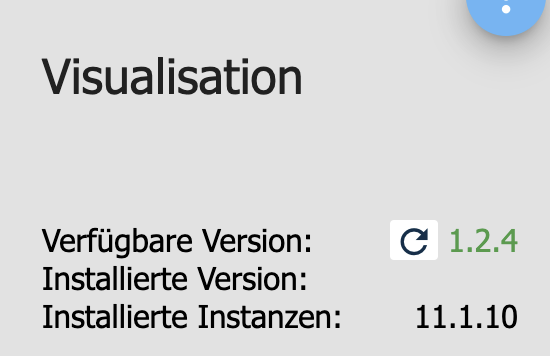
                              9828055c-3953-4da5-8d26-10b031d368aa-image.png
                              bzw.
                              691c06eb-c1a1-4301-aa5f-a17318ffd839-image.png

                              what the hell?

                              HomoranH 1 Reply Last reply
                              0
                              • S SaschaS

                                Aber 😲 ich habe mit

                                sudo iobroker upgrade vis@1.1.10
                                

                                die Version 1.1.10 installieren wollen.

                                Angezeigt wird mir nach einen Neustart von ioBroker
                                9828055c-3953-4da5-8d26-10b031d368aa-image.png
                                bzw.
                                691c06eb-c1a1-4301-aa5f-a17318ffd839-image.png

                                what the hell?

                                HomoranH Do not disturb
                                HomoranH Do not disturb
                                Homoran
                                Global Moderator Administrators
                                wrote on last edited by Homoran
                                #53

                                @SaschaS
                                Kann es sein, dass du 2 iobroker Installationen hast?

                                kein Support per PN! - Fragen im Forum stellen -
                                Benutzt das Voting rechts unten im Beitrag wenn er euch geholfen hat.
                                Das Forum freut sich über eine Spende. Benutzt dazu den Spendenbutton oben rechts. Danke!
                                der Installationsfixer: curl -fsL https://iobroker.net/fix.sh | bash -

                                S 1 Reply Last reply
                                0
                                • HomoranH Homoran

                                  @SaschaS
                                  Kann es sein, dass du 2 iobroker Installationen hast?

                                  S Offline
                                  S Offline
                                  Sprite01
                                  wrote on last edited by
                                  #54

                                  Das habe ich hier aktuell mit der 1.2.5 auch.
                                  Nach Start der vis-Instanz erscheint im Log:

                                  Cannot check license: Error: getaddrinfo ENOTFOUND iobroker1.net iobroker1.net:443
                                  

                                  Gruß

                                  Dirk

                                  http://www.DessauWetter.de

                                  (ioBroker auf IntelNuc und Proxmox)

                                  S 1 Reply Last reply
                                  0
                                  • S Sprite01

                                    Das habe ich hier aktuell mit der 1.2.5 auch.
                                    Nach Start der vis-Instanz erscheint im Log:

                                    Cannot check license: Error: getaddrinfo ENOTFOUND iobroker1.net iobroker1.net:443
                                    
                                    S Offline
                                    S Offline
                                    Sprite01
                                    wrote on last edited by Sprite01
                                    #55

                                    Liegt es daran, das mir in meinem Pro-Account keine Lizenzen mehr angezeigt werden ?
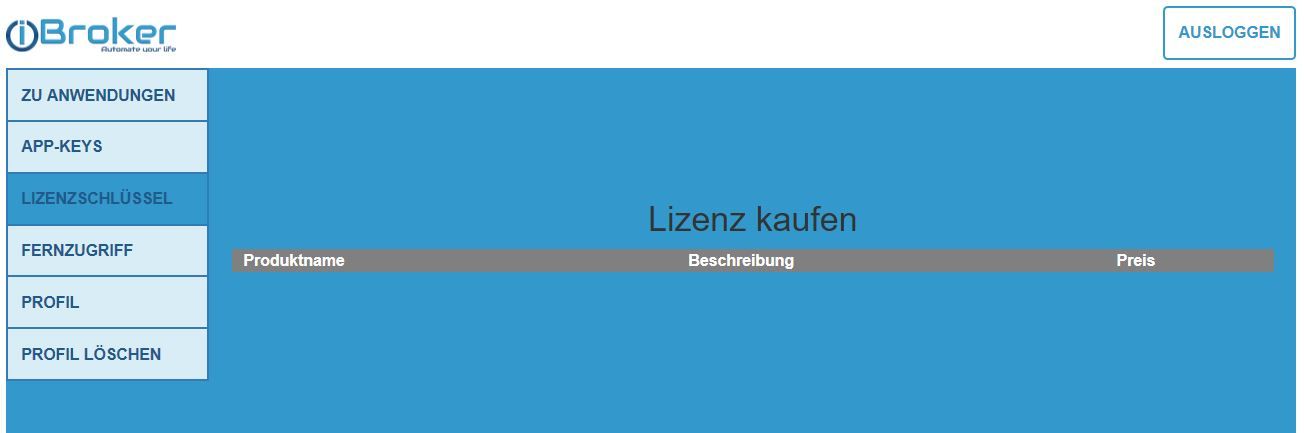
                                    lizenz.JPG

                                    Der Login auf iobroker.pro funktioniert und der Fernzugriff- und auch Assistentzugriff gilt auch noch eine Weile.
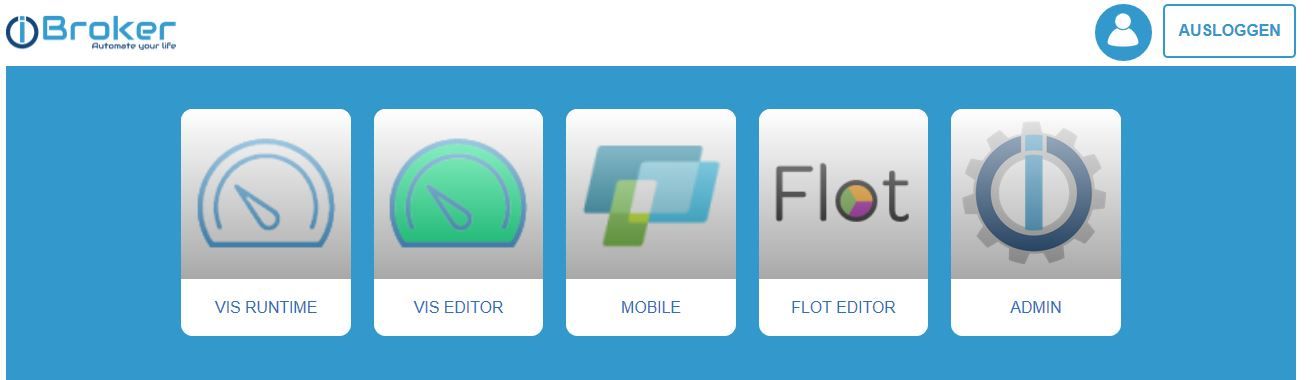
                                    lizenz2.JPG

                                    PS:ein Downgrade auf 1.2.2 hat bei mir erst mal geholfen.

                                    Gruß

                                    Dirk

                                    http://www.DessauWetter.de

                                    (ioBroker auf IntelNuc und Proxmox)

                                    1 Reply Last reply
                                    0
                                    • N nousefor82

                                      Servus,

                                      habe bei mir Admin und Vis auf den letzten Stand gebracht.

                                      Seit dem bekomme ich in meiner Visualisierung folgende Meldung:

                                      Keine gültige Lizenz gefunden

                                      Bei der Lizenzprüfung im VIS Adapter bekomme ich ein grünes OK angezeigt.

                                      Jemand eine Idee?

                                      Danke!

                                      C Offline
                                      C Offline
                                      Crockers
                                      wrote on last edited by
                                      #56

                                      Leider habe ich auch das Problem.

                                      Sowohl intern als auch extern.

                                      VIS Adapter sagt "Linzenz prüfen -- OK"
                                      App Key im Cloud Adapter ist auch in Ordnung.

                                      Was kann ich machen?

                                      VIS 1.2.6
                                      Cloud Connection 3.0.4
                                      IoT Assistants 1.6.3

                                      sigi234S HomoranH 2 Replies Last reply
                                      0
                                      • C Crockers

                                        Leider habe ich auch das Problem.

                                        Sowohl intern als auch extern.

                                        VIS Adapter sagt "Linzenz prüfen -- OK"
                                        App Key im Cloud Adapter ist auch in Ordnung.

                                        Was kann ich machen?

                                        VIS 1.2.6
                                        Cloud Connection 3.0.4
                                        IoT Assistants 1.6.3

                                        sigi234S Online
                                        sigi234S Online
                                        sigi234
                                        Forum Testing Most Active
                                        wrote on last edited by
                                        #57

                                        @Crockers
                                        Host mal neu gestartet?

                                        Bitte benutzt das Voting rechts unten im Beitrag wenn er euch geholfen hat.
                                        Immer Daten sichern!

                                        1 Reply Last reply
                                        0
                                        • C Crockers

                                          Leider habe ich auch das Problem.

                                          Sowohl intern als auch extern.

                                          VIS Adapter sagt "Linzenz prüfen -- OK"
                                          App Key im Cloud Adapter ist auch in Ordnung.

                                          Was kann ich machen?

                                          VIS 1.2.6
                                          Cloud Connection 3.0.4
                                          IoT Assistants 1.6.3

                                          HomoranH Do not disturb
                                          HomoranH Do not disturb
                                          Homoran
                                          Global Moderator Administrators
                                          wrote on last edited by
                                          #58

                                          @Crockers sagte in VIS: Keine gültige Lizenz gefunden:

                                          App Key im Cloud Adapter ist auch in Ordnung.

                                          Der hat aber nichts mit der vis Lizenz zu tun.
                                          Ist die in der Konfig von vis eingetragen?

                                          kein Support per PN! - Fragen im Forum stellen -
                                          Benutzt das Voting rechts unten im Beitrag wenn er euch geholfen hat.
                                          Das Forum freut sich über eine Spende. Benutzt dazu den Spendenbutton oben rechts. Danke!
                                          der Installationsfixer: curl -fsL https://iobroker.net/fix.sh | bash -

                                          C 1 Reply Last reply
                                          0

                                          Hello! It looks like you're interested in this conversation, but you don't have an account yet.

                                          Getting fed up of having to scroll through the same posts each visit? When you register for an account, you'll always come back to exactly where you were before, and choose to be notified of new replies (either via email, or push notification). You'll also be able to save bookmarks and upvote posts to show your appreciation to other community members.

                                          With your input, this post could be even better 💗

                                          Register Login
                                          Reply
                                          • Reply as topic
                                          Log in to reply
                                          • Oldest to Newest
                                          • Newest to Oldest
                                          • Most Votes


                                          Support us

                                          ioBroker
                                          Community Adapters
                                          Donate
                                          FAQ Cloud / IOT
                                          HowTo: Node.js-Update
                                          HowTo: Backup/Restore
                                          Downloads
                                          BLOG

                                          542

                                          Online

                                          32.8k

                                          Users

                                          82.7k

                                          Topics

                                          1.3m

                                          Posts
                                          Community
                                          Impressum | Datenschutz-Bestimmungen | Nutzungsbedingungen | Einwilligungseinstellungen
                                          ioBroker Community 2014-2025
                                          logo
                                          • Login

                                          • Don't have an account? Register

                                          • Login or register to search.
                                          • First post
                                            Last post
                                          0
                                          • Home
                                          • Recent
                                          • Tags
                                          • Unread 0
                                          • Categories
                                          • Unreplied
                                          • Popular
                                          • GitHub
                                          • Docu
                                          • Hilfe