



Skip to content
  • Home
  • Recent
  • Tags
  • 0 Unread 0
  • Categories
  • Unreplied
  • Popular
  • GitHub
  • Docu
  • Hilfe
Skins
  • Light
  • Brite
  • Cerulean
  • Cosmo
  • Flatly
  • Journal
  • Litera
  • Lumen
  • Lux
  • Materia
  • Minty
  • Morph
  • Pulse
  • Sandstone
  • Simplex
  • Sketchy
  • Spacelab
  • United
  • Yeti
  • Zephyr
  • Dark
  • Cyborg
  • Darkly
  • Quartz
  • Slate
  • Solar
  • Superhero
  • Vapor

  • Default (No Skin)
  • No Skin
Collapse
ioBroker Logo

Community Forum

donate donate
  1. ioBroker Community Home
  2. Deutsch
  3. ioBroker Allgemein
  4. Und wieder einmal Harmony... Firmware 4.15.250...

NEWS

  • Monatsrückblick Januar/Februar 2026 ist online!
    BluefoxB
    Bluefox
    17
    1
    377

  • Jahresrückblick 2025 – unser neuer Blogbeitrag ist online! ✨
    BluefoxB
    Bluefox
    17
    1
    4.9k

  • Neuer Blogbeitrag: Monatsrückblick - Dezember 2025 🎄
    BluefoxB
    Bluefox
    13
    1
    1.3k

Und wieder einmal Harmony... Firmware 4.15.250...

Scheduled Pinned Locked Moved ioBroker Allgemein
101 Posts 29 Posters 15.0k Views 30 Watching
  • Oldest to Newest
  • Newest to Oldest
  • Most Votes
Reply
  • Reply as topic
Log in to reply
This topic has been deleted. Only users with topic management privileges can see it.
  • Dr. BakteriusD Offline
    Dr. BakteriusD Offline
    Dr. Bakterius
    Most Active
    wrote on last edited by
    #81

    Auch von meiner Seite vielen Dank an @foxriver76! :+1:

    1.2.1 funktioniert ohne XMPP wieder bestens (bis Logitech wieder herum pfuscht). Ich musste auch keine Ordner löschen, einfach über 1.0.0 installiert.

    1 Reply Last reply
    0
    • M Offline
      M Offline
      miwe
      wrote on last edited by miwe
      #82

      Moin,

      ich kann das UPDATE leider nicht installieren.

      $ ./iobroker upgrade harmony
      Update harmony from @1.0.0 to @1.2.1
      NPM version: 6.4.1
      npm install iobroker.harmony@1.2.1 --production --save --prefix "/opt/iobroker" (System call)
      npm
       WARN checkPermissions Missing write access to /opt/iobroker/node_modules/iobroker.harmony
      npm 
      WARN babel-eslint@5.0.4 requires a peer of eslint@<2.3.0 but none is installed. You must install peer dependencies yourself.
      
      npm 
      ERR! path /opt/iobroker/node_modules/iobroker.harmonynpm ERR! code EACCES
      
      npm ERR! errno -13npm
       ERR! syscall access
      npm ERR! Error: EACCES: permission denied, access '/opt/iobroker/node_modules/iobroker.harmony'npm ERR!  { Error: EACCES: permission denied, access '/opt/iobroker/node_modules/iobroker.harmony'
      npm ERR!   stack: 'Error: EACCES: permission denied, access \'/opt/iobroker/node_modules/iobroker.harmony\'',
      npm ERR!   errno: -13,
      npm ERR!   code: 'EACCES',
      npm ERR!   syscall: 'access',
      npm ERR!   path: '/opt/iobroker/node_modules/iobroker.harmony' }
      npm ERR! 
      npm ERR! The operation was rejected by your operating system.
      npm ERR! It is likely you do not have the permissions to access this file as the current user
      npm ERR! 
      npm ERR! If you believe this might be a permissions issue, please double-check the
      npm ERR! permissions of the file and its containing directories, or try running
      npm ERR! the command again as root/Administrator (though this is not recommended).
      
      
      npm ERR! A complete log of this run can be found in:npm ERR!     /home/iobroker/.npm/_logs/2019-02-23T11_31_13_888Z-debug.log
      
      ERROR: host.iobroker Cannot install iobroker.harmony@1.2.1: 243
      ERROR: process exited with code 25
      

      Wie bekomme ich das hingebogen? Offenbar ein Benutzerrechteproblem? Ich will lieber hier fragen bevor ich irgendwelchen Mist baue und gar nichts mhr läuft.
      UPDATE: In der Konsole mit "Su" gehts. Wie bekomme ich es hin dass es wieder über die WEBGUI geht?

      Danke

      HomoranH 1 Reply Last reply
      0
      • M miwe

        Moin,

        ich kann das UPDATE leider nicht installieren.

        $ ./iobroker upgrade harmony
        Update harmony from @1.0.0 to @1.2.1
        NPM version: 6.4.1
        npm install iobroker.harmony@1.2.1 --production --save --prefix "/opt/iobroker" (System call)
        npm
         WARN checkPermissions Missing write access to /opt/iobroker/node_modules/iobroker.harmony
        npm 
        WARN babel-eslint@5.0.4 requires a peer of eslint@<2.3.0 but none is installed. You must install peer dependencies yourself.
        
        npm 
        ERR! path /opt/iobroker/node_modules/iobroker.harmonynpm ERR! code EACCES
        
        npm ERR! errno -13npm
         ERR! syscall access
        npm ERR! Error: EACCES: permission denied, access '/opt/iobroker/node_modules/iobroker.harmony'npm ERR!  { Error: EACCES: permission denied, access '/opt/iobroker/node_modules/iobroker.harmony'
        npm ERR!   stack: 'Error: EACCES: permission denied, access \'/opt/iobroker/node_modules/iobroker.harmony\'',
        npm ERR!   errno: -13,
        npm ERR!   code: 'EACCES',
        npm ERR!   syscall: 'access',
        npm ERR!   path: '/opt/iobroker/node_modules/iobroker.harmony' }
        npm ERR! 
        npm ERR! The operation was rejected by your operating system.
        npm ERR! It is likely you do not have the permissions to access this file as the current user
        npm ERR! 
        npm ERR! If you believe this might be a permissions issue, please double-check the
        npm ERR! permissions of the file and its containing directories, or try running
        npm ERR! the command again as root/Administrator (though this is not recommended).
        
        
        npm ERR! A complete log of this run can be found in:npm ERR!     /home/iobroker/.npm/_logs/2019-02-23T11_31_13_888Z-debug.log
        
        ERROR: host.iobroker Cannot install iobroker.harmony@1.2.1: 243
        ERROR: process exited with code 25
        

        Wie bekomme ich das hingebogen? Offenbar ein Benutzerrechteproblem? Ich will lieber hier fragen bevor ich irgendwelchen Mist baue und gar nichts mhr läuft.
        UPDATE: In der Konsole mit "Su" gehts. Wie bekomme ich es hin dass es wieder über die WEBGUI geht?

        Danke

        HomoranH Offline
        HomoranH Offline
        Homoran
        Global Moderator Administrators
        wrote on last edited by
        #83

        @miwe
        Wann und wie hast du IoBroker installiert.

        Ggf. Bist du ein Kandidat für den Fixer

        kein Support per PN! - Fragen im Forum stellen -
        Benutzt das Voting rechts unten im Beitrag wenn er euch geholfen hat.
        Das Forum freut sich über eine Spende. Benutzt dazu den Spendenbutton im Header. Danke!
        der Installationsfixer: curl -fsL https://iobroker.net/fix.sh | bash -

        M 1 Reply Last reply
        0
        • HomoranH Homoran

          @miwe
          Wann und wie hast du IoBroker installiert.

          Ggf. Bist du ein Kandidat für den Fixer

          M Offline
          M Offline
          miwe
          wrote on last edited by
          #84

          @Homoran

          Moin!

          IOBROKER läuft hier auf Proxmox. Wie ich es installiert habe kann ich Dir nicht mehr sagen :) Ich habe irgendne Anleitung im Internet bemüht.
          Installiert vor 2 bis 3 Monaten?
          Wie gesagt - in der Konsole unter "su" gehts - aus der GUI nicht. Ich tippe auf ein Benutzerrechteproblem.

          D HomoranH 2 Replies Last reply
          0
          • M miwe

            @Homoran

            Moin!

            IOBROKER läuft hier auf Proxmox. Wie ich es installiert habe kann ich Dir nicht mehr sagen :) Ich habe irgendne Anleitung im Internet bemüht.
            Installiert vor 2 bis 3 Monaten?
            Wie gesagt - in der Konsole unter "su" gehts - aus der GUI nicht. Ich tippe auf ein Benutzerrechteproblem.

            D Offline
            D Offline
            danw
            wrote on last edited by
            #85

            @miwe Ist es. Einfach mal löschen und neu installieren.

            WARN checkPermissions Missing write access to /opt/iobroker/node_modules/iobroker.harmony

            It's not a Bug, it's a Feature

            1 Reply Last reply
            0
            • SRo769S SRo769

              @Master77

              ja, im Ordner /opt/iobroker/node_modules/ den Ordner harmony... einfach löschen und dann im iobroker die V1.2.1 installieren.

              Grüße SRo769

              M Offline
              M Offline
              Master77
              wrote on last edited by
              #86

              @SRo769 sagte in Und wieder einmal Harmony... Firmware 4.15.250...:

              @Master77

              ja, im Ordner /opt/iobroker/node_modules/ den Ordner harmony... einfach löschen und dann im iobroker die V1.2.1 installieren.

              Grüße SRo769

              Hat einwandfrei funktioniert. Vielen Dank für die Hilfe.

              Und vielen Dank für das schnelle Update. 👍

              Gruß Markus

              1 Reply Last reply
              0
              • M miwe

                @Homoran

                Moin!

                IOBROKER läuft hier auf Proxmox. Wie ich es installiert habe kann ich Dir nicht mehr sagen :) Ich habe irgendne Anleitung im Internet bemüht.
                Installiert vor 2 bis 3 Monaten?
                Wie gesagt - in der Konsole unter "su" gehts - aus der GUI nicht. Ich tippe auf ein Benutzerrechteproblem.

                HomoranH Offline
                HomoranH Offline
                Homoran
                Global Moderator Administrators
                wrote on last edited by
                #87

                @miwe sagte in Und wieder einmal Harmony... Firmware 4.15.250...:

                Installiert vor 2 bis 3 Monaten?

                Wenn du Anfang januar über den Installer (curl....) installiert hast, solltest du auf jeden Fall mal den Fixer testen.

                kein Support per PN! - Fragen im Forum stellen -
                Benutzt das Voting rechts unten im Beitrag wenn er euch geholfen hat.
                Das Forum freut sich über eine Spende. Benutzt dazu den Spendenbutton im Header. Danke!
                der Installationsfixer: curl -fsL https://iobroker.net/fix.sh | bash -

                M 1 Reply Last reply
                0
                • HomoranH Homoran

                  @miwe sagte in Und wieder einmal Harmony... Firmware 4.15.250...:

                  Installiert vor 2 bis 3 Monaten?

                  Wenn du Anfang januar über den Installer (curl....) installiert hast, solltest du auf jeden Fall mal den Fixer testen.

                  M Offline
                  M Offline
                  miwe
                  wrote on last edited by
                  #88

                  @Homoran said in Und wieder einmal Harmony... Firmware 4.15.250...:

                  @miwe sagte in Und wieder einmal Harmony... Firmware 4.15.250...:

                  Installiert vor 2 bis 3 Monaten?

                  Wenn du Anfang januar über den Installer (curl....) installiert hast, solltest du auf jeden Fall mal den Fixer testen.

                  Ich krieg hier ne Macke. Ich wollte gerade den Fixer testen. Problem: Der will dass ich IOBROKER stoppe. Gebe ich ein IOBROKER stop sagt der mir das dieser nicht läuft. Dieser läuft aber definitiv. Gebe ich Iobroker status ein steht da: running. Hä?

                  HomoranH 1 Reply Last reply
                  0
                  • M miwe

                    @Homoran said in Und wieder einmal Harmony... Firmware 4.15.250...:

                    @miwe sagte in Und wieder einmal Harmony... Firmware 4.15.250...:

                    Installiert vor 2 bis 3 Monaten?

                    Wenn du Anfang januar über den Installer (curl....) installiert hast, solltest du auf jeden Fall mal den Fixer testen.

                    Ich krieg hier ne Macke. Ich wollte gerade den Fixer testen. Problem: Der will dass ich IOBROKER stoppe. Gebe ich ein IOBROKER stop sagt der mir das dieser nicht läuft. Dieser läuft aber definitiv. Gebe ich Iobroker status ein steht da: running. Hä?

                    HomoranH Offline
                    HomoranH Offline
                    Homoran
                    Global Moderator Administrators
                    wrote on last edited by
                    #89

                    @miwe
                    Das fixt der Fixer ;-)

                    sudo systemctl stop iobroker
                    

                    kein Support per PN! - Fragen im Forum stellen -
                    Benutzt das Voting rechts unten im Beitrag wenn er euch geholfen hat.
                    Das Forum freut sich über eine Spende. Benutzt dazu den Spendenbutton im Header. Danke!
                    der Installationsfixer: curl -fsL https://iobroker.net/fix.sh | bash -

                    M 1 Reply Last reply
                    0
                    • HomoranH Homoran

                      @miwe
                      Das fixt der Fixer ;-)

                      sudo systemctl stop iobroker
                      
                      M Offline
                      M Offline
                      miwe
                      wrote on last edited by
                      #90

                      @Homoran Danke :)

                      1 Reply Last reply
                      0
                      • K Offline
                        K Offline
                        kaiserm
                        wrote on last edited by kaiserm
                        #91

                        Auf der Webadmin Oberfläche sehe ich zum Update nur die 1.1.5
                        Wie bekommt man die 1.2.1?
                        Irgendwas mit Github?!

                        Was muss man da machen damit ich von der derzeitigen 1.0.0 auf die 1.2.1 komme?

                        Danke im Voraus

                        SRo769S 1 Reply Last reply
                        0
                        • K kaiserm

                          Auf der Webadmin Oberfläche sehe ich zum Update nur die 1.1.5
                          Wie bekommt man die 1.2.1?
                          Irgendwas mit Github?!

                          Was muss man da machen damit ich von der derzeitigen 1.0.0 auf die 1.2.1 komme?

                          Danke im Voraus

                          SRo769S Offline
                          SRo769S Offline
                          SRo769
                          wrote on last edited by
                          #92

                          @kaiserm

                          Hi, über den Werkzeugschlüssel oben "Verwahrort" auf latest stellen - dann sollte die V1.2.1 sofort zum Update angezeigt werden. Nach dem Update kannst du ja den Verwahrort wieder auf default stellen.

                          1 Reply Last reply
                          0
                          • ? Offline
                            ? Offline
                            A Former User
                            wrote on last edited by A Former User
                            #93

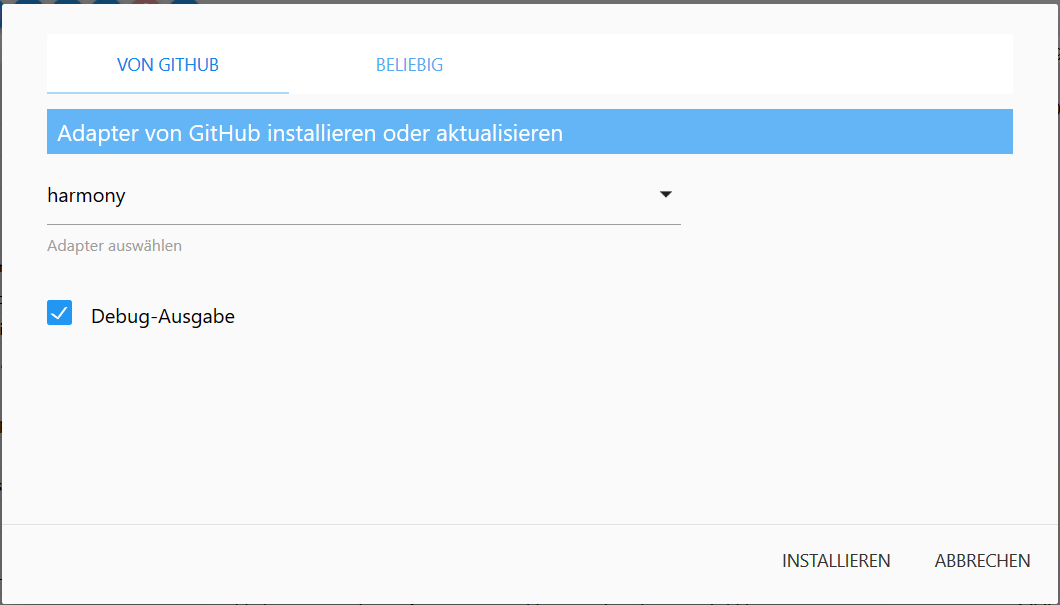
                            ...oder direkt vom Github installieren.!
                            [Bild Text]8e7abae8-4466-4a03-88e2-4cb292261614-grafik.png (Bild Link)
                            1 Reply Last reply
                            0
                            • foxriver76F Offline
                              foxriver76F Offline
                              foxriver76
                              Developer
                              wrote on last edited by
                              #94

                              Die Depdendency ist gefixt und wenn man 1.0.0 neu installiert, sollte man XMPP nutzen können ohne weiteres zu tun und für die Websocket-User bitte 1.2.1 (meine Empfehlung, auch wenn es da noch ein kleines Problem zu beheben gibt, da derzeit der Hub nicht als geblockt markiert wird während eine Aktivität gestartet wird).

                              Videotutorials & mehr

                              Hier könnt ihr mich unterstützen.

                              1 Reply Last reply
                              0
                              • M Offline
                                M Offline
                                Master77
                                wrote on last edited by Master77
                                #95

                                Hallo zusammen.

                                Ich habe da ein kleines Problem.
                                Ich hatte ja auch das Downgrade gemacht und XMPP aktiviert. Nun habe ich das Update gemacht und benötige das XMPP nicht mehr. Leider bekomme ich XMPP nicht mehr über die App deaktiviert. Ich bekomme immer folgende Meldung:
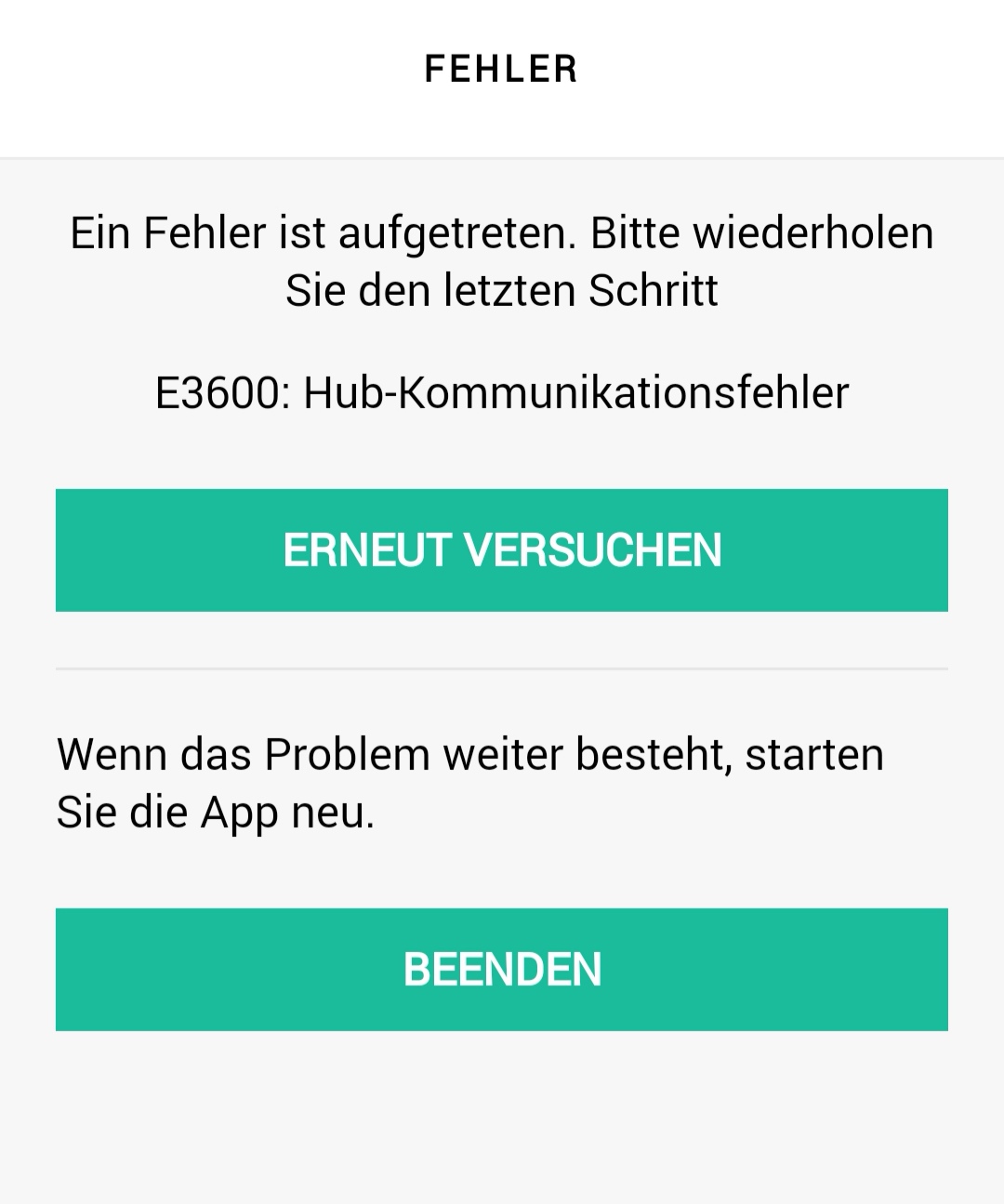
                                Screenshot_20190226_142558.jpg

                                Der Hub funktioniert einwandfrei und im Log stehen auch keine fehler.
                                Bekommt man XMPP auch ohne die App deaktiviert. Habe schon alles mögliche probiert.
                                Danke im voraus für die Hilfe.

                                Gruß Markus

                                1 Reply Last reply
                                0
                                • ? Offline
                                  ? Offline
                                  A Former User
                                  wrote on last edited by
                                  #96

                                  Ich hatte damit keine Probleme....das liegt aber eher an Logitech und nicht am Adapter...

                                  M 1 Reply Last reply
                                  0
                                  • ? A Former User

                                    Ich hatte damit keine Probleme....das liegt aber eher an Logitech und nicht am Adapter...

                                    M Offline
                                    M Offline
                                    Master77
                                    wrote on last edited by
                                    #97

                                    @Menne sagte in Und wieder einmal Harmony... Firmware 4.15.250...:

                                    ....das liegt aber eher an Logitech und nicht am Adapter...

                                    Das weiß ich auch das es nicht am Adapter liegt. Hatte nur gehofft das mir da einer weiter helfen kann auch wenn es eigentlich OT ist.

                                    Gruß Markus

                                    1 Reply Last reply
                                    0
                                    • Samson71S Offline
                                      Samson71S Offline
                                      Samson71
                                      Global Moderator
                                      wrote on last edited by
                                      #98

                                      Hatte auch Probleme mit der App. Sprang irgendwie immer wieder zurück und machte einfach nicht weiter. Sync, Hub neu starten und die App komplett neu installieren brachten dann irgendwie den Erfolg.

                                      Markus

                                      Bitte beachten:
                                      Hinweise für gute Forenbeiträge
                                      Maßnahmen zum Schutz des Forums

                                      M 1 Reply Last reply
                                      0
                                      • Samson71S Samson71

                                        Hatte auch Probleme mit der App. Sprang irgendwie immer wieder zurück und machte einfach nicht weiter. Sync, Hub neu starten und die App komplett neu installieren brachten dann irgendwie den Erfolg.

                                        M Offline
                                        M Offline
                                        Master77
                                        wrote on last edited by
                                        #99

                                        @Samson71 sagte in Und wieder einmal Harmony... Firmware 4.15.250...:

                                        ....die App komplett neu installieren brachten dann irgendwie den Erfolg.

                                        Das war's.... Danke für den Tipp.

                                        Gruß Markus

                                        1 Reply Last reply
                                        0
                                        • ? Offline
                                          ? Offline
                                          A Former User
                                          wrote on last edited by A Former User
                                          #100

                                          @Master77...und was war an meiner Aussage jetzt falsch?
                                          Das wäre mein nächster Schritt,wenn es bei mir nicht funktioniert hätte, gewesen.
                                          Ohne zu fragen....

                                          M 1 Reply Last reply
                                          0
                                          Reply
                                          • Reply as topic
                                          Log in to reply
                                          • Oldest to Newest
                                          • Newest to Oldest
                                          • Most Votes


                                          Support us

                                          ioBroker
                                          Community Adapters
                                          Donate
                                          FAQ Cloud / IOT
                                          HowTo: Node.js-Update
                                          HowTo: Backup/Restore
                                          Downloads
                                          BLOG

                                          343

                                          Online

                                          32.7k

                                          Users

                                          82.5k

                                          Topics

                                          1.3m

                                          Posts
                                          Community
                                          Impressum | Datenschutz-Bestimmungen | Nutzungsbedingungen | Einwilligungseinstellungen
                                          ioBroker Community 2014-2025
                                          logo
                                          • Login

                                          • Don't have an account? Register

                                          • Login or register to search.
                                          • First post
                                            Last post
                                          0
                                          • Home
                                          • Recent
                                          • Tags
                                          • Unread 0
                                          • Categories
                                          • Unreplied
                                          • Popular
                                          • GitHub
                                          • Docu
                                          • Hilfe


