Skip to content
  • Home
  • Recent
  • Tags
  • 0 Unread 0
  • Categories
  • Unreplied
  • Popular
  • GitHub
  • Docu
  • Hilfe
Skins
  • Light
  • Brite
  • Cerulean
  • Cosmo
  • Flatly
  • Journal
  • Litera
  • Lumen
  • Lux
  • Materia
  • Minty
  • Morph
  • Pulse
  • Sandstone
  • Simplex
  • Sketchy
  • Spacelab
  • United
  • Yeti
  • Zephyr
  • Dark
  • Cyborg
  • Darkly
  • Quartz
  • Slate
  • Solar
  • Superhero
  • Vapor

  • Default (No Skin)
  • No Skin
Collapse
ioBroker Logo

Community Forum

donate donate
  1. ioBroker Community Home
  2. Deutsch
  3. Skripten / Logik
  4. Blockly
  5. Sayit-Block funktioniert nicht mehr

NEWS

  • Jahresrückblick 2025 – unser neuer Blogbeitrag ist online! ✨
    BluefoxB
    Bluefox
    17
    1
    2.6k

  • Neuer Blogbeitrag: Monatsrückblick - Dezember 2025 🎄
    BluefoxB
    Bluefox
    13
    1
    997

  • Weihnachtsangebot 2025! 🎄
    BluefoxB
    Bluefox
    25
    1
    2.3k

Sayit-Block funktioniert nicht mehr

Scheduled Pinned Locked Moved Blockly
34 Posts 12 Posters 4.5k Views 11 Watching
  • Oldest to Newest
  • Newest to Oldest
  • Most Votes
Reply
  • Reply as topic
Log in to reply
This topic has been deleted. Only users with topic management privileges can see it.
  • ste_gleiS ste_glei

    bei mir das gleiche Problem.

    nach downgrade des javascript Adapter auf 6.2.0 funktionieren die Sprachansagen wieder.

    B Offline
    B Offline
    Bender275
    wrote on last edited by
    #14

    @ste_glei
    Hast du noch irgendwas gemacht? Das Downgrade allein half leider nicht... :-(

    ste_gleiS DJMarc75D 2 Replies Last reply
    0
    • B Bender275

      @ste_glei
      Hast du noch irgendwas gemacht? Das Downgrade allein half leider nicht... :-(

      ste_gleiS Offline
      ste_gleiS Offline
      ste_glei
      wrote on last edited by
      #15

      @bender275

      Ich habe nur ein downgrade gemacht und dann funktionierte es wieder.

      1 Reply Last reply
      0
      • B Bender275

        @ste_glei
        Hast du noch irgendwas gemacht? Das Downgrade allein half leider nicht... :-(

        DJMarc75D Offline
        DJMarc75D Offline
        DJMarc75
        wrote on last edited by
        #16

        @bender275
        die Nachfragen nach

        iob diag
        

        überlesen ?

        Lehrling seit 1975 !!!
        Beitrag geholfen ? dann gerne ein upvote rechts unten im Beitrag klicken ;)
        https://forum.iobroker.net/topic/51555/hinweise-f%C3%BCr-gute-forenbeitr%C3%A4ge

        B 1 Reply Last reply
        0
        • D Offline
          D Offline
          d0nnergurke
          wrote on last edited by d0nnergurke
          #17

          Ein Downgrade vom SayIt-Adapter auf 3.0.4 sollte eher helfen - Wichtig ist: Nach dem Downgrade die betroffenen Skripte editieren/neu speichern. Das Problem entsteht, weil seit SayIt-Version 3.0.5 die Skript-Blöcke in Blockly anders übersetzt werden. Die Übersetzung findet jedoch erst statt wenn ein Blockly-Skript geändert oder neu erstellt wird, daher funktionieren "alte" Blockly-Skripte weiterhin.
          Statt ursprünglich den Wert von [SayIt-Instanz].tts.text per "setStateDelayed" zu ändern wird ab 3.0.5 per "sendTo" mit dem Adapter kommuniziert. Bei mir reagiert der Adapter jedoch auch nicht auf den SendTo-Befehl - Siehe auch https://github.com/ioBroker/ioBroker.sayit/issues/267

          B 1 Reply Last reply
          0
          • DJMarc75D DJMarc75

            @bender275
            die Nachfragen nach

            iob diag
            

            überlesen ?

            B Offline
            B Offline
            Bender275
            wrote on last edited by
            #18

            @djmarc75
            Sorry, war unterwegs. Hier iob diag


            ======== Start marking the full check here =========

            Skript v.2023-04-16
            
            *** BASE SYSTEM ***
            Model		: Raspberry Pi 4 Model B Rev 1.4
            Architecture    : aarch64
            Docker          : false
            Virtualization  : none
            Distributor ID:	Raspbian
            Description:	Raspbian GNU/Linux 11 (bullseye)
            Release:	11
            Codename:	bullseye
            
            PRETTY_NAME="Raspbian GNU/Linux 11 (bullseye)"
            NAME="Raspbian GNU/Linux"
            VERSION_ID="11"
            VERSION="11 (bullseye)"
            VERSION_CODENAME=bullseye
            ID=raspbian
            ID_LIKE=debian
            HOME_URL="http://www.raspbian.org/"
            SUPPORT_URL="http://www.raspbian.org/RaspbianForums"
            BUG_REPORT_URL="http://www.raspbian.org/RaspbianBugs"
            
            Systemuptime and Load:
             20:07:24 up 7 days,  2:27,  0 users,  load average: 1.02, 1.07, 0.96
            CPU threads: 4
            
            Raspberry only:
            throttled=0x0
            Other values than 0x0 hint to temperature/voltage problems
            temp=53.0'C
            volt=0.8600V
            
            *** Time and Time Zones ***
                           Local time: Mon 2023-07-10 20:07:24 CEST
                       Universal time: Mon 2023-07-10 18:07:24 UTC
                             RTC time: n/a
                            Time zone: Europe/Berlin (CEST, +0200)
            System clock synchronized: yes
                          NTP service: active
                      RTC in local TZ: no
            
            *** User and Groups ***
            pi
            /home/pi
            pi adm dialout cdrom sudo audio video plugdev games users input netdev lpadmin gpio i2c spi iobroker
            
            *** X-Server-Setup ***
            X-Server: 	true
            Desktop: 	LXDE-pi
            Terminal: 	x11
            Boot Target: 	graphical.target
            
            *** MEMORY ***
                           total        used        free      shared  buff/cache   available
            Mem:            7.8G        2.2G        2.0G         53M        3.6G        5.4G
            Swap:            99M          0B         99M
            Total:          7.9G        2.2G        2.1G
            
                     7811 M total memory
                     2231 M used memory
                     3833 M active memory
                     1604 M inactive memory
                     2017 M free memory
                      279 M buffer memory
                     3282 M swap cache
                       99 M total swap
                        0 M used swap
                       99 M free swap
            
            Raspberry only:
            oom events: 0
            lifetime oom required: 0 Mbytes
            total time in oom handler: 0 ms
            max time spent in oom handler: 0 ms
            
            *** FILESYSTEM ***
            Filesystem     Type      Size  Used Avail Use% Mounted on
            /dev/root      ext4      470G   17G  434G   4% /
            devtmpfs       devtmpfs  3.6G     0  3.6G   0% /dev
            tmpfs          tmpfs     3.9G  3.8M  3.9G   1% /dev/shm
            tmpfs          tmpfs     1.6G  796K  1.6G   1% /run
            tmpfs          tmpfs     5.0M  4.0K  5.0M   1% /run/lock
            /dev/sda1      vfat      253M   51M  202M  20% /boot
            tmpfs          tmpfs     782M   20K  782M   1% /run/user/1000
            
            Messages concerning ext4 filesystem in dmesg:
            [Mon Jul  3 17:40:17 2023] Kernel command line: coherent_pool=1M 8250.nr_uarts=0 snd_bcm2835.enable_headphones=0 snd_bcm2835.enable_headphones=1 snd_bcm2835.enable_hdmi=1  smsc95xx.macaddr=E4:5F:01:0C:5F:3D vc_mem.mem_base=0x3eb00000 vc_mem.mem_size=0x3ff00000  console=tty1 root=PARTUUID=5d45f9a3-02 rootfstype=ext4 elevator=deadline fsck.repair=yes rootwait quiet splash plymouth.ignore-serial-consoles
            [Mon Jul  3 17:40:19 2023] EXT4-fs (sda2): mounted filesystem with ordered data mode. Quota mode: none.
            [Mon Jul  3 17:40:19 2023] VFS: Mounted root (ext4 filesystem) readonly on device 8:2.
            [Mon Jul  3 17:40:21 2023] EXT4-fs (sda2): re-mounted. Quota mode: none.
            
            Show mounted filesystems (real ones only):
            TARGET                       SOURCE       FSTYPE            OPTIONS
            /                            /dev/sda2    ext4              rw,noatime
            |-/boot                      /dev/sda1    vfat              rw,relatime,fmask=0022,dmask=0022,codepage=437,iocharset=ascii,shortname=mixed,flush,errors=remount-ro
            `-/home/pi/thinclient_drives xrdp-chansrv fuse.xrdp-chansrv rw,nosuid,nodev,relatime,user_id=1000,group_id=1000
            
            Files in neuralgic directories:
            
            /var:
            2.8G	/var/
            1.3G	/var/log
            1.2G	/var/log/journal/d305c1d5b0964304901f0bf58ddc9f97
            1.2G	/var/log/journal
            918M	/var/cache
            
            Archived and active journals take up 1.1G in the file system.
            
            /opt/iobroker/backups:
            566M	/opt/iobroker/backups/
            704K	/opt/iobroker/backups/skripte
            688K	/opt/iobroker/backups/skripte/Räume
            252K	/opt/iobroker/backups/skripte/Räume/allgemein
            156K	/opt/iobroker/backups/skripte/Räume/Küche
            
            /opt/iobroker/iobroker-data:
            391M	/opt/iobroker/iobroker-data/
            214M	/opt/iobroker/iobroker-data/files
            126M	/opt/iobroker/iobroker-data/backup-objects
            51M	/opt/iobroker/iobroker-data/files/javascript.admin
            45M	/opt/iobroker/iobroker-data/files/devices.admin/static
            
            The five largest files in iobroker-data are:
            35M	/opt/iobroker/iobroker-data/files/devices.admin/static/js/main.24f2bb56.js.map
            22M	/opt/iobroker/iobroker-data/objects.jsonl
            19M	/opt/iobroker/iobroker-data/files/iot.admin/static/js/main.2975a411.js.map
            8.9M	/opt/iobroker/iobroker-data/files/scenes.admin/static/js/2.7de3299d.chunk.js.map
            8.7M	/opt/iobroker/iobroker-data/objects.json.migrated
            
            *** NodeJS-Installation ***
            
            /usr/bin/nodejs 	v18.16.1
            /usr/bin/node 		v18.16.1
            /usr/bin/npm 		9.5.1
            /usr/bin/npx 		9.5.1
            
            
            nodejs:
              Installed: 18.16.1-deb-1nodesource1
              Candidate: 18.16.1-deb-1nodesource1
              Version table:
             *** 18.16.1-deb-1nodesource1 500
                    500 https://deb.nodesource.com/node_18.x bullseye/main armhf Packages
                    100 /var/lib/dpkg/status
                 12.22.12~dfsg-1~deb11u4 500
                    500 http://raspbian.raspberrypi.org/raspbian bullseye/main armhf Packages
            
            Temp directories causing npm8 problem: 0
            No problems detected
            
            *** ioBroker-Installation ***
            
            ioBroker Status
            iobroker is running on this host.
            
            
            Objects type: jsonl
            States  type: jsonl
            
            MULTIHOSTSERVICE/enabled: false
            
            Core adapters versions
            js-controller: 	4.0.24
            admin: 		6.3.5
            javascript: 	6.2.0
            
            Adapters from github: 	4
            
            Adapter State
            + system.adapter.admin.0                  : admin                 : Raspi4                                   -  enabled, port: 8081, bind: 0.0.0.0, run as: admin
            + system.adapter.backitup.0               : backitup              : Raspi4                                   -  enabled
            + system.adapter.bestway.0                : bestway               : Raspi4                                   -  enabled
            + system.adapter.bluelink.0               : bluelink              : Raspi4                                   -  enabled
            + system.adapter.cloud.0                  : cloud                 : Raspi4                                   -  enabled
              system.adapter.daswetter.0              : daswetter             : Raspi4                                   -  enabled
              system.adapter.devices.0                : devices               : Raspi4                                   -  enabled
            + system.adapter.discovery.0              : discovery             : Raspi4                                   -  enabled
              system.adapter.dwd.0                    : dwd                   : Raspi4                                   -  enabled
            + system.adapter.email.0                  : email                 : Raspi4                                   -  enabled
              system.adapter.feiertage.0              : feiertage             : Raspi4                                   -  enabled
            + system.adapter.fritzdect.0              : fritzdect             : Raspi4                                   -  enabled
            + system.adapter.fronius-wattpilot.0      : fronius-wattpilot     : Raspi4                                   -  enabled
            + system.adapter.fronius.0                : fronius               : Raspi4                                   -  enabled
            + system.adapter.hs100.0                  : hs100                 : Raspi4                                   -  enabled
            + system.adapter.info.0                   : info                  : Raspi4                                   -  enabled
            + system.adapter.iot.0                    : iot                   : Raspi4                                   -  enabled
            + system.adapter.jarvis.0                 : jarvis                : Raspi4                                   -  enabled
            + system.adapter.javascript.0             : javascript            : Raspi4                                   -  enabled
            + system.adapter.klf200.0                 : klf200                : Raspi4                                   -  enabled
            + system.adapter.lgtv.0                   : lgtv                  : Raspi4                                   -  enabled
            + system.adapter.mqtt.0                   : mqtt                  : Raspi4                                   -  enabled, port: 1883, bind: 0.0.0.0
            + system.adapter.net-tools.0              : net-tools             : Raspi4                                   -  enabled
            + system.adapter.nuki.0                   : nuki                  : Raspi4                                   -  enabled
            + system.adapter.ping.0                   : ping                  : Raspi4                                   -  enabled
            + system.adapter.sayit.0                  : sayit                 : Raspi4                                   -  enabled
            + system.adapter.sayit.1                  : sayit                 : Raspi4                                   -  enabled
            + system.adapter.sayit.2                  : sayit                 : Raspi4                                   -  enabled
            + system.adapter.scenes.0                 : scenes                : Raspi4                                   -  enabled
            + system.adapter.shelly.0                 : shelly                : Raspi4                                   -  enabled, port: 1882, bind: 0.0.0.0
            + system.adapter.shelly.1                 : shelly                : Raspi4                                   -  enabled, port: 1882, bind: 0.0.0.0
            + system.adapter.sprinklecontrol.0        : sprinklecontrol       : Raspi4                                   -  enabled
            + system.adapter.sql.0                    : sql                   : Raspi4                                   -  enabled, port: 3306
            + system.adapter.tuya.0                   : tuya                  : Raspi4                                   -  enabled
              system.adapter.vis.0                    : vis                   : Raspi4                                   -  enabled
            + system.adapter.web.0                    : web                   : Raspi4                                   -  enabled, port: 8082, bind: 0.0.0.0, run as: admin
            
            + instance is alive
            
            Enabled adapters with bindings
            + system.adapter.admin.0                  : admin                 : Raspi4                                   -  enabled, port: 8081, bind: 0.0.0.0, run as: admin
            + system.adapter.mqtt.0                   : mqtt                  : Raspi4                                   -  enabled, port: 1883, bind: 0.0.0.0
            + system.adapter.shelly.0                 : shelly                : Raspi4                                   -  enabled, port: 1882, bind: 0.0.0.0
            + system.adapter.shelly.1                 : shelly                : Raspi4                                   -  enabled, port: 1882, bind: 0.0.0.0
            + system.adapter.sql.0                    : sql                   : Raspi4                                   -  enabled, port: 3306
            + system.adapter.web.0                    : web                   : Raspi4                                   -  enabled, port: 8082, bind: 0.0.0.0, run as: admin
            
            ioBroker-Repositories
            Stable (default): http://download.iobroker.net/sources-dist.json
            Beta (latest) : http://download.iobroker.net/sources-dist-latest.json
            
            Active repo(s): Stable (default)
            
            Installed ioBroker-Instances
            Used repository: Stable (default)
            Adapter    "admin"        : 6.3.5    , installed 6.3.5
            Adapter    "backitup"     : 2.6.23   , installed 2.6.23
            Adapter    "bestway"      : 0.0.4    , installed 0.0.4
            Adapter    "bluelink"     : 2.3.2    , installed 2.3.2
            Adapter    "cloud"        : 4.4.1    , installed 4.4.1
            Adapter    "daswetter"    : 3.1.8    , installed 3.1.8
            Adapter    "devices"      : 1.1.5    , installed 1.1.5
            Adapter    "discovery"    : 3.1.0    , installed 3.1.0
            Adapter    "dwd"          : 2.8.3    , installed 2.8.3
            Adapter    "email"        : 1.2.0    , installed 1.2.0
            Adapter    "feiertage"    : 1.1.0    , installed 1.1.0
            Adapter    "fritzdect"    : 2.3.1    , installed 2.3.1
            Adapter    "fronius"      : 1.1.3    , installed 1.1.3
            Adapter    "fronius-wattpilot": 4.5.1, installed 4.5.1
            Adapter    "hs100"        : 2.1.2    , installed 2.1.6
            Adapter    "info"         : 1.9.26   , installed 1.9.26
            Adapter    "iot"          : 1.14.5   , installed 1.14.5
            Adapter    "jarvis"       : 3.1.2    , installed 3.1.2
            Adapter    "javascript"   : 7.0.3    , installed 6.2.0  [Updatable]
            Controller "js-controller": 4.0.24   , installed 4.0.24
            Adapter    "klf200"       : 1.0.1    , installed 1.0.1
            Adapter    "lgtv"         : 1.1.10   , installed 1.1.10
            Adapter    "mqtt"         : 4.1.1    , installed 4.1.1
            Adapter    "net-tools"    : 0.2.0    , installed 0.2.0
            Adapter    "nuki"         : 1.6.0    , installed 1.6.0
            Adapter    "ping"         : 1.5.3    , installed 1.5.3
            Adapter    "sayit"        : 3.0.5    , installed 3.0.5
            Adapter    "scenes"       : 2.3.9    , installed 2.3.9
            Adapter    "shelly"       : 6.4.1    , installed 6.4.1
            Adapter    "simple-api"   : 2.7.2    , installed 2.7.2
            Adapter    "socketio"     : 4.2.0    , installed 4.2.0
            Adapter    "sprinklecontrol": 0.2.13 , installed 0.2.13
            Adapter    "sql"          : 2.2.0    , installed 2.2.0
            Adapter    "tuya"         : 3.14.2   , installed 3.14.2
            Adapter    "vis"          : 1.4.16   , installed 1.4.16
            Adapter    "web"          : 4.3.0    , installed 4.3.0
            Adapter    "ws"           : 1.3.0    , installed 1.3.0
            
            Objects and States
            Please stand by - This may take a while
            Objects: 	8225
            States: 	6469
            
            *** OS-Repositories and Updates ***
            Hit:1 http://archive.raspberrypi.org/debian bullseye InRelease
            Hit:2 http://raspbian.raspberrypi.org/raspbian bullseye InRelease
            Hit:3 https://deb.nodesource.com/node_18.x bullseye InRelease
            Reading package lists...
            Pending Updates: 17
            
            *** Listening Ports ***
            Active Internet connections (only servers)
            Proto Recv-Q Send-Q Local Address           Foreign Address         State       User       Inode      PID/Program name    
            tcp        0      0 0.0.0.0:8400            0.0.0.0:*               LISTEN      1001       109227     6942/io.jarvis.0    
            tcp        0      0 127.0.0.1:9001          0.0.0.0:*               LISTEN      1001       105697     6214/iobroker.js-co 
            tcp        0      0 127.0.0.1:9000          0.0.0.0:*               LISTEN      1001       103137     6214/iobroker.js-co 
            tcp        0      0 0.0.0.0:80              0.0.0.0:*               LISTEN      0          14136      599/lighttpd        
            tcp        0      0 0.0.0.0:22              0.0.0.0:*               LISTEN      0          15951      594/sshd: /usr/sbin 
            tcp        0      0 0.0.0.0:53              0.0.0.0:*               LISTEN      999        15029      553/pihole-FTL      
            tcp        0      0 127.0.0.1:631           0.0.0.0:*               LISTEN      0          24909578   27450/cupsd         
            tcp        0      0 127.0.0.1:4711          0.0.0.0:*               LISTEN      999        15035      553/pihole-FTL      
            tcp        0      0 0.0.0.0:1883            0.0.0.0:*               LISTEN      117        15904      568/mosquitto       
            tcp        0      0 0.0.0.0:1882            0.0.0.0:*               LISTEN      1001       104924     6399/io.shelly.1    
            tcp6       0      0 :::80                   :::*                    LISTEN      0          14137      599/lighttpd        
            tcp6       0      0 :::22                   :::*                    LISTEN      0          15953      594/sshd: /usr/sbin 
            tcp6       0      0 :::53                   :::*                    LISTEN      999        15031      553/pihole-FTL      
            tcp6       0      0 :::1883                 :::*                    LISTEN      117        15905      568/mosquitto       
            tcp6       0      0 ::1:3350                :::*                    LISTEN      0          14610      556/xrdp-sesman     
            tcp6       0      0 ::1:4711                :::*                    LISTEN      999        15036      553/pihole-FTL      
            tcp6       0      0 ::1:631                 :::*                    LISTEN      0          24909577   27450/cupsd         
            tcp6       0      0 :::8082                 :::*                    LISTEN      1001       4014514    29072/io.web.0      
            tcp6       0      0 :::8081                 :::*                    LISTEN      1001       104666     6232/io.admin.0     
            tcp6       0      0 :::3306                 :::*                    LISTEN      116        14243      813/mysqld          
            tcp6       0      0 :::3389                 :::*                    LISTEN      115        14248      615/xrdp            
            udp        0      0 0.0.0.0:34960           0.0.0.0:*                           108        13926      376/avahi-daemon: r 
            udp        0      0 0.0.0.0:6666            0.0.0.0:*                           1001       106000     6382/io.tuya.0      
            udp        0      0 0.0.0.0:6667            0.0.0.0:*                           1001       106001     6382/io.tuya.0      
            udp        0      0 0.0.0.0:60008           0.0.0.0:*                           1001       23722718   11297/io.javascript 
            udp        0      0 0.0.0.0:40139           0.0.0.0:*                           1001       28266417   -                   
            udp        0      0 0.0.0.0:53              0.0.0.0:*                           999        15028      553/pihole-FTL      
            udp        0      0 0.0.0.0:68              0.0.0.0:*                           0          14950      443/dhcpcd          
            udp        0      0 0.0.0.0:631             0.0.0.0:*                           0          24912270   27452/cups-browsed  
            udp        0      0 0.0.0.0:5353            0.0.0.0:*                           108        13924      376/avahi-daemon: r 
            udp        0      0 0.0.0.0:5683            0.0.0.0:*                           1001       104117     6348/io.shelly.0    
            udp6       0      0 :::44036                :::*                                108        13927      376/avahi-daemon: r 
            udp6       0      0 :::53                   :::*                                999        15030      553/pihole-FTL      
            udp6       0      0 :::5353                 :::*                                108        13925      376/avahi-daemon: r 
            
            *** Log File - Last 25 Lines ***
            
            2023-07-10 19:55:00.181  - info: host.Raspi4 instance system.adapter.dwd.0 started with pid 7582
            2023-07-10 19:55:03.170  - info: dwd.0 (7582) starting. Version 2.8.3 in /opt/iobroker/node_modules/iobroker.dwd, node: v18.16.1, js-controller: 4.0.24
            2023-07-10 19:55:06.461  - info: dwd.0 (7582) Terminated (ADAPTER_REQUESTED_TERMINATION): Without reason
            2023-07-10 19:55:06.998  - info: host.Raspi4 instance system.adapter.dwd.0 terminated with code 11 (ADAPTER_REQUESTED_TERMINATION)
            2023-07-10 20:00:00.024  - info: javascript.0 (11297) script.js.Räume.Wohnen.Fernsehlicht_nicht_bei_ausser_Haus: Own states (javascript.0.scriptEnabled.Räume.Wohnen.Fernsehlicht_nach_Zeitplan_ein_aus) should not be used in javascript.X.scriptEnabled.*! Please move the states to 0_userdata.0.*
            2023-07-10 20:00:00.215  - info: host.Raspi4 instance system.adapter.dwd.0 started with pid 7800
            2023-07-10 20:00:00.290  - info: bluelink.0 (6906) Forcing refresh from Server
            2023-07-10 20:00:00.291  - info: bluelink.0 (6906) Read new update for XXX from the server
            2023-07-10 20:00:00.305  - info: bluelink.0 (6906) Forcing refresh from Car
            2023-07-10 20:00:00.306  - info: bluelink.0 (6906) Read new update for XXX directly from the car
            2023-07-10 20:00:03.352  - info: bluelink.0 (6906) Update for XXX successfull
            2023-07-10 20:00:03.857  - info: dwd.0 (7800) starting. Version 2.8.3 in /opt/iobroker/node_modules/iobroker.dwd, node: v18.16.1, js-controller: 4.0.24
            2023-07-10 20:00:04.260  - info: host.Raspi4 instance system.adapter.daswetter.0 started with pid 7817
            2023-07-10 20:00:07.359  - info: daswetter.0 (7817) starting. Version 3.1.8 in /opt/iobroker/node_modules/iobroker.daswetter, node: v18.16.1, js-controller: 4.0.24
            2023-07-10 20:00:08.183  - info: dwd.0 (7800) Terminated (ADAPTER_REQUESTED_TERMINATION): Without reason
            2023-07-10 20:00:08.729  - info: host.Raspi4 instance system.adapter.dwd.0 terminated with code 11 (ADAPTER_REQUESTED_TERMINATION)
            2023-07-10 20:00:18.257  - info: daswetter.0 (7817) Terminated (ADAPTER_REQUESTED_TERMINATION): All data handled, adapter stopped until next scheduled moment
            2023-07-10 20:00:18.775  - info: daswetter.0 (7817) cleaned everything up...
            2023-07-10 20:00:18.795  - info: host.Raspi4 instance system.adapter.daswetter.0 terminated with code 11 (ADAPTER_REQUESTED_TERMINATION)
            2023-07-10 20:00:36.575  - info: bluelink.0 (6906) Update for XXX successfull
            2023-07-10 20:05:00.206  - info: host.Raspi4 instance system.adapter.dwd.0 started with pid 8042
            2023-07-10 20:05:03.366  - info: dwd.0 (8042) starting. Version 2.8.3 in /opt/iobroker/node_modules/iobroker.dwd, node: v18.16.1, js-controller: 4.0.24
            2023-07-10 20:05:06.544  - info: dwd.0 (8042) Terminated (ADAPTER_REQUESTED_TERMINATION): Without reason
            2023-07-10 20:05:07.104  - info: host.Raspi4 instance system.adapter.dwd.0 terminated with code 11 (ADAPTER_REQUESTED_TERMINATION)
            2023-07-10 20:08:01.238  - info: admin.0 (6232) ==> Connected system.user.admin from ::ffff:10.0.2.11


            ============ Mark until here for C&P =============

            ======================= SUMMARY =======================
            		     v.2023-04-16
            
            
            Operatingsystem: 	Raspbian GNU/Linux 11 (bullseye)
            Kernel: 		6.1.36-v8+
            Installation: 		Native
            Timezone: 		Europe/Berlin (CEST, +0200)
            User-ID: 		1000
            X-Server: 		true
            Boot Target: 		graphical.target
            
            Pending OS-Updates: 	17
            Pending iob updates: 	1
            
            Nodejs-Installation: 	/usr/bin/nodejs 	v18.16.1
            			/usr/bin/node 		v18.16.1
            			/usr/bin/npm 		9.5.1
            			/usr/bin/npx 		9.5.1
            
            Recommended versions are nodejs 18.x.y and npm 9.x.y
            Your nodejs installation is correct
            
            MEMORY: 
                           total        used        free      shared  buff/cache   available
            Mem:            7.8G        2.3G        2.0G         53M        3.6G        5.4G
            Swap:            99M          0B         99M
            Total:          7.9G        2.3G        2.1G
            
            Active iob-Instances: 	32
            Active repo(s): Stable (default)
            
            ioBroker Core: 		js-controller 		4.0.24
            			admin 			6.3.5
            
            ioBroker Status: 	iobroker is running on this host.
            
            
            Objects type: jsonl
            States  type: jsonl
            
            Status admin and web instance:
            + system.adapter.admin.0                  : admin                 : Raspi4                                   -  enabled, port: 8081, bind: 0.0.0.0, run as: admin
            + system.adapter.web.0                    : web                   : Raspi4                                   -  enabled, port: 8082, bind: 0.0.0.0, run as: admin
            
            Objects: 		8225
            States: 		6469
            
            Size of iob-Database:
            
            22M	/opt/iobroker/iobroker-data/objects.jsonl
            8.7M	/opt/iobroker/iobroker-data/objects.json.migrated
            8.7M	/opt/iobroker/iobroker-data/objects.json.bak.migrated
            7.0M	/opt/iobroker/iobroker-data/states.jsonl
            1.1M	/opt/iobroker/iobroker-data/states.json.migrated
            1.1M	/opt/iobroker/iobroker-data/states.json.bak.migrated
            0	/opt/iobroker/iobroker-data/states.json.broken


            =================== END OF SUMMARY ====================
            [/s]
            
            @d0nnergurke Werd ich probieren, danke!
            1 Reply Last reply
            0
            • D d0nnergurke

              Ein Downgrade vom SayIt-Adapter auf 3.0.4 sollte eher helfen - Wichtig ist: Nach dem Downgrade die betroffenen Skripte editieren/neu speichern. Das Problem entsteht, weil seit SayIt-Version 3.0.5 die Skript-Blöcke in Blockly anders übersetzt werden. Die Übersetzung findet jedoch erst statt wenn ein Blockly-Skript geändert oder neu erstellt wird, daher funktionieren "alte" Blockly-Skripte weiterhin.
              Statt ursprünglich den Wert von [SayIt-Instanz].tts.text per "setStateDelayed" zu ändern wird ab 3.0.5 per "sendTo" mit dem Adapter kommuniziert. Bei mir reagiert der Adapter jedoch auch nicht auf den SendTo-Befehl - Siehe auch https://github.com/ioBroker/ioBroker.sayit/issues/267

              B Offline
              B Offline
              Bender275
              wrote on last edited by
              #19

              @d0nnergurke
              Werde ich probieren, vielen Dank!

              1 Reply Last reply
              0
              • DJMarc75D Offline
                DJMarc75D Offline
                DJMarc75
                wrote on last edited by
                #20

                @bender275
                Desktop ausknipsen
                Updates einspielen
                Adapter auf Stand bringen

                Dann kucken wir mal weiter

                Lehrling seit 1975 !!!
                Beitrag geholfen ? dann gerne ein upvote rechts unten im Beitrag klicken ;)
                https://forum.iobroker.net/topic/51555/hinweise-f%C3%BCr-gute-forenbeitr%C3%A4ge

                1 Reply Last reply
                0
                • B Offline
                  B Offline
                  Bender275
                  wrote on last edited by
                  #21

                  Also, mit dem Downgrade des SayIt-Adapters gemäß d0nnergurke funktioniert wieder alles einwandfrei. Danke!

                  1 Reply Last reply
                  0
                  • S Online
                    S Online
                    spike2
                    wrote on last edited by
                    #22

                    Wie funktioniert der Downgrade auf die 3.0.4?
                    Mir wird über den Expertenmodus egal ob Stable oder Beta Repo lediglich die 3.0.0 oder 3.0.5 angezeigt ?

                    crunchipC 1 Reply Last reply
                    0
                    • S spike2

                      Wie funktioniert der Downgrade auf die 3.0.4?
                      Mir wird über den Expertenmodus egal ob Stable oder Beta Repo lediglich die 3.0.0 oder 3.0.5 angezeigt ?

                      crunchipC Away
                      crunchipC Away
                      crunchip
                      Forum Testing Most Active
                      wrote on last edited by
                      #23

                      @spike2 https://www.iobroker.net/#de/documentation/tutorial/adapter.md

                      umgestiegen von Proxmox auf Unraid

                      S 1 Reply Last reply
                      0
                      • crunchipC crunchip

                        @spike2 https://www.iobroker.net/#de/documentation/tutorial/adapter.md

                        S Online
                        S Online
                        spike2
                        wrote on last edited by
                        #24

                        @crunchip Super, hat geklappt. Danke dir :+1:

                        1 Reply Last reply
                        0
                        • S Offline
                          S Offline
                          sebi2ndPC
                          wrote on last edited by sebi2ndPC
                          #25

                          also ich bekomms auch nicht ans laufen, auch der "downgrade" nach der Anleitung klappt irgendwie nicht, was mache ich falsch?

                          root@iobroker:~# iobroker install sayit@3.0.4
                          NPM version: 9.6.7
                          Installing iobroker.sayit@3.0.4... (System call)
                          Try to solve ENOTEMPTY error automatically
                          Could not handle ENOTEMPTY, because no deletable files were found
                          npm ERR! code ENOTEMPTY
                          npm ERR! syscall rename
                          npm ERR! path /opt/iobroker/node_modules/@aws-sdk/types
                          npm ERR! dest /opt/iobroker/node_modules/@aws-sdk/.types-qurPIL6Q
                          npm ERR! errno -39
                          npm ERR! ENOTEMPTY: directory not empty, rename '/opt/iobroker/node_modules/@aws-sdk/types' -> '/opt/iobroker/node_modules/@aws-sdk/.types-qurPIL6Q'
                          
                          npm ERR! A complete log of this run can be found in: /home/iobroker/.npm/_logs/2023-10-20T20_14_46_855Z-debug-0.log
                          host.iobroker Cannot install iobroker.sayit@3.0.4: 217
                          root@iobroker:~# 
                          
                          Thomas BraunT S 2 Replies Last reply
                          0
                          • S sebi2ndPC

                            also ich bekomms auch nicht ans laufen, auch der "downgrade" nach der Anleitung klappt irgendwie nicht, was mache ich falsch?

                            root@iobroker:~# iobroker install sayit@3.0.4
                            NPM version: 9.6.7
                            Installing iobroker.sayit@3.0.4... (System call)
                            Try to solve ENOTEMPTY error automatically
                            Could not handle ENOTEMPTY, because no deletable files were found
                            npm ERR! code ENOTEMPTY
                            npm ERR! syscall rename
                            npm ERR! path /opt/iobroker/node_modules/@aws-sdk/types
                            npm ERR! dest /opt/iobroker/node_modules/@aws-sdk/.types-qurPIL6Q
                            npm ERR! errno -39
                            npm ERR! ENOTEMPTY: directory not empty, rename '/opt/iobroker/node_modules/@aws-sdk/types' -> '/opt/iobroker/node_modules/@aws-sdk/.types-qurPIL6Q'
                            
                            npm ERR! A complete log of this run can be found in: /home/iobroker/.npm/_logs/2023-10-20T20_14_46_855Z-debug-0.log
                            host.iobroker Cannot install iobroker.sayit@3.0.4: 217
                            root@iobroker:~# 
                            
                            Thomas BraunT Online
                            Thomas BraunT Online
                            Thomas Braun
                            Most Active
                            wrote on last edited by
                            #26

                            @sebi2ndpc sagte in Sayit-Block funktioniert nicht mehr:

                            was mache ich falsch?

                            root Login ist falsch.
                            Als user hantieren und

                            iob fix
                            

                            ausführen.

                            Linux-Werkzeugkasten:
                            https://forum.iobroker.net/topic/42952/der-kleine-iobroker-linux-werkzeugkasten
                            NodeJS Fixer Skript:
                            https://forum.iobroker.net/topic/68035/iob-node-fix-skript
                            iob_diag: curl -sLf -o diag.sh https://iobroker.net/diag.sh && bash diag.sh

                            S 1 Reply Last reply
                            0
                            • S sebi2ndPC

                              also ich bekomms auch nicht ans laufen, auch der "downgrade" nach der Anleitung klappt irgendwie nicht, was mache ich falsch?

                              root@iobroker:~# iobroker install sayit@3.0.4
                              NPM version: 9.6.7
                              Installing iobroker.sayit@3.0.4... (System call)
                              Try to solve ENOTEMPTY error automatically
                              Could not handle ENOTEMPTY, because no deletable files were found
                              npm ERR! code ENOTEMPTY
                              npm ERR! syscall rename
                              npm ERR! path /opt/iobroker/node_modules/@aws-sdk/types
                              npm ERR! dest /opt/iobroker/node_modules/@aws-sdk/.types-qurPIL6Q
                              npm ERR! errno -39
                              npm ERR! ENOTEMPTY: directory not empty, rename '/opt/iobroker/node_modules/@aws-sdk/types' -> '/opt/iobroker/node_modules/@aws-sdk/.types-qurPIL6Q'
                              
                              npm ERR! A complete log of this run can be found in: /home/iobroker/.npm/_logs/2023-10-20T20_14_46_855Z-debug-0.log
                              host.iobroker Cannot install iobroker.sayit@3.0.4: 217
                              root@iobroker:~# 
                              
                              S Away
                              S Away
                              Shadowhunter23
                              wrote on last edited by
                              #27

                              @sebi2ndpc

                              root@iobroker:~# iobroker install sayit@3.0.4
                              

                              Sollte es nicht 3.0.0 sein?

                              Proxmox 9 HA-Cluster mit 3x HP prodesk 400 G6 i5
                              Bei einem downvote bitte melden, es könnte sein, dass dieser ungewollt ist!

                              1 Reply Last reply
                              0
                              • Thomas BraunT Thomas Braun

                                @sebi2ndpc sagte in Sayit-Block funktioniert nicht mehr:

                                was mache ich falsch?

                                root Login ist falsch.
                                Als user hantieren und

                                iob fix
                                

                                ausführen.

                                S Offline
                                S Offline
                                sebi2ndPC
                                wrote on last edited by
                                #28

                                @thomas-braun danke, das war der richtige hinweis :-) jetzt hat es geklappt.

                                1 Reply Last reply
                                0
                                • S Offline
                                  S Offline
                                  sebi2ndPC
                                  wrote on last edited by
                                  #29

                                  also sayit auf 3.0.4 downgrade hat geklappt, skripte neu editiert und gespeichert aber am laufen bekomme ich die sprachausgabe immernoch nicht. komisch das es irgendwann mal tadellos funktionierte, nur leider weiss ich nicht mehr zu welchen versions varianten vom chromecast / web adapter und say it.....

                                  gibt es eine alternative evtl zu dem adapter der sprachausgaben auf den google home bringen kann?

                                  UweRLPU 1 Reply Last reply
                                  0
                                  • S sebi2ndPC

                                    also sayit auf 3.0.4 downgrade hat geklappt, skripte neu editiert und gespeichert aber am laufen bekomme ich die sprachausgabe immernoch nicht. komisch das es irgendwann mal tadellos funktionierte, nur leider weiss ich nicht mehr zu welchen versions varianten vom chromecast / web adapter und say it.....

                                    gibt es eine alternative evtl zu dem adapter der sprachausgaben auf den google home bringen kann?

                                    UweRLPU Offline
                                    UweRLPU Offline
                                    UweRLP
                                    wrote on last edited by
                                    #30

                                    @sebi2ndpc Ich nutze hier SayIt 3.0.5
                                    Irgendwann vor langer... keine Ahnung wann
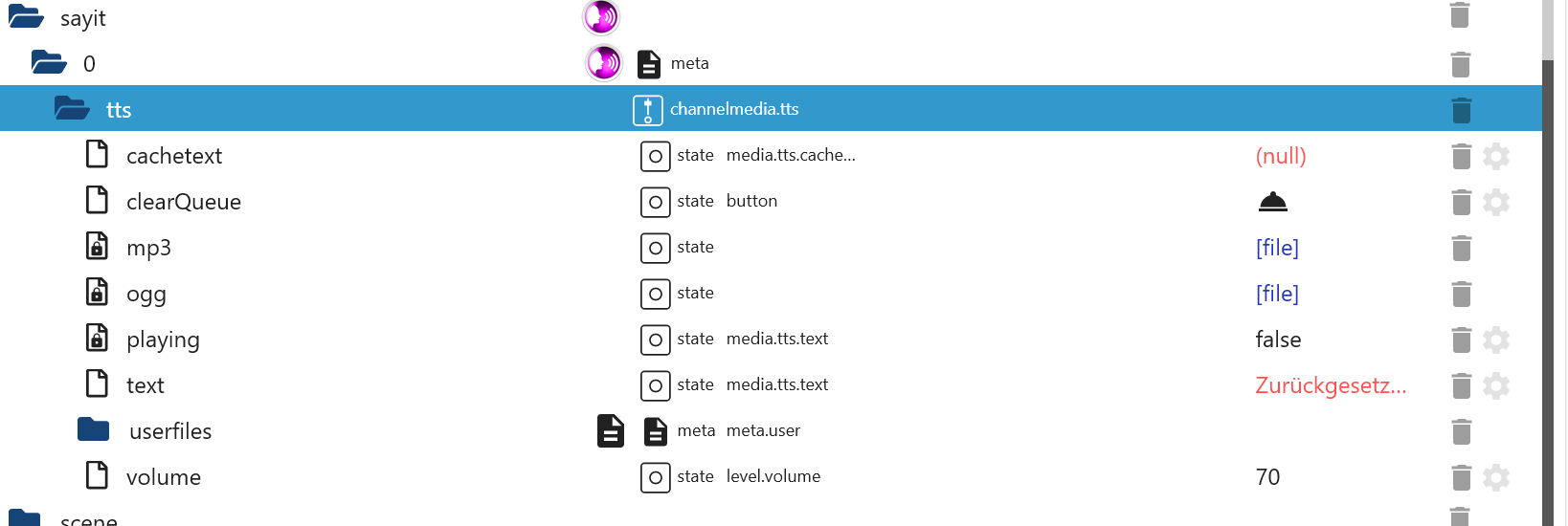
                                    SayIt erstellt Objecte

                                    SayIt Objecte.png

                                    Übergib mal dem sayit.0.tts.text den auszusprechenden Text, also ein

                                    Spich zu mir iobroker.png

                                    S 1 Reply Last reply
                                    0
                                    • UweRLPU UweRLP

                                      @sebi2ndpc Ich nutze hier SayIt 3.0.5
                                      Irgendwann vor langer... keine Ahnung wann
                                      SayIt erstellt Objecte

                                      SayIt Objecte.png

                                      Übergib mal dem sayit.0.tts.text den auszusprechenden Text, also ein

                                      Spich zu mir iobroker.png

                                      S Offline
                                      S Offline
                                      sebi2ndPC
                                      wrote on last edited by
                                      #31

                                      @uwerlp

                                      das ist der fehler log, den hatte ich auch schon mit der 3.0.5 er version gehabt.

                                      ip mit XXXXX überschrieben.

                                      2023-10-22 15:43:12.905 - info: sayit.0 (4681) saying: hallo
                                      2023-10-22 15:43:13.133 - info: sayit.0 (4681) Set "chromecast.0.14c14e7b0aac.player.announcement to {"url":"http://XXXXXX/sayit.0/tts.mp3?ts=1697982193133","volume":100}
                                      2023-10-22 15:43:23.646 - error: sayit.0 (4681) Error while checking if chromecast.0.14c14e7b0aac.player.announcement finished playing announcement: {"url":"http://XXXXXXX/sayit.0/tts.mp3?ts=1697982193133","volume":100}: TIMEOUT
                                      2023-10-22 15:43:23.647 - error: sayit.0 (4681) Cannot play file: Timeout by checking of announcement finished playing

                                      UweRLPU 1 Reply Last reply
                                      0
                                      • S sebi2ndPC

                                        @uwerlp

                                        das ist der fehler log, den hatte ich auch schon mit der 3.0.5 er version gehabt.

                                        ip mit XXXXX überschrieben.

                                        2023-10-22 15:43:12.905 - info: sayit.0 (4681) saying: hallo
                                        2023-10-22 15:43:13.133 - info: sayit.0 (4681) Set "chromecast.0.14c14e7b0aac.player.announcement to {"url":"http://XXXXXX/sayit.0/tts.mp3?ts=1697982193133","volume":100}
                                        2023-10-22 15:43:23.646 - error: sayit.0 (4681) Error while checking if chromecast.0.14c14e7b0aac.player.announcement finished playing announcement: {"url":"http://XXXXXXX/sayit.0/tts.mp3?ts=1697982193133","volume":100}: TIMEOUT
                                        2023-10-22 15:43:23.647 - error: sayit.0 (4681) Cannot play file: Timeout by checking of announcement finished playing

                                        UweRLPU Offline
                                        UweRLPU Offline
                                        UweRLP
                                        wrote on last edited by
                                        #32

                                        @sebi2ndpc Sorry mit Fehlerlog kann ich leider nichts anfangen. Wollte nur drauf hin weisen, dass auch bei mir der SendTo Block nicht mehr ging dafür aber das Object.

                                        1 Reply Last reply
                                        0
                                        • W Offline
                                          W Offline
                                          warp735
                                          wrote on last edited by warp735
                                          #33

                                          Wird der Adapter jemals wieder repariert? Oder gibts Alternativen? Scheint sich niemand mehr darum zu kümmern (letztes Update vom April(!!!)

                                          S 1 Reply Last reply
                                          0
                                          Reply
                                          • Reply as topic
                                          Log in to reply
                                          • Oldest to Newest
                                          • Newest to Oldest
                                          • Most Votes


                                          Support us

                                          ioBroker
                                          Community Adapters
                                          Donate

                                          605

                                          Online

                                          32.6k

                                          Users

                                          82.3k

                                          Topics

                                          1.3m

                                          Posts
                                          Community
                                          Impressum | Datenschutz-Bestimmungen | Nutzungsbedingungen | Einwilligungseinstellungen
                                          ioBroker Community 2014-2025
                                          logo
                                          • Login

                                          • Don't have an account? Register

                                          • Login or register to search.
                                          • First post
                                            Last post
                                          0
                                          • Home
                                          • Recent
                                          • Tags
                                          • Unread 0
                                          • Categories
                                          • Unreplied
                                          • Popular
                                          • GitHub
                                          • Docu
                                          • Hilfe