




nach Admin-Adapter-Update iobroker nicht über Web erreichbar
-
@rennigel probier mal eine 2te Admin Instanz
iobroker add admin --enabled --port 8089und dann entsprechend den iobroker mit dem port aufrufen
192.168.178.69:8089bzw probier es erst mit:
geh ins Verzeichnis
/opt/iobroker/node_modules/iobroker.admin/node_modules
und nochmal einen rebuild oder kannst auchnpm install --productionausführen@crunchip sagte in nach Admin-Adapter-Update iobroker nicht über Web erreichbar:
und nochmal einen rebuild
Dort aber einen
npm rebuildstatt desiob rebuild -
@rennigel probier mal eine 2te Admin Instanz
iobroker add admin --enabled --port 8089und dann entsprechend den iobroker mit dem port aufrufen
192.168.178.69:8089bzw probier es erst mit:
geh ins Verzeichnis
/opt/iobroker/node_modules/iobroker.admin/node_modules
und nochmal einen rebuild oder kannst auchnpm install --productionausführen@crunchip said in nach Admin-Adapter-Update iobroker nicht über Web erreichbar:
/opt/iobroker/node_modules/iobroker.admin/node_modules
Habe jetzt folgendes gemacht:
pi@RPi4:/opt/iobroker/log $ iobroker add admin --port 8089
host.RPi4 create instance admin
host.RPi4 object system.adapter.admin.1.alive created
host.RPi4 object system.adapter.admin.1.connected created
host.RPi4 object system.adapter.admin.1.compactMode created
host.RPi4 object system.adapter.admin.1.cpu created
host.RPi4 object system.adapter.admin.1.cputime created
host.RPi4 object system.adapter.admin.1.memHeapUsed created
host.RPi4 object system.adapter.admin.1.memHeapTotal created
host.RPi4 object system.adapter.admin.1.memRss created
host.RPi4 object system.adapter.admin.1.uptime created
host.RPi4 object system.adapter.admin.1.inputCount created
host.RPi4 object system.adapter.admin.1.outputCount created
host.RPi4 object system.adapter.admin.1.eventLoopLag created
host.RPi4 object system.adapter.admin.1.sigKill created
host.RPi4 object system.adapter.admin.1.logLevel created
host.RPi4 object system.adapter.admin.upload created
host.RPi4 object admin.1.info created
host.RPi4 object admin.1 created
host.RPi4 object admin.1.info.connected created
host.RPi4 object admin.1.info.connection created
host.RPi4 object admin.1.info.newsFeed created
host.RPi4 object admin.1.info.newsETag created
host.RPi4 object admin.1.info.newsLastId created
host.RPi4 object admin.1.info.updatesList created
host.RPi4 Set default value of admin.1.info.connected:
host.RPi4 Set default value of admin.1.info.connection: false
host.RPi4 Set default value of admin.1.info.updatesList:
host.RPi4 object system.adapter.admin.1 created
pi@RPi4:/opt/iobroker/log $ cd /opt/iobroker/node_modules/iobroker.admin/node_modules
pi@RPi4:/opt/iobroker/node_modules/iobroker.admin/node_modules $ npm install --production
npm WARN config production Use `--omit=dev` instead.

added 123 packages, removed 1 package, and audited 159 packages in 2m

14 packages are looking for funding
  run `npm fund` for details

found 0 vulnerabilities
pi@RPi4:/opt/iobroker/node_modules/iobroker.admin/node_modules $ iob start admin.1
pi@RPi4:/opt/iobroker/node_modules/iobroker.admin/node_modules $
Aber auf Port 8089 passiert auch nichts.
(Hab's jetzt nur der Sicherheit wegen über den einen Rechner mit Edge und einen anderen mit Firefox probiert ... nur um den Browser als Fehlerquelle auszuschließen. Hat aber schon immer von beiden problemlos geklappt.) -
@crunchip said in nach Admin-Adapter-Update iobroker nicht über Web erreichbar:
/opt/iobroker/node_modules/iobroker.admin/node_modules
Habe jetzt folgendes gemacht:
pi@RPi4:/opt/iobroker/log $ iobroker add admin --port 8089
host.RPi4 create instance admin
host.RPi4 object system.adapter.admin.1.alive created
host.RPi4 object system.adapter.admin.1.connected created
host.RPi4 object system.adapter.admin.1.compactMode created
host.RPi4 object system.adapter.admin.1.cpu created
host.RPi4 object system.adapter.admin.1.cputime created
host.RPi4 object system.adapter.admin.1.memHeapUsed created
host.RPi4 object system.adapter.admin.1.memHeapTotal created
host.RPi4 object system.adapter.admin.1.memRss created
host.RPi4 object system.adapter.admin.1.uptime created
host.RPi4 object system.adapter.admin.1.inputCount created
host.RPi4 object system.adapter.admin.1.outputCount created
host.RPi4 object system.adapter.admin.1.eventLoopLag created
host.RPi4 object system.adapter.admin.1.sigKill created
host.RPi4 object system.adapter.admin.1.logLevel created
host.RPi4 object system.adapter.admin.upload created
host.RPi4 object admin.1.info created
host.RPi4 object admin.1 created
host.RPi4 object admin.1.info.connected created
host.RPi4 object admin.1.info.connection created
host.RPi4 object admin.1.info.newsFeed created
host.RPi4 object admin.1.info.newsETag created
host.RPi4 object admin.1.info.newsLastId created
host.RPi4 object admin.1.info.updatesList created
host.RPi4 Set default value of admin.1.info.connected:
host.RPi4 Set default value of admin.1.info.connection: false
host.RPi4 Set default value of admin.1.info.updatesList:
host.RPi4 object system.adapter.admin.1 created
pi@RPi4:/opt/iobroker/log $ cd /opt/iobroker/node_modules/iobroker.admin/node_modules
pi@RPi4:/opt/iobroker/node_modules/iobroker.admin/node_modules $ npm install --production
npm WARN config production Use `--omit=dev` instead.

added 123 packages, removed 1 package, and audited 159 packages in 2m

14 packages are looking for funding
  run `npm fund` for details

found 0 vulnerabilities
pi@RPi4:/opt/iobroker/node_modules/iobroker.admin/node_modules $ iob start admin.1
pi@RPi4:/opt/iobroker/node_modules/iobroker.admin/node_modules $
Aber auf Port 8089 passiert auch nichts.
(Hab's jetzt nur der Sicherheit wegen über den einen Rechner mit Edge und einen anderen mit Firefox probiert ... nur um den Browser als Fehlerquelle auszuschließen. Hat aber schon immer von beiden problemlos geklappt.)@rennigel sagte in nach Admin-Adapter-Update iobroker nicht über Web erreichbar:
Aber auf Port 8089 passiert auch nichts.
list instances
-
@crunchip said in nach Admin-Adapter-Update iobroker nicht über Web erreichbar:
/opt/iobroker/node_modules/iobroker.admin/node_modules
Habe jetzt folgendes gemacht:
pi@RPi4:/opt/iobroker/log $ iobroker add admin --port 8089
host.RPi4 create instance admin
host.RPi4 object system.adapter.admin.1.alive created
host.RPi4 object system.adapter.admin.1.connected created
host.RPi4 object system.adapter.admin.1.compactMode created
host.RPi4 object system.adapter.admin.1.cpu created
host.RPi4 object system.adapter.admin.1.cputime created
host.RPi4 object system.adapter.admin.1.memHeapUsed created
host.RPi4 object system.adapter.admin.1.memHeapTotal created
host.RPi4 object system.adapter.admin.1.memRss created
host.RPi4 object system.adapter.admin.1.uptime created
host.RPi4 object system.adapter.admin.1.inputCount created
host.RPi4 object system.adapter.admin.1.outputCount created
host.RPi4 object system.adapter.admin.1.eventLoopLag created
host.RPi4 object system.adapter.admin.1.sigKill created
host.RPi4 object system.adapter.admin.1.logLevel created
host.RPi4 object system.adapter.admin.upload created
host.RPi4 object admin.1.info created
host.RPi4 object admin.1 created
host.RPi4 object admin.1.info.connected created
host.RPi4 object admin.1.info.connection created
host.RPi4 object admin.1.info.newsFeed created
host.RPi4 object admin.1.info.newsETag created
host.RPi4 object admin.1.info.newsLastId created
host.RPi4 object admin.1.info.updatesList created
host.RPi4 Set default value of admin.1.info.connected:
host.RPi4 Set default value of admin.1.info.connection: false
host.RPi4 Set default value of admin.1.info.updatesList:
host.RPi4 object system.adapter.admin.1 created
pi@RPi4:/opt/iobroker/log $ cd /opt/iobroker/node_modules/iobroker.admin/node_modules
pi@RPi4:/opt/iobroker/node_modules/iobroker.admin/node_modules $ npm install --production
npm WARN config production Use `--omit=dev` instead.

added 123 packages, removed 1 package, and audited 159 packages in 2m

14 packages are looking for funding
  run `npm fund` for details

found 0 vulnerabilities
pi@RPi4:/opt/iobroker/node_modules/iobroker.admin/node_modules $ iob start admin.1
pi@RPi4:/opt/iobroker/node_modules/iobroker.admin/node_modules $
Aber auf Port 8089 passiert auch nichts.
(Hab's jetzt nur der Sicherheit wegen über den einen Rechner mit Edge und einen anderen mit Firefox probiert ... nur um den Browser als Fehlerquelle auszuschließen. Hat aber schon immer von beiden problemlos geklappt.)@rennigel sagte in nach Admin-Adapter-Update iobroker nicht über Web erreichbar:
pi@RPi4:/opt/iobroker/node_modules/iobroker.admin/node_modules $ npm install --production npm WARN config production Use
--omit=devinstead.ggf noch
--omit=devmit anhängen, admin 1 sollte aber normalerweise laufen -
Vielleicht wäre es einfacher das package-lock.json zu löschen.
Mich wundert nur, dass gar nichts in Konsole oder log steht.kein Support per PN! - Fragen im Forum stellen -
Benutzt das Voting rechts unten im Beitrag wenn er euch geholfen hat.
Das Forum freut sich über eine Spende. Benutzt dazu den Spendenbutton oben rechts. Danke!
der Installationsfixer: curl -fsL https://iobroker.net/fix.sh | bash - -
Vielleicht wäre es einfacher das package-lock.json zu löschen.
Mich wundert nur, dass gar nichts in Konsole oder log steht.@homoran Hallo, ich kämpfe mit dem gleichen Problem "IOB Broker nicht mehr erreichbar, sonst funktioniert aber alles : Zigbee, Debmatic etc "
habe hier schon viel mitgelesen, aber keinen Erfolg gehabt bisher.
Frage : soll ich hier "zwischenfragen" ? wird ggf verwirrend werden fürchte ich.
Bei einem eigenen Post könnte ich ggf auf die Suchfunktion verwiesen werden, dadurch habe ich ja diesen Thread gefunden ...
cu
Uwe
-
@homoran Hallo, ich kämpfe mit dem gleichen Problem "IOB Broker nicht mehr erreichbar, sonst funktioniert aber alles : Zigbee, Debmatic etc "
habe hier schon viel mitgelesen, aber keinen Erfolg gehabt bisher.
Frage : soll ich hier "zwischenfragen" ? wird ggf verwirrend werden fürchte ich.
Bei einem eigenen Post könnte ich ggf auf die Suchfunktion verwiesen werden, dadurch habe ich ja diesen Thread gefunden ...
@uwe-k sagte in nach Admin-Adapter-Update iobroker nicht über Web erreichbar:
mit dem gleichen Problem
ein admin Update?
mach einen eigenen Thread dazu auf, mit stichhaltigen Fakten
-
pi@RPi4:~ $ iob list instances
  system.adapter.admin.0                  : admin                 : RPi4                                     -  enabled, port: 8081, bind: 0.0.0.0, run as: admin
  system.adapter.admin.1                  : admin                 : RPi4                                     -  enabled, port: 8089, bind: 0.0.0.0, run as: admin
+ system.adapter.alexa2.0                 : alexa2                : RPi4                                     -  enabled
+ system.adapter.backitup.0               : backitup              : RPi4                                     -  enabled
+ system.adapter.botvac.0                 : botvac                : RPi4                                     -  enabled
+ system.adapter.discovery.0              : discovery             : RPi4                                     -  enabled
+ system.adapter.history.0                : history               : RPi4                                     -  enabled
+ system.adapter.hue-extended.0           : hue-extended          : RPi4                                     -  enabled
+ system.adapter.hue.0                    : hue                   : RPi4                                     -  enabled, port: 80
+ system.adapter.influxdb.0               : influxdb              : RPi4                                     -  enabled, port: 8086
+ system.adapter.info.0                   : info                  : RPi4                                     -  enabled
+ system.adapter.jarvis.0                 : jarvis                : RPi4                                     -  enabled
+ system.adapter.javascript.0             : javascript            : RPi4                                     -  enabled
+ system.adapter.mqtt.0                   : mqtt                  : RPi4                                     -  enabled, port: 1883, bind: 0.0.0.0
+ system.adapter.netatmo.0                : netatmo               : RPi4                                     -  enabled
+ system.adapter.nuki-extended.0          : nuki-extended         : RPi4                                     -  enabled
+ system.adapter.ping.0                   : ping                  : RPi4                                     -  enabled
  system.adapter.rickshaw.0               : rickshaw              : RPi4                                     -  enabled
+ system.adapter.shelly.0                 : shelly                : RPi4                                     -  enabled, port: 1882, bind: 0.0.0.0
+ system.adapter.simple-api.0             : simple-api            : RPi4                                     -  enabled, port: 8087, bind: 0.0.0.0, run as: admin
+ system.adapter.sourceanalytix.0         : sourceanalytix        : RPi4                                     -  enabled
  system.adapter.sprinklecontrol.0        : sprinklecontrol       : RPi4                                     - disabled
+ system.adapter.telegram.0               : telegram              : RPi4                                     -  enabled, port: 8443, bind: 0.0.0.0
+ system.adapter.tr-064.0                 : tr-064                : RPi4                                     -  enabled
+ system.adapter.tr-064.1                 : tr-064                : RPi4                                     -  enabled
+ system.adapter.tr-064.2                 : tr-064                : RPi4                                     -  enabled
  system.adapter.vis.0                    : vis                   : RPi4                                     -  enabled
  system.adapter.web.0                    : web                   : RPi4                                     -  enabled, port: 8082, bind: 0.0.0.0, run as: admin
+ system.adapter.worx.0                   : worx                  : RPi4                                     -  enabled
+ system.adapter.yahka.0                  : yahka                 : RPi4                                     -  enabled
+ system.adapter.zigbee.0                 : zigbee                : RPi4                                     -  enabled, port: /dev/ttyACM0

+ instance is alive
Zweite Admin Instanz ist da, aber auch nicht "alive"
-
pi@RPi4:~ $ iob list instances
  system.adapter.admin.0                  : admin                 : RPi4                                     -  enabled, port: 8081, bind: 0.0.0.0, run as: admin
  system.adapter.admin.1                  : admin                 : RPi4                                     -  enabled, port: 8089, bind: 0.0.0.0, run as: admin
+ system.adapter.alexa2.0                 : alexa2                : RPi4                                     -  enabled
+ system.adapter.backitup.0               : backitup              : RPi4                                     -  enabled
+ system.adapter.botvac.0                 : botvac                : RPi4                                     -  enabled
+ system.adapter.discovery.0              : discovery             : RPi4                                     -  enabled
+ system.adapter.history.0                : history               : RPi4                                     -  enabled
+ system.adapter.hue-extended.0           : hue-extended          : RPi4                                     -  enabled
+ system.adapter.hue.0                    : hue                   : RPi4                                     -  enabled, port: 80
+ system.adapter.influxdb.0               : influxdb              : RPi4                                     -  enabled, port: 8086
+ system.adapter.info.0                   : info                  : RPi4                                     -  enabled
+ system.adapter.jarvis.0                 : jarvis                : RPi4                                     -  enabled
+ system.adapter.javascript.0             : javascript            : RPi4                                     -  enabled
+ system.adapter.mqtt.0                   : mqtt                  : RPi4                                     -  enabled, port: 1883, bind: 0.0.0.0
+ system.adapter.netatmo.0                : netatmo               : RPi4                                     -  enabled
+ system.adapter.nuki-extended.0          : nuki-extended         : RPi4                                     -  enabled
+ system.adapter.ping.0                   : ping                  : RPi4                                     -  enabled
  system.adapter.rickshaw.0               : rickshaw              : RPi4                                     -  enabled
+ system.adapter.shelly.0                 : shelly                : RPi4                                     -  enabled, port: 1882, bind: 0.0.0.0
+ system.adapter.simple-api.0             : simple-api            : RPi4                                     -  enabled, port: 8087, bind: 0.0.0.0, run as: admin
+ system.adapter.sourceanalytix.0         : sourceanalytix        : RPi4                                     -  enabled
  system.adapter.sprinklecontrol.0        : sprinklecontrol       : RPi4                                     - disabled
+ system.adapter.telegram.0               : telegram              : RPi4                                     -  enabled, port: 8443, bind: 0.0.0.0
+ system.adapter.tr-064.0                 : tr-064                : RPi4                                     -  enabled
+ system.adapter.tr-064.1                 : tr-064                : RPi4                                     -  enabled
+ system.adapter.tr-064.2                 : tr-064                : RPi4                                     -  enabled
  system.adapter.vis.0                    : vis                   : RPi4                                     -  enabled
  system.adapter.web.0                    : web                   : RPi4                                     -  enabled, port: 8082, bind: 0.0.0.0, run as: admin
+ system.adapter.worx.0                   : worx                  : RPi4                                     -  enabled
+ system.adapter.yahka.0                  : yahka                 : RPi4                                     -  enabled
+ system.adapter.zigbee.0                 : zigbee                : RPi4                                     -  enabled, port: /dev/ttyACM0

+ instance is alive
Zweite Admin Instanz ist da, aber auch nicht "alive"
@rennigel sagte in nach Admin-Adapter-Update iobroker nicht über Web erreichbar:
Zweite Admin Instanz ist da, aber auch nicht "alive"
und beim Versuch zu starten auch nichts im log?
mach mal eine zweite Session in der Konsole auf u d starte dortt
iob logs --watch
auf der anderen Konsole danniob start admin.1
dann bitte die zeitgleiche Ausgabe aus den logs hier posten -
Habe ich getan.
Leider läuft mein log gerade mit ziemlichen warnings voll, weil a) mein NAS nicht läuft, weswegen influx meckert b) ich dauerhaft informiert werde, dass meine Shellys nicht sicher sind und c) mein Saugroboter spinnt ....
Abgesehen davon keine einzige Meldung während des Starts des Adapters admin.1
Ich habe es auch probiert mit --debug (in der Annahme, dass dann das Schreiben ins Log erzwungen wird).Ich hänge es dennoch mal an, auch wenn es in meinen Augen nur "Ballast" ist.
2023-08-03 23:53:24.773  - info: influxdb.0 (4035) Connecting http://192.168.178.40:8086/ ...
2023-08-03 23:53:24.774  - info: influxdb.0 (4035) Influx DB Version used: 1.x
2023-08-03 23:53:24.779  - error: influxdb.0 (4035) Error: connect ECONNREFUSED 192.168.178.40:8086
2023-08-03 23:53:24.773  - info: influxdb.0 (4035) Connecting http://192.168.178.40:8086/ ...
2023-08-03 23:53:24.774  - info: influxdb.0 (4035) Influx DB Version used: 1.x
2023-08-03 23:53:24.779  - error: influxdb.0 (4035) Error: connect ECONNREFUSED 192.168.178.40:8086
2023-08-03 23:53:26.190  - warn: shelly.0 (4323) [authEnabled] 192.168.178.155 (shelly1 / shelly1-C4FC6C / SHSW-1#C4FC6C#1): This device is not protected via restricted login (see adapter documentation for details)
2023-08-03 23:53:26.267  - warn: shelly.0 (4323) [authEnabled] 192.168.178.152 (shellydimmer2 / shellydimmer2-48551900BDA6 / SHDM-2#48551900BDA6#1): This device is not protected via restricted login (see adapter documentation for details)
2023-08-03 23:53:26.297  - warn: shelly.0 (4323) [authEnabled] 192.168.178.160 (shellydimmer2 / shellydimmer2-40F52000E62F / SHDM-2#40F52000E62F#1): This device is not protected via restricted login (see adapter documentation for details)
2023-08-03 23:53:26.317  - warn: shelly.0 (4323) [authEnabled] 192.168.178.159 (shellydimmer2 / shellydimmer2-40F520015676 / SHDM-2#40F520015676#1): This device is not protected via restricted login (see adapter documentation for details)
2023-08-03 23:53:26.494  - info: botvac.0 (4620) devices found: 1
2023-08-03 23:53:27.071  - warn: botvac.0 (4620) could not update robot Staubsaugbär
2023-08-03 23:53:27.074  - warn: botvac.0 (4620) Read-only state "botvac.0.Staubsaugbär.status.reachable" has been written without ack-flag with value "true"
2023-08-03 23:53:27.154  - warn: shelly.0 (4323) [authEnabled] 192.168.178.157 (shelly1 / shelly1-C42940 / SHSW-1#C42940#1): This device is not protected via restricted login (see adapter documentation for details)
2023-08-03 23:53:26.190  - warn: shelly.0 (4323) [authEnabled] 192.168.178.155 (shelly1 / shelly1-C4FC6C / SHSW-1#C4FC6C#1): This device is not protected via restricted login (see adapter documentation for details)
2023-08-03 23:53:26.267  - warn: shelly.0 (4323) [authEnabled] 192.168.178.152 (shellydimmer2 / shellydimmer2-48551900BDA6 / SHDM-2#48551900BDA6#1): This device is not protected via restricted login (see adapter documentation for details)
2023-08-03 23:53:26.297  - warn: shelly.0 (4323) [authEnabled] 192.168.178.160 (shellydimmer2 / shellydimmer2-40F52000E62F / SHDM-2#40F52000E62F#1): This device is not protected via restricted login (see adapter documentation for details)
2023-08-03 23:53:26.317  - warn: shelly.0 (4323) [authEnabled] 192.168.178.159 (shellydimmer2 / shellydimmer2-40F520015676 / SHDM-2#40F520015676#1): This device is not protected via restricted login (see adapter documentation for details)
2023-08-03 23:53:26.494  - info: botvac.0 (4620) devices found: 1
2023-08-03 23:53:27.071  - warn: botvac.0 (4620) could not update robot Staubsaugbär
2023-08-03 23:53:27.074  - warn: botvac.0 (4620) Read-only state "botvac.0.Staubsaugbär.status.reachable" has been written without ack-flag with value "true"
2023-08-03 23:53:27.154  - warn: shelly.0 (4323) [authEnabled] 192.168.178.157 (shelly1 / shelly1-C42940 / SHSW-1#C42940#1): This device is not protected via restricted login (see adapter documentation for details)
2023-08-03 23:53:28.888  - warn: shelly.0 (4323) [authEnabled] 192.168.178.156 (shelly1 / shelly1-C4F5D9 / SHSW-1#C4F5D9#1): This device is not protected via restricted login (see adapter documentation for details)
2023-08-03 23:53:28.888  - warn: shelly.0 (4323) [authEnabled] 192.168.178.156 (shelly1 / shelly1-C4F5D9 / SHSW-1#C4F5D9#1): This device is not protected via restricted login (see adapter documentation for details)
2023-08-03 23:53:31.372  - warn: shelly.0 (4323) [authEnabled] 192.168.178.153 (shellydimmer / shellydimmer-CC50E3F35994 / SHDM-1#CC50E3F35994#1): This device is not protected via restricted login (see adapter documentation for details)
2023-08-03 23:53:31.410  - warn: shelly.0 (4323) [authEnabled] 192.168.178.151 (shelly1 / shelly1-C4834E / SHSW-1#C4834E#1): This device is not protected via restricted login (see adapter documentation for details)
2023-08-03 23:53:31.372  - warn: shelly.0 (4323) [authEnabled] 192.168.178.153 (shellydimmer / shellydimmer-CC50E3F35994 / SHDM-1#CC50E3F35994#1): This device is not protected via restricted login (see adapter documentation for details)
2023-08-03 23:53:31.410  - warn: shelly.0 (4323) [authEnabled] 192.168.178.151 (shelly1 / shelly1-C4834E / SHSW-1#C4834E#1): This device is not protected via restricted login (see adapter documentation for details)
2023-08-03 23:53:32.599  - warn: shelly.0 (4323) [authEnabled] 192.168.178.154 (shelly1 / shelly1-C4870D / SHSW-1#C4870D#1): This device is not protected via restricted login (see adapter documentation for details)
2023-08-03 23:53:32.599  - warn: shelly.0 (4323) [authEnabled] 192.168.178.154 (shelly1 / shelly1-C4870D / SHSW-1#C4870D#1): This device is not protected via restricted login (see adapter documentation for details)
2023-08-03 23:53:34.780  - info: influxdb.0 (4035) Connecting http://192.168.178.40:8086/ ...
2023-08-03 23:53:34.781  - info: influxdb.0 (4035) Influx DB Version used: 1.x
2023-08-03 23:53:34.791  - error: influxdb.0 (4035) Error: connect ECONNREFUSED 192.168.178.40:8086
2023-08-03 23:53:34.780  - info: influxdb.0 (4035) Connecting http://192.168.178.40:8086/ ...
2023-08-03 23:53:34.781  - info: influxdb.0 (4035) Influx DB Version used: 1.x
2023-08-03 23:53:34.791  - error: influxdb.0 (4035) Error: connect ECONNREFUSED 192.168.178.40:8086
2023-08-03 23:53:36.600  - warn: shelly.0 (4323) [authEnabled] 192.168.178.155 (shelly1 / shelly1-C4FC6C / SHSW-1#C4FC6C#1): This device is not protected via restricted login (see adapter documentation for details)
2023-08-03 23:53:36.618  - warn: shelly.0 (4323) [authEnabled] 192.168.178.152 (shellydimmer2 / shellydimmer2-48551900BDA6 / SHDM-2#48551900BDA6#1): This device is not protected via restricted login (see adapter documentation for details)
2023-08-03 23:53:36.666  - warn: shelly.0 (4323) [authEnabled] 192.168.178.160 (shellydimmer2 / shellydimmer2-40F52000E62F / SHDM-2#40F52000E62F#1): This device is not protected via restricted login (see adapter documentation for details)
2023-08-03 23:53:36.676  - warn: shelly.0 (4323) [authEnabled] 192.168.178.159 (shellydimmer2 / shellydimmer2-40F520015676 / SHDM-2#40F520015676#1): This device is not protected via restricted login (see adapter documentation for details)
2023-08-03 23:53:36.600  - warn: shelly.0 (4323) [authEnabled] 192.168.178.155 (shelly1 / shelly1-C4FC6C / SHSW-1#C4FC6C#1): This device is not protected via restricted login (see adapter documentation for details)
2023-08-03 23:53:36.618  - warn: shelly.0 (4323) [authEnabled] 192.168.178.152 (shellydimmer2 / shellydimmer2-48551900BDA6 / SHDM-2#48551900BDA6#1): This device is not protected via restricted login (see adapter documentation for details)
2023-08-03 23:53:36.666  - warn: shelly.0 (4323) [authEnabled] 192.168.178.160 (shellydimmer2 / shellydimmer2-40F52000E62F / SHDM-2#40F52000E62F#1): This device is not protected via restricted login (see adapter documentation for details)
2023-08-03 23:53:36.676  - warn: shelly.0 (4323) [authEnabled] 192.168.178.159 (shellydimmer2 / shellydimmer2-40F520015676 / SHDM-2#40F520015676#1): This device is not protected via restricted login (see adapter documentation for details)
2023-08-03 23:53:37.508  - warn: shelly.0 (4323) [authEnabled] 192.168.178.157 (shelly1 / shelly1-C42940 / SHSW-1#C42940#1): This device is not protected via restricted login (see adapter documentation for details)
2023-08-03 23:53:37.508  - warn: shelly.0 (4323) [authEnabled] 192.168.178.157 (shelly1 / shelly1-C42940 / SHSW-1#C42940#1): This device is not protected via restricted login (see adapter documentation for details)
2023-08-03 23:53:39.164  - warn: shelly.0 (4323) [authEnabled] 192.168.178.156 (shelly1 / shelly1-C4F5D9 / SHSW-1#C4F5D9#1): This device is not protected via restricted login (see adapter documentation for details)
2023-08-03 23:53:39.164  - warn: shelly.0 (4323) [authEnabled] 192.168.178.156 (shelly1 / shelly1-C4F5D9 / SHSW-1#C4F5D9#1): This device is not protected via restricted login (see adapter documentation for details)
2023-08-03 23:53:41.578  - warn: shelly.0 (4323) [authEnabled] 192.168.178.153 (shellydimmer / shellydimmer-CC50E3F35994 / SHDM-1#CC50E3F35994#1): This device is not protected via restricted login (see adapter documentation for details)
2023-08-03 23:53:41.706  - warn: shelly.0 (4323) [authEnabled] 192.168.178.151 (shelly1 / shelly1-C4834E / SHSW-1#C4834E#1): This device is not protected via restricted login (see adapter documentation for details)
2023-08-03 23:53:41.578  - warn: shelly.0 (4323) [authEnabled] 192.168.178.153 (shellydimmer / shellydimmer-CC50E3F35994 / SHDM-1#CC50E3F35994#1): This device is not protected via restricted login (see adapter documentation for details)
2023-08-03 23:53:41.706  - warn: shelly.0 (4323) [authEnabled] 192.168.178.151 (shelly1 / shelly1-C4834E / SHSW-1#C4834E#1): This device is not protected via restricted login (see adapter documentation for details)
2023-08-03 23:53:42.882  - warn: shelly.0 (4323) [authEnabled] 192.168.178.154 (shelly1 / shelly1-C4870D / SHSW-1#C4870D#1): This device is not protected via restricted login (see adapter documentation for details)
2023-08-03 23:53:42.882  - warn: shelly.0 (4323) [authEnabled] 192.168.178.154 (shelly1 / shelly1-C4870D / SHSW-1#C4870D#1): This device is not protected via restricted login (see adapter documentation for details)
2023-08-03 23:53:44.791  - info: influxdb.0 (4035) Connecting http://192.168.178.40:8086/ ...
2023-08-03 23:53:44.791  - info: influxdb.0 (4035) Influx DB Version used: 1.x
2023-08-03 23:53:44.796  - error: influxdb.0 (4035) Error: connect ECONNREFUSED 192.168.178.40:8086
2023-08-03 23:53:44.791  - info: influxdb.0 (4035) Connecting http://192.168.178.40:8086/ ...
2023-08-03 23:53:44.791  - info: influxdb.0 (4035) Influx DB Version used: 1.x
2023-08-03 23:53:44.796  - error: influxdb.0 (4035) Error: connect ECONNREFUSED 192.168.178.40:8086
Das ist genau der Moment des (nicht funktionierenden) Starts des admin.1
Davor und dahinter sieht es im Log genauso aus.
In "iob list instances" imme rnoch kein "+" -
Habe ich getan.
Leider läuft mein log gerade mit ziemlichen warnings voll, weil a) mein NAS nicht läuft, weswegen influx meckert b) ich dauerhaft informiert werde, dass meine Shellys nicht sicher sind und c) mein Saugroboter spinnt ....
Abgesehen davon keine einzige Meldung während des Starts des Adapters admin.1
Ich habe es auch probiert mit --debug (in der Annahme, dass dann das Schreiben ins Log erzwungen wird).Ich hänge es dennoch mal an, auch wenn es in meinen Augen nur "Ballast" ist.
2023-08-03 23:53:24.773  - info: influxdb.0 (4035) Connecting http://192.168.178.40:8086/ ...
2023-08-03 23:53:24.774  - info: influxdb.0 (4035) Influx DB Version used: 1.x
2023-08-03 23:53:24.779  - error: influxdb.0 (4035) Error: connect ECONNREFUSED 192.168.178.40:8086
2023-08-03 23:53:24.773  - info: influxdb.0 (4035) Connecting http://192.168.178.40:8086/ ...
2023-08-03 23:53:24.774  - info: influxdb.0 (4035) Influx DB Version used: 1.x
2023-08-03 23:53:24.779  - error: influxdb.0 (4035) Error: connect ECONNREFUSED 192.168.178.40:8086
2023-08-03 23:53:26.190  - warn: shelly.0 (4323) [authEnabled] 192.168.178.155 (shelly1 / shelly1-C4FC6C / SHSW-1#C4FC6C#1): This device is not protected via restricted login (see adapter documentation for details)
2023-08-03 23:53:26.267  - warn: shelly.0 (4323) [authEnabled] 192.168.178.152 (shellydimmer2 / shellydimmer2-48551900BDA6 / SHDM-2#48551900BDA6#1): This device is not protected via restricted login (see adapter documentation for details)
2023-08-03 23:53:26.297  - warn: shelly.0 (4323) [authEnabled] 192.168.178.160 (shellydimmer2 / shellydimmer2-40F52000E62F / SHDM-2#40F52000E62F#1): This device is not protected via restricted login (see adapter documentation for details)
2023-08-03 23:53:26.317  - warn: shelly.0 (4323) [authEnabled] 192.168.178.159 (shellydimmer2 / shellydimmer2-40F520015676 / SHDM-2#40F520015676#1): This device is not protected via restricted login (see adapter documentation for details)
2023-08-03 23:53:26.494  - info: botvac.0 (4620) devices found: 1
2023-08-03 23:53:27.071  - warn: botvac.0 (4620) could not update robot Staubsaugbär
2023-08-03 23:53:27.074  - warn: botvac.0 (4620) Read-only state "botvac.0.Staubsaugbär.status.reachable" has been written without ack-flag with value "true"
2023-08-03 23:53:27.154  - warn: shelly.0 (4323) [authEnabled] 192.168.178.157 (shelly1 / shelly1-C42940 / SHSW-1#C42940#1): This device is not protected via restricted login (see adapter documentation for details)
2023-08-03 23:53:26.190  - warn: shelly.0 (4323) [authEnabled] 192.168.178.155 (shelly1 / shelly1-C4FC6C / SHSW-1#C4FC6C#1): This device is not protected via restricted login (see adapter documentation for details)
2023-08-03 23:53:26.267  - warn: shelly.0 (4323) [authEnabled] 192.168.178.152 (shellydimmer2 / shellydimmer2-48551900BDA6 / SHDM-2#48551900BDA6#1): This device is not protected via restricted login (see adapter documentation for details)
2023-08-03 23:53:26.297  - warn: shelly.0 (4323) [authEnabled] 192.168.178.160 (shellydimmer2 / shellydimmer2-40F52000E62F / SHDM-2#40F52000E62F#1): This device is not protected via restricted login (see adapter documentation for details)
2023-08-03 23:53:26.317  - warn: shelly.0 (4323) [authEnabled] 192.168.178.159 (shellydimmer2 / shellydimmer2-40F520015676 / SHDM-2#40F520015676#1): This device is not protected via restricted login (see adapter documentation for details)
2023-08-03 23:53:26.494  - info: botvac.0 (4620) devices found: 1
2023-08-03 23:53:27.071  - warn: botvac.0 (4620) could not update robot Staubsaugbär
2023-08-03 23:53:27.074  - warn: botvac.0 (4620) Read-only state "botvac.0.Staubsaugbär.status.reachable" has been written without ack-flag with value "true"
2023-08-03 23:53:27.154  - warn: shelly.0 (4323) [authEnabled] 192.168.178.157 (shelly1 / shelly1-C42940 / SHSW-1#C42940#1): This device is not protected via restricted login (see adapter documentation for details)
2023-08-03 23:53:28.888  - warn: shelly.0 (4323) [authEnabled] 192.168.178.156 (shelly1 / shelly1-C4F5D9 / SHSW-1#C4F5D9#1): This device is not protected via restricted login (see adapter documentation for details)
2023-08-03 23:53:28.888  - warn: shelly.0 (4323) [authEnabled] 192.168.178.156 (shelly1 / shelly1-C4F5D9 / SHSW-1#C4F5D9#1): This device is not protected via restricted login (see adapter documentation for details)
2023-08-03 23:53:31.372  - warn: shelly.0 (4323) [authEnabled] 192.168.178.153 (shellydimmer / shellydimmer-CC50E3F35994 / SHDM-1#CC50E3F35994#1): This device is not protected via restricted login (see adapter documentation for details)
2023-08-03 23:53:31.410  - warn: shelly.0 (4323) [authEnabled] 192.168.178.151 (shelly1 / shelly1-C4834E / SHSW-1#C4834E#1): This device is not protected via restricted login (see adapter documentation for details)
2023-08-03 23:53:31.372  - warn: shelly.0 (4323) [authEnabled] 192.168.178.153 (shellydimmer / shellydimmer-CC50E3F35994 / SHDM-1#CC50E3F35994#1): This device is not protected via restricted login (see adapter documentation for details)
2023-08-03 23:53:31.410  - warn: shelly.0 (4323) [authEnabled] 192.168.178.151 (shelly1 / shelly1-C4834E / SHSW-1#C4834E#1): This device is not protected via restricted login (see adapter documentation for details)
2023-08-03 23:53:32.599  - warn: shelly.0 (4323) [authEnabled] 192.168.178.154 (shelly1 / shelly1-C4870D / SHSW-1#C4870D#1): This device is not protected via restricted login (see adapter documentation for details)
2023-08-03 23:53:32.599  - warn: shelly.0 (4323) [authEnabled] 192.168.178.154 (shelly1 / shelly1-C4870D / SHSW-1#C4870D#1): This device is not protected via restricted login (see adapter documentation for details)
2023-08-03 23:53:34.780  - info: influxdb.0 (4035) Connecting http://192.168.178.40:8086/ ...
2023-08-03 23:53:34.781  - info: influxdb.0 (4035) Influx DB Version used: 1.x
2023-08-03 23:53:34.791  - error: influxdb.0 (4035) Error: connect ECONNREFUSED 192.168.178.40:8086
2023-08-03 23:53:34.780  - info: influxdb.0 (4035) Connecting http://192.168.178.40:8086/ ...
2023-08-03 23:53:34.781  - info: influxdb.0 (4035) Influx DB Version used: 1.x
2023-08-03 23:53:34.791  - error: influxdb.0 (4035) Error: connect ECONNREFUSED 192.168.178.40:8086
2023-08-03 23:53:36.600  - warn: shelly.0 (4323) [authEnabled] 192.168.178.155 (shelly1 / shelly1-C4FC6C / SHSW-1#C4FC6C#1): This device is not protected via restricted login (see adapter documentation for details)
2023-08-03 23:53:36.618  - warn: shelly.0 (4323) [authEnabled] 192.168.178.152 (shellydimmer2 / shellydimmer2-48551900BDA6 / SHDM-2#48551900BDA6#1): This device is not protected via restricted login (see adapter documentation for details)
2023-08-03 23:53:36.666  - warn: shelly.0 (4323) [authEnabled] 192.168.178.160 (shellydimmer2 / shellydimmer2-40F52000E62F / SHDM-2#40F52000E62F#1): This device is not protected via restricted login (see adapter documentation for details)
2023-08-03 23:53:36.676  - warn: shelly.0 (4323) [authEnabled] 192.168.178.159 (shellydimmer2 / shellydimmer2-40F520015676 / SHDM-2#40F520015676#1): This device is not protected via restricted login (see adapter documentation for details)
2023-08-03 23:53:36.600  - warn: shelly.0 (4323) [authEnabled] 192.168.178.155 (shelly1 / shelly1-C4FC6C / SHSW-1#C4FC6C#1): This device is not protected via restricted login (see adapter documentation for details)
2023-08-03 23:53:36.618  - warn: shelly.0 (4323) [authEnabled] 192.168.178.152 (shellydimmer2 / shellydimmer2-48551900BDA6 / SHDM-2#48551900BDA6#1): This device is not protected via restricted login (see adapter documentation for details)
2023-08-03 23:53:36.666  - warn: shelly.0 (4323) [authEnabled] 192.168.178.160 (shellydimmer2 / shellydimmer2-40F52000E62F / SHDM-2#40F52000E62F#1): This device is not protected via restricted login (see adapter documentation for details)
2023-08-03 23:53:36.676  - warn: shelly.0 (4323) [authEnabled] 192.168.178.159 (shellydimmer2 / shellydimmer2-40F520015676 / SHDM-2#40F520015676#1): This device is not protected via restricted login (see adapter documentation for details)
2023-08-03 23:53:37.508  - warn: shelly.0 (4323) [authEnabled] 192.168.178.157 (shelly1 / shelly1-C42940 / SHSW-1#C42940#1): This device is not protected via restricted login (see adapter documentation for details)
2023-08-03 23:53:37.508  - warn: shelly.0 (4323) [authEnabled] 192.168.178.157 (shelly1 / shelly1-C42940 / SHSW-1#C42940#1): This device is not protected via restricted login (see adapter documentation for details)
2023-08-03 23:53:39.164  - warn: shelly.0 (4323) [authEnabled] 192.168.178.156 (shelly1 / shelly1-C4F5D9 / SHSW-1#C4F5D9#1): This device is not protected via restricted login (see adapter documentation for details)
2023-08-03 23:53:39.164  - warn: shelly.0 (4323) [authEnabled] 192.168.178.156 (shelly1 / shelly1-C4F5D9 / SHSW-1#C4F5D9#1): This device is not protected via restricted login (see adapter documentation for details)
2023-08-03 23:53:41.578  - warn: shelly.0 (4323) [authEnabled] 192.168.178.153 (shellydimmer / shellydimmer-CC50E3F35994 / SHDM-1#CC50E3F35994#1): This device is not protected via restricted login (see adapter documentation for details)
2023-08-03 23:53:41.706  - warn: shelly.0 (4323) [authEnabled] 192.168.178.151 (shelly1 / shelly1-C4834E / SHSW-1#C4834E#1): This device is not protected via restricted login (see adapter documentation for details)
2023-08-03 23:53:41.578  - warn: shelly.0 (4323) [authEnabled] 192.168.178.153 (shellydimmer / shellydimmer-CC50E3F35994 / SHDM-1#CC50E3F35994#1): This device is not protected via restricted login (see adapter documentation for details)
2023-08-03 23:53:41.706  - warn: shelly.0 (4323) [authEnabled] 192.168.178.151 (shelly1 / shelly1-C4834E / SHSW-1#C4834E#1): This device is not protected via restricted login (see adapter documentation for details)
2023-08-03 23:53:42.882  - warn: shelly.0 (4323) [authEnabled] 192.168.178.154 (shelly1 / shelly1-C4870D / SHSW-1#C4870D#1): This device is not protected via restricted login (see adapter documentation for details)
2023-08-03 23:53:42.882  - warn: shelly.0 (4323) [authEnabled] 192.168.178.154 (shelly1 / shelly1-C4870D / SHSW-1#C4870D#1): This device is not protected via restricted login (see adapter documentation for details)
2023-08-03 23:53:44.791  - info: influxdb.0 (4035) Connecting http://192.168.178.40:8086/ ...
2023-08-03 23:53:44.791  - info: influxdb.0 (4035) Influx DB Version used: 1.x
2023-08-03 23:53:44.796  - error: influxdb.0 (4035) Error: connect ECONNREFUSED 192.168.178.40:8086
2023-08-03 23:53:44.791  - info: influxdb.0 (4035) Connecting http://192.168.178.40:8086/ ...
2023-08-03 23:53:44.791  - info: influxdb.0 (4035) Influx DB Version used: 1.x
2023-08-03 23:53:44.796  - error: influxdb.0 (4035) Error: connect ECONNREFUSED 192.168.178.40:8086
Das ist genau der Moment des (nicht funktionierenden) Starts des admin.1
Davor und dahinter sieht es im Log genauso aus.
In "iob list instances" imme rnoch kein "+"@rennigel ist zwar noch früh am Morgen aber probier mal so
iob stop
iob del admin
iob fix
cd /opt/iobroker
npm install iobroker.admin --omit=dev
iob start
Danach
iob list instancesSollte keine admin Instanz vorhanden sein
cd /opt/iobroker npm add iobroker.admin -
@rennigel ist zwar noch früh am Morgen aber probier mal so
iob stop
iob del admin
iob fix
cd /opt/iobroker
npm install iobroker.admin --omit=dev
iob start
Danach
iob list instancesSollte keine admin Instanz vorhanden sein
cd /opt/iobroker npm add iobroker.admin@crunchip
Das ist in der Tat früh ... early bird und so ... ;-)Beim Löschen erhalte ich folgende Meldung:
pi@RPi4:~ $ iob del admin
Delete adapter "admin"
host.RPi4 Counted 2 instances of admin
Cannot remove adapter "admin", because instance "info" depends on it!
Den Info einfach auch löschen und dann hinterher wieder installieren?
Gibt es eine Reihenfolge zu beachten?
Falls ja: nur mit "npm install iobroker.info" oder auch mit dem Zusatz "--omit=dev" -
Habe ich getan.
Leider läuft mein log gerade mit ziemlichen warnings voll, weil a) mein NAS nicht läuft, weswegen influx meckert b) ich dauerhaft informiert werde, dass meine Shellys nicht sicher sind und c) mein Saugroboter spinnt ....
Abgesehen davon keine einzige Meldung während des Starts des Adapters admin.1
Ich habe es auch probiert mit --debug (in der Annahme, dass dann das Schreiben ins Log erzwungen wird).Ich hänge es dennoch mal an, auch wenn es in meinen Augen nur "Ballast" ist.
2023-08-03 23:53:24.773  - info: influxdb.0 (4035) Connecting http://192.168.178.40:8086/ ...
2023-08-03 23:53:24.774  - info: influxdb.0 (4035) Influx DB Version used: 1.x
2023-08-03 23:53:24.779  - error: influxdb.0 (4035) Error: connect ECONNREFUSED 192.168.178.40:8086
2023-08-03 23:53:24.773  - info: influxdb.0 (4035) Connecting http://192.168.178.40:8086/ ...
2023-08-03 23:53:24.774  - info: influxdb.0 (4035) Influx DB Version used: 1.x
2023-08-03 23:53:24.779  - error: influxdb.0 (4035) Error: connect ECONNREFUSED 192.168.178.40:8086
2023-08-03 23:53:26.190  - warn: shelly.0 (4323) [authEnabled] 192.168.178.155 (shelly1 / shelly1-C4FC6C / SHSW-1#C4FC6C#1): This device is not protected via restricted login (see adapter documentation for details)
2023-08-03 23:53:26.267  - warn: shelly.0 (4323) [authEnabled] 192.168.178.152 (shellydimmer2 / shellydimmer2-48551900BDA6 / SHDM-2#48551900BDA6#1): This device is not protected via restricted login (see adapter documentation for details)
2023-08-03 23:53:26.297  - warn: shelly.0 (4323) [authEnabled] 192.168.178.160 (shellydimmer2 / shellydimmer2-40F52000E62F / SHDM-2#40F52000E62F#1): This device is not protected via restricted login (see adapter documentation for details)
2023-08-03 23:53:26.317  - warn: shelly.0 (4323) [authEnabled] 192.168.178.159 (shellydimmer2 / shellydimmer2-40F520015676 / SHDM-2#40F520015676#1): This device is not protected via restricted login (see adapter documentation for details)
2023-08-03 23:53:26.494  - info: botvac.0 (4620) devices found: 1
2023-08-03 23:53:27.071  - warn: botvac.0 (4620) could not update robot Staubsaugbär
2023-08-03 23:53:27.074  - warn: botvac.0 (4620) Read-only state "botvac.0.Staubsaugbär.status.reachable" has been written without ack-flag with value "true"
2023-08-03 23:53:27.154  - warn: shelly.0 (4323) [authEnabled] 192.168.178.157 (shelly1 / shelly1-C42940 / SHSW-1#C42940#1): This device is not protected via restricted login (see adapter documentation for details)
2023-08-03 23:53:26.190  - warn: shelly.0 (4323) [authEnabled] 192.168.178.155 (shelly1 / shelly1-C4FC6C / SHSW-1#C4FC6C#1): This device is not protected via restricted login (see adapter documentation for details)
2023-08-03 23:53:26.267  - warn: shelly.0 (4323) [authEnabled] 192.168.178.152 (shellydimmer2 / shellydimmer2-48551900BDA6 / SHDM-2#48551900BDA6#1): This device is not protected via restricted login (see adapter documentation for details)
2023-08-03 23:53:26.297  - warn: shelly.0 (4323) [authEnabled] 192.168.178.160 (shellydimmer2 / shellydimmer2-40F52000E62F / SHDM-2#40F52000E62F#1): This device is not protected via restricted login (see adapter documentation for details)
2023-08-03 23:53:26.317  - warn: shelly.0 (4323) [authEnabled] 192.168.178.159 (shellydimmer2 / shellydimmer2-40F520015676 / SHDM-2#40F520015676#1): This device is not protected via restricted login (see adapter documentation for details)
2023-08-03 23:53:26.494  - info: botvac.0 (4620) devices found: 1
2023-08-03 23:53:27.071  - warn: botvac.0 (4620) could not update robot Staubsaugbär
2023-08-03 23:53:27.074  - warn: botvac.0 (4620) Read-only state "botvac.0.Staubsaugbär.status.reachable" has been written without ack-flag with value "true"
2023-08-03 23:53:27.154  - warn: shelly.0 (4323) [authEnabled] 192.168.178.157 (shelly1 / shelly1-C42940 / SHSW-1#C42940#1): This device is not protected via restricted login (see adapter documentation for details)
2023-08-03 23:53:28.888  - warn: shelly.0 (4323) [authEnabled] 192.168.178.156 (shelly1 / shelly1-C4F5D9 / SHSW-1#C4F5D9#1): This device is not protected via restricted login (see adapter documentation for details)
2023-08-03 23:53:28.888  - warn: shelly.0 (4323) [authEnabled] 192.168.178.156 (shelly1 / shelly1-C4F5D9 / SHSW-1#C4F5D9#1): This device is not protected via restricted login (see adapter documentation for details)
2023-08-03 23:53:31.372  - warn: shelly.0 (4323) [authEnabled] 192.168.178.153 (shellydimmer / shellydimmer-CC50E3F35994 / SHDM-1#CC50E3F35994#1): This device is not protected via restricted login (see adapter documentation for details)
2023-08-03 23:53:31.410  - warn: shelly.0 (4323) [authEnabled] 192.168.178.151 (shelly1 / shelly1-C4834E / SHSW-1#C4834E#1): This device is not protected via restricted login (see adapter documentation for details)
2023-08-03 23:53:31.372  - warn: shelly.0 (4323) [authEnabled] 192.168.178.153 (shellydimmer / shellydimmer-CC50E3F35994 / SHDM-1#CC50E3F35994#1): This device is not protected via restricted login (see adapter documentation for details)
2023-08-03 23:53:31.410  - warn: shelly.0 (4323) [authEnabled] 192.168.178.151 (shelly1 / shelly1-C4834E / SHSW-1#C4834E#1): This device is not protected via restricted login (see adapter documentation for details)
2023-08-03 23:53:32.599  - warn: shelly.0 (4323) [authEnabled] 192.168.178.154 (shelly1 / shelly1-C4870D / SHSW-1#C4870D#1): This device is not protected via restricted login (see adapter documentation for details)
2023-08-03 23:53:32.599  - warn: shelly.0 (4323) [authEnabled] 192.168.178.154 (shelly1 / shelly1-C4870D / SHSW-1#C4870D#1): This device is not protected via restricted login (see adapter documentation for details)
2023-08-03 23:53:34.780  - info: influxdb.0 (4035) Connecting http://192.168.178.40:8086/ ...
2023-08-03 23:53:34.781  - info: influxdb.0 (4035) Influx DB Version used: 1.x
2023-08-03 23:53:34.791  - error: influxdb.0 (4035) Error: connect ECONNREFUSED 192.168.178.40:8086
2023-08-03 23:53:34.780  - info: influxdb.0 (4035) Connecting http://192.168.178.40:8086/ ...
2023-08-03 23:53:34.781  - info: influxdb.0 (4035) Influx DB Version used: 1.x
2023-08-03 23:53:34.791  - error: influxdb.0 (4035) Error: connect ECONNREFUSED 192.168.178.40:8086
2023-08-03 23:53:36.600  - warn: shelly.0 (4323) [authEnabled] 192.168.178.155 (shelly1 / shelly1-C4FC6C / SHSW-1#C4FC6C#1): This device is not protected via restricted login (see adapter documentation for details)
2023-08-03 23:53:36.618  - warn: shelly.0 (4323) [authEnabled] 192.168.178.152 (shellydimmer2 / shellydimmer2-48551900BDA6 / SHDM-2#48551900BDA6#1): This device is not protected via restricted login (see adapter documentation for details)
2023-08-03 23:53:36.666  - warn: shelly.0 (4323) [authEnabled] 192.168.178.160 (shellydimmer2 / shellydimmer2-40F52000E62F / SHDM-2#40F52000E62F#1): This device is not protected via restricted login (see adapter documentation for details)
2023-08-03 23:53:36.676  - warn: shelly.0 (4323) [authEnabled] 192.168.178.159 (shellydimmer2 / shellydimmer2-40F520015676 / SHDM-2#40F520015676#1): This device is not protected via restricted login (see adapter documentation for details)
2023-08-03 23:53:36.600  - warn: shelly.0 (4323) [authEnabled] 192.168.178.155 (shelly1 / shelly1-C4FC6C / SHSW-1#C4FC6C#1): This device is not protected via restricted login (see adapter documentation for details)
2023-08-03 23:53:36.618  - warn: shelly.0 (4323) [authEnabled] 192.168.178.152 (shellydimmer2 / shellydimmer2-48551900BDA6 / SHDM-2#48551900BDA6#1): This device is not protected via restricted login (see adapter documentation for details)
2023-08-03 23:53:36.666  - warn: shelly.0 (4323) [authEnabled] 192.168.178.160 (shellydimmer2 / shellydimmer2-40F52000E62F / SHDM-2#40F52000E62F#1): This device is not protected via restricted login (see adapter documentation for details)
2023-08-03 23:53:36.676  - warn: shelly.0 (4323) [authEnabled] 192.168.178.159 (shellydimmer2 / shellydimmer2-40F520015676 / SHDM-2#40F520015676#1): This device is not protected via restricted login (see adapter documentation for details)
2023-08-03 23:53:37.508  - warn: shelly.0 (4323) [authEnabled] 192.168.178.157 (shelly1 / shelly1-C42940 / SHSW-1#C42940#1): This device is not protected via restricted login (see adapter documentation for details)
2023-08-03 23:53:37.508  - warn: shelly.0 (4323) [authEnabled] 192.168.178.157 (shelly1 / shelly1-C42940 / SHSW-1#C42940#1): This device is not protected via restricted login (see adapter documentation for details)
2023-08-03 23:53:39.164  - warn: shelly.0 (4323) [authEnabled] 192.168.178.156 (shelly1 / shelly1-C4F5D9 / SHSW-1#C4F5D9#1): This device is not protected via restricted login (see adapter documentation for details)
2023-08-03 23:53:39.164  - warn: shelly.0 (4323) [authEnabled] 192.168.178.156 (shelly1 / shelly1-C4F5D9 / SHSW-1#C4F5D9#1): This device is not protected via restricted login (see adapter documentation for details)
2023-08-03 23:53:41.578  - warn: shelly.0 (4323) [authEnabled] 192.168.178.153 (shellydimmer / shellydimmer-CC50E3F35994 / SHDM-1#CC50E3F35994#1): This device is not protected via restricted login (see adapter documentation for details)
2023-08-03 23:53:41.706  - warn: shelly.0 (4323) [authEnabled] 192.168.178.151 (shelly1 / shelly1-C4834E / SHSW-1#C4834E#1): This device is not protected via restricted login (see adapter documentation for details)
2023-08-03 23:53:41.578  - warn: shelly.0 (4323) [authEnabled] 192.168.178.153 (shellydimmer / shellydimmer-CC50E3F35994 / SHDM-1#CC50E3F35994#1): This device is not protected via restricted login (see adapter documentation for details)
2023-08-03 23:53:41.706  - warn: shelly.0 (4323) [authEnabled] 192.168.178.151 (shelly1 / shelly1-C4834E / SHSW-1#C4834E#1): This device is not protected via restricted login (see adapter documentation for details)
2023-08-03 23:53:42.882  - warn: shelly.0 (4323) [authEnabled] 192.168.178.154 (shelly1 / shelly1-C4870D / SHSW-1#C4870D#1): This device is not protected via restricted login (see adapter documentation for details)
2023-08-03 23:53:42.882  - warn: shelly.0 (4323) [authEnabled] 192.168.178.154 (shelly1 / shelly1-C4870D / SHSW-1#C4870D#1): This device is not protected via restricted login (see adapter documentation for details)
2023-08-03 23:53:44.791  - info: influxdb.0 (4035) Connecting http://192.168.178.40:8086/ ...
2023-08-03 23:53:44.791  - info: influxdb.0 (4035) Influx DB Version used: 1.x
2023-08-03 23:53:44.796  - error: influxdb.0 (4035) Error: connect ECONNREFUSED 192.168.178.40:8086
2023-08-03 23:53:44.791  - info: influxdb.0 (4035) Connecting http://192.168.178.40:8086/ ...
2023-08-03 23:53:44.791  - info: influxdb.0 (4035) Influx DB Version used: 1.x
2023-08-03 23:53:44.796  - error: influxdb.0 (4035) Error: connect ECONNREFUSED 192.168.178.40:8086
Das ist genau der Moment des (nicht funktionierenden) Starts des admin.1
Davor und dahinter sieht es im Log genauso aus.
In "iob list instances" imme rnoch kein "+"@rennigel sagte in nach Admin-Adapter-Update iobroker nicht über Web erreichbar:
Das ist genau der Moment des (nicht funktionierenden) Starts des admin.1
ich sehe keinerlei debug Ausgaben
-
@rennigel sagte in nach Admin-Adapter-Update iobroker nicht über Web erreichbar:
Das ist genau der Moment des (nicht funktionierenden) Starts des admin.1
ich sehe keinerlei debug Ausgaben
@homoran
Hätte ich dann mit
"iob start admin.1 --debug"
starten müssen, damit die Instanz die richtige Logstufe hat?Ich wollte das gerade ausprobieren, habe iob wieder gestartet, hatte in einem 2. Fenster das Log mitlaufen und als ich da aus Neugierde währenddessen reinschaue ....
2023-08-04 09:30:28.926  - info: host.RPi4 iobroker.js-controller version 4.0.24 js-controller starting
2023-08-04 09:30:28.935  - info: host.RPi4 Copyright (c) 2014-2022 bluefox, 2014 hobbyquaker
2023-08-04 09:30:28.936  - info: host.RPi4 hostname: RPi4, node: v18.17.0
2023-08-04 09:30:28.938  - info: host.RPi4 ip addresses: 192.168.178.21 2a02:2f4:4217:cc00:5e5d:c93:a398:e367 fe80::a42e:3571:42bc:6227 192.168.178.69 2a02:2f4:4217:cc00:c97c:4f8d:f209:b490 fe80::8414:2919:516a:9a2f
2023-08-04 09:30:28.926  - info: host.RPi4 iobroker.js-controller version 4.0.24 js-controller starting
2023-08-04 09:30:28.935  - info: host.RPi4 Copyright (c) 2014-2022 bluefox, 2014 hobbyquaker
2023-08-04 09:30:28.936  - info: host.RPi4 hostname: RPi4, node: v18.17.0
2023-08-04 09:30:28.938  - info: host.RPi4 ip addresses: 192.168.178.21 2a02:2f4:4217:cc00:5e5d:c93:a398:e367 fe80::a42e:3571:42bc:6227 192.168.178.69 2a02:2f4:4217:cc00:c97c:4f8d:f209:b490 fe80::8414:2919:516a:9a2f
2023-08-04 09:30:30.462  - info: host.RPi4 connected to Objects and States
2023-08-04 09:30:30.517  - info: host.RPi4 added notifications configuration of host
2023-08-04 09:30:30.462  - info: host.RPi4 connected to Objects and States
2023-08-04 09:30:30.517  - info: host.RPi4 added notifications configuration of host
2023-08-04 09:30:31.259  - info: host.RPi4 31 instances found
2023-08-04 09:30:31.321  - info: host.RPi4 starting 29 instances
2023-08-04 09:30:31.501  - info: host.RPi4 instance system.adapter.admin.0 started with pid 17070
2023-08-04 09:30:31.259  - info: host.RPi4 31 instances found
2023-08-04 09:30:31.321  - info: host.RPi4 starting 29 instances
2023-08-04 09:30:31.501  - info: host.RPi4 instance system.adapter.admin.0 started with pid 17070
2023-08-04 09:30:35.072  - info: admin.0 (17070) starting. Version 6.7.0 in /opt/iobroker/node_modules/iobroker.admin, node: v18.17.0, js-controller: 4.0.24
2023-08-04 09:30:35.136  - info: admin.0 (17070) requesting all states
2023-08-04 09:30:35.137  - info: admin.0 (17070) requesting all objects
2023-08-04 09:30:35.072  - info: admin.0 (17070) starting. Version 6.7.0 in /opt/iobroker/node_modules/iobroker.admin, node: v18.17.0, js-controller: 4.0.24
2023-08-04 09:30:35.136  - info: admin.0 (17070) requesting all states
2023-08-04 09:30:35.137  - info: admin.0 (17070) requesting all objects
2023-08-04 09:30:36.658  - info: host.RPi4 instance system.adapter.admin.1 started with pid 17086
2023-08-04 09:30:36.658  - info: host.RPi4 instance system.adapter.admin.1 started with pid 17086
2023-08-04 09:30:37.462  - info: admin.0 (17070) received all objects
2023-08-04 09:30:37.462  - info: admin.0 (17070) received all objects
2023-08-04 09:30:38.008  - info: admin.0 (17070) socket.io server listening on port 8081
2023-08-04 09:30:38.012  - info: admin.0 (17070) http server listening on port 8081
2023-08-04 09:30:38.012  - info: admin.0 (17070) Use link "http://127.0.0.1:8081" to configure.
2023-08-04 09:30:38.008  - info: admin.0 (17070) socket.io server listening on port 8081
2023-08-04 09:30:38.012  - info: admin.0 (17070) http server listening on port 8081
2023-08-04 09:30:38.012  - info: admin.0 (17070) Use link "http://127.0.0.1:8081" to configure.
2023-08-04 09:30:39.478  - info: host.RPi4 instance system.adapter.history.0 started with pid 17106
2023-08-04 09:30:39.478  - info: host.RPi4 instance system.adapter.history.0 started with pid 17106
2023-08-04 09:30:40.671  - info: admin.1 (17086) starting. Version 6.7.0 in /opt/iobroker/node_modules/iobroker.admin, node: v18.17.0, js-controller: 4.0.24
2023-08-04 09:30:40.740  - info: admin.1 (17086) requesting all states
2023-08-04 09:30:40.742  - info: admin.1 (17086) requesting all objects
2023-08-04 09:30:40.671  - info: admin.1 (17086) starting. Version 6.7.0 in /opt/iobroker/node_modules/iobroker.admin, node: v18.17.0, js-controller: 4.0.24
2023-08-04 09:30:40.740  - info: admin.1 (17086) requesting all states
2023-08-04 09:30:40.742  - info: admin.1 (17086) requesting all objects
2023-08-04 09:30:42.805  - info: admin.1 (17086) received all objects
2023-08-04 09:30:43.049  - info: history.0 (17106) starting. Version 2.2.4 in /opt/iobroker/node_modules/iobroker.history, node: v18.17.0, js-controller: 4.0.24
2023-08-04 09:30:43.206  - info: history.0 (17106) enabled logging of tr-064.0.callmonitor.lastCall.caller (Count=1), Alias=false
2023-08-04 09:30:43.207  - info: history.0 (17106) enabled logging of tr-064.0.callmonitor.lastCall.callee (Count=2), Alias=false
2023-08-04 09:30:43.209  - info: history.0 (17106) enabled logging of tr-064.0.callmonitor.lastCall.duration (Count=3), Alias=false
2023-08-04 09:30:43.211  - info: history.0 (17106) enabled logging of 0_userdata.0.QVR.Kamera-hinten.bewegung-erkannt (Count=4), Alias=false
2023-08-04 09:30:43.474  - info: admin.1 (17086) socket.io server listening on port 8089
2023-08-04 09:30:43.480  - info: admin.1 (17086) http server listening on port 8089
2023-08-04 09:30:43.482  - info: admin.1 (17086) Use link "http://127.0.0.1:8089" to configure.
Beide Admin-Instanzen starten!
Ich habe in der Zwischenzeit absolut nichts verändert oder rumprobiert (um Eure Hilfe nicht mit meinem potentiellen Rumgepfusche zu gefährden).
Schön, dass es jetzt plötzlich läuft, aber die Ursache zu wissen wäre ggf. hilfreich, um zu verhindern, dass das wieder passiert.Beim Start der GUI kam dann folgende Meldung:
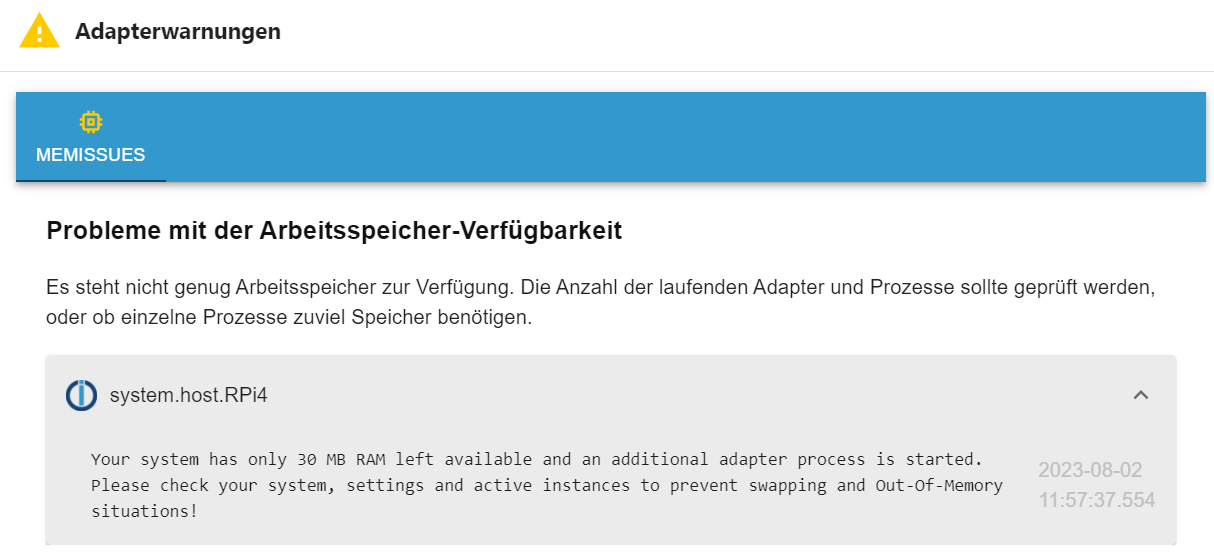
Kann das ursächlich sein? Vor allem, dass dann ausgerechnet NUR der Admin-Adapter nicht startet? Klar, zu wenig Speicher sorgt für Probleme, aber hängen die beiden Sachen Kausal zusammen?Als ich gestern "iob diag" ausgeführt habe, sah es auch nicht ganz so dramatisch aus ....
*** MEMORY ***
              total        used        free      shared  buff/cache   available
Mem:           1.9G        1.2G        271M         20M        423M        587M
Swap:           99M        9.0M         90M
Total:         2.0G        1.2G        362M
Reichen meine 2GB RAM tatsächlich nicht?
Oder habe ich irgendwo einen versteckten Speicherfresser ...?
Auf dem RPi ist nichts anderes als iobroker installiert.Aber abgesehen vom RAM, was sollte ich noch tun, um das System nachhaltig zu stabilisieren?
-
@homoran
Hätte ich dann mit
"iob start admin.1 --debug"
starten müssen, damit die Instanz die richtige Logstufe hat?Ich wollte das gerade ausprobieren, habe iob wieder gestartet, hatte in einem 2. Fenster das Log mitlaufen und als ich da aus Neugierde währenddessen reinschaue ....
2023-08-04 09:30:28.926  - info: host.RPi4 iobroker.js-controller version 4.0.24 js-controller starting
2023-08-04 09:30:28.935  - info: host.RPi4 Copyright (c) 2014-2022 bluefox, 2014 hobbyquaker
2023-08-04 09:30:28.936  - info: host.RPi4 hostname: RPi4, node: v18.17.0
2023-08-04 09:30:28.938  - info: host.RPi4 ip addresses: 192.168.178.21 2a02:2f4:4217:cc00:5e5d:c93:a398:e367 fe80::a42e:3571:42bc:6227 192.168.178.69 2a02:2f4:4217:cc00:c97c:4f8d:f209:b490 fe80::8414:2919:516a:9a2f
2023-08-04 09:30:28.926  - info: host.RPi4 iobroker.js-controller version 4.0.24 js-controller starting
2023-08-04 09:30:28.935  - info: host.RPi4 Copyright (c) 2014-2022 bluefox, 2014 hobbyquaker
2023-08-04 09:30:28.936  - info: host.RPi4 hostname: RPi4, node: v18.17.0
2023-08-04 09:30:28.938  - info: host.RPi4 ip addresses: 192.168.178.21 2a02:2f4:4217:cc00:5e5d:c93:a398:e367 fe80::a42e:3571:42bc:6227 192.168.178.69 2a02:2f4:4217:cc00:c97c:4f8d:f209:b490 fe80::8414:2919:516a:9a2f
2023-08-04 09:30:30.462  - info: host.RPi4 connected to Objects and States
2023-08-04 09:30:30.517  - info: host.RPi4 added notifications configuration of host
2023-08-04 09:30:30.462  - info: host.RPi4 connected to Objects and States
2023-08-04 09:30:30.517  - info: host.RPi4 added notifications configuration of host
2023-08-04 09:30:31.259  - info: host.RPi4 31 instances found
2023-08-04 09:30:31.321  - info: host.RPi4 starting 29 instances
2023-08-04 09:30:31.501  - info: host.RPi4 instance system.adapter.admin.0 started with pid 17070
2023-08-04 09:30:31.259  - info: host.RPi4 31 instances found
2023-08-04 09:30:31.321  - info: host.RPi4 starting 29 instances
2023-08-04 09:30:31.501  - info: host.RPi4 instance system.adapter.admin.0 started with pid 17070
2023-08-04 09:30:35.072  - info: admin.0 (17070) starting. Version 6.7.0 in /opt/iobroker/node_modules/iobroker.admin, node: v18.17.0, js-controller: 4.0.24
2023-08-04 09:30:35.136  - info: admin.0 (17070) requesting all states
2023-08-04 09:30:35.137  - info: admin.0 (17070) requesting all objects
2023-08-04 09:30:35.072  - info: admin.0 (17070) starting. Version 6.7.0 in /opt/iobroker/node_modules/iobroker.admin, node: v18.17.0, js-controller: 4.0.24
2023-08-04 09:30:35.136  - info: admin.0 (17070) requesting all states
2023-08-04 09:30:35.137  - info: admin.0 (17070) requesting all objects
2023-08-04 09:30:36.658  - info: host.RPi4 instance system.adapter.admin.1 started with pid 17086
2023-08-04 09:30:36.658  - info: host.RPi4 instance system.adapter.admin.1 started with pid 17086
2023-08-04 09:30:37.462  - info: admin.0 (17070) received all objects
2023-08-04 09:30:37.462  - info: admin.0 (17070) received all objects
2023-08-04 09:30:38.008  - info: admin.0 (17070) socket.io server listening on port 8081
2023-08-04 09:30:38.012  - info: admin.0 (17070) http server listening on port 8081
2023-08-04 09:30:38.012  - info: admin.0 (17070) Use link "http://127.0.0.1:8081" to configure.
2023-08-04 09:30:38.008  - info: admin.0 (17070) socket.io server listening on port 8081
2023-08-04 09:30:38.012  - info: admin.0 (17070) http server listening on port 8081
2023-08-04 09:30:38.012  - info: admin.0 (17070) Use link "http://127.0.0.1:8081" to configure.
2023-08-04 09:30:39.478  - info: host.RPi4 instance system.adapter.history.0 started with pid 17106
2023-08-04 09:30:39.478  - info: host.RPi4 instance system.adapter.history.0 started with pid 17106
2023-08-04 09:30:40.671  - info: admin.1 (17086) starting. Version 6.7.0 in /opt/iobroker/node_modules/iobroker.admin, node: v18.17.0, js-controller: 4.0.24
2023-08-04 09:30:40.740  - info: admin.1 (17086) requesting all states
2023-08-04 09:30:40.742  - info: admin.1 (17086) requesting all objects
2023-08-04 09:30:40.671  - info: admin.1 (17086) starting. Version 6.7.0 in /opt/iobroker/node_modules/iobroker.admin, node: v18.17.0, js-controller: 4.0.24
2023-08-04 09:30:40.740  - info: admin.1 (17086) requesting all states
2023-08-04 09:30:40.742  - info: admin.1 (17086) requesting all objects
2023-08-04 09:30:42.805  - info: admin.1 (17086) received all objects
2023-08-04 09:30:43.049  - info: history.0 (17106) starting. Version 2.2.4 in /opt/iobroker/node_modules/iobroker.history, node: v18.17.0, js-controller: 4.0.24
2023-08-04 09:30:43.206  - info: history.0 (17106) enabled logging of tr-064.0.callmonitor.lastCall.caller (Count=1), Alias=false
2023-08-04 09:30:43.207  - info: history.0 (17106) enabled logging of tr-064.0.callmonitor.lastCall.callee (Count=2), Alias=false
2023-08-04 09:30:43.209  - info: history.0 (17106) enabled logging of tr-064.0.callmonitor.lastCall.duration (Count=3), Alias=false
2023-08-04 09:30:43.211  - info: history.0 (17106) enabled logging of 0_userdata.0.QVR.Kamera-hinten.bewegung-erkannt (Count=4), Alias=false
2023-08-04 09:30:43.474  - info: admin.1 (17086) socket.io server listening on port 8089
2023-08-04 09:30:43.480  - info: admin.1 (17086) http server listening on port 8089
2023-08-04 09:30:43.482  - info: admin.1 (17086) Use link "http://127.0.0.1:8089" to configure.
Beide Admin-Instanzen starten!
Ich habe in der Zwischenzeit absolut nichts verändert oder rumprobiert (um Eure Hilfe nicht mit meinem potentiellen Rumgepfusche zu gefährden).
Schön, dass es jetzt plötzlich läuft, aber die Ursache zu wissen wäre ggf. hilfreich, um zu verhindern, dass das wieder passiert.Beim Start der GUI kam dann folgende Meldung:
Kann das ursächlich sein? Vor allem, dass dann ausgerechnet NUR der Admin-Adapter nicht startet? Klar, zu wenig Speicher sorgt für Probleme, aber hängen die beiden Sachen Kausal zusammen?Als ich gestern "iob diag" ausgeführt habe, sah es auch nicht ganz so dramatisch aus ....
*** MEMORY ***
              total        used        free      shared  buff/cache   available
Mem:           1.9G        1.2G        271M         20M        423M        587M
Swap:           99M        9.0M         90M
Total:         2.0G        1.2G        362M
Reichen meine 2GB RAM tatsächlich nicht?
Oder habe ich irgendwo einen versteckten Speicherfresser ...?
Auf dem RPi ist nichts anderes als iobroker installiert.Aber abgesehen vom RAM, was sollte ich noch tun, um das System nachhaltig zu stabilisieren?
@rennigel sagte in nach Admin-Adapter-Update iobroker nicht über Web erreichbar:
Reichen meine 2GB RAM tatsächlich nicht?
Sehr wahrscheinlich nicht!
Das hätte aber irgendwo zu sehen sein müssen (log/Konsole)@rennigel sagte in nach Admin-Adapter-Update iobroker nicht über Web erreichbar:
Mem: 1.9G 1.2G 271M 20M 423M 587M
da ist definitiv keine Reserve mehr (ohne admin)
nach dem Start des Admin waren ja nur noch 30MB frei.hätte man schon bei deiner langen Liste an Instanzen ahnen können
-
@homoran
Hätte ich dann mit
"iob start admin.1 --debug"
starten müssen, damit die Instanz die richtige Logstufe hat?Ich wollte das gerade ausprobieren, habe iob wieder gestartet, hatte in einem 2. Fenster das Log mitlaufen und als ich da aus Neugierde währenddessen reinschaue ....
2023-08-04 09:30:28.926  - info: host.RPi4 iobroker.js-controller version 4.0.24 js-controller starting
2023-08-04 09:30:28.935  - info: host.RPi4 Copyright (c) 2014-2022 bluefox, 2014 hobbyquaker
2023-08-04 09:30:28.936  - info: host.RPi4 hostname: RPi4, node: v18.17.0
2023-08-04 09:30:28.938  - info: host.RPi4 ip addresses: 192.168.178.21 2a02:2f4:4217:cc00:5e5d:c93:a398:e367 fe80::a42e:3571:42bc:6227 192.168.178.69 2a02:2f4:4217:cc00:c97c:4f8d:f209:b490 fe80::8414:2919:516a:9a2f
2023-08-04 09:30:28.926  - info: host.RPi4 iobroker.js-controller version 4.0.24 js-controller starting
2023-08-04 09:30:28.935  - info: host.RPi4 Copyright (c) 2014-2022 bluefox, 2014 hobbyquaker
2023-08-04 09:30:28.936  - info: host.RPi4 hostname: RPi4, node: v18.17.0
2023-08-04 09:30:28.938  - info: host.RPi4 ip addresses: 192.168.178.21 2a02:2f4:4217:cc00:5e5d:c93:a398:e367 fe80::a42e:3571:42bc:6227 192.168.178.69 2a02:2f4:4217:cc00:c97c:4f8d:f209:b490 fe80::8414:2919:516a:9a2f
2023-08-04 09:30:30.462  - info: host.RPi4 connected to Objects and States
2023-08-04 09:30:30.517  - info: host.RPi4 added notifications configuration of host
2023-08-04 09:30:30.462  - info: host.RPi4 connected to Objects and States
2023-08-04 09:30:30.517  - info: host.RPi4 added notifications configuration of host
2023-08-04 09:30:31.259  - info: host.RPi4 31 instances found
2023-08-04 09:30:31.321  - info: host.RPi4 starting 29 instances
2023-08-04 09:30:31.501  - info: host.RPi4 instance system.adapter.admin.0 started with pid 17070
2023-08-04 09:30:31.259  - info: host.RPi4 31 instances found
2023-08-04 09:30:31.321  - info: host.RPi4 starting 29 instances
2023-08-04 09:30:31.501  - info: host.RPi4 instance system.adapter.admin.0 started with pid 17070
2023-08-04 09:30:35.072  - info: admin.0 (17070) starting. Version 6.7.0 in /opt/iobroker/node_modules/iobroker.admin, node: v18.17.0, js-controller: 4.0.24
2023-08-04 09:30:35.136  - info: admin.0 (17070) requesting all states
2023-08-04 09:30:35.137  - info: admin.0 (17070) requesting all objects
2023-08-04 09:30:35.072  - info: admin.0 (17070) starting. Version 6.7.0 in /opt/iobroker/node_modules/iobroker.admin, node: v18.17.0, js-controller: 4.0.24
2023-08-04 09:30:35.136  - info: admin.0 (17070) requesting all states
2023-08-04 09:30:35.137  - info: admin.0 (17070) requesting all objects
2023-08-04 09:30:36.658  - info: host.RPi4 instance system.adapter.admin.1 started with pid 17086
2023-08-04 09:30:36.658  - info: host.RPi4 instance system.adapter.admin.1 started with pid 17086
2023-08-04 09:30:37.462  - info: admin.0 (17070) received all objects
2023-08-04 09:30:37.462  - info: admin.0 (17070) received all objects
2023-08-04 09:30:38.008  - info: admin.0 (17070) socket.io server listening on port 8081
2023-08-04 09:30:38.012  - info: admin.0 (17070) http server listening on port 8081
2023-08-04 09:30:38.012  - info: admin.0 (17070) Use link "http://127.0.0.1:8081" to configure.
2023-08-04 09:30:38.008  - info: admin.0 (17070) socket.io server listening on port 8081
2023-08-04 09:30:38.012  - info: admin.0 (17070) http server listening on port 8081
2023-08-04 09:30:38.012  - info: admin.0 (17070) Use link "http://127.0.0.1:8081" to configure.
2023-08-04 09:30:39.478  - info: host.RPi4 instance system.adapter.history.0 started with pid 17106
2023-08-04 09:30:39.478  - info: host.RPi4 instance system.adapter.history.0 started with pid 17106
2023-08-04 09:30:40.671  - info: admin.1 (17086) starting. Version 6.7.0 in /opt/iobroker/node_modules/iobroker.admin, node: v18.17.0, js-controller: 4.0.24
2023-08-04 09:30:40.740  - info: admin.1 (17086) requesting all states
2023-08-04 09:30:40.742  - info: admin.1 (17086) requesting all objects
2023-08-04 09:30:40.671  - info: admin.1 (17086) starting. Version 6.7.0 in /opt/iobroker/node_modules/iobroker.admin, node: v18.17.0, js-controller: 4.0.24
2023-08-04 09:30:40.740  - info: admin.1 (17086) requesting all states
2023-08-04 09:30:40.742  - info: admin.1 (17086) requesting all objects
2023-08-04 09:30:42.805  - info: admin.1 (17086) received all objects
2023-08-04 09:30:43.049  - info: history.0 (17106) starting. Version 2.2.4 in /opt/iobroker/node_modules/iobroker.history, node: v18.17.0, js-controller: 4.0.24
2023-08-04 09:30:43.206  - info: history.0 (17106) enabled logging of tr-064.0.callmonitor.lastCall.caller (Count=1), Alias=false
2023-08-04 09:30:43.207  - info: history.0 (17106) enabled logging of tr-064.0.callmonitor.lastCall.callee (Count=2), Alias=false
2023-08-04 09:30:43.209  - info: history.0 (17106) enabled logging of tr-064.0.callmonitor.lastCall.duration (Count=3), Alias=false
2023-08-04 09:30:43.211  - info: history.0 (17106) enabled logging of 0_userdata.0.QVR.Kamera-hinten.bewegung-erkannt (Count=4), Alias=false
2023-08-04 09:30:43.474  - info: admin.1 (17086) socket.io server listening on port 8089
2023-08-04 09:30:43.480  - info: admin.1 (17086) http server listening on port 8089
2023-08-04 09:30:43.482  - info: admin.1 (17086) Use link "http://127.0.0.1:8089" to configure.
Beide Admin-Instanzen starten!
Ich habe in der Zwischenzeit absolut nichts verändert oder rumprobiert (um Eure Hilfe nicht mit meinem potentiellen Rumgepfusche zu gefährden).
Schön, dass es jetzt plötzlich läuft, aber die Ursache zu wissen wäre ggf. hilfreich, um zu verhindern, dass das wieder passiert.Beim Start der GUI kam dann folgende Meldung:
Kann das ursächlich sein? Vor allem, dass dann ausgerechnet NUR der Admin-Adapter nicht startet? Klar, zu wenig Speicher sorgt für Probleme, aber hängen die beiden Sachen Kausal zusammen?Als ich gestern "iob diag" ausgeführt habe, sah es auch nicht ganz so dramatisch aus ....
*** MEMORY ***
              total        used        free      shared  buff/cache   available
Mem:           1.9G        1.2G        271M         20M        423M        587M
Swap:           99M        9.0M         90M
Total:         2.0G        1.2G        362M
Reichen meine 2GB RAM tatsächlich nicht?
Oder habe ich irgendwo einen versteckten Speicherfresser ...?
Auf dem RPi ist nichts anderes als iobroker installiert.Aber abgesehen vom RAM, was sollte ich noch tun, um das System nachhaltig zu stabilisieren?
@rennigel sagte in nach Admin-Adapter-Update iobroker nicht über Web erreichbar:
2GB RAM
Da hatte ich oben gar nicht darauf geachtet.
Notfallplan
Deinstalliere den info Adapter, braucht man nicht.
Den discovery Adapter deaktivieren ggf auch löschen, wird eigentlich auch nicht benötigt.
Den backitup Adapter kannst du mittels script "schlafen legen" bzw nur für den Zeitraum des backups aktivieren.
Dies sollte ein paar Ram freischaufeln.Langfristig wirst du aber etwas mit mehr Ram benötigen
Ps
Und den 2ten admin natürlich wieder löschen -
Bereinige grad die installierten Adapter, danke für die Infos.
Was ist mit Adapter web?
Ich lese, Admin hat seinen eigenen Webserver, braucht als web nicht.
vis und rickshaw habe ich gelöscht (nutze ich nicht), aber wird web auch für jarvis benötigt? Ich vermute mal, ja.Gibt es noch irgendwelche purge-Aktionen, Cache-Lösch-Funktionen o.ä., die den Speicher optimieren?
-
Habe nochmal "iob diag" ausgeführt, sieht im Speicher jetzt so aus:
*** MEMORY ***
              total        used        free      shared  buff/cache   available
Mem:           1.9G        1.2G        459M         18M        230M        568M
Swap:           99M         78M         21M
Total:         2.0G        1.3G        481M

         1872 M total memory
         1182 M used memory
          158 M active memory
         1144 M inactive memory
          459 M free memory
           43 M buffer memory
          186 M swap cache
           99 M total swap
           78 M used swap
           21 M free swap
Knapp 0,5 GB freier Speicher klingt jetzt nicht so wenig, aber ihr meintet, das allgemein die 2GB schon knapp bemessen sind (wie kommen denn dann die Leute mit RPi3 und 1 GB klar ...?).
Wie sind denn die Zahlen praxisorient richtig zu interpretieren, oder anders: Wieviel freien Speicher braucht iobroker um stabil zu laufen (in % vom Gesamt-RAM oder absoluten MB) -
Habe nochmal "iob diag" ausgeführt, sieht im Speicher jetzt so aus:
*** MEMORY ***
              total        used        free      shared  buff/cache   available
Mem:           1.9G        1.2G        459M         18M        230M        568M
Swap:           99M         78M         21M
Total:         2.0G        1.3G        481M

         1872 M total memory
         1182 M used memory
          158 M active memory
         1144 M inactive memory
          459 M free memory
           43 M buffer memory
          186 M swap cache
           99 M total swap
           78 M used swap
           21 M free swap
Knapp 0,5 GB freier Speicher klingt jetzt nicht so wenig, aber ihr meintet, das allgemein die 2GB schon knapp bemessen sind (wie kommen denn dann die Leute mit RPi3 und 1 GB klar ...?).
Wie sind denn die Zahlen praxisorient richtig zu interpretieren, oder anders: Wieviel freien Speicher braucht iobroker um stabil zu laufen (in % vom Gesamt-RAM oder absoluten MB)@rennigel das kommt darauf an wieviele Instanzen man letztendlich am laufen hat, je nach Anwendungsfall.
500 Mb Ram ist nötig, je nach Prozesse die ja zufälligerweise zeitgleich auftreten können, wird für diesen Zeitraum kurzfristig mehr Ram beansprucht. Gerade im Fall backup -
Bereinige grad die installierten Adapter, danke für die Infos.
Was ist mit Adapter web?
Ich lese, Admin hat seinen eigenen Webserver, braucht als web nicht.
vis und rickshaw habe ich gelöscht (nutze ich nicht), aber wird web auch für jarvis benötigt? Ich vermute mal, ja.Gibt es noch irgendwelche purge-Aktionen, Cache-Lösch-Funktionen o.ä., die den Speicher optimieren?
@rennigel sagte in nach Admin-Adapter-Update iobroker nicht über Web erreichbar:
Gibt es noch irgendwelche purge-Aktionen, Cache-Lösch-Funktionen o.ä., die den Speicher optimieren?
Fällt mir auf die schnelle nichts weiter ein



Hey! Du scheinst an dieser Unterhaltung interessiert zu sein, hast aber noch kein Konto.
Hast du es satt, bei jedem Besuch durch die gleichen Beiträge zu scrollen? Wenn du dich für ein Konto anmeldest, kommst du immer genau dorthin zurück, wo du zuvor warst, und kannst dich über neue Antworten benachrichtigen lassen (entweder per E-Mail oder Push-Benachrichtigung). Du kannst auch Lesezeichen speichern und Beiträge positiv bewerten, um anderen Community-Mitgliedern deine Wertschätzung zu zeigen.
Mit deinem Input könnte dieser Beitrag noch besser werden 💗
Registrieren Anmelden401
Online33.0k
Benutzer83.5k
Themen1.3m
Beiträge