Hallo zusammen,
ich bin absoluter Newbie, und Noob in Sachen Programmierung, das vielleicht am Rande. Trotzdem sehr interessiert und taste mich quasi per learning by doing ans Thema heran.
Ich habe gestern meinen Pi mit ioBroker versehen, kann auf die Weboberfläche zugreifen und auch dort Einstellungen vornehmen, Adapter installieren etc.. ebenso habe ich einen CC2531 Stick für Zigbee. Ich bekomme es nicht hin, diesen über den Status gelb hinaus in Betrieb zu nehmen. Ich habe über Putty die Daten des Stick ausgelesen und in Zigbee eingetragen.
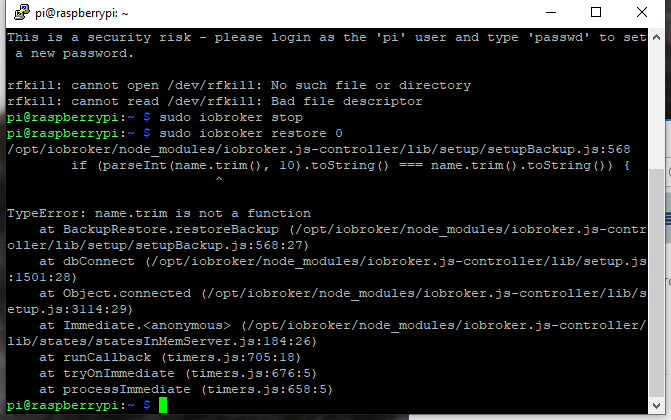
Im Log werden einige Fehlermeldungen gegeben, aus denen ich als Noob natürlich nicht schlau werde.
Bevor ich den Log sende ( macheich das einfach per CopyPaste ??) ist noch eine andere Sache auffällig gewesen bei der Inst.
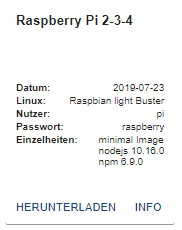
Ich habe diese unter zuhilfenahme eines Youtube Videos von Schimmermedia vorgenommen. Doch seit Erstellung des Videos und der gestrigen Inst. sind ja schon 2 Revisionen des images neu gekommen...
Ich hatte zuerst das Komplettimage geflasht und anschliessend bin ich nach Anleitung vorgegangen um Node Nodejs und NPM zu installieren. Dabei traten scon Fehler auf. Ich habe dann das aktuellste "Minimalimage" genommen und bin wieder weiter nach Anleitung vorgegangen und hatte nach Fertigstellung und Einrichtung über Webinterface keine Möglichkeiten Adapter zu installieren da die "NPM" Version nicht ausgelesen werden könne. Ich habe dann dazu gegooglet NPM zu installieren und habe dann nach einer angebotenen Lösung im Netz über Putty NPM installiert.
Adapter ließen sich dann installieren. Könnte der Fehler hierher rühren?
Ich habe auch den Zigbee Adapter 2 mal de- und wieder installiert. Es kommt dann immer zu einer Fehlermeldung nach dem Öffnen des Adapters (habe den Text nicht mehr genau im Kopf): "Error You have to run .....
Mal eine grundsätzliche Frage: wenn ich das "Komplettimage" nehme, muss ich dann von Hand doch nicht mehr die ganzen Dinge nachinstalliere (node etc.) Theoretisch reicht über putty das Basesetup mit root User einrichten, Passwörter...und dann sollte ich auf die Weboberfläche schon zugreifen können, oder? Meine ganze Arbeit war eher Zeitverschwendung?
Wenn jemand einen vorschlag hat zum manuellen Nachinstallieren von irgendwas, so bitte ich diesen höflich das für meinen übersichtlichen Programmierhorizont zu erklären. Bedanke mich jetzt schon seeeehr herzlich dafür
VG
Rascall9999