




Server Cannot start inMem-objects on port 9001
-
@tungild sagte in Server Cannot start inMem-objects on port 9001:
So, hoffe ich habe nun alles auf dem neusten Stand.
Active repo(s): beta
Dir ist schon bekannt , das du dein Repo auf BETA hast bzw. auch ein Beta Tester bist !?
EDIT :
ich denke mal unbewußt , denn du hast zuvor diese Versionen gehabt :
admin:          6.1.9
javascript:     5.7.0
und
alles auf dem neusten Stand.
du hast noch Buster , Bullseye ist der aktuelle Stand !
Guten Abend,
Gleiches Problem auch bei mir..Server Cannot start inMem-objects on port 9001: Failed to lock DB file "/opt/iobroker/iobroker-data/objects.jsonl"!Der Fix hat nix gebracht.
iob diag spuckt folgendes aus:======== Start marking the full check here ========= Skript v.2023-04-16 *** BASE SYSTEM *** Model : Raspberry Pi 3 Model B Rev 1.2 Architecture : aarch64 Docker : false Virtualization : none Distributor ID: Debian Description: Debian GNU/Linux 11 (bullseye) Release: 11 Codename: bullseye PRETTY_NAME="Debian GNU/Linux 11 (bullseye)" NAME="Debian GNU/Linux" VERSION_ID="11" VERSION="11 (bullseye)" VERSION_CODENAME=bullseye ID=debian HOME_URL="https://www.debian.org/" SUPPORT_URL="https://www.debian.org/support" BUG_REPORT_URL="https://bugs.debian.org/" Systemuptime and Load: 23:12:09 up 1 min, 1 user, load average: 1.24, 0.46, 0.17 CPU threads: 4 Raspberry only: throttled=0x0 Other values than 0x0 hint to temperature/voltage problems temp=71.4'C volt=1.3438V *** Time and Time Zones *** Local time: Fri 2023-05-12 23:12:10 CEST Universal time: Fri 2023-05-12 21:12:10 UTC RTC time: n/a Time zone: Europe/Berlin (CEST, +0200) System clock synchronized: yes NTP service: active RTC in local TZ: no *** User and Groups *** pi /home/pi pi adm dialout cdrom sudo audio video plugdev games users input render netdev gpio i2c spi iobroker *** X-Server-Setup *** X-Server: false Desktop: Terminal: tty Boot Target: multi-user.target *** MEMORY *** total used free shared buff/cache available Mem: 909M 162M 156M 0.0K 590M 691M Swap: 99M 0B 99M Total: 1.0G 162M 256M 909 M total memory 162 M used memory 215 M active memory 458 M inactive memory 156 M free memory 19 M buffer memory 570 M swap cache 99 M total swap 0 M used swap 99 M free swap Raspberry only: oom events: 0 lifetime oom required: 0 Mbytes total time in oom handler: 0 ms max time spent in oom handler: 0 ms *** FILESYSTEM *** Filesystem Type Size Used Avail Use% Mounted on /dev/root ext4 15G 4.8G 8.9G 36% / devtmpfs devtmpfs 325M 0 325M 0% /dev tmpfs tmpfs 455M 0 455M 0% /dev/shm tmpfs tmpfs 182M 968K 181M 1% /run tmpfs tmpfs 5.0M 4.0K 5.0M 1% /run/lock /dev/mmcblk0p1 vfat 255M 31M 225M 13% /boot tmpfs tmpfs 91M 0 91M 0% /run/user/1000 Messages concerning ext4 filesystem in dmesg: [Fri May 12 23:10:54 2023] Kernel command line: coherent_pool=1M 8250.nr_uarts=0 snd_bcm2835.enable_headphones=0 snd_bcm2835.enable_headphones=1 snd_bcm2835.enable_hdmi=1 snd_bcm2835.enable_hdmi=0 video=Composite-1:720x480@60i vc_mem.mem_base=0x3ec00000 vc_mem.mem_size=0x40000000 console=ttyS0,115200 console=tty1 root=PARTUUID=0c797088-02 rootfstype=ext4 fsck.repair=yes rootwait [Fri May 12 23:10:57 2023] EXT4-fs (mmcblk0p2): mounted filesystem with ordered data mode. Quota mode: none. [Fri May 12 23:10:57 2023] VFS: Mounted root (ext4 filesystem) readonly on device 179:2. [Fri May 12 23:11:00 2023] EXT4-fs (mmcblk0p2): re-mounted. Quota mode: none. Show mounted filesystems (real ones only): TARGET SOURCE FSTYPE OPTIONS / /dev/mmcblk0p2 ext4 rw,noatime,commit=600 `-/boot /dev/mmcblk0p1 vfat rw,relatime,fmask=0022,dmask=0022,codepage=437,iocharset=ascii,shortname=mixed,errors=remount-ro Files in neuralgic directories: /var: 993M /var/ 536M /var/log 521M /var/log/journal/556ce5c3a8d54c0c89d73703db3b1f8c 521M /var/log/journal 209M /var/cache Archived and active journals take up 520.1M in the file system. /opt/iobroker/backups: 33M /opt/iobroker/backups/ /opt/iobroker/iobroker-data: 704M /opt/iobroker/iobroker-data/ 169M /opt/iobroker/iobroker-data/files 64M /opt/iobroker/iobroker-data/backup-objects 51M /opt/iobroker/iobroker-data/files/javascript.admin 48M /opt/iobroker/iobroker-data/files/telegram.admin The five largest files in iobroker-data are: 467M /opt/iobroker/iobroker-data/objects.jsonl 15M /opt/iobroker/iobroker-data/files/telegram.admin/rules/static/js/vendors-node_modules_iobroker_adapter-react-v5_assets_devices_parseNames_d_ts-node_modules_io-1d9f06.44fe4a3f.chunk.js.map 7.2M /opt/iobroker/iobroker-data/files/telegram.admin/rules/static/js/vendors-node_modules_iobroker_adapter-react-v5_assets_devices_parseNames_d_ts-node_modules_io-1d9f06.44fe4a3f.chunk.js 6.9M /opt/iobroker/iobroker-data/files/telegram.admin/custom/static/js/vendors-node_modules_mui_icons-material_esm_index_js.8fdf8cb7.chunk.js.map 6.9M /opt/iobroker/iobroker-data/files/javascript.admin/static/js/610.de0231c9.chunk.js.map *** NodeJS-Installation *** /usr/bin/nodejs v16.20.0 /usr/bin/node v16.20.0 /usr/bin/npm 8.19.4 /usr/bin/npx 8.19.4 nodejs: Installed: 16.20.0-deb-1nodesource1 Candidate: 16.20.0-deb-1nodesource1 Version table: *** 16.20.0-deb-1nodesource1 500 500 https://deb.nodesource.com/node_16.x bullseye/main arm64 Packages 100 /var/lib/dpkg/status 12.22.12~dfsg-1~deb11u4 500 500 http://security.debian.org/debian-security bullseye-security/main arm64 Packages 12.22.12~dfsg-1~deb11u3 500 500 http://deb.debian.org/debian bullseye/main arm64 Packages Temp directories causing npm8 problem: 0 No problems detected *** ioBroker-Installation *** ioBroker Status Server Cannot start inMem-objects on port 9001: Failed to lock DB file "/opt/iobroker/iobroker-data/objects.jsonl"! Core adapters versions js-controller: 4.0.23 admin: 6.3.5 javascript: 6.1.4 Adapters from github: 1 Adapter State No connection to databases possible ... Enabled adapters with bindings ioBroker-Repositories Server Cannot start inMem-objects on port 9001: Failed to lock DB file "/opt/iobroker/iobroker-data/objects.jsonl"! Installed ioBroker-Instances Server Cannot start inMem-objects on port 9001: Failed to lock DB file "/opt/iobroker/iobroker-data/objects.jsonl"! Objects and States Please stand by - This may take a while Objects: 1 States: 1 *** OS-Repositories and Updates *** Hit:1 http://deb.debian.org/debian bullseye InRelease Hit:2 http://security.debian.org/debian-security bullseye-security InRelease Hit:3 http://deb.debian.org/debian bullseye-updates InRelease Hit:4 http://archive.raspberrypi.org/debian bullseye InRelease Hit:5 https://deb.nodesource.com/node_16.x bullseye InRelease Reading package lists... Pending Updates: 0 *** Listening Ports *** Active Internet connections (only servers) Proto Recv-Q Send-Q Local Address Foreign Address State User Inode PID/Program name tcp 0 0 0.0.0.0:22 0.0.0.0:* LISTEN 0 14495 523/sshd: /usr/sbin tcp6 0 0 :::22 :::* LISTEN 0 14497 523/sshd: /usr/sbin udp 0 0 0.0.0.0:68 0.0.0.0:* 0 1794 623/dhcpcd udp 0 0 0.0.0.0:51820 0.0.0.0:* 0 1886 - udp 0 0 0.0.0.0:41124 0.0.0.0:* 108 14448 368/avahi-daemon: r udp 0 0 0.0.0.0:5353 0.0.0.0:* 108 14446 368/avahi-daemon: r udp6 0 0 :::51820 :::* 0 1887 - udp6 0 0 :::5353 :::* 108 14447 368/avahi-daemon: r udp6 0 0 :::49432 :::* 108 14449 368/avahi-daemon: r *** Log File - Last 25 Lines *** 2023-05-12 23:14:20.573 - info: host.raspberrypi ip addresses: 192.168.30.6 fe80::6b2f:cbb4:2470:70a3 10.110.183.1 2023-05-12 23:14:50.621 - error: host.raspberrypi No connection to databases possible, restart 2023-05-12 23:14:50.656 - info: host.raspberrypi iobroker _restart 2023-05-12 23:14:57.929 - info: host.raspberrypi iobroker.js-controller version 4.0.23 js-controller starting 2023-05-12 23:14:57.944 - info: host.raspberrypi Copyright (c) 2014-2022 bluefox, 2014 hobbyquaker 2023-05-12 23:14:57.946 - info: host.raspberrypi hostname: raspberrypi, node: v16.20.0 2023-05-12 23:14:57.948 - info: host.raspberrypi ip addresses: 192.168.30.6 fe80::6b2f:cbb4:2470:70a3 10.110.183.1 2023-05-12 23:15:27.989 - error: host.raspberrypi No connection to databases possible, restart 2023-05-12 23:15:28.019 - info: host.raspberrypi iobroker _restart 2023-05-12 23:15:35.553 - info: host.raspberrypi iobroker.js-controller version 4.0.23 js-controller starting 2023-05-12 23:15:35.571 - info: host.raspberrypi Copyright (c) 2014-2022 bluefox, 2014 hobbyquaker 2023-05-12 23:15:35.574 - info: host.raspberrypi hostname: raspberrypi, node: v16.20.0 2023-05-12 23:15:35.577 - info: host.raspberrypi ip addresses: 192.168.30.6 fe80::6b2f:cbb4:2470:70a3 10.110.183.1 2023-05-12 23:15:37.722 - error: host.raspberrypi-Server Cannot start inMem-objects on port 9001: Failed to lock DB file "/opt/iobroker/iobroker-data/objects.jsonl"! 2023-05-12 23:15:44.388 - info: host.raspberrypi iobroker.js-controller version 4.0.23 js-controller starting 2023-05-12 23:15:44.405 - info: host.raspberrypi Copyright (c) 2014-2022 bluefox, 2014 hobbyquaker 2023-05-12 23:15:44.408 - info: host.raspberrypi hostname: raspberrypi, node: v16.20.0 2023-05-12 23:15:44.411 - info: host.raspberrypi ip addresses: 192.168.30.6 fe80::6b2f:cbb4:2470:70a3 10.110.183.1 2023-05-12 23:15:46.561 - error: host.raspberrypi-Server Cannot start inMem-objects on port 9001: Failed to lock DB file "/opt/iobroker/iobroker-data/objects.jsonl"! 2023-05-12 23:15:53.085 - info: host.raspberrypi iobroker.js-controller version 4.0.23 js-controller starting 2023-05-12 23:15:53.101 - info: host.raspberrypi Copyright (c) 2014-2022 bluefox, 2014 hobbyquaker 2023-05-12 23:15:53.103 - info: host.raspberrypi hostname: raspberrypi, node: v16.20.0 2023-05-12 23:15:53.106 - info: host.raspberrypi ip addresses: 192.168.30.6 fe80::6b2f:cbb4:2470:70a3 10.110.183.1 2023-05-12 23:16:23.156 - error: host.raspberrypi No connection to databases possible, restart 2023-05-12 23:16:23.213 - info: host.raspberrypi iobroker _restart ============ Mark until here for C&P ============= iob diag has finished. Press any key for a summaryWoran kanns liegen?
-
Guten Abend,
Gleiches Problem auch bei mir..Server Cannot start inMem-objects on port 9001: Failed to lock DB file "/opt/iobroker/iobroker-data/objects.jsonl"!Der Fix hat nix gebracht.
iob diag spuckt folgendes aus:======== Start marking the full check here ========= Skript v.2023-04-16 *** BASE SYSTEM *** Model : Raspberry Pi 3 Model B Rev 1.2 Architecture : aarch64 Docker : false Virtualization : none Distributor ID: Debian Description: Debian GNU/Linux 11 (bullseye) Release: 11 Codename: bullseye PRETTY_NAME="Debian GNU/Linux 11 (bullseye)" NAME="Debian GNU/Linux" VERSION_ID="11" VERSION="11 (bullseye)" VERSION_CODENAME=bullseye ID=debian HOME_URL="https://www.debian.org/" SUPPORT_URL="https://www.debian.org/support" BUG_REPORT_URL="https://bugs.debian.org/" Systemuptime and Load: 23:12:09 up 1 min, 1 user, load average: 1.24, 0.46, 0.17 CPU threads: 4 Raspberry only: throttled=0x0 Other values than 0x0 hint to temperature/voltage problems temp=71.4'C volt=1.3438V *** Time and Time Zones *** Local time: Fri 2023-05-12 23:12:10 CEST Universal time: Fri 2023-05-12 21:12:10 UTC RTC time: n/a Time zone: Europe/Berlin (CEST, +0200) System clock synchronized: yes NTP service: active RTC in local TZ: no *** User and Groups *** pi /home/pi pi adm dialout cdrom sudo audio video plugdev games users input render netdev gpio i2c spi iobroker *** X-Server-Setup *** X-Server: false Desktop: Terminal: tty Boot Target: multi-user.target *** MEMORY *** total used free shared buff/cache available Mem: 909M 162M 156M 0.0K 590M 691M Swap: 99M 0B 99M Total: 1.0G 162M 256M 909 M total memory 162 M used memory 215 M active memory 458 M inactive memory 156 M free memory 19 M buffer memory 570 M swap cache 99 M total swap 0 M used swap 99 M free swap Raspberry only: oom events: 0 lifetime oom required: 0 Mbytes total time in oom handler: 0 ms max time spent in oom handler: 0 ms *** FILESYSTEM *** Filesystem Type Size Used Avail Use% Mounted on /dev/root ext4 15G 4.8G 8.9G 36% / devtmpfs devtmpfs 325M 0 325M 0% /dev tmpfs tmpfs 455M 0 455M 0% /dev/shm tmpfs tmpfs 182M 968K 181M 1% /run tmpfs tmpfs 5.0M 4.0K 5.0M 1% /run/lock /dev/mmcblk0p1 vfat 255M 31M 225M 13% /boot tmpfs tmpfs 91M 0 91M 0% /run/user/1000 Messages concerning ext4 filesystem in dmesg: [Fri May 12 23:10:54 2023] Kernel command line: coherent_pool=1M 8250.nr_uarts=0 snd_bcm2835.enable_headphones=0 snd_bcm2835.enable_headphones=1 snd_bcm2835.enable_hdmi=1 snd_bcm2835.enable_hdmi=0 video=Composite-1:720x480@60i vc_mem.mem_base=0x3ec00000 vc_mem.mem_size=0x40000000 console=ttyS0,115200 console=tty1 root=PARTUUID=0c797088-02 rootfstype=ext4 fsck.repair=yes rootwait [Fri May 12 23:10:57 2023] EXT4-fs (mmcblk0p2): mounted filesystem with ordered data mode. Quota mode: none. [Fri May 12 23:10:57 2023] VFS: Mounted root (ext4 filesystem) readonly on device 179:2. [Fri May 12 23:11:00 2023] EXT4-fs (mmcblk0p2): re-mounted. Quota mode: none. Show mounted filesystems (real ones only): TARGET SOURCE FSTYPE OPTIONS / /dev/mmcblk0p2 ext4 rw,noatime,commit=600 `-/boot /dev/mmcblk0p1 vfat rw,relatime,fmask=0022,dmask=0022,codepage=437,iocharset=ascii,shortname=mixed,errors=remount-ro Files in neuralgic directories: /var: 993M /var/ 536M /var/log 521M /var/log/journal/556ce5c3a8d54c0c89d73703db3b1f8c 521M /var/log/journal 209M /var/cache Archived and active journals take up 520.1M in the file system. /opt/iobroker/backups: 33M /opt/iobroker/backups/ /opt/iobroker/iobroker-data: 704M /opt/iobroker/iobroker-data/ 169M /opt/iobroker/iobroker-data/files 64M /opt/iobroker/iobroker-data/backup-objects 51M /opt/iobroker/iobroker-data/files/javascript.admin 48M /opt/iobroker/iobroker-data/files/telegram.admin The five largest files in iobroker-data are: 467M /opt/iobroker/iobroker-data/objects.jsonl 15M /opt/iobroker/iobroker-data/files/telegram.admin/rules/static/js/vendors-node_modules_iobroker_adapter-react-v5_assets_devices_parseNames_d_ts-node_modules_io-1d9f06.44fe4a3f.chunk.js.map 7.2M /opt/iobroker/iobroker-data/files/telegram.admin/rules/static/js/vendors-node_modules_iobroker_adapter-react-v5_assets_devices_parseNames_d_ts-node_modules_io-1d9f06.44fe4a3f.chunk.js 6.9M /opt/iobroker/iobroker-data/files/telegram.admin/custom/static/js/vendors-node_modules_mui_icons-material_esm_index_js.8fdf8cb7.chunk.js.map 6.9M /opt/iobroker/iobroker-data/files/javascript.admin/static/js/610.de0231c9.chunk.js.map *** NodeJS-Installation *** /usr/bin/nodejs v16.20.0 /usr/bin/node v16.20.0 /usr/bin/npm 8.19.4 /usr/bin/npx 8.19.4 nodejs: Installed: 16.20.0-deb-1nodesource1 Candidate: 16.20.0-deb-1nodesource1 Version table: *** 16.20.0-deb-1nodesource1 500 500 https://deb.nodesource.com/node_16.x bullseye/main arm64 Packages 100 /var/lib/dpkg/status 12.22.12~dfsg-1~deb11u4 500 500 http://security.debian.org/debian-security bullseye-security/main arm64 Packages 12.22.12~dfsg-1~deb11u3 500 500 http://deb.debian.org/debian bullseye/main arm64 Packages Temp directories causing npm8 problem: 0 No problems detected *** ioBroker-Installation *** ioBroker Status Server Cannot start inMem-objects on port 9001: Failed to lock DB file "/opt/iobroker/iobroker-data/objects.jsonl"! Core adapters versions js-controller: 4.0.23 admin: 6.3.5 javascript: 6.1.4 Adapters from github: 1 Adapter State No connection to databases possible ... Enabled adapters with bindings ioBroker-Repositories Server Cannot start inMem-objects on port 9001: Failed to lock DB file "/opt/iobroker/iobroker-data/objects.jsonl"! Installed ioBroker-Instances Server Cannot start inMem-objects on port 9001: Failed to lock DB file "/opt/iobroker/iobroker-data/objects.jsonl"! Objects and States Please stand by - This may take a while Objects: 1 States: 1 *** OS-Repositories and Updates *** Hit:1 http://deb.debian.org/debian bullseye InRelease Hit:2 http://security.debian.org/debian-security bullseye-security InRelease Hit:3 http://deb.debian.org/debian bullseye-updates InRelease Hit:4 http://archive.raspberrypi.org/debian bullseye InRelease Hit:5 https://deb.nodesource.com/node_16.x bullseye InRelease Reading package lists... Pending Updates: 0 *** Listening Ports *** Active Internet connections (only servers) Proto Recv-Q Send-Q Local Address Foreign Address State User Inode PID/Program name tcp 0 0 0.0.0.0:22 0.0.0.0:* LISTEN 0 14495 523/sshd: /usr/sbin tcp6 0 0 :::22 :::* LISTEN 0 14497 523/sshd: /usr/sbin udp 0 0 0.0.0.0:68 0.0.0.0:* 0 1794 623/dhcpcd udp 0 0 0.0.0.0:51820 0.0.0.0:* 0 1886 - udp 0 0 0.0.0.0:41124 0.0.0.0:* 108 14448 368/avahi-daemon: r udp 0 0 0.0.0.0:5353 0.0.0.0:* 108 14446 368/avahi-daemon: r udp6 0 0 :::51820 :::* 0 1887 - udp6 0 0 :::5353 :::* 108 14447 368/avahi-daemon: r udp6 0 0 :::49432 :::* 108 14449 368/avahi-daemon: r *** Log File - Last 25 Lines *** 2023-05-12 23:14:20.573 - info: host.raspberrypi ip addresses: 192.168.30.6 fe80::6b2f:cbb4:2470:70a3 10.110.183.1 2023-05-12 23:14:50.621 - error: host.raspberrypi No connection to databases possible, restart 2023-05-12 23:14:50.656 - info: host.raspberrypi iobroker _restart 2023-05-12 23:14:57.929 - info: host.raspberrypi iobroker.js-controller version 4.0.23 js-controller starting 2023-05-12 23:14:57.944 - info: host.raspberrypi Copyright (c) 2014-2022 bluefox, 2014 hobbyquaker 2023-05-12 23:14:57.946 - info: host.raspberrypi hostname: raspberrypi, node: v16.20.0 2023-05-12 23:14:57.948 - info: host.raspberrypi ip addresses: 192.168.30.6 fe80::6b2f:cbb4:2470:70a3 10.110.183.1 2023-05-12 23:15:27.989 - error: host.raspberrypi No connection to databases possible, restart 2023-05-12 23:15:28.019 - info: host.raspberrypi iobroker _restart 2023-05-12 23:15:35.553 - info: host.raspberrypi iobroker.js-controller version 4.0.23 js-controller starting 2023-05-12 23:15:35.571 - info: host.raspberrypi Copyright (c) 2014-2022 bluefox, 2014 hobbyquaker 2023-05-12 23:15:35.574 - info: host.raspberrypi hostname: raspberrypi, node: v16.20.0 2023-05-12 23:15:35.577 - info: host.raspberrypi ip addresses: 192.168.30.6 fe80::6b2f:cbb4:2470:70a3 10.110.183.1 2023-05-12 23:15:37.722 - error: host.raspberrypi-Server Cannot start inMem-objects on port 9001: Failed to lock DB file "/opt/iobroker/iobroker-data/objects.jsonl"! 2023-05-12 23:15:44.388 - info: host.raspberrypi iobroker.js-controller version 4.0.23 js-controller starting 2023-05-12 23:15:44.405 - info: host.raspberrypi Copyright (c) 2014-2022 bluefox, 2014 hobbyquaker 2023-05-12 23:15:44.408 - info: host.raspberrypi hostname: raspberrypi, node: v16.20.0 2023-05-12 23:15:44.411 - info: host.raspberrypi ip addresses: 192.168.30.6 fe80::6b2f:cbb4:2470:70a3 10.110.183.1 2023-05-12 23:15:46.561 - error: host.raspberrypi-Server Cannot start inMem-objects on port 9001: Failed to lock DB file "/opt/iobroker/iobroker-data/objects.jsonl"! 2023-05-12 23:15:53.085 - info: host.raspberrypi iobroker.js-controller version 4.0.23 js-controller starting 2023-05-12 23:15:53.101 - info: host.raspberrypi Copyright (c) 2014-2022 bluefox, 2014 hobbyquaker 2023-05-12 23:15:53.103 - info: host.raspberrypi hostname: raspberrypi, node: v16.20.0 2023-05-12 23:15:53.106 - info: host.raspberrypi ip addresses: 192.168.30.6 fe80::6b2f:cbb4:2470:70a3 10.110.183.1 2023-05-12 23:16:23.156 - error: host.raspberrypi No connection to databases possible, restart 2023-05-12 23:16:23.213 - info: host.raspberrypi iobroker _restart ============ Mark until here for C&P ============= iob diag has finished. Press any key for a summaryWoran kanns liegen?
-
@uncleb Und "iob fix" hat echt nichts geholfen? Bitte versuch nochmal und poste noch die Ausgabe von fix und diag danach. Wenn dein "Objects.jsonl" so gross bleibt hast Du dir einiges an Objekten angesammelt
Hallo zusammen,
ich habe den gleichen Fehler. Zuerst lief alles wie gewünscht. Doch nach einiger Zeit (Monate? Hab es nicht konstant geprüft) konnte ich nicht mehr auf das Webinterface von iobroker zugreifen. Jetzt untersuche ich es genauer und bekomme bei "iob status" den Fehler:
Server Cannot start inMem-objects on port 9001: Failed to lock DB file "/opt/iobroker/iobroker-data/objects.jsonl"!Nach "iob fix" und "reboot" funktioniert es immer noch nicht
Die "iob diag" gibt folgendes aus:
======================= SUMMARY =======================
                     v.2023-04-16


Operatingsystem:        Raspbian GNU/Linux 11 (bullseye)
Kernel:                 5.15.68-v7+
Installation:           Native
Timezone:               Europe/Berlin (CEST, +0200)
User-ID:                1000
X-Server:               false
Boot Target:            multi-user.target

Pending OS-Updates:     105
Pending iob updates:    0

Nodejs-Installation:    /usr/bin/nodejs         v16.17.0
                        /usr/bin/node           v16.17.0
                        /usr/bin/npm            8.15.0
                        /usr/bin/npx            8.15.0

Recommended versions are nodejs 18.x.y and npm 9.x.y
Your nodejs installation is correct

MEMORY:
               total        used        free      shared  buff/cache   available
Mem:            922M        234M         74M        0.0K        613M        632M
Swap:            99M        1.0M         98M
Total:          1.0G        235M        173M

Active iob-Instances:   0
Server Cannot start inMem-objects on port 9001: Failed to lock DB file "/opt/iobroker/iobroker-data/objects.jsonl"!

ioBroker Core:          js-controller           4.0.23
                        admin                   6.2.22

ioBroker Status:        No connection to databases possible ...

Status admin and web instance:

Objects:                1
States:                 1

Size of iob-Database:

628M    /opt/iobroker/iobroker-data/objects.jsonl
88K     /opt/iobroker/iobroker-data/states.jsonl


=================== END OF SUMMARY ====================
Jemand eine Idee was ich noch machen kann? Wollte nicht wirklich den ganzen Rasperry neu aufsetzen.
Ich dachte erst durch mein dauerndest Loggen von Messwerten in meiner HomeAutomation wäre der Speicher vollgelaufen. Das scheint aber nicht zu sein:
df Filesystem 1K-blocks Used Available Use% Mounted on /dev/root 14563544 5695448 8243064 41% / devtmpfs 340548 0 340548 0% /dev tmpfs 472132 0 472132 0% /dev/shm tmpfs 188856 988 187868 1% /run tmpfs 5120 4 5116 1% /run/lock /dev/mmcblk0p1 261108 50962 210146 20% /boo -
Hallo zusammen,
ich habe den gleichen Fehler. Zuerst lief alles wie gewünscht. Doch nach einiger Zeit (Monate? Hab es nicht konstant geprüft) konnte ich nicht mehr auf das Webinterface von iobroker zugreifen. Jetzt untersuche ich es genauer und bekomme bei "iob status" den Fehler:
Server Cannot start inMem-objects on port 9001: Failed to lock DB file "/opt/iobroker/iobroker-data/objects.jsonl"!Nach "iob fix" und "reboot" funktioniert es immer noch nicht
Die "iob diag" gibt folgendes aus:
======================= SUMMARY =======================
                     v.2023-04-16


Operatingsystem:        Raspbian GNU/Linux 11 (bullseye)
Kernel:                 5.15.68-v7+
Installation:           Native
Timezone:               Europe/Berlin (CEST, +0200)
User-ID:                1000
X-Server:               false
Boot Target:            multi-user.target

Pending OS-Updates:     105
Pending iob updates:    0

Nodejs-Installation:    /usr/bin/nodejs         v16.17.0
                        /usr/bin/node           v16.17.0
                        /usr/bin/npm            8.15.0
                        /usr/bin/npx            8.15.0

Recommended versions are nodejs 18.x.y and npm 9.x.y
Your nodejs installation is correct

MEMORY:
               total        used        free      shared  buff/cache   available
Mem:            922M        234M         74M        0.0K        613M        632M
Swap:            99M        1.0M         98M
Total:          1.0G        235M        173M

Active iob-Instances:   0
Server Cannot start inMem-objects on port 9001: Failed to lock DB file "/opt/iobroker/iobroker-data/objects.jsonl"!

ioBroker Core:          js-controller           4.0.23
                        admin                   6.2.22

ioBroker Status:        No connection to databases possible ...

Status admin and web instance:

Objects:                1
States:                 1

Size of iob-Database:

628M    /opt/iobroker/iobroker-data/objects.jsonl
88K     /opt/iobroker/iobroker-data/states.jsonl


=================== END OF SUMMARY ====================
Jemand eine Idee was ich noch machen kann? Wollte nicht wirklich den ganzen Rasperry neu aufsetzen.
Ich dachte erst durch mein dauerndest Loggen von Messwerten in meiner HomeAutomation wäre der Speicher vollgelaufen. Das scheint aber nicht zu sein:
df Filesystem 1K-blocks Used Available Use% Mounted on /dev/root 14563544 5695448 8243064 41% / devtmpfs 340548 0 340548 0% /dev tmpfs 472132 0 472132 0% /dev/shm tmpfs 188856 988 187868 1% /run tmpfs 5120 4 5116 1% /run/lock /dev/mmcblk0p1 261108 50962 210146 20% /boo@bot1000 sagte in Server Cannot start inMem-objects on port 9001:
eine Idee was ich noch machen kann?
-
Hallo zusammen,
ich habe den gleichen Fehler. Zuerst lief alles wie gewünscht. Doch nach einiger Zeit (Monate? Hab es nicht konstant geprüft) konnte ich nicht mehr auf das Webinterface von iobroker zugreifen. Jetzt untersuche ich es genauer und bekomme bei "iob status" den Fehler:
Server Cannot start inMem-objects on port 9001: Failed to lock DB file "/opt/iobroker/iobroker-data/objects.jsonl"!Nach "iob fix" und "reboot" funktioniert es immer noch nicht
Die "iob diag" gibt folgendes aus:
======================= SUMMARY =======================
                     v.2023-04-16


Operatingsystem:        Raspbian GNU/Linux 11 (bullseye)
Kernel:                 5.15.68-v7+
Installation:           Native
Timezone:               Europe/Berlin (CEST, +0200)
User-ID:                1000
X-Server:               false
Boot Target:            multi-user.target

Pending OS-Updates:     105
Pending iob updates:    0

Nodejs-Installation:    /usr/bin/nodejs         v16.17.0
                        /usr/bin/node           v16.17.0
                        /usr/bin/npm            8.15.0
                        /usr/bin/npx            8.15.0

Recommended versions are nodejs 18.x.y and npm 9.x.y
Your nodejs installation is correct

MEMORY:
               total        used        free      shared  buff/cache   available
Mem:            922M        234M         74M        0.0K        613M        632M
Swap:            99M        1.0M         98M
Total:          1.0G        235M        173M

Active iob-Instances:   0
Server Cannot start inMem-objects on port 9001: Failed to lock DB file "/opt/iobroker/iobroker-data/objects.jsonl"!

ioBroker Core:          js-controller           4.0.23
                        admin                   6.2.22

ioBroker Status:        No connection to databases possible ...

Status admin and web instance:

Objects:                1
States:                 1

Size of iob-Database:

628M    /opt/iobroker/iobroker-data/objects.jsonl
88K     /opt/iobroker/iobroker-data/states.jsonl


=================== END OF SUMMARY ====================
Jemand eine Idee was ich noch machen kann? Wollte nicht wirklich den ganzen Rasperry neu aufsetzen.
Ich dachte erst durch mein dauerndest Loggen von Messwerten in meiner HomeAutomation wäre der Speicher vollgelaufen. Das scheint aber nicht zu sein:
df Filesystem 1K-blocks Used Available Use% Mounted on /dev/root 14563544 5695448 8243064 41% / devtmpfs 340548 0 340548 0% /dev tmpfs 472132 0 472132 0% /dev/shm tmpfs 188856 988 187868 1% /run tmpfs 5120 4 5116 1% /run/lock /dev/mmcblk0p1 261108 50962 210146 20% /boo -
Pending OS-Updates:     105
Pending iob updates:    0

Nodejs-Installation:    /usr/bin/nodejs         v16.17.0
System aktuell halten.
Und was ist /boo für ein mountpunkt?
-
Pending OS-Updates:     105
Pending iob updates:    0

Nodejs-Installation:    /usr/bin/nodejs         v16.17.0
System aktuell halten.
Und was ist /boo für ein mountpunkt?
@thomas-braun
System aktualisiert -> Fehler ist gleichboo hatte ich abgeschnittenb es ist "boot"
-
@bot1000 sagte in Server Cannot start inMem-objects on port 9001:
eine Idee was ich noch machen kann?
-
@thomas-braun
System aktualisiert -> Fehler ist gleichboo hatte ich abgeschnittenb es ist "boot"
-
@bot1000 Die Ausgabe von iob fix würde mich echt interessieren bei so einem großen objects file ... lass nochmal fixlaufen und schon ob das kleiner wird.
@apollon77
System upgedatetUnd dann "iob fix" nochmal ausgeführt. Object file immer noch so groß:
iob fix Ausgabe:
library: loaded
Library version=2022-12-09

==========================================================================

    Welcome to the ioBroker installation fixer!
    Script version: 2023-04-02

    You might need to enter your password a couple of times.

==========================================================================


==========================================================================
    Installing prerequisites (1/5)
==========================================================================

Hit:1 http://raspbian.raspberrypi.org/raspbian bullseye InRelease
Hit:2 http://archive.raspberrypi.org/debian bullseye InRelease
Hit:3 https://deb.nodesource.com/node_16.x bullseye InRelease
Get:4 https://repos.influxdata.com/debian stable InRelease [6,892 B]
Get:5 https://packages.grafana.com/oss/deb stable InRelease [5,984 B]
Err:4 https://repos.influxdata.com/debian stable InRelease
  The following signatures couldn't be verified because the public key is not av                                                                                                                                                                             ailable: NO_PUBKEY D8FF8E1F7DF8B07E
Err:5 https://packages.grafana.com/oss/deb stable InRelease
  The following signatures couldn't be verified because the public key is not av                                                                                                                                                                             ailable: NO_PUBKEY 9E439B102CF3C0C6
Fetched 6,892 B in 4s (1,829 B/s)
Reading package lists... Done
W: An error occurred during the signature verification. The repository is not up                                                                                                                                                                             dated and the previous index files will be used. GPG error: https://repos.influx                                                                                                                                                                             data.com/debian stable InRelease: The following signatures couldn't be verified                                                                                                                                                                              because the public key is not available: NO_PUBKEY D8FF8E1F7DF8B07E
W: An error occurred during the signature verification. The repository is not up                                                                                                                                                                             dated and the previous index files will be used. GPG error: https://packages.gra                                                                                                                                                                             fana.com/oss/deb stable InRelease: The following signatures couldn't be verified                                                                                                                                                                              because the public key is not available: NO_PUBKEY 9E439B102CF3C0C6
W: Failed to fetch https://packages.grafana.com/oss/deb/dists/stable/InRelease                                                                                                                                                                               The following signatures couldn't be verified because the public key is not avai                                                                                                                                                                             lable: NO_PUBKEY 9E439B102CF3C0C6
W: Failed to fetch https://repos.influxdata.com/debian/dists/stable/InRelease  T                                                                                                                                                                             he following signatures couldn't be verified because the public key is not avail                                                                                                                                                                             able: NO_PUBKEY D8FF8E1F7DF8B07E
W: Some index files failed to download. They have been ignored, or old ones used                                                                                                                                                                              instead.
Installed gcc-c++

==========================================================================
    Checking ioBroker user and directory permissions (2/5)
==========================================================================

Created /etc/sudoers.d/iobroker
Fixing directory permissions...

==========================================================================
    Check and cleanup npm temporary directories (3/5)
==========================================================================

Done.

==========================================================================
    Database maintenance (4/5)
==========================================================================

Checking for uncompressed JSONL databases... This might take a while!

Compressing /opt/iobroker/iobroker-data/states.jsonl
Compressing /opt/iobroker/iobroker-data/objects.jsonl
Cannot compress objects.jsonl: Error: Failed to lock DB file "/opt/iobroker/iobr                                                                                                                                                                             oker-data/objects.jsonl"!
    at JsonlDB.open (/home/iobroker/.npm/_npx/36bee06d4228a674/node_modules/@alc                                                                                                                                                                             alzone/jsonl-db/build/lib/db.js:185:19)
    at async compressDB (/home/iobroker/.npm/_npx/36bee06d4228a674/node_modules/                                                                                                                                                                             @iobroker/jsonltool/index.js:37:9)
    at async main (/home/iobroker/.npm/_npx/36bee06d4228a674/node_modules/@iobro                                                                                                                                                                             ker/jsonltool/index.js:93:17)
Compressed 1 JSONL files. Done

==========================================================================
    Checking autostart (5/5)
==========================================================================

Enabling autostart...
Autostart enabled!

==========================================================================

    Your installation was fixed successfully
    Run iobroker start to start ioBroker again!

==========================================================================
iob diag Ausgabe "Summary":
======================= SUMMARY ======================= v.2023-04-16 Operatingsystem: Raspbian GNU/Linux 11 (bullseye) Kernel: 6.1.21-v7+ Installation: Native Timezone: Europe/Berlin (CEST, +0200) User-ID: 1000 X-Server: false Boot Target: multi-user.target Pending OS-Updates: 0 Pending iob updates: 0 Nodejs-Installation: /usr/bin/nodejs v16.20.0 /usr/bin/node v16.20.0 /usr/bin/npm 8.19.4 /usr/bin/npx 8.19.4 Recommended versions are nodejs 18.x.y and npm 9.x.y Your nodejs installation is correct MEMORY: total used free shared buff/cache available Mem: 921M 213M 101M 0.0K 606M 684M Swap: 99M 32M 67M Total: 1.0G 245M 169M Active iob-Instances: 0 Server Cannot start inMem-objects on port 9001: Failed to lock DB file "/opt/iobroker/iobroker-data/objects.jsonl"! ioBroker Core: js-controller 4.0.23 admin 6.2.22 ioBroker Status: Server Cannot start inMem-objects on port 9001: Failed to lock DB file "/opt/iobroker/iobroker-data/objects.jsonl"! Status admin and web instance: Objects: 1 States: 1 Size of iob-Database: 628M /opt/iobroker/iobroker-data/objects.jsonl 88K /opt/iobroker/iobroker-data/states.jsonl =================== END OF SUMMARY ==================== -
@apollon77
System upgedatetUnd dann "iob fix" nochmal ausgeführt. Object file immer noch so groß:
iob fix Ausgabe:
library: loaded
Library version=2022-12-09

==========================================================================

    Welcome to the ioBroker installation fixer!
    Script version: 2023-04-02

    You might need to enter your password a couple of times.

==========================================================================


==========================================================================
    Installing prerequisites (1/5)
==========================================================================

Hit:1 http://raspbian.raspberrypi.org/raspbian bullseye InRelease
Hit:2 http://archive.raspberrypi.org/debian bullseye InRelease
Hit:3 https://deb.nodesource.com/node_16.x bullseye InRelease
Get:4 https://repos.influxdata.com/debian stable InRelease [6,892 B]
Get:5 https://packages.grafana.com/oss/deb stable InRelease [5,984 B]
Err:4 https://repos.influxdata.com/debian stable InRelease
  The following signatures couldn't be verified because the public key is not av                                                                                                                                                                             ailable: NO_PUBKEY D8FF8E1F7DF8B07E
Err:5 https://packages.grafana.com/oss/deb stable InRelease
  The following signatures couldn't be verified because the public key is not av                                                                                                                                                                             ailable: NO_PUBKEY 9E439B102CF3C0C6
Fetched 6,892 B in 4s (1,829 B/s)
Reading package lists... Done
W: An error occurred during the signature verification. The repository is not up                                                                                                                                                                             dated and the previous index files will be used. GPG error: https://repos.influx                                                                                                                                                                             data.com/debian stable InRelease: The following signatures couldn't be verified                                                                                                                                                                              because the public key is not available: NO_PUBKEY D8FF8E1F7DF8B07E
W: An error occurred during the signature verification. The repository is not up                                                                                                                                                                             dated and the previous index files will be used. GPG error: https://packages.gra                                                                                                                                                                             fana.com/oss/deb stable InRelease: The following signatures couldn't be verified                                                                                                                                                                              because the public key is not available: NO_PUBKEY 9E439B102CF3C0C6
W: Failed to fetch https://packages.grafana.com/oss/deb/dists/stable/InRelease                                                                                                                                                                               The following signatures couldn't be verified because the public key is not avai                                                                                                                                                                             lable: NO_PUBKEY 9E439B102CF3C0C6
W: Failed to fetch https://repos.influxdata.com/debian/dists/stable/InRelease  T                                                                                                                                                                             he following signatures couldn't be verified because the public key is not avail                                                                                                                                                                             able: NO_PUBKEY D8FF8E1F7DF8B07E
W: Some index files failed to download. They have been ignored, or old ones used                                                                                                                                                                              instead.
Installed gcc-c++

==========================================================================
    Checking ioBroker user and directory permissions (2/5)
==========================================================================

Created /etc/sudoers.d/iobroker
Fixing directory permissions...

==========================================================================
    Check and cleanup npm temporary directories (3/5)
==========================================================================

Done.

==========================================================================
    Database maintenance (4/5)
==========================================================================

Checking for uncompressed JSONL databases... This might take a while!

Compressing /opt/iobroker/iobroker-data/states.jsonl
Compressing /opt/iobroker/iobroker-data/objects.jsonl
Cannot compress objects.jsonl: Error: Failed to lock DB file "/opt/iobroker/iobr                                                                                                                                                                             oker-data/objects.jsonl"!
    at JsonlDB.open (/home/iobroker/.npm/_npx/36bee06d4228a674/node_modules/@alc                                                                                                                                                                             alzone/jsonl-db/build/lib/db.js:185:19)
    at async compressDB (/home/iobroker/.npm/_npx/36bee06d4228a674/node_modules/                                                                                                                                                                             @iobroker/jsonltool/index.js:37:9)
    at async main (/home/iobroker/.npm/_npx/36bee06d4228a674/node_modules/@iobro                                                                                                                                                                             ker/jsonltool/index.js:93:17)
Compressed 1 JSONL files. Done

==========================================================================
    Checking autostart (5/5)
==========================================================================

Enabling autostart...
Autostart enabled!

==========================================================================

    Your installation was fixed successfully
    Run iobroker start to start ioBroker again!

==========================================================================
iob diag Ausgabe "Summary":
======================= SUMMARY ======================= v.2023-04-16 Operatingsystem: Raspbian GNU/Linux 11 (bullseye) Kernel: 6.1.21-v7+ Installation: Native Timezone: Europe/Berlin (CEST, +0200) User-ID: 1000 X-Server: false Boot Target: multi-user.target Pending OS-Updates: 0 Pending iob updates: 0 Nodejs-Installation: /usr/bin/nodejs v16.20.0 /usr/bin/node v16.20.0 /usr/bin/npm 8.19.4 /usr/bin/npx 8.19.4 Recommended versions are nodejs 18.x.y and npm 9.x.y Your nodejs installation is correct MEMORY: total used free shared buff/cache available Mem: 921M 213M 101M 0.0K 606M 684M Swap: 99M 32M 67M Total: 1.0G 245M 169M Active iob-Instances: 0 Server Cannot start inMem-objects on port 9001: Failed to lock DB file "/opt/iobroker/iobroker-data/objects.jsonl"! ioBroker Core: js-controller 4.0.23 admin 6.2.22 ioBroker Status: Server Cannot start inMem-objects on port 9001: Failed to lock DB file "/opt/iobroker/iobroker-data/objects.jsonl"! Status admin and web instance: Objects: 1 States: 1 Size of iob-Database: 628M /opt/iobroker/iobroker-data/objects.jsonl 88K /opt/iobroker/iobroker-data/states.jsonl =================== END OF SUMMARY ==================== -
@bot1000 sagte in Server Cannot start inMem-objects on port 9001:
Jemand noch ne Idee?
ja, wie wäre es wenn Du tatsächlich Deine Installation auf den aktuellen Stand bringen würdest ?
Also Node auf die empfohlene Version bringen.
https://forum.iobroker.net/topic/64032/update-nodejs-best-practise-supported-16-und-18 -
@bot1000 dann probier spasseshalber mal mit 60000
Ausserdem musst du deine keys für grafana und influx anpassen
-
@bot1000 dann probier spasseshalber mal mit 60000
Ausserdem musst du deine keys für grafana und influx anpassen
-
https://forum.iobroker.net/topic/62040/linux-debian-grafana-repo-muss-aktualisiert-werden
Für influx steht auch was im weiteren Verlauf des Threads dabei.
-
https://forum.iobroker.net/topic/62040/linux-debian-grafana-repo-muss-aktualisiert-werden
Für influx steht auch was im weiteren Verlauf des Threads dabei.
Moin, ich hatte den Fehler heute auch wieder. Es hat also 3 Monate gedauert, bis das wieder aufgetreten ist. Der iob Fixer hat geholfen. Mein System ist stark veraltet, der neue PI etc. ist in Arbeit, aber es läuft wieder alles.
Compressing /opt/iobroker/iobroker-data/states.jsonl
Compressing /opt/iobroker/iobroker-data/objects.jsonl
Compressed 2 JSONL files. Done
Meine Frage: Die JSON Files sollen doch automatisch komprimiert werden, richtig? JS Controller ist die 4.0.23 aktuell. Wie könnte ich denn mal prüfen, wieso das automatische Komprimieren nicht funktioniert. Vielleicht "muss" man das irgendwo mal enablen?
-
Moin, ich hatte den Fehler heute auch wieder. Es hat also 3 Monate gedauert, bis das wieder aufgetreten ist. Der iob Fixer hat geholfen. Mein System ist stark veraltet, der neue PI etc. ist in Arbeit, aber es läuft wieder alles.
Compressing /opt/iobroker/iobroker-data/states.jsonl
Compressing /opt/iobroker/iobroker-data/objects.jsonl
Compressed 2 JSONL files. Done
Meine Frage: Die JSON Files sollen doch automatisch komprimiert werden, richtig? JS Controller ist die 4.0.23 aktuell. Wie könnte ich denn mal prüfen, wieso das automatische Komprimieren nicht funktioniert. Vielleicht "muss" man das irgendwo mal enablen?
@worn sagte in Server Cannot start inMem-objects on port 9001:
Vielleicht "muss" man das irgendwo mal enablen?
Vielleicht muss man sein System auch nur aktuell halten?
js-controller latest: 4.0.24 for 5 months stable: 4.0.24 for 5 months -
@worn sagte in Server Cannot start inMem-objects on port 9001:
Vielleicht "muss" man das irgendwo mal enablen?
Vielleicht muss man sein System auch nur aktuell halten?
js-controller latest: 4.0.24 for 5 months stable: 4.0.24 for 5 monthsDa hast du absolut Recht. Mich wunderte nur, dass irgendwo stand, die Komprimierung sollte bei JS 4.0.23 schon drin sein (meine ich hier gelesen zu haben), daher interessiert mich, ob da woanders ein Fehler steckt. Aktualisieren mache ich natürlich jetzt. Mal sehen, was dann in ~3 Monaten passiert (bzw. dann ist sicher der neue Raspi mit allem neu im Einsatz).
-
Da hast du absolut Recht. Mich wunderte nur, dass irgendwo stand, die Komprimierung sollte bei JS 4.0.23 schon drin sein (meine ich hier gelesen zu haben), daher interessiert mich, ob da woanders ein Fehler steckt. Aktualisieren mache ich natürlich jetzt. Mal sehen, was dann in ~3 Monaten passiert (bzw. dann ist sicher der neue Raspi mit allem neu im Einsatz).
@worn sagte in Server Cannot start inMem-objects on port 9001:
Aktualisieren mache ich natürlich jetzt.
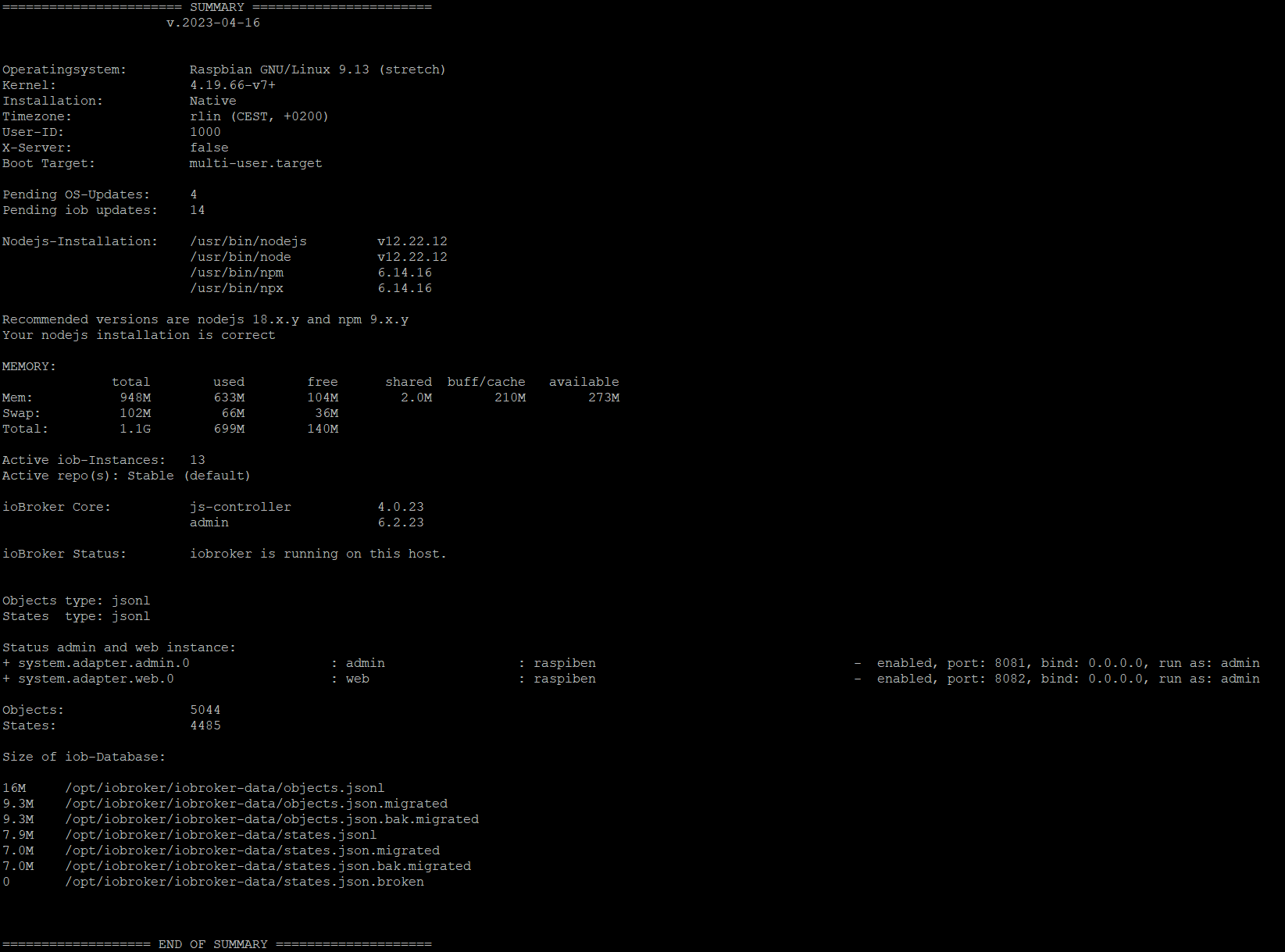
Wo stehst du denn im Moment?
iob diaghilft dir da evtl. weiter.
-
@worn sagte in Server Cannot start inMem-objects on port 9001:
Aktualisieren mache ich natürlich jetzt.
Wo stehst du denn im Moment?
iob diaghilft dir da evtl. weiter.





Hey! Du scheinst an dieser Unterhaltung interessiert zu sein, hast aber noch kein Konto.
Hast du es satt, bei jedem Besuch durch die gleichen Beiträge zu scrollen? Wenn du dich für ein Konto anmeldest, kommst du immer genau dorthin zurück, wo du zuvor warst, und kannst dich über neue Antworten benachrichtigen lassen (entweder per E-Mail oder Push-Benachrichtigung). Du kannst auch Lesezeichen speichern und Beiträge positiv bewerten, um anderen Community-Mitgliedern deine Wertschätzung zu zeigen.
Mit deinem Input könnte dieser Beitrag noch besser werden 💗
Registrieren Anmelden326
Online33.0k
Benutzende83.7k
Themen1.3m
Beiträge