
NEWS




ioBroker in Proxmox nach Doku installiert, aber Fragen!
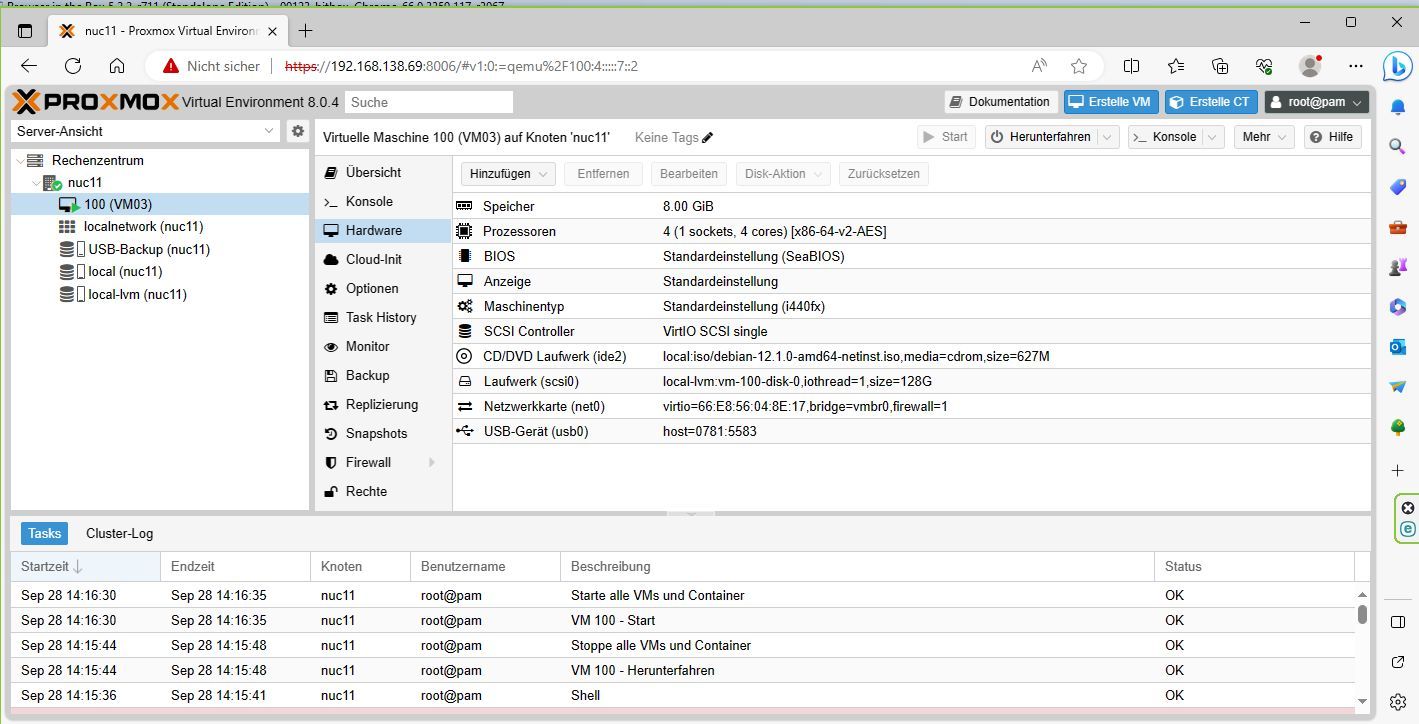
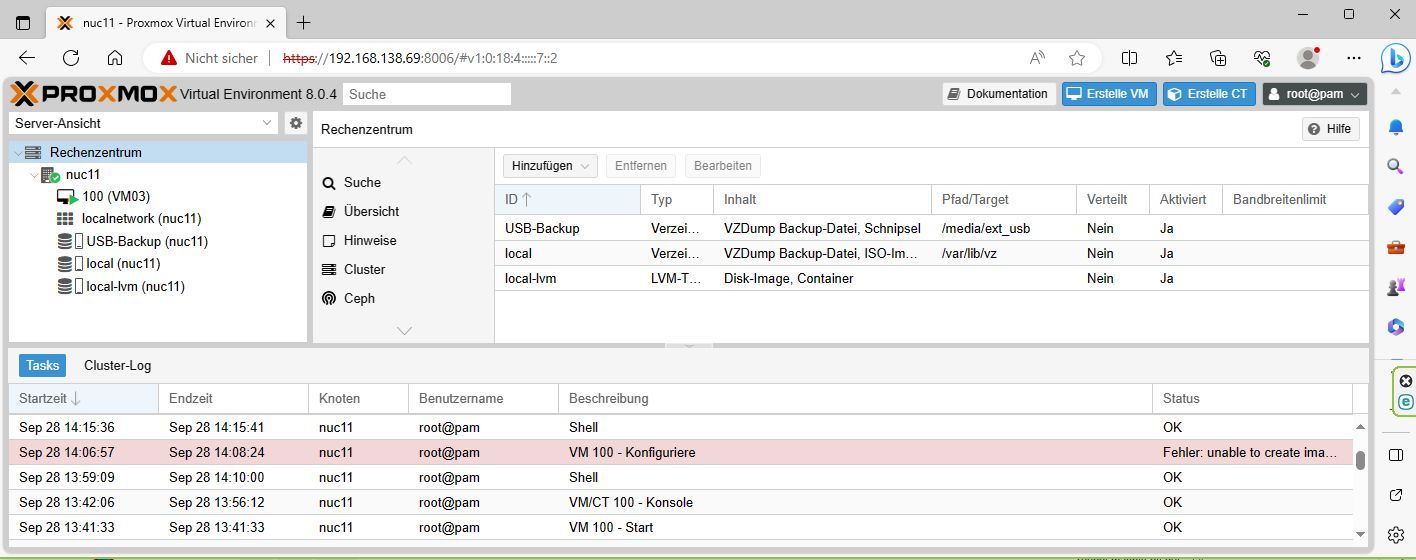
-
@crunchip sagte in ioBroker in Proxmox nach Doku installiert, aber Fragen!:
Verzeichnis und mount hattest du doch schon erstellt auf der VM, oder?
nee, nur das Gerät.
Für Verzeichnis und mount fehlen mir die Buttons oder Parameter@crunchip sagte in ioBroker in Proxmox nach Doku installiert, aber Fragen!:
Rechte ändern
sudo chmod 766 -c -R /ort/ordnerja, wenn ich ort und ordner hätte
@crunchip sagte in ioBroker in Proxmox nach Doku installiert, aber Fragen!:
das muss auch weg
dann mac ich das mal als erstes
@homoran sagte in ioBroker in Proxmox nach Doku installiert, aber Fragen!:
Für Verzeichnis und mount fehlen mir die Buttons oder Parameter
??
du hattest doch oben schon /media/usbstick angelegtumgestiegen von Proxmox auf Unraid
-
@homoran sagte in ioBroker in Proxmox nach Doku installiert, aber Fragen!:
Für Verzeichnis und mount fehlen mir die Buttons oder Parameter
??
du hattest doch oben schon /media/usbstick angelegt@crunchip sagte in ioBroker in Proxmox nach Doku installiert, aber Fragen!:
@homoran sagte in ioBroker in Proxmox nach Doku installiert, aber Fragen!:
Für Verzeichnis und mount fehlen mir die Buttons oder Parameter
??
du hattest doch oben schon /media/usbstick angelegtääähm, gestern oder vorgestern?
da gab es auch ein sdb1, das gibt es nicht mehr
pi@VM03:~$ sudo blkid
[sudo] Passwort für pi:
/dev/sr0: BLOCK_SIZE="2048" UUID="2023-07-22-10-52-30-00" LABEL="Debian 12.1.0 amd64 n" TYPE="iso9660" PTUUID="3db87b5e" PTTYPE="dos"
/dev/sdc1: UUID="60a9d942-0ebd-473c-8d77-b15e15a21df7" BLOCK_SIZE="4096" TYPE="ext4"
/dev/sda5: UUID="fc17aa9c-8f67-44c1-a81e-596eaf6b932e" TYPE="swap" PARTUUID="f97472f3-05"
/dev/sda1: UUID="8c135bc3-7ee2-40fa-b164-d21aab2f5661" BLOCK_SIZE="4096" TYPE="ext4" PARTUUID="f97472f3-01"
pi@VM03:~$
edit
pi@VM03:~$ ls -la /media/
insgesamt 16
drwxr-xr-x  4 root root 4096 29. Sep 13:39 .
drwxr-xr-x 18 root root 4096 28. Sep 18:15 ..
lrwxrwxrwx  1 root root    6 28. Sep 18:12 cdrom -> cdrom0
drwxr-xr-x  2 root root 4096 28. Sep 18:12 cdrom0
drwxr-xr-x  2 root root 4096 29. Sep 13:39 usbstick
pi@VM03:~$ ls -la /media/usbstick
insgesamt 8
drwxr-xr-x 2 root root 4096 29. Sep 13:39 .
drwxr-xr-x 4 root root 4096 29. Sep 13:39 ..
pi@VM03:~$
aber wo mounte ich den hin?
edit2
pi@VM03:~$ mount
sysfs on /sys type sysfs (rw,nosuid,nodev,noexec,relatime)
proc on /proc type proc (rw,nosuid,nodev,noexec,relatime)
udev on /dev type devtmpfs (rw,nosuid,relatime,size=4042836k,nr_inodes=1010709,mode=755,inode64)
devpts on /dev/pts type devpts (rw,nosuid,noexec,relatime,gid=5,mode=620,ptmxmode=000)
tmpfs on /run type tmpfs (rw,nosuid,nodev,noexec,relatime,size=813124k,mode=755,inode64)
/dev/sda1 on / type ext4 (rw,relatime,errors=remount-ro)
securityfs on /sys/kernel/security type securityfs (rw,nosuid,nodev,noexec,relatime)
tmpfs on /dev/shm type tmpfs (rw,nosuid,nodev,inode64)
tmpfs on /run/lock type tmpfs (rw,nosuid,nodev,noexec,relatime,size=5120k,inode64)
cgroup2 on /sys/fs/cgroup type cgroup2 (rw,nosuid,nodev,noexec,relatime,nsdelegate,memory_recursiveprot)
pstore on /sys/fs/pstore type pstore (rw,nosuid,nodev,noexec,relatime)
bpf on /sys/fs/bpf type bpf (rw,nosuid,nodev,noexec,relatime,mode=700)
systemd-1 on /proc/sys/fs/binfmt_misc type autofs (rw,relatime,fd=30,pgrp=1,timeout=0,minproto=5,maxproto=5,direct,pipe_ino=1633)
mqueue on /dev/mqueue type mqueue (rw,nosuid,nodev,noexec,relatime)
debugfs on /sys/kernel/debug type debugfs (rw,nosuid,nodev,noexec,relatime)
tracefs on /sys/kernel/tracing type tracefs (rw,nosuid,nodev,noexec,relatime)
hugetlbfs on /dev/hugepages type hugetlbfs (rw,relatime,pagesize=2M)
configfs on /sys/kernel/config type configfs (rw,nosuid,nodev,noexec,relatime)
fusectl on /sys/fs/fuse/connections type fusectl (rw,nosuid,nodev,noexec,relatime)
ramfs on /run/credentials/systemd-sysctl.service type ramfs (ro,nosuid,nodev,noexec,relatime,mode=700)
ramfs on /run/credentials/systemd-sysusers.service type ramfs (ro,nosuid,nodev,noexec,relatime,mode=700)
ramfs on /run/credentials/systemd-tmpfiles-setup-dev.service type ramfs (ro,nosuid,nodev,noexec,relatime,mode=700)ramfs on /run/credentials/systemd-tmpfiles-setup.service type ramfs (ro,nosuid,nodev,noexec,relatime,mode=700)
binfmt_misc on /proc/sys/fs/binfmt_misc type binfmt_misc (rw,nosuid,nodev,noexec,relatime)
sunrpc on /run/rpc_pipefs type rpc_pipefs (rw,relatime)
tmpfs on /run/user/1000 type tmpfs (rw,nosuid,nodev,relatime,size=813120k,nr_inodes=203280,mode=700,uid=1000,gid=1000,inode64)
pi@VM03:~$
kein Support per PN! - Fragen im Forum stellen - Benutzt das Voting rechts unten im Beitrag wenn er euch geholfen hat.
Das Forum freut sich über eine Spende. Benutzt dazu den Spendenbutton oben rechts. Danke!
der Installationsfixer: curl -fsL https://iobroker.net/fix.sh | bash - -
@crunchip sagte in ioBroker in Proxmox nach Doku installiert, aber Fragen!:
@homoran sagte in ioBroker in Proxmox nach Doku installiert, aber Fragen!:
Für Verzeichnis und mount fehlen mir die Buttons oder Parameter
??
du hattest doch oben schon /media/usbstick angelegtääähm, gestern oder vorgestern?
da gab es auch ein sdb1, das gibt es nicht mehr
pi@VM03:~$ sudo blkid
[sudo] Passwort für pi:
/dev/sr0: BLOCK_SIZE="2048" UUID="2023-07-22-10-52-30-00" LABEL="Debian 12.1.0 amd64 n" TYPE="iso9660" PTUUID="3db87b5e" PTTYPE="dos"
/dev/sdc1: UUID="60a9d942-0ebd-473c-8d77-b15e15a21df7" BLOCK_SIZE="4096" TYPE="ext4"
/dev/sda5: UUID="fc17aa9c-8f67-44c1-a81e-596eaf6b932e" TYPE="swap" PARTUUID="f97472f3-05"
/dev/sda1: UUID="8c135bc3-7ee2-40fa-b164-d21aab2f5661" BLOCK_SIZE="4096" TYPE="ext4" PARTUUID="f97472f3-01"
pi@VM03:~$
edit
pi@VM03:~$ ls -la /media/
insgesamt 16
drwxr-xr-x  4 root root 4096 29. Sep 13:39 .
drwxr-xr-x 18 root root 4096 28. Sep 18:15 ..
lrwxrwxrwx  1 root root    6 28. Sep 18:12 cdrom -> cdrom0
drwxr-xr-x  2 root root 4096 28. Sep 18:12 cdrom0
drwxr-xr-x  2 root root 4096 29. Sep 13:39 usbstick
pi@VM03:~$ ls -la /media/usbstick
insgesamt 8
drwxr-xr-x 2 root root 4096 29. Sep 13:39 .
drwxr-xr-x 4 root root 4096 29. Sep 13:39 ..
pi@VM03:~$
aber wo mounte ich den hin?
edit2
pi@VM03:~$ mount sysfs on /sys type sysfs (rw,nosuid,nodev,noexec,relatime) proc on /proc type proc (rw,nosuid,nodev,noexec,relatime) udev on /dev type devtmpfs (rw,nosuid,relatime,size=4042836k,nr_inodes=1010709,mode=755,inode64) devpts on /dev/pts type devpts (rw,nosuid,noexec,relatime,gid=5,mode=620,ptmxmode=000) tmpfs on /run type tmpfs (rw,nosuid,nodev,noexec,relatime,size=813124k,mode=755,inode64) /dev/sda1 on / type ext4 (rw,relatime,errors=remount-ro) securityfs on /sys/kernel/security type securityfs (rw,nosuid,nodev,noexec,relatime) tmpfs on /dev/shm type tmpfs (rw,nosuid,nodev,inode64) tmpfs on /run/lock type tmpfs (rw,nosuid,nodev,noexec,relatime,size=5120k,inode64) cgroup2 on /sys/fs/cgroup type cgroup2 (rw,nosuid,nodev,noexec,relatime,nsdelegate,memory_recursiveprot) pstore on /sys/fs/pstore type pstore (rw,nosuid,nodev,noexec,relatime) bpf on /sys/fs/bpf type bpf (rw,nosuid,nodev,noexec,relatime,mode=700) systemd-1 on /proc/sys/fs/binfmt_misc type autofs (rw,relatime,fd=30,pgrp=1,timeout=0,minproto=5,maxproto=5,direct,pipe_ino=1633) mqueue on /dev/mqueue type mqueue (rw,nosuid,nodev,noexec,relatime) debugfs on /sys/kernel/debug type debugfs (rw,nosuid,nodev,noexec,relatime) tracefs on /sys/kernel/tracing type tracefs (rw,nosuid,nodev,noexec,relatime) hugetlbfs on /dev/hugepages type hugetlbfs (rw,relatime,pagesize=2M) configfs on /sys/kernel/config type configfs (rw,nosuid,nodev,noexec,relatime) fusectl on /sys/fs/fuse/connections type fusectl (rw,nosuid,nodev,noexec,relatime) ramfs on /run/credentials/systemd-sysctl.service type ramfs (ro,nosuid,nodev,noexec,relatime,mode=700) ramfs on /run/credentials/systemd-sysusers.service type ramfs (ro,nosuid,nodev,noexec,relatime,mode=700) ramfs on /run/credentials/systemd-tmpfiles-setup-dev.service type ramfs (ro,nosuid,nodev,noexec,relatime,mode=700)ramfs on /run/credentials/systemd-tmpfiles-setup.service type ramfs (ro,nosuid,nodev,noexec,relatime,mode=700) binfmt_misc on /proc/sys/fs/binfmt_misc type binfmt_misc (rw,nosuid,nodev,noexec,relatime) sunrpc on /run/rpc_pipefs type rpc_pipefs (rw,relatime) tmpfs on /run/user/1000 type tmpfs (rw,nosuid,nodev,relatime,size=813120k,nr_inodes=203280,mode=700,uid=1000,gid=1000,inode64) pi@VM03:~$@homoran sagte in ioBroker in Proxmox nach Doku installiert, aber Fragen!:
drwxr-xr-x 2 root root 4096 29. Sep 13:39 usbstick
da ist es doch, bleibt ja bestehen der Ordner
allerdings die Rechte noch nicht angepasst@homoran sagte in ioBroker in Proxmox nach Doku installiert, aber Fragen!:
da gab es auch ein sdb1
logisch gibts den nimmer, hast ja neu formatiert
müsste ja jetzt sdc1 sein@homoran sagte in ioBroker in Proxmox nach Doku installiert, aber Fragen!:
aber wo mounte ich den hin?
mount /dev/sdc1 /media/usbstickdann sollte es schon mal mit dem backitup Adapter funktionieren
rebootfest, dann allerdings erst mit dem Eintrag in die fstab
umgestiegen von Proxmox auf Unraid
-
@homoran sagte in ioBroker in Proxmox nach Doku installiert, aber Fragen!:
drwxr-xr-x 2 root root 4096 29. Sep 13:39 usbstick
da ist es doch, bleibt ja bestehen der Ordner
allerdings die Rechte noch nicht angepasst@homoran sagte in ioBroker in Proxmox nach Doku installiert, aber Fragen!:
da gab es auch ein sdb1
logisch gibts den nimmer, hast ja neu formatiert
müsste ja jetzt sdc1 sein@homoran sagte in ioBroker in Proxmox nach Doku installiert, aber Fragen!:
aber wo mounte ich den hin?
mount /dev/sdc1 /media/usbstickdann sollte es schon mal mit dem backitup Adapter funktionieren
rebootfest, dann allerdings erst mit dem Eintrag in die fstab
@crunchip sagte in ioBroker in Proxmox nach Doku installiert, aber Fragen!:
logisch gibts den nimmer, hast ja neu formatiert
das passt
@crunchip sagte in ioBroker in Proxmox nach Doku installiert, aber Fragen!:
müsste ja jetzt sdc1 sein
kann ich das verifizieren?
kein Support per PN! - Fragen im Forum stellen - Benutzt das Voting rechts unten im Beitrag wenn er euch geholfen hat.
Das Forum freut sich über eine Spende. Benutzt dazu den Spendenbutton oben rechts. Danke!
der Installationsfixer: curl -fsL https://iobroker.net/fix.sh | bash - -
@crunchip sagte in ioBroker in Proxmox nach Doku installiert, aber Fragen!:
logisch gibts den nimmer, hast ja neu formatiert
das passt
@crunchip sagte in ioBroker in Proxmox nach Doku installiert, aber Fragen!:
müsste ja jetzt sdc1 sein
kann ich das verifizieren?
@homoran sagte in ioBroker in Proxmox nach Doku installiert, aber Fragen!:
ann ich das verifizieren
wenn du ihn absteckst und gegenprüfst
umgestiegen von Proxmox auf Unraid
-
@homoran sagte in ioBroker in Proxmox nach Doku installiert, aber Fragen!:
ann ich das verifizieren
wenn du ihn absteckst und gegenprüfst
@crunchip sagte in ioBroker in Proxmox nach Doku installiert, aber Fragen!:
@homoran sagte in ioBroker in Proxmox nach Doku installiert, aber Fragen!:
ann ich das verifizieren
wenn du ihn absteckst und gegenprüfst
nööö
pi@VM03:~$ df -h
Dateisystem    Größe Benutzt Verf. Verw% Eingehängt auf
udev            3,9G       0  3,9G    0% /dev
tmpfs           795M    540K  794M    1% /run
/dev/sda1       187G    3,1G  175G    2% /
tmpfs           3,9G       0  3,9G    0% /dev/shm
tmpfs           5,0M       0  5,0M    0% /run/lock
tmpfs           795M       0  795M    0% /run/user/1000
/dev/sdc1        57G     24K   54G    1% /media/usbstick
pi@VM03:~$
sieht gut aus, jetzt chmodden
pi@VM03:~$ sudo chmod 766 -c -R /media/usbstick
der Modus von '/media/usbstick' wurde von 0755 (rwxr-xr-x) in 0766 (rwxrw-rw-) geändert
der Modus von '/media/usbstick/lost+found' wurde von 0700 (rwx------) in 0766 (rwxrw-rw-) geändert
pi@VM03:~$ ls -la /media/usbstick
ls: Zugriff auf '/media/usbstick/.' nicht möglich: Keine Berechtigung
ls: Zugriff auf '/media/usbstick/..' nicht möglich: Keine Berechtigung
ls: Zugriff auf '/media/usbstick/lost+found' nicht möglich: Keine Berechtigung
insgesamt 0
d????????? ? ? ? ?             ? .
d????????? ? ? ? ?             ? ..
d????????? ? ? ? ?             ? lost+found
pi@VM03:~$ sudo ls -la /media/usbstick
insgesamt 24
drwxrw-rw- 3 root root  4096 30. Sep 17:20 .
drwxr-xr-x 4 root root  4096 29. Sep 13:39 ..
drwxrw-rw- 2 root root 16384 30. Sep 17:20 lost+found
pi@VM03:~$
kein Support per PN! - Fragen im Forum stellen - Benutzt das Voting rechts unten im Beitrag wenn er euch geholfen hat.
Das Forum freut sich über eine Spende. Benutzt dazu den Spendenbutton oben rechts. Danke!
der Installationsfixer: curl -fsL https://iobroker.net/fix.sh | bash - -
@crunchip sagte in ioBroker in Proxmox nach Doku installiert, aber Fragen!:
@homoran sagte in ioBroker in Proxmox nach Doku installiert, aber Fragen!:
ann ich das verifizieren
wenn du ihn absteckst und gegenprüfst
nööö
pi@VM03:~$ df -h
Dateisystem    Größe Benutzt Verf. Verw% Eingehängt auf
udev            3,9G       0  3,9G    0% /dev
tmpfs           795M    540K  794M    1% /run
/dev/sda1       187G    3,1G  175G    2% /
tmpfs           3,9G       0  3,9G    0% /dev/shm
tmpfs           5,0M       0  5,0M    0% /run/lock
tmpfs           795M       0  795M    0% /run/user/1000
/dev/sdc1        57G     24K   54G    1% /media/usbstick
pi@VM03:~$
sieht gut aus, jetzt chmodden
pi@VM03:~$ sudo chmod 766 -c -R /media/usbstick der Modus von '/media/usbstick' wurde von 0755 (rwxr-xr-x) in 0766 (rwxrw-rw-) geändert der Modus von '/media/usbstick/lost+found' wurde von 0700 (rwx------) in 0766 (rwxrw-rw-) geändert pi@VM03:~$ ls -la /media/usbstick ls: Zugriff auf '/media/usbstick/.' nicht möglich: Keine Berechtigung ls: Zugriff auf '/media/usbstick/..' nicht möglich: Keine Berechtigung ls: Zugriff auf '/media/usbstick/lost+found' nicht möglich: Keine Berechtigung insgesamt 0 d????????? ? ? ? ? ? . d????????? ? ? ? ? ? .. d????????? ? ? ? ? ? lost+found pi@VM03:~$ sudo ls -la /media/usbstick insgesamt 24 drwxrw-rw- 3 root root 4096 30. Sep 17:20 . drwxr-xr-x 4 root root 4096 29. Sep 13:39 .. drwxrw-rw- 2 root root 16384 30. Sep 17:20 lost+found pi@VM03:~$@homoran sagte in ioBroker in Proxmox nach Doku installiert, aber Fragen!:
nööö
oder so

@homoran sagte in ioBroker in Proxmox nach Doku installiert, aber Fragen!:
jetzt chmodden
sudo chmod 766 -c -R /media/usbstickdann
sudo mount /dev/sdc1 /media/usbsticknun backitup testen
-
@crunchip sagte in ioBroker in Proxmox nach Doku installiert, aber Fragen!:
@homoran sagte in ioBroker in Proxmox nach Doku installiert, aber Fragen!:
ann ich das verifizieren
wenn du ihn absteckst und gegenprüfst
nööö
pi@VM03:~$ df -h
Dateisystem    Größe Benutzt Verf. Verw% Eingehängt auf
udev            3,9G       0  3,9G    0% /dev
tmpfs           795M    540K  794M    1% /run
/dev/sda1       187G    3,1G  175G    2% /
tmpfs           3,9G       0  3,9G    0% /dev/shm
tmpfs           5,0M       0  5,0M    0% /run/lock
tmpfs           795M       0  795M    0% /run/user/1000
/dev/sdc1        57G     24K   54G    1% /media/usbstick
pi@VM03:~$
sieht gut aus, jetzt chmodden
pi@VM03:~$ sudo chmod 766 -c -R /media/usbstick der Modus von '/media/usbstick' wurde von 0755 (rwxr-xr-x) in 0766 (rwxrw-rw-) geändert der Modus von '/media/usbstick/lost+found' wurde von 0700 (rwx------) in 0766 (rwxrw-rw-) geändert pi@VM03:~$ ls -la /media/usbstick ls: Zugriff auf '/media/usbstick/.' nicht möglich: Keine Berechtigung ls: Zugriff auf '/media/usbstick/..' nicht möglich: Keine Berechtigung ls: Zugriff auf '/media/usbstick/lost+found' nicht möglich: Keine Berechtigung insgesamt 0 d????????? ? ? ? ? ? . d????????? ? ? ? ? ? .. d????????? ? ? ? ? ? lost+found pi@VM03:~$ sudo ls -la /media/usbstick insgesamt 24 drwxrw-rw- 3 root root 4096 30. Sep 17:20 . drwxr-xr-x 4 root root 4096 29. Sep 13:39 .. drwxrw-rw- 2 root root 16384 30. Sep 17:20 lost+found pi@VM03:~$@homoran sagte in ioBroker in Proxmox nach Doku installiert, aber Fragen!:
d????????? ? ? ? ? ? . d????????? ? ? ? ? ? .. d????????? ? ? ? ? ? lost+found
was hast du da noch auf dem Stick?
@homoran sagte in ioBroker in Proxmox nach Doku installiert, aber Fragen!:
drwxr-xr-x 4 root root 4096 29. Sep 13:39 ..
dachte du hast den neu formatiert
umgestiegen von Proxmox auf Unraid
-
@homoran sagte in ioBroker in Proxmox nach Doku installiert, aber Fragen!:
d????????? ? ? ? ? ? . d????????? ? ? ? ? ? .. d????????? ? ? ? ? ? lost+found
was hast du da noch auf dem Stick?
@homoran sagte in ioBroker in Proxmox nach Doku installiert, aber Fragen!:
drwxr-xr-x 4 root root 4096 29. Sep 13:39 ..
dachte du hast den neu formatiert
@crunchip sagte in ioBroker in Proxmox nach Doku installiert, aber Fragen!:
@homoran sagte in ioBroker in Proxmox nach Doku installiert, aber Fragen!:
d????????? ? ? ? ? ? . d????????? ? ? ? ? ? .. d????????? ? ? ? ? ? lost+found
was hast du da noch auf dem Stick?
nicht dass ich wüsstexwas ich hier tue

das kam ohne sudo
mit sudo war es anscheinend richtig
pi@VM03:~$ sudo mkdir /media/usbstick/backups
pi@VM03:~$ sudo ls -la /media/usbstick
insgesamt 28
drwxrw-rw- 4 root root  4096 30. Sep 20:19 .
drwxr-xr-x 4 root root  4096 29. Sep 13:39 ..
drwxr-xr-x 2 root root  4096 30. Sep 20:19 backups
drwxrw-rw- 2 root root 16384 30. Sep 17:20 lost+found
pi@VM03:~$ sudo ls -la /media/usbstick/backups
insgesamt 8
drwxr-xr-x 2 root root 4096 30. Sep 20:19 .
drwxrw-rw- 4 root root 4096 30. Sep 20:19 ..
pi@VM03:~$
allerdings findet backitup es nicht
Started iobroker ...
[DEBUG] [iobroker] start with {"type":"creator","workDir":"/opt/iobroker/node_modules/iobroker.js-controller/iobroker.js","time":"02:40","debugging":true,"slaveBackup":"Single","everyXDays":"1","deleteBackupAfter":0,"cifs":{"enabled":true,"mountType":"Copy","type":"storage","source":"local","mount":"","debugging":true,"fileDir":"/opt/iobroker/iobroker-data/backitup","wakeOnLAN":false,"macAd":"20:DE:20:DE:20:DE","wolTime":"25","wolPort":"9","smb":"vers=3.1.1","sudo":true,"cifsDomain":"","clientInodes":false,"deleteOldBackup":false,"ownDir":false,"dir":"media/usbstick/backups","dirMinimal":"sharename/backupDir","user":"","pass":"****","ignoreErrors":false},"ignoreErrors":false,"dir":"/opt/iobroker","historyHTML":{"enabled":true,"type":"message","entriesNumber":"25","ignoreErrors":false,"systemLang":"de"},"historyJSON":{"enabled":true,"type":"message","entriesNumber":"25","ignoreErrors":false,"systemLang":"de"},"signal":{"enabled":false,"notificationsType":"Telegram","type":"message","instance":"","NoticeType":"longSignalNotice","onlyError":false,"signalWaiting":0,"hostName":"","ignoreErrors":false,"systemLang":"de"},"matrix":{"enabled":false,"notificationsType":"Telegram","type":"message","instance":"","NoticeType":"longMatrixNotice","onlyError":false,"matrixWaiting":0,"hostName":"","ignoreErrors":false,"systemLang":"de"},"backupDir":"/opt/iobroker/backups"}
[DEBUG] [iobroker] - host.VM03 105 states saved

[DEBUG] [iobroker] - host.VM03 144 objects saved

[DEBUG] [iobroker] - Backup created: /opt/iobroker/backups/iobroker_2023_09_30-20_22_05_backupiobroker.tar.gz
This backup can only be restored with js-controller version up from 4.1

[DEBUG] [iobroker] - done
[DEBUG] [cifs] - used copy path: /media/usbstick/backups
[ERROR] [cifs] - Path "/media/usbstick/backups" not found
[DEBUG] [cifs] start with {"mountType":"Copy","type":"storage","source":"local","mount":"","debugging":true,"fileDir":"/opt/iobroker/iobroker-data/backitup","wakeOnLAN":false,"macAd":"20:DE:20:DE:20:DE","wolTime":"25","wolPort":"9","smb":"vers=3.1.1","sudo":true,"cifsDomain":"","clientInodes":false,"deleteOldBackup":false,"ownDir":false,"dir":"media/usbstick/backups","dirMinimal":"sharename/backupDir","user":"","pass":"****","ignoreErrors":false,"deleteBackupAfter":0}
kein Support per PN! - Fragen im Forum stellen - Benutzt das Voting rechts unten im Beitrag wenn er euch geholfen hat.
Das Forum freut sich über eine Spende. Benutzt dazu den Spendenbutton oben rechts. Danke!
der Installationsfixer: curl -fsL https://iobroker.net/fix.sh | bash - -
@homoran sagte in ioBroker in Proxmox nach Doku installiert, aber Fragen!:
d????????? ? ? ? ? ? . d????????? ? ? ? ? ? .. d????????? ? ? ? ? ? lost+found
was hast du da noch auf dem Stick?
@homoran sagte in ioBroker in Proxmox nach Doku installiert, aber Fragen!:
drwxr-xr-x 4 root root 4096 29. Sep 13:39 ..
dachte du hast den neu formatiert
@crunchip sagte in ioBroker in Proxmox nach Doku installiert, aber Fragen!:
dachte du hast den neu formatiert
dann eben nochmal!
kann ich das jetzt aus der VM machen?
oder nochmal von vorne?kein Support per PN! - Fragen im Forum stellen - Benutzt das Voting rechts unten im Beitrag wenn er euch geholfen hat.
Das Forum freut sich über eine Spende. Benutzt dazu den Spendenbutton oben rechts. Danke!
der Installationsfixer: curl -fsL https://iobroker.net/fix.sh | bash - -
@crunchip sagte in ioBroker in Proxmox nach Doku installiert, aber Fragen!:
dachte du hast den neu formatiert
dann eben nochmal!
kann ich das jetzt aus der VM machen?
oder nochmal von vorne?@homoran sagte in ioBroker in Proxmox nach Doku installiert, aber Fragen!:
dann eben nochmal!
warte mal
du hast ja jetzt noch
/backupsmit dran hängenmach mal
sudo umount /dev/sdc1 /media/usbstickdann
sudo mount /dev/sdc1 /media/usbstick/backupsund jetzt backup testen
den mount erstellst du aber schon aus deiner VM?
edit
@homoran sagte in ioBroker in Proxmox nach Doku installiert, aber Fragen!:
drwxr-xr-x 2 root root 4096 30. Sep 20:19 backups
passen ja immer noch nicht die Rechte
umgestiegen von Proxmox auf Unraid
-
@homoran sagte in ioBroker in Proxmox nach Doku installiert, aber Fragen!:
dann eben nochmal!
warte mal
du hast ja jetzt noch
/backupsmit dran hängenmach mal
sudo umount /dev/sdc1 /media/usbstickdann
sudo mount /dev/sdc1 /media/usbstick/backupsund jetzt backup testen
den mount erstellst du aber schon aus deiner VM?
edit
@homoran sagte in ioBroker in Proxmox nach Doku installiert, aber Fragen!:
drwxr-xr-x 2 root root 4096 30. Sep 20:19 backups
passen ja immer noch nicht die Rechte
@crunchip sagte in ioBroker in Proxmox nach Doku installiert, aber Fragen!:
den mount erstellst du aber schon aus deiner VM?
ja!
danke!
stay tuned -
@homoran sagte in ioBroker in Proxmox nach Doku installiert, aber Fragen!:
dann eben nochmal!
warte mal
du hast ja jetzt noch
/backupsmit dran hängenmach mal
sudo umount /dev/sdc1 /media/usbstickdann
sudo mount /dev/sdc1 /media/usbstick/backupsund jetzt backup testen
den mount erstellst du aber schon aus deiner VM?
edit
@homoran sagte in ioBroker in Proxmox nach Doku installiert, aber Fragen!:
drwxr-xr-x 2 root root 4096 30. Sep 20:19 backups
passen ja immer noch nicht die Rechte
@crunchip hmm
i@VM03:~$ sudo mount /dev/sdc1 /media/usbstick/backups
mount: /media/usbstick/backups: mount point does not exist.
       dmesg(1) may have more information after failed mount system call.
pi@VM03:~$
pi@VM03:~$ sudo ls -la /media/usbstick insgesamt 8 drwxr-xr-x 2 root root 4096 29. Sep 13:39 . drwxr-xr-x 4 root root 4096 29. Sep 13:39 .. pi@VM03:~$wo ist denn der Unterordber hin?
kein Support per PN! - Fragen im Forum stellen - Benutzt das Voting rechts unten im Beitrag wenn er euch geholfen hat.
Das Forum freut sich über eine Spende. Benutzt dazu den Spendenbutton oben rechts. Danke!
der Installationsfixer: curl -fsL https://iobroker.net/fix.sh | bash - -
@crunchip hmm
i@VM03:~$ sudo mount /dev/sdc1 /media/usbstick/backups
mount: /media/usbstick/backups: mount point does not exist.
       dmesg(1) may have more information after failed mount system call.
pi@VM03:~$
pi@VM03:~$ sudo ls -la /media/usbstick insgesamt 8 drwxr-xr-x 2 root root 4096 29. Sep 13:39 . drwxr-xr-x 4 root root 4096 29. Sep 13:39 .. pi@VM03:~$wo ist denn der Unterordber hin?
@homoran sagte in ioBroker in Proxmox nach Doku installiert, aber Fragen!:
wo ist denn der Unterordber hin?
du fragst mich sachen
-
@homoran sagte in ioBroker in Proxmox nach Doku installiert, aber Fragen!:
dann eben nochmal!
warte mal
du hast ja jetzt noch
/backupsmit dran hängenmach mal
sudo umount /dev/sdc1 /media/usbstickdann
sudo mount /dev/sdc1 /media/usbstick/backupsund jetzt backup testen
den mount erstellst du aber schon aus deiner VM?
edit
@homoran sagte in ioBroker in Proxmox nach Doku installiert, aber Fragen!:
drwxr-xr-x 2 root root 4096 30. Sep 20:19 backups
passen ja immer noch nicht die Rechte
@crunchip sagte in ioBroker in Proxmox nach Doku installiert, aber Fragen!:
passen ja immer noch nicht die Rechte
hat sich verstellt!
nochmal gemacht
 i@VM03:~$ sudo chmod 766 -c -R /media/usbstick
der Modus von '/media/usbstick' wurde von 0755 (rwxr-xr-x) in 0766 (rwxrw-rw-) geändert
pi@VM03:~$
das war schon mal so
kein Support per PN! - Fragen im Forum stellen - Benutzt das Voting rechts unten im Beitrag wenn er euch geholfen hat.
Das Forum freut sich über eine Spende. Benutzt dazu den Spendenbutton oben rechts. Danke!
der Installationsfixer: curl -fsL https://iobroker.net/fix.sh | bash - -
@crunchip sagte in ioBroker in Proxmox nach Doku installiert, aber Fragen!:
passen ja immer noch nicht die Rechte
hat sich verstellt!
nochmal gemacht
 i@VM03:~$ sudo chmod 766 -c -R /media/usbstick
der Modus von '/media/usbstick' wurde von 0755 (rwxr-xr-x) in 0766 (rwxrw-rw-) geändert
pi@VM03:~$
das war schon mal so
-
@homoran sagte in ioBroker in Proxmox nach Doku installiert, aber Fragen!:
Dann gab es wohl Probleme wegen der ausgewählten Objekte, daraufhin hatte ich die Images wieder rausgenommen
was meinst du damit genau?
@homoran sagte in ioBroker in Proxmox nach Doku installiert, aber Fragen!:
Hat auch anscheinend bis zur pve-Ebene geklappt
ist siehe screenshot aktuell für VZDump und Schnipsel sichtbar in deinem Host
@homoran sagte in ioBroker in Proxmox nach Doku installiert, aber Fragen!:
Wie bekomme ich jetzt den Stick in backitup angesprochen?
lösch mal dein usb0 aus der VM und halte die VM an
danach auf dem Proxmox Host die ID des Stick ermitteln
ls -la /dev/disk/by-id/anschließend
qm set 100 -scsi1 /dev/disk/by-id/Deine-Bezeichnung-DesSticks
update VM 100: -scsi1 /dev/disk/by-id/Deine-BezeichnungDes-Sticks
qm100 ist deine VM, scsi1 weil scsi0 schon dein root VM Laufwerk ist
dann kannst du dir nen Ordner auf dem Stick erstellen und diesen anschließend im Backitup Adapter hinterlegen, müsste dann glaub ich unter Verbindungstyp copy funktionieren (nutze das selbst aber nicht)
EDIT
du kannst das qm set....auch direkt in der Gui machen, VM Hardware hinzufügen> Laufwerkdas existiert auch noch.
@crunchip sagte in ioBroker in Proxmox nach Doku installiert, aber Fragen!:
anschließend
qm set 100 -scsi1 /dev/disk/by-id/Deine-Bezeichnung-DesSticks
update VM 100: -scsi1 /dev/disk/by-id/Deine-BezeichnungDes-Sticks
spuckt uns das in die Suppe.
Die Rechte sehen gerade so aus
i@VM03:~$ sudo ls -la /media/usbstick
insgesamt 8
drwxrw-rw- 2 root root 4096 29. Sep 13:39 .
drwxr-xr-x 4 root root 4096 29. Sep 13:39 ..
pi@VM03:~$
kein Support per PN! - Fragen im Forum stellen - Benutzt das Voting rechts unten im Beitrag wenn er euch geholfen hat.
Das Forum freut sich über eine Spende. Benutzt dazu den Spendenbutton oben rechts. Danke!
der Installationsfixer: curl -fsL https://iobroker.net/fix.sh | bash - -
@crunchip sagte in ioBroker in Proxmox nach Doku installiert, aber Fragen!:
@homoran ok, aber wo is der Ordner
den leg ich jetzt nochmal an
und schwupps hat er wieder die falschen Rechte
pi@VM03:~$ sudo mkdir /media/usbstick/backups
pi@VM03:~$ sudo ls -la /media/usbstick
insgesamt 12
drwxrw-rw- 3 root root 4096 30. Sep 21:02 .
drwxr-xr-x 4 root root 4096 29. Sep 13:39 ..
drwxr-xr-x 2 root root 4096 30. Sep 21:02 backups
pi@VM03:~$
geändert! dann klappt's auch mit dem mount
pi@VM03:~$ sudo chmod 766 -c -R /media/usbstick/backups
der Modus von '/media/usbstick/backups' wurde von 0755 (rwxr-xr-x) in 0766 (rwxrw-rw-) geändert
pi@VM03:~$ sudo ls -la /media/usbstick
insgesamt 12
drwxrw-rw- 3 root root 4096 30. Sep 21:02 .
drwxr-xr-x 4 root root 4096 29. Sep 13:39 ..
drwxrw-rw- 2 root root 4096 30. Sep 21:02 backups
pi@VM03:~$ sudo mount /dev/sdc1 /media/usbstick/backups
pi@VM03:~$
kein Support per PN! - Fragen im Forum stellen - Benutzt das Voting rechts unten im Beitrag wenn er euch geholfen hat.
Das Forum freut sich über eine Spende. Benutzt dazu den Spendenbutton oben rechts. Danke!
der Installationsfixer: curl -fsL https://iobroker.net/fix.sh | bash - -
das existiert auch noch.
@crunchip sagte in ioBroker in Proxmox nach Doku installiert, aber Fragen!:
anschließend
qm set 100 -scsi1 /dev/disk/by-id/Deine-Bezeichnung-DesSticks
update VM 100: -scsi1 /dev/disk/by-id/Deine-BezeichnungDes-Sticks
spuckt uns das in die Suppe.
Die Rechte sehen gerade so aus
i@VM03:~$ sudo ls -la /media/usbstick insgesamt 8 drwxrw-rw- 2 root root 4096 29. Sep 13:39 . drwxr-xr-x 4 root root 4096 29. Sep 13:39 .. pi@VM03:~$@homoran sagte in ioBroker in Proxmox nach Doku installiert, aber Fragen!:
spuckt uns das in die Suppe.
dachte das hast du rausgenommen
scsi1
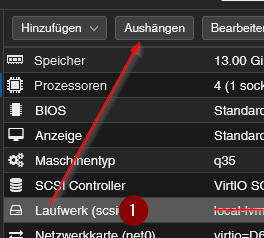
umgestiegen von Proxmox auf Unraid
-
@crunchip sagte in ioBroker in Proxmox nach Doku installiert, aber Fragen!:
@homoran ok, aber wo is der Ordner
den leg ich jetzt nochmal an
und schwupps hat er wieder die falschen Rechte
pi@VM03:~$ sudo mkdir /media/usbstick/backups
pi@VM03:~$ sudo ls -la /media/usbstick
insgesamt 12
drwxrw-rw- 3 root root 4096 30. Sep 21:02 .
drwxr-xr-x 4 root root 4096 29. Sep 13:39 ..
drwxr-xr-x 2 root root 4096 30. Sep 21:02 backups
pi@VM03:~$
geändert! dann klappt's auch mit dem mount
pi@VM03:~$ sudo chmod 766 -c -R /media/usbstick/backups der Modus von '/media/usbstick/backups' wurde von 0755 (rwxr-xr-x) in 0766 (rwxrw-rw-) geändert pi@VM03:~$ sudo ls -la /media/usbstick insgesamt 12 drwxrw-rw- 3 root root 4096 30. Sep 21:02 . drwxr-xr-x 4 root root 4096 29. Sep 13:39 .. drwxrw-rw- 2 root root 4096 30. Sep 21:02 backups pi@VM03:~$ sudo mount /dev/sdc1 /media/usbstick/backups pi@VM03:~$@homoran sagte in ioBroker in Proxmox nach Doku installiert, aber Fragen!:
und schwupps hat er wieder die falschen Rechte
ja, weil nachträglich
@homoran sagte in ioBroker in Proxmox nach Doku installiert, aber Fragen!:
geändert! dann klappt's auch mit dem mount
dann sollte backitup nun durchlaufen
umgestiegen von Proxmox auf Unraid

Hey! Du scheinst an dieser Unterhaltung interessiert zu sein, hast aber noch kein Konto.
Hast du es satt, bei jedem Besuch durch die gleichen Beiträge zu scrollen? Wenn du dich für ein Konto anmeldest, kommst du immer genau dorthin zurück, wo du zuvor warst, und kannst dich über neue Antworten benachrichtigen lassen (entweder per E-Mail oder Push-Benachrichtigung). Du kannst auch Lesezeichen speichern und Beiträge positiv bewerten, um anderen Community-Mitgliedern deine Wertschätzung zu zeigen.
Mit deinem Input könnte dieser Beitrag noch besser werden 💗
Registrieren AnmeldenSupport us
473
Online33.1k
Benutzende83.7k
Themen1.3m
Beiträge