@thomas-braun
Hallo.
Die Signatur ist noch vom Produktivsystem.
Hier mal iob diag vom System der Testinstallation
Skript v.2023-10-10
*** BASE SYSTEM ***
Static hostname: RPI5
Icon name: computer
Operating System: Debian GNU/Linux 12 (bookworm)
Kernel: Linux 6.1.0-rpi8-rpi-2712
Architecture: arm64
Model : Raspberry Pi 5 Model B Rev 1.0
Docker : false
Virtualization : none
Kernel : aarch64
Userland : arm64
Systemuptime and Load:
15:13:43 up 15 min, 2 users, load average: 0.14, 0.14, 0.18
CPU threads: 4
*** RASPBERRY THROTTLING ***
Current issues:
No throttling issues detected.
Previously detected issues:
No throttling issues detected.
*** Time and Time Zones ***
Local time: Fri 2024-02-16 15:13:43 CET
Universal time: Fri 2024-02-16 14:13:43 UTC
RTC time: Fri 2024-02-16 14:13:43
Time zone: Europe/Berlin (CET, +0100)
System clock synchronized: yes
NTP service: active
RTC in local TZ: no
*** User and Groups ***
pi
/home/pi
pi adm dialout cdrom sudo audio video plugdev games users input render netdev gpio i2c spi iobroker
*** X-Server-Setup ***
X-Server: false
Desktop:
Terminal: tty
Boot Target: multi-user.target
*** MEMORY ***
total used free shared buff/cache available
Mem: 8.4G 559M 6.0G 5.3M 2.0G 7.9G
Swap: 104M 0B 104M
Total: 8.5G 559M 6.1G
8053 M total memory
533 M used memory
461 M active memory
1595 M inactive memory
5754 M free memory
105 M buffer memory
1760 M swap cache
99 M total swap
0 M used swap
99 M free swap
Raspberry only:
vc_gencmd_read_response returned -1
error=1 error_msg="Command not registered"
*** FAILED SERVICES ***
UNIT LOAD ACTIVE SUB DESCRIPTION
0 loaded units listed.
*** FILESYSTEM ***
Filesystem Type Size Used Avail Use% Mounted on
udev devtmpfs 3.8G 0 3.8G 0% /dev
tmpfs tmpfs 806M 5.0M 801M 1% /run
/dev/mmcblk0p2 ext4 59G 2.8G 53G 6% /
tmpfs tmpfs 4.0G 0 4.0G 0% /dev/shm
tmpfs tmpfs 5.0M 48K 5.0M 1% /run/lock
/dev/mmcblk0p1 vfat 510M 61M 450M 12% /boot/firmware
tmpfs tmpfs 806M 0 806M 0% /run/user/1000
Messages concerning ext4 filesystem in dmesg:
[Fri Feb 16 14:57:47 2024] Kernel command line: reboot=w coherent_pool=1M 8250.nr_uarts=1 pci=pcie_bus_safe snd_bcm2835.enable_compat_alsa=0 snd_bcm2835.enable_hdmi=1 smsc95xx.macaddr=D8:3A:DD:D7:3F:BA vc_mem.mem_base=0x3fc00000 vc_mem.mem_size=0x40000000 console=ttyAMA10,115200 console=tty1 root=PARTUUID=eb2b2f60-02 rootfstype=ext4 fsck.repair=yes rootwait
[Fri Feb 16 14:57:50 2024] EXT4-fs (mmcblk0p2): mounted filesystem with ordered data mode. Quota mode: none.
[Fri Feb 16 14:57:51 2024] EXT4-fs (mmcblk0p2): re-mounted. Quota mode: none.
Show mounted filesystems \(real ones only\):
TARGET SOURCE FSTYPE OPTIONS
/ /dev/mmcblk0p2 ext4 rw,noatime
`-/boot/firmware /dev/mmcblk0p1 vfat rw,relatime,fmask=0022,dmask=0022,codepage=437,iocharset=ascii,shortname=mixed,errors=remount-ro
Files in neuralgic directories:
/var:
490M /var/
202M /var/cache
197M /var/cache/apt
164M /var/lib
132M /var/lib/apt/lists
Archived and active journals take up 24.0M in the file system.
/opt/iobroker/backups:
4.0K /opt/iobroker/backups/
/opt/iobroker/iobroker-data:
19M /opt/iobroker/iobroker-data/
15M /opt/iobroker/iobroker-data/files
13M /opt/iobroker/iobroker-data/files/admin.admin/custom/static/js
13M /opt/iobroker/iobroker-data/files/admin.admin/custom/static
13M /opt/iobroker/iobroker-data/files/admin.admin/custom
The five largest files in iobroker-data are:
6.3M /opt/iobroker/iobroker-data/files/admin.admin/custom/static/js/vendors-node_modules_iobroker_adapter-react-v5_assets_devices_parseNames_js-node_modules_iobr-99c23e.847b8ad9.chunk.js.map
4.2M /opt/iobroker/iobroker-data/objects.jsonl
2.8M /opt/iobroker/iobroker-data/files/admin.admin/custom/static/js/vendors-node_modules_iobroker_adapter-react-v5_assets_devices_parseNames_js-node_modules_iobr-99c23e.847b8ad9.chunk.js
1.6M /opt/iobroker/iobroker-data/files/admin.admin/custom/static/js/vendors-node_modules_mui_material_Accordion_index_js-node_modules_mui_material_AccordionDetai-57e02d.0886b730.chunk.js.map
652K /opt/iobroker/iobroker-data/files/admin.admin/custom/static/js/vendors-node_modules_mui_material_index_js.40e01f69.chunk.js.map
USB-Devices by-id:
USB-Sticks - Avoid direct links to /dev/* in your adapter setups, please always prefer the links 'by-id':
find: '/dev/serial/by-id/': No such file or directory
*** NodeJS-Installation ***
/usr/bin/nodejs v18.19.1
/usr/bin/node v18.19.1
/usr/bin/npm 10.2.4
/usr/bin/npx 10.2.4
/usr/bin/corepack 0.22.0
nodejs:
Installed: 18.19.1-1nodesource1
Candidate: 18.19.1-1nodesource1
Version table:
*** 18.19.1-1nodesource1 1001
500 https://deb.nodesource.com/node_18.x nodistro/main arm64 Packages
100 /var/lib/dpkg/status
18.19.0+dfsg-6~deb12u1 500
500 http://deb.debian.org/debian-security bookworm-security/main arm64 Packages
18.19.0-1nodesource1 1001
500 https://deb.nodesource.com/node_18.x nodistro/main arm64 Packages
18.18.2-1nodesource1 1001
500 https://deb.nodesource.com/node_18.x nodistro/main arm64 Packages
18.18.1-1nodesource1 1001
500 https://deb.nodesource.com/node_18.x nodistro/main arm64 Packages
18.18.0-1nodesource1 1001
500 https://deb.nodesource.com/node_18.x nodistro/main arm64 Packages
18.17.1-1nodesource1 1001
500 https://deb.nodesource.com/node_18.x nodistro/main arm64 Packages
18.17.0-1nodesource1 1001
500 https://deb.nodesource.com/node_18.x nodistro/main arm64 Packages
18.16.1-1nodesource1 1001
500 https://deb.nodesource.com/node_18.x nodistro/main arm64 Packages
18.16.0-1nodesource1 1001
500 https://deb.nodesource.com/node_18.x nodistro/main arm64 Packages
18.15.0-1nodesource1 1001
500 https://deb.nodesource.com/node_18.x nodistro/main arm64 Packages
18.14.2-1nodesource1 1001
500 https://deb.nodesource.com/node_18.x nodistro/main arm64 Packages
18.14.1-1nodesource1 1001
500 https://deb.nodesource.com/node_18.x nodistro/main arm64 Packages
18.14.0-1nodesource1 1001
500 https://deb.nodesource.com/node_18.x nodistro/main arm64 Packages
18.13.0+dfsg1-1 500
500 http://deb.debian.org/debian bookworm/main arm64 Packages
18.13.0-1nodesource1 1001
500 https://deb.nodesource.com/node_18.x nodistro/main arm64 Packages
18.12.0-1nodesource1 1001
500 https://deb.nodesource.com/node_18.x nodistro/main arm64 Packages
18.11.0-1nodesource1 1001
500 https://deb.nodesource.com/node_18.x nodistro/main arm64 Packages
18.10.0-1nodesource1 1001
500 https://deb.nodesource.com/node_18.x nodistro/main arm64 Packages
18.9.1-1nodesource1 1001
500 https://deb.nodesource.com/node_18.x nodistro/main arm64 Packages
18.9.0-1nodesource1 1001
500 https://deb.nodesource.com/node_18.x nodistro/main arm64 Packages
18.8.0-1nodesource1 1001
500 https://deb.nodesource.com/node_18.x nodistro/main arm64 Packages
18.7.0-1nodesource1 1001
500 https://deb.nodesource.com/node_18.x nodistro/main arm64 Packages
18.6.0-1nodesource1 1001
500 https://deb.nodesource.com/node_18.x nodistro/main arm64 Packages
18.5.0-1nodesource1 1001
500 https://deb.nodesource.com/node_18.x nodistro/main arm64 Packages
18.4.0-1nodesource1 1001
500 https://deb.nodesource.com/node_18.x nodistro/main arm64 Packages
18.3.0-1nodesource1 1001
500 https://deb.nodesource.com/node_18.x nodistro/main arm64 Packages
18.2.0-1nodesource1 1001
500 https://deb.nodesource.com/node_18.x nodistro/main arm64 Packages
18.1.0-1nodesource1 1001
500 https://deb.nodesource.com/node_18.x nodistro/main arm64 Packages
18.0.0-1nodesource1 1001
500 https://deb.nodesource.com/node_18.x nodistro/main arm64 Packages
Temp directories causing npm8 problem: 0
No problems detected
Errors in npm tree:
*** ioBroker-Installation ***
ioBroker Status
iobroker is running on this host.
Objects type: jsonl
States type: jsonl
Core adapters versions
js-controller: 5.0.17
admin: 6.13.16
javascript: "javascript" not found
Adapters from github: 0
Adapter State
+ system.adapter.admin.0 : admin : RPI5 - enabled, port: 8081, bind: 0.0.0.0, run as: admin
+ system.adapter.backitup.0 : backitup : RPI5 - enabled
+ system.adapter.discovery.0 : discovery : RPI5 - enabled
+ instance is alive
Enabled adapters with bindings
+ system.adapter.admin.0 : admin : RPI5 - enabled, port: 8081, bind: 0.0.0.0, run as: admin
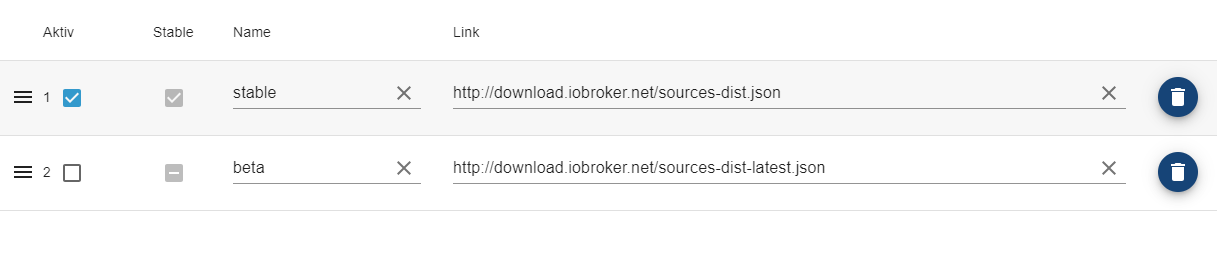
ioBroker-Repositories
stable : http://download.iobroker.net/sources-dist.json
beta : http://download.iobroker.net/sources-dist-latest.json
Active repo(s): stable
Installed ioBroker-Instances
Used repository: stable
Adapter "admin" : 6.13.16 , installed 6.13.16
Adapter "backitup" : 2.9.8 , installed 2.9.8
Adapter "discovery" : 4.2.0 , installed 4.2.0
Controller "js-controller": 5.0.17 , installed 5.0.17
Objects and States
Please stand by - This may take a while
Objects: 143
States: 106
*** OS-Repositories and Updates ***
Hit:1 http://deb.debian.org/debian bookworm InRelease
Hit:2 http://deb.debian.org/debian-security bookworm-security InRelease
Hit:3 http://deb.debian.org/debian bookworm-updates InRelease
Hit:4 http://archive.raspberrypi.com/debian bookworm InRelease
Hit:5 https://deb.nodesource.com/node_18.x nodistro InRelease
Reading package lists...
Pending Updates: 0
*** Listening Ports ***
Active Internet connections (only servers)
Proto Recv-Q Send-Q Local Address Foreign Address State User Inode PID/Program name
tcp 0 0 127.0.0.1:6010 0.0.0.0:* LISTEN 1000 46431 11070/sshd: pi@pts/
tcp 0 0 0.0.0.0:22 0.0.0.0:* LISTEN 0 758 788/sshd: /usr/sbin
tcp 0 0 127.0.0.1:9001 0.0.0.0:* LISTEN 1001 52878 15208/iobroker.js-c
tcp 0 0 127.0.0.1:9000 0.0.0.0:* LISTEN 1001 52885 15208/iobroker.js-c
tcp6 0 0 :::8081 :::* LISTEN 1001 54278 15232/io.admin.0
tcp6 0 0 ::1:6010 :::* LISTEN 1000 46430 11070/sshd: pi@pts/
tcp6 0 0 :::22 :::* LISTEN 0 760 788/sshd: /usr/sbin
udp 0 0 0.0.0.0:47069 0.0.0.0:* 104 15591 668/avahi-daemon: r
udp 0 0 0.0.0.0:5353 0.0.0.0:* 104 15589 668/avahi-daemon: r
udp6 0 0 :::36842 :::* 104 15592 668/avahi-daemon: r
udp6 0 0 fe80::132c:7aba:e36:546 :::* 0 16790 753/NetworkManager
udp6 0 0 :::5353 :::* 104 15590 668/avahi-daemon: r
*** Log File - Last 25 Lines ***
2024-02-16 15:11:33.221 - info: host.RPI5 ip addresses: 192.168.1.72 2a01:3d8:38f:8500:cbb:e730:7bf0:3c87 fe80::132c:7aba:e36e:e2da
2024-02-16 15:11:33.562 - info: host.RPI5 connected to Objects and States
2024-02-16 15:11:33.572 - info: host.RPI5 added notifications configuration of host
2024-02-16 15:11:33.761 - info: host.RPI5 Delete state "system.host.RPI5.versions.nodeCurrent"
2024-02-16 15:11:33.765 - info: host.RPI5 3 instances found
2024-02-16 15:11:33.768 - info: host.RPI5 starting 3 instances
2024-02-16 15:11:33.776 - info: host.RPI5 Delete state "system.host.RPI5.versions.nodeNewest"
2024-02-16 15:11:33.790 - info: host.RPI5 instance system.adapter.admin.0 started with pid 15232
2024-02-16 15:11:33.830 - info: host.RPI5 Delete state "system.host.RPI5.versions.nodeNewestNext"
2024-02-16 15:11:33.834 - info: host.RPI5 Delete state "system.host.RPI5.versions.npmCurrent"
2024-02-16 15:11:33.837 - info: host.RPI5 Delete state "system.host.RPI5.versions.npmNewest"
2024-02-16 15:11:33.840 - info: host.RPI5 Delete state "system.host.RPI5.versions.npmNewestNext"
2024-02-16 15:11:33.842 - info: host.RPI5 Some obsolete host states deleted.
2024-02-16 15:11:34.626 - info: admin.0 (15232) starting. Version 6.13.16 in /opt/iobroker/node_modules/iobroker.admin, node: v18.19.1, js-controller: 5.0.17
2024-02-16 15:11:34.641 - info: admin.0 (15232) requesting all objects
2024-02-16 15:11:34.916 - info: admin.0 (15232) received all objects
2024-02-16 15:11:35.088 - info: admin.0 (15232) socket.io server listening on port 8081
2024-02-16 15:11:35.097 - info: admin.0 (15232) http server listening on port 8081
2024-02-16 15:11:35.097 - info: admin.0 (15232) Use link "http://127.0.0.1:8081" to configure.
2024-02-16 15:11:37.776 - info: host.RPI5 instance system.adapter.discovery.0 started with pid 15283
2024-02-16 15:11:38.473 - info: discovery.0 (15283) starting. Version 4.2.0 in /opt/iobroker/node_modules/iobroker.discovery, node: v18.19.1, js-controller: 5.0.17
2024-02-16 15:11:41.777 - info: host.RPI5 instance system.adapter.backitup.0 started with pid 15322
2024-02-16 15:11:42.447 - info: backitup.0 (15322) starting. Version 2.9.8 in /opt/iobroker/node_modules/iobroker.backitup, node: v18.19.1, js-controller: 5.0.17
2024-02-16 15:11:42.472 - info: backitup.0 (15322) [iobroker] backup will be activated at 02:48 every 1 day(s)
2024-02-16 15:11:54.405 - info: admin.0 (15232) ==> Connected system.user.admin from 2a01:3d8:38f:8500:e917:88c9:4604:82df
Edit:
Danke für den Hinweis auf die npm Version.