




[gelöst]Benutzer definierte Einstellungen- Bleistift?
-
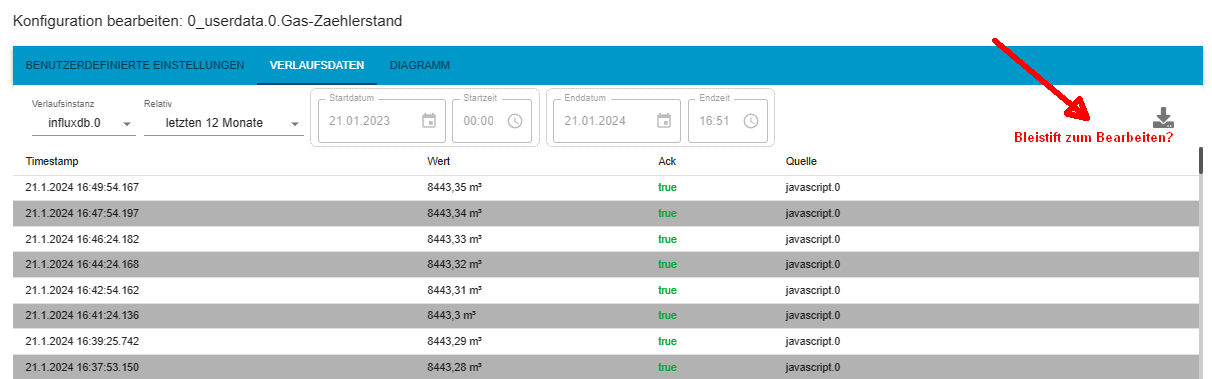
Moin, nach vielen Jahren problemloser Anwendung des Brokers auf einem Raspi bin ich jetzt auf einen Proxmox Container umgezogen. Dank Eurer Hilfe und Youtube hat das auch recht gut geklappt. Auch meine USB-Sticks (Zigbee und NanoCul) habe ich durchgereicht. Gleichzeitig habe ich die Datenbank Influxdb auf die V2 umgestell. Anfänglich hat das auch geklappt, zwischenzeitlich habe ich aber jetzt 2 Buckets: einmal mit den Daten bis zur Umstellung und ein zweites Bucket mit den Daten ab der Umstellung. Wo mir da der Fehler unterlaufen ist, kann ich nicht mehr nachvollziehen. Ist aber nicht so tragisch. Jetzt wollte ich einmal ein paar Daten editieren. Dazu habe ich in den Objekten auf das Zahnrad eines Datenpunktes geklickt. Es öffnet sich dann das bekannte Fenster mit den 3 Tabs. Unter dem Tab "Verlaufsdaten" erscheinen auch die entsprechenden Daten. Soweit ich mich erinnere, gab es hier vorher immer einen "Bleistift", mit dem man die Einträge editieren und sogar löschen konnte. Diesen Bleistift finde ich nicht mehr. Kann mir jemand sagen, wo ich evtl. in den Einstellungen etwas übersehen habe?
Gruß
Hans_jürgen
Proxmox LXC
Node.js: V22.22.2
NPM: 10.9.7
JS-controller: 7.0.7 -
Moin, nach vielen Jahren problemloser Anwendung des Brokers auf einem Raspi bin ich jetzt auf einen Proxmox Container umgezogen. Dank Eurer Hilfe und Youtube hat das auch recht gut geklappt. Auch meine USB-Sticks (Zigbee und NanoCul) habe ich durchgereicht. Gleichzeitig habe ich die Datenbank Influxdb auf die V2 umgestell. Anfänglich hat das auch geklappt, zwischenzeitlich habe ich aber jetzt 2 Buckets: einmal mit den Daten bis zur Umstellung und ein zweites Bucket mit den Daten ab der Umstellung. Wo mir da der Fehler unterlaufen ist, kann ich nicht mehr nachvollziehen. Ist aber nicht so tragisch. Jetzt wollte ich einmal ein paar Daten editieren. Dazu habe ich in den Objekten auf das Zahnrad eines Datenpunktes geklickt. Es öffnet sich dann das bekannte Fenster mit den 3 Tabs. Unter dem Tab "Verlaufsdaten" erscheinen auch die entsprechenden Daten. Soweit ich mich erinnere, gab es hier vorher immer einen "Bleistift", mit dem man die Einträge editieren und sogar löschen konnte. Diesen Bleistift finde ich nicht mehr. Kann mir jemand sagen, wo ich evtl. in den Einstellungen etwas übersehen habe?
Gruß
Hans_jürgen
-
@jack01 sagte in Benutzer definierte Einstellungen- Bleistift?:
Diesen Bleistift finde ich nicht mehr.
dann seh es dir mal als Experte an.
-
@jack01 sagte in Benutzer definierte Einstellungen- Bleistift?:
@homoran Tja, das habe ich schon probiert, leider keine Änderung....
Browsercache geleert?
wie sind die Versionen?iob diagin der Langfassung bitte@homoran Ja, den Cache auch schon gelöscht. Anbei das File:
Skript v.2023-10-10 *** BASE SYSTEM *** Static hostname: ioBroker Icon name: computer-container Chassis: container ☐ Virtualization: lxc Operating System: Debian GNU/Linux 12 (bookworm) Kernel: Linux 6.5.11-7-pve Architecture: x86-64 model name : Intel(R) Core(TM) i5-4590T CPU @ 2.00GHz Docker : false Virtualization : lxc Kernel : x86_64 Userland : amd64 Systemuptime and Load: 19:18:33 up 8 days, 6:42, 4 users, load average: 0.19, 0.36, 0.43 CPU threads: 2 *** Time and Time Zones *** Local time: Sun 2024-01-21 19:18:33 CET Universal time: Sun 2024-01-21 18:18:33 UTC RTC time: n/a Time zone: Europe/Berlin (CET, +0100) System clock synchronized: yes NTP service: inactive RTC in local TZ: no *** User and Groups *** pi /home/pi pi sudo users iobroker *** X-Server-Setup *** X-Server: false Desktop: Terminal: tty Boot Target: graphical.target *** MEMORY *** total used free shared buff/cache available Mem: 8.6G 2.8G 5.2G 155K 592M 5.8G Swap: 536M 4.1K 536M Total: 9.1G 2.8G 5.7G 8192 M total memory 2665 M used memory 2826 M active memory 268 M inactive memory 4961 M free memory 0 M buffer memory 565 M swap cache 512 M total swap 0 M used swap 511 M free swap *** FAILED SERVICES *** UNIT LOAD ACTIVE SUB DESCRIPTION * run-rpc_pipefs.mount loaded failed failed RPC Pipe File System * sys-kernel-config.mount loaded failed failed Kernel Configuration File System * networking.service loaded failed failed Raise network interfaces LOAD = Reflects whether the unit definition was properly loaded. ACTIVE = The high-level unit activation state, i.e. generalization of SUB. SUB = The low-level unit activation state, values depend on unit type. 3 loaded units listed. *** FILESYSTEM *** Filesystem Type Size Used Avail Use% Mounted on /dev/mapper/pve-vm--324--disk--0 ext4 9.8G 4.2G 5.1G 46% / none tmpfs 492K 4.0K 488K 1% /dev udev devtmpfs 7.8G 0 7.8G 0% /dev/tty tmpfs tmpfs 7.8G 0 7.8G 0% /dev/shm tmpfs tmpfs 3.1G 144K 3.1G 1% /run tmpfs tmpfs 5.0M 0 5.0M 0% /run/lock tmpfs tmpfs 1.6G 0 1.6G 0% /run/user/1000 Messages concerning ext4 filesystem in dmesg: dmesg: read kernel buffer failed: Operation not permitted Show mounted filesystems \(real ones only\): TARGET SOURCE FSTYPE OPTIONS / /dev/mapper/pve-vm--324--disk--0 ext4 rw,relatime,stripe=16 Files in neuralgic directories: /var: 721M /var/ 386M /var/lib 300M /var/cache 296M /var/cache/apt 239M /var/lib/influxdb/engine Hint: You are currently not seeing messages from other users and the system. Users in groups 'adm', 'systemd-journal' can see all messages. Pass -q to turn off this notice. Archived and active journals take up 8.0M in the file system. /opt/iobroker/backups: 243M /opt/iobroker/backups/ /opt/iobroker/iobroker-data: 484M /opt/iobroker/iobroker-data/ 387M /opt/iobroker/iobroker-data/files 89M /opt/iobroker/iobroker-data/files/echarts.admin 75M /opt/iobroker/iobroker-data/backup-objects 67M /opt/iobroker/iobroker-data/files/javascript.admin The five largest files in iobroker-data are: 33M /opt/iobroker/iobroker-data/files/iot.admin/static/js/main.1797d034.js.map 24M /opt/iobroker/iobroker-data/files/echarts/static/js/main.2b7495c2.js.map 24M /opt/iobroker/iobroker-data/files/echarts.admin/chart/static/js/main.2b7495c2.js.map 23M /opt/iobroker/iobroker-data/files/echarts.admin/static/js/main.245b61c0.js.map 22M /opt/iobroker/iobroker-data/objects.jsonl USB-Devices by-id: USB-Sticks - Avoid direct links to /dev/* in your adapter setups, please always prefer the links 'by-id': /dev/serial/by-id/usb-ITead_Sonoff_Zigbee_3.0_USB_Dongle_Plus_766e40ea5ad8ed11b9a2776162c613ac-if00-port0 *** NodeJS-Installation *** /usr/bin/nodejs v18.19.0 /usr/bin/node v18.19.0 /usr/bin/npm 10.2.3 /usr/bin/npx 10.2.3 /usr/bin/corepack 0.22.0 nodejs: Installed: 18.19.0-1nodesource1 Candidate: 18.19.0-1nodesource1 Version table: 18.19.0+dfsg-6~deb12u1 500 500 http://security.debian.org bookworm-security/main amd64 Packages *** 18.19.0-1nodesource1 600 500 https://deb.nodesource.com/node_18.x nodistro/main amd64 Packages 100 /var/lib/dpkg/status 18.18.2-1nodesource1 600 500 https://deb.nodesource.com/node_18.x nodistro/main amd64 Packages 18.18.1-1nodesource1 600 500 https://deb.nodesource.com/node_18.x nodistro/main amd64 Packages 18.18.0-1nodesource1 600 500 https://deb.nodesource.com/node_18.x nodistro/main amd64 Packages 18.17.1-1nodesource1 600 500 https://deb.nodesource.com/node_18.x nodistro/main amd64 Packages 18.17.0-1nodesource1 600 500 https://deb.nodesource.com/node_18.x nodistro/main amd64 Packages 18.16.1-1nodesource1 600 500 https://deb.nodesource.com/node_18.x nodistro/main amd64 Packages 18.16.0-1nodesource1 600 500 https://deb.nodesource.com/node_18.x nodistro/main amd64 Packages 18.15.0-1nodesource1 600 500 https://deb.nodesource.com/node_18.x nodistro/main amd64 Packages 18.14.2-1nodesource1 600 500 https://deb.nodesource.com/node_18.x nodistro/main amd64 Packages 18.14.1-1nodesource1 600 500 https://deb.nodesource.com/node_18.x nodistro/main amd64 Packages 18.14.0-1nodesource1 600 500 https://deb.nodesource.com/node_18.x nodistro/main amd64 Packages 18.13.0+dfsg1-1 500 500 http://deb.debian.org/debian bookworm/main amd64 Packages 18.13.0-1nodesource1 600 500 https://deb.nodesource.com/node_18.x nodistro/main amd64 Packages 18.12.0-1nodesource1 600 500 https://deb.nodesource.com/node_18.x nodistro/main amd64 Packages 18.11.0-1nodesource1 600 500 https://deb.nodesource.com/node_18.x nodistro/main amd64 Packages 18.10.0-1nodesource1 600 500 https://deb.nodesource.com/node_18.x nodistro/main amd64 Packages 18.9.1-1nodesource1 600 500 https://deb.nodesource.com/node_18.x nodistro/main amd64 Packages 18.9.0-1nodesource1 600 500 https://deb.nodesource.com/node_18.x nodistro/main amd64 Packages 18.8.0-1nodesource1 600 500 https://deb.nodesource.com/node_18.x nodistro/main amd64 Packages 18.7.0-1nodesource1 600 500 https://deb.nodesource.com/node_18.x nodistro/main amd64 Packages 18.6.0-1nodesource1 600 500 https://deb.nodesource.com/node_18.x nodistro/main amd64 Packages 18.5.0-1nodesource1 600 500 https://deb.nodesource.com/node_18.x nodistro/main amd64 Packages 18.4.0-1nodesource1 600 500 https://deb.nodesource.com/node_18.x nodistro/main amd64 Packages 18.3.0-1nodesource1 600 500 https://deb.nodesource.com/node_18.x nodistro/main amd64 Packages 18.2.0-1nodesource1 600 500 https://deb.nodesource.com/node_18.x nodistro/main amd64 Packages 18.1.0-1nodesource1 600 500 https://deb.nodesource.com/node_18.x nodistro/main amd64 Packages 18.0.0-1nodesource1 600 500 https://deb.nodesource.com/node_18.x nodistro/main amd64 Packages Temp directories causing npm8 problem: 0 No problems detected Errors in npm tree: *** ioBroker-Installation *** ioBroker Status iobroker is running on this host. Objects type: jsonl States type: redis Core adapters versions js-controller: 5.0.17 admin: 6.12.0 javascript: 7.1.6 Adapters from github: 0 Adapter State + system.adapter.admin.0 : admin : ioBroker - enabled, port: 8081, bind: 0.0.0.0, run as: admin + system.adapter.alexa2.0 : alexa2 : ioBroker - enabled + system.adapter.backitup.0 : backitup : ioBroker - enabled system.adapter.daswetter.0 : daswetter : ioBroker - enabled + system.adapter.discovery.0 : discovery : ioBroker - enabled system.adapter.dwd.0 : dwd : ioBroker - enabled + system.adapter.echarts.0 : echarts : ioBroker - enabled + system.adapter.email.0 : email : ioBroker - enabled + system.adapter.ems-esp.0 : ems-esp : ioBroker - enabled + system.adapter.hm-rega.0 : hm-rega : ioBroker - enabled + system.adapter.hm-rpc.0 : hm-rpc : ioBroker - enabled, port: 0 + system.adapter.hm-rpc.1 : hm-rpc : ioBroker - enabled, port: 0 system.adapter.icons-material-png.0 : icons-material-png : ioBroker - disabled system.adapter.icons-mfd-svg.0 : icons-mfd-svg : ioBroker - disabled + system.adapter.influxdb.0 : influxdb : ioBroker - enabled, port: 8086 + system.adapter.info.0 : info : ioBroker - enabled + system.adapter.iot.0 : iot : ioBroker - enabled + system.adapter.javascript.0 : javascript : ioBroker - enabled system.adapter.mobile.0 : mobile : ioBroker - disabled system.adapter.mqtt.0 : mqtt : ioBroker - disabled, port: 1883, bind: 0.0.0.0 + system.adapter.opendtu.0 : opendtu : ioBroker - enabled + system.adapter.scenes.0 : scenes : ioBroker - enabled + system.adapter.socketio.0 : socketio : ioBroker - enabled, port: 8084, bind: 0.0.0.0, run as: admin + system.adapter.sonoff.0 : sonoff : ioBroker - enabled, port: 1886, bind: 0.0.0.0 + system.adapter.sourceanalytix.0 : sourceanalytix : ioBroker - enabled system.adapter.vis-colorpicker.0 : vis-colorpicker : ioBroker - disabled system.adapter.vis-fancyswitch.0 : vis-fancyswitch : ioBroker - disabled system.adapter.vis-hqwidgets.0 : vis-hqwidgets : ioBroker - enabled + system.adapter.vis-inventwo.0 : vis-inventwo : ioBroker - enabled system.adapter.vis-jqui-mfd.0 : vis-jqui-mfd : ioBroker - disabled system.adapter.vis-justgage.0 : vis-justgage : ioBroker - disabled system.adapter.vis-keyboard.0 : vis-keyboard : ioBroker - disabled system.adapter.vis-metro.0 : vis-metro : ioBroker - disabled system.adapter.vis-timeandweather.0 : vis-timeandweather : ioBroker - disabled system.adapter.vis.0 : vis : ioBroker - enabled + system.adapter.web.0 : web : ioBroker - enabled, port: 8082, bind: 0.0.0.0, run as: admin + system.adapter.wireless-mbus.0 : wireless-mbus : ioBroker - enabled system.adapter.worx.0 : worx : ioBroker - disabled + system.adapter.zigbee.0 : zigbee : ioBroker - enabled, port: /dev/ttyUSB0 + instance is alive Enabled adapters with bindings + system.adapter.admin.0 : admin : ioBroker - enabled, port: 8081, bind: 0.0.0.0, run as: admin + system.adapter.hm-rpc.0 : hm-rpc : ioBroker - enabled, port: 0 + system.adapter.hm-rpc.1 : hm-rpc : ioBroker - enabled, port: 0 + system.adapter.influxdb.0 : influxdb : ioBroker - enabled, port: 8086 + system.adapter.socketio.0 : socketio : ioBroker - enabled, port: 8084, bind: 0.0.0.0, run as: admin + system.adapter.sonoff.0 : sonoff : ioBroker - enabled, port: 1886, bind: 0.0.0.0 + system.adapter.web.0 : web : ioBroker - enabled, port: 8082, bind: 0.0.0.0, run as: admin + system.adapter.zigbee.0 : zigbee : ioBroker - enabled, port: /dev/ttyUSB0 ioBroker-Repositories stable : http://download.iobroker.net/sources-dist.json beta : http://download.iobroker.net/sources-dist-latest.json Active repo(s): stable Installed ioBroker-Instances Used repository: stable Adapter "admin" : 6.12.0 , installed 6.12.0 Adapter "alexa2" : 3.26.3 , installed 3.26.3 Adapter "backitup" : 2.9.8 , installed 2.9.8 Adapter "daswetter" : 3.1.12 , installed 3.1.12 Adapter "discovery" : 4.2.0 , installed 4.2.0 Adapter "dwd" : 2.8.5 , installed 2.8.5 Adapter "echarts" : 1.7.2 , installed 1.7.2 Adapter "email" : 1.2.1 , installed 1.2.1 Adapter "ems-esp" : 2.6.3 , installed 2.6.3 Adapter "hm-rega" : 4.0.0 , installed 4.0.0 Adapter "hm-rpc" : 1.15.19 , installed 1.15.19 Adapter "icons-material-png": 0.1.0, installed 0.1.0 Adapter "icons-mfd-svg": 1.2.0 , installed 1.2.0 Adapter "influxdb" : 3.2.0 , installed 3.2.0 Adapter "info" : 2.0.0 , installed 2.0.0 Adapter "iot" : 2.0.11 , installed 2.0.11 Adapter "javascript" : 7.1.6 , installed 7.1.6 Controller "js-controller": 5.0.17 , installed 5.0.17 Adapter "mobile" : 1.0.1 , installed 1.0.1 Adapter "mqtt" : 5.1.0 , installed 5.1.0 Adapter "opendtu" : 1.0.1 , installed 1.0.1 Adapter "scenes" : 2.3.9 , installed 2.3.9 Adapter "simple-api" : 2.7.2 , installed 2.7.2 Adapter "socketio" : 6.6.0 , installed 6.6.0 Adapter "sonoff" : 3.0.3 , installed 3.0.3 Adapter "vis" : 1.5.4 , installed 1.5.4 Adapter "vis-colorpicker": 2.0.3 , installed 2.0.3 Adapter "vis-fancyswitch": 1.1.0 , installed 1.1.0 Adapter "vis-hqwidgets": 1.4.0 , installed 1.4.0 Adapter "vis-inventwo" : 3.3.3 , installed 3.3.3 Adapter "vis-jqui-mfd" : 1.0.12 , installed 1.0.12 Adapter "vis-justgage" : 2.1.0 , installed 2.1.0 Adapter "vis-keyboard" : 0.0.2 , installed 0.0.2 Adapter "vis-metro" : 1.2.0 , installed 1.2.0 Adapter "vis-timeandweather": 1.2.2, installed 1.2.2 Adapter "web" : 6.1.10 , installed 6.1.10 Adapter "wireless-mbus": 0.9.1 , installed 0.9.1 Adapter "worx" : 2.3.4 , installed 2.3.4 Adapter "ws" : 2.5.8 , installed 2.5.8 Adapter "zigbee" : 1.10.1 , installed 1.10.1 Objects and States Please stand by - This may take a while Objects: 9680 States: 8999 *** OS-Repositories and Updates *** Hit:1 http://security.debian.org bookworm-security InRelease Hit:2 http://deb.debian.org/debian bookworm InRelease Hit:3 http://deb.debian.org/debian bookworm-updates InRelease Hit:4 https://repos.influxdata.com/debian stable InRelease Hit:5 https://deb.nodesource.com/node_18.x nodistro InRelease Reading package lists... Pending Updates: 1 *** Listening Ports *** Active Internet connections (only servers) Proto Recv-Q Send-Q Local Address Foreign Address State User Inode PID/Program name tcp 0 0 127.0.0.1:9001 0.0.0.0:* LISTEN 1001 322945 372/iobroker.js-con tcp 0 0 127.0.0.1:25 0.0.0.0:* LISTEN 0 322742 366/master tcp 0 0 0.0.0.0:1886 0.0.0.0:* LISTEN 1001 324038 478/io.sonoff.0 tcp 0 0 192.168.178.24:2010 0.0.0.0:* LISTEN 1001 40405889 2937531/io.hm-rpc.1 tcp 0 0 192.168.178.24:2001 0.0.0.0:* LISTEN 1001 324233 523/io.hm-rpc.0 tcp 0 0 127.0.0.1:6379 0.0.0.0:* LISTEN 105 322638 175/redis-server 12 tcp 0 0 0.0.0.0:111 0.0.0.0:* LISTEN 0 315902 1/init tcp6 0 0 ::1:25 :::* LISTEN 0 322743 366/master tcp6 0 0 :::8081 :::* LISTEN 1001 323656 391/io.admin.0 tcp6 0 0 :::8082 :::* LISTEN 1001 325654 614/io.web.0 tcp6 0 0 :::8084 :::* LISTEN 1001 328959 1212/io.socketio.0 tcp6 0 0 :::8086 :::* LISTEN 999 322486 182/influxd tcp6 0 0 :::111 :::* LISTEN 0 315904 1/init tcp6 0 0 :::22 :::* LISTEN 0 313846 1/init tcp6 0 0 ::1:6379 :::* LISTEN 105 322639 175/redis-server 12 udp 0 0 0.0.0.0:111 0.0.0.0:* 0 315903 1/init udp6 0 0 :::111 :::* 0 315905 1/init *** Log File - Last 25 Lines *** 2024-01-21 19:17:50.381 - info: web.0 (614) <== Disconnect system.user.admin from ::ffff:192.168.178.54 2024-01-21 19:17:50.387 - info: web.0 (614) ==> Connected system.user.admin from ::ffff:192.168.178.54 2024-01-21 19:17:50.412 - info: web.0 (614) <== Disconnect system.user.admin from ::ffff:192.168.178.54 2024-01-21 19:17:50.422 - info: web.0 (614) ==> Connected system.user.admin from ::ffff:192.168.178.54 2024-01-21 19:17:50.444 - info: web.0 (614) <== Disconnect system.user.admin from ::ffff:192.168.178.54 2024-01-21 19:17:51.380 - info: web.0 (614) <== Disconnect system.user.admin from ::ffff:192.168.178.54 2024-01-21 19:17:51.449 - info: web.0 (614) ==> Connected system.user.admin from ::ffff:192.168.178.54 2024-01-21 19:17:51.452 - info: web.0 (614) <== Disconnect system.user.admin from ::ffff:192.168.178.54 2024-01-21 19:17:52.373 - info: web.0 (614) ==> Connected system.user.admin from ::ffff:192.168.178.54 2024-01-21 19:17:54.375 - info: web.0 (614) <== Disconnect system.user.admin from ::ffff:192.168.178.54 2024-01-21 19:17:54.379 - info: web.0 (614) ==> Connected system.user.admin from ::ffff:192.168.178.54 2024-01-21 19:17:54.402 - info: web.0 (614) <== Disconnect system.user.admin from ::ffff:192.168.178.54 2024-01-21 19:17:55.420 - info: web.0 (614) ==> Connected system.user.admin from ::ffff:192.168.178.54 2024-01-21 19:17:56.377 - info: web.0 (614) ==> Connected system.user.admin from ::ffff:192.168.178.54 2024-01-21 19:17:58.376 - info: web.0 (614) <== Disconnect system.user.admin from ::ffff:192.168.178.54 2024-01-21 19:17:58.382 - info: web.0 (614) ==> Connected system.user.admin from ::ffff:192.168.178.54 2024-01-21 19:17:58.399 - info: web.0 (614) <== Disconnect system.user.admin from ::ffff:192.168.178.54 2024-01-21 19:17:58.483 - info: web.0 (614) <== Disconnect system.user.admin from ::ffff:192.168.178.54 2024-01-21 19:17:58.487 - info: web.0 (614) <== Disconnect system.user.admin from ::ffff:192.168.178.54 2024-01-21 19:17:58.490 - info: web.0 (614) <== Disconnect system.user.admin from ::ffff:192.168.178.54 2024-01-21 19:17:58.491 - info: web.0 (614) <== Disconnect system.user.admin from ::ffff:192.168.178.54 2024-01-21 19:17:58.491 - info: web.0 (614) <== Disconnect system.user.admin from ::ffff:192.168.178.54 2024-01-21 19:17:58.495 - info: web.0 (614) <== Disconnect system.user.admin from ::ffff:192.168.178.54 2024-01-21 19:17:58.495 - info: web.0 (614) <== Disconnect system.user.admin from ::ffff:192.168.178.54 2024-01-21 19:18:00.928 - info: web.0 (614) ==> Connected system.user.admin from ::ffff:192.168.178.54 ============ Mark until here for C&P =============Proxmox LXC
Node.js: V22.22.2
NPM: 10.9.7
JS-controller: 7.0.7 -
@homoran Ja, den Cache auch schon gelöscht. Anbei das File:
Skript v.2023-10-10 *** BASE SYSTEM *** Static hostname: ioBroker Icon name: computer-container Chassis: container ☐ Virtualization: lxc Operating System: Debian GNU/Linux 12 (bookworm) Kernel: Linux 6.5.11-7-pve Architecture: x86-64 model name : Intel(R) Core(TM) i5-4590T CPU @ 2.00GHz Docker : false Virtualization : lxc Kernel : x86_64 Userland : amd64 Systemuptime and Load: 19:18:33 up 8 days, 6:42, 4 users, load average: 0.19, 0.36, 0.43 CPU threads: 2 *** Time and Time Zones *** Local time: Sun 2024-01-21 19:18:33 CET Universal time: Sun 2024-01-21 18:18:33 UTC RTC time: n/a Time zone: Europe/Berlin (CET, +0100) System clock synchronized: yes NTP service: inactive RTC in local TZ: no *** User and Groups *** pi /home/pi pi sudo users iobroker *** X-Server-Setup *** X-Server: false Desktop: Terminal: tty Boot Target: graphical.target *** MEMORY *** total used free shared buff/cache available Mem: 8.6G 2.8G 5.2G 155K 592M 5.8G Swap: 536M 4.1K 536M Total: 9.1G 2.8G 5.7G 8192 M total memory 2665 M used memory 2826 M active memory 268 M inactive memory 4961 M free memory 0 M buffer memory 565 M swap cache 512 M total swap 0 M used swap 511 M free swap *** FAILED SERVICES *** UNIT LOAD ACTIVE SUB DESCRIPTION * run-rpc_pipefs.mount loaded failed failed RPC Pipe File System * sys-kernel-config.mount loaded failed failed Kernel Configuration File System * networking.service loaded failed failed Raise network interfaces LOAD = Reflects whether the unit definition was properly loaded. ACTIVE = The high-level unit activation state, i.e. generalization of SUB. SUB = The low-level unit activation state, values depend on unit type. 3 loaded units listed. *** FILESYSTEM *** Filesystem Type Size Used Avail Use% Mounted on /dev/mapper/pve-vm--324--disk--0 ext4 9.8G 4.2G 5.1G 46% / none tmpfs 492K 4.0K 488K 1% /dev udev devtmpfs 7.8G 0 7.8G 0% /dev/tty tmpfs tmpfs 7.8G 0 7.8G 0% /dev/shm tmpfs tmpfs 3.1G 144K 3.1G 1% /run tmpfs tmpfs 5.0M 0 5.0M 0% /run/lock tmpfs tmpfs 1.6G 0 1.6G 0% /run/user/1000 Messages concerning ext4 filesystem in dmesg: dmesg: read kernel buffer failed: Operation not permitted Show mounted filesystems \(real ones only\): TARGET SOURCE FSTYPE OPTIONS / /dev/mapper/pve-vm--324--disk--0 ext4 rw,relatime,stripe=16 Files in neuralgic directories: /var: 721M /var/ 386M /var/lib 300M /var/cache 296M /var/cache/apt 239M /var/lib/influxdb/engine Hint: You are currently not seeing messages from other users and the system. Users in groups 'adm', 'systemd-journal' can see all messages. Pass -q to turn off this notice. Archived and active journals take up 8.0M in the file system. /opt/iobroker/backups: 243M /opt/iobroker/backups/ /opt/iobroker/iobroker-data: 484M /opt/iobroker/iobroker-data/ 387M /opt/iobroker/iobroker-data/files 89M /opt/iobroker/iobroker-data/files/echarts.admin 75M /opt/iobroker/iobroker-data/backup-objects 67M /opt/iobroker/iobroker-data/files/javascript.admin The five largest files in iobroker-data are: 33M /opt/iobroker/iobroker-data/files/iot.admin/static/js/main.1797d034.js.map 24M /opt/iobroker/iobroker-data/files/echarts/static/js/main.2b7495c2.js.map 24M /opt/iobroker/iobroker-data/files/echarts.admin/chart/static/js/main.2b7495c2.js.map 23M /opt/iobroker/iobroker-data/files/echarts.admin/static/js/main.245b61c0.js.map 22M /opt/iobroker/iobroker-data/objects.jsonl USB-Devices by-id: USB-Sticks - Avoid direct links to /dev/* in your adapter setups, please always prefer the links 'by-id': /dev/serial/by-id/usb-ITead_Sonoff_Zigbee_3.0_USB_Dongle_Plus_766e40ea5ad8ed11b9a2776162c613ac-if00-port0 *** NodeJS-Installation *** /usr/bin/nodejs v18.19.0 /usr/bin/node v18.19.0 /usr/bin/npm 10.2.3 /usr/bin/npx 10.2.3 /usr/bin/corepack 0.22.0 nodejs: Installed: 18.19.0-1nodesource1 Candidate: 18.19.0-1nodesource1 Version table: 18.19.0+dfsg-6~deb12u1 500 500 http://security.debian.org bookworm-security/main amd64 Packages *** 18.19.0-1nodesource1 600 500 https://deb.nodesource.com/node_18.x nodistro/main amd64 Packages 100 /var/lib/dpkg/status 18.18.2-1nodesource1 600 500 https://deb.nodesource.com/node_18.x nodistro/main amd64 Packages 18.18.1-1nodesource1 600 500 https://deb.nodesource.com/node_18.x nodistro/main amd64 Packages 18.18.0-1nodesource1 600 500 https://deb.nodesource.com/node_18.x nodistro/main amd64 Packages 18.17.1-1nodesource1 600 500 https://deb.nodesource.com/node_18.x nodistro/main amd64 Packages 18.17.0-1nodesource1 600 500 https://deb.nodesource.com/node_18.x nodistro/main amd64 Packages 18.16.1-1nodesource1 600 500 https://deb.nodesource.com/node_18.x nodistro/main amd64 Packages 18.16.0-1nodesource1 600 500 https://deb.nodesource.com/node_18.x nodistro/main amd64 Packages 18.15.0-1nodesource1 600 500 https://deb.nodesource.com/node_18.x nodistro/main amd64 Packages 18.14.2-1nodesource1 600 500 https://deb.nodesource.com/node_18.x nodistro/main amd64 Packages 18.14.1-1nodesource1 600 500 https://deb.nodesource.com/node_18.x nodistro/main amd64 Packages 18.14.0-1nodesource1 600 500 https://deb.nodesource.com/node_18.x nodistro/main amd64 Packages 18.13.0+dfsg1-1 500 500 http://deb.debian.org/debian bookworm/main amd64 Packages 18.13.0-1nodesource1 600 500 https://deb.nodesource.com/node_18.x nodistro/main amd64 Packages 18.12.0-1nodesource1 600 500 https://deb.nodesource.com/node_18.x nodistro/main amd64 Packages 18.11.0-1nodesource1 600 500 https://deb.nodesource.com/node_18.x nodistro/main amd64 Packages 18.10.0-1nodesource1 600 500 https://deb.nodesource.com/node_18.x nodistro/main amd64 Packages 18.9.1-1nodesource1 600 500 https://deb.nodesource.com/node_18.x nodistro/main amd64 Packages 18.9.0-1nodesource1 600 500 https://deb.nodesource.com/node_18.x nodistro/main amd64 Packages 18.8.0-1nodesource1 600 500 https://deb.nodesource.com/node_18.x nodistro/main amd64 Packages 18.7.0-1nodesource1 600 500 https://deb.nodesource.com/node_18.x nodistro/main amd64 Packages 18.6.0-1nodesource1 600 500 https://deb.nodesource.com/node_18.x nodistro/main amd64 Packages 18.5.0-1nodesource1 600 500 https://deb.nodesource.com/node_18.x nodistro/main amd64 Packages 18.4.0-1nodesource1 600 500 https://deb.nodesource.com/node_18.x nodistro/main amd64 Packages 18.3.0-1nodesource1 600 500 https://deb.nodesource.com/node_18.x nodistro/main amd64 Packages 18.2.0-1nodesource1 600 500 https://deb.nodesource.com/node_18.x nodistro/main amd64 Packages 18.1.0-1nodesource1 600 500 https://deb.nodesource.com/node_18.x nodistro/main amd64 Packages 18.0.0-1nodesource1 600 500 https://deb.nodesource.com/node_18.x nodistro/main amd64 Packages Temp directories causing npm8 problem: 0 No problems detected Errors in npm tree: *** ioBroker-Installation *** ioBroker Status iobroker is running on this host. Objects type: jsonl States type: redis Core adapters versions js-controller: 5.0.17 admin: 6.12.0 javascript: 7.1.6 Adapters from github: 0 Adapter State + system.adapter.admin.0 : admin : ioBroker - enabled, port: 8081, bind: 0.0.0.0, run as: admin + system.adapter.alexa2.0 : alexa2 : ioBroker - enabled + system.adapter.backitup.0 : backitup : ioBroker - enabled system.adapter.daswetter.0 : daswetter : ioBroker - enabled + system.adapter.discovery.0 : discovery : ioBroker - enabled system.adapter.dwd.0 : dwd : ioBroker - enabled + system.adapter.echarts.0 : echarts : ioBroker - enabled + system.adapter.email.0 : email : ioBroker - enabled + system.adapter.ems-esp.0 : ems-esp : ioBroker - enabled + system.adapter.hm-rega.0 : hm-rega : ioBroker - enabled + system.adapter.hm-rpc.0 : hm-rpc : ioBroker - enabled, port: 0 + system.adapter.hm-rpc.1 : hm-rpc : ioBroker - enabled, port: 0 system.adapter.icons-material-png.0 : icons-material-png : ioBroker - disabled system.adapter.icons-mfd-svg.0 : icons-mfd-svg : ioBroker - disabled + system.adapter.influxdb.0 : influxdb : ioBroker - enabled, port: 8086 + system.adapter.info.0 : info : ioBroker - enabled + system.adapter.iot.0 : iot : ioBroker - enabled + system.adapter.javascript.0 : javascript : ioBroker - enabled system.adapter.mobile.0 : mobile : ioBroker - disabled system.adapter.mqtt.0 : mqtt : ioBroker - disabled, port: 1883, bind: 0.0.0.0 + system.adapter.opendtu.0 : opendtu : ioBroker - enabled + system.adapter.scenes.0 : scenes : ioBroker - enabled + system.adapter.socketio.0 : socketio : ioBroker - enabled, port: 8084, bind: 0.0.0.0, run as: admin + system.adapter.sonoff.0 : sonoff : ioBroker - enabled, port: 1886, bind: 0.0.0.0 + system.adapter.sourceanalytix.0 : sourceanalytix : ioBroker - enabled system.adapter.vis-colorpicker.0 : vis-colorpicker : ioBroker - disabled system.adapter.vis-fancyswitch.0 : vis-fancyswitch : ioBroker - disabled system.adapter.vis-hqwidgets.0 : vis-hqwidgets : ioBroker - enabled + system.adapter.vis-inventwo.0 : vis-inventwo : ioBroker - enabled system.adapter.vis-jqui-mfd.0 : vis-jqui-mfd : ioBroker - disabled system.adapter.vis-justgage.0 : vis-justgage : ioBroker - disabled system.adapter.vis-keyboard.0 : vis-keyboard : ioBroker - disabled system.adapter.vis-metro.0 : vis-metro : ioBroker - disabled system.adapter.vis-timeandweather.0 : vis-timeandweather : ioBroker - disabled system.adapter.vis.0 : vis : ioBroker - enabled + system.adapter.web.0 : web : ioBroker - enabled, port: 8082, bind: 0.0.0.0, run as: admin + system.adapter.wireless-mbus.0 : wireless-mbus : ioBroker - enabled system.adapter.worx.0 : worx : ioBroker - disabled + system.adapter.zigbee.0 : zigbee : ioBroker - enabled, port: /dev/ttyUSB0 + instance is alive Enabled adapters with bindings + system.adapter.admin.0 : admin : ioBroker - enabled, port: 8081, bind: 0.0.0.0, run as: admin + system.adapter.hm-rpc.0 : hm-rpc : ioBroker - enabled, port: 0 + system.adapter.hm-rpc.1 : hm-rpc : ioBroker - enabled, port: 0 + system.adapter.influxdb.0 : influxdb : ioBroker - enabled, port: 8086 + system.adapter.socketio.0 : socketio : ioBroker - enabled, port: 8084, bind: 0.0.0.0, run as: admin + system.adapter.sonoff.0 : sonoff : ioBroker - enabled, port: 1886, bind: 0.0.0.0 + system.adapter.web.0 : web : ioBroker - enabled, port: 8082, bind: 0.0.0.0, run as: admin + system.adapter.zigbee.0 : zigbee : ioBroker - enabled, port: /dev/ttyUSB0 ioBroker-Repositories stable : http://download.iobroker.net/sources-dist.json beta : http://download.iobroker.net/sources-dist-latest.json Active repo(s): stable Installed ioBroker-Instances Used repository: stable Adapter "admin" : 6.12.0 , installed 6.12.0 Adapter "alexa2" : 3.26.3 , installed 3.26.3 Adapter "backitup" : 2.9.8 , installed 2.9.8 Adapter "daswetter" : 3.1.12 , installed 3.1.12 Adapter "discovery" : 4.2.0 , installed 4.2.0 Adapter "dwd" : 2.8.5 , installed 2.8.5 Adapter "echarts" : 1.7.2 , installed 1.7.2 Adapter "email" : 1.2.1 , installed 1.2.1 Adapter "ems-esp" : 2.6.3 , installed 2.6.3 Adapter "hm-rega" : 4.0.0 , installed 4.0.0 Adapter "hm-rpc" : 1.15.19 , installed 1.15.19 Adapter "icons-material-png": 0.1.0, installed 0.1.0 Adapter "icons-mfd-svg": 1.2.0 , installed 1.2.0 Adapter "influxdb" : 3.2.0 , installed 3.2.0 Adapter "info" : 2.0.0 , installed 2.0.0 Adapter "iot" : 2.0.11 , installed 2.0.11 Adapter "javascript" : 7.1.6 , installed 7.1.6 Controller "js-controller": 5.0.17 , installed 5.0.17 Adapter "mobile" : 1.0.1 , installed 1.0.1 Adapter "mqtt" : 5.1.0 , installed 5.1.0 Adapter "opendtu" : 1.0.1 , installed 1.0.1 Adapter "scenes" : 2.3.9 , installed 2.3.9 Adapter "simple-api" : 2.7.2 , installed 2.7.2 Adapter "socketio" : 6.6.0 , installed 6.6.0 Adapter "sonoff" : 3.0.3 , installed 3.0.3 Adapter "vis" : 1.5.4 , installed 1.5.4 Adapter "vis-colorpicker": 2.0.3 , installed 2.0.3 Adapter "vis-fancyswitch": 1.1.0 , installed 1.1.0 Adapter "vis-hqwidgets": 1.4.0 , installed 1.4.0 Adapter "vis-inventwo" : 3.3.3 , installed 3.3.3 Adapter "vis-jqui-mfd" : 1.0.12 , installed 1.0.12 Adapter "vis-justgage" : 2.1.0 , installed 2.1.0 Adapter "vis-keyboard" : 0.0.2 , installed 0.0.2 Adapter "vis-metro" : 1.2.0 , installed 1.2.0 Adapter "vis-timeandweather": 1.2.2, installed 1.2.2 Adapter "web" : 6.1.10 , installed 6.1.10 Adapter "wireless-mbus": 0.9.1 , installed 0.9.1 Adapter "worx" : 2.3.4 , installed 2.3.4 Adapter "ws" : 2.5.8 , installed 2.5.8 Adapter "zigbee" : 1.10.1 , installed 1.10.1 Objects and States Please stand by - This may take a while Objects: 9680 States: 8999 *** OS-Repositories and Updates *** Hit:1 http://security.debian.org bookworm-security InRelease Hit:2 http://deb.debian.org/debian bookworm InRelease Hit:3 http://deb.debian.org/debian bookworm-updates InRelease Hit:4 https://repos.influxdata.com/debian stable InRelease Hit:5 https://deb.nodesource.com/node_18.x nodistro InRelease Reading package lists... Pending Updates: 1 *** Listening Ports *** Active Internet connections (only servers) Proto Recv-Q Send-Q Local Address Foreign Address State User Inode PID/Program name tcp 0 0 127.0.0.1:9001 0.0.0.0:* LISTEN 1001 322945 372/iobroker.js-con tcp 0 0 127.0.0.1:25 0.0.0.0:* LISTEN 0 322742 366/master tcp 0 0 0.0.0.0:1886 0.0.0.0:* LISTEN 1001 324038 478/io.sonoff.0 tcp 0 0 192.168.178.24:2010 0.0.0.0:* LISTEN 1001 40405889 2937531/io.hm-rpc.1 tcp 0 0 192.168.178.24:2001 0.0.0.0:* LISTEN 1001 324233 523/io.hm-rpc.0 tcp 0 0 127.0.0.1:6379 0.0.0.0:* LISTEN 105 322638 175/redis-server 12 tcp 0 0 0.0.0.0:111 0.0.0.0:* LISTEN 0 315902 1/init tcp6 0 0 ::1:25 :::* LISTEN 0 322743 366/master tcp6 0 0 :::8081 :::* LISTEN 1001 323656 391/io.admin.0 tcp6 0 0 :::8082 :::* LISTEN 1001 325654 614/io.web.0 tcp6 0 0 :::8084 :::* LISTEN 1001 328959 1212/io.socketio.0 tcp6 0 0 :::8086 :::* LISTEN 999 322486 182/influxd tcp6 0 0 :::111 :::* LISTEN 0 315904 1/init tcp6 0 0 :::22 :::* LISTEN 0 313846 1/init tcp6 0 0 ::1:6379 :::* LISTEN 105 322639 175/redis-server 12 udp 0 0 0.0.0.0:111 0.0.0.0:* 0 315903 1/init udp6 0 0 :::111 :::* 0 315905 1/init *** Log File - Last 25 Lines *** 2024-01-21 19:17:50.381 - info: web.0 (614) <== Disconnect system.user.admin from ::ffff:192.168.178.54 2024-01-21 19:17:50.387 - info: web.0 (614) ==> Connected system.user.admin from ::ffff:192.168.178.54 2024-01-21 19:17:50.412 - info: web.0 (614) <== Disconnect system.user.admin from ::ffff:192.168.178.54 2024-01-21 19:17:50.422 - info: web.0 (614) ==> Connected system.user.admin from ::ffff:192.168.178.54 2024-01-21 19:17:50.444 - info: web.0 (614) <== Disconnect system.user.admin from ::ffff:192.168.178.54 2024-01-21 19:17:51.380 - info: web.0 (614) <== Disconnect system.user.admin from ::ffff:192.168.178.54 2024-01-21 19:17:51.449 - info: web.0 (614) ==> Connected system.user.admin from ::ffff:192.168.178.54 2024-01-21 19:17:51.452 - info: web.0 (614) <== Disconnect system.user.admin from ::ffff:192.168.178.54 2024-01-21 19:17:52.373 - info: web.0 (614) ==> Connected system.user.admin from ::ffff:192.168.178.54 2024-01-21 19:17:54.375 - info: web.0 (614) <== Disconnect system.user.admin from ::ffff:192.168.178.54 2024-01-21 19:17:54.379 - info: web.0 (614) ==> Connected system.user.admin from ::ffff:192.168.178.54 2024-01-21 19:17:54.402 - info: web.0 (614) <== Disconnect system.user.admin from ::ffff:192.168.178.54 2024-01-21 19:17:55.420 - info: web.0 (614) ==> Connected system.user.admin from ::ffff:192.168.178.54 2024-01-21 19:17:56.377 - info: web.0 (614) ==> Connected system.user.admin from ::ffff:192.168.178.54 2024-01-21 19:17:58.376 - info: web.0 (614) <== Disconnect system.user.admin from ::ffff:192.168.178.54 2024-01-21 19:17:58.382 - info: web.0 (614) ==> Connected system.user.admin from ::ffff:192.168.178.54 2024-01-21 19:17:58.399 - info: web.0 (614) <== Disconnect system.user.admin from ::ffff:192.168.178.54 2024-01-21 19:17:58.483 - info: web.0 (614) <== Disconnect system.user.admin from ::ffff:192.168.178.54 2024-01-21 19:17:58.487 - info: web.0 (614) <== Disconnect system.user.admin from ::ffff:192.168.178.54 2024-01-21 19:17:58.490 - info: web.0 (614) <== Disconnect system.user.admin from ::ffff:192.168.178.54 2024-01-21 19:17:58.491 - info: web.0 (614) <== Disconnect system.user.admin from ::ffff:192.168.178.54 2024-01-21 19:17:58.491 - info: web.0 (614) <== Disconnect system.user.admin from ::ffff:192.168.178.54 2024-01-21 19:17:58.495 - info: web.0 (614) <== Disconnect system.user.admin from ::ffff:192.168.178.54 2024-01-21 19:17:58.495 - info: web.0 (614) <== Disconnect system.user.admin from ::ffff:192.168.178.54 2024-01-21 19:18:00.928 - info: web.0 (614) ==> Connected system.user.admin from ::ffff:192.168.178.54 ============ Mark until here for C&P ============= -
@homoran Ja, den Cache auch schon gelöscht. Anbei das File:
Skript v.2023-10-10 *** BASE SYSTEM *** Static hostname: ioBroker Icon name: computer-container Chassis: container ☐ Virtualization: lxc Operating System: Debian GNU/Linux 12 (bookworm) Kernel: Linux 6.5.11-7-pve Architecture: x86-64 model name : Intel(R) Core(TM) i5-4590T CPU @ 2.00GHz Docker : false Virtualization : lxc Kernel : x86_64 Userland : amd64 Systemuptime and Load: 19:18:33 up 8 days, 6:42, 4 users, load average: 0.19, 0.36, 0.43 CPU threads: 2 *** Time and Time Zones *** Local time: Sun 2024-01-21 19:18:33 CET Universal time: Sun 2024-01-21 18:18:33 UTC RTC time: n/a Time zone: Europe/Berlin (CET, +0100) System clock synchronized: yes NTP service: inactive RTC in local TZ: no *** User and Groups *** pi /home/pi pi sudo users iobroker *** X-Server-Setup *** X-Server: false Desktop: Terminal: tty Boot Target: graphical.target *** MEMORY *** total used free shared buff/cache available Mem: 8.6G 2.8G 5.2G 155K 592M 5.8G Swap: 536M 4.1K 536M Total: 9.1G 2.8G 5.7G 8192 M total memory 2665 M used memory 2826 M active memory 268 M inactive memory 4961 M free memory 0 M buffer memory 565 M swap cache 512 M total swap 0 M used swap 511 M free swap *** FAILED SERVICES *** UNIT LOAD ACTIVE SUB DESCRIPTION * run-rpc_pipefs.mount loaded failed failed RPC Pipe File System * sys-kernel-config.mount loaded failed failed Kernel Configuration File System * networking.service loaded failed failed Raise network interfaces LOAD = Reflects whether the unit definition was properly loaded. ACTIVE = The high-level unit activation state, i.e. generalization of SUB. SUB = The low-level unit activation state, values depend on unit type. 3 loaded units listed. *** FILESYSTEM *** Filesystem Type Size Used Avail Use% Mounted on /dev/mapper/pve-vm--324--disk--0 ext4 9.8G 4.2G 5.1G 46% / none tmpfs 492K 4.0K 488K 1% /dev udev devtmpfs 7.8G 0 7.8G 0% /dev/tty tmpfs tmpfs 7.8G 0 7.8G 0% /dev/shm tmpfs tmpfs 3.1G 144K 3.1G 1% /run tmpfs tmpfs 5.0M 0 5.0M 0% /run/lock tmpfs tmpfs 1.6G 0 1.6G 0% /run/user/1000 Messages concerning ext4 filesystem in dmesg: dmesg: read kernel buffer failed: Operation not permitted Show mounted filesystems \(real ones only\): TARGET SOURCE FSTYPE OPTIONS / /dev/mapper/pve-vm--324--disk--0 ext4 rw,relatime,stripe=16 Files in neuralgic directories: /var: 721M /var/ 386M /var/lib 300M /var/cache 296M /var/cache/apt 239M /var/lib/influxdb/engine Hint: You are currently not seeing messages from other users and the system. Users in groups 'adm', 'systemd-journal' can see all messages. Pass -q to turn off this notice. Archived and active journals take up 8.0M in the file system. /opt/iobroker/backups: 243M /opt/iobroker/backups/ /opt/iobroker/iobroker-data: 484M /opt/iobroker/iobroker-data/ 387M /opt/iobroker/iobroker-data/files 89M /opt/iobroker/iobroker-data/files/echarts.admin 75M /opt/iobroker/iobroker-data/backup-objects 67M /opt/iobroker/iobroker-data/files/javascript.admin The five largest files in iobroker-data are: 33M /opt/iobroker/iobroker-data/files/iot.admin/static/js/main.1797d034.js.map 24M /opt/iobroker/iobroker-data/files/echarts/static/js/main.2b7495c2.js.map 24M /opt/iobroker/iobroker-data/files/echarts.admin/chart/static/js/main.2b7495c2.js.map 23M /opt/iobroker/iobroker-data/files/echarts.admin/static/js/main.245b61c0.js.map 22M /opt/iobroker/iobroker-data/objects.jsonl USB-Devices by-id: USB-Sticks - Avoid direct links to /dev/* in your adapter setups, please always prefer the links 'by-id': /dev/serial/by-id/usb-ITead_Sonoff_Zigbee_3.0_USB_Dongle_Plus_766e40ea5ad8ed11b9a2776162c613ac-if00-port0 *** NodeJS-Installation *** /usr/bin/nodejs v18.19.0 /usr/bin/node v18.19.0 /usr/bin/npm 10.2.3 /usr/bin/npx 10.2.3 /usr/bin/corepack 0.22.0 nodejs: Installed: 18.19.0-1nodesource1 Candidate: 18.19.0-1nodesource1 Version table: 18.19.0+dfsg-6~deb12u1 500 500 http://security.debian.org bookworm-security/main amd64 Packages *** 18.19.0-1nodesource1 600 500 https://deb.nodesource.com/node_18.x nodistro/main amd64 Packages 100 /var/lib/dpkg/status 18.18.2-1nodesource1 600 500 https://deb.nodesource.com/node_18.x nodistro/main amd64 Packages 18.18.1-1nodesource1 600 500 https://deb.nodesource.com/node_18.x nodistro/main amd64 Packages 18.18.0-1nodesource1 600 500 https://deb.nodesource.com/node_18.x nodistro/main amd64 Packages 18.17.1-1nodesource1 600 500 https://deb.nodesource.com/node_18.x nodistro/main amd64 Packages 18.17.0-1nodesource1 600 500 https://deb.nodesource.com/node_18.x nodistro/main amd64 Packages 18.16.1-1nodesource1 600 500 https://deb.nodesource.com/node_18.x nodistro/main amd64 Packages 18.16.0-1nodesource1 600 500 https://deb.nodesource.com/node_18.x nodistro/main amd64 Packages 18.15.0-1nodesource1 600 500 https://deb.nodesource.com/node_18.x nodistro/main amd64 Packages 18.14.2-1nodesource1 600 500 https://deb.nodesource.com/node_18.x nodistro/main amd64 Packages 18.14.1-1nodesource1 600 500 https://deb.nodesource.com/node_18.x nodistro/main amd64 Packages 18.14.0-1nodesource1 600 500 https://deb.nodesource.com/node_18.x nodistro/main amd64 Packages 18.13.0+dfsg1-1 500 500 http://deb.debian.org/debian bookworm/main amd64 Packages 18.13.0-1nodesource1 600 500 https://deb.nodesource.com/node_18.x nodistro/main amd64 Packages 18.12.0-1nodesource1 600 500 https://deb.nodesource.com/node_18.x nodistro/main amd64 Packages 18.11.0-1nodesource1 600 500 https://deb.nodesource.com/node_18.x nodistro/main amd64 Packages 18.10.0-1nodesource1 600 500 https://deb.nodesource.com/node_18.x nodistro/main amd64 Packages 18.9.1-1nodesource1 600 500 https://deb.nodesource.com/node_18.x nodistro/main amd64 Packages 18.9.0-1nodesource1 600 500 https://deb.nodesource.com/node_18.x nodistro/main amd64 Packages 18.8.0-1nodesource1 600 500 https://deb.nodesource.com/node_18.x nodistro/main amd64 Packages 18.7.0-1nodesource1 600 500 https://deb.nodesource.com/node_18.x nodistro/main amd64 Packages 18.6.0-1nodesource1 600 500 https://deb.nodesource.com/node_18.x nodistro/main amd64 Packages 18.5.0-1nodesource1 600 500 https://deb.nodesource.com/node_18.x nodistro/main amd64 Packages 18.4.0-1nodesource1 600 500 https://deb.nodesource.com/node_18.x nodistro/main amd64 Packages 18.3.0-1nodesource1 600 500 https://deb.nodesource.com/node_18.x nodistro/main amd64 Packages 18.2.0-1nodesource1 600 500 https://deb.nodesource.com/node_18.x nodistro/main amd64 Packages 18.1.0-1nodesource1 600 500 https://deb.nodesource.com/node_18.x nodistro/main amd64 Packages 18.0.0-1nodesource1 600 500 https://deb.nodesource.com/node_18.x nodistro/main amd64 Packages Temp directories causing npm8 problem: 0 No problems detected Errors in npm tree: *** ioBroker-Installation *** ioBroker Status iobroker is running on this host. Objects type: jsonl States type: redis Core adapters versions js-controller: 5.0.17 admin: 6.12.0 javascript: 7.1.6 Adapters from github: 0 Adapter State + system.adapter.admin.0 : admin : ioBroker - enabled, port: 8081, bind: 0.0.0.0, run as: admin + system.adapter.alexa2.0 : alexa2 : ioBroker - enabled + system.adapter.backitup.0 : backitup : ioBroker - enabled system.adapter.daswetter.0 : daswetter : ioBroker - enabled + system.adapter.discovery.0 : discovery : ioBroker - enabled system.adapter.dwd.0 : dwd : ioBroker - enabled + system.adapter.echarts.0 : echarts : ioBroker - enabled + system.adapter.email.0 : email : ioBroker - enabled + system.adapter.ems-esp.0 : ems-esp : ioBroker - enabled + system.adapter.hm-rega.0 : hm-rega : ioBroker - enabled + system.adapter.hm-rpc.0 : hm-rpc : ioBroker - enabled, port: 0 + system.adapter.hm-rpc.1 : hm-rpc : ioBroker - enabled, port: 0 system.adapter.icons-material-png.0 : icons-material-png : ioBroker - disabled system.adapter.icons-mfd-svg.0 : icons-mfd-svg : ioBroker - disabled + system.adapter.influxdb.0 : influxdb : ioBroker - enabled, port: 8086 + system.adapter.info.0 : info : ioBroker - enabled + system.adapter.iot.0 : iot : ioBroker - enabled + system.adapter.javascript.0 : javascript : ioBroker - enabled system.adapter.mobile.0 : mobile : ioBroker - disabled system.adapter.mqtt.0 : mqtt : ioBroker - disabled, port: 1883, bind: 0.0.0.0 + system.adapter.opendtu.0 : opendtu : ioBroker - enabled + system.adapter.scenes.0 : scenes : ioBroker - enabled + system.adapter.socketio.0 : socketio : ioBroker - enabled, port: 8084, bind: 0.0.0.0, run as: admin + system.adapter.sonoff.0 : sonoff : ioBroker - enabled, port: 1886, bind: 0.0.0.0 + system.adapter.sourceanalytix.0 : sourceanalytix : ioBroker - enabled system.adapter.vis-colorpicker.0 : vis-colorpicker : ioBroker - disabled system.adapter.vis-fancyswitch.0 : vis-fancyswitch : ioBroker - disabled system.adapter.vis-hqwidgets.0 : vis-hqwidgets : ioBroker - enabled + system.adapter.vis-inventwo.0 : vis-inventwo : ioBroker - enabled system.adapter.vis-jqui-mfd.0 : vis-jqui-mfd : ioBroker - disabled system.adapter.vis-justgage.0 : vis-justgage : ioBroker - disabled system.adapter.vis-keyboard.0 : vis-keyboard : ioBroker - disabled system.adapter.vis-metro.0 : vis-metro : ioBroker - disabled system.adapter.vis-timeandweather.0 : vis-timeandweather : ioBroker - disabled system.adapter.vis.0 : vis : ioBroker - enabled + system.adapter.web.0 : web : ioBroker - enabled, port: 8082, bind: 0.0.0.0, run as: admin + system.adapter.wireless-mbus.0 : wireless-mbus : ioBroker - enabled system.adapter.worx.0 : worx : ioBroker - disabled + system.adapter.zigbee.0 : zigbee : ioBroker - enabled, port: /dev/ttyUSB0 + instance is alive Enabled adapters with bindings + system.adapter.admin.0 : admin : ioBroker - enabled, port: 8081, bind: 0.0.0.0, run as: admin + system.adapter.hm-rpc.0 : hm-rpc : ioBroker - enabled, port: 0 + system.adapter.hm-rpc.1 : hm-rpc : ioBroker - enabled, port: 0 + system.adapter.influxdb.0 : influxdb : ioBroker - enabled, port: 8086 + system.adapter.socketio.0 : socketio : ioBroker - enabled, port: 8084, bind: 0.0.0.0, run as: admin + system.adapter.sonoff.0 : sonoff : ioBroker - enabled, port: 1886, bind: 0.0.0.0 + system.adapter.web.0 : web : ioBroker - enabled, port: 8082, bind: 0.0.0.0, run as: admin + system.adapter.zigbee.0 : zigbee : ioBroker - enabled, port: /dev/ttyUSB0 ioBroker-Repositories stable : http://download.iobroker.net/sources-dist.json beta : http://download.iobroker.net/sources-dist-latest.json Active repo(s): stable Installed ioBroker-Instances Used repository: stable Adapter "admin" : 6.12.0 , installed 6.12.0 Adapter "alexa2" : 3.26.3 , installed 3.26.3 Adapter "backitup" : 2.9.8 , installed 2.9.8 Adapter "daswetter" : 3.1.12 , installed 3.1.12 Adapter "discovery" : 4.2.0 , installed 4.2.0 Adapter "dwd" : 2.8.5 , installed 2.8.5 Adapter "echarts" : 1.7.2 , installed 1.7.2 Adapter "email" : 1.2.1 , installed 1.2.1 Adapter "ems-esp" : 2.6.3 , installed 2.6.3 Adapter "hm-rega" : 4.0.0 , installed 4.0.0 Adapter "hm-rpc" : 1.15.19 , installed 1.15.19 Adapter "icons-material-png": 0.1.0, installed 0.1.0 Adapter "icons-mfd-svg": 1.2.0 , installed 1.2.0 Adapter "influxdb" : 3.2.0 , installed 3.2.0 Adapter "info" : 2.0.0 , installed 2.0.0 Adapter "iot" : 2.0.11 , installed 2.0.11 Adapter "javascript" : 7.1.6 , installed 7.1.6 Controller "js-controller": 5.0.17 , installed 5.0.17 Adapter "mobile" : 1.0.1 , installed 1.0.1 Adapter "mqtt" : 5.1.0 , installed 5.1.0 Adapter "opendtu" : 1.0.1 , installed 1.0.1 Adapter "scenes" : 2.3.9 , installed 2.3.9 Adapter "simple-api" : 2.7.2 , installed 2.7.2 Adapter "socketio" : 6.6.0 , installed 6.6.0 Adapter "sonoff" : 3.0.3 , installed 3.0.3 Adapter "vis" : 1.5.4 , installed 1.5.4 Adapter "vis-colorpicker": 2.0.3 , installed 2.0.3 Adapter "vis-fancyswitch": 1.1.0 , installed 1.1.0 Adapter "vis-hqwidgets": 1.4.0 , installed 1.4.0 Adapter "vis-inventwo" : 3.3.3 , installed 3.3.3 Adapter "vis-jqui-mfd" : 1.0.12 , installed 1.0.12 Adapter "vis-justgage" : 2.1.0 , installed 2.1.0 Adapter "vis-keyboard" : 0.0.2 , installed 0.0.2 Adapter "vis-metro" : 1.2.0 , installed 1.2.0 Adapter "vis-timeandweather": 1.2.2, installed 1.2.2 Adapter "web" : 6.1.10 , installed 6.1.10 Adapter "wireless-mbus": 0.9.1 , installed 0.9.1 Adapter "worx" : 2.3.4 , installed 2.3.4 Adapter "ws" : 2.5.8 , installed 2.5.8 Adapter "zigbee" : 1.10.1 , installed 1.10.1 Objects and States Please stand by - This may take a while Objects: 9680 States: 8999 *** OS-Repositories and Updates *** Hit:1 http://security.debian.org bookworm-security InRelease Hit:2 http://deb.debian.org/debian bookworm InRelease Hit:3 http://deb.debian.org/debian bookworm-updates InRelease Hit:4 https://repos.influxdata.com/debian stable InRelease Hit:5 https://deb.nodesource.com/node_18.x nodistro InRelease Reading package lists... Pending Updates: 1 *** Listening Ports *** Active Internet connections (only servers) Proto Recv-Q Send-Q Local Address Foreign Address State User Inode PID/Program name tcp 0 0 127.0.0.1:9001 0.0.0.0:* LISTEN 1001 322945 372/iobroker.js-con tcp 0 0 127.0.0.1:25 0.0.0.0:* LISTEN 0 322742 366/master tcp 0 0 0.0.0.0:1886 0.0.0.0:* LISTEN 1001 324038 478/io.sonoff.0 tcp 0 0 192.168.178.24:2010 0.0.0.0:* LISTEN 1001 40405889 2937531/io.hm-rpc.1 tcp 0 0 192.168.178.24:2001 0.0.0.0:* LISTEN 1001 324233 523/io.hm-rpc.0 tcp 0 0 127.0.0.1:6379 0.0.0.0:* LISTEN 105 322638 175/redis-server 12 tcp 0 0 0.0.0.0:111 0.0.0.0:* LISTEN 0 315902 1/init tcp6 0 0 ::1:25 :::* LISTEN 0 322743 366/master tcp6 0 0 :::8081 :::* LISTEN 1001 323656 391/io.admin.0 tcp6 0 0 :::8082 :::* LISTEN 1001 325654 614/io.web.0 tcp6 0 0 :::8084 :::* LISTEN 1001 328959 1212/io.socketio.0 tcp6 0 0 :::8086 :::* LISTEN 999 322486 182/influxd tcp6 0 0 :::111 :::* LISTEN 0 315904 1/init tcp6 0 0 :::22 :::* LISTEN 0 313846 1/init tcp6 0 0 ::1:6379 :::* LISTEN 105 322639 175/redis-server 12 udp 0 0 0.0.0.0:111 0.0.0.0:* 0 315903 1/init udp6 0 0 :::111 :::* 0 315905 1/init *** Log File - Last 25 Lines *** 2024-01-21 19:17:50.381 - info: web.0 (614) <== Disconnect system.user.admin from ::ffff:192.168.178.54 2024-01-21 19:17:50.387 - info: web.0 (614) ==> Connected system.user.admin from ::ffff:192.168.178.54 2024-01-21 19:17:50.412 - info: web.0 (614) <== Disconnect system.user.admin from ::ffff:192.168.178.54 2024-01-21 19:17:50.422 - info: web.0 (614) ==> Connected system.user.admin from ::ffff:192.168.178.54 2024-01-21 19:17:50.444 - info: web.0 (614) <== Disconnect system.user.admin from ::ffff:192.168.178.54 2024-01-21 19:17:51.380 - info: web.0 (614) <== Disconnect system.user.admin from ::ffff:192.168.178.54 2024-01-21 19:17:51.449 - info: web.0 (614) ==> Connected system.user.admin from ::ffff:192.168.178.54 2024-01-21 19:17:51.452 - info: web.0 (614) <== Disconnect system.user.admin from ::ffff:192.168.178.54 2024-01-21 19:17:52.373 - info: web.0 (614) ==> Connected system.user.admin from ::ffff:192.168.178.54 2024-01-21 19:17:54.375 - info: web.0 (614) <== Disconnect system.user.admin from ::ffff:192.168.178.54 2024-01-21 19:17:54.379 - info: web.0 (614) ==> Connected system.user.admin from ::ffff:192.168.178.54 2024-01-21 19:17:54.402 - info: web.0 (614) <== Disconnect system.user.admin from ::ffff:192.168.178.54 2024-01-21 19:17:55.420 - info: web.0 (614) ==> Connected system.user.admin from ::ffff:192.168.178.54 2024-01-21 19:17:56.377 - info: web.0 (614) ==> Connected system.user.admin from ::ffff:192.168.178.54 2024-01-21 19:17:58.376 - info: web.0 (614) <== Disconnect system.user.admin from ::ffff:192.168.178.54 2024-01-21 19:17:58.382 - info: web.0 (614) ==> Connected system.user.admin from ::ffff:192.168.178.54 2024-01-21 19:17:58.399 - info: web.0 (614) <== Disconnect system.user.admin from ::ffff:192.168.178.54 2024-01-21 19:17:58.483 - info: web.0 (614) <== Disconnect system.user.admin from ::ffff:192.168.178.54 2024-01-21 19:17:58.487 - info: web.0 (614) <== Disconnect system.user.admin from ::ffff:192.168.178.54 2024-01-21 19:17:58.490 - info: web.0 (614) <== Disconnect system.user.admin from ::ffff:192.168.178.54 2024-01-21 19:17:58.491 - info: web.0 (614) <== Disconnect system.user.admin from ::ffff:192.168.178.54 2024-01-21 19:17:58.491 - info: web.0 (614) <== Disconnect system.user.admin from ::ffff:192.168.178.54 2024-01-21 19:17:58.495 - info: web.0 (614) <== Disconnect system.user.admin from ::ffff:192.168.178.54 2024-01-21 19:17:58.495 - info: web.0 (614) <== Disconnect system.user.admin from ::ffff:192.168.178.54 2024-01-21 19:18:00.928 - info: web.0 (614) ==> Connected system.user.admin from ::ffff:192.168.178.54 ============ Mark until here for C&P ============= -
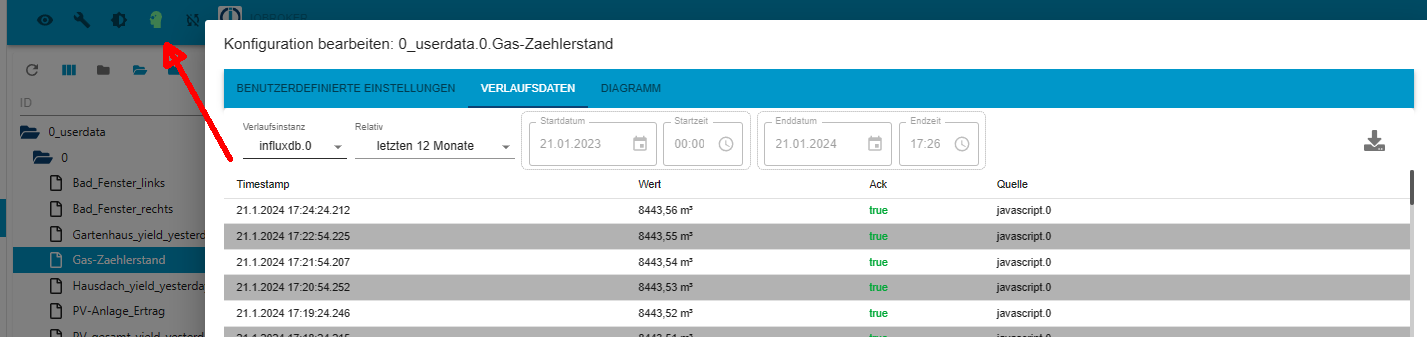
sollte nach dem umschalten im Experten-Modus sichtbar sein !

Nimm mal einen anderen Browser .. was ist dann !?
Edit :
so kein Experten-Modus :
.

@glasfaser Habs mal mit dem Chrome Browser probiert. Ist das gleiche Problem. So wie in deinem ersten Bild sah es vorher bei mir auch aus (auf dem Raspi). Das gilt übrigens für alle Datenpunkte, nicht nur für den einen wie Bild.
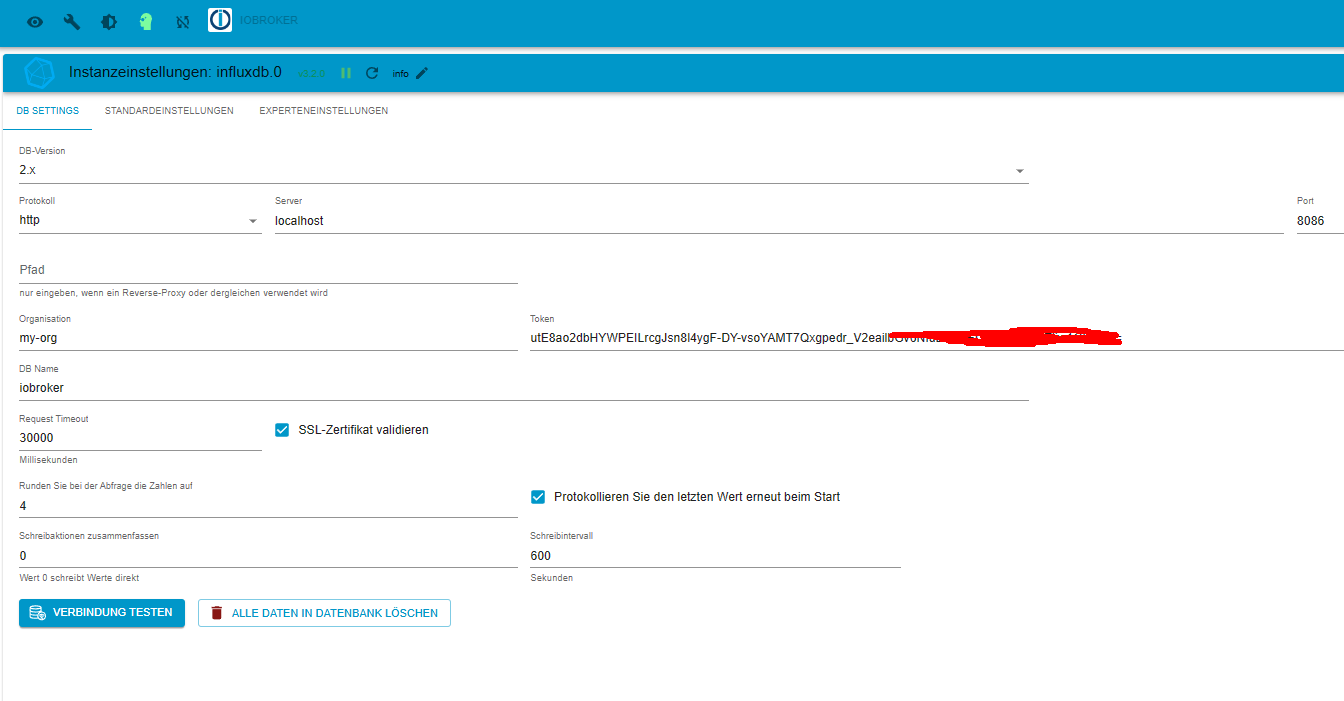
Da fällt mir noch ein, dass ich bei der Umstellung auf Influxdb2 den Adapter nicht neu installiert habe. Ich habe ihn nur von V1 auf V2 umgestellt und den Token eingetragen.
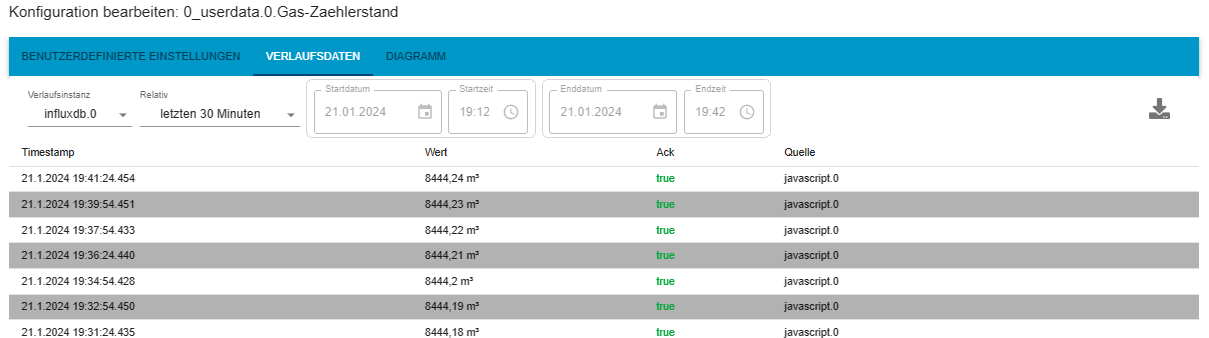
@Homoran Also die Daten werden richtig in der influx0 aufgezeichnet. Hier der aktuelle Zählerstand von heute Abend:

Hey! Du scheinst an dieser Unterhaltung interessiert zu sein, hast aber noch kein Konto.
Hast du es satt, bei jedem Besuch durch die gleichen Beiträge zu scrollen? Wenn du dich für ein Konto anmeldest, kommst du immer genau dorthin zurück, wo du zuvor warst, und kannst dich über neue Antworten benachrichtigen lassen (entweder per E-Mail oder Push-Benachrichtigung). Du kannst auch Lesezeichen speichern und Beiträge positiv bewerten, um anderen Community-Mitgliedern deine Wertschätzung zu zeigen.
Mit deinem Input könnte dieser Beitrag noch besser werden 💗
Registrieren Anmelden431
Online33.0k
Benutzende83.7k
Themen1.3m
Beiträge