




Installation ioBroker bricht mit npm error code 22 ab
-
Thomas hier die Ausgabe von iob diag:
iobpi3@iobroker-pi3:~ $ iob diag /usr/bin/iob: line 21: /home/iobroker/iob_diag.log: Permission denied iobpi3@iobroker-pi3:~ $ -
Das ist ja das Problem iob fix funktioniert nicht:
iobpi3@iobroker-pi3:~ $ iob fix library: loaded Library version=2026-04-11 ioBroker is not installed in /opt/iobroker! Cannot fix anything... iobpi3@iobroker-pi3:~ $Und wenn du den Installationseinzeiler nochmal eingibst?
-
Dann läuft das erstmal normal los:
==========================================================================
    Installing prerequisites (1/4)
==========================================================================

Hit:1 http://deb.debian.org/debian trixie InRelease
Get:2 http://deb.debian.org/debian trixie-updates InRelease [47.3 kB]
Hit:3 http://archive.raspberrypi.com/debian trixie InRelease
Get:4 http://deb.debian.org/debian-security trixie-security InRelease [43.4 kB]
Hit:5 https://deb.nodesource.com/node_22.x nodistro InRelease
Fetched 90.7 kB in 1s (176 kB/s)
Reading package lists... Done

==========================================================================
    Creating ioBroker user and directory (2/4)
==========================================================================

Created /etc/sudoers.d/iobroker
Directory /opt/iobroker created

==========================================================================
    Installing ioBroker (3/4)
==========================================================================
Was mich wundert ist das manche Konsolenbefehle wie zb. ls oder tree nicht erkannt werden bzw. keine Ausgaben liefern...
-
Mir ist auch nicht genau klar was mit re-login gemeint ist.
Den User mit dem die Installation durchgeführt wurde einmal ausloggen und wieder einloggen.
Alternativ den Raspberry einmal sauber neustarten.Installier es nochmal neu. Kann aber auch gut sein, dass der RPI3 mittlerweile etwas schwach auf der Brust ist.
@krcm
Und was kommt dann?Kann aber auch gut sein, dass der RPI3 mittlerweile etwas schwach auf der Brust ist.
Wie lange wartest du jetzt?
-
Dann läuft das erstmal normal los:
==========================================================================
    Installing prerequisites (1/4)
==========================================================================

Hit:1 http://deb.debian.org/debian trixie InRelease
Get:2 http://deb.debian.org/debian trixie-updates InRelease [47.3 kB]
Hit:3 http://archive.raspberrypi.com/debian trixie InRelease
Get:4 http://deb.debian.org/debian-security trixie-security InRelease [43.4 kB]
Hit:5 https://deb.nodesource.com/node_22.x nodistro InRelease
Fetched 90.7 kB in 1s (176 kB/s)
Reading package lists... Done

==========================================================================
    Creating ioBroker user and directory (2/4)
==========================================================================

Created /etc/sudoers.d/iobroker
Directory /opt/iobroker created

==========================================================================
    Installing ioBroker (3/4)
==========================================================================
Was mich wundert ist das manche Konsolenbefehle wie zb. ls oder tree nicht erkannt werden bzw. keine Ausgaben liefern...
-
Hallo zusammen, bei der Installation des IoBrokers auf einem Raspi 3 (Debian Trixi OS 64 lite frisch installiert) bricht die Installation mit folgender Fehlermeldung ab:
npm error code 22
npm error command failed
npm error command sh -c node iobroker.js setup first
npm error creating conf/iobroker.json
npm error No connection to databases possible ...
npm error Cannot load "custom": Connection is closed.
npm error Cannot initialize database scripts: Cannot load "custom" into objects database: Connection is closed.
npm error A complete log of this run can be found in: /home/iobpi3/.npm/_logs/2026-07-25T16_40_16_328Z-debug-0.log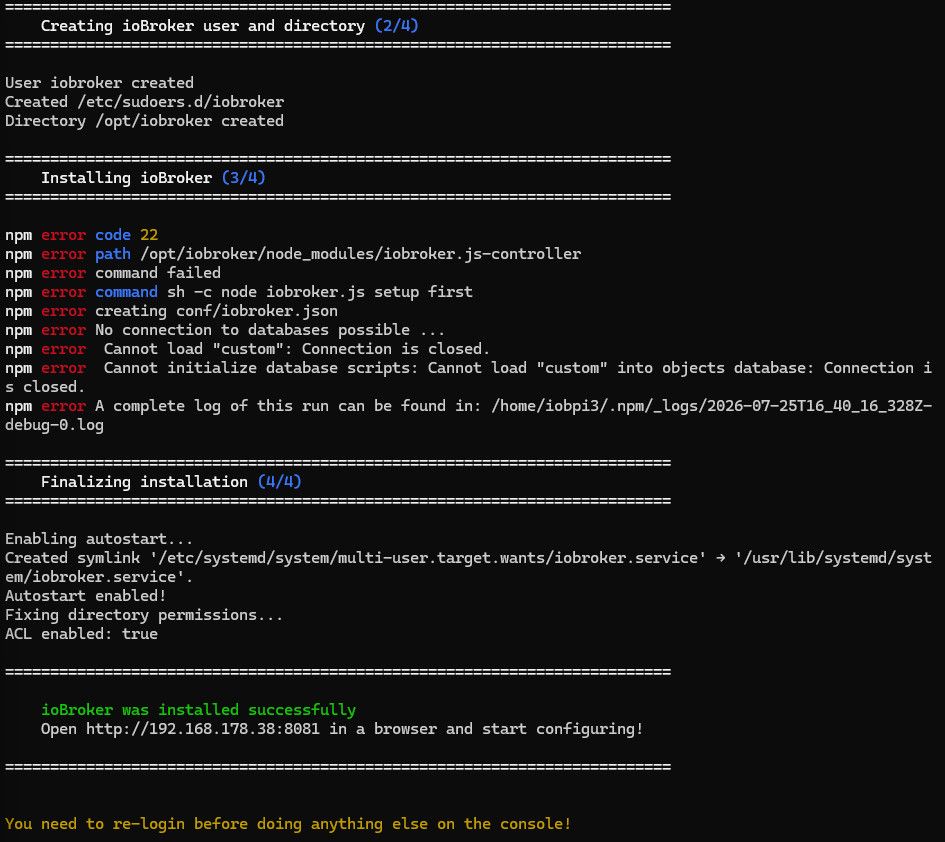 Weiß jemand hier evtl. rat?
Mir ist auch nicht genau klar was mit re-login gemeint ist. Aufrufe von iob fix und iob status siehe screenshot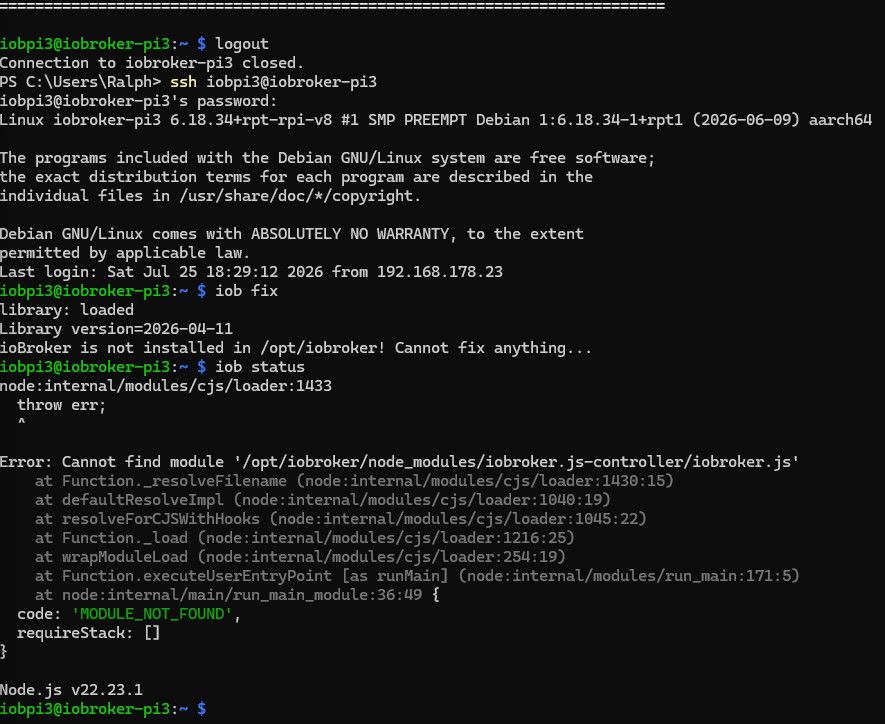
Vielen Dank vorab. -
Der Schitt 3 / 4 dauert dann lange ohne das eine Ausgabe kommt aktuell ca 3 Minuten
jetzt läuft es weiter========================================================================== Finalizing installation (4/4) ========================================================================== Enabling autostart... Autostart enabled! Fixing directory permissions... ACL enabled: true -
Der Schitt 3 / 4 dauert dann lange ohne das eine Ausgabe kommt aktuell ca 3 Minuten
jetzt läuft es weiter========================================================================== Finalizing installation (4/4) ========================================================================== Enabling autostart... Autostart enabled! Fixing directory permissions... ACL enabled: true -
ja eientlich wollte ich den Pi3 nicht mit 64 bit betreiben :-) aber bei der alten IOB Installation wollte ein Modul die 64 bit ich weiß aber nicht mehr welches (Schritt 4/4 läuft nocht
-
OK Ich kanns halt nicht mehr sagen aber vorher hatte ich mit der Installation (gleiche HW) keine schwierigkeiten. Beim Update gab es dann eine Fehlermeldung und dann habe ich mich entschlossen das System zu updaten und neu zu Installieren
Die alte Installation lief ca 2 Jahre problemlos
Speicherkarte habe ich beim OS update verifizieren lassen keine Auffälligkeiten
PS der Installationschirtt 4/4 läuft noch -
OK Ich kanns halt nicht mehr sagen aber vorher hatte ich mit der Installation (gleiche HW) keine schwierigkeiten. Beim Update gab es dann eine Fehlermeldung und dann habe ich mich entschlossen das System zu updaten und neu zu Installieren
Die alte Installation lief ca 2 Jahre problemlos
Speicherkarte habe ich beim OS update verifizieren lassen keine Auffälligkeiten
PS der Installationschirtt 4/4 läuft noch@krcm besorge dir neue Hardware. Selbst wenn du den ioBroker zum Laufen bekommst, wirst du später mit den Adaptern, Performance Probleme bekommen. 1GB RAM ist zu wenig. Für jetzt und zukünftig solltest du schon was zwischen 4 und 8 GB RAM haben - eher 8.
Ro75.
-
Der Schitt 3 / 4 dauert dann lange ohne das eine Ausgabe kommt aktuell ca 3 Minuten
jetzt läuft es weiter========================================================================== Finalizing installation (4/4) ========================================================================== Enabling autostart... Autostart enabled! Fixing directory permissions... ACL enabled: true -
ja eientlich wollte ich den Pi3 nicht mit 64 bit betreiben :-) aber bei der alten IOB Installation wollte ein Modul die 64 bit ich weiß aber nicht mehr welches (Schritt 4/4 läuft nocht
-
Ok danke für den Hinweis dann probier ich das ganze mal bei Gelegenheit auf meinem PI4 mit 8GB
-
Hallo zusammen: Es sieht eigentlich jetzt nicht schlecht aus:
========================================================================== Finalizing installation (4/4) ========================================================================== Enabling autostart... Autostart enabled! Fixing directory permissions... ACL enabled: true ========================================================================== ioBroker was installed successfully Open http://192.168.178.38:8081 in a browser and start configuring! ========================================================================== You need to re-login before doing anything else on the console! ========================================================================== Please run 'iob fix' first after the required re-login to finalize the setup. ========================================================================== iobpi3@iobroker-pi3:/ $ exit logout Connection to iobroker-pi3 closed. PS C:\Users\Ralph> ssh iobpi3@iobroker-pi3 iobpi3@iobroker-pi3's password: Linux iobroker-pi3 6.18.34+rpt-rpi-v8 #1 SMP PREEMPT Debian 1:6.18.34-1+rpt1 (2026-06-09) aarch64 The programs included with the Debian GNU/Linux system are free software; the exact distribution terms for each program are described in the individual files in /usr/share/doc/*/copyright. Debian GNU/Linux comes with ABSOLUTELY NO WARRANTY, to the extent permitted by applicable law. Last login: Sun Jul 26 14:44:41 2026 from 192.168.178.23 iobpi3@iobroker-pi3:~ $ iob fix library: loaded Library version=2026-04-11 ioBroker or some processes are still running: 22922 iobroker.js-con 22976 io.admin.0 22991 io.backitup.0 23054 io.discovery.0 Please stop them first and try again! iobpi3@iobroker-pi3:~ $ iob stop iobpi3@iobroker-pi3:~ $ iob fix library: loaded Library version=2026-04-11 ========================================================================== Welcome to the ioBroker installation fixer! Script version: 2025-09-18 You might need to enter your password a couple of times. ========================================================================== ========================================================================== Installing prerequisites (1/5) ========================================================================== Hit:1 http://deb.debian.org/debian trixie InRelease Hit:2 http://deb.debian.org/debian trixie-updates InRelease Hit:3 http://deb.debian.org/debian-security trixie-security InRelease Hit:4 http://archive.raspberrypi.com/debian trixie InRelease Hit:5 https://deb.nodesource.com/node_22.x nodistro InRelease Reading package lists... Done ========================================================================== Checking ioBroker user and directory permissions (2/5) ========================================================================== Created /etc/sudoers.d/iobroker Fixing directory permissions... ACL enabled: true ========================================================================== Check and cleanup npm temporary directories (3/5) ========================================================================== Done. ========================================================================== Database maintenance (4/5) ========================================================================== Checking for uncompressed JSONL databases... This might take a while! Compressing /opt/iobroker/iobroker-data/states.jsonl Compressing /opt/iobroker/iobroker-data/objects.jsonl Compressed 2 JSONL files. Done ========================================================================== Checking autostart (5/5) ========================================================================== ==== AUTHENTICATING FOR org.freedesktop.systemd1.manage-units ==== Authentication is required to stop 'iobroker.service'. Authenticating as: Raspberry Pi OS (iobpi3) Password: polkit-agent-helper-1: pam_authenticate failed: Authentication failure ==== AUTHENTICATION FAILED ==== Enabling autostart... Autostart enabled! ========================================================================== Your installation was fixed successfully Run iobroker start to start ioBroker again! ========================================================================== -
Hallo zusammen: Es sieht eigentlich jetzt nicht schlecht aus:
========================================================================== Finalizing installation (4/4) ========================================================================== Enabling autostart... Autostart enabled! Fixing directory permissions... ACL enabled: true ========================================================================== ioBroker was installed successfully Open http://192.168.178.38:8081 in a browser and start configuring! ========================================================================== You need to re-login before doing anything else on the console! ========================================================================== Please run 'iob fix' first after the required re-login to finalize the setup. ========================================================================== iobpi3@iobroker-pi3:/ $ exit logout Connection to iobroker-pi3 closed. PS C:\Users\Ralph> ssh iobpi3@iobroker-pi3 iobpi3@iobroker-pi3's password: Linux iobroker-pi3 6.18.34+rpt-rpi-v8 #1 SMP PREEMPT Debian 1:6.18.34-1+rpt1 (2026-06-09) aarch64 The programs included with the Debian GNU/Linux system are free software; the exact distribution terms for each program are described in the individual files in /usr/share/doc/*/copyright. Debian GNU/Linux comes with ABSOLUTELY NO WARRANTY, to the extent permitted by applicable law. Last login: Sun Jul 26 14:44:41 2026 from 192.168.178.23 iobpi3@iobroker-pi3:~ $ iob fix library: loaded Library version=2026-04-11 ioBroker or some processes are still running: 22922 iobroker.js-con 22976 io.admin.0 22991 io.backitup.0 23054 io.discovery.0 Please stop them first and try again! iobpi3@iobroker-pi3:~ $ iob stop iobpi3@iobroker-pi3:~ $ iob fix library: loaded Library version=2026-04-11 ========================================================================== Welcome to the ioBroker installation fixer! Script version: 2025-09-18 You might need to enter your password a couple of times. ========================================================================== ========================================================================== Installing prerequisites (1/5) ========================================================================== Hit:1 http://deb.debian.org/debian trixie InRelease Hit:2 http://deb.debian.org/debian trixie-updates InRelease Hit:3 http://deb.debian.org/debian-security trixie-security InRelease Hit:4 http://archive.raspberrypi.com/debian trixie InRelease Hit:5 https://deb.nodesource.com/node_22.x nodistro InRelease Reading package lists... Done ========================================================================== Checking ioBroker user and directory permissions (2/5) ========================================================================== Created /etc/sudoers.d/iobroker Fixing directory permissions... ACL enabled: true ========================================================================== Check and cleanup npm temporary directories (3/5) ========================================================================== Done. ========================================================================== Database maintenance (4/5) ========================================================================== Checking for uncompressed JSONL databases... This might take a while! Compressing /opt/iobroker/iobroker-data/states.jsonl Compressing /opt/iobroker/iobroker-data/objects.jsonl Compressed 2 JSONL files. Done ========================================================================== Checking autostart (5/5) ========================================================================== ==== AUTHENTICATING FOR org.freedesktop.systemd1.manage-units ==== Authentication is required to stop 'iobroker.service'. Authenticating as: Raspberry Pi OS (iobpi3) Password: polkit-agent-helper-1: pam_authenticate failed: Authentication failure ==== AUTHENTICATION FAILED ==== Enabling autostart... Autostart enabled! ========================================================================== Your installation was fixed successfully Run iobroker start to start ioBroker again! ========================================================================== -
Ok ich komme auf die Web oberfläche und kann konfigurieren hier die Ausgabe von TOP:
Debian GNU/Linux comes with ABSOLUTELY NO WARRANTY, to the extent
permitted by applicable law.
Last login: Sun Jul 26 15:37:09 2026 from 192.168.178.23
iobpi3@iobroker-pi3:~ $ top
top - 15:45:31 up  2:47,  1 user,  load average: 0.05, 0.26, 0.44
Tasks: 135 total,   1 running, 134 sleeping,   0 stopped,   0 zombie
%Cpu(s):  1.2 us,  0.2 sy,  0.0 ni, 98.3 id,  0.1 wa,  0.0 hi,  0.2 si,  0.0 st
MiB Mem :    905.1 total,    216.8 free,    525.8 used,    227.5 buff/cache
MiB Swap:    905.0 total,    855.8 free,     49.2 used.    379.3 avail Mem

    PID USER      PR  NI    VIRT    RES    SHR S  %CPU  %MEM     TIME+ COMMAND
  25285 iobroker  20   0   10.9g 178740  49988 S   3.0  19.3   0:49.64 iobroker.js-con
  25304 iobroker  20   0   21.1g 185212  56828 S   2.3  20.0   0:33.10 io.admin.0
  25502 iobpi3    20   0   10196   5432   3320 R   1.0   0.6   0:00.19 top
    571 root      20   0  342152   6040   4876 S   0.3   0.7   0:03.57 NetworkManager
      1 root      20   0   25376   9724   6944 S   0.0   1.0   1:08.46 systemd
      2 root      20   0       0      0      0 S   0.0   0.0   0:00.02 kthreadd
      3 root      20   0       0      0      0 S   0.0   0.0   0:00.00 pool_workqueue_release
      4 root       0 -20       0      0      0 I   0.0   0.0   0:00.00 kworker/R-rcu_gp
      5 root       0 -20       0      0      0 I   0.0   0.0   0:00.00 kworker/R-sync_wq
      6 root       0 -20       0      0      0 I   0.0   0.0   0:00.00 kworker/R-kvfree_rcu_reclaim
      7 root       0 -20       0      0      0 I   0.0   0.0   0:00.00 kworker/R-slub_flushwq
      8 root       0 -20       0      0      0 I   0.0   0.0   0:00.00 kworker/R-netns
     13 root       0 -20       0      0      0 I   0.0   0.0   0:00.00 kworker/R-mm_percpu_wq
     14 root      20   0       0      0      0 S   0.0   0.0   0:00.18 ksoftirqd/0
     15 root      20   0       0      0      0 I   0.0   0.0   0:03.36 rcu_preempt
     16 root      20   0       0      0      0 S   0.0   0.0   0:00.00 rcu_exp_par_gp_kthread_worker/0
     17 root      20   0       0      0      0 S   0.0   0.0   0:00.00 rcu_exp_gp_kthread_worker
     18 root      rt   0       0      0      0 S   0.0   0.0   0:00.00 migration/0
     19 root      20   0       0      0      0 S   0.0   0.0   0:00.00 cpuhp/0
     20 root      20   0       0      0      0 S   0.0   0.0   0:00.00 cpuhp/1
     21 root      rt   0       0      0      0 S   0.0   0.0   0:00.00 migration/1
     22 root      20   0       0      0      0 S   0.0   0.0   0:00.14 ksoftirqd/1
     25 root      20   0       0      0      0 S   0.0   0.0   0:00.00 cpuhp/2
     26 root      rt   0       0      0      0 S   0.0   0.0   0:00.00 migration/2
     27 root      20   0       0      0      0 S   0.0   0.0   0:00.12 ksoftirqd/2
     30 root      20   0       0      0      0 S   0.0   0.0   0:00.00 cpuhp/3
     31 root      rt   0       0      0      0 S   0.0   0.0   0:00.00 migration/3
     32 root      20   0       0      0      0 S   0.0   0.0   0:00.13 ksoftirqd/3
     35 root      20   0       0      0      0 S   0.0   0.0   0:00.00 kdevtmpfs
     36 root       0 -20       0      0      0 I   0.0   0.0   0:00.00 kworker/R-inet_frag_wq
     37 root      20   0       0      0      0 I   0.0   0.0   0:00.00 rcu_tasks_kthread
     38 root      20   0       0      0      0 I   0.0   0.0   0:00.00 rcu_tasks_rude_kthread
     39 root      20   0       0      0      0 I   0.0   0.0   0:00.00 rcu_tasks_trace_kthread
     40 root      20   0       0      0      0 S   0.0   0.0   0:00.00 kauditd
     42 root      20   0       0      0      0 S   0.0   0.0   0:00.01 khungtaskd
     43 root      20   0       0      0      0 S   0.0   0.0   0:00.00 oom_reaper
     44 root       0 -20       0      0      0 I   0.0   0.0   0:00.00 kworker/R-writeback
     45 root      20   0       0      0      0 S   0.0   0.0   0:05.87 kcompactd0
     47 root       0 -20       0      0      0 I   0.0   0.0   0:00.00 kworker/R-kblockd
     48 root       0 -20       0      0      0 I   0.0   0.0   0:00.00 kworker/R-blkcg_punt_bio



Hey! Du scheinst an dieser Unterhaltung interessiert zu sein, hast aber noch kein Konto.
Hast du es satt, bei jedem Besuch durch die gleichen Beiträge zu scrollen? Wenn du dich für ein Konto anmeldest, kommst du immer genau dorthin zurück, wo du zuvor warst, und kannst dich über neue Antworten benachrichtigen lassen (entweder per E-Mail oder Push-Benachrichtigung). Du kannst auch Lesezeichen speichern und Beiträge positiv bewerten, um anderen Community-Mitgliedern deine Wertschätzung zu zeigen.
Mit deinem Input könnte dieser Beitrag noch besser werden 💗
Registrieren AnmeldenSupport us
234
Online33.0k
Benutzende83.7k
Themen1.3m
Beiträge