Skip to content
  • Home
  • Recent
  • Tags
  • 0 Unread 0
  • Categories
  • Unreplied
  • Popular
  • GitHub
  • Docu
  • Hilfe
Skins
  • Light
  • Brite
  • Cerulean
  • Cosmo
  • Flatly
  • Journal
  • Litera
  • Lumen
  • Lux
  • Materia
  • Minty
  • Morph
  • Pulse
  • Sandstone
  • Simplex
  • Sketchy
  • Spacelab
  • United
  • Yeti
  • Zephyr
  • Dark
  • Cyborg
  • Darkly
  • Quartz
  • Slate
  • Solar
  • Superhero
  • Vapor

  • Default (No Skin)
  • No Skin
Collapse
ioBroker Logo

Community Forum

donate donate
  1. ioBroker Community Home
  2. Deutsch
  3. Off Topic
  4. Proxmox
  5. [Erledigt]proxmox-Datensicherung Fehlermeldung ?

NEWS

  • Jahresrückblick 2025 – unser neuer Blogbeitrag ist online! ✨
    BluefoxB
    Bluefox
    17
    1
    3.0k

  • Neuer Blogbeitrag: Monatsrückblick - Dezember 2025 🎄
    BluefoxB
    Bluefox
    13
    1
    1.1k

  • Weihnachtsangebot 2025! 🎄
    BluefoxB
    Bluefox
    25
    1
    2.4k

[Erledigt]proxmox-Datensicherung Fehlermeldung ?

Scheduled Pinned Locked Moved Proxmox
62 Posts 4 Posters 7.9k Views 4 Watching
  • Oldest to Newest
  • Newest to Oldest
  • Most Votes
Reply
  • Reply as topic
Log in to reply
This topic has been deleted. Only users with topic management privileges can see it.
  • Meister MopperM Meister Mopper

    @crunchip sagte in proxmox-Datensicherung Fehlermeldung ?:

    hab drei nodes, alle haben die selbe Speicherbelegung, wenn das so wäre, müsste ja bei allen das selbe schief gegangen sein.

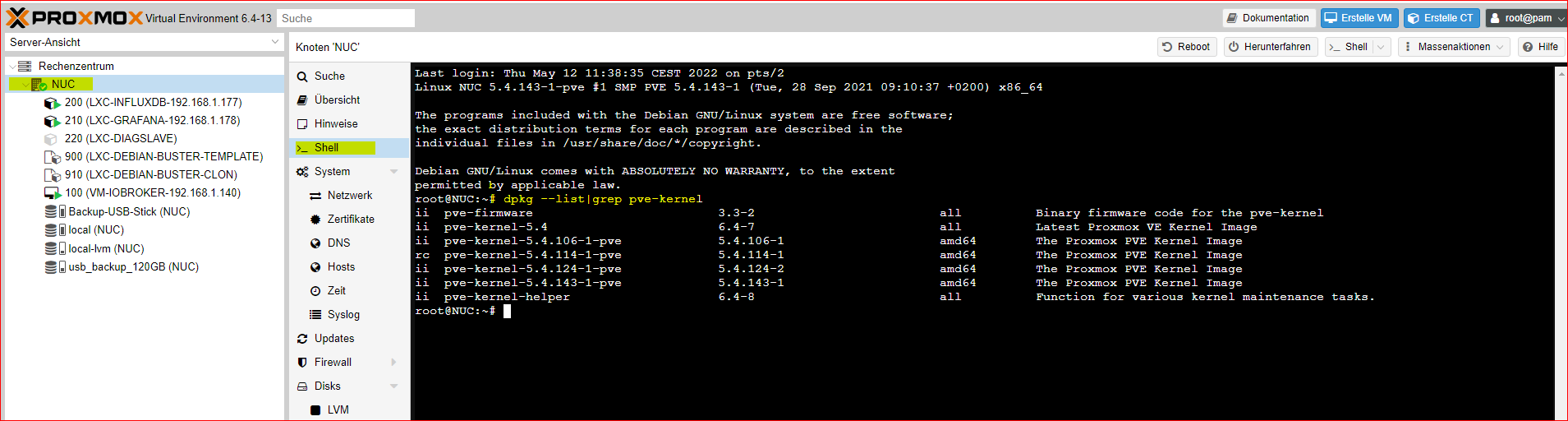
    Einige Kernel bleiben offenbar und können nur manuell entfernt werden. Feststellen kannst Du das ja mit dpkg --list|grep pve-kernel.

    crunchipC Away
    crunchipC Away
    crunchip
    Forum Testing Most Active
    wrote on last edited by
    #38

    @meister-mopper das zeigt zwar alles Mögliche an( was auch immer das bedeutet), aber installiert ist doch nur einer

    umgestiegen von Proxmox auf Unraid

    1 Reply Last reply
    1
    • crunchipC crunchip

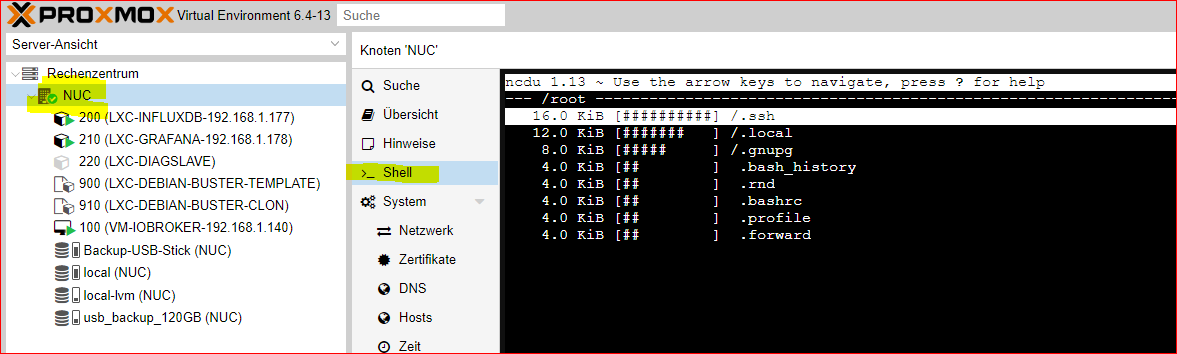
      @goetschhofer mit ncdu, glaub das hatten wir bei dir schon mal in Verwendung
      Wenn es nicht installiert ist, dann auf dem Proxmox Host

      apt install ncdu
      
      G Offline
      G Offline
      GOETSCHHOFER
      wrote on last edited by GOETSCHHOFER
      #39

      @crunchip said in proxmox-Datensicherung Fehlermeldung ?:

      apt install ncdu

      Musste ich erst in proxmox über die Shell installieren.

      Mit ncdu zeigt er mir dies an ?


      5131e147-193a-444d-8c0b-143bd86f9745-image.png

      @Meister-Mopper Feststellen kannst Du das ja mit dpkg --list|grep pve-kernel.


      e5a56122-dd1c-4666-a00e-f266a271e1e0-image.png

      Das Warning nach dem Backup habe ich für beide USB-sticks immer noch.


      INFO: starting new backup job: vzdump 100 200 210 --storage usb_backup_120GB --mailnotification always --quiet 1 --mode snapshot --mailto --node NUC --compress zstd
      INFO: Starting Backup of VM 100 (qemu)
      INFO: Backup started at 2022-05-11 21:00:01
      INFO: status = running
      INFO: VM Name: VM-IOBROKER-192.168.1.140
      INFO: include disk 'scsi0' 'local-lvm:vm-100-disk-0' 20G
      INFO: backup mode: snapshot
      INFO: ionice priority: 7
      INFO: creating vzdump archive '/media/usb_backup/dump/vzdump-qemu-100-2022_05_11-21_00_01.vma.zst'
      INFO: started backup task '79f197ef-621b-43db-b4ff-0755ac3210fa'
      INFO: resuming VM again
      INFO: 1% (275.5 MiB of 20.0 GiB) in 3s, read: 91.8 MiB/s, write: 40.4 MiB/s
      INFO: 2% (445.9 MiB of 20.0 GiB) in 8s, read: 34.1 MiB/s, write: 22.2 MiB/s
      INFO: 3% (616.2 MiB of 20.0 GiB) in 15s, read: 24.3 MiB/s, write: 15.9 MiB/s
      INFO: 4% (819.2 MiB of 20.0 GiB) in 24s, read: 22.6 MiB/s, write: 18.5 MiB/s
      INFO: 5% (1.0 GiB of 20.0 GiB) in 30s, read: 37.5 MiB/s, write: 27.1 MiB/s
      INFO: 6% (1.2 GiB of 20.0 GiB) in 38s, read: 25.8 MiB/s, write: 21.1 MiB/s
      INFO: 7% (1.4 GiB of 20.0 GiB) in 43s, read: 40.6 MiB/s, write: 34.0 MiB/s
      INFO: 8% (1.6 GiB of 20.0 GiB) in 49s, read: 33.2 MiB/s, write: 24.7 MiB/s
      INFO: 9% (1.8 GiB of 20.0 GiB) in 58s, read: 23.4 MiB/s, write: 20.7 MiB/s
      INFO: 10% (2.0 GiB of 20.0 GiB) in 1m 6s, read: 23.1 MiB/s, write: 21.0 MiB/s
      INFO: 11% (2.2 GiB of 20.0 GiB) in 1m 9s, read: 76.1 MiB/s, write: 39.1 MiB/s
      INFO: 12% (2.4 GiB of 20.0 GiB) in 1m 14s, read: 41.1 MiB/s, write: 30.2 MiB/s
      INFO: 13% (2.6 GiB of 20.0 GiB) in 1m 25s, read: 17.9 MiB/s, write: 17.2 MiB/s
      INFO: 15% (3.1 GiB of 20.0 GiB) in 1m 28s, read: 148.6 MiB/s, write: 15.5 MiB/s
      INFO: 16% (3.2 GiB of 20.0 GiB) in 1m 34s, read: 27.8 MiB/s, write: 17.1 MiB/s
      INFO: 17% (3.4 GiB of 20.0 GiB) in 1m 43s, read: 21.8 MiB/s, write: 18.8 MiB/s
      INFO: 18% (3.6 GiB of 20.0 GiB) in 1m 57s, read: 15.3 MiB/s, write: 15.3 MiB/s
      INFO: 19% (3.8 GiB of 20.0 GiB) in 2m 8s, read: 17.5 MiB/s, write: 15.9 MiB/s
      INFO: 20% (4.0 GiB of 20.0 GiB) in 2m 19s, read: 18.5 MiB/s, write: 14.4 MiB/s
      INFO: 21% (4.2 GiB of 20.0 GiB) in 2m 22s, read: 68.9 MiB/s, write: 27.7 MiB/s
      INFO: 22% (4.4 GiB of 20.0 GiB) in 2m 26s, read: 52.6 MiB/s, write: 45.8 MiB/s
      INFO: 23% (4.6 GiB of 20.0 GiB) in 2m 34s, read: 26.3 MiB/s, write: 25.7 MiB/s
      INFO: 24% (4.8 GiB of 20.0 GiB) in 2m 41s, read: 33.1 MiB/s, write: 20.6 MiB/s
      INFO: 25% (5.0 GiB of 20.0 GiB) in 2m 47s, read: 27.8 MiB/s, write: 24.0 MiB/s
      INFO: 26% (5.2 GiB of 20.0 GiB) in 2m 52s, read: 40.6 MiB/s, write: 34.0 MiB/s
      INFO: 27% (5.4 GiB of 20.0 GiB) in 3m 4s, read: 17.2 MiB/s, write: 16.7 MiB/s
      INFO: 28% (5.8 GiB of 20.0 GiB) in 3m 14s, read: 40.2 MiB/s, write: 15.1 MiB/s
      INFO: 29% (5.9 GiB of 20.0 GiB) in 3m 17s, read: 33.8 MiB/s, write: 18.9 MiB/s
      INFO: 30% (6.0 GiB of 20.0 GiB) in 3m 24s, read: 15.5 MiB/s, write: 15.5 MiB/s
      INFO: 31% (6.2 GiB of 20.0 GiB) in 3m 27s, read: 77.3 MiB/s, write: 30.3 MiB/s
      INFO: 32% (6.4 GiB of 20.0 GiB) in 3m 32s, read: 35.5 MiB/s, write: 28.5 MiB/s
      INFO: 33% (6.6 GiB of 20.0 GiB) in 3m 42s, read: 21.8 MiB/s, write: 17.9 MiB/s
      INFO: 34% (6.8 GiB of 20.0 GiB) in 3m 55s, read: 15.3 MiB/s, write: 15.3 MiB/s
      INFO: 35% (7.0 GiB of 20.0 GiB) in 4m 5s, read: 21.0 MiB/s, write: 17.1 MiB/s
      INFO: 36% (7.2 GiB of 20.0 GiB) in 4m 14s, read: 26.2 MiB/s, write: 18.6 MiB/s
      INFO: 38% (7.7 GiB of 20.0 GiB) in 4m 17s, read: 146.2 MiB/s, write: 16.0 MiB/s
      INFO: 39% (7.8 GiB of 20.0 GiB) in 4m 26s, read: 16.5 MiB/s, write: 16.5 MiB/s
      INFO: 41% (8.3 GiB of 20.0 GiB) in 4m 29s, read: 168.0 MiB/s, write: 67.0 MiB/s
      INFO: 42% (8.4 GiB of 20.0 GiB) in 4m 33s, read: 32.6 MiB/s, write: 26.5 MiB/s
      INFO: 44% (8.9 GiB of 20.0 GiB) in 4m 36s, read: 170.4 MiB/s, write: 22.4 MiB/s
      INFO: 45% (9.0 GiB of 20.0 GiB) in 4m 41s, read: 15.2 MiB/s, write: 15.2 MiB/s
      INFO: 46% (9.2 GiB of 20.0 GiB) in 4m 53s, read: 16.9 MiB/s, write: 16.3 MiB/s
      INFO: 47% (9.4 GiB of 20.0 GiB) in 5m 5s, read: 16.9 MiB/s, write: 16.3 MiB/s
      INFO: 48% (9.6 GiB of 20.0 GiB) in 5m 17s, read: 17.5 MiB/s, write: 17.1 MiB/s
      INFO: 49% (9.8 GiB of 20.0 GiB) in 5m 30s, read: 15.6 MiB/s, write: 15.6 MiB/s
      INFO: 51% (10.2 GiB of 20.0 GiB) in 5m 33s, read: 146.1 MiB/s, write: 39.4 MiB/s
      INFO: 52% (10.5 GiB of 20.0 GiB) in 5m 37s, read: 69.9 MiB/s, write: 41.7 MiB/s
      INFO: 53% (10.7 GiB of 20.0 GiB) in 5m 41s, read: 58.9 MiB/s, write: 21.1 MiB/s
      INFO: 58% (11.8 GiB of 20.0 GiB) in 5m 44s, read: 360.1 MiB/s, write: 27.8 MiB/s
      INFO: 60% (12.2 GiB of 20.0 GiB) in 5m 47s, read: 122.0 MiB/s, write: 42.8 MiB/s
      INFO: 61% (12.3 GiB of 20.0 GiB) in 5m 50s, read: 49.5 MiB/s, write: 39.5 MiB/s
      INFO: 62% (12.5 GiB of 20.0 GiB) in 5m 53s, read: 60.4 MiB/s, write: 44.7 MiB/s
      INFO: 63% (12.6 GiB of 20.0 GiB) in 5m 56s, read: 45.9 MiB/s, write: 37.5 MiB/s
      INFO: 64% (12.8 GiB of 20.0 GiB) in 6m 1s, read: 39.9 MiB/s, write: 32.2 MiB/s
      INFO: 70% (14.0 GiB of 20.0 GiB) in 6m 4s, read: 409.5 MiB/s, write: 28.0 MiB/s
      INFO: 71% (14.3 GiB of 20.0 GiB) in 6m 7s, read: 110.1 MiB/s, write: 46.5 MiB/s
      INFO: 80% (16.0 GiB of 20.0 GiB) in 6m 10s, read: 574.0 MiB/s, write: 25.1 MiB/s
      INFO: 81% (16.3 GiB of 20.0 GiB) in 6m 13s, read: 99.1 MiB/s, write: 53.8 MiB/s
      INFO: 82% (16.5 GiB of 20.0 GiB) in 6m 16s, read: 85.8 MiB/s, write: 47.3 MiB/s
      INFO: 86% (17.2 GiB of 20.0 GiB) in 6m 19s, read: 223.5 MiB/s, write: 43.6 MiB/s
      INFO: 92% (18.5 GiB of 20.0 GiB) in 6m 22s, read: 455.5 MiB/s, write: 19.7 MiB/s
      INFO: 93% (18.6 GiB of 20.0 GiB) in 6m 26s, read: 17.2 MiB/s, write: 17.2 MiB/s
      INFO: 94% (18.8 GiB of 20.0 GiB) in 6m 36s, read: 21.0 MiB/s, write: 16.2 MiB/s
      INFO: 95% (19.0 GiB of 20.0 GiB) in 6m 49s, read: 15.6 MiB/s, write: 15.6 MiB/s
      INFO: 100% (20.0 GiB of 20.0 GiB) in 6m 52s, read: 337.9 MiB/s, write: 13.4 MiB/s
      INFO: backup is sparse: 11.16 GiB (55%) total zero data
      INFO: transferred 20.00 GiB in 412 seconds (49.7 MiB/s)
      INFO: archive file size: 6.07GB
      INFO: Finished Backup of VM 100 (00:06:53)
      INFO: Backup finished at 2022-05-11 21:06:54
      INFO: Starting Backup of VM 200 (lxc)
      INFO: Backup started at 2022-05-11 21:06:54
      INFO: status = running
      INFO: CT Name: LXC-INFLUXDB-192.168.1.177
      INFO: including mount point rootfs ('/') in backup
      INFO: backup mode: snapshot
      INFO: ionice priority: 7
      INFO: create storage snapshot 'vzdump'
      WARNING: You have not turned on protection against thin pools running out of space.
      WARNING: Set activation/thin_pool_autoextend_threshold below 100 to trigger automatic extension of thin pools before they get full.
      Logical volume "snap_vm-200-disk-1_vzdump" created.
      WARNING: Sum of all thin volume sizes (148.00 GiB) exceeds the size of thin pool pve/data and the amount of free space in volume group (16.00 GiB).
      INFO: creating vzdump archive '/media/usb_backup/dump/vzdump-lxc-200-2022_05_11-21_06_54.tar.zst'
      INFO: Total bytes written: 7836293120 (7.3GiB, 58MiB/s)
      INFO: archive file size: 1.61GB
      INFO: cleanup temporary 'vzdump' snapshot
      Logical volume "snap_vm-200-disk-1_vzdump" successfully removed
      INFO: Finished Backup of VM 200 (00:02:13)
      INFO: Backup finished at 2022-05-11 21:09:07
      INFO: Starting Backup of VM 210 (lxc)
      INFO: Backup started at 2022-05-11 21:09:07
      INFO: status = running
      INFO: CT Name: LXC-GRAFANA-192.168.1.178
      INFO: including mount point rootfs ('/') in backup
      INFO: backup mode: snapshot
      INFO: ionice priority: 7
      INFO: create storage snapshot 'vzdump'
      WARNING: You have not turned on protection against thin pools running out of space.
      WARNING: Set activation/thin_pool_autoextend_threshold below 100 to trigger automatic extension of thin pools before they get full.
      Logical volume "snap_vm-210-disk-0_vzdump" created.
      WARNING: Sum of all thin volume sizes (148.00 GiB) exceeds the size of thin pool pve/data and the amount of free space
      in volume group (16.00 GiB).
      INFO: creating vzdump archive '/media/usb_backup/dump/vzdump-lxc-210-2022_05_11-21_09_07.tar.zst'
      INFO: Total bytes written: 1238763520 (1.2GiB, 35MiB/s)
      INFO: archive file size: 452MB
      INFO: cleanup temporary 'vzdump' snapshot
      Logical volume "snap_vm-210-disk-0_vzdump" successfully removed
      INFO: Finished Backup of VM 210 (00:00:37)
      INFO: Backup finished at 2022-05-11 21:09:44
      INFO: Backup job finished successfully
      TASK OK


      INFO: starting new backup job: vzdump 200 210 --storage Backup-USB-Stick --compress zstd --node NUC --mailto --mailnotification always --quiet 1 --mode snapshot
      INFO: Starting Backup of VM 200 (lxc)
      INFO: Backup started at 2022-05-11 20:00:02
      INFO: status = running
      INFO: CT Name: LXC-INFLUXDB-192.168.1.177
      INFO: including mount point rootfs ('/') in backup
      INFO: backup mode: snapshot
      INFO: ionice priority: 7
      INFO: create storage snapshot 'vzdump'
      WARNING: You have not turned on protection against thin pools running out of space.
      WARNING: Set activation/thin_pool_autoextend_threshold below 100 to trigger automatic extension of thin pools before they get full.
      Logical volume "snap_vm-200-disk-1_vzdump" created.
      WARNING: Sum of all thin volume sizes (148.00 GiB) exceeds the size of thin pool pve/data and the amount of free space in volume group (16.00 GiB).
      INFO: creating vzdump archive '/media/USB-NUC-NAS/dump/vzdump-lxc-200-2022_05_11-20_00_02.tar.zst'
      INFO: Total bytes written: 7845120000 (7.4GiB, 203MiB/s)
      INFO: archive file size: 1.63GB
      INFO: removing backup 'Backup-USB-Stick:backup/vzdump-lxc-200-2022_05_08-20_01_55.tar.zst'
      INFO: cleanup temporary 'vzdump' snapshot
      Logical volume "snap_vm-200-disk-1_vzdump" successfully removed
      INFO: Finished Backup of VM 200 (00:00:40)
      INFO: Backup finished at 2022-05-11 20:00:42
      INFO: Starting Backup of VM 210 (lxc)
      INFO: Backup started at 2022-05-11 20:00:42
      INFO: status = running
      INFO: CT Name: LXC-GRAFANA-192.168.1.178
      INFO: including mount point rootfs ('/') in backup
      INFO: backup mode: snapshot
      INFO: ionice priority: 7
      INFO: create storage snapshot 'vzdump'
      WARNING: You have not turned on protection against thin pools running out of space.
      WARNING: Set activation/thin_pool_autoextend_threshold below 100 to trigger automatic extension of thin pools before they get full.
      Logical volume "snap_vm-210-disk-0_vzdump" created.
      WARNING: Sum of all thin volume sizes (148.00 GiB) exceeds the size of thin pool pve/data and the amount of free space
      in volume group (16.00 GiB).
      INFO: creating vzdump archive '/media/USB-NUC-NAS/dump/vzdump-lxc-210-2022_05_11-20_00_42.tar.zst'
      INFO: Total bytes written: 1238763520 (1.2GiB, 108MiB/s)
      INFO: archive file size: 452MB
      INFO: removing backup 'Backup-USB-Stick:backup/vzdump-lxc-210-2022_05_08-20_02_38.tar.zst'
      INFO: cleanup temporary 'vzdump' snapshot
      Logical volume "snap_vm-210-disk-0_vzdump" successfully removed
      INFO: Finished Backup of VM 210 (00:00:15)
      INFO: Backup finished at 2022-05-11 20:00:57
      INFO: Backup job finished successfully
      TASK OK

      Danke

      crunchipC 1 Reply Last reply
      0
      • G GOETSCHHOFER

        @crunchip said in proxmox-Datensicherung Fehlermeldung ?:

        apt install ncdu

        Musste ich erst in proxmox über die Shell installieren.

        Mit ncdu zeigt er mir dies an ?


        5131e147-193a-444d-8c0b-143bd86f9745-image.png

        @Meister-Mopper Feststellen kannst Du das ja mit dpkg --list|grep pve-kernel.


        e5a56122-dd1c-4666-a00e-f266a271e1e0-image.png

        Das Warning nach dem Backup habe ich für beide USB-sticks immer noch.


        INFO: starting new backup job: vzdump 100 200 210 --storage usb_backup_120GB --mailnotification always --quiet 1 --mode snapshot --mailto --node NUC --compress zstd
        INFO: Starting Backup of VM 100 (qemu)
        INFO: Backup started at 2022-05-11 21:00:01
        INFO: status = running
        INFO: VM Name: VM-IOBROKER-192.168.1.140
        INFO: include disk 'scsi0' 'local-lvm:vm-100-disk-0' 20G
        INFO: backup mode: snapshot
        INFO: ionice priority: 7
        INFO: creating vzdump archive '/media/usb_backup/dump/vzdump-qemu-100-2022_05_11-21_00_01.vma.zst'
        INFO: started backup task '79f197ef-621b-43db-b4ff-0755ac3210fa'
        INFO: resuming VM again
        INFO: 1% (275.5 MiB of 20.0 GiB) in 3s, read: 91.8 MiB/s, write: 40.4 MiB/s
        INFO: 2% (445.9 MiB of 20.0 GiB) in 8s, read: 34.1 MiB/s, write: 22.2 MiB/s
        INFO: 3% (616.2 MiB of 20.0 GiB) in 15s, read: 24.3 MiB/s, write: 15.9 MiB/s
        INFO: 4% (819.2 MiB of 20.0 GiB) in 24s, read: 22.6 MiB/s, write: 18.5 MiB/s
        INFO: 5% (1.0 GiB of 20.0 GiB) in 30s, read: 37.5 MiB/s, write: 27.1 MiB/s
        INFO: 6% (1.2 GiB of 20.0 GiB) in 38s, read: 25.8 MiB/s, write: 21.1 MiB/s
        INFO: 7% (1.4 GiB of 20.0 GiB) in 43s, read: 40.6 MiB/s, write: 34.0 MiB/s
        INFO: 8% (1.6 GiB of 20.0 GiB) in 49s, read: 33.2 MiB/s, write: 24.7 MiB/s
        INFO: 9% (1.8 GiB of 20.0 GiB) in 58s, read: 23.4 MiB/s, write: 20.7 MiB/s
        INFO: 10% (2.0 GiB of 20.0 GiB) in 1m 6s, read: 23.1 MiB/s, write: 21.0 MiB/s
        INFO: 11% (2.2 GiB of 20.0 GiB) in 1m 9s, read: 76.1 MiB/s, write: 39.1 MiB/s
        INFO: 12% (2.4 GiB of 20.0 GiB) in 1m 14s, read: 41.1 MiB/s, write: 30.2 MiB/s
        INFO: 13% (2.6 GiB of 20.0 GiB) in 1m 25s, read: 17.9 MiB/s, write: 17.2 MiB/s
        INFO: 15% (3.1 GiB of 20.0 GiB) in 1m 28s, read: 148.6 MiB/s, write: 15.5 MiB/s
        INFO: 16% (3.2 GiB of 20.0 GiB) in 1m 34s, read: 27.8 MiB/s, write: 17.1 MiB/s
        INFO: 17% (3.4 GiB of 20.0 GiB) in 1m 43s, read: 21.8 MiB/s, write: 18.8 MiB/s
        INFO: 18% (3.6 GiB of 20.0 GiB) in 1m 57s, read: 15.3 MiB/s, write: 15.3 MiB/s
        INFO: 19% (3.8 GiB of 20.0 GiB) in 2m 8s, read: 17.5 MiB/s, write: 15.9 MiB/s
        INFO: 20% (4.0 GiB of 20.0 GiB) in 2m 19s, read: 18.5 MiB/s, write: 14.4 MiB/s
        INFO: 21% (4.2 GiB of 20.0 GiB) in 2m 22s, read: 68.9 MiB/s, write: 27.7 MiB/s
        INFO: 22% (4.4 GiB of 20.0 GiB) in 2m 26s, read: 52.6 MiB/s, write: 45.8 MiB/s
        INFO: 23% (4.6 GiB of 20.0 GiB) in 2m 34s, read: 26.3 MiB/s, write: 25.7 MiB/s
        INFO: 24% (4.8 GiB of 20.0 GiB) in 2m 41s, read: 33.1 MiB/s, write: 20.6 MiB/s
        INFO: 25% (5.0 GiB of 20.0 GiB) in 2m 47s, read: 27.8 MiB/s, write: 24.0 MiB/s
        INFO: 26% (5.2 GiB of 20.0 GiB) in 2m 52s, read: 40.6 MiB/s, write: 34.0 MiB/s
        INFO: 27% (5.4 GiB of 20.0 GiB) in 3m 4s, read: 17.2 MiB/s, write: 16.7 MiB/s
        INFO: 28% (5.8 GiB of 20.0 GiB) in 3m 14s, read: 40.2 MiB/s, write: 15.1 MiB/s
        INFO: 29% (5.9 GiB of 20.0 GiB) in 3m 17s, read: 33.8 MiB/s, write: 18.9 MiB/s
        INFO: 30% (6.0 GiB of 20.0 GiB) in 3m 24s, read: 15.5 MiB/s, write: 15.5 MiB/s
        INFO: 31% (6.2 GiB of 20.0 GiB) in 3m 27s, read: 77.3 MiB/s, write: 30.3 MiB/s
        INFO: 32% (6.4 GiB of 20.0 GiB) in 3m 32s, read: 35.5 MiB/s, write: 28.5 MiB/s
        INFO: 33% (6.6 GiB of 20.0 GiB) in 3m 42s, read: 21.8 MiB/s, write: 17.9 MiB/s
        INFO: 34% (6.8 GiB of 20.0 GiB) in 3m 55s, read: 15.3 MiB/s, write: 15.3 MiB/s
        INFO: 35% (7.0 GiB of 20.0 GiB) in 4m 5s, read: 21.0 MiB/s, write: 17.1 MiB/s
        INFO: 36% (7.2 GiB of 20.0 GiB) in 4m 14s, read: 26.2 MiB/s, write: 18.6 MiB/s
        INFO: 38% (7.7 GiB of 20.0 GiB) in 4m 17s, read: 146.2 MiB/s, write: 16.0 MiB/s
        INFO: 39% (7.8 GiB of 20.0 GiB) in 4m 26s, read: 16.5 MiB/s, write: 16.5 MiB/s
        INFO: 41% (8.3 GiB of 20.0 GiB) in 4m 29s, read: 168.0 MiB/s, write: 67.0 MiB/s
        INFO: 42% (8.4 GiB of 20.0 GiB) in 4m 33s, read: 32.6 MiB/s, write: 26.5 MiB/s
        INFO: 44% (8.9 GiB of 20.0 GiB) in 4m 36s, read: 170.4 MiB/s, write: 22.4 MiB/s
        INFO: 45% (9.0 GiB of 20.0 GiB) in 4m 41s, read: 15.2 MiB/s, write: 15.2 MiB/s
        INFO: 46% (9.2 GiB of 20.0 GiB) in 4m 53s, read: 16.9 MiB/s, write: 16.3 MiB/s
        INFO: 47% (9.4 GiB of 20.0 GiB) in 5m 5s, read: 16.9 MiB/s, write: 16.3 MiB/s
        INFO: 48% (9.6 GiB of 20.0 GiB) in 5m 17s, read: 17.5 MiB/s, write: 17.1 MiB/s
        INFO: 49% (9.8 GiB of 20.0 GiB) in 5m 30s, read: 15.6 MiB/s, write: 15.6 MiB/s
        INFO: 51% (10.2 GiB of 20.0 GiB) in 5m 33s, read: 146.1 MiB/s, write: 39.4 MiB/s
        INFO: 52% (10.5 GiB of 20.0 GiB) in 5m 37s, read: 69.9 MiB/s, write: 41.7 MiB/s
        INFO: 53% (10.7 GiB of 20.0 GiB) in 5m 41s, read: 58.9 MiB/s, write: 21.1 MiB/s
        INFO: 58% (11.8 GiB of 20.0 GiB) in 5m 44s, read: 360.1 MiB/s, write: 27.8 MiB/s
        INFO: 60% (12.2 GiB of 20.0 GiB) in 5m 47s, read: 122.0 MiB/s, write: 42.8 MiB/s
        INFO: 61% (12.3 GiB of 20.0 GiB) in 5m 50s, read: 49.5 MiB/s, write: 39.5 MiB/s
        INFO: 62% (12.5 GiB of 20.0 GiB) in 5m 53s, read: 60.4 MiB/s, write: 44.7 MiB/s
        INFO: 63% (12.6 GiB of 20.0 GiB) in 5m 56s, read: 45.9 MiB/s, write: 37.5 MiB/s
        INFO: 64% (12.8 GiB of 20.0 GiB) in 6m 1s, read: 39.9 MiB/s, write: 32.2 MiB/s
        INFO: 70% (14.0 GiB of 20.0 GiB) in 6m 4s, read: 409.5 MiB/s, write: 28.0 MiB/s
        INFO: 71% (14.3 GiB of 20.0 GiB) in 6m 7s, read: 110.1 MiB/s, write: 46.5 MiB/s
        INFO: 80% (16.0 GiB of 20.0 GiB) in 6m 10s, read: 574.0 MiB/s, write: 25.1 MiB/s
        INFO: 81% (16.3 GiB of 20.0 GiB) in 6m 13s, read: 99.1 MiB/s, write: 53.8 MiB/s
        INFO: 82% (16.5 GiB of 20.0 GiB) in 6m 16s, read: 85.8 MiB/s, write: 47.3 MiB/s
        INFO: 86% (17.2 GiB of 20.0 GiB) in 6m 19s, read: 223.5 MiB/s, write: 43.6 MiB/s
        INFO: 92% (18.5 GiB of 20.0 GiB) in 6m 22s, read: 455.5 MiB/s, write: 19.7 MiB/s
        INFO: 93% (18.6 GiB of 20.0 GiB) in 6m 26s, read: 17.2 MiB/s, write: 17.2 MiB/s
        INFO: 94% (18.8 GiB of 20.0 GiB) in 6m 36s, read: 21.0 MiB/s, write: 16.2 MiB/s
        INFO: 95% (19.0 GiB of 20.0 GiB) in 6m 49s, read: 15.6 MiB/s, write: 15.6 MiB/s
        INFO: 100% (20.0 GiB of 20.0 GiB) in 6m 52s, read: 337.9 MiB/s, write: 13.4 MiB/s
        INFO: backup is sparse: 11.16 GiB (55%) total zero data
        INFO: transferred 20.00 GiB in 412 seconds (49.7 MiB/s)
        INFO: archive file size: 6.07GB
        INFO: Finished Backup of VM 100 (00:06:53)
        INFO: Backup finished at 2022-05-11 21:06:54
        INFO: Starting Backup of VM 200 (lxc)
        INFO: Backup started at 2022-05-11 21:06:54
        INFO: status = running
        INFO: CT Name: LXC-INFLUXDB-192.168.1.177
        INFO: including mount point rootfs ('/') in backup
        INFO: backup mode: snapshot
        INFO: ionice priority: 7
        INFO: create storage snapshot 'vzdump'
        WARNING: You have not turned on protection against thin pools running out of space.
        WARNING: Set activation/thin_pool_autoextend_threshold below 100 to trigger automatic extension of thin pools before they get full.
        Logical volume "snap_vm-200-disk-1_vzdump" created.
        WARNING: Sum of all thin volume sizes (148.00 GiB) exceeds the size of thin pool pve/data and the amount of free space in volume group (16.00 GiB).
        INFO: creating vzdump archive '/media/usb_backup/dump/vzdump-lxc-200-2022_05_11-21_06_54.tar.zst'
        INFO: Total bytes written: 7836293120 (7.3GiB, 58MiB/s)
        INFO: archive file size: 1.61GB
        INFO: cleanup temporary 'vzdump' snapshot
        Logical volume "snap_vm-200-disk-1_vzdump" successfully removed
        INFO: Finished Backup of VM 200 (00:02:13)
        INFO: Backup finished at 2022-05-11 21:09:07
        INFO: Starting Backup of VM 210 (lxc)
        INFO: Backup started at 2022-05-11 21:09:07
        INFO: status = running
        INFO: CT Name: LXC-GRAFANA-192.168.1.178
        INFO: including mount point rootfs ('/') in backup
        INFO: backup mode: snapshot
        INFO: ionice priority: 7
        INFO: create storage snapshot 'vzdump'
        WARNING: You have not turned on protection against thin pools running out of space.
        WARNING: Set activation/thin_pool_autoextend_threshold below 100 to trigger automatic extension of thin pools before they get full.
        Logical volume "snap_vm-210-disk-0_vzdump" created.
        WARNING: Sum of all thin volume sizes (148.00 GiB) exceeds the size of thin pool pve/data and the amount of free space
        in volume group (16.00 GiB).
        INFO: creating vzdump archive '/media/usb_backup/dump/vzdump-lxc-210-2022_05_11-21_09_07.tar.zst'
        INFO: Total bytes written: 1238763520 (1.2GiB, 35MiB/s)
        INFO: archive file size: 452MB
        INFO: cleanup temporary 'vzdump' snapshot
        Logical volume "snap_vm-210-disk-0_vzdump" successfully removed
        INFO: Finished Backup of VM 210 (00:00:37)
        INFO: Backup finished at 2022-05-11 21:09:44
        INFO: Backup job finished successfully
        TASK OK


        INFO: starting new backup job: vzdump 200 210 --storage Backup-USB-Stick --compress zstd --node NUC --mailto --mailnotification always --quiet 1 --mode snapshot
        INFO: Starting Backup of VM 200 (lxc)
        INFO: Backup started at 2022-05-11 20:00:02
        INFO: status = running
        INFO: CT Name: LXC-INFLUXDB-192.168.1.177
        INFO: including mount point rootfs ('/') in backup
        INFO: backup mode: snapshot
        INFO: ionice priority: 7
        INFO: create storage snapshot 'vzdump'
        WARNING: You have not turned on protection against thin pools running out of space.
        WARNING: Set activation/thin_pool_autoextend_threshold below 100 to trigger automatic extension of thin pools before they get full.
        Logical volume "snap_vm-200-disk-1_vzdump" created.
        WARNING: Sum of all thin volume sizes (148.00 GiB) exceeds the size of thin pool pve/data and the amount of free space in volume group (16.00 GiB).
        INFO: creating vzdump archive '/media/USB-NUC-NAS/dump/vzdump-lxc-200-2022_05_11-20_00_02.tar.zst'
        INFO: Total bytes written: 7845120000 (7.4GiB, 203MiB/s)
        INFO: archive file size: 1.63GB
        INFO: removing backup 'Backup-USB-Stick:backup/vzdump-lxc-200-2022_05_08-20_01_55.tar.zst'
        INFO: cleanup temporary 'vzdump' snapshot
        Logical volume "snap_vm-200-disk-1_vzdump" successfully removed
        INFO: Finished Backup of VM 200 (00:00:40)
        INFO: Backup finished at 2022-05-11 20:00:42
        INFO: Starting Backup of VM 210 (lxc)
        INFO: Backup started at 2022-05-11 20:00:42
        INFO: status = running
        INFO: CT Name: LXC-GRAFANA-192.168.1.178
        INFO: including mount point rootfs ('/') in backup
        INFO: backup mode: snapshot
        INFO: ionice priority: 7
        INFO: create storage snapshot 'vzdump'
        WARNING: You have not turned on protection against thin pools running out of space.
        WARNING: Set activation/thin_pool_autoextend_threshold below 100 to trigger automatic extension of thin pools before they get full.
        Logical volume "snap_vm-210-disk-0_vzdump" created.
        WARNING: Sum of all thin volume sizes (148.00 GiB) exceeds the size of thin pool pve/data and the amount of free space
        in volume group (16.00 GiB).
        INFO: creating vzdump archive '/media/USB-NUC-NAS/dump/vzdump-lxc-210-2022_05_11-20_00_42.tar.zst'
        INFO: Total bytes written: 1238763520 (1.2GiB, 108MiB/s)
        INFO: archive file size: 452MB
        INFO: removing backup 'Backup-USB-Stick:backup/vzdump-lxc-210-2022_05_08-20_02_38.tar.zst'
        INFO: cleanup temporary 'vzdump' snapshot
        Logical volume "snap_vm-210-disk-0_vzdump" successfully removed
        INFO: Finished Backup of VM 210 (00:00:15)
        INFO: Backup finished at 2022-05-11 20:00:57
        INFO: Backup job finished successfully
        TASK OK

        Danke

        crunchipC Away
        crunchipC Away
        crunchip
        Forum Testing Most Active
        wrote on last edited by crunchip
        #40

        @goetschhofer sagte in proxmox-Datensicherung Fehlermeldung ?:

        Mit ncdu zeigt er mir dies an

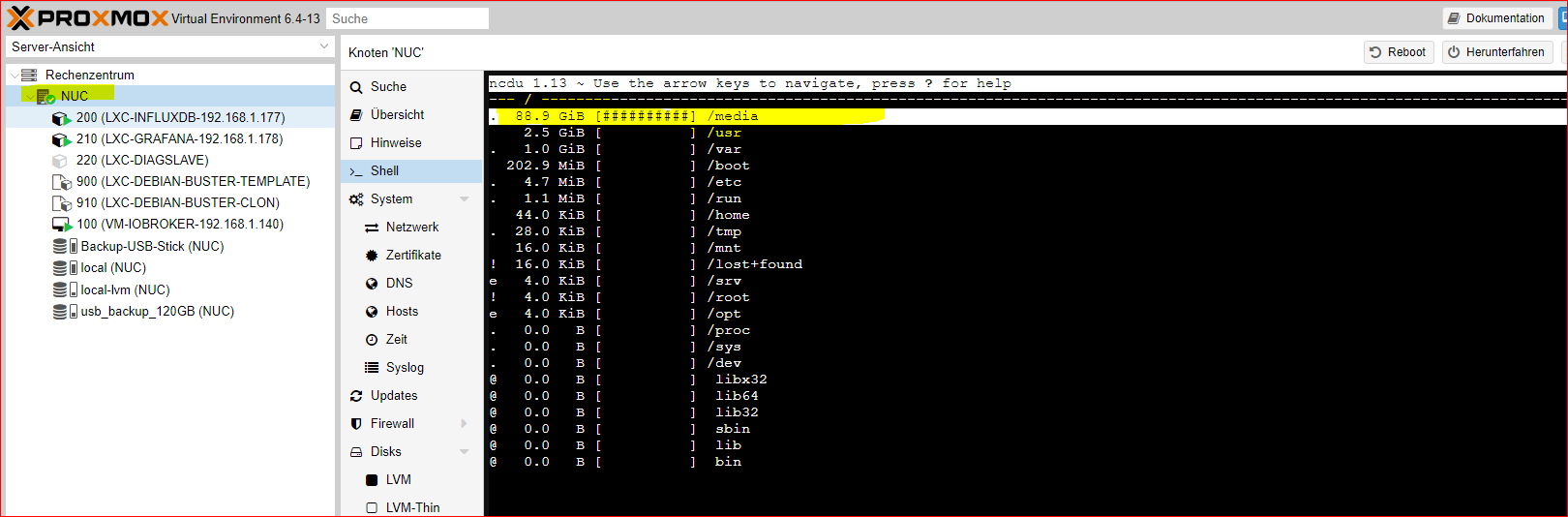
        du stehst im root Verzeichnis, wechsel auf die Gesamtplatte mit

        cd /
        

        und danach nochmal

        ncdu
        

        danach siehst du die einzelnen Verzeichnisse incl Größe und kannst mit den Pfeiltasten hin und her blättern

        @goetschhofer sagte in proxmox-Datensicherung Fehlermeldung ?:

        Das Warning nach dem Backup habe ich für beide USB-sticks immer noch.
        Spoiler

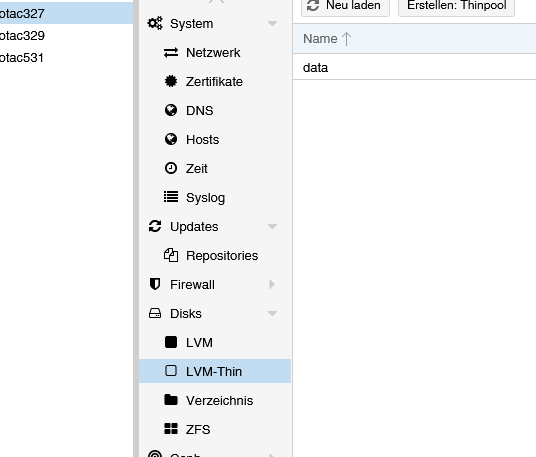
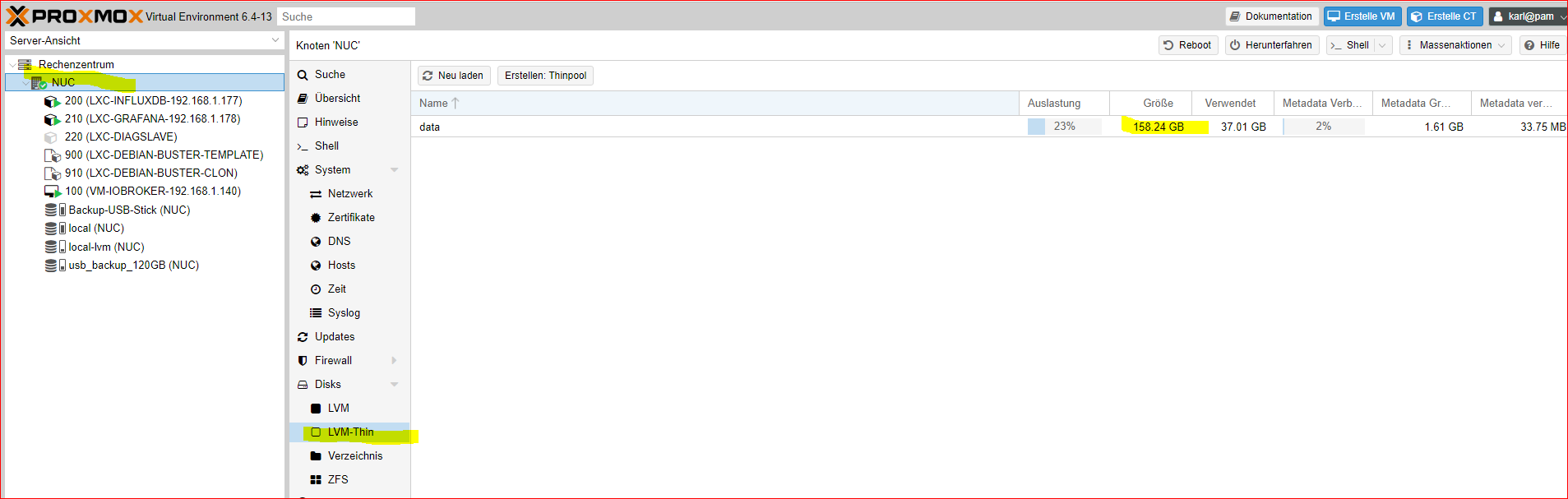
        hab ich ja schon bereits geschrieben, dein volles local hat nichts damit zu tun, dein thin pool ist belegt
        zeig mal den Inhalt von local-lvm
        bzw auch
        fbc205ae-0f5d-404b-931c-ab39320e2e86-image.png

        umgestiegen von Proxmox auf Unraid

        G 1 Reply Last reply
        1
        • crunchipC crunchip

          @goetschhofer sagte in proxmox-Datensicherung Fehlermeldung ?:

          Mit ncdu zeigt er mir dies an

          du stehst im root Verzeichnis, wechsel auf die Gesamtplatte mit

          cd /
          

          und danach nochmal

          ncdu
          

          danach siehst du die einzelnen Verzeichnisse incl Größe und kannst mit den Pfeiltasten hin und her blättern

          @goetschhofer sagte in proxmox-Datensicherung Fehlermeldung ?:

          Das Warning nach dem Backup habe ich für beide USB-sticks immer noch.
          Spoiler

          hab ich ja schon bereits geschrieben, dein volles local hat nichts damit zu tun, dein thin pool ist belegt
          zeig mal den Inhalt von local-lvm
          bzw auch
          fbc205ae-0f5d-404b-931c-ab39320e2e86-image.png

          G Offline
          G Offline
          GOETSCHHOFER
          wrote on last edited by GOETSCHHOFER
          #41

          @crunchip

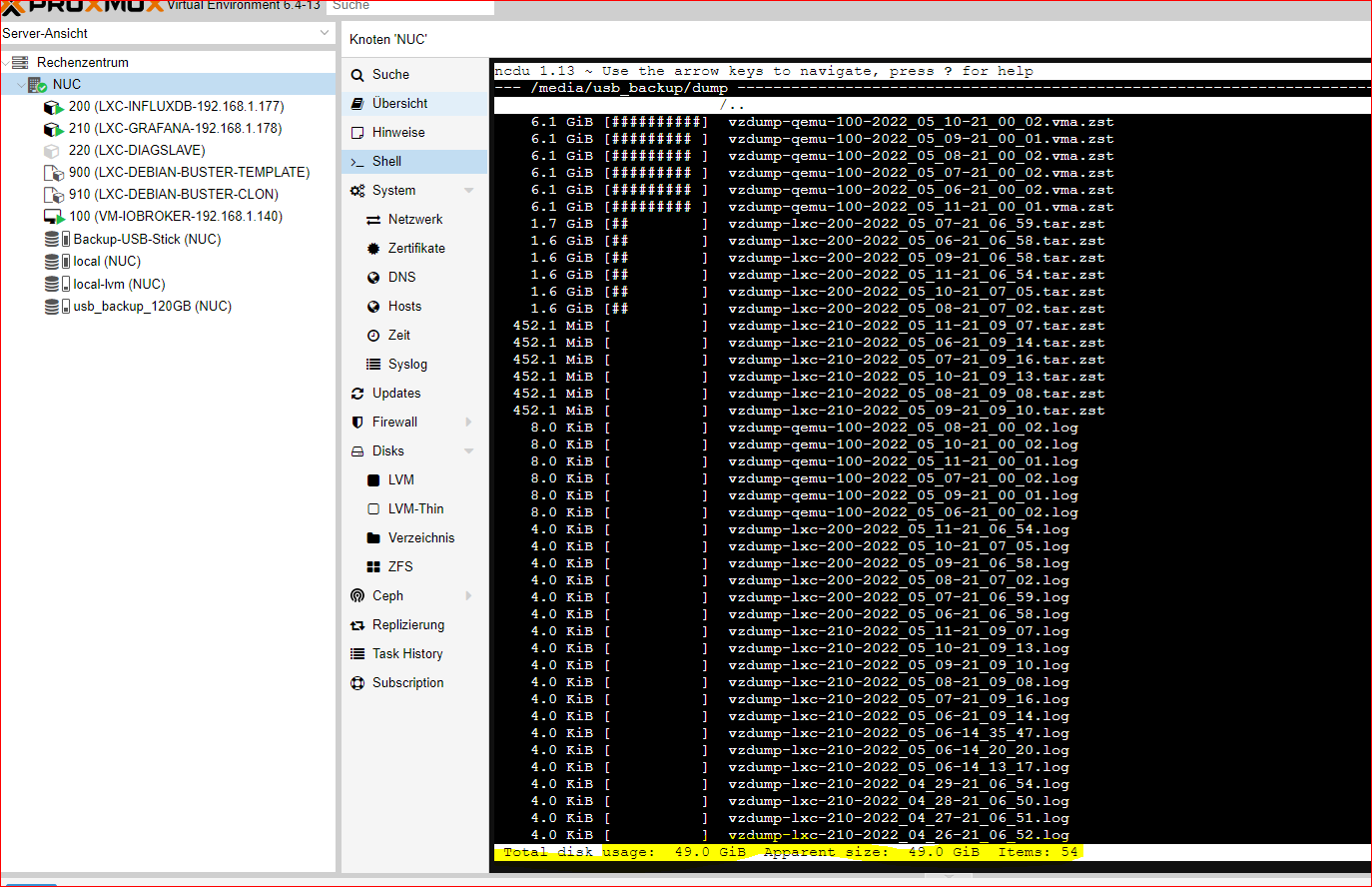
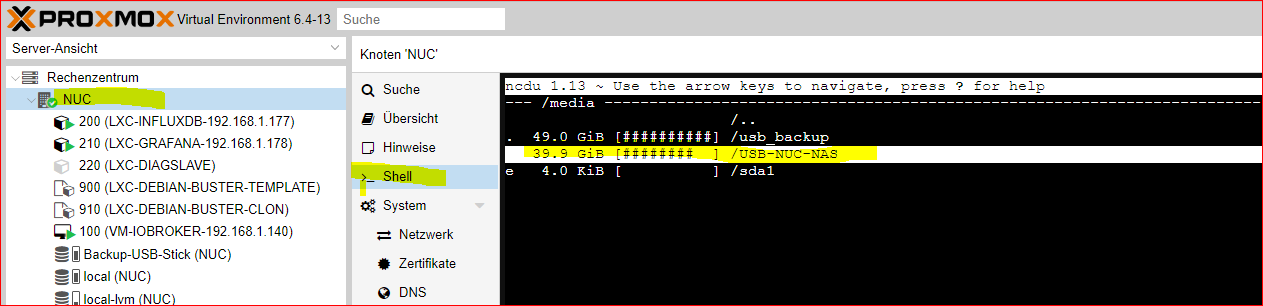
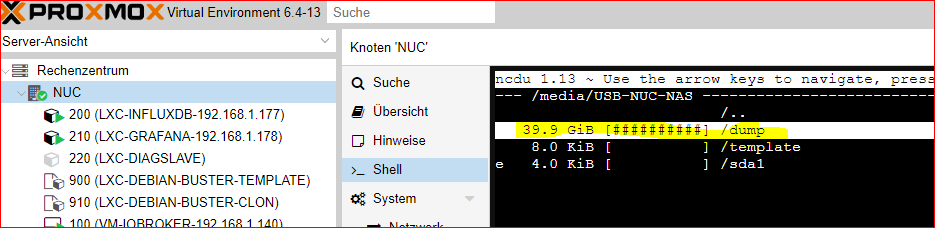
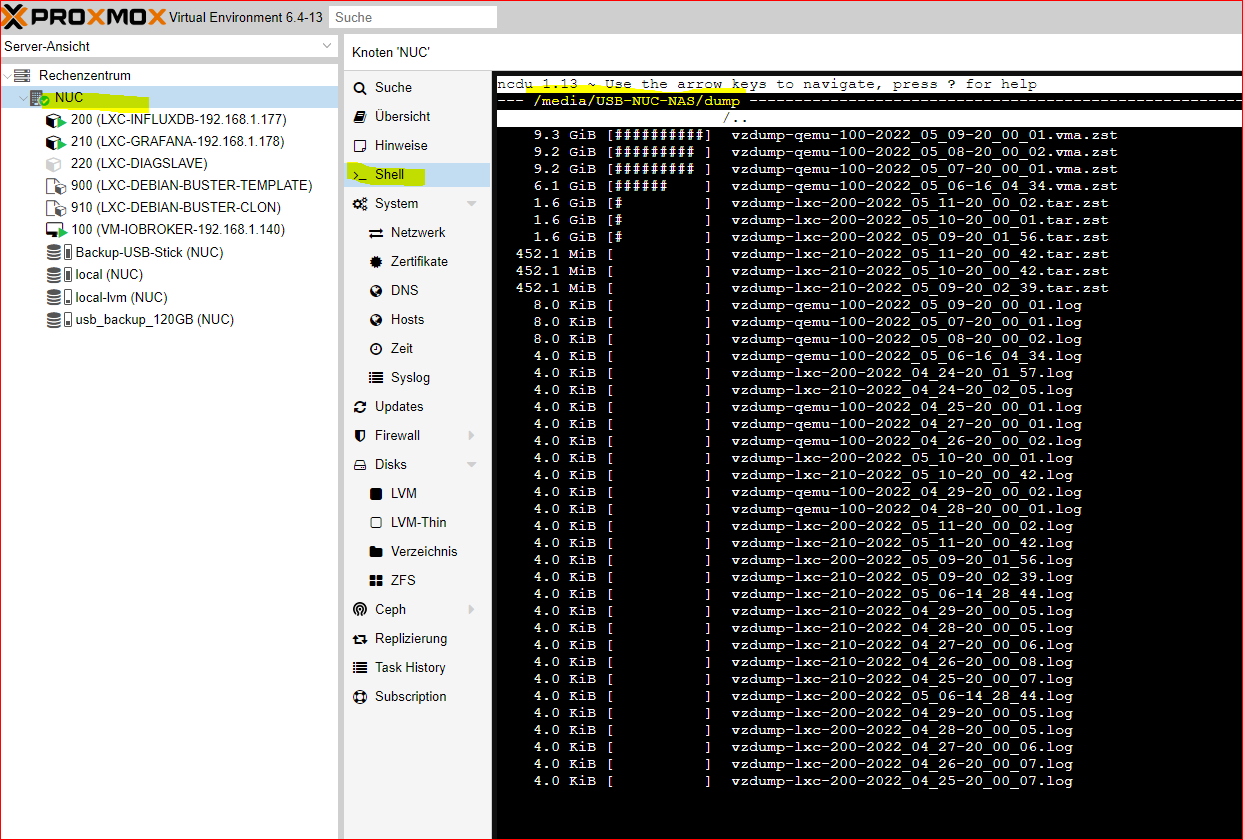
          ncdu:


          5e3df0a4-a1f0-47de-ac8c-941ab50b1d34-image.png
          c9356593-6c66-4a8d-9622-245a3b1e48e4-image.png
          f4e91ea2-4f53-4ca8-955d-4e215e2afa5e-image.png
          d393d084-9f2e-4d29-a103-48b987ed8587-image.png


          2a2009ec-db04-4599-93c5-089f348bb025-image.png
          76568049-dff5-4848-928f-d6df5c321ce4-image.png

          5c9e8174-7321-429c-9d09-32d3d1e8a5d5-image.png

          zeig mal den Inhalt von local-lvm:


          050d30cf-18cd-4f1b-ab6a-ece9f4e4d0ce-image.png

          crunchipC 1 Reply Last reply
          0
          • G GOETSCHHOFER

            @crunchip

            ncdu:


            5e3df0a4-a1f0-47de-ac8c-941ab50b1d34-image.png
            c9356593-6c66-4a8d-9622-245a3b1e48e4-image.png
            f4e91ea2-4f53-4ca8-955d-4e215e2afa5e-image.png
            d393d084-9f2e-4d29-a103-48b987ed8587-image.png


            2a2009ec-db04-4599-93c5-089f348bb025-image.png
            76568049-dff5-4848-928f-d6df5c321ce4-image.png

            5c9e8174-7321-429c-9d09-32d3d1e8a5d5-image.png

            zeig mal den Inhalt von local-lvm:


            050d30cf-18cd-4f1b-ab6a-ece9f4e4d0ce-image.png

            crunchipC Away
            crunchipC Away
            crunchip
            Forum Testing Most Active
            wrote on last edited by
            #42

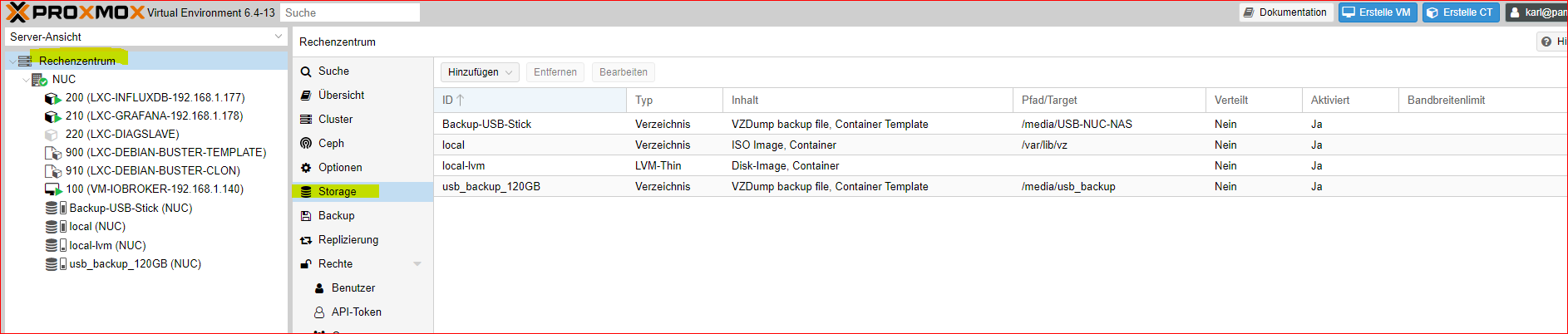
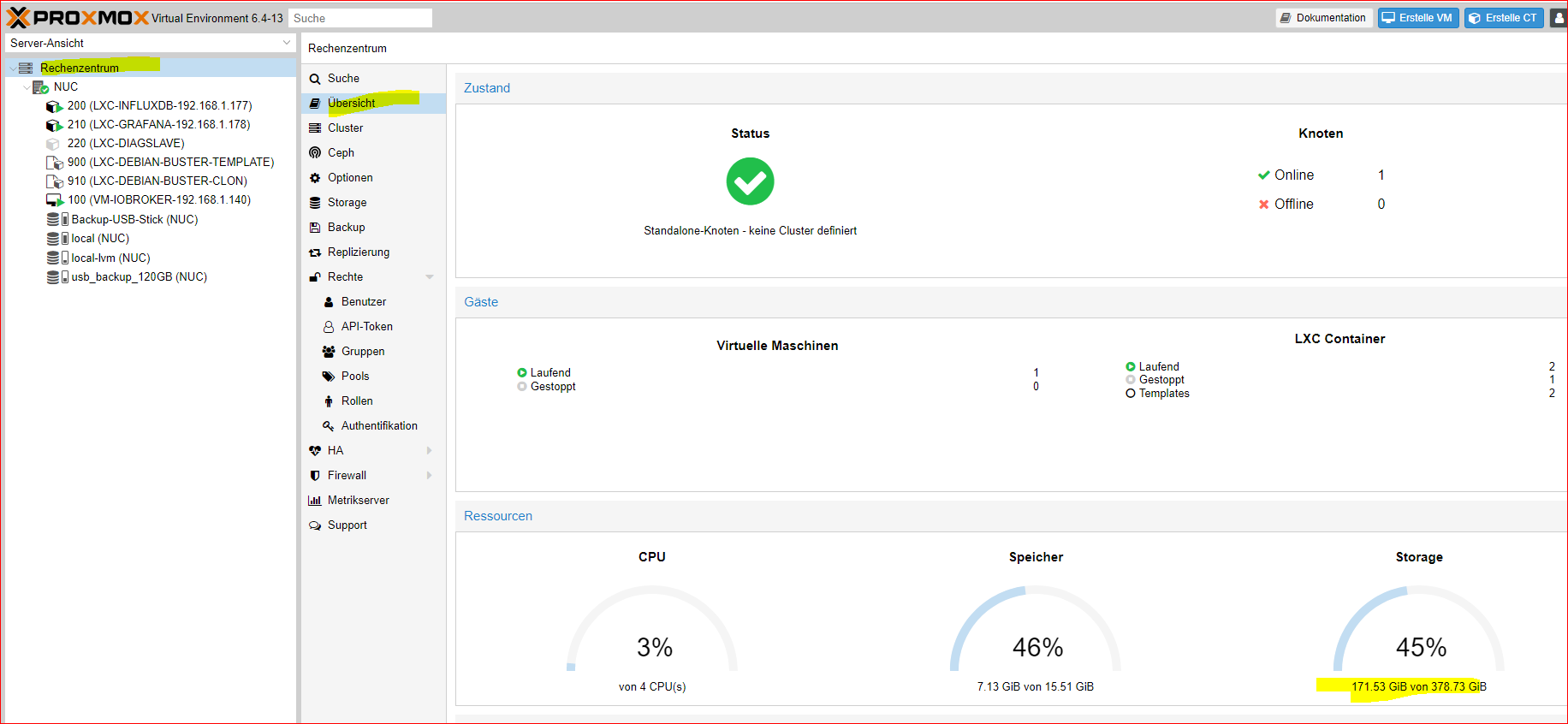
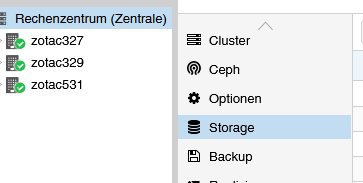
            @goetschhofer irgendwie hängen deine 49GB Backup im local

            zeig auch mal Rechenzentrum>>Storage
            a0a87ca4-1336-4f36-836d-08194830431a-image.png

            umgestiegen von Proxmox auf Unraid

            G 1 Reply Last reply
            1
            • crunchipC crunchip

              @goetschhofer irgendwie hängen deine 49GB Backup im local

              zeig auch mal Rechenzentrum>>Storage
              a0a87ca4-1336-4f36-836d-08194830431a-image.png

              G Offline
              G Offline
              GOETSCHHOFER
              wrote on last edited by GOETSCHHOFER
              #43

              @crunchip said in proxmox-Datensicherung Fehlermeldung ?:

              @goetschhofer irgendwie hängen deine 49GB Backup im local

              zeig auch mal Rechenzentrum>>Storage


              4f787978-ff6c-4dbd-be02-f638668f4d96-image.png
              6481e274-d98d-477a-84ca-7ae3647f953a-image.png

              Danke

              crunchipC 1 Reply Last reply
              0
              • G GOETSCHHOFER

                @crunchip said in proxmox-Datensicherung Fehlermeldung ?:

                @goetschhofer irgendwie hängen deine 49GB Backup im local

                zeig auch mal Rechenzentrum>>Storage


                4f787978-ff6c-4dbd-be02-f638668f4d96-image.png
                6481e274-d98d-477a-84ca-7ae3647f953a-image.png

                Danke

                crunchipC Away
                crunchipC Away
                crunchip
                Forum Testing Most Active
                wrote on last edited by
                #44

                @goetschhofer ist mir erst jetzt aufgefallen, du hast da noch weitere lxc
                dann mal die Ausgabe von

                lvs
                

                umgestiegen von Proxmox auf Unraid

                G 1 Reply Last reply
                1
                • crunchipC crunchip

                  @goetschhofer ist mir erst jetzt aufgefallen, du hast da noch weitere lxc
                  dann mal die Ausgabe von

                  lvs
                  
                  G Offline
                  G Offline
                  GOETSCHHOFER
                  wrote on last edited by
                  #45

                  @crunchip

                  Sorry für die späte Rückmeldung.

                  Ich kann dir bei lvs nicht folgen ?

                  Meintest du lvm ?


                  24cf5bbc-2ee8-4b33-bc10-d5f0add8f7b2-image.png
                  b963ddd8-22a3-40a8-9be3-dfe22005ea44-image.png

                  Danke

                  crunchipC 1 Reply Last reply
                  0
                  • G GOETSCHHOFER

                    @crunchip

                    Sorry für die späte Rückmeldung.

                    Ich kann dir bei lvs nicht folgen ?

                    Meintest du lvm ?


                    24cf5bbc-2ee8-4b33-bc10-d5f0add8f7b2-image.png
                    b963ddd8-22a3-40a8-9be3-dfe22005ea44-image.png

                    Danke

                    crunchipC Away
                    crunchipC Away
                    crunchip
                    Forum Testing Most Active
                    wrote on last edited by crunchip
                    #46

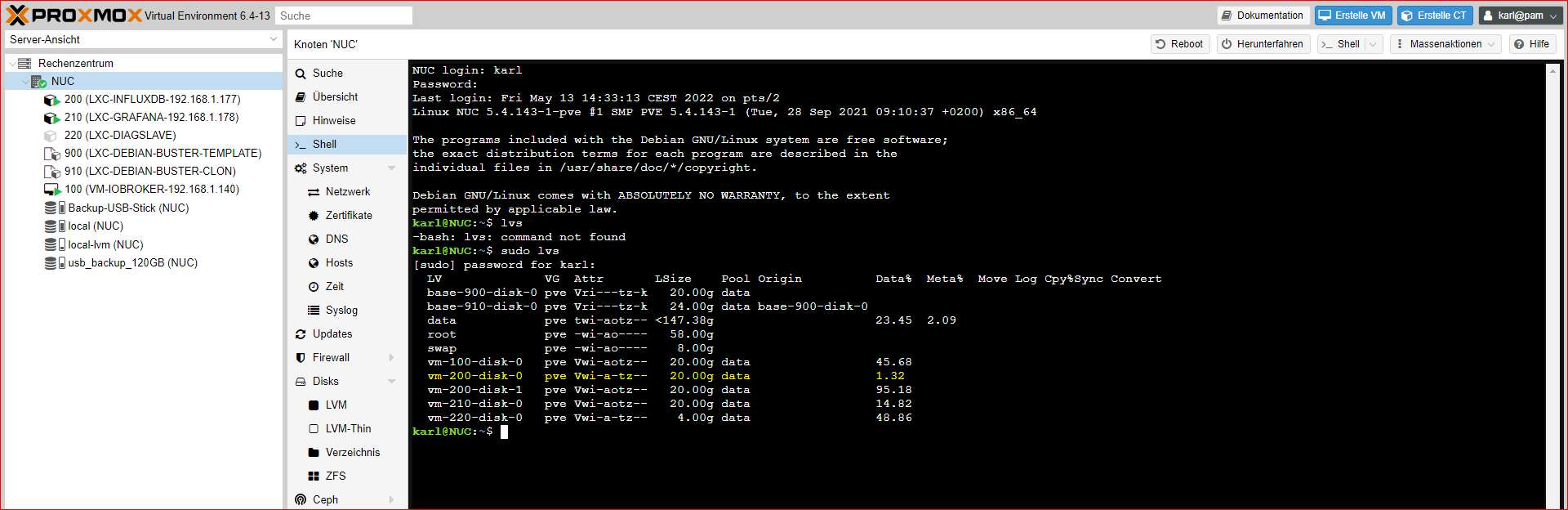
                    @goetschhofer lvs auf der Konsole vom Host als Ausgabe posten
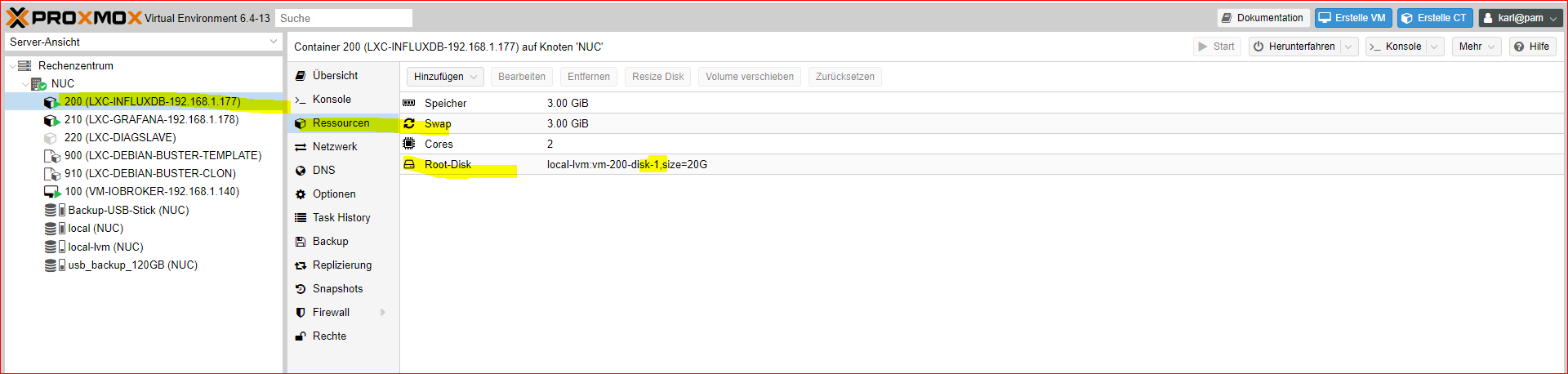
                    Aber so sieht man auch schon das du noch ne zweite Raw von deinem lxc 200(vm200 disk0 und disk1) liegen hast.
                    Eine davon kann weg
                    Musst du mal bei deinem influxdb Lxc schauen ob da disk 0 oder 1 hinterlegt ist, nicht das du den falschen löscht.

                    umgestiegen von Proxmox auf Unraid

                    G 1 Reply Last reply
                    1
                    • crunchipC crunchip

                      @goetschhofer lvs auf der Konsole vom Host als Ausgabe posten
                      Aber so sieht man auch schon das du noch ne zweite Raw von deinem lxc 200(vm200 disk0 und disk1) liegen hast.
                      Eine davon kann weg
                      Musst du mal bei deinem influxdb Lxc schauen ob da disk 0 oder 1 hinterlegt ist, nicht das du den falschen löscht.

                      G Offline
                      G Offline
                      GOETSCHHOFER
                      wrote on last edited by GOETSCHHOFER
                      #47

                      @crunchip said in proxmox-Datensicherung Fehlermeldung ?:

                      lvs auf der Konsole vom Host als Ausgabe posten


                      c1d0bff5-995b-4d65-ab44-a0e69fc1b0de-image.png

                      Meinst du disk-0 hier ? Dies würde bedeuten, dass ich unter-local-lvm(NUC) die vm-200-disk-0 mit 21,57 GB löschen könnte ?
                      Aber blöde Frage und zum Verständnis ? Wie kann man hier 2 haben ? Wie kommt so etwas zustande ? Was hab ich hier fabriziert ?


                      10dd4319-dcad-4793-90da-65a79aebb04f-image.png

                      crunchipC 1 Reply Last reply
                      0
                      • G GOETSCHHOFER

                        @crunchip said in proxmox-Datensicherung Fehlermeldung ?:

                        lvs auf der Konsole vom Host als Ausgabe posten


                        c1d0bff5-995b-4d65-ab44-a0e69fc1b0de-image.png

                        Meinst du disk-0 hier ? Dies würde bedeuten, dass ich unter-local-lvm(NUC) die vm-200-disk-0 mit 21,57 GB löschen könnte ?
                        Aber blöde Frage und zum Verständnis ? Wie kann man hier 2 haben ? Wie kommt so etwas zustande ? Was hab ich hier fabriziert ?


                        10dd4319-dcad-4793-90da-65a79aebb04f-image.png

                        crunchipC Away
                        crunchipC Away
                        crunchip
                        Forum Testing Most Active
                        wrote on last edited by crunchip
                        #48

                        @goetschhofer hast du wahrscheinlich mal was an deinem Lxc geändert und zurückgespielt, was auch immer du da vor hattest.
                        Somit könntest du disk 0 löschen. Schafft Platz, da die virtuell belegten 20GB wieder frei werden.

                        Dein influxdb Container ist auch schon zu 95% belegt.

                        Dein buster template war ja soweit ich mich erinnern kann, ja ein vorbereiteter Container, mit allen Einstellungen und User Einrichtung.
                        Warum hast du davon auch einen Clone erstellt?
                        Wenn nicht mehr benötigt, kannst du diesen ebenfalls löschen.

                        Dann sollt der Fehler weg sein

                        umgestiegen von Proxmox auf Unraid

                        G 1 Reply Last reply
                        1
                        • crunchipC crunchip

                          @goetschhofer hast du wahrscheinlich mal was an deinem Lxc geändert und zurückgespielt, was auch immer du da vor hattest.
                          Somit könntest du disk 0 löschen. Schafft Platz, da die virtuell belegten 20GB wieder frei werden.

                          Dein influxdb Container ist auch schon zu 95% belegt.

                          Dein buster template war ja soweit ich mich erinnern kann, ja ein vorbereiteter Container, mit allen Einstellungen und User Einrichtung.
                          Warum hast du davon auch einen Clone erstellt?
                          Wenn nicht mehr benötigt, kannst du diesen ebenfalls löschen.

                          Dann sollt der Fehler weg sein

                          G Offline
                          G Offline
                          GOETSCHHOFER
                          wrote on last edited by GOETSCHHOFER
                          #49

                          @crunchip said in proxmox-Datensicherung Fehlermeldung ?:

                          Somit könntest du disk 0 löschen.

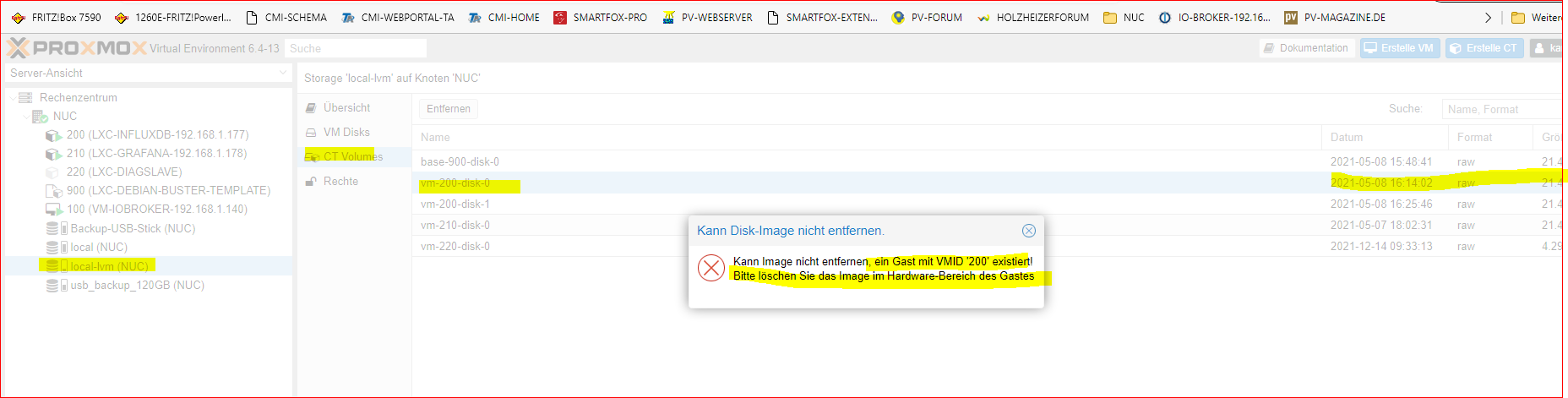
                          Clone habe ich gelöscht, aber bei LXC-200-disk-0 bekomme ich beim Löschen eine Fehlermeldung ?
                          Was ist ein Gast mit VMID-200 ? Hätte das Löschen unter root versucht, aber gleiche Fehlermeldung.


                          e48f4fc2-bb15-4f33-b88a-de4f3323801e-image.png

                          Vielen Dank.

                          crunchipC 1 Reply Last reply
                          0
                          • G GOETSCHHOFER

                            @crunchip said in proxmox-Datensicherung Fehlermeldung ?:

                            Somit könntest du disk 0 löschen.

                            Clone habe ich gelöscht, aber bei LXC-200-disk-0 bekomme ich beim Löschen eine Fehlermeldung ?
                            Was ist ein Gast mit VMID-200 ? Hätte das Löschen unter root versucht, aber gleiche Fehlermeldung.


                            e48f4fc2-bb15-4f33-b88a-de4f3323801e-image.png

                            Vielen Dank.

                            crunchipC Away
                            crunchipC Away
                            crunchip
                            Forum Testing Most Active
                            wrote on last edited by crunchip
                            #50

                            @goetschhofer gucken wir später, bin heute beschäftigt.
                            Zumindest müsste aber bereits durch die "vorherige Überbelegung" nun dein backup wieder funktionieren.

                            @GOETSCHHOFER habs schnell rausgesucht
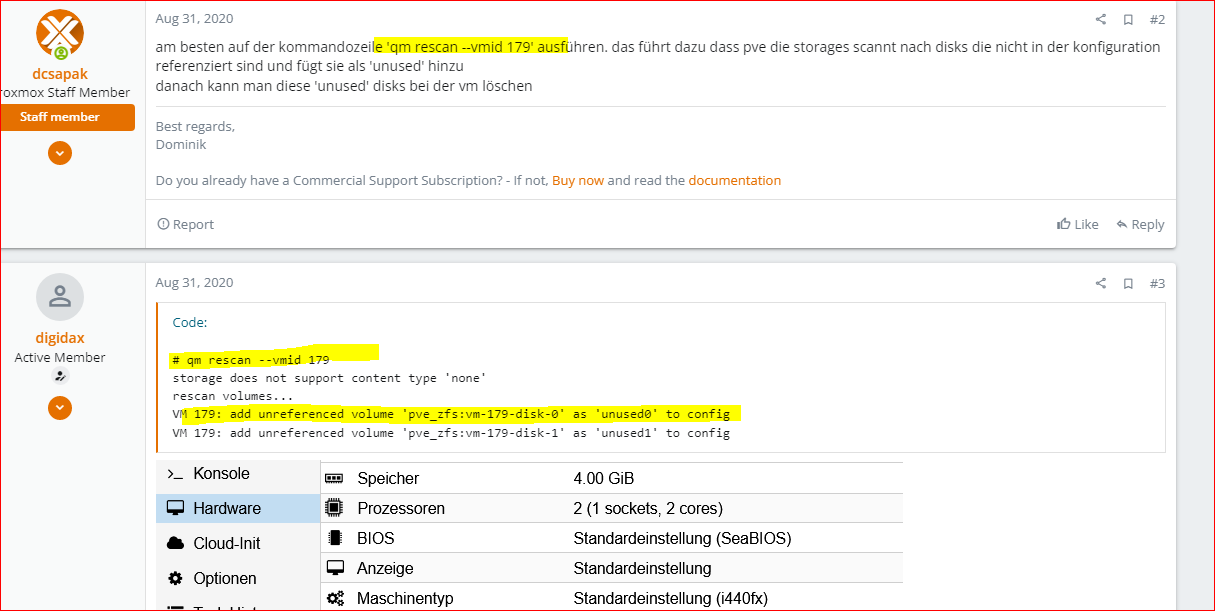
                            https://forum.proxmox.com/threads/solved-nicht-mehr-benutztes-disk-image-von-vm-kann-nicht-gelöscht-werden.75131/

                            umgestiegen von Proxmox auf Unraid

                            G 2 Replies Last reply
                            1
                            • crunchipC crunchip

                              @goetschhofer gucken wir später, bin heute beschäftigt.
                              Zumindest müsste aber bereits durch die "vorherige Überbelegung" nun dein backup wieder funktionieren.

                              @GOETSCHHOFER habs schnell rausgesucht
                              https://forum.proxmox.com/threads/solved-nicht-mehr-benutztes-disk-image-von-vm-kann-nicht-gelöscht-werden.75131/

                              G Offline
                              G Offline
                              GOETSCHHOFER
                              wrote on last edited by
                              #51

                              @crunchip

                              Super vielen Dank, werde ich mir in Ruhe anschauen.:+1:

                              1 Reply Last reply
                              0
                              • crunchipC crunchip

                                @goetschhofer gucken wir später, bin heute beschäftigt.
                                Zumindest müsste aber bereits durch die "vorherige Überbelegung" nun dein backup wieder funktionieren.

                                @GOETSCHHOFER habs schnell rausgesucht
                                https://forum.proxmox.com/threads/solved-nicht-mehr-benutztes-disk-image-von-vm-kann-nicht-gelöscht-werden.75131/

                                G Offline
                                G Offline
                                GOETSCHHOFER
                                wrote on last edited by GOETSCHHOFER
                                #52

                                @crunchip said in proxmox-Datensicherung Fehlermeldung ?:

                                Zumindest müsste aber bereits durch die "vorherige Überbelegung" nun dein backup wieder funktionieren.

                                Ja, das Warning beim täglichen backup kommt jetzt nicht mehr. :+1:

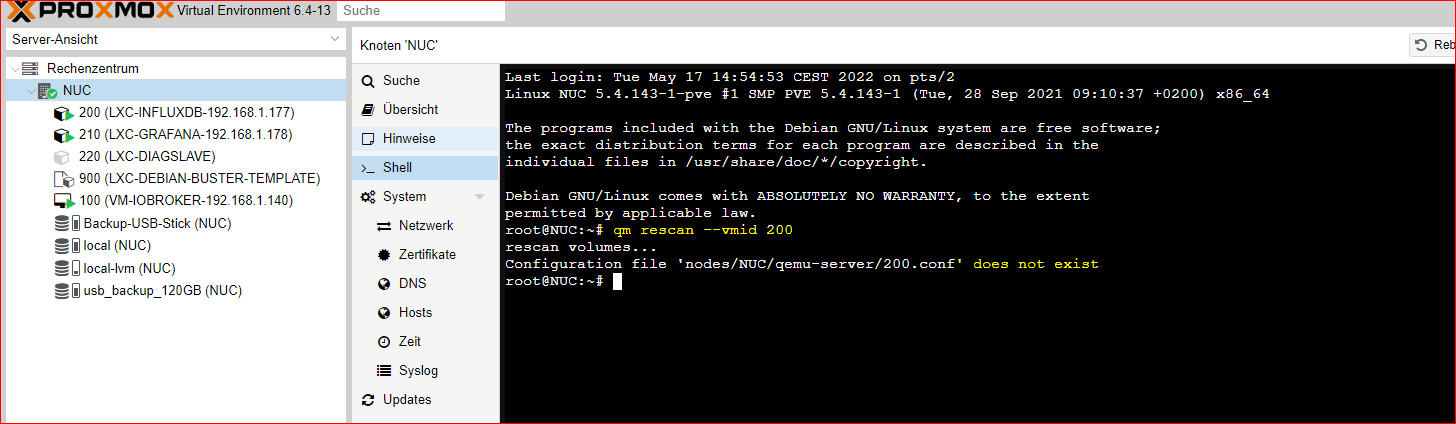
                                Bei der 2. Sache beim Löschen der VM-200-disk-0 habe ich noch Probleme:

                                Habe wie im Link beschrieben über die Shell folgendes eingegeben, da bekomme ich aber eine Fehlermeldung.
                                qm rescan --vmid 200

                                https://forum.proxmox.com/threads/solved-nicht-mehr-benutztes-disk-image-von-vm-kann-nicht-gelöscht-werden.75131/


                                bb662d7b-f22c-4916-b07e-112339d90cc6-image.png


                                77f756d0-7fcb-4e25-b677-60e4b03dc364-image.png

                                Danke

                                crunchipC 1 Reply Last reply
                                0
                                • G GOETSCHHOFER

                                  @crunchip said in proxmox-Datensicherung Fehlermeldung ?:

                                  Zumindest müsste aber bereits durch die "vorherige Überbelegung" nun dein backup wieder funktionieren.

                                  Ja, das Warning beim täglichen backup kommt jetzt nicht mehr. :+1:

                                  Bei der 2. Sache beim Löschen der VM-200-disk-0 habe ich noch Probleme:

                                  Habe wie im Link beschrieben über die Shell folgendes eingegeben, da bekomme ich aber eine Fehlermeldung.
                                  qm rescan --vmid 200

                                  https://forum.proxmox.com/threads/solved-nicht-mehr-benutztes-disk-image-von-vm-kann-nicht-gelöscht-werden.75131/


                                  bb662d7b-f22c-4916-b07e-112339d90cc6-image.png


                                  77f756d0-7fcb-4e25-b677-60e4b03dc364-image.png

                                  Danke

                                  crunchipC Away
                                  crunchipC Away
                                  crunchip
                                  Forum Testing Most Active
                                  wrote on last edited by crunchip
                                  #53

                                  @goetschhofer sagte in proxmox-Datensicherung Fehlermeldung ?:

                                  da bekomme ich aber eine Fehlermeldung

                                  seltsam,
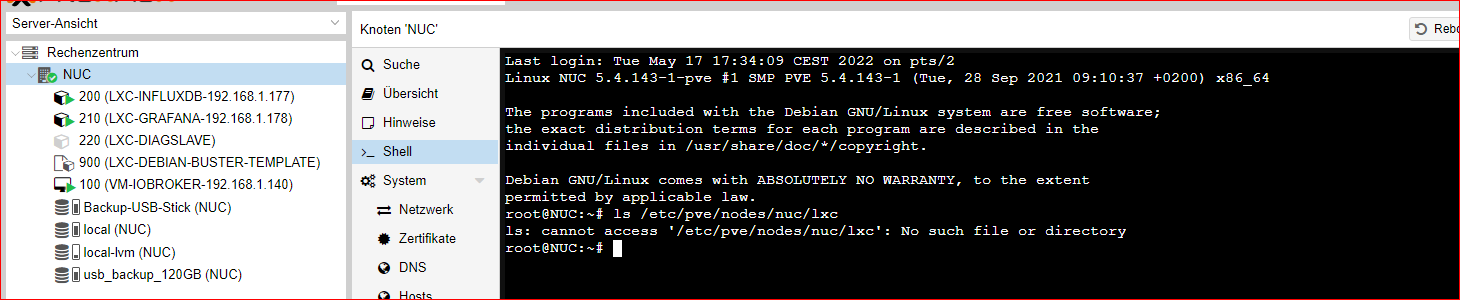
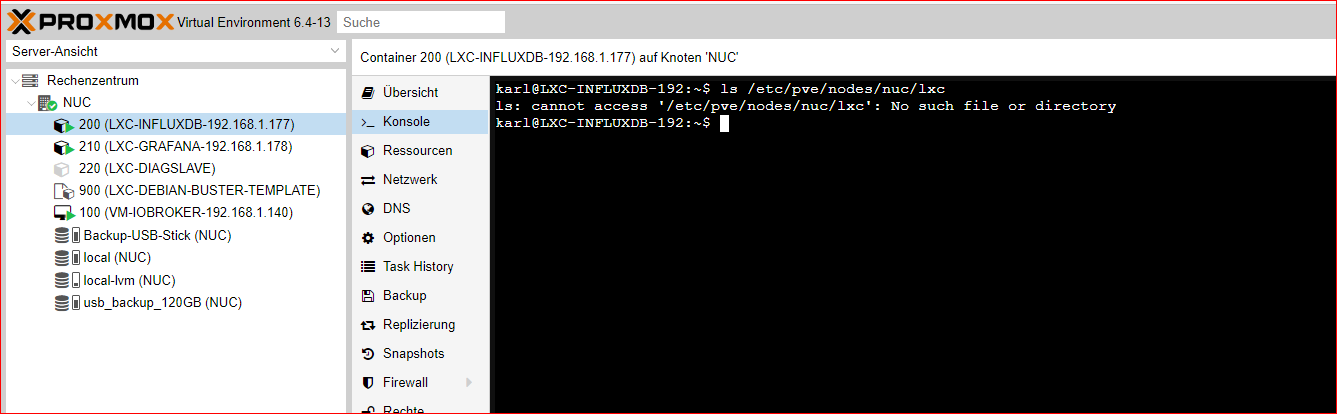
                                  was ist den da hinterlegt im Pfad /etc/pve/nodes/nuc/lxc

                                  ls /etc/pve/nodes/nuc/lxc
                                  

                                  umgestiegen von Proxmox auf Unraid

                                  G 1 Reply Last reply
                                  1
                                  • crunchipC crunchip

                                    @goetschhofer sagte in proxmox-Datensicherung Fehlermeldung ?:

                                    da bekomme ich aber eine Fehlermeldung

                                    seltsam,
                                    was ist den da hinterlegt im Pfad /etc/pve/nodes/nuc/lxc

                                    ls /etc/pve/nodes/nuc/lxc
                                    
                                    G Offline
                                    G Offline
                                    GOETSCHHOFER
                                    wrote on last edited by
                                    #54

                                    @crunchip said in proxmox-Datensicherung Fehlermeldung ?:

                                    ls /etc/pve/nodes/nuc/lxc

                                    Habe ich dies richtig abgefragt ?


                                    1b253867-62a7-4888-9134-0b3bd9b58299-image.png

                                    7f1d3c63-f3c6-4eb5-a02c-cc5a045fe89e-image.png

                                    crunchipC 1 Reply Last reply
                                    0
                                    • G GOETSCHHOFER

                                      @crunchip said in proxmox-Datensicherung Fehlermeldung ?:

                                      ls /etc/pve/nodes/nuc/lxc

                                      Habe ich dies richtig abgefragt ?


                                      1b253867-62a7-4888-9134-0b3bd9b58299-image.png

                                      7f1d3c63-f3c6-4eb5-a02c-cc5a045fe89e-image.png

                                      crunchipC Away
                                      crunchipC Away
                                      crunchip
                                      Forum Testing Most Active
                                      wrote on last edited by
                                      #55

                                      @goetschhofer sagte in proxmox-Datensicherung Fehlermeldung ?:

                                      Habe ich dies richtig abgefragt

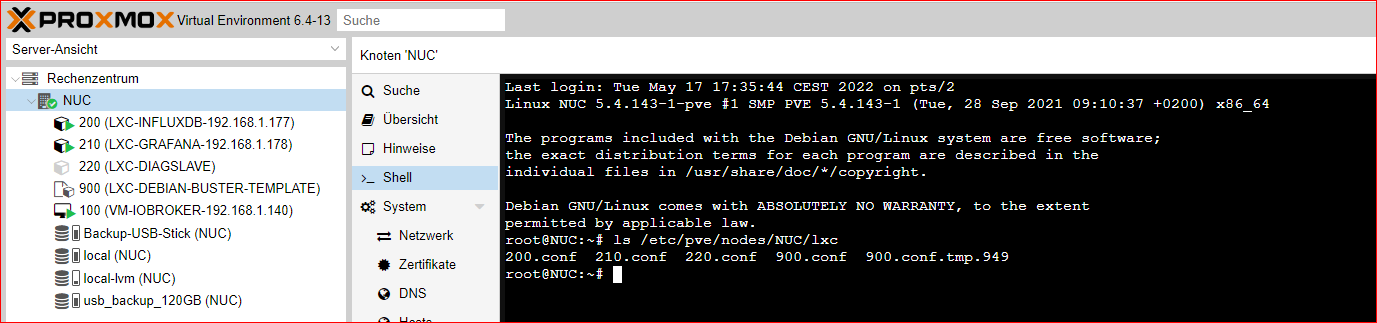
                                      ja, Schreibfehler von mir, sorry...nuc großschreiben

                                      ls /etc/pve/nodes/NUC/lxc
                                      

                                      umgestiegen von Proxmox auf Unraid

                                      G 1 Reply Last reply
                                      1
                                      • crunchipC crunchip

                                        @goetschhofer sagte in proxmox-Datensicherung Fehlermeldung ?:

                                        Habe ich dies richtig abgefragt

                                        ja, Schreibfehler von mir, sorry...nuc großschreiben

                                        ls /etc/pve/nodes/NUC/lxc
                                        
                                        G Offline
                                        G Offline
                                        GOETSCHHOFER
                                        wrote on last edited by GOETSCHHOFER
                                        #56

                                        @crunchip said in proxmox-Datensicherung Fehlermeldung ?:

                                        ls /etc/pve/nodes/NUC/lxc

                                        Kein, Problem.


                                        e18c9f31-f3aa-41f7-8000-7e9f7f53da9e-image.png

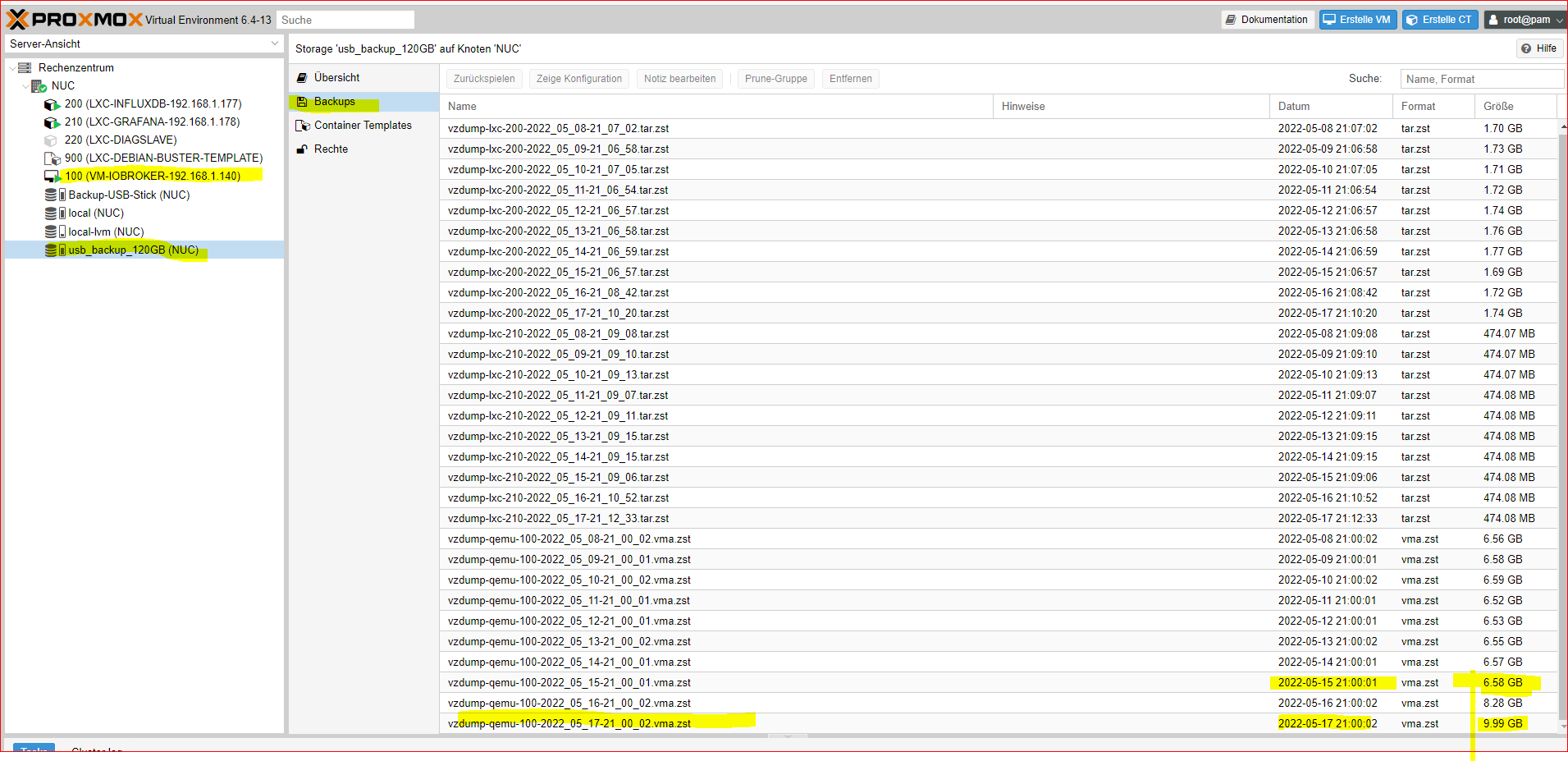
                                        Interessant: VM-100-iobroker ist in 2 Tagen von 6,6 GB auf 10 G gestiegen ?


                                        50abb4c1-5237-40b7-9f10-25da68b5944d-image.png

                                        Beim backitup im iobroker auf meinen USB-NAS-Fritzbiox7590 wächst die VM100 iobroker nicht ?


                                        6faf3823-029f-4da4-a4ba-c169f0470b88-image.png

                                        Danke

                                        1 Reply Last reply
                                        0
                                        • crunchipC Away
                                          crunchipC Away
                                          crunchip
                                          Forum Testing Most Active
                                          wrote on last edited by
                                          #57

                                          @goetschhofer also erstmal eins nach dem anderen

                                          ist ja keine VM sondern ein Container, somit

                                          pct rescan --vmid 200
                                          

                                          danach sollte sich disk-0 löschen lassen

                                          umgestiegen von Proxmox auf Unraid

                                          G 1 Reply Last reply
                                          1
                                          Reply
                                          • Reply as topic
                                          Log in to reply
                                          • Oldest to Newest
                                          • Newest to Oldest
                                          • Most Votes


                                          Support us

                                          ioBroker
                                          Community Adapters
                                          Donate

                                          311

                                          Online

                                          32.6k

                                          Users

                                          82.3k

                                          Topics

                                          1.3m

                                          Posts
                                          Community
                                          Impressum | Datenschutz-Bestimmungen | Nutzungsbedingungen | Einwilligungseinstellungen
                                          ioBroker Community 2014-2025
                                          logo
                                          • Login

                                          • Don't have an account? Register

                                          • Login or register to search.
                                          • First post
                                            Last post
                                          0
                                          • Home
                                          • Recent
                                          • Tags
                                          • Unread 0
                                          • Categories
                                          • Unreplied
                                          • Popular
                                          • GitHub
                                          • Docu
                                          • Hilfe