Skip to content
  • Home
  • Recent
  • Tags
  • 0 Unread 0
  • Categories
  • Unreplied
  • Popular
  • GitHub
  • Docu
  • Hilfe
Skins
  • Light
  • Brite
  • Cerulean
  • Cosmo
  • Flatly
  • Journal
  • Litera
  • Lumen
  • Lux
  • Materia
  • Minty
  • Morph
  • Pulse
  • Sandstone
  • Simplex
  • Sketchy
  • Spacelab
  • United
  • Yeti
  • Zephyr
  • Dark
  • Cyborg
  • Darkly
  • Quartz
  • Slate
  • Solar
  • Superhero
  • Vapor

  • Default (No Skin)
  • No Skin
Collapse
ioBroker Logo

Community Forum

donate donate
  1. ioBroker Community Home
  2. Deutsch
  3. ioBroker Allgemein
  4. js-controller 3.3 jetzt im STABLE!

NEWS

  • Monatsrückblick Januar/Februar 2026 ist online!
    BluefoxB
    Bluefox
    16
    1
    282

  • Jahresrückblick 2025 – unser neuer Blogbeitrag ist online! ✨
    BluefoxB
    Bluefox
    17
    1
    4.7k

  • Neuer Blogbeitrag: Monatsrückblick - Dezember 2025 🎄
    BluefoxB
    Bluefox
    13
    1
    1.3k

js-controller 3.3 jetzt im STABLE!

Scheduled Pinned Locked Moved ioBroker Allgemein
344 Posts 61 Posters 99.7k Views 46 Watching
  • Oldest to Newest
  • Newest to Oldest
  • Most Votes
Reply
  • Reply as topic
Log in to reply
This topic has been deleted. Only users with topic management privileges can see it.
  • B BlueEssi

    @apollon77 OK, danke. Es sieht so aus, dass ich mich wohl noch eine Weile gedulden muss um auf 3.3 hochrüsten zu können. Ich hoffe, die "alten" Adapter werden irgendwann überhaupt nachgezogen.

    Thomas BraunT Online
    Thomas BraunT Online
    Thomas Braun
    Most Active
    wrote on last edited by
    #294

    @blueessi

    Wie schaut denn das überhaupt aus bei dir?

    iobroker update -i
    

    Linux-Werkzeugkasten:
    https://forum.iobroker.net/topic/42952/der-kleine-iobroker-linux-werkzeugkasten
    NodeJS Fixer Skript:
    https://forum.iobroker.net/topic/68035/iob-node-fix-skript
    iob_diag: curl -sLf -o diag.sh https://iobroker.net/diag.sh && bash diag.sh

    1 Reply Last reply
    0
    • B BlueEssi

      @apollon77 OK, danke. Es sieht so aus, dass ich mich wohl noch eine Weile gedulden muss um auf 3.3 hochrüsten zu können. Ich hoffe, die "alten" Adapter werden irgendwann überhaupt nachgezogen.

      apollon77A Offline
      apollon77A Offline
      apollon77
      wrote on last edited by
      #295

      @blueessi naja wenn Du genau liesst ist das einzige was die alten Adapter ggf tun ist "Info" logging zu machen das was nicht stimmt ... ehrlich ... Loglevel hochsetzen in der Wartezeit und gut ... ich denke nicht das das vom Update abhalten sollte

      Beitrag hat geholfen? Votet rechts unten im Beitrag :-) https://paypal.me/Apollon77 / https://github.com/sponsors/Apollon77

      • Debug-Log für Instanz einschalten? Admin -> Instanzen -> Expertenmodus -> Instanz aufklappen - Loglevel ändern
      • Logfiles auf Platte /opt/iobroker/log/… nutzen, Admin schneidet Zeilen ab
      B 1 Reply Last reply
      0
      • apollon77A apollon77

        @blueessi naja wenn Du genau liesst ist das einzige was die alten Adapter ggf tun ist "Info" logging zu machen das was nicht stimmt ... ehrlich ... Loglevel hochsetzen in der Wartezeit und gut ... ich denke nicht das das vom Update abhalten sollte

        B Offline
        B Offline
        BlueEssi
        wrote on last edited by
        #296

        @apollon77 Ok, das war mir nicht bewusst. Vielleicht könntest du den Hinweis in der Inkompatibilitäts-Auflistung oben ergänzen. Ich werde es testen. Danke.

        1 Reply Last reply
        0
        • S Offline
          S Offline
          sandro_gera
          wrote on last edited by
          #297

          Hallo an alle,

          ich hab folgende Fehlermeldung bekommen

          pi@RaspBerry4BioBroker:~ $ iob upgrade self
          Update js-controller from @3.3.21 to @3.3.22
          NPM version: 6.14.15
          npm install iobroker.js-controller@3.3.22 --loglevel error --unsafe-perm --prefi                       x "/opt/iobroker" (System call)
          Server Cannot move /opt/iobroker/iobroker-data/objects.json.new to /opt/iobroker                       /iobroker-data/objects.json: ENOENT: no such file or directory, stat '/opt/iobro                       ker/iobroker-data/objects.json.new'. Try direct write as fallback


          Das update scheint aber funktioniert zu haben.

          Muß ich jetzt irgend etwas unternehmen?

          Master RPI4 8GB, Slave RPI3 1GB
          Node.js v18.17.1, npm: 9.6.7,
          JS-Controller: 5.0.16

          apollon77A 1 Reply Last reply
          0
          • S sandro_gera

            Hallo an alle,

            ich hab folgende Fehlermeldung bekommen

            pi@RaspBerry4BioBroker:~ $ iob upgrade self
            Update js-controller from @3.3.21 to @3.3.22
            NPM version: 6.14.15
            npm install iobroker.js-controller@3.3.22 --loglevel error --unsafe-perm --prefi                       x "/opt/iobroker" (System call)
            Server Cannot move /opt/iobroker/iobroker-data/objects.json.new to /opt/iobroker                       /iobroker-data/objects.json: ENOENT: no such file or directory, stat '/opt/iobro                       ker/iobroker-data/objects.json.new'. Try direct write as fallback


            Das update scheint aber funktioniert zu haben.

            Muß ich jetzt irgend etwas unternehmen?

            apollon77A Offline
            apollon77A Offline
            apollon77
            wrote on last edited by
            #298

            @sandro_gera Ne, das ist am Ende nur ne Info meldung. Wenn sonst kein Fehler ds ist ist oder kam alles ok

            Beitrag hat geholfen? Votet rechts unten im Beitrag :-) https://paypal.me/Apollon77 / https://github.com/sponsors/Apollon77

            • Debug-Log für Instanz einschalten? Admin -> Instanzen -> Expertenmodus -> Instanz aufklappen - Loglevel ändern
            • Logfiles auf Platte /opt/iobroker/log/… nutzen, Admin schneidet Zeilen ab
            1 Reply Last reply
            1
            • NWHN Offline
              NWHN Offline
              NWH
              wrote on last edited by
              #299

              Hallo
              Wollte wie immer das update per Konsole machen, aber diesmal kommt diese Meldung.
              Wer kann mir sagen warum ich nicht auf die Version 3.3.22 komme.
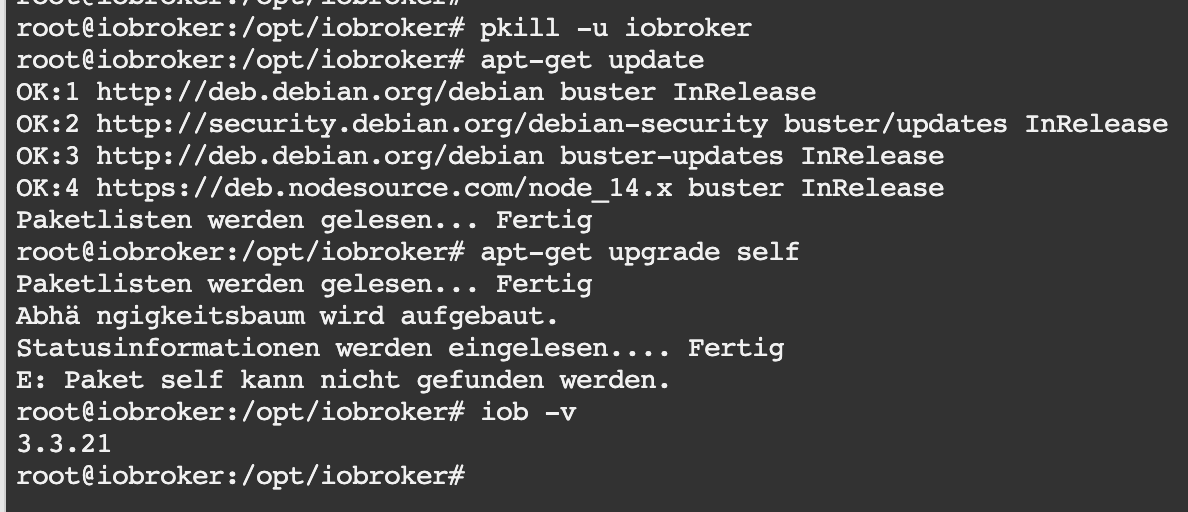
              557ffd69-c0fb-48e9-b3b8-a7294109e5a2-image.png

              Iobrocker läuft auf eine Synology im docker.

              Neu gestartet habe ich auch schon.

              Thomas BraunT GlasfaserG 2 Replies Last reply
              0
              • NWHN NWH

                Hallo
                Wollte wie immer das update per Konsole machen, aber diesmal kommt diese Meldung.
                Wer kann mir sagen warum ich nicht auf die Version 3.3.22 komme.

                557ffd69-c0fb-48e9-b3b8-a7294109e5a2-image.png

                Iobrocker läuft auf eine Synology im docker.

                Neu gestartet habe ich auch schon.

                Thomas BraunT Online
                Thomas BraunT Online
                Thomas Braun
                Most Active
                wrote on last edited by Thomas Braun
                #300

                @nwh

                Keine Screenshots aus der Konsole. Text als Text in CodeTags posten.

                Und auch keine Phantasie-Kommandos verwenden.

                apt upgrade
                

                für das System,

                iobroker upgrade self
                

                für den js-controller.

                Linux-Werkzeugkasten:
                https://forum.iobroker.net/topic/42952/der-kleine-iobroker-linux-werkzeugkasten
                NodeJS Fixer Skript:
                https://forum.iobroker.net/topic/68035/iob-node-fix-skript
                iob_diag: curl -sLf -o diag.sh https://iobroker.net/diag.sh && bash diag.sh

                NWHN 1 Reply Last reply
                0
                • NWHN NWH

                  Hallo
                  Wollte wie immer das update per Konsole machen, aber diesmal kommt diese Meldung.
                  Wer kann mir sagen warum ich nicht auf die Version 3.3.22 komme.

                  557ffd69-c0fb-48e9-b3b8-a7294109e5a2-image.png

                  Iobrocker läuft auf eine Synology im docker.

                  Neu gestartet habe ich auch schon.

                  GlasfaserG Offline
                  GlasfaserG Offline
                  Glasfaser
                  wrote on last edited by Glasfaser
                  #301

                  @nwh sagte in js-controller 3.3 jetzt im STABLE!:

                  Wollte wie immer das update per Konsole machen

                  Aber nicht so !!

                  So:

                  pkill -u iobroker
                  iobroker upgrade self
                  

                  Synology 918+ 16GB - ioBroker in Docker v9 , VISO auf Trekstor Primebook C13 13,3" , Hikvision Domkameras mit Surveillance Station .. CCU RaspberryMatic in Synology VM .. Zigbee CC2538+CC2592 .. Sonoff .. KNX .. Modbus ..

                  1 Reply Last reply
                  0
                  • Thomas BraunT Thomas Braun

                    @nwh

                    Keine Screenshots aus der Konsole. Text als Text in CodeTags posten.

                    Und auch keine Phantasie-Kommandos verwenden.

                    apt upgrade
                    

                    für das System,

                    iobroker upgrade self
                    

                    für den js-controller.

                    NWHN Offline
                    NWHN Offline
                    NWH
                    wrote on last edited by
                    #302

                    @thomas-braun
                    Ja tut mir leid. Kommt nicht wieder vor.
                    Danke für die Info, hat schon funktioniert.

                    1 Reply Last reply
                    0
                    • R Offline
                      R Offline
                      root_
                      wrote on last edited by
                      #303

                      Wie komme ich von der 3.3.22 wieder auf die 3.3.21?

                      HomoranH 1 Reply Last reply
                      0
                      • R root_

                        Wie komme ich von der 3.3.22 wieder auf die 3.3.21?

                        HomoranH Do not disturb
                        HomoranH Do not disturb
                        Homoran
                        Global Moderator Administrators
                        wrote on last edited by
                        #304

                        @root_ sagte in js-controller 3.3 jetzt im STABLE!:

                        Wie komme ich von der 3.3.22 wieder auf die 3.3.21?

                        warum willst du das?
                        in 3.3.22 ist ein Bug behoben worden

                        kein Support per PN! - Fragen im Forum stellen -
                        Benutzt das Voting rechts unten im Beitrag wenn er euch geholfen hat.
                        Das Forum freut sich über eine Spende. Benutzt dazu den Spendenbutton im Header. Danke!
                        der Installationsfixer: curl -fsL https://iobroker.net/fix.sh | bash -

                        1 Reply Last reply
                        0
                        • R Offline
                          R Offline
                          root_
                          wrote on last edited by
                          #305

                          Weil mein iPad 4 nicht mehr funktioniert.

                          HomoranH apollon77A 2 Replies Last reply
                          0
                          • R root_

                            Weil mein iPad 4 nicht mehr funktioniert.

                            HomoranH Do not disturb
                            HomoranH Do not disturb
                            Homoran
                            Global Moderator Administrators
                            wrote on last edited by
                            #306

                            @root_ sagte in js-controller 3.3 jetzt im STABLE!:

                            Weil mein iPad 4 nicht mehr funktioniert.

                            Dann solltest du es zur Reparatur bringen. SCNR!

                            So eine Antwort hilft nicht wirklich

                            kein Support per PN! - Fragen im Forum stellen -
                            Benutzt das Voting rechts unten im Beitrag wenn er euch geholfen hat.
                            Das Forum freut sich über eine Spende. Benutzt dazu den Spendenbutton im Header. Danke!
                            der Installationsfixer: curl -fsL https://iobroker.net/fix.sh | bash -

                            R 1 Reply Last reply
                            0
                            • HomoranH Homoran

                              @root_ sagte in js-controller 3.3 jetzt im STABLE!:

                              Weil mein iPad 4 nicht mehr funktioniert.

                              Dann solltest du es zur Reparatur bringen. SCNR!

                              So eine Antwort hilft nicht wirklich

                              R Offline
                              R Offline
                              root_
                              wrote on last edited by root_
                              #307

                              @homoran
                              Scheinbar ist etwas geändert worden im websocket oder so.
                              Vor dem update ging es und mit meinem Testsys und 3.3.21 geht es auch. Seit 3.3.22 gehen alle Geräte ausser das 2012er IPad 4.
                              Wir reden von VIS. Dort habe ich seit dem Update nur noch den "Ladekreisel"

                              sudo npm i iobroker.js-controller@3.3.21 --production
                              

                              hat nicht funktioniert.

                              HomoranH apollon77A 2 Replies Last reply
                              0
                              • R root_

                                @homoran
                                Scheinbar ist etwas geändert worden im websocket oder so.
                                Vor dem update ging es und mit meinem Testsys und 3.3.21 geht es auch. Seit 3.3.22 gehen alle Geräte ausser das 2012er IPad 4.
                                Wir reden von VIS. Dort habe ich seit dem Update nur noch den "Ladekreisel"

                                sudo npm i iobroker.js-controller@3.3.21 --production
                                

                                hat nicht funktioniert.

                                HomoranH Do not disturb
                                HomoranH Do not disturb
                                Homoran
                                Global Moderator Administrators
                                wrote on last edited by
                                #308

                                @root_ sagte in js-controller 3.3 jetzt im STABLE!:

                                hat nicht funktioniert.

                                ich hoffe du hast das im richtigen Verzeichnis gemacht und das jetzt nicht irgendwo im home deines Users installiert

                                @root_ sagte in js-controller 3.3 jetzt im STABLE!:

                                Wir reden von VIS. Dort habe ich seit dem Update nur noch den "Ladekreisel"

                                da wäre u.a. der Web-Adapter für verantwortlich

                                kein Support per PN! - Fragen im Forum stellen -
                                Benutzt das Voting rechts unten im Beitrag wenn er euch geholfen hat.
                                Das Forum freut sich über eine Spende. Benutzt dazu den Spendenbutton im Header. Danke!
                                der Installationsfixer: curl -fsL https://iobroker.net/fix.sh | bash -

                                1 Reply Last reply
                                0
                                • R root_

                                  @homoran
                                  Scheinbar ist etwas geändert worden im websocket oder so.
                                  Vor dem update ging es und mit meinem Testsys und 3.3.21 geht es auch. Seit 3.3.22 gehen alle Geräte ausser das 2012er IPad 4.
                                  Wir reden von VIS. Dort habe ich seit dem Update nur noch den "Ladekreisel"

                                  sudo npm i iobroker.js-controller@3.3.21 --production
                                  

                                  hat nicht funktioniert.

                                  apollon77A Offline
                                  apollon77A Offline
                                  apollon77
                                  wrote on last edited by
                                  #309

                                  @root_ sagte in js-controller 3.3 jetzt im STABLE!:

                                  Wir reden von VIS. Dort habe ich seit dem Update nur noch den "Ladekreisel"

                                  Ja wenn es um Vis geht bitte dort Issue öffnen

                                  Beitrag hat geholfen? Votet rechts unten im Beitrag :-) https://paypal.me/Apollon77 / https://github.com/sponsors/Apollon77

                                  • Debug-Log für Instanz einschalten? Admin -> Instanzen -> Expertenmodus -> Instanz aufklappen - Loglevel ändern
                                  • Logfiles auf Platte /opt/iobroker/log/… nutzen, Admin schneidet Zeilen ab
                                  1 Reply Last reply
                                  0
                                  • R root_

                                    Weil mein iPad 4 nicht mehr funktioniert.

                                    apollon77A Offline
                                    apollon77A Offline
                                    apollon77
                                    wrote on last edited by
                                    #310

                                    @root_ STOP!!!!!!

                                    Ihreredet hier über den js-controller aber das issue ist doch vis oder?!?!?!

                                    Beitrag hat geholfen? Votet rechts unten im Beitrag :-) https://paypal.me/Apollon77 / https://github.com/sponsors/Apollon77

                                    • Debug-Log für Instanz einschalten? Admin -> Instanzen -> Expertenmodus -> Instanz aufklappen - Loglevel ändern
                                    • Logfiles auf Platte /opt/iobroker/log/… nutzen, Admin schneidet Zeilen ab
                                    HomoranH 1 Reply Last reply
                                    0
                                    • apollon77A apollon77

                                      @root_ STOP!!!!!!

                                      Ihreredet hier über den js-controller aber das issue ist doch vis oder?!?!?!

                                      HomoranH Do not disturb
                                      HomoranH Do not disturb
                                      Homoran
                                      Global Moderator Administrators
                                      wrote on last edited by
                                      #311

                                      @apollon77 sagte in js-controller 3.3 jetzt im STABLE!:

                                      @root_ STOP!!!!!!

                                      Ihreredet hier über den js-controller aber das issue ist doch vis oder?!?!?!

                                      Das versuche ich gerade herauszubekommen

                                      kein Support per PN! - Fragen im Forum stellen -
                                      Benutzt das Voting rechts unten im Beitrag wenn er euch geholfen hat.
                                      Das Forum freut sich über eine Spende. Benutzt dazu den Spendenbutton im Header. Danke!
                                      der Installationsfixer: curl -fsL https://iobroker.net/fix.sh | bash -

                                      K 1 Reply Last reply
                                      0
                                      • HomoranH Homoran

                                        @apollon77 sagte in js-controller 3.3 jetzt im STABLE!:

                                        @root_ STOP!!!!!!

                                        Ihreredet hier über den js-controller aber das issue ist doch vis oder?!?!?!

                                        Das versuche ich gerade herauszubekommen

                                        K Offline
                                        K Offline
                                        Kodo_sh
                                        wrote on last edited by
                                        #312

                                        Bitte um Hilfe, mein Broker startet nicht mehr.
                                        Wolle js updaten wie beschrieben, jetzt startet nichts mehr.
                                        Linux ist leider ein buch mit 7 Siegeln für mich, Broker Oberfläche ist für mich ok ;)


                                        npm WARN optional SKIPPING OPTIONAL DEPENDENCY: fsevents@~2.3.2 (node_modules/chokidar/node_modules/fsevents):
                                        npm WARN notsup SKIPPING OPTIONAL DEPENDENCY: Unsupported platform for fsevents@2.3.2: wanted {"os":"darwin","arch":"any"} (current: {"os":"linux","arch":"x64"})
                                        npm WARN optional SKIPPING OPTIONAL DEPENDENCY: osx-temperature-sensor@1.0.7 (node_modules/osx-temperature-sensor):
                                        npm WARN notsup SKIPPING OPTIONAL DEPENDENCY: Unsupported platform for osx-temperature-sensor@1.0.7: wanted {"os":"darwin","arch":"any"} (current: {"os":"linux","arch":"x64"})
                                        
                                        npm ERR! code ELIFECYCLE
                                        npm ERR! errno 100
                                        npm ERR! iobroker@2.0.3 postinstall: `node lib/install.js`
                                        npm ERR! Exit status 100
                                        npm ERR!
                                        npm ERR! Failed at the iobroker@2.0.3 postinstall script.
                                        npm ERR! This is probably not a problem with npm. There is likely additional logging output above.
                                        
                                        npm ERR! A complete log of this run can be found in:
                                        npm ERR!     /home/iobroker/.npm/_logs/2022-01-06T13_16_42_085Z-debug.log
                                        iobroker@iobroker-server:/opt/iobroker$ iobroker version
                                        3.3.22
                                        iobroker@iobroker-server:/opt/iobroker$ iobroker fix
                                        library: loaded
                                        Library version=2021-12-27
                                        
                                        ==========================================================================
                                        
                                            Welcome to the ioBroker installation fixer!
                                            Script version: 2021-12-27
                                        
                                            You might need to enter your password a couple of times.
                                        
                                        ==========================================================================
                                        
                                        
                                        ==========================================================================
                                            Installing prerequisites (1/3)
                                        ==========================================================================
                                        
                                        Hit:1 http://de.archive.ubuntu.com/ubuntu bionic InRelease
                                        Get:2 http://de.archive.ubuntu.com/ubuntu bionic-updates InRelease [88.7 kB]
                                        Hit:3 http://de.archive.ubuntu.com/ubuntu bionic-backports InRelease
                                        Hit:4 http://de.archive.ubuntu.com/ubuntu bionic-security InRelease
                                        Hit:5 https://deb.nodesource.com/node_14.x bionic InRelease
                                        Fetched 88.7 kB in 1s (152 kB/s)
                                        Reading package lists... Done
                                        Installed gcc-c++
                                        
                                        ==========================================================================
                                            Checking ioBroker user and directory permissions (2/3)
                                        ==========================================================================
                                        
                                        Fixing directory permissions...
                                        
                                        ==========================================================================
                                            Checking autostart (3/3)
                                        ==========================================================================
                                        
                                        Enabling autostart...
                                        Autostart enabled!
                                        
                                        ==========================================================================
                                        
                                            Your installation was fixed successfully
                                            Run iobroker start to start ioBroker again!
                                        
                                        ==========================================================================
                                        
                                        iobroker@iobroker-server:/opt/iobroker$ iobroker update
                                        Used repository: stable
                                        hash unchanged, use cached sources
                                        update done
                                        Adapter    "admin"         : 5.2.3    , installed 5.1.25 [Updateable]
                                        Adapter    "alexa2"        : 3.11.2   , installed 3.11.2
                                        Adapter    "backitup"      : 2.2.2    , installed 2.2.2
                                        Adapter    "daswetter"     : 3.0.9    , installed 3.0.9
                                        Adapter    "denon"         : 1.11.2   , installed 1.11.2
                                        Adapter    "devices"       : 1.0.9    , installed 1.0.9
                                        Adapter    "discovery"     : 2.7.3    , installed 2.7.3
                                        Adapter    "dwd"           : 2.7.7    , installed 2.7.7
                                        Adapter    "email"         : 1.0.10   , installed 1.0.10
                                        Adapter    "energymanager" : 1.3.4    , installed 1.3.3 [Updateable]
                                        Adapter    "fb-checkpresence": 1.1.10  , installed 1.1.10
                                        Adapter    "feiertage"     : 1.1.0    , installed 1.0.23 [Updateable]
                                        Adapter    "flot"          : 1.10.7   , installed 1.10.7
                                        Adapter    "fullybrowser"  : 2.0.10   , installed 2.0.9 [Updateable]
                                        Adapter    "harmony"       : 1.2.2    , installed 1.2.2
                                        Adapter    "history"       : 1.9.14   , installed 1.9.13 [Updateable]
                                        Adapter    "ical"          : 1.11.4   , installed 1.11.4
                                        Adapter    "icons-mfd-png" : 1.0.2    , installed 1.0.2
                                        Adapter    "icons-mfd-svg" : 1.0.2    , installed 1.0.2
                                        Adapter    "info"          : 1.9.8    , installed 1.9.8
                                        Adapter    "iot"           : 1.8.24   , installed 1.8.24
                                        Adapter    "javascript"    : 5.2.13   , installed 5.2.13
                                        Controller "js-controller" : 3.3.22   , installed 3.3.22
                                        Adapter    "openweathermap": 0.1.0    , installed 0.1.0
                                        Adapter    "ping"          : 1.5.0    , installed 1.5.0
                                        Adapter    "pollenflug"    : 1.0.6    , installed 1.0.6
                                        Adapter    "pushover"      : 2.0.5    , installed 2.0.5
                                        Adapter    "radar2"        : 2.0.3    , installed 2.0.3
                                        Adapter    "shelly"        : 4.0.7    , installed 4.1.2
                                        Adapter    "socketio"      : 3.1.4    , installed 3.1.4
                                        Adapter    "sonoff"        : 2.4.5    , installed 2.4.5
                                        Adapter    "statistics"    : 1.0.9    , installed 1.0.9
                                        Adapter    "synology"      : 1.1.3    , installed 1.1.3
                                        Adapter    "systeminfo"    : 0.3.1    , installed 0.3.1
                                        Adapter    "tankerkoenig"  : 2.1.1    , installed 2.1.1
                                        Adapter    "tr-064"        : 4.2.14   , installed 4.2.14
                                        Adapter    "upnp"          : 1.0.19   , installed 1.0.19
                                        Adapter    "vis"           : 1.4.5    , installed 1.4.5
                                        Adapter    "vis-bars"      : 0.1.4    , installed 0.1.4
                                        Adapter    "vis-canvas-gauges": 0.1.5   , installed 0.1.5
                                        Adapter    "vis-fancyswitch": 1.1.0   , installed 1.1.0
                                        Adapter    "vis-hqwidgets" : 1.1.7    , installed 1.1.7
                                        Adapter    "vis-jqui-mfd"  : 1.0.12   , installed 1.0.12
                                        Adapter    "vis-justgage"  : 1.0.2    , installed 1.0.2
                                        Adapter    "vis-metro"     : 1.1.2    , installed 1.1.2
                                        Adapter    "vis-plumb"     : 1.0.2    , installed 1.0.2
                                        Adapter    "vis-timeandweather": 1.1.7   , installed 1.1.7
                                        Adapter    "web"           : 3.4.9    , installed 3.4.9
                                        Adapter    "worx"          : 1.5.5    , installed 1.5.5
                                        iobroker@iobroker-server:/opt/iobroker$ iobroker upgrade
                                        
                                        This upgrade of "fullybrowser" will introduce the following changes:
                                        ==========================================================================
                                        -> 2.0.10:
                                        psw patch
                                        ==========================================================================
                                        
                                        Would you like to upgrade fullybrowser from @2.0.9 to @2.0.10 now? [(y)es, (n)o]: y
                                        Update fullybrowser from @2.0.9 to @2.0.10
                                        NPM version: 6.14.11
                                        npm install iobroker.fullybrowser@2.0.10 --loglevel error --prefix "/opt/iobroker" (System call)
                                        
                                        
                                        ╭─────────────────────────────────────────────────────────╮
                                        │                                                         │
                                        │ Manual installation of ioBroker is no longer supported  │
                                        │ on Linux, OSX and FreeBSD!                              │
                                        │ Please refer to the documentation on how to install it! │
                                        │ https://github.com/ioBroker/ioBroker/wiki/Installation  │
                                        │                                                         │
                                        ╰─────────────────────────────────────────────────────────╯
                                        
                                        
                                        npm ERR! code ELIFECYCLE
                                        npm ERR! errno 100
                                        npm ERR! iobroker@2.0.3 postinstall: `node lib/install.js`
                                        npm ERR! Exit status 100
                                        npm ERR!
                                        npm ERR! Failed at the iobroker@2.0.3 postinstall script.
                                        npm ERR! This is probably not a problem with npm. There is likely additional logging output above.
                                        
                                        npm ERR! A complete log of this run can be found in:
                                        npm ERR!     /home/iobroker/.npm/_logs/2022-01-06T13_18_26_806Z-debug.log
                                        host.iobroker-server Cannot install iobroker.fullybrowser@2.0.10: 100
                                        iobroker@iobroker-server:/opt/iobroker$ iobroker start
                                        iobroker@iobroker-server:/opt/iobroker$


                                        Bin für jede Hilfe dankbar
                                        Gruß
                                        ALex

                                        Thomas BraunT 1 Reply Last reply
                                        0
                                        • K Kodo_sh

                                          Bitte um Hilfe, mein Broker startet nicht mehr.
                                          Wolle js updaten wie beschrieben, jetzt startet nichts mehr.
                                          Linux ist leider ein buch mit 7 Siegeln für mich, Broker Oberfläche ist für mich ok ;)


                                          npm WARN optional SKIPPING OPTIONAL DEPENDENCY: fsevents@~2.3.2 (node_modules/chokidar/node_modules/fsevents):
                                          npm WARN notsup SKIPPING OPTIONAL DEPENDENCY: Unsupported platform for fsevents@2.3.2: wanted {"os":"darwin","arch":"any"} (current: {"os":"linux","arch":"x64"})
                                          npm WARN optional SKIPPING OPTIONAL DEPENDENCY: osx-temperature-sensor@1.0.7 (node_modules/osx-temperature-sensor):
                                          npm WARN notsup SKIPPING OPTIONAL DEPENDENCY: Unsupported platform for osx-temperature-sensor@1.0.7: wanted {"os":"darwin","arch":"any"} (current: {"os":"linux","arch":"x64"})
                                          
                                          npm ERR! code ELIFECYCLE
                                          npm ERR! errno 100
                                          npm ERR! iobroker@2.0.3 postinstall: `node lib/install.js`
                                          npm ERR! Exit status 100
                                          npm ERR!
                                          npm ERR! Failed at the iobroker@2.0.3 postinstall script.
                                          npm ERR! This is probably not a problem with npm. There is likely additional logging output above.
                                          
                                          npm ERR! A complete log of this run can be found in:
                                          npm ERR!     /home/iobroker/.npm/_logs/2022-01-06T13_16_42_085Z-debug.log
                                          iobroker@iobroker-server:/opt/iobroker$ iobroker version
                                          3.3.22
                                          iobroker@iobroker-server:/opt/iobroker$ iobroker fix
                                          library: loaded
                                          Library version=2021-12-27
                                          
                                          ==========================================================================
                                          
                                              Welcome to the ioBroker installation fixer!
                                              Script version: 2021-12-27
                                          
                                              You might need to enter your password a couple of times.
                                          
                                          ==========================================================================
                                          
                                          
                                          ==========================================================================
                                              Installing prerequisites (1/3)
                                          ==========================================================================
                                          
                                          Hit:1 http://de.archive.ubuntu.com/ubuntu bionic InRelease
                                          Get:2 http://de.archive.ubuntu.com/ubuntu bionic-updates InRelease [88.7 kB]
                                          Hit:3 http://de.archive.ubuntu.com/ubuntu bionic-backports InRelease
                                          Hit:4 http://de.archive.ubuntu.com/ubuntu bionic-security InRelease
                                          Hit:5 https://deb.nodesource.com/node_14.x bionic InRelease
                                          Fetched 88.7 kB in 1s (152 kB/s)
                                          Reading package lists... Done
                                          Installed gcc-c++
                                          
                                          ==========================================================================
                                              Checking ioBroker user and directory permissions (2/3)
                                          ==========================================================================
                                          
                                          Fixing directory permissions...
                                          
                                          ==========================================================================
                                              Checking autostart (3/3)
                                          ==========================================================================
                                          
                                          Enabling autostart...
                                          Autostart enabled!
                                          
                                          ==========================================================================
                                          
                                              Your installation was fixed successfully
                                              Run iobroker start to start ioBroker again!
                                          
                                          ==========================================================================
                                          
                                          iobroker@iobroker-server:/opt/iobroker$ iobroker update
                                          Used repository: stable
                                          hash unchanged, use cached sources
                                          update done
                                          Adapter    "admin"         : 5.2.3    , installed 5.1.25 [Updateable]
                                          Adapter    "alexa2"        : 3.11.2   , installed 3.11.2
                                          Adapter    "backitup"      : 2.2.2    , installed 2.2.2
                                          Adapter    "daswetter"     : 3.0.9    , installed 3.0.9
                                          Adapter    "denon"         : 1.11.2   , installed 1.11.2
                                          Adapter    "devices"       : 1.0.9    , installed 1.0.9
                                          Adapter    "discovery"     : 2.7.3    , installed 2.7.3
                                          Adapter    "dwd"           : 2.7.7    , installed 2.7.7
                                          Adapter    "email"         : 1.0.10   , installed 1.0.10
                                          Adapter    "energymanager" : 1.3.4    , installed 1.3.3 [Updateable]
                                          Adapter    "fb-checkpresence": 1.1.10  , installed 1.1.10
                                          Adapter    "feiertage"     : 1.1.0    , installed 1.0.23 [Updateable]
                                          Adapter    "flot"          : 1.10.7   , installed 1.10.7
                                          Adapter    "fullybrowser"  : 2.0.10   , installed 2.0.9 [Updateable]
                                          Adapter    "harmony"       : 1.2.2    , installed 1.2.2
                                          Adapter    "history"       : 1.9.14   , installed 1.9.13 [Updateable]
                                          Adapter    "ical"          : 1.11.4   , installed 1.11.4
                                          Adapter    "icons-mfd-png" : 1.0.2    , installed 1.0.2
                                          Adapter    "icons-mfd-svg" : 1.0.2    , installed 1.0.2
                                          Adapter    "info"          : 1.9.8    , installed 1.9.8
                                          Adapter    "iot"           : 1.8.24   , installed 1.8.24
                                          Adapter    "javascript"    : 5.2.13   , installed 5.2.13
                                          Controller "js-controller" : 3.3.22   , installed 3.3.22
                                          Adapter    "openweathermap": 0.1.0    , installed 0.1.0
                                          Adapter    "ping"          : 1.5.0    , installed 1.5.0
                                          Adapter    "pollenflug"    : 1.0.6    , installed 1.0.6
                                          Adapter    "pushover"      : 2.0.5    , installed 2.0.5
                                          Adapter    "radar2"        : 2.0.3    , installed 2.0.3
                                          Adapter    "shelly"        : 4.0.7    , installed 4.1.2
                                          Adapter    "socketio"      : 3.1.4    , installed 3.1.4
                                          Adapter    "sonoff"        : 2.4.5    , installed 2.4.5
                                          Adapter    "statistics"    : 1.0.9    , installed 1.0.9
                                          Adapter    "synology"      : 1.1.3    , installed 1.1.3
                                          Adapter    "systeminfo"    : 0.3.1    , installed 0.3.1
                                          Adapter    "tankerkoenig"  : 2.1.1    , installed 2.1.1
                                          Adapter    "tr-064"        : 4.2.14   , installed 4.2.14
                                          Adapter    "upnp"          : 1.0.19   , installed 1.0.19
                                          Adapter    "vis"           : 1.4.5    , installed 1.4.5
                                          Adapter    "vis-bars"      : 0.1.4    , installed 0.1.4
                                          Adapter    "vis-canvas-gauges": 0.1.5   , installed 0.1.5
                                          Adapter    "vis-fancyswitch": 1.1.0   , installed 1.1.0
                                          Adapter    "vis-hqwidgets" : 1.1.7    , installed 1.1.7
                                          Adapter    "vis-jqui-mfd"  : 1.0.12   , installed 1.0.12
                                          Adapter    "vis-justgage"  : 1.0.2    , installed 1.0.2
                                          Adapter    "vis-metro"     : 1.1.2    , installed 1.1.2
                                          Adapter    "vis-plumb"     : 1.0.2    , installed 1.0.2
                                          Adapter    "vis-timeandweather": 1.1.7   , installed 1.1.7
                                          Adapter    "web"           : 3.4.9    , installed 3.4.9
                                          Adapter    "worx"          : 1.5.5    , installed 1.5.5
                                          iobroker@iobroker-server:/opt/iobroker$ iobroker upgrade
                                          
                                          This upgrade of "fullybrowser" will introduce the following changes:
                                          ==========================================================================
                                          -> 2.0.10:
                                          psw patch
                                          ==========================================================================
                                          
                                          Would you like to upgrade fullybrowser from @2.0.9 to @2.0.10 now? [(y)es, (n)o]: y
                                          Update fullybrowser from @2.0.9 to @2.0.10
                                          NPM version: 6.14.11
                                          npm install iobroker.fullybrowser@2.0.10 --loglevel error --prefix "/opt/iobroker" (System call)
                                          
                                          
                                          ╭─────────────────────────────────────────────────────────╮
                                          │                                                         │
                                          │ Manual installation of ioBroker is no longer supported  │
                                          │ on Linux, OSX and FreeBSD!                              │
                                          │ Please refer to the documentation on how to install it! │
                                          │ https://github.com/ioBroker/ioBroker/wiki/Installation  │
                                          │                                                         │
                                          ╰─────────────────────────────────────────────────────────╯
                                          
                                          
                                          npm ERR! code ELIFECYCLE
                                          npm ERR! errno 100
                                          npm ERR! iobroker@2.0.3 postinstall: `node lib/install.js`
                                          npm ERR! Exit status 100
                                          npm ERR!
                                          npm ERR! Failed at the iobroker@2.0.3 postinstall script.
                                          npm ERR! This is probably not a problem with npm. There is likely additional logging output above.
                                          
                                          npm ERR! A complete log of this run can be found in:
                                          npm ERR!     /home/iobroker/.npm/_logs/2022-01-06T13_18_26_806Z-debug.log
                                          host.iobroker-server Cannot install iobroker.fullybrowser@2.0.10: 100
                                          iobroker@iobroker-server:/opt/iobroker$ iobroker start
                                          iobroker@iobroker-server:/opt/iobroker$


                                          Bin für jede Hilfe dankbar
                                          Gruß
                                          ALex

                                          Thomas BraunT Online
                                          Thomas BraunT Online
                                          Thomas Braun
                                          Most Active
                                          wrote on last edited by Thomas Braun
                                          #313

                                          @kodo_sh sagte in js-controller 3.3 jetzt im STABLE!:

                                          iobroker update
                                          iobroker upgrade admin@5.2.3
                                          

                                          mal probiert?

                                          @Homoran
                                          Bitte Thema abtrennen, das hat mit dem js-controller 3.3 nix zu tun.

                                          Linux-Werkzeugkasten:
                                          https://forum.iobroker.net/topic/42952/der-kleine-iobroker-linux-werkzeugkasten
                                          NodeJS Fixer Skript:
                                          https://forum.iobroker.net/topic/68035/iob-node-fix-skript
                                          iob_diag: curl -sLf -o diag.sh https://iobroker.net/diag.sh && bash diag.sh

                                          K 1 Reply Last reply
                                          0
                                          Reply
                                          • Reply as topic
                                          Log in to reply
                                          • Oldest to Newest
                                          • Newest to Oldest
                                          • Most Votes


                                          Support us

                                          ioBroker
                                          Community Adapters
                                          Donate
                                          FAQ Cloud / IOT
                                          HowTo: Node.js-Update
                                          HowTo: Backup/Restore
                                          Downloads
                                          BLOG

                                          552

                                          Online

                                          32.7k

                                          Users

                                          82.5k

                                          Topics

                                          1.3m

                                          Posts
                                          Community
                                          Impressum | Datenschutz-Bestimmungen | Nutzungsbedingungen | Einwilligungseinstellungen
                                          ioBroker Community 2014-2025
                                          logo
                                          • Login

                                          • Don't have an account? Register

                                          • Login or register to search.
                                          • First post
                                            Last post
                                          0
                                          • Home
                                          • Recent
                                          • Tags
                                          • Unread 0
                                          • Categories
                                          • Unreplied
                                          • Popular
                                          • GitHub
                                          • Docu
                                          • Hilfe