Skip to content
  • Home
  • Recent
  • Tags
  • 0 Unread 0
  • Categories
  • Unreplied
  • Popular
  • GitHub
  • Docu
  • Hilfe
Skins
  • Light
  • Brite
  • Cerulean
  • Cosmo
  • Flatly
  • Journal
  • Litera
  • Lumen
  • Lux
  • Materia
  • Minty
  • Morph
  • Pulse
  • Sandstone
  • Simplex
  • Sketchy
  • Spacelab
  • United
  • Yeti
  • Zephyr
  • Dark
  • Cyborg
  • Darkly
  • Quartz
  • Slate
  • Solar
  • Superhero
  • Vapor

  • Default (No Skin)
  • No Skin
Collapse
ioBroker Logo

Community Forum

donate donate
  1. ioBroker Community Home
  2. Deutsch
  3. ioBroker Allgemein
  4. Yet another HomeKit adapter

NEWS

  • UPDATE 31.10.: Amazon Alexa - ioBroker Skill läuft aus ?
    apollon77A
    apollon77
    48
    3
    8.8k

  • Monatsrückblick – September 2025
    BluefoxB
    Bluefox
    13
    1
    2.2k

  • Neues Video "KI im Smart Home" - ioBroker plus n8n
    BluefoxB
    Bluefox
    16
    1
    3.2k

Yet another HomeKit adapter

Scheduled Pinned Locked Moved ioBroker Allgemein
1.8k Posts 206 Posters 837.7k Views 68 Watching
  • Oldest to Newest
  • Newest to Oldest
  • Most Votes
Reply
  • Reply as topic
Log in to reply
This topic has been deleted. Only users with topic management privileges can see it.
  • P Offline
    P Offline
    pusemuckel
    wrote on last edited by
    #25

    Möchte kurz Feedback geben.

    Ich habe jetzt 14 Geräte aufgenommen, Rolläden und Thermostate und alles läuft recht stabil.

    Mein Vorgehen war dabei wie folgt.

    • In ioBroker Bride anlegen und erstes Gerät hinzugefügt

    • In der Home App die Bridge und das Gerät hinzugefügt

    • in ioBroker yahka weitere Geräte anlegen ohne diese zu speichern, erst nachdem alle Geräte angelegt waren gespeichert

    • In der Home App werden die neuen Geräte aufgenommen

    • In der Home App die Räume zugeweisen und stehen lassen, damit der sync in die icloud funktioniert

    Nach 2 Tage ist nochalles verfügbar und lässt sich steuern

    Gruß

    1 Reply Last reply
    0
    • J Offline
      J Offline
      JW86
      wrote on last edited by
      #26

      @PArt:

      Was mache ich falsch? `

      Es gibt des öfteren das Problem, das die i-Geräte nicht mit der Bridge reden möchten wenn die Konfiguration ungültig ist/war.

      Oft hilft dann nur das Ändern des "Usernames" (= die Adresse im MAC Format).

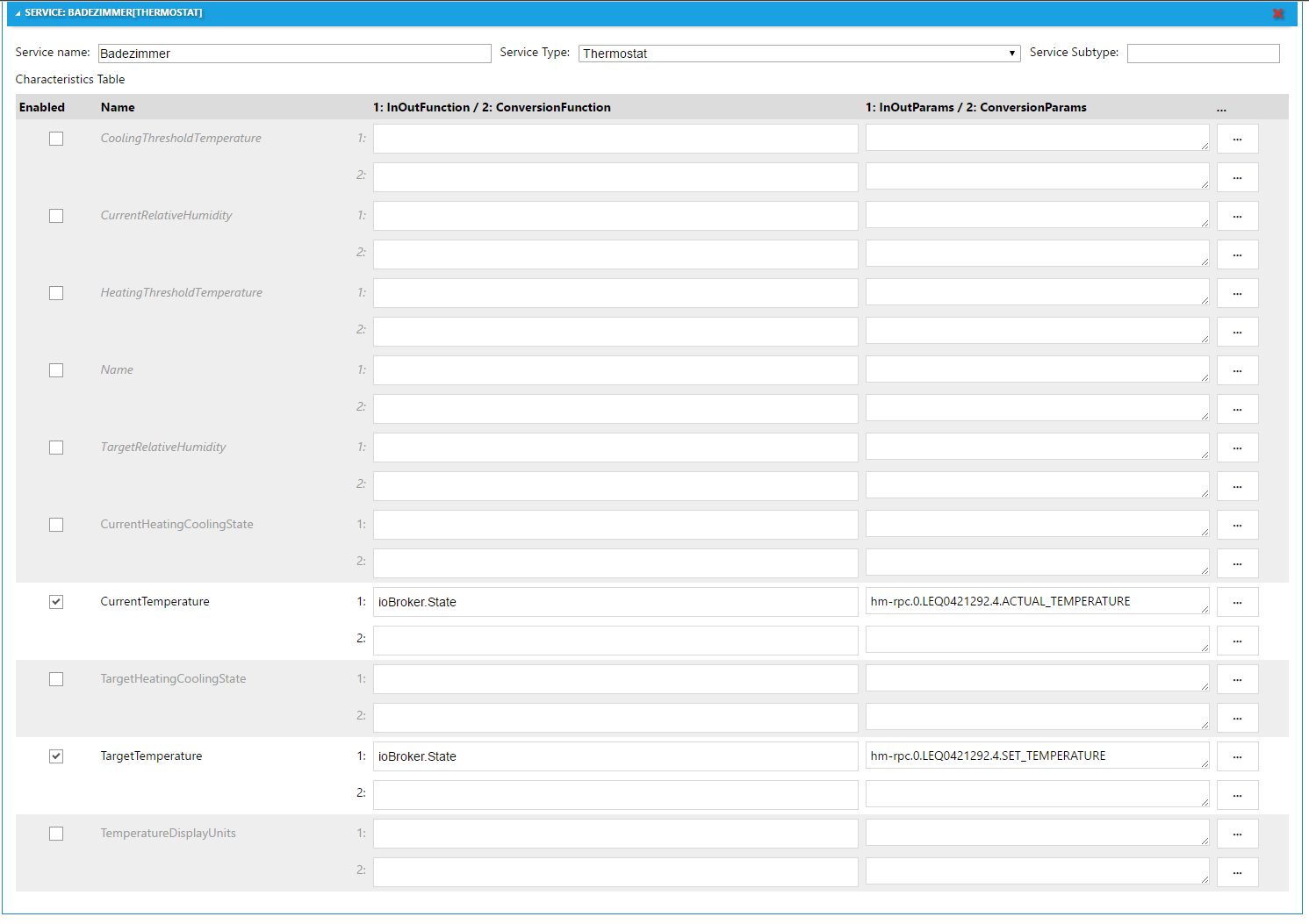
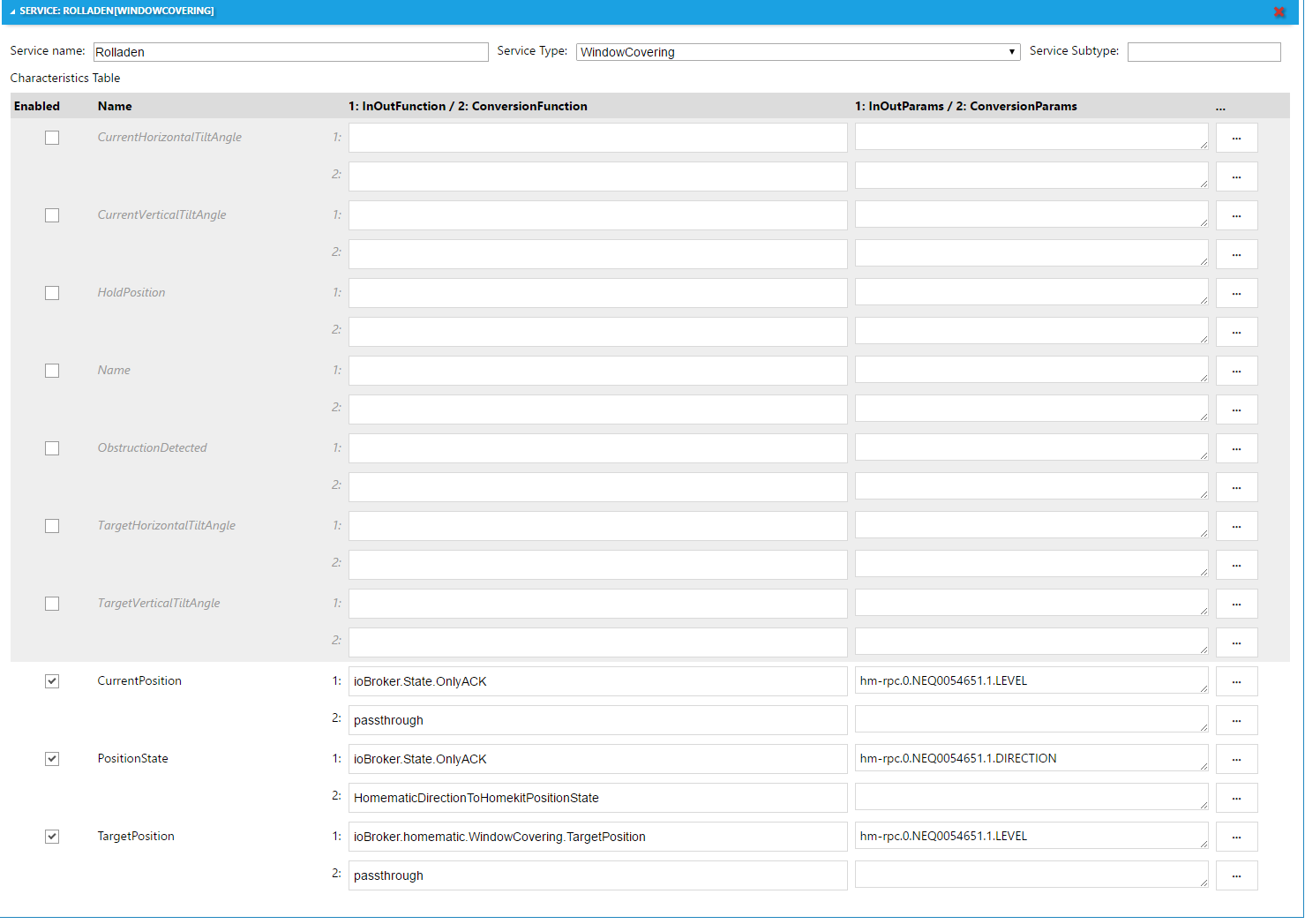
      Des Weiteren sollte man für die "Current*" Werte die Funktion "ioBroker.State.OnlyACK" nutzen.

      Diese Funktion gibt nur Werte weiter, welche in ioBroker das Flag "acknowledged" haben. Letztendlich bedeutet das, das nur Werte die vom Gerät kommen an diesen HomeKit Datenpunkt weitergegeben werden.

      HomeKit unterteilt meistens nach Soll-Wert und Ist-Wert während das bei Homematic oder anderen Systemen meistens nicht der Fall ist.

      Nimmt man für "Current*" die State-Werte direkt, werden die Soll-Werte sofort als Ist-Werte angezeigt und es gibt hässliche Effekte beim Ändern eines Sollwerts (das Hochziehen der Temperatur springt dann hässlich hin und her).

      1 Reply Last reply
      0
      • M Offline
        M Offline
        Michy
        wrote on last edited by
        #27

        Hi, danke für deine Mühe!

        ich bekomme bei der Installation über NPM immer folgenden Fehler:

        $ ./iobroker url "https://github.com/ioBroker/ioBroker.yahka/tarball/master" yahka --debug
        install https://github.com/ioBroker/ioBroker.yahka/tarball/master
        npm install https://github.com/ioBroker/ioBroker.yahka/tarball/master --production --prefix "/root" (System call)
        npm
         ERR!
         fetch failed
         https://github.com/ioBroker/ioBroker.yahka/tarball/master
        npm WARN
         retry
         will retry, error on last attempt: Error: fetch failed with status code 404
        npm
        
        ERR!
         fetch failed https://github.com/ioBroker/ioBroker.yahka/tarball/masternpm
         WARN retry will retry, error on last attempt: Error: fetch failed with status code 404
        npm
         ERR! 
        fetch failed https://github.com/ioBroker/ioBroker.yahka/tarball/master
        npm
         ERR! Linux 4.4.13-v7+
        npm ERR! 
        argv "/usr/bin/nodejs" "/usr/bin/npm" "install" "https://github.com/ioBroker/ioBroker.yahka/tarball/master" "--production" "--prefix" "/root"npm ERR!
         node v4.5.0npm
         ERR! npm 
         v4.0.5
        
        npm ERR! fetch failed with status code 404npm 
        ERR! npm
         ERR! If you need help, you may report this error at:npm ERR!     <https: github.com/npm/issues="">
        
        npm ERR! Please include the following file with any support request:npm ERR!     /npm-debug.log
        
        ERROR: host.RIPBR Cannot install https://github.com/ioBroker/ioBroker.yahka/tarball/master: 1
        ERROR: process exited with code 25</https:>
        

        Hat das jemand schon gehabt? Habe die npm Version schon geupdatet. Oder ist es doch die falsche NodeVersion?

        Gruß

        Micha

        1 Reply Last reply
        0
        • J Offline
          J Offline
          JW86
          wrote on last edited by
          #28

          Du installierst vermutlich via GIT Url statt mit dem NPM Paket

          1 Reply Last reply
          0
          • M Offline
            M Offline
            Michy
            wrote on last edited by
            #29

            @JW86:

            Du installierst vermutlich via GIT Url statt mit dem NPM Paket `

            okay das habe ich jetzt erst verstanden :lol:

            nun kommen aber diese Fehler:

            $ ./iobroker url "iobroker.yahka" --debug
            install iobroker.yahka
            npm install iobroker.yahka --production --prefix "/root" (System call)
            > authenticate-pam@1.0.2 install /root/node_modules/authenticate-pam
            > node-gyp rebuild
            
            make: Entering directory '/root/node_modules/authenticate-pam/build'
              CXX(target) Release/obj.target/authenticate_pam/authenticate_pam.o
            ../authenticate_pam.cc:30:31: fatal error: security/pam_appl.h: Datei oder Verzeichnis nicht gefunden #include <security pam_appl.h="">^
            compilation terminated.
            
            authenticate_pam.target.mk:94: recipe for target 'Release/obj.target/authenticate_pam/authenticate_pam.o' failed
            make: Leaving directory '/root/node_modules/authenticate-pam/build'make: *** [Release/obj.target/authenticate_pam/authenticate_pam.o] Error 1
            
            gyp
             ERR! build error 
            gyp ERR! stack Error: `make` failed with exit code: 2gyp ERR! stack     at ChildProcess.onExit (/usr/lib/node_modules/npm/node_modules/node-gyp/lib/build.js:276:23)
            gyp ERR! stack     at emitTwo (events.js:87:13)
            gyp ERR! stack     at ChildProcess.emit (events.js:172:7)
            gyp ERR! stack     at Process.ChildProcess._handle.onexit (internal/child_process.js:200:12)
            gyp
             ERR! System Linux 4.4.13-v7+gyp ERR! command "/usr/bin/nodejs" "/usr/lib/node_modules/npm/node_modules/node-gyp/bin/node-gyp.js" "rebuild"
            gyp ERR! cwd /root/node_modules/authenticate-pam
            gyp ERR! node -v v4.5.0
            
            gyp ERR! node-gyp -v v3.4.0
            gyp ERR! not ok</security> 
            

            den Fehler konnte ich nun mit dem Befehl:

            npm repair –save

            beheben. Nun ist nach der Installation der Adapter leider nicht aufzufinden :D

            gruß

            Micha

            1 Reply Last reply
            0
            • T Offline
              T Offline
              Trident
              wrote on last edited by
              #30

              Der Adapter funktioniert bei mir auf Anhieb ohne Problem mit 12 Geräten!

              Vielen Dank für die tolle Arbeit!

              1 Reply Last reply
              0
              • J Offline
                J Offline
                JW86
                wrote on last edited by
                #31

                > Wichtig vor der Installation müssen einige Pakete installiert werden: sudo apt-get install libavahi-compat-libdnssd-dev

                Hast du das beachtet?

                1 Reply Last reply
                0
                • M Offline
                  M Offline
                  Michy
                  wrote on last edited by
                  #32

                  @JW86:

                  > Wichtig vor der Installation müssen einige Pakete installiert werden: sudo apt-get install libavahi-compat-libdnssd-dev

                  Hast du das beachtet? `

                  Ja, das ist installiert.

                  Wenn ich das ganze manuell über die Konsole mit dem Befehl

                  npm install iobroker.yahka –production --prefix "/root"

                  installieren möchte, kommen jetzt solche Warnungen:

                  npm WARN enoent ENOENT: no such file or Directory, open '/opt/iobroker/package.json'
                  npm WARN iobroker No description
                  npm WARN iobroker No repository field.
                  npm WARN iobroker No README data
                  npm WARN iobroker No license field.


                  Was ist denn da los? :lol:

                  gruß

                  Micha

                  1 Reply Last reply
                  0
                  • HomoranH Do not disturb
                    HomoranH Do not disturb
                    Homoran
                    Global Moderator Administrators
                    wrote on last edited by
                    #33

                    Bist du root?

                    Ansonsten bitte sudo verwenden

                    Gruß

                    Rainer

                    kein Support per PN! - Fragen im Forum stellen - es gibt fast nichts, was nicht auch für andere interessant ist.

                    Benutzt das Voting rechts unten im Beitrag wenn er euch geholfen hat.

                    der Installationsfixer: curl -fsL https://iobroker.net/fix.sh | bash -

                    1 Reply Last reply
                    0
                    • M Offline
                      M Offline
                      Michy
                      wrote on last edited by
                      #34

                      @Homoran:

                      Bist du root?

                      Ansonsten bitte sudo verwenden

                      Gruß

                      Rainer `

                      Also mit sudo gibt er mir gar keinen Fehlerwert mehr zurück:

                      root@RIPBR:~# sudo npm install iobroker.yahka –production --prefix "/root"

                      iobroker.core@1.0.0 /root

                      └── iobroker.yahka@0.5.2

                      Trotzdem kann ich den Adapter nicht in dem IoBroker unter Adapter finden.

                      Habe ich mir da irgendetwas zerschossen :?:

                      Gruß

                      Micha

                      1 Reply Last reply
                      0
                      • HomoranH Do not disturb
                        HomoranH Do not disturb
                        Homoran
                        Global Moderator Administrators
                        wrote on last edited by
                        #35

                        Doppelt hält besser. Jetzt bist du root und nimmst sudo ;)

                        Aber du bist anscheinend nicht im iobroker Verzeichnis, oder?

                        Hast du vorher cd /opt/iobroker ausgeführt?

                        Gruß

                        Rainer

                        kein Support per PN! - Fragen im Forum stellen - es gibt fast nichts, was nicht auch für andere interessant ist.

                        Benutzt das Voting rechts unten im Beitrag wenn er euch geholfen hat.

                        der Installationsfixer: curl -fsL https://iobroker.net/fix.sh | bash -

                        1 Reply Last reply
                        0
                        • M Offline
                          M Offline
                          Michy
                          wrote on last edited by
                          #36

                          @Homoran:

                          Doppelt hält besser. Jetzt bist du root und nimmst sudo ;)

                          Aber du bist anscheinend nicht im iobroker Verzeichnis, oder?

                          Hast du vorher cd /opt/iobroker ausgeführt?

                          Gruß

                          Rainer `

                          Ich dachte ich probiere es mal :D

                          also keine Chance. Die Installation läuft anscheinend problemlos durch.

                          Der Adapter will einfach nicht unter dem Reiter "Adapter" erscheinen.

                          Habe das ganze auch nochmal über "Aus eigener URL" mit "iobroker.yahka" ausprobiert.

                          Was kann das denn sonst noch sein :x :x

                          Gruß

                          Micha

                          1 Reply Last reply
                          0
                          • apollon77A Offline
                            apollon77A Offline
                            apollon77
                            wrote on last edited by
                            #37

                            Was gibts denn an Log-Ausgaben während der Installation?

                            Beitrag hat geholfen? Votet rechts unten im Beitrag :-) https://paypal.me/Apollon77 / https://github.com/sponsors/Apollon77

                            • Debug-Log für Instanz einschalten? Admin -> Instanzen -> Expertenmodus -> Instanz aufklappen - Loglevel ändern
                            • Logfiles auf Platte /opt/iobroker/log/… nutzen, Admin schneidet Zeilen ab
                            1 Reply Last reply
                            0
                            • M Offline
                              M Offline
                              Michy
                              wrote on last edited by
                              #38

                              @apollon77:

                              Was gibts denn an Log-Ausgaben während der Installation? `

                              Hier einmal der Auszug aus dem Log:

                              host.RIPBR	2017-01-07 19:47:53.652	info	Update repository "default" under "http://download.iobroker.net/sources-dist.json"
                              iobroker	2017-01-07 19:47:53.465	info	exit 0
                              iobroker	2017-01-07 19:47:53.369	info	iobroker.core@1.0.0 /root└── iobroker.yahka@0.5.2
                              iobroker	2017-01-07 19:46:42.744	info	npm install iobroker.yahka --production --prefix "/root" (System call)
                              iobroker	2017-01-07 19:46:42.407	info	install iobroker.yahka
                              iobroker	2017-01-07 19:46:41.271	info	url "iobroker.yahka" --debug
                              

                              Ich kann dort keinen Fehler sehen. Nur muss doch dann auch der Adapter irgendwo installiert worden sein?

                              Hat noch jemand eine Idee?

                              Gruß

                              Micha

                              1 Reply Last reply
                              0
                              • M Offline
                                M Offline
                                mimquadrat
                                wrote on last edited by
                                #39

                                ich hab das selbe Problem dass der Adapter nicht angezeigt wird.

                                habe die Befehle so abgesetzt:

                                als root im Standardverzeichnis:

                                apt-get install libavahi-compat-libdnssd-dev

                                dann (ebenfalls als root) in iobroker Verzeichnis gewechselt:

                                cd /opt/iobroker

                                dann

                                root@raspberrypi:/opt/iobroker# iobroker stop

                                dann

                                root@raspberrypi:/opt/iobroker# npm install iobroker.yahka –production --prefix "/root"

                                keine Fehler o.ä. gekommen. Neustart durchgeführt

                                1 Reply Last reply
                                0
                                • J Offline
                                  J Offline
                                  JW86
                                  wrote on last edited by
                                  #40

                                  @mimquadrat:

                                  root@raspberrypi:/opt/iobroker# npm install iobroker.yahka –production --prefix "/root" `

                                  Ich bin mir nicht sicher ob das der richtige weg ist ein Paket zu installieren - aber da wissen andere Sicher mehr.

                                  Ich kann mir vorstellen das du noch folgendes ausführen musst (als Root im ioBroker Verzeichneis - ioBroker muss dazu nicht beendet werden):

                                  iobroker upload yahka
                                  
                                  1 Reply Last reply
                                  0
                                  • M Offline
                                    M Offline
                                    Michy
                                    wrote on last edited by
                                    #41

                                    @JW86:

                                    @mimquadrat:

                                    root@raspberrypi:/opt/iobroker# npm install iobroker.yahka –production --prefix "/root" `

                                    Ich bin mir nicht sicher ob das der richtige weg ist ein Paket zu installieren - aber da wissen andere Sicher mehr.

                                    Ich kann mir vorstellen das du noch folgendes ausführen musst (als Root im ioBroker Verzeichneis - ioBroker muss dazu nicht beendet werden):

                                    iobroker upload yahka
                                    ```` `  
                                    

                                    Danke für die Antwort. Leider klappt auch das nicht. Yahka ist auch nach Neustart nicht unter "Adapter" zu finden

                                    Gruß

                                    Micha

                                    Gesendet von iPhone mit Tapatalk

                                    1 Reply Last reply
                                    0
                                    • M Offline
                                      M Offline
                                      mimquadrat
                                      wrote on last edited by
                                      #42

                                      hier kommt ein Fehler:

                                      root@raspberrypi:/opt/iobroker# iobroker upload yahka

                                      Cannot find io-package.json in /opt/iobroker/node_modules/iobroker.js-controller/adapter/yahka

                                      Cannot parse /opt/iobroker/node_modules/iobroker.js-controller/adapter/yahka/io-package.json:Error: ENOENT: no such file or directory, open '/opt/iobroker/node_modules/iobroker.js-controller/adapter/yahka/io-package.json'

                                      root@raspberrypi:/opt/iobroker#

                                      edit:

                                      mit dem hier hats geklappt:

                                      Der Adapter kann über das NPM-Paket "iobroker.yahka" installiert werden (Admin-Konsole -> Installieren aus eigener URL (links oben) -> aus eigener URL -> "iobroker.yahka" -> ok

                                      1 Reply Last reply
                                      0
                                      • DutchmanD Offline
                                        DutchmanD Offline
                                        Dutchman
                                        Developer Most Active Administrators
                                        wrote on last edited by
                                        #43

                                        @mimquadrat:

                                        hier kommt ein Fehler:

                                        root@raspberrypi:/opt/iobroker# iobroker upload yahka

                                        Cannot find io-package.json in /opt/iobroker/node_modules/iobroker.js-controller/adapter/yahka

                                        Cannot parse /opt/iobroker/node_modules/iobroker.js-controller/adapter/yahka/io-package.json:Error: ENOENT: no such file or directory, open '/opt/iobroker/node_modules/iobroker.js-controller/adapter/yahka/io-package.json'

                                        root@raspberrypi:/opt/iobroker#

                                        edit:

                                        mit dem hier hats geklappt:

                                        Der Adapter kann über das NPM-Paket "iobroker.yahka" installiert werden (Admin-Konsole -> Installieren aus eigener URL (links oben) -> aus eigener URL -> "iobroker.yahka" -> ok `

                                        Upload geht nur wen die install files bereits da sind (also entweder im browser oder per console installiert. Sonst immer erst "iobroker add >adaptername<"

                                        1 Reply Last reply
                                        0
                                        • M Offline
                                          M Offline
                                          Michy
                                          wrote on last edited by
                                          #44

                                          @Dutchman:

                                          @mimquadrat:

                                          hier kommt ein Fehler:

                                          root@raspberrypi:/opt/iobroker# iobroker upload yahka

                                          Cannot find io-package.json in /opt/iobroker/node_modules/iobroker.js-controller/adapter/yahka

                                          Cannot parse /opt/iobroker/node_modules/iobroker.js-controller/adapter/yahka/io-package.json:Error: ENOENT: no such file or directory, open '/opt/iobroker/node_modules/iobroker.js-controller/adapter/yahka/io-package.json'

                                          root@raspberrypi:/opt/iobroker#

                                          edit:

                                          mit dem hier hats geklappt:

                                          Der Adapter kann über das NPM-Paket "iobroker.yahka" installiert werden (Admin-Konsole -> Installieren aus eigener URL (links oben) -> aus eigener URL -> "iobroker.yahka" -> ok `

                                          Upload geht nur wen die install files bereits da sind (also entweder im browser oder per console installiert. Sonst immer erst "iobroker add >adaptername<" `

                                          Das klappt. Nur dann ist die Version aus dem Github installiert. In der kann ich in der Konfiguration keine Objekte auswählen und abspeichern. Kann man nicht die Github Version aktualisieren, sodass man das ganz einfach installieren kann? Über NPM bekomme ich den Adapter nicht angezeigt.

                                          Gruß

                                          Micha

                                          1 Reply Last reply
                                          0
                                          Reply
                                          • Reply as topic
                                          Log in to reply
                                          • Oldest to Newest
                                          • Newest to Oldest
                                          • Most Votes


                                          Support us

                                          ioBroker
                                          Community Adapters
                                          Donate
                                          FAQ Cloud / IOT
                                          HowTo: Node.js-Update
                                          HowTo: Backup/Restore
                                          Downloads
                                          BLOG

                                          802

                                          Online

                                          32.4k

                                          Users

                                          81.5k

                                          Topics

                                          1.3m

                                          Posts
                                          Community
                                          Impressum | Datenschutz-Bestimmungen | Nutzungsbedingungen | Einwilligungseinstellungen
                                          ioBroker Community 2014-2025
                                          logo
                                          • Login

                                          • Don't have an account? Register

                                          • Login or register to search.
                                          • First post
                                            Last post
                                          0
                                          • Home
                                          • Recent
                                          • Tags
                                          • Unread 0
                                          • Categories
                                          • Unreplied
                                          • Popular
                                          • GitHub
                                          • Docu
                                          • Hilfe