




Update System iobroker failed
-
@tiger If you copy with user pi - all files are owned by this user. As iobroker runs under user iobroker you need to change the owner of the files and directories.
-
@tiger So but I am not sure if the old node will work at all with the new node version. You should better think about a replacement.
@mickym
So... if I'm understanding well...
I've to let like that without copy the directory...
install the new node of Alexa...
and made a new programmation?as i wanted to have an installation up to date... if it's your recommandation... i'll do like that...
-
@tiger sagte in Update System iobroker failed:
is it possible to place the SDcard on my windows desktop pc and save it
I'm pretty sure windows won't see it :-(
No problem Now that I'd understood Filezilla :)
I'm going to have all working, and after we'll see to the update.
After Node-red.. that if I understand well I've to reprogram... for alexa
I've to check VIS
RFXCOM it seems that I've to pair everything as I've the devices but seems not connected
Zigbee, probably same, I've to pair everything -
don't remember if socketio is used but it was installed.
Web.0 is not configured, And I didn't reached to change the Ip adress.Configuration of VIS, nothing, lincence key is show and when checking licence it's OK
Configuration of Web.0
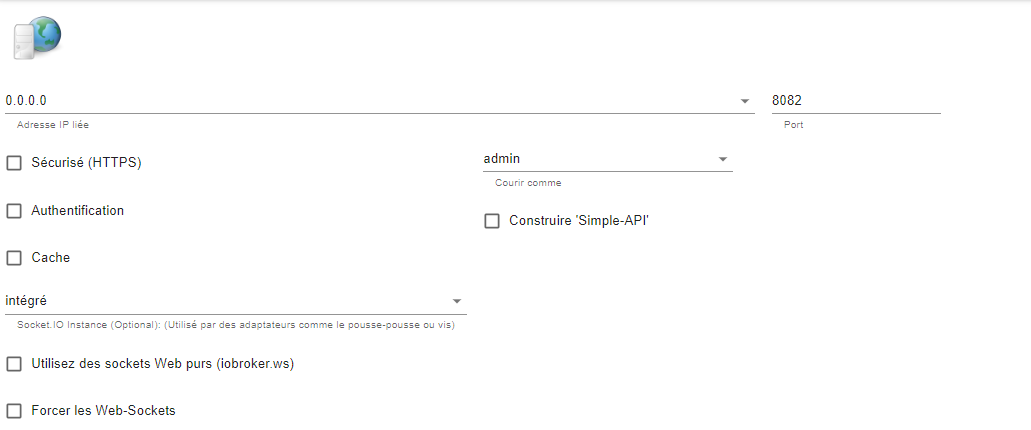
No ip Adress, supposed is the reason
@tiger sagte in Update System iobroker failed:
don't remember if socketio is used but it was installed.
Not currently, you can switch and test it or use pure web sockets
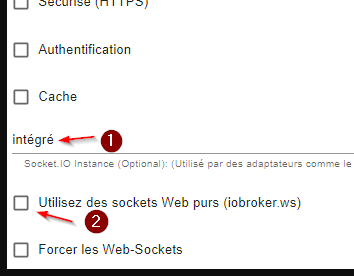
-
@mickym
So... if I'm understanding well...
I've to let like that without copy the directory...
install the new node of Alexa...
and made a new programmation?as i wanted to have an installation up to date... if it's your recommandation... i'll do like that...
@tiger sagte in Update System iobroker failed:
@mickym
So... if I'm understanding well...
I've to let like that without copy the directory...
install the new node of Alexa...
and made a new programmation?as i wanted to have an installation up to date... if it's your recommandation... i'll do like that...
Yes my recommendation is to do not copy the old stuff. Edit your package.json and delete the line in the dependencies section which refers to the old- alexa node. Run npm install hopefully without errors. Activate in the node red adapter configuration that you use the pallet manager and install a different node. Then you need to rework all alexa flows
-
No problem Now that I'd understood Filezilla :)
I'm going to have all working, and after we'll see to the update.
After Node-red.. that if I understand well I've to reprogram... for alexa
I've to check VIS
RFXCOM it seems that I've to pair everything as I've the devices but seems not connected
Zigbee, probably same, I've to pair everything@tiger sagte in Update System iobroker failed:
Zigbee, probably same, I've to pair everything
i don't use zigbee and therefore I'm very sorry if there is a pitfall too.
But @Thomas-Braun may know wether there will be a solution. -
@tiger sagte in Update System iobroker failed:
@mickym
So... if I'm understanding well...
I've to let like that without copy the directory...
install the new node of Alexa...
and made a new programmation?as i wanted to have an installation up to date... if it's your recommandation... i'll do like that...
Yes my recommendation is to do not copy the old stuff. Edit your package.json and delete the line in the dependencies section which refers to the old- alexa node. Run npm install hopefully without errors. Activate in the node red adapter configuration that you use the pallet manager and install a different node. Then you need to rework all alexa flows
@mickym said in Update System iobroker failed:
package.json
ok I'll do it...
but, how do you edit the package.json? -
@tiger sagte in Update System iobroker failed:
Zigbee, probably same, I've to pair everything
i don't use zigbee and therefore I'm very sorry if there is a pitfall too.
But @Thomas-Braun may know wether there will be a solution. -
@tiger sagte in Update System iobroker failed:
don't remember if socketio is used but it was installed.
Not currently, you can switch and test it or use pure web sockets
it seems it's due to my version of iobroker.admin...
I thing we'll be able to solve it after upgrading system...
2022-08-16 18:10:28.357 error startInstance system.adapter.web.0 Adapter dependency not fulfilled on any host: required adapter "admin" has wrong version. Installed "4.0.10", required ">=5.1.0"! -
it seems it's due to my version of iobroker.admin...
I thing we'll be able to solve it after upgrading system...
2022-08-16 18:10:28.357 error startInstance system.adapter.web.0 Adapter dependency not fulfilled on any host: required adapter "admin" has wrong version. Installed "4.0.10", required ">=5.1.0"!@tiger I do not understand all the problems, that was a backup with the backitup adapter? Why admin 4
umgestiegen von Proxmox auf Unraid
-
@tiger I do not understand all the problems, that was a backup with the backitup adapter? Why admin 4
@crunchip sagte in Update System iobroker failed:
that was a backup with the backitup adapter?
no manually by
iobroker backupthe admin had been downgraded by the restore
kein Support per PN! - Fragen im Forum stellen - Benutzt das Voting rechts unten im Beitrag wenn er euch geholfen hat.
Das Forum freut sich über eine Spende. Benutzt dazu den Spendenbutton oben rechts. Danke!
der Installationsfixer: curl -fsL https://iobroker.net/fix.sh | bash - -
@crunchip sagte in Update System iobroker failed:
that was a backup with the backitup adapter?
no manually by
iobroker backupthe admin had been downgraded by the restore
@tiger sagte in Update System iobroker failed:
Vis installed
Backup with --force done...
ADmin version has beenn downgrade to 4.0 as before...Why
itself or through backup@tiger sagte in Update System iobroker failed:
Installed "4.0.10", required ">=5.1.0"
then do the upgrade
umgestiegen von Proxmox auf Unraid
-
@mickym said in Update System iobroker failed:
package.json
ok I'll do it...
but, how do you edit the package.json?@tiger sagte in Update System iobroker failed:
@mickym said in Update System iobroker failed:
package.json
ok I'll do it...
but, how do you edit the package.json?Goto directory
cd /opt/iobroker/iobroker-data/node-red
nano package.json
If a message occurs that file is write protected then use
sudo nano package.jsonSearch for the reference of the alexa node. CTRL + k should delete line. I’m typing on my mobile so you need to look at the bottom describing the short-cuts. CTRL + x to
exit and confirm to write.Ensure that you run npm install in the directory /opt/iobroker/iobroker-data/node-red. After you started the Node Red Adapter using the pallet manager, remove all alexa nodes from your flows and update your nodes within the pallet manager, if updates are available. This should be done on a regular base. Keep your system up to date to avoid surprises like this.
-
@tiger sagte in Update System iobroker failed:
Vis installed
Backup with --force done...
ADmin version has beenn downgrade to 4.0 as before...Why
itself or through backup@tiger sagte in Update System iobroker failed:
Installed "4.0.10", required ">=5.1.0"
then do the upgrade
-
@tiger sagte in Update System iobroker failed:
@mickym said in Update System iobroker failed:
package.json
ok I'll do it...
but, how do you edit the package.json?Goto directory
cd /opt/iobroker/iobroker-data/node-red
nano package.json
If a message occurs that file is write protected then use
sudo nano package.jsonSearch for the reference of the alexa node. CTRL + k should delete line. I’m typing on my mobile so you need to look at the bottom describing the short-cuts. CTRL + x to
exit and confirm to write.Ensure that you run npm install in the directory /opt/iobroker/iobroker-data/node-red. After you started the Node Red Adapter using the pallet manager, remove all alexa nodes from your flows and update your nodes within the pallet manager, if updates are available. This should be done on a regular base. Keep your system up to date to avoid surprises like this.
I made by another way as i've not a lot of node to install and needed.
I installed node manually,
Now I'm trying to find the correct alexa node...
moreover The boolean-logic that was installed don't work now... I had a AND node, that works good... now don't work...So I'm truing to find these two solution.
node-red is correctly connect to My LOGO !8 from siemens
Regards
-
@tiger sagte in Update System iobroker failed:
@mickym said in Update System iobroker failed:
package.json
ok I'll do it...
but, how do you edit the package.json?Goto directory
cd /opt/iobroker/iobroker-data/node-red
nano package.json
If a message occurs that file is write protected then use
sudo nano package.jsonSearch for the reference of the alexa node. CTRL + k should delete line. I’m typing on my mobile so you need to look at the bottom describing the short-cuts. CTRL + x to
exit and confirm to write.Ensure that you run npm install in the directory /opt/iobroker/iobroker-data/node-red. After you started the Node Red Adapter using the pallet manager, remove all alexa nodes from your flows and update your nodes within the pallet manager, if updates are available. This should be done on a regular base. Keep your system up to date to avoid surprises like this.
-
@tiger sagte in Update System iobroker failed:
@mickym said in Update System iobroker failed:
package.json
ok I'll do it...
but, how do you edit the package.json?Goto directory
cd /opt/iobroker/iobroker-data/node-red
nano package.json
If a message occurs that file is write protected then use
sudo nano package.jsonSearch for the reference of the alexa node. CTRL + k should delete line. I’m typing on my mobile so you need to look at the bottom describing the short-cuts. CTRL + x to
exit and confirm to write.Ensure that you run npm install in the directory /opt/iobroker/iobroker-data/node-red. After you started the Node Red Adapter using the pallet manager, remove all alexa nodes from your flows and update your nodes within the pallet manager, if updates are available. This should be done on a regular base. Keep your system up to date to avoid surprises like this.
Don't know why,
Was trying to add other functionnality that doesn't work with node amazonand connexion lost
message in the log file are like that
node-red.0 2022-08-16 21:00:26.108 info (8145) node-red exited with 1 node-red.0 2022-08-16 21:00:25.642 warn (8145) 16 Aug 21:00:25 - [warn] Projects disabled : editorTheme.projects.enabled=false node-red.0 2022-08-16 21:00:21.074 warn (8145) (node:8183) [DEP0128] DeprecationWarning: Invalid 'main' field in '/opt/iobroker/node_modules/@node-red/editor-client/package.json' of './lib/index.js'. Please either fix that or report it to t node-red.0 2022-08-16 21:00:21.067 warn (8145) 16 Aug 21:00:21 - [warn] server.httpadminauth-deprecated node-red.0 2022-08-16 21:00:19.544 info (8145) Starting node-red: --max-old-space-size=2048 /opt/iobroker/node_modules/node-red/red.js -v --settings /opt/iobroker/iobroker-data/node-red/settings.js -
Don't know why,
Was trying to add other functionnality that doesn't work with node amazonand connexion lost
message in the log file are like that
node-red.0 2022-08-16 21:00:26.108 info (8145) node-red exited with 1 node-red.0 2022-08-16 21:00:25.642 warn (8145) 16 Aug 21:00:25 - [warn] Projects disabled : editorTheme.projects.enabled=false node-red.0 2022-08-16 21:00:21.074 warn (8145) (node:8183) [DEP0128] DeprecationWarning: Invalid 'main' field in '/opt/iobroker/node_modules/@node-red/editor-client/package.json' of './lib/index.js'. Please either fix that or report it to t node-red.0 2022-08-16 21:00:21.067 warn (8145) 16 Aug 21:00:21 - [warn] server.httpadminauth-deprecated node-red.0 2022-08-16 21:00:19.544 info (8145) Starting node-red: --max-old-space-size=2048 /opt/iobroker/node_modules/node-red/red.js -v --settings /opt/iobroker/iobroker-data/node-red/settings.js@tiger I cant help you with alexa - as I personally do not use it. The only node - which I help for support was this node:
node-red-contrib-virtual-smart-home. The message which you log are specific to nodes that you have installed. -
@tiger I cant help you with alexa - as I personally do not use it. The only node - which I help for support was this node:
node-red-contrib-virtual-smart-home. The message which you log are specific to nodes that you have installed.


Hey! Du scheinst an dieser Unterhaltung interessiert zu sein, hast aber noch kein Konto.
Hast du es satt, bei jedem Besuch durch die gleichen Beiträge zu scrollen? Wenn du dich für ein Konto anmeldest, kommst du immer genau dorthin zurück, wo du zuvor warst, und kannst dich über neue Antworten benachrichtigen lassen (entweder per E-Mail oder Push-Benachrichtigung). Du kannst auch Lesezeichen speichern und Beiträge positiv bewerten, um anderen Community-Mitgliedern deine Wertschätzung zu zeigen.
Mit deinem Input könnte dieser Beitrag noch besser werden 💗
Registrieren AnmeldenSupport us
492
Online33.0k
Benutzer83.6k
Themen1.3m
Beiträge