Skip to content
  • Home
  • Aktuell
  • Tags
  • 0 Ungelesen 0
  • Kategorien
  • Unreplied
  • Beliebt
  • GitHub
  • Docu
  • Hilfe
Skins
  • Light
  • Brite
  • Cerulean
  • Cosmo
  • Flatly
  • Journal
  • Litera
  • Lumen
  • Lux
  • Materia
  • Minty
  • Morph
  • Pulse
  • Sandstone
  • Simplex
  • Sketchy
  • Spacelab
  • United
  • Yeti
  • Zephyr
  • Dark
  • Cyborg
  • Darkly
  • Quartz
  • Slate
  • Solar
  • Superhero
  • Vapor

  • Standard: (Kein Skin)
  • Kein Skin
Einklappen
ioBroker Logo

Community Forum

donate donate
  1. ioBroker Community Home
  2. Deutsch
  3. ioBroker Allgemein
  4. (gelöst) Grafana

NEWS

  • Weihnachtsangebot 2025! 🎄
    BluefoxB
    Bluefox
    8
    1
    90

  • UPDATE 31.10.: Amazon Alexa - ioBroker Skill läuft aus ?
    apollon77A
    apollon77
    48
    3
    8.9k

  • Monatsrückblick – September 2025
    BluefoxB
    Bluefox
    13
    1
    2.3k

(gelöst) Grafana

Geplant Angeheftet Gesperrt Verschoben ioBroker Allgemein
101 Beiträge 7 Kommentatoren 9.8k Aufrufe 5 Watching
  • Älteste zuerst
  • Neuste zuerst
  • Meiste Stimmen
Antworten
  • In einem neuen Thema antworten
Anmelden zum Antworten
Dieses Thema wurde gelöscht. Nur Nutzer mit entsprechenden Rechten können es sehen.
  • ostseereiterO Offline
    ostseereiterO Offline
    ostseereiter
    schrieb am zuletzt editiert von
    #71

    Hallo freunde ich habe erst mal Grafana installiert.
    Bekomme aber keine Verbindung zur Influx-datenbank.
    Wie kann ich dort überprüfen wie die angelegt Datenbank heißt (ob sie angelegt wurde)
    und wie der User heißt und (ob der angelegt wurde.

    > CREATE USER "admin" WITH PASSWORD "2606" WITH ALL PRIVILEGES
    ERR: unable to parse authentication credentials
    Warning: It is possible this error is due to not setting a database.
    Please set a database with the command "use <database>".
    > SHOW USERS
    ERR: unable to parse authentication credentials
    Warning: It is possible this error is due to not setting a database.
    Please set a database with the command "use <database>".


    Gruß OSR

    Plattform
    Linux x64 CPUs2 AMD G-T56N Processor 1646 MHz 8GB RAM

    crunchipC 1 Antwort Letzte Antwort
    0
    • ostseereiterO ostseereiter

      Hallo freunde ich habe erst mal Grafana installiert.
      Bekomme aber keine Verbindung zur Influx-datenbank.
      Wie kann ich dort überprüfen wie die angelegt Datenbank heißt (ob sie angelegt wurde)
      und wie der User heißt und (ob der angelegt wurde.

      > CREATE USER "admin" WITH PASSWORD "2606" WITH ALL PRIVILEGES
      ERR: unable to parse authentication credentials
      Warning: It is possible this error is due to not setting a database.
      Please set a database with the command "use <database>".
      > SHOW USERS
      ERR: unable to parse authentication credentials
      Warning: It is possible this error is due to not setting a database.
      Please set a database with the command "use <database>".
      
      
      crunchipC Abwesend
      crunchipC Abwesend
      crunchip
      Forum Testing Most Active
      schrieb am zuletzt editiert von crunchip
      #72

      @ostseereiter das was du in der Influx instanz stehen hast, brauchst du auch in grafana

      Mit putty auf deine Rechner wo influx läuft, folgende Kommandos zeigen dir was du suchst

      influx
      show databases
      show user
      exit
      

      umgestiegen von Proxmox auf Unraid

      ostseereiterO 1 Antwort Letzte Antwort
      0
      • crunchipC crunchip

        @ostseereiter das was du in der Influx instanz stehen hast, brauchst du auch in grafana

        Mit putty auf deine Rechner wo influx läuft, folgende Kommandos zeigen dir was du suchst

        influx
        show databases
        show user
        exit
        
        ostseereiterO Offline
        ostseereiterO Offline
        ostseereiter
        schrieb am zuletzt editiert von
        #73

        @crunchip
        wie kann ich das in der Influxdatenbank überprüfen das war gestern soviel für mich was ich eingegeben habe. also wie die Datenbank heißt User

        Gruß OSR

        Plattform
        Linux x64 CPUs2 AMD G-T56N Processor 1646 MHz 8GB RAM

        crunchipC 1 Antwort Letzte Antwort
        0
        • ostseereiterO ostseereiter

          @crunchip
          wie kann ich das in der Influxdatenbank überprüfen das war gestern soviel für mich was ich eingegeben habe. also wie die Datenbank heißt User

          crunchipC Abwesend
          crunchipC Abwesend
          crunchip
          Forum Testing Most Active
          schrieb am zuletzt editiert von
          #74

          @ostseereiter die Befehle hab ich doch gerade geschrieben

          umgestiegen von Proxmox auf Unraid

          ostseereiterO 2 Antworten Letzte Antwort
          0
          • crunchipC crunchip

            @ostseereiter die Befehle hab ich doch gerade geschrieben

            ostseereiterO Offline
            ostseereiterO Offline
            ostseereiter
            schrieb am zuletzt editiert von
            #75

            @crunchip alles klar habe ich übersehen muss erst mal kaffee holen nach 5 wochen arbeit ist man kein Mensch mehr.

            Gruß OSR

            Plattform
            Linux x64 CPUs2 AMD G-T56N Processor 1646 MHz 8GB RAM

            1 Antwort Letzte Antwort
            0
            • crunchipC crunchip

              @ostseereiter die Befehle hab ich doch gerade geschrieben

              ostseereiterO Offline
              ostseereiterO Offline
              ostseereiter
              schrieb am zuletzt editiert von
              #76

              @crunchip

              
              andy@debian:~$ influx
              Connected to http://localhost:8086 version 1.8.5
              InfluxDB shell version: 1.8.5
              > show databases
              ERR: unable to parse authentication credentials
              Warning: It is possible this error is due to not setting a database.
              Please set a database with the command "use <database>".
              > show user
              ERR: unable to parse authentication credentials
              Warning: It is possible this error is due to not setting a database.
              Please set a database with the command "use <database>".
              > exit


              Gruß OSR

              Plattform
              Linux x64 CPUs2 AMD G-T56N Processor 1646 MHz 8GB RAM

              1 Antwort Letzte Antwort
              0
              • ostseereiterO Offline
                ostseereiterO Offline
                ostseereiter
                schrieb am zuletzt editiert von
                #77

                ich habe jetzt mal in der Influx-Config auth-enabled auf false gesetzt
                danach konnte ich die Datenbank finden aber den User leider nicht .

                
                andy@debian:~$ sudo influx
                Connected to http://localhost:8086 version 1.8.5
                InfluxDB shell version: 1.8.5
                > show databases
                name: databases
                name
                ----
                _internal
                IobrokerD
                > show user
                ERR: error parsing query: found USER, expected CONTINUOUS, DATABASES, DIAGNOSTICS, FIELD, GRANTS, MEASUREMENT, MEASUREMENTS, QUERIES, RETENTION, SERIES, SHARD, SHARDS, STATS, SUBSCRIPTIONS, TAG, USERS at line 1, char 6
                Warning: It is possible this error is due to not setting a database.
                Please set a database with the command "use <database>".
                > exit


                Gruß OSR

                Plattform
                Linux x64 CPUs2 AMD G-T56N Processor 1646 MHz 8GB RAM

                crunchipC 1 Antwort Letzte Antwort
                0
                • ostseereiterO ostseereiter

                  ich habe jetzt mal in der Influx-Config auth-enabled auf false gesetzt
                  danach konnte ich die Datenbank finden aber den User leider nicht .

                  
                  andy@debian:~$ sudo influx
                  Connected to http://localhost:8086 version 1.8.5
                  InfluxDB shell version: 1.8.5
                  > show databases
                  name: databases
                  name
                  ----
                  _internal
                  IobrokerD
                  > show user
                  ERR: error parsing query: found USER, expected CONTINUOUS, DATABASES, DIAGNOSTICS, FIELD, GRANTS, MEASUREMENT, MEASUREMENTS, QUERIES, RETENTION, SERIES, SHARD, SHARDS, STATS, SUBSCRIPTIONS, TAG, USERS at line 1, char 6
                  Warning: It is possible this error is due to not setting a database.
                  Please set a database with the command "use <database>".
                  > exit
                  
                  
                  crunchipC Abwesend
                  crunchipC Abwesend
                  crunchip
                  Forum Testing Most Active
                  schrieb am zuletzt editiert von
                  #78

                  @ostseereiter irgendwie hast du ein ganz schön "verkorkstes" System

                  umgestiegen von Proxmox auf Unraid

                  ostseereiterO 1 Antwort Letzte Antwort
                  0
                  • crunchipC crunchip

                    @ostseereiter irgendwie hast du ein ganz schön "verkorkstes" System

                    ostseereiterO Offline
                    ostseereiterO Offline
                    ostseereiter
                    schrieb am zuletzt editiert von
                    #79

                    @crunchip kann sein wie gesagt wurde neu aufgespielt dann iobroker drauf und sonst nix nun jetzt halt die Datenbank

                    Gruß OSR

                    Plattform
                    Linux x64 CPUs2 AMD G-T56N Processor 1646 MHz 8GB RAM

                    crunchipC 1 Antwort Letzte Antwort
                    0
                    • ostseereiterO ostseereiter

                      @crunchip kann sein wie gesagt wurde neu aufgespielt dann iobroker drauf und sonst nix nun jetzt halt die Datenbank

                      crunchipC Abwesend
                      crunchipC Abwesend
                      crunchip
                      Forum Testing Most Active
                      schrieb am zuletzt editiert von crunchip
                      #80

                      @ostseereiter wen du influx frisch installiert hast, brauchst du doch keine Datenbank anlegen. Das machst du durch den influx Adapter! In der Instanz gibst du user Passwort und Name der Datenbank an, das wird dann automatisch in Influx angelegt. Diese Daten nutzt du dann und verweisst in Grafana auf deine Datenbank.

                      umgestiegen von Proxmox auf Unraid

                      ostseereiterO 2 Antworten Letzte Antwort
                      0
                      • crunchipC crunchip

                        @ostseereiter wen du influx frisch installiert hast, brauchst du doch keine Datenbank anlegen. Das machst du durch den influx Adapter! In der Instanz gibst du user Passwort und Name der Datenbank an, das wird dann automatisch in Influx angelegt. Diese Daten nutzt du dann und verweisst in Grafana auf deine Datenbank.

                        ostseereiterO Offline
                        ostseereiterO Offline
                        ostseereiter
                        schrieb am zuletzt editiert von
                        #81

                        @crunchip Grafana bracht ja eine Datenbank wenn man kein Iobroker benutzt zb

                        Gruß OSR

                        Plattform
                        Linux x64 CPUs2 AMD G-T56N Processor 1646 MHz 8GB RAM

                        1 Antwort Letzte Antwort
                        0
                        • crunchipC crunchip

                          @ostseereiter wen du influx frisch installiert hast, brauchst du doch keine Datenbank anlegen. Das machst du durch den influx Adapter! In der Instanz gibst du user Passwort und Name der Datenbank an, das wird dann automatisch in Influx angelegt. Diese Daten nutzt du dann und verweisst in Grafana auf deine Datenbank.

                          ostseereiterO Offline
                          ostseereiterO Offline
                          ostseereiter
                          schrieb am zuletzt editiert von
                          #82

                          @crunchip
                          der Befehl show user hat sich geändert in show users

                          
                          InfluxDB shell version: 1.8.5
                          > show databases
                          name: databases
                          name
                          ----
                          _internal
                          IobrokerD
                          > use IobrokerD
                          Using database IobrokerD
                          > show users
                          user  admin
                          ----  -----
                          admin true
                          andy  false


                          Gruß OSR

                          Plattform
                          Linux x64 CPUs2 AMD G-T56N Processor 1646 MHz 8GB RAM

                          1 Antwort Letzte Antwort
                          0
                          • ostseereiterO Offline
                            ostseereiterO Offline
                            ostseereiter
                            schrieb am zuletzt editiert von
                            #83

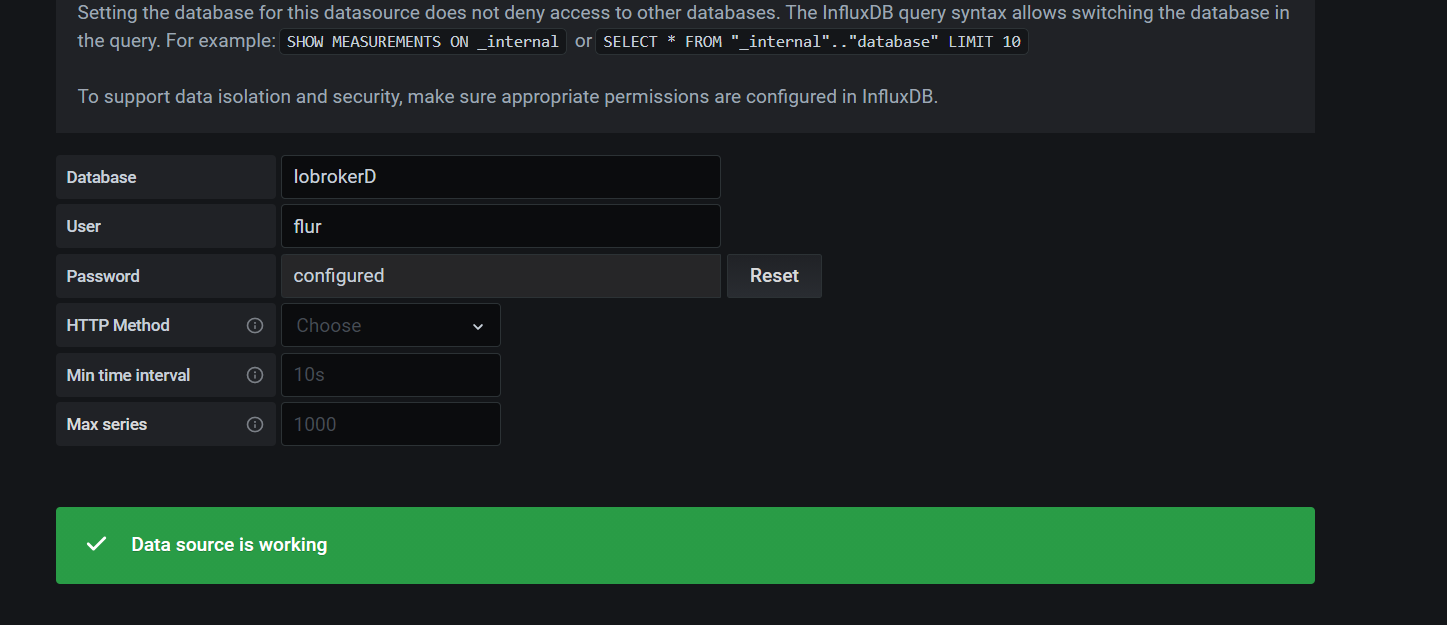
                            Verbindung steht
                            Screenshot (95).png
                            Nun möchte ich aber nicht gleich alles umstellen. Kann man von den influxadaper zwei Instanzen anlegen?

                            Gruß OSR

                            Plattform
                            Linux x64 CPUs2 AMD G-T56N Processor 1646 MHz 8GB RAM

                            crunchipC 1 Antwort Letzte Antwort
                            0
                            • ostseereiterO ostseereiter

                              Verbindung steht
                              Screenshot (95).png
                              Nun möchte ich aber nicht gleich alles umstellen. Kann man von den influxadaper zwei Instanzen anlegen?

                              crunchipC Abwesend
                              crunchipC Abwesend
                              crunchip
                              Forum Testing Most Active
                              schrieb am zuletzt editiert von
                              #84

                              @ostseereiter Jep, habe selbst 3 laufen, damit das bisschen getrennt ist. Eine davon ist zum "spielen" , denn bevor ich da dann ewig einzelne Daten löschen muss, lösch ich die Datenbank und leg sie wieder neu an.

                              umgestiegen von Proxmox auf Unraid

                              ostseereiterO 1 Antwort Letzte Antwort
                              1
                              • crunchipC crunchip

                                @ostseereiter Jep, habe selbst 3 laufen, damit das bisschen getrennt ist. Eine davon ist zum "spielen" , denn bevor ich da dann ewig einzelne Daten löschen muss, lösch ich die Datenbank und leg sie wieder neu an.

                                ostseereiterO Offline
                                ostseereiterO Offline
                                ostseereiter
                                schrieb am zuletzt editiert von
                                #85

                                @crunchip
                                ok

                                Gruß OSR

                                Plattform
                                Linux x64 CPUs2 AMD G-T56N Processor 1646 MHz 8GB RAM

                                1 Antwort Letzte Antwort
                                0
                                • ostseereiterO Offline
                                  ostseereiterO Offline
                                  ostseereiter
                                  schrieb am zuletzt editiert von
                                  #86

                                  Instanz erstellt alles grün das ist erst mal super.einen Testgraph erstellt auch alles gut nun weiß ich das es irgendwo eine Einstellung gibt so dass man diese auch in Iobroker-Vis sichtbar macht jedoch das finde ich nicht.
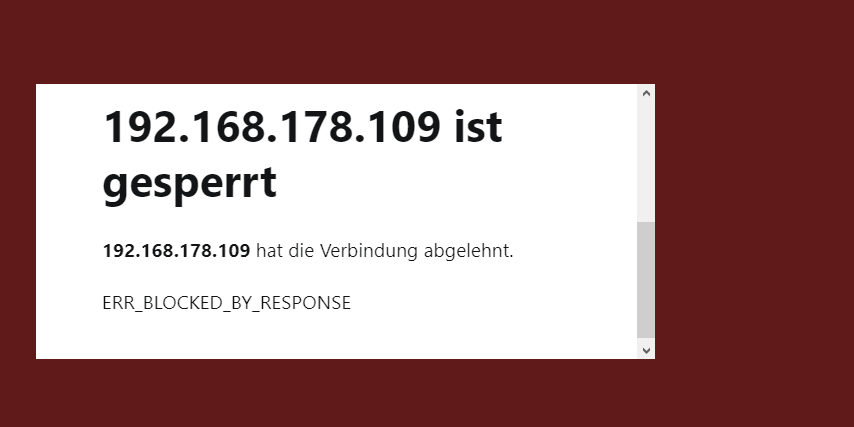
                                  Screenshot (97).png

                                  Gruß OSR

                                  Plattform
                                  Linux x64 CPUs2 AMD G-T56N Processor 1646 MHz 8GB RAM

                                  crunchipC 1 Antwort Letzte Antwort
                                  0
                                  • ostseereiterO ostseereiter

                                    Instanz erstellt alles grün das ist erst mal super.einen Testgraph erstellt auch alles gut nun weiß ich das es irgendwo eine Einstellung gibt so dass man diese auch in Iobroker-Vis sichtbar macht jedoch das finde ich nicht.
                                    Screenshot (97).png

                                    crunchipC Abwesend
                                    crunchipC Abwesend
                                    crunchip
                                    Forum Testing Most Active
                                    schrieb am zuletzt editiert von
                                    #87

                                    @ostseereiter du musst die config anpassen. Bin grad unterwegs

                                    umgestiegen von Proxmox auf Unraid

                                    ostseereiterO 1 Antwort Letzte Antwort
                                    0
                                    • crunchipC crunchip

                                      @ostseereiter du musst die config anpassen. Bin grad unterwegs

                                      ostseereiterO Offline
                                      ostseereiterO Offline
                                      ostseereiter
                                      schrieb am zuletzt editiert von
                                      #88

                                      @crunchip
                                      ok ich habe die grafana.ini bearbeitet so wie es im Internet steht
                                      aber immer noch kein Zugriff vielleicht übersehe ich noch was.

                                      #################################### Security ####################################
                                      [security]
                                      # disable creation of admin user on first start of grafana
                                      ;disable_initial_admin_creation = false
                                      
                                      # default admin user, created on startup
                                      ;admin_user = admin
                                      
                                      # default admin password, can be changed before first start of grafana,  or in profile settings
                                      ;admin_password = admin
                                      
                                      # used for signing
                                      ;secret_key = SW2YcwTIb9zpOOhoPsMm
                                      
                                      # disable gravatar profile images
                                      ;disable_gravatar = false
                                      
                                      # data source proxy whitelist (ip_or_domain:port separated by spaces)
                                      ;data_source_proxy_whitelist =
                                      
                                      # disable protection against brute force login attempts
                                      ;disable_brute_force_login_protection = false
                                      
                                      # set to true if you host Grafana behind HTTPS. default is false.
                                      ;cookie_secure = false
                                      
                                      # set cookie SameSite attribute. defaults to `lax`. can be set to "lax", "strict", "none" and "disabled"
                                      ;cookie_samesite = lax
                                      
                                      # set to true if you want to allow browsers to render Grafana in a <frame>, <iframe>, <embed> or <object>. default is false.
                                      ;allow_embedding = true
                                      
                                      # Set to true if you want to enable http strict transport security (HSTS) response header.
                                      # This is only sent when HTTPS is enabled in this configuration.
                                      # HSTS tells browsers that the site should only be accessed using HTTPS.
                                      ;strict_transport_security = false
                                      
                                      # Sets how long a browser should cache HSTS. Only applied if strict_transport_security is enabled.
                                      ;strict_transport_security_max_age_seconds = 86400
                                      
                                      # Set to true if to enable HSTS preloading option. Only applied if strict_transport_security is enabled.
                                      ;strict_transport_security_preload = false
                                      
                                      #################################### Anonymous Auth ######################
                                      [auth.anonymous]
                                      # enable anonymous access
                                      ;enabled = true

                                      
                                      # specify organization name that should be used for unauthenticated users
                                      ;org_name = Main Org.
                                      
                                      # specify role for unauthenticated users
                                      ;org_role = Viewer
                                      
                                      # mask the Grafana version number for unauthenticated users
                                      ;hide_version = false


                                      Gruß OSR

                                      Plattform
                                      Linux x64 CPUs2 AMD G-T56N Processor 1646 MHz 8GB RAM

                                      HomoranH 1 Antwort Letzte Antwort
                                      0
                                      • ostseereiterO ostseereiter

                                        @crunchip
                                        ok ich habe die grafana.ini bearbeitet so wie es im Internet steht
                                        aber immer noch kein Zugriff vielleicht übersehe ich noch was.

                                        #################################### Security ####################################
                                        [security]
                                        # disable creation of admin user on first start of grafana
                                        ;disable_initial_admin_creation = false
                                        
                                        # default admin user, created on startup
                                        ;admin_user = admin
                                        
                                        # default admin password, can be changed before first start of grafana,  or in profile settings
                                        ;admin_password = admin
                                        
                                        # used for signing
                                        ;secret_key = SW2YcwTIb9zpOOhoPsMm
                                        
                                        # disable gravatar profile images
                                        ;disable_gravatar = false
                                        
                                        # data source proxy whitelist (ip_or_domain:port separated by spaces)
                                        ;data_source_proxy_whitelist =
                                        
                                        # disable protection against brute force login attempts
                                        ;disable_brute_force_login_protection = false
                                        
                                        # set to true if you host Grafana behind HTTPS. default is false.
                                        ;cookie_secure = false
                                        
                                        # set cookie SameSite attribute. defaults to `lax`. can be set to "lax", "strict", "none" and "disabled"
                                        ;cookie_samesite = lax
                                        
                                        # set to true if you want to allow browsers to render Grafana in a <frame>, <iframe>, <embed> or <object>. default is false.
                                        ;allow_embedding = true
                                        
                                        # Set to true if you want to enable http strict transport security (HSTS) response header.
                                        # This is only sent when HTTPS is enabled in this configuration.
                                        # HSTS tells browsers that the site should only be accessed using HTTPS.
                                        ;strict_transport_security = false
                                        
                                        # Sets how long a browser should cache HSTS. Only applied if strict_transport_security is enabled.
                                        ;strict_transport_security_max_age_seconds = 86400
                                        
                                        # Set to true if to enable HSTS preloading option. Only applied if strict_transport_security is enabled.
                                        ;strict_transport_security_preload = false
                                        
                                        #################################### Anonymous Auth ######################
                                        [auth.anonymous]
                                        # enable anonymous access
                                        ;enabled = true

                                        
                                        # specify organization name that should be used for unauthenticated users
                                        ;org_name = Main Org.
                                        
                                        # specify role for unauthenticated users
                                        ;org_role = Viewer
                                        
                                        # mask the Grafana version number for unauthenticated users
                                        ;hide_version = false
                                        
                                        
                                        HomoranH Nicht stören
                                        HomoranH Nicht stören
                                        Homoran
                                        Global Moderator Administrators
                                        schrieb am zuletzt editiert von Homoran
                                        #89

                                        @ostseereiter sagte in Grafana:

                                         [auth.anonymous]                                                                                                                                                                            # enable anonymous access                                                                                                                                                                            ;enabled = true
                                        

                                        kein Support per PN! - Fragen im Forum stellen - es gibt fast nichts, was nicht auch für andere interessant ist.

                                        Benutzt das Voting rechts unten im Beitrag wenn er euch geholfen hat.

                                        der Installationsfixer: curl -fsL https://iobroker.net/fix.sh | bash -

                                        ostseereiterO 1 Antwort Letzte Antwort
                                        0
                                        • HomoranH Homoran

                                          @ostseereiter sagte in Grafana:

                                           [auth.anonymous]                                                                                                                                                                            # enable anonymous access                                                                                                                                                                            ;enabled = true
                                          
                                          ostseereiterO Offline
                                          ostseereiterO Offline
                                          ostseereiter
                                          schrieb am zuletzt editiert von
                                          #90

                                          @homoran
                                          das ist doch

                                          [auth.anonymous]
                                          # enable anonymous access
                                          ;enabled = true
                                          

                                          Gruß OSR

                                          Plattform
                                          Linux x64 CPUs2 AMD G-T56N Processor 1646 MHz 8GB RAM

                                          HomoranH 1 Antwort Letzte Antwort
                                          0
                                          Antworten
                                          • In einem neuen Thema antworten
                                          Anmelden zum Antworten
                                          • Älteste zuerst
                                          • Neuste zuerst
                                          • Meiste Stimmen


                                          Support us

                                          ioBroker
                                          Community Adapters
                                          Donate
                                          FAQ Cloud / IOT
                                          HowTo: Node.js-Update
                                          HowTo: Backup/Restore
                                          Downloads
                                          BLOG

                                          865

                                          Online

                                          32.5k

                                          Benutzer

                                          81.6k

                                          Themen

                                          1.3m

                                          Beiträge
                                          Community
                                          Impressum | Datenschutz-Bestimmungen | Nutzungsbedingungen | Einwilligungseinstellungen
                                          ioBroker Community 2014-2025
                                          logo
                                          • Anmelden

                                          • Du hast noch kein Konto? Registrieren

                                          • Anmelden oder registrieren, um zu suchen
                                          • Erster Beitrag
                                            Letzter Beitrag
                                          0
                                          • Home
                                          • Aktuell
                                          • Tags
                                          • Ungelesen 0
                                          • Kategorien
                                          • Unreplied
                                          • Beliebt
                                          • GitHub
                                          • Docu
                                          • Hilfe