Weiter zum Inhalt
  • Home
  • Aktuell
  • Tags
  • 0 Ungelesen 0
  • Kategorien
  • Unreplied
  • Beliebt
  • GitHub
  • Docu
  • Hilfe
Skins
  • Hell
  • Brite
  • Cerulean
  • Cosmo
  • Flatly
  • Journal
  • Litera
  • Lumen
  • Lux
  • Materia
  • Minty
  • Morph
  • Pulse
  • Sandstone
  • Simplex
  • Sketchy
  • Spacelab
  • United
  • Yeti
  • Zephyr
  • Dunkel
  • Cyborg
  • Darkly
  • Quartz
  • Slate
  • Solar
  • Superhero
  • Vapor

  • Standard: (Kein Skin)
  • Kein Skin
Einklappen
ioBroker Logo

Community Forum

donate donate
  1. ioBroker Community Home
  2. Deutsch
  3. ioBroker Allgemein
  4. Sonoff-Adapter

NEWS

  • Neuer ioBroker-Blog online: Monatsrückblick März/April 2026
    BluefoxB
    Bluefox
    8
    1
    671

  • Verwendung von KI bitte immer deutlich kennzeichnen
    HomoranH
    Homoran
    10
    1
    514

  • Monatsrückblick Januar/Februar 2026 ist online!
    BluefoxB
    Bluefox
    18
    1
    1.0k

Sonoff-Adapter

Geplant Angeheftet Gesperrt Verschoben ioBroker Allgemein
sonoff-adapter
102 Beiträge 8 Kommentatoren 10.8k Aufrufe 6 Beobachtet
  • Älteste zuerst
  • Neuste zuerst
  • Meiste Stimmen
Antworten
  • In einem neuen Thema antworten
Anmelden zum Antworten
Dieses Thema wurde gelöscht. Nur Nutzer mit entsprechenden Rechten können es sehen.
  • L Leon111

    Soll ich den Adapter erst deinstalieren und dann neuinstalieren?
    Alle Geräte gehen dan verlaren?

    J Offline
    J Offline
    Jan1
    schrieb am zuletzt editiert von
    #8

    @Leon111
    ja und der findet selbständig danach eh wieder alle

    1 Antwort Letzte Antwort
    0
    • L Offline
      L Offline
      Leon111
      schrieb am zuletzt editiert von
      #9

      Hi, danke erstmal für Deine Hilfe. Nach der Neuinstalation bleibt der Adapter gelb und alle Geräte sind weg.

      J crunchipC 2 Antworten Letzte Antwort
      0
      • L Leon111

        Hi, danke erstmal für Deine Hilfe. Nach der Neuinstalation bleibt der Adapter gelb und alle Geräte sind weg.

        J Offline
        J Offline
        Jan1
        schrieb am zuletzt editiert von
        #10

        @Leon111
        die kommen ja auch nur wenn der Adapter grün wird und genau das sollte auch so sein.

        1 Antwort Letzte Antwort
        0
        • L Offline
          L Offline
          Leon111
          schrieb am zuletzt editiert von
          #11

          ja richtig

          1 Antwort Letzte Antwort
          0
          • L Offline
            L Offline
            Leon111
            schrieb am zuletzt editiert von
            #12

            das ist der letzte Log:

            sonoff.0 2019-06-08 12:12:35.939 info Starting MQTT authenticated server on port 1883
            sonoff.0 2019-06-08 12:12:35.864 info starting. Version 2.2.2 in /opt/iobroker/node_modules/iobroker.sonoff, node: v8.15.0
            host.raspberrypi 2019-06-08 12:12:34.514 info instance system.adapter.sonoff.0 started with pid 1050
            host.raspberrypi 2019-06-08 12:12:32.039 info instance system.adapter.sonoff.0 terminated with code 0 (OK)
            host.raspberrypi 2019-06-08 12:12:31.999 info stopInstance system.adapter.sonoff.0 killing pid 357
            host.raspberrypi 2019-06-08 12:12:31.999 info stopInstance system.adapter.sonoff.0
            host.raspberrypi 2019-06-08 12:12:31.998 info object change system.adapter.sonoff.0
            sonoff.0 2019-06-08 12:12:00.117 info Starting MQTT authenticated server on port 1883
            sonoff.0 2019-06-08 12:12:00.037 info starting. Version 2.2.2 in /opt/iobroker/node_modules/iobroker.sonoff, node: v8.15.0
            host.raspberrypi 2019-06-08 12:11:58.817 info instance system.adapter.sonoff.0 started with pid 357
            host.raspberrypi 2019-06-08 12:11:56.333 info instance system.adapter.sonoff.0 terminated with code 0 (OK)
            host.raspberrypi 2019-06-08 12:11:56.279 info stopInstance system.adapter.sonoff.0 killing pid 23179
            host.raspberrypi 2019-06-08 12:11:56.278 info stopInstance system.adapter.sonoff.0
            host.raspberrypi 2019-06-08 12:11:56.277 info object change system.adapter.sonoff.0
            info.0 2019-06-08 12:10:01.426 info Popup-News readed...
            sonoff.0 2019-06-08 12:02:52.403 info Starting MQTT server on port 1883
            sonoff.0 2019-06-08 12:02:52.277 info starting. Version 2.2.2 in /opt/iobroker/node_modules/iobroker.sonoff, node: v8.15.0
            sonoff.0 2019-06-08 12:02:47.015 error no connection to objects DB
            iobroker 2019-06-08 12:02:40.972 info exit 0
            iobroker 2019-06-08 12:02:40.946 info host.raspberrypi object system.adapter.sonoff.0 created
            host.raspberrypi 2019-06-08 12:02:40.935 info instance system.adapter.sonoff.0 started with pid 23179
            host.raspberrypi 2019-06-08 12:02:40.907 info object change system.adapter.sonoff.0
            iobroker 2019-06-08 12:02:40.859 info host.raspberrypi object system.adapter.sonoff.0.alive created
            iobroker 2019-06-08 12:02:40.823 info host.raspberrypi object system.adapter.sonoff.0.connected created
            iobroker 2019-06-08 12:02:40.787 info host.raspberrypi object system.adapter.sonoff.0.cpu created
            iobroker 2019-06-08 12:02:40.751 info host.raspberrypi object system.adapter.sonoff.0.cputime created
            iobroker 2019-06-08 12:02:40.714 info host.raspberrypi object system.adapter.sonoff.0.memHeapUsed created
            iobroker 2019-06-08 12:02:40.683 info host.raspberrypi object system.adapter.sonoff.0.memHeapTotal created
            iobroker 2019-06-08 12:02:40.651 info host.raspberrypi object system.adapter.sonoff.0.memRss created
            iobroker 2019-06-08 12:02:40.619 info host.raspberrypi object system.adapter.sonoff.0.uptime created
            iobroker 2019-06-08 12:02:40.586 info host.raspberrypi object system.adapter.sonoff.0.inputCount created
            iobroker 2019-06-08 12:02:40.551 info host.raspberrypi object system.adapter.sonoff.0.outputCount created
            iobroker 2019-06-08 12:02:40.520 info host.raspberrypi object sonoff.0.info created
            iobroker 2019-06-08 12:02:40.490 info host.raspberrypi object sonoff.0.info.connection created
            iobroker 2019-06-08 12:02:40.482 info host.raspberrypi create instance sonoff
            iobroker 2019-06-08 12:02:40.447 info host.raspberrypi object system.adapter.sonoff created

            v522533V 1 Antwort Letzte Antwort
            0
            • L Leon111

              Hi, danke erstmal für Deine Hilfe. Nach der Neuinstalation bleibt der Adapter gelb und alle Geräte sind weg.

              crunchipC Abwesend
              crunchipC Abwesend
              crunchip
              Forum Testing Most Active Developer
              schrieb am zuletzt editiert von
              #13

              @Leon111 denke das dein MQTT nicht passt, wie oben schon erwähnt
              siehe

              @Jan1 sagte in Sonoff-Adapter:

              Hast aber nicht zufällig noch den MQTT Adapter auf dem selben Port laufen?

              umgestiegen von Proxmox auf Unraid

              1 Antwort Letzte Antwort
              0
              • L Leon111

                das ist der letzte Log:

                sonoff.0 2019-06-08 12:12:35.939 info Starting MQTT authenticated server on port 1883
                sonoff.0 2019-06-08 12:12:35.864 info starting. Version 2.2.2 in /opt/iobroker/node_modules/iobroker.sonoff, node: v8.15.0
                host.raspberrypi 2019-06-08 12:12:34.514 info instance system.adapter.sonoff.0 started with pid 1050
                host.raspberrypi 2019-06-08 12:12:32.039 info instance system.adapter.sonoff.0 terminated with code 0 (OK)
                host.raspberrypi 2019-06-08 12:12:31.999 info stopInstance system.adapter.sonoff.0 killing pid 357
                host.raspberrypi 2019-06-08 12:12:31.999 info stopInstance system.adapter.sonoff.0
                host.raspberrypi 2019-06-08 12:12:31.998 info object change system.adapter.sonoff.0
                sonoff.0 2019-06-08 12:12:00.117 info Starting MQTT authenticated server on port 1883
                sonoff.0 2019-06-08 12:12:00.037 info starting. Version 2.2.2 in /opt/iobroker/node_modules/iobroker.sonoff, node: v8.15.0
                host.raspberrypi 2019-06-08 12:11:58.817 info instance system.adapter.sonoff.0 started with pid 357
                host.raspberrypi 2019-06-08 12:11:56.333 info instance system.adapter.sonoff.0 terminated with code 0 (OK)
                host.raspberrypi 2019-06-08 12:11:56.279 info stopInstance system.adapter.sonoff.0 killing pid 23179
                host.raspberrypi 2019-06-08 12:11:56.278 info stopInstance system.adapter.sonoff.0
                host.raspberrypi 2019-06-08 12:11:56.277 info object change system.adapter.sonoff.0
                info.0 2019-06-08 12:10:01.426 info Popup-News readed...
                sonoff.0 2019-06-08 12:02:52.403 info Starting MQTT server on port 1883
                sonoff.0 2019-06-08 12:02:52.277 info starting. Version 2.2.2 in /opt/iobroker/node_modules/iobroker.sonoff, node: v8.15.0
                sonoff.0 2019-06-08 12:02:47.015 error no connection to objects DB
                iobroker 2019-06-08 12:02:40.972 info exit 0
                iobroker 2019-06-08 12:02:40.946 info host.raspberrypi object system.adapter.sonoff.0 created
                host.raspberrypi 2019-06-08 12:02:40.935 info instance system.adapter.sonoff.0 started with pid 23179
                host.raspberrypi 2019-06-08 12:02:40.907 info object change system.adapter.sonoff.0
                iobroker 2019-06-08 12:02:40.859 info host.raspberrypi object system.adapter.sonoff.0.alive created
                iobroker 2019-06-08 12:02:40.823 info host.raspberrypi object system.adapter.sonoff.0.connected created
                iobroker 2019-06-08 12:02:40.787 info host.raspberrypi object system.adapter.sonoff.0.cpu created
                iobroker 2019-06-08 12:02:40.751 info host.raspberrypi object system.adapter.sonoff.0.cputime created
                iobroker 2019-06-08 12:02:40.714 info host.raspberrypi object system.adapter.sonoff.0.memHeapUsed created
                iobroker 2019-06-08 12:02:40.683 info host.raspberrypi object system.adapter.sonoff.0.memHeapTotal created
                iobroker 2019-06-08 12:02:40.651 info host.raspberrypi object system.adapter.sonoff.0.memRss created
                iobroker 2019-06-08 12:02:40.619 info host.raspberrypi object system.adapter.sonoff.0.uptime created
                iobroker 2019-06-08 12:02:40.586 info host.raspberrypi object system.adapter.sonoff.0.inputCount created
                iobroker 2019-06-08 12:02:40.551 info host.raspberrypi object system.adapter.sonoff.0.outputCount created
                iobroker 2019-06-08 12:02:40.520 info host.raspberrypi object sonoff.0.info created
                iobroker 2019-06-08 12:02:40.490 info host.raspberrypi object sonoff.0.info.connection created
                iobroker 2019-06-08 12:02:40.482 info host.raspberrypi create instance sonoff
                iobroker 2019-06-08 12:02:40.447 info host.raspberrypi object system.adapter.sonoff created

                v522533V Offline
                v522533V Offline
                v522533
                schrieb am zuletzt editiert von
                #14

                @Leon111 sagte in Sonoff-Adapter:

                sonoff.0 2019-06-08 12:02:47.015 error no connection to objects DB

                das sollte glaube ich auch nicht sein. frage mich aber bitte nicht wie man das repariert. Ich hatte das auch mal bei nem anderen adapter, da ging dann auch nichts mehr

                Gruß Chris

                J 1 Antwort Letzte Antwort
                0
                • v522533V v522533

                  @Leon111 sagte in Sonoff-Adapter:

                  sonoff.0 2019-06-08 12:02:47.015 error no connection to objects DB

                  das sollte glaube ich auch nicht sein. frage mich aber bitte nicht wie man das repariert. Ich hatte das auch mal bei nem anderen adapter, da ging dann auch nichts mehr

                  J Offline
                  J Offline
                  Jan1
                  schrieb am zuletzt editiert von Jan1
                  #15

                  @Leon111
                  mach mal ein Screenshot von der Adapter Seite

                  v522533V 1 Antwort Letzte Antwort
                  0
                  • J Jan1

                    @Leon111
                    mach mal ein Screenshot von der Adapter Seite

                    v522533V Offline
                    v522533V Offline
                    v522533
                    schrieb am zuletzt editiert von
                    #16

                    @Jan1

                    ich glaube du meinst leon und nicht mich ;) bei mir geht alles

                    Gruß Chris

                    1 Antwort Letzte Antwort
                    0
                    • L Offline
                      L Offline
                      Leon111
                      schrieb am zuletzt editiert von
                      #17

                      Meinst Du Adapter- oder Instanzen-Seite?

                      J 1 Antwort Letzte Antwort
                      0
                      • L Leon111

                        Meinst Du Adapter- oder Instanzen-Seite?

                        J Offline
                        J Offline
                        Jan1
                        schrieb am zuletzt editiert von
                        #18

                        @Leon111
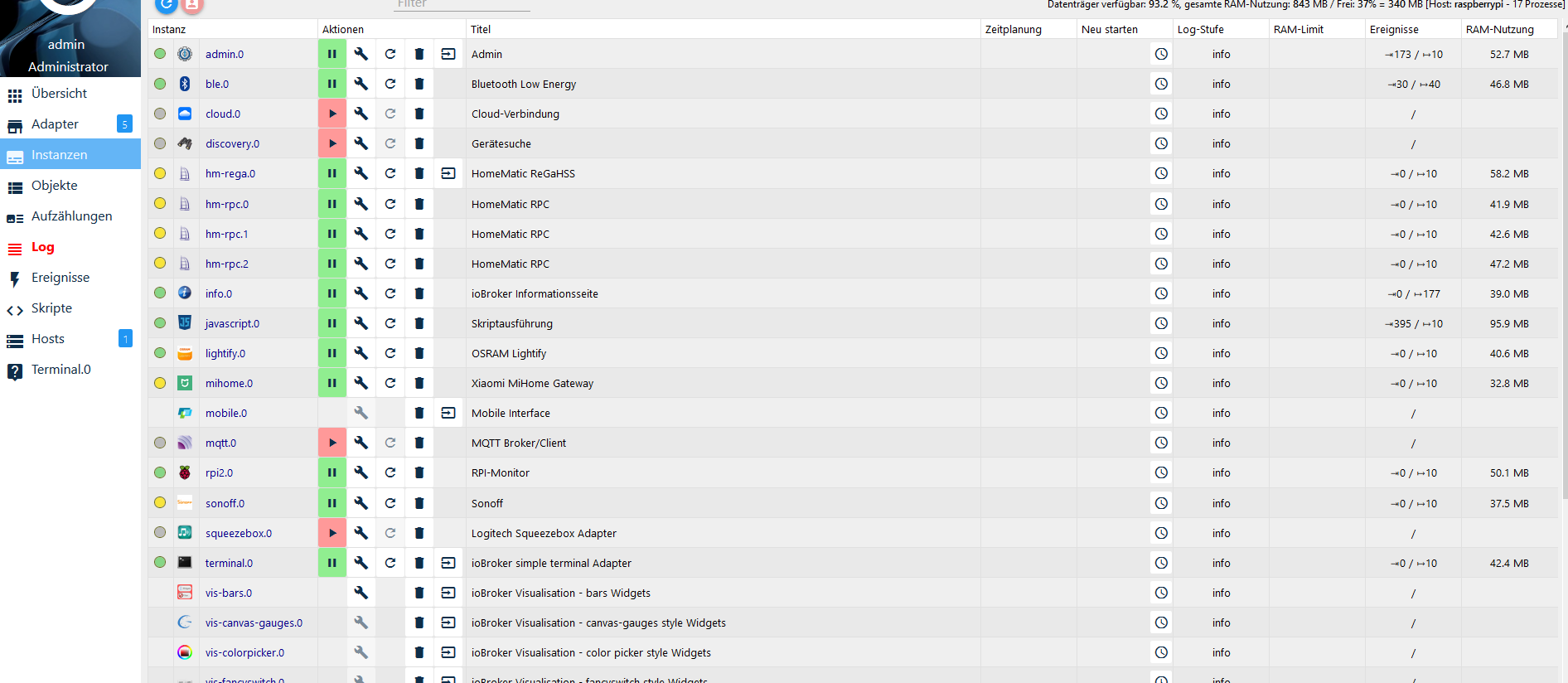
                        Die Adapter Seite, da DU die Frage zum MQTT Adapter noch nicht beantwortet hast, möchte ich's einfach mal selber sehen 😀

                        1 Antwort Letzte Antwort
                        0
                        • L Offline
                          L Offline
                          Leon111
                          schrieb am zuletzt editiert von
                          #19

                          63dcdf4e-adad-466c-89ac-0b473a1326e8-grafik.png

                          J 1 Antwort Letzte Antwort
                          0
                          • L Leon111

                            63dcdf4e-adad-466c-89ac-0b473a1326e8-grafik.png

                            J Offline
                            J Offline
                            Jan1
                            schrieb am zuletzt editiert von Jan1
                            #20

                            @Leon111
                            OK, ich glaube Du hast da noch ein paar Probleme mehr als nur den Sonoff Adapter.
                            Was hats denn als Admin Version und bist auf default oder latest?

                            Dann deinstalliere bitte alles was gelb ist und bring Dein System auf einen aktuellen Stand, am besten auf latest.
                            Es wäre auch von Interesse, welche Node und NPM Version verwendet wird.

                            1 Antwort Letzte Antwort
                            0
                            • L Offline
                              L Offline
                              Leon111
                              schrieb am zuletzt editiert von
                              #21

                              MQTT habe ich deaktieviert, da ich die Sonoff-bridge nicht mehr benutze.
                              Wie Du siehst auch der Mihome adapter ist gelb und der Raspi. Alles Heute Morgen passiert. Mein Smart TV ist erst seit Heute online. Aber die IP-Nummer kolliediert nicht. Deshalb kann ich mir nicht erklären wodurch das passiert ist.

                              An alle die sich jetzt gedanken drüber machen und versuchen mir zu helfen Herzlichen Dank .

                              J 1 Antwort Letzte Antwort
                              0
                              • L Offline
                                L Offline
                                Leon111
                                schrieb am zuletzt editiert von
                                #22

                                lattform: linux
                                RAM: 927.1 MB
                                Node.js: v8.15.0
                                NPM: 6.4.1

                                1 Antwort Letzte Antwort
                                0
                                • L Offline
                                  L Offline
                                  Leon111
                                  schrieb am zuletzt editiert von
                                  #23

                                  Admin 3.6.2

                                  1 Antwort Letzte Antwort
                                  0
                                  • L Leon111

                                    MQTT habe ich deaktieviert, da ich die Sonoff-bridge nicht mehr benutze.
                                    Wie Du siehst auch der Mihome adapter ist gelb und der Raspi. Alles Heute Morgen passiert. Mein Smart TV ist erst seit Heute online. Aber die IP-Nummer kolliediert nicht. Deshalb kann ich mir nicht erklären wodurch das passiert ist.

                                    An alle die sich jetzt gedanken drüber machen und versuchen mir zu helfen Herzlichen Dank .

                                    J Offline
                                    J Offline
                                    Jan1
                                    schrieb am zuletzt editiert von Jan1
                                    #24

                                    @Leon111
                                    Die Sonoff Bridge läuft aber auch mit dem Sonoff Adapter wenn Tasmota drauf ist.
                                    NPM ist etwas alt, aber daran liegt es nicht. MAch mal was ich geschrieben habe, alles was gelb ist deaktivieren oder besser deinstallieren und alles auf einen aktuellen Stand.
                                    Auf alle Fälle mal Admin und Host.

                                    1 Antwort Letzte Antwort
                                    0
                                    • L Offline
                                      L Offline
                                      Leon111
                                      schrieb am zuletzt editiert von
                                      #25
                                      Plattform: linux
                                      RAM: 927.1 MB
                                      Node.js: v8.15.0
                                      NPM: 6.4.1
                                      

                                      raspberrypi

                                      Typ: js-controller
                                      Titel: JS controller
                                      OS: linux
                                      Verfügbar: 1.5.12
                                      Eingerichtet: 1.5.12
                                      Ereignisse: ⇥10 / ↦13
                                      

                                      Admin 3.6.3

                                      Es hat sich also nicht viel verändert

                                      1 Antwort Letzte Antwort
                                      0
                                      • L Offline
                                        L Offline
                                        Leon111
                                        schrieb am zuletzt editiert von
                                        #26

                                        beim updaten.....

                                        root@raspberrypi:/opt/iobroker# sudo iobroker upgrade self
                                        Update js-controller from @1.5.8 to @1.5.12
                                        NPM version: 6.4.1
                                        npm install iobroker.js-controller@1.5.12 --unsafe-perm --production --save --prefix "/opt/iobroker" (System call)
                                        ../authenticate_pam.cc:30:31: fatal error: security/pam_appl.h: Datei oder Verzeichnis nicht gefunden
                                        #include <security/pam_appl.h>
                                        ^
                                        compilation terminated.
                                        make: *** [Release/obj.target/authenticate_pam/authenticate_pam.o] Fehler 1
                                        gyp ERR! build error
                                        gyp ERR! stack Error: make failed with exit code: 2
                                        gyp ERR! stack at ChildProcess.onExit (/usr/lib/node_modules/npm/node_modules/node-gyp/lib/build.js:262:23)
                                        gyp ERR! stack at emitTwo (events.js:126:13)
                                        gyp ERR! stack at ChildProcess.emit (events.js:214:7)
                                        gyp ERR! stack at Process.ChildProcess._handle.onexit (internal/child_process.js:198:12)
                                        gyp ERR! System Linux 4.14.79-v7+
                                        gyp ERR! command "/usr/bin/node" "/usr/lib/node_modules/npm/node_modules/node-gyp/bin/node-gyp.js" "rebuild"
                                        gyp ERR! cwd /opt/iobroker/node_modules/authenticate-pam
                                        gyp ERR! node -v v8.15.0
                                        gyp ERR! node-gyp -v v3.8.0
                                        gyp ERR! not ok
                                        prebuild-install WARN install No prebuilt binaries found (target=8.15.0 runtime=node arch=arm libc= platform=linux)
                                        In file included from ../src/./serialport.h:6:0,
                                        from ../src/serialport.cpp:1:
                                        ../src/serialport.cpp: In function ‘Nan::NAN_METHOD_RETURN_TYPE Get(Nan::NAN_METHOD_ARGS_TYPE)’:
                                        ../src/serialport.cpp:291:12: internal compiler error: Speicherzugriffsfehler
                                        NAN_METHOD(Get) {
                                        ^
                                        ../node_modules/nan/nan.h:1566:33: note: in definition of macro ‘NAN_METHOD’
                                        Nan::NAN_METHOD_RETURN_TYPE name(Nan::NAN_METHOD_ARGS_TYPE info)
                                        ^~~~
                                        Please submit a full bug report,
                                        with preprocessed source if appropriate.
                                        See <file:///usr/share/doc/gcc-6/README.Bugs> for instructions.
                                        make: *** [Release/obj.target/bindings/src/serialport.o] Fehler 1
                                        gyp ERR! build error
                                        gyp ERR! stack Error: make failed with exit code: 2
                                        gyp ERR! stack at ChildProcess.onExit (/usr/lib/node_modules/npm/node_modules/node-gyp/lib/build.js:262:23)
                                        gyp ERR! stack at emitTwo (events.js:126:13)
                                        gyp ERR! stack at ChildProcess.emit (events.js:214:7)
                                        gyp ERR! stack at Process.ChildProcess._handle.onexit (internal/child_process.js:198:12)
                                        gyp ERR! System Linux 4.14.79-v7+
                                        gyp ERR! command "/usr/bin/node" "/usr/lib/node_modules/npm/node_modules/node-gyp/bin/node-gyp.js" "rebuild"
                                        gyp ERR! cwd /opt/iobroker/node_modules/@serialport/bindings
                                        gyp ERR! node -v v8.15.0
                                        gyp ERR! node-gyp -v v3.8.0
                                        gyp ERR! not ok
                                        Please submit a full bug report,
                                        with preprocessed source if appropriate.
                                        See <file:///usr/share/doc/gcc-6/README.Bugs> for instructions.
                                        make: *** [Release/obj.target/bindings/src/serialport.o] Fehler 1
                                        gyp ERR! build error
                                        gyp ERR! stack Error: make failed with exit code: 2
                                        gyp ERR! stack at ChildProcess.onExit (/usr/lib/node_modules/npm/node_modules/node-gyp/lib/build.js:262:23)
                                        gyp ERR! stack at emitTwo (events.js:126:13)
                                        gyp ERR! stack at ChildProcess.emit (events.js:214:7)
                                        gyp ERR! stack at Process.ChildProcess._handle.onexit (internal/child_process.js:198:12)
                                        gyp ERR! System Linux 4.14.79-v7+
                                        gyp ERR! command "/usr/bin/node" "/usr/lib/node_modules/npm/node_modules/node-gyp/bin/node-gyp.js" "rebuild"
                                        gyp ERR! cwd /opt/iobroker/node_modules/@serialport/bindings
                                        gyp ERR! node -v v8.15.0
                                        gyp ERR! node-gyp -v v3.8.0
                                        gyp ERR! not ok

                                        npm WARN JSON.parse Failed to parse json
                                        npm WARN JSON.parse Unexpected token
                                        npm WARN JSON.parse in JSON at position 14 while parsing '{
                                        npm WARN JSON.parse "_argsb: [
                                        npm WARN JSON.parse [
                                        npm WARN JSON.parse {
                                        npm WARN JSON.parse $ "ra'
                                        npm WARN bl@0.7.0 requires a peer of stream-browserify@* but none is installed. You must install peer dependencies yourself.
                                        npm WARN bl@0.7.0 requires a peer of stream-browserify@* but none is installed. You must install peer dependencies yourself.
                                        npm WARN optional SKIPPING OPTIONAL DEPENDENCY: osx-temperature-sensor@1.0.3 (node_modules/osx-temperature-sensor):
                                        npm WARN notsup SKIPPING OPTIONAL DEPENDENCY: Unsupported platform for osx-temperature-sensor@1.0.3: wanted {"os":"darwin","arch":"any"} (current: {"os":"linux","arch":"arm"})
                                        npm WARN optional SKIPPING OPTIONAL DEPENDENCY: xpc-connection@0.1.4 (node_modules/xpc-connection):
                                        npm WARN notsup SKIPPING OPTIONAL DEPENDENCY: Unsupported platform for xpc-connection@0.1.4: wanted {"os":"darwin","arch":"any"} (current: {"os":"linux","arch":"arm"})
                                        npm WARN optional SKIPPING OPTIONAL DEPENDENCY: authenticate-pam@1.0.2 (node_modules/authenticate-pam):
                                        npm WARN optional SKIPPING OPTIONAL DEPENDENCY: authenticate-pam@1.0.2 install: node-gyp rebuild
                                        npm WARN optional SKIPPING OPTIONAL DEPENDENCY: Exit status 1
                                        npm WARN optional SKIPPING OPTIONAL DEPENDENCY: @serialport/bindings@2.0.8 (node_modules/@serialport/bindings):
                                        npm WARN optional SKIPPING OPTIONAL DEPENDENCY: @serialport/bindings@2.0.8 install: prebuild-install --tag-prefix @serialport/bindings@ || node-gyp rebuild
                                        npm WARN optional SKIPPING OPTIONAL DEPENDENCY: Exit status 1

                                        Host "raspberrypi" (linux) updated
                                        Execute: chmod -R 777 /opt/iobroker

                                        Chmod finished. Restart controller
                                        Starting node restart.js
                                        root@raspberrypi:/opt/iobroker# Please submit a full bug report,
                                        -bash: Please: Kommando nicht gefunden.
                                        root@raspberrypi:/opt/iobroker# with preprocessed source if appropriate.
                                        -bash: with: Kommando nicht gefunden.
                                        root@raspberrypi:/opt/iobroker# See <file:///usr/share/doc/gcc-6/README.Bugs> for instructions.
                                        -bash: file:///usr/share/doc/gcc-6/README.Bugs: Datei oder Verzeichnis nicht gefunden
                                        root@raspberrypi:/opt/iobroker# make: *** [Release/obj.target/bindings/src/serialport.o] Fehler 1
                                        -bash: make:: Kommando nicht gefunden.
                                        root@raspberrypi:/opt/iobroker# gyp ERR! build error
                                        -bash: gyp: Kommando nicht gefunden.
                                        root@raspberrypi:/opt/iobroker# gyp ERR! stack Error: make failed with exit code: 2
                                        make: *** Es wurden keine Ziele angegeben und keine „make“-Steuerdatei gefunden. Schluss.
                                        -bash: gyp: Kommando nicht gefunden.
                                        root@raspberrypi:/opt/iobroker# gyp ERR! stack at ChildProcess.onExit (/usr/lib/node_modules/npm/node_modules/node-gyp/lib/build.js:262:23)
                                        -bash: Syntaxfehler beim unerwarteten Wort (' root@raspberrypi:/opt/iobroker# gyp ERR! stack at emitTwo (events.js:126:13) -bash: Syntaxfehler beim unerwarteten Wort ('
                                        root@raspberrypi:/opt/iobroker# gyp ERR! stack at ChildProcess.emit (events.js:214:7)
                                        -bash: Syntaxfehler beim unerwarteten Wort (' root@raspberrypi:/opt/iobroker# gyp ERR! stack at Process.ChildProcess._handle.onexit (internal/child_process.js:198:12) -bash: Syntaxfehler beim unerwarteten Wort ('
                                        root@raspberrypi:/opt/iobroker# gyp ERR! System Linux 4.14.79-v7+
                                        -bash: gyp: Kommando nicht gefunden.
                                        root@raspberrypi:/opt/iobroker# gyp ERR! command "/usr/bin/node" "/usr/lib/node_modules/npm/node_modules/node-gyp/bin/node-gyp.js" "rebuild"
                                        -bash: gyp: Kommando nicht gefunden.
                                        root@raspberrypi:/opt/iobroker# gyp ERR! cwd /opt/iobroker/node_modules/@serialport/bindings
                                        -bash: gyp: Kommando nicht gefunden.
                                        root@raspberrypi:/opt/iobroker# gyp ERR! node -v v8.15.0
                                        -bash: gyp: Kommando nicht gefunden.
                                        root@raspberrypi:/opt/iobroker# gyp ERR! node-gyp -v v3.8.0
                                        -bash: gyp: Kommando nicht gefunden.
                                        root@raspberrypi:/opt/iobroker# gyp ERR! not ok
                                        -bash: gyp: Kommando nicht gefunden.
                                        root@raspberrypi:/opt/iobroker#

                                        sind ja irgendwelche Fehler aufgetreten

                                        1 Antwort Letzte Antwort
                                        0
                                        • L Offline
                                          L Offline
                                          Leon111
                                          schrieb am zuletzt editiert von
                                          #27
                                          Plattform: linux
                                          RAM: 927.1 MB
                                          Node.js: v8.16.0
                                          NPM: v6.4.1
                                          

                                          raspberrypi

                                          Typ: js-controller
                                          Titel: JS controller
                                          OS: linux
                                          Verfügbar: 1.5.12
                                          Eingerichtet: 1.5.12
                                          Ereignisse: ⇥10 / ↦13
                                          visibility
                                          build
                                          Host raspberrypi
                                          

                                          ioBroker.admin 3.6.3

                                          1 Antwort Letzte Antwort
                                          0

                                          Hey! Du scheinst an dieser Unterhaltung interessiert zu sein, hast aber noch kein Konto.

                                          Hast du es satt, bei jedem Besuch durch die gleichen Beiträge zu scrollen? Wenn du dich für ein Konto anmeldest, kommst du immer genau dorthin zurück, wo du zuvor warst, und kannst dich über neue Antworten benachrichtigen lassen (entweder per E-Mail oder Push-Benachrichtigung). Du kannst auch Lesezeichen speichern und Beiträge positiv bewerten, um anderen Community-Mitgliedern deine Wertschätzung zu zeigen.

                                          Mit deinem Input könnte dieser Beitrag noch besser werden 💗

                                          Registrieren Anmelden
                                          Antworten
                                          • In einem neuen Thema antworten
                                          Anmelden zum Antworten
                                          • Älteste zuerst
                                          • Neuste zuerst
                                          • Meiste Stimmen


                                          Support us

                                          ioBroker
                                          Community Adapters
                                          Donate
                                          FAQ Cloud / IOT
                                          HowTo: Node.js-Update
                                          HowTo: Backup/Restore
                                          Downloads
                                          BLOG

                                          618

                                          Online

                                          32.8k

                                          Benutzer

                                          82.9k

                                          Themen

                                          1.3m

                                          Beiträge
                                          Community
                                          Impressum | Datenschutz-Bestimmungen | Nutzungsbedingungen | Einwilligungseinstellungen
                                          ioBroker Community 2014-2025
                                          logo
                                          • Anmelden

                                          • Du hast noch kein Konto? Registrieren

                                          • Anmelden oder registrieren, um zu suchen
                                          • Erster Beitrag
                                            Letzter Beitrag
                                          0
                                          • Home
                                          • Aktuell
                                          • Tags
                                          • Ungelesen 0
                                          • Kategorien
                                          • Unreplied
                                          • Beliebt
                                          • GitHub
                                          • Docu
                                          • Hilfe