Skip to content
  • Home
  • Aktuell
  • Tags
  • 0 Ungelesen 0
  • Kategorien
  • Unreplied
  • Beliebt
  • GitHub
  • Docu
  • Hilfe
Skins
  • Light
  • Brite
  • Cerulean
  • Cosmo
  • Flatly
  • Journal
  • Litera
  • Lumen
  • Lux
  • Materia
  • Minty
  • Morph
  • Pulse
  • Sandstone
  • Simplex
  • Sketchy
  • Spacelab
  • United
  • Yeti
  • Zephyr
  • Dark
  • Cyborg
  • Darkly
  • Quartz
  • Slate
  • Solar
  • Superhero
  • Vapor

  • Standard: (Kein Skin)
  • Kein Skin
Einklappen
ioBroker Logo

Community Forum

donate donate
  1. ioBroker Community Home
  2. Deutsch
  3. ioBroker Allgemein
  4. IoBroker in VM legt kompletten Proxmox-Server lahm.
NEWS

  • Jahresrückblick 2025 – unser neuer Blogbeitrag ist online! ✨
    BluefoxB
    Bluefox
    17
    1
    4.0k

  • Neuer Blogbeitrag: Monatsrückblick - Dezember 2025 🎄
    BluefoxB
    Bluefox
    13
    1
    1.2k

  • Weihnachtsangebot 2025! 🎄
    BluefoxB
    Bluefox
    25
    1
    2.5k

IoBroker in VM legt kompletten Proxmox-Server lahm.
Geplant Angeheftet Gesperrt Verschoben ioBroker Allgemein
27 Beiträge 10 Kommentatoren 2.0k Aufrufe 8 Watching
  • Älteste zuerst
  • Neuste zuerst
  • Meiste Stimmen
Antworten
  • In einem neuen Thema antworten
Anmelden zum Antworten
Dieses Thema wurde gelöscht. Nur Nutzer mit entsprechenden Rechten können es sehen.
  • a200A a200

    Jetzt ist es mir zum dritten Mal passiert, dass die komplette Maschine plötzlich nicht erreichbar war.

    Ich nutze Proxmox mit einigen LXC und einer VM mit iobroker. Die Maschine läuft recht entspannt. Plötzlich sehe ich im Browser folgende Meldung: c9091417-b6c5-45f1-92af-f71f5882e06a-grafik.png

    Ab da ist die komplette Maschine (Proxmox) nicht mehr erreichbar. Kein ping, kein ssh, nichts. Wenn ich lange auf den Ein/Aus Button drücke, fährt der NUC sauber runter und dann wieder sauber hoch.
    Das Gleiche ist mir vor kurzem schon zwei mal passiert, da ich aber an VIS-2 war, habe ich es darauf geschoben. Allerdings ist mir das auch passiert, als ich in Urlaub war und keiner sonst an der Maschine war. Gemerkt habe ich es nur, weil mein wireguard auch auf der Maschine läuft. Damals war keiner, der auf den Knopf hätte drücken können.

    Wie auch immer, wie kann der iobroker die Maschine so ko setzen?

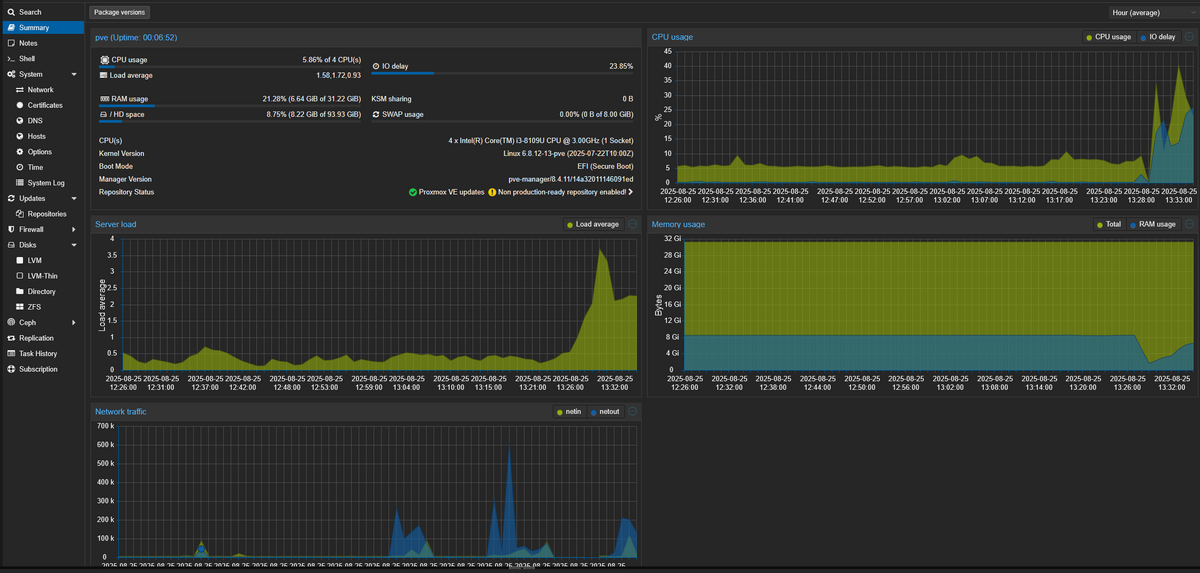
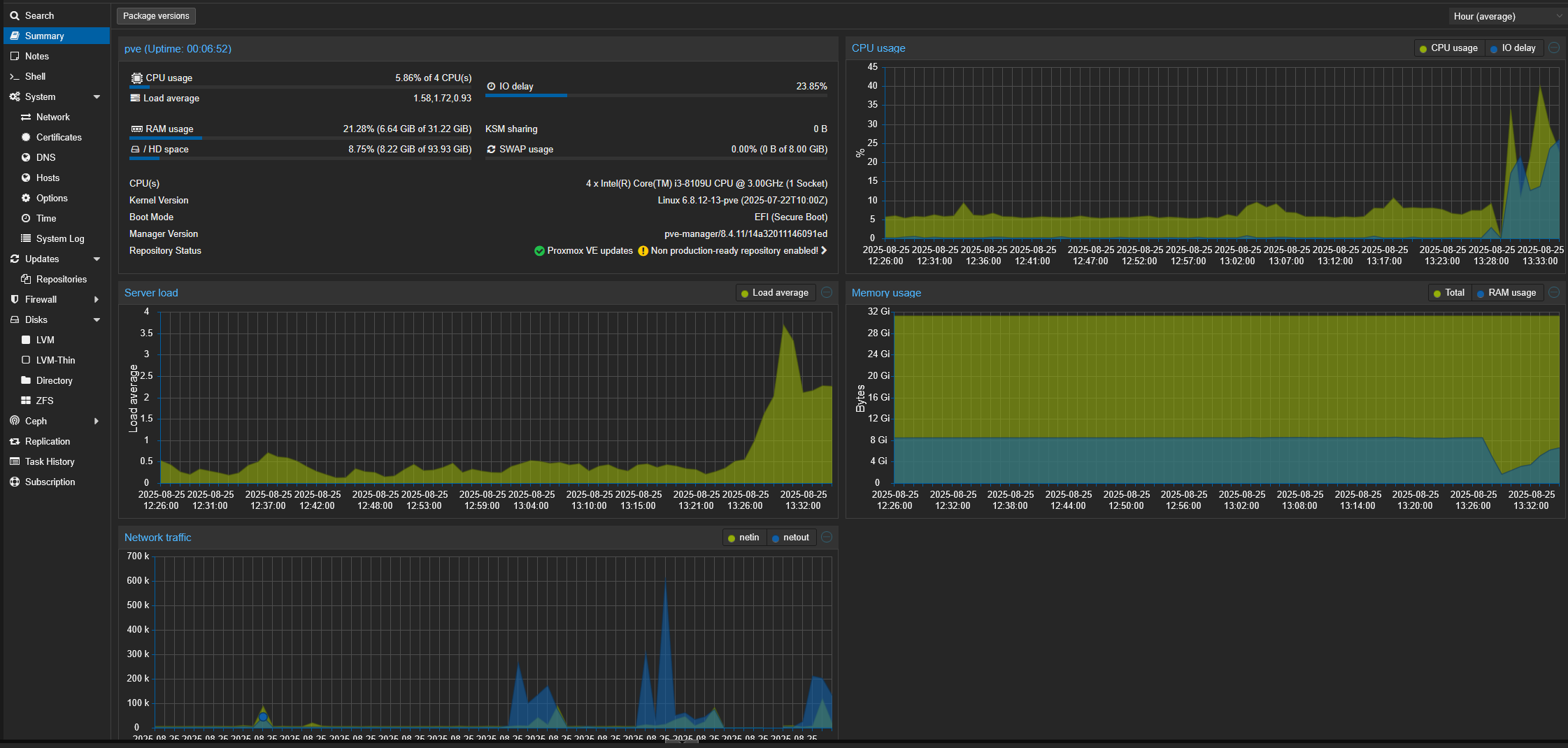
    Auslastung Proxmox


    Auslastung Proxmox
    9dec48fd-9ded-4401-8be9-84b54b8483d9-grafik.png

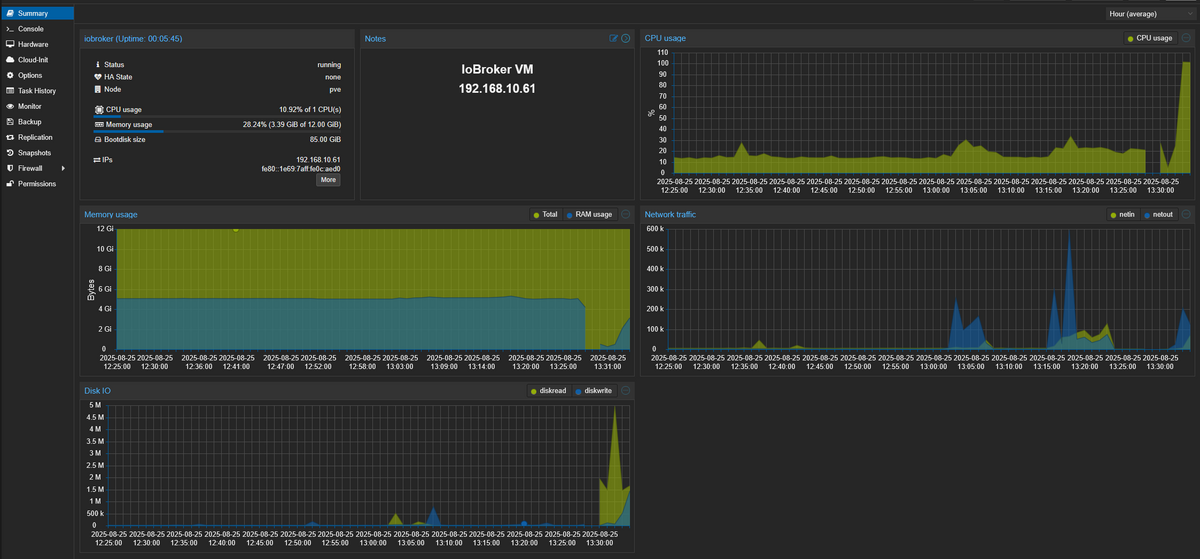
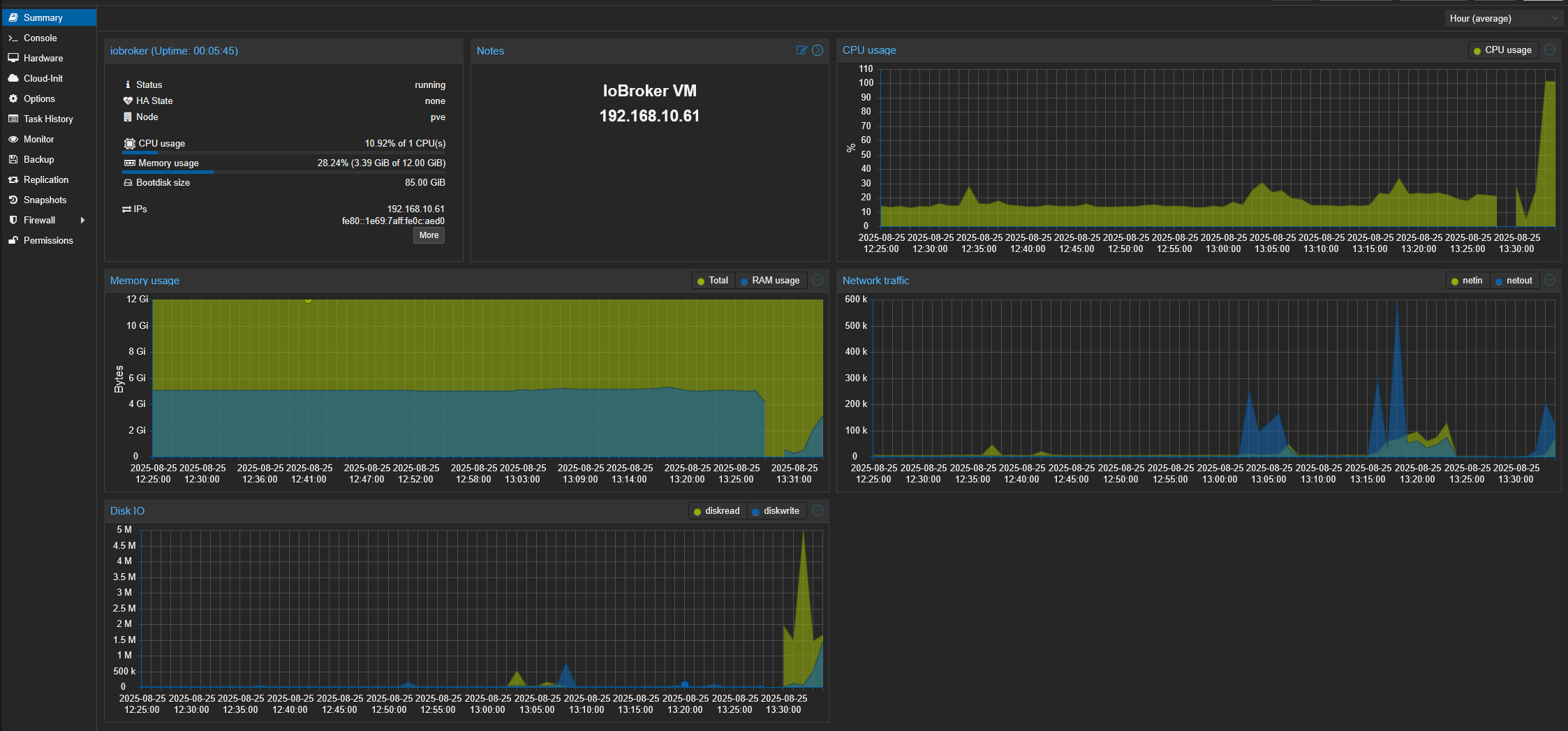
    Auslastung iobroker VM

    Auslastung iobroker VM
    1d5de56d-5dda-4fd9-8036-cebeac944740-grafik.png

    Logfile

    2025-08-25 13:21:54.664  - warn: ebus.0 (1362) no update since 22.8.2025, 19:04:56 Broadcast.messages.Signoflife.lastup
    2025-08-25 13:22:02.607  - info: smartmeter.0 (1021) Received 13 values, 5 updated
    2025-08-25 13:22:35.770  - info: smartmeter.0 (1021) Received 13 values, 5 updated
    2025-08-25 13:22:45.133  - warn: telegram.0 (40159) polling_error: EFATAL, EFATAL: Error: read ETIMEDOUT
    2025-08-25 13:22:45.656  - info: admin.0 (644) <== Disconnect system.user.admin from ::ffff:192.168.10.174 admin
    2025-08-25 13:22:45.925  - info: admin.0 (644) <== Disconnect system.user.admin from ::ffff:192.168.10.174 admin
    2025-08-25 13:22:47.467  - info: mqtt.1 (1070) Client [HM600-284444] connection closed: timeout
    2025-08-25 13:22:48.598  - info: admin.0 (644) <== Disconnect system.user.admin from ::ffff:192.168.10.174 admin
    2025-08-25 13:22:50.927  - info: admin.0 (644) <== Disconnect system.user.admin from ::ffff:192.168.10.174 admin
    2025-08-25 13:22:52.157  - info: admin.0 (644) <== Disconnect system.user.admin from ::ffff:192.168.10.174 javascript
    2025-08-25 13:22:53.039  - error: hm-rega.0 (929) post request error: connect EHOSTUNREACH 192.168.10.27:48181
    2025-08-25 13:22:53.043  - error: hm-rega.0 (929) CCU 192.168.10.27 unreachable
    2025-08-25 13:22:53.036  - error: hm-rpc.1 (937) uncaught exception: read ETIMEDOUT
    2025-08-25 13:22:53.038  - error: hm-rpc.1 (937) Error: read ETIMEDOUT
    2025-08-25 13:22:53.038  - error: hm-rpc.1 (937) Exception-Code: ETIMEDOUT: read ETIMEDOUT
    2025-08-25 13:22:53.055  - info: hm-rpc.1 (937) binrpc -> 192.168.10.27:8701/ init ["xmlrpc_bin://192.168.10.61:8701",""]
    2025-08-25 13:22:53.057  - info: hm-rpc.1 (937) Disconnected
    2025-08-25 13:22:53.057  - error: hm-rpc.1 (937) Cannot call init: [xmlrpc_bin://192.168.10.61:8701, ""] Cannot call write after a stream was destroyed
    2025-08-25 13:22:53.058  - info: hm-rpc.1 (937) terminating
    2025-08-25 13:22:53.058  - warn: hm-rpc.1 (937) Terminated (UNCAUGHT_EXCEPTION): Without reason
    2025-08-25 13:22:53.627  - error: host.iobroker instance system.adapter.hm-rpc.1 terminated with code 6 (UNCAUGHT_EXCEPTION)
    2025-08-25 13:22:53.627  - info: host.iobroker Restart adapter system.adapter.hm-rpc.1 because enabled
    2025-08-25 13:22:54.603  - warn: ebus.0 (1362) no update since 22.8.2025, 19:04:56 Broadcast.messages.Signoflife.lastup
    2025-08-25 13:23:09.348  - info: smartmeter.0 (1021) Received 13 values, 5 updated
    2025-08-25 13:23:20.524  - error: telegram.0 (40159) getMe (reconnect #0) Error:Error: EFATAL: Error: getaddrinfo EAI_AGAIN api.telegram.org
    2025-08-25 13:23:24.056  - info: host.iobroker instance system.adapter.hm-rpc.1 in version "2.0.2" started with pid 45792
    2025-08-25 13:23:25.481  - info: hm-rpc.1 (45792) starting. Version 2.0.2 in /opt/iobroker/node_modules/iobroker.hm-rpc, node: v22.18.0, js-controller: 7.0.7
    2025-08-25 13:23:25.719  - info: hm-rpc.1 (45792) binrpc server is trying to listen on 0.0.0.0:8701
    2025-08-25 13:23:25.719  - info: hm-rpc.1 (45792) binrpc client is trying to connect to 192.168.10.27:8701/ with ["xmlrpc_bin://192.168.10.61:8701","iobroker:hm-rpc.1:xxxxxxxxxxxxxxxxxxxxx"]
    2025-08-25 13:23:26.124  - error: hm-rega.0 (929) CCU 192.168.10.27 unreachable
    2025-08-25 13:23:26.130  - error: hm-rpc.1 (45792) Init not possible, going to stop: connect EHOSTUNREACH 192.168.10.27:8701
    2025-08-25 13:23:36.723  - warn: fully-mqtt.0 (1392) Samsung A10 is not alive! (MQTT: client did not send message for more than 70 seconds)
    2025-08-25 13:23:40.141  - error: unifi.0 (1028) Error site undefined: Host or network cannot be reached.
    2025-08-25 13:23:41.947  - info: smartmeter.0 (1021) Received 13 values, 6 updated
    2025-08-25 13:23:44.975  - error: hm-rpc.2 (957) Ping error [iobroker:hm-rpc.2:xxxxxxxxxxxxxxxx]: connect EHOSTUNREACH 192.168.10.27:42010
    2025-08-25 13:23:44.977  - info: hm-rpc.2 (957) Disconnected
    2025-08-25 13:23:44.972  - error: hm-rpc.0 (936) Ping error [iobroker:hm-rpc.0:xxxxxxxxxxxxxxxx]: connect EHOSTUNREACH 192.168.10.27:42001
    2025-08-25 13:23:44.974  - info: hm-rpc.0 (936) Disconnected
    2025-08-25 13:23:47.840  - info: web.0 (1251) <== Disconnect system.user.admin from ::ffff:192.168.10.174
    2025-08-25 13:23:55.035  - warn: ebus.0 (1362) no update since 22.8.2025, 19:04:56 Broadcast.messages.Signoflife.lastup
    2025-08-25 13:23:55.483  - warn: frigate.0 (1408) client error: frigate keep alive timeout Error: keep alive timeout
    2025-08-25 13:23:55.487  - info: frigate.0 (1408) client disconnected frigate
    2025-08-25 13:23:55.487  - info: frigate.0 (1408) MQTT client frigate unsubscribed to topics: frigate/# from broker xxxxxxxxxxxxxxxx
    2025-08-25 13:23:56.136  - info: hm-rpc.1 (45792) binrpc -> 192.168.10.27:8701/ init ["xmlrpc_bin://192.168.10.61:8701",""]
    2025-08-25 13:23:56.137  - error: hm-rpc.1 (45792) Cannot call init: [xmlrpc_bin://192.168.10.61:8701, ""] Socket closed before the connection was established
    2025-08-25 13:23:56.184  - info: hm-rpc.1 (45792) terminating
    2025-08-25 13:23:56.185  - info: hm-rpc.1 (45792) Terminated (NO_ERROR): Without reason
    2025-08-25 13:23:56.724  - info: fully-mqtt.0 (1392) [MQTT] Samsung A10: Client error - keep alive timeout
    2025-08-25 13:23:56.725  - info: fully-mqtt.0 (1392) MQTT Client Samsung A10 disconnected.
    2025-08-25 13:23:56.768  - info: host.iobroker instance system.adapter.hm-rpc.1 terminated with code 0 (NO_ERROR)
    2025-08-25 13:23:56.768  - info: host.iobroker Restart adapter system.adapter.hm-rpc.1 because enabled
    2025-08-25 13:23:59.179  - error: hm-rega.0 (929) CCU 192.168.10.27 unreachable
    2025-08-25 13:24:16.635  - info: smartmeter.0 (1021) Received 13 values, 6 updated
    2025-08-25 13:24:18.059  - error: hm-rpc.2 (957) Init not possible, going to stop: connect EHOSTUNREACH 192.168.10.27:42010
    2025-08-25 13:24:18.060  - error: hm-rpc.0 (936) Init not possible, going to stop: connect EHOSTUNREACH 192.168.10.27:42001
    2025-08-25 13:24:27.229  - info: host.iobroker instance system.adapter.hm-rpc.1 in version "2.0.2" started with pid 45819
    2025-08-25 13:24:28.639  - info: hm-rpc.1 (45819) starting. Version 2.0.2 in /opt/iobroker/node_modules/iobroker.hm-rpc, node: v22.18.0, js-controller: 7.0.7
    2025-08-25 13:24:28.779  - info: web.0 (1251) <== Disconnect system.user.admin from ::ffff:192.168.10.174
    2025-08-25 13:24:28.871  - info: hm-rpc.1 (45819) binrpc server is trying to listen on 0.0.0.0:8701
    2025-08-25 13:24:28.872  - info: hm-rpc.1 (45819) binrpc client is trying to connect to 192.168.10.27:8701/ with ["xmlrpc_bin://192.168.10.61:8701","iobroker:hm-rpc.1:de97dea98b96ab27f1ed136deeea4afc"]
    2025-08-25 13:24:29.522  - info: web.0 (1251) <== Disconnect system.user.admin from ::ffff:192.168.10.174
    2025-08-25 13:24:29.522  - info: web.0 (1251) <== Disconnect system.user.admin from ::ffff:192.168.10.174
    2025-08-25 13:24:29.522  - info: web.0 (1251) <== Disconnect system.user.admin from ::ffff:192.168.10.174
    2025-08-25 13:24:31.688  - info: web.0 (1251) <== Disconnect system.user.admin from ::ffff:192.168.10.174 energiefluss.0
    2025-08-25 13:24:31.949  - error: hm-rega.0 (929) CCU 192.168.10.27 unreachable
    2025-08-25 13:24:31.948  - error: hm-rpc.1 (45819) Init not possible, going to stop: connect EHOSTUNREACH 192.168.10.27:8701
    2025-08-25 13:24:35.329  - info: web.0 (1251) <== Disconnect system.user.admin from ::ffff:192.168.10.174 vis.0
    2025-08-25 13:24:39.892  - info: web.0 (1251) <== Disconnect system.user.admin from ::ffff:192.168.10.174
    2025-08-25 13:24:48.043  - error: hm-rpc.2 (957) Init not possible, going to stop: connect EHOSTUNREACH 192.168.10.27:42010
    2025-08-25 13:24:48.044  - error: hm-rpc.0 (936) Init not possible, going to stop: connect EHOSTUNREACH 192.168.10.27:42001
    2025-08-25 13:24:48.062  - info: hm-rpc.0 (936) xmlrpc -> 192.168.10.27:42001/ init ["http://192.168.10.61:42001",""]
    2025-08-25 13:24:48.061  - info: hm-rpc.2 (957) xmlrpc -> 192.168.10.27:42010/ init ["http://192.168.10.61:42010",""]
    2025-08-25 13:24:49.068  - info: hm-rpc.0 (936) terminating
    2025-08-25 13:24:49.069  - info: hm-rpc.0 (936) Terminated (NO_ERROR): Without reason
    2025-08-25 13:24:49.070  - info: hm-rpc.2 (957) terminating
    2025-08-25 13:24:49.070  - info: hm-rpc.2 (957) Terminated (NO_ERROR): Without reason
    2025-08-25 13:24:49.712  - info: host.iobroker instance system.adapter.hm-rpc.2 terminated with code 0 (NO_ERROR)
    2025-08-25 13:24:49.713  - info: host.iobroker Restart adapter system.adapter.hm-rpc.2 because enabled
    2025-08-25 13:24:49.907  - info: host.iobroker instance system.adapter.hm-rpc.0 terminated with code 0 (NO_ERROR)
    2025-08-25 13:24:49.907  - info: host.iobroker Restart adapter system.adapter.hm-rpc.0 because enabled
    2025-08-25 13:24:51.893  - info: smartmeter.0 (1021) Received 13 values, 5 updated
    2025-08-25 13:24:56.024  - warn: ebus.0 (1362) no update since 22.8.2025, 19:04:56 Broadcast.messages.Signoflife.lastup
    2025-08-25 13:25:01.951  - info: hm-rpc.1 (45819) binrpc -> 192.168.10.27:8701/ init ["xmlrpc_bin://192.168.10.61:8701",""]
    2025-08-25 13:25:01.953  - error: hm-rpc.1 (45819) Cannot call init: [xmlrpc_bin://192.168.10.61:8701, ""] Socket closed before the connection was established
    2025-08-25 13:25:01.956  - info: hm-rpc.1 (45819) terminating
    2025-08-25 13:25:01.957  - info: hm-rpc.1 (45819) Terminated (NO_ERROR): Without reason
    2025-08-25 13:25:02.522  - info: host.iobroker instance system.adapter.hm-rpc.1 terminated with code 0 (NO_ERROR)
    2025-08-25 13:25:02.522  - info: host.iobroker Restart adapter system.adapter.hm-rpc.1 because enabled
    2025-08-25 13:25:03.903  - info: web.0 (1251) <== Disconnect system.user.admin from ::ffff:192.168.10.174
    2025-08-25 13:25:05.003  - error: hm-rega.0 (929) CCU 192.168.10.27 unreachable
    2025-08-25 13:25:20.607  - info: host.iobroker instance system.adapter.hm-rpc.2 in version "2.0.2" started with pid 45839
    2025-08-25 13:25:20.693  - info: host.iobroker instance system.adapter.hm-rpc.0 in version "2.0.2" started with pid 45846
    2025-08-25 13:25:23.213  - info: hm-rpc.2 (45839) starting. Version 2.0.2 in /opt/iobroker/node_modules/iobroker.hm-rpc, node: v22.18.0, js-controller: 7.0.7
    2025-08-25 13:25:23.233  - info: hm-rpc.0 (45846) starting. Version 2.0.2 in /opt/iobroker/node_modules/iobroker.hm-rpc, node: v22.18.0, js-controller: 7.0.7
    2025-08-25 13:25:23.550  - info: hm-rpc.2 (45839) xmlrpc server is trying to listen on 0.0.0.0:42010
    2025-08-25 13:25:23.551  - info: hm-rpc.2 (45839) xmlrpc client is trying to connect to 192.168.10.27:42010/ with ["http://192.168.10.61:42010","iobroker:hm-rpc.2:xxxxxxxxxxxxxxxx"]
    2025-08-25 13:25:23.608  - info: hm-rpc.0 (45846) xmlrpc server is trying to listen on 0.0.0.0:42001
    2025-08-25 13:25:23.608  - info: hm-rpc.0 (45846) xmlrpc client is trying to connect to 192.168.10.27:42001/ with ["http://192.168.10.61:42001","iobroker:hm-rpc.0:xxxxxxxxxxxxxxxx"]
    2025-08-25 13:25:26.637  - error: hm-rpc.0 (45846) Init not possible, going to stop: connect EHOSTUNREACH 192.168.10.27:42001
    2025-08-25 13:25:26.636  - error: hm-rpc.2 (45839) Init not possible, going to stop: connect EHOSTUNREACH 192.168.10.27:42010
    2025-08-25 13:25:27.191  - info: smartmeter.0 (1021) Received 13 values, 5 updated
    2025-08-25 13:25:32.968  - info: host.iobroker instance system.adapter.hm-rpc.1 in version "2.0.2" started with pid 45869
    2025-08-25 13:25:34.250  - info: hm-rpc.1 (45869) starting. Version 2.0.2 in /opt/iobroker/node_modules/iobroker.hm-rpc, node: v22.18.0, js-controller: 7.0.7
    2025-08-25 13:25:34.470  - info: hm-rpc.1 (45869) binrpc server is trying to listen on 0.0.0.0:8701
    2025-08-25 13:25:34.470  - info: hm-rpc.1 (45869) binrpc client is trying to connect to 192.168.10.27:8701/ with ["xmlrpc_bin://192.168.10.61:8701","iobroker:hm-rpc.1:b606077931412b5485d1b8a124482b95"]
    2025-08-25 13:25:37.549  - error: hm-rega.0 (929) CCU 192.168.10.27 unreachable
    2025-08-25 13:25:37.548  - error: hm-rpc.1 (45869) Init not possible, going to stop: connect EHOSTUNREACH 192.168.10.27:8701
    2025-08-25 13:25:55.071  - warn: ebus.0 (1362) no update since 22.8.2025, 19:04:56 Broadcast.messages.Signoflife.lastup
    2025-08-25 13:25:56.639  - info: hm-rpc.0 (45846) xmlrpc -> 192.168.10.27:42001/ init ["http://192.168.10.61:42001",""]
    2025-08-25 13:25:56.640  - info: hm-rpc.2 (45839) xmlrpc -> 192.168.10.27:42010/ init ["http://192.168.10.61:42010",""]
    2025-08-25 13:25:56.651  - error: hm-rpc.2 (45839) Init not possible, going to stop: connect EHOSTUNREACH 192.168.10.27:42010
    2025-08-25 13:25:56.653  - error: hm-rpc.0 (45846) Init not possible, going to stop: connect EHOSTUNREACH 192.168.10.27:42001
    2025-08-25 13:25:56.653  - warn: hm-rpc.0 (45846) setTimeout called, but adapter is shutting down
    2025-08-25 13:25:56.653  - error: hm-rpc.0 (45846) Cannot call init: [http://192.168.10.61:42001, ""] connect EHOSTUNREACH 192.168.10.27:42001
    2025-08-25 13:25:56.651  - warn: hm-rpc.2 (45839) setTimeout called, but adapter is shutting down
    2025-08-25 13:25:56.652  - error: hm-rpc.2 (45839) Cannot call init: [http://192.168.10.61:42010, ""] connect EHOSTUNREACH 192.168.10.27:42010
    2025-08-25 13:25:56.708  - info: hm-rpc.0 (45846) terminating
    2025-08-25 13:25:56.709  - info: hm-rpc.0 (45846) Terminated (NO_ERROR): Without reason
    2025-08-25 13:25:56.710  - info: hm-rpc.2 (45839) terminating
    2025-08-25 13:25:56.711  - info: hm-rpc.2 (45839) Terminated (NO_ERROR): Without reason
    2025-08-25 13:25:57.321  - info: host.iobroker instance system.adapter.hm-rpc.0 terminated with code 0 (NO_ERROR)
    2025-08-25 13:25:57.321  - info: host.iobroker Restart adapter system.adapter.hm-rpc.0 because enabled
    2025-08-25 13:25:57.550  - info: host.iobroker instance system.adapter.hm-rpc.2 terminated with code 0 (NO_ERROR)
    2025-08-25 13:25:57.552  - info: host.iobroker Restart adapter system.adapter.hm-rpc.2 because enabled
    2025-08-25 13:26:01.905  - info: smartmeter.0 (1021) Received 13 values, 6 updated
    2025-08-25 13:26:07.551  - info: hm-rpc.1 (45869) binrpc -> 192.168.10.27:8701/ init ["xmlrpc_bin://192.168.10.61:8701",""]
    2025-08-25 13:26:07.552  - error: hm-rpc.1 (45869) Cannot call init: [xmlrpc_bin://192.168.10.61:8701, ""] Socket closed before the connection was established
    2025-08-25 13:26:07.555  - info: hm-rpc.1 (45869) terminating
    2025-08-25 13:26:07.556  - info: hm-rpc.1 (45869) Terminated (NO_ERROR): Without reason
    2025-08-25 13:26:08.124  - info: host.iobroker instance system.adapter.hm-rpc.1 terminated with code 0 (NO_ERROR)
    2025-08-25 13:26:08.124  - info: host.iobroker Restart adapter system.adapter.hm-rpc.1 because enabled
    2025-08-25 13:26:10.603  - error: hm-rega.0 (929) CCU 192.168.10.27 unreachable
    2025-08-25 13:26:28.289  - info: host.iobroker instance system.adapter.hm-rpc.0 in version "2.0.2" started with pid 45891
    2025-08-25 13:26:28.341  - info: host.iobroker instance system.adapter.hm-rpc.2 in version "2.0.2" started with pid 45898
    2025-08-25 13:26:30.608  - info: hm-rpc.0 (45891) starting. Version 2.0.2 in /opt/iobroker/node_modules/iobroker.hm-rpc, node: v22.18.0, js-controller: 7.0.7
    2025-08-25 13:26:30.627  - info: hm-rpc.2 (45898) starting. Version 2.0.2 in /opt/iobroker/node_modules/iobroker.hm-rpc, node: v22.18.0, js-controller: 7.0.7
    2025-08-25 13:26:30.942  - info: hm-rpc.0 (45891) xmlrpc server is trying to listen on 0.0.0.0:42001
    2025-08-25 13:26:30.943  - info: hm-rpc.0 (45891) xmlrpc client is trying to connect to 192.168.10.27:42001/ with ["http://192.168.10.61:42001","iobroker:hm-rpc.0:xxxxxxxxxxxxxxxx"]
    2025-08-25 13:26:30.995  - info: hm-rpc.2 (45898) xmlrpc server is trying to listen on 0.0.0.0:42010
    2025-08-25 13:26:30.995  - info: hm-rpc.2 (45898) xmlrpc client is trying to connect to 192.168.10.27:42010/ with ["http://192.168.10.61:42010","iobroker:hm-rpc.2:xxxxxxxxxxxxxxxx"]
    2025-08-25 13:26:34.030  - error: hm-rpc.0 (45891) Init not possible, going to stop: connect EHOSTUNREACH 192.168.10.27:42001
    2025-08-25 13:26:34.029  - error: hm-rpc.2 (45898) Init not possible, going to stop: connect EHOSTUNREACH 192.168.10.27:42010
    2025-08-25 13:26:35.538  - info: smartmeter.0 (1021) Received 13 values, 5 updated
    2025-08-25 13:26:38.582  - info: host.iobroker instance system.adapter.hm-rpc.1 in version "2.0.2" started with pid 45923
    2025-08-25 13:26:39.913  - info: hm-rpc.1 (45923) starting. Version 2.0.2 in /opt/iobroker/node_modules/iobroker.hm-rpc, node: v22.18.0, js-controller: 7.0.7
    2025-08-25 13:26:40.101  - info: hm-rpc.1 (45923) binrpc server is trying to listen on 0.0.0.0:8701
    2025-08-25 13:26:40.101  - info: hm-rpc.1 (45923) binrpc client is trying to connect to 192.168.10.27:8701/ with ["xmlrpc_bin://192.168.10.61:8701","iobroker:hm-rpc.1:xxxxxxxxxxxxxxxx"]
    2025-08-25 13:26:43.180  - error: hm-rega.0 (929) CCU 192.168.10.27 unreachable
    2025-08-25 13:26:43.180  - error: hm-rpc.1 (45923) Init not possible, going to stop: connect EHOSTUNREACH 192.168.10.27:8701
    2025-08-25 13:26:57.672  - warn: ebus.0 (1362) no update since 22.8.2025, 19:04:56 Broadcast.messages.Signoflife.lastup
    2025-08-25 13:27:04.031  - info: hm-rpc.0 (45891) xmlrpc -> 192.168.10.27:42001/ init ["http://192.168.10.61:42001",""]
    2025-08-25 13:27:04.033  - info: hm-rpc.2 (45898) xmlrpc -> 192.168.10.27:42010/ init ["http://192.168.10.61:42010",""]
    2025-08-25 13:27:04.043  - error: hm-rpc.0 (45891) Init not possible, going to stop: connect EHOSTUNREACH 192.168.10.27:42001
    2025-08-25 13:27:04.045  - error: hm-rpc.2 (45898) Init not possible, going to stop: connect EHOSTUNREACH 192.168.10.27:42010
    2025-08-25 13:27:04.045  - warn: hm-rpc.2 (45898) setTimeout called, but adapter is shutting down
    2025-08-25 13:27:04.046  - error: hm-rpc.2 (45898) Cannot call init: [http://192.168.10.61:42010, ""] connect EHOSTUNREACH 192.168.10.27:42010
    2025-08-25 13:27:04.043  - warn: hm-rpc.0 (45891) setTimeout called, but adapter is shutting down
    2025-08-25 13:27:04.044  - error: hm-rpc.0 (45891) Cannot call init: [http://192.168.10.61:42001, ""] connect EHOSTUNREACH 192.168.10.27:42001
    2025-08-25 13:27:04.100  - info: hm-rpc.2 (45898) terminating
    2025-08-25 13:27:04.101  - info: hm-rpc.2 (45898) Terminated (NO_ERROR): Without reason
    2025-08-25 13:27:04.101  - info: hm-rpc.0 (45891) terminating
    2025-08-25 13:27:04.102  - info: hm-rpc.0 (45891) Terminated (NO_ERROR): Without reason
    2025-08-25 13:27:04.705  - info: host.iobroker instance system.adapter.hm-rpc.0 terminated with code 0 (NO_ERROR)
    2025-08-25 13:27:04.705  - info: host.iobroker Restart adapter system.adapter.hm-rpc.0 because enabled
    2025-08-25 13:27:04.799  - info: host.iobroker instance system.adapter.hm-rpc.2 terminated with code 0 (NO_ERROR)
    2025-08-25 13:27:04.800  - info: host.iobroker Restart adapter system.adapter.hm-rpc.2 because enabled
    2025-08-25 13:27:10.606  - info: smartmeter.0 (1021) Received 13 values, 6 updated
    2025-08-25 13:27:13.183  - info: hm-rpc.1 (45923) binrpc -> 192.168.10.27:8701/ init ["xmlrpc_bin://192.168.10.61:8701",""]
    2025-08-25 13:27:13.185  - error: hm-rpc.1 (45923) Cannot call init: [xmlrpc_bin://192.168.10.61:8701, ""] Socket closed before the connection was established
    2025-08-25 13:27:13.188  - info: hm-rpc.1 (45923) terminating
    2025-08-25 13:27:13.188  - info: hm-rpc.1 (45923) Terminated (NO_ERROR): Without reason
    2025-08-25 13:27:13.750  - info: host.iobroker instance system.adapter.hm-rpc.1 terminated with code 0 (NO_ERROR)
    2025-08-25 13:27:13.750  - info: host.iobroker Restart adapter system.adapter.hm-rpc.1 because enabled
    2025-08-25 13:27:16.236  - error: hm-rega.0 (929) CCU 192.168.10.27 unreachable
    2025-08-25 13:27:26.593  - info: host.iobroker received SIGTERM
    2025-08-25 13:27:26.600  - info: admin.0 (644) terminating http server on port 8081
    2025-08-25 13:27:26.602  - info: javascript.0 (695) Stopping script script.js.Prod.OG_Bad_LED
    2025-08-25 13:27:26.626  - info: unifi.0 (1028) cleaned everything up...
    2025-08-25 13:27:26.637  - info: frigate.0 (1408) client disconnected iobroker.mqtt.5
    2025-08-25 13:27:26.638  - info: frigate.0 (1408) MQTT client iobroker.mqtt.5 unsubscribed to topics: # from broker xxxxxxxxxxxxxxxx-6cd8-41ef-8efc-8947db3439e3
    2025-08-25 13:27:26.646  - warn: web.0 (1251) setTimeout called, but adapter is shutting down
    2025-08-25 13:27:26.655  - info: simple-api.0 (1268) terminating http server on port 8187
    2025-08-25 13:27:26.665  - info: sourceanalytix.0 (1339) SourceAnalytix stopped, now you have to calculate by yourself :'( ...
    2025-08-25 13:27:26.666  - info: ebus.0 (1362) cleaned everything up...
    2025-08-25 13:27:26.616  - info: backitup.0 (845) cleaned everything up...
    2025-08-25 13:27:26.602  - info: javascript.0 (695) Stopping script script.js.Prod.Status-Homematic
    2025-08-25 13:27:26.602  - info: javascript.0 (695) Stopping script script.js.Prod.Status-ZigBee
    2025-08-25 13:27:26.602  - info: javascript.0 (695) Stopping script script.js.Prod.UPNP-Stream
    2025-08-25 13:27:26.602  - info: javascript.0 (695) Stopping script script.js.Prod.VIS-Back2main


    iob diag

    Script v.2025-08-09
    
    *** BASE SYSTEM ***
    Operating System: Debian GNU/Linux 12 (bookworm)
     Static hostname: iobroker
           Icon name: computer-vm
             Chassis: vm 🖴
      Virtualization: kvm
              Kernel: Linux 6.1.0-30-amd64
        Architecture: x86-64
     Hardware Vendor: QEMU
      Hardware Model: Standard PC _i440FX + PIIX, 1996_
    Firmware Version: rel-1.16.3-0-ga6ed6b701f0a-prebuilt.qemu.org
    OS is similar to:
    
    model name      : Common KVM processor
    Docker          : false
    Virtualization  : kvm
    Kernel          : x86_64
    Userland        : 64 bit
    
    Systemuptime and Load:
     14:36:11 up  1:06,  2 users,  load average: 0.35, 0.31, 0.34
    CPU threads: 2
    
    
    *** LIFE CYCLE STATUS ***
    Operating System is the current Debian stable version codenamed 'bookworm'!
    
    *** TIME AND TIMEZONES ***
                   Local time: Mon 2025-08-25 14:36:11 CEST
               Universal time: Mon 2025-08-25 12:36:11 UTC
                     RTC time: Mon 2025-08-25 12:36:11
                    Time zone: Europe/Berlin (CEST, +0200)
    System clock synchronized: yes
                  NTP service: active
              RTC in local TZ: no
    
    *** Users and Groups ***
    User that called 'iob diag':
    iobroker
    HOME=/home/iobroker
    GROUPS=iobroker tty dialout audio video plugdev
    
    User that is running 'js-controller':
    iobroker
    HOME=/home/iobroker
    GROUPS=iobroker tty dialout audio video plugdev
    
    A default user should be created! This user will be enabled to temporarily switch to root via 'sudo'!
    A root login is not required in most Linux Distributions.
    Run 'iobroker fix' or use the system tools to create a user.
    *** DISPLAY-SERVER SETUP ***
    Display-Server:         false
    Unit display-manager.service could not be found.
    Display-Manager:
    Desktop:
    Session:
    
    System is booting into 'graphical.target'. Usually a server is running in 'multi-user.target'. Please set BootTarget to 'multi-user.target' or run 'iobroker fix'
    
    *** MEMORY ***
                   total        used        free      shared  buff/cache   available
    Mem:             12G        3.1G        8.9G        593K        805M        9.4G
    Swap:           268M          0B        268M
    Total:           12G        3.1G        9.2G
    
    Active iob-Instances:   34
    
            11961 M total memory
             2977 M used memory
              346 M active memory
             2889 M inactive memory
             8478 M free memory
              112 M buffer memory
              655 M swap cache
              255 M total swap
                0 M used swap
              255 M free swap
    
    *** top - Table Of Processes  ***
    top - 14:36:11 up  1:06,  2 users,  load average: 0.35, 0.31, 0.34
    Tasks: 136 total,   1 running, 135 sleeping,   0 stopped,   0 zombie
    %Cpu(s):  0.0 us,  0.0 sy,  0.0 ni,100.0 id,  0.0 wa,  0.0 hi,  0.0 si,  0.0 st
    MiB Mem :  11961.4 total,   8478.2 free,   2978.0 used,    768.1 buff/cache
    MiB Swap:    256.0 total,    256.0 free,      0.0 used.   8983.4 avail Mem
    
    *** FAILED SERVICES ***
    
      UNIT LOAD ACTIVE SUB DESCRIPTION
    0 loaded units listed.
    
    
    *** DMESG CRITICAL ERRORS ***
    [sudo] password for iobroker:
    No critical errors detected
    
    *** FILESYSTEM ***
    Filesystem     Type      Size  Used Avail Use% Mounted on
    udev           devtmpfs  5.9G     0  5.9G   0% /dev
    tmpfs          tmpfs     1.2G  580K  1.2G   1% /run
    /dev/sda1      ext4       76G   44G   30G  60% /
    tmpfs          tmpfs     5.9G     0  5.9G   0% /dev/shm
    tmpfs          tmpfs     5.0M     0  5.0M   0% /run/lock
    tmpfs          tmpfs     1.2G     0  1.2G   0% /run/user/0
    
    Messages concerning ext4 filesystem in dmesg:
    [Mon Aug 25 13:30:10 2025] EXT4-fs (sda1): mounted filesystem with ordered data mode. Quota mode: none.
    [Mon Aug 25 13:30:11 2025] EXT4-fs (sda1): re-mounted. Quota mode: none.
    
    Show mounted filesystems:
    TARGET SOURCE    FSTYPE OPTIONS
    /      /dev/sda1 ext4   rw,relatime,errors=remount-ro
    
    Files in neuralgic directories:
    
    /var:
    20G     /var/
    15G     /var/lib/influxdb/.influxdbv2/engine/data/7bf64f61a42d54f8/autogen
    15G     /var/lib/influxdb/.influxdbv2/engine/data/7bf64f61a42d54f8
    15G     /var/lib/influxdb/.influxdbv2/engine/data
    15G     /var/lib/influxdb/.influxdbv2/engine
    
    Hint: You are currently not seeing messages from other users and the system.
          Users in groups 'adm', 'systemd-journal' can see all messages.
          Pass -q to turn off this notice.
    Archived and active journals take up 3.7G in the file system.
    
    /opt/iobroker/backups:
    2.2G    /opt/iobroker/backups/
    4.0K    /opt/iobroker/backups/redistmp
    
    /opt/iobroker/iobroker-data:
    1.5G    /opt/iobroker/iobroker-data/
    1.1G    /opt/iobroker/iobroker-data/files
    273M    /opt/iobroker/iobroker-data/files/minuvis
    237M    /opt/iobroker/iobroker-data/files/minuvis/app
    236M    /opt/iobroker/iobroker-data/files/minuvis/app/static
    
    The five largest files in iobroker-data are:
    35M     /opt/iobroker/iobroker-data/states.jsonl
    35M     /opt/iobroker/iobroker-data/objects.jsonl
    35M     /opt/iobroker/iobroker-data/files/devices.admin/static/js/main.24f2bb56.js.map
    27M     /opt/iobroker/iobroker-data/files/tankerkoenig.admin/build/index.js.map
    26M     /opt/iobroker/iobroker-data/files/echarts/static/js/main.41cee985.js.map
    
    USB-Devices by-id:
    USB-Sticks -  Avoid direct links to /dev/tty* in your adapter setups, please always prefer the links 'by-id':
    
    /dev/serial/by-id/usb-Prolific_Technology_Inc._USB-Serial_Controller_D-if00-port0
    /dev/serial/by-id/usb-Texas_Instruments_CC2538_USB_CDC-if00
    
    *** ZigBee Settings ***
    
    HINT:
    Your zigbee.0 COM-Port is NOT matching 'by-id'. Please check your setting:
    /dev/ttyACM0
    
    HINT:
    Your zigbee.1 COM-Port is NOT matching 'by-id'. Please check your setting:
    tcp
    
    HINT:
    Your zigbee.2 COM-Port is NOT matching 'by-id'. Please check your setting:
    tcp
    Zigbee Network Settings on your coordinator/in nvbackup are:
    
    zigbee.X
    Extended Pan ID:
    *** MASKED ***
    Pan ID:
    *** MASKED ***
    Channel:
    *** MASKED ***
    Network Key:
    *** MASKED ***
    
    To unmask the settings run 'iob diag --unmask'
    
    
    *** NodeJS-Installation ***
    
    /usr/bin/nodejs         v22.18.0
    /usr/bin/node           v22.18.0
    /usr/bin/npm            10.9.3
    /usr/bin/npx            10.9.3
    /usr/bin/corepack       0.33.0
    
    nodejs:
      Installed: 22.18.0-1nodesource1
      Candidate: 22.18.0-1nodesource1
      Version table:
     *** 22.18.0-1nodesource1 1001
            500 https://deb.nodesource.com/node_22.x nodistro/main amd64 Packages
            100 /var/lib/dpkg/status
         22.17.1-1nodesource1 1001
            500 https://deb.nodesource.com/node_22.x nodistro/main amd64 Packages
         22.17.0-1nodesource1 1001
            500 https://deb.nodesource.com/node_22.x nodistro/main amd64 Packages
         22.16.0-1nodesource1 1001
            500 https://deb.nodesource.com/node_22.x nodistro/main amd64 Packages
         22.15.1-1nodesource1 1001
            500 https://deb.nodesource.com/node_22.x nodistro/main amd64 Packages
         22.15.0-1nodesource1 1001
            500 https://deb.nodesource.com/node_22.x nodistro/main amd64 Packages
         22.14.0-1nodesource1 1001
            500 https://deb.nodesource.com/node_22.x nodistro/main amd64 Packages
         22.13.1-1nodesource1 1001
            500 https://deb.nodesource.com/node_22.x nodistro/main amd64 Packages
         22.13.0-1nodesource1 1001
            500 https://deb.nodesource.com/node_22.x nodistro/main amd64 Packages
         22.12.0-1nodesource1 1001
            500 https://deb.nodesource.com/node_22.x nodistro/main amd64 Packages
         22.11.0-1nodesource1 1001
            500 https://deb.nodesource.com/node_22.x nodistro/main amd64 Packages
         22.10.0-1nodesource1 1001
            500 https://deb.nodesource.com/node_22.x nodistro/main amd64 Packages
         22.9.0-1nodesource1 1001
            500 https://deb.nodesource.com/node_22.x nodistro/main amd64 Packages
         22.8.0-1nodesource1 1001
            500 https://deb.nodesource.com/node_22.x nodistro/main amd64 Packages
         22.7.0-1nodesource1 1001
            500 https://deb.nodesource.com/node_22.x nodistro/main amd64 Packages
         22.6.0-1nodesource1 1001
            500 https://deb.nodesource.com/node_22.x nodistro/main amd64 Packages
         22.5.1-1nodesource1 1001
            500 https://deb.nodesource.com/node_22.x nodistro/main amd64 Packages
         22.5.0-1nodesource1 1001
            500 https://deb.nodesource.com/node_22.x nodistro/main amd64 Packages
         22.4.1-1nodesource1 1001
            500 https://deb.nodesource.com/node_22.x nodistro/main amd64 Packages
         22.4.0-1nodesource1 1001
            500 https://deb.nodesource.com/node_22.x nodistro/main amd64 Packages
         22.3.0-1nodesource1 1001
            500 https://deb.nodesource.com/node_22.x nodistro/main amd64 Packages
         22.2.0-1nodesource1 1001
            500 https://deb.nodesource.com/node_22.x nodistro/main amd64 Packages
         22.1.0-1nodesource1 1001
            500 https://deb.nodesource.com/node_22.x nodistro/main amd64 Packages
         22.0.0-1nodesource1 1001
            500 https://deb.nodesource.com/node_22.x nodistro/main amd64 Packages
         18.19.0+dfsg-6~deb12u2 500
            500 http://mirrors.linode.com/debian bookworm/main amd64 Packages
         18.19.0+dfsg-6~deb12u1 500
            500 http://mirrors.linode.com/debian-security bookworm-security/updates/main amd64 Packages
    
    Temp directories causing deletion problem: 0
    No problems detected
    
    Errors in npm tree: 0
    No problems detected
    
    Checking for nodejs vulnerability:
    
    
     █████  ██      ██           ██████   ██████   ██████  ██████         ██
    ██   ██ ██      ██          ██       ██    ██ ██    ██ ██   ██     ██  ██
    ███████ ██      ██          ██   ███ ██    ██ ██    ██ ██   ██         ██
    ██   ██ ██      ██          ██    ██ ██    ██ ██    ██ ██   ██     ██  ██
    ██   ██ ███████ ███████      ██████   ██████   ██████  ██████         ██


    *** ioBroker-Installation ***
    
    ioBroker Status
    iobroker is running on this host.
    
    
    Objects type: jsonl
    States  type: jsonl
    
    Hosts:
    iobroker            iobroker (version: 7.0.7, hostname: iobroker      , alive, uptime: 3877)
    
    Core adapters versions
    js-controller:  7.0.7
    admin:          7.6.17
    javascript:     8.9.2
    
    nodejs modules from github:     4
    +-- iobroker.ebus@3.6.6 (git+ssh://git@github.com/rg-engineering/ioBroker.ebus.git#cabb6bf763384bdf9b1c6e22a01cd04f8e8e91c1)
    +-- iobroker.fully-mqtt@0.2.0 (git+ssh://git@github.com/Acgua/ioBroker.fully-mqtt.git#0540250cfb83a4e1ef8eeafe1991beeefbe70cd1)
    +-- iobroker.fully-tablet-control@0.3.6-1 (git+ssh://git@github.com/xXBJXx/ioBroker.fully-tablet-control.git#50caa37bf48dfc91a999b5f116f1911dcd2e7908)
    +-- iobroker.minuvis@2.3.4 (git+ssh://git@github.com/minukodu/ioBroker.minuvis.git#fe1a1a6af5786ba02d686c42c6c35c9f43afed05)
    
    Adapter State
    + system.adapter.admin.0                  : admin                 : iobroker                                 -  enabled, port: 8081, bind: 0.0.0.0, run as: admin
      system.adapter.alias-manager.0          : alias-manager         : iobroker                                 -  enabled
    + system.adapter.backitup.0               : backitup              : iobroker                                 -  enabled
      system.adapter.daswetter.0              : daswetter             : iobroker                                 -  enabled
      system.adapter.devices.0                : devices               : iobroker                                 -  enabled
    + system.adapter.discovery.0              : discovery             : iobroker                                 -  enabled
      system.adapter.dwd.0                    : dwd                   : iobroker                                 -  enabled
    + system.adapter.ebus.0                   : ebus                  : iobroker                                 -  enabled
    + system.adapter.echarts.0                : echarts               : iobroker                                 -  enabled
    + system.adapter.energiefluss.0           : energiefluss          : iobroker                                 -  enabled
      system.adapter.esphome.0                : esphome               : iobroker                                 - disabled
    + system.adapter.eventlist.0              : eventlist             : iobroker                                 -  enabled
      system.adapter.ford.0                   : ford                  : iobroker                                 - disabled
    + system.adapter.frigate.0                : frigate               : iobroker                                 -  enabled
    + system.adapter.fully-mqtt.0             : fully-mqtt            : iobroker                                 -  enabled
      system.adapter.fully-tablet-control.0   : fully-tablet-control  : iobroker                                 - disabled
      system.adapter.fullybrowser.0           : fullybrowser          : iobroker                                 - disabled
      system.adapter.gartenbewaesserung.0     : gartenbewaesserung    : iobroker                                 - disabled
    + system.adapter.hm-rega.0                : hm-rega               : iobroker                                 -  enabled
    + system.adapter.hm-rpc.0                 : hm-rpc                : iobroker                                 -  enabled, port: 0
    + system.adapter.hm-rpc.1                 : hm-rpc                : iobroker                                 -  enabled, port: 0
    + system.adapter.hm-rpc.2                 : hm-rpc                : iobroker                                 -  enabled, port: 0
      system.adapter.ical.0                   : ical                  : iobroker                                 -  enabled
      system.adapter.ical.1                   : ical                  : iobroker                                 -  enabled
      system.adapter.ical.2                   : ical                  : iobroker                                 -  enabled
      system.adapter.icons-mfd-png.0          : icons-mfd-png         : iobroker                                 - disabled
      system.adapter.icons-mfd-svg.0          : icons-mfd-svg         : iobroker                                 - disabled
      system.adapter.icons-open-icon-library-png.0: icons-open-icon-library-png: iobroker                                 -  enabled
    + system.adapter.influxdb.0               : influxdb              : iobroker                                 -  enabled, port: 8086
    + system.adapter.influxdb.1               : influxdb              : iobroker                                 -  enabled, port: 8086
    + system.adapter.influxdb.2               : influxdb              : iobroker                                 -  enabled, port: 8086
    + system.adapter.javascript.0             : javascript            : iobroker                                 -  enabled
      system.adapter.minuvis.0                : minuvis               : iobroker                                 -  enabled
      system.adapter.mqtt.0                   : mqtt                  : iobroker                                 - disabled, port: 8883, bind: 0.0.0.0
    + system.adapter.mqtt.1                   : mqtt                  : iobroker                                 -  enabled, port: 1889, bind: 0.0.0.0
    + system.adapter.mqtt.3                   : mqtt                  : iobroker                                 -  enabled, port: 1888, bind: 0.0.0.0
      system.adapter.mqtt.4                   : mqtt                  : iobroker                                 - disabled, port: 1884, bind: 0.0.0.0
    + system.adapter.mqtt.5                   : mqtt                  : iobroker                                 -  enabled, port: 1884, bind: 0.0.0.0
    + system.adapter.nut.0                    : nut                   : iobroker                                 -  enabled
      system.adapter.pi-hole.0                : pi-hole               : iobroker                                 - disabled
    + system.adapter.ping.0                   : ping                  : iobroker                                 -  enabled
      system.adapter.proxmox.0                : proxmox               : iobroker                                 - disabled, port: 8006
      system.adapter.shelly.0                 : shelly                : iobroker                                 - disabled, port: 1882, bind: 0.0.0.0
    + system.adapter.signal-cmb.0             : signal-cmb            : iobroker                                 -  enabled
    + system.adapter.simple-api.0             : simple-api            : iobroker                                 -  enabled, port: 8187, bind: 0.0.0.0, run as: admin
    + system.adapter.smartmeter.0             : smartmeter            : iobroker                                 -  enabled
      system.adapter.socketio.0               : socketio              : iobroker                                 - disabled, port: 8084, bind: 0.0.0.0, run as: admin
      system.adapter.sonoff.0                 : sonoff                : iobroker                                 - disabled, port: 1890, bind: 0.0.0.0
    + system.adapter.sourceanalytix.0         : sourceanalytix        : iobroker                                 -  enabled
      system.adapter.sprinklecontrol.0        : sprinklecontrol       : iobroker                                 - disabled
      system.adapter.sql.0                    : sql                   : iobroker                                 - disabled, port: 3306
      system.adapter.systeminfo.0             : systeminfo            : iobroker                                 - disabled
    + system.adapter.tankerkoenig.0           : tankerkoenig          : iobroker                                 -  enabled
    + system.adapter.telegram.0               : telegram              : iobroker                                 -  enabled, port: 8443, bind: 0.0.0.0
      system.adapter.tr-064.0                 : tr-064                : iobroker                                 - disabled
      system.adapter.tuya.0                   : tuya                  : iobroker                                 - disabled
    + system.adapter.unifi.0                  : unifi                 : iobroker                                 -  enabled
    + system.adapter.upnp.0                   : upnp                  : iobroker                                 -  enabled
      system.adapter.vis-2-widgets-energy.0   : vis-2-widgets-energy  : iobroker                                 -  enabled
      system.adapter.vis-2-widgets-inventwo.0 : vis-2-widgets-inventwo: iobroker                                 -  enabled
      system.adapter.vis-2-widgets-material.0 : vis-2-widgets-material: iobroker                                 -  enabled
    + system.adapter.vis-2.0                  : vis-2                 : iobroker                                 -  enabled
      system.adapter.vis-bars.0               : vis-bars              : iobroker                                 - disabled
      system.adapter.vis-colorpicker.0        : vis-colorpicker       : iobroker                                 -  enabled
      system.adapter.vis-hqwidgets.0          : vis-hqwidgets         : iobroker                                 - disabled
      system.adapter.vis-jqui-mfd.0           : vis-jqui-mfd          : iobroker                                 - disabled
      system.adapter.vis-map.0                : vis-map               : iobroker                                 -  enabled
      system.adapter.vis-materialdesign.0     : vis-materialdesign    : iobroker                                 -  enabled
      system.adapter.vis-metro.0              : vis-metro             : iobroker                                 -  enabled
      system.adapter.vis-timeandweather.0     : vis-timeandweather    : iobroker                                 - disabled
      system.adapter.vis.0                    : vis                   : iobroker                                 -  enabled
      system.adapter.vofo-speedtest.0         : vofo-speedtest        : iobroker                                 - disabled
      system.adapter.weatherunderground.0     : weatherunderground    : iobroker                                 - disabled
    + system.adapter.web.0                    : web                   : iobroker                                 -  enabled, port: 8082, bind: 0.0.0.0, run as: admin
    + system.adapter.wireguard.0              : wireguard             : iobroker                                 -  enabled
      system.adapter.zigbee.0                 : zigbee                : iobroker                                 - disabled, port: /dev/ttyACM0
      system.adapter.zigbee.1                 : zigbee                : iobroker                                 - disabled, port: tcp://192.168.10.109:6638
      system.adapter.zigbee.2                 : zigbee                : iobroker                                 -  enabled, port: tcp://192.168.10.24:6638
    
    + instance is alive
    
    Enabled adapters with bindings
    + system.adapter.admin.0                  : admin                 : iobroker                                 -  enabled, port: 8081, bind: 0.0.0.0, run as: admin
    + system.adapter.hm-rpc.0                 : hm-rpc                : iobroker                                 -  enabled, port: 0
    + system.adapter.hm-rpc.1                 : hm-rpc                : iobroker                                 -  enabled, port: 0
    + system.adapter.hm-rpc.2                 : hm-rpc                : iobroker                                 -  enabled, port: 0
    + system.adapter.influxdb.0               : influxdb              : iobroker                                 -  enabled, port: 8086
    + system.adapter.influxdb.1               : influxdb              : iobroker                                 -  enabled, port: 8086
    + system.adapter.influxdb.2               : influxdb              : iobroker                                 -  enabled, port: 8086
    + system.adapter.mqtt.1                   : mqtt                  : iobroker                                 -  enabled, port: 1889, bind: 0.0.0.0
    + system.adapter.mqtt.3                   : mqtt                  : iobroker                                 -  enabled, port: 1888, bind: 0.0.0.0
    + system.adapter.mqtt.5                   : mqtt                  : iobroker                                 -  enabled, port: 1884, bind: 0.0.0.0
    + system.adapter.simple-api.0             : simple-api            : iobroker                                 -  enabled, port: 8187, bind: 0.0.0.0, run as: admin
    + system.adapter.telegram.0               : telegram              : iobroker                                 -  enabled, port: 8443, bind: 0.0.0.0
    + system.adapter.web.0                    : web                   : iobroker                                 -  enabled, port: 8082, bind: 0.0.0.0, run as: admin
      system.adapter.zigbee.2                 : zigbee                : iobroker                                 -  enabled, port: tcp://192.168.10.24:6638
    
    ioBroker-Repositories
    ┌─────────┬──────────┬─────────────────────────────────────────────────────────┬──────────────┐
    │ (index) │ name     │ url                                                     │ auto upgrade │
    ├─────────┼──────────┼─────────────────────────────────────────────────────────┼──────────────┤
    │ 0       │ 'stable' │ 'http://download.iobroker.net/sources-dist.json'        │ false        │
    │ 1       │ 'beta'   │ 'http://download.iobroker.net/sources-dist-latest.json' │ false        │
    └─────────┴──────────┴─────────────────────────────────────────────────────────┴──────────────┘
    
    Active repo(s): stable
    Upgrade policy: none
    
    Installed ioBroker-Adapters
    Used repository: stable
    Adapter    "admin"        : 7.6.17   , installed 7.6.17
    Adapter    "alias-manager": 2.0.0    , installed 2.0.0
    Adapter    "backitup"     : 3.3.5    , installed 3.3.5
    Adapter    "daswetter"    : 3.2.3    , installed 3.2.3
    Adapter    "devices"      : 1.1.5    , installed 1.1.5
    Adapter    "discovery"    : 5.0.0    , installed 5.0.0
    Adapter    "dwd"          : 2.8.5    , installed 2.8.5
    Adapter    "ebus"         : 3.6.3    , installed 3.6.6
    Adapter    "echarts"      : 1.9.2    , installed 1.9.2
    Adapter    "energiefluss" : 3.6.2    , installed 3.6.2
    Adapter    "eventlist"    : 2.0.1    , installed 2.0.1
    Adapter    "ford"         : 1.0.4    , installed 1.0.4
    Adapter    "frigate"      : 1.3.2    , installed 1.3.2
    Adapter    "fullybrowser" : 3.1.2    , installed 3.1.2
    Adapter    "hm-rega"      : 5.1.0    , installed 5.1.0
    Adapter    "hm-rpc"       : 2.0.2    , installed 2.0.2
    Adapter    "ical"         : 1.16.2   , installed 1.16.2
    Adapter    "icons-mfd-png": 1.2.1    , installed 1.2.1
    Adapter    "icons-mfd-svg": 1.2.0    , installed 1.2.0
    Adapter    "icons-open-icon-library-png": 0.1.2, installed 0.1.2
    Adapter    "influxdb"     : 4.0.2    , installed 4.0.2
    Adapter    "javascript"   : 8.9.2    , installed 8.9.2
    Controller "js-controller": 7.0.7    , installed 7.0.7
    Adapter    "minuvis"      : 2.3.3    , installed 2.3.4
    Adapter    "mqtt"         : 6.1.2    , installed 6.1.2
    Adapter    "nut"          : 1.6.0    , installed 1.6.0
    Adapter    "parser"       : 2.2.4    , installed 2.2.4
    Adapter    "pi-hole"      : 1.3.6    , installed 1.3.6
    Adapter    "ping"         : 1.6.2    , installed 1.6.2
    Adapter    "proxmox"      : 2.4.0    , installed 2.4.0
    Adapter    "shelly"       : 10.1.0   , installed 10.1.0
    Adapter    "signal-cmb"   : 0.3.0    , installed 0.3.0
    Adapter    "simple-api"   : 2.8.0    , installed 2.8.0
    Adapter    "smartmeter"   : 3.4.0    , installed 3.4.0
    Adapter    "socketio"     : 6.7.1    , installed 6.7.1
    Adapter    "sonoff"       : 3.1.2    , installed 3.1.2
    Adapter    "sprinklecontrol": 0.2.19 , installed 0.2.19
    Adapter    "sql"          : 3.0.1    , installed 3.0.1
    Adapter    "systeminfo"   : 1.3.0    , installed 1.3.0
    Adapter    "tankerkoenig" : 3.4.0    , installed 3.4.0
    Adapter    "telegram"     : 4.1.0    , installed 4.1.0
    Adapter    "tr-064"       : 4.3.0    , installed 4.3.0
    Adapter    "tuya"         : 3.16.0   , installed 3.16.0
    Adapter    "unifi"        : 0.7.0    , installed 0.7.0
    Adapter    "upnp"         : 1.1.0    , installed 1.1.0
    Adapter    "vis"          : 1.5.6    , installed 1.5.6
    Adapter    "vis-2"        : 2.12.12  , installed 2.12.12
    Adapter    "vis-2-widgets-energy": 1.0.2, installed 1.0.2
    Adapter    "vis-2-widgets-inventwo": 0.2.2, installed 0.2.2
    Adapter    "vis-2-widgets-material": 1.4.10, installed 1.4.10
    Adapter    "vis-bars"     : 0.1.4    , installed 0.1.4
    Adapter    "vis-colorpicker": 2.0.3  , installed 2.0.3
    Adapter    "vis-hqwidgets": 1.5.1    , installed 1.5.1
    Adapter    "vis-jqui-mfd" : 1.1.1    , installed 1.1.1
    Adapter    "vis-map"      : 1.1.2    , installed 1.1.2
    Adapter    "vis-materialdesign": 0.5.9, installed 0.5.9
    Adapter    "vis-metro"    : 1.2.0    , installed 1.2.0
    Adapter    "vis-timeandweather": 1.2.2, installed 1.2.2
    Adapter    "weatherunderground": 3.7.0, installed 3.7.0
    Adapter    "web"          : 7.0.8    , installed 7.0.8
    Adapter    "wireguard"    : 1.7.0    , installed 1.7.0
    Adapter    "ws"           : 2.6.2    , installed 2.6.2
    Adapter    "zigbee"       : 2.0.5    , installed 2.0.5
    
    Objects and States
    Please stand by - This may take a while
    Objects:        32169
    States:         30652
    
    *** OS-Repositories and Updates ***
    Hit:1 http://mirrors.linode.com/debian bookworm InRelease
    Hit:2 http://mirrors.linode.com/debian-security bookworm-security/updates InRelease
    Hit:3 http://mirrors.linode.com/debian bookworm-updates InRelease
    Hit:4 https://deb.nodesource.com/node_22.x nodistro InRelease
    Reading package lists...
    Pending Updates: 1
    
    *** Listening Ports ***
    Active Internet connections (only servers)
    Proto Recv-Q Send-Q Local Address           Foreign Address         State       User       Inode      PID/Program name
    tcp        0      0 0.0.0.0:42010           0.0.0.0:*               LISTEN      1001       18767      940/io.hm-rpc.2
    tcp        0      0 0.0.0.0:42001           0.0.0.0:*               LISTEN      1001       18768      938/io.hm-rpc.0
    tcp        0      0 0.0.0.0:1888            0.0.0.0:*               LISTEN      1001       19232      1084/io.mqtt.3
    tcp        0      0 0.0.0.0:1889            0.0.0.0:*               LISTEN      1001       19221      1061/io.mqtt.1
    tcp        0      0 127.0.0.1:6010          0.0.0.0:*               LISTEN      0          23354      1639/sshd: root@pts
    tcp        0      0 0.0.0.0:42667           0.0.0.0:*               LISTEN      0          16708      587/rpc.mountd
    tcp        0      0 0.0.0.0:8701            0.0.0.0:*               LISTEN      1001       18765      939/io.hm-rpc.1
    tcp        0      0 0.0.0.0:111             0.0.0.0:*               LISTEN      0          13412      1/init
    tcp        0      0 0.0.0.0:22              0.0.0.0:*               LISTEN      0          17177      637/sshd: /usr/sbin
    tcp        0      0 0.0.0.0:2049            0.0.0.0:*               LISTEN      0          16829      -
    tcp        0      0 127.0.0.1:9001          0.0.0.0:*               LISTEN      1001       17278      613/iobroker.js-con
    tcp        0      0 127.0.0.1:9000          0.0.0.0:*               LISTEN      1001       17283      613/iobroker.js-con
    tcp        0      0 0.0.0.0:40487           0.0.0.0:*               LISTEN      0          16847      -
    tcp        0      0 0.0.0.0:39169           0.0.0.0:*               LISTEN      107        16764      586/rpc.statd
    tcp        0      0 0.0.0.0:39225           0.0.0.0:*               LISTEN      0          16696      587/rpc.mountd
    tcp        0      0 0.0.0.0:47765           0.0.0.0:*               LISTEN      0          16684      587/rpc.mountd
    tcp6       0      0 :::1884                 :::*                    LISTEN      1001       20389      1412/io.frigate.0
    tcp6       0      0 :::59177                :::*                    LISTEN      0          16717      587/rpc.mountd
    tcp6       0      0 :::58945                :::*                    LISTEN      0          16702      587/rpc.mountd
    tcp6       0      0 :::49235                :::*                    LISTEN      0          16690      587/rpc.mountd
    tcp6       0      0 :::111                  :::*                    LISTEN      0          13418      1/init
    tcp6       0      0 :::22                   :::*                    LISTEN      0          17188      637/sshd: /usr/sbin
    tcp6       0      0 :::2049                 :::*                    LISTEN      0          16841      -
    tcp6       0      0 :::3000                 :::*                    LISTEN      1001       20323      1397/io.fully-mqtt.
    tcp6       0      0 :::38089                :::*                    LISTEN      0          16849      -
    tcp6       0      0 ::1:6010                :::*                    LISTEN      0          23353      1639/sshd: root@pts
    tcp6       0      0 :::56717                :::*                    LISTEN      107        16770      586/rpc.statd
    tcp6       0      0 :::8187                 :::*                    LISTEN      1001       19774      1256/io.simple-api.
    tcp6       0      0 :::8082                 :::*                    LISTEN      1001       19698      1241/io.web.0
    tcp6       0      0 :::8081                 :::*                    LISTEN      1001       17423      670/io.admin.0
    tcp6       0      0 :::6556                 :::*                    LISTEN      0          16895      1/init
    udp        0      0 0.0.0.0:111             0.0.0.0:*                           0          13415      1/init
    udp        0      0 127.0.0.1:762           0.0.0.0:*                           0          16752      586/rpc.statd
    udp        0      0 0.0.0.0:33882           0.0.0.0:*                           0          16693      587/rpc.mountd
    udp        0      0 0.0.0.0:34105           0.0.0.0:*                           1001       19578      1211/io.upnp.0
    udp        0      0 0.0.0.0:1900            0.0.0.0:*                           1001       19844      1211/io.upnp.0
    udp        0      0 0.0.0.0:59386           0.0.0.0:*                           0          16705      587/rpc.mountd
    udp        0      0 0.0.0.0:51239           0.0.0.0:*                           0          16846      -
    udp        0      0 0.0.0.0:52454           0.0.0.0:*                           107        16761      586/rpc.statd
    udp        0      0 0.0.0.0:60980           0.0.0.0:*                           0          16681      587/rpc.mountd
    udp6       0      0 :::38205                :::*                                107        16767      586/rpc.statd
    udp6       0      0 :::46577                :::*                                0          16687      587/rpc.mountd
    udp6       0      0 :::47575                :::*                                0          16699      587/rpc.mountd
    udp6       0      0 :::111                  :::*                                0          13421      1/init
    udp6       0      0 :::33917                :::*                                0          16711      587/rpc.mountd
    udp6       0      0 :::59610                :::*                                0          16848      -
    
    *** Log File - Last 25 Lines ***
    
    2025-08-25 14:35:01.525  - info: javascript.0 (686) script.js.Prod.StromSolar.real-currentYear: sourceanalytix.0.smartmeter__0__1-0:2_8_0__255__value.2025.earnings.months.08_August - 08: 1.23
    2025-08-25 14:35:01.525  - info: javascript.0 (686) script.js.Prod.StromSolar.real-currentYear: sourceanalytix.0.smartmeter__0__1-0:2_8_0__255__value.2025.earnings.months.09_September - 09: 0
    2025-08-25 14:35:01.525  - info: javascript.0 (686) script.js.Prod.StromSolar.real-currentYear: sourceanalytix.0.smartmeter__0__1-0:2_8_0__255__value.2025.earnings.months.10_October - 10: 0
    2025-08-25 14:35:01.525  - info: javascript.0 (686) script.js.Prod.StromSolar.real-currentYear: sourceanalytix.0.smartmeter__0__1-0:2_8_0__255__value.2025.earnings.months.11_November - 11: 0
    2025-08-25 14:35:01.527  - info: javascript.0 (686) script.js.Prod.StromSolar.real-currentYear: sourceanalytix.0.smartmeter__0__1-0:2_8_0__255__value.2025.earnings.months.12_December - 12: 0
    2025-08-25 14:35:01.528  - info: javascript.0 (686) script.js.Prod.StromSolar.real-currentYear: Summe costs = 5.67
    2025-08-25 14:35:06.892  - info: admin.0 (670) <== Disconnect system.user.admin from ::ffff:192.168.10.174 admin
    2025-08-25 14:35:13.899  - info: smartmeter.0 (1012) Received 13 values, 5 updated
    2025-08-25 14:35:14.962  - warn: ebus.0 (1363) no update since 25.8.2025, 13:30:11 Broadcast.messages.Signoflife.lastup
    2025-08-25 14:35:46.035  - info: smartmeter.0 (1012) Received 13 values, 6 updated
    2025-08-25 14:35:50.522  - info: admin.0 (670) ==> Connected system.user.admin from ::ffff:192.168.10.174
    2025-08-25 14:36:00.020  - info: host.iobroker instance system.adapter.ical.2 in version "1.16.2" started with pid 2325
    2025-08-25 14:36:01.984  - info: ical.2 (2325) starting. Version 1.16.2 in /opt/iobroker/node_modules/iobroker.ical, node: v22.18.0, js-controller: 7.0.7
    2025-08-25 14:36:02.662  - warn: ical.2 (2325) Error reading from URL "https://outlook.office365.com/entfernt/reachcalendar.ics": 500
    2025-08-25 14:36:02.665  - warn: ical.2 (2325) Error reading "https://outlook.office365.com/entfernt/reachcalendar.ics": Cannot read URL: "https://outlook.office365.com/entfernt/reachcalendar.ics"
    2025-08-25 14:36:04.532  - info: ical.2 (2325) processing URL: Marek https://nextcloud.marekki.de/remote.php/dav/calendars/Marek/marek?export
    2025-08-25 14:36:05.186  - info: ical.2 (2325) processing URL: Kunde https://nextcloud.marekki.de/remote.php/dav/calendars/Marek/kunde?export
    2025-08-25 14:36:10.453  - info: ical.2 (2325) Terminated (NO_ERROR): Without reason
    2025-08-25 14:36:10.534  - info: admin.0 (670) <== Disconnect system.user.admin from ::ffff:192.168.10.174 admin
    2025-08-25 14:36:10.966  - info: host.iobroker instance system.adapter.ical.2 having pid 2325 terminated with code 0 (NO_ERROR)
    2025-08-25 14:36:14.775  - warn: ebus.0 (1363) no update since 25.8.2025, 13:30:11 Broadcast.messages.Signoflife.lastup
    2025-08-25 14:36:19.069  - info: smartmeter.0 (1012) Received 13 values, 5 updated
    2025-08-25 14:36:33.360  - info: admin.0 (670) ==> Connected system.user.admin from ::ffff:192.168.10.174
    2025-08-25 14:36:49.096  - info: admin.0 (670) <== Disconnect system.user.admin from ::ffff:192.168.10.174 admin
    2025-08-25 14:36:54.914  - info: smartmeter.0 (1012) Received 13 values, 6 updated


    MOD-EDIT: persönliche Daten entfernt!

    Über Ideen und Tips würde ich mich sehr freuen.

    Dr. BakteriusD Online
    Dr. BakteriusD Online
    Dr. Bakterius
    Most Active
    schrieb am zuletzt editiert von
    #4

    @a200 Die aktuelle Auslastung ist mit 11% normal. Steigt die dann mit der Zeit an?

    a200A 1 Antwort Letzte Antwort
    0
    • Dr. BakteriusD Dr. Bakterius

      @a200 Die aktuelle Auslastung ist mit 11% normal. Steigt die dann mit der Zeit an?

      a200A Offline
      a200A Offline
      a200
      schrieb am zuletzt editiert von
      #5

      @dr-bakterius @Thomas-Braun - Das ist, was ich mit entspannt meine. Durchschnittlich bei 10-20% CPU. Ich werde ihn jetzt 2 CPU mit je 2 Kernen spendieren. Mal sehen ob es besser wird. Allerdings ist die Auslastung weder bei iobroker noch bei proxmox so hoch gewesen. Auffallend ist, dass die Netzwerkverbindung weg ist. Über den Hardware-Button lässt sich der Server locker ausschalten...

      @MartinP - Auf Node 22.x bin ich erst vor ein paar Tagen umgestiegen. Die Probleme gab es schon früher.

      IoBroker auf QNAP TS-451, Raspi und NUC

      W 1 Antwort Letzte Antwort
      0
      • a200A a200

        @dr-bakterius @Thomas-Braun - Das ist, was ich mit entspannt meine. Durchschnittlich bei 10-20% CPU. Ich werde ihn jetzt 2 CPU mit je 2 Kernen spendieren. Mal sehen ob es besser wird. Allerdings ist die Auslastung weder bei iobroker noch bei proxmox so hoch gewesen. Auffallend ist, dass die Netzwerkverbindung weg ist. Über den Hardware-Button lässt sich der Server locker ausschalten...

        @MartinP - Auf Node 22.x bin ich erst vor ein paar Tagen umgestiegen. Die Probleme gab es schon früher.

        W Online
        W Online
        Wildbill
        schrieb am zuletzt editiert von
        #6

        @a200 Nachdem Dein Log oben mit backitup-Meldungen beginnt, würde ich mal da schauen. Kann es sein, dass Dir da bei einem laufenden Backup einfach der Speicher in der VM ausgeht (Backitup braucht da schnell ziemlich viel) und dann nach und nach vom System die einzelnen Prozesse abgeschossen werden? darauf würde auch hinweisen, dass danach die Adapter wieder anlaufen und die Disk-IO in die Höhe schießt.

        Gruss, Jürgen

        a200A 1 Antwort Letzte Antwort
        0
        • W Wildbill

          @a200 Nachdem Dein Log oben mit backitup-Meldungen beginnt, würde ich mal da schauen. Kann es sein, dass Dir da bei einem laufenden Backup einfach der Speicher in der VM ausgeht (Backitup braucht da schnell ziemlich viel) und dann nach und nach vom System die einzelnen Prozesse abgeschossen werden? darauf würde auch hinweisen, dass danach die Adapter wieder anlaufen und die Disk-IO in die Höhe schießt.

          Gruss, Jürgen

          a200A Offline
          a200A Offline
          a200
          schrieb am zuletzt editiert von
          #7

          @wildbill - habe auch schon daran gedacht. Die Messungen von Proxmox sind zu selten, dass ein sehr schneller Anstieg + Exitus dort nicht sichtbar sind. Allerdings sollte nur die VM davon betroffen sein nicht die komplette Proxmox Instanz. Wobei ist es nicht gesagt, dass alle Ressourcen von Proxmox betroffen sind, wenn nur das betroffen ist... Fragen über Fragen. Ich muss schauen ob ich das Netzwerk device von Proxmox extra überwachen kann. Ist eine komplexe Geschichte.

          IoBroker auf QNAP TS-451, Raspi und NUC

          W 1 Antwort Letzte Antwort
          0
          • a200A a200

            @wildbill - habe auch schon daran gedacht. Die Messungen von Proxmox sind zu selten, dass ein sehr schneller Anstieg + Exitus dort nicht sichtbar sind. Allerdings sollte nur die VM davon betroffen sein nicht die komplette Proxmox Instanz. Wobei ist es nicht gesagt, dass alle Ressourcen von Proxmox betroffen sind, wenn nur das betroffen ist... Fragen über Fragen. Ich muss schauen ob ich das Netzwerk device von Proxmox extra überwachen kann. Ist eine komplexe Geschichte.

            W Online
            W Online
            Wildbill
            schrieb am zuletzt editiert von Wildbill
            #8

            @a200 Dass Proxmox als Host ausgebremst wird, sehe ich da als Folge. Wenn die iobroker-VM (warum jetzt auch immer) plötzlich viel Disk-IO erzeugt, dann steigt eben die Gesamt-Last. Und oben sieht man ja bereits ein IO-Delay beim Host, also liest/schreibt da in iobroker irgendwas über Gebühr. Oder irgendein Adapter/Gerät hantiert da mit so vielen Daten, dass es eben den Host ausbremst.

            Gruss, Jürgen

            EDIT: Passiert das immer zu festen Zeiten, also beispielsweise wenn Backitup aktiv wird?

            a200A 1 Antwort Letzte Antwort
            0
            • W Wildbill

              @a200 Dass Proxmox als Host ausgebremst wird, sehe ich da als Folge. Wenn die iobroker-VM (warum jetzt auch immer) plötzlich viel Disk-IO erzeugt, dann steigt eben die Gesamt-Last. Und oben sieht man ja bereits ein IO-Delay beim Host, also liest/schreibt da in iobroker irgendwas über Gebühr. Oder irgendein Adapter/Gerät hantiert da mit so vielen Daten, dass es eben den Host ausbremst.

              Gruss, Jürgen

              EDIT: Passiert das immer zu festen Zeiten, also beispielsweise wenn Backitup aktiv wird?

              a200A Offline
              a200A Offline
              a200
              schrieb am zuletzt editiert von
              #9

              @wildbill - Nein, es passiert sehr unregelmäßig. die letzten beide Male, als ich in IoBroker war. Aber es passierte auch so zwischendurch. Allerdings reden wir von ca. 2 x im Monat.

              IoBroker auf QNAP TS-451, Raspi und NUC

              1 Antwort Letzte Antwort
              0
              • a200A a200

                Jetzt ist es mir zum dritten Mal passiert, dass die komplette Maschine plötzlich nicht erreichbar war.

                Ich nutze Proxmox mit einigen LXC und einer VM mit iobroker. Die Maschine läuft recht entspannt. Plötzlich sehe ich im Browser folgende Meldung: c9091417-b6c5-45f1-92af-f71f5882e06a-grafik.png

                Ab da ist die komplette Maschine (Proxmox) nicht mehr erreichbar. Kein ping, kein ssh, nichts. Wenn ich lange auf den Ein/Aus Button drücke, fährt der NUC sauber runter und dann wieder sauber hoch.
                Das Gleiche ist mir vor kurzem schon zwei mal passiert, da ich aber an VIS-2 war, habe ich es darauf geschoben. Allerdings ist mir das auch passiert, als ich in Urlaub war und keiner sonst an der Maschine war. Gemerkt habe ich es nur, weil mein wireguard auch auf der Maschine läuft. Damals war keiner, der auf den Knopf hätte drücken können.

                Wie auch immer, wie kann der iobroker die Maschine so ko setzen?

                Auslastung Proxmox


                Auslastung Proxmox
                9dec48fd-9ded-4401-8be9-84b54b8483d9-grafik.png

                Auslastung iobroker VM

                Auslastung iobroker VM
                1d5de56d-5dda-4fd9-8036-cebeac944740-grafik.png

                Logfile

                2025-08-25 13:21:54.664  - warn: ebus.0 (1362) no update since 22.8.2025, 19:04:56 Broadcast.messages.Signoflife.lastup
                2025-08-25 13:22:02.607  - info: smartmeter.0 (1021) Received 13 values, 5 updated
                2025-08-25 13:22:35.770  - info: smartmeter.0 (1021) Received 13 values, 5 updated
                2025-08-25 13:22:45.133  - warn: telegram.0 (40159) polling_error: EFATAL, EFATAL: Error: read ETIMEDOUT
                2025-08-25 13:22:45.656  - info: admin.0 (644) <== Disconnect system.user.admin from ::ffff:192.168.10.174 admin
                2025-08-25 13:22:45.925  - info: admin.0 (644) <== Disconnect system.user.admin from ::ffff:192.168.10.174 admin
                2025-08-25 13:22:47.467  - info: mqtt.1 (1070) Client [HM600-284444] connection closed: timeout
                2025-08-25 13:22:48.598  - info: admin.0 (644) <== Disconnect system.user.admin from ::ffff:192.168.10.174 admin
                2025-08-25 13:22:50.927  - info: admin.0 (644) <== Disconnect system.user.admin from ::ffff:192.168.10.174 admin
                2025-08-25 13:22:52.157  - info: admin.0 (644) <== Disconnect system.user.admin from ::ffff:192.168.10.174 javascript
                2025-08-25 13:22:53.039  - error: hm-rega.0 (929) post request error: connect EHOSTUNREACH 192.168.10.27:48181
                2025-08-25 13:22:53.043  - error: hm-rega.0 (929) CCU 192.168.10.27 unreachable
                2025-08-25 13:22:53.036  - error: hm-rpc.1 (937) uncaught exception: read ETIMEDOUT
                2025-08-25 13:22:53.038  - error: hm-rpc.1 (937) Error: read ETIMEDOUT
                2025-08-25 13:22:53.038  - error: hm-rpc.1 (937) Exception-Code: ETIMEDOUT: read ETIMEDOUT
                2025-08-25 13:22:53.055  - info: hm-rpc.1 (937) binrpc -> 192.168.10.27:8701/ init ["xmlrpc_bin://192.168.10.61:8701",""]
                2025-08-25 13:22:53.057  - info: hm-rpc.1 (937) Disconnected
                2025-08-25 13:22:53.057  - error: hm-rpc.1 (937) Cannot call init: [xmlrpc_bin://192.168.10.61:8701, ""] Cannot call write after a stream was destroyed
                2025-08-25 13:22:53.058  - info: hm-rpc.1 (937) terminating
                2025-08-25 13:22:53.058  - warn: hm-rpc.1 (937) Terminated (UNCAUGHT_EXCEPTION): Without reason
                2025-08-25 13:22:53.627  - error: host.iobroker instance system.adapter.hm-rpc.1 terminated with code 6 (UNCAUGHT_EXCEPTION)
                2025-08-25 13:22:53.627  - info: host.iobroker Restart adapter system.adapter.hm-rpc.1 because enabled
                2025-08-25 13:22:54.603  - warn: ebus.0 (1362) no update since 22.8.2025, 19:04:56 Broadcast.messages.Signoflife.lastup
                2025-08-25 13:23:09.348  - info: smartmeter.0 (1021) Received 13 values, 5 updated
                2025-08-25 13:23:20.524  - error: telegram.0 (40159) getMe (reconnect #0) Error:Error: EFATAL: Error: getaddrinfo EAI_AGAIN api.telegram.org
                2025-08-25 13:23:24.056  - info: host.iobroker instance system.adapter.hm-rpc.1 in version "2.0.2" started with pid 45792
                2025-08-25 13:23:25.481  - info: hm-rpc.1 (45792) starting. Version 2.0.2 in /opt/iobroker/node_modules/iobroker.hm-rpc, node: v22.18.0, js-controller: 7.0.7
                2025-08-25 13:23:25.719  - info: hm-rpc.1 (45792) binrpc server is trying to listen on 0.0.0.0:8701
                2025-08-25 13:23:25.719  - info: hm-rpc.1 (45792) binrpc client is trying to connect to 192.168.10.27:8701/ with ["xmlrpc_bin://192.168.10.61:8701","iobroker:hm-rpc.1:xxxxxxxxxxxxxxxxxxxxx"]
                2025-08-25 13:23:26.124  - error: hm-rega.0 (929) CCU 192.168.10.27 unreachable
                2025-08-25 13:23:26.130  - error: hm-rpc.1 (45792) Init not possible, going to stop: connect EHOSTUNREACH 192.168.10.27:8701
                2025-08-25 13:23:36.723  - warn: fully-mqtt.0 (1392) Samsung A10 is not alive! (MQTT: client did not send message for more than 70 seconds)
                2025-08-25 13:23:40.141  - error: unifi.0 (1028) Error site undefined: Host or network cannot be reached.
                2025-08-25 13:23:41.947  - info: smartmeter.0 (1021) Received 13 values, 6 updated
                2025-08-25 13:23:44.975  - error: hm-rpc.2 (957) Ping error [iobroker:hm-rpc.2:xxxxxxxxxxxxxxxx]: connect EHOSTUNREACH 192.168.10.27:42010
                2025-08-25 13:23:44.977  - info: hm-rpc.2 (957) Disconnected
                2025-08-25 13:23:44.972  - error: hm-rpc.0 (936) Ping error [iobroker:hm-rpc.0:xxxxxxxxxxxxxxxx]: connect EHOSTUNREACH 192.168.10.27:42001
                2025-08-25 13:23:44.974  - info: hm-rpc.0 (936) Disconnected
                2025-08-25 13:23:47.840  - info: web.0 (1251) <== Disconnect system.user.admin from ::ffff:192.168.10.174
                2025-08-25 13:23:55.035  - warn: ebus.0 (1362) no update since 22.8.2025, 19:04:56 Broadcast.messages.Signoflife.lastup
                2025-08-25 13:23:55.483  - warn: frigate.0 (1408) client error: frigate keep alive timeout Error: keep alive timeout
                2025-08-25 13:23:55.487  - info: frigate.0 (1408) client disconnected frigate
                2025-08-25 13:23:55.487  - info: frigate.0 (1408) MQTT client frigate unsubscribed to topics: frigate/# from broker xxxxxxxxxxxxxxxx
                2025-08-25 13:23:56.136  - info: hm-rpc.1 (45792) binrpc -> 192.168.10.27:8701/ init ["xmlrpc_bin://192.168.10.61:8701",""]
                2025-08-25 13:23:56.137  - error: hm-rpc.1 (45792) Cannot call init: [xmlrpc_bin://192.168.10.61:8701, ""] Socket closed before the connection was established
                2025-08-25 13:23:56.184  - info: hm-rpc.1 (45792) terminating
                2025-08-25 13:23:56.185  - info: hm-rpc.1 (45792) Terminated (NO_ERROR): Without reason
                2025-08-25 13:23:56.724  - info: fully-mqtt.0 (1392) [MQTT] Samsung A10: Client error - keep alive timeout
                2025-08-25 13:23:56.725  - info: fully-mqtt.0 (1392) MQTT Client Samsung A10 disconnected.
                2025-08-25 13:23:56.768  - info: host.iobroker instance system.adapter.hm-rpc.1 terminated with code 0 (NO_ERROR)
                2025-08-25 13:23:56.768  - info: host.iobroker Restart adapter system.adapter.hm-rpc.1 because enabled
                2025-08-25 13:23:59.179  - error: hm-rega.0 (929) CCU 192.168.10.27 unreachable
                2025-08-25 13:24:16.635  - info: smartmeter.0 (1021) Received 13 values, 6 updated
                2025-08-25 13:24:18.059  - error: hm-rpc.2 (957) Init not possible, going to stop: connect EHOSTUNREACH 192.168.10.27:42010
                2025-08-25 13:24:18.060  - error: hm-rpc.0 (936) Init not possible, going to stop: connect EHOSTUNREACH 192.168.10.27:42001
                2025-08-25 13:24:27.229  - info: host.iobroker instance system.adapter.hm-rpc.1 in version "2.0.2" started with pid 45819
                2025-08-25 13:24:28.639  - info: hm-rpc.1 (45819) starting. Version 2.0.2 in /opt/iobroker/node_modules/iobroker.hm-rpc, node: v22.18.0, js-controller: 7.0.7
                2025-08-25 13:24:28.779  - info: web.0 (1251) <== Disconnect system.user.admin from ::ffff:192.168.10.174
                2025-08-25 13:24:28.871  - info: hm-rpc.1 (45819) binrpc server is trying to listen on 0.0.0.0:8701
                2025-08-25 13:24:28.872  - info: hm-rpc.1 (45819) binrpc client is trying to connect to 192.168.10.27:8701/ with ["xmlrpc_bin://192.168.10.61:8701","iobroker:hm-rpc.1:de97dea98b96ab27f1ed136deeea4afc"]
                2025-08-25 13:24:29.522  - info: web.0 (1251) <== Disconnect system.user.admin from ::ffff:192.168.10.174
                2025-08-25 13:24:29.522  - info: web.0 (1251) <== Disconnect system.user.admin from ::ffff:192.168.10.174
                2025-08-25 13:24:29.522  - info: web.0 (1251) <== Disconnect system.user.admin from ::ffff:192.168.10.174
                2025-08-25 13:24:31.688  - info: web.0 (1251) <== Disconnect system.user.admin from ::ffff:192.168.10.174 energiefluss.0
                2025-08-25 13:24:31.949  - error: hm-rega.0 (929) CCU 192.168.10.27 unreachable
                2025-08-25 13:24:31.948  - error: hm-rpc.1 (45819) Init not possible, going to stop: connect EHOSTUNREACH 192.168.10.27:8701
                2025-08-25 13:24:35.329  - info: web.0 (1251) <== Disconnect system.user.admin from ::ffff:192.168.10.174 vis.0
                2025-08-25 13:24:39.892  - info: web.0 (1251) <== Disconnect system.user.admin from ::ffff:192.168.10.174
                2025-08-25 13:24:48.043  - error: hm-rpc.2 (957) Init not possible, going to stop: connect EHOSTUNREACH 192.168.10.27:42010
                2025-08-25 13:24:48.044  - error: hm-rpc.0 (936) Init not possible, going to stop: connect EHOSTUNREACH 192.168.10.27:42001
                2025-08-25 13:24:48.062  - info: hm-rpc.0 (936) xmlrpc -> 192.168.10.27:42001/ init ["http://192.168.10.61:42001",""]
                2025-08-25 13:24:48.061  - info: hm-rpc.2 (957) xmlrpc -> 192.168.10.27:42010/ init ["http://192.168.10.61:42010",""]
                2025-08-25 13:24:49.068  - info: hm-rpc.0 (936) terminating
                2025-08-25 13:24:49.069  - info: hm-rpc.0 (936) Terminated (NO_ERROR): Without reason
                2025-08-25 13:24:49.070  - info: hm-rpc.2 (957) terminating
                2025-08-25 13:24:49.070  - info: hm-rpc.2 (957) Terminated (NO_ERROR): Without reason
                2025-08-25 13:24:49.712  - info: host.iobroker instance system.adapter.hm-rpc.2 terminated with code 0 (NO_ERROR)
                2025-08-25 13:24:49.713  - info: host.iobroker Restart adapter system.adapter.hm-rpc.2 because enabled
                2025-08-25 13:24:49.907  - info: host.iobroker instance system.adapter.hm-rpc.0 terminated with code 0 (NO_ERROR)
                2025-08-25 13:24:49.907  - info: host.iobroker Restart adapter system.adapter.hm-rpc.0 because enabled
                2025-08-25 13:24:51.893  - info: smartmeter.0 (1021) Received 13 values, 5 updated
                2025-08-25 13:24:56.024  - warn: ebus.0 (1362) no update since 22.8.2025, 19:04:56 Broadcast.messages.Signoflife.lastup
                2025-08-25 13:25:01.951  - info: hm-rpc.1 (45819) binrpc -> 192.168.10.27:8701/ init ["xmlrpc_bin://192.168.10.61:8701",""]
                2025-08-25 13:25:01.953  - error: hm-rpc.1 (45819) Cannot call init: [xmlrpc_bin://192.168.10.61:8701, ""] Socket closed before the connection was established
                2025-08-25 13:25:01.956  - info: hm-rpc.1 (45819) terminating
                2025-08-25 13:25:01.957  - info: hm-rpc.1 (45819) Terminated (NO_ERROR): Without reason
                2025-08-25 13:25:02.522  - info: host.iobroker instance system.adapter.hm-rpc.1 terminated with code 0 (NO_ERROR)
                2025-08-25 13:25:02.522  - info: host.iobroker Restart adapter system.adapter.hm-rpc.1 because enabled
                2025-08-25 13:25:03.903  - info: web.0 (1251) <== Disconnect system.user.admin from ::ffff:192.168.10.174
                2025-08-25 13:25:05.003  - error: hm-rega.0 (929) CCU 192.168.10.27 unreachable
                2025-08-25 13:25:20.607  - info: host.iobroker instance system.adapter.hm-rpc.2 in version "2.0.2" started with pid 45839
                2025-08-25 13:25:20.693  - info: host.iobroker instance system.adapter.hm-rpc.0 in version "2.0.2" started with pid 45846
                2025-08-25 13:25:23.213  - info: hm-rpc.2 (45839) starting. Version 2.0.2 in /opt/iobroker/node_modules/iobroker.hm-rpc, node: v22.18.0, js-controller: 7.0.7
                2025-08-25 13:25:23.233  - info: hm-rpc.0 (45846) starting. Version 2.0.2 in /opt/iobroker/node_modules/iobroker.hm-rpc, node: v22.18.0, js-controller: 7.0.7
                2025-08-25 13:25:23.550  - info: hm-rpc.2 (45839) xmlrpc server is trying to listen on 0.0.0.0:42010
                2025-08-25 13:25:23.551  - info: hm-rpc.2 (45839) xmlrpc client is trying to connect to 192.168.10.27:42010/ with ["http://192.168.10.61:42010","iobroker:hm-rpc.2:xxxxxxxxxxxxxxxx"]
                2025-08-25 13:25:23.608  - info: hm-rpc.0 (45846) xmlrpc server is trying to listen on 0.0.0.0:42001
                2025-08-25 13:25:23.608  - info: hm-rpc.0 (45846) xmlrpc client is trying to connect to 192.168.10.27:42001/ with ["http://192.168.10.61:42001","iobroker:hm-rpc.0:xxxxxxxxxxxxxxxx"]
                2025-08-25 13:25:26.637  - error: hm-rpc.0 (45846) Init not possible, going to stop: connect EHOSTUNREACH 192.168.10.27:42001
                2025-08-25 13:25:26.636  - error: hm-rpc.2 (45839) Init not possible, going to stop: connect EHOSTUNREACH 192.168.10.27:42010
                2025-08-25 13:25:27.191  - info: smartmeter.0 (1021) Received 13 values, 5 updated
                2025-08-25 13:25:32.968  - info: host.iobroker instance system.adapter.hm-rpc.1 in version "2.0.2" started with pid 45869
                2025-08-25 13:25:34.250  - info: hm-rpc.1 (45869) starting. Version 2.0.2 in /opt/iobroker/node_modules/iobroker.hm-rpc, node: v22.18.0, js-controller: 7.0.7
                2025-08-25 13:25:34.470  - info: hm-rpc.1 (45869) binrpc server is trying to listen on 0.0.0.0:8701
                2025-08-25 13:25:34.470  - info: hm-rpc.1 (45869) binrpc client is trying to connect to 192.168.10.27:8701/ with ["xmlrpc_bin://192.168.10.61:8701","iobroker:hm-rpc.1:b606077931412b5485d1b8a124482b95"]
                2025-08-25 13:25:37.549  - error: hm-rega.0 (929) CCU 192.168.10.27 unreachable
                2025-08-25 13:25:37.548  - error: hm-rpc.1 (45869) Init not possible, going to stop: connect EHOSTUNREACH 192.168.10.27:8701
                2025-08-25 13:25:55.071  - warn: ebus.0 (1362) no update since 22.8.2025, 19:04:56 Broadcast.messages.Signoflife.lastup
                2025-08-25 13:25:56.639  - info: hm-rpc.0 (45846) xmlrpc -> 192.168.10.27:42001/ init ["http://192.168.10.61:42001",""]
                2025-08-25 13:25:56.640  - info: hm-rpc.2 (45839) xmlrpc -> 192.168.10.27:42010/ init ["http://192.168.10.61:42010",""]
                2025-08-25 13:25:56.651  - error: hm-rpc.2 (45839) Init not possible, going to stop: connect EHOSTUNREACH 192.168.10.27:42010
                2025-08-25 13:25:56.653  - error: hm-rpc.0 (45846) Init not possible, going to stop: connect EHOSTUNREACH 192.168.10.27:42001
                2025-08-25 13:25:56.653  - warn: hm-rpc.0 (45846) setTimeout called, but adapter is shutting down
                2025-08-25 13:25:56.653  - error: hm-rpc.0 (45846) Cannot call init: [http://192.168.10.61:42001, ""] connect EHOSTUNREACH 192.168.10.27:42001
                2025-08-25 13:25:56.651  - warn: hm-rpc.2 (45839) setTimeout called, but adapter is shutting down
                2025-08-25 13:25:56.652  - error: hm-rpc.2 (45839) Cannot call init: [http://192.168.10.61:42010, ""] connect EHOSTUNREACH 192.168.10.27:42010
                2025-08-25 13:25:56.708  - info: hm-rpc.0 (45846) terminating
                2025-08-25 13:25:56.709  - info: hm-rpc.0 (45846) Terminated (NO_ERROR): Without reason
                2025-08-25 13:25:56.710  - info: hm-rpc.2 (45839) terminating
                2025-08-25 13:25:56.711  - info: hm-rpc.2 (45839) Terminated (NO_ERROR): Without reason
                2025-08-25 13:25:57.321  - info: host.iobroker instance system.adapter.hm-rpc.0 terminated with code 0 (NO_ERROR)
                2025-08-25 13:25:57.321  - info: host.iobroker Restart adapter system.adapter.hm-rpc.0 because enabled
                2025-08-25 13:25:57.550  - info: host.iobroker instance system.adapter.hm-rpc.2 terminated with code 0 (NO_ERROR)
                2025-08-25 13:25:57.552  - info: host.iobroker Restart adapter system.adapter.hm-rpc.2 because enabled
                2025-08-25 13:26:01.905  - info: smartmeter.0 (1021) Received 13 values, 6 updated
                2025-08-25 13:26:07.551  - info: hm-rpc.1 (45869) binrpc -> 192.168.10.27:8701/ init ["xmlrpc_bin://192.168.10.61:8701",""]
                2025-08-25 13:26:07.552  - error: hm-rpc.1 (45869) Cannot call init: [xmlrpc_bin://192.168.10.61:8701, ""] Socket closed before the connection was established
                2025-08-25 13:26:07.555  - info: hm-rpc.1 (45869) terminating
                2025-08-25 13:26:07.556  - info: hm-rpc.1 (45869) Terminated (NO_ERROR): Without reason
                2025-08-25 13:26:08.124  - info: host.iobroker instance system.adapter.hm-rpc.1 terminated with code 0 (NO_ERROR)
                2025-08-25 13:26:08.124  - info: host.iobroker Restart adapter system.adapter.hm-rpc.1 because enabled
                2025-08-25 13:26:10.603  - error: hm-rega.0 (929) CCU 192.168.10.27 unreachable
                2025-08-25 13:26:28.289  - info: host.iobroker instance system.adapter.hm-rpc.0 in version "2.0.2" started with pid 45891
                2025-08-25 13:26:28.341  - info: host.iobroker instance system.adapter.hm-rpc.2 in version "2.0.2" started with pid 45898
                2025-08-25 13:26:30.608  - info: hm-rpc.0 (45891) starting. Version 2.0.2 in /opt/iobroker/node_modules/iobroker.hm-rpc, node: v22.18.0, js-controller: 7.0.7
                2025-08-25 13:26:30.627  - info: hm-rpc.2 (45898) starting. Version 2.0.2 in /opt/iobroker/node_modules/iobroker.hm-rpc, node: v22.18.0, js-controller: 7.0.7
                2025-08-25 13:26:30.942  - info: hm-rpc.0 (45891) xmlrpc server is trying to listen on 0.0.0.0:42001
                2025-08-25 13:26:30.943  - info: hm-rpc.0 (45891) xmlrpc client is trying to connect to 192.168.10.27:42001/ with ["http://192.168.10.61:42001","iobroker:hm-rpc.0:xxxxxxxxxxxxxxxx"]
                2025-08-25 13:26:30.995  - info: hm-rpc.2 (45898) xmlrpc server is trying to listen on 0.0.0.0:42010
                2025-08-25 13:26:30.995  - info: hm-rpc.2 (45898) xmlrpc client is trying to connect to 192.168.10.27:42010/ with ["http://192.168.10.61:42010","iobroker:hm-rpc.2:xxxxxxxxxxxxxxxx"]
                2025-08-25 13:26:34.030  - error: hm-rpc.0 (45891) Init not possible, going to stop: connect EHOSTUNREACH 192.168.10.27:42001
                2025-08-25 13:26:34.029  - error: hm-rpc.2 (45898) Init not possible, going to stop: connect EHOSTUNREACH 192.168.10.27:42010
                2025-08-25 13:26:35.538  - info: smartmeter.0 (1021) Received 13 values, 5 updated
                2025-08-25 13:26:38.582  - info: host.iobroker instance system.adapter.hm-rpc.1 in version "2.0.2" started with pid 45923
                2025-08-25 13:26:39.913  - info: hm-rpc.1 (45923) starting. Version 2.0.2 in /opt/iobroker/node_modules/iobroker.hm-rpc, node: v22.18.0, js-controller: 7.0.7
                2025-08-25 13:26:40.101  - info: hm-rpc.1 (45923) binrpc server is trying to listen on 0.0.0.0:8701
                2025-08-25 13:26:40.101  - info: hm-rpc.1 (45923) binrpc client is trying to connect to 192.168.10.27:8701/ with ["xmlrpc_bin://192.168.10.61:8701","iobroker:hm-rpc.1:xxxxxxxxxxxxxxxx"]
                2025-08-25 13:26:43.180  - error: hm-rega.0 (929) CCU 192.168.10.27 unreachable
                2025-08-25 13:26:43.180  - error: hm-rpc.1 (45923) Init not possible, going to stop: connect EHOSTUNREACH 192.168.10.27:8701
                2025-08-25 13:26:57.672  - warn: ebus.0 (1362) no update since 22.8.2025, 19:04:56 Broadcast.messages.Signoflife.lastup
                2025-08-25 13:27:04.031  - info: hm-rpc.0 (45891) xmlrpc -> 192.168.10.27:42001/ init ["http://192.168.10.61:42001",""]
                2025-08-25 13:27:04.033  - info: hm-rpc.2 (45898) xmlrpc -> 192.168.10.27:42010/ init ["http://192.168.10.61:42010",""]
                2025-08-25 13:27:04.043  - error: hm-rpc.0 (45891) Init not possible, going to stop: connect EHOSTUNREACH 192.168.10.27:42001
                2025-08-25 13:27:04.045  - error: hm-rpc.2 (45898) Init not possible, going to stop: connect EHOSTUNREACH 192.168.10.27:42010
                2025-08-25 13:27:04.045  - warn: hm-rpc.2 (45898) setTimeout called, but adapter is shutting down
                2025-08-25 13:27:04.046  - error: hm-rpc.2 (45898) Cannot call init: [http://192.168.10.61:42010, ""] connect EHOSTUNREACH 192.168.10.27:42010
                2025-08-25 13:27:04.043  - warn: hm-rpc.0 (45891) setTimeout called, but adapter is shutting down
                2025-08-25 13:27:04.044  - error: hm-rpc.0 (45891) Cannot call init: [http://192.168.10.61:42001, ""] connect EHOSTUNREACH 192.168.10.27:42001
                2025-08-25 13:27:04.100  - info: hm-rpc.2 (45898) terminating
                2025-08-25 13:27:04.101  - info: hm-rpc.2 (45898) Terminated (NO_ERROR): Without reason
                2025-08-25 13:27:04.101  - info: hm-rpc.0 (45891) terminating
                2025-08-25 13:27:04.102  - info: hm-rpc.0 (45891) Terminated (NO_ERROR): Without reason
                2025-08-25 13:27:04.705  - info: host.iobroker instance system.adapter.hm-rpc.0 terminated with code 0 (NO_ERROR)
                2025-08-25 13:27:04.705  - info: host.iobroker Restart adapter system.adapter.hm-rpc.0 because enabled
                2025-08-25 13:27:04.799  - info: host.iobroker instance system.adapter.hm-rpc.2 terminated with code 0 (NO_ERROR)
                2025-08-25 13:27:04.800  - info: host.iobroker Restart adapter system.adapter.hm-rpc.2 because enabled
                2025-08-25 13:27:10.606  - info: smartmeter.0 (1021) Received 13 values, 6 updated
                2025-08-25 13:27:13.183  - info: hm-rpc.1 (45923) binrpc -> 192.168.10.27:8701/ init ["xmlrpc_bin://192.168.10.61:8701",""]
                2025-08-25 13:27:13.185  - error: hm-rpc.1 (45923) Cannot call init: [xmlrpc_bin://192.168.10.61:8701, ""] Socket closed before the connection was established
                2025-08-25 13:27:13.188  - info: hm-rpc.1 (45923) terminating
                2025-08-25 13:27:13.188  - info: hm-rpc.1 (45923) Terminated (NO_ERROR): Without reason
                2025-08-25 13:27:13.750  - info: host.iobroker instance system.adapter.hm-rpc.1 terminated with code 0 (NO_ERROR)
                2025-08-25 13:27:13.750  - info: host.iobroker Restart adapter system.adapter.hm-rpc.1 because enabled
                2025-08-25 13:27:16.236  - error: hm-rega.0 (929) CCU 192.168.10.27 unreachable
                2025-08-25 13:27:26.593  - info: host.iobroker received SIGTERM
                2025-08-25 13:27:26.600  - info: admin.0 (644) terminating http server on port 8081
                2025-08-25 13:27:26.602  - info: javascript.0 (695) Stopping script script.js.Prod.OG_Bad_LED
                2025-08-25 13:27:26.626  - info: unifi.0 (1028) cleaned everything up...
                2025-08-25 13:27:26.637  - info: frigate.0 (1408) client disconnected iobroker.mqtt.5
                2025-08-25 13:27:26.638  - info: frigate.0 (1408) MQTT client iobroker.mqtt.5 unsubscribed to topics: # from broker xxxxxxxxxxxxxxxx-6cd8-41ef-8efc-8947db3439e3
                2025-08-25 13:27:26.646  - warn: web.0 (1251) setTimeout called, but adapter is shutting down
                2025-08-25 13:27:26.655  - info: simple-api.0 (1268) terminating http server on port 8187
                2025-08-25 13:27:26.665  - info: sourceanalytix.0 (1339) SourceAnalytix stopped, now you have to calculate by yourself :'( ...
                2025-08-25 13:27:26.666  - info: ebus.0 (1362) cleaned everything up...
                2025-08-25 13:27:26.616  - info: backitup.0 (845) cleaned everything up...
                2025-08-25 13:27:26.602  - info: javascript.0 (695) Stopping script script.js.Prod.Status-Homematic
                2025-08-25 13:27:26.602  - info: javascript.0 (695) Stopping script script.js.Prod.Status-ZigBee
                2025-08-25 13:27:26.602  - info: javascript.0 (695) Stopping script script.js.Prod.UPNP-Stream
                2025-08-25 13:27:26.602  - info: javascript.0 (695) Stopping script script.js.Prod.VIS-Back2main


                iob diag

                Script v.2025-08-09
                
                *** BASE SYSTEM ***
                Operating System: Debian GNU/Linux 12 (bookworm)
                 Static hostname: iobroker
                       Icon name: computer-vm
                         Chassis: vm 🖴
                  Virtualization: kvm
                          Kernel: Linux 6.1.0-30-amd64
                    Architecture: x86-64
                 Hardware Vendor: QEMU
                  Hardware Model: Standard PC _i440FX + PIIX, 1996_
                Firmware Version: rel-1.16.3-0-ga6ed6b701f0a-prebuilt.qemu.org
                OS is similar to:
                
                model name      : Common KVM processor
                Docker          : false
                Virtualization  : kvm
                Kernel          : x86_64
                Userland        : 64 bit
                
                Systemuptime and Load:
                 14:36:11 up  1:06,  2 users,  load average: 0.35, 0.31, 0.34
                CPU threads: 2
                
                
                *** LIFE CYCLE STATUS ***
                Operating System is the current Debian stable version codenamed 'bookworm'!
                
                *** TIME AND TIMEZONES ***
                               Local time: Mon 2025-08-25 14:36:11 CEST
                           Universal time: Mon 2025-08-25 12:36:11 UTC
                                 RTC time: Mon 2025-08-25 12:36:11
                                Time zone: Europe/Berlin (CEST, +0200)
                System clock synchronized: yes
                              NTP service: active
                          RTC in local TZ: no
                
                *** Users and Groups ***
                User that called 'iob diag':
                iobroker
                HOME=/home/iobroker
                GROUPS=iobroker tty dialout audio video plugdev
                
                User that is running 'js-controller':
                iobroker
                HOME=/home/iobroker
                GROUPS=iobroker tty dialout audio video plugdev
                
                A default user should be created! This user will be enabled to temporarily switch to root via 'sudo'!
                A root login is not required in most Linux Distributions.
                Run 'iobroker fix' or use the system tools to create a user.
                *** DISPLAY-SERVER SETUP ***
                Display-Server:         false
                Unit display-manager.service could not be found.
                Display-Manager:
                Desktop:
                Session:
                
                System is booting into 'graphical.target'. Usually a server is running in 'multi-user.target'. Please set BootTarget to 'multi-user.target' or run 'iobroker fix'
                
                *** MEMORY ***
                               total        used        free      shared  buff/cache   available
                Mem:             12G        3.1G        8.9G        593K        805M        9.4G
                Swap:           268M          0B        268M
                Total:           12G        3.1G        9.2G
                
                Active iob-Instances:   34
                
                        11961 M total memory
                         2977 M used memory
                          346 M active memory
                         2889 M inactive memory
                         8478 M free memory
                          112 M buffer memory
                          655 M swap cache
                          255 M total swap
                            0 M used swap
                          255 M free swap
                
                *** top - Table Of Processes  ***
                top - 14:36:11 up  1:06,  2 users,  load average: 0.35, 0.31, 0.34
                Tasks: 136 total,   1 running, 135 sleeping,   0 stopped,   0 zombie
                %Cpu(s):  0.0 us,  0.0 sy,  0.0 ni,100.0 id,  0.0 wa,  0.0 hi,  0.0 si,  0.0 st
                MiB Mem :  11961.4 total,   8478.2 free,   2978.0 used,    768.1 buff/cache
                MiB Swap:    256.0 total,    256.0 free,      0.0 used.   8983.4 avail Mem
                
                *** FAILED SERVICES ***
                
                  UNIT LOAD ACTIVE SUB DESCRIPTION
                0 loaded units listed.
                
                
                *** DMESG CRITICAL ERRORS ***
                [sudo] password for iobroker:
                No critical errors detected
                
                *** FILESYSTEM ***
                Filesystem     Type      Size  Used Avail Use% Mounted on
                udev           devtmpfs  5.9G     0  5.9G   0% /dev
                tmpfs          tmpfs     1.2G  580K  1.2G   1% /run
                /dev/sda1      ext4       76G   44G   30G  60% /
                tmpfs          tmpfs     5.9G     0  5.9G   0% /dev/shm
                tmpfs          tmpfs     5.0M     0  5.0M   0% /run/lock
                tmpfs          tmpfs     1.2G     0  1.2G   0% /run/user/0
                
                Messages concerning ext4 filesystem in dmesg:
                [Mon Aug 25 13:30:10 2025] EXT4-fs (sda1): mounted filesystem with ordered data mode. Quota mode: none.
                [Mon Aug 25 13:30:11 2025] EXT4-fs (sda1): re-mounted. Quota mode: none.
                
                Show mounted filesystems:
                TARGET SOURCE    FSTYPE OPTIONS
                /      /dev/sda1 ext4   rw,relatime,errors=remount-ro
                
                Files in neuralgic directories:
                
                /var:
                20G     /var/
                15G     /var/lib/influxdb/.influxdbv2/engine/data/7bf64f61a42d54f8/autogen
                15G     /var/lib/influxdb/.influxdbv2/engine/data/7bf64f61a42d54f8
                15G     /var/lib/influxdb/.influxdbv2/engine/data
                15G     /var/lib/influxdb/.influxdbv2/engine
                
                Hint: You are currently not seeing messages from other users and the system.
                      Users in groups 'adm', 'systemd-journal' can see all messages.
                      Pass -q to turn off this notice.
                Archived and active journals take up 3.7G in the file system.
                
                /opt/iobroker/backups:
                2.2G    /opt/iobroker/backups/
                4.0K    /opt/iobroker/backups/redistmp
                
                /opt/iobroker/iobroker-data:
                1.5G    /opt/iobroker/iobroker-data/
                1.1G    /opt/iobroker/iobroker-data/files
                273M    /opt/iobroker/iobroker-data/files/minuvis
                237M    /opt/iobroker/iobroker-data/files/minuvis/app
                236M    /opt/iobroker/iobroker-data/files/minuvis/app/static
                
                The five largest files in iobroker-data are:
                35M     /opt/iobroker/iobroker-data/states.jsonl
                35M     /opt/iobroker/iobroker-data/objects.jsonl
                35M     /opt/iobroker/iobroker-data/files/devices.admin/static/js/main.24f2bb56.js.map
                27M     /opt/iobroker/iobroker-data/files/tankerkoenig.admin/build/index.js.map
                26M     /opt/iobroker/iobroker-data/files/echarts/static/js/main.41cee985.js.map
                
                USB-Devices by-id:
                USB-Sticks -  Avoid direct links to /dev/tty* in your adapter setups, please always prefer the links 'by-id':
                
                /dev/serial/by-id/usb-Prolific_Technology_Inc._USB-Serial_Controller_D-if00-port0
                /dev/serial/by-id/usb-Texas_Instruments_CC2538_USB_CDC-if00
                
                *** ZigBee Settings ***
                
                HINT:
                Your zigbee.0 COM-Port is NOT matching 'by-id'. Please check your setting:
                /dev/ttyACM0
                
                HINT:
                Your zigbee.1 COM-Port is NOT matching 'by-id'. Please check your setting:
                tcp
                
                HINT:
                Your zigbee.2 COM-Port is NOT matching 'by-id'. Please check your setting:
                tcp
                Zigbee Network Settings on your coordinator/in nvbackup are:
                
                zigbee.X
                Extended Pan ID:
                *** MASKED ***
                Pan ID:
                *** MASKED ***
                Channel:
                *** MASKED ***
                Network Key:
                *** MASKED ***
                
                To unmask the settings run 'iob diag --unmask'
                
                
                *** NodeJS-Installation ***
                
                /usr/bin/nodejs         v22.18.0
                /usr/bin/node           v22.18.0
                /usr/bin/npm            10.9.3
                /usr/bin/npx            10.9.3
                /usr/bin/corepack       0.33.0
                
                nodejs:
                  Installed: 22.18.0-1nodesource1
                  Candidate: 22.18.0-1nodesource1
                  Version table:
                 *** 22.18.0-1nodesource1 1001
                        500 https://deb.nodesource.com/node_22.x nodistro/main amd64 Packages
                        100 /var/lib/dpkg/status
                     22.17.1-1nodesource1 1001
                        500 https://deb.nodesource.com/node_22.x nodistro/main amd64 Packages
                     22.17.0-1nodesource1 1001
                        500 https://deb.nodesource.com/node_22.x nodistro/main amd64 Packages
                     22.16.0-1nodesource1 1001
                        500 https://deb.nodesource.com/node_22.x nodistro/main amd64 Packages
                     22.15.1-1nodesource1 1001
                        500 https://deb.nodesource.com/node_22.x nodistro/main amd64 Packages
                     22.15.0-1nodesource1 1001
                        500 https://deb.nodesource.com/node_22.x nodistro/main amd64 Packages
                     22.14.0-1nodesource1 1001
                        500 https://deb.nodesource.com/node_22.x nodistro/main amd64 Packages
                     22.13.1-1nodesource1 1001
                        500 https://deb.nodesource.com/node_22.x nodistro/main amd64 Packages
                     22.13.0-1nodesource1 1001
                        500 https://deb.nodesource.com/node_22.x nodistro/main amd64 Packages
                     22.12.0-1nodesource1 1001
                        500 https://deb.nodesource.com/node_22.x nodistro/main amd64 Packages
                     22.11.0-1nodesource1 1001
                        500 https://deb.nodesource.com/node_22.x nodistro/main amd64 Packages
                     22.10.0-1nodesource1 1001
                        500 https://deb.nodesource.com/node_22.x nodistro/main amd64 Packages
                     22.9.0-1nodesource1 1001
                        500 https://deb.nodesource.com/node_22.x nodistro/main amd64 Packages
                     22.8.0-1nodesource1 1001
                        500 https://deb.nodesource.com/node_22.x nodistro/main amd64 Packages
                     22.7.0-1nodesource1 1001
                        500 https://deb.nodesource.com/node_22.x nodistro/main amd64 Packages
                     22.6.0-1nodesource1 1001
                        500 https://deb.nodesource.com/node_22.x nodistro/main amd64 Packages
                     22.5.1-1nodesource1 1001
                        500 https://deb.nodesource.com/node_22.x nodistro/main amd64 Packages
                     22.5.0-1nodesource1 1001
                        500 https://deb.nodesource.com/node_22.x nodistro/main amd64 Packages
                     22.4.1-1nodesource1 1001
                        500 https://deb.nodesource.com/node_22.x nodistro/main amd64 Packages
                     22.4.0-1nodesource1 1001
                        500 https://deb.nodesource.com/node_22.x nodistro/main amd64 Packages
                     22.3.0-1nodesource1 1001
                        500 https://deb.nodesource.com/node_22.x nodistro/main amd64 Packages
                     22.2.0-1nodesource1 1001
                        500 https://deb.nodesource.com/node_22.x nodistro/main amd64 Packages
                     22.1.0-1nodesource1 1001
                        500 https://deb.nodesource.com/node_22.x nodistro/main amd64 Packages
                     22.0.0-1nodesource1 1001
                        500 https://deb.nodesource.com/node_22.x nodistro/main amd64 Packages
                     18.19.0+dfsg-6~deb12u2 500
                        500 http://mirrors.linode.com/debian bookworm/main amd64 Packages
                     18.19.0+dfsg-6~deb12u1 500
                        500 http://mirrors.linode.com/debian-security bookworm-security/updates/main amd64 Packages
                
                Temp directories causing deletion problem: 0
                No problems detected
                
                Errors in npm tree: 0
                No problems detected
                
                Checking for nodejs vulnerability:
                
                
                 █████  ██      ██           ██████   ██████   ██████  ██████         ██
                ██   ██ ██      ██          ██       ██    ██ ██    ██ ██   ██     ██  ██
                ███████ ██      ██          ██   ███ ██    ██ ██    ██ ██   ██         ██
                ██   ██ ██      ██          ██    ██ ██    ██ ██    ██ ██   ██     ██  ██
                ██   ██ ███████ ███████      ██████   ██████   ██████  ██████         ██


                *** ioBroker-Installation ***
                
                ioBroker Status
                iobroker is running on this host.
                
                
                Objects type: jsonl
                States  type: jsonl
                
                Hosts:
                iobroker            iobroker (version: 7.0.7, hostname: iobroker      , alive, uptime: 3877)
                
                Core adapters versions
                js-controller:  7.0.7
                admin:          7.6.17
                javascript:     8.9.2
                
                nodejs modules from github:     4
                +-- iobroker.ebus@3.6.6 (git+ssh://git@github.com/rg-engineering/ioBroker.ebus.git#cabb6bf763384bdf9b1c6e22a01cd04f8e8e91c1)
                +-- iobroker.fully-mqtt@0.2.0 (git+ssh://git@github.com/Acgua/ioBroker.fully-mqtt.git#0540250cfb83a4e1ef8eeafe1991beeefbe70cd1)
                +-- iobroker.fully-tablet-control@0.3.6-1 (git+ssh://git@github.com/xXBJXx/ioBroker.fully-tablet-control.git#50caa37bf48dfc91a999b5f116f1911dcd2e7908)
                +-- iobroker.minuvis@2.3.4 (git+ssh://git@github.com/minukodu/ioBroker.minuvis.git#fe1a1a6af5786ba02d686c42c6c35c9f43afed05)
                
                Adapter State
                + system.adapter.admin.0                  : admin                 : iobroker                                 -  enabled, port: 8081, bind: 0.0.0.0, run as: admin
                  system.adapter.alias-manager.0          : alias-manager         : iobroker                                 -  enabled
                + system.adapter.backitup.0               : backitup              : iobroker                                 -  enabled
                  system.adapter.daswetter.0              : daswetter             : iobroker                                 -  enabled
                  system.adapter.devices.0                : devices               : iobroker                                 -  enabled
                + system.adapter.discovery.0              : discovery             : iobroker                                 -  enabled
                  system.adapter.dwd.0                    : dwd                   : iobroker                                 -  enabled
                + system.adapter.ebus.0                   : ebus                  : iobroker                                 -  enabled
                + system.adapter.echarts.0                : echarts               : iobroker                                 -  enabled
                + system.adapter.energiefluss.0           : energiefluss          : iobroker                                 -  enabled
                  system.adapter.esphome.0                : esphome               : iobroker                                 - disabled
                + system.adapter.eventlist.0              : eventlist             : iobroker                                 -  enabled
                  system.adapter.ford.0                   : ford                  : iobroker                                 - disabled
                + system.adapter.frigate.0                : frigate               : iobroker                                 -  enabled
                + system.adapter.fully-mqtt.0             : fully-mqtt            : iobroker                                 -  enabled
                  system.adapter.fully-tablet-control.0   : fully-tablet-control  : iobroker                                 - disabled
                  system.adapter.fullybrowser.0           : fullybrowser          : iobroker                                 - disabled
                  system.adapter.gartenbewaesserung.0     : gartenbewaesserung    : iobroker                                 - disabled
                + system.adapter.hm-rega.0                : hm-rega               : iobroker                                 -  enabled
                + system.adapter.hm-rpc.0                 : hm-rpc                : iobroker                                 -  enabled, port: 0
                + system.adapter.hm-rpc.1                 : hm-rpc                : iobroker                                 -  enabled, port: 0
                + system.adapter.hm-rpc.2                 : hm-rpc                : iobroker                                 -  enabled, port: 0
                  system.adapter.ical.0                   : ical                  : iobroker                                 -  enabled
                  system.adapter.ical.1                   : ical                  : iobroker                                 -  enabled
                  system.adapter.ical.2                   : ical                  : iobroker                                 -  enabled
                  system.adapter.icons-mfd-png.0          : icons-mfd-png         : iobroker                                 - disabled
                  system.adapter.icons-mfd-svg.0          : icons-mfd-svg         : iobroker                                 - disabled
                  system.adapter.icons-open-icon-library-png.0: icons-open-icon-library-png: iobroker                                 -  enabled
                + system.adapter.influxdb.0               : influxdb              : iobroker                                 -  enabled, port: 8086
                + system.adapter.influxdb.1               : influxdb              : iobroker                                 -  enabled, port: 8086
                + system.adapter.influxdb.2               : influxdb              : iobroker                                 -  enabled, port: 8086
                + system.adapter.javascript.0             : javascript            : iobroker                                 -  enabled
                  system.adapter.minuvis.0                : minuvis               : iobroker                                 -  enabled
                  system.adapter.mqtt.0                   : mqtt                  : iobroker                                 - disabled, port: 8883, bind: 0.0.0.0
                + system.adapter.mqtt.1                   : mqtt                  : iobroker                                 -  enabled, port: 1889, bind: 0.0.0.0
                + system.adapter.mqtt.3                   : mqtt                  : iobroker                                 -  enabled, port: 1888, bind: 0.0.0.0
                  system.adapter.mqtt.4                   : mqtt                  : iobroker                                 - disabled, port: 1884, bind: 0.0.0.0
                + system.adapter.mqtt.5                   : mqtt                  : iobroker                                 -  enabled, port: 1884, bind: 0.0.0.0
                + system.adapter.nut.0                    : nut                   : iobroker                                 -  enabled
                  system.adapter.pi-hole.0                : pi-hole               : iobroker                                 - disabled
                + system.adapter.ping.0                   : ping                  : iobroker                                 -  enabled
                  system.adapter.proxmox.0                : proxmox               : iobroker                                 - disabled, port: 8006
                  system.adapter.shelly.0                 : shelly                : iobroker                                 - disabled, port: 1882, bind: 0.0.0.0
                + system.adapter.signal-cmb.0             : signal-cmb            : iobroker                                 -  enabled
                + system.adapter.simple-api.0             : simple-api            : iobroker                                 -  enabled, port: 8187, bind: 0.0.0.0, run as: admin
                + system.adapter.smartmeter.0             : smartmeter            : iobroker                                 -  enabled
                  system.adapter.socketio.0               : socketio              : iobroker                                 - disabled, port: 8084, bind: 0.0.0.0, run as: admin
                  system.adapter.sonoff.0                 : sonoff                : iobroker                                 - disabled, port: 1890, bind: 0.0.0.0
                + system.adapter.sourceanalytix.0         : sourceanalytix        : iobroker                                 -  enabled
                  system.adapter.sprinklecontrol.0        : sprinklecontrol       : iobroker                                 - disabled
                  system.adapter.sql.0                    : sql                   : iobroker                                 - disabled, port: 3306
                  system.adapter.systeminfo.0             : systeminfo            : iobroker                                 - disabled
                + system.adapter.tankerkoenig.0           : tankerkoenig          : iobroker                                 -  enabled
                + system.adapter.telegram.0               : telegram              : iobroker                                 -  enabled, port: 8443, bind: 0.0.0.0
                  system.adapter.tr-064.0                 : tr-064                : iobroker                                 - disabled
                  system.adapter.tuya.0                   : tuya                  : iobroker                                 - disabled
                + system.adapter.unifi.0                  : unifi                 : iobroker                                 -  enabled
                + system.adapter.upnp.0                   : upnp                  : iobroker                                 -  enabled
                  system.adapter.vis-2-widgets-energy.0   : vis-2-widgets-energy  : iobroker                                 -  enabled
                  system.adapter.vis-2-widgets-inventwo.0 : vis-2-widgets-inventwo: iobroker                                 -  enabled
                  system.adapter.vis-2-widgets-material.0 : vis-2-widgets-material: iobroker                                 -  enabled
                + system.adapter.vis-2.0                  : vis-2                 : iobroker                                 -  enabled
                  system.adapter.vis-bars.0               : vis-bars              : iobroker                                 - disabled
                  system.adapter.vis-colorpicker.0        : vis-colorpicker       : iobroker                                 -  enabled
                  system.adapter.vis-hqwidgets.0          : vis-hqwidgets         : iobroker                                 - disabled
                  system.adapter.vis-jqui-mfd.0           : vis-jqui-mfd          : iobroker                                 - disabled
                  system.adapter.vis-map.0                : vis-map               : iobroker                                 -  enabled
                  system.adapter.vis-materialdesign.0     : vis-materialdesign    : iobroker                                 -  enabled
                  system.adapter.vis-metro.0              : vis-metro             : iobroker                                 -  enabled
                  system.adapter.vis-timeandweather.0     : vis-timeandweather    : iobroker                                 - disabled
                  system.adapter.vis.0                    : vis                   : iobroker                                 -  enabled
                  system.adapter.vofo-speedtest.0         : vofo-speedtest        : iobroker                                 - disabled
                  system.adapter.weatherunderground.0     : weatherunderground    : iobroker                                 - disabled
                + system.adapter.web.0                    : web                   : iobroker                                 -  enabled, port: 8082, bind: 0.0.0.0, run as: admin
                + system.adapter.wireguard.0              : wireguard             : iobroker                                 -  enabled
                  system.adapter.zigbee.0                 : zigbee                : iobroker                                 - disabled, port: /dev/ttyACM0
                  system.adapter.zigbee.1                 : zigbee                : iobroker                                 - disabled, port: tcp://192.168.10.109:6638
                  system.adapter.zigbee.2                 : zigbee                : iobroker                                 -  enabled, port: tcp://192.168.10.24:6638
                
                + instance is alive
                
                Enabled adapters with bindings
                + system.adapter.admin.0                  : admin                 : iobroker                                 -  enabled, port: 8081, bind: 0.0.0.0, run as: admin
                + system.adapter.hm-rpc.0                 : hm-rpc                : iobroker                                 -  enabled, port: 0
                + system.adapter.hm-rpc.1                 : hm-rpc                : iobroker                                 -  enabled, port: 0
                + system.adapter.hm-rpc.2                 : hm-rpc                : iobroker                                 -  enabled, port: 0
                + system.adapter.influxdb.0               : influxdb              : iobroker                                 -  enabled, port: 8086
                + system.adapter.influxdb.1               : influxdb              : iobroker                                 -  enabled, port: 8086
                + system.adapter.influxdb.2               : influxdb              : iobroker                                 -  enabled, port: 8086
                + system.adapter.mqtt.1                   : mqtt                  : iobroker                                 -  enabled, port: 1889, bind: 0.0.0.0
                + system.adapter.mqtt.3                   : mqtt                  : iobroker                                 -  enabled, port: 1888, bind: 0.0.0.0
                + system.adapter.mqtt.5                   : mqtt                  : iobroker                                 -  enabled, port: 1884, bind: 0.0.0.0
                + system.adapter.simple-api.0             : simple-api            : iobroker                                 -  enabled, port: 8187, bind: 0.0.0.0, run as: admin
                + system.adapter.telegram.0               : telegram              : iobroker                                 -  enabled, port: 8443, bind: 0.0.0.0
                + system.adapter.web.0                    : web                   : iobroker                                 -  enabled, port: 8082, bind: 0.0.0.0, run as: admin
                  system.adapter.zigbee.2                 : zigbee                : iobroker                                 -  enabled, port: tcp://192.168.10.24:6638
                
                ioBroker-Repositories
                ┌─────────┬──────────┬─────────────────────────────────────────────────────────┬──────────────┐
                │ (index) │ name     │ url                                                     │ auto upgrade │
                ├─────────┼──────────┼─────────────────────────────────────────────────────────┼──────────────┤
                │ 0       │ 'stable' │ 'http://download.iobroker.net/sources-dist.json'        │ false        │
                │ 1       │ 'beta'   │ 'http://download.iobroker.net/sources-dist-latest.json' │ false        │
                └─────────┴──────────┴─────────────────────────────────────────────────────────┴──────────────┘
                
                Active repo(s): stable
                Upgrade policy: none
                
                Installed ioBroker-Adapters
                Used repository: stable
                Adapter    "admin"        : 7.6.17   , installed 7.6.17
                Adapter    "alias-manager": 2.0.0    , installed 2.0.0
                Adapter    "backitup"     : 3.3.5    , installed 3.3.5
                Adapter    "daswetter"    : 3.2.3    , installed 3.2.3
                Adapter    "devices"      : 1.1.5    , installed 1.1.5
                Adapter    "discovery"    : 5.0.0    , installed 5.0.0
                Adapter    "dwd"          : 2.8.5    , installed 2.8.5
                Adapter    "ebus"         : 3.6.3    , installed 3.6.6
                Adapter    "echarts"      : 1.9.2    , installed 1.9.2
                Adapter    "energiefluss" : 3.6.2    , installed 3.6.2
                Adapter    "eventlist"    : 2.0.1    , installed 2.0.1
                Adapter    "ford"         : 1.0.4    , installed 1.0.4
                Adapter    "frigate"      : 1.3.2    , installed 1.3.2
                Adapter    "fullybrowser" : 3.1.2    , installed 3.1.2
                Adapter    "hm-rega"      : 5.1.0    , installed 5.1.0
                Adapter    "hm-rpc"       : 2.0.2    , installed 2.0.2
                Adapter    "ical"         : 1.16.2   , installed 1.16.2
                Adapter    "icons-mfd-png": 1.2.1    , installed 1.2.1
                Adapter    "icons-mfd-svg": 1.2.0    , installed 1.2.0
                Adapter    "icons-open-icon-library-png": 0.1.2, installed 0.1.2
                Adapter    "influxdb"     : 4.0.2    , installed 4.0.2
                Adapter    "javascript"   : 8.9.2    , installed 8.9.2
                Controller "js-controller": 7.0.7    , installed 7.0.7
                Adapter    "minuvis"      : 2.3.3    , installed 2.3.4
                Adapter    "mqtt"         : 6.1.2    , installed 6.1.2
                Adapter    "nut"          : 1.6.0    , installed 1.6.0
                Adapter    "parser"       : 2.2.4    , installed 2.2.4
                Adapter    "pi-hole"      : 1.3.6    , installed 1.3.6
                Adapter    "ping"         : 1.6.2    , installed 1.6.2
                Adapter    "proxmox"      : 2.4.0    , installed 2.4.0
                Adapter    "shelly"       : 10.1.0   , installed 10.1.0
                Adapter    "signal-cmb"   : 0.3.0    , installed 0.3.0
                Adapter    "simple-api"   : 2.8.0    , installed 2.8.0
                Adapter    "smartmeter"   : 3.4.0    , installed 3.4.0
                Adapter    "socketio"     : 6.7.1    , installed 6.7.1
                Adapter    "sonoff"       : 3.1.2    , installed 3.1.2
                Adapter    "sprinklecontrol": 0.2.19 , installed 0.2.19
                Adapter    "sql"          : 3.0.1    , installed 3.0.1
                Adapter    "systeminfo"   : 1.3.0    , installed 1.3.0
                Adapter    "tankerkoenig" : 3.4.0    , installed 3.4.0
                Adapter    "telegram"     : 4.1.0    , installed 4.1.0
                Adapter    "tr-064"       : 4.3.0    , installed 4.3.0
                Adapter    "tuya"         : 3.16.0   , installed 3.16.0
                Adapter    "unifi"        : 0.7.0    , installed 0.7.0
                Adapter    "upnp"         : 1.1.0    , installed 1.1.0
                Adapter    "vis"          : 1.5.6    , installed 1.5.6
                Adapter    "vis-2"        : 2.12.12  , installed 2.12.12
                Adapter    "vis-2-widgets-energy": 1.0.2, installed 1.0.2
                Adapter    "vis-2-widgets-inventwo": 0.2.2, installed 0.2.2
                Adapter    "vis-2-widgets-material": 1.4.10, installed 1.4.10
                Adapter    "vis-bars"     : 0.1.4    , installed 0.1.4
                Adapter    "vis-colorpicker": 2.0.3  , installed 2.0.3
                Adapter    "vis-hqwidgets": 1.5.1    , installed 1.5.1
                Adapter    "vis-jqui-mfd" : 1.1.1    , installed 1.1.1
                Adapter    "vis-map"      : 1.1.2    , installed 1.1.2
                Adapter    "vis-materialdesign": 0.5.9, installed 0.5.9
                Adapter    "vis-metro"    : 1.2.0    , installed 1.2.0
                Adapter    "vis-timeandweather": 1.2.2, installed 1.2.2
                Adapter    "weatherunderground": 3.7.0, installed 3.7.0
                Adapter    "web"          : 7.0.8    , installed 7.0.8
                Adapter    "wireguard"    : 1.7.0    , installed 1.7.0
                Adapter    "ws"           : 2.6.2    , installed 2.6.2
                Adapter    "zigbee"       : 2.0.5    , installed 2.0.5
                
                Objects and States
                Please stand by - This may take a while
                Objects:        32169
                States:         30652
                
                *** OS-Repositories and Updates ***
                Hit:1 http://mirrors.linode.com/debian bookworm InRelease
                Hit:2 http://mirrors.linode.com/debian-security bookworm-security/updates InRelease
                Hit:3 http://mirrors.linode.com/debian bookworm-updates InRelease
                Hit:4 https://deb.nodesource.com/node_22.x nodistro InRelease
                Reading package lists...
                Pending Updates: 1
                
                *** Listening Ports ***
                Active Internet connections (only servers)
                Proto Recv-Q Send-Q Local Address           Foreign Address         State       User       Inode      PID/Program name
                tcp        0      0 0.0.0.0:42010           0.0.0.0:*               LISTEN      1001       18767      940/io.hm-rpc.2
                tcp        0      0 0.0.0.0:42001           0.0.0.0:*               LISTEN      1001       18768      938/io.hm-rpc.0
                tcp        0      0 0.0.0.0:1888            0.0.0.0:*               LISTEN      1001       19232      1084/io.mqtt.3
                tcp        0      0 0.0.0.0:1889            0.0.0.0:*               LISTEN      1001       19221      1061/io.mqtt.1
                tcp        0      0 127.0.0.1:6010          0.0.0.0:*               LISTEN      0          23354      1639/sshd: root@pts
                tcp        0      0 0.0.0.0:42667           0.0.0.0:*               LISTEN      0          16708      587/rpc.mountd
                tcp        0      0 0.0.0.0:8701            0.0.0.0:*               LISTEN      1001       18765      939/io.hm-rpc.1
                tcp        0      0 0.0.0.0:111             0.0.0.0:*               LISTEN      0          13412      1/init
                tcp        0      0 0.0.0.0:22              0.0.0.0:*               LISTEN      0          17177      637/sshd: /usr/sbin
                tcp        0      0 0.0.0.0:2049            0.0.0.0:*               LISTEN      0          16829      -
                tcp        0      0 127.0.0.1:9001          0.0.0.0:*               LISTEN      1001       17278      613/iobroker.js-con
                tcp        0      0 127.0.0.1:9000          0.0.0.0:*               LISTEN      1001       17283      613/iobroker.js-con
                tcp        0      0 0.0.0.0:40487           0.0.0.0:*               LISTEN      0          16847      -
                tcp        0      0 0.0.0.0:39169           0.0.0.0:*               LISTEN      107        16764      586/rpc.statd
                tcp        0      0 0.0.0.0:39225           0.0.0.0:*               LISTEN      0          16696      587/rpc.mountd
                tcp        0      0 0.0.0.0:47765           0.0.0.0:*               LISTEN      0          16684      587/rpc.mountd
                tcp6       0      0 :::1884                 :::*                    LISTEN      1001       20389      1412/io.frigate.0
                tcp6       0      0 :::59177                :::*                    LISTEN      0          16717      587/rpc.mountd
                tcp6       0      0 :::58945                :::*                    LISTEN      0          16702      587/rpc.mountd
                tcp6       0      0 :::49235                :::*                    LISTEN      0          16690      587/rpc.mountd
                tcp6       0      0 :::111                  :::*                    LISTEN      0          13418      1/init
                tcp6       0      0 :::22                   :::*                    LISTEN      0          17188      637/sshd: /usr/sbin
                tcp6       0      0 :::2049                 :::*                    LISTEN      0          16841      -
                tcp6       0      0 :::3000                 :::*                    LISTEN      1001       20323      1397/io.fully-mqtt.
                tcp6       0      0 :::38089                :::*                    LISTEN      0          16849      -
                tcp6       0      0 ::1:6010                :::*                    LISTEN      0          23353      1639/sshd: root@pts
                tcp6       0      0 :::56717                :::*                    LISTEN      107        16770      586/rpc.statd
                tcp6       0      0 :::8187                 :::*                    LISTEN      1001       19774      1256/io.simple-api.
                tcp6       0      0 :::8082                 :::*                    LISTEN      1001       19698      1241/io.web.0
                tcp6       0      0 :::8081                 :::*                    LISTEN      1001       17423      670/io.admin.0
                tcp6       0      0 :::6556                 :::*                    LISTEN      0          16895      1/init
                udp        0      0 0.0.0.0:111             0.0.0.0:*                           0          13415      1/init
                udp        0      0 127.0.0.1:762           0.0.0.0:*                           0          16752      586/rpc.statd
                udp        0      0 0.0.0.0:33882           0.0.0.0:*                           0          16693      587/rpc.mountd
                udp        0      0 0.0.0.0:34105           0.0.0.0:*                           1001       19578      1211/io.upnp.0
                udp        0      0 0.0.0.0:1900            0.0.0.0:*                           1001       19844      1211/io.upnp.0
                udp        0      0 0.0.0.0:59386           0.0.0.0:*                           0          16705      587/rpc.mountd
                udp        0      0 0.0.0.0:51239           0.0.0.0:*                           0          16846      -
                udp        0      0 0.0.0.0:52454           0.0.0.0:*                           107        16761      586/rpc.statd
                udp        0      0 0.0.0.0:60980           0.0.0.0:*                           0          16681      587/rpc.mountd
                udp6       0      0 :::38205                :::*                                107        16767      586/rpc.statd
                udp6       0      0 :::46577                :::*                                0          16687      587/rpc.mountd
                udp6       0      0 :::47575                :::*                                0          16699      587/rpc.mountd
                udp6       0      0 :::111                  :::*                                0          13421      1/init
                udp6       0      0 :::33917                :::*                                0          16711      587/rpc.mountd
                udp6       0      0 :::59610                :::*                                0          16848      -
                
                *** Log File - Last 25 Lines ***
                
                2025-08-25 14:35:01.525  - info: javascript.0 (686) script.js.Prod.StromSolar.real-currentYear: sourceanalytix.0.smartmeter__0__1-0:2_8_0__255__value.2025.earnings.months.08_August - 08: 1.23
                2025-08-25 14:35:01.525  - info: javascript.0 (686) script.js.Prod.StromSolar.real-currentYear: sourceanalytix.0.smartmeter__0__1-0:2_8_0__255__value.2025.earnings.months.09_September - 09: 0
                2025-08-25 14:35:01.525  - info: javascript.0 (686) script.js.Prod.StromSolar.real-currentYear: sourceanalytix.0.smartmeter__0__1-0:2_8_0__255__value.2025.earnings.months.10_October - 10: 0
                2025-08-25 14:35:01.525  - info: javascript.0 (686) script.js.Prod.StromSolar.real-currentYear: sourceanalytix.0.smartmeter__0__1-0:2_8_0__255__value.2025.earnings.months.11_November - 11: 0
                2025-08-25 14:35:01.527  - info: javascript.0 (686) script.js.Prod.StromSolar.real-currentYear: sourceanalytix.0.smartmeter__0__1-0:2_8_0__255__value.2025.earnings.months.12_December - 12: 0
                2025-08-25 14:35:01.528  - info: javascript.0 (686) script.js.Prod.StromSolar.real-currentYear: Summe costs = 5.67
                2025-08-25 14:35:06.892  - info: admin.0 (670) <== Disconnect system.user.admin from ::ffff:192.168.10.174 admin
                2025-08-25 14:35:13.899  - info: smartmeter.0 (1012) Received 13 values, 5 updated
                2025-08-25 14:35:14.962  - warn: ebus.0 (1363) no update since 25.8.2025, 13:30:11 Broadcast.messages.Signoflife.lastup
                2025-08-25 14:35:46.035  - info: smartmeter.0 (1012) Received 13 values, 6 updated
                2025-08-25 14:35:50.522  - info: admin.0 (670) ==> Connected system.user.admin from ::ffff:192.168.10.174
                2025-08-25 14:36:00.020  - info: host.iobroker instance system.adapter.ical.2 in version "1.16.2" started with pid 2325
                2025-08-25 14:36:01.984  - info: ical.2 (2325) starting. Version 1.16.2 in /opt/iobroker/node_modules/iobroker.ical, node: v22.18.0, js-controller: 7.0.7
                2025-08-25 14:36:02.662  - warn: ical.2 (2325) Error reading from URL "https://outlook.office365.com/entfernt/reachcalendar.ics": 500
                2025-08-25 14:36:02.665  - warn: ical.2 (2325) Error reading "https://outlook.office365.com/entfernt/reachcalendar.ics": Cannot read URL: "https://outlook.office365.com/entfernt/reachcalendar.ics"
                2025-08-25 14:36:04.532  - info: ical.2 (2325) processing URL: Marek https://nextcloud.marekki.de/remote.php/dav/calendars/Marek/marek?export
                2025-08-25 14:36:05.186  - info: ical.2 (2325) processing URL: Kunde https://nextcloud.marekki.de/remote.php/dav/calendars/Marek/kunde?export
                2025-08-25 14:36:10.453  - info: ical.2 (2325) Terminated (NO_ERROR): Without reason
                2025-08-25 14:36:10.534  - info: admin.0 (670) <== Disconnect system.user.admin from ::ffff:192.168.10.174 admin
                2025-08-25 14:36:10.966  - info: host.iobroker instance system.adapter.ical.2 having pid 2325 terminated with code 0 (NO_ERROR)
                2025-08-25 14:36:14.775  - warn: ebus.0 (1363) no update since 25.8.2025, 13:30:11 Broadcast.messages.Signoflife.lastup
                2025-08-25 14:36:19.069  - info: smartmeter.0 (1012) Received 13 values, 5 updated
                2025-08-25 14:36:33.360  - info: admin.0 (670) ==> Connected system.user.admin from ::ffff:192.168.10.174
                2025-08-25 14:36:49.096  - info: admin.0 (670) <== Disconnect system.user.admin from ::ffff:192.168.10.174 admin
                2025-08-25 14:36:54.914  - info: smartmeter.0 (1012) Received 13 values, 6 updated


                MOD-EDIT: persönliche Daten entfernt!

                Über Ideen und Tips würde ich mich sehr freuen.

                crunchipC Abwesend
                crunchipC Abwesend
                crunchip
                Forum Testing Most Active
                schrieb am zuletzt editiert von
                #10

                @a200 zu einen würde ich mal das syslog von Proxmox kontrollieren. Dann auch mal die Temperaturen ansehen und zum Thema CPU, ja mehr Power geben, man muss nicht sparen, Proxmox regelt das selbst

                umgestiegen von Proxmox auf Unraid

                a200A 1 Antwort Letzte Antwort
                0
                • crunchipC crunchip

                  @a200 zu einen würde ich mal das syslog von Proxmox kontrollieren. Dann auch mal die Temperaturen ansehen und zum Thema CPU, ja mehr Power geben, man muss nicht sparen, Proxmox regelt das selbst

                  a200A Offline
                  a200A Offline
                  a200
                  schrieb am zuletzt editiert von
                  #11

                  @crunchip In der Nacht ist es wieder passiert. An der CPU liegt es nicht. Der IoBroker lief laut logfils ununterbrochen weiter. Also scheint es ein Problem mit dem Netzwerkdevice zu geben. Ich habe jetzt den Proxmoxadapter in IoBroker eingeschaltet um zu sehen ob die interne Kommunikation (über virtuelle devices) stabil ist. Jetzt werde ich auch auf der Proxmoxseite gucken. Ich werde ein Skript aufsetzen, der bei fehlerhaften ping ein restart des networking.service ausführt.
                  Hat einer eine Idee wo in Proxmox ich nach einem Reboot Informationen zu dem Problem/Netzwerkausfall/was auch immer finden kann?

                  IoBroker auf QNAP TS-451, Raspi und NUC

                  MartinPM crunchipC 2 Antworten Letzte Antwort
                  0
                  • a200A a200

                    @crunchip In der Nacht ist es wieder passiert. An der CPU liegt es nicht. Der IoBroker lief laut logfils ununterbrochen weiter. Also scheint es ein Problem mit dem Netzwerkdevice zu geben. Ich habe jetzt den Proxmoxadapter in IoBroker eingeschaltet um zu sehen ob die interne Kommunikation (über virtuelle devices) stabil ist. Jetzt werde ich auch auf der Proxmoxseite gucken. Ich werde ein Skript aufsetzen, der bei fehlerhaften ping ein restart des networking.service ausführt.
                    Hat einer eine Idee wo in Proxmox ich nach einem Reboot Informationen zu dem Problem/Netzwerkausfall/was auch immer finden kann?

                    MartinPM Online
                    MartinPM Online
                    MartinP
                    schrieb am zuletzt editiert von
                    #12

                    @a200 Ist der Proxmox-PC per LAN-Kabel oder per WLAN mit dem Heimnetz verbunden?

                    WLAN wird für Proxmox nicht empfohlen.

                    Intel(R) Celeron(R) CPU N3000 @ 1.04GHz 8G RAM 480G SSD
                    Virtualization : unprivileged lxc container (debian 13) on Proxmox 9.1.5)
                    Linux pve 6.17.9-1-pve
                    6 GByte RAM für den Container
                    Fritzbox 6591 FW 8.20 (Vodafone Leih-Box)
                    Remote-Access über Wireguard der Fritzbox

                    a200A 1 Antwort Letzte Antwort
                    0
                    • MartinPM MartinP

                      @a200 Ist der Proxmox-PC per LAN-Kabel oder per WLAN mit dem Heimnetz verbunden?

                      WLAN wird für Proxmox nicht empfohlen.

                      a200A Offline
                      a200A Offline
                      a200
                      schrieb am zuletzt editiert von
                      #13

                      @martinp LAN natürlich

                      IoBroker auf QNAP TS-451, Raspi und NUC

                      1 Antwort Letzte Antwort
                      0
                      • a200A a200

                        @crunchip In der Nacht ist es wieder passiert. An der CPU liegt es nicht. Der IoBroker lief laut logfils ununterbrochen weiter. Also scheint es ein Problem mit dem Netzwerkdevice zu geben. Ich habe jetzt den Proxmoxadapter in IoBroker eingeschaltet um zu sehen ob die interne Kommunikation (über virtuelle devices) stabil ist. Jetzt werde ich auch auf der Proxmoxseite gucken. Ich werde ein Skript aufsetzen, der bei fehlerhaften ping ein restart des networking.service ausführt.
                        Hat einer eine Idee wo in Proxmox ich nach einem Reboot Informationen zu dem Problem/Netzwerkausfall/was auch immer finden kann?

                        crunchipC Abwesend
                        crunchipC Abwesend
                        crunchip
                        Forum Testing Most Active
                        schrieb am zuletzt editiert von
                        #14

                        @a200 sagte in IoBroker in VM legt kompletten Proxmox-Server lahm.:

                        Hat einer eine Idee wo in Proxmox ich nach einem Reboot Informationen zu dem Problem/Netzwerkausfall/was auch immer finden kann?

                        @crunchip sagte in IoBroker in VM legt kompletten Proxmox-Server lahm.:

                        das syslog von Proxmox kontrollieren

                        umgestiegen von Proxmox auf Unraid

                        a200A 1 Antwort Letzte Antwort
                        1
                        • crunchipC crunchip

                          @a200 sagte in IoBroker in VM legt kompletten Proxmox-Server lahm.:

                          Hat einer eine Idee wo in Proxmox ich nach einem Reboot Informationen zu dem Problem/Netzwerkausfall/was auch immer finden kann?

                          @crunchip sagte in IoBroker in VM legt kompletten Proxmox-Server lahm.:

                          das syslog von Proxmox kontrollieren

                          a200A Offline
                          a200A Offline
                          a200
                          schrieb am zuletzt editiert von
                          #15

                          @crunchip scheint ein bekanntes Problem zu sein:

                          2025-08-28T14:59:38.912818+02:00 pve kernel: [264641.580371] e1000e 0000:00:1f.6 eno1: Detected Hardware Unit Hang:
                          2025-08-28T14:59:38.912833+02:00 pve kernel: [264641.580371]   TDH                  <7f>
                          2025-08-28T14:59:38.912835+02:00 pve kernel: [264641.580371]   TDT                  <b0>
                          2025-08-28T14:59:38.912836+02:00 pve kernel: [264641.580371]   next_to_use          <b0>
                          2025-08-28T14:59:38.912837+02:00 pve kernel: [264641.580371]   next_to_clean        <7e>
                          2025-08-28T14:59:38.912839+02:00 pve kernel: [264641.580371] buffer_info[next_to_clean]:
                          2025-08-28T14:59:38.912840+02:00 pve kernel: [264641.580371]   time_stamp           <10fc1780f>
                          2025-08-28T14:59:38.912842+02:00 pve kernel: [264641.580371]   next_to_watch        <7f>
                          2025-08-28T14:59:38.912843+02:00 pve kernel: [264641.580371]   jiffies              <10fc19c80>
                          2025-08-28T14:59:38.912845+02:00 pve kernel: [264641.580371]   next_to_watch.status <0>
                          2025-08-28T14:59:38.912858+02:00 pve kernel: [264641.580371] MAC Status             <40080083>
                          2025-08-28T14:59:38.912860+02:00 pve kernel: [264641.580371] PHY Status             <796d>
                          2025-08-28T14:59:38.912861+02:00 pve kernel: [264641.580371] PHY 1000BASE-T Status  <3800>
                          2025-08-28T14:59:38.912862+02:00 pve kernel: [264641.580371] PHY Extended Status    <3000>
                          2025-08-28T14:59:38.912863+02:00 pve kernel: [264641.580371] PCI Status             <10>
                          
                          root@pve:~/Marek/Proxmox-logfile# grep "Detected Hardware Unit Hang" a |wc -l
                          3721
                          

                          Muss hier weiter gucken: https://forum.proxmox.com/threads/e1000-driver-hang.58284/

                          Danke.

                          IoBroker auf QNAP TS-451, Raspi und NUC

                          crunchipC 1 Antwort Letzte Antwort
                          0
                          • a200A a200

                            @crunchip scheint ein bekanntes Problem zu sein:

                            2025-08-28T14:59:38.912818+02:00 pve kernel: [264641.580371] e1000e 0000:00:1f.6 eno1: Detected Hardware Unit Hang:
                            2025-08-28T14:59:38.912833+02:00 pve kernel: [264641.580371]   TDH                  <7f>
                            2025-08-28T14:59:38.912835+02:00 pve kernel: [264641.580371]   TDT                  <b0>
                            2025-08-28T14:59:38.912836+02:00 pve kernel: [264641.580371]   next_to_use          <b0>
                            2025-08-28T14:59:38.912837+02:00 pve kernel: [264641.580371]   next_to_clean        <7e>
                            2025-08-28T14:59:38.912839+02:00 pve kernel: [264641.580371] buffer_info[next_to_clean]:
                            2025-08-28T14:59:38.912840+02:00 pve kernel: [264641.580371]   time_stamp           <10fc1780f>
                            2025-08-28T14:59:38.912842+02:00 pve kernel: [264641.580371]   next_to_watch        <7f>
                            2025-08-28T14:59:38.912843+02:00 pve kernel: [264641.580371]   jiffies              <10fc19c80>
                            2025-08-28T14:59:38.912845+02:00 pve kernel: [264641.580371]   next_to_watch.status <0>
                            2025-08-28T14:59:38.912858+02:00 pve kernel: [264641.580371] MAC Status             <40080083>
                            2025-08-28T14:59:38.912860+02:00 pve kernel: [264641.580371] PHY Status             <796d>
                            2025-08-28T14:59:38.912861+02:00 pve kernel: [264641.580371] PHY 1000BASE-T Status  <3800>
                            2025-08-28T14:59:38.912862+02:00 pve kernel: [264641.580371] PHY Extended Status    <3000>
                            2025-08-28T14:59:38.912863+02:00 pve kernel: [264641.580371] PCI Status             <10>
                            
                            root@pve:~/Marek/Proxmox-logfile# grep "Detected Hardware Unit Hang" a |wc -l
                            3721
                            

                            Muss hier weiter gucken: https://forum.proxmox.com/threads/e1000-driver-hang.58284/

                            Danke.

                            crunchipC Abwesend
                            crunchipC Abwesend
                            crunchip
                            Forum Testing Most Active
                            schrieb am zuletzt editiert von
                            #16

                            @a200 hast du in deiner VM Netzwerk E1000 eingestellt, anstatt VirtIO (paravirtualized)?

                            umgestiegen von Proxmox auf Unraid

                            1 Antwort Letzte Antwort
                            1
                            • a200A Offline
                              a200A Offline
                              a200
                              schrieb am zuletzt editiert von a200
                              #17

                              @crunchip nein. Aber es scheint weniger mit der VM, als mehr mit Proxmox zu tun haben. e1000 ist das physikalische Device bei dem NUC und das scheint ein Problem bei den neuen Kernels zu machen. Ich habe jetzt die empfohlene offloading Einstellung genommen. Mal sehen wie lange es hält.

                              Vielen Dank für deine Unterstützung.

                              ethtool -K eno1 gso off gro off tso off tx off rx off rxvlan off txvlan off sg off
                              

                              a0c4850c-a5e6-4b99-9707-d815e8f2bf70-grafik.png

                              IoBroker auf QNAP TS-451, Raspi und NUC

                              crunchipC David G.D 2 Antworten Letzte Antwort
                              0
                              • a200A a200

                                @crunchip nein. Aber es scheint weniger mit der VM, als mehr mit Proxmox zu tun haben. e1000 ist das physikalische Device bei dem NUC und das scheint ein Problem bei den neuen Kernels zu machen. Ich habe jetzt die empfohlene offloading Einstellung genommen. Mal sehen wie lange es hält.

                                Vielen Dank für deine Unterstützung.

                                ethtool -K eno1 gso off gro off tso off tx off rx off rxvlan off txvlan off sg off
                                

                                a0c4850c-a5e6-4b99-9707-d815e8f2bf70-grafik.png

                                crunchipC Abwesend
                                crunchipC Abwesend
                                crunchip
                                Forum Testing Most Active
                                schrieb am zuletzt editiert von
                                #18

                                @a200 virtio sollte keine Probleme bereiten und die Performance ist auch besser

                                umgestiegen von Proxmox auf Unraid

                                1 Antwort Letzte Antwort
                                1
                                • Kalle BlomquistK Offline
                                  Kalle BlomquistK Offline
                                  Kalle Blomquist
                                  schrieb am zuletzt editiert von Kalle Blomquist
                                  #19

                                  @a200
                                  Wenn bei dir wieder alles läuft und du ein bisschen Zeit hast, schau dir doch mal den Proxmox-Metrikserver an. Damit kann man Probleme schon ganz gut aufspüren.
                                  Siehe:
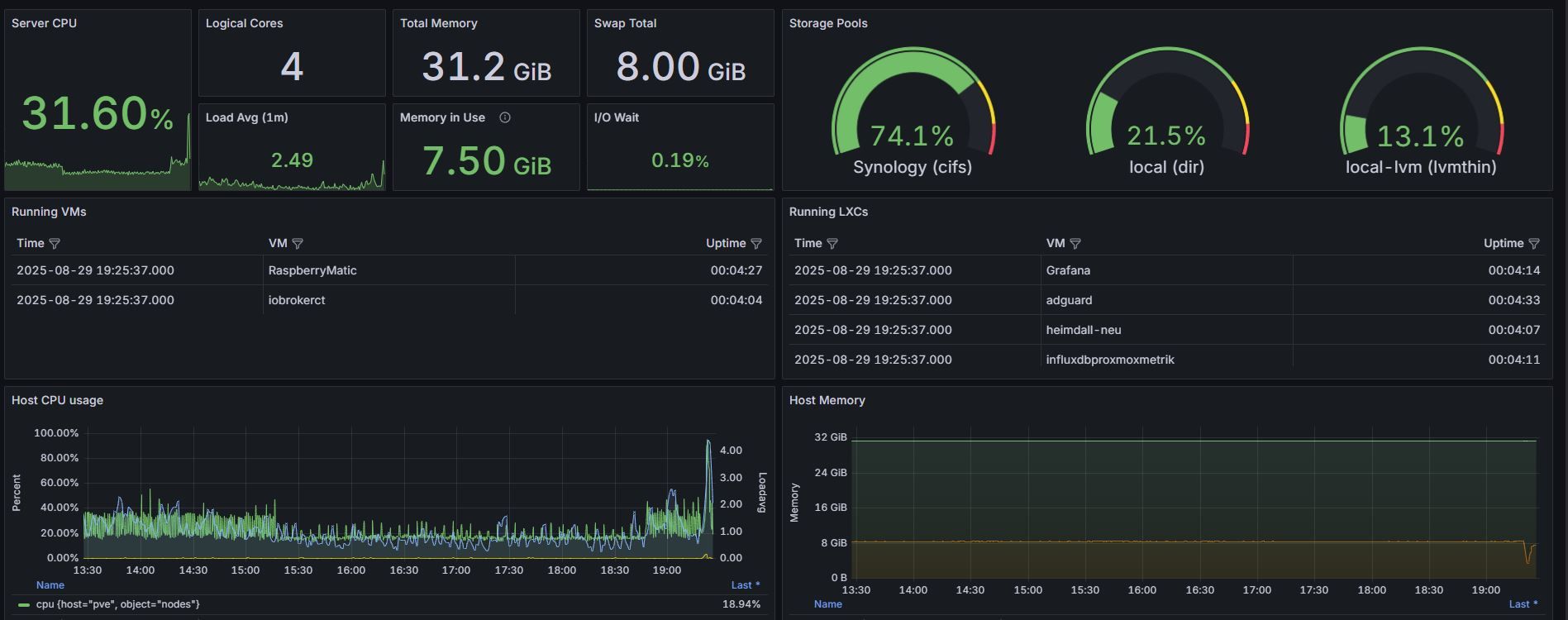
                                  promox1.JPG
                                  promox2.JPG

                                  1 Antwort Letzte Antwort
                                  1
                                  • a200A a200

                                    @crunchip nein. Aber es scheint weniger mit der VM, als mehr mit Proxmox zu tun haben. e1000 ist das physikalische Device bei dem NUC und das scheint ein Problem bei den neuen Kernels zu machen. Ich habe jetzt die empfohlene offloading Einstellung genommen. Mal sehen wie lange es hält.

                                    Vielen Dank für deine Unterstützung.

                                    ethtool -K eno1 gso off gro off tso off tx off rx off rxvlan off txvlan off sg off
                                    

                                    a0c4850c-a5e6-4b99-9707-d815e8f2bf70-grafik.png

                                    David G.D Online
                                    David G.D Online
                                    David G.
                                    schrieb am zuletzt editiert von
                                    #20

                                    @a200 sagte in IoBroker in VM legt kompletten Proxmox-Server lahm.:

                                    @crunchip nein. Aber es scheint weniger mit der VM, als mehr mit Proxmox zu tun haben. e1000 ist das physikalische Device bei dem NUC und das scheint ein Problem bei den neuen Kernels zu machen. Ich habe jetzt die empfohlene offloading Einstellung genommen. Mal sehen wie lange es hält.

                                    Vielen Dank für deine Unterstützung.

                                    ethtool -K eno1 gso off gro off tso off tx off rx off rxvlan off txvlan off sg off
                                    

                                    a0c4850c-a5e6-4b99-9707-d815e8f2bf70-grafik.png

                                    Das kann es gut gewesen sein.
                                    Ich hatte genau das selbe Problem.
                                    Bei mir ist es nach oder bei großen Backups aufgetreten die der PBS über das Internet versendet hat.

                                    Bei mir reicht ein

                                    ethtool -K enp0s31f6 tso off gso off gro off
                                    

                                    damit alles sauber läuft.
                                    Hab es allerdings nach den letzten 2-3 reboots nicht mehr gemacht, ka ob sich das Problem mittlerweile gelöst hat....

                                    Zeigt eure Lovelace-Visualisierung klick
                                    (Auch ideal um sich Anregungen zu holen)

                                    Meine Tabellen für eure Visualisierung klick

                                    Meister MopperM 1 Antwort Letzte Antwort
                                    0
                                    • isi07I Offline
                                      isi07I Offline
                                      isi07
                                      schrieb am zuletzt editiert von
                                      #21

                                      Ist die Proxmox Installation aktuell? Ich erinner mich, dass ich das beschriebene Verhalten auch mal hatte mit einem NUC und einem e1000 Netzwerkadapter. Hin und wieder war der komplette Host nicht mehr erreichbar und konnte nur über den Knopf aus und wieder eingeschaltet werden. Ist aber bestimmt schon zwei Jahre her.
                                      Bei mir lag es damals an Problemen mit dem Treiber im Kernel. Da musste ich dann für eine weile per dpks (oder so ähnlich) eine neuere Treiberversion hinzufügen. Seit einer Weile läuft bei mir aber alles wieder stabil mit dem aktuellen Kernel ohne Erweiterung.
                                      Vielleicht mal im Proxmox forum suchen.
                                      Viel Erfolg

                                      David G.D 1 Antwort Letzte Antwort
                                      0
                                      • isi07I isi07

                                        Ist die Proxmox Installation aktuell? Ich erinner mich, dass ich das beschriebene Verhalten auch mal hatte mit einem NUC und einem e1000 Netzwerkadapter. Hin und wieder war der komplette Host nicht mehr erreichbar und konnte nur über den Knopf aus und wieder eingeschaltet werden. Ist aber bestimmt schon zwei Jahre her.
                                        Bei mir lag es damals an Problemen mit dem Treiber im Kernel. Da musste ich dann für eine weile per dpks (oder so ähnlich) eine neuere Treiberversion hinzufügen. Seit einer Weile läuft bei mir aber alles wieder stabil mit dem aktuellen Kernel ohne Erweiterung.
                                        Vielleicht mal im Proxmox forum suchen.
                                        Viel Erfolg

                                        David G.D Online
                                        David G.D Online
                                        David G.
                                        schrieb am zuletzt editiert von
                                        #22

                                        @isi07

                                        Ich hatte es auf jedem Fall bis vor ca 6 Monaten, System immer aktuell.

                                        Ob es wirklich weg ist, oder nur nicht mehr auftritt weil die großen Backups durch sind weiß ich nicht.
                                        Das Problem trat auch erst seit den großen Backups auf.

                                        Zeigt eure Lovelace-Visualisierung klick
                                        (Auch ideal um sich Anregungen zu holen)

                                        Meine Tabellen für eure Visualisierung klick

                                        MartinPM 1 Antwort Letzte Antwort
                                        0
                                        • David G.D David G.

                                          @isi07

                                          Ich hatte es auf jedem Fall bis vor ca 6 Monaten, System immer aktuell.

                                          Ob es wirklich weg ist, oder nur nicht mehr auftritt weil die großen Backups durch sind weiß ich nicht.
                                          Das Problem trat auch erst seit den großen Backups auf.

                                          MartinPM Online
                                          MartinPM Online
                                          MartinP
                                          schrieb am zuletzt editiert von
                                          #23

                                          Allgemein an das Forum - welche(n) physischen Netzwerk-Adapter man hat, kann man in der pve Shell folgendermaßen herausfinden:

                                          root@pve:~# lshw -short |grep network
                                          /0/100/1c.3/0          enp3s0     network     RTL8111/8168/8411 PCI Express Gigabit Ethernet Controller

                                          

                                          Intel(R) Celeron(R) CPU N3000 @ 1.04GHz 8G RAM 480G SSD
                                          Virtualization : unprivileged lxc container (debian 13) on Proxmox 9.1.5)
                                          Linux pve 6.17.9-1-pve
                                          6 GByte RAM für den Container
                                          Fritzbox 6591 FW 8.20 (Vodafone Leih-Box)
                                          Remote-Access über Wireguard der Fritzbox

                                          1 Antwort Letzte Antwort
                                          1
                                          Antworten
                                          • In einem neuen Thema antworten
                                          Anmelden zum Antworten
                                          • Älteste zuerst
                                          • Neuste zuerst
                                          • Meiste Stimmen


                                          Support us

                                          ioBroker
                                          Community Adapters
                                          Donate
                                          FAQ Cloud / IOT
                                          HowTo: Node.js-Update
                                          HowTo: Backup/Restore
                                          Downloads
                                          BLOG

                                          698

                                          Online

                                          32.7k

                                          Benutzer

                                          82.4k

                                          Themen

                                          1.3m

                                          Beiträge
                                          Community
                                          Impressum | Datenschutz-Bestimmungen | Nutzungsbedingungen | Einwilligungseinstellungen
                                          ioBroker Community 2014-2025
                                          logo
                                          • Anmelden

                                          • Du hast noch kein Konto? Registrieren

                                          • Anmelden oder registrieren, um zu suchen
                                          • Erster Beitrag
                                            Letzter Beitrag
                                          0
                                          • Home
                                          • Aktuell
                                          • Tags
                                          • Ungelesen 0
                                          • Kategorien
                                          • Unreplied
                                          • Beliebt
                                          • GitHub
                                          • Docu
                                          • Hilfe