



Skip to content
  • Home
  • Aktuell
  • Tags
  • 0 Ungelesen 0
  • Kategorien
  • Unreplied
  • Beliebt
  • GitHub
  • Docu
  • Hilfe
Skins
  • Light
  • Brite
  • Cerulean
  • Cosmo
  • Flatly
  • Journal
  • Litera
  • Lumen
  • Lux
  • Materia
  • Minty
  • Morph
  • Pulse
  • Sandstone
  • Simplex
  • Sketchy
  • Spacelab
  • United
  • Yeti
  • Zephyr
  • Dark
  • Cyborg
  • Darkly
  • Quartz
  • Slate
  • Solar
  • Superhero
  • Vapor

  • Standard: (Kein Skin)
  • Kein Skin
Einklappen
ioBroker Logo

Community Forum

donate donate
  1. ioBroker Community Home
  2. Deutsch
  3. ioBroker Allgemein
  4. Sonoff (WLan) unter Proxmox reagiert unzuverlässig

NEWS

  • UPDATE 31.10.: Amazon Alexa - ioBroker Skill läuft aus ?
    apollon77A
    apollon77
    48
    3
    8.9k

  • Monatsrückblick – September 2025
    BluefoxB
    Bluefox
    13
    1
    2.3k

  • Neues Video "KI im Smart Home" - ioBroker plus n8n
    BluefoxB
    Bluefox
    16
    1
    3.5k

Sonoff (WLan) unter Proxmox reagiert unzuverlässig

Geplant Angeheftet Gesperrt Verschoben ioBroker Allgemein
28 Beiträge 5 Kommentatoren 2.3k Aufrufe 2 Watching
  • Älteste zuerst
  • Neuste zuerst
  • Meiste Stimmen
Antworten
  • In einem neuen Thema antworten
Anmelden zum Antworten
Dieses Thema wurde gelöscht. Nur Nutzer mit entsprechenden Rechten können es sehen.
  • arteckA arteck

    @allodo sagte in Sonoff (WLan) unter Proxmox reagiert unzuverlässig:

    Liegt es evtl. an Proxmox?

    nö.. ausser du hast eine wilde Netzwerkumgebung.. da du dzu nichts weiter schreibst ..kein plan

    mit dem zigbee coordinator muss ich auch passen.. meine Glaskugel ist gerade zur Weihnachtlichen politur..

    A Offline
    A Offline
    Allodo
    schrieb am zuletzt editiert von
    #4

    @arteck
    Inwiefern eine wilde Netzwerkumgebung? Ist alles im selben Mesh ;)

    @Thomas-Braun
    Ok, werde dann mal einen LXC-Container mit Debian Bookworm mit iobroker aufsetzen. Kann es denn damit zu tun haben?

    Thomas BraunT T 2 Antworten Letzte Antwort
    0
    • A Allodo

      @arteck
      Inwiefern eine wilde Netzwerkumgebung? Ist alles im selben Mesh ;)

      @Thomas-Braun
      Ok, werde dann mal einen LXC-Container mit Debian Bookworm mit iobroker aufsetzen. Kann es denn damit zu tun haben?

      Thomas BraunT Online
      Thomas BraunT Online
      Thomas Braun
      Most Active
      schrieb am zuletzt editiert von Thomas Braun
      #5

      @allodo sagte in Sonoff (WLan) unter Proxmox reagiert unzuverlässig:

      Kann es denn damit zu tun haben?

      Da wir so gut wie gar nichts von deinem System wissen:
      Ja/Nein/Vielleicht

      Aber man verwendet grundsätzlich keine Interimsversionen bei Ubuntu.

      Linux-Werkzeugkasten:
      https://forum.iobroker.net/topic/42952/der-kleine-iobroker-linux-werkzeugkasten
      NodeJS Fixer Skript:
      https://forum.iobroker.net/topic/68035/iob-node-fix-skript
      iob_diag: curl -sLf -o diag.sh https://iobroker.net/diag.sh && bash diag.sh

      1 Antwort Letzte Antwort
      0
      • A Allodo

        @arteck
        Inwiefern eine wilde Netzwerkumgebung? Ist alles im selben Mesh ;)

        @Thomas-Braun
        Ok, werde dann mal einen LXC-Container mit Debian Bookworm mit iobroker aufsetzen. Kann es denn damit zu tun haben?

        T Nicht stören
        T Nicht stören
        ticaki
        schrieb am zuletzt editiert von ticaki
        #6

        @allodo sagte in Sonoff (WLan) unter Proxmox reagiert unzuverlässig:

        Kann es denn damit zu tun haben?

        Du solltest die Zusammenfassung von iob diag bei einer solchen Fragen mitliefern, damit man zumindest einen Vorstellung davon hat, wie dein System aussieht.

        Bei mir war der iobroker eine zeitlang unzuverlässig, weil der samba lxc den io-delay auf 70%-90% hoch gejagt hat. Wird bei dir nicht das selbe sein, aber andererseits wer weiß :)

        Bildschirmfoto 2024-12-11 um 10.37.39.png

        Weather-Warnings Espresense NSPanel-Lovelace-ui Tagesschau

        Spenden

        1 Antwort Letzte Antwort
        0
        • A Offline
          A Offline
          Allodo
          schrieb am zuletzt editiert von
          #7

          Danke für die Antworten. :)

          Werde jetzt mal einen Container mit Debian bookworm aufsetzen und dann schauen, wie sich das System verhält :)

          MartinPM 1 Antwort Letzte Antwort
          0
          • A Allodo

            Danke für die Antworten. :)

            Werde jetzt mal einen Container mit Debian bookworm aufsetzen und dann schauen, wie sich das System verhält :)

            MartinPM Online
            MartinPM Online
            MartinP
            schrieb am zuletzt editiert von
            #8

            @allodo Wichtig ist auch, ob der S920 per LAN oder WLAN angebunden ist...
            PVE - Rechner per WLAN anzubinden ist keine gute Idee ...

            https://forum.proxmox.com/threads/proxmox-over-wifi-wlan.123805/

            Intel(R) Celeron(R) CPU N3000 @ 1.04GHz 8G RAM 480G SSD
            Virtualization : unprivileged lxc container (debian 12 on Proxmox 8.4.14)
            Linux pve 6.8.12-16-pve
            6 GByte RAM für den Container
            Fritzbox 6591 FW 8.03 (Vodafone Leih-Box)
            Remote-Access über Wireguard der Fritzbox

            A 1 Antwort Letzte Antwort
            0
            • MartinPM MartinP

              @allodo Wichtig ist auch, ob der S920 per LAN oder WLAN angebunden ist...
              PVE - Rechner per WLAN anzubinden ist keine gute Idee ...

              https://forum.proxmox.com/threads/proxmox-over-wifi-wlan.123805/

              A Offline
              A Offline
              Allodo
              schrieb am zuletzt editiert von
              #9

              @martinp
              Direkt per LAN :)

              A 1 Antwort Letzte Antwort
              0
              • A Allodo

                @martinp
                Direkt per LAN :)

                A Offline
                A Offline
                Allodo
                schrieb am zuletzt editiert von
                #10

                Habe jetzt mal iobroker in einem neuen Container mit Debian 12 aufgesetzt. Es ist schon etwas besser geworden mit den Sonoff, aber immer noch nicht so gut, wie vorher auf dem RPi.

                Hoffe ich habe jetzt alles Infos zusammengetragen ;)

                Hier mal die Ergebnisse von iob diag:

                Script v.2024-10-19
                
                *** BASE SYSTEM ***
                Static hostname: iobrokerPrOD
                      Icon name: computer-container
                        Chassis: container ☐
                 Virtualization: lxc
                Operating System: Debian GNU/Linux 12 (bookworm)
                         Kernel: Linux 6.5.11-4-pve
                   Architecture: x86-64
                OS is similar to: 
                
                model name      : AMD GX-415GA SOC with Radeon(tm) HD Graphics
                Docker          : false
                Virtualization  : lxc
                Kernel          : x86_64
                Userland        : 64 bit
                
                Systemuptime and Load:
                07:52:07 up 1 day, 17:06,  2 users,  load average: 0.72, 0.45, 0.42
                CPU threads: 4
                
                
                *** LIFE CYCLE STATUS ***
                Unknown release codenamed ''. Please check yourself if the Operating System is actively maintained.
                
                *** TIME AND TIMEZONES ***
                              Local time: Fri 2024-12-13 07:52:08 CET
                          Universal time: Fri 2024-12-13 06:52:08 UTC
                                RTC time: n/a
                               Time zone: Europe/Berlin (CET, +0100)
                System clock synchronized: yes
                             NTP service: inactive
                         RTC in local TZ: no
                
                *** Users and Groups ***
                User that called 'iob diag':
                allodo
                HOME=/home/allodo
                GROUPS=allodo sudo users iobroker
                
                User that is running 'js-controller':
                iobroker
                HOME=/home/iobroker
                GROUPS=iobroker tty dialout audio video plugdev
                
                *** DISPLAY-SERVER SETUP ***
                Display-Server: false
                Desktop: 
                Terminal: 
                
                *** MEMORY ***
                              total        used        free      shared  buff/cache   available
                Mem:            4.7G        2.3G        2.4G        118K         55M        2.4G
                Swap:           536M          0B        536M
                Total:          5.3G        2.3G        2.9G
                
                Active iob-Instances:   30
                
                        4512 M total memory
                        2203 M used memory
                        2171 M active memory
                           0 M inactive memory
                        2255 M free memory
                           0 M buffer memory
                          53 M swap cache
                         512 M total swap
                           0 M used swap
                         512 M free swap
                
                *** top - Table Of Processes  ***
                top - 07:52:08 up 1 day, 17:06,  2 users,  load average: 0.72, 0.45, 0.42
                Tasks:  54 total,   2 running,  52 sleeping,   0 stopped,   0 zombie
                %Cpu(s):  0.0 us, 33.3 sy,  0.0 ni, 66.7 id,  0.0 wa,  0.0 hi,  0.0 si,  0.0 st 
                MiB Mem :   4512.0 total,   2253.8 free,   2205.0 used,     53.2 buff/cache     
                MiB Swap:    512.0 total,    512.0 free,      0.0 used.   2307.0 avail Mem 
                
                *** FAILED SERVICES ***
                
                 UNIT LOAD ACTIVE SUB DESCRIPTION
                0 loaded units listed.
                
                
                *** DMESG CRITICAL ERRORS ***
                No critical errors detected
                
                *** FILESYSTEM ***
                Filesystem                 Type      Size  Used Avail Use% Mounted on
                ZFS.Pool/subvol-126-disk-0 zfs        20G  3.1G   17G  16% /
                none                       tmpfs     492K  4.0K  488K   1% /dev
                udev                       devtmpfs  3.7G     0  3.7G   0% /dev/ttyACM0
                tmpfs                      tmpfs     3.8G     0  3.8G   0% /dev/shm
                tmpfs                      tmpfs     1.5G  108K  1.5G   1% /run
                tmpfs                      tmpfs     5.0M     0  5.0M   0% /run/lock
                
                Messages concerning ext4 filesystem in dmesg:
                [Fri Dec  6 11:33:48 2024] EXT4-fs (dm-1): mounted filesystem efdb61d7-9788-4154-871e-c0eb261b17ce ro with ordered data mode. Quota mode: none.
                [Fri Dec  6 11:33:49 2024] EXT4-fs (dm-1): re-mounted efdb61d7-9788-4154-871e-c0eb261b17ce r/w. Quota mode: none.
                [Fri Dec  6 11:34:35 2024] EXT4-fs (dm-6): warning: mounting fs with errors, running e2fsck is recommended
                [Fri Dec  6 11:34:35 2024] EXT4-fs (dm-6): mounted filesystem 2cbfc864-b80d-413e-a301-43d2f2b819c9 r/w with ordered data mode. Quota mode: none.
                [Fri Dec  6 11:39:46 2024] EXT4-fs (dm-6): error count since last fsck: 11
                [Fri Dec  6 11:39:46 2024] EXT4-fs (dm-6): initial error at time 1733399934: ext4_reserve_inode_write:5718
                [Fri Dec  6 11:39:46 2024] EXT4-fs (dm-6): last error at time 1733401554: ext4_journal_check_start:83
                [Sat Dec  7 13:16:34 2024] EXT4-fs (dm-6): error count since last fsck: 11
                [Sat Dec  7 13:16:34 2024] EXT4-fs (dm-6): initial error at time 1733399934: ext4_reserve_inode_write:5718
                [Sat Dec  7 13:16:34 2024] EXT4-fs (dm-6): last error at time 1733401554: ext4_journal_check_start:83
                [Sun Dec  8 14:54:27 2024] EXT4-fs (dm-6): error count since last fsck: 11
                [Sun Dec  8 14:54:27 2024] EXT4-fs (dm-6): initial error at time 1733399934: ext4_reserve_inode_write:5718
                [Sun Dec  8 14:54:27 2024] EXT4-fs (dm-6): last error at time 1733401554: ext4_journal_check_start:83
                [Mon Dec  9 16:32:20 2024] EXT4-fs (dm-6): error count since last fsck: 11
                [Mon Dec  9 16:32:20 2024] EXT4-fs (dm-6): initial error at time 1733399934: ext4_reserve_inode_write:5718
                [Mon Dec  9 16:32:20 2024] EXT4-fs (dm-6): last error at time 1733401554: ext4_journal_check_start:83
                [Tue Dec 10 18:10:14 2024] EXT4-fs (dm-6): error count since last fsck: 11
                [Tue Dec 10 18:10:14 2024] EXT4-fs (dm-6): initial error at time 1733399934: ext4_reserve_inode_write:5718
                [Tue Dec 10 18:10:14 2024] EXT4-fs (dm-6): last error at time 1733401554: ext4_journal_check_start:83
                [Wed Dec 11 09:42:58 2024] EXT4-fs (dm-8): write access unavailable, skipping orphan cleanup
                [Wed Dec 11 09:42:58 2024] EXT4-fs (dm-8): mounted filesystem 2cbfc864-b80d-413e-a301-43d2f2b819c9 ro without journal. Quota mode: none.
                [Wed Dec 11 09:48:01 2024] EXT4-fs (dm-8): unmounting filesystem 2cbfc864-b80d-413e-a301-43d2f2b819c9.
                [Wed Dec 11 16:03:31 2024] EXT4-fs (dm-6): unmounting filesystem 2cbfc864-b80d-413e-a301-43d2f2b819c9.
                
                Show mounted filesystems:
                TARGET SOURCE                     FSTYPE OPTIONS
                /      ZFS.Pool/subvol-126-disk-0 zfs    rw,relatime,xattr,posixacl,casesensitive
                
                Files in neuralgic directories:
                
                /var:
                284M    /var/
                220M    /var/cache
                218M    /var/cache/apt
                173M    /var/cache/apt/archives
                62M     /var/lib
                
                Hint: You are currently not seeing messages from other users and the system.
                     Users in groups 'adm', 'systemd-journal' can see all messages.
                     Pass -q to turn off this notice.
                Archived and active journals take up 200.5K in the file system.
                
                /opt/iobroker/backups:
                15M     /opt/iobroker/backups/
                
                /opt/iobroker/iobroker-data:
                512M    /opt/iobroker/iobroker-data/
                452M    /opt/iobroker/iobroker-data/files
                247M    /opt/iobroker/iobroker-data/files/javascript.admin
                222M    /opt/iobroker/iobroker-data/files/javascript.admin/static
                221M    /opt/iobroker/iobroker-data/files/javascript.admin/static/js
                
                The five largest files in iobroker-data are:
                8.6M    /opt/iobroker/iobroker-data/files/vis-2/static/js/main.f305bc29.js.map
                8.6M    /opt/iobroker/iobroker-data/files/vis-2/static/js/main.8e80ccb0.js.map
                8.6M    /opt/iobroker/iobroker-data/files/vis-2/customWidgets.js.map
                8.4M    /opt/iobroker/iobroker-data/files/scenes.admin/static/js/main.c9369f6c.js.map
                8.2M    /opt/iobroker/iobroker-data/files/web.admin/static/js/main.135279a0.js.map
                
                USB-Devices by-id:
                USB-Sticks -  Avoid direct links to /dev/tty* in your adapter setups, please always prefer the links 'by-id':
                
                /dev/serial/by-id/usb-ITEAD_SONOFF_Zigbee_3.0_USB_Dongle_Plus_V2_20221130105601-if00
                
                HINT:
                Your zigbee.0 COM-Port is NOT matching 'by-id'. Please check your setting:
                /dev/ttyACM0
                
                *** NodeJS-Installation ***
                
                /usr/bin/nodejs         v20.18.1
                /usr/bin/node           v20.18.1
                /usr/bin/npm            10.8.2
                /usr/bin/npx            10.8.2
                /usr/bin/corepack       0.29.4
                
                nodejs:
                 Installed: 20.18.1-1nodesource1
                 Candidate: 20.18.1-1nodesource1
                 Version table:
                *** 20.18.1-1nodesource1 1001
                       500 https://deb.nodesource.com/node_20.x nodistro/main amd64 Packages
                       100 /var/lib/dpkg/status
                    20.18.0-1nodesource1 1001
                       500 https://deb.nodesource.com/node_20.x nodistro/main amd64 Packages
                    20.17.0-1nodesource1 1001
                       500 https://deb.nodesource.com/node_20.x nodistro/main amd64 Packages
                    20.16.0-1nodesource1 1001
                       500 https://deb.nodesource.com/node_20.x nodistro/main amd64 Packages
                    20.15.1-1nodesource1 1001
                       500 https://deb.nodesource.com/node_20.x nodistro/main amd64 Packages
                    20.15.0-1nodesource1 1001
                       500 https://deb.nodesource.com/node_20.x nodistro/main amd64 Packages
                    20.14.0-1nodesource1 1001
                       500 https://deb.nodesource.com/node_20.x nodistro/main amd64 Packages
                    20.13.1-1nodesource1 1001
                       500 https://deb.nodesource.com/node_20.x nodistro/main amd64 Packages
                    20.13.0-1nodesource1 1001
                       500 https://deb.nodesource.com/node_20.x nodistro/main amd64 Packages
                    20.12.2-1nodesource1 1001
                       500 https://deb.nodesource.com/node_20.x nodistro/main amd64 Packages
                    20.12.1-1nodesource1 1001
                       500 https://deb.nodesource.com/node_20.x nodistro/main amd64 Packages
                    20.12.0-1nodesource1 1001
                       500 https://deb.nodesource.com/node_20.x nodistro/main amd64 Packages
                    20.11.1-1nodesource1 1001
                       500 https://deb.nodesource.com/node_20.x nodistro/main amd64 Packages
                    20.11.0-1nodesource1 1001
                       500 https://deb.nodesource.com/node_20.x nodistro/main amd64 Packages
                    20.10.0-1nodesource1 1001
                       500 https://deb.nodesource.com/node_20.x nodistro/main amd64 Packages
                    20.9.0-1nodesource1 1001
                       500 https://deb.nodesource.com/node_20.x nodistro/main amd64 Packages
                    20.8.1-1nodesource1 1001
                       500 https://deb.nodesource.com/node_20.x nodistro/main amd64 Packages
                    20.8.0-1nodesource1 1001
                       500 https://deb.nodesource.com/node_20.x nodistro/main amd64 Packages
                    20.7.0-1nodesource1 1001
                       500 https://deb.nodesource.com/node_20.x nodistro/main amd64 Packages
                    20.6.1-1nodesource1 1001
                       500 https://deb.nodesource.com/node_20.x nodistro/main amd64 Packages
                    20.6.0-1nodesource1 1001
                       500 https://deb.nodesource.com/node_20.x nodistro/main amd64 Packages
                    20.5.1-1nodesource1 1001
                       500 https://deb.nodesource.com/node_20.x nodistro/main amd64 Packages
                    20.5.0-1nodesource1 1001
                       500 https://deb.nodesource.com/node_20.x nodistro/main amd64 Packages
                    20.4.0-1nodesource1 1001
                       500 https://deb.nodesource.com/node_20.x nodistro/main amd64 Packages
                    20.3.1-1nodesource1 1001
                       500 https://deb.nodesource.com/node_20.x nodistro/main amd64 Packages
                    20.3.0-1nodesource1 1001
                       500 https://deb.nodesource.com/node_20.x nodistro/main amd64 Packages
                    20.2.0-1nodesource1 1001
                       500 https://deb.nodesource.com/node_20.x nodistro/main amd64 Packages
                    20.1.0-1nodesource1 1001
                       500 https://deb.nodesource.com/node_20.x nodistro/main amd64 Packages
                    20.0.0-1nodesource1 1001
                       500 https://deb.nodesource.com/node_20.x nodistro/main amd64 Packages
                    18.19.0+dfsg-6~deb12u2 500
                       500 http://deb.debian.org/debian bookworm/main amd64 Packages
                    18.19.0+dfsg-6~deb12u1 500
                       500 http://security.debian.org bookworm-security/main amd64 Packages
                
                Temp directories causing deletion problem: 0
                No problems detected
                
                Errors in npm tree: 0
                No problems detected
                
                *** ioBroker-Installation ***
                
                ioBroker Status
                iobroker is running on this host.
                
                
                Objects type: jsonl
                States  type: jsonl
                
                Hosts:
                iobrokerPrOD        iobrokerPrOD (version: 7.0.3, hostname: iobrokerPrOD  , alive, uptime: 148016)
                
                Core adapters versions
                js-controller:  7.0.3
                admin:          7.1.5
                javascript:     8.8.3
                
                nodejs modules from github:     1
                +-- iobroker.sourceanalytix@0.4.15-alpha.1 (git+ssh://git@github.com/iobroker-community-adapters/ioBroker.sourceanalytix.git#deb2bf5210576700734b590215a5f27bb8b72d7d)
                
                Adapter State
                + system.adapter.admin.0                  : admin                 : iobrokerPrOD                             -  enabled, port: 8081, bind: 0.0.0.0, run as: admin
                + system.adapter.alexa2.0                 : alexa2                : iobrokerPrOD                             -  enabled
                + system.adapter.backitup.0               : backitup              : iobrokerPrOD                             -  enabled
                 system.adapter.cloud.0                  : cloud                 : iobrokerPrOD                             - disabled
                + system.adapter.discovery.0              : discovery             : iobrokerPrOD                             -  enabled
                 system.adapter.doorbird.0               : doorbird              : iobrokerPrOD                             - disabled
                + system.adapter.energiefluss-erweitert.0 : energiefluss-erweitert: iobrokerPrOD                             -  enabled
                 system.adapter.feiertage.0              : feiertage             : iobrokerPrOD                             -  enabled
                + system.adapter.fullybrowser.0           : fullybrowser          : iobrokerPrOD                             -  enabled
                 system.adapter.harmony.0                : harmony               : iobrokerPrOD                             - disabled
                + system.adapter.history.0                : history               : iobrokerPrOD                             -  enabled
                + system.adapter.hm-rega.0                : hm-rega               : iobrokerPrOD                             -  enabled
                + system.adapter.hm-rpc.0                 : hm-rpc                : iobrokerPrOD                             -  enabled, port: 0
                 system.adapter.influxdb.0               : influxdb              : iobrokerPrOD                             - disabled, port: 8086
                + system.adapter.javascript.0             : javascript            : iobrokerPrOD                             -  enabled
                 system.adapter.lgtv.0                   : lgtv                  : iobrokerPrOD                             - disabled
                 system.adapter.mihome.0                 : mihome                : iobrokerPrOD                             - disabled, port: 9898, bind: 0.0.0.0
                 system.adapter.mobile.0                 : mobile                : iobrokerPrOD                             - disabled
                + system.adapter.opendtu.0                : opendtu               : iobrokerPrOD                             -  enabled
                + system.adapter.ping.0                   : ping                  : iobrokerPrOD                             -  enabled
                + system.adapter.samsung_tizen.0          : samsung_tizen         : iobrokerPrOD                             -  enabled, port: 8002
                + system.adapter.samsung_tizen.1          : samsung_tizen         : iobrokerPrOD                             -  enabled, port: 8002
                + system.adapter.scenes.0                 : scenes                : iobrokerPrOD                             -  enabled
                + system.adapter.shelly.0                 : shelly                : iobrokerPrOD                             -  enabled, port: 1882, bind: 0.0.0.0
                + system.adapter.shelly.1                 : shelly                : iobrokerPrOD                             -  enabled, port: 1882, bind: 0.0.0.0
                + system.adapter.socketio.0               : socketio              : iobrokerPrOD                             -  enabled, port: 8084, bind: 0.0.0.0, run as: admin
                + system.adapter.sonoff.0                 : sonoff                : iobrokerPrOD                             -  enabled, port: 1883, bind: 0.0.0.0
                + system.adapter.sourceanalytix.0         : sourceanalytix        : iobrokerPrOD                             -  enabled
                + system.adapter.tankerkoenig.0           : tankerkoenig          : iobrokerPrOD                             -  enabled
                + system.adapter.telegram.0               : telegram              : iobrokerPrOD                             -  enabled, port: 8443, bind: 0.0.0.0
                + system.adapter.tr-064.0                 : tr-064                : iobrokerPrOD                             -  enabled
                + system.adapter.tuya.0                   : tuya                  : iobrokerPrOD                             -  enabled
                 system.adapter.vis-2-widgets-energy.0   : vis-2-widgets-energy  : iobrokerPrOD                             - disabled
                + system.adapter.vis-2.0                  : vis-2                 : iobrokerPrOD                             -  enabled
                 system.adapter.vis-hqwidgets.0          : vis-hqwidgets         : iobrokerPrOD                             - disabled
                 system.adapter.vis-icontwo.0            : vis-icontwo           : iobrokerPrOD                             - disabled
                + system.adapter.vis-inventwo.0           : vis-inventwo          : iobrokerPrOD                             -  enabled
                 system.adapter.vis-jqui-mfd.0           : vis-jqui-mfd          : iobrokerPrOD                             - disabled
                 system.adapter.vis-metro.0              : vis-metro             : iobrokerPrOD                             - disabled
                 system.adapter.vis-timeandweather.0     : vis-timeandweather    : iobrokerPrOD                             - disabled
                 system.adapter.vis.0                    : vis                   : iobrokerPrOD                             -  enabled
                + system.adapter.web.0                    : web                   : iobrokerPrOD                             -  enabled, port: 8082, bind: 0.0.0.0, run as: admin
                + system.adapter.web.1                    : web                   : iobrokerPrOD                             -  enabled, port: 8083, bind: 0.0.0.0, run as: admin
                + system.adapter.zigbee.0                 : zigbee                : iobrokerPrOD                             -  enabled, port: /dev/ttyACM0
                
                + instance is alive
                
                Enabled adapters with bindings
                + system.adapter.admin.0                  : admin                 : iobrokerPrOD                             -  enabled, port: 8081, bind: 0.0.0.0, run as: admin
                + system.adapter.hm-rpc.0                 : hm-rpc                : iobrokerPrOD                             -  enabled, port: 0
                + system.adapter.samsung_tizen.0          : samsung_tizen         : iobrokerPrOD                             -  enabled, port: 8002
                + system.adapter.samsung_tizen.1          : samsung_tizen         : iobrokerPrOD                             -  enabled, port: 8002
                + system.adapter.shelly.0                 : shelly                : iobrokerPrOD                             -  enabled, port: 1882, bind: 0.0.0.0
                + system.adapter.shelly.1                 : shelly                : iobrokerPrOD                             -  enabled, port: 1882, bind: 0.0.0.0
                + system.adapter.socketio.0               : socketio              : iobrokerPrOD                             -  enabled, port: 8084, bind: 0.0.0.0, run as: admin
                + system.adapter.sonoff.0                 : sonoff                : iobrokerPrOD                             -  enabled, port: 1883, bind: 0.0.0.0
                + system.adapter.telegram.0               : telegram              : iobrokerPrOD                             -  enabled, port: 8443, bind: 0.0.0.0
                + system.adapter.web.0                    : web                   : iobrokerPrOD                             -  enabled, port: 8082, bind: 0.0.0.0, run as: admin
                + system.adapter.web.1                    : web                   : iobrokerPrOD                             -  enabled, port: 8083, bind: 0.0.0.0, run as: admin
                + system.adapter.zigbee.0                 : zigbee                : iobrokerPrOD                             -  enabled, port: /dev/ttyACM0
                
                ioBroker-Repositories
                ┌─────────┬──────────┬─────────────────────────────────────────────────────────┬──────────────┐
                │ (index) │ name     │ url                                                     │ auto upgrade │
                ├─────────┼──────────┼─────────────────────────────────────────────────────────┼──────────────┤
                │ 0       │ 'stable' │ 'http://download.iobroker.net/sources-dist.json'        │ false        │
                │ 1       │ 'beta'   │ 'http://download.iobroker.net/sources-dist-latest.json' │ false        │
                └─────────┴──────────┴─────────────────────────────────────────────────────────┴──────────────┘
                
                Active repo(s): stable
                Upgrade policy: none
                
                Installed ioBroker-Instances
                Used repository: stable
                Adapter    "admin"        : 7.1.5    , installed 7.1.5
                Adapter    "alexa2"       : 3.26.5   , installed 3.26.5
                Adapter    "backitup"     : 3.0.25   , installed 3.0.25
                Adapter    "cloud"        : 5.0.1    , installed 5.0.1
                Adapter    "discovery"    : 5.0.0    , installed 5.0.0
                Adapter    "doorbird"     : 2.0.0    , installed 2.0.0
                Adapter    "energiefluss-erweitert": 0.4.1, installed 0.4.1
                Adapter    "feiertage"    : 1.2.0    , installed 1.2.0
                Adapter    "fullybrowser" : 3.0.12   , installed 3.0.12
                Adapter    "harmony"      : 1.5.0    , installed 1.5.0
                Adapter    "history"      : 3.0.1    , installed 3.0.1
                Adapter    "hm-rega"      : 5.1.0    , installed 5.1.0
                Adapter    "hm-rpc"       : 2.0.2    , installed 2.0.2
                Adapter    "influxdb"     : 4.0.2    , installed 4.0.2
                Adapter    "javascript"   : 8.8.3    , installed 8.8.3
                Controller "js-controller": 7.0.3    , installed 7.0.3
                Adapter    "lgtv"         : 2.2.0    , installed 2.2.0
                Adapter    "mihome"       : 1.4.0    , installed 1.4.0
                Adapter    "mobile"       : 1.0.1    , installed 1.0.1
                Adapter    "opendtu"      : 2.0.0    , installed 2.0.0
                Adapter    "ping"         : 1.6.2    , installed 1.6.2
                Adapter    "samsung_tizen": 1.1.0    , installed 1.1.0
                Adapter    "scenes"       : 3.2.3    , installed 3.2.3
                Adapter    "shelly"       : 8.2.1    , installed 8.2.1
                Adapter    "simple-api"   : 2.8.0    , installed 2.8.0
                Adapter    "socketio"     : 6.7.1    , installed 6.7.1
                Adapter    "sonoff"       : 3.1.2    , installed 3.1.2
                Adapter    "tankerkoenig" : 3.4.0    , installed 3.4.0
                Adapter    "telegram"     : 3.9.0    , installed 3.9.0
                Adapter    "tr-064"       : 4.3.0    , installed 4.3.0
                Adapter    "tuya"         : 3.16.0   , installed 3.16.0
                Adapter    "vis"          : 1.5.6    , installed 1.5.6
                Adapter    "vis-2"        : 2.9.64   , installed 2.9.64
                Adapter    "vis-2-widgets-energy": 1.0.2, installed 1.0.2
                Adapter    "vis-hqwidgets": 1.5.1    , installed 1.5.1
                Adapter    "vis-icontwo"  : 1.5.0    , installed 1.6.3
                Adapter    "vis-inventwo" : 3.3.4    , installed 3.3.4
                Adapter    "vis-jqui-mfd" : 1.1.1    , installed 1.1.1
                Adapter    "vis-metro"    : 1.2.0    , installed 1.2.0
                Adapter    "vis-timeandweather": 1.2.2, installed 1.2.2
                Adapter    "web"          : 6.2.5    , installed 6.2.5
                Adapter    "ws"           : 2.6.2    , installed 2.6.2
                Adapter    "zigbee"       : 1.10.3   , installed 1.10.3
                
                Objects and States
                Please stand by - This may take a while
                Objects:        9495
                States:         7008
                
                *** OS-Repositories and Updates ***
                Hit:1 http://security.debian.org bookworm-security InRelease
                Hit:2 http://deb.debian.org/debian bookworm InRelease
                Hit:3 http://deb.debian.org/debian bookworm-updates InRelease
                Hit:4 https://deb.nodesource.com/node_20.x nodistro InRelease
                Reading package lists...
                Pending Updates: 0
                
                *** Listening Ports ***
                Active Internet connections (only servers)
                Proto Recv-Q Send-Q Local Address           Foreign Address         State       User       Inode      PID/Program name    
                tcp        0      0 127.0.0.1:25            0.0.0.0:*               LISTEN      0          15370918   290/master          
                tcp        0      0 127.0.0.1:9201          0.0.0.0:*               LISTEN      1001       15372634   126/iobroker.js-con 
                tcp        0      0 127.0.0.1:9202          0.0.0.0:*               LISTEN      1001       15369938   126/iobroker.js-con 
                tcp        0      0 0.0.0.0:1883            0.0.0.0:*               LISTEN      1001       15841747   1603/io.sonoff.0    
                tcp        0      0 0.0.0.0:1882            0.0.0.0:*               LISTEN      1001       15840672   1587/io.shelly.1    
                tcp        0      0 0.0.0.0:111             0.0.0.0:*               LISTEN      0          15370713   1/init              
                tcp        0      0 192.168.1.26:2001       0.0.0.0:*               LISTEN      1001       15373698   480/io.hm-rpc.0     
                tcp6       0      0 :::8084                 :::*                    LISTEN      1001       15377933   860/io.socketio.0   
                tcp6       0      0 :::8083                 :::*                    LISTEN      1001       15380960   943/io.web.1        
                tcp6       0      0 :::8082                 :::*                    LISTEN      1001       15380203   942/io.web.0        
                tcp6       0      0 :::8081                 :::*                    LISTEN      1001       15371916   301/io.admin.0      
                tcp6       0      0 :::22                   :::*                    LISTEN      0          15371636   1/init              
                tcp6       0      0 :::111                  :::*                    LISTEN      0          15370714   1/init              
                tcp6       0      0 ::1:25                  :::*                    LISTEN      0          15370919   290/master          
                udp        0      0 192.168.1.26:5353       0.0.0.0:*                           1001       15376249   616/io.tr-064.0     
                udp        0      0 0.0.0.0:5683            0.0.0.0:*                           1001       15376728   557/io.shelly.0     
                udp        0      0 0.0.0.0:6666            0.0.0.0:*                           1001       15376330   627/io.tuya.0       
                udp        0      0 0.0.0.0:6667            0.0.0.0:*                           1001       15376331   627/io.tuya.0       
                udp        0      0 0.0.0.0:111             0.0.0.0:*                           0          15372354   1/init              
                udp6       0      0 :::111                  :::*                                0          15371563   1/init              
                
                *** Log File - Last 25 Lines ***
                

                Und hier mal die Zusammenfassung:

                ======================= SUMMARY =======================
                                       v.2024-10-19
                
                
                Static hostname: iobrokerPrOD
                      Icon name: computer-container
                        Chassis: container ☐
                 Virtualization: lxc
                Operating System: Debian GNU/Linux 12 (bookworm)
                         Kernel: Linux 6.5.11-4-pve
                   Architecture: x86-64
                
                Installation:           lxc
                Kernel:                 x86_64
                Userland:               64 bit
                Timezone:               Europe/Berlin (CET, +0100)
                User-ID:                1000
                Display-Server:         false
                Boot Target:            multi-user.target
                
                Pending OS-Updates:     0
                Pending iob updates:    0
                
                Nodejs-Installation:
                /usr/bin/nodejs         v20.18.1
                /usr/bin/node           v20.18.1
                /usr/bin/npm            10.8.2
                /usr/bin/npx            10.8.2
                /usr/bin/corepack       0.29.4
                
                Recommended versions are nodejs 20.18.1 and npm 10.8.2
                nodeJS installation is correct
                
                MEMORY: 
                              total        used        free      shared  buff/cache   available
                Mem:            4.7G        2.3G        2.4G        118K         59M        2.4G
                Swap:           536M          0B        536M
                Total:          5.3G        2.3G        2.9G
                
                Active iob-Instances:   30
                Upgrade policy: none
                
                ioBroker Core:          js-controller           7.0.3
                                       admin                   7.1.5
                
                ioBroker Status:        iobroker is running on this host.
                
                
                Objects type: jsonl
                States  type: jsonl
                
                Status admin and web instance:
                + system.adapter.admin.0                  : admin                 : iobrokerPrOD                             -  enabled, port: 8081, bind: 0.0.0.0, run as: admin
                + system.adapter.web.0                    : web                   : iobrokerPrOD                             -  enabled, port: 8082, bind: 0.0.0.0, run as: admin
                + system.adapter.web.1                    : web                   : iobrokerPrOD                             -  enabled, port: 8083, bind: 0.0.0.0, run as: admin
                
                Objects:                9495
                States:                 7008
                
                Size of iob-Database:
                
                9.0M    /opt/iobroker/iobroker-data/objects.jsonl
                1.7M    /opt/iobroker/iobroker-data/states.jsonl
                
                
                Unknown release codenamed ''. Please check yourself if the Operating System is actively maintained.
                
                =================== END OF SUMMARY ====================
                

                Und hier mal der Log von den Sonoff:

                2024-12-13 08:03:54.429 - info: sonoff.0 (8993) starting. Version 3.1.2 in /opt/iobroker/node_modules/iobroker.sonoff, node: v20.18.1, js-controller: 7.0.3
                2024-12-13 08:03:54.470 - info: sonoff.0 (8993) Starting MQTT authenticated server on port 1883
                2024-12-13 08:03:58.301 - info: sonoff.0 (8993) Client [TV_Lampe] connected with secret 1734073438287_4948
                2024-12-13 08:03:58.372 - info: sonoff.0 (8993) Client [Spiegellampe] connected with secret 1734073438291_9052
                2024-12-13 08:03:58.581 - info: sonoff.0 (8993) Client [Kranz_Treppe] connected with secret 1734073438579_5352
                2024-12-13 08:03:58.656 - info: sonoff.0 (8993) Client [Helligkeitssensor_Fenster] connected with secret 1734073438654_9101
                2024-12-13 08:03:58.814 - info: sonoff.0 (8993) Client [Ambilight] connected with secret 1734073438812_5440
                2024-12-13 08:03:59.108 - info: sonoff.0 (8993) Client [IR:Lichtsensor] connected with secret 1734073439106_6447
                2024-12-13 08:04:08.414 - info: sonoff.0 (8993) Client [Spiegellampe] connection closed: timeout
                2024-12-13 08:04:08.552 - info: sonoff.0 (8993) Client [TV_Lampe] connection closed: timeout
                2024-12-13 08:04:08.656 - info: sonoff.0 (8993) Client [Kranz_Treppe] connection closed: timeout
                2024-12-13 08:04:08.717 - info: sonoff.0 (8993) Client [Helligkeitssensor_Fenster] connection closed: timeout
                2024-12-13 08:04:16.797 - info: sonoff.0 (8993) Client [Ambilight] connection closed: timeout
                2024-12-13 08:04:18.098 - info: socketio.0 (860) ==> Connected system.user.admin from ::ffff:192.168.1.112
                2024-12-13 08:04:19.389 - warn: sonoff.0 (8993) Client "Spiegellampe" not connected
                2024-12-13 08:04:22.660 - warn: sonoff.0 (8993) Client "Spiegellampe" not connected
                2024-12-13 08:04:24.239 - warn: sonoff.0 (8993) Client "Spiegellampe" not connected
                2024-12-13 08:04:24.385 - info: sonoff.0 (8993) Client [Spiegellampe] connected with secret 1734073464379_5897
                

                Die Sonoff's bekommen immer einen Timeout, ob das vorher auch schon so war, kann ich nicht sagen. Aber warum ist dem so?

                Thomas BraunT 1 Antwort Letzte Antwort
                0
                • A Offline
                  A Offline
                  Allodo
                  schrieb am zuletzt editiert von
                  #11

                  @allodo sagte in Sonoff (WLan) unter Proxmox reagiert unzuverlässig:

                  Client [Spiegellampe] connected with secret 1734073464379_5897

                  Tasmota ist bei den meisten auf 14.3.0 aktualisiert ;)

                  1 Antwort Letzte Antwort
                  0
                  • A Allodo

                    Habe jetzt mal iobroker in einem neuen Container mit Debian 12 aufgesetzt. Es ist schon etwas besser geworden mit den Sonoff, aber immer noch nicht so gut, wie vorher auf dem RPi.

                    Hoffe ich habe jetzt alles Infos zusammengetragen ;)

                    Hier mal die Ergebnisse von iob diag:

                    Script v.2024-10-19
                    
                    *** BASE SYSTEM ***
                    Static hostname: iobrokerPrOD
                          Icon name: computer-container
                            Chassis: container ☐
                     Virtualization: lxc
                    Operating System: Debian GNU/Linux 12 (bookworm)
                             Kernel: Linux 6.5.11-4-pve
                       Architecture: x86-64
                    OS is similar to: 
                    
                    model name      : AMD GX-415GA SOC with Radeon(tm) HD Graphics
                    Docker          : false
                    Virtualization  : lxc
                    Kernel          : x86_64
                    Userland        : 64 bit
                    
                    Systemuptime and Load:
                    07:52:07 up 1 day, 17:06,  2 users,  load average: 0.72, 0.45, 0.42
                    CPU threads: 4
                    
                    
                    *** LIFE CYCLE STATUS ***
                    Unknown release codenamed ''. Please check yourself if the Operating System is actively maintained.
                    
                    *** TIME AND TIMEZONES ***
                                  Local time: Fri 2024-12-13 07:52:08 CET
                              Universal time: Fri 2024-12-13 06:52:08 UTC
                                    RTC time: n/a
                                   Time zone: Europe/Berlin (CET, +0100)
                    System clock synchronized: yes
                                 NTP service: inactive
                             RTC in local TZ: no
                    
                    *** Users and Groups ***
                    User that called 'iob diag':
                    allodo
                    HOME=/home/allodo
                    GROUPS=allodo sudo users iobroker
                    
                    User that is running 'js-controller':
                    iobroker
                    HOME=/home/iobroker
                    GROUPS=iobroker tty dialout audio video plugdev
                    
                    *** DISPLAY-SERVER SETUP ***
                    Display-Server: false
                    Desktop: 
                    Terminal: 
                    
                    *** MEMORY ***
                                  total        used        free      shared  buff/cache   available
                    Mem:            4.7G        2.3G        2.4G        118K         55M        2.4G
                    Swap:           536M          0B        536M
                    Total:          5.3G        2.3G        2.9G
                    
                    Active iob-Instances:   30
                    
                            4512 M total memory
                            2203 M used memory
                            2171 M active memory
                               0 M inactive memory
                            2255 M free memory
                               0 M buffer memory
                              53 M swap cache
                             512 M total swap
                               0 M used swap
                             512 M free swap
                    
                    *** top - Table Of Processes  ***
                    top - 07:52:08 up 1 day, 17:06,  2 users,  load average: 0.72, 0.45, 0.42
                    Tasks:  54 total,   2 running,  52 sleeping,   0 stopped,   0 zombie
                    %Cpu(s):  0.0 us, 33.3 sy,  0.0 ni, 66.7 id,  0.0 wa,  0.0 hi,  0.0 si,  0.0 st 
                    MiB Mem :   4512.0 total,   2253.8 free,   2205.0 used,     53.2 buff/cache     
                    MiB Swap:    512.0 total,    512.0 free,      0.0 used.   2307.0 avail Mem 
                    
                    *** FAILED SERVICES ***
                    
                     UNIT LOAD ACTIVE SUB DESCRIPTION
                    0 loaded units listed.
                    
                    
                    *** DMESG CRITICAL ERRORS ***
                    No critical errors detected
                    
                    *** FILESYSTEM ***
                    Filesystem                 Type      Size  Used Avail Use% Mounted on
                    ZFS.Pool/subvol-126-disk-0 zfs        20G  3.1G   17G  16% /
                    none                       tmpfs     492K  4.0K  488K   1% /dev
                    udev                       devtmpfs  3.7G     0  3.7G   0% /dev/ttyACM0
                    tmpfs                      tmpfs     3.8G     0  3.8G   0% /dev/shm
                    tmpfs                      tmpfs     1.5G  108K  1.5G   1% /run
                    tmpfs                      tmpfs     5.0M     0  5.0M   0% /run/lock
                    
                    Messages concerning ext4 filesystem in dmesg:
                    [Fri Dec  6 11:33:48 2024] EXT4-fs (dm-1): mounted filesystem efdb61d7-9788-4154-871e-c0eb261b17ce ro with ordered data mode. Quota mode: none.
                    [Fri Dec  6 11:33:49 2024] EXT4-fs (dm-1): re-mounted efdb61d7-9788-4154-871e-c0eb261b17ce r/w. Quota mode: none.
                    [Fri Dec  6 11:34:35 2024] EXT4-fs (dm-6): warning: mounting fs with errors, running e2fsck is recommended
                    [Fri Dec  6 11:34:35 2024] EXT4-fs (dm-6): mounted filesystem 2cbfc864-b80d-413e-a301-43d2f2b819c9 r/w with ordered data mode. Quota mode: none.
                    [Fri Dec  6 11:39:46 2024] EXT4-fs (dm-6): error count since last fsck: 11
                    [Fri Dec  6 11:39:46 2024] EXT4-fs (dm-6): initial error at time 1733399934: ext4_reserve_inode_write:5718
                    [Fri Dec  6 11:39:46 2024] EXT4-fs (dm-6): last error at time 1733401554: ext4_journal_check_start:83
                    [Sat Dec  7 13:16:34 2024] EXT4-fs (dm-6): error count since last fsck: 11
                    [Sat Dec  7 13:16:34 2024] EXT4-fs (dm-6): initial error at time 1733399934: ext4_reserve_inode_write:5718
                    [Sat Dec  7 13:16:34 2024] EXT4-fs (dm-6): last error at time 1733401554: ext4_journal_check_start:83
                    [Sun Dec  8 14:54:27 2024] EXT4-fs (dm-6): error count since last fsck: 11
                    [Sun Dec  8 14:54:27 2024] EXT4-fs (dm-6): initial error at time 1733399934: ext4_reserve_inode_write:5718
                    [Sun Dec  8 14:54:27 2024] EXT4-fs (dm-6): last error at time 1733401554: ext4_journal_check_start:83
                    [Mon Dec  9 16:32:20 2024] EXT4-fs (dm-6): error count since last fsck: 11
                    [Mon Dec  9 16:32:20 2024] EXT4-fs (dm-6): initial error at time 1733399934: ext4_reserve_inode_write:5718
                    [Mon Dec  9 16:32:20 2024] EXT4-fs (dm-6): last error at time 1733401554: ext4_journal_check_start:83
                    [Tue Dec 10 18:10:14 2024] EXT4-fs (dm-6): error count since last fsck: 11
                    [Tue Dec 10 18:10:14 2024] EXT4-fs (dm-6): initial error at time 1733399934: ext4_reserve_inode_write:5718
                    [Tue Dec 10 18:10:14 2024] EXT4-fs (dm-6): last error at time 1733401554: ext4_journal_check_start:83
                    [Wed Dec 11 09:42:58 2024] EXT4-fs (dm-8): write access unavailable, skipping orphan cleanup
                    [Wed Dec 11 09:42:58 2024] EXT4-fs (dm-8): mounted filesystem 2cbfc864-b80d-413e-a301-43d2f2b819c9 ro without journal. Quota mode: none.
                    [Wed Dec 11 09:48:01 2024] EXT4-fs (dm-8): unmounting filesystem 2cbfc864-b80d-413e-a301-43d2f2b819c9.
                    [Wed Dec 11 16:03:31 2024] EXT4-fs (dm-6): unmounting filesystem 2cbfc864-b80d-413e-a301-43d2f2b819c9.
                    
                    Show mounted filesystems:
                    TARGET SOURCE                     FSTYPE OPTIONS
                    /      ZFS.Pool/subvol-126-disk-0 zfs    rw,relatime,xattr,posixacl,casesensitive
                    
                    Files in neuralgic directories:
                    
                    /var:
                    284M    /var/
                    220M    /var/cache
                    218M    /var/cache/apt
                    173M    /var/cache/apt/archives
                    62M     /var/lib
                    
                    Hint: You are currently not seeing messages from other users and the system.
                         Users in groups 'adm', 'systemd-journal' can see all messages.
                         Pass -q to turn off this notice.
                    Archived and active journals take up 200.5K in the file system.
                    
                    /opt/iobroker/backups:
                    15M     /opt/iobroker/backups/
                    
                    /opt/iobroker/iobroker-data:
                    512M    /opt/iobroker/iobroker-data/
                    452M    /opt/iobroker/iobroker-data/files
                    247M    /opt/iobroker/iobroker-data/files/javascript.admin
                    222M    /opt/iobroker/iobroker-data/files/javascript.admin/static
                    221M    /opt/iobroker/iobroker-data/files/javascript.admin/static/js
                    
                    The five largest files in iobroker-data are:
                    8.6M    /opt/iobroker/iobroker-data/files/vis-2/static/js/main.f305bc29.js.map
                    8.6M    /opt/iobroker/iobroker-data/files/vis-2/static/js/main.8e80ccb0.js.map
                    8.6M    /opt/iobroker/iobroker-data/files/vis-2/customWidgets.js.map
                    8.4M    /opt/iobroker/iobroker-data/files/scenes.admin/static/js/main.c9369f6c.js.map
                    8.2M    /opt/iobroker/iobroker-data/files/web.admin/static/js/main.135279a0.js.map
                    
                    USB-Devices by-id:
                    USB-Sticks -  Avoid direct links to /dev/tty* in your adapter setups, please always prefer the links 'by-id':
                    
                    /dev/serial/by-id/usb-ITEAD_SONOFF_Zigbee_3.0_USB_Dongle_Plus_V2_20221130105601-if00
                    
                    HINT:
                    Your zigbee.0 COM-Port is NOT matching 'by-id'. Please check your setting:
                    /dev/ttyACM0
                    
                    *** NodeJS-Installation ***
                    
                    /usr/bin/nodejs         v20.18.1
                    /usr/bin/node           v20.18.1
                    /usr/bin/npm            10.8.2
                    /usr/bin/npx            10.8.2
                    /usr/bin/corepack       0.29.4
                    
                    nodejs:
                     Installed: 20.18.1-1nodesource1
                     Candidate: 20.18.1-1nodesource1
                     Version table:
                    *** 20.18.1-1nodesource1 1001
                           500 https://deb.nodesource.com/node_20.x nodistro/main amd64 Packages
                           100 /var/lib/dpkg/status
                        20.18.0-1nodesource1 1001
                           500 https://deb.nodesource.com/node_20.x nodistro/main amd64 Packages
                        20.17.0-1nodesource1 1001
                           500 https://deb.nodesource.com/node_20.x nodistro/main amd64 Packages
                        20.16.0-1nodesource1 1001
                           500 https://deb.nodesource.com/node_20.x nodistro/main amd64 Packages
                        20.15.1-1nodesource1 1001
                           500 https://deb.nodesource.com/node_20.x nodistro/main amd64 Packages
                        20.15.0-1nodesource1 1001
                           500 https://deb.nodesource.com/node_20.x nodistro/main amd64 Packages
                        20.14.0-1nodesource1 1001
                           500 https://deb.nodesource.com/node_20.x nodistro/main amd64 Packages
                        20.13.1-1nodesource1 1001
                           500 https://deb.nodesource.com/node_20.x nodistro/main amd64 Packages
                        20.13.0-1nodesource1 1001
                           500 https://deb.nodesource.com/node_20.x nodistro/main amd64 Packages
                        20.12.2-1nodesource1 1001
                           500 https://deb.nodesource.com/node_20.x nodistro/main amd64 Packages
                        20.12.1-1nodesource1 1001
                           500 https://deb.nodesource.com/node_20.x nodistro/main amd64 Packages
                        20.12.0-1nodesource1 1001
                           500 https://deb.nodesource.com/node_20.x nodistro/main amd64 Packages
                        20.11.1-1nodesource1 1001
                           500 https://deb.nodesource.com/node_20.x nodistro/main amd64 Packages
                        20.11.0-1nodesource1 1001
                           500 https://deb.nodesource.com/node_20.x nodistro/main amd64 Packages
                        20.10.0-1nodesource1 1001
                           500 https://deb.nodesource.com/node_20.x nodistro/main amd64 Packages
                        20.9.0-1nodesource1 1001
                           500 https://deb.nodesource.com/node_20.x nodistro/main amd64 Packages
                        20.8.1-1nodesource1 1001
                           500 https://deb.nodesource.com/node_20.x nodistro/main amd64 Packages
                        20.8.0-1nodesource1 1001
                           500 https://deb.nodesource.com/node_20.x nodistro/main amd64 Packages
                        20.7.0-1nodesource1 1001
                           500 https://deb.nodesource.com/node_20.x nodistro/main amd64 Packages
                        20.6.1-1nodesource1 1001
                           500 https://deb.nodesource.com/node_20.x nodistro/main amd64 Packages
                        20.6.0-1nodesource1 1001
                           500 https://deb.nodesource.com/node_20.x nodistro/main amd64 Packages
                        20.5.1-1nodesource1 1001
                           500 https://deb.nodesource.com/node_20.x nodistro/main amd64 Packages
                        20.5.0-1nodesource1 1001
                           500 https://deb.nodesource.com/node_20.x nodistro/main amd64 Packages
                        20.4.0-1nodesource1 1001
                           500 https://deb.nodesource.com/node_20.x nodistro/main amd64 Packages
                        20.3.1-1nodesource1 1001
                           500 https://deb.nodesource.com/node_20.x nodistro/main amd64 Packages
                        20.3.0-1nodesource1 1001
                           500 https://deb.nodesource.com/node_20.x nodistro/main amd64 Packages
                        20.2.0-1nodesource1 1001
                           500 https://deb.nodesource.com/node_20.x nodistro/main amd64 Packages
                        20.1.0-1nodesource1 1001
                           500 https://deb.nodesource.com/node_20.x nodistro/main amd64 Packages
                        20.0.0-1nodesource1 1001
                           500 https://deb.nodesource.com/node_20.x nodistro/main amd64 Packages
                        18.19.0+dfsg-6~deb12u2 500
                           500 http://deb.debian.org/debian bookworm/main amd64 Packages
                        18.19.0+dfsg-6~deb12u1 500
                           500 http://security.debian.org bookworm-security/main amd64 Packages
                    
                    Temp directories causing deletion problem: 0
                    No problems detected
                    
                    Errors in npm tree: 0
                    No problems detected
                    
                    *** ioBroker-Installation ***
                    
                    ioBroker Status
                    iobroker is running on this host.
                    
                    
                    Objects type: jsonl
                    States  type: jsonl
                    
                    Hosts:
                    iobrokerPrOD        iobrokerPrOD (version: 7.0.3, hostname: iobrokerPrOD  , alive, uptime: 148016)
                    
                    Core adapters versions
                    js-controller:  7.0.3
                    admin:          7.1.5
                    javascript:     8.8.3
                    
                    nodejs modules from github:     1
                    +-- iobroker.sourceanalytix@0.4.15-alpha.1 (git+ssh://git@github.com/iobroker-community-adapters/ioBroker.sourceanalytix.git#deb2bf5210576700734b590215a5f27bb8b72d7d)
                    
                    Adapter State
                    + system.adapter.admin.0                  : admin                 : iobrokerPrOD                             -  enabled, port: 8081, bind: 0.0.0.0, run as: admin
                    + system.adapter.alexa2.0                 : alexa2                : iobrokerPrOD                             -  enabled
                    + system.adapter.backitup.0               : backitup              : iobrokerPrOD                             -  enabled
                     system.adapter.cloud.0                  : cloud                 : iobrokerPrOD                             - disabled
                    + system.adapter.discovery.0              : discovery             : iobrokerPrOD                             -  enabled
                     system.adapter.doorbird.0               : doorbird              : iobrokerPrOD                             - disabled
                    + system.adapter.energiefluss-erweitert.0 : energiefluss-erweitert: iobrokerPrOD                             -  enabled
                     system.adapter.feiertage.0              : feiertage             : iobrokerPrOD                             -  enabled
                    + system.adapter.fullybrowser.0           : fullybrowser          : iobrokerPrOD                             -  enabled
                     system.adapter.harmony.0                : harmony               : iobrokerPrOD                             - disabled
                    + system.adapter.history.0                : history               : iobrokerPrOD                             -  enabled
                    + system.adapter.hm-rega.0                : hm-rega               : iobrokerPrOD                             -  enabled
                    + system.adapter.hm-rpc.0                 : hm-rpc                : iobrokerPrOD                             -  enabled, port: 0
                     system.adapter.influxdb.0               : influxdb              : iobrokerPrOD                             - disabled, port: 8086
                    + system.adapter.javascript.0             : javascript            : iobrokerPrOD                             -  enabled
                     system.adapter.lgtv.0                   : lgtv                  : iobrokerPrOD                             - disabled
                     system.adapter.mihome.0                 : mihome                : iobrokerPrOD                             - disabled, port: 9898, bind: 0.0.0.0
                     system.adapter.mobile.0                 : mobile                : iobrokerPrOD                             - disabled
                    + system.adapter.opendtu.0                : opendtu               : iobrokerPrOD                             -  enabled
                    + system.adapter.ping.0                   : ping                  : iobrokerPrOD                             -  enabled
                    + system.adapter.samsung_tizen.0          : samsung_tizen         : iobrokerPrOD                             -  enabled, port: 8002
                    + system.adapter.samsung_tizen.1          : samsung_tizen         : iobrokerPrOD                             -  enabled, port: 8002
                    + system.adapter.scenes.0                 : scenes                : iobrokerPrOD                             -  enabled
                    + system.adapter.shelly.0                 : shelly                : iobrokerPrOD                             -  enabled, port: 1882, bind: 0.0.0.0
                    + system.adapter.shelly.1                 : shelly                : iobrokerPrOD                             -  enabled, port: 1882, bind: 0.0.0.0
                    + system.adapter.socketio.0               : socketio              : iobrokerPrOD                             -  enabled, port: 8084, bind: 0.0.0.0, run as: admin
                    + system.adapter.sonoff.0                 : sonoff                : iobrokerPrOD                             -  enabled, port: 1883, bind: 0.0.0.0
                    + system.adapter.sourceanalytix.0         : sourceanalytix        : iobrokerPrOD                             -  enabled
                    + system.adapter.tankerkoenig.0           : tankerkoenig          : iobrokerPrOD                             -  enabled
                    + system.adapter.telegram.0               : telegram              : iobrokerPrOD                             -  enabled, port: 8443, bind: 0.0.0.0
                    + system.adapter.tr-064.0                 : tr-064                : iobrokerPrOD                             -  enabled
                    + system.adapter.tuya.0                   : tuya                  : iobrokerPrOD                             -  enabled
                     system.adapter.vis-2-widgets-energy.0   : vis-2-widgets-energy  : iobrokerPrOD                             - disabled
                    + system.adapter.vis-2.0                  : vis-2                 : iobrokerPrOD                             -  enabled
                     system.adapter.vis-hqwidgets.0          : vis-hqwidgets         : iobrokerPrOD                             - disabled
                     system.adapter.vis-icontwo.0            : vis-icontwo           : iobrokerPrOD                             - disabled
                    + system.adapter.vis-inventwo.0           : vis-inventwo          : iobrokerPrOD                             -  enabled
                     system.adapter.vis-jqui-mfd.0           : vis-jqui-mfd          : iobrokerPrOD                             - disabled
                     system.adapter.vis-metro.0              : vis-metro             : iobrokerPrOD                             - disabled
                     system.adapter.vis-timeandweather.0     : vis-timeandweather    : iobrokerPrOD                             - disabled
                     system.adapter.vis.0                    : vis                   : iobrokerPrOD                             -  enabled
                    + system.adapter.web.0                    : web                   : iobrokerPrOD                             -  enabled, port: 8082, bind: 0.0.0.0, run as: admin
                    + system.adapter.web.1                    : web                   : iobrokerPrOD                             -  enabled, port: 8083, bind: 0.0.0.0, run as: admin
                    + system.adapter.zigbee.0                 : zigbee                : iobrokerPrOD                             -  enabled, port: /dev/ttyACM0
                    
                    + instance is alive
                    
                    Enabled adapters with bindings
                    + system.adapter.admin.0                  : admin                 : iobrokerPrOD                             -  enabled, port: 8081, bind: 0.0.0.0, run as: admin
                    + system.adapter.hm-rpc.0                 : hm-rpc                : iobrokerPrOD                             -  enabled, port: 0
                    + system.adapter.samsung_tizen.0          : samsung_tizen         : iobrokerPrOD                             -  enabled, port: 8002
                    + system.adapter.samsung_tizen.1          : samsung_tizen         : iobrokerPrOD                             -  enabled, port: 8002
                    + system.adapter.shelly.0                 : shelly                : iobrokerPrOD                             -  enabled, port: 1882, bind: 0.0.0.0
                    + system.adapter.shelly.1                 : shelly                : iobrokerPrOD                             -  enabled, port: 1882, bind: 0.0.0.0
                    + system.adapter.socketio.0               : socketio              : iobrokerPrOD                             -  enabled, port: 8084, bind: 0.0.0.0, run as: admin
                    + system.adapter.sonoff.0                 : sonoff                : iobrokerPrOD                             -  enabled, port: 1883, bind: 0.0.0.0
                    + system.adapter.telegram.0               : telegram              : iobrokerPrOD                             -  enabled, port: 8443, bind: 0.0.0.0
                    + system.adapter.web.0                    : web                   : iobrokerPrOD                             -  enabled, port: 8082, bind: 0.0.0.0, run as: admin
                    + system.adapter.web.1                    : web                   : iobrokerPrOD                             -  enabled, port: 8083, bind: 0.0.0.0, run as: admin
                    + system.adapter.zigbee.0                 : zigbee                : iobrokerPrOD                             -  enabled, port: /dev/ttyACM0
                    
                    ioBroker-Repositories
                    ┌─────────┬──────────┬─────────────────────────────────────────────────────────┬──────────────┐
                    │ (index) │ name     │ url                                                     │ auto upgrade │
                    ├─────────┼──────────┼─────────────────────────────────────────────────────────┼──────────────┤
                    │ 0       │ 'stable' │ 'http://download.iobroker.net/sources-dist.json'        │ false        │
                    │ 1       │ 'beta'   │ 'http://download.iobroker.net/sources-dist-latest.json' │ false        │
                    └─────────┴──────────┴─────────────────────────────────────────────────────────┴──────────────┘
                    
                    Active repo(s): stable
                    Upgrade policy: none
                    
                    Installed ioBroker-Instances
                    Used repository: stable
                    Adapter    "admin"        : 7.1.5    , installed 7.1.5
                    Adapter    "alexa2"       : 3.26.5   , installed 3.26.5
                    Adapter    "backitup"     : 3.0.25   , installed 3.0.25
                    Adapter    "cloud"        : 5.0.1    , installed 5.0.1
                    Adapter    "discovery"    : 5.0.0    , installed 5.0.0
                    Adapter    "doorbird"     : 2.0.0    , installed 2.0.0
                    Adapter    "energiefluss-erweitert": 0.4.1, installed 0.4.1
                    Adapter    "feiertage"    : 1.2.0    , installed 1.2.0
                    Adapter    "fullybrowser" : 3.0.12   , installed 3.0.12
                    Adapter    "harmony"      : 1.5.0    , installed 1.5.0
                    Adapter    "history"      : 3.0.1    , installed 3.0.1
                    Adapter    "hm-rega"      : 5.1.0    , installed 5.1.0
                    Adapter    "hm-rpc"       : 2.0.2    , installed 2.0.2
                    Adapter    "influxdb"     : 4.0.2    , installed 4.0.2
                    Adapter    "javascript"   : 8.8.3    , installed 8.8.3
                    Controller "js-controller": 7.0.3    , installed 7.0.3
                    Adapter    "lgtv"         : 2.2.0    , installed 2.2.0
                    Adapter    "mihome"       : 1.4.0    , installed 1.4.0
                    Adapter    "mobile"       : 1.0.1    , installed 1.0.1
                    Adapter    "opendtu"      : 2.0.0    , installed 2.0.0
                    Adapter    "ping"         : 1.6.2    , installed 1.6.2
                    Adapter    "samsung_tizen": 1.1.0    , installed 1.1.0
                    Adapter    "scenes"       : 3.2.3    , installed 3.2.3
                    Adapter    "shelly"       : 8.2.1    , installed 8.2.1
                    Adapter    "simple-api"   : 2.8.0    , installed 2.8.0
                    Adapter    "socketio"     : 6.7.1    , installed 6.7.1
                    Adapter    "sonoff"       : 3.1.2    , installed 3.1.2
                    Adapter    "tankerkoenig" : 3.4.0    , installed 3.4.0
                    Adapter    "telegram"     : 3.9.0    , installed 3.9.0
                    Adapter    "tr-064"       : 4.3.0    , installed 4.3.0
                    Adapter    "tuya"         : 3.16.0   , installed 3.16.0
                    Adapter    "vis"          : 1.5.6    , installed 1.5.6
                    Adapter    "vis-2"        : 2.9.64   , installed 2.9.64
                    Adapter    "vis-2-widgets-energy": 1.0.2, installed 1.0.2
                    Adapter    "vis-hqwidgets": 1.5.1    , installed 1.5.1
                    Adapter    "vis-icontwo"  : 1.5.0    , installed 1.6.3
                    Adapter    "vis-inventwo" : 3.3.4    , installed 3.3.4
                    Adapter    "vis-jqui-mfd" : 1.1.1    , installed 1.1.1
                    Adapter    "vis-metro"    : 1.2.0    , installed 1.2.0
                    Adapter    "vis-timeandweather": 1.2.2, installed 1.2.2
                    Adapter    "web"          : 6.2.5    , installed 6.2.5
                    Adapter    "ws"           : 2.6.2    , installed 2.6.2
                    Adapter    "zigbee"       : 1.10.3   , installed 1.10.3
                    
                    Objects and States
                    Please stand by - This may take a while
                    Objects:        9495
                    States:         7008
                    
                    *** OS-Repositories and Updates ***
                    Hit:1 http://security.debian.org bookworm-security InRelease
                    Hit:2 http://deb.debian.org/debian bookworm InRelease
                    Hit:3 http://deb.debian.org/debian bookworm-updates InRelease
                    Hit:4 https://deb.nodesource.com/node_20.x nodistro InRelease
                    Reading package lists...
                    Pending Updates: 0
                    
                    *** Listening Ports ***
                    Active Internet connections (only servers)
                    Proto Recv-Q Send-Q Local Address           Foreign Address         State       User       Inode      PID/Program name    
                    tcp        0      0 127.0.0.1:25            0.0.0.0:*               LISTEN      0          15370918   290/master          
                    tcp        0      0 127.0.0.1:9201          0.0.0.0:*               LISTEN      1001       15372634   126/iobroker.js-con 
                    tcp        0      0 127.0.0.1:9202          0.0.0.0:*               LISTEN      1001       15369938   126/iobroker.js-con 
                    tcp        0      0 0.0.0.0:1883            0.0.0.0:*               LISTEN      1001       15841747   1603/io.sonoff.0    
                    tcp        0      0 0.0.0.0:1882            0.0.0.0:*               LISTEN      1001       15840672   1587/io.shelly.1    
                    tcp        0      0 0.0.0.0:111             0.0.0.0:*               LISTEN      0          15370713   1/init              
                    tcp        0      0 192.168.1.26:2001       0.0.0.0:*               LISTEN      1001       15373698   480/io.hm-rpc.0     
                    tcp6       0      0 :::8084                 :::*                    LISTEN      1001       15377933   860/io.socketio.0   
                    tcp6       0      0 :::8083                 :::*                    LISTEN      1001       15380960   943/io.web.1        
                    tcp6       0      0 :::8082                 :::*                    LISTEN      1001       15380203   942/io.web.0        
                    tcp6       0      0 :::8081                 :::*                    LISTEN      1001       15371916   301/io.admin.0      
                    tcp6       0      0 :::22                   :::*                    LISTEN      0          15371636   1/init              
                    tcp6       0      0 :::111                  :::*                    LISTEN      0          15370714   1/init              
                    tcp6       0      0 ::1:25                  :::*                    LISTEN      0          15370919   290/master          
                    udp        0      0 192.168.1.26:5353       0.0.0.0:*                           1001       15376249   616/io.tr-064.0     
                    udp        0      0 0.0.0.0:5683            0.0.0.0:*                           1001       15376728   557/io.shelly.0     
                    udp        0      0 0.0.0.0:6666            0.0.0.0:*                           1001       15376330   627/io.tuya.0       
                    udp        0      0 0.0.0.0:6667            0.0.0.0:*                           1001       15376331   627/io.tuya.0       
                    udp        0      0 0.0.0.0:111             0.0.0.0:*                           0          15372354   1/init              
                    udp6       0      0 :::111                  :::*                                0          15371563   1/init              
                    
                    *** Log File - Last 25 Lines ***
                    

                    Und hier mal die Zusammenfassung:

                    ======================= SUMMARY =======================
                                           v.2024-10-19
                    
                    
                    Static hostname: iobrokerPrOD
                          Icon name: computer-container
                            Chassis: container ☐
                     Virtualization: lxc
                    Operating System: Debian GNU/Linux 12 (bookworm)
                             Kernel: Linux 6.5.11-4-pve
                       Architecture: x86-64
                    
                    Installation:           lxc
                    Kernel:                 x86_64
                    Userland:               64 bit
                    Timezone:               Europe/Berlin (CET, +0100)
                    User-ID:                1000
                    Display-Server:         false
                    Boot Target:            multi-user.target
                    
                    Pending OS-Updates:     0
                    Pending iob updates:    0
                    
                    Nodejs-Installation:
                    /usr/bin/nodejs         v20.18.1
                    /usr/bin/node           v20.18.1
                    /usr/bin/npm            10.8.2
                    /usr/bin/npx            10.8.2
                    /usr/bin/corepack       0.29.4
                    
                    Recommended versions are nodejs 20.18.1 and npm 10.8.2
                    nodeJS installation is correct
                    
                    MEMORY: 
                                  total        used        free      shared  buff/cache   available
                    Mem:            4.7G        2.3G        2.4G        118K         59M        2.4G
                    Swap:           536M          0B        536M
                    Total:          5.3G        2.3G        2.9G
                    
                    Active iob-Instances:   30
                    Upgrade policy: none
                    
                    ioBroker Core:          js-controller           7.0.3
                                           admin                   7.1.5
                    
                    ioBroker Status:        iobroker is running on this host.
                    
                    
                    Objects type: jsonl
                    States  type: jsonl
                    
                    Status admin and web instance:
                    + system.adapter.admin.0                  : admin                 : iobrokerPrOD                             -  enabled, port: 8081, bind: 0.0.0.0, run as: admin
                    + system.adapter.web.0                    : web                   : iobrokerPrOD                             -  enabled, port: 8082, bind: 0.0.0.0, run as: admin
                    + system.adapter.web.1                    : web                   : iobrokerPrOD                             -  enabled, port: 8083, bind: 0.0.0.0, run as: admin
                    
                    Objects:                9495
                    States:                 7008
                    
                    Size of iob-Database:
                    
                    9.0M    /opt/iobroker/iobroker-data/objects.jsonl
                    1.7M    /opt/iobroker/iobroker-data/states.jsonl
                    
                    
                    Unknown release codenamed ''. Please check yourself if the Operating System is actively maintained.
                    
                    =================== END OF SUMMARY ====================
                    

                    Und hier mal der Log von den Sonoff:

                    2024-12-13 08:03:54.429 - info: sonoff.0 (8993) starting. Version 3.1.2 in /opt/iobroker/node_modules/iobroker.sonoff, node: v20.18.1, js-controller: 7.0.3
                    2024-12-13 08:03:54.470 - info: sonoff.0 (8993) Starting MQTT authenticated server on port 1883
                    2024-12-13 08:03:58.301 - info: sonoff.0 (8993) Client [TV_Lampe] connected with secret 1734073438287_4948
                    2024-12-13 08:03:58.372 - info: sonoff.0 (8993) Client [Spiegellampe] connected with secret 1734073438291_9052
                    2024-12-13 08:03:58.581 - info: sonoff.0 (8993) Client [Kranz_Treppe] connected with secret 1734073438579_5352
                    2024-12-13 08:03:58.656 - info: sonoff.0 (8993) Client [Helligkeitssensor_Fenster] connected with secret 1734073438654_9101
                    2024-12-13 08:03:58.814 - info: sonoff.0 (8993) Client [Ambilight] connected with secret 1734073438812_5440
                    2024-12-13 08:03:59.108 - info: sonoff.0 (8993) Client [IR:Lichtsensor] connected with secret 1734073439106_6447
                    2024-12-13 08:04:08.414 - info: sonoff.0 (8993) Client [Spiegellampe] connection closed: timeout
                    2024-12-13 08:04:08.552 - info: sonoff.0 (8993) Client [TV_Lampe] connection closed: timeout
                    2024-12-13 08:04:08.656 - info: sonoff.0 (8993) Client [Kranz_Treppe] connection closed: timeout
                    2024-12-13 08:04:08.717 - info: sonoff.0 (8993) Client [Helligkeitssensor_Fenster] connection closed: timeout
                    2024-12-13 08:04:16.797 - info: sonoff.0 (8993) Client [Ambilight] connection closed: timeout
                    2024-12-13 08:04:18.098 - info: socketio.0 (860) ==> Connected system.user.admin from ::ffff:192.168.1.112
                    2024-12-13 08:04:19.389 - warn: sonoff.0 (8993) Client "Spiegellampe" not connected
                    2024-12-13 08:04:22.660 - warn: sonoff.0 (8993) Client "Spiegellampe" not connected
                    2024-12-13 08:04:24.239 - warn: sonoff.0 (8993) Client "Spiegellampe" not connected
                    2024-12-13 08:04:24.385 - info: sonoff.0 (8993) Client [Spiegellampe] connected with secret 1734073464379_5897
                    

                    Die Sonoff's bekommen immer einen Timeout, ob das vorher auch schon so war, kann ich nicht sagen. Aber warum ist dem so?

                    Thomas BraunT Online
                    Thomas BraunT Online
                    Thomas Braun
                    Most Active
                    schrieb am zuletzt editiert von
                    #12

                    @allodo sagte in Sonoff (WLan) unter Proxmox reagiert unzuverlässig:

                    warning: mounting fs with errors, running e2fsck is recommended

                    Das Dateisystem da scheint 'nen Schuss zu haben.

                    Zu Zigbee: Verwende den 'by-id'-Link

                    USB-Devices by-id:
                    USB-Sticks - Avoid direct links to /dev/tty* in your adapter setups, please always prefer the links 'by-id':

                    /dev/serial/by-id/usb-ITEAD_SONOFF_Zigbee_3.0_USB_Dongle_Plus_V2_20221130105601-if00

                    HINT:
                    Your zigbee.0 COM-Port is NOT matching 'by-id'. Please check your setting:
                    /dev/ttyACM0

                    Linux-Werkzeugkasten:
                    https://forum.iobroker.net/topic/42952/der-kleine-iobroker-linux-werkzeugkasten
                    NodeJS Fixer Skript:
                    https://forum.iobroker.net/topic/68035/iob-node-fix-skript
                    iob_diag: curl -sLf -o diag.sh https://iobroker.net/diag.sh && bash diag.sh

                    1 Antwort Letzte Antwort
                    0
                    • A Offline
                      A Offline
                      Allodo
                      schrieb am zuletzt editiert von Allodo
                      #13

                      @thomas-braun
                      Habe den Link jetzt mal bei Zigbee eingetragen, jetzt wird der Stick nicht mehr gefunden, vorher mit /dev/ttyACM0 hat es funktioniert :(

                      Hier mal ein Teil der Ausgabe von ls -l /dev

                      crw-rw-rw- 1 root   root      5, 0 Dec 13 07:54 tty
                      crw------- 1 allodo tty     136, 1 Dec 13 08:35 tty1
                      crw--w---- 1 root   tty     136, 2 Dec 11 14:45 tty2
                      crw-rw-rw- 1 root   dialout 166, 0 Dec 13 08:29 ttyACM0
                      crw-rw-rw- 1 root   root      1, 9 Dec 11 14:45 urandom
                      crw-rw-rw- 1 root   root      1, 5 Dec 11 14:45 ze
                      

                      Aber kann das Auswirkungen auf den Sonoff-Adapter haben?

                      Thomas BraunT 1 Antwort Letzte Antwort
                      0
                      • A Allodo

                        @thomas-braun
                        Habe den Link jetzt mal bei Zigbee eingetragen, jetzt wird der Stick nicht mehr gefunden, vorher mit /dev/ttyACM0 hat es funktioniert :(

                        Hier mal ein Teil der Ausgabe von ls -l /dev

                        crw-rw-rw- 1 root   root      5, 0 Dec 13 07:54 tty
                        crw------- 1 allodo tty     136, 1 Dec 13 08:35 tty1
                        crw--w---- 1 root   tty     136, 2 Dec 11 14:45 tty2
                        crw-rw-rw- 1 root   dialout 166, 0 Dec 13 08:29 ttyACM0
                        crw-rw-rw- 1 root   root      1, 9 Dec 11 14:45 urandom
                        crw-rw-rw- 1 root   root      1, 5 Dec 11 14:45 ze
                        

                        Aber kann das Auswirkungen auf den Sonoff-Adapter haben?

                        Thomas BraunT Online
                        Thomas BraunT Online
                        Thomas Braun
                        Most Active
                        schrieb am zuletzt editiert von
                        #14

                        @allodo sagte in Sonoff (WLan) unter Proxmox reagiert unzuverlässig:

                        jetzt wird der Stick nicht mehr gefunden,

                        Dann hast du da was falsches reinkopiert.

                        Linux-Werkzeugkasten:
                        https://forum.iobroker.net/topic/42952/der-kleine-iobroker-linux-werkzeugkasten
                        NodeJS Fixer Skript:
                        https://forum.iobroker.net/topic/68035/iob-node-fix-skript
                        iob_diag: curl -sLf -o diag.sh https://iobroker.net/diag.sh && bash diag.sh

                        A 1 Antwort Letzte Antwort
                        0
                        • Thomas BraunT Thomas Braun

                          @allodo sagte in Sonoff (WLan) unter Proxmox reagiert unzuverlässig:

                          jetzt wird der Stick nicht mehr gefunden,

                          Dann hast du da was falsches reinkopiert.

                          A Offline
                          A Offline
                          Allodo
                          schrieb am zuletzt editiert von Allodo
                          #15

                          @thomas-braun

                          /dev/serial/by-id/usb-ITEAD_SONOFF_Zigbee_3.0_USB_Dongle_Plus_V2_20221130105601-if00
                          

                          Genau diesen Pfad habe ich reinkopiert
                          iobroker und allodo sind member von dialout

                          Thomas BraunT 1 Antwort Letzte Antwort
                          0
                          • A Allodo

                            @thomas-braun

                            /dev/serial/by-id/usb-ITEAD_SONOFF_Zigbee_3.0_USB_Dongle_Plus_V2_20221130105601-if00
                            

                            Genau diesen Pfad habe ich reinkopiert
                            iobroker und allodo sind member von dialout

                            Thomas BraunT Online
                            Thomas BraunT Online
                            Thomas Braun
                            Most Active
                            schrieb am zuletzt editiert von
                            #16

                            @allodo

                            ls -l /dev/serial/by-id/
                            

                            sagt?

                            Linux-Werkzeugkasten:
                            https://forum.iobroker.net/topic/42952/der-kleine-iobroker-linux-werkzeugkasten
                            NodeJS Fixer Skript:
                            https://forum.iobroker.net/topic/68035/iob-node-fix-skript
                            iob_diag: curl -sLf -o diag.sh https://iobroker.net/diag.sh && bash diag.sh

                            A 1 Antwort Letzte Antwort
                            0
                            • Thomas BraunT Thomas Braun

                              @allodo

                              ls -l /dev/serial/by-id/
                              

                              sagt?

                              A Offline
                              A Offline
                              Allodo
                              schrieb am zuletzt editiert von
                              #17

                              @thomas-braun

                              allodo@iobrokerPrOD:/$ ls -l /dev/serial/by-id/
                              total 0
                              ---------- 1 root root 0 Dec 11 14:45 usb-ITEAD_SONOFF_Zigbee_3.0_USB_Dongle_Plus_V2_20221130105601-if00
                              
                              Thomas BraunT 1 Antwort Letzte Antwort
                              0
                              • A Allodo

                                @thomas-braun

                                allodo@iobrokerPrOD:/$ ls -l /dev/serial/by-id/
                                total 0
                                ---------- 1 root root 0 Dec 11 14:45 usb-ITEAD_SONOFF_Zigbee_3.0_USB_Dongle_Plus_V2_20221130105601-if00
                                
                                Thomas BraunT Online
                                Thomas BraunT Online
                                Thomas Braun
                                Most Active
                                schrieb am zuletzt editiert von Thomas Braun
                                #18

                                @allodo

                                Dann ist der Stick nicht richtig durchgereicht.
                                Sonst hätte der nämlich Rechte bekommen.
                                So darf niemand nichts mit dem Link anfangen.

                                Linux-Werkzeugkasten:
                                https://forum.iobroker.net/topic/42952/der-kleine-iobroker-linux-werkzeugkasten
                                NodeJS Fixer Skript:
                                https://forum.iobroker.net/topic/68035/iob-node-fix-skript
                                iob_diag: curl -sLf -o diag.sh https://iobroker.net/diag.sh && bash diag.sh

                                A 1 Antwort Letzte Antwort
                                0
                                • Thomas BraunT Thomas Braun

                                  @allodo

                                  Dann ist der Stick nicht richtig durchgereicht.
                                  Sonst hätte der nämlich Rechte bekommen.
                                  So darf niemand nichts mit dem Link anfangen.

                                  A Offline
                                  A Offline
                                  Allodo
                                  schrieb am zuletzt editiert von
                                  #19

                                  @thomas-braun
                                  Wenn ich aber /dev/ttyACM0 eintrage, funktionert er doch einwandfrei

                                  Mir geht es aber eigentlich um mein Sonoff-WLan-Geräte, welche nicht richtig funktionieren :(
                                  Warum verlieren diese immer wieder den Kontakt?

                                  Ach ja, den Sonoff-Adapter habe ich schon mal gelöscht und neu installiert, was aber keine Besserung brachte. Habe den Geräten eine andere Client-ID gegeben und diese waren auch unmittelbar sichtbar, es erschienen aber kurz darauf die "alten"Client-ID's unter Objekten, jedoch als Offline.

                                  Thomas BraunT 1 Antwort Letzte Antwort
                                  0
                                  • A Allodo

                                    @thomas-braun
                                    Wenn ich aber /dev/ttyACM0 eintrage, funktionert er doch einwandfrei

                                    Mir geht es aber eigentlich um mein Sonoff-WLan-Geräte, welche nicht richtig funktionieren :(
                                    Warum verlieren diese immer wieder den Kontakt?

                                    Ach ja, den Sonoff-Adapter habe ich schon mal gelöscht und neu installiert, was aber keine Besserung brachte. Habe den Geräten eine andere Client-ID gegeben und diese waren auch unmittelbar sichtbar, es erschienen aber kurz darauf die "alten"Client-ID's unter Objekten, jedoch als Offline.

                                    Thomas BraunT Online
                                    Thomas BraunT Online
                                    Thomas Braun
                                    Most Active
                                    schrieb am zuletzt editiert von
                                    #20

                                    @allodo sagte in Sonoff (WLan) unter Proxmox reagiert unzuverlässig:

                                    funktionert er doch einwandfrei

                                    Aber nur solange sich das Gerät nicht ändert.
                                    Deswegen verwendet man ja bevorzugt die by-id-Links, die ändern sich nämlich nicht.
                                    Dazu muss das aber in einer VM auch richtig durchgereicht werden. Musst du mal in die Dokumentation schauen, wie das da richtig gemacht wird.

                                    Linux-Werkzeugkasten:
                                    https://forum.iobroker.net/topic/42952/der-kleine-iobroker-linux-werkzeugkasten
                                    NodeJS Fixer Skript:
                                    https://forum.iobroker.net/topic/68035/iob-node-fix-skript
                                    iob_diag: curl -sLf -o diag.sh https://iobroker.net/diag.sh && bash diag.sh

                                    A 1 Antwort Letzte Antwort
                                    0
                                    • Thomas BraunT Thomas Braun

                                      @allodo sagte in Sonoff (WLan) unter Proxmox reagiert unzuverlässig:

                                      funktionert er doch einwandfrei

                                      Aber nur solange sich das Gerät nicht ändert.
                                      Deswegen verwendet man ja bevorzugt die by-id-Links, die ändern sich nämlich nicht.
                                      Dazu muss das aber in einer VM auch richtig durchgereicht werden. Musst du mal in die Dokumentation schauen, wie das da richtig gemacht wird.

                                      A Offline
                                      A Offline
                                      Allodo
                                      schrieb am zuletzt editiert von
                                      #21

                                      @thomas-braun

                                      Also so habe ich es in die config-Datei geschrieben.

                                      lxc.cgroup2.devices.allow: c 189:* rwm
                                      lxc.mount.entry: usb-ITEAD_SONOFF_Zigbee_3.0_USB_Dongle_Plus_V2_20221130105601-if00 dev/serial/by-id/usb-ITEAD_SONOFF_Zigbee_3.0_USB_Dongle_Plus_V2_2022113>
                                      lxc.cgroup2.devices.allow: c 166:* rwm
                                      lxc.mount.entry: /dev/ttyACM0 dev/ttyACM0 none bind,optional,create=file
                                      

                                      Die korrekten Werte habe ich vorher ermittelt. Halte mich da nur an Anleitungen, da ich, wie erwähnt, kein Linuxcrack bin, sondern einfacher Anwender :(

                                      MartinPM 1 Antwort Letzte Antwort
                                      0
                                      • A Allodo

                                        @thomas-braun

                                        Also so habe ich es in die config-Datei geschrieben.

                                        lxc.cgroup2.devices.allow: c 189:* rwm
                                        lxc.mount.entry: usb-ITEAD_SONOFF_Zigbee_3.0_USB_Dongle_Plus_V2_20221130105601-if00 dev/serial/by-id/usb-ITEAD_SONOFF_Zigbee_3.0_USB_Dongle_Plus_V2_2022113>
                                        lxc.cgroup2.devices.allow: c 166:* rwm
                                        lxc.mount.entry: /dev/ttyACM0 dev/ttyACM0 none bind,optional,create=file
                                        

                                        Die korrekten Werte habe ich vorher ermittelt. Halte mich da nur an Anleitungen, da ich, wie erwähnt, kein Linuxcrack bin, sondern einfacher Anwender :(

                                        MartinPM Online
                                        MartinPM Online
                                        MartinP
                                        schrieb am zuletzt editiert von MartinP
                                        #22

                                        @allodo Kann mach doch inzwischen im Proxmox-Webinterface einstellen, und muss sich nicht mehr mit Konfig-Dateien herumschlagen ...
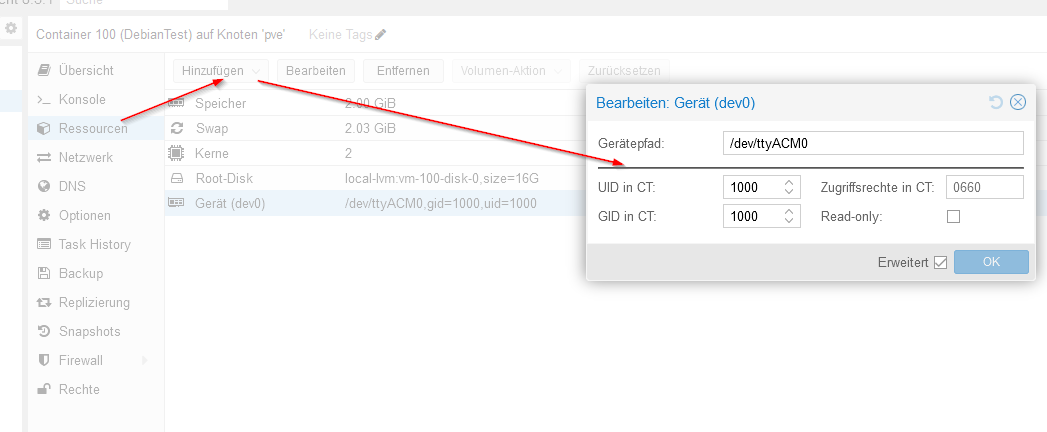
                                        2289a7a0-1e66-4af5-a2eb-1ee5532f8e07-image.png

                                        "Zugriffsrechte im CT" werden mit 0660 vorbesetzt ...
                                        UID/GID muss man selbst eintragen

                                        Finde im Konfig File dann

                                        arch: amd64
                                        cores: 2
                                        dev0: /dev/ttyACM0,gid=1000,uid=1000
                                        features: nesting=1
                                        hostname: DebianTest
                                        memory: 2048
                                        net0: name=eth0,bridge=vmbr0,firewall=1,hwaddr=BC:24:11:8D:96:FE,ip=dhcp,type=veth
                                        onboot: 1
                                        ostype: debian
                                        rootfs: local-lvm:vm-100-disk-0,size=16G
                                        swap: 2080
                                        unprivileged: 1
                                        lxc.cap.drop: "sys_rawio audit_read"
                                        

                                        Intel(R) Celeron(R) CPU N3000 @ 1.04GHz 8G RAM 480G SSD
                                        Virtualization : unprivileged lxc container (debian 12 on Proxmox 8.4.14)
                                        Linux pve 6.8.12-16-pve
                                        6 GByte RAM für den Container
                                        Fritzbox 6591 FW 8.03 (Vodafone Leih-Box)
                                        Remote-Access über Wireguard der Fritzbox

                                        A 1 Antwort Letzte Antwort
                                        0
                                        • MartinPM MartinP

                                          @allodo Kann mach doch inzwischen im Proxmox-Webinterface einstellen, und muss sich nicht mehr mit Konfig-Dateien herumschlagen ...
                                          2289a7a0-1e66-4af5-a2eb-1ee5532f8e07-image.png

                                          "Zugriffsrechte im CT" werden mit 0660 vorbesetzt ...
                                          UID/GID muss man selbst eintragen

                                          Finde im Konfig File dann

                                          arch: amd64
                                          cores: 2
                                          dev0: /dev/ttyACM0,gid=1000,uid=1000
                                          features: nesting=1
                                          hostname: DebianTest
                                          memory: 2048
                                          net0: name=eth0,bridge=vmbr0,firewall=1,hwaddr=BC:24:11:8D:96:FE,ip=dhcp,type=veth
                                          onboot: 1
                                          ostype: debian
                                          rootfs: local-lvm:vm-100-disk-0,size=16G
                                          swap: 2080
                                          unprivileged: 1
                                          lxc.cap.drop: "sys_rawio audit_read"
                                          
                                          A Offline
                                          A Offline
                                          Allodo
                                          schrieb am zuletzt editiert von
                                          #23

                                          @martinp
                                          Danke, das wusste ich nicht. Proxmox ist ja auch völliges Neuland für mich ;)
                                          Allerdings habe ich dort nur den Eintrag "Mount Point" und kann kein Gerät neu zuweisen :(

                                          Ist ein priviliegerter Container, da ich meine automatischen Backups per CIFS auf meinen Windows-Rechner übertragen möchte. Habe gelesen, dass das wohl nur mit einem priviligierten Container gehen würde

                                          MartinPM 1 Antwort Letzte Antwort
                                          0
                                          Antworten
                                          • In einem neuen Thema antworten
                                          Anmelden zum Antworten
                                          • Älteste zuerst
                                          • Neuste zuerst
                                          • Meiste Stimmen


                                          Support us

                                          ioBroker
                                          Community Adapters
                                          Donate
                                          FAQ Cloud / IOT
                                          HowTo: Node.js-Update
                                          HowTo: Backup/Restore
                                          Downloads
                                          BLOG

                                          819

                                          Online

                                          32.4k

                                          Benutzer

                                          81.6k

                                          Themen

                                          1.3m

                                          Beiträge
                                          Community
                                          Impressum | Datenschutz-Bestimmungen | Nutzungsbedingungen | Einwilligungseinstellungen
                                          ioBroker Community 2014-2025
                                          logo
                                          • Anmelden

                                          • Du hast noch kein Konto? Registrieren

                                          • Anmelden oder registrieren, um zu suchen
                                          • Erster Beitrag
                                            Letzter Beitrag
                                          0
                                          • Home
                                          • Aktuell
                                          • Tags
                                          • Ungelesen 0
                                          • Kategorien
                                          • Unreplied
                                          • Beliebt
                                          • GitHub
                                          • Docu
                                          • Hilfe
