@glasfaser
Hallo
iob diag liefert
pi@raspberrypi:~ $ iob diag
iobroker [command]
Commands:
iobroker setup Setup ioBroker
iobroker start [all|<adapter>.<instance>] Starts the js-controller or a specified adapter instance
iobroker stop [<adapter>.<instance>] stops the js-controller or a specified adapter instance
iobroker restart [<adapter>.<instance>] Restarts js-controller or a specified adapter instance [aliases: r]
iobroker debug <adapter>[.<instance>] Starts a Node.js debugging session for the adapter instance
iobroker info Shows the host info
iobroker logs [<adapter>] Monitor log
iobroker add <adapter> [desiredNumber] Add instance of adapter [aliases: a]
iobroker install <adapter> Installs a specified adapter [aliases: i]
iobroker rebuild [<module>] Rebuild all native modules or path
iobroker url <url> [<name>] Install adapter from specified url, e.g. GitHub
iobroker del <adapter> Remove adapter and all instances from this host [aliases: delete]
iobroker del <adapter>.<instance> Remove adapter instance [aliases: delete]
iobroker update [<repositoryUrl>] Update repository and list adapters
iobroker upgrade Upgrade management
iobroker upload [all|<adapter>] Upload management [aliases: u]
iobroker object Object management [aliases: o]
iobroker state State management [aliases: s]
iobroker message <adapter>[.instance] <command> [<message>] Send message to adapter instance/s
iobroker list <type> [<filter>] List all entries, like objects
iobroker chmod <mode> <file> Change file rights
iobroker chown <user> <group> <file> Change file ownership
iobroker touch <file> Touch file
iobroker rm <file> Remove file
iobroker file File management
iobroker user User commands
iobroker group group management
iobroker host <hostname> Set host to given hostname
iobroker set <adapter>.<instance> Change settings of adapter config
iobroker license <license.file or license.text> Update license by given file
iobroker cert Certificate management
iobroker clean <yes> Clears all objects and states
iobroker backup Create backup
iobroker restore <backup name or path> Restore a specified backup
iobroker validate <backup name or path> Validate a specified backup
iobroker status [all|<adapter>.<instance>] Status of ioBroker or adapter instance [aliases: isrun]
iobroker repo [<name>] Show repo information
iobroker uuid Show uuid of the installation [aliases: id]
iobroker unsetup Reset license, installation secret and language
iobroker fix Execute the installation fixer script, this updates your ioBroker installation
iobroker multihost Multihost management
iobroker compact compact group management
iobroker plugin Plugin management
iobroker version [<adapter>] Show version of js-controller or specified adapter [aliases: v]
Options:
--help Show help [boolean]
Ich glaube aber, dass ein Problem meines lokalen Netzwerkes schuld sein könnte.
Ich habe gerade folgendes beobachtet:
Auf meinem (Windows) Rechner waren 2 Firefox Fenster mit IO-Broker Vis sichtbar, in einer virtuellen Maschine eine Win 7 Instanz und über VNC ein Desktop eines Win 10 Rechners der gerade eine große Datei von der lokalen Festplatte auf ein NAS kopiert hat. Dann hatte ich in Ultraedit eine Datei geöffnet, die auf dem IO-Broker Raspberry liegt und per SMB ins lokale Netz eingebunden ist.
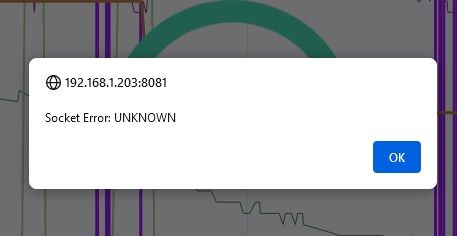
Jetzt habe ich in das UltraaEdit Fenster geklickt und dieses hat dann erstmal die darin geladene Datei aktualisiert. In dem Moment sind auf beiden VIS Fenstern die Fenster "Socket Errror: UNKNOWN" aufgepoppt, im VNC Fenster hat das Kopieren der Datei auf das NAS mit der Meldung "... abgebrochen, überprüfen Sie die Schreibrechte" agebrochen und die vituelle Maschine hat komplett den Netzwerkzugang verloren. (Kein Ping mehr ins lokale Netz möglich, Netzwerkadapter sagt, dass kein Kabel angeschlossen ist, wenn ich die virtuelle Maschine schlafen lege "Zustand der virtuellen Maschine speichern" und wieder aufwecke ist das Netzwerk wieder da).
Ich glaube ich habe ein tieferes Netzwerkproblem hier :-(