Skip to content
  • Home
  • Recent
  • Tags
  • 0 Unread 0
  • Categories
  • Unreplied
  • Popular
  • GitHub
  • Docu
  • Hilfe
Skins
  • Light
  • Brite
  • Cerulean
  • Cosmo
  • Flatly
  • Journal
  • Litera
  • Lumen
  • Lux
  • Materia
  • Minty
  • Morph
  • Pulse
  • Sandstone
  • Simplex
  • Sketchy
  • Spacelab
  • United
  • Yeti
  • Zephyr
  • Dark
  • Cyborg
  • Darkly
  • Quartz
  • Slate
  • Solar
  • Superhero
  • Vapor

  • Default (No Skin)
  • No Skin
Collapse
ioBroker Logo

Community Forum

donate donate
  1. ioBroker Community Home
  2. Deutsch
  3. Tester
  4. Adapter: ioBroker.info

NEWS

  • Jahresrückblick 2025 – unser neuer Blogbeitrag ist online! ✨
    BluefoxB
    Bluefox
    17
    1
    2.7k

  • Neuer Blogbeitrag: Monatsrückblick - Dezember 2025 🎄
    BluefoxB
    Bluefox
    13
    1
    1.1k

  • Weihnachtsangebot 2025! 🎄
    BluefoxB
    Bluefox
    25
    1
    2.4k

Adapter: ioBroker.info

Scheduled Pinned Locked Moved Tester
info adapter
350 Posts 53 Posters 91.2k Views 23 Watching
  • Oldest to Newest
  • Newest to Oldest
  • Most Votes
Reply
  • Reply as topic
Log in to reply
This topic has been deleted. Only users with topic management privileges can see it.
  • liv-in-skyL liv-in-sky

    Image 1.png
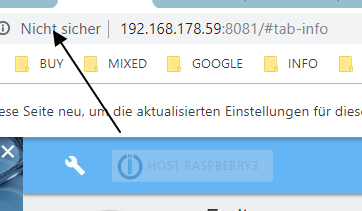
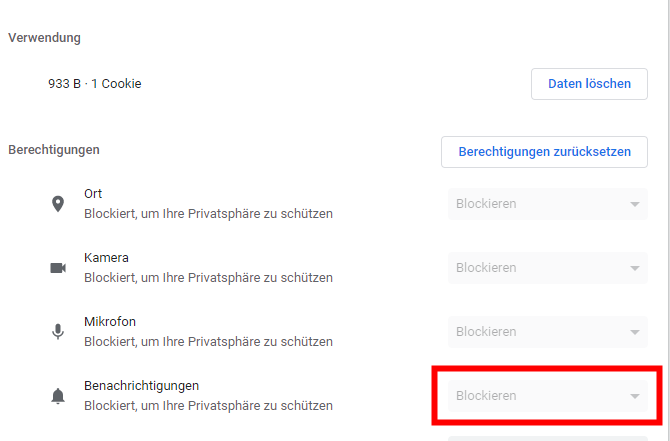
    wenn man in chrome darauf klickt - kann man popups blockieren (webseite einstellung)
    bahnuhrB Online
    bahnuhrB Online
    bahnuhr
    Forum Testing Most Active
    wrote on last edited by
    #287

    @liv-in-sky sagte in Adapter: ioBroker.info:

    Image 1.png
    wenn man in chrome darauf klickt - kann man popups blockieren (webseite einstellung)

    ef8465f0-4915-4aa9-b064-82558a062d85-image.png

    tatsächlich!

    Ist bei mir offensichtlich blockiert.
    Dann hat das aber chrome blockiert, oder?
    wahrscheinlich wg. dem "Nicht sicher", richtig ?

    mfg


    Wenn ich helfen konnte, dann Daumen hoch (Pfeil nach oben)!
    Danke.
    gute Forenbeiträge: https://forum.iobroker.net/topic/51555/hinweise-f%C3%BCr-gute-forenbeitr%C3%A4ge
    ScreenToGif :https://www.screentogif.com/downloads.html

    liv-in-skyL 1 Reply Last reply
    0
    • bahnuhrB bahnuhr

      @liv-in-sky sagte in Adapter: ioBroker.info:

      Image 1.png
      wenn man in chrome darauf klickt - kann man popups blockieren (webseite einstellung)

      ef8465f0-4915-4aa9-b064-82558a062d85-image.png

      tatsächlich!

      Ist bei mir offensichtlich blockiert.
      Dann hat das aber chrome blockiert, oder?
      wahrscheinlich wg. dem "Nicht sicher", richtig ?

      mfg

      liv-in-skyL Offline
      liv-in-skyL Offline
      liv-in-sky
      wrote on last edited by
      #288

      @bahnuhr

      das weiß ich auch nicht so genau - aber vermutlich hast du recht

      ein paar zeilen weiter unten sind auch noch popups zum einstellen

      nach einem gelösten Thread wäre es sinnvoll dies in der Überschrift des ersten Posts einzutragen [gelöst]-... Bitte benutzt das Voting rechts unten im Beitrag wenn er euch geholfen hat. Forum-Tools: PicPick https://picpick.app/en/download/ und ScreenToGif https://www.screentogif.com/downloads.html

      1 Reply Last reply
      0
      • ldittmarL Offline
        ldittmarL Offline
        ldittmar
        Developer
        wrote on last edited by
        #289

        Das ist kein Popup, den man blockieren kann. Das ist eine Meldung vom Admin Adapter ab Version 3.6.1. Normalerweise sollte die Meldung nur einmal erscheinen, dann nie wieder. Irgendwo im System ist aber ein Fehler drin, der dazu führt, dass der Admin Adapter denkt er hätte die Meldung noch nicht angezeigt und deswegen kommt das Fenster immer wieder.

        Die Meldung wurde jetzt entfernt und sollte nicht mehr auftauchen. Ich werde jetzt auch ein Dummy Adapter bauen, um das Problem zu rekonstruieren um dann zusammen mit den anderen nach einer Lösung zu suchen. So lange werden keine neue Nachrichten im Info Adapter rein kommen.

        Und nochmals sorry... das Problem, warum das schon früher nicht bemerkt wurde, ist dass es beim Debuggen wunderbar funktioniert. Erst im Live Betrieb geht es nicht....

        Das Problem habt ihr auch nur wenn Admin 3.6.2 drauf ist...

        Also... wir sind dran es zu beheben.

        Grüße,
        ldittmar

        liv-in-skyL bahnuhrB 2 Replies Last reply
        0
        • ldittmarL ldittmar

          Das ist kein Popup, den man blockieren kann. Das ist eine Meldung vom Admin Adapter ab Version 3.6.1. Normalerweise sollte die Meldung nur einmal erscheinen, dann nie wieder. Irgendwo im System ist aber ein Fehler drin, der dazu führt, dass der Admin Adapter denkt er hätte die Meldung noch nicht angezeigt und deswegen kommt das Fenster immer wieder.

          Die Meldung wurde jetzt entfernt und sollte nicht mehr auftauchen. Ich werde jetzt auch ein Dummy Adapter bauen, um das Problem zu rekonstruieren um dann zusammen mit den anderen nach einer Lösung zu suchen. So lange werden keine neue Nachrichten im Info Adapter rein kommen.

          Und nochmals sorry... das Problem, warum das schon früher nicht bemerkt wurde, ist dass es beim Debuggen wunderbar funktioniert. Erst im Live Betrieb geht es nicht....

          Das Problem habt ihr auch nur wenn Admin 3.6.2 drauf ist...

          Also... wir sind dran es zu beheben.

          Grüße,
          ldittmar

          liv-in-skyL Offline
          liv-in-skyL Offline
          liv-in-sky
          wrote on last edited by
          #290

          @ldittmar danke -das erklärt viel

          nach einem gelösten Thread wäre es sinnvoll dies in der Überschrift des ersten Posts einzutragen [gelöst]-... Bitte benutzt das Voting rechts unten im Beitrag wenn er euch geholfen hat. Forum-Tools: PicPick https://picpick.app/en/download/ und ScreenToGif https://www.screentogif.com/downloads.html

          1 Reply Last reply
          0
          • ldittmarL ldittmar

            Das ist kein Popup, den man blockieren kann. Das ist eine Meldung vom Admin Adapter ab Version 3.6.1. Normalerweise sollte die Meldung nur einmal erscheinen, dann nie wieder. Irgendwo im System ist aber ein Fehler drin, der dazu führt, dass der Admin Adapter denkt er hätte die Meldung noch nicht angezeigt und deswegen kommt das Fenster immer wieder.

            Die Meldung wurde jetzt entfernt und sollte nicht mehr auftauchen. Ich werde jetzt auch ein Dummy Adapter bauen, um das Problem zu rekonstruieren um dann zusammen mit den anderen nach einer Lösung zu suchen. So lange werden keine neue Nachrichten im Info Adapter rein kommen.

            Und nochmals sorry... das Problem, warum das schon früher nicht bemerkt wurde, ist dass es beim Debuggen wunderbar funktioniert. Erst im Live Betrieb geht es nicht....

            Das Problem habt ihr auch nur wenn Admin 3.6.2 drauf ist...

            Also... wir sind dran es zu beheben.

            Grüße,
            ldittmar

            bahnuhrB Online
            bahnuhrB Online
            bahnuhr
            Forum Testing Most Active
            wrote on last edited by
            #291

            @ldittmar sagte in Adapter: ioBroker.info:

            ab Version 3.6.1

            Ahaaa

            Ich habe 3.6.0 und deshalb wohl keine meldung.


            Wenn ich helfen konnte, dann Daumen hoch (Pfeil nach oben)!
            Danke.
            gute Forenbeiträge: https://forum.iobroker.net/topic/51555/hinweise-f%C3%BCr-gute-forenbeitr%C3%A4ge
            ScreenToGif :https://www.screentogif.com/downloads.html

            ldittmarL 1 Reply Last reply
            0
            • bahnuhrB bahnuhr

              @ldittmar sagte in Adapter: ioBroker.info:

              ab Version 3.6.1

              Ahaaa

              Ich habe 3.6.0 und deshalb wohl keine meldung.

              ldittmarL Offline
              ldittmarL Offline
              ldittmar
              Developer
              wrote on last edited by
              #292

              @bahnuhr said in Adapter: ioBroker.info:

              @ldittmar sagte in Adapter: ioBroker.info:

              ab Version 3.6.1

              Ahaaa

              Ich habe 3.6.0 und deshalb wohl keine meldung.

              Das ist ja auch die Stable Version... die 3.6.2 ist Latest.... kann also, wie hier der Fall ist, manchmal Fehlerhaft sein. ;-)

              1 Reply Last reply
              0
              • ldittmarL ldittmar

                @BBTown das ist ein Bug irgendwo im System. Wir sind dran es zu beheben. Die Meldungen verschwinden nach einer Zeit automatisch. Wir werden erstmal keine neue Nachrichten hinzufügen, bis die Ursache gefunden worden ist. Sorry....

                BBTownB Offline
                BBTownB Offline
                BBTown
                wrote on last edited by
                #293

                @ldittmar sagte in Adapter: ioBroker.info:

                @BBTown das ist ein Bug irgendwo im System. Wir sind dran es zu beheben. Die Meldungen verschwinden nach einer Zeit automatisch. Wir werden erstmal keine neue Nachrichten hinzufügen, bis die Ursache gefunden worden ist. Sorry....

                okidoki ... danke für die Erklärung, ich gedulde mich ;-)

                ioBroker auf NUC (VM debian v13 (Trixie ), node v22.21.0 npm v10.9.4, js-controller v7.1.0 jsonl/jsonl / HomeMatic CCU-2 (Wired und Funk) / Philips HUE / echo.DOT / Broadlink RM pro / SONOS

                1 Reply Last reply
                0
                • C Offline
                  C Offline
                  Conquest
                  wrote on last edited by Conquest
                  #294

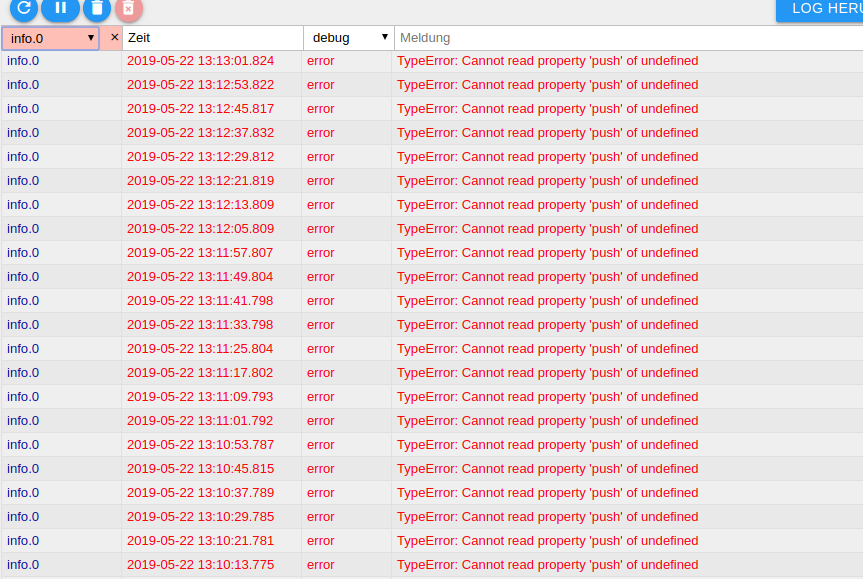
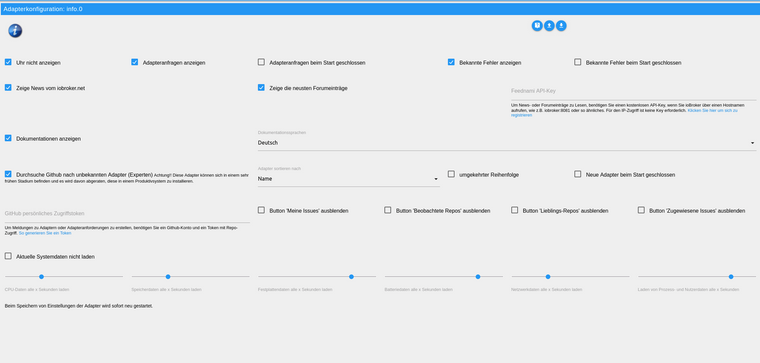
                  Hallo ich habe seid heute einen Error im Log. An der Konfiguration habe ich nix geändert. Der Adapter hat die Version 1.3.7.
                  Hat noch jemand das Problem?

                  screenshot-192.168.178.46-8081-2019.05.22-13-21-27.png
                  screenshot-192.168.178.46-8081-2019.05.22-13-26-43.png

                  1 Reply Last reply
                  0
                  • L Offline
                    L Offline
                    loverz
                    wrote on last edited by
                    #295

                    Bei mir hat sich heute beim Updaten des Admin Adapters auttomatisch der Info Adapter installiert.

                    Da mein ioBroker auf einem Raspberry 3B+ läuft muss ich natürlich Ressourcen sparen.

                    Wieviel Ressourcen nimmt denn dieser Adapter in Anspruch?
                    Meine Frage bezieht sich vorallem auf das sekündliche aktualisieren der Werte für CPU, Temperatur RAM etc.

                    Ist das wirklich nötig?

                    sigi234S iomountainI 2 Replies Last reply
                    0
                    • L loverz

                      Bei mir hat sich heute beim Updaten des Admin Adapters auttomatisch der Info Adapter installiert.

                      Da mein ioBroker auf einem Raspberry 3B+ läuft muss ich natürlich Ressourcen sparen.

                      Wieviel Ressourcen nimmt denn dieser Adapter in Anspruch?
                      Meine Frage bezieht sich vorallem auf das sekündliche aktualisieren der Werte für CPU, Temperatur RAM etc.

                      Ist das wirklich nötig?

                      sigi234S Online
                      sigi234S Online
                      sigi234
                      Forum Testing Most Active
                      wrote on last edited by sigi234
                      #296

                      @loverz
                      Kannst du erhöhen oder deaktivieren.......

                      Bitte benutzt das Voting rechts unten im Beitrag wenn er euch geholfen hat.
                      Immer Daten sichern!

                      L 1 Reply Last reply
                      0
                      • L loverz

                        Bei mir hat sich heute beim Updaten des Admin Adapters auttomatisch der Info Adapter installiert.

                        Da mein ioBroker auf einem Raspberry 3B+ läuft muss ich natürlich Ressourcen sparen.

                        Wieviel Ressourcen nimmt denn dieser Adapter in Anspruch?
                        Meine Frage bezieht sich vorallem auf das sekündliche aktualisieren der Werte für CPU, Temperatur RAM etc.

                        Ist das wirklich nötig?

                        iomountainI Offline
                        iomountainI Offline
                        iomountain
                        wrote on last edited by
                        #297

                        @loverz sagte in Adapter: ioBroker.info:

                        Info Adapter installiert

                        @sigi234 sagte in Adapter: ioBroker.info:

                        @loverz
                        Kannst du erhöhen oder deaktivieren.......

                        Hab ich bei mir auch deaktiviert, das meiste funktioniert trotzdem auf dem Info Tab.

                        1 Reply Last reply
                        0
                        • sigi234S sigi234

                          @loverz
                          Kannst du erhöhen oder deaktivieren.......

                          L Offline
                          L Offline
                          loverz
                          wrote on last edited by
                          #298

                          @sigi234 das ist mir klar, aber die Frage ist, wieviel Ressourcen das überhaupt braucht in der Standardeinstellung.
                          Ist das bei einem Pi 3B+ vernachlässigbar, oder ernste Ressourcenbindung?

                          sigi234S 1 Reply Last reply
                          0
                          • L loverz

                            @sigi234 das ist mir klar, aber die Frage ist, wieviel Ressourcen das überhaupt braucht in der Standardeinstellung.
                            Ist das bei einem Pi 3B+ vernachlässigbar, oder ernste Ressourcenbindung?

                            sigi234S Online
                            sigi234S Online
                            sigi234
                            Forum Testing Most Active
                            wrote on last edited by
                            #299

                            @loverz sagte in Adapter: ioBroker.info:

                            Ist das bei einem Pi 3B+ vernachlässigbar, oder ernste Ressourcenbindung?

                            Kommt auf dein System an, wieviel Adapter , Skripte du hast........beobachte mal die Auslastung.

                            https://github.com/iobroker-community-adapters/ioBroker.info/blob/master/docs/de/info.md

                            Bitte benutzt das Voting rechts unten im Beitrag wenn er euch geholfen hat.
                            Immer Daten sichern!

                            1 Reply Last reply
                            1
                            • D Offline
                              D Offline
                              Daniel1103
                              wrote on last edited by
                              #300

                              Hallo,

                              Das mit der Temperaturanzeige der CPU wurde noch nicht gefixt oder?

                              MfG Daniel

                              1 Reply Last reply
                              0
                              • crunchipC Away
                                crunchipC Away
                                crunchip
                                Forum Testing Most Active
                                wrote on last edited by crunchip
                                #301

                                Temperaturanzeige geht bei mir auch nicht.

                                root@Zotac:~# apt-get install lm-sensors
                                Paketlisten werden gelesen... Fertig
                                Abhängigkeitsbaum wird aufgebaut.
                                Statusinformationen werden eingelesen.... Fertig
                                The following additional packages will be installed:
                                  libsensors4
                                Vorgeschlagene Pakete:
                                  fancontrol read-edid i2c-tools
                                Die folgenden NEUEN Pakete werden installiert:
                                  libsensors4 lm-sensors
                                0 aktualisiert, 2 neu installiert, 0 zu entfernen und 0 nicht aktualisiert.
                                Es müssen 165 kB an Archiven heruntergeladen werden.
                                Nach dieser Operation werden 515 kB Plattenplatz zusätzlich benutzt.
                                Möchten Sie fortfahren? [J/n] j
                                Holen:1 http://ftp.de.debian.org/debian stretch/main amd64 libsensors4 amd64 1:3                        .4.0-4 [53,3 kB]
                                Holen:2 http://ftp.de.debian.org/debian stretch/main amd64 lm-sensors amd64 1:3.                        4.0-4 [112 kB]
                                Es wurden 165 kB in 0 s geholt (556 kB/s).
                                Vormals nicht ausgewähltes Paket libsensors4:amd64 wird gewählt.
                                (Lese Datenbank ... 60894 Dateien und Verzeichnisse sind derzeit installiert.)
                                Vorbereitung zum Entpacken von .../libsensors4_1%3a3.4.0-4_amd64.deb ...
                                Entpacken von libsensors4:amd64 (1:3.4.0-4) ...
                                Vormals nicht ausgewähltes Paket lm-sensors wird gewählt.
                                Vorbereitung zum Entpacken von .../lm-sensors_1%3a3.4.0-4_amd64.deb ...
                                Entpacken von lm-sensors (1:3.4.0-4) ...
                                Trigger für libc-bin (2.24-11+deb9u4) werden verarbeitet ...
                                Trigger für systemd (232-25+deb9u11) werden verarbeitet ...
                                libsensors4:amd64 (1:3.4.0-4) wird eingerichtet ...
                                Trigger für man-db (2.7.6.1-2) werden verarbeitet ...
                                lm-sensors (1:3.4.0-4) wird eingerichtet ...
                                Created symlink /etc/systemd/system/multi-user.target.wants/lm-sensors.service →                         /lib/systemd/system/lm-sensors.service.
                                Trigger für libc-bin (2.24-11+deb9u4) werden verarbeitet ...
                                Trigger für systemd (232-25+deb9u11) werden verarbeitet ...
                                root@Zotac:~# sensors
                                iwlwifi-virtual-0
                                Adapter: Virtual device
                                temp1:            N/A
                                
                                acpitz-virtual-0
                                Adapter: Virtual device
                                temp1:        +52.0°C  (crit = +100.0°C)
                                
                                coretemp-isa-0000
                                Adapter: ISA adapter
                                Package id 0:  +51.0°C  (high = +105.0°C, crit = +105.0°C)
                                Core 0:        +50.0°C  (high = +105.0°C, crit = +105.0°C)
                                Core 1:        +50.0°C  (high = +105.0°C, crit = +105.0°C)
                                Core 2:        +51.0°C  (high = +105.0°C, crit = +105.0°C)
                                Core 3:        +51.0°C  (high = +105.0°C, crit = +105.0°C)
                                
                                root@Zotac:~# sensors-detect
                                # sensors-detect revision 6284 (2015-05-31 14:00:33 +0200)
                                # System: NA ZBOX-CI327NANO-GS-01 [Default string]
                                # Kernel: 4.15.18-15-pve x86_64
                                # Processor: Intel(R) Celeron(R) CPU N3450 @ 1.10GHz (6/92/9)
                                
                                This program will help you determine which kernel modules you need
                                to load to use lm_sensors most effectively. It is generally safe
                                and recommended to accept the default answers to all questions,
                                unless you know what you're doing.
                                
                                Some south bridges, CPUs or memory controllers contain embedded sensors.
                                Do you want to scan for them? This is totally safe. (YES/no): y
                                Module cpuid loaded successfully.
                                Silicon Integrated Systems SIS5595...                       No
                                VIA VT82C686 Integrated Sensors...                          No
                                VIA VT8231 Integrated Sensors...                            No
                                AMD K8 thermal sensors...                                   No
                                AMD Family 10h thermal sensors...                           No
                                AMD Family 11h thermal sensors...                           No
                                AMD Family 12h and 14h thermal sensors...                   No
                                AMD Family 15h thermal sensors...                           No
                                AMD Family 16h thermal sensors...                           No
                                AMD Family 15h power sensors...                             No
                                AMD Family 16h power sensors...                             No
                                Intel digital thermal sensor...                             Success!
                                    (driver `coretemp')
                                Intel AMB FB-DIMM thermal sensor...                         No
                                Intel 5500/5520/X58 thermal sensor...                       No
                                VIA C7 thermal sensor...                                    No
                                VIA Nano thermal sensor...                                  No
                                
                                Some Super I/O chips contain embedded sensors. We have to write to
                                standard I/O ports to probe them. This is usually safe.
                                Do you want to scan for Super I/O sensors? (YES/no): y
                                Probing for Super-I/O at 0x2e/0x2f
                                Trying family `National Semiconductor/ITE'...               No
                                Trying family `SMSC'...                                     No
                                Trying family `VIA/Winbond/Nuvoton/Fintek'...               No
                                Trying family `ITE'...                                      Yes
                                Found unknown chip with ID 0x8613
                                Probing for Super-I/O at 0x4e/0x4f
                                Trying family `National Semiconductor/ITE'...               No
                                Trying family `SMSC'...                                     No
                                Trying family `VIA/Winbond/Nuvoton/Fintek'...               No
                                Trying family `ITE'...                                      No
                                
                                Some systems (mainly servers) implement IPMI, a set of common interfaces
                                through which system health data may be retrieved, amongst other things.
                                We first try to get the information from SMBIOS. If we don't find it
                                there, we have to read from arbitrary I/O ports to probe for such
                                interfaces. This is normally safe. Do you want to scan for IPMI
                                interfaces? (YES/no): y
                                Probing for `IPMI BMC KCS' at 0xca0...                      No
                                Probing for `IPMI BMC SMIC' at 0xca8...                     No
                                
                                Some hardware monitoring chips are accessible through the ISA I/O ports.
                                We have to write to arbitrary I/O ports to probe them. This is usually
                                safe though. Yes, you do have ISA I/O ports even if you do not have any
                                ISA slots! Do you want to scan the ISA I/O ports? (YES/no): y
                                Probing for `National Semiconductor LM78' at 0x290...       No
                                Probing for `National Semiconductor LM79' at 0x290...       No
                                Probing for `Winbond W83781D' at 0x290...                   No
                                Probing for `Winbond W83782D' at 0x290...                   No
                                
                                Lastly, we can probe the I2C/SMBus adapters for connected hardware
                                monitoring devices. This is the most risky part, and while it works
                                reasonably well on most systems, it has been reported to cause trouble
                                on some systems.
                                Do you want to probe the I2C/SMBus adapters now? (YES/no): y
                                Found unknown SMBus adapter 8086:5ad4 at 0000:00:1f.1.
                                Sorry, no supported PCI bus adapters found.
                                
                                Next adapter: SMBus I801 adapter at f040 (i2c-0)
                                Do you want to scan it? (YES/no/selectively): y
                                Client found at address 0x50
                                Probing for `Analog Devices ADM1033'...                     No
                                Probing for `Analog Devices ADM1034'...                     No
                                Probing for `SPD EEPROM'...                                 Yes
                                    (confidence 8, not a hardware monitoring chip)
                                Probing for `EDID EEPROM'...                                No
                                Client found at address 0x52
                                Probing for `Analog Devices ADM1033'...                     No
                                Probing for `Analog Devices ADM1034'...                     No
                                Probing for `SPD EEPROM'...                                 Yes
                                    (confidence 8, not a hardware monitoring chip)
                                
                                Next adapter: i915 gmbus dpb (i2c-1)
                                Do you want to scan it? (yes/NO/selectively): y
                                
                                Next adapter: i915 gmbus dpc (i2c-2)
                                Do you want to scan it? (yes/NO/selectively): y
                                
                                Next adapter: i915 gmbus misc (i2c-3)
                                Do you want to scan it? (yes/NO/selectively): y
                                
                                Next adapter: DPDDC-B (i2c-4)
                                Do you want to scan it? (yes/NO/selectively): y
                                
                                Next adapter: DPDDC-C (i2c-5)
                                Do you want to scan it? (yes/NO/selectively): y
                                
                                
                                Now follows a summary of the probes I have just done.
                                Just press ENTER to continue:
                                
                                Driver `coretemp':
                                  * Chip `Intel digital thermal sensor' (confidence: 9)
                                
                                To load everything that is needed, add this to /etc/modules:
                                #----cut here----
                                # Chip drivers
                                coretemp
                                #----cut here----
                                If you have some drivers built into your kernel, the list above will
                                contain too many modules. Skip the appropriate ones!
                                
                                Do you want to add these lines automatically to /etc/modules? (yes/NO)y
                                Successful!
                                
                                Monitoring programs won't work until the needed modules are
                                loaded. You may want to run '/etc/init.d/kmod start'
                                to load them.
                                
                                Unloading cpuid... OK


                                umgestiegen von Proxmox auf Unraid

                                liv-in-skyL 1 Reply Last reply
                                0
                                • crunchipC crunchip

                                  Temperaturanzeige geht bei mir auch nicht.

                                  root@Zotac:~# apt-get install lm-sensors
                                  Paketlisten werden gelesen... Fertig
                                  Abhängigkeitsbaum wird aufgebaut.
                                  Statusinformationen werden eingelesen.... Fertig
                                  The following additional packages will be installed:
                                    libsensors4
                                  Vorgeschlagene Pakete:
                                    fancontrol read-edid i2c-tools
                                  Die folgenden NEUEN Pakete werden installiert:
                                    libsensors4 lm-sensors
                                  0 aktualisiert, 2 neu installiert, 0 zu entfernen und 0 nicht aktualisiert.
                                  Es müssen 165 kB an Archiven heruntergeladen werden.
                                  Nach dieser Operation werden 515 kB Plattenplatz zusätzlich benutzt.
                                  Möchten Sie fortfahren? [J/n] j
                                  Holen:1 http://ftp.de.debian.org/debian stretch/main amd64 libsensors4 amd64 1:3                        .4.0-4 [53,3 kB]
                                  Holen:2 http://ftp.de.debian.org/debian stretch/main amd64 lm-sensors amd64 1:3.                        4.0-4 [112 kB]
                                  Es wurden 165 kB in 0 s geholt (556 kB/s).
                                  Vormals nicht ausgewähltes Paket libsensors4:amd64 wird gewählt.
                                  (Lese Datenbank ... 60894 Dateien und Verzeichnisse sind derzeit installiert.)
                                  Vorbereitung zum Entpacken von .../libsensors4_1%3a3.4.0-4_amd64.deb ...
                                  Entpacken von libsensors4:amd64 (1:3.4.0-4) ...
                                  Vormals nicht ausgewähltes Paket lm-sensors wird gewählt.
                                  Vorbereitung zum Entpacken von .../lm-sensors_1%3a3.4.0-4_amd64.deb ...
                                  Entpacken von lm-sensors (1:3.4.0-4) ...
                                  Trigger für libc-bin (2.24-11+deb9u4) werden verarbeitet ...
                                  Trigger für systemd (232-25+deb9u11) werden verarbeitet ...
                                  libsensors4:amd64 (1:3.4.0-4) wird eingerichtet ...
                                  Trigger für man-db (2.7.6.1-2) werden verarbeitet ...
                                  lm-sensors (1:3.4.0-4) wird eingerichtet ...
                                  Created symlink /etc/systemd/system/multi-user.target.wants/lm-sensors.service →                         /lib/systemd/system/lm-sensors.service.
                                  Trigger für libc-bin (2.24-11+deb9u4) werden verarbeitet ...
                                  Trigger für systemd (232-25+deb9u11) werden verarbeitet ...
                                  root@Zotac:~# sensors
                                  iwlwifi-virtual-0
                                  Adapter: Virtual device
                                  temp1:            N/A
                                  
                                  acpitz-virtual-0
                                  Adapter: Virtual device
                                  temp1:        +52.0°C  (crit = +100.0°C)
                                  
                                  coretemp-isa-0000
                                  Adapter: ISA adapter
                                  Package id 0:  +51.0°C  (high = +105.0°C, crit = +105.0°C)
                                  Core 0:        +50.0°C  (high = +105.0°C, crit = +105.0°C)
                                  Core 1:        +50.0°C  (high = +105.0°C, crit = +105.0°C)
                                  Core 2:        +51.0°C  (high = +105.0°C, crit = +105.0°C)
                                  Core 3:        +51.0°C  (high = +105.0°C, crit = +105.0°C)
                                  
                                  root@Zotac:~# sensors-detect
                                  # sensors-detect revision 6284 (2015-05-31 14:00:33 +0200)
                                  # System: NA ZBOX-CI327NANO-GS-01 [Default string]
                                  # Kernel: 4.15.18-15-pve x86_64
                                  # Processor: Intel(R) Celeron(R) CPU N3450 @ 1.10GHz (6/92/9)
                                  
                                  This program will help you determine which kernel modules you need
                                  to load to use lm_sensors most effectively. It is generally safe
                                  and recommended to accept the default answers to all questions,
                                  unless you know what you're doing.
                                  
                                  Some south bridges, CPUs or memory controllers contain embedded sensors.
                                  Do you want to scan for them? This is totally safe. (YES/no): y
                                  Module cpuid loaded successfully.
                                  Silicon Integrated Systems SIS5595...                       No
                                  VIA VT82C686 Integrated Sensors...                          No
                                  VIA VT8231 Integrated Sensors...                            No
                                  AMD K8 thermal sensors...                                   No
                                  AMD Family 10h thermal sensors...                           No
                                  AMD Family 11h thermal sensors...                           No
                                  AMD Family 12h and 14h thermal sensors...                   No
                                  AMD Family 15h thermal sensors...                           No
                                  AMD Family 16h thermal sensors...                           No
                                  AMD Family 15h power sensors...                             No
                                  AMD Family 16h power sensors...                             No
                                  Intel digital thermal sensor...                             Success!
                                      (driver `coretemp')
                                  Intel AMB FB-DIMM thermal sensor...                         No
                                  Intel 5500/5520/X58 thermal sensor...                       No
                                  VIA C7 thermal sensor...                                    No
                                  VIA Nano thermal sensor...                                  No
                                  
                                  Some Super I/O chips contain embedded sensors. We have to write to
                                  standard I/O ports to probe them. This is usually safe.
                                  Do you want to scan for Super I/O sensors? (YES/no): y
                                  Probing for Super-I/O at 0x2e/0x2f
                                  Trying family `National Semiconductor/ITE'...               No
                                  Trying family `SMSC'...                                     No
                                  Trying family `VIA/Winbond/Nuvoton/Fintek'...               No
                                  Trying family `ITE'...                                      Yes
                                  Found unknown chip with ID 0x8613
                                  Probing for Super-I/O at 0x4e/0x4f
                                  Trying family `National Semiconductor/ITE'...               No
                                  Trying family `SMSC'...                                     No
                                  Trying family `VIA/Winbond/Nuvoton/Fintek'...               No
                                  Trying family `ITE'...                                      No
                                  
                                  Some systems (mainly servers) implement IPMI, a set of common interfaces
                                  through which system health data may be retrieved, amongst other things.
                                  We first try to get the information from SMBIOS. If we don't find it
                                  there, we have to read from arbitrary I/O ports to probe for such
                                  interfaces. This is normally safe. Do you want to scan for IPMI
                                  interfaces? (YES/no): y
                                  Probing for `IPMI BMC KCS' at 0xca0...                      No
                                  Probing for `IPMI BMC SMIC' at 0xca8...                     No
                                  
                                  Some hardware monitoring chips are accessible through the ISA I/O ports.
                                  We have to write to arbitrary I/O ports to probe them. This is usually
                                  safe though. Yes, you do have ISA I/O ports even if you do not have any
                                  ISA slots! Do you want to scan the ISA I/O ports? (YES/no): y
                                  Probing for `National Semiconductor LM78' at 0x290...       No
                                  Probing for `National Semiconductor LM79' at 0x290...       No
                                  Probing for `Winbond W83781D' at 0x290...                   No
                                  Probing for `Winbond W83782D' at 0x290...                   No
                                  
                                  Lastly, we can probe the I2C/SMBus adapters for connected hardware
                                  monitoring devices. This is the most risky part, and while it works
                                  reasonably well on most systems, it has been reported to cause trouble
                                  on some systems.
                                  Do you want to probe the I2C/SMBus adapters now? (YES/no): y
                                  Found unknown SMBus adapter 8086:5ad4 at 0000:00:1f.1.
                                  Sorry, no supported PCI bus adapters found.
                                  
                                  Next adapter: SMBus I801 adapter at f040 (i2c-0)
                                  Do you want to scan it? (YES/no/selectively): y
                                  Client found at address 0x50
                                  Probing for `Analog Devices ADM1033'...                     No
                                  Probing for `Analog Devices ADM1034'...                     No
                                  Probing for `SPD EEPROM'...                                 Yes
                                      (confidence 8, not a hardware monitoring chip)
                                  Probing for `EDID EEPROM'...                                No
                                  Client found at address 0x52
                                  Probing for `Analog Devices ADM1033'...                     No
                                  Probing for `Analog Devices ADM1034'...                     No
                                  Probing for `SPD EEPROM'...                                 Yes
                                      (confidence 8, not a hardware monitoring chip)
                                  
                                  Next adapter: i915 gmbus dpb (i2c-1)
                                  Do you want to scan it? (yes/NO/selectively): y
                                  
                                  Next adapter: i915 gmbus dpc (i2c-2)
                                  Do you want to scan it? (yes/NO/selectively): y
                                  
                                  Next adapter: i915 gmbus misc (i2c-3)
                                  Do you want to scan it? (yes/NO/selectively): y
                                  
                                  Next adapter: DPDDC-B (i2c-4)
                                  Do you want to scan it? (yes/NO/selectively): y
                                  
                                  Next adapter: DPDDC-C (i2c-5)
                                  Do you want to scan it? (yes/NO/selectively): y
                                  
                                  
                                  Now follows a summary of the probes I have just done.
                                  Just press ENTER to continue:
                                  
                                  Driver `coretemp':
                                    * Chip `Intel digital thermal sensor' (confidence: 9)
                                  
                                  To load everything that is needed, add this to /etc/modules:
                                  #----cut here----
                                  # Chip drivers
                                  coretemp
                                  #----cut here----
                                  If you have some drivers built into your kernel, the list above will
                                  contain too many modules. Skip the appropriate ones!
                                  
                                  Do you want to add these lines automatically to /etc/modules? (yes/NO)y
                                  Successful!
                                  
                                  Monitoring programs won't work until the needed modules are
                                  loaded. You may want to run '/etc/init.d/kmod start'
                                  to load them.
                                  
                                  Unloading cpuid... OK
                                  
                                  
                                  liv-in-skyL Offline
                                  liv-in-skyL Offline
                                  liv-in-sky
                                  wrote on last edited by liv-in-sky
                                  #302

                                  hi @crunchip

                                  ich glaube du benutzt doch proxmox - dann geht das nicht - meine cpu temp hole ich über ein linux script im proxmox server und sende es an iobroker (VM)

                                  nach einem gelösten Thread wäre es sinnvoll dies in der Überschrift des ersten Posts einzutragen [gelöst]-... Bitte benutzt das Voting rechts unten im Beitrag wenn er euch geholfen hat. Forum-Tools: PicPick https://picpick.app/en/download/ und ScreenToGif https://www.screentogif.com/downloads.html

                                  crunchipC B 2 Replies Last reply
                                  0
                                  • liv-in-skyL liv-in-sky

                                    hi @crunchip

                                    ich glaube du benutzt doch proxmox - dann geht das nicht - meine cpu temp hole ich über ein linux script im proxmox server und sende es an iobroker (VM)

                                    crunchipC Away
                                    crunchipC Away
                                    crunchip
                                    Forum Testing Most Active
                                    wrote on last edited by
                                    #303

                                    @liv-in-sky ok, wusst ich nicht, danke für die Info

                                    umgestiegen von Proxmox auf Unraid

                                    1 Reply Last reply
                                    0
                                    • liv-in-skyL liv-in-sky

                                      hi @crunchip

                                      ich glaube du benutzt doch proxmox - dann geht das nicht - meine cpu temp hole ich über ein linux script im proxmox server und sende es an iobroker (VM)

                                      B Offline
                                      B Offline
                                      blackplanet333
                                      wrote on last edited by
                                      #304

                                      @liv-in-sky

                                      Hallo,

                                      magst du mir vielleicht erklären wie das funktioniert?

                                      Nutze auch Proxmox auf einem NUC und ioBroker auf einer Debian VM darauf.
                                      Möchte auch gerne die CPU Temp im ioBroker überwachen...

                                      Danke

                                      liv-in-skyL 1 Reply Last reply
                                      0
                                      • B blackplanet333

                                        @liv-in-sky

                                        Hallo,

                                        magst du mir vielleicht erklären wie das funktioniert?

                                        Nutze auch Proxmox auf einem NUC und ioBroker auf einer Debian VM darauf.
                                        Möchte auch gerne die CPU Temp im ioBroker überwachen...

                                        Danke

                                        liv-in-skyL Offline
                                        liv-in-skyL Offline
                                        liv-in-sky
                                        wrote on last edited by
                                        #305

                                        @blackplanet333
                                        auf dem proxmox server habe ich dieses bash script:

                                        #!/bin/bash
                                        tempi=`sensors | grep temp1 -m 1 | awk '{print $2}' | awk '{print substr($1, length($0)-6,2)}'`
                                         curl "http://192.168.178.59:8087/set/controll-own.0.mount.CPUTemp?value=$tempi"
                                        

                                        über den simple.api.adapter(curl) wird der wert jede minute (crontab -e) an iobroker gesendet

                                        das ist alles

                                        nach einem gelösten Thread wäre es sinnvoll dies in der Überschrift des ersten Posts einzutragen [gelöst]-... Bitte benutzt das Voting rechts unten im Beitrag wenn er euch geholfen hat. Forum-Tools: PicPick https://picpick.app/en/download/ und ScreenToGif https://www.screentogif.com/downloads.html

                                        B 1 Reply Last reply
                                        1
                                        • liv-in-skyL liv-in-sky

                                          @blackplanet333
                                          auf dem proxmox server habe ich dieses bash script:

                                          #!/bin/bash
                                          tempi=`sensors | grep temp1 -m 1 | awk '{print $2}' | awk '{print substr($1, length($0)-6,2)}'`
                                           curl "http://192.168.178.59:8087/set/controll-own.0.mount.CPUTemp?value=$tempi"
                                          

                                          über den simple.api.adapter(curl) wird der wert jede minute (crontab -e) an iobroker gesendet

                                          das ist alles

                                          B Offline
                                          B Offline
                                          blackplanet333
                                          wrote on last edited by
                                          #306

                                          @liv-in-sky

                                          Danke für die fixe Antwort.

                                          Könntest du mir vielleicht noch kurz erklären wie ich das auf dem Proxmox server einbinde?

                                          Das Bash Script einfach über Konsole ausführen und durch meine IP ersetzen?

                                          1 Reply Last reply
                                          0
                                          Reply
                                          • Reply as topic
                                          Log in to reply
                                          • Oldest to Newest
                                          • Newest to Oldest
                                          • Most Votes


                                          Support us

                                          ioBroker
                                          Community Adapters
                                          Donate

                                          677

                                          Online

                                          32.6k

                                          Users

                                          82.3k

                                          Topics

                                          1.3m

                                          Posts
                                          Community
                                          Impressum | Datenschutz-Bestimmungen | Nutzungsbedingungen | Einwilligungseinstellungen
                                          ioBroker Community 2014-2025
                                          logo
                                          • Login

                                          • Don't have an account? Register

                                          • Login or register to search.
                                          • First post
                                            Last post
                                          0
                                          • Home
                                          • Recent
                                          • Tags
                                          • Unread 0
                                          • Categories
                                          • Unreplied
                                          • Popular
                                          • GitHub
                                          • Docu
                                          • Hilfe