Skip to content
  • Home
  • Aktuell
  • Tags
  • 0 Ungelesen 0
  • Kategorien
  • Unreplied
  • Beliebt
  • GitHub
  • Docu
  • Hilfe
Skins
  • Light
  • Brite
  • Cerulean
  • Cosmo
  • Flatly
  • Journal
  • Litera
  • Lumen
  • Lux
  • Materia
  • Minty
  • Morph
  • Pulse
  • Sandstone
  • Simplex
  • Sketchy
  • Spacelab
  • United
  • Yeti
  • Zephyr
  • Dark
  • Cyborg
  • Darkly
  • Quartz
  • Slate
  • Solar
  • Superhero
  • Vapor

  • Standard: (Kein Skin)
  • Kein Skin
Einklappen
ioBroker Logo

Community Forum

donate donate
  1. ioBroker Community Home
  2. Deutsch
  3. Off Topic
  4. Proxmox
  5. Proxmox WebIf nicht erreichbar

NEWS

  • UPDATE 31.10.: Amazon Alexa - ioBroker Skill läuft aus ?
    apollon77A
    apollon77
    48
    3
    8.8k

  • Monatsrückblick – September 2025
    BluefoxB
    Bluefox
    13
    1
    2.2k

  • Neues Video "KI im Smart Home" - ioBroker plus n8n
    BluefoxB
    Bluefox
    16
    1
    3.2k

Proxmox WebIf nicht erreichbar

Geplant Angeheftet Gesperrt Verschoben Proxmox
70 Beiträge 5 Kommentatoren 2.1k Aufrufe 4 Watching
  • Älteste zuerst
  • Neuste zuerst
  • Meiste Stimmen
Antworten
  • In einem neuen Thema antworten
Anmelden zum Antworten
Dieses Thema wurde gelöscht. Nur Nutzer mit entsprechenden Rechten können es sehen.
  • crunchipC crunchip

    @negalein sagte in Proxmox WebIf nicht erreichbar:

    die ist leer

    ok,also kein cluster sondern single node

    NegaleinN Offline
    NegaleinN Offline
    Negalein
    Global Moderator
    schrieb am zuletzt editiert von
    #43

    @crunchip sagte in Proxmox WebIf nicht erreichbar:

    sondern single node

    ja, das wäre das nächste Projekt ;)

    ° Node.js: 20.17.0 NPM: 10.8.2
    ° Proxmox, Ubuntu 22.04.3 LTS
    ° Fixer ---> iob fix

    1 Antwort Letzte Antwort
    0
    • NegaleinN Negalein

      @crunchip sagte in Proxmox WebIf nicht erreichbar:

      Weil du nur den proxy und nicht den Netzwerkdienst neu gestartet hast.

      ah, deshalb.
      Nach reboot hat er die richtige IP gehabt.
      Aber GUI geht nicht.

      Ist die 206 auch frei, oder Vllt schon anderweitig belegt?

      Ja, definitiv frei

      Gibt's im LOG etwas zu sehen?

      wo find ich das?

      Ist die Fehlermeldung von oben noch vorhanden?

      Ja

      Möglichkeit wäre noch testhalber von statisch auf DHCP stellen um eventuelle Fehler auszuschließen.

      in der /etc/network/interfaces:auto?

      
      iface vmbr0 inet DHCP
      address 10.0.1.206/23
      gateway 10.0.1.1
      bridge-ports enp0s31f6
      bridge-stp off
      bridge-fd 0
      

      so?

      etc/hosts

      127.0.0.1 localhost.localdomain localhost
      10.0.1.206 proxmox-3.fritz.box
      
      # The following lines are desirable for IPv6 capable hosts
      
      ::1     ip6-localhost ip6-loopback
      fe00::0 ip6-localnet
      ff00::0 ip6-mcastprefix
      ff02::1 ip6-allnodes
      ff02::2 ip6-allrouters
      ff02::3 ip6-allhosts
      
      crunchipC Abwesend
      crunchipC Abwesend
      crunchip
      Forum Testing Most Active
      schrieb am zuletzt editiert von
      #44

      @negalein sagte in Proxmox WebIf nicht erreichbar:

                                                                                                                                  127.0.0.1 localhost.localdomain localhost                                                                                                                                                                            10.0.1.206 proxmox-3.fritz.box                                                                                                                                                                                                                                                                                                                                                         # The following lines are desirable for IPv6 capable hosts                                                                                                                                                                                                                                                                                                                                                         ::1     ip6-localhost ip6-loopback                                                                                                                                                                            fe00::0 ip6-localnet                                                                                                                                                                            ff00::0 ip6-mcastprefix                                                                                                                                                                            ff02::1 ip6-allnodes                                                                                                                                                                            ff02::2 ip6-allrouters                                                                                                                                                                            ff02::3 ip6-allhosts                                            
      

      irgendwo is da noch der Wurm drin
      ergänze das mal, siehe Zeile 2

      127.0.0.1 localhost.localdomain localhost
      10.0.1.206 proxmox-3.fritz.box proxmox-3
       
      # The following lines are desirable for IPv6 capable hosts
       
      ::1     ip6-localhost ip6-loopback
      fe00::0 ip6-localnet
      ff00::0 ip6-mcastprefix
      ff02::1 ip6-allnodes
      ff02::2 ip6-allrouters
      ff02::3 ip6-allhosts


      und um sicherzustellen auch nochmal in /etc/hostname nachsehen ob der Hostname so drinsteht proxmox-3

      hast du jetzt auf dhcp umgestellt oder noch statisch?

      umgestiegen von Proxmox auf Unraid

      NegaleinN 2 Antworten Letzte Antwort
      0
      • crunchipC crunchip

        @negalein sagte in Proxmox WebIf nicht erreichbar:

                                                                                                                                    127.0.0.1 localhost.localdomain localhost                                                                                                                                                                            10.0.1.206 proxmox-3.fritz.box                                                                                                                                                                                                                                                                                                                                                         # The following lines are desirable for IPv6 capable hosts                                                                                                                                                                                                                                                                                                                                                         ::1     ip6-localhost ip6-loopback                                                                                                                                                                            fe00::0 ip6-localnet                                                                                                                                                                            ff00::0 ip6-mcastprefix                                                                                                                                                                            ff02::1 ip6-allnodes                                                                                                                                                                            ff02::2 ip6-allrouters                                                                                                                                                                            ff02::3 ip6-allhosts                                            
        

        irgendwo is da noch der Wurm drin
        ergänze das mal, siehe Zeile 2

        127.0.0.1 localhost.localdomain localhost
        10.0.1.206 proxmox-3.fritz.box proxmox-3
         
        # The following lines are desirable for IPv6 capable hosts
         
        ::1     ip6-localhost ip6-loopback
        fe00::0 ip6-localnet
        ff00::0 ip6-mcastprefix
        ff02::1 ip6-allnodes
        ff02::2 ip6-allrouters
        ff02::3 ip6-allhosts


        und um sicherzustellen auch nochmal in /etc/hostname nachsehen ob der Hostname so drinsteht proxmox-3

        hast du jetzt auf dhcp umgestellt oder noch statisch?

        NegaleinN Offline
        NegaleinN Offline
        Negalein
        Global Moderator
        schrieb am zuletzt editiert von
        #45

        @crunchip sagte in Proxmox WebIf nicht erreichbar:

        ergänze das mal, siehe Zeile 2

        etc/hosts
        Zeile 2 mit proxmox-3 ergänzt

        etc/hostname pve durch proxmox-3 ersetzt

        hast du jetzt auf dhcp umgestellt oder noch statisch?

        schon auf dhcp


        er hat jetzt 10.0.0.33 bekommen
        GUI funktioniert :)

        Danke

        Jetzt kann ich das Netzwerk in der GUI wieder auf statisch stellen. :)


        und dann pack ich auch gleich die 2. Kiste

        ° Node.js: 20.17.0 NPM: 10.8.2
        ° Proxmox, Ubuntu 22.04.3 LTS
        ° Fixer ---> iob fix

        crunchipC 1 Antwort Letzte Antwort
        0
        • crunchipC crunchip

          @negalein sagte in Proxmox WebIf nicht erreichbar:

                                                                                                                                      127.0.0.1 localhost.localdomain localhost                                                                                                                                                                            10.0.1.206 proxmox-3.fritz.box                                                                                                                                                                                                                                                                                                                                                         # The following lines are desirable for IPv6 capable hosts                                                                                                                                                                                                                                                                                                                                                         ::1     ip6-localhost ip6-loopback                                                                                                                                                                            fe00::0 ip6-localnet                                                                                                                                                                            ff00::0 ip6-mcastprefix                                                                                                                                                                            ff02::1 ip6-allnodes                                                                                                                                                                            ff02::2 ip6-allrouters                                                                                                                                                                            ff02::3 ip6-allhosts                                            
          

          irgendwo is da noch der Wurm drin
          ergänze das mal, siehe Zeile 2

          127.0.0.1 localhost.localdomain localhost
          10.0.1.206 proxmox-3.fritz.box proxmox-3
           
          # The following lines are desirable for IPv6 capable hosts
           
          ::1     ip6-localhost ip6-loopback
          fe00::0 ip6-localnet
          ff00::0 ip6-mcastprefix
          ff02::1 ip6-allnodes
          ff02::2 ip6-allrouters
          ff02::3 ip6-allhosts


          und um sicherzustellen auch nochmal in /etc/hostname nachsehen ob der Hostname so drinsteht proxmox-3

          hast du jetzt auf dhcp umgestellt oder noch statisch?

          NegaleinN Offline
          NegaleinN Offline
          Negalein
          Global Moderator
          schrieb am zuletzt editiert von Negalein
          #46

          @crunchip

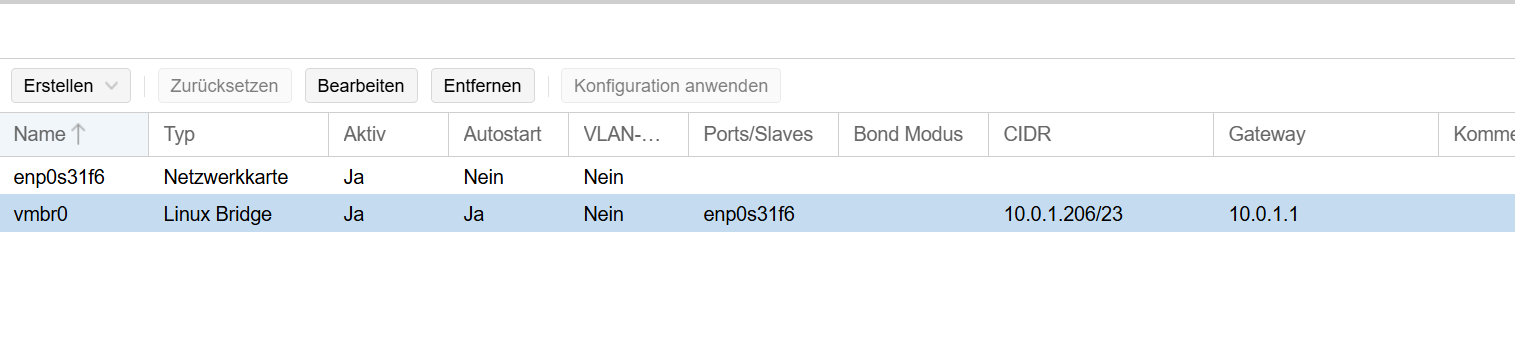
          normal, dass in der GUI noch die .1.206 steht?

          134dfab2-a0f5-4bbc-adea-450ec93cc373-image.png

          ich dachte, dort aktivier ich auch static?

          e25fcf87-49b3-4028-a304-c1042c2d0af9-image.png

          ° Node.js: 20.17.0 NPM: 10.8.2
          ° Proxmox, Ubuntu 22.04.3 LTS
          ° Fixer ---> iob fix

          crunchipC 1 Antwort Letzte Antwort
          0
          • NegaleinN Negalein

            @crunchip

            normal, dass in der GUI noch die .1.206 steht?

            134dfab2-a0f5-4bbc-adea-450ec93cc373-image.png

            ich dachte, dort aktivier ich auch static?

            e25fcf87-49b3-4028-a304-c1042c2d0af9-image.png

            crunchipC Abwesend
            crunchipC Abwesend
            crunchip
            Forum Testing Most Active
            schrieb am zuletzt editiert von
            #47

            @negalein sagte in Proxmox WebIf nicht erreichbar:

            ich dachte, dort aktivier ich auch static?

            ja

            @negalein sagte in Proxmox WebIf nicht erreichbar:

            normal, dass in der GUI noch die .1.206 steht

            eigentlich nicht

            umgestiegen von Proxmox auf Unraid

            1 Antwort Letzte Antwort
            0
            • NegaleinN Negalein

              @crunchip sagte in Proxmox WebIf nicht erreichbar:

              ergänze das mal, siehe Zeile 2

              etc/hosts
              Zeile 2 mit proxmox-3 ergänzt

              etc/hostname pve durch proxmox-3 ersetzt

              hast du jetzt auf dhcp umgestellt oder noch statisch?

              schon auf dhcp


              er hat jetzt 10.0.0.33 bekommen
              GUI funktioniert :)

              Danke

              Jetzt kann ich das Netzwerk in der GUI wieder auf statisch stellen. :)


              und dann pack ich auch gleich die 2. Kiste

              crunchipC Abwesend
              crunchipC Abwesend
              crunchip
              Forum Testing Most Active
              schrieb am zuletzt editiert von
              #48

              @negalein sagte in Proxmox WebIf nicht erreichbar:

              er hat jetzt 10.0.0.33 bekommen
              GUI funktioniert

              ist den jetzt der pve-ssl.key wieder korrekt?

              umgestiegen von Proxmox auf Unraid

              NegaleinN 1 Antwort Letzte Antwort
              0
              • crunchipC crunchip

                @negalein sagte in Proxmox WebIf nicht erreichbar:

                er hat jetzt 10.0.0.33 bekommen
                GUI funktioniert

                ist den jetzt der pve-ssl.key wieder korrekt?

                NegaleinN Offline
                NegaleinN Offline
                Negalein
                Global Moderator
                schrieb am zuletzt editiert von
                #49

                @crunchip sagte in Proxmox WebIf nicht erreichbar:

                ist den jetzt der pve-ssl.key wieder korrekt?

                ● pve-guests.service - PVE guests
                     Loaded: loaded (/lib/systemd/system/pve-guests.service; enabled; vendor preset: enabled)
                     Active: active (exited) since Sun 2025-10-12 17:00:02 CEST; 1min 38s ago
                    Process: 938 ExecStartPre=/usr/share/pve-manager/helpers/pve-startall-delay (code=exited, status=0/SUCCESS)
                    Process: 939 ExecStart=/usr/bin/pvesh --nooutput create /nodes/localhost/startall (code=exited, status=0/SUCCESS)
                   Main PID: 939 (code=exited, status=0/SUCCESS)
                        CPU: 766ms
                
                Oct 12 17:00:01 proxmox-3 systemd[1]: Starting PVE guests...
                Oct 12 17:00:02 proxmox-3 pve-guests[939]: <root@pam> starting task UPID:proxmox-3:000003AC:00000670:68EBC272:startall::root@pam:
                Oct 12 17:00:02 proxmox-3 pve-guests[939]: <root@pam> end task UPID:proxmox-3:000003AC:00000670:68EBC272:startall::root@pam: OK
                Oct 12 17:00:02 proxmox-3 systemd[1]: Finished PVE guests.
                

                @negalein sagte in Proxmox WebIf nicht erreichbar:

                ich dachte, dort aktivier ich auch static?

                ja

                finde da nichts zum aktivieren (Häckchen)

                hab ihm jetzt vorerst per Fritz eine fixe zugewiesen.
                Läuft jetzt wieder unter .1.206

                würds aber gern direkt in der Maschine machen.

                ° Node.js: 20.17.0 NPM: 10.8.2
                ° Proxmox, Ubuntu 22.04.3 LTS
                ° Fixer ---> iob fix

                crunchipC 1 Antwort Letzte Antwort
                0
                • NegaleinN Negalein

                  @crunchip sagte in Proxmox WebIf nicht erreichbar:

                  ist den jetzt der pve-ssl.key wieder korrekt?

                  ● pve-guests.service - PVE guests
                       Loaded: loaded (/lib/systemd/system/pve-guests.service; enabled; vendor preset: enabled)
                       Active: active (exited) since Sun 2025-10-12 17:00:02 CEST; 1min 38s ago
                      Process: 938 ExecStartPre=/usr/share/pve-manager/helpers/pve-startall-delay (code=exited, status=0/SUCCESS)
                      Process: 939 ExecStart=/usr/bin/pvesh --nooutput create /nodes/localhost/startall (code=exited, status=0/SUCCESS)
                     Main PID: 939 (code=exited, status=0/SUCCESS)
                          CPU: 766ms
                  
                  Oct 12 17:00:01 proxmox-3 systemd[1]: Starting PVE guests...
                  Oct 12 17:00:02 proxmox-3 pve-guests[939]: <root@pam> starting task UPID:proxmox-3:000003AC:00000670:68EBC272:startall::root@pam:
                  Oct 12 17:00:02 proxmox-3 pve-guests[939]: <root@pam> end task UPID:proxmox-3:000003AC:00000670:68EBC272:startall::root@pam: OK
                  Oct 12 17:00:02 proxmox-3 systemd[1]: Finished PVE guests.
                  

                  @negalein sagte in Proxmox WebIf nicht erreichbar:

                  ich dachte, dort aktivier ich auch static?

                  ja

                  finde da nichts zum aktivieren (Häckchen)

                  hab ihm jetzt vorerst per Fritz eine fixe zugewiesen.
                  Läuft jetzt wieder unter .1.206

                  würds aber gern direkt in der Maschine machen.

                  crunchipC Abwesend
                  crunchipC Abwesend
                  crunchip
                  Forum Testing Most Active
                  schrieb am zuletzt editiert von crunchip
                  #50

                  @negalein sagte in Proxmox WebIf nicht erreichbar:

                  finde da nichts zum aktivieren (Häckchen)

                  ist nicht wie bei einer VM, da hat man die Wahl per Gui von dhcp und statisch
                  proxmox ist Standard auf statisch, wenn dann von dhcp wieder per nano /etc/network/interfaces umstellen, die IP selbst kannst du per GUI ändern.
                  auch der zugehörige Eintrag in /etc/hosts ist per Gui möglich
                  https://www.servethehome.com/how-to-change-primary-proxmox-ve-ip-address/

                  umgestiegen von Proxmox auf Unraid

                  NegaleinN 1 Antwort Letzte Antwort
                  0
                  • crunchipC crunchip

                    @negalein sagte in Proxmox WebIf nicht erreichbar:

                    finde da nichts zum aktivieren (Häckchen)

                    ist nicht wie bei einer VM, da hat man die Wahl per Gui von dhcp und statisch
                    proxmox ist Standard auf statisch, wenn dann von dhcp wieder per nano /etc/network/interfaces umstellen, die IP selbst kannst du per GUI ändern.
                    auch der zugehörige Eintrag in /etc/hosts ist per Gui möglich
                    https://www.servethehome.com/how-to-change-primary-proxmox-ve-ip-address/

                    NegaleinN Offline
                    NegaleinN Offline
                    Negalein
                    Global Moderator
                    schrieb am zuletzt editiert von
                    #51

                    @crunchip sagte in Proxmox WebIf nicht erreichbar:

                    proxmox ist Standard auf statisch, wenn dann von dhcp wieder per nano /etc/network/interfaces umstellen, die IP selbst kannst du per GUI ändern.

                    ah, stimmt

                    ich mach jetzt mal Pause. Komm vom lesen schon durcheinander.

                    die nächste wird Morgen umgestellt. :)

                    ° Node.js: 20.17.0 NPM: 10.8.2
                    ° Proxmox, Ubuntu 22.04.3 LTS
                    ° Fixer ---> iob fix

                    crunchipC 1 Antwort Letzte Antwort
                    0
                    • NegaleinN Negalein

                      @crunchip sagte in Proxmox WebIf nicht erreichbar:

                      proxmox ist Standard auf statisch, wenn dann von dhcp wieder per nano /etc/network/interfaces umstellen, die IP selbst kannst du per GUI ändern.

                      ah, stimmt

                      ich mach jetzt mal Pause. Komm vom lesen schon durcheinander.

                      die nächste wird Morgen umgestellt. :)

                      crunchipC Abwesend
                      crunchipC Abwesend
                      crunchip
                      Forum Testing Most Active
                      schrieb am zuletzt editiert von
                      #52

                      @negalein OK, eigentlich nur die beiden wie zuvor geschrieben anpassen, dann sollte es laufen

                      umgestiegen von Proxmox auf Unraid

                      1 Antwort Letzte Antwort
                      1
                      • Thomas BraunT Thomas Braun

                        @negalein sagte in Proxmox WebIf nicht erreichbar:

                        and 161 not upgraded.

                        Pfleg die Kiste. Da hängt einiges in der Pipeline.

                        NegaleinN Offline
                        NegaleinN Offline
                        Negalein
                        Global Moderator
                        schrieb am zuletzt editiert von
                        #53

                        @thomas-braun sagte in Proxmox WebIf nicht erreichbar:

                        Pfleg die Kiste. Da hängt einiges in der Pipeline.

                        Hallo Thomas,
                        wollte die Kiste up to date bringen.

                        Stehe jetzt nach dem Reboot bei do-release-upgrade an.

                        -bash: do-release-upgrade: command not found

                        Hab dann mit apt install update-manager-core versucht.

                        Da kommt

                        Reading package lists... Done
                        Building dependency tree... Done
                        Reading state information... Done
                        Package update-manager-core is not available, but is referred to by another package.
                        This may mean that the package is missing, has been obsoleted, or
                        is only available from another source
                        
                        E: Package 'update-manager-core' has no installation candidate
                        

                        Im Netz finde ich dazu nichts.

                        ° Node.js: 20.17.0 NPM: 10.8.2
                        ° Proxmox, Ubuntu 22.04.3 LTS
                        ° Fixer ---> iob fix

                        Thomas BraunT crunchipC 2 Antworten Letzte Antwort
                        0
                        • NegaleinN Negalein

                          @thomas-braun sagte in Proxmox WebIf nicht erreichbar:

                          Pfleg die Kiste. Da hängt einiges in der Pipeline.

                          Hallo Thomas,
                          wollte die Kiste up to date bringen.

                          Stehe jetzt nach dem Reboot bei do-release-upgrade an.

                          -bash: do-release-upgrade: command not found

                          Hab dann mit apt install update-manager-core versucht.

                          Da kommt

                          Reading package lists... Done
                          Building dependency tree... Done
                          Reading state information... Done
                          Package update-manager-core is not available, but is referred to by another package.
                          This may mean that the package is missing, has been obsoleted, or
                          is only available from another source
                          
                          E: Package 'update-manager-core' has no installation candidate
                          

                          Im Netz finde ich dazu nichts.

                          Thomas BraunT Online
                          Thomas BraunT Online
                          Thomas Braun
                          Most Active
                          schrieb am zuletzt editiert von
                          #54

                          @negalein

                          Zu Proxmox kann ich dir nix weiter sagen. Und zu Schnubbibuntu auch nicht.

                          Linux-Werkzeugkasten:
                          https://forum.iobroker.net/topic/42952/der-kleine-iobroker-linux-werkzeugkasten
                          NodeJS Fixer Skript:
                          https://forum.iobroker.net/topic/68035/iob-node-fix-skript
                          iob_diag: curl -sLf -o diag.sh https://iobroker.net/diag.sh && bash diag.sh

                          NegaleinN 1 Antwort Letzte Antwort
                          0
                          • Thomas BraunT Thomas Braun

                            @negalein

                            Zu Proxmox kann ich dir nix weiter sagen. Und zu Schnubbibuntu auch nicht.

                            NegaleinN Offline
                            NegaleinN Offline
                            Negalein
                            Global Moderator
                            schrieb am zuletzt editiert von
                            #55

                            @thomas-braun sagte in Proxmox WebIf nicht erreichbar:

                            Und zu Schnubbibuntu auch nicht.

                            hab ich nicht ;)

                            nega@proxmox-3:~$ cat /etc/os-release
                            PRETTY_NAME="Debian GNU/Linux 11 (bullseye)"
                            NAME="Debian GNU/Linux"
                            VERSION_ID="11"
                            VERSION="11 (bullseye)"
                            VERSION_CODENAME=bullseye
                            ID=debian
                            HOME_URL="https://www.debian.org/"
                            SUPPORT_URL="https://www.debian.org/support"
                            BUG_REPORT_URL="https://bugs.debian.org/"
                            

                            ° Node.js: 20.17.0 NPM: 10.8.2
                            ° Proxmox, Ubuntu 22.04.3 LTS
                            ° Fixer ---> iob fix

                            Thomas BraunT 1 Antwort Letzte Antwort
                            0
                            • NegaleinN Negalein

                              @thomas-braun sagte in Proxmox WebIf nicht erreichbar:

                              Und zu Schnubbibuntu auch nicht.

                              hab ich nicht ;)

                              nega@proxmox-3:~$ cat /etc/os-release
                              PRETTY_NAME="Debian GNU/Linux 11 (bullseye)"
                              NAME="Debian GNU/Linux"
                              VERSION_ID="11"
                              VERSION="11 (bullseye)"
                              VERSION_CODENAME=bullseye
                              ID=debian
                              HOME_URL="https://www.debian.org/"
                              SUPPORT_URL="https://www.debian.org/support"
                              BUG_REPORT_URL="https://bugs.debian.org/"
                              
                              Thomas BraunT Online
                              Thomas BraunT Online
                              Thomas Braun
                              Most Active
                              schrieb am zuletzt editiert von
                              #56

                              @negalein

                              do-release-upgrade ist aber ein Ubuntu-Sonderstrick, das funktioniert auf einem richtigen Debian nicht.

                              Linux-Werkzeugkasten:
                              https://forum.iobroker.net/topic/42952/der-kleine-iobroker-linux-werkzeugkasten
                              NodeJS Fixer Skript:
                              https://forum.iobroker.net/topic/68035/iob-node-fix-skript
                              iob_diag: curl -sLf -o diag.sh https://iobroker.net/diag.sh && bash diag.sh

                              NegaleinN 1 Antwort Letzte Antwort
                              0
                              • Thomas BraunT Thomas Braun

                                @negalein

                                do-release-upgrade ist aber ein Ubuntu-Sonderstrick, das funktioniert auf einem richtigen Debian nicht.

                                NegaleinN Offline
                                NegaleinN Offline
                                Negalein
                                Global Moderator
                                schrieb am zuletzt editiert von
                                #57

                                @thomas-braun sagte in Proxmox WebIf nicht erreichbar:

                                do-release-upgrade ist aber ein Ubuntu-Sonderstrick, das funktioniert auf einem richtigen Debian nicht.

                                ah, ok. Hab ich im Netz so gefunden.

                                Hab jetzt mal GPT gefragt.

                                sudo apt dist-upgrade

                                und dann

                                and then manually adjust /etc/apt/sources.list to the new release.

                                wie geh ich da mit dem "and then manually ..."

                                ° Node.js: 20.17.0 NPM: 10.8.2
                                ° Proxmox, Ubuntu 22.04.3 LTS
                                ° Fixer ---> iob fix

                                Thomas BraunT 1 Antwort Letzte Antwort
                                0
                                • NegaleinN Negalein

                                  @thomas-braun sagte in Proxmox WebIf nicht erreichbar:

                                  do-release-upgrade ist aber ein Ubuntu-Sonderstrick, das funktioniert auf einem richtigen Debian nicht.

                                  ah, ok. Hab ich im Netz so gefunden.

                                  Hab jetzt mal GPT gefragt.

                                  sudo apt dist-upgrade

                                  und dann

                                  and then manually adjust /etc/apt/sources.list to the new release.

                                  wie geh ich da mit dem "and then manually ..."

                                  Thomas BraunT Online
                                  Thomas BraunT Online
                                  Thomas Braun
                                  Most Active
                                  schrieb am zuletzt editiert von Thomas Braun
                                  #58

                                  @negalein sagte in Proxmox WebIf nicht erreichbar:

                                  ah, ok. Hab ich im Netz so gefunden.
                                  Hab jetzt mal GPT gefragt.

                                  Oh mann...
                                  Wozu gibt es eigentlich offizielle Doku? Im Fall von Debian ist die auch mehr als ausufernd. Da muss man auch nicht irgendwas von SchättJippiehTieh oder 'aus dem Netz' auf Verdacht mal in die Kiste kloppen...
                                  Kurzfassung:
                                  Ein Debian hält man innerhalb der Version per

                                  sudo apt update && sudo apt full-upgrade
                                  

                                  auf Stand.

                                  Edit: Bei Proxmox kann das aber wieder anders aussehen. Aber auch da gibt es mit Sicherheit eine offizielle Anleitung.

                                  Linux-Werkzeugkasten:
                                  https://forum.iobroker.net/topic/42952/der-kleine-iobroker-linux-werkzeugkasten
                                  NodeJS Fixer Skript:
                                  https://forum.iobroker.net/topic/68035/iob-node-fix-skript
                                  iob_diag: curl -sLf -o diag.sh https://iobroker.net/diag.sh && bash diag.sh

                                  NegaleinN 1 Antwort Letzte Antwort
                                  0
                                  • NegaleinN Negalein

                                    @thomas-braun sagte in Proxmox WebIf nicht erreichbar:

                                    Pfleg die Kiste. Da hängt einiges in der Pipeline.

                                    Hallo Thomas,
                                    wollte die Kiste up to date bringen.

                                    Stehe jetzt nach dem Reboot bei do-release-upgrade an.

                                    -bash: do-release-upgrade: command not found

                                    Hab dann mit apt install update-manager-core versucht.

                                    Da kommt

                                    Reading package lists... Done
                                    Building dependency tree... Done
                                    Reading state information... Done
                                    Package update-manager-core is not available, but is referred to by another package.
                                    This may mean that the package is missing, has been obsoleted, or
                                    is only available from another source
                                    
                                    E: Package 'update-manager-core' has no installation candidate
                                    

                                    Im Netz finde ich dazu nichts.

                                    crunchipC Abwesend
                                    crunchipC Abwesend
                                    crunchip
                                    Forum Testing Most Active
                                    schrieb am zuletzt editiert von
                                    #59

                                    @negalein sagte in Proxmox WebIf nicht erreichbar:

                                    wollte die Kiste up to date bringen.

                                    Mit Proxmox v7 bist du aber generell etwas hinterher.
                                    Da würde ich eher Backups machen und neu aufsetzen

                                    umgestiegen von Proxmox auf Unraid

                                    NegaleinN 1 Antwort Letzte Antwort
                                    1
                                    • crunchipC crunchip

                                      @negalein sagte in Proxmox WebIf nicht erreichbar:

                                      wollte die Kiste up to date bringen.

                                      Mit Proxmox v7 bist du aber generell etwas hinterher.
                                      Da würde ich eher Backups machen und neu aufsetzen

                                      NegaleinN Offline
                                      NegaleinN Offline
                                      Negalein
                                      Global Moderator
                                      schrieb am zuletzt editiert von
                                      #60

                                      @crunchip sagte in Proxmox WebIf nicht erreichbar:

                                      Mit Proxmox v7 bist du aber generell etwas hinterher.

                                      läuft noch keine VM oder LXC drauf.

                                      Hatte mir gedacht, ich mach jetzt Debian aktuell und dann Proxmox.

                                      ° Node.js: 20.17.0 NPM: 10.8.2
                                      ° Proxmox, Ubuntu 22.04.3 LTS
                                      ° Fixer ---> iob fix

                                      crunchipC BananaJoeB 2 Antworten Letzte Antwort
                                      0
                                      • Thomas BraunT Thomas Braun

                                        @negalein sagte in Proxmox WebIf nicht erreichbar:

                                        ah, ok. Hab ich im Netz so gefunden.
                                        Hab jetzt mal GPT gefragt.

                                        Oh mann...
                                        Wozu gibt es eigentlich offizielle Doku? Im Fall von Debian ist die auch mehr als ausufernd. Da muss man auch nicht irgendwas von SchättJippiehTieh oder 'aus dem Netz' auf Verdacht mal in die Kiste kloppen...
                                        Kurzfassung:
                                        Ein Debian hält man innerhalb der Version per

                                        sudo apt update && sudo apt full-upgrade
                                        

                                        auf Stand.

                                        Edit: Bei Proxmox kann das aber wieder anders aussehen. Aber auch da gibt es mit Sicherheit eine offizielle Anleitung.

                                        NegaleinN Offline
                                        NegaleinN Offline
                                        Negalein
                                        Global Moderator
                                        schrieb am zuletzt editiert von Negalein
                                        #61

                                        @thomas-braun sagte in Proxmox WebIf nicht erreichbar:

                                        Wozu gibt es eigentlich offizielle Doku?

                                        Aber auch da gibt es mit Sicherheit eine offizielle Anleitung

                                        Ja, aber alles offizielle ist auf Englisch.
                                        Ja, ich könnte dann noch Translate anweerfen.

                                        Aber da vertrau ich bei den Befehlszeilen nicht ganz, ob das cdann noch so stimmt.

                                        sudo apt update && sudo apt full-upgrade

                                        und wenn ich die Version updaten möchte? zB von 11 auf 12?

                                        ° Node.js: 20.17.0 NPM: 10.8.2
                                        ° Proxmox, Ubuntu 22.04.3 LTS
                                        ° Fixer ---> iob fix

                                        Thomas BraunT uweklattU 3 Antworten Letzte Antwort
                                        0
                                        • NegaleinN Negalein

                                          @thomas-braun sagte in Proxmox WebIf nicht erreichbar:

                                          Wozu gibt es eigentlich offizielle Doku?

                                          Aber auch da gibt es mit Sicherheit eine offizielle Anleitung

                                          Ja, aber alles offizielle ist auf Englisch.
                                          Ja, ich könnte dann noch Translate anweerfen.

                                          Aber da vertrau ich bei den Befehlszeilen nicht ganz, ob das cdann noch so stimmt.

                                          sudo apt update && sudo apt full-upgrade

                                          und wenn ich die Version updaten möchte? zB von 11 auf 12?

                                          Thomas BraunT Online
                                          Thomas BraunT Online
                                          Thomas Braun
                                          Most Active
                                          schrieb am zuletzt editiert von Thomas Braun
                                          #62

                                          @negalein

                                          https://forum.iobroker.net/topic/65655/upgrade-von-debian-11-bullseye-auf-12-bookworm

                                          https://forum.iobroker.net/topic/81187/upgrade-von-debian-12-bookworm-auf-debian-13-trixie/158

                                          Ob es da bezgl. Proxmox noch irgendwas zu beachten gibt weiß ich nicht. Aber einen akutellen Trixie-Container würde ich nicht auf ein altes Proxmox setzen.


                                          Linux-Werkzeugkasten:
                                          https://forum.iobroker.net/topic/42952/der-kleine-iobroker-linux-werkzeugkasten
                                          NodeJS Fixer Skript:
                                          https://forum.iobroker.net/topic/68035/iob-node-fix-skript
                                          iob_diag: curl -sLf -o diag.sh https://iobroker.net/diag.sh && bash diag.sh

                                          1 Antwort Letzte Antwort
                                          1
                                          Antworten
                                          • In einem neuen Thema antworten
                                          Anmelden zum Antworten
                                          • Älteste zuerst
                                          • Neuste zuerst
                                          • Meiste Stimmen


                                          Support us

                                          ioBroker
                                          Community Adapters
                                          Donate

                                          892

                                          Online

                                          32.4k

                                          Benutzer

                                          81.5k

                                          Themen

                                          1.3m

                                          Beiträge
                                          Community
                                          Impressum | Datenschutz-Bestimmungen | Nutzungsbedingungen | Einwilligungseinstellungen
                                          ioBroker Community 2014-2025
                                          logo
                                          • Anmelden

                                          • Du hast noch kein Konto? Registrieren

                                          • Anmelden oder registrieren, um zu suchen
                                          • Erster Beitrag
                                            Letzter Beitrag
                                          0
                                          • Home
                                          • Aktuell
                                          • Tags
                                          • Ungelesen 0
                                          • Kategorien
                                          • Unreplied
                                          • Beliebt
                                          • GitHub
                                          • Docu
                                          • Hilfe