
NEWS




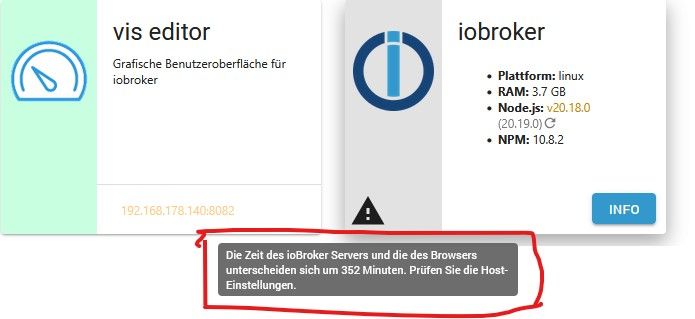
Meldung über Zeitfehler - Was ist das ?

-
Ok, danke.
Aber warum zeigt mir die Instanz vom mqtt jetzt an:
Verbunden - grün
Lebenszeichen - grün
Verbunden - rot
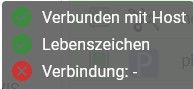
Die Einstellungen in der Instanz mit der neuen IP stimmen doch, oder nicht ?
-
Ok, danke.
Aber warum zeigt mir die Instanz vom mqtt jetzt an:
Verbunden - grün
Lebenszeichen - grün
Verbunden - rot
Die Einstellungen in der Instanz mit der neuen IP stimmen doch, oder nicht ?
-
@thomas-braun
Im Log vom ioBroker steht was den mqtt betrifft:mqtt.0 2025-04-05 12:03:05.677 info Starting MQTT server on 192.168.178.174:8885 mqtt.0 2025-04-05 12:03:05.278 info starting. Version 6.1.2 in /opt/iobroker/node_modules/iobroker.mqtt, node: v20.19.0, js-controller: 7.0.6 mqtt.0 2025-04-05 12:02:58.680 info terminating mqtt.0 2025-04-05 12:02:58.177 info Terminated (ADAPTER_REQUESTED_TERMINATION): Without reason mqtt.0 2025-04-05 12:02:58.175 info terminating mqtt.0 2025-04-05 12:02:58.173 info Got terminate signal TERMINATE_YOURSELF -
@thomas-braun
Im Log vom ioBroker steht was den mqtt betrifft:mqtt.0 2025-04-05 12:03:05.677 info Starting MQTT server on 192.168.178.174:8885 mqtt.0 2025-04-05 12:03:05.278 info starting. Version 6.1.2 in /opt/iobroker/node_modules/iobroker.mqtt, node: v20.19.0, js-controller: 7.0.6 mqtt.0 2025-04-05 12:02:58.680 info terminating mqtt.0 2025-04-05 12:02:58.177 info Terminated (ADAPTER_REQUESTED_TERMINATION): Without reason mqtt.0 2025-04-05 12:02:58.175 info terminating mqtt.0 2025-04-05 12:02:58.173 info Got terminate signal TERMINATE_YOURSELF@dogfight76 wissen die clients von der neuen IP?
kein Support per PN! - Fragen im Forum stellen - es gibt fast nichts, was nicht auch für andere interessant ist.
Benutzt das Voting rechts unten im Beitrag wenn er euch geholfen hat.
der Installationsfixer: curl -fsL https://iobroker.net/fix.sh | bash -
-
@dogfight76 wissen die clients von der neuen IP?
-
@homoran
Wo stelle ich die neue IP für Clients ein ?
Hatte jetzt nur an den mqqt gedacht ?@dogfight76 sagte in Meldung über Zeitfehler - Was ist das ?:
Wo stelle ich die neue IP für Clients ein ?
nicht für!
Bei den Clients
-
Ok, gefunden jetzt noch das in der Heishamon -PLatine noch die neue IP eingetragen werden musste !
Gemacht und dort ist ja im mqqt-Instanz auch die Port für eingetragenHeishamonm rebootet und mqqt neu gestartet.
Aber in der ioBroker-Instanz vom mqqt steht immer
Verbunden - grün
Lebenszeichen - grün
Verbunden - rotOder muss da die IP von der Heishamon Platine rein ?
-
Ok, gefunden jetzt noch das in der Heishamon -PLatine noch die neue IP eingetragen werden musste !
Gemacht und dort ist ja im mqqt-Instanz auch die Port für eingetragenHeishamonm rebootet und mqqt neu gestartet.
Aber in der ioBroker-Instanz vom mqqt steht immer
Verbunden - grün
Lebenszeichen - grün
Verbunden - rotOder muss da die IP von der Heishamon Platine rein ?
@dogfight76 sagte in Meldung über Zeitfehler - Was ist das ?:
Oder muss da die IP von der Heishamon Platine rein ?
wo?
du sagst ja nicht was du
@dogfight76 sagte in Meldung über Zeitfehler - Was ist das ?:
gefunden
hast
-
Mit „Gefunden“ meinte ich die eine Stellen in der heishamon-Einstellung !
Geändert auf die .174 , aber die Instanz im iobroker sagt immer noch:
Verbunden - grün
Lebenszeichen - grün
Verbunden - rotUnd die Temperatur im iobroker stimmt nicht überein mit der Anzeige im heishamon.
Die Verbindung scheint auch nicht stehen.Weiß nicht warum !?
-
@dogfight76 sagte in Meldung über Zeitfehler - Was ist das ?:
Wo stelle ich die neue IP für Clients ein ?
nicht für!
Bei den Clients
@homoran said in Meldung über Zeitfehler - Was ist das ?:
nicht für!
Bei den ClientsDann hilf mir bitte mal auf die Sprünge ? Was meinst du damit ?
Ich habe im Setuo der Heishamon-PLatine die IP auf die .174 geändert.
In den Topics der Heishamon stimmt auch die outside.temp mit 13 Grad
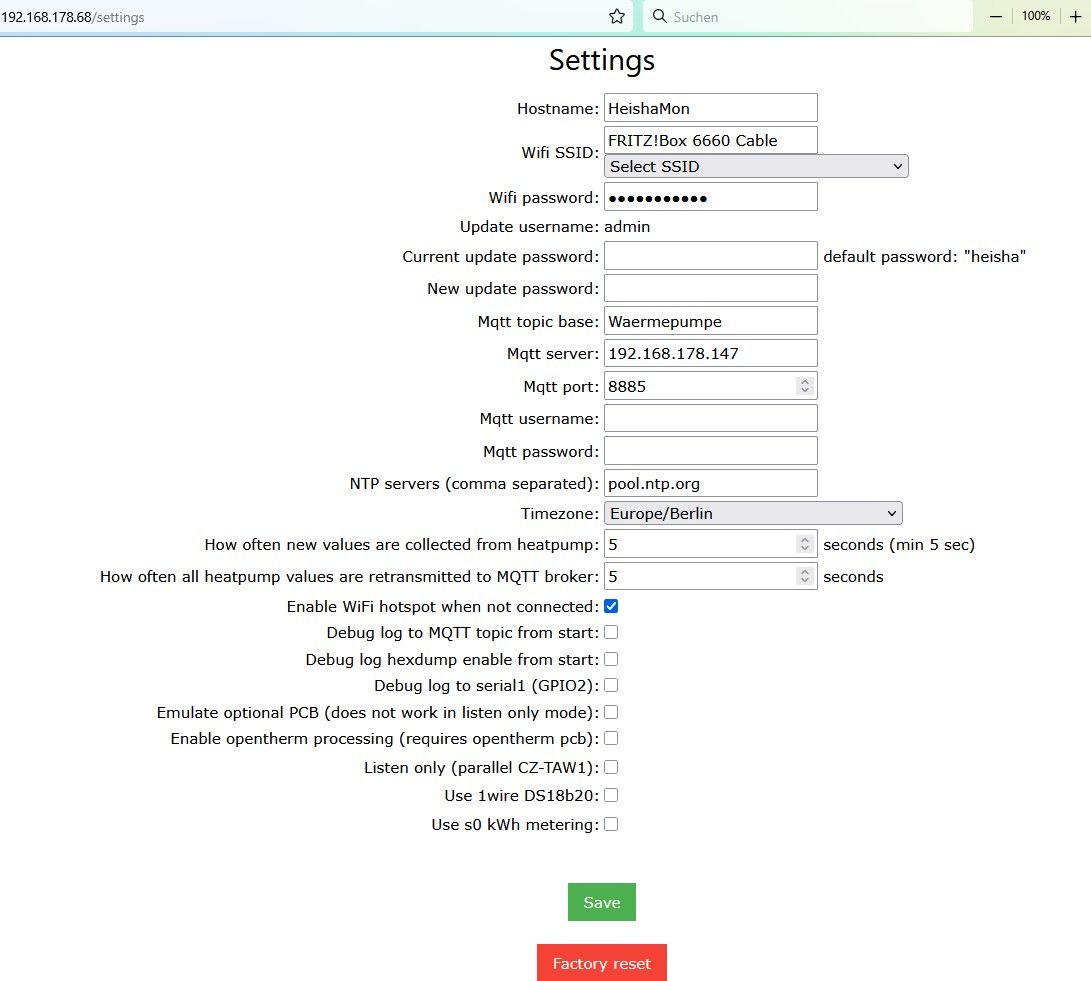
Aber die mqtt-Instanz im ioBroker stellt keine Verbindung her.
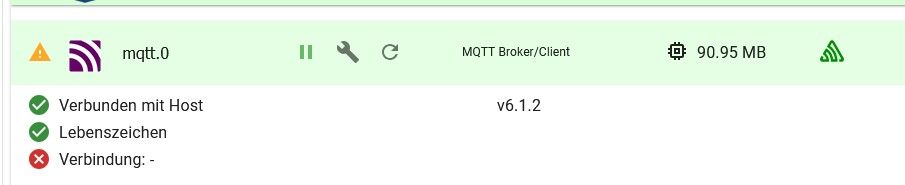
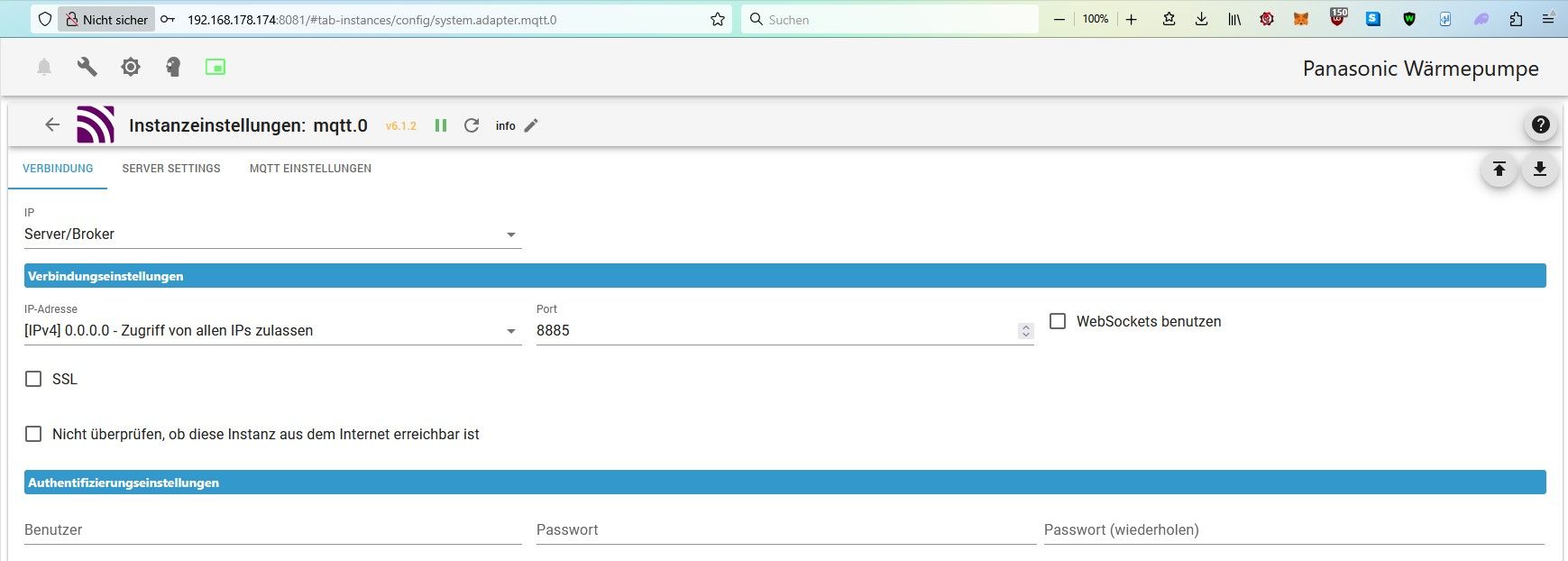
Bei der Auswahl der IP im Setup der Instanz ist das zur Auswahl:
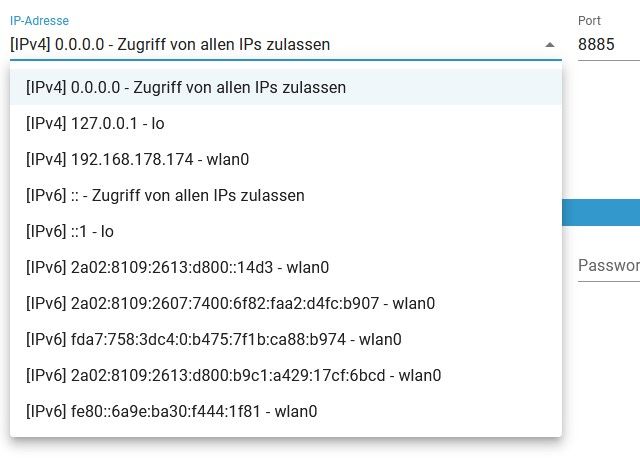
Die IP der Heishamon-Platine wäre 192.168.178.68, die steht nircht zur Auswahl.
Daher fiel meine Wahl auf "Alle IP zulassen"Verstehe nicht warum der ioBroker keine Verbindung zur Heishamon aufbauen kann.
Ihr eine Idee ?
-
@homoran said in Meldung über Zeitfehler - Was ist das ?:
nicht für!
Bei den ClientsDann hilf mir bitte mal auf die Sprünge ? Was meinst du damit ?
Ich habe im Setuo der Heishamon-PLatine die IP auf die .174 geändert.
In den Topics der Heishamon stimmt auch die outside.temp mit 13 Grad
Aber die mqtt-Instanz im ioBroker stellt keine Verbindung her.
Bei der Auswahl der IP im Setup der Instanz ist das zur Auswahl:
Die IP der Heishamon-Platine wäre 192.168.178.68, die steht nircht zur Auswahl.
Daher fiel meine Wahl auf "Alle IP zulassen"Verstehe nicht warum der ioBroker keine Verbindung zur Heishamon aufbauen kann.
Ihr eine Idee ?
@dogfight76 was sagt denn das debug-log?
kein Support per PN! - Fragen im Forum stellen - es gibt fast nichts, was nicht auch für andere interessant ist.
Benutzt das Voting rechts unten im Beitrag wenn er euch geholfen hat.
der Installationsfixer: curl -fsL https://iobroker.net/fix.sh | bash -
-
@dogfight76 was sagt denn das debug-log?
-
@homoran
Vom start der mqtt Instanz ?
Wie mache ich ein log direkt davon ?@dogfight76 sagte in Meldung über Zeitfehler - Was ist das ?:
Vom start der mqtt Instanz ?
ja!
@dogfight76 sagte in Meldung über Zeitfehler - Was ist das ?:
Wie mache ich ein log direkt davon ?
das kommt von selber wenn du startest
kein Support per PN! - Fragen im Forum stellen - es gibt fast nichts, was nicht auch für andere interessant ist.
Benutzt das Voting rechts unten im Beitrag wenn er euch geholfen hat.
der Installationsfixer: curl -fsL https://iobroker.net/fix.sh | bash -
-
@dogfight76 sagte in Meldung über Zeitfehler - Was ist das ?:
Vom start der mqtt Instanz ?
ja!
@dogfight76 sagte in Meldung über Zeitfehler - Was ist das ?:
Wie mache ich ein log direkt davon ?
das kommt von selber wenn du startest
@homoran
Habe bei der Instanz vom mqtt die Protokollebene von Info umgestellt auf debug.
Dann Neustart gemacht:2025-04-05 17:39:34.253 - info: host.ioBroker-neu stopInstance system.adapter.mqtt.0 (force=false, process=true) 2025-04-05 17:39:34.261 - info: mqtt.0 (14718) Got terminate signal TERMINATE_YOURSELF 2025-04-05 17:39:34.264 - info: mqtt.0 (14718) terminating 2025-04-05 17:39:34.267 - info: mqtt.0 (14718) Terminated (ADAPTER_REQUESTED_TERMINATION): Without reason 2025-04-05 17:39:34.301 - info: host.ioBroker-neu stopInstance system.adapter.mqtt.0 send kill signal 2025-04-05 17:39:34.771 - info: mqtt.0 (14718) terminating 2025-04-05 17:39:34.827 - info: host.ioBroker-neu instance system.adapter.mqtt.0 terminated with code 11 (ADAPTER_REQUESTED_TERMINATION) 2025-04-05 17:39:38.220 - info: host.ioBroker-neu instance system.adapter.mqtt.0 in version "6.1.2" started with pid 15640 2025-04-05 17:39:40.700 - info: mqtt.0 (15640) starting. Version 6.1.2 in /opt/iobroker/node_modules/iobroker.mqtt, node: v20.19.0, js-controller: 7.0.6 2025-04-05 17:39:41.096 - info: mqtt.0 (15640) Starting MQTT server on 0.0.0.0:8885 2025-04-05 17:40:10.282 - info: admin.0 (8745) <== Disconnect system.user.admin from ::ffff:192.168.178.130 admin 2025-04-05 17:40:29.977 - info: admin.0 (8745) ==> Connected system.user.admin from ::ffff:192.168.178.130 2025-04-05 17:41:04.982 - info: admin.0 (8745) <== Disconnect system.user.admin from ::ffff:192.168.178.130 admin 2025-04-05 17:41:13.785 - info: admin.0 (8745) ==> Connected system.user.admin from ::ffff:192.168.178.130 2025-04-05 17:42:03.791 - info: admin.0 (8745) <== Disconnect system.user.admin from ::ffff:192.168.178.130 admin 2025-04-05 17:42:14.083 - info: admin.0 (8745) ==> Connected system.user.admin from ::ffff:192.168.178.130 2025-04-05 17:42:14.646 - info: admin.0 (8745) ==> Connected system.user.admin from ::ffff:192.168.178.130 2025-04-05 17:42:14.663 - info: admin.0 (8745) <== Disconnect system.user.admin from ::ffff:192.168.178.130 admin 2025-04-05 17:43:34.311 - info: admin.0 (8745) ==> Connected system.user.admin from ::ffff:192.168.178.130 2025-04-05 17:43:50.324 - info: admin.0 (8745) <== Disconnect system.user.admin from ::ffff:192.168.178.130 2025-04-05 17:44:21.817 - info: admin.0 (8745) ==> Connected system.user.admin from ::ffff:192.168.178.130 2025-04-05 17:44:30.719 - info: admin.0 (8745) <== Disconnect system.user.admin from ::ffff:192.168.178.130 2025-04-05 17:44:36.373 - info: admin.0 (8745) ==> Connected system.user.admin from ::ffff:192.168.178.130 2025-04-05 17:44:41.182 - info: admin.0 (8745) <== Disconnect system.user.admin from ::ffff:192.168.178.130 2025-04-05 17:45:48.615 - info: admin.0 (8745) ==> Connected system.user.admin from ::ffff:192.168.178.130 2025-04-05 17:45:59.136 - info: admin.0 (8745) <== Disconnect system.user.admin from ::ffff:192.168.178.130 2025-04-05 17:46:06.525 - info: admin.0 (8745) ==> Connected system.user.admin from ::ffff:192.168.178.130 2025-04-05 17:46:11.861 - info: admin.0 (8745) <== Disconnect system.user.admin from ::ffff:192.168.178.130 web 2025-04-05 17:47:09.996 - info: host.ioBroker-neu stopInstance system.adapter.mqtt.0 (force=false, process=true) 2025-04-05 17:47:10.005 - info: mqtt.0 (15640) Got terminate signal TERMINATE_YOURSELF 2025-04-05 17:47:10.007 - info: mqtt.0 (15640) terminating 2025-04-05 17:47:10.010 - info: mqtt.0 (15640) Terminated (ADAPTER_REQUESTED_TERMINATION): Without reason 2025-04-05 17:47:10.045 - info: host.ioBroker-neu stopInstance system.adapter.mqtt.0 send kill signal 2025-04-05 17:47:10.512 - info: mqtt.0 (15640) terminating 2025-04-05 17:47:10.575 - info: host.ioBroker-neu instance system.adapter.mqtt.0 terminated with code 11 (ADAPTER_REQUESTED_TERMINATION) 2025-04-05 17:47:13.210 - info: host.ioBroker-neu instance system.adapter.mqtt.0 in version "6.1.2" started with pid 15942 2025-04-05 17:47:15.035 - debug: mqtt.0 (15942) Redis Objects: Use Redis connection: 127.0.0.1:9001 2025-04-05 17:47:15.089 - debug: mqtt.0 (15942) Objects client ready ... initialize now 2025-04-05 17:47:15.100 - debug: mqtt.0 (15942) Objects create System PubSub Client 2025-04-05 17:47:15.103 - debug: mqtt.0 (15942) Objects create User PubSub Client 2025-04-05 17:47:15.127 - debug: mqtt.0 (15942) Objects client initialize lua scripts 2025-04-05 17:47:15.137 - debug: mqtt.0 (15942) Objects connected to redis: 127.0.0.1:9001 2025-04-05 17:47:15.160 - debug: mqtt.0 (15942) Redis States: Use Redis connection: 127.0.0.1:9000 2025-04-05 17:47:15.230 - debug: mqtt.0 (15942) States create System PubSub Client 2025-04-05 17:47:15.237 - debug: mqtt.0 (15942) States create User PubSub Client 2025-04-05 17:47:15.298 - debug: mqtt.0 (15942) States connected to redis: 127.0.0.1:9000 2025-04-05 17:47:15.334 - debug: mqtt.0 (15942) Plugin sentry Initialize Plugin (enabled=true) 2025-04-05 17:47:15.762 - info: mqtt.0 (15942) starting. Version 6.1.2 in /opt/iobroker/node_modules/iobroker.mqtt, node: v20.19.0, js-controller: 7.0.6 2025-04-05 17:47:16.086 - info: mqtt.0 (15942) Starting MQTT server on 0.0.0.0:8885 2025-04-05 17:47:16.165 - debug: mqtt.0 (15942) stateChange mqtt.0.info.clients.HeishaMon: {"val":false,"ack":true,"ts":1743868036160,"q":0,"from":"system.adapter.mqtt.0","user":"system.user.admin","lc":1743788862234} 2025-04-05 17:47:16.217 - debug: mqtt.0 (15942) stateChange mqtt.0.info.connection: {"val":"","ack":true,"ts":1743868036212,"q":0,"from":"system.adapter.mqtt.0","user":"system.user.admin","lc":1743788862251} 2025-04-05 17:47:48.123 - info: host.ioBroker-neu stopInstance system.adapter.mqtt.0 (force=false, process=true) 2025-04-05 17:47:48.137 - info: mqtt.0 (15942) Got terminate signal TERMINATE_YOURSELF 2025-04-05 17:47:48.143 - info: mqtt.0 (15942) terminating 2025-04-05 17:47:48.146 - debug: mqtt.0 (15942) Plugin sentry destroyed 2025-04-05 17:47:48.149 - info: mqtt.0 (15942) Terminated (ADAPTER_REQUESTED_TERMINATION): Without reason 2025-04-05 17:47:48.174 - info: host.ioBroker-neu stopInstance system.adapter.mqtt.0 send kill signal 2025-04-05 17:47:48.652 - info: mqtt.0 (15942) terminating 2025-04-05 17:47:48.711 - info: host.ioBroker-neu instance system.adapter.mqtt.0 terminated with code 11 (ADAPTER_REQUESTED_TERMINATION) 2025-04-05 17:47:52.106 - info: host.ioBroker-neu instance system.adapter.mqtt.0 in version "6.1.2" started with pid 15988 2025-04-05 17:47:54.611 - info: mqtt.0 (15988) starting. Version 6.1.2 in /opt/iobroker/node_modules/iobroker.mqtt, node: v20.19.0, js-controller: 7.0.6 2025-04-05 17:47:54.938 - info: mqtt.0 (15988) Starting MQTT server on 0.0.0.0:8885 2025-04-05 17:48:42.390 - info: host.ioBroker-neu stopInstance system.adapter.mqtt.0 (force=false, process=true) 2025-04-05 17:48:42.403 - info: mqtt.0 (15988) Got terminate signal TERMINATE_YOURSELF 2025-04-05 17:48:42.407 - info: mqtt.0 (15988) terminating 2025-04-05 17:48:42.412 - info: mqtt.0 (15988) Terminated (ADAPTER_REQUESTED_TERMINATION): Without reason 2025-04-05 17:48:42.456 - info: host.ioBroker-neu stopInstance system.adapter.mqtt.0 send kill signal 2025-04-05 17:48:42.914 - info: mqtt.0 (15988) terminating 2025-04-05 17:48:42.971 - info: host.ioBroker-neu instance system.adapter.mqtt.0 terminated with code 11 (ADAPTER_REQUESTED_TERMINATION) 2025-04-05 17:48:45.831 - info: host.ioBroker-neu instance system.adapter.mqtt.0 in version "6.1.2" started with pid 16045 2025-04-05 17:48:47.733 - debug: mqtt.0 (16045) Redis Objects: Use Redis connection: 127.0.0.1:9001 2025-04-05 17:48:47.767 - debug: mqtt.0 (16045) Objects client ready ... initialize now 2025-04-05 17:48:47.770 - debug: mqtt.0 (16045) Objects create System PubSub Client 2025-04-05 17:48:47.771 - debug: mqtt.0 (16045) Objects create User PubSub Client 2025-04-05 17:48:47.797 - debug: mqtt.0 (16045) Objects client initialize lua scripts 2025-04-05 17:48:47.807 - debug: mqtt.0 (16045) Objects connected to redis: 127.0.0.1:9001 2025-04-05 17:48:47.845 - debug: mqtt.0 (16045) Redis States: Use Redis connection: 127.0.0.1:9000 2025-04-05 17:48:47.856 - debug: mqtt.0 (16045) States create System PubSub Client 2025-04-05 17:48:47.858 - debug: mqtt.0 (16045) States create User PubSub Client 2025-04-05 17:48:47.914 - debug: mqtt.0 (16045) States connected to redis: 127.0.0.1:9000 2025-04-05 17:48:47.950 - debug: mqtt.0 (16045) Plugin sentry Initialize Plugin (enabled=true) 2025-04-05 17:48:48.364 - info: mqtt.0 (16045) starting. Version 6.1.2 in /opt/iobroker/node_modules/iobroker.mqtt, node: v20.19.0, js-controller: 7.0.6 2025-04-05 17:48:48.725 - info: mqtt.0 (16045) Starting MQTT server on 0.0.0.0:8885 2025-04-05 17:48:48.813 - debug: mqtt.0 (16045) stateChange mqtt.0.info.clients.HeishaMon: {"val":false,"ack":true,"ts":1743868128808,"q":0,"from":"system.adapter.mqtt.0","user":"system.user.admin","lc":1743788862234} 2025-04-05 17:48:48.864 - debug: mqtt.0 (16045) stateChange mqtt.0.info.connection: {"val":"","ack":true,"ts":1743868128860,"q":0,"from":"system.adapter.mqtt.0","user":"system.user.admin","lc":1743788862251}Hoffe das hilft warum keine Verbindung zur Heishamon aufgebaut wird.
-
@homoran
Habe bei der Instanz vom mqtt die Protokollebene von Info umgestellt auf debug.
Dann Neustart gemacht:2025-04-05 17:39:34.253 - info: host.ioBroker-neu stopInstance system.adapter.mqtt.0 (force=false, process=true) 2025-04-05 17:39:34.261 - info: mqtt.0 (14718) Got terminate signal TERMINATE_YOURSELF 2025-04-05 17:39:34.264 - info: mqtt.0 (14718) terminating 2025-04-05 17:39:34.267 - info: mqtt.0 (14718) Terminated (ADAPTER_REQUESTED_TERMINATION): Without reason 2025-04-05 17:39:34.301 - info: host.ioBroker-neu stopInstance system.adapter.mqtt.0 send kill signal 2025-04-05 17:39:34.771 - info: mqtt.0 (14718) terminating 2025-04-05 17:39:34.827 - info: host.ioBroker-neu instance system.adapter.mqtt.0 terminated with code 11 (ADAPTER_REQUESTED_TERMINATION) 2025-04-05 17:39:38.220 - info: host.ioBroker-neu instance system.adapter.mqtt.0 in version "6.1.2" started with pid 15640 2025-04-05 17:39:40.700 - info: mqtt.0 (15640) starting. Version 6.1.2 in /opt/iobroker/node_modules/iobroker.mqtt, node: v20.19.0, js-controller: 7.0.6 2025-04-05 17:39:41.096 - info: mqtt.0 (15640) Starting MQTT server on 0.0.0.0:8885 2025-04-05 17:40:10.282 - info: admin.0 (8745) <== Disconnect system.user.admin from ::ffff:192.168.178.130 admin 2025-04-05 17:40:29.977 - info: admin.0 (8745) ==> Connected system.user.admin from ::ffff:192.168.178.130 2025-04-05 17:41:04.982 - info: admin.0 (8745) <== Disconnect system.user.admin from ::ffff:192.168.178.130 admin 2025-04-05 17:41:13.785 - info: admin.0 (8745) ==> Connected system.user.admin from ::ffff:192.168.178.130 2025-04-05 17:42:03.791 - info: admin.0 (8745) <== Disconnect system.user.admin from ::ffff:192.168.178.130 admin 2025-04-05 17:42:14.083 - info: admin.0 (8745) ==> Connected system.user.admin from ::ffff:192.168.178.130 2025-04-05 17:42:14.646 - info: admin.0 (8745) ==> Connected system.user.admin from ::ffff:192.168.178.130 2025-04-05 17:42:14.663 - info: admin.0 (8745) <== Disconnect system.user.admin from ::ffff:192.168.178.130 admin 2025-04-05 17:43:34.311 - info: admin.0 (8745) ==> Connected system.user.admin from ::ffff:192.168.178.130 2025-04-05 17:43:50.324 - info: admin.0 (8745) <== Disconnect system.user.admin from ::ffff:192.168.178.130 2025-04-05 17:44:21.817 - info: admin.0 (8745) ==> Connected system.user.admin from ::ffff:192.168.178.130 2025-04-05 17:44:30.719 - info: admin.0 (8745) <== Disconnect system.user.admin from ::ffff:192.168.178.130 2025-04-05 17:44:36.373 - info: admin.0 (8745) ==> Connected system.user.admin from ::ffff:192.168.178.130 2025-04-05 17:44:41.182 - info: admin.0 (8745) <== Disconnect system.user.admin from ::ffff:192.168.178.130 2025-04-05 17:45:48.615 - info: admin.0 (8745) ==> Connected system.user.admin from ::ffff:192.168.178.130 2025-04-05 17:45:59.136 - info: admin.0 (8745) <== Disconnect system.user.admin from ::ffff:192.168.178.130 2025-04-05 17:46:06.525 - info: admin.0 (8745) ==> Connected system.user.admin from ::ffff:192.168.178.130 2025-04-05 17:46:11.861 - info: admin.0 (8745) <== Disconnect system.user.admin from ::ffff:192.168.178.130 web 2025-04-05 17:47:09.996 - info: host.ioBroker-neu stopInstance system.adapter.mqtt.0 (force=false, process=true) 2025-04-05 17:47:10.005 - info: mqtt.0 (15640) Got terminate signal TERMINATE_YOURSELF 2025-04-05 17:47:10.007 - info: mqtt.0 (15640) terminating 2025-04-05 17:47:10.010 - info: mqtt.0 (15640) Terminated (ADAPTER_REQUESTED_TERMINATION): Without reason 2025-04-05 17:47:10.045 - info: host.ioBroker-neu stopInstance system.adapter.mqtt.0 send kill signal 2025-04-05 17:47:10.512 - info: mqtt.0 (15640) terminating 2025-04-05 17:47:10.575 - info: host.ioBroker-neu instance system.adapter.mqtt.0 terminated with code 11 (ADAPTER_REQUESTED_TERMINATION) 2025-04-05 17:47:13.210 - info: host.ioBroker-neu instance system.adapter.mqtt.0 in version "6.1.2" started with pid 15942 2025-04-05 17:47:15.035 - debug: mqtt.0 (15942) Redis Objects: Use Redis connection: 127.0.0.1:9001 2025-04-05 17:47:15.089 - debug: mqtt.0 (15942) Objects client ready ... initialize now 2025-04-05 17:47:15.100 - debug: mqtt.0 (15942) Objects create System PubSub Client 2025-04-05 17:47:15.103 - debug: mqtt.0 (15942) Objects create User PubSub Client 2025-04-05 17:47:15.127 - debug: mqtt.0 (15942) Objects client initialize lua scripts 2025-04-05 17:47:15.137 - debug: mqtt.0 (15942) Objects connected to redis: 127.0.0.1:9001 2025-04-05 17:47:15.160 - debug: mqtt.0 (15942) Redis States: Use Redis connection: 127.0.0.1:9000 2025-04-05 17:47:15.230 - debug: mqtt.0 (15942) States create System PubSub Client 2025-04-05 17:47:15.237 - debug: mqtt.0 (15942) States create User PubSub Client 2025-04-05 17:47:15.298 - debug: mqtt.0 (15942) States connected to redis: 127.0.0.1:9000 2025-04-05 17:47:15.334 - debug: mqtt.0 (15942) Plugin sentry Initialize Plugin (enabled=true) 2025-04-05 17:47:15.762 - info: mqtt.0 (15942) starting. Version 6.1.2 in /opt/iobroker/node_modules/iobroker.mqtt, node: v20.19.0, js-controller: 7.0.6 2025-04-05 17:47:16.086 - info: mqtt.0 (15942) Starting MQTT server on 0.0.0.0:8885 2025-04-05 17:47:16.165 - debug: mqtt.0 (15942) stateChange mqtt.0.info.clients.HeishaMon: {"val":false,"ack":true,"ts":1743868036160,"q":0,"from":"system.adapter.mqtt.0","user":"system.user.admin","lc":1743788862234} 2025-04-05 17:47:16.217 - debug: mqtt.0 (15942) stateChange mqtt.0.info.connection: {"val":"","ack":true,"ts":1743868036212,"q":0,"from":"system.adapter.mqtt.0","user":"system.user.admin","lc":1743788862251} 2025-04-05 17:47:48.123 - info: host.ioBroker-neu stopInstance system.adapter.mqtt.0 (force=false, process=true) 2025-04-05 17:47:48.137 - info: mqtt.0 (15942) Got terminate signal TERMINATE_YOURSELF 2025-04-05 17:47:48.143 - info: mqtt.0 (15942) terminating 2025-04-05 17:47:48.146 - debug: mqtt.0 (15942) Plugin sentry destroyed 2025-04-05 17:47:48.149 - info: mqtt.0 (15942) Terminated (ADAPTER_REQUESTED_TERMINATION): Without reason 2025-04-05 17:47:48.174 - info: host.ioBroker-neu stopInstance system.adapter.mqtt.0 send kill signal 2025-04-05 17:47:48.652 - info: mqtt.0 (15942) terminating 2025-04-05 17:47:48.711 - info: host.ioBroker-neu instance system.adapter.mqtt.0 terminated with code 11 (ADAPTER_REQUESTED_TERMINATION) 2025-04-05 17:47:52.106 - info: host.ioBroker-neu instance system.adapter.mqtt.0 in version "6.1.2" started with pid 15988 2025-04-05 17:47:54.611 - info: mqtt.0 (15988) starting. Version 6.1.2 in /opt/iobroker/node_modules/iobroker.mqtt, node: v20.19.0, js-controller: 7.0.6 2025-04-05 17:47:54.938 - info: mqtt.0 (15988) Starting MQTT server on 0.0.0.0:8885 2025-04-05 17:48:42.390 - info: host.ioBroker-neu stopInstance system.adapter.mqtt.0 (force=false, process=true) 2025-04-05 17:48:42.403 - info: mqtt.0 (15988) Got terminate signal TERMINATE_YOURSELF 2025-04-05 17:48:42.407 - info: mqtt.0 (15988) terminating 2025-04-05 17:48:42.412 - info: mqtt.0 (15988) Terminated (ADAPTER_REQUESTED_TERMINATION): Without reason 2025-04-05 17:48:42.456 - info: host.ioBroker-neu stopInstance system.adapter.mqtt.0 send kill signal 2025-04-05 17:48:42.914 - info: mqtt.0 (15988) terminating 2025-04-05 17:48:42.971 - info: host.ioBroker-neu instance system.adapter.mqtt.0 terminated with code 11 (ADAPTER_REQUESTED_TERMINATION) 2025-04-05 17:48:45.831 - info: host.ioBroker-neu instance system.adapter.mqtt.0 in version "6.1.2" started with pid 16045 2025-04-05 17:48:47.733 - debug: mqtt.0 (16045) Redis Objects: Use Redis connection: 127.0.0.1:9001 2025-04-05 17:48:47.767 - debug: mqtt.0 (16045) Objects client ready ... initialize now 2025-04-05 17:48:47.770 - debug: mqtt.0 (16045) Objects create System PubSub Client 2025-04-05 17:48:47.771 - debug: mqtt.0 (16045) Objects create User PubSub Client 2025-04-05 17:48:47.797 - debug: mqtt.0 (16045) Objects client initialize lua scripts 2025-04-05 17:48:47.807 - debug: mqtt.0 (16045) Objects connected to redis: 127.0.0.1:9001 2025-04-05 17:48:47.845 - debug: mqtt.0 (16045) Redis States: Use Redis connection: 127.0.0.1:9000 2025-04-05 17:48:47.856 - debug: mqtt.0 (16045) States create System PubSub Client 2025-04-05 17:48:47.858 - debug: mqtt.0 (16045) States create User PubSub Client 2025-04-05 17:48:47.914 - debug: mqtt.0 (16045) States connected to redis: 127.0.0.1:9000 2025-04-05 17:48:47.950 - debug: mqtt.0 (16045) Plugin sentry Initialize Plugin (enabled=true) 2025-04-05 17:48:48.364 - info: mqtt.0 (16045) starting. Version 6.1.2 in /opt/iobroker/node_modules/iobroker.mqtt, node: v20.19.0, js-controller: 7.0.6 2025-04-05 17:48:48.725 - info: mqtt.0 (16045) Starting MQTT server on 0.0.0.0:8885 2025-04-05 17:48:48.813 - debug: mqtt.0 (16045) stateChange mqtt.0.info.clients.HeishaMon: {"val":false,"ack":true,"ts":1743868128808,"q":0,"from":"system.adapter.mqtt.0","user":"system.user.admin","lc":1743788862234} 2025-04-05 17:48:48.864 - debug: mqtt.0 (16045) stateChange mqtt.0.info.connection: {"val":"","ack":true,"ts":1743868128860,"q":0,"from":"system.adapter.mqtt.0","user":"system.user.admin","lc":1743788862251}Hoffe das hilft warum keine Verbindung zur Heishamon aufgebaut wird.
@dogfight76 sagte in Meldung über Zeitfehler - Was ist das ?:
Dann Neustart gemacht:
wie oft??
bitte nur einen Neustart.
laut log wurde die Instanz 3x neu gestartet
kein Support per PN! - Fragen im Forum stellen - es gibt fast nichts, was nicht auch für andere interessant ist.
Benutzt das Voting rechts unten im Beitrag wenn er euch geholfen hat.
der Installationsfixer: curl -fsL https://iobroker.net/fix.sh | bash -
-
@dogfight76 sagte in Meldung über Zeitfehler - Was ist das ?:
Dann Neustart gemacht:
wie oft??
bitte nur einen Neustart.
laut log wurde die Instanz 3x neu gestartet
Das kann wohl sein , weil ich kucken musste wie man debug-log macht
Aber was zu erkennen warum er die heishamon nicht verbinden kann ?
Noch eine Idee ?
Wo muss man die neue IP noch eintragen und gegen die alte IP tauscht.Habe bei den Instanzen alle setup durchgeschaut. Keine IP Einträge gefunden ! In der heishamon habe ich es angepasst.
Irgendwo muss der Fehler ja liegen….
-
Das kann wohl sein , weil ich kucken musste wie man debug-log macht
Aber was zu erkennen warum er die heishamon nicht verbinden kann ?
Noch eine Idee ?
Wo muss man die neue IP noch eintragen und gegen die alte IP tauscht.Habe bei den Instanzen alle setup durchgeschaut. Keine IP Einträge gefunden ! In der heishamon habe ich es angepasst.
Irgendwo muss der Fehler ja liegen….
@dogfight76 sagte in Meldung über Zeitfehler - Was ist das ?:
warum er die heishamon nicht verbinden kann ?
nein.
kann man an der Platine die Verbindung testen?
sonst lass mal das log auf debug und starte die Platine neu.ein iob diag in der Langfassung schadet nie
-
Jetzt geht auch der Befehl:
"iob diag"Läuft gerade, Ergebnis kommt sofort
Edit für Ergebnis:
Copy text starting here:

```bash
======================= SUMMARY =======================
                        v.2025-02-23


 Static hostname: ioBroker-neu
       Icon name: computer
Operating System: Debian GNU/Linux 12 (bookworm)
          Kernel: Linux 6.12.20+rpt-rpi-v8
    Architecture: arm64

Installation:           native
Kernel:                 aarch64
Userland:               64 bit
Timezone:               Europe/Berlin (CEST, +0200)
User-ID:                1000
Display-Server:         false
Boot Target:            multi-user.target

Pending OS-Updates:     0
Pending iob updates:    0

Nodejs-Installation:
/usr/bin/nodejs         v20.19.0
/usr/bin/node           v20.19.0
/usr/bin/npm            10.8.2
/usr/bin/npx            10.8.2
/usr/bin/corepack       0.31.0

Recommended versions are nodejs 20.19.0 and npm 10.8.2
nodeJS installation is correct

MEMORY:
               total        used        free      shared  buff/cache   available
Mem:            4.0G        1.1G        2.2G        1.2M        807M        2.9G
Swap:           536M          0B        536M
Total:          4.5G        1.1G        2.7G

Active iob-Instances:   13
Upgrade policy: none

ioBroker Core:          js-controller           7.0.6
                        admin                   7.6.3

ioBroker Status:        iobroker is running on this host.


Objects type: jsonl
States  type: jsonl

Status admin and web instance:
+ system.adapter.admin.0                  : admin                 : ioBroker-neu                             -  enabled, port: 8081, bind: 0.0.0.0, run as: admin
+ system.adapter.web.0                    : web                   : ioBroker-neu                             -  enabled, port: 8082, bind: 0.0.0.0, run as: admin

Objects:                1150
States:                 882

Size of iob-Database:

12M     /opt/iobroker/iobroker-data/objects.jsonl
684K    /opt/iobroker/iobroker-data/states.jsonl


Operating System is the current Debian stable version codenamed 'bookworm'!

=================== END OF SUMMARY ====================
Das Ergebniss Fenster ist neu in der Version "Bookworm" ?
@dogfight76 said in Meldung über Zeitfehler - Was ist das ?:
Jetzt geht auch der Befehl:
"iob diag"Läuft gerade, Ergebnis kommt sofort
Edit für Ergebnis:
Copy text starting here:

```bash
======================= SUMMARY =======================
                        v.2025-02-23


 Static hostname: ioBroker-neu
       Icon name: computer
Operating System: Debian GNU/Linux 12 (bookworm)
          Kernel: Linux 6.12.20+rpt-rpi-v8
    Architecture: arm64

Installation:           native
Kernel:                 aarch64
Userland:               64 bit
Timezone:               Europe/Berlin (CEST, +0200)
User-ID:                1000
Display-Server:         false
Boot Target:            multi-user.target

Pending OS-Updates:     0
Pending iob updates:    0

Nodejs-Installation:
/usr/bin/nodejs         v20.19.0
/usr/bin/node           v20.19.0
/usr/bin/npm            10.8.2
/usr/bin/npx            10.8.2
/usr/bin/corepack       0.31.0

Recommended versions are nodejs 20.19.0 and npm 10.8.2
nodeJS installation is correct

MEMORY:
               total        used        free      shared  buff/cache   available
Mem:            4.0G        1.1G        2.2G        1.2M        807M        2.9G
Swap:           536M          0B        536M
Total:          4.5G        1.1G        2.7G

Active iob-Instances:   13
Upgrade policy: none

ioBroker Core:          js-controller           7.0.6
                        admin                   7.6.3

ioBroker Status:        iobroker is running on this host.


Objects type: jsonl
States  type: jsonl

Status admin and web instance:
+ system.adapter.admin.0                  : admin                 : ioBroker-neu                             -  enabled, port: 8081, bind: 0.0.0.0, run as: admin
+ system.adapter.web.0                    : web                   : ioBroker-neu                             -  enabled, port: 8082, bind: 0.0.0.0, run as: admin

Objects:                1150
States:                 882

Size of iob-Database:

12M     /opt/iobroker/iobroker-data/objects.jsonl
684K    /opt/iobroker/iobroker-data/states.jsonl


Operating System is the current Debian stable version codenamed 'bookworm'!

=================== END OF SUMMARY ====================
Das Ergebniss Fenster ist neu in der Version "Bookworm" ?
Das iob diag von vorhin ! Ist sauber……
-
@dogfight76 said in Meldung über Zeitfehler - Was ist das ?:
Jetzt geht auch der Befehl:
"iob diag"Läuft gerade, Ergebnis kommt sofort
Edit für Ergebnis:
Copy text starting here:

```bash
======================= SUMMARY =======================
                        v.2025-02-23


 Static hostname: ioBroker-neu
       Icon name: computer
Operating System: Debian GNU/Linux 12 (bookworm)
          Kernel: Linux 6.12.20+rpt-rpi-v8
    Architecture: arm64

Installation:           native
Kernel:                 aarch64
Userland:               64 bit
Timezone:               Europe/Berlin (CEST, +0200)
User-ID:                1000
Display-Server:         false
Boot Target:            multi-user.target

Pending OS-Updates:     0
Pending iob updates:    0

Nodejs-Installation:
/usr/bin/nodejs         v20.19.0
/usr/bin/node           v20.19.0
/usr/bin/npm            10.8.2
/usr/bin/npx            10.8.2
/usr/bin/corepack       0.31.0

Recommended versions are nodejs 20.19.0 and npm 10.8.2
nodeJS installation is correct

MEMORY:
               total        used        free      shared  buff/cache   available
Mem:            4.0G        1.1G        2.2G        1.2M        807M        2.9G
Swap:           536M          0B        536M
Total:          4.5G        1.1G        2.7G

Active iob-Instances:   13
Upgrade policy: none

ioBroker Core:          js-controller           7.0.6
                        admin                   7.6.3

ioBroker Status:        iobroker is running on this host.


Objects type: jsonl
States  type: jsonl

Status admin and web instance:
+ system.adapter.admin.0                  : admin                 : ioBroker-neu                             -  enabled, port: 8081, bind: 0.0.0.0, run as: admin
+ system.adapter.web.0                    : web                   : ioBroker-neu                             -  enabled, port: 8082, bind: 0.0.0.0, run as: admin

Objects:                1150
States:                 882

Size of iob-Database:

12M     /opt/iobroker/iobroker-data/objects.jsonl
684K    /opt/iobroker/iobroker-data/states.jsonl


Operating System is the current Debian stable version codenamed 'bookworm'!

=================== END OF SUMMARY ====================
Das Ergebniss Fenster ist neu in der Version "Bookworm" ?
Das iob diag von vorhin ! Ist sauber……
@dogfight76 sagte in Meldung über Zeitfehler - Was ist das ?:
Das iob diag von vorhin !
ist aber immer noch nicht zur Langfassung mutiert!
-
@thomas-braun
Moment.....Edit Ergebnis @Thomas-braun
========== Start marking the full check here =========== ```bash Script v.2025-02-23 *** BASE SYSTEM *** Static hostname: ioBroker-neu Icon name: computer Operating System: Debian GNU/Linux 12 (bookworm) Kernel: Linux 6.12.20+rpt-rpi-v8 Architecture: arm64 OS is similar to: Model : Raspberry Pi 4 Model B Rev 1.1 Docker : false Virtualization : none Kernel : aarch64 Userland : 64 bit Systemuptime and Load: 11:21:44 up 23 min, 2 users, load average: 0.23, 0.27, 0.32 CPU threads: 4 *** LIFE CYCLE STATUS *** Operating System is the current Debian stable version codenamed 'bookworm'! *** RASPBERRY THROTTLING *** Current issues: No throttling issues detected. Previously detected issues: No throttling issues detected. *** TIME AND TIMEZONES *** Local time: Sat 2025-04-05 11:21:44 CEST Universal time: Sat 2025-04-05 09:21:44 UTC RTC time: n/a Time zone: Europe/Berlin (CEST, +0200) System clock synchronized: yes NTP service: active RTC in local TZ: no *** Users and Groups *** User that called 'iob diag': dogfight76 HOME=/home/dogfight76 GROUPS=dogfight76 adm dialout cdrom sudo audio video plugdev games users input render netdev gpio i2c spi iobroker User that is running 'js-controller': iobroker HOME=/home/iobroker GROUPS=iobroker tty dialout audio video plugdev bluetooth gpio i2c *** DISPLAY-SERVER SETUP *** Display-Server: false Desktop: Terminal: tty *** MEMORY *** total used free shared buff/cache available Mem: 4.0G 1.1G 2.2G 1.2M 808M 2.9G Swap: 536M 0B 536M Total: 4.5G 1.1G 2.7G Active iob-Instances: 14 3791 M total memory 1003 M used memory 971 M active memory 490 M inactive memory 2093 M free memory 100 M buffer memory 670 M swap cache 511 M total swap 0 M used swap 511 M free swap *** top - Table Of Processes *** top - 11:21:45 up 23 min, 2 users, load average: 0.23, 0.27, 0.32 Tasks: 182 total, 1 running, 181 sleeping, 0 stopped, 0 zombie %Cpu(s): 20.0 us, 0.0 sy, 0.0 ni, 80.0 id, 0.0 wa, 0.0 hi, 0.0 si, 0.0 st MiB Mem : 3791.4 total, 2094.0 free, 1003.5 used, 770.7 buff/cache MiB Swap: 512.0 total, 512.0 free, 0.0 used. 2787.9 avail Mem *** FAILED SERVICES *** UNIT LOAD ACTIVE SUB DESCRIPTION 0 loaded units listed. *** DMESG CRITICAL ERRORS *** No critical errors detected *** FILESYSTEM *** Filesystem Type Size Used Avail Use% Mounted on udev devtmpfs 1.6G 0 1.6G 0% /dev tmpfs tmpfs 380M 1.2M 379M 1% /run /dev/mmcblk0p2 ext4 117G 5.7G 106G 6% / tmpfs tmpfs 1.9G 0 1.9G 0% /dev/shm tmpfs tmpfs 5.0M 16K 5.0M 1% /run/lock /dev/mmcblk0p1 vfat 510M 56M 455M 11% /boot/firmware tmpfs tmpfs 380M 0 380M 0% /run/user/1000 Messages concerning ext4 filesystem in dmesg: [Sat Apr 5 10:58:20 2025] Kernel command line: coherent_pool=1M 8250.nr_uarts=0 snd_bcm2835.enable_headphones=0 cgroup_disable=memory numa_policy=interleave snd_bcm2835.enable_headphones=1 snd_bcm2835.enable_hdmi=1 snd_bcm2835.enable_hdmi=0 smsc95xx.macaddr=DC:A6:32:0D:BC:95 vc_mem.mem_base=0x3ec00000 vc_mem.mem_size=0x40000000 console=ttyS0,115200 console=tty1 root=PARTUUID=d72bd49f-02 rootfstype=ext4 fsck.repair=yes rootwait cfg80211.ieee80211_regdom=DE [Sat Apr 5 10:58:23 2025] EXT4-fs (mmcblk0p2): mounted filesystem ce208fd3-38a8-424a-87a2-cd44114eb820 ro with ordered data mode. Quota mode: none. [Sat Apr 5 10:58:24 2025] EXT4-fs (mmcblk0p2): re-mounted ce208fd3-38a8-424a-87a2-cd44114eb820 r/w. Quota mode: none. Show mounted filesystems: TARGET SOURCE FSTYPE OPTIONS / /dev/mmcblk0p2 ext4 rw,noatime,commit=600 `-/boot/firmware /dev/mmcblk0p1 vfat rw,relatime,fmask=0022,dmask=0022,codepage=437,iocharset=ascii,shortname=mixed,errors=remount-ro Files in neuralgic directories: /var: 936M /var/ 204M /var/cache 199M /var/cache/apt 167M /var/lib 135M /var/lib/apt/lists Archived and active journals take up 52.0M in the file system. /opt/iobroker/backups: 8.5M /opt/iobroker/backups/ /opt/iobroker/iobroker-data: 740M /opt/iobroker/iobroker-data/ 727M /opt/iobroker/iobroker-data/files 617M /opt/iobroker/iobroker-data/files/javascript.admin 560M /opt/iobroker/iobroker-data/files/javascript.admin/static 558M /opt/iobroker/iobroker-data/files/javascript.admin/static/js The five largest files in iobroker-data are: 12M /opt/iobroker/iobroker-data/objects.jsonl 8.7M /opt/iobroker/iobroker-data/files/javascript.admin/static/js/838.0aa41cb0.chunk.js.map 8.6M /opt/iobroker/iobroker-data/files/javascript.admin/static/js/310.89a60ae1.chunk.js.map 7.0M /opt/iobroker/iobroker-data/files/javascript.admin/static/js/675.a9c6d34a.chunk.js.map 7.0M /opt/iobroker/iobroker-data/files/javascript.admin/static/js/675.7e9d7842.chunk.js.map USB-Devices by-id: USB-Sticks - Avoid direct links to /dev/tty* in your adapter setups, please always prefer the links 'by-id': No Devices found 'by-id' Zigbee Network Settings on your coordinator/in nvbackup are: zigbee.X Extended Pan ID: *** MASKED *** Pan ID: *** MASKED *** Channel: *** MASKED *** Network Key: *** MASKED *** To unmask the settings run 'iob diag --unmask' *** NodeJS-Installation *** /usr/bin/nodejs v20.19.0 /usr/bin/node v20.19.0 /usr/bin/npm 10.8.2 /usr/bin/npx 10.8.2 /usr/bin/corepack 0.31.0 nodejs: Installed: 20.19.0-1nodesource1 Candidate: 20.19.0-1nodesource1 Version table: *** 20.19.0-1nodesource1 1001 500 https://deb.nodesource.com/node_20.x nodistro/main arm64 Packages 100 /var/lib/dpkg/status 20.18.3-1nodesource1 1001 500 https://deb.nodesource.com/node_20.x nodistro/main arm64 Packages 20.18.2-1nodesource1 1001 500 https://deb.nodesource.com/node_20.x nodistro/main arm64 Packages 20.18.1-1nodesource1 1001 500 https://deb.nodesource.com/node_20.x nodistro/main arm64 Packages 20.18.0-1nodesource1 1001 500 https://deb.nodesource.com/node_20.x nodistro/main arm64 Packages 20.17.0-1nodesource1 1001 500 https://deb.nodesource.com/node_20.x nodistro/main arm64 Packages 20.16.0-1nodesource1 1001 500 https://deb.nodesource.com/node_20.x nodistro/main arm64 Packages 20.15.1-1nodesource1 1001 500 https://deb.nodesource.com/node_20.x nodistro/main arm64 Packages 20.15.0-1nodesource1 1001 500 https://deb.nodesource.com/node_20.x nodistro/main arm64 Packages 20.14.0-1nodesource1 1001 500 https://deb.nodesource.com/node_20.x nodistro/main arm64 Packages 20.13.1-1nodesource1 1001 500 https://deb.nodesource.com/node_20.x nodistro/main arm64 Packages 20.13.0-1nodesource1 1001 500 https://deb.nodesource.com/node_20.x nodistro/main arm64 Packages 20.12.2-1nodesource1 1001 500 https://deb.nodesource.com/node_20.x nodistro/main arm64 Packages 20.12.1-1nodesource1 1001 500 https://deb.nodesource.com/node_20.x nodistro/main arm64 Packages 20.12.0-1nodesource1 1001 500 https://deb.nodesource.com/node_20.x nodistro/main arm64 Packages 20.11.1-1nodesource1 1001 500 https://deb.nodesource.com/node_20.x nodistro/main arm64 Packages 20.11.0-1nodesource1 1001 500 https://deb.nodesource.com/node_20.x nodistro/main arm64 Packages 20.10.0-1nodesource1 1001 500 https://deb.nodesource.com/node_20.x nodistro/main arm64 Packages 20.9.0-1nodesource1 1001 500 https://deb.nodesource.com/node_20.x nodistro/main arm64 Packages 20.8.1-1nodesource1 1001 500 https://deb.nodesource.com/node_20.x nodistro/main arm64 Packages 20.8.0-1nodesource1 1001 500 https://deb.nodesource.com/node_20.x nodistro/main arm64 Packages 20.7.0-1nodesource1 1001 500 https://deb.nodesource.com/node_20.x nodistro/main arm64 Packages 20.6.1-1nodesource1 1001 500 https://deb.nodesource.com/node_20.x nodistro/main arm64 Packages 20.6.0-1nodesource1 1001 500 https://deb.nodesource.com/node_20.x nodistro/main arm64 Packages 20.5.1-1nodesource1 1001 500 https://deb.nodesource.com/node_20.x nodistro/main arm64 Packages 20.5.0-1nodesource1 1001 500 https://deb.nodesource.com/node_20.x nodistro/main arm64 Packages 20.4.0-1nodesource1 1001 500 https://deb.nodesource.com/node_20.x nodistro/main arm64 Packages 20.3.1-1nodesource1 1001 500 https://deb.nodesource.com/node_20.x nodistro/main arm64 Packages 20.3.0-1nodesource1 1001 500 https://deb.nodesource.com/node_20.x nodistro/main arm64 Packages 20.2.0-1nodesource1 1001 500 https://deb.nodesource.com/node_20.x nodistro/main arm64 Packages 20.1.0-1nodesource1 1001 500 https://deb.nodesource.com/node_20.x nodistro/main arm64 Packages 20.0.0-1nodesource1 1001 500 https://deb.nodesource.com/node_20.x nodistro/main arm64 Packages 18.19.0+dfsg-6~deb12u2 500 500 http://deb.debian.org/debian bookworm/main arm64 Packages 18.19.0+dfsg-6~deb12u1 500 500 http://deb.debian.org/debian-security bookworm-security/main arm64 Packages Temp directories causing deletion problem: 0 No problems detected Errors in npm tree: 0 No problems detected *** ioBroker-Installation *** ioBroker Status iobroker is running on this host. Objects type: jsonl States type: jsonl Hosts: ioBroker-neu ioBroker-neu (version: 7.0.6, hostname: ioBroker-neu , alive, uptime: 1188) Core adapters versions js-controller: 7.0.6 admin: 7.6.3 javascript: 8.8.3 nodejs modules from github: 1 +-- iobroker.time-switch@2.2.2 (git+ssh://git@github.com/walli545/ioBroker.time-switch.git#45b5addb484d270dcac6d1bfdb1a9f86b444d80e) Adapter State + system.adapter.admin.0 : admin : ioBroker-neu - enabled, port: 8081, bind: 0.0.0.0, run as: admin + system.adapter.backitup.0 : backitup : ioBroker-neu - enabled + system.adapter.chromecast.0 : chromecast : ioBroker-neu - enabled + system.adapter.cloud.0 : cloud : ioBroker-neu - enabled system.adapter.discovery.0 : discovery : ioBroker-neu - disabled system.adapter.fritzdect.0 : fritzdect : ioBroker-neu - disabled + system.adapter.history.0 : history : ioBroker-neu - enabled system.adapter.hm-rega.0 : hm-rega : ioBroker-neu - disabled system.adapter.hm-rpc.0 : hm-rpc : ioBroker-neu - disabled, port: 18701 system.adapter.hm-rpc.1 : hm-rpc : ioBroker-neu - disabled, port: 12001 system.adapter.hm-rpc.2 : hm-rpc : ioBroker-neu - disabled, port: 12010 system.adapter.influxdb.0 : influxdb : ioBroker-neu - disabled, port: 8086 + system.adapter.jarvis.0 : jarvis : ioBroker-neu - enabled + system.adapter.javascript.0 : javascript : ioBroker-neu - enabled + system.adapter.mqtt.0 : mqtt : ioBroker-neu - enabled, port: 8885, bind: 192.168.178.174 + system.adapter.net-tools.0 : net-tools : ioBroker-neu - enabled + system.adapter.ping.0 : ping : ioBroker-neu - enabled system.adapter.solarlog.0 : solarlog : ioBroker-neu - disabled, port: 80 + system.adapter.time-switch.0 : time-switch : ioBroker-neu - enabled system.adapter.tr-064.0 : tr-064 : ioBroker-neu - disabled + system.adapter.vis-inventwo.0 : vis-inventwo : ioBroker-neu - enabled system.adapter.vis-timeandweather.0 : vis-timeandweather : ioBroker-neu - disabled system.adapter.vis.0 : vis : ioBroker-neu - enabled + system.adapter.web.0 : web : ioBroker-neu - enabled, port: 8082, bind: 0.0.0.0, run as: admin + instance is alive Enabled adapters with bindings + system.adapter.admin.0 : admin : ioBroker-neu - enabled, port: 8081, bind: 0.0.0.0, run as: admin + system.adapter.mqtt.0 : mqtt : ioBroker-neu - enabled, port: 8885, bind: 192.168.178.174 + system.adapter.web.0 : web : ioBroker-neu - enabled, port: 8082, bind: 0.0.0.0, run as: admin ioBroker-Repositories ┌─────────┬──────────┬─────────────────────────────────────────────────────────┬──────────────┐ │ (index) │ name │ url │ auto upgrade │ ├─────────┼──────────┼─────────────────────────────────────────────────────────┼──────────────┤ │ 0 │ 'stable' │ 'http://download.iobroker.net/sources-dist.json' │ false │ │ 1 │ 'beta' │ 'http://download.iobroker.net/sources-dist-latest.json' │ false │ └─────────┴──────────┴─────────────────────────────────────────────────────────┴──────────────┘ Active repo(s): stable Upgrade policy: none Installed ioBroker-Adapters Used repository: stable Adapter "admin" : 7.6.3 , installed 7.6.3 Adapter "backitup" : 3.0.31 , installed 3.0.31 Adapter "chromecast" : 4.0.0 , installed 4.0.0 Adapter "cloud" : 5.0.1 , installed 5.0.1 Adapter "discovery" : 5.0.0 , installed 5.0.0 Adapter "fritzdect" : 2.5.11 , installed 2.5.11 Adapter "history" : 3.0.1 , installed 3.0.1 Adapter "hm-rega" : 5.1.0 , installed 5.1.0 Adapter "hm-rpc" : 2.0.2 , installed 2.0.2 Adapter "influxdb" : 4.0.2 , installed 4.0.2 Adapter "jarvis" : 3.1.8 , installed 3.1.8 Adapter "javascript" : 8.8.3 , installed 8.8.3 Controller "js-controller": 7.0.6 , installed 7.0.6 Adapter "mqtt" : 6.1.2 , installed 6.1.2 Adapter "net-tools" : 1.0.11 , installed 1.0.11 Adapter "ping" : 1.6.2 , installed 1.6.2 Adapter "socketio" : 6.7.1 , installed 7.0.8 Adapter "solarlog" : 2.3.0 , installed 2.3.0 Adapter "tr-064" : 4.3.0 , installed 4.3.0 Adapter "vis-inventwo" : 3.3.4 , installed 3.3.4 Adapter "vis-timeandweather": 1.2.2, installed 1.2.2 Adapter "web" : 7.0.8 , installed 7.0.8 Adapter "ws" : 2.6.2 , installed 3.0.19 Objects and States Please stand by - This may take a while Objects: 1150 States: 883 *** OS-Repositories and Updates *** Hit:1 http://archive.raspberrypi.com/debian bookworm InRelease Hit:2 https://deb.nodesource.com/node_20.x nodistro InRelease Hit:3 http://deb.debian.org/debian bookworm InRelease Hit:4 http://deb.debian.org/debian-security bookworm-security InRelease Hit:5 http://deb.debian.org/debian bookworm-updates InRelease Reading package lists... Pending Updates: 0 *** Listening Ports *** Active Internet connections (only servers) Proto Recv-Q Send-Q Local Address Foreign Address State User Inode PID/Program name tcp 0 0 192.168.178.174:8885 0.0.0.0:* LISTEN 1001 26077 4548/io.mqtt.0 tcp 0 0 0.0.0.0:8400 0.0.0.0:* LISTEN 1001 11133 2261/io.jarvis.0 tcp 0 0 0.0.0.0:22 0.0.0.0:* LISTEN 0 4810 600/sshd: /usr/sbin tcp 0 0 127.0.0.1:9000 0.0.0.0:* LISTEN 1001 11712 2059/iobroker.js-co tcp 0 0 127.0.0.1:9001 0.0.0.0:* LISTEN 1001 11707 2059/iobroker.js-co tcp6 0 0 :::22 :::* LISTEN 0 4812 600/sshd: /usr/sbin tcp6 0 0 :::8081 :::* LISTEN 1001 11777 2077/io.admin.0 tcp6 0 0 :::8082 :::* LISTEN 1001 13592 2377/io.web.0 udp 0 0 0.0.0.0:5353 0.0.0.0:* 1001 12637 2173/io.chromecast. udp 0 0 0.0.0.0:5353 0.0.0.0:* 104 561 461/avahi-daemon: r udp 0 0 0.0.0.0:34298 0.0.0.0:* 104 563 461/avahi-daemon: r udp6 0 0 fe80::6a9e:ba30:f44:546 :::* 0 767 539/NetworkManager udp6 0 0 :::5353 :::* 104 562 461/avahi-daemon: r udp6 0 0 :::44980 :::* 104 564 461/avahi-daemon: r *** Log File - Last 25 Lines *** 2025-04-05 11:14:36.201 - info: mqtt.0 (4120) terminating 2025-04-05 11:14:36.264 - info: host.ioBroker-neu instance system.adapter.mqtt.0 terminated with code 11 (ADAPTER_REQUESTED_TERMINATION) 2025-04-05 11:14:39.629 - info: host.ioBroker-neu instance system.adapter.mqtt.0 in version "6.1.2" started with pid 4139 2025-04-05 11:14:42.180 - info: mqtt.0 (4139) starting. Version 6.1.2 in /opt/iobroker/node_modules/iobroker.mqtt, node: v20.19.0, js-controller: 7.0.6 2025-04-05 11:14:42.542 - info: mqtt.0 (4139) Starting MQTT server on 0.0.0.0:8885 2025-04-05 11:14:42.547 - info: host.ioBroker-neu stopInstance system.adapter.mqtt.0 (force=false, process=true) 2025-04-05 11:14:42.560 - info: mqtt.0 (4139) Got terminate signal TERMINATE_YOURSELF 2025-04-05 11:14:42.564 - info: mqtt.0 (4139) terminating 2025-04-05 11:14:42.566 - info: mqtt.0 (4139) Terminated (ADAPTER_REQUESTED_TERMINATION): Without reason 2025-04-05 11:14:42.619 - info: host.ioBroker-neu stopInstance system.adapter.mqtt.0 send kill signal 2025-04-05 11:14:43.069 - info: mqtt.0 (4139) terminating 2025-04-05 11:14:43.138 - info: host.ioBroker-neu instance system.adapter.mqtt.0 terminated with code 11 (ADAPTER_REQUESTED_TERMINATION) 2025-04-05 11:14:46.552 - info: host.ioBroker-neu instance system.adapter.mqtt.0 in version "6.1.2" started with pid 4185 2025-04-05 11:14:49.095 - info: mqtt.0 (4185) starting. Version 6.1.2 in /opt/iobroker/node_modules/iobroker.mqtt, node: v20.19.0, js-controller: 7.0.6 2025-04-05 11:14:49.433 - info: mqtt.0 (4185) Starting MQTT server on 0.0.0.0:8885 2025-04-05 11:19:36.808 - info: host.ioBroker-neu stopInstance system.adapter.mqtt.0 (force=false, process=true) 2025-04-05 11:19:36.815 - info: mqtt.0 (4185) Got terminate signal TERMINATE_YOURSELF 2025-04-05 11:19:36.819 - info: mqtt.0 (4185) terminating 2025-04-05 11:19:36.821 - info: mqtt.0 (4185) Terminated (ADAPTER_REQUESTED_TERMINATION): Without reason 2025-04-05 11:19:36.853 - info: host.ioBroker-neu stopInstance system.adapter.mqtt.0 send kill signal 2025-04-05 11:19:37.324 - info: mqtt.0 (4185) terminating 2025-04-05 11:19:37.402 - info: host.ioBroker-neu instance system.adapter.mqtt.0 terminated with code 11 (ADAPTER_REQUESTED_TERMINATION) 2025-04-05 11:19:40.810 - info: host.ioBroker-neu instance system.adapter.mqtt.0 in version "6.1.2" started with pid 4548 2025-04-05 11:19:43.269 - info: mqtt.0 (4548) starting. Version 6.1.2 in /opt/iobroker/node_modules/iobroker.mqtt, node: v20.19.0, js-controller: 7.0.6 2025-04-05 11:19:43.590 - info: mqtt.0 (4548) Starting MQTT server on 192.168.178.174:8885 ============ Mark until here for C&P =============@dogfight76 said in Meldung über Zeitfehler - Was ist das ?:
@thomas-braun
Moment.....Edit Ergebnis @Thomas-braun
========== Start marking the full check here ===========

```bash
Script v.2025-02-23

*** BASE SYSTEM ***
 Static hostname: ioBroker-neu
       Icon name: computer
Operating System: Debian GNU/Linux 12 (bookworm)
          Kernel: Linux 6.12.20+rpt-rpi-v8
    Architecture: arm64
OS is similar to:

Model           : Raspberry Pi 4 Model B Rev 1.1
Docker          : false
Virtualization  : none
Kernel          : aarch64
Userland        : 64 bit

Systemuptime and Load:
 11:21:44 up 23 min,  2 users,  load average: 0.23, 0.27, 0.32
CPU threads: 4


*** LIFE CYCLE STATUS ***
Operating System is the current Debian stable version codenamed 'bookworm'!

*** RASPBERRY THROTTLING ***
Current issues:
No throttling issues detected.

Previously detected issues:
No throttling issues detected.

*** TIME AND TIMEZONES ***
               Local time: Sat 2025-04-05 11:21:44 CEST
           Universal time: Sat 2025-04-05 09:21:44 UTC
                 RTC time: n/a
                Time zone: Europe/Berlin (CEST, +0200)
System clock synchronized: yes
              NTP service: active
          RTC in local TZ: no

*** Users and Groups ***
User that called 'iob diag':
dogfight76
HOME=/home/dogfight76
GROUPS=dogfight76 adm dialout cdrom sudo audio video plugdev games users input render netdev gpio i2c spi iobroker

User that is running 'js-controller':
iobroker
HOME=/home/iobroker
GROUPS=iobroker tty dialout audio video plugdev bluetooth gpio i2c

*** DISPLAY-SERVER SETUP ***
Display-Server: false
Desktop:
Terminal:       tty

*** MEMORY ***
               total        used        free      shared  buff/cache   available
Mem:            4.0G        1.1G        2.2G        1.2M        808M        2.9G
Swap:           536M          0B        536M
Total:          4.5G        1.1G        2.7G

Active iob-Instances:   14

         3791 M total memory
         1003 M used memory
          971 M active memory
          490 M inactive memory
         2093 M free memory
          100 M buffer memory
          670 M swap cache
          511 M total swap
            0 M used swap
          511 M free swap

*** top - Table Of Processes  ***
top - 11:21:45 up 23 min,  2 users,  load average: 0.23, 0.27, 0.32
Tasks: 182 total,   1 running, 181 sleeping,   0 stopped,   0 zombie
%Cpu(s): 20.0 us,  0.0 sy,  0.0 ni, 80.0 id,  0.0 wa,  0.0 hi,  0.0 si,  0.0 st
MiB Mem :   3791.4 total,   2094.0 free,   1003.5 used,    770.7 buff/cache
MiB Swap:    512.0 total,    512.0 free,      0.0 used.   2787.9 avail Mem

*** FAILED SERVICES ***

  UNIT LOAD ACTIVE SUB DESCRIPTION
0 loaded units listed.


*** DMESG CRITICAL ERRORS ***
No critical errors detected

*** FILESYSTEM ***
Filesystem     Type      Size  Used Avail Use% Mounted on
udev           devtmpfs  1.6G     0  1.6G   0% /dev
tmpfs          tmpfs     380M  1.2M  379M   1% /run
/dev/mmcblk0p2 ext4      117G  5.7G  106G   6% /
tmpfs          tmpfs     1.9G     0  1.9G   0% /dev/shm
tmpfs          tmpfs     5.0M   16K  5.0M   1% /run/lock
/dev/mmcblk0p1 vfat      510M   56M  455M  11% /boot/firmware
tmpfs          tmpfs     380M     0  380M   0% /run/user/1000

Messages concerning ext4 filesystem in dmesg:
[Sat Apr  5 10:58:20 2025] Kernel command line: coherent_pool=1M 8250.nr_uarts=0 snd_bcm2835.enable_headphones=0 cgroup_disable=memory numa_policy=interleave snd_bcm2835.enable_headphones=1 snd_bcm2835.enable_hdmi=1 snd_bcm2835.enable_hdmi=0  smsc95xx.macaddr=DC:A6:32:0D:BC:95 vc_mem.mem_base=0x3ec00000 vc_mem.mem_size=0x40000000  console=ttyS0,115200 console=tty1 root=PARTUUID=d72bd49f-02 rootfstype=ext4 fsck.repair=yes rootwait cfg80211.ieee80211_regdom=DE
[Sat Apr  5 10:58:23 2025] EXT4-fs (mmcblk0p2): mounted filesystem ce208fd3-38a8-424a-87a2-cd44114eb820 ro with ordered data mode. Quota mode: none.
[Sat Apr  5 10:58:24 2025] EXT4-fs (mmcblk0p2): re-mounted ce208fd3-38a8-424a-87a2-cd44114eb820 r/w. Quota mode: none.

Show mounted filesystems:
TARGET           SOURCE         FSTYPE OPTIONS
/                /dev/mmcblk0p2 ext4   rw,noatime,commit=600
`-/boot/firmware /dev/mmcblk0p1 vfat   rw,relatime,fmask=0022,dmask=0022,codepage=437,iocharset=ascii,shortname=mixed,errors=remount-ro

Files in neuralgic directories:

/var:
936M    /var/
204M    /var/cache
199M    /var/cache/apt
167M    /var/lib
135M    /var/lib/apt/lists

Archived and active journals take up 52.0M in the file system.

/opt/iobroker/backups:
8.5M    /opt/iobroker/backups/

/opt/iobroker/iobroker-data:
740M    /opt/iobroker/iobroker-data/
727M    /opt/iobroker/iobroker-data/files
617M    /opt/iobroker/iobroker-data/files/javascript.admin
560M    /opt/iobroker/iobroker-data/files/javascript.admin/static
558M    /opt/iobroker/iobroker-data/files/javascript.admin/static/js

The five largest files in iobroker-data are:
12M     /opt/iobroker/iobroker-data/objects.jsonl
8.7M    /opt/iobroker/iobroker-data/files/javascript.admin/static/js/838.0aa41cb0.chunk.js.map
8.6M    /opt/iobroker/iobroker-data/files/javascript.admin/static/js/310.89a60ae1.chunk.js.map
7.0M    /opt/iobroker/iobroker-data/files/javascript.admin/static/js/675.a9c6d34a.chunk.js.map
7.0M    /opt/iobroker/iobroker-data/files/javascript.admin/static/js/675.7e9d7842.chunk.js.map

USB-Devices by-id:
USB-Sticks -  Avoid direct links to /dev/tty* in your adapter setups, please always prefer the links 'by-id':

No Devices found 'by-id'

Zigbee Network Settings on your coordinator/in nvbackup are:

zigbee.X
Extended Pan ID:
*** MASKED ***
Pan ID:
*** MASKED ***
Channel:
*** MASKED ***
Network Key:
*** MASKED ***

To unmask the settings run 'iob diag --unmask'


*** NodeJS-Installation ***

/usr/bin/nodejs         v20.19.0
/usr/bin/node           v20.19.0
/usr/bin/npm            10.8.2
/usr/bin/npx            10.8.2
/usr/bin/corepack       0.31.0

nodejs:
  Installed: 20.19.0-1nodesource1
  Candidate: 20.19.0-1nodesource1
  Version table:
 *** 20.19.0-1nodesource1 1001
        500 https://deb.nodesource.com/node_20.x nodistro/main arm64 Packages
        100 /var/lib/dpkg/status
     20.18.3-1nodesource1 1001
        500 https://deb.nodesource.com/node_20.x nodistro/main arm64 Packages
     20.18.2-1nodesource1 1001
        500 https://deb.nodesource.com/node_20.x nodistro/main arm64 Packages
     20.18.1-1nodesource1 1001
        500 https://deb.nodesource.com/node_20.x nodistro/main arm64 Packages
     20.18.0-1nodesource1 1001
        500 https://deb.nodesource.com/node_20.x nodistro/main arm64 Packages
     20.17.0-1nodesource1 1001
        500 https://deb.nodesource.com/node_20.x nodistro/main arm64 Packages
     20.16.0-1nodesource1 1001
        500 https://deb.nodesource.com/node_20.x nodistro/main arm64 Packages
     20.15.1-1nodesource1 1001
        500 https://deb.nodesource.com/node_20.x nodistro/main arm64 Packages
     20.15.0-1nodesource1 1001
        500 https://deb.nodesource.com/node_20.x nodistro/main arm64 Packages
     20.14.0-1nodesource1 1001
        500 https://deb.nodesource.com/node_20.x nodistro/main arm64 Packages
     20.13.1-1nodesource1 1001
        500 https://deb.nodesource.com/node_20.x nodistro/main arm64 Packages
     20.13.0-1nodesource1 1001
        500 https://deb.nodesource.com/node_20.x nodistro/main arm64 Packages
     20.12.2-1nodesource1 1001
        500 https://deb.nodesource.com/node_20.x nodistro/main arm64 Packages
     20.12.1-1nodesource1 1001
        500 https://deb.nodesource.com/node_20.x nodistro/main arm64 Packages
     20.12.0-1nodesource1 1001
        500 https://deb.nodesource.com/node_20.x nodistro/main arm64 Packages
     20.11.1-1nodesource1 1001
        500 https://deb.nodesource.com/node_20.x nodistro/main arm64 Packages
     20.11.0-1nodesource1 1001
        500 https://deb.nodesource.com/node_20.x nodistro/main arm64 Packages
     20.10.0-1nodesource1 1001
        500 https://deb.nodesource.com/node_20.x nodistro/main arm64 Packages
     20.9.0-1nodesource1 1001
        500 https://deb.nodesource.com/node_20.x nodistro/main arm64 Packages
     20.8.1-1nodesource1 1001
        500 https://deb.nodesource.com/node_20.x nodistro/main arm64 Packages
     20.8.0-1nodesource1 1001
        500 https://deb.nodesource.com/node_20.x nodistro/main arm64 Packages
     20.7.0-1nodesource1 1001
        500 https://deb.nodesource.com/node_20.x nodistro/main arm64 Packages
     20.6.1-1nodesource1 1001
        500 https://deb.nodesource.com/node_20.x nodistro/main arm64 Packages
     20.6.0-1nodesource1 1001
        500 https://deb.nodesource.com/node_20.x nodistro/main arm64 Packages
     20.5.1-1nodesource1 1001
        500 https://deb.nodesource.com/node_20.x nodistro/main arm64 Packages
     20.5.0-1nodesource1 1001
        500 https://deb.nodesource.com/node_20.x nodistro/main arm64 Packages
     20.4.0-1nodesource1 1001
        500 https://deb.nodesource.com/node_20.x nodistro/main arm64 Packages
     20.3.1-1nodesource1 1001
        500 https://deb.nodesource.com/node_20.x nodistro/main arm64 Packages
     20.3.0-1nodesource1 1001
        500 https://deb.nodesource.com/node_20.x nodistro/main arm64 Packages
     20.2.0-1nodesource1 1001
        500 https://deb.nodesource.com/node_20.x nodistro/main arm64 Packages
     20.1.0-1nodesource1 1001
        500 https://deb.nodesource.com/node_20.x nodistro/main arm64 Packages
     20.0.0-1nodesource1 1001
        500 https://deb.nodesource.com/node_20.x nodistro/main arm64 Packages
     18.19.0+dfsg-6~deb12u2 500
        500 http://deb.debian.org/debian bookworm/main arm64 Packages
     18.19.0+dfsg-6~deb12u1 500
        500 http://deb.debian.org/debian-security bookworm-security/main arm64 Packages

Temp directories causing deletion problem: 0
No problems detected

Errors in npm tree: 0
No problems detected

*** ioBroker-Installation ***

ioBroker Status
iobroker is running on this host.


Objects type: jsonl
States  type: jsonl

Hosts:
ioBroker-neu        ioBroker-neu (version: 7.0.6, hostname: ioBroker-neu  , alive, uptime: 1188)

Core adapters versions
js-controller:  7.0.6
admin:          7.6.3
javascript:     8.8.3

nodejs modules from github:     1
+-- iobroker.time-switch@2.2.2 (git+ssh://git@github.com/walli545/ioBroker.time-switch.git#45b5addb484d270dcac6d1bfdb1a9f86b444d80e)

Adapter State
+ system.adapter.admin.0                  : admin                 : ioBroker-neu                             -  enabled, port: 8081, bind: 0.0.0.0, run as: admin
+ system.adapter.backitup.0               : backitup              : ioBroker-neu                             -  enabled
+ system.adapter.chromecast.0             : chromecast            : ioBroker-neu                             -  enabled
+ system.adapter.cloud.0                  : cloud                 : ioBroker-neu                             -  enabled
  system.adapter.discovery.0              : discovery             : ioBroker-neu                             - disabled
  system.adapter.fritzdect.0              : fritzdect             : ioBroker-neu                             - disabled
+ system.adapter.history.0                : history               : ioBroker-neu                             -  enabled
  system.adapter.hm-rega.0                : hm-rega               : ioBroker-neu                             - disabled
  system.adapter.hm-rpc.0                 : hm-rpc                : ioBroker-neu                             - disabled, port: 18701
  system.adapter.hm-rpc.1                 : hm-rpc                : ioBroker-neu                             - disabled, port: 12001
  system.adapter.hm-rpc.2                 : hm-rpc                : ioBroker-neu                             - disabled, port: 12010
  system.adapter.influxdb.0               : influxdb              : ioBroker-neu                             - disabled, port: 8086
+ system.adapter.jarvis.0                 : jarvis                : ioBroker-neu                             -  enabled
+ system.adapter.javascript.0             : javascript            : ioBroker-neu                             -  enabled
+ system.adapter.mqtt.0                   : mqtt                  : ioBroker-neu                             -  enabled, port: 8885, bind: 192.168.178.174
+ system.adapter.net-tools.0              : net-tools             : ioBroker-neu                             -  enabled
+ system.adapter.ping.0                   : ping                  : ioBroker-neu                             -  enabled
  system.adapter.solarlog.0               : solarlog              : ioBroker-neu                             - disabled, port: 80
+ system.adapter.time-switch.0            : time-switch           : ioBroker-neu                             -  enabled
  system.adapter.tr-064.0                 : tr-064                : ioBroker-neu                             - disabled
+ system.adapter.vis-inventwo.0           : vis-inventwo          : ioBroker-neu                             -  enabled
  system.adapter.vis-timeandweather.0     : vis-timeandweather    : ioBroker-neu                             - disabled
  system.adapter.vis.0                    : vis                   : ioBroker-neu                             -  enabled
+ system.adapter.web.0                    : web                   : ioBroker-neu                             -  enabled, port: 8082, bind: 0.0.0.0, run as: admin

+ instance is alive

Enabled adapters with bindings
+ system.adapter.admin.0                  : admin                 : ioBroker-neu                             -  enabled, port: 8081, bind: 0.0.0.0, run as: admin
+ system.adapter.mqtt.0                   : mqtt                  : ioBroker-neu                             -  enabled, port: 8885, bind: 192.168.178.174
+ system.adapter.web.0                    : web                   : ioBroker-neu                             -  enabled, port: 8082, bind: 0.0.0.0, run as: admin

ioBroker-Repositories
┌─────────┬──────────┬─────────────────────────────────────────────────────────┬──────────────┐
│ (index) │ name     │ url                                                     │ auto upgrade │
├─────────┼──────────┼─────────────────────────────────────────────────────────┼──────────────┤
│ 0       │ 'stable' │ 'http://download.iobroker.net/sources-dist.json'        │ false        │
│ 1       │ 'beta'   │ 'http://download.iobroker.net/sources-dist-latest.json' │ false        │
└─────────┴──────────┴─────────────────────────────────────────────────────────┴──────────────┘

Active repo(s): stable
Upgrade policy: none

Installed ioBroker-Adapters
Used repository: stable
Adapter    "admin"        : 7.6.3    , installed 7.6.3
Adapter    "backitup"     : 3.0.31   , installed 3.0.31
Adapter    "chromecast"   : 4.0.0    , installed 4.0.0
Adapter    "cloud"        : 5.0.1    , installed 5.0.1
Adapter    "discovery"    : 5.0.0    , installed 5.0.0
Adapter    "fritzdect"    : 2.5.11   , installed 2.5.11
Adapter    "history"      : 3.0.1    , installed 3.0.1
Adapter    "hm-rega"      : 5.1.0    , installed 5.1.0
Adapter    "hm-rpc"       : 2.0.2    , installed 2.0.2
Adapter    "influxdb"     : 4.0.2    , installed 4.0.2
Adapter    "jarvis"       : 3.1.8    , installed 3.1.8
Adapter    "javascript"   : 8.8.3    , installed 8.8.3
Controller "js-controller": 7.0.6    , installed 7.0.6
Adapter    "mqtt"         : 6.1.2    , installed 6.1.2
Adapter    "net-tools"    : 1.0.11   , installed 1.0.11
Adapter    "ping"         : 1.6.2    , installed 1.6.2
Adapter    "socketio"     : 6.7.1    , installed 7.0.8
Adapter    "solarlog"     : 2.3.0    , installed 2.3.0
Adapter    "tr-064"       : 4.3.0    , installed 4.3.0
Adapter    "vis-inventwo" : 3.3.4    , installed 3.3.4
Adapter    "vis-timeandweather": 1.2.2, installed 1.2.2
Adapter    "web"          : 7.0.8    , installed 7.0.8
Adapter    "ws"           : 2.6.2    , installed 3.0.19

Objects and States
Please stand by - This may take a while
Objects:        1150
States:         883

*** OS-Repositories and Updates ***
Hit:1 http://archive.raspberrypi.com/debian bookworm InRelease
Hit:2 https://deb.nodesource.com/node_20.x nodistro InRelease
Hit:3 http://deb.debian.org/debian bookworm InRelease
Hit:4 http://deb.debian.org/debian-security bookworm-security InRelease
Hit:5 http://deb.debian.org/debian bookworm-updates InRelease
Reading package lists...
Pending Updates: 0

*** Listening Ports ***
Active Internet connections (only servers)
Proto Recv-Q Send-Q Local Address           Foreign Address         State       User       Inode      PID/Program name
tcp        0      0 192.168.178.174:8885    0.0.0.0:*               LISTEN      1001       26077      4548/io.mqtt.0
tcp        0      0 0.0.0.0:8400            0.0.0.0:*               LISTEN      1001       11133      2261/io.jarvis.0
tcp        0      0 0.0.0.0:22              0.0.0.0:*               LISTEN      0          4810       600/sshd: /usr/sbin
tcp        0      0 127.0.0.1:9000          0.0.0.0:*               LISTEN      1001       11712      2059/iobroker.js-co
tcp        0      0 127.0.0.1:9001          0.0.0.0:*               LISTEN      1001       11707      2059/iobroker.js-co
tcp6       0      0 :::22                   :::*                    LISTEN      0          4812       600/sshd: /usr/sbin
tcp6       0      0 :::8081                 :::*                    LISTEN      1001       11777      2077/io.admin.0
tcp6       0      0 :::8082                 :::*                    LISTEN      1001       13592      2377/io.web.0
udp        0      0 0.0.0.0:5353            0.0.0.0:*                           1001       12637      2173/io.chromecast.
udp        0      0 0.0.0.0:5353            0.0.0.0:*                           104        561        461/avahi-daemon: r
udp        0      0 0.0.0.0:34298           0.0.0.0:*                           104        563        461/avahi-daemon: r
udp6       0      0 fe80::6a9e:ba30:f44:546 :::*                                0          767        539/NetworkManager
udp6       0      0 :::5353                 :::*                                104        562        461/avahi-daemon: r
udp6       0      0 :::44980                :::*                                104        564        461/avahi-daemon: r

*** Log File - Last 25 Lines ***

2025-04-05 11:14:36.201  - info: mqtt.0 (4120) terminating
2025-04-05 11:14:36.264  - info: host.ioBroker-neu instance system.adapter.mqtt.0 terminated with code 11 (ADAPTER_REQUESTED_TERMINATION)
2025-04-05 11:14:39.629  - info: host.ioBroker-neu instance system.adapter.mqtt.0 in version "6.1.2" started with pid 4139
2025-04-05 11:14:42.180  - info: mqtt.0 (4139) starting. Version 6.1.2 in /opt/iobroker/node_modules/iobroker.mqtt, node: v20.19.0, js-controller: 7.0.6
2025-04-05 11:14:42.542  - info: mqtt.0 (4139) Starting MQTT server on 0.0.0.0:8885
2025-04-05 11:14:42.547  - info: host.ioBroker-neu stopInstance system.adapter.mqtt.0 (force=false, process=true)
2025-04-05 11:14:42.560  - info: mqtt.0 (4139) Got terminate signal TERMINATE_YOURSELF
2025-04-05 11:14:42.564  - info: mqtt.0 (4139) terminating
2025-04-05 11:14:42.566  - info: mqtt.0 (4139) Terminated (ADAPTER_REQUESTED_TERMINATION): Without reason
2025-04-05 11:14:42.619  - info: host.ioBroker-neu stopInstance system.adapter.mqtt.0 send kill signal
2025-04-05 11:14:43.069  - info: mqtt.0 (4139) terminating
2025-04-05 11:14:43.138  - info: host.ioBroker-neu instance system.adapter.mqtt.0 terminated with code 11 (ADAPTER_REQUESTED_TERMINATION)
2025-04-05 11:14:46.552  - info: host.ioBroker-neu instance system.adapter.mqtt.0 in version "6.1.2" started with pid 4185
2025-04-05 11:14:49.095  - info: mqtt.0 (4185) starting. Version 6.1.2 in /opt/iobroker/node_modules/iobroker.mqtt, node: v20.19.0, js-controller: 7.0.6
2025-04-05 11:14:49.433  - info: mqtt.0 (4185) Starting MQTT server on 0.0.0.0:8885
2025-04-05 11:19:36.808  - info: host.ioBroker-neu stopInstance system.adapter.mqtt.0 (force=false, process=true)
2025-04-05 11:19:36.815  - info: mqtt.0 (4185) Got terminate signal TERMINATE_YOURSELF
2025-04-05 11:19:36.819  - info: mqtt.0 (4185) terminating
2025-04-05 11:19:36.821  - info: mqtt.0 (4185) Terminated (ADAPTER_REQUESTED_TERMINATION): Without reason
2025-04-05 11:19:36.853  - info: host.ioBroker-neu stopInstance system.adapter.mqtt.0 send kill signal
2025-04-05 11:19:37.324  - info: mqtt.0 (4185) terminating
2025-04-05 11:19:37.402  - info: host.ioBroker-neu instance system.adapter.mqtt.0 terminated with code 11 (ADAPTER_REQUESTED_TERMINATION)
2025-04-05 11:19:40.810  - info: host.ioBroker-neu instance system.adapter.mqtt.0 in version "6.1.2" started with pid 4548
2025-04-05 11:19:43.269  - info: mqtt.0 (4548) starting. Version 6.1.2 in /opt/iobroker/node_modules/iobroker.mqtt, node: v20.19.0, js-controller: 7.0.6
2025-04-05 11:19:43.590  - info: mqtt.0 (4548) Starting MQTT server on 192.168.178.174:8885


============ Mark until here for C&P =============
Sorry , das war die lange Fassung ! Aber wie er gerade sagte. Das war in Ordnung



Support us
847
Online32.4k
Users81.5k
Topics1.3m
Posts