Skip to content
  • Home
  • Aktuell
  • Tags
  • 0 Ungelesen 0
  • Kategorien
  • Unreplied
  • Beliebt
  • GitHub
  • Docu
  • Hilfe
Skins
  • Light
  • Brite
  • Cerulean
  • Cosmo
  • Flatly
  • Journal
  • Litera
  • Lumen
  • Lux
  • Materia
  • Minty
  • Morph
  • Pulse
  • Sandstone
  • Simplex
  • Sketchy
  • Spacelab
  • United
  • Yeti
  • Zephyr
  • Dark
  • Cyborg
  • Darkly
  • Quartz
  • Slate
  • Solar
  • Superhero
  • Vapor

  • Standard: (Kein Skin)
  • Kein Skin
Einklappen
ioBroker Logo

Community Forum

donate donate
  1. ioBroker Community Home
  2. Deutsch
  3. Off Topic
  4. Pflege des Betriebssystems
  5. Meldung über Zeitfehler - Was ist das ?

NEWS

  • UPDATE 31.10.: Amazon Alexa - ioBroker Skill läuft aus ?
    apollon77A
    apollon77
    48
    3
    8.9k

  • Monatsrückblick – September 2025
    BluefoxB
    Bluefox
    13
    1
    2.3k

  • Neues Video "KI im Smart Home" - ioBroker plus n8n
    BluefoxB
    Bluefox
    16
    1
    3.4k

Meldung über Zeitfehler - Was ist das ?
Geplant Angeheftet Gesperrt Verschoben Pflege des Betriebssystems
65 Beiträge 5 Kommentatoren 6.7k Aufrufe 3 Watching
  • Älteste zuerst
  • Neuste zuerst
  • Meiste Stimmen
Antworten
  • In einem neuen Thema antworten
Anmelden zum Antworten
Dieses Thema wurde gelöscht. Nur Nutzer mit entsprechenden Rechten können es sehen.
  • dogfight76D dogfight76

    @thomas-braun said in Meldung über Zeitfehler - Was ist das ?:

    Das kannst du schon mal auf Version 12 'Bookworm' bringen. Geht beim Raspberry aber nur per Neuinstallation.

    Hallo,

    so, habe das Upgrade auf die aktuelle Version Bookworm gemacht. Dann Updates installiert , von Bookworm und auch iobroker.
    Wollte dir die Ausgabe von "iob diag" zeigen, aber da kommt diese Meldung:

    dogfight76@ioBroker-neu:~ $ iob update
    Used repository: stable
    Adapter    "admin"        : 7.6.3    , installed 7.6.3
    Adapter    "backitup"     : 3.0.31   , installed 3.0.31
    Adapter    "discovery"    : 5.0.0    , installed 5.0.0
    Controller "js-controller": 7.0.6    , installed 7.0.6
    dogfight76@ioBroker-neu:~ $ iob diag
    /usr/bin/iob: line 21: /home/iobroker/iob_diag.log: Permission denied
    dogfight76@ioBroker-neu:~ $ sudo iob diag
    
    ***For security reasons ioBroker should not be run or administrated as root.***
    By default only a user that is member of iobroker group can execute ioBroker commands.
    Please read the Documentation on how to set up such a user, if not done yet.
    Only in very special cases you can run iobroker commands by adding the --allow-root option at the end of the command line.
    Please note that this option may be disabled in the future, so please change your setup accordingly now.
    dogfight76@ioBroker-neu:~ $ iob diag
    /usr/bin/iob: line 21: /home/iobroker/iob_diag.log: Permission denied
    dogfight76@ioBroker-neu:~ $
    
    HomoranH Nicht stören
    HomoranH Nicht stören
    Homoran
    Global Moderator Administrators
    schrieb am zuletzt editiert von
    #16

    @dogfight76 sagte in Meldung über Zeitfehler - Was ist das ?:

    habe das Upgrade auf die aktuelle Version Bookworm gemacht.

    Bei RaspiOS kann man dieses Upgrade nicht (so einfach) durchführen.
    Da geht im Prinzip nur Neuinstallation!

    kein Support per PN! - Fragen im Forum stellen - es gibt fast nichts, was nicht auch für andere interessant ist.

    Benutzt das Voting rechts unten im Beitrag wenn er euch geholfen hat.

    der Installationsfixer: curl -fsL https://iobroker.net/fix.sh | bash -

    dogfight76D 1 Antwort Letzte Antwort
    0
    • HomoranH Homoran

      @dogfight76 sagte in Meldung über Zeitfehler - Was ist das ?:

      habe das Upgrade auf die aktuelle Version Bookworm gemacht.

      Bei RaspiOS kann man dieses Upgrade nicht (so einfach) durchführen.
      Da geht im Prinzip nur Neuinstallation!

      dogfight76D Offline
      dogfight76D Offline
      dogfight76
      schrieb am zuletzt editiert von
      #17

      @homoran

      Ist eine komplette Neusinatllation gemacht worden !
      Hatte einen Pi 4 Modell A rumliegen , mit 128GB miscroSD und daruaf alles frisch aufgesetzt ! Bis halt zu dem Punkt "iob diag"

      HomoranH 1 Antwort Letzte Antwort
      0
      • dogfight76D dogfight76

        @homoran

        Ist eine komplette Neusinatllation gemacht worden !
        Hatte einen Pi 4 Modell A rumliegen , mit 128GB miscroSD und daruaf alles frisch aufgesetzt ! Bis halt zu dem Punkt "iob diag"

        HomoranH Nicht stören
        HomoranH Nicht stören
        Homoran
        Global Moderator Administrators
        schrieb am zuletzt editiert von
        #18

        @dogfight76 wie hast du den user angelegt?
        wie hast du iobroker installiert?

        • mit welchem user?

        kein Support per PN! - Fragen im Forum stellen - es gibt fast nichts, was nicht auch für andere interessant ist.

        Benutzt das Voting rechts unten im Beitrag wenn er euch geholfen hat.

        der Installationsfixer: curl -fsL https://iobroker.net/fix.sh | bash -

        dogfight76D 1 Antwort Letzte Antwort
        0
        • dogfight76D dogfight76

          @thomas-braun said in Meldung über Zeitfehler - Was ist das ?:

          Das kannst du schon mal auf Version 12 'Bookworm' bringen. Geht beim Raspberry aber nur per Neuinstallation.

          Hallo,

          so, habe das Upgrade auf die aktuelle Version Bookworm gemacht. Dann Updates installiert , von Bookworm und auch iobroker.
          Wollte dir die Ausgabe von "iob diag" zeigen, aber da kommt diese Meldung:

          dogfight76@ioBroker-neu:~ $ iob update
          Used repository: stable
          Adapter    "admin"        : 7.6.3    , installed 7.6.3
          Adapter    "backitup"     : 3.0.31   , installed 3.0.31
          Adapter    "discovery"    : 5.0.0    , installed 5.0.0
          Controller "js-controller": 7.0.6    , installed 7.0.6
          dogfight76@ioBroker-neu:~ $ iob diag
          /usr/bin/iob: line 21: /home/iobroker/iob_diag.log: Permission denied
          dogfight76@ioBroker-neu:~ $ sudo iob diag
          
          ***For security reasons ioBroker should not be run or administrated as root.***
          By default only a user that is member of iobroker group can execute ioBroker commands.
          Please read the Documentation on how to set up such a user, if not done yet.
          Only in very special cases you can run iobroker commands by adding the --allow-root option at the end of the command line.
          Please note that this option may be disabled in the future, so please change your setup accordingly now.
          dogfight76@ioBroker-neu:~ $ iob diag
          /usr/bin/iob: line 21: /home/iobroker/iob_diag.log: Permission denied
          dogfight76@ioBroker-neu:~ $
          
          Thomas BraunT Online
          Thomas BraunT Online
          Thomas Braun
          Most Active
          schrieb am zuletzt editiert von
          #19

          @dogfight76 sagte in Meldung über Zeitfehler - Was ist das ?:

          Permission denied

          Der user dogfight76 ist vermutlich nicht in der richtigen Gruppe. Oder der wurde nach der Installation noch nicht neueingeloggt.

          Linux-Werkzeugkasten:
          https://forum.iobroker.net/topic/42952/der-kleine-iobroker-linux-werkzeugkasten
          NodeJS Fixer Skript:
          https://forum.iobroker.net/topic/68035/iob-node-fix-skript
          iob_diag: curl -sLf -o diag.sh https://iobroker.net/diag.sh && bash diag.sh

          1 Antwort Letzte Antwort
          0
          • HomoranH Homoran

            @dogfight76 wie hast du den user angelegt?
            wie hast du iobroker installiert?

            • mit welchem user?
            dogfight76D Offline
            dogfight76D Offline
            dogfight76
            schrieb am zuletzt editiert von
            #20

            Guten morgen,

            @homoran said in Meldung über Zeitfehler - Was ist das ?:

            wie hast du iobroker installiert?

            Nach dieser Anleitung hier aus dem Forum:
            https://forum.iobroker.net/topic/51869/installation-auf-raspi-einfacher-geht-s-nicht

            Und danach mein ioBroker-Backup eingespielt.

            Gruß

            HomoranH Thomas BraunT 2 Antworten Letzte Antwort
            0
            • dogfight76D dogfight76

              Guten morgen,

              @homoran said in Meldung über Zeitfehler - Was ist das ?:

              wie hast du iobroker installiert?

              Nach dieser Anleitung hier aus dem Forum:
              https://forum.iobroker.net/topic/51869/installation-auf-raspi-einfacher-geht-s-nicht

              Und danach mein ioBroker-Backup eingespielt.

              Gruß

              HomoranH Nicht stören
              HomoranH Nicht stören
              Homoran
              Global Moderator Administrators
              schrieb am zuletzt editiert von
              #21

              @dogfight76 sagte in Meldung über Zeitfehler - Was ist das ?:

              Nach dieser Anleitung hier aus dem Forum:

              und die Antwort auf die zweite Frage?

              @homoran sagte in Meldung über Zeitfehler - Was ist das ?:

              mit welchem user?

              kein Support per PN! - Fragen im Forum stellen - es gibt fast nichts, was nicht auch für andere interessant ist.

              Benutzt das Voting rechts unten im Beitrag wenn er euch geholfen hat.

              der Installationsfixer: curl -fsL https://iobroker.net/fix.sh | bash -

              1 Antwort Letzte Antwort
              0
              • dogfight76D dogfight76

                Guten morgen,

                @homoran said in Meldung über Zeitfehler - Was ist das ?:

                wie hast du iobroker installiert?

                Nach dieser Anleitung hier aus dem Forum:
                https://forum.iobroker.net/topic/51869/installation-auf-raspi-einfacher-geht-s-nicht

                Und danach mein ioBroker-Backup eingespielt.

                Gruß

                Thomas BraunT Online
                Thomas BraunT Online
                Thomas Braun
                Most Active
                schrieb am zuletzt editiert von
                #22

                @dogfight76

                Hast du unmittelbar nach der Installation den dogfight76 abgemeldet?
                Hast du unmittelbar nach der Installation den iob fix ausgefürht?
                Zeig die Ausgabe von

                groups
                ls -l /home
                

                Linux-Werkzeugkasten:
                https://forum.iobroker.net/topic/42952/der-kleine-iobroker-linux-werkzeugkasten
                NodeJS Fixer Skript:
                https://forum.iobroker.net/topic/68035/iob-node-fix-skript
                iob_diag: curl -sLf -o diag.sh https://iobroker.net/diag.sh && bash diag.sh

                dogfight76D 1 Antwort Letzte Antwort
                0
                • dogfight76D Offline
                  dogfight76D Offline
                  dogfight76
                  schrieb am zuletzt editiert von
                  #23

                  Hallo,

                  angemldet im ioBroker ? Ist der User gemeint ?
                  Im ioBroker angemeldet mit vergebenem User und meinem vergebenem Passwort.

                  Die Anleitung einfach bis zum Ende abgearbeitet ,dann die Update/Upgrade Befehle ausgeführt
                  Danach im ioBroker angemeldet und das Backup eingespielt.

                  Dann wollte ich über putty den Befehle "iob diag" durchlaufen lassen um das Ergebnis hier für die Kontrolle einzufügen.
                  Da kam der Fehler......

                  Gruß

                  1 Antwort Letzte Antwort
                  0
                  • Thomas BraunT Thomas Braun

                    @dogfight76

                    Hast du unmittelbar nach der Installation den dogfight76 abgemeldet?
                    Hast du unmittelbar nach der Installation den iob fix ausgefürht?
                    Zeig die Ausgabe von

                    groups
                    ls -l /home
                    
                    dogfight76D Offline
                    dogfight76D Offline
                    dogfight76
                    schrieb am zuletzt editiert von
                    #24

                    @thomas-braun said in Meldung über Zeitfehler - Was ist das ?:

                    Hast du unmittelbar nach der Installation den iob fix ausgefürht?
                    Zeig die Ausgabe von

                    Habe "iob stop" und dann "iob fix" ausgeführt.
                    Die Ausgabe dazu:

                    dogfight76@ioBroker-neu:~ $ iob stop
                    dogfight76@ioBroker-neu:~ $ iob fix
                    library: loaded
                    Library version=2024-10-22
                    
                    ==========================================================================
                    
                        Welcome to the ioBroker installation fixer!
                        Script version: 205-02-02
                    
                        You might need to enter your password a couple of times.
                    
                    ==========================================================================
                    
                    
                    ==========================================================================
                        Installing prerequisites (1/5)
                    ==========================================================================
                    
                    Hit:1 http://deb.debian.org/debian bookworm InRelease
                    Get:2 http://deb.debian.org/debian-security bookworm-security InRelease [48.0 kB]
                    Get:3 http://deb.debian.org/debian bookworm-updates InRelease [55.4 kB]
                    Hit:4 https://deb.nodesource.com/node_20.x nodistro InRelease
                    Get:5 http://deb.debian.org/debian-security bookworm-security/main armhf Packages [231 kB]
                    Get:6 http://deb.debian.org/debian-security bookworm-security/main arm64 Packages [246 kB]
                    Hit:7 http://archive.raspberrypi.com/debian bookworm InRelease
                    Fetched 580 kB in 1s (421 kB/s)
                    Reading package lists... Done
                    
                    ==========================================================================
                        Checking ioBroker user and directory permissions (2/5)
                    ==========================================================================
                    
                    Created /etc/sudoers.d/iobroker
                    Fixing directory permissions...
                    
                    ==========================================================================
                        Check and cleanup npm temporary directories (3/5)
                    ==========================================================================
                    
                    Done.
                    
                    ==========================================================================
                        Database maintenance (4/5)
                    ==========================================================================
                    
                    Checking for uncompressed JSONL databases... This might take a while!
                    
                    Compressing /opt/iobroker/iobroker-data/states.jsonl
                    Compressing /opt/iobroker/iobroker-data/objects.jsonl
                    Compressed 2 JSONL files. Done
                    
                    ==========================================================================
                        Checking autostart (5/5)
                    ==========================================================================
                    
                    ==== AUTHENTICATING FOR org.freedesktop.systemd1.manage-units ====
                    Authentication is required to stop 'iobroker.service'.
                    Authenticating as: ,,, (dogfight76)
                    Password: polkit-agent-helper-1: pam_authenticate failed: Authentication failure
                    !%GunffiEnabling autostart...
                    ighterAutostart enabled!
                    
                    ==========================================================================
                    
                        Your installation was fixed successfully
                        Run iobroker start to start ioBroker again!
                    
                    ==========================================================================


                    Jezt "iob start" gemacht. Dann die Abfrage "ls -l /home"
                    Ergebnis:

                    dogfight76@ioBroker-neu:~ $ ls -l /home
                    total 8
                    drwx------ 5 dogfight76 dogfight76 4096 Apr  5 10:59 dogfight76
                    drwxr-xr-x 3 iobroker   iobroker   4096 Apr  5 10:59 iobroker
                    dogfight76@ioBroker-neu:~ $
                    
                    
                    dogfight76D 1 Antwort Letzte Antwort
                    0
                    • dogfight76D dogfight76

                      @thomas-braun said in Meldung über Zeitfehler - Was ist das ?:

                      Hast du unmittelbar nach der Installation den iob fix ausgefürht?
                      Zeig die Ausgabe von

                      Habe "iob stop" und dann "iob fix" ausgeführt.
                      Die Ausgabe dazu:

                      dogfight76@ioBroker-neu:~ $ iob stop
                      dogfight76@ioBroker-neu:~ $ iob fix
                      library: loaded
                      Library version=2024-10-22
                      
                      ==========================================================================
                      
                          Welcome to the ioBroker installation fixer!
                          Script version: 205-02-02
                      
                          You might need to enter your password a couple of times.
                      
                      ==========================================================================
                      
                      
                      ==========================================================================
                          Installing prerequisites (1/5)
                      ==========================================================================
                      
                      Hit:1 http://deb.debian.org/debian bookworm InRelease
                      Get:2 http://deb.debian.org/debian-security bookworm-security InRelease [48.0 kB]
                      Get:3 http://deb.debian.org/debian bookworm-updates InRelease [55.4 kB]
                      Hit:4 https://deb.nodesource.com/node_20.x nodistro InRelease
                      Get:5 http://deb.debian.org/debian-security bookworm-security/main armhf Packages [231 kB]
                      Get:6 http://deb.debian.org/debian-security bookworm-security/main arm64 Packages [246 kB]
                      Hit:7 http://archive.raspberrypi.com/debian bookworm InRelease
                      Fetched 580 kB in 1s (421 kB/s)
                      Reading package lists... Done
                      
                      ==========================================================================
                          Checking ioBroker user and directory permissions (2/5)
                      ==========================================================================
                      
                      Created /etc/sudoers.d/iobroker
                      Fixing directory permissions...
                      
                      ==========================================================================
                          Check and cleanup npm temporary directories (3/5)
                      ==========================================================================
                      
                      Done.
                      
                      ==========================================================================
                          Database maintenance (4/5)
                      ==========================================================================
                      
                      Checking for uncompressed JSONL databases... This might take a while!
                      
                      Compressing /opt/iobroker/iobroker-data/states.jsonl
                      Compressing /opt/iobroker/iobroker-data/objects.jsonl
                      Compressed 2 JSONL files. Done
                      
                      ==========================================================================
                          Checking autostart (5/5)
                      ==========================================================================
                      
                      ==== AUTHENTICATING FOR org.freedesktop.systemd1.manage-units ====
                      Authentication is required to stop 'iobroker.service'.
                      Authenticating as: ,,, (dogfight76)
                      Password: polkit-agent-helper-1: pam_authenticate failed: Authentication failure
                      !%GunffiEnabling autostart...
                      ighterAutostart enabled!
                      
                      ==========================================================================
                      
                          Your installation was fixed successfully
                          Run iobroker start to start ioBroker again!
                      
                      ==========================================================================


                      Jezt "iob start" gemacht. Dann die Abfrage "ls -l /home"
                      Ergebnis:

                      dogfight76@ioBroker-neu:~ $ ls -l /home
                      total 8
                      drwx------ 5 dogfight76 dogfight76 4096 Apr  5 10:59 dogfight76
                      drwxr-xr-x 3 iobroker   iobroker   4096 Apr  5 10:59 iobroker
                      dogfight76@ioBroker-neu:~ $
                      
                      
                      dogfight76D Offline
                      dogfight76D Offline
                      dogfight76
                      schrieb am zuletzt editiert von dogfight76
                      #25

                      Jetzt geht auch der Befehl:
                      "iob diag"

                      Läuft gerade, Ergebnis kommt sofort

                      Edit für Ergebnis:

                      Copy text starting here:
                      
                      ```bash
                      ======================= SUMMARY =======================
                                              v.2025-02-23
                      
                      
                       Static hostname: ioBroker-neu
                             Icon name: computer
                      Operating System: Debian GNU/Linux 12 (bookworm)
                                Kernel: Linux 6.12.20+rpt-rpi-v8
                          Architecture: arm64
                      
                      Installation:           native
                      Kernel:                 aarch64
                      Userland:               64 bit
                      Timezone:               Europe/Berlin (CEST, +0200)
                      User-ID:                1000
                      Display-Server:         false
                      Boot Target:            multi-user.target
                      
                      Pending OS-Updates:     0
                      Pending iob updates:    0
                      
                      Nodejs-Installation:
                      /usr/bin/nodejs         v20.19.0
                      /usr/bin/node           v20.19.0
                      /usr/bin/npm            10.8.2
                      /usr/bin/npx            10.8.2
                      /usr/bin/corepack       0.31.0
                      
                      Recommended versions are nodejs 20.19.0 and npm 10.8.2
                      nodeJS installation is correct
                      
                      MEMORY:
                                     total        used        free      shared  buff/cache   available
                      Mem:            4.0G        1.1G        2.2G        1.2M        807M        2.9G
                      Swap:           536M          0B        536M
                      Total:          4.5G        1.1G        2.7G
                      
                      Active iob-Instances:   13
                      Upgrade policy: none
                      
                      ioBroker Core:          js-controller           7.0.6
                                              admin                   7.6.3
                      
                      ioBroker Status:        iobroker is running on this host.
                      
                      
                      Objects type: jsonl
                      States  type: jsonl
                      
                      Status admin and web instance:
                      + system.adapter.admin.0                  : admin                 : ioBroker-neu                             -  enabled, port: 8081, bind: 0.0.0.0, run as: admin
                      + system.adapter.web.0                    : web                   : ioBroker-neu                             -  enabled, port: 8082, bind: 0.0.0.0, run as: admin
                      
                      Objects:                1150
                      States:                 882
                      
                      Size of iob-Database:
                      
                      12M     /opt/iobroker/iobroker-data/objects.jsonl
                      684K    /opt/iobroker/iobroker-data/states.jsonl
                      
                      
                      Operating System is the current Debian stable version codenamed 'bookworm'!
                      
                      =================== END OF SUMMARY ====================


                      Das Ergebniss Fenster ist neu in der Version "Bookworm" ?

                      @thomas-braun

                      Thomas BraunT dogfight76D 2 Antworten Letzte Antwort
                      0
                      • dogfight76D dogfight76

                        Jetzt geht auch der Befehl:
                        "iob diag"

                        Läuft gerade, Ergebnis kommt sofort

                        Edit für Ergebnis:

                        Copy text starting here:
                        
                        ```bash
                        ======================= SUMMARY =======================
                                                v.2025-02-23
                        
                        
                         Static hostname: ioBroker-neu
                               Icon name: computer
                        Operating System: Debian GNU/Linux 12 (bookworm)
                                  Kernel: Linux 6.12.20+rpt-rpi-v8
                            Architecture: arm64
                        
                        Installation:           native
                        Kernel:                 aarch64
                        Userland:               64 bit
                        Timezone:               Europe/Berlin (CEST, +0200)
                        User-ID:                1000
                        Display-Server:         false
                        Boot Target:            multi-user.target
                        
                        Pending OS-Updates:     0
                        Pending iob updates:    0
                        
                        Nodejs-Installation:
                        /usr/bin/nodejs         v20.19.0
                        /usr/bin/node           v20.19.0
                        /usr/bin/npm            10.8.2
                        /usr/bin/npx            10.8.2
                        /usr/bin/corepack       0.31.0
                        
                        Recommended versions are nodejs 20.19.0 and npm 10.8.2
                        nodeJS installation is correct
                        
                        MEMORY:
                                       total        used        free      shared  buff/cache   available
                        Mem:            4.0G        1.1G        2.2G        1.2M        807M        2.9G
                        Swap:           536M          0B        536M
                        Total:          4.5G        1.1G        2.7G
                        
                        Active iob-Instances:   13
                        Upgrade policy: none
                        
                        ioBroker Core:          js-controller           7.0.6
                                                admin                   7.6.3
                        
                        ioBroker Status:        iobroker is running on this host.
                        
                        
                        Objects type: jsonl
                        States  type: jsonl
                        
                        Status admin and web instance:
                        + system.adapter.admin.0                  : admin                 : ioBroker-neu                             -  enabled, port: 8081, bind: 0.0.0.0, run as: admin
                        + system.adapter.web.0                    : web                   : ioBroker-neu                             -  enabled, port: 8082, bind: 0.0.0.0, run as: admin
                        
                        Objects:                1150
                        States:                 882
                        
                        Size of iob-Database:
                        
                        12M     /opt/iobroker/iobroker-data/objects.jsonl
                        684K    /opt/iobroker/iobroker-data/states.jsonl
                        
                        
                        Operating System is the current Debian stable version codenamed 'bookworm'!
                        
                        =================== END OF SUMMARY ====================


                        Das Ergebniss Fenster ist neu in der Version "Bookworm" ?

                        @thomas-braun

                        Thomas BraunT Online
                        Thomas BraunT Online
                        Thomas Braun
                        Most Active
                        schrieb am zuletzt editiert von
                        #26

                        @dogfight76 sagte in Meldung über Zeitfehler - Was ist das ?:

                        Das Ergebniss Fenster ist neu in der Version "Bookworm" ?

                        Nein.
                        Gib mal die Langfassung.

                        Linux-Werkzeugkasten:
                        https://forum.iobroker.net/topic/42952/der-kleine-iobroker-linux-werkzeugkasten
                        NodeJS Fixer Skript:
                        https://forum.iobroker.net/topic/68035/iob-node-fix-skript
                        iob_diag: curl -sLf -o diag.sh https://iobroker.net/diag.sh && bash diag.sh

                        dogfight76D 1 Antwort Letzte Antwort
                        0
                        • Thomas BraunT Thomas Braun

                          @dogfight76 sagte in Meldung über Zeitfehler - Was ist das ?:

                          Das Ergebniss Fenster ist neu in der Version "Bookworm" ?

                          Nein.
                          Gib mal die Langfassung.

                          dogfight76D Offline
                          dogfight76D Offline
                          dogfight76
                          schrieb am zuletzt editiert von dogfight76
                          #27

                          @thomas-braun
                          Moment.....

                          Edit Ergebnis @Thomas-braun

                          
                          ========== Start marking the full check here ===========
                          
                          ```bash
                          Script v.2025-02-23
                          
                          *** BASE SYSTEM ***
                           Static hostname: ioBroker-neu
                                 Icon name: computer
                          Operating System: Debian GNU/Linux 12 (bookworm)
                                    Kernel: Linux 6.12.20+rpt-rpi-v8
                              Architecture: arm64
                          OS is similar to:
                          
                          Model           : Raspberry Pi 4 Model B Rev 1.1
                          Docker          : false
                          Virtualization  : none
                          Kernel          : aarch64
                          Userland        : 64 bit
                          
                          Systemuptime and Load:
                           11:21:44 up 23 min,  2 users,  load average: 0.23, 0.27, 0.32
                          CPU threads: 4
                          
                          
                          *** LIFE CYCLE STATUS ***
                          Operating System is the current Debian stable version codenamed 'bookworm'!
                          
                          *** RASPBERRY THROTTLING ***
                          Current issues:
                          No throttling issues detected.
                          
                          Previously detected issues:
                          No throttling issues detected.
                          
                          *** TIME AND TIMEZONES ***
                                         Local time: Sat 2025-04-05 11:21:44 CEST
                                     Universal time: Sat 2025-04-05 09:21:44 UTC
                                           RTC time: n/a
                                          Time zone: Europe/Berlin (CEST, +0200)
                          System clock synchronized: yes
                                        NTP service: active
                                    RTC in local TZ: no
                          
                          *** Users and Groups ***
                          User that called 'iob diag':
                          dogfight76
                          HOME=/home/dogfight76
                          GROUPS=dogfight76 adm dialout cdrom sudo audio video plugdev games users input render netdev gpio i2c spi iobroker
                          
                          User that is running 'js-controller':
                          iobroker
                          HOME=/home/iobroker
                          GROUPS=iobroker tty dialout audio video plugdev bluetooth gpio i2c
                          
                          *** DISPLAY-SERVER SETUP ***
                          Display-Server: false
                          Desktop:
                          Terminal:       tty
                          
                          *** MEMORY ***
                                         total        used        free      shared  buff/cache   available
                          Mem:            4.0G        1.1G        2.2G        1.2M        808M        2.9G
                          Swap:           536M          0B        536M
                          Total:          4.5G        1.1G        2.7G
                          
                          Active iob-Instances:   14
                          
                                   3791 M total memory
                                   1003 M used memory
                                    971 M active memory
                                    490 M inactive memory
                                   2093 M free memory
                                    100 M buffer memory
                                    670 M swap cache
                                    511 M total swap
                                      0 M used swap
                                    511 M free swap
                          
                          *** top - Table Of Processes  ***
                          top - 11:21:45 up 23 min,  2 users,  load average: 0.23, 0.27, 0.32
                          Tasks: 182 total,   1 running, 181 sleeping,   0 stopped,   0 zombie
                          %Cpu(s): 20.0 us,  0.0 sy,  0.0 ni, 80.0 id,  0.0 wa,  0.0 hi,  0.0 si,  0.0 st
                          MiB Mem :   3791.4 total,   2094.0 free,   1003.5 used,    770.7 buff/cache
                          MiB Swap:    512.0 total,    512.0 free,      0.0 used.   2787.9 avail Mem
                          
                          *** FAILED SERVICES ***
                          
                            UNIT LOAD ACTIVE SUB DESCRIPTION
                          0 loaded units listed.
                          
                          
                          *** DMESG CRITICAL ERRORS ***
                          No critical errors detected
                          
                          *** FILESYSTEM ***
                          Filesystem     Type      Size  Used Avail Use% Mounted on
                          udev           devtmpfs  1.6G     0  1.6G   0% /dev
                          tmpfs          tmpfs     380M  1.2M  379M   1% /run
                          /dev/mmcblk0p2 ext4      117G  5.7G  106G   6% /
                          tmpfs          tmpfs     1.9G     0  1.9G   0% /dev/shm
                          tmpfs          tmpfs     5.0M   16K  5.0M   1% /run/lock
                          /dev/mmcblk0p1 vfat      510M   56M  455M  11% /boot/firmware
                          tmpfs          tmpfs     380M     0  380M   0% /run/user/1000
                          
                          Messages concerning ext4 filesystem in dmesg:
                          [Sat Apr  5 10:58:20 2025] Kernel command line: coherent_pool=1M 8250.nr_uarts=0 snd_bcm2835.enable_headphones=0 cgroup_disable=memory numa_policy=interleave snd_bcm2835.enable_headphones=1 snd_bcm2835.enable_hdmi=1 snd_bcm2835.enable_hdmi=0  smsc95xx.macaddr=DC:A6:32:0D:BC:95 vc_mem.mem_base=0x3ec00000 vc_mem.mem_size=0x40000000  console=ttyS0,115200 console=tty1 root=PARTUUID=d72bd49f-02 rootfstype=ext4 fsck.repair=yes rootwait cfg80211.ieee80211_regdom=DE
                          [Sat Apr  5 10:58:23 2025] EXT4-fs (mmcblk0p2): mounted filesystem ce208fd3-38a8-424a-87a2-cd44114eb820 ro with ordered data mode. Quota mode: none.
                          [Sat Apr  5 10:58:24 2025] EXT4-fs (mmcblk0p2): re-mounted ce208fd3-38a8-424a-87a2-cd44114eb820 r/w. Quota mode: none.
                          
                          Show mounted filesystems:
                          TARGET           SOURCE         FSTYPE OPTIONS
                          /                /dev/mmcblk0p2 ext4   rw,noatime,commit=600
                          `-/boot/firmware /dev/mmcblk0p1 vfat   rw,relatime,fmask=0022,dmask=0022,codepage=437,iocharset=ascii,shortname=mixed,errors=remount-ro
                          
                          Files in neuralgic directories:
                          
                          /var:
                          936M    /var/
                          204M    /var/cache
                          199M    /var/cache/apt
                          167M    /var/lib
                          135M    /var/lib/apt/lists
                          
                          Archived and active journals take up 52.0M in the file system.
                          
                          /opt/iobroker/backups:
                          8.5M    /opt/iobroker/backups/
                          
                          /opt/iobroker/iobroker-data:
                          740M    /opt/iobroker/iobroker-data/
                          727M    /opt/iobroker/iobroker-data/files
                          617M    /opt/iobroker/iobroker-data/files/javascript.admin
                          560M    /opt/iobroker/iobroker-data/files/javascript.admin/static
                          558M    /opt/iobroker/iobroker-data/files/javascript.admin/static/js
                          
                          The five largest files in iobroker-data are:
                          12M     /opt/iobroker/iobroker-data/objects.jsonl
                          8.7M    /opt/iobroker/iobroker-data/files/javascript.admin/static/js/838.0aa41cb0.chunk.js.map
                          8.6M    /opt/iobroker/iobroker-data/files/javascript.admin/static/js/310.89a60ae1.chunk.js.map
                          7.0M    /opt/iobroker/iobroker-data/files/javascript.admin/static/js/675.a9c6d34a.chunk.js.map
                          7.0M    /opt/iobroker/iobroker-data/files/javascript.admin/static/js/675.7e9d7842.chunk.js.map
                          
                          USB-Devices by-id:
                          USB-Sticks -  Avoid direct links to /dev/tty* in your adapter setups, please always prefer the links 'by-id':
                          
                          No Devices found 'by-id'
                          
                          Zigbee Network Settings on your coordinator/in nvbackup are:
                          
                          zigbee.X
                          Extended Pan ID:
                          *** MASKED ***
                          Pan ID:
                          *** MASKED ***
                          Channel:
                          *** MASKED ***
                          Network Key:
                          *** MASKED ***
                          
                          To unmask the settings run 'iob diag --unmask'
                          
                          
                          *** NodeJS-Installation ***
                          
                          /usr/bin/nodejs         v20.19.0
                          /usr/bin/node           v20.19.0
                          /usr/bin/npm            10.8.2
                          /usr/bin/npx            10.8.2
                          /usr/bin/corepack       0.31.0
                          
                          nodejs:
                            Installed: 20.19.0-1nodesource1
                            Candidate: 20.19.0-1nodesource1
                            Version table:
                           *** 20.19.0-1nodesource1 1001
                                  500 https://deb.nodesource.com/node_20.x nodistro/main arm64 Packages
                                  100 /var/lib/dpkg/status
                               20.18.3-1nodesource1 1001
                                  500 https://deb.nodesource.com/node_20.x nodistro/main arm64 Packages
                               20.18.2-1nodesource1 1001
                                  500 https://deb.nodesource.com/node_20.x nodistro/main arm64 Packages
                               20.18.1-1nodesource1 1001
                                  500 https://deb.nodesource.com/node_20.x nodistro/main arm64 Packages
                               20.18.0-1nodesource1 1001
                                  500 https://deb.nodesource.com/node_20.x nodistro/main arm64 Packages
                               20.17.0-1nodesource1 1001
                                  500 https://deb.nodesource.com/node_20.x nodistro/main arm64 Packages
                               20.16.0-1nodesource1 1001
                                  500 https://deb.nodesource.com/node_20.x nodistro/main arm64 Packages
                               20.15.1-1nodesource1 1001
                                  500 https://deb.nodesource.com/node_20.x nodistro/main arm64 Packages
                               20.15.0-1nodesource1 1001
                                  500 https://deb.nodesource.com/node_20.x nodistro/main arm64 Packages
                               20.14.0-1nodesource1 1001
                                  500 https://deb.nodesource.com/node_20.x nodistro/main arm64 Packages
                               20.13.1-1nodesource1 1001
                                  500 https://deb.nodesource.com/node_20.x nodistro/main arm64 Packages
                               20.13.0-1nodesource1 1001
                                  500 https://deb.nodesource.com/node_20.x nodistro/main arm64 Packages
                               20.12.2-1nodesource1 1001
                                  500 https://deb.nodesource.com/node_20.x nodistro/main arm64 Packages
                               20.12.1-1nodesource1 1001
                                  500 https://deb.nodesource.com/node_20.x nodistro/main arm64 Packages
                               20.12.0-1nodesource1 1001
                                  500 https://deb.nodesource.com/node_20.x nodistro/main arm64 Packages
                               20.11.1-1nodesource1 1001
                                  500 https://deb.nodesource.com/node_20.x nodistro/main arm64 Packages
                               20.11.0-1nodesource1 1001
                                  500 https://deb.nodesource.com/node_20.x nodistro/main arm64 Packages
                               20.10.0-1nodesource1 1001
                                  500 https://deb.nodesource.com/node_20.x nodistro/main arm64 Packages
                               20.9.0-1nodesource1 1001
                                  500 https://deb.nodesource.com/node_20.x nodistro/main arm64 Packages
                               20.8.1-1nodesource1 1001
                                  500 https://deb.nodesource.com/node_20.x nodistro/main arm64 Packages
                               20.8.0-1nodesource1 1001
                                  500 https://deb.nodesource.com/node_20.x nodistro/main arm64 Packages
                               20.7.0-1nodesource1 1001
                                  500 https://deb.nodesource.com/node_20.x nodistro/main arm64 Packages
                               20.6.1-1nodesource1 1001
                                  500 https://deb.nodesource.com/node_20.x nodistro/main arm64 Packages
                               20.6.0-1nodesource1 1001
                                  500 https://deb.nodesource.com/node_20.x nodistro/main arm64 Packages
                               20.5.1-1nodesource1 1001
                                  500 https://deb.nodesource.com/node_20.x nodistro/main arm64 Packages
                               20.5.0-1nodesource1 1001
                                  500 https://deb.nodesource.com/node_20.x nodistro/main arm64 Packages
                               20.4.0-1nodesource1 1001
                                  500 https://deb.nodesource.com/node_20.x nodistro/main arm64 Packages
                               20.3.1-1nodesource1 1001
                                  500 https://deb.nodesource.com/node_20.x nodistro/main arm64 Packages
                               20.3.0-1nodesource1 1001
                                  500 https://deb.nodesource.com/node_20.x nodistro/main arm64 Packages
                               20.2.0-1nodesource1 1001
                                  500 https://deb.nodesource.com/node_20.x nodistro/main arm64 Packages
                               20.1.0-1nodesource1 1001
                                  500 https://deb.nodesource.com/node_20.x nodistro/main arm64 Packages
                               20.0.0-1nodesource1 1001
                                  500 https://deb.nodesource.com/node_20.x nodistro/main arm64 Packages
                               18.19.0+dfsg-6~deb12u2 500
                                  500 http://deb.debian.org/debian bookworm/main arm64 Packages
                               18.19.0+dfsg-6~deb12u1 500
                                  500 http://deb.debian.org/debian-security bookworm-security/main arm64 Packages
                          
                          Temp directories causing deletion problem: 0
                          No problems detected
                          
                          Errors in npm tree: 0
                          No problems detected
                          
                          *** ioBroker-Installation ***
                          
                          ioBroker Status
                          iobroker is running on this host.
                          
                          
                          Objects type: jsonl
                          States  type: jsonl
                          
                          Hosts:
                          ioBroker-neu        ioBroker-neu (version: 7.0.6, hostname: ioBroker-neu  , alive, uptime: 1188)
                          
                          Core adapters versions
                          js-controller:  7.0.6
                          admin:          7.6.3
                          javascript:     8.8.3
                          
                          nodejs modules from github:     1
                          +-- iobroker.time-switch@2.2.2 (git+ssh://git@github.com/walli545/ioBroker.time-switch.git#45b5addb484d270dcac6d1bfdb1a9f86b444d80e)
                          
                          Adapter State
                          + system.adapter.admin.0                  : admin                 : ioBroker-neu                             -  enabled, port: 8081, bind: 0.0.0.0, run as: admin
                          + system.adapter.backitup.0               : backitup              : ioBroker-neu                             -  enabled
                          + system.adapter.chromecast.0             : chromecast            : ioBroker-neu                             -  enabled
                          + system.adapter.cloud.0                  : cloud                 : ioBroker-neu                             -  enabled
                            system.adapter.discovery.0              : discovery             : ioBroker-neu                             - disabled
                            system.adapter.fritzdect.0              : fritzdect             : ioBroker-neu                             - disabled
                          + system.adapter.history.0                : history               : ioBroker-neu                             -  enabled
                            system.adapter.hm-rega.0                : hm-rega               : ioBroker-neu                             - disabled
                            system.adapter.hm-rpc.0                 : hm-rpc                : ioBroker-neu                             - disabled, port: 18701
                            system.adapter.hm-rpc.1                 : hm-rpc                : ioBroker-neu                             - disabled, port: 12001
                            system.adapter.hm-rpc.2                 : hm-rpc                : ioBroker-neu                             - disabled, port: 12010
                            system.adapter.influxdb.0               : influxdb              : ioBroker-neu                             - disabled, port: 8086
                          + system.adapter.jarvis.0                 : jarvis                : ioBroker-neu                             -  enabled
                          + system.adapter.javascript.0             : javascript            : ioBroker-neu                             -  enabled
                          + system.adapter.mqtt.0                   : mqtt                  : ioBroker-neu                             -  enabled, port: 8885, bind: 192.168.178.174
                          + system.adapter.net-tools.0              : net-tools             : ioBroker-neu                             -  enabled
                          + system.adapter.ping.0                   : ping                  : ioBroker-neu                             -  enabled
                            system.adapter.solarlog.0               : solarlog              : ioBroker-neu                             - disabled, port: 80
                          + system.adapter.time-switch.0            : time-switch           : ioBroker-neu                             -  enabled
                            system.adapter.tr-064.0                 : tr-064                : ioBroker-neu                             - disabled
                          + system.adapter.vis-inventwo.0           : vis-inventwo          : ioBroker-neu                             -  enabled
                            system.adapter.vis-timeandweather.0     : vis-timeandweather    : ioBroker-neu                             - disabled
                            system.adapter.vis.0                    : vis                   : ioBroker-neu                             -  enabled
                          + system.adapter.web.0                    : web                   : ioBroker-neu                             -  enabled, port: 8082, bind: 0.0.0.0, run as: admin
                          
                          + instance is alive
                          
                          Enabled adapters with bindings
                          + system.adapter.admin.0                  : admin                 : ioBroker-neu                             -  enabled, port: 8081, bind: 0.0.0.0, run as: admin
                          + system.adapter.mqtt.0                   : mqtt                  : ioBroker-neu                             -  enabled, port: 8885, bind: 192.168.178.174
                          + system.adapter.web.0                    : web                   : ioBroker-neu                             -  enabled, port: 8082, bind: 0.0.0.0, run as: admin
                          
                          ioBroker-Repositories
                          ┌─────────┬──────────┬─────────────────────────────────────────────────────────┬──────────────┐
                          │ (index) │ name     │ url                                                     │ auto upgrade │
                          ├─────────┼──────────┼─────────────────────────────────────────────────────────┼──────────────┤
                          │ 0       │ 'stable' │ 'http://download.iobroker.net/sources-dist.json'        │ false        │
                          │ 1       │ 'beta'   │ 'http://download.iobroker.net/sources-dist-latest.json' │ false        │
                          └─────────┴──────────┴─────────────────────────────────────────────────────────┴──────────────┘
                          
                          Active repo(s): stable
                          Upgrade policy: none
                          
                          Installed ioBroker-Adapters
                          Used repository: stable
                          Adapter    "admin"        : 7.6.3    , installed 7.6.3
                          Adapter    "backitup"     : 3.0.31   , installed 3.0.31
                          Adapter    "chromecast"   : 4.0.0    , installed 4.0.0
                          Adapter    "cloud"        : 5.0.1    , installed 5.0.1
                          Adapter    "discovery"    : 5.0.0    , installed 5.0.0
                          Adapter    "fritzdect"    : 2.5.11   , installed 2.5.11
                          Adapter    "history"      : 3.0.1    , installed 3.0.1
                          Adapter    "hm-rega"      : 5.1.0    , installed 5.1.0
                          Adapter    "hm-rpc"       : 2.0.2    , installed 2.0.2
                          Adapter    "influxdb"     : 4.0.2    , installed 4.0.2
                          Adapter    "jarvis"       : 3.1.8    , installed 3.1.8
                          Adapter    "javascript"   : 8.8.3    , installed 8.8.3
                          Controller "js-controller": 7.0.6    , installed 7.0.6
                          Adapter    "mqtt"         : 6.1.2    , installed 6.1.2
                          Adapter    "net-tools"    : 1.0.11   , installed 1.0.11
                          Adapter    "ping"         : 1.6.2    , installed 1.6.2
                          Adapter    "socketio"     : 6.7.1    , installed 7.0.8
                          Adapter    "solarlog"     : 2.3.0    , installed 2.3.0
                          Adapter    "tr-064"       : 4.3.0    , installed 4.3.0
                          Adapter    "vis-inventwo" : 3.3.4    , installed 3.3.4
                          Adapter    "vis-timeandweather": 1.2.2, installed 1.2.2
                          Adapter    "web"          : 7.0.8    , installed 7.0.8
                          Adapter    "ws"           : 2.6.2    , installed 3.0.19
                          
                          Objects and States
                          Please stand by - This may take a while
                          Objects:        1150
                          States:         883
                          
                          *** OS-Repositories and Updates ***
                          Hit:1 http://archive.raspberrypi.com/debian bookworm InRelease
                          Hit:2 https://deb.nodesource.com/node_20.x nodistro InRelease
                          Hit:3 http://deb.debian.org/debian bookworm InRelease
                          Hit:4 http://deb.debian.org/debian-security bookworm-security InRelease
                          Hit:5 http://deb.debian.org/debian bookworm-updates InRelease
                          Reading package lists...
                          Pending Updates: 0
                          
                          *** Listening Ports ***
                          Active Internet connections (only servers)
                          Proto Recv-Q Send-Q Local Address           Foreign Address         State       User       Inode      PID/Program name
                          tcp        0      0 192.168.178.174:8885    0.0.0.0:*               LISTEN      1001       26077      4548/io.mqtt.0
                          tcp        0      0 0.0.0.0:8400            0.0.0.0:*               LISTEN      1001       11133      2261/io.jarvis.0
                          tcp        0      0 0.0.0.0:22              0.0.0.0:*               LISTEN      0          4810       600/sshd: /usr/sbin
                          tcp        0      0 127.0.0.1:9000          0.0.0.0:*               LISTEN      1001       11712      2059/iobroker.js-co
                          tcp        0      0 127.0.0.1:9001          0.0.0.0:*               LISTEN      1001       11707      2059/iobroker.js-co
                          tcp6       0      0 :::22                   :::*                    LISTEN      0          4812       600/sshd: /usr/sbin
                          tcp6       0      0 :::8081                 :::*                    LISTEN      1001       11777      2077/io.admin.0
                          tcp6       0      0 :::8082                 :::*                    LISTEN      1001       13592      2377/io.web.0
                          udp        0      0 0.0.0.0:5353            0.0.0.0:*                           1001       12637      2173/io.chromecast.
                          udp        0      0 0.0.0.0:5353            0.0.0.0:*                           104        561        461/avahi-daemon: r
                          udp        0      0 0.0.0.0:34298           0.0.0.0:*                           104        563        461/avahi-daemon: r
                          udp6       0      0 fe80::6a9e:ba30:f44:546 :::*                                0          767        539/NetworkManager
                          udp6       0      0 :::5353                 :::*                                104        562        461/avahi-daemon: r
                          udp6       0      0 :::44980                :::*                                104        564        461/avahi-daemon: r
                          
                          *** Log File - Last 25 Lines ***
                          
                          2025-04-05 11:14:36.201  - info: mqtt.0 (4120) terminating
                          2025-04-05 11:14:36.264  - info: host.ioBroker-neu instance system.adapter.mqtt.0 terminated with code 11 (ADAPTER_REQUESTED_TERMINATION)
                          2025-04-05 11:14:39.629  - info: host.ioBroker-neu instance system.adapter.mqtt.0 in version "6.1.2" started with pid 4139
                          2025-04-05 11:14:42.180  - info: mqtt.0 (4139) starting. Version 6.1.2 in /opt/iobroker/node_modules/iobroker.mqtt, node: v20.19.0, js-controller: 7.0.6
                          2025-04-05 11:14:42.542  - info: mqtt.0 (4139) Starting MQTT server on 0.0.0.0:8885
                          2025-04-05 11:14:42.547  - info: host.ioBroker-neu stopInstance system.adapter.mqtt.0 (force=false, process=true)
                          2025-04-05 11:14:42.560  - info: mqtt.0 (4139) Got terminate signal TERMINATE_YOURSELF
                          2025-04-05 11:14:42.564  - info: mqtt.0 (4139) terminating
                          2025-04-05 11:14:42.566  - info: mqtt.0 (4139) Terminated (ADAPTER_REQUESTED_TERMINATION): Without reason
                          2025-04-05 11:14:42.619  - info: host.ioBroker-neu stopInstance system.adapter.mqtt.0 send kill signal
                          2025-04-05 11:14:43.069  - info: mqtt.0 (4139) terminating
                          2025-04-05 11:14:43.138  - info: host.ioBroker-neu instance system.adapter.mqtt.0 terminated with code 11 (ADAPTER_REQUESTED_TERMINATION)
                          2025-04-05 11:14:46.552  - info: host.ioBroker-neu instance system.adapter.mqtt.0 in version "6.1.2" started with pid 4185
                          2025-04-05 11:14:49.095  - info: mqtt.0 (4185) starting. Version 6.1.2 in /opt/iobroker/node_modules/iobroker.mqtt, node: v20.19.0, js-controller: 7.0.6
                          2025-04-05 11:14:49.433  - info: mqtt.0 (4185) Starting MQTT server on 0.0.0.0:8885
                          2025-04-05 11:19:36.808  - info: host.ioBroker-neu stopInstance system.adapter.mqtt.0 (force=false, process=true)
                          2025-04-05 11:19:36.815  - info: mqtt.0 (4185) Got terminate signal TERMINATE_YOURSELF
                          2025-04-05 11:19:36.819  - info: mqtt.0 (4185) terminating
                          2025-04-05 11:19:36.821  - info: mqtt.0 (4185) Terminated (ADAPTER_REQUESTED_TERMINATION): Without reason
                          2025-04-05 11:19:36.853  - info: host.ioBroker-neu stopInstance system.adapter.mqtt.0 send kill signal
                          2025-04-05 11:19:37.324  - info: mqtt.0 (4185) terminating
                          2025-04-05 11:19:37.402  - info: host.ioBroker-neu instance system.adapter.mqtt.0 terminated with code 11 (ADAPTER_REQUESTED_TERMINATION)
                          2025-04-05 11:19:40.810  - info: host.ioBroker-neu instance system.adapter.mqtt.0 in version "6.1.2" started with pid 4548
                          2025-04-05 11:19:43.269  - info: mqtt.0 (4548) starting. Version 6.1.2 in /opt/iobroker/node_modules/iobroker.mqtt, node: v20.19.0, js-controller: 7.0.6
                          2025-04-05 11:19:43.590  - info: mqtt.0 (4548) Starting MQTT server on 192.168.178.174:8885


                          ============ Mark until here for C&P =============
                          
                          
                          Thomas BraunT dogfight76D 2 Antworten Letzte Antwort
                          0
                          • dogfight76D dogfight76

                            @thomas-braun
                            Moment.....

                            Edit Ergebnis @Thomas-braun

                            
                            ========== Start marking the full check here ===========
                            
                            ```bash
                            Script v.2025-02-23
                            
                            *** BASE SYSTEM ***
                             Static hostname: ioBroker-neu
                                   Icon name: computer
                            Operating System: Debian GNU/Linux 12 (bookworm)
                                      Kernel: Linux 6.12.20+rpt-rpi-v8
                                Architecture: arm64
                            OS is similar to:
                            
                            Model           : Raspberry Pi 4 Model B Rev 1.1
                            Docker          : false
                            Virtualization  : none
                            Kernel          : aarch64
                            Userland        : 64 bit
                            
                            Systemuptime and Load:
                             11:21:44 up 23 min,  2 users,  load average: 0.23, 0.27, 0.32
                            CPU threads: 4
                            
                            
                            *** LIFE CYCLE STATUS ***
                            Operating System is the current Debian stable version codenamed 'bookworm'!
                            
                            *** RASPBERRY THROTTLING ***
                            Current issues:
                            No throttling issues detected.
                            
                            Previously detected issues:
                            No throttling issues detected.
                            
                            *** TIME AND TIMEZONES ***
                                           Local time: Sat 2025-04-05 11:21:44 CEST
                                       Universal time: Sat 2025-04-05 09:21:44 UTC
                                             RTC time: n/a
                                            Time zone: Europe/Berlin (CEST, +0200)
                            System clock synchronized: yes
                                          NTP service: active
                                      RTC in local TZ: no
                            
                            *** Users and Groups ***
                            User that called 'iob diag':
                            dogfight76
                            HOME=/home/dogfight76
                            GROUPS=dogfight76 adm dialout cdrom sudo audio video plugdev games users input render netdev gpio i2c spi iobroker
                            
                            User that is running 'js-controller':
                            iobroker
                            HOME=/home/iobroker
                            GROUPS=iobroker tty dialout audio video plugdev bluetooth gpio i2c
                            
                            *** DISPLAY-SERVER SETUP ***
                            Display-Server: false
                            Desktop:
                            Terminal:       tty
                            
                            *** MEMORY ***
                                           total        used        free      shared  buff/cache   available
                            Mem:            4.0G        1.1G        2.2G        1.2M        808M        2.9G
                            Swap:           536M          0B        536M
                            Total:          4.5G        1.1G        2.7G
                            
                            Active iob-Instances:   14
                            
                                     3791 M total memory
                                     1003 M used memory
                                      971 M active memory
                                      490 M inactive memory
                                     2093 M free memory
                                      100 M buffer memory
                                      670 M swap cache
                                      511 M total swap
                                        0 M used swap
                                      511 M free swap
                            
                            *** top - Table Of Processes  ***
                            top - 11:21:45 up 23 min,  2 users,  load average: 0.23, 0.27, 0.32
                            Tasks: 182 total,   1 running, 181 sleeping,   0 stopped,   0 zombie
                            %Cpu(s): 20.0 us,  0.0 sy,  0.0 ni, 80.0 id,  0.0 wa,  0.0 hi,  0.0 si,  0.0 st
                            MiB Mem :   3791.4 total,   2094.0 free,   1003.5 used,    770.7 buff/cache
                            MiB Swap:    512.0 total,    512.0 free,      0.0 used.   2787.9 avail Mem
                            
                            *** FAILED SERVICES ***
                            
                              UNIT LOAD ACTIVE SUB DESCRIPTION
                            0 loaded units listed.
                            
                            
                            *** DMESG CRITICAL ERRORS ***
                            No critical errors detected
                            
                            *** FILESYSTEM ***
                            Filesystem     Type      Size  Used Avail Use% Mounted on
                            udev           devtmpfs  1.6G     0  1.6G   0% /dev
                            tmpfs          tmpfs     380M  1.2M  379M   1% /run
                            /dev/mmcblk0p2 ext4      117G  5.7G  106G   6% /
                            tmpfs          tmpfs     1.9G     0  1.9G   0% /dev/shm
                            tmpfs          tmpfs     5.0M   16K  5.0M   1% /run/lock
                            /dev/mmcblk0p1 vfat      510M   56M  455M  11% /boot/firmware
                            tmpfs          tmpfs     380M     0  380M   0% /run/user/1000
                            
                            Messages concerning ext4 filesystem in dmesg:
                            [Sat Apr  5 10:58:20 2025] Kernel command line: coherent_pool=1M 8250.nr_uarts=0 snd_bcm2835.enable_headphones=0 cgroup_disable=memory numa_policy=interleave snd_bcm2835.enable_headphones=1 snd_bcm2835.enable_hdmi=1 snd_bcm2835.enable_hdmi=0  smsc95xx.macaddr=DC:A6:32:0D:BC:95 vc_mem.mem_base=0x3ec00000 vc_mem.mem_size=0x40000000  console=ttyS0,115200 console=tty1 root=PARTUUID=d72bd49f-02 rootfstype=ext4 fsck.repair=yes rootwait cfg80211.ieee80211_regdom=DE
                            [Sat Apr  5 10:58:23 2025] EXT4-fs (mmcblk0p2): mounted filesystem ce208fd3-38a8-424a-87a2-cd44114eb820 ro with ordered data mode. Quota mode: none.
                            [Sat Apr  5 10:58:24 2025] EXT4-fs (mmcblk0p2): re-mounted ce208fd3-38a8-424a-87a2-cd44114eb820 r/w. Quota mode: none.
                            
                            Show mounted filesystems:
                            TARGET           SOURCE         FSTYPE OPTIONS
                            /                /dev/mmcblk0p2 ext4   rw,noatime,commit=600
                            `-/boot/firmware /dev/mmcblk0p1 vfat   rw,relatime,fmask=0022,dmask=0022,codepage=437,iocharset=ascii,shortname=mixed,errors=remount-ro
                            
                            Files in neuralgic directories:
                            
                            /var:
                            936M    /var/
                            204M    /var/cache
                            199M    /var/cache/apt
                            167M    /var/lib
                            135M    /var/lib/apt/lists
                            
                            Archived and active journals take up 52.0M in the file system.
                            
                            /opt/iobroker/backups:
                            8.5M    /opt/iobroker/backups/
                            
                            /opt/iobroker/iobroker-data:
                            740M    /opt/iobroker/iobroker-data/
                            727M    /opt/iobroker/iobroker-data/files
                            617M    /opt/iobroker/iobroker-data/files/javascript.admin
                            560M    /opt/iobroker/iobroker-data/files/javascript.admin/static
                            558M    /opt/iobroker/iobroker-data/files/javascript.admin/static/js
                            
                            The five largest files in iobroker-data are:
                            12M     /opt/iobroker/iobroker-data/objects.jsonl
                            8.7M    /opt/iobroker/iobroker-data/files/javascript.admin/static/js/838.0aa41cb0.chunk.js.map
                            8.6M    /opt/iobroker/iobroker-data/files/javascript.admin/static/js/310.89a60ae1.chunk.js.map
                            7.0M    /opt/iobroker/iobroker-data/files/javascript.admin/static/js/675.a9c6d34a.chunk.js.map
                            7.0M    /opt/iobroker/iobroker-data/files/javascript.admin/static/js/675.7e9d7842.chunk.js.map
                            
                            USB-Devices by-id:
                            USB-Sticks -  Avoid direct links to /dev/tty* in your adapter setups, please always prefer the links 'by-id':
                            
                            No Devices found 'by-id'
                            
                            Zigbee Network Settings on your coordinator/in nvbackup are:
                            
                            zigbee.X
                            Extended Pan ID:
                            *** MASKED ***
                            Pan ID:
                            *** MASKED ***
                            Channel:
                            *** MASKED ***
                            Network Key:
                            *** MASKED ***
                            
                            To unmask the settings run 'iob diag --unmask'
                            
                            
                            *** NodeJS-Installation ***
                            
                            /usr/bin/nodejs         v20.19.0
                            /usr/bin/node           v20.19.0
                            /usr/bin/npm            10.8.2
                            /usr/bin/npx            10.8.2
                            /usr/bin/corepack       0.31.0
                            
                            nodejs:
                              Installed: 20.19.0-1nodesource1
                              Candidate: 20.19.0-1nodesource1
                              Version table:
                             *** 20.19.0-1nodesource1 1001
                                    500 https://deb.nodesource.com/node_20.x nodistro/main arm64 Packages
                                    100 /var/lib/dpkg/status
                                 20.18.3-1nodesource1 1001
                                    500 https://deb.nodesource.com/node_20.x nodistro/main arm64 Packages
                                 20.18.2-1nodesource1 1001
                                    500 https://deb.nodesource.com/node_20.x nodistro/main arm64 Packages
                                 20.18.1-1nodesource1 1001
                                    500 https://deb.nodesource.com/node_20.x nodistro/main arm64 Packages
                                 20.18.0-1nodesource1 1001
                                    500 https://deb.nodesource.com/node_20.x nodistro/main arm64 Packages
                                 20.17.0-1nodesource1 1001
                                    500 https://deb.nodesource.com/node_20.x nodistro/main arm64 Packages
                                 20.16.0-1nodesource1 1001
                                    500 https://deb.nodesource.com/node_20.x nodistro/main arm64 Packages
                                 20.15.1-1nodesource1 1001
                                    500 https://deb.nodesource.com/node_20.x nodistro/main arm64 Packages
                                 20.15.0-1nodesource1 1001
                                    500 https://deb.nodesource.com/node_20.x nodistro/main arm64 Packages
                                 20.14.0-1nodesource1 1001
                                    500 https://deb.nodesource.com/node_20.x nodistro/main arm64 Packages
                                 20.13.1-1nodesource1 1001
                                    500 https://deb.nodesource.com/node_20.x nodistro/main arm64 Packages
                                 20.13.0-1nodesource1 1001
                                    500 https://deb.nodesource.com/node_20.x nodistro/main arm64 Packages
                                 20.12.2-1nodesource1 1001
                                    500 https://deb.nodesource.com/node_20.x nodistro/main arm64 Packages
                                 20.12.1-1nodesource1 1001
                                    500 https://deb.nodesource.com/node_20.x nodistro/main arm64 Packages
                                 20.12.0-1nodesource1 1001
                                    500 https://deb.nodesource.com/node_20.x nodistro/main arm64 Packages
                                 20.11.1-1nodesource1 1001
                                    500 https://deb.nodesource.com/node_20.x nodistro/main arm64 Packages
                                 20.11.0-1nodesource1 1001
                                    500 https://deb.nodesource.com/node_20.x nodistro/main arm64 Packages
                                 20.10.0-1nodesource1 1001
                                    500 https://deb.nodesource.com/node_20.x nodistro/main arm64 Packages
                                 20.9.0-1nodesource1 1001
                                    500 https://deb.nodesource.com/node_20.x nodistro/main arm64 Packages
                                 20.8.1-1nodesource1 1001
                                    500 https://deb.nodesource.com/node_20.x nodistro/main arm64 Packages
                                 20.8.0-1nodesource1 1001
                                    500 https://deb.nodesource.com/node_20.x nodistro/main arm64 Packages
                                 20.7.0-1nodesource1 1001
                                    500 https://deb.nodesource.com/node_20.x nodistro/main arm64 Packages
                                 20.6.1-1nodesource1 1001
                                    500 https://deb.nodesource.com/node_20.x nodistro/main arm64 Packages
                                 20.6.0-1nodesource1 1001
                                    500 https://deb.nodesource.com/node_20.x nodistro/main arm64 Packages
                                 20.5.1-1nodesource1 1001
                                    500 https://deb.nodesource.com/node_20.x nodistro/main arm64 Packages
                                 20.5.0-1nodesource1 1001
                                    500 https://deb.nodesource.com/node_20.x nodistro/main arm64 Packages
                                 20.4.0-1nodesource1 1001
                                    500 https://deb.nodesource.com/node_20.x nodistro/main arm64 Packages
                                 20.3.1-1nodesource1 1001
                                    500 https://deb.nodesource.com/node_20.x nodistro/main arm64 Packages
                                 20.3.0-1nodesource1 1001
                                    500 https://deb.nodesource.com/node_20.x nodistro/main arm64 Packages
                                 20.2.0-1nodesource1 1001
                                    500 https://deb.nodesource.com/node_20.x nodistro/main arm64 Packages
                                 20.1.0-1nodesource1 1001
                                    500 https://deb.nodesource.com/node_20.x nodistro/main arm64 Packages
                                 20.0.0-1nodesource1 1001
                                    500 https://deb.nodesource.com/node_20.x nodistro/main arm64 Packages
                                 18.19.0+dfsg-6~deb12u2 500
                                    500 http://deb.debian.org/debian bookworm/main arm64 Packages
                                 18.19.0+dfsg-6~deb12u1 500
                                    500 http://deb.debian.org/debian-security bookworm-security/main arm64 Packages
                            
                            Temp directories causing deletion problem: 0
                            No problems detected
                            
                            Errors in npm tree: 0
                            No problems detected
                            
                            *** ioBroker-Installation ***
                            
                            ioBroker Status
                            iobroker is running on this host.
                            
                            
                            Objects type: jsonl
                            States  type: jsonl
                            
                            Hosts:
                            ioBroker-neu        ioBroker-neu (version: 7.0.6, hostname: ioBroker-neu  , alive, uptime: 1188)
                            
                            Core adapters versions
                            js-controller:  7.0.6
                            admin:          7.6.3
                            javascript:     8.8.3
                            
                            nodejs modules from github:     1
                            +-- iobroker.time-switch@2.2.2 (git+ssh://git@github.com/walli545/ioBroker.time-switch.git#45b5addb484d270dcac6d1bfdb1a9f86b444d80e)
                            
                            Adapter State
                            + system.adapter.admin.0                  : admin                 : ioBroker-neu                             -  enabled, port: 8081, bind: 0.0.0.0, run as: admin
                            + system.adapter.backitup.0               : backitup              : ioBroker-neu                             -  enabled
                            + system.adapter.chromecast.0             : chromecast            : ioBroker-neu                             -  enabled
                            + system.adapter.cloud.0                  : cloud                 : ioBroker-neu                             -  enabled
                              system.adapter.discovery.0              : discovery             : ioBroker-neu                             - disabled
                              system.adapter.fritzdect.0              : fritzdect             : ioBroker-neu                             - disabled
                            + system.adapter.history.0                : history               : ioBroker-neu                             -  enabled
                              system.adapter.hm-rega.0                : hm-rega               : ioBroker-neu                             - disabled
                              system.adapter.hm-rpc.0                 : hm-rpc                : ioBroker-neu                             - disabled, port: 18701
                              system.adapter.hm-rpc.1                 : hm-rpc                : ioBroker-neu                             - disabled, port: 12001
                              system.adapter.hm-rpc.2                 : hm-rpc                : ioBroker-neu                             - disabled, port: 12010
                              system.adapter.influxdb.0               : influxdb              : ioBroker-neu                             - disabled, port: 8086
                            + system.adapter.jarvis.0                 : jarvis                : ioBroker-neu                             -  enabled
                            + system.adapter.javascript.0             : javascript            : ioBroker-neu                             -  enabled
                            + system.adapter.mqtt.0                   : mqtt                  : ioBroker-neu                             -  enabled, port: 8885, bind: 192.168.178.174
                            + system.adapter.net-tools.0              : net-tools             : ioBroker-neu                             -  enabled
                            + system.adapter.ping.0                   : ping                  : ioBroker-neu                             -  enabled
                              system.adapter.solarlog.0               : solarlog              : ioBroker-neu                             - disabled, port: 80
                            + system.adapter.time-switch.0            : time-switch           : ioBroker-neu                             -  enabled
                              system.adapter.tr-064.0                 : tr-064                : ioBroker-neu                             - disabled
                            + system.adapter.vis-inventwo.0           : vis-inventwo          : ioBroker-neu                             -  enabled
                              system.adapter.vis-timeandweather.0     : vis-timeandweather    : ioBroker-neu                             - disabled
                              system.adapter.vis.0                    : vis                   : ioBroker-neu                             -  enabled
                            + system.adapter.web.0                    : web                   : ioBroker-neu                             -  enabled, port: 8082, bind: 0.0.0.0, run as: admin
                            
                            + instance is alive
                            
                            Enabled adapters with bindings
                            + system.adapter.admin.0                  : admin                 : ioBroker-neu                             -  enabled, port: 8081, bind: 0.0.0.0, run as: admin
                            + system.adapter.mqtt.0                   : mqtt                  : ioBroker-neu                             -  enabled, port: 8885, bind: 192.168.178.174
                            + system.adapter.web.0                    : web                   : ioBroker-neu                             -  enabled, port: 8082, bind: 0.0.0.0, run as: admin
                            
                            ioBroker-Repositories
                            ┌─────────┬──────────┬─────────────────────────────────────────────────────────┬──────────────┐
                            │ (index) │ name     │ url                                                     │ auto upgrade │
                            ├─────────┼──────────┼─────────────────────────────────────────────────────────┼──────────────┤
                            │ 0       │ 'stable' │ 'http://download.iobroker.net/sources-dist.json'        │ false        │
                            │ 1       │ 'beta'   │ 'http://download.iobroker.net/sources-dist-latest.json' │ false        │
                            └─────────┴──────────┴─────────────────────────────────────────────────────────┴──────────────┘
                            
                            Active repo(s): stable
                            Upgrade policy: none
                            
                            Installed ioBroker-Adapters
                            Used repository: stable
                            Adapter    "admin"        : 7.6.3    , installed 7.6.3
                            Adapter    "backitup"     : 3.0.31   , installed 3.0.31
                            Adapter    "chromecast"   : 4.0.0    , installed 4.0.0
                            Adapter    "cloud"        : 5.0.1    , installed 5.0.1
                            Adapter    "discovery"    : 5.0.0    , installed 5.0.0
                            Adapter    "fritzdect"    : 2.5.11   , installed 2.5.11
                            Adapter    "history"      : 3.0.1    , installed 3.0.1
                            Adapter    "hm-rega"      : 5.1.0    , installed 5.1.0
                            Adapter    "hm-rpc"       : 2.0.2    , installed 2.0.2
                            Adapter    "influxdb"     : 4.0.2    , installed 4.0.2
                            Adapter    "jarvis"       : 3.1.8    , installed 3.1.8
                            Adapter    "javascript"   : 8.8.3    , installed 8.8.3
                            Controller "js-controller": 7.0.6    , installed 7.0.6
                            Adapter    "mqtt"         : 6.1.2    , installed 6.1.2
                            Adapter    "net-tools"    : 1.0.11   , installed 1.0.11
                            Adapter    "ping"         : 1.6.2    , installed 1.6.2
                            Adapter    "socketio"     : 6.7.1    , installed 7.0.8
                            Adapter    "solarlog"     : 2.3.0    , installed 2.3.0
                            Adapter    "tr-064"       : 4.3.0    , installed 4.3.0
                            Adapter    "vis-inventwo" : 3.3.4    , installed 3.3.4
                            Adapter    "vis-timeandweather": 1.2.2, installed 1.2.2
                            Adapter    "web"          : 7.0.8    , installed 7.0.8
                            Adapter    "ws"           : 2.6.2    , installed 3.0.19
                            
                            Objects and States
                            Please stand by - This may take a while
                            Objects:        1150
                            States:         883
                            
                            *** OS-Repositories and Updates ***
                            Hit:1 http://archive.raspberrypi.com/debian bookworm InRelease
                            Hit:2 https://deb.nodesource.com/node_20.x nodistro InRelease
                            Hit:3 http://deb.debian.org/debian bookworm InRelease
                            Hit:4 http://deb.debian.org/debian-security bookworm-security InRelease
                            Hit:5 http://deb.debian.org/debian bookworm-updates InRelease
                            Reading package lists...
                            Pending Updates: 0
                            
                            *** Listening Ports ***
                            Active Internet connections (only servers)
                            Proto Recv-Q Send-Q Local Address           Foreign Address         State       User       Inode      PID/Program name
                            tcp        0      0 192.168.178.174:8885    0.0.0.0:*               LISTEN      1001       26077      4548/io.mqtt.0
                            tcp        0      0 0.0.0.0:8400            0.0.0.0:*               LISTEN      1001       11133      2261/io.jarvis.0
                            tcp        0      0 0.0.0.0:22              0.0.0.0:*               LISTEN      0          4810       600/sshd: /usr/sbin
                            tcp        0      0 127.0.0.1:9000          0.0.0.0:*               LISTEN      1001       11712      2059/iobroker.js-co
                            tcp        0      0 127.0.0.1:9001          0.0.0.0:*               LISTEN      1001       11707      2059/iobroker.js-co
                            tcp6       0      0 :::22                   :::*                    LISTEN      0          4812       600/sshd: /usr/sbin
                            tcp6       0      0 :::8081                 :::*                    LISTEN      1001       11777      2077/io.admin.0
                            tcp6       0      0 :::8082                 :::*                    LISTEN      1001       13592      2377/io.web.0
                            udp        0      0 0.0.0.0:5353            0.0.0.0:*                           1001       12637      2173/io.chromecast.
                            udp        0      0 0.0.0.0:5353            0.0.0.0:*                           104        561        461/avahi-daemon: r
                            udp        0      0 0.0.0.0:34298           0.0.0.0:*                           104        563        461/avahi-daemon: r
                            udp6       0      0 fe80::6a9e:ba30:f44:546 :::*                                0          767        539/NetworkManager
                            udp6       0      0 :::5353                 :::*                                104        562        461/avahi-daemon: r
                            udp6       0      0 :::44980                :::*                                104        564        461/avahi-daemon: r
                            
                            *** Log File - Last 25 Lines ***
                            
                            2025-04-05 11:14:36.201  - info: mqtt.0 (4120) terminating
                            2025-04-05 11:14:36.264  - info: host.ioBroker-neu instance system.adapter.mqtt.0 terminated with code 11 (ADAPTER_REQUESTED_TERMINATION)
                            2025-04-05 11:14:39.629  - info: host.ioBroker-neu instance system.adapter.mqtt.0 in version "6.1.2" started with pid 4139
                            2025-04-05 11:14:42.180  - info: mqtt.0 (4139) starting. Version 6.1.2 in /opt/iobroker/node_modules/iobroker.mqtt, node: v20.19.0, js-controller: 7.0.6
                            2025-04-05 11:14:42.542  - info: mqtt.0 (4139) Starting MQTT server on 0.0.0.0:8885
                            2025-04-05 11:14:42.547  - info: host.ioBroker-neu stopInstance system.adapter.mqtt.0 (force=false, process=true)
                            2025-04-05 11:14:42.560  - info: mqtt.0 (4139) Got terminate signal TERMINATE_YOURSELF
                            2025-04-05 11:14:42.564  - info: mqtt.0 (4139) terminating
                            2025-04-05 11:14:42.566  - info: mqtt.0 (4139) Terminated (ADAPTER_REQUESTED_TERMINATION): Without reason
                            2025-04-05 11:14:42.619  - info: host.ioBroker-neu stopInstance system.adapter.mqtt.0 send kill signal
                            2025-04-05 11:14:43.069  - info: mqtt.0 (4139) terminating
                            2025-04-05 11:14:43.138  - info: host.ioBroker-neu instance system.adapter.mqtt.0 terminated with code 11 (ADAPTER_REQUESTED_TERMINATION)
                            2025-04-05 11:14:46.552  - info: host.ioBroker-neu instance system.adapter.mqtt.0 in version "6.1.2" started with pid 4185
                            2025-04-05 11:14:49.095  - info: mqtt.0 (4185) starting. Version 6.1.2 in /opt/iobroker/node_modules/iobroker.mqtt, node: v20.19.0, js-controller: 7.0.6
                            2025-04-05 11:14:49.433  - info: mqtt.0 (4185) Starting MQTT server on 0.0.0.0:8885
                            2025-04-05 11:19:36.808  - info: host.ioBroker-neu stopInstance system.adapter.mqtt.0 (force=false, process=true)
                            2025-04-05 11:19:36.815  - info: mqtt.0 (4185) Got terminate signal TERMINATE_YOURSELF
                            2025-04-05 11:19:36.819  - info: mqtt.0 (4185) terminating
                            2025-04-05 11:19:36.821  - info: mqtt.0 (4185) Terminated (ADAPTER_REQUESTED_TERMINATION): Without reason
                            2025-04-05 11:19:36.853  - info: host.ioBroker-neu stopInstance system.adapter.mqtt.0 send kill signal
                            2025-04-05 11:19:37.324  - info: mqtt.0 (4185) terminating
                            2025-04-05 11:19:37.402  - info: host.ioBroker-neu instance system.adapter.mqtt.0 terminated with code 11 (ADAPTER_REQUESTED_TERMINATION)
                            2025-04-05 11:19:40.810  - info: host.ioBroker-neu instance system.adapter.mqtt.0 in version "6.1.2" started with pid 4548
                            2025-04-05 11:19:43.269  - info: mqtt.0 (4548) starting. Version 6.1.2 in /opt/iobroker/node_modules/iobroker.mqtt, node: v20.19.0, js-controller: 7.0.6
                            2025-04-05 11:19:43.590  - info: mqtt.0 (4548) Starting MQTT server on 192.168.178.174:8885


                            ============ Mark until here for C&P =============
                            
                            
                            Thomas BraunT Online
                            Thomas BraunT Online
                            Thomas Braun
                            Most Active
                            schrieb am zuletzt editiert von
                            #28

                            @dogfight76

                            Jetzt ist es sauber.

                            Linux-Werkzeugkasten:
                            https://forum.iobroker.net/topic/42952/der-kleine-iobroker-linux-werkzeugkasten
                            NodeJS Fixer Skript:
                            https://forum.iobroker.net/topic/68035/iob-node-fix-skript
                            iob_diag: curl -sLf -o diag.sh https://iobroker.net/diag.sh && bash diag.sh

                            1 Antwort Letzte Antwort
                            1
                            • dogfight76D Offline
                              dogfight76D Offline
                              dogfight76
                              schrieb am zuletzt editiert von
                              #29

                              Da der Pi ja ein anderer ist als vorher , hat sich die IP geändert auf 192.168.178.174 (vorher .140)

                              Jetzt meckert die MQTT-Instanz , weil dort ja die .140 eingetragen war.

                              mqtt.jpg

                              Ich also in den Settings von mqtt die IP im Auswahlfenster geändert auf:
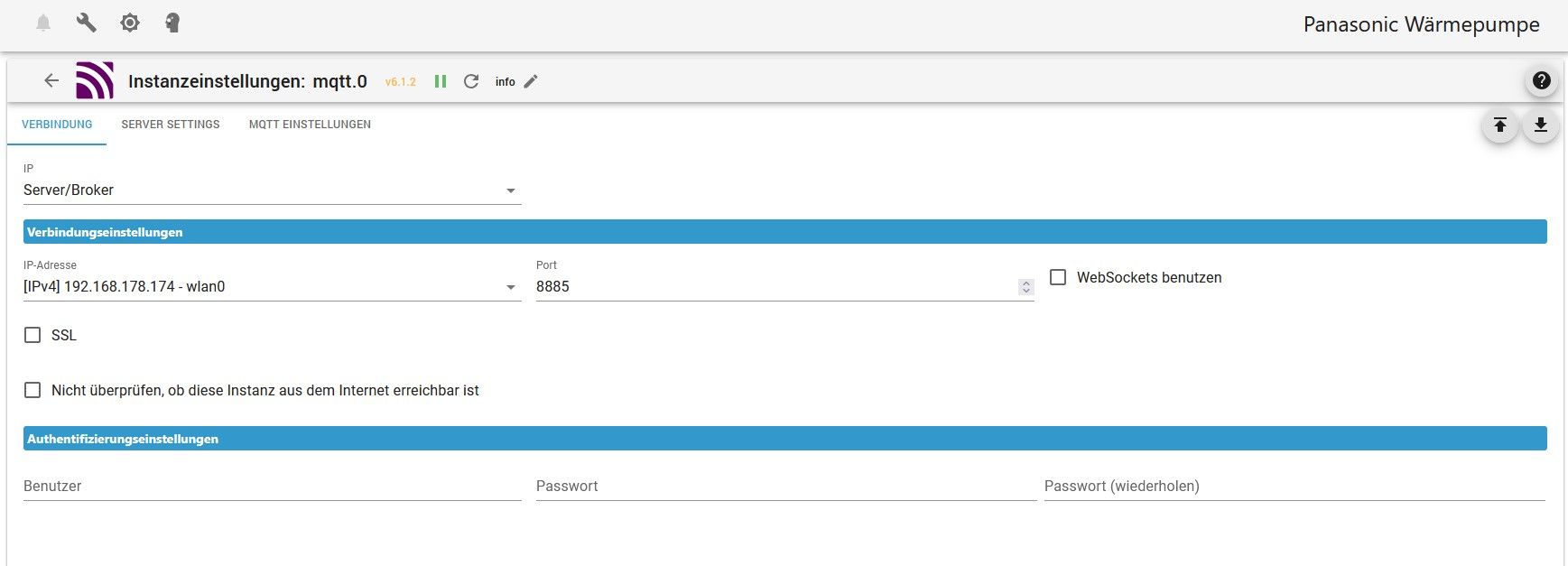
                              mqtt-settings.jpg

                              (ipv4) 192.168.178.174-wlan0 , beim Port steht ja die 8885.
                              Muss das der Port sein wo man die VIS aufruft ?
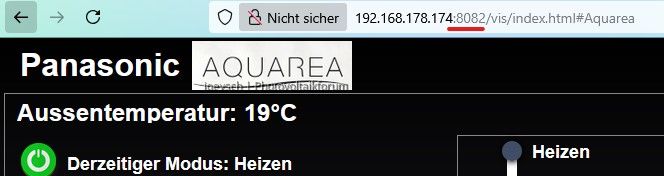
                              Port-Nummer.jpg

                              Thomas BraunT 1Topf1 2 Antworten Letzte Antwort
                              0
                              • dogfight76D dogfight76

                                Da der Pi ja ein anderer ist als vorher , hat sich die IP geändert auf 192.168.178.174 (vorher .140)

                                Jetzt meckert die MQTT-Instanz , weil dort ja die .140 eingetragen war.
                                mqtt.jpg

                                Ich also in den Settings von mqtt die IP im Auswahlfenster geändert auf:
                                mqtt-settings.jpg

                                (ipv4) 192.168.178.174-wlan0 , beim Port steht ja die 8885.
                                Muss das der Port sein wo man die VIS aufruft ?

                                Port-Nummer.jpg

                                Thomas BraunT Online
                                Thomas BraunT Online
                                Thomas Braun
                                Most Active
                                schrieb am zuletzt editiert von
                                #30

                                @dogfight76

                                mqtt hat mit der vis nix zu schaffen. Natürlich lauschen die Dienste auf unterschiedlichen Ports.

                                Linux-Werkzeugkasten:
                                https://forum.iobroker.net/topic/42952/der-kleine-iobroker-linux-werkzeugkasten
                                NodeJS Fixer Skript:
                                https://forum.iobroker.net/topic/68035/iob-node-fix-skript
                                iob_diag: curl -sLf -o diag.sh https://iobroker.net/diag.sh && bash diag.sh

                                1 Antwort Letzte Antwort
                                0
                                • dogfight76D Offline
                                  dogfight76D Offline
                                  dogfight76
                                  schrieb am zuletzt editiert von
                                  #31

                                  Ok, danke.

                                  Aber warum zeigt mir die Instanz vom mqtt jetzt an:
                                  Verbunden - grün
                                  Lebenszeichen - grün
                                  Verbunden - rot
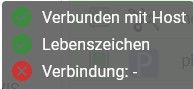
                                  mqtt.jpg

                                  Die Einstellungen in der Instanz mit der neuen IP stimmen doch, oder nicht ?

                                  Thomas BraunT 1 Antwort Letzte Antwort
                                  0
                                  • dogfight76D dogfight76

                                    Ok, danke.

                                    Aber warum zeigt mir die Instanz vom mqtt jetzt an:
                                    Verbunden - grün
                                    Lebenszeichen - grün
                                    Verbunden - rot
                                    mqtt.jpg

                                    Die Einstellungen in der Instanz mit der neuen IP stimmen doch, oder nicht ?

                                    Thomas BraunT Online
                                    Thomas BraunT Online
                                    Thomas Braun
                                    Most Active
                                    schrieb am zuletzt editiert von
                                    #32

                                    @dogfight76 sagte in Meldung über Zeitfehler - Was ist das ?:

                                    Aber warum

                                    Schau in das Log.

                                    Linux-Werkzeugkasten:
                                    https://forum.iobroker.net/topic/42952/der-kleine-iobroker-linux-werkzeugkasten
                                    NodeJS Fixer Skript:
                                    https://forum.iobroker.net/topic/68035/iob-node-fix-skript
                                    iob_diag: curl -sLf -o diag.sh https://iobroker.net/diag.sh && bash diag.sh

                                    dogfight76D 1 Antwort Letzte Antwort
                                    0
                                    • Thomas BraunT Thomas Braun

                                      @dogfight76 sagte in Meldung über Zeitfehler - Was ist das ?:

                                      Aber warum

                                      Schau in das Log.

                                      dogfight76D Offline
                                      dogfight76D Offline
                                      dogfight76
                                      schrieb am zuletzt editiert von
                                      #33

                                      @thomas-braun
                                      Im Log vom ioBroker steht was den mqtt betrifft:

                                      mqtt.0
                                      	2025-04-05 12:03:05.677	info	Starting MQTT server on 192.168.178.174:8885
                                      mqtt.0
                                      	2025-04-05 12:03:05.278	info	starting. Version 6.1.2 in /opt/iobroker/node_modules/iobroker.mqtt, node: v20.19.0, js-controller: 7.0.6
                                      mqtt.0
                                      	2025-04-05 12:02:58.680	info	terminating
                                      mqtt.0
                                      	2025-04-05 12:02:58.177	info	Terminated (ADAPTER_REQUESTED_TERMINATION): Without reason
                                      mqtt.0
                                      	2025-04-05 12:02:58.175	info	terminating
                                      mqtt.0
                                      	2025-04-05 12:02:58.173	info	Got terminate signal TERMINATE_YOURSELF
                                      
                                      HomoranH 1 Antwort Letzte Antwort
                                      0
                                      • dogfight76D dogfight76

                                        @thomas-braun
                                        Im Log vom ioBroker steht was den mqtt betrifft:

                                        mqtt.0
                                        	2025-04-05 12:03:05.677	info	Starting MQTT server on 192.168.178.174:8885
                                        mqtt.0
                                        	2025-04-05 12:03:05.278	info	starting. Version 6.1.2 in /opt/iobroker/node_modules/iobroker.mqtt, node: v20.19.0, js-controller: 7.0.6
                                        mqtt.0
                                        	2025-04-05 12:02:58.680	info	terminating
                                        mqtt.0
                                        	2025-04-05 12:02:58.177	info	Terminated (ADAPTER_REQUESTED_TERMINATION): Without reason
                                        mqtt.0
                                        	2025-04-05 12:02:58.175	info	terminating
                                        mqtt.0
                                        	2025-04-05 12:02:58.173	info	Got terminate signal TERMINATE_YOURSELF
                                        
                                        HomoranH Nicht stören
                                        HomoranH Nicht stören
                                        Homoran
                                        Global Moderator Administrators
                                        schrieb am zuletzt editiert von
                                        #34

                                        @dogfight76 wissen die clients von der neuen IP?

                                        kein Support per PN! - Fragen im Forum stellen - es gibt fast nichts, was nicht auch für andere interessant ist.

                                        Benutzt das Voting rechts unten im Beitrag wenn er euch geholfen hat.

                                        der Installationsfixer: curl -fsL https://iobroker.net/fix.sh | bash -

                                        dogfight76D 1 Antwort Letzte Antwort
                                        0
                                        • HomoranH Homoran

                                          @dogfight76 wissen die clients von der neuen IP?

                                          dogfight76D Offline
                                          dogfight76D Offline
                                          dogfight76
                                          schrieb am zuletzt editiert von
                                          #35

                                          @homoran
                                          Wo stelle ich die neue IP für Clients ein ?
                                          Hatte jetzt nur an den mqqt gedacht ?

                                          HomoranH 1 Antwort Letzte Antwort
                                          0
                                          Antworten
                                          • In einem neuen Thema antworten
                                          Anmelden zum Antworten
                                          • Älteste zuerst
                                          • Neuste zuerst
                                          • Meiste Stimmen


                                          Support us

                                          ioBroker
                                          Community Adapters
                                          Donate

                                          360

                                          Online

                                          32.5k

                                          Benutzer

                                          81.6k

                                          Themen

                                          1.3m

                                          Beiträge
                                          Community
                                          Impressum | Datenschutz-Bestimmungen | Nutzungsbedingungen | Einwilligungseinstellungen
                                          ioBroker Community 2014-2025
                                          logo
                                          • Anmelden

                                          • Du hast noch kein Konto? Registrieren

                                          • Anmelden oder registrieren, um zu suchen
                                          • Erster Beitrag
                                            Letzter Beitrag
                                          0
                                          • Home
                                          • Aktuell
                                          • Tags
                                          • Ungelesen 0
                                          • Kategorien
                                          • Unreplied
                                          • Beliebt
                                          • GitHub
                                          • Docu
                                          • Hilfe