Weiter zum Inhalt
  • Home
  • Aktuell
  • Tags
  • 0 Ungelesen 0
  • Kategorien
  • Unreplied
  • Beliebt
  • GitHub
  • Docu
  • Hilfe
Skins
  • Hell
  • Brite
  • Cerulean
  • Cosmo
  • Flatly
  • Journal
  • Litera
  • Lumen
  • Lux
  • Materia
  • Minty
  • Morph
  • Pulse
  • Sandstone
  • Simplex
  • Sketchy
  • Spacelab
  • United
  • Yeti
  • Zephyr
  • Dunkel
  • Cyborg
  • Darkly
  • Quartz
  • Slate
  • Solar
  • Superhero
  • Vapor

  • Standard: (Kein Skin)
  • Kein Skin
Einklappen
ioBroker Logo

Community Forum

donate donate
  1. ioBroker Community Home
  2. Deutsch
  3. ioBroker Allgemein
  4. (gelöst) linux-control lxc host klappt nicht

NEWS

  • Neuer ioBroker-Blog online: Monatsrückblick März/April 2026
    BluefoxB
    Bluefox
    8
    1
    347

  • Verwendung von KI bitte immer deutlich kennzeichnen
    HomoranH
    Homoran
    10
    1
    311

  • Monatsrückblick Januar/Februar 2026 ist online!
    BluefoxB
    Bluefox
    18
    1
    932

(gelöst) linux-control lxc host klappt nicht

Geplant Angeheftet Gesperrt Verschoben ioBroker Allgemein
37 Beiträge 8 Kommentatoren 3.3k Aufrufe 6 Beobachtet
  • Älteste zuerst
  • Neuste zuerst
  • Meiste Stimmen
Antworten
  • In einem neuen Thema antworten
Anmelden zum Antworten
Dieses Thema wurde gelöscht. Nur Nutzer mit entsprechenden Rechten können es sehen.
  • WalW Wal

    @hal ,
    installiere dir auch mal die Version 1.1.6 von Github, bei der 1.1.5 hatte ich unter Proxmox ab und zu auch Login Probleme.
    Kann auch sein das die Probleme weg waren als ich in Proxmox auf feste IP umgestellt hatte, ich weis es nicht mehr.

    HALH Offline
    HALH Offline
    HAL
    schrieb am zuletzt editiert von
    #19

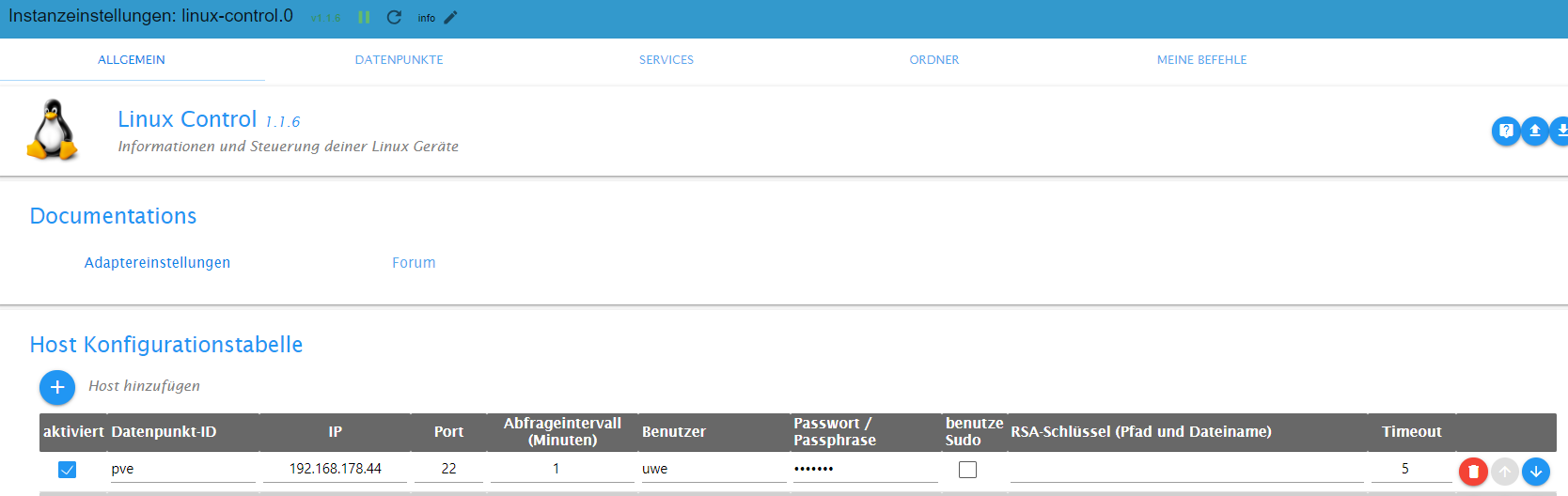
    @wal die 1.1.6 hatte ich schon
    Screenshot 2024-03-26 172900.png

    @crunchip auch mit einem user mit allen Berechtigungen, keine Veränderung. Der Adapter sagt immer die ip ist nicht zu erreichen...

    Alle Raspberry ( 5 ) gegen NUC (N100, 16GB Ram und 500GB M2 SSD, extern 2TB SSD ) mit Proxmox 8.3.3 gewechselt. Läuft absolut super !
    (Iobroker, Grafana, Teslalogger, Nextcloud, go2rtc, PiHole, IOB-VIS2, Teslamate, homeassistant nur als test)

    crunchipC 1 Antwort Letzte Antwort
    0
    • HALH HAL

      @wal die 1.1.6 hatte ich schon
      Screenshot 2024-03-26 172900.png

      @crunchip auch mit einem user mit allen Berechtigungen, keine Veränderung. Der Adapter sagt immer die ip ist nicht zu erreichen...

      crunchipC Abwesend
      crunchipC Abwesend
      crunchip
      Forum Testing Most Active Developer
      schrieb am zuletzt editiert von crunchip
      #20

      @hal da fehlt der Haken bei sudo

      Edit
      ich hatte auch paar Abfragen an Proxmox Konfiguriert und das ein oder andere wurde nicht mehr ausgeführt, daher ist das bei mir schon längere Zeit deaktiviert.
      Ist mir gerade so eingefallen, müsst ich heut abend mal nachsehen ob die Verbindung noch klappt.

      umgestiegen von Proxmox auf Unraid

      HALH 1 Antwort Letzte Antwort
      0
      • crunchipC crunchip

        @hal da fehlt der Haken bei sudo

        Edit
        ich hatte auch paar Abfragen an Proxmox Konfiguriert und das ein oder andere wurde nicht mehr ausgeführt, daher ist das bei mir schon längere Zeit deaktiviert.
        Ist mir gerade so eingefallen, müsst ich heut abend mal nachsehen ob die Verbindung noch klappt.

        HALH Offline
        HALH Offline
        HAL
        schrieb am zuletzt editiert von HAL
        #21

        @crunchip ich habe jetzt im Adapter eine physische andere ip von einem Raspberry eingetragen und das klappt NICHT. Es liegt also irgendwie in der Thematik proxmox und linux container.

        [getConnection] Host 'ccu' (192.168.178.20:22) seems not to be online

        Egal ob der sudo markiert ist oder nicht.

        Alle Raspberry ( 5 ) gegen NUC (N100, 16GB Ram und 500GB M2 SSD, extern 2TB SSD ) mit Proxmox 8.3.3 gewechselt. Läuft absolut super !
        (Iobroker, Grafana, Teslalogger, Nextcloud, go2rtc, PiHole, IOB-VIS2, Teslamate, homeassistant nur als test)

        crunchipC 1 Antwort Letzte Antwort
        0
        • HALH HAL

          @crunchip ich habe jetzt im Adapter eine physische andere ip von einem Raspberry eingetragen und das klappt NICHT. Es liegt also irgendwie in der Thematik proxmox und linux container.

          [getConnection] Host 'ccu' (192.168.178.20:22) seems not to be online

          Egal ob der sudo markiert ist oder nicht.

          crunchipC Abwesend
          crunchipC Abwesend
          crunchip
          Forum Testing Most Active Developer
          schrieb am zuletzt editiert von
          #22

          @hal ist dies korrekt?

          if its not possible to get connection to your linux client, check if iputils-ping is correct installed on client
          

          umgestiegen von Proxmox auf Unraid

          HALH 1 Antwort Letzte Antwort
          0
          • crunchipC crunchip

            @hal ist dies korrekt?

            if its not possible to get connection to your linux client, check if iputils-ping is correct installed on client
            
            HALH Offline
            HALH Offline
            HAL
            schrieb am zuletzt editiert von
            #23

            @crunchip

            root@iobroker:~# ping 192.168.178.44
            PING 192.168.178.44 (192.168.178.44) 56(84) bytes of data.
            64 bytes from 192.168.178.44: icmp_seq=1 ttl=64 time=0.044 ms
            64 bytes from 192.168.178.44: icmp_seq=2 ttl=64 time=0.036 ms
            64 bytes from 192.168.178.44: icmp_seq=3 ttl=64 time=0.058 ms
            64 bytes from 192.168.178.44: icmp_seq=4 ttl=64 time=0.048 ms
            ^C
            --- 192.168.178.44 ping statistics ---
            4 packets transmitted, 4 received, 0% packet loss, time 3074ms
            rtt min/avg/max/mdev = 0.036/0.046/0.058/0.007 ms
            

            Alle Raspberry ( 5 ) gegen NUC (N100, 16GB Ram und 500GB M2 SSD, extern 2TB SSD ) mit Proxmox 8.3.3 gewechselt. Läuft absolut super !
            (Iobroker, Grafana, Teslalogger, Nextcloud, go2rtc, PiHole, IOB-VIS2, Teslamate, homeassistant nur als test)

            CodierknechtC 1 Antwort Letzte Antwort
            0
            • HALH HAL

              @crunchip

              root@iobroker:~# ping 192.168.178.44
              PING 192.168.178.44 (192.168.178.44) 56(84) bytes of data.
              64 bytes from 192.168.178.44: icmp_seq=1 ttl=64 time=0.044 ms
              64 bytes from 192.168.178.44: icmp_seq=2 ttl=64 time=0.036 ms
              64 bytes from 192.168.178.44: icmp_seq=3 ttl=64 time=0.058 ms
              64 bytes from 192.168.178.44: icmp_seq=4 ttl=64 time=0.048 ms
              ^C
              --- 192.168.178.44 ping statistics ---
              4 packets transmitted, 4 received, 0% packet loss, time 3074ms
              rtt min/avg/max/mdev = 0.036/0.046/0.058/0.007 ms
              
              CodierknechtC Online
              CodierknechtC Online
              Codierknecht
              Developer Most Active
              schrieb am zuletzt editiert von
              #24

              @hal
              Da wurschtelt man immer noch nicht als rootrum.

              "Any fool can write code that a computer can understand. Good programmers write code that humans can understand." (Martin Fowler, "Refactoring")

              Proxmox 9.1.1 LXC|8 GB|Core i7-6700
              HmIP|ZigBee|Tasmota|Unifi
              Zabbix Certified Specialist
              Konnte ich Dir helfen? Dann benutze bitte das Voting unten rechts im Beitrag

              HALH 1 Antwort Letzte Antwort
              1
              • CodierknechtC Codierknecht

                @hal
                Da wurschtelt man immer noch nicht als rootrum.

                HALH Offline
                HALH Offline
                HAL
                schrieb am zuletzt editiert von
                #25

                @codierknecht was hat das mit dem Adapter zu tun ?

                Alle Raspberry ( 5 ) gegen NUC (N100, 16GB Ram und 500GB M2 SSD, extern 2TB SSD ) mit Proxmox 8.3.3 gewechselt. Läuft absolut super !
                (Iobroker, Grafana, Teslalogger, Nextcloud, go2rtc, PiHole, IOB-VIS2, Teslamate, homeassistant nur als test)

                CodierknechtC 1 Antwort Letzte Antwort
                0
                • HALH HAL

                  @codierknecht was hat das mit dem Adapter zu tun ?

                  CodierknechtC Online
                  CodierknechtC Online
                  Codierknecht
                  Developer Most Active
                  schrieb am zuletzt editiert von
                  #26

                  @hal
                  Die Ausgabe zeigt lediglich, dass ein ping als root funktioniert.
                  Der Adapter läuft aber nicht als root.

                  "Any fool can write code that a computer can understand. Good programmers write code that humans can understand." (Martin Fowler, "Refactoring")

                  Proxmox 9.1.1 LXC|8 GB|Core i7-6700
                  HmIP|ZigBee|Tasmota|Unifi
                  Zabbix Certified Specialist
                  Konnte ich Dir helfen? Dann benutze bitte das Voting unten rechts im Beitrag

                  HALH 1 Antwort Letzte Antwort
                  0
                  • CodierknechtC Codierknecht

                    @hal
                    Die Ausgabe zeigt lediglich, dass ein ping als root funktioniert.
                    Der Adapter läuft aber nicht als root.

                    HALH Offline
                    HALH Offline
                    HAL
                    schrieb am zuletzt editiert von HAL
                    #27

                    @codierknecht

                    uwe@iobroker:~$ sudo ping 192.168.178.44
                    [sudo] password for uwe: 
                    PING 192.168.178.44 (192.168.178.44) 56(84) bytes of data.
                    64 bytes from 192.168.178.44: icmp_seq=1 ttl=64 time=0.047 ms
                    64 bytes from 192.168.178.44: icmp_seq=2 ttl=64 time=0.037 ms
                    64 bytes from 192.168.178.44: icmp_seq=3 ttl=64 time=0.044 ms
                    64 bytes from 192.168.178.44: icmp_seq=4 ttl=64 time=0.043 ms
                    ^C
                    --- 192.168.178.44 ping statistics ---
                    4 packets transmitted, 4 received, 0% packet loss, time 3068ms
                    rtt min/avg/max/mdev = 0.037/0.042/0.047/0.003 ms

                    

                    a0f2cb76-2a00-46aa-ba1b-ecc26a91f3a1-image.png

                    
                    linux-control.0
                    2024-03-26 23:00:44.869	info	[getConnection] Host 'pve' (192.168.178.44:22) seems not to be online
                    
                    linux-control.0
                    2024-03-26 23:00:44.851	info	getting data from pve (192.168.178.44:22, Adapter start)
                    
                    linux-control.0
                    2024-03-26 23:00:44.799	info	starting. Version 1.1.6 (non-npm: Scrounger/ioBroker.linux-control) in /opt/iobroker/node_modules/iobroker.linux-control, node: v18.18.2, js-controller: 5.0.19
                    

                    Alle Raspberry ( 5 ) gegen NUC (N100, 16GB Ram und 500GB M2 SSD, extern 2TB SSD ) mit Proxmox 8.3.3 gewechselt. Läuft absolut super !
                    (Iobroker, Grafana, Teslalogger, Nextcloud, go2rtc, PiHole, IOB-VIS2, Teslamate, homeassistant nur als test)

                    CodierknechtC crunchipC Thomas BraunT 3 Antworten Letzte Antwort
                    0
                    • HALH HAL

                      @codierknecht

                      uwe@iobroker:~$ sudo ping 192.168.178.44
                      [sudo] password for uwe: 
                      PING 192.168.178.44 (192.168.178.44) 56(84) bytes of data.
                      64 bytes from 192.168.178.44: icmp_seq=1 ttl=64 time=0.047 ms
                      64 bytes from 192.168.178.44: icmp_seq=2 ttl=64 time=0.037 ms
                      64 bytes from 192.168.178.44: icmp_seq=3 ttl=64 time=0.044 ms
                      64 bytes from 192.168.178.44: icmp_seq=4 ttl=64 time=0.043 ms
                      ^C
                      --- 192.168.178.44 ping statistics ---
                      4 packets transmitted, 4 received, 0% packet loss, time 3068ms
                      rtt min/avg/max/mdev = 0.037/0.042/0.047/0.003 ms
                      

                      a0f2cb76-2a00-46aa-ba1b-ecc26a91f3a1-image.png

                      
                      linux-control.0
                      2024-03-26 23:00:44.869	info	[getConnection] Host 'pve' (192.168.178.44:22) seems not to be online
                      
                      linux-control.0
                      2024-03-26 23:00:44.851	info	getting data from pve (192.168.178.44:22, Adapter start)
                      
                      linux-control.0
                      2024-03-26 23:00:44.799	info	starting. Version 1.1.6 (non-npm: Scrounger/ioBroker.linux-control) in /opt/iobroker/node_modules/iobroker.linux-control, node: v18.18.2, js-controller: 5.0.19
                      
                      CodierknechtC Online
                      CodierknechtC Online
                      Codierknecht
                      Developer Most Active
                      schrieb am zuletzt editiert von
                      #28

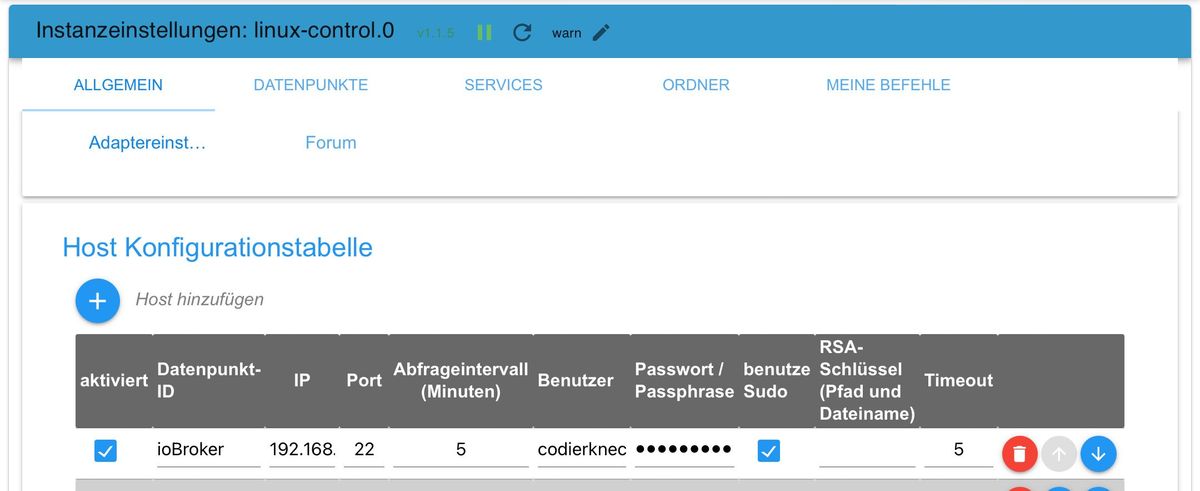
                      @hal
                      Also ich kann meinen LXC Container problemlos erreichen.
                      Ein grundsätzliches Problem beim Adapter würde ich demnach ausschließen.
                      Hätte vermutlich auch längst Geschrei gegeben.
                      IMG_0013.jpeg

                      "Any fool can write code that a computer can understand. Good programmers write code that humans can understand." (Martin Fowler, "Refactoring")

                      Proxmox 9.1.1 LXC|8 GB|Core i7-6700
                      HmIP|ZigBee|Tasmota|Unifi
                      Zabbix Certified Specialist
                      Konnte ich Dir helfen? Dann benutze bitte das Voting unten rechts im Beitrag

                      crunchipC 1 Antwort Letzte Antwort
                      0
                      • CodierknechtC Codierknecht

                        @hal
                        Also ich kann meinen LXC Container problemlos erreichen.
                        Ein grundsätzliches Problem beim Adapter würde ich demnach ausschließen.
                        Hätte vermutlich auch längst Geschrei gegeben.

                        IMG_0013.jpeg

                        crunchipC Abwesend
                        crunchipC Abwesend
                        crunchip
                        Forum Testing Most Active Developer
                        schrieb am zuletzt editiert von
                        #29

                        @codierknecht habs bei mir ebenfalls gerade getestet, vom iobroker docker (anderer Server) zum Proxmox-Host, funktioniert ohne Probleme

                        umgestiegen von Proxmox auf Unraid

                        1 Antwort Letzte Antwort
                        0
                        • HALH HAL

                          @codierknecht

                          uwe@iobroker:~$ sudo ping 192.168.178.44
                          [sudo] password for uwe: 
                          PING 192.168.178.44 (192.168.178.44) 56(84) bytes of data.
                          64 bytes from 192.168.178.44: icmp_seq=1 ttl=64 time=0.047 ms
                          64 bytes from 192.168.178.44: icmp_seq=2 ttl=64 time=0.037 ms
                          64 bytes from 192.168.178.44: icmp_seq=3 ttl=64 time=0.044 ms
                          64 bytes from 192.168.178.44: icmp_seq=4 ttl=64 time=0.043 ms
                          ^C
                          --- 192.168.178.44 ping statistics ---
                          4 packets transmitted, 4 received, 0% packet loss, time 3068ms
                          rtt min/avg/max/mdev = 0.037/0.042/0.047/0.003 ms
                          

                          a0f2cb76-2a00-46aa-ba1b-ecc26a91f3a1-image.png

                          
                          linux-control.0
                          2024-03-26 23:00:44.869	info	[getConnection] Host 'pve' (192.168.178.44:22) seems not to be online
                          
                          linux-control.0
                          2024-03-26 23:00:44.851	info	getting data from pve (192.168.178.44:22, Adapter start)
                          
                          linux-control.0
                          2024-03-26 23:00:44.799	info	starting. Version 1.1.6 (non-npm: Scrounger/ioBroker.linux-control) in /opt/iobroker/node_modules/iobroker.linux-control, node: v18.18.2, js-controller: 5.0.19
                          
                          crunchipC Abwesend
                          crunchipC Abwesend
                          crunchip
                          Forum Testing Most Active Developer
                          schrieb am zuletzt editiert von crunchip
                          #30

                          @hal sagte in linux-control lxc host klappt nicht:

                          node: v18.18.2

                          ist aber auch nicht der aktuelle Stand

                          auch schon mal Proxmox neu gestartet?

                          es gab Hier ein issue, hat sich aber scheinbar in Luft aufgelöst

                          umgestiegen von Proxmox auf Unraid

                          HALH 1 Antwort Letzte Antwort
                          0
                          • HALH HAL

                            @codierknecht

                            uwe@iobroker:~$ sudo ping 192.168.178.44
                            [sudo] password for uwe: 
                            PING 192.168.178.44 (192.168.178.44) 56(84) bytes of data.
                            64 bytes from 192.168.178.44: icmp_seq=1 ttl=64 time=0.047 ms
                            64 bytes from 192.168.178.44: icmp_seq=2 ttl=64 time=0.037 ms
                            64 bytes from 192.168.178.44: icmp_seq=3 ttl=64 time=0.044 ms
                            64 bytes from 192.168.178.44: icmp_seq=4 ttl=64 time=0.043 ms
                            ^C
                            --- 192.168.178.44 ping statistics ---
                            4 packets transmitted, 4 received, 0% packet loss, time 3068ms
                            rtt min/avg/max/mdev = 0.037/0.042/0.047/0.003 ms
                            

                            a0f2cb76-2a00-46aa-ba1b-ecc26a91f3a1-image.png

                            
                            linux-control.0
                            2024-03-26 23:00:44.869	info	[getConnection] Host 'pve' (192.168.178.44:22) seems not to be online
                            
                            linux-control.0
                            2024-03-26 23:00:44.851	info	getting data from pve (192.168.178.44:22, Adapter start)
                            
                            linux-control.0
                            2024-03-26 23:00:44.799	info	starting. Version 1.1.6 (non-npm: Scrounger/ioBroker.linux-control) in /opt/iobroker/node_modules/iobroker.linux-control, node: v18.18.2, js-controller: 5.0.19
                            
                            Thomas BraunT Online
                            Thomas BraunT Online
                            Thomas Braun
                            Most Active
                            schrieb am zuletzt editiert von
                            #31

                            @hal

                            apt policy iputils-ping ping
                            ping 192.168.178.44
                            sudo -H -u iobroker ping 192.168.178.44
                            

                            sagt? Natürlich NICHT als root sondern als user ausgeführt.
                            Eigentlich logisch, da man sich ohnehin nie als root anmeldet.

                            Linux-Werkzeugkasten:
                            https://forum.iobroker.net/topic/42952/der-kleine-iobroker-linux-werkzeugkasten
                            NodeJS Fixer Skript:
                            https://forum.iobroker.net/topic/68035/iob-node-fix-skript
                            iob_diag: curl -sLf -o diag.sh https://iobroker.net/diag.sh && bash diag.sh

                            HALH 2 Antworten Letzte Antwort
                            0
                            • Thomas BraunT Thomas Braun

                              @hal

                              apt policy iputils-ping ping
                              ping 192.168.178.44
                              sudo -H -u iobroker ping 192.168.178.44
                              

                              sagt? Natürlich NICHT als root sondern als user ausgeführt.
                              Eigentlich logisch, da man sich ohnehin nie als root anmeldet.

                              HALH Offline
                              HALH Offline
                              HAL
                              schrieb am zuletzt editiert von
                              #32

                              @thomas-braun ich bin am iobroker mit dem user Uwe angemeldet

                              Alle Raspberry ( 5 ) gegen NUC (N100, 16GB Ram und 500GB M2 SSD, extern 2TB SSD ) mit Proxmox 8.3.3 gewechselt. Läuft absolut super !
                              (Iobroker, Grafana, Teslalogger, Nextcloud, go2rtc, PiHole, IOB-VIS2, Teslamate, homeassistant nur als test)

                              Thomas BraunT 1 Antwort Letzte Antwort
                              0
                              • HALH HAL

                                @thomas-braun ich bin am iobroker mit dem user Uwe angemeldet

                                Thomas BraunT Online
                                Thomas BraunT Online
                                Thomas Braun
                                Most Active
                                schrieb am zuletzt editiert von Thomas Braun
                                #33

                                @hal

                                Mag ja sein. Mittels sudo setzt du da aber weiterhin auf root-Rechte. Bringt dir aber keine Erkenntnisse, weil Ping z.B. unter Umständen von Usern nicht ausgeführt werden darf. Deswegen halt als User agieren, weil man immer als user eingeloggt ist und nie als root.

                                Die Kommandos liefern nun was zurück?

                                Linux-Werkzeugkasten:
                                https://forum.iobroker.net/topic/42952/der-kleine-iobroker-linux-werkzeugkasten
                                NodeJS Fixer Skript:
                                https://forum.iobroker.net/topic/68035/iob-node-fix-skript
                                iob_diag: curl -sLf -o diag.sh https://iobroker.net/diag.sh && bash diag.sh

                                1 Antwort Letzte Antwort
                                0
                                • crunchipC crunchip

                                  @hal sagte in linux-control lxc host klappt nicht:

                                  node: v18.18.2

                                  ist aber auch nicht der aktuelle Stand

                                  auch schon mal Proxmox neu gestartet?

                                  es gab Hier ein issue, hat sich aber scheinbar in Luft aufgelöst

                                  HALH Offline
                                  HALH Offline
                                  HAL
                                  schrieb am zuletzt editiert von
                                  #34

                                  @crunchip mach ich heute abend, bin jetzt unterwegs

                                  Alle Raspberry ( 5 ) gegen NUC (N100, 16GB Ram und 500GB M2 SSD, extern 2TB SSD ) mit Proxmox 8.3.3 gewechselt. Läuft absolut super !
                                  (Iobroker, Grafana, Teslalogger, Nextcloud, go2rtc, PiHole, IOB-VIS2, Teslamate, homeassistant nur als test)

                                  1 Antwort Letzte Antwort
                                  0
                                  • Thomas BraunT Thomas Braun

                                    @hal

                                    apt policy iputils-ping ping
                                    ping 192.168.178.44
                                    sudo -H -u iobroker ping 192.168.178.44
                                    

                                    sagt? Natürlich NICHT als root sondern als user ausgeführt.
                                    Eigentlich logisch, da man sich ohnehin nie als root anmeldet.

                                    HALH Offline
                                    HALH Offline
                                    HAL
                                    schrieb am zuletzt editiert von
                                    #35

                                    @thomas-braun sorry war durch Ostern beschäftigt

                                    iobroker login: uwe
                                    Password: 
                                    Linux iobroker 6.5.13-1-pve #1 SMP PREEMPT_DYNAMIC PMX 6.5.13-1 (2024-02-05T13:50Z) x86_64
                                    
                                    The programs included with the Debian GNU/Linux system are free software;
                                    the exact distribution terms for each program are described in the
                                    individual files in /usr/share/doc/*/copyright.
                                    
                                    Debian GNU/Linux comes with ABSOLUTELY NO WARRANTY, to the extent
                                    permitted by applicable law.
                                    Last login: Mon Apr  1 14:43:10 CEST 2024 on tty1
                                    uwe@iobroker:~$ apt policy iputils-ping ping
                                    iputils-ping:
                                      Installed: 3:20210202-1
                                      Candidate: 3:20210202-1
                                      Version table:
                                     *** 3:20210202-1 500
                                            500 http://deb.debian.org/debian bullseye/main amd64 Packages
                                            100 /var/lib/dpkg/status
                                    ping:
                                      Installed: (none)
                                      Candidate: (none)
                                      Version table:
                                    uwe@iobroker:~$ ping 192.168.178.44
                                    ping: socket: Operation not permitted
                                    uwe@iobroker:~$ sudo -H -u iobroker ping 192.168.178.44
                                    [sudo] password for uwe: 
                                    ping: socket: Operation not permitted
                                    uwe@iobroker:~$
                                    

                                    Alle Raspberry ( 5 ) gegen NUC (N100, 16GB Ram und 500GB M2 SSD, extern 2TB SSD ) mit Proxmox 8.3.3 gewechselt. Läuft absolut super !
                                    (Iobroker, Grafana, Teslalogger, Nextcloud, go2rtc, PiHole, IOB-VIS2, Teslamate, homeassistant nur als test)

                                    Thomas BraunT 1 Antwort Letzte Antwort
                                    0
                                    • HALH HAL

                                      @thomas-braun sorry war durch Ostern beschäftigt

                                      iobroker login: uwe
                                      Password: 
                                      Linux iobroker 6.5.13-1-pve #1 SMP PREEMPT_DYNAMIC PMX 6.5.13-1 (2024-02-05T13:50Z) x86_64
                                      
                                      The programs included with the Debian GNU/Linux system are free software;
                                      the exact distribution terms for each program are described in the
                                      individual files in /usr/share/doc/*/copyright.
                                      
                                      Debian GNU/Linux comes with ABSOLUTELY NO WARRANTY, to the extent
                                      permitted by applicable law.
                                      Last login: Mon Apr  1 14:43:10 CEST 2024 on tty1
                                      uwe@iobroker:~$ apt policy iputils-ping ping
                                      iputils-ping:
                                        Installed: 3:20210202-1
                                        Candidate: 3:20210202-1
                                        Version table:
                                       *** 3:20210202-1 500
                                              500 http://deb.debian.org/debian bullseye/main amd64 Packages
                                              100 /var/lib/dpkg/status
                                      ping:
                                        Installed: (none)
                                        Candidate: (none)
                                        Version table:
                                      uwe@iobroker:~$ ping 192.168.178.44
                                      ping: socket: Operation not permitted
                                      uwe@iobroker:~$ sudo -H -u iobroker ping 192.168.178.44
                                      [sudo] password for uwe: 
                                      ping: socket: Operation not permitted
                                      uwe@iobroker:~$
                                      
                                      Thomas BraunT Online
                                      Thomas BraunT Online
                                      Thomas Braun
                                      Most Active
                                      schrieb am zuletzt editiert von
                                      #36

                                      @hal

                                      Gib den usern die Rechte:

                                      sudo setcap cap_net_raw+p /bin/ping
                                      

                                      Linux-Werkzeugkasten:
                                      https://forum.iobroker.net/topic/42952/der-kleine-iobroker-linux-werkzeugkasten
                                      NodeJS Fixer Skript:
                                      https://forum.iobroker.net/topic/68035/iob-node-fix-skript
                                      iob_diag: curl -sLf -o diag.sh https://iobroker.net/diag.sh && bash diag.sh

                                      HALH 1 Antwort Letzte Antwort
                                      0
                                      • Thomas BraunT Thomas Braun

                                        @hal

                                        Gib den usern die Rechte:

                                        sudo setcap cap_net_raw+p /bin/ping
                                        
                                        HALH Offline
                                        HALH Offline
                                        HAL
                                        schrieb am zuletzt editiert von
                                        #37

                                        @thomas-braun OK, jetzt funktioniert auch die Abfrage der CPU Temperatur im Container. Danke für Deinen Support !


                                        Alle Raspberry ( 5 ) gegen NUC (N100, 16GB Ram und 500GB M2 SSD, extern 2TB SSD ) mit Proxmox 8.3.3 gewechselt. Läuft absolut super !
                                        (Iobroker, Grafana, Teslalogger, Nextcloud, go2rtc, PiHole, IOB-VIS2, Teslamate, homeassistant nur als test)

                                        1 Antwort Letzte Antwort
                                        0

                                        Hey! Du scheinst an dieser Unterhaltung interessiert zu sein, hast aber noch kein Konto.

                                        Hast du es satt, bei jedem Besuch durch die gleichen Beiträge zu scrollen? Wenn du dich für ein Konto anmeldest, kommst du immer genau dorthin zurück, wo du zuvor warst, und kannst dich über neue Antworten benachrichtigen lassen (entweder per E-Mail oder Push-Benachrichtigung). Du kannst auch Lesezeichen speichern und Beiträge positiv bewerten, um anderen Community-Mitgliedern deine Wertschätzung zu zeigen.

                                        Mit deinem Input könnte dieser Beitrag noch besser werden 💗

                                        Registrieren Anmelden
                                        Antworten
                                        • In einem neuen Thema antworten
                                        Anmelden zum Antworten
                                        • Älteste zuerst
                                        • Neuste zuerst
                                        • Meiste Stimmen


                                        Support us

                                        ioBroker
                                        Community Adapters
                                        Donate
                                        FAQ Cloud / IOT
                                        HowTo: Node.js-Update
                                        HowTo: Backup/Restore
                                        Downloads
                                        BLOG

                                        497

                                        Online

                                        32.8k

                                        Benutzer

                                        82.8k

                                        Themen

                                        1.3m

                                        Beiträge
                                        Community
                                        Impressum | Datenschutz-Bestimmungen | Nutzungsbedingungen | Einwilligungseinstellungen
                                        ioBroker Community 2014-2025
                                        logo
                                        • Anmelden

                                        • Du hast noch kein Konto? Registrieren

                                        • Anmelden oder registrieren, um zu suchen
                                        • Erster Beitrag
                                          Letzter Beitrag
                                        0
                                        • Home
                                        • Aktuell
                                        • Tags
                                        • Ungelesen 0
                                        • Kategorien
                                        • Unreplied
                                        • Beliebt
                                        • GitHub
                                        • Docu
                                        • Hilfe