
NEWS




Test Adapter KNX v2.x

-
@marlan99 said in Test Adapter KNX v2.x:
@mibr85 ich denke die einfachste Methode ist tatsächlich ganzen Baum löschen und Instanz neu starten.
Die Objekte in den Blockly werden beibehalten.
Eine andere Variante wäre ein Script zu schreiben um im KNX Baum nach Objekten zu suchen die seit einem bestimmten Datum nie mehr aktualisiert wurden. Sicher aufwändiger und je nachdem nicht so zuverlässig wie das löschen des Baums
Ich habe das selbe Problem. Ich habe das löschen und neu anlegen lassen mal versucht(IOB Kopie) ging leider schief.
In vielen KNX Datenpunkten waren die Flags danach falsch. Bei knapp 1000DP machts das keinen Spaß. Solch eine Funktion gehört in den Adapter rein.
-
@mpl1338 wenn die Flags nach dem Import falsch sind, dann ist es bereits in der ETS nicht korrekt gesetzt. Ist eine Mordsarbeit, aber seither passt es bei jedem Import perfekt.
-
@marlan99
wie genau bist du denn vorgegangen beim setzen deiner Flags?
welche KOs haben bei dir welche Flags bekommen?Hier meine Notizen, die ich dann in der ETS konsequent angewendet hatte. Die Info habe ich vom KNX Adapter Entwickler irgendwo in den Weiten des Internets gefunden.
KNX Flags
Pro Datenobjekt darf nur 1 Leseflag gesetzt sein !!!
Standard Flags:
-Lichttaster: S Ü A
-Lichttaster LED: S A
-Taster sperre: S
-Lichtaktor Schalten: S
-Lichtaktor Schaltstatus: L Ü-Rollladentaster: S Ü
-Rollladenaktor Schalten: S (A)
-Rollladenaktor Stati: L Ü (A)———————————————————-
K-Flag: Kommunikation ist eingeschaltetL-Flag:
S-Flag: LED soll geschaltet werden, wenn jemand auf den Bus schreibt
Ü-Flag: Sollte die LED irgendwie intern geschaltet werden, zum Beispiel durch drücken einer Taste, soll der Zustand auf den Bus geschrieben (übertragen) werden.
A-Flag: Falls ein Gerät auf dem Bus die Adresse abfragt (also liest) soll der Zustand der LED auch Aktualisiert werden.
—————————————————
ioBroker KNX Importregeln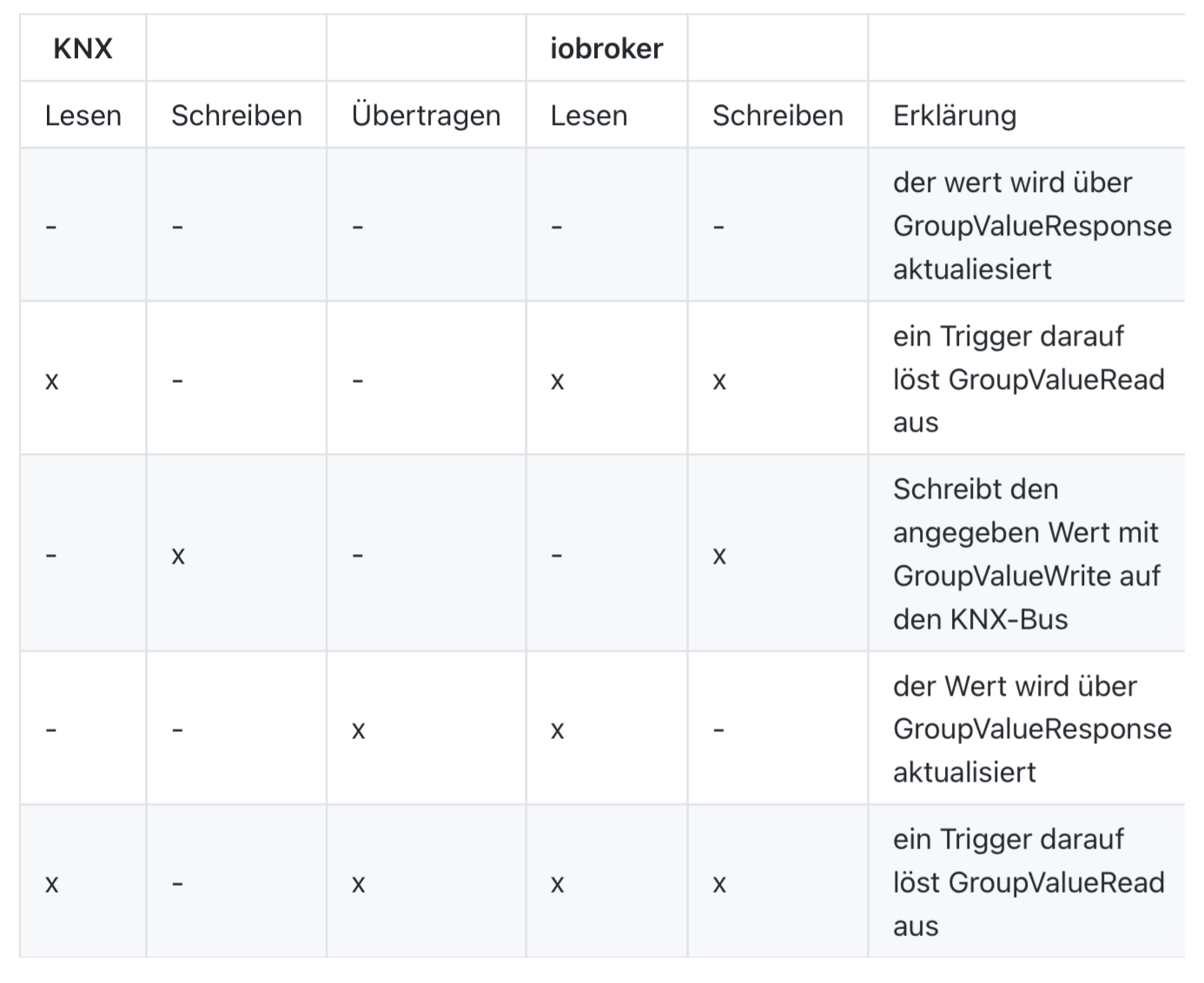
-
@mpl1338 wenn die Flags nach dem Import falsch sind, dann ist es bereits in der ETS nicht korrekt gesetzt. Ist eine Mordsarbeit, aber seither passt es bei jedem Import perfekt.
@marlan99 said in Test Adapter KNX v2.x:
@mpl1338 wenn die Flags nach dem Import falsch sind, dann ist es bereits in der ETS nicht korrekt gesetzt. Ist eine Mordsarbeit, aber seither passt es bei jedem Import perfekt.
eben nicht :/
8 GAs', 8 Aktorausgänge 1/1/0 - 1/1/7(DT 1001), Status 6/1/0 - 6/1/7(DT 1011) und trotzdem schafft es der Adapter den ein oder anderen Ausgang als Eingang zu deklaieren.
Mit Rollläden hatte ich die meisten Probleme.
Rollladen Zimmer XXX fahren absolute Position (flag schreiben )
Rollladen Zimmer XXX status absolute Position (flag lesen/übertragen)nach dem Import kann ich "fahren absolute Position" nicht mehr beschreiben
-
@blacksheep587 sagte in Test Adapter KNX v2.x:
@dutchman ja, das wäre gut, wenn wir die InfluxDB über Aliase umhängen könnten. Die Skripte habe ich gestern bereits geändert und als Visu habe ich eine native KNX Umgebung, da gibts nichts zu tun.
Wie wollen wir vorgehen? Bin gerne bereit dich hier im Forum, also das wir die Schritte durchgehen auch zum mitlesen für anderen, oder per discord/Teams dabei zu unterstützen
@dutchman
Ich habe das Problem jetzt zusammen mit chefkoch009 gelöst;
irgendwo gab es ein Problem beim Import meiner GAs auf Grund von falsch gesetzten Flags in der ETS;
Wir haben die kompletten GAs der 0er Instanz gelöscht Flags korrigiert und neu eingelesen; die Influx-DB habe ich somit auch wieder an die alten Datenpunkte hängen können.
Vielen Dank trotzdem für eure Unterstützung! -
@dutchman
Ich habe das Problem jetzt zusammen mit chefkoch009 gelöst;
irgendwo gab es ein Problem beim Import meiner GAs auf Grund von falsch gesetzten Flags in der ETS;
Wir haben die kompletten GAs der 0er Instanz gelöscht Flags korrigiert und neu eingelesen; die Influx-DB habe ich somit auch wieder an die alten Datenpunkte hängen können.
Vielen Dank trotzdem für eure Unterstützung!@blacksheep587 sagte in Test Adapter KNX v2.x:
@dutchman
Ich habe das Problem jetzt zusammen mit chefkoch009 gelöst;
irgendwo gab es ein Problem beim Import meiner GAs auf Grund von falsch gesetzten Flags in der ETS;
Wir haben die kompletten GAs der 0er Instanz gelöscht Flags korrigiert und neu eingelesen; die Influx-DB habe ich somit auch wieder an die alten Datenpunkte hängen können.
Vielen Dank trotzdem für eure Unterstützung!super freut mich und damit auch vielen dank an @ChefSache fuer den support
-
Hallo Zusammen
ich habe ein Problem mit meinem KNX Adapter:
alle 5-10 Tage habe ich festgestellt, dass die CPU Last meines Synology NAS (ioBroker läuft hierauf im Docker) plötzlich um 20-30% ansteigt.

Jetzt habe ich im Ressourcenmanager geschaut was diesen Anstieg auslöst:

Wenn ich die KNX Instanz im ioBroker stoppe, läuft dieser Prozess trotzdem weiter.
wenn ich die KNX Instanz neustarte wird ein neuer Prozess gestartet:

so sieht es im Docker aus:
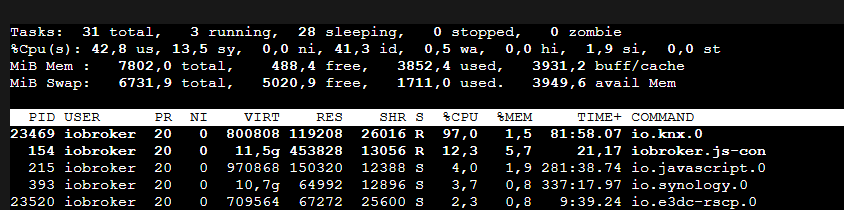
ich konnte den Prozess nur mit sudo kill -9 io.knx.0 stoppen
Wie kann ich den Prozess stoppen?
Wie kann ich herausfinden was zu diesem verhalten führt?Auszug aus iob diag:
Skript v.2023-10-10 *** BASE SYSTEM *** Hardware Vendor : Synology Kernel : x86_64 Userland : amd64 Docker : v9.0.1 Virtualization : Docker Kernel : x86_64 Userland : amd64 Systemuptime and Load: 02:36:03 up 13 days, 16:08, 0 user, load average: 1.24, 2.29, 3.05 CPU threads: 4 *** Time and Time Zones *** Mon Dec 11 01:36:03 UTC 2023 Mon Dec 11 02:36:03 CET 2023 CET +0100 Etc/UTC *** User and Groups *** root /root root *** X-Server-Setup *** X-Server: false Desktop: Terminal: *** MEMORY *** total used free shared buff/cache available Mem: 8.2G 4.0G 259M 182M 4.4G 4.2G Swap: 7.1G 1.8G 5.3G Total: 15G 5.7G 5.6G 7802 M total memory 3797 M used memory 3200 M active memory 2819 M inactive memory 247 M free memory 16 M buffer memory 4211 M swap cache 6731 M total swap 1673 M used swap 5058 M free swap *** FILESYSTEM *** Filesystem Type Size Used Avail Use% Mounted on /dev/mapper/cachedev_0 btrfs 5.3T 3.4T 2.0T 64% / tmpfs tmpfs 64M 0 64M 0% /dev tmpfs tmpfs 3.9G 0 3.9G 0% /sys/fs/cgroup shm tmpfs 64M 0 64M 0% /dev/shm /dev/mapper/cachedev_0 btrfs 5.3T 3.4T 2.0T 64% /opt/iobroker tmpfs tmpfs 3.9G 0 3.9G 0% /proc/acpi tmpfs tmpfs 3.9G 0 3.9G 0% /proc/scsi tmpfs tmpfs 3.9G 0 3.9G 0% /sys/firmware Messages concerning ext4 filesystem in dmesg: [Mon Nov 27 10:27:58 2023] EXT4-fs (md0): couldn't mount as ext3 due to feature incompatibilities [Mon Nov 27 10:27:58 2023] EXT4-fs (md0): mounted filesystem with ordered data mode. Opts: (null) [Mon Nov 27 10:27:58 2023] EXT4-fs (md0): couldn't mount as ext3 due to feature incompatibilities [Mon Nov 27 10:27:58 2023] EXT4-fs (md0): mounted filesystem with ordered data mode. Opts: barrier=1 [Mon Nov 27 10:27:58 2023] EXT4-fs (sdd2): couldn't mount as ext3 due to feature incompatibilities [Mon Nov 27 10:27:58 2023] EXT4-fs (sdd2): mounted filesystem with ordered data mode. Opts: (null) [Mon Nov 27 10:29:23 2023] EXT4-fs (md0): couldn't mount as ext3 due to feature incompatibilities [Mon Nov 27 10:29:23 2023] EXT4-fs (md0): mounted filesystem with ordered data mode. Opts: (null) [Mon Nov 27 10:29:23 2023] EXT4-fs (md0): couldn't mount as ext3 due to feature incompatibilities [Mon Nov 27 10:29:23 2023] EXT4-fs (md0): mounted filesystem with ordered data mode. Opts: barrier=1 Show mounted filesystems \(real ones only\): TARGET SOURCE FSTYPE OPTIONS / /dev/mapper/cachedev_0[/@syno/@docker/btrfs/subvolumes/1ced23e2edec353cde2fe4d9270f5dcb50e5ee8b10733174734586bded77cb77] btrfs rw,nodev,relatime,ssd,synoacl,space_cache=v2,auto_reclaim_space,metadata_ratio=50,syno_allocator,subvolid=865,subvol=/@syno/@docker/btrfs/subvolumes/1ced23e2edec353cde2fe4d9270f5dcb50e5ee8b10733174734586bded77cb77 |-/opt/iobroker /dev/mapper/cachedev_0[/@syno/@docker/volumes/iobrokerVolume/_data] btrfs rw,nodev,relatime,ssd,synoacl,space_cache=v2,auto_reclaim_space,metadata_ratio=50,syno_allocator,subvolid=257,subvol=/@syno |-/etc/resolv.conf /dev/mapper/cachedev_0[/@syno/@docker/containers/2d62f9c4b750cc523ec5c6240dcefc599d288730892369546e93bb18b849868b/resolv.conf] btrfs rw,nodev,relatime,ssd,synoacl,space_cache=v2,auto_reclaim_space,metadata_ratio=50,syno_allocator,subvolid=257,subvol=/@syno |-/etc/hostname /dev/mapper/cachedev_0[/@syno/@docker/containers/2d62f9c4b750cc523ec5c6240dcefc599d288730892369546e93bb18b849868b/hostname] btrfs rw,nodev,relatime,ssd,synoacl,space_cache=v2,auto_reclaim_space,metadata_ratio=50,syno_allocator,subvolid=257,subvol=/@syno `-/etc/hosts /dev/mapper/cachedev_0[/@syno/@docker/containers/2d62f9c4b750cc523ec5c6240dcefc599d288730892369546e93bb18b849868b/hosts] btrfs rw,nodev,relatime,ssd,synoacl,space_cache=v2,auto_reclaim_space,metadata_ratio=50,syno_allocator,subvolid=257,subvol=/@syno Files in neuralgic directories: /var: 34M /var/ 32M /var/lib 19M /var/lib/apt/lists 19M /var/lib/apt 13M /var/lib/dpkg /opt/iobroker/backups: 38M /opt/iobroker/backups/ /opt/iobroker/iobroker-data: 368M /opt/iobroker/iobroker-data/ 224M /opt/iobroker/iobroker-data/files 84M /opt/iobroker/iobroker-data/backup-objects 67M /opt/iobroker/iobroker-data/files/javascript.admin 48M /opt/iobroker/iobroker-data/files/javascript.admin/static The five largest files in iobroker-data are: 36M /opt/iobroker/iobroker-data/objects.jsonl 33M /opt/iobroker/iobroker-data/files/iot.admin/static/js/main.1797d034.js.map 26M /opt/iobroker/iobroker-data/states.jsonl 21M /opt/iobroker/iobroker-data/files/web.admin/static/js/main.aaea95f8.js.map 18M /opt/iobroker/iobroker-data/files/text2command.admin/static/js/main.274a4d8d.js.map USB-Devices by-id: USB-Sticks - Avoid direct links to /dev/* in your adapter setups, please always prefer the links 'by-id': find: '/dev/serial/by-id/': No such file or directory *** NodeJS-Installation *** /usr/bin/nodejs v18.18.2 /usr/bin/node v18.18.2 /usr/bin/npm 9.8.1 /usr/bin/npx 9.8.1 /usr/bin/corepack 0.19.0 nodejs: Installed: 18.18.2-1nodesource1 Candidate: 18.18.2-1nodesource1 Version table: *** 18.18.2-1nodesource1 500 500 https://deb.nodesource.com/node_18.x nodistro/main amd64 Packages 100 /var/lib/dpkg/status 18.18.1-1nodesource1 500 500 https://deb.nodesource.com/node_18.x nodistro/main amd64 Packages 18.18.0-1nodesource1 500 500 https://deb.nodesource.com/node_18.x nodistro/main amd64 Packages 18.17.1-1nodesource1 500 500 https://deb.nodesource.com/node_18.x nodistro/main amd64 Packages 18.17.0-1nodesource1 500 500 https://deb.nodesource.com/node_18.x nodistro/main amd64 Packages 18.16.1-1nodesource1 500 500 https://deb.nodesource.com/node_18.x nodistro/main amd64 Packages 18.16.0-1nodesource1 500 500 https://deb.nodesource.com/node_18.x nodistro/main amd64 Packages 18.15.0-1nodesource1 500 500 https://deb.nodesource.com/node_18.x nodistro/main amd64 Packages 18.14.2-1nodesource1 500 500 https://deb.nodesource.com/node_18.x nodistro/main amd64 Packages 18.14.1-1nodesource1 500 500 https://deb.nodesource.com/node_18.x nodistro/main amd64 Packages 18.14.0-1nodesource1 500 500 https://deb.nodesource.com/node_18.x nodistro/main amd64 Packages 18.13.0+dfsg1-1 500 500 http://deb.debian.org/debian bookworm/main amd64 Packages 18.13.0-1nodesource1 500 500 https://deb.nodesource.com/node_18.x nodistro/main amd64 Packages 18.12.0-1nodesource1 500 500 https://deb.nodesource.com/node_18.x nodistro/main amd64 Packages 18.11.0-1nodesource1 500 500 https://deb.nodesource.com/node_18.x nodistro/main amd64 Packages 18.10.0-1nodesource1 500 500 https://deb.nodesource.com/node_18.x nodistro/main amd64 Packages 18.9.1-1nodesource1 500 500 https://deb.nodesource.com/node_18.x nodistro/main amd64 Packages 18.9.0-1nodesource1 500 500 https://deb.nodesource.com/node_18.x nodistro/main amd64 Packages 18.8.0-1nodesource1 500 500 https://deb.nodesource.com/node_18.x nodistro/main amd64 Packages 18.7.0-1nodesource1 500 500 https://deb.nodesource.com/node_18.x nodistro/main amd64 Packages 18.6.0-1nodesource1 500 500 https://deb.nodesource.com/node_18.x nodistro/main amd64 Packages 18.5.0-1nodesource1 500 500 https://deb.nodesource.com/node_18.x nodistro/main amd64 Packages 18.4.0-1nodesource1 500 500 https://deb.nodesource.com/node_18.x nodistro/main amd64 Packages 18.3.0-1nodesource1 500 500 https://deb.nodesource.com/node_18.x nodistro/main amd64 Packages 18.2.0-1nodesource1 500 500 https://deb.nodesource.com/node_18.x nodistro/main amd64 Packages 18.1.0-1nodesource1 500 500 https://deb.nodesource.com/node_18.x nodistro/main amd64 Packages 18.0.0-1nodesource1 500 500 https://deb.nodesource.com/node_18.x nodistro/main amd64 Packages Temp directories causing npm8 problem: 0 No problems detected Errors in npm tree: *** ioBroker-Installation *** ioBroker Status iobroker is running on this host. Objects type: jsonl States type: jsonl Core adapters versions js-controller: 5.0.16 admin: 6.12.0 javascript: 7.1.6 Adapters from github: 0 Adapter State + system.adapter.admin.0 : admin : MIBR-DS - enabled, port: 8081, bind: 0.0.0.0, run as: admin + system.adapter.backitup.0 : backitup : MIBR-DS - enabled + system.adapter.discovery.0 : discovery : MIBR-DS - enabled + system.adapter.doorbird.0 : doorbird : MIBR-DS - enabled + system.adapter.e3dc-rscp.0 : e3dc-rscp : MIBR-DS - enabled + system.adapter.gruenbeck.0 : gruenbeck : MIBR-DS - enabled + system.adapter.hue.0 : hue : MIBR-DS - enabled, port: 443 + system.adapter.hue.1 : hue : MIBR-DS - enabled, port: 443 system.adapter.ical.0 : ical : MIBR-DS - enabled + system.adapter.info.0 : info : MIBR-DS - enabled + system.adapter.iot.0 : iot : MIBR-DS - enabled + system.adapter.javascript.0 : javascript : MIBR-DS - enabled + system.adapter.klf200.0 : klf200 : MIBR-DS - enabled system.adapter.knx.0 : knx : MIBR-DS - disabled system.adapter.lg-thinq.0 : lg-thinq : MIBR-DS - disabled + system.adapter.mihome-vacuum.0 : mihome-vacuum : MIBR-DS - enabled, port: 54321 + system.adapter.mqtt-client.0 : mqtt-client : MIBR-DS - enabled, port: 1883 system.adapter.node-red.0 : node-red : MIBR-DS - disabled, port: 1880, bind: 0.0.0.0 + system.adapter.procon-ip.0 : procon-ip : MIBR-DS - enabled + system.adapter.pvforecast.0 : pvforecast : MIBR-DS - enabled + system.adapter.scenes.0 : scenes : MIBR-DS - enabled + system.adapter.shelly.0 : shelly : MIBR-DS - enabled, port: 1882, bind: 0.0.0.0 + system.adapter.statistics.0 : statistics : MIBR-DS - enabled + system.adapter.synology.0 : synology : MIBR-DS - enabled, port: 5001 + system.adapter.telegram.0 : telegram : MIBR-DS - enabled, port: 8443, bind: 0.0.0.0 + system.adapter.telegram.1 : telegram : MIBR-DS - enabled, port: 8443, bind: 0.0.0.0 + system.adapter.text2command.0 : text2command : MIBR-DS - enabled + system.adapter.unifi.0 : unifi : MIBR-DS - enabled + system.adapter.viessmannapi.0 : viessmannapi : MIBR-DS - enabled + system.adapter.web.0 : web : MIBR-DS - enabled, port: 8082, bind: 0.0.0.0, run as: admin system.adapter.yahka.0 : yahka : MIBR-DS - disabled + instance is alive Enabled adapters with bindings + system.adapter.admin.0 : admin : MIBR-DS - enabled, port: 8081, bind: 0.0.0.0, run as: admin + system.adapter.hue.0 : hue : MIBR-DS - enabled, port: 443 + system.adapter.hue.1 : hue : MIBR-DS - enabled, port: 443 + system.adapter.mihome-vacuum.0 : mihome-vacuum : MIBR-DS - enabled, port: 54321 + system.adapter.mqtt-client.0 : mqtt-client : MIBR-DS - enabled, port: 1883 + system.adapter.shelly.0 : shelly : MIBR-DS - enabled, port: 1882, bind: 0.0.0.0 + system.adapter.synology.0 : synology : MIBR-DS - enabled, port: 5001 + system.adapter.telegram.0 : telegram : MIBR-DS - enabled, port: 8443, bind: 0.0.0.0 + system.adapter.telegram.1 : telegram : MIBR-DS - enabled, port: 8443, bind: 0.0.0.0 + system.adapter.web.0 : web : MIBR-DS - enabled, port: 8082, bind: 0.0.0.0, run as: admin ioBroker-Repositories stable : http://download.iobroker.net/sources-dist.json beta : http://download.iobroker.net/sources-dist-latest.json Active repo(s): stable Installed ioBroker-Instances Used repository: stable Adapter "admin" : 6.12.0 , installed 6.12.0 Adapter "backitup" : 2.8.7 , installed 2.8.7 Adapter "discovery" : 4.2.0 , installed 4.2.0 Adapter "doorbird" : 1.3.0 , installed 1.3.0 Adapter "e3dc-rscp" : 1.2.5 , installed 1.2.5 Adapter "gruenbeck" : 0.0.42 , installed 0.0.42 Adapter "hue" : 3.10.1 , installed 3.10.1 Adapter "ical" : 1.13.3 , installed 1.13.3 Adapter "info" : 2.0.0 , installed 2.0.0 Adapter "iot" : 2.0.11 , installed 2.0.11 Adapter "javascript" : 7.1.6 , installed 7.1.6 Controller "js-controller": 5.0.16 , installed 5.0.16 Adapter "klf200" : 1.1.2 , installed 1.1.2 Adapter "knx" : 2.0.23 , installed 2.0.23 Adapter "lg-thinq" : 0.1.4 , installed 0.1.4 Adapter "mihome-vacuum": 4.1.0 , installed 4.1.0 Adapter "mqtt-client" : 1.7.0 , installed 1.7.0 Adapter "node-red" : 4.0.3 , installed 4.0.3 Adapter "procon-ip" : 1.5.1 , installed 1.5.1 Adapter "pvforecast" : 2.9.0 , installed 2.9.0 Adapter "scenes" : 2.3.9 , installed 2.3.9 Adapter "shelly" : 6.6.1 , installed 6.6.1 Adapter "simple-api" : 2.7.2 , installed 2.7.2 Adapter "socketio" : 6.6.0 , installed 6.6.0 Adapter "statistics" : 2.4.0 , installed 2.4.0 Adapter "synology" : 3.0.1 , installed 3.0.1 Adapter "telegram" : 3.0.0 , installed 3.0.0 Adapter "text2command" : 3.0.2 , installed 3.0.2 Adapter "unifi" : 0.6.6 , installed 0.6.6 Adapter "viessmannapi" : 2.3.0 , installed 2.3.0 Adapter "web" : 6.1.10 , installed 6.1.10 Adapter "ws" : 2.5.8 , installed 2.5.8 Adapter "yahka" : 1.0.3 , installed 1.0.3 Objects and States Please stand by - This may take a while Objects: 32437 -
Hallo Zusammen
ich habe ein Problem mit meinem KNX Adapter:
alle 5-10 Tage habe ich festgestellt, dass die CPU Last meines Synology NAS (ioBroker läuft hierauf im Docker) plötzlich um 20-30% ansteigt.
Jetzt habe ich im Ressourcenmanager geschaut was diesen Anstieg auslöst:
Wenn ich die KNX Instanz im ioBroker stoppe, läuft dieser Prozess trotzdem weiter.
wenn ich die KNX Instanz neustarte wird ein neuer Prozess gestartet:
so sieht es im Docker aus:
ich konnte den Prozess nur mit sudo kill -9 io.knx.0 stoppen
Wie kann ich den Prozess stoppen?
Wie kann ich herausfinden was zu diesem verhalten führt?Auszug aus iob diag:
Skript v.2023-10-10 *** BASE SYSTEM *** Hardware Vendor : Synology Kernel : x86_64 Userland : amd64 Docker : v9.0.1 Virtualization : Docker Kernel : x86_64 Userland : amd64 Systemuptime and Load: 02:36:03 up 13 days, 16:08, 0 user, load average: 1.24, 2.29, 3.05 CPU threads: 4 *** Time and Time Zones *** Mon Dec 11 01:36:03 UTC 2023 Mon Dec 11 02:36:03 CET 2023 CET +0100 Etc/UTC *** User and Groups *** root /root root *** X-Server-Setup *** X-Server: false Desktop: Terminal: *** MEMORY *** total used free shared buff/cache available Mem: 8.2G 4.0G 259M 182M 4.4G 4.2G Swap: 7.1G 1.8G 5.3G Total: 15G 5.7G 5.6G 7802 M total memory 3797 M used memory 3200 M active memory 2819 M inactive memory 247 M free memory 16 M buffer memory 4211 M swap cache 6731 M total swap 1673 M used swap 5058 M free swap *** FILESYSTEM *** Filesystem Type Size Used Avail Use% Mounted on /dev/mapper/cachedev_0 btrfs 5.3T 3.4T 2.0T 64% / tmpfs tmpfs 64M 0 64M 0% /dev tmpfs tmpfs 3.9G 0 3.9G 0% /sys/fs/cgroup shm tmpfs 64M 0 64M 0% /dev/shm /dev/mapper/cachedev_0 btrfs 5.3T 3.4T 2.0T 64% /opt/iobroker tmpfs tmpfs 3.9G 0 3.9G 0% /proc/acpi tmpfs tmpfs 3.9G 0 3.9G 0% /proc/scsi tmpfs tmpfs 3.9G 0 3.9G 0% /sys/firmware Messages concerning ext4 filesystem in dmesg: [Mon Nov 27 10:27:58 2023] EXT4-fs (md0): couldn't mount as ext3 due to feature incompatibilities [Mon Nov 27 10:27:58 2023] EXT4-fs (md0): mounted filesystem with ordered data mode. Opts: (null) [Mon Nov 27 10:27:58 2023] EXT4-fs (md0): couldn't mount as ext3 due to feature incompatibilities [Mon Nov 27 10:27:58 2023] EXT4-fs (md0): mounted filesystem with ordered data mode. Opts: barrier=1 [Mon Nov 27 10:27:58 2023] EXT4-fs (sdd2): couldn't mount as ext3 due to feature incompatibilities [Mon Nov 27 10:27:58 2023] EXT4-fs (sdd2): mounted filesystem with ordered data mode. Opts: (null) [Mon Nov 27 10:29:23 2023] EXT4-fs (md0): couldn't mount as ext3 due to feature incompatibilities [Mon Nov 27 10:29:23 2023] EXT4-fs (md0): mounted filesystem with ordered data mode. Opts: (null) [Mon Nov 27 10:29:23 2023] EXT4-fs (md0): couldn't mount as ext3 due to feature incompatibilities [Mon Nov 27 10:29:23 2023] EXT4-fs (md0): mounted filesystem with ordered data mode. Opts: barrier=1 Show mounted filesystems \(real ones only\): TARGET SOURCE FSTYPE OPTIONS / /dev/mapper/cachedev_0[/@syno/@docker/btrfs/subvolumes/1ced23e2edec353cde2fe4d9270f5dcb50e5ee8b10733174734586bded77cb77] btrfs rw,nodev,relatime,ssd,synoacl,space_cache=v2,auto_reclaim_space,metadata_ratio=50,syno_allocator,subvolid=865,subvol=/@syno/@docker/btrfs/subvolumes/1ced23e2edec353cde2fe4d9270f5dcb50e5ee8b10733174734586bded77cb77 |-/opt/iobroker /dev/mapper/cachedev_0[/@syno/@docker/volumes/iobrokerVolume/_data] btrfs rw,nodev,relatime,ssd,synoacl,space_cache=v2,auto_reclaim_space,metadata_ratio=50,syno_allocator,subvolid=257,subvol=/@syno |-/etc/resolv.conf /dev/mapper/cachedev_0[/@syno/@docker/containers/2d62f9c4b750cc523ec5c6240dcefc599d288730892369546e93bb18b849868b/resolv.conf] btrfs rw,nodev,relatime,ssd,synoacl,space_cache=v2,auto_reclaim_space,metadata_ratio=50,syno_allocator,subvolid=257,subvol=/@syno |-/etc/hostname /dev/mapper/cachedev_0[/@syno/@docker/containers/2d62f9c4b750cc523ec5c6240dcefc599d288730892369546e93bb18b849868b/hostname] btrfs rw,nodev,relatime,ssd,synoacl,space_cache=v2,auto_reclaim_space,metadata_ratio=50,syno_allocator,subvolid=257,subvol=/@syno `-/etc/hosts /dev/mapper/cachedev_0[/@syno/@docker/containers/2d62f9c4b750cc523ec5c6240dcefc599d288730892369546e93bb18b849868b/hosts] btrfs rw,nodev,relatime,ssd,synoacl,space_cache=v2,auto_reclaim_space,metadata_ratio=50,syno_allocator,subvolid=257,subvol=/@syno Files in neuralgic directories: /var: 34M /var/ 32M /var/lib 19M /var/lib/apt/lists 19M /var/lib/apt 13M /var/lib/dpkg /opt/iobroker/backups: 38M /opt/iobroker/backups/ /opt/iobroker/iobroker-data: 368M /opt/iobroker/iobroker-data/ 224M /opt/iobroker/iobroker-data/files 84M /opt/iobroker/iobroker-data/backup-objects 67M /opt/iobroker/iobroker-data/files/javascript.admin 48M /opt/iobroker/iobroker-data/files/javascript.admin/static The five largest files in iobroker-data are: 36M /opt/iobroker/iobroker-data/objects.jsonl 33M /opt/iobroker/iobroker-data/files/iot.admin/static/js/main.1797d034.js.map 26M /opt/iobroker/iobroker-data/states.jsonl 21M /opt/iobroker/iobroker-data/files/web.admin/static/js/main.aaea95f8.js.map 18M /opt/iobroker/iobroker-data/files/text2command.admin/static/js/main.274a4d8d.js.map USB-Devices by-id: USB-Sticks - Avoid direct links to /dev/* in your adapter setups, please always prefer the links 'by-id': find: '/dev/serial/by-id/': No such file or directory *** NodeJS-Installation *** /usr/bin/nodejs v18.18.2 /usr/bin/node v18.18.2 /usr/bin/npm 9.8.1 /usr/bin/npx 9.8.1 /usr/bin/corepack 0.19.0 nodejs: Installed: 18.18.2-1nodesource1 Candidate: 18.18.2-1nodesource1 Version table: *** 18.18.2-1nodesource1 500 500 https://deb.nodesource.com/node_18.x nodistro/main amd64 Packages 100 /var/lib/dpkg/status 18.18.1-1nodesource1 500 500 https://deb.nodesource.com/node_18.x nodistro/main amd64 Packages 18.18.0-1nodesource1 500 500 https://deb.nodesource.com/node_18.x nodistro/main amd64 Packages 18.17.1-1nodesource1 500 500 https://deb.nodesource.com/node_18.x nodistro/main amd64 Packages 18.17.0-1nodesource1 500 500 https://deb.nodesource.com/node_18.x nodistro/main amd64 Packages 18.16.1-1nodesource1 500 500 https://deb.nodesource.com/node_18.x nodistro/main amd64 Packages 18.16.0-1nodesource1 500 500 https://deb.nodesource.com/node_18.x nodistro/main amd64 Packages 18.15.0-1nodesource1 500 500 https://deb.nodesource.com/node_18.x nodistro/main amd64 Packages 18.14.2-1nodesource1 500 500 https://deb.nodesource.com/node_18.x nodistro/main amd64 Packages 18.14.1-1nodesource1 500 500 https://deb.nodesource.com/node_18.x nodistro/main amd64 Packages 18.14.0-1nodesource1 500 500 https://deb.nodesource.com/node_18.x nodistro/main amd64 Packages 18.13.0+dfsg1-1 500 500 http://deb.debian.org/debian bookworm/main amd64 Packages 18.13.0-1nodesource1 500 500 https://deb.nodesource.com/node_18.x nodistro/main amd64 Packages 18.12.0-1nodesource1 500 500 https://deb.nodesource.com/node_18.x nodistro/main amd64 Packages 18.11.0-1nodesource1 500 500 https://deb.nodesource.com/node_18.x nodistro/main amd64 Packages 18.10.0-1nodesource1 500 500 https://deb.nodesource.com/node_18.x nodistro/main amd64 Packages 18.9.1-1nodesource1 500 500 https://deb.nodesource.com/node_18.x nodistro/main amd64 Packages 18.9.0-1nodesource1 500 500 https://deb.nodesource.com/node_18.x nodistro/main amd64 Packages 18.8.0-1nodesource1 500 500 https://deb.nodesource.com/node_18.x nodistro/main amd64 Packages 18.7.0-1nodesource1 500 500 https://deb.nodesource.com/node_18.x nodistro/main amd64 Packages 18.6.0-1nodesource1 500 500 https://deb.nodesource.com/node_18.x nodistro/main amd64 Packages 18.5.0-1nodesource1 500 500 https://deb.nodesource.com/node_18.x nodistro/main amd64 Packages 18.4.0-1nodesource1 500 500 https://deb.nodesource.com/node_18.x nodistro/main amd64 Packages 18.3.0-1nodesource1 500 500 https://deb.nodesource.com/node_18.x nodistro/main amd64 Packages 18.2.0-1nodesource1 500 500 https://deb.nodesource.com/node_18.x nodistro/main amd64 Packages 18.1.0-1nodesource1 500 500 https://deb.nodesource.com/node_18.x nodistro/main amd64 Packages 18.0.0-1nodesource1 500 500 https://deb.nodesource.com/node_18.x nodistro/main amd64 Packages Temp directories causing npm8 problem: 0 No problems detected Errors in npm tree: *** ioBroker-Installation *** ioBroker Status iobroker is running on this host. Objects type: jsonl States type: jsonl Core adapters versions js-controller: 5.0.16 admin: 6.12.0 javascript: 7.1.6 Adapters from github: 0 Adapter State + system.adapter.admin.0 : admin : MIBR-DS - enabled, port: 8081, bind: 0.0.0.0, run as: admin + system.adapter.backitup.0 : backitup : MIBR-DS - enabled + system.adapter.discovery.0 : discovery : MIBR-DS - enabled + system.adapter.doorbird.0 : doorbird : MIBR-DS - enabled + system.adapter.e3dc-rscp.0 : e3dc-rscp : MIBR-DS - enabled + system.adapter.gruenbeck.0 : gruenbeck : MIBR-DS - enabled + system.adapter.hue.0 : hue : MIBR-DS - enabled, port: 443 + system.adapter.hue.1 : hue : MIBR-DS - enabled, port: 443 system.adapter.ical.0 : ical : MIBR-DS - enabled + system.adapter.info.0 : info : MIBR-DS - enabled + system.adapter.iot.0 : iot : MIBR-DS - enabled + system.adapter.javascript.0 : javascript : MIBR-DS - enabled + system.adapter.klf200.0 : klf200 : MIBR-DS - enabled system.adapter.knx.0 : knx : MIBR-DS - disabled system.adapter.lg-thinq.0 : lg-thinq : MIBR-DS - disabled + system.adapter.mihome-vacuum.0 : mihome-vacuum : MIBR-DS - enabled, port: 54321 + system.adapter.mqtt-client.0 : mqtt-client : MIBR-DS - enabled, port: 1883 system.adapter.node-red.0 : node-red : MIBR-DS - disabled, port: 1880, bind: 0.0.0.0 + system.adapter.procon-ip.0 : procon-ip : MIBR-DS - enabled + system.adapter.pvforecast.0 : pvforecast : MIBR-DS - enabled + system.adapter.scenes.0 : scenes : MIBR-DS - enabled + system.adapter.shelly.0 : shelly : MIBR-DS - enabled, port: 1882, bind: 0.0.0.0 + system.adapter.statistics.0 : statistics : MIBR-DS - enabled + system.adapter.synology.0 : synology : MIBR-DS - enabled, port: 5001 + system.adapter.telegram.0 : telegram : MIBR-DS - enabled, port: 8443, bind: 0.0.0.0 + system.adapter.telegram.1 : telegram : MIBR-DS - enabled, port: 8443, bind: 0.0.0.0 + system.adapter.text2command.0 : text2command : MIBR-DS - enabled + system.adapter.unifi.0 : unifi : MIBR-DS - enabled + system.adapter.viessmannapi.0 : viessmannapi : MIBR-DS - enabled + system.adapter.web.0 : web : MIBR-DS - enabled, port: 8082, bind: 0.0.0.0, run as: admin system.adapter.yahka.0 : yahka : MIBR-DS - disabled + instance is alive Enabled adapters with bindings + system.adapter.admin.0 : admin : MIBR-DS - enabled, port: 8081, bind: 0.0.0.0, run as: admin + system.adapter.hue.0 : hue : MIBR-DS - enabled, port: 443 + system.adapter.hue.1 : hue : MIBR-DS - enabled, port: 443 + system.adapter.mihome-vacuum.0 : mihome-vacuum : MIBR-DS - enabled, port: 54321 + system.adapter.mqtt-client.0 : mqtt-client : MIBR-DS - enabled, port: 1883 + system.adapter.shelly.0 : shelly : MIBR-DS - enabled, port: 1882, bind: 0.0.0.0 + system.adapter.synology.0 : synology : MIBR-DS - enabled, port: 5001 + system.adapter.telegram.0 : telegram : MIBR-DS - enabled, port: 8443, bind: 0.0.0.0 + system.adapter.telegram.1 : telegram : MIBR-DS - enabled, port: 8443, bind: 0.0.0.0 + system.adapter.web.0 : web : MIBR-DS - enabled, port: 8082, bind: 0.0.0.0, run as: admin ioBroker-Repositories stable : http://download.iobroker.net/sources-dist.json beta : http://download.iobroker.net/sources-dist-latest.json Active repo(s): stable Installed ioBroker-Instances Used repository: stable Adapter "admin" : 6.12.0 , installed 6.12.0 Adapter "backitup" : 2.8.7 , installed 2.8.7 Adapter "discovery" : 4.2.0 , installed 4.2.0 Adapter "doorbird" : 1.3.0 , installed 1.3.0 Adapter "e3dc-rscp" : 1.2.5 , installed 1.2.5 Adapter "gruenbeck" : 0.0.42 , installed 0.0.42 Adapter "hue" : 3.10.1 , installed 3.10.1 Adapter "ical" : 1.13.3 , installed 1.13.3 Adapter "info" : 2.0.0 , installed 2.0.0 Adapter "iot" : 2.0.11 , installed 2.0.11 Adapter "javascript" : 7.1.6 , installed 7.1.6 Controller "js-controller": 5.0.16 , installed 5.0.16 Adapter "klf200" : 1.1.2 , installed 1.1.2 Adapter "knx" : 2.0.23 , installed 2.0.23 Adapter "lg-thinq" : 0.1.4 , installed 0.1.4 Adapter "mihome-vacuum": 4.1.0 , installed 4.1.0 Adapter "mqtt-client" : 1.7.0 , installed 1.7.0 Adapter "node-red" : 4.0.3 , installed 4.0.3 Adapter "procon-ip" : 1.5.1 , installed 1.5.1 Adapter "pvforecast" : 2.9.0 , installed 2.9.0 Adapter "scenes" : 2.3.9 , installed 2.3.9 Adapter "shelly" : 6.6.1 , installed 6.6.1 Adapter "simple-api" : 2.7.2 , installed 2.7.2 Adapter "socketio" : 6.6.0 , installed 6.6.0 Adapter "statistics" : 2.4.0 , installed 2.4.0 Adapter "synology" : 3.0.1 , installed 3.0.1 Adapter "telegram" : 3.0.0 , installed 3.0.0 Adapter "text2command" : 3.0.2 , installed 3.0.2 Adapter "unifi" : 0.6.6 , installed 0.6.6 Adapter "viessmannapi" : 2.3.0 , installed 2.3.0 Adapter "web" : 6.1.10 , installed 6.1.10 Adapter "ws" : 2.5.8 , installed 2.5.8 Adapter "yahka" : 1.0.3 , installed 1.0.3 Objects and States Please stand by - This may take a while Objects: 32437 -
Wenn der Adapter normal läuft schreiben mir diese meldungen den Log voll, wie kann ich die meldungen interpretieren und vermeiden:
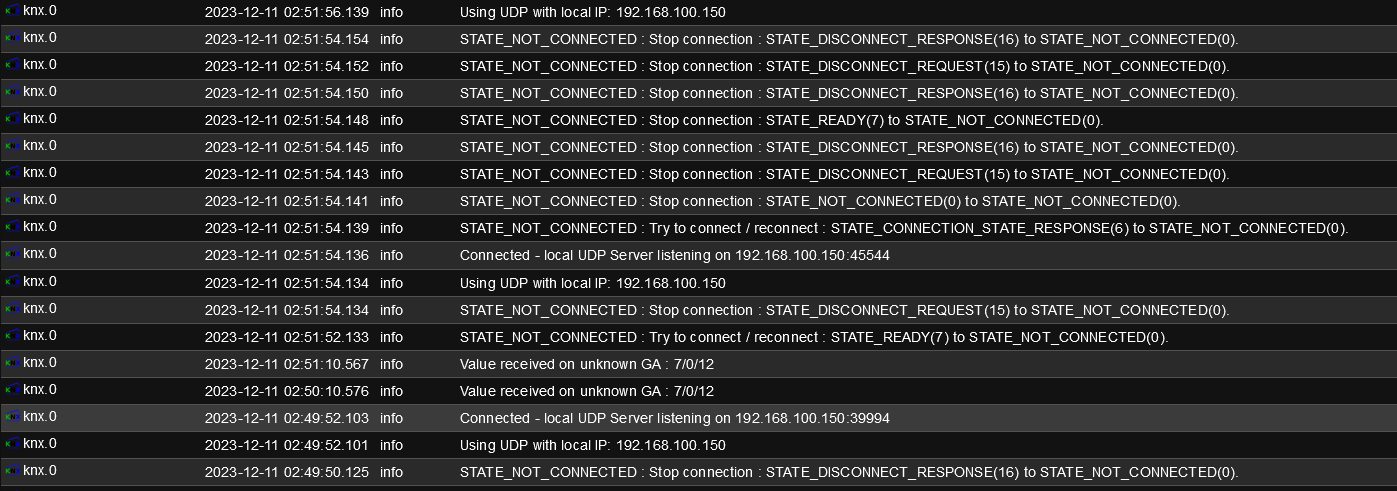
@mibr85 die "NOT CONNECTED" Meldungen habe ich mit der aktuellsten KNX Adapter Version auch immer wieder einmal, allerdings nicht so sehr häufig. Die Instanz verbindet sich dann auch wieder und läuft weiter.
Die zwei Meldungen im Log "Value received on unknown GA" bedeutet, dass auf diesem GA (7/1/12) etwas gesendet wurde, in deiner knx Instanz auf dem iob aber nicht bekannt sind. Hier evtl. das ETS Projekt noch einmal importieren und die Option aktivieren, dass nur die neuen GA übernommen werden.
Dein Problem mit einem hängenden Prozess konnte ich bei mir allerdings bisher noch nie feststellen (iob auf Raspi 4B)
-
Hallo Zusammen
ich habe ein Problem mit meinem KNX Adapter:
alle 5-10 Tage habe ich festgestellt, dass die CPU Last meines Synology NAS (ioBroker läuft hierauf im Docker) plötzlich um 20-30% ansteigt.
Jetzt habe ich im Ressourcenmanager geschaut was diesen Anstieg auslöst:
Wenn ich die KNX Instanz im ioBroker stoppe, läuft dieser Prozess trotzdem weiter.
wenn ich die KNX Instanz neustarte wird ein neuer Prozess gestartet:
so sieht es im Docker aus:
ich konnte den Prozess nur mit sudo kill -9 io.knx.0 stoppen
Wie kann ich den Prozess stoppen?
Wie kann ich herausfinden was zu diesem verhalten führt?Auszug aus iob diag:
Skript v.2023-10-10 *** BASE SYSTEM *** Hardware Vendor : Synology Kernel : x86_64 Userland : amd64 Docker : v9.0.1 Virtualization : Docker Kernel : x86_64 Userland : amd64 Systemuptime and Load: 02:36:03 up 13 days, 16:08, 0 user, load average: 1.24, 2.29, 3.05 CPU threads: 4 *** Time and Time Zones *** Mon Dec 11 01:36:03 UTC 2023 Mon Dec 11 02:36:03 CET 2023 CET +0100 Etc/UTC *** User and Groups *** root /root root *** X-Server-Setup *** X-Server: false Desktop: Terminal: *** MEMORY *** total used free shared buff/cache available Mem: 8.2G 4.0G 259M 182M 4.4G 4.2G Swap: 7.1G 1.8G 5.3G Total: 15G 5.7G 5.6G 7802 M total memory 3797 M used memory 3200 M active memory 2819 M inactive memory 247 M free memory 16 M buffer memory 4211 M swap cache 6731 M total swap 1673 M used swap 5058 M free swap *** FILESYSTEM *** Filesystem Type Size Used Avail Use% Mounted on /dev/mapper/cachedev_0 btrfs 5.3T 3.4T 2.0T 64% / tmpfs tmpfs 64M 0 64M 0% /dev tmpfs tmpfs 3.9G 0 3.9G 0% /sys/fs/cgroup shm tmpfs 64M 0 64M 0% /dev/shm /dev/mapper/cachedev_0 btrfs 5.3T 3.4T 2.0T 64% /opt/iobroker tmpfs tmpfs 3.9G 0 3.9G 0% /proc/acpi tmpfs tmpfs 3.9G 0 3.9G 0% /proc/scsi tmpfs tmpfs 3.9G 0 3.9G 0% /sys/firmware Messages concerning ext4 filesystem in dmesg: [Mon Nov 27 10:27:58 2023] EXT4-fs (md0): couldn't mount as ext3 due to feature incompatibilities [Mon Nov 27 10:27:58 2023] EXT4-fs (md0): mounted filesystem with ordered data mode. Opts: (null) [Mon Nov 27 10:27:58 2023] EXT4-fs (md0): couldn't mount as ext3 due to feature incompatibilities [Mon Nov 27 10:27:58 2023] EXT4-fs (md0): mounted filesystem with ordered data mode. Opts: barrier=1 [Mon Nov 27 10:27:58 2023] EXT4-fs (sdd2): couldn't mount as ext3 due to feature incompatibilities [Mon Nov 27 10:27:58 2023] EXT4-fs (sdd2): mounted filesystem with ordered data mode. Opts: (null) [Mon Nov 27 10:29:23 2023] EXT4-fs (md0): couldn't mount as ext3 due to feature incompatibilities [Mon Nov 27 10:29:23 2023] EXT4-fs (md0): mounted filesystem with ordered data mode. Opts: (null) [Mon Nov 27 10:29:23 2023] EXT4-fs (md0): couldn't mount as ext3 due to feature incompatibilities [Mon Nov 27 10:29:23 2023] EXT4-fs (md0): mounted filesystem with ordered data mode. Opts: barrier=1 Show mounted filesystems \(real ones only\): TARGET SOURCE FSTYPE OPTIONS / /dev/mapper/cachedev_0[/@syno/@docker/btrfs/subvolumes/1ced23e2edec353cde2fe4d9270f5dcb50e5ee8b10733174734586bded77cb77] btrfs rw,nodev,relatime,ssd,synoacl,space_cache=v2,auto_reclaim_space,metadata_ratio=50,syno_allocator,subvolid=865,subvol=/@syno/@docker/btrfs/subvolumes/1ced23e2edec353cde2fe4d9270f5dcb50e5ee8b10733174734586bded77cb77 |-/opt/iobroker /dev/mapper/cachedev_0[/@syno/@docker/volumes/iobrokerVolume/_data] btrfs rw,nodev,relatime,ssd,synoacl,space_cache=v2,auto_reclaim_space,metadata_ratio=50,syno_allocator,subvolid=257,subvol=/@syno |-/etc/resolv.conf /dev/mapper/cachedev_0[/@syno/@docker/containers/2d62f9c4b750cc523ec5c6240dcefc599d288730892369546e93bb18b849868b/resolv.conf] btrfs rw,nodev,relatime,ssd,synoacl,space_cache=v2,auto_reclaim_space,metadata_ratio=50,syno_allocator,subvolid=257,subvol=/@syno |-/etc/hostname /dev/mapper/cachedev_0[/@syno/@docker/containers/2d62f9c4b750cc523ec5c6240dcefc599d288730892369546e93bb18b849868b/hostname] btrfs rw,nodev,relatime,ssd,synoacl,space_cache=v2,auto_reclaim_space,metadata_ratio=50,syno_allocator,subvolid=257,subvol=/@syno `-/etc/hosts /dev/mapper/cachedev_0[/@syno/@docker/containers/2d62f9c4b750cc523ec5c6240dcefc599d288730892369546e93bb18b849868b/hosts] btrfs rw,nodev,relatime,ssd,synoacl,space_cache=v2,auto_reclaim_space,metadata_ratio=50,syno_allocator,subvolid=257,subvol=/@syno Files in neuralgic directories: /var: 34M /var/ 32M /var/lib 19M /var/lib/apt/lists 19M /var/lib/apt 13M /var/lib/dpkg /opt/iobroker/backups: 38M /opt/iobroker/backups/ /opt/iobroker/iobroker-data: 368M /opt/iobroker/iobroker-data/ 224M /opt/iobroker/iobroker-data/files 84M /opt/iobroker/iobroker-data/backup-objects 67M /opt/iobroker/iobroker-data/files/javascript.admin 48M /opt/iobroker/iobroker-data/files/javascript.admin/static The five largest files in iobroker-data are: 36M /opt/iobroker/iobroker-data/objects.jsonl 33M /opt/iobroker/iobroker-data/files/iot.admin/static/js/main.1797d034.js.map 26M /opt/iobroker/iobroker-data/states.jsonl 21M /opt/iobroker/iobroker-data/files/web.admin/static/js/main.aaea95f8.js.map 18M /opt/iobroker/iobroker-data/files/text2command.admin/static/js/main.274a4d8d.js.map USB-Devices by-id: USB-Sticks - Avoid direct links to /dev/* in your adapter setups, please always prefer the links 'by-id': find: '/dev/serial/by-id/': No such file or directory *** NodeJS-Installation *** /usr/bin/nodejs v18.18.2 /usr/bin/node v18.18.2 /usr/bin/npm 9.8.1 /usr/bin/npx 9.8.1 /usr/bin/corepack 0.19.0 nodejs: Installed: 18.18.2-1nodesource1 Candidate: 18.18.2-1nodesource1 Version table: *** 18.18.2-1nodesource1 500 500 https://deb.nodesource.com/node_18.x nodistro/main amd64 Packages 100 /var/lib/dpkg/status 18.18.1-1nodesource1 500 500 https://deb.nodesource.com/node_18.x nodistro/main amd64 Packages 18.18.0-1nodesource1 500 500 https://deb.nodesource.com/node_18.x nodistro/main amd64 Packages 18.17.1-1nodesource1 500 500 https://deb.nodesource.com/node_18.x nodistro/main amd64 Packages 18.17.0-1nodesource1 500 500 https://deb.nodesource.com/node_18.x nodistro/main amd64 Packages 18.16.1-1nodesource1 500 500 https://deb.nodesource.com/node_18.x nodistro/main amd64 Packages 18.16.0-1nodesource1 500 500 https://deb.nodesource.com/node_18.x nodistro/main amd64 Packages 18.15.0-1nodesource1 500 500 https://deb.nodesource.com/node_18.x nodistro/main amd64 Packages 18.14.2-1nodesource1 500 500 https://deb.nodesource.com/node_18.x nodistro/main amd64 Packages 18.14.1-1nodesource1 500 500 https://deb.nodesource.com/node_18.x nodistro/main amd64 Packages 18.14.0-1nodesource1 500 500 https://deb.nodesource.com/node_18.x nodistro/main amd64 Packages 18.13.0+dfsg1-1 500 500 http://deb.debian.org/debian bookworm/main amd64 Packages 18.13.0-1nodesource1 500 500 https://deb.nodesource.com/node_18.x nodistro/main amd64 Packages 18.12.0-1nodesource1 500 500 https://deb.nodesource.com/node_18.x nodistro/main amd64 Packages 18.11.0-1nodesource1 500 500 https://deb.nodesource.com/node_18.x nodistro/main amd64 Packages 18.10.0-1nodesource1 500 500 https://deb.nodesource.com/node_18.x nodistro/main amd64 Packages 18.9.1-1nodesource1 500 500 https://deb.nodesource.com/node_18.x nodistro/main amd64 Packages 18.9.0-1nodesource1 500 500 https://deb.nodesource.com/node_18.x nodistro/main amd64 Packages 18.8.0-1nodesource1 500 500 https://deb.nodesource.com/node_18.x nodistro/main amd64 Packages 18.7.0-1nodesource1 500 500 https://deb.nodesource.com/node_18.x nodistro/main amd64 Packages 18.6.0-1nodesource1 500 500 https://deb.nodesource.com/node_18.x nodistro/main amd64 Packages 18.5.0-1nodesource1 500 500 https://deb.nodesource.com/node_18.x nodistro/main amd64 Packages 18.4.0-1nodesource1 500 500 https://deb.nodesource.com/node_18.x nodistro/main amd64 Packages 18.3.0-1nodesource1 500 500 https://deb.nodesource.com/node_18.x nodistro/main amd64 Packages 18.2.0-1nodesource1 500 500 https://deb.nodesource.com/node_18.x nodistro/main amd64 Packages 18.1.0-1nodesource1 500 500 https://deb.nodesource.com/node_18.x nodistro/main amd64 Packages 18.0.0-1nodesource1 500 500 https://deb.nodesource.com/node_18.x nodistro/main amd64 Packages Temp directories causing npm8 problem: 0 No problems detected Errors in npm tree: *** ioBroker-Installation *** ioBroker Status iobroker is running on this host. Objects type: jsonl States type: jsonl Core adapters versions js-controller: 5.0.16 admin: 6.12.0 javascript: 7.1.6 Adapters from github: 0 Adapter State + system.adapter.admin.0 : admin : MIBR-DS - enabled, port: 8081, bind: 0.0.0.0, run as: admin + system.adapter.backitup.0 : backitup : MIBR-DS - enabled + system.adapter.discovery.0 : discovery : MIBR-DS - enabled + system.adapter.doorbird.0 : doorbird : MIBR-DS - enabled + system.adapter.e3dc-rscp.0 : e3dc-rscp : MIBR-DS - enabled + system.adapter.gruenbeck.0 : gruenbeck : MIBR-DS - enabled + system.adapter.hue.0 : hue : MIBR-DS - enabled, port: 443 + system.adapter.hue.1 : hue : MIBR-DS - enabled, port: 443 system.adapter.ical.0 : ical : MIBR-DS - enabled + system.adapter.info.0 : info : MIBR-DS - enabled + system.adapter.iot.0 : iot : MIBR-DS - enabled + system.adapter.javascript.0 : javascript : MIBR-DS - enabled + system.adapter.klf200.0 : klf200 : MIBR-DS - enabled system.adapter.knx.0 : knx : MIBR-DS - disabled system.adapter.lg-thinq.0 : lg-thinq : MIBR-DS - disabled + system.adapter.mihome-vacuum.0 : mihome-vacuum : MIBR-DS - enabled, port: 54321 + system.adapter.mqtt-client.0 : mqtt-client : MIBR-DS - enabled, port: 1883 system.adapter.node-red.0 : node-red : MIBR-DS - disabled, port: 1880, bind: 0.0.0.0 + system.adapter.procon-ip.0 : procon-ip : MIBR-DS - enabled + system.adapter.pvforecast.0 : pvforecast : MIBR-DS - enabled + system.adapter.scenes.0 : scenes : MIBR-DS - enabled + system.adapter.shelly.0 : shelly : MIBR-DS - enabled, port: 1882, bind: 0.0.0.0 + system.adapter.statistics.0 : statistics : MIBR-DS - enabled + system.adapter.synology.0 : synology : MIBR-DS - enabled, port: 5001 + system.adapter.telegram.0 : telegram : MIBR-DS - enabled, port: 8443, bind: 0.0.0.0 + system.adapter.telegram.1 : telegram : MIBR-DS - enabled, port: 8443, bind: 0.0.0.0 + system.adapter.text2command.0 : text2command : MIBR-DS - enabled + system.adapter.unifi.0 : unifi : MIBR-DS - enabled + system.adapter.viessmannapi.0 : viessmannapi : MIBR-DS - enabled + system.adapter.web.0 : web : MIBR-DS - enabled, port: 8082, bind: 0.0.0.0, run as: admin system.adapter.yahka.0 : yahka : MIBR-DS - disabled + instance is alive Enabled adapters with bindings + system.adapter.admin.0 : admin : MIBR-DS - enabled, port: 8081, bind: 0.0.0.0, run as: admin + system.adapter.hue.0 : hue : MIBR-DS - enabled, port: 443 + system.adapter.hue.1 : hue : MIBR-DS - enabled, port: 443 + system.adapter.mihome-vacuum.0 : mihome-vacuum : MIBR-DS - enabled, port: 54321 + system.adapter.mqtt-client.0 : mqtt-client : MIBR-DS - enabled, port: 1883 + system.adapter.shelly.0 : shelly : MIBR-DS - enabled, port: 1882, bind: 0.0.0.0 + system.adapter.synology.0 : synology : MIBR-DS - enabled, port: 5001 + system.adapter.telegram.0 : telegram : MIBR-DS - enabled, port: 8443, bind: 0.0.0.0 + system.adapter.telegram.1 : telegram : MIBR-DS - enabled, port: 8443, bind: 0.0.0.0 + system.adapter.web.0 : web : MIBR-DS - enabled, port: 8082, bind: 0.0.0.0, run as: admin ioBroker-Repositories stable : http://download.iobroker.net/sources-dist.json beta : http://download.iobroker.net/sources-dist-latest.json Active repo(s): stable Installed ioBroker-Instances Used repository: stable Adapter "admin" : 6.12.0 , installed 6.12.0 Adapter "backitup" : 2.8.7 , installed 2.8.7 Adapter "discovery" : 4.2.0 , installed 4.2.0 Adapter "doorbird" : 1.3.0 , installed 1.3.0 Adapter "e3dc-rscp" : 1.2.5 , installed 1.2.5 Adapter "gruenbeck" : 0.0.42 , installed 0.0.42 Adapter "hue" : 3.10.1 , installed 3.10.1 Adapter "ical" : 1.13.3 , installed 1.13.3 Adapter "info" : 2.0.0 , installed 2.0.0 Adapter "iot" : 2.0.11 , installed 2.0.11 Adapter "javascript" : 7.1.6 , installed 7.1.6 Controller "js-controller": 5.0.16 , installed 5.0.16 Adapter "klf200" : 1.1.2 , installed 1.1.2 Adapter "knx" : 2.0.23 , installed 2.0.23 Adapter "lg-thinq" : 0.1.4 , installed 0.1.4 Adapter "mihome-vacuum": 4.1.0 , installed 4.1.0 Adapter "mqtt-client" : 1.7.0 , installed 1.7.0 Adapter "node-red" : 4.0.3 , installed 4.0.3 Adapter "procon-ip" : 1.5.1 , installed 1.5.1 Adapter "pvforecast" : 2.9.0 , installed 2.9.0 Adapter "scenes" : 2.3.9 , installed 2.3.9 Adapter "shelly" : 6.6.1 , installed 6.6.1 Adapter "simple-api" : 2.7.2 , installed 2.7.2 Adapter "socketio" : 6.6.0 , installed 6.6.0 Adapter "statistics" : 2.4.0 , installed 2.4.0 Adapter "synology" : 3.0.1 , installed 3.0.1 Adapter "telegram" : 3.0.0 , installed 3.0.0 Adapter "text2command" : 3.0.2 , installed 3.0.2 Adapter "unifi" : 0.6.6 , installed 0.6.6 Adapter "viessmannapi" : 2.3.0 , installed 2.3.0 Adapter "web" : 6.1.10 , installed 6.1.10 Adapter "ws" : 2.5.8 , installed 2.5.8 Adapter "yahka" : 1.0.3 , installed 1.0.3 Objects and States Please stand by - This may take a while Objects: 32437 -
Hallo,
Ich setzte schon ne Zeit den KNX Adapter ein.
Läuft auf RPI4 mit 8GB Ram auf SSD.
Habe vor ein paar Wochen update auf 2.0.24 gemacht, hatte danach keinerlei Probleme einige alte Bugs wurden gefixt, danke dafür, glaube war ewig auf der .15 weil ich an meinen Rolläden nach jedem Update immer noch was manuell einrichten musste..Jetzt bin ich am einbinden einer Unifi UDM-SE, die läuft derzeit nur als Switch bei mir im Netz für die saubere Einbindung des DSL Routers warte ich noch auf meinen Netzwerkspezi..
Ich habe seitdem das Phänomen das ich aus meiner Visu eigentlich gar nichts mehr vom KNX vernünftig ansteuern kann.
Direkt auf Button Druck kommt schon mal gar nichts, manchmal 3-5 Minuten später.
Ab und zu gehen einige Skripte die Zeitgesteuert die Rolladen fahren schon mal, aber meist werden max. die hälfte der Rollläden angesteuert.
Gibt es für den KNX Adapter irgendwelche notwenigen extras in Sachen Netzwerkprotokoll?Ich setzte zwei Gira IpRouter ein.
Oft ist es auch so das der KNX Adapter erst beim 2-3 Start grün wird.Hat noch wer nen Tipp nach was ich da suchen könnte?
0 2024-01-15 19:10:54.164 info Connected - local UDP Server listening on 192.168.178.66:55744 knx.0 2024-01-15 19:10:54.163 info Event : UDP - listening knx.0 2024-01-15 19:10:54.162 info Using UDP with local IP: 192.168.178.66 knx.0 2024-01-15 19:10:52.165 info STATE_NOT_CONNECTED : Stop connection : STATE_DISCONNECT_REQUEST(15) to STATE_NOT_CONNECTED(0). knx.0 2024-01-15 19:10:52.163 info STATE_NOT_CONNECTED : Try to connect / reconnect : STATE_CONNECTION_STATE_REQUEST(5) to STATE_NOT_CONNECTED(0). knx.0 2024-01-15 19:10:45.186 info Connected - local UDP Server listening on 192.168.178.66:50208 knx.0 2024-01-15 19:10:45.185 info Event : UDP - listening knx.0 2024-01-15 19:10:45.183 info Using UDP with local IP: 192.168.178.66 knx.0 2024-01-15 19:10:43.186 info STATE_NOT_CONNECTED : Stop connection : STATE_DISCONNECT_REQUEST(15) to STATE_NOT_CONNECTED(0). knx.0 2024-01-15 19:10:43.183 info STATE_NOT_CONNECTED : Try to connect / reconnect : STATE_CONNECTION_STATE_REQUEST(5) to STATE_NOT_CONNECTED(0). knx.0 2024-01-15 19:10:04.321 info Connected - local UDP Server listening on 192.168.178.66:55390 knx.0 2024-01-15 19:10:04.320 info Event : UDP - listening knx.0 2024-01-15 19:10:04.319 info Using UDP with local IP: 192.168.178.66 knx.0 2024-01-15 19:10:02.322 info STATE_NOT_CONNECTED : Stop connection : STATE_DISCONNECT_REQUEST(15) to STATE_NOT_CONNECTED(0). knx.0 2024-01-15 19:10:02.320 info STATE_NOT_CONNECTED : Try to connect / reconnect : STATE_CONNECTION_STATE_REQUEST(5) to STATE_NOT_CONNECTED(0). knx.0 2024-01-15 19:09:57.632 info Connected - local UDP Server listening on 192.168.178.66:60984 knx.0 2024-01-15 19:09:57.631 info Event : UDP - listening knx.0 2024-01-15 19:09:57.630 info Using UDP with local IP: 192.168.178.66 knx.0 2024-01-15 19:09:55.632 info STATE_NOT_CONNECTED : Stop connection : STATE_DISCONNECT_REQUEST(15) to STATE_NOT_CONNECTED(0). knx.0 2024-01-15 19:09:55.630 info STATE_NOT_CONNECTED : Try to connect / reconnect : STATE_CONNECTION_STATE_REQUEST(5) to STATE_NOT_CONNECTED(0). knx.0 2024-01-15 19:09:21.136 info Connected - local UDP Server listening on 192.168.178.66:42664 knx.0 2024-01-15 19:09:21.135 info Event : UDP - listening knx.0 2024-01-15 19:09:21.135 info Using UDP with local IP: 192.168.178.66 knx.0 2024-01-15 19:09:20.135 info STATE_NOT_CONNECTED : Stop connection : STATE_NOT_CONNECTED(0) to STATE_NOT_CONNECTED(0). knx.0 2024-01-15 19:09:19.134 info STATE_NOT_CONNECTED : Try to connect / reconnect : STATE_DISCONNECT_REQUEST(15) to STATE_NOT_CONNECTED(0). knx.0 2024-01-15 18:51:20.554 info Connected - local UDP Server listening on 192.168.178.66:50149 knx.0 2024-01-15 18:51:20.554 info Event : UDP - listening knx.0 2024-01-15 18:51:20.553 info Using UDP with local IP: 192.168.178.66 knx.0 2024-01-15 18:51:18.554 info STATE_NOT_CONNECTED : Stop connection : STATE_DISCONNECT_REQUEST(15) to STATE_NOT_CONNECTED(0). knx.0 2024-01-15 18:51:18.552 info STATE_NOT_CONNECTED : Try to connect / reconnect : STATE_CONNECTION_STATE_REQUEST(5) to STATE_NOT_CONNECTED(0). knx.0 2024-01-15 18:51:11.555 info Connected - local UDP Server listening on 192.168.178.66:37076 knx.0 2024-01-15 18:51:11.554 info Event : UDP - listening knx.0 2024-01-15 18:51:11.553 info Using UDP with local IP: 192.168.178.66 knx.0 2024-01-15 18:51:09.557 info STATE_NOT_CONNECTED : Stop connection : STATE_DISCONNECT_REQUEST(15) to STATE_NOT_CONNECTED(0). knx.0 2024-01-15 18:51:09.553 info STATE_NOT_CONNECTED : Try to connect / reconnect : STATE_READY(7) to STATE_NOT_CONNECTED(0). knx.0 2024-01-15 18:50:02.770 info Connected - local UDP Server listening on 192.168.178.66:60934 knx.0 2024-01-15 18:50:02.769 info Event : UDP - listening knx.0 2024-01-15 18:50:02.768 info Using UDP with local IP: 192.168.178.66 knx.0 2024-01-15 18:50:01.772 info STATE_NOT_CONNECTED : Stop connection : STATE_NOT_CONNECTED(0) to STATE_NOT_CONNECTED(0). knx.0 2024-01-15 18:50:00.768 info STATE_NOT_CONNECTED : Try to connect / reconnect : STATE_DISCONNECT_REQUEST(15) to STATE_NOT_CONNECTED(0). knx.0 2024-01-15 18:46:00.685 info Connected - local UDP Server listening on 192.168.178.66:38708 knx. -
Hallo,
Ich setzte schon ne Zeit den KNX Adapter ein.
Läuft auf RPI4 mit 8GB Ram auf SSD.
Habe vor ein paar Wochen update auf 2.0.24 gemacht, hatte danach keinerlei Probleme einige alte Bugs wurden gefixt, danke dafür, glaube war ewig auf der .15 weil ich an meinen Rolläden nach jedem Update immer noch was manuell einrichten musste..Jetzt bin ich am einbinden einer Unifi UDM-SE, die läuft derzeit nur als Switch bei mir im Netz für die saubere Einbindung des DSL Routers warte ich noch auf meinen Netzwerkspezi..
Ich habe seitdem das Phänomen das ich aus meiner Visu eigentlich gar nichts mehr vom KNX vernünftig ansteuern kann.
Direkt auf Button Druck kommt schon mal gar nichts, manchmal 3-5 Minuten später.
Ab und zu gehen einige Skripte die Zeitgesteuert die Rolladen fahren schon mal, aber meist werden max. die hälfte der Rollläden angesteuert.
Gibt es für den KNX Adapter irgendwelche notwenigen extras in Sachen Netzwerkprotokoll?Ich setzte zwei Gira IpRouter ein.
Oft ist es auch so das der KNX Adapter erst beim 2-3 Start grün wird.Hat noch wer nen Tipp nach was ich da suchen könnte?
0 2024-01-15 19:10:54.164 info Connected - local UDP Server listening on 192.168.178.66:55744 knx.0 2024-01-15 19:10:54.163 info Event : UDP - listening knx.0 2024-01-15 19:10:54.162 info Using UDP with local IP: 192.168.178.66 knx.0 2024-01-15 19:10:52.165 info STATE_NOT_CONNECTED : Stop connection : STATE_DISCONNECT_REQUEST(15) to STATE_NOT_CONNECTED(0). knx.0 2024-01-15 19:10:52.163 info STATE_NOT_CONNECTED : Try to connect / reconnect : STATE_CONNECTION_STATE_REQUEST(5) to STATE_NOT_CONNECTED(0). knx.0 2024-01-15 19:10:45.186 info Connected - local UDP Server listening on 192.168.178.66:50208 knx.0 2024-01-15 19:10:45.185 info Event : UDP - listening knx.0 2024-01-15 19:10:45.183 info Using UDP with local IP: 192.168.178.66 knx.0 2024-01-15 19:10:43.186 info STATE_NOT_CONNECTED : Stop connection : STATE_DISCONNECT_REQUEST(15) to STATE_NOT_CONNECTED(0). knx.0 2024-01-15 19:10:43.183 info STATE_NOT_CONNECTED : Try to connect / reconnect : STATE_CONNECTION_STATE_REQUEST(5) to STATE_NOT_CONNECTED(0). knx.0 2024-01-15 19:10:04.321 info Connected - local UDP Server listening on 192.168.178.66:55390 knx.0 2024-01-15 19:10:04.320 info Event : UDP - listening knx.0 2024-01-15 19:10:04.319 info Using UDP with local IP: 192.168.178.66 knx.0 2024-01-15 19:10:02.322 info STATE_NOT_CONNECTED : Stop connection : STATE_DISCONNECT_REQUEST(15) to STATE_NOT_CONNECTED(0). knx.0 2024-01-15 19:10:02.320 info STATE_NOT_CONNECTED : Try to connect / reconnect : STATE_CONNECTION_STATE_REQUEST(5) to STATE_NOT_CONNECTED(0). knx.0 2024-01-15 19:09:57.632 info Connected - local UDP Server listening on 192.168.178.66:60984 knx.0 2024-01-15 19:09:57.631 info Event : UDP - listening knx.0 2024-01-15 19:09:57.630 info Using UDP with local IP: 192.168.178.66 knx.0 2024-01-15 19:09:55.632 info STATE_NOT_CONNECTED : Stop connection : STATE_DISCONNECT_REQUEST(15) to STATE_NOT_CONNECTED(0). knx.0 2024-01-15 19:09:55.630 info STATE_NOT_CONNECTED : Try to connect / reconnect : STATE_CONNECTION_STATE_REQUEST(5) to STATE_NOT_CONNECTED(0). knx.0 2024-01-15 19:09:21.136 info Connected - local UDP Server listening on 192.168.178.66:42664 knx.0 2024-01-15 19:09:21.135 info Event : UDP - listening knx.0 2024-01-15 19:09:21.135 info Using UDP with local IP: 192.168.178.66 knx.0 2024-01-15 19:09:20.135 info STATE_NOT_CONNECTED : Stop connection : STATE_NOT_CONNECTED(0) to STATE_NOT_CONNECTED(0). knx.0 2024-01-15 19:09:19.134 info STATE_NOT_CONNECTED : Try to connect / reconnect : STATE_DISCONNECT_REQUEST(15) to STATE_NOT_CONNECTED(0). knx.0 2024-01-15 18:51:20.554 info Connected - local UDP Server listening on 192.168.178.66:50149 knx.0 2024-01-15 18:51:20.554 info Event : UDP - listening knx.0 2024-01-15 18:51:20.553 info Using UDP with local IP: 192.168.178.66 knx.0 2024-01-15 18:51:18.554 info STATE_NOT_CONNECTED : Stop connection : STATE_DISCONNECT_REQUEST(15) to STATE_NOT_CONNECTED(0). knx.0 2024-01-15 18:51:18.552 info STATE_NOT_CONNECTED : Try to connect / reconnect : STATE_CONNECTION_STATE_REQUEST(5) to STATE_NOT_CONNECTED(0). knx.0 2024-01-15 18:51:11.555 info Connected - local UDP Server listening on 192.168.178.66:37076 knx.0 2024-01-15 18:51:11.554 info Event : UDP - listening knx.0 2024-01-15 18:51:11.553 info Using UDP with local IP: 192.168.178.66 knx.0 2024-01-15 18:51:09.557 info STATE_NOT_CONNECTED : Stop connection : STATE_DISCONNECT_REQUEST(15) to STATE_NOT_CONNECTED(0). knx.0 2024-01-15 18:51:09.553 info STATE_NOT_CONNECTED : Try to connect / reconnect : STATE_READY(7) to STATE_NOT_CONNECTED(0). knx.0 2024-01-15 18:50:02.770 info Connected - local UDP Server listening on 192.168.178.66:60934 knx.0 2024-01-15 18:50:02.769 info Event : UDP - listening knx.0 2024-01-15 18:50:02.768 info Using UDP with local IP: 192.168.178.66 knx.0 2024-01-15 18:50:01.772 info STATE_NOT_CONNECTED : Stop connection : STATE_NOT_CONNECTED(0) to STATE_NOT_CONNECTED(0). knx.0 2024-01-15 18:50:00.768 info STATE_NOT_CONNECTED : Try to connect / reconnect : STATE_DISCONNECT_REQUEST(15) to STATE_NOT_CONNECTED(0). knx.0 2024-01-15 18:46:00.685 info Connected - local UDP Server listening on 192.168.178.66:38708 knx.@tobi68 sagte in Test Adapter KNX v2.x:
Hallo,
Ich setzte schon ne Zeit den KNX Adapter ein.
Läuft auf RPI4 mit 8GB Ram auf SSD.
Habe vor ein paar Wochen update auf 2.0.24 gemacht, hatte danach keinerlei Probleme einige alte Bugs wurden gefixt, danke dafür, glaube war ewig auf der .15 weil ich an meinen Rolläden nach jedem Update immer noch was manuell einrichten musste..Jetzt bin ich am einbinden einer Unifi UDM-SE, die läuft derzeit nur als Switch bei mir im Netz für die saubere Einbindung des DSL Routers warte ich noch auf meinen Netzwerkspezi..
Ich habe seitdem das Phänomen das ich aus meiner Visu eigentlich gar nichts mehr vom KNX vernünftig ansteuern kann.
Direkt auf Button Druck kommt schon mal gar nichts, manchmal 3-5 Minuten später.
Ab und zu gehen einige Skripte die Zeitgesteuert die Rolladen fahren schon mal, aber meist werden max. die hälfte der Rollläden angesteuert.
Gibt es für den KNX Adapter irgendwelche notwenigen extras in Sachen Netzwerkprotokoll?Ich setzte zwei Gira IpRouter ein.
Oft ist es auch so das der KNX Adapter erst beim 2-3 Start grün wird.Hat noch wer nen Tipp nach was ich da suchen könnte?
Kurzes Update:
Habe den KNX IP Router auf einen anderen Switch gelegt, seitdem funktioniert wieder alles.
-
Hi zusammen,
ich bin neu in der KNX Welt und habe nun die erste Wohnung mit KNX vernetzt und programmiert. Da ich schon ewig in ioBroker unterwegs bin, wollte ich das nun auch hier integrieren.
Da komm ich nun zu meinem Problem ;)
ich habe in der ETS 6.3.0 alles programmiert. Das wollte ich nun in den KNX Adapter in der Version 2.0.30 importieren, was aber leider nicht funktioniert.
Ich bekomme immer folgenden Fehler:
Importstate
Import teilweise oder vollständig mit Fehler fehlgeschlagen: Error: Unknown error
Leider komme ich mit dem HInweis nicht weiter. Habe den export schon mehrfach gemacht, leider kein Erfolg. Ebenfalls habe ich den Adapter scheon neu installiert, auch kein Erfolg.
Jemand eine Idee wo ich noch ansetzen kann?
Hier die Systemdaten:
Plattform:
linux
Betriebssystem:
linux
Architektur:
x64
CPUs:
4
Node.js:
v20.18.1
NPM:
10.8.2Besten Dank!
VG Matthias
-
........
-
Hi zusammen,
ich bin neu in der KNX Welt und habe nun die erste Wohnung mit KNX vernetzt und programmiert. Da ich schon ewig in ioBroker unterwegs bin, wollte ich das nun auch hier integrieren.
Da komm ich nun zu meinem Problem ;)
ich habe in der ETS 6.3.0 alles programmiert. Das wollte ich nun in den KNX Adapter in der Version 2.0.30 importieren, was aber leider nicht funktioniert.
Ich bekomme immer folgenden Fehler:
Importstate
Import teilweise oder vollständig mit Fehler fehlgeschlagen: Error: Unknown error
Leider komme ich mit dem HInweis nicht weiter. Habe den export schon mehrfach gemacht, leider kein Erfolg. Ebenfalls habe ich den Adapter scheon neu installiert, auch kein Erfolg.
Jemand eine Idee wo ich noch ansetzen kann?
Hier die Systemdaten:
Plattform:
linux
Betriebssystem:
linux
Architektur:
x64
CPUs:
4
Node.js:
v20.18.1
NPM:
10.8.2Besten Dank!
VG Matthias
..........
-
Ich habe zwei KNX Taster, die über ein Script meinen Doorbird ansteuern um das Hoftor bzw. die Einfahrt zu öffnen.
Seit der 2.0.31 "spinnen" die etwas. Teilweise passiert nichts. Wenn ich dann aber über die VIS einmal das Tor geöffnet habe, geht dann auf einmal auf wieder der Taster. Zumindest ne zeitlang.Bevor ich jetzt "wild" Fehler suche:
Gab es bei der 2.0.31 eine Änderung, die das bewirken könnte? Laut Changelog wurde ja nur beim Import was geändert.EDIT:
Also da muss irgendwas anders sein. mit der 2.0.31 wird der Datenpunkt ein paar Mal geändert, dann passiert da gar nichts mehr.
Zurück auf die Vorgängerversion und alles läuft. Hab nur jetzt leider keine Zeit für ne ausführlich Analyse mit Logs :(
In der ETS sieht man bei jedem Druck das entsprechende Telegramm. Das Problem müsste also beim Adapter liegen. -
Mit der .31 ist ohnehin etwas komisch. NodeJS 22 als Dependency vorauszusetzen dürfte bei vielen Installationen für einen Block der Adapter-Version sorgen, da die empfohlene Nodejs-Version und auch die Nodejs-Version, die der nodejs-Updater des ioBrokers installiert, nach wie vor die Version 20 ist.
-
Mit der .31 ist ohnehin etwas komisch. NodeJS 22 als Dependency vorauszusetzen dürfte bei vielen Installationen für einen Block der Adapter-Version sorgen, da die empfohlene Nodejs-Version und auch die Nodejs-Version, die der nodejs-Updater des ioBrokers installiert, nach wie vor die Version 20 ist.
@peer69
Ja, das mit der Version hat mich auch etwas Nerven gekostet... Musste erstmal rausfinden, wie ich die nodejs Version richtig upgrade.... Hatte erst gedacht, dass da bei meiner Installation vielleicht was nicht OK wäre und ich deswegen noch auf der 20er war.Beta-Tester
-
@peer69
Ja, das mit der Version hat mich auch etwas Nerven gekostet... Musste erstmal rausfinden, wie ich die nodejs Version richtig upgrade.... Hatte erst gedacht, dass da bei meiner Installation vielleicht was nicht OK wäre und ich deswegen noch auf der 20er war.@merlin123 sagte in Test Adapter KNX v2.x:
Musste erstmal rausfinden, wie ich die nodejs Version richtig upgrade...
Unter Linux/Debian z. B. einfach per
iob nodejs-update 22Wobei die
22oder auch24als gewünschte Major nur dann zu setzen ist, wenn man eine andere Version als die momentane Empfehlung nodejs@20 verwenden will/muss/darf. Ohne zusätzliche Option wird nämlich diese dann installiert.




Support us
800
Online32.4k
Users81.5k
Topics1.3m
Posts