Skip to content
  • Home
  • Recent
  • Tags
  • 0 Unread 0
  • Categories
  • Unreplied
  • Popular
  • GitHub
  • Docu
  • Hilfe
Skins
  • Light
  • Brite
  • Cerulean
  • Cosmo
  • Flatly
  • Journal
  • Litera
  • Lumen
  • Lux
  • Materia
  • Minty
  • Morph
  • Pulse
  • Sandstone
  • Simplex
  • Sketchy
  • Spacelab
  • United
  • Yeti
  • Zephyr
  • Dark
  • Cyborg
  • Darkly
  • Quartz
  • Slate
  • Solar
  • Superhero
  • Vapor

  • Default (No Skin)
  • No Skin
Collapse
ioBroker Logo

Community Forum

donate donate
  1. ioBroker Community Home
  2. Deutsch
  3. Error/Bug
  4. HS100 Adapter Fehlermeldungen

NEWS

  • UPDATE 31.10.: Amazon Alexa - ioBroker Skill läuft aus ?
    apollon77A
    apollon77
    48
    3
    8.9k

  • Monatsrückblick – September 2025
    BluefoxB
    Bluefox
    13
    1
    2.3k

  • Neues Video "KI im Smart Home" - ioBroker plus n8n
    BluefoxB
    Bluefox
    16
    1
    3.4k

HS100 Adapter Fehlermeldungen

Scheduled Pinned Locked Moved Unsolved Error/Bug
hs100 adapterfehler im log
190 Posts 23 Posters 24.6k Views 22 Watching
  • Oldest to Newest
  • Newest to Oldest
  • Most Votes
Reply
  • Reply as topic
Log in to reply
This topic has been deleted. Only users with topic management privileges can see it.
  • arteckA arteck

    @stenmic hab mich so auf den Fehler eingeschossen... hab was vergessen...SRY.. jetzt

    S Offline
    S Offline
    stenmic
    wrote on last edited by
    #153

    @arteck kenn ich.
    werde heute Abend testen

    1 Reply Last reply
    0
    • WinniW Offline
      WinniW Offline
      Winni
      wrote on last edited by Winni
      #154

      Hallo, wenn ich die

      https://github.com/arteck/ioBroker.hs100/tarball/vers2
      

      installiere, erscheint unter den Adaptern trotzdem nur die 2.0.0, was mach ich falsch?

      Ok, Fehler gefunden,

      https://github.com/arteck/ioBroker.hs100.git
      

      Ist richtig :blush:

      Es gibt nicht Gutes. Außer man tut es. Erich Kästner

      1 Reply Last reply
      0
      • arteckA arteck

        @stenmic hab mich so auf den Fehler eingeschossen... hab was vergessen...SRY.. jetzt

        S Offline
        S Offline
        stenmic
        wrote on last edited by
        #155

        @arteck 2.0.1 läuft 👍🏻
        Danke

        1 Reply Last reply
        0
        • G Offline
          G Offline
          groisi
          wrote on last edited by
          #156

          Hallo, ich bekomme vereinzelt noch folgenden Fehler:
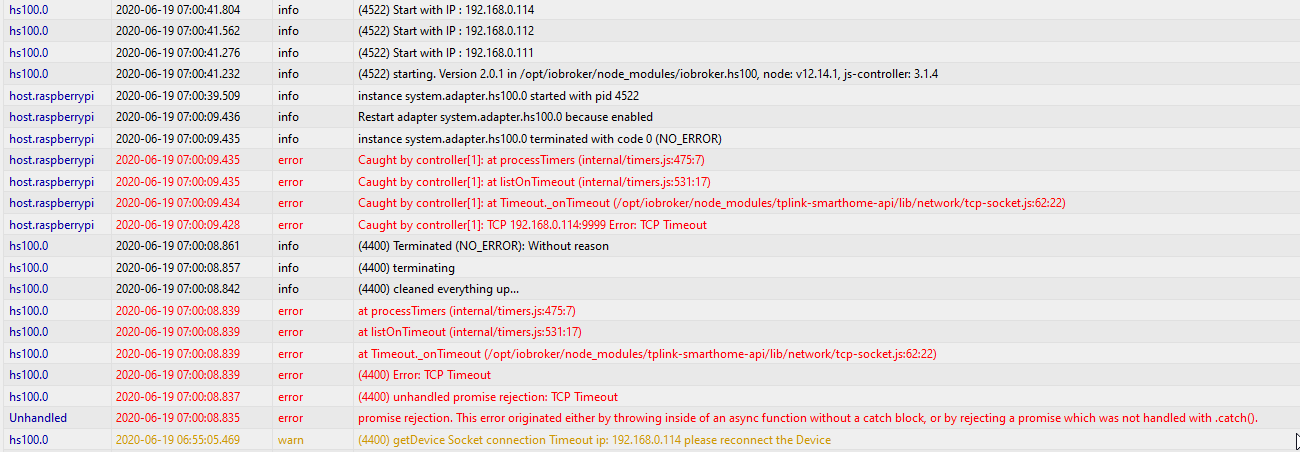
          a735bb35-dd11-458e-a2e4-743b04c9cdd6-grafik.png

          Alle 3 Dosen sind auf v1.5.6, 1 Dose hat einen nicht perfekten WLAN-Empfang.

          arteckA 1 Reply Last reply
          0
          • G groisi

            Hallo, ich bekomme vereinzelt noch folgenden Fehler:

            a735bb35-dd11-458e-a2e4-743b04c9cdd6-grafik.png

            Alle 3 Dosen sind auf v1.5.6, 1 Dose hat einen nicht perfekten WLAN-Empfang.

            arteckA Offline
            arteckA Offline
            arteck
            Developer Most Active
            wrote on last edited by
            #157

            @groisi die .114 nehme ich mal an

            zigbee hab ich, zwave auch, nuc's genauso und HA auch

            G S 2 Replies Last reply
            0
            • arteckA arteck

              @groisi die .114 nehme ich mal an

              G Offline
              G Offline
              groisi
              wrote on last edited by
              #158

              @arteck richtig😀

              1 Reply Last reply
              0
              • arteckA arteck

                @groisi die .114 nehme ich mal an

                S Offline
                S Offline
                stenmic
                wrote on last edited by
                #159

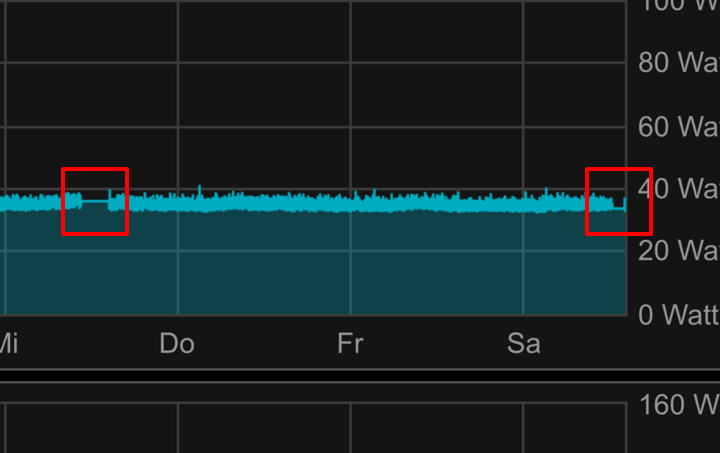
                @arteck mit der 2.0.1 sind die Fehler weniger geworden, jedoch nicht verschwunden.
                Sporatisch bleibt der Adapter stehen und aktualisiert wieder keinen Zwischenstecker mehr.
                IMG_1562.PNG

                Der Adapter ist dabei grün. Lade ich ihn neu funktioniert alles wieder.
                Über Kasa sind in dieser Zeit alle Stecker erreichbar.

                Im Log steht folgende Fehlermeldung dazu.

                Image 010.jpg

                1 Reply Last reply
                0
                • D Offline
                  D Offline
                  DarkDevil
                  wrote on last edited by
                  #160

                  Ich habe mir deshalb einen täglichen Neustart eingebaut

                  S 1 Reply Last reply
                  0
                  • D DarkDevil

                    Ich habe mir deshalb einen täglichen Neustart eingebaut

                    S Offline
                    S Offline
                    stenmic
                    wrote on last edited by
                    #161

                    @DarkDevil den hatte ich auch. Jetzt überwache ich den Zeitstempel und lösen dann einen Neustart aus.

                    1 Reply Last reply
                    0
                    • arteckA Offline
                      arteckA Offline
                      arteck
                      Developer Most Active
                      wrote on last edited by
                      #162

                      eine Idee hab ich noch... ich meld mich..

                      wobei die Fehler werden bleiben nur dass der Adapter da nicht neu starten wird..

                      zigbee hab ich, zwave auch, nuc's genauso und HA auch

                      1 Reply Last reply
                      0
                      • NegaleinN Offline
                        NegaleinN Offline
                        Negalein
                        Global Moderator
                        wrote on last edited by Negalein
                        #163

                        @arteck

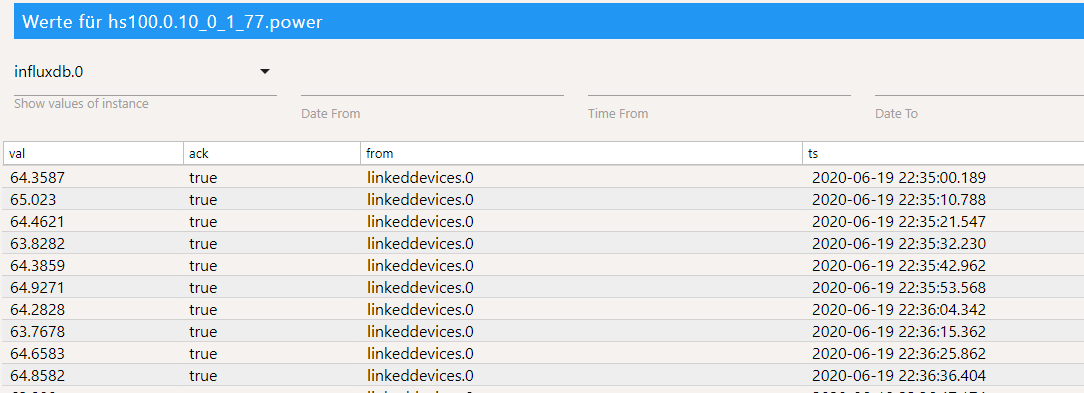
                        Seit Update auf 2.0.1 wird der .powerDatenpunkt dauernd mit 0angezeigt.

                        objects - ioBroker.png

                        EDIT: Seit heute 4:13 Uhr funktioniert es wieder. Neustart hat geholfen.

                        ° Node.js: 20.17.0 NPM: 10.8.2
                        ° Proxmox, Ubuntu 22.04.3 LTS
                        ° Fixer ---> iob fix

                        arteckA 1 Reply Last reply
                        0
                        • NegaleinN Negalein

                          @arteck

                          Seit Update auf 2.0.1 wird der .powerDatenpunkt dauernd mit 0angezeigt.

                          objects - ioBroker.png

                          EDIT: Seit heute 4:13 Uhr funktioniert es wieder. Neustart hat geholfen.

                          arteckA Offline
                          arteckA Offline
                          arteck
                          Developer Most Active
                          wrote on last edited by
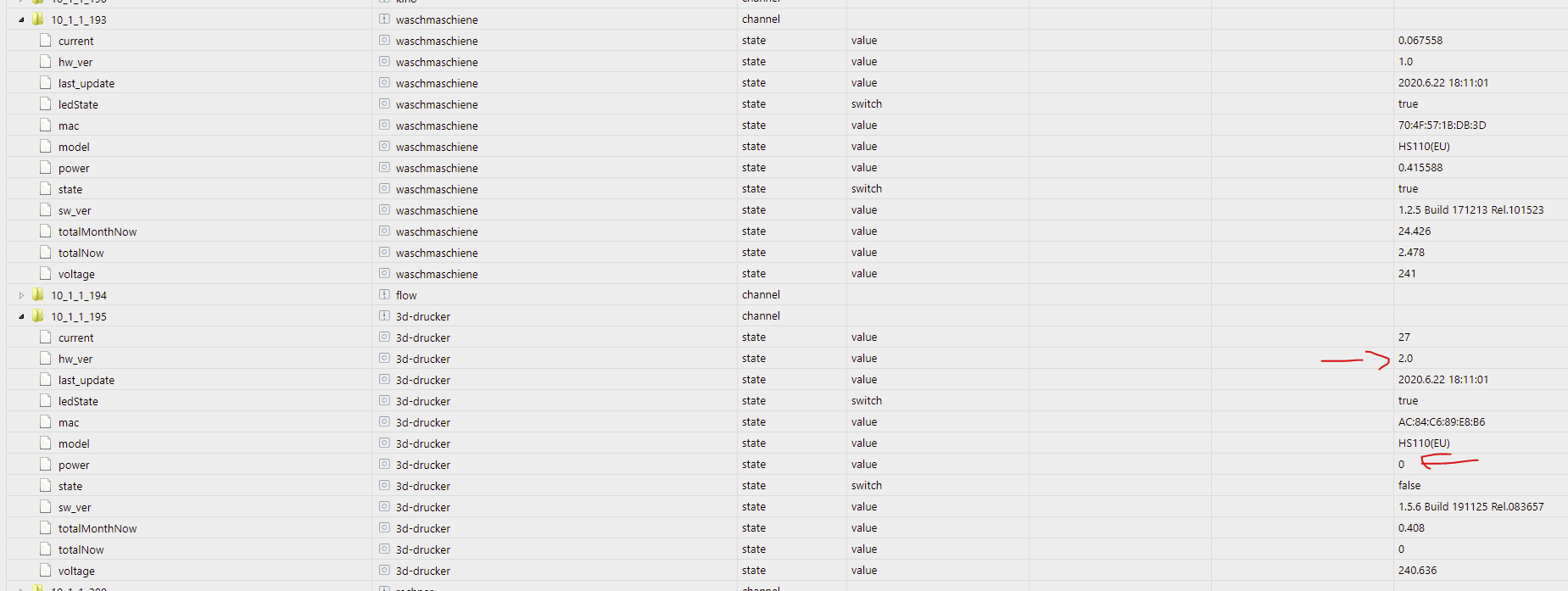
                          #164

                          @Negalein scheint aber nur bei den 2.0 zu sein
                          b5d9438e-25a5-4743-b017-5ef5b2bcf7e2-grafik.png

                          zigbee hab ich, zwave auch, nuc's genauso und HA auch

                          NegaleinN 1 Reply Last reply
                          0
                          • arteckA arteck

                            @Negalein scheint aber nur bei den 2.0 zu sein
                            b5d9438e-25a5-4743-b017-5ef5b2bcf7e2-grafik.png

                            NegaleinN Offline
                            NegaleinN Offline
                            Negalein
                            Global Moderator
                            wrote on last edited by
                            #165

                            @arteck sagte in HS100 Adapter Fehlermeldungen:

                            scheint aber nur bei den 2.0 zu sein

                            1.0 und 2.0 bei mir
                            eine V3 hab ich noch nicht.

                            ° Node.js: 20.17.0 NPM: 10.8.2
                            ° Proxmox, Ubuntu 22.04.3 LTS
                            ° Fixer ---> iob fix

                            arteckA 1 Reply Last reply
                            0
                            • NegaleinN Negalein

                              @arteck sagte in HS100 Adapter Fehlermeldungen:

                              scheint aber nur bei den 2.0 zu sein

                              1.0 und 2.0 bei mir
                              eine V3 hab ich noch nicht.

                              arteckA Offline
                              arteckA Offline
                              arteck
                              Developer Most Active
                              wrote on last edited by arteck
                              #166

                              @Negalein hmm wobei mach die dose mal in Kasa kurz auf
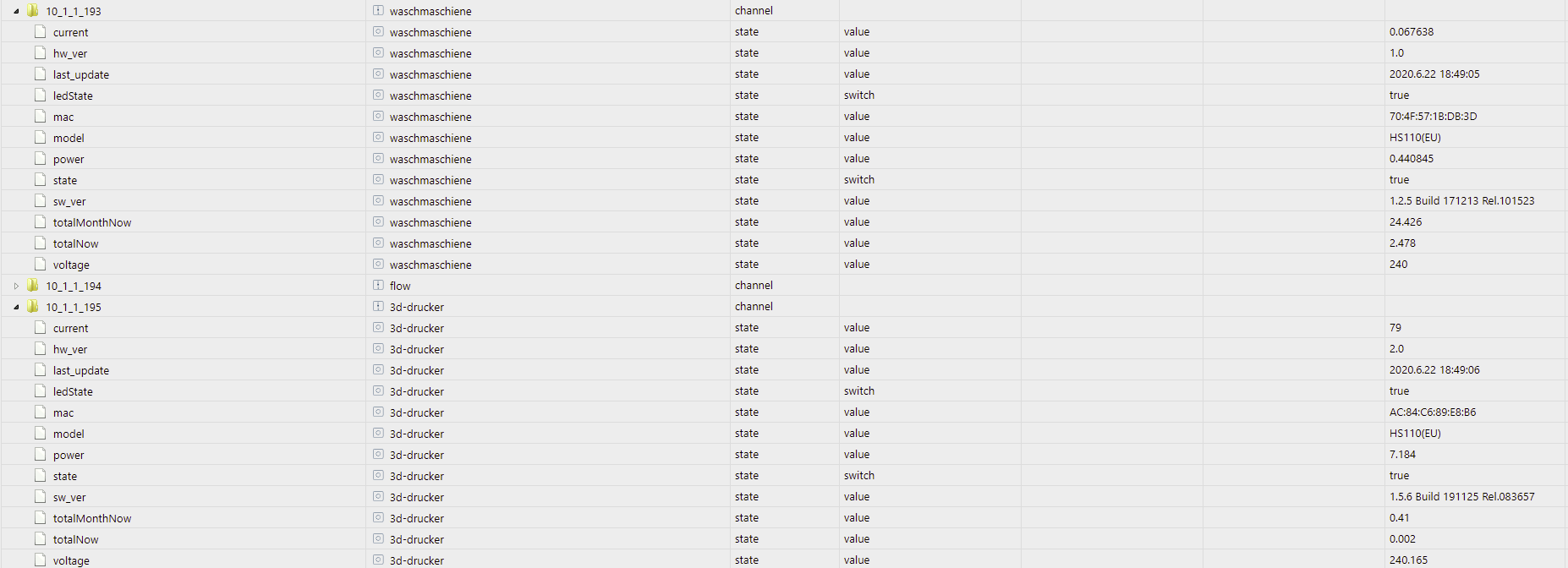
                              4e92747d-1e45-48d7-b20a-03b49c310284-grafik.png

                              ich hab die Werte jetzt

                              ansonsten schau mal in der main.js zeile 279 und 281 und kommentiere die mal aus.. danach adapter neu starten

                              zigbee hab ich, zwave auch, nuc's genauso und HA auch

                              NegaleinN 1 Reply Last reply
                              0
                              • arteckA arteck

                                @Negalein hmm wobei mach die dose mal in Kasa kurz auf

                                4e92747d-1e45-48d7-b20a-03b49c310284-grafik.png

                                ich hab die Werte jetzt

                                ansonsten schau mal in der main.js zeile 279 und 281 und kommentiere die mal aus.. danach adapter neu starten

                                NegaleinN Offline
                                NegaleinN Offline
                                Negalein
                                Global Moderator
                                wrote on last edited by
                                #167

                                @arteck sagte in HS100 Adapter Fehlermeldungen:

                                hmm wobei mach die dose mal in Kasa kurz auf

                                Seit heute 4:13 Uhr funktioniert es wieder. Neustart vom ioBroker hat geholfen.

                                ° Node.js: 20.17.0 NPM: 10.8.2
                                ° Proxmox, Ubuntu 22.04.3 LTS
                                ° Fixer ---> iob fix

                                1 Reply Last reply
                                0
                                • L Offline
                                  L Offline
                                  LaplaceII
                                  wrote on last edited by Negalein
                                  #168

                                  Hallo, ich weiß nicht ob das Thema auch noch andere trifft oder schon eine Lösung vorhanden ist. Leider habe ich auch seit der Installation des Version 2 jeden Tag die Fehler (Neustart des Systems hat bei mir nicht geholfen). Gibt es ein Workaround um die Abstürze des Adapters zu vermeiden? Danke!
                                  (Mein System: Rock64, npm 6.14.10, nodejs 12.20.1, js-controller 3.2.12)

                                  host.rock64	2021-02-01 17:24:58.100	error	instance system.adapter.hs100.0 terminated with code 6 (UNCAUGHT_EXCEPTION)
                                  host.rock64	2021-02-01 17:24:58.099	error	Caught by controller[2]: at processTimers (internal/timers.js:497:7)
                                  host.rock64	2021-02-01 17:24:58.099	error	Caught by controller[2]: at listOnTimeout (internal/timers.js:554:17)
                                  host.rock64	2021-02-01 17:24:58.098	error	Caught by controller[2]: at Timeout._onTimeout (/opt/iobroker/node_modules/tplink-smarthome-api/lib/network/tcp-socket.js:59:36)
                                  host.rock64	2021-02-01 17:24:58.097	error	Caught by controller[2]: 192.168.1.51:9999 {"emeter":{"get_daystat":{"year":2021,"month":2}}}
                                  host.rock64	2021-02-01 17:24:58.097	error	Caught by controller[2]: [EG_KUE_Spuelmaschine] device.send() Error: TCP Timeout after 10000ms
                                  host.rock64	2021-02-01 17:24:58.096	error	Caught by controller[1]: at processTimers (internal/timers.js:497:7)
                                  host.rock64	2021-02-01 17:24:58.096	error	Caught by controller[1]: at listOnTimeout (internal/timers.js:554:17)
                                  host.rock64	2021-02-01 17:24:58.095	error	Caught by controller[1]: at Timeout._onTimeout (/opt/iobroker/node_modules/tplink-smarthome-api/lib/network/tcp-socket.js:59:36)
                                  host.rock64	2021-02-01 17:24:58.094	error	Caught by controller[1]: 192.168.1.51:9999 {"emeter":{"get_daystat":{"year":2021,"month":2}}}
                                  host.rock64	2021-02-01 17:24:58.094	error	Caught by controller[1]: TCP 192.168.1.51:9999 Error: TCP Timeout after 10000ms
                                  hs100.0	2021-02-01 17:24:57.334	warn	(4488) Terminated (UNCAUGHT_EXCEPTION): Without reason
                                  hs100.0	2021-02-01 17:24:57.333	info	(4488) terminating
                                  hs100.0	2021-02-01 17:24:57.331	info	(4488) cleaned everything up...
                                  hs100.0	2021-02-01 17:24:57.293	error	192.168.1.51:9999 {"emeter":{"get_daystat":{"year":2021,"month":2}}}
                                  hs100.0	2021-02-01 17:24:57.293	error	(4488) TCP Timeout after 10000ms
                                  hs100.0	2021-02-01 17:24:57.292	error	at processTimers (internal/timers.js:497:7)
                                  hs100.0	2021-02-01 17:24:57.292	error	at listOnTimeout (internal/timers.js:554:17)
                                  hs100.0	2021-02-01 17:24:57.292	error	at Timeout._onTimeout (/opt/iobroker/node_modules/tplink-smarthome-api/lib/network/tcp-socket.js:59:36)
                                  hs100.0	2021-02-01 17:24:57.292	error	192.168.1.51:9999 {"emeter":{"get_daystat":{"year":2021,"month":2}}}
                                  hs100.0	2021-02-01 17:24:57.292	error	(4488) Error: TCP Timeout after 10000ms
                                  hs100.0	2021-02-01 17:24:57.291	error	192.168.1.51:9999 {"emeter":{"get_daystat":{"year":2021,"month":2}}}
                                  hs100.0	2021-02-01 17:24:57.291	error	(4488) unhandled promise rejection: TCP Timeout after 10000ms
                                  hs100.0	2021-02-01 17:24:57.290	error	(4488) Unhandled promise rejection. This error originated either by throwing inside of an async function without a catch block, or by rejecting a promise which was not handled with .catch().
                                  hs100.0	2021-02-01 17:24:25.749	warn	(4488) getDevice Socket connection Timeout ip: 192.168.1.48 please reconnect the Device
                                  

                                  arteckA 1 Reply Last reply
                                  0
                                  • L LaplaceII

                                    Hallo, ich weiß nicht ob das Thema auch noch andere trifft oder schon eine Lösung vorhanden ist. Leider habe ich auch seit der Installation des Version 2 jeden Tag die Fehler (Neustart des Systems hat bei mir nicht geholfen). Gibt es ein Workaround um die Abstürze des Adapters zu vermeiden? Danke!
                                    (Mein System: Rock64, npm 6.14.10, nodejs 12.20.1, js-controller 3.2.12)

                                    host.rock64	2021-02-01 17:24:58.100	error	instance system.adapter.hs100.0 terminated with code 6 (UNCAUGHT_EXCEPTION)
                                    host.rock64	2021-02-01 17:24:58.099	error	Caught by controller[2]: at processTimers (internal/timers.js:497:7)
                                    host.rock64	2021-02-01 17:24:58.099	error	Caught by controller[2]: at listOnTimeout (internal/timers.js:554:17)
                                    host.rock64	2021-02-01 17:24:58.098	error	Caught by controller[2]: at Timeout._onTimeout (/opt/iobroker/node_modules/tplink-smarthome-api/lib/network/tcp-socket.js:59:36)
                                    host.rock64	2021-02-01 17:24:58.097	error	Caught by controller[2]: 192.168.1.51:9999 {"emeter":{"get_daystat":{"year":2021,"month":2}}}
                                    host.rock64	2021-02-01 17:24:58.097	error	Caught by controller[2]: [EG_KUE_Spuelmaschine] device.send() Error: TCP Timeout after 10000ms
                                    host.rock64	2021-02-01 17:24:58.096	error	Caught by controller[1]: at processTimers (internal/timers.js:497:7)
                                    host.rock64	2021-02-01 17:24:58.096	error	Caught by controller[1]: at listOnTimeout (internal/timers.js:554:17)
                                    host.rock64	2021-02-01 17:24:58.095	error	Caught by controller[1]: at Timeout._onTimeout (/opt/iobroker/node_modules/tplink-smarthome-api/lib/network/tcp-socket.js:59:36)
                                    host.rock64	2021-02-01 17:24:58.094	error	Caught by controller[1]: 192.168.1.51:9999 {"emeter":{"get_daystat":{"year":2021,"month":2}}}
                                    host.rock64	2021-02-01 17:24:58.094	error	Caught by controller[1]: TCP 192.168.1.51:9999 Error: TCP Timeout after 10000ms
                                    hs100.0	2021-02-01 17:24:57.334	warn	(4488) Terminated (UNCAUGHT_EXCEPTION): Without reason
                                    hs100.0	2021-02-01 17:24:57.333	info	(4488) terminating
                                    hs100.0	2021-02-01 17:24:57.331	info	(4488) cleaned everything up...
                                    hs100.0	2021-02-01 17:24:57.293	error	192.168.1.51:9999 {"emeter":{"get_daystat":{"year":2021,"month":2}}}
                                    hs100.0	2021-02-01 17:24:57.293	error	(4488) TCP Timeout after 10000ms
                                    hs100.0	2021-02-01 17:24:57.292	error	at processTimers (internal/timers.js:497:7)
                                    hs100.0	2021-02-01 17:24:57.292	error	at listOnTimeout (internal/timers.js:554:17)
                                    hs100.0	2021-02-01 17:24:57.292	error	at Timeout._onTimeout (/opt/iobroker/node_modules/tplink-smarthome-api/lib/network/tcp-socket.js:59:36)
                                    hs100.0	2021-02-01 17:24:57.292	error	192.168.1.51:9999 {"emeter":{"get_daystat":{"year":2021,"month":2}}}
                                    hs100.0	2021-02-01 17:24:57.292	error	(4488) Error: TCP Timeout after 10000ms
                                    hs100.0	2021-02-01 17:24:57.291	error	192.168.1.51:9999 {"emeter":{"get_daystat":{"year":2021,"month":2}}}
                                    hs100.0	2021-02-01 17:24:57.291	error	(4488) unhandled promise rejection: TCP Timeout after 10000ms
                                    hs100.0	2021-02-01 17:24:57.290	error	(4488) Unhandled promise rejection. This error originated either by throwing inside of an async function without a catch block, or by rejecting a promise which was not handled with .catch().
                                    hs100.0	2021-02-01 17:24:25.749	warn	(4488) getDevice Socket connection Timeout ip: 192.168.1.48 please reconnect the Device
                                    

                                    arteckA Offline
                                    arteckA Offline
                                    arteck
                                    Developer Most Active
                                    wrote on last edited by
                                    #169

                                    @laplaceii installiere mal die 2.0.3 von GIT

                                    zigbee hab ich, zwave auch, nuc's genauso und HA auch

                                    L A 3 Replies Last reply
                                    0
                                    • arteckA arteck

                                      @laplaceii installiere mal die 2.0.3 von GIT

                                      L Offline
                                      L Offline
                                      LaplaceII
                                      wrote on last edited by
                                      #170

                                      @arteck Habs installiert und beobachte... Ich melde mich zurück!

                                      1 Reply Last reply
                                      0
                                      • arteckA arteck

                                        @laplaceii installiere mal die 2.0.3 von GIT

                                        L Offline
                                        L Offline
                                        LaplaceII
                                        wrote on last edited by LaplaceII
                                        #171

                                        @arteck Hallo, Version von Github habe ich installiert und wie versprochen beobachtet. Leider gibt es immer noch diese Neustarts (teilweise mehrfach am Tag). Zwischendurch auch immer timeout warnings. Ich habe das Log nochmal beigefügt. Grüße

                                        2021-02-04 15:22:11.136 - error: hs100.0 (18092) Unhandled promise rejection. This error originated either by throwing inside of an async function without a catch block, or by rejecting a promise which was not handled with .catch().
                                        2021-02-04 15:22:11.138 - error: hs100.0 (18092) unhandled promise rejection: TCP Timeout after 10000ms
                                        192.168.1.48:9999 {"emeter":{"get_realtime":{}}}
                                        2021-02-04 15:22:11.138 - error: hs100.0 (18092) Error: TCP Timeout after 10000ms
                                        192.168.1.48:9999 {"emeter":{"get_realtime":{}}}
                                        at Timeout._onTimeout (/opt/iobroker/node_modules/tplink-smarthome-api/lib/network/tcp-socket.js:59:36)
                                        at listOnTimeout (internal/timers.js:554:17)
                                        at processTimers (internal/timers.js:497:7)
                                        2021-02-04 15:22:11.139 - error: hs100.0 (18092) TCP Timeout after 10000ms
                                        192.168.1.48:9999 {"emeter":{"get_realtime":{}}}
                                        2021-02-04 15:22:11.165 - warn: hs100.0 (18092) Info Message setDevice: Error: TCP Timeout after 10000ms
                                        192.168.1.48:9999 {"system":{"get_sysinfo":{}}}
                                        at Timeout._onTimeout (/opt/iobroker/node_modules/tplink-smarthome-api/lib/network/tcp-socket.js:59:36)
                                        at listOnTimeout (internal/timers.js:554:17)
                                        at processTimers (internal/timers.js:497:7)
                                        2021-02-04 15:22:11.188 - info: hs100.0 (18092) cleaned everything up...
                                        2021-02-04 15:22:11.190 - info: hs100.0 (18092) terminating
                                        2021-02-04 15:22:11.192 - warn: hs100.0 (18092) Terminated (UNCAUGHT_EXCEPTION): Without reason
                                        2021-02-04 15:22:11.986 - error: host.rock64 Caught by controller[1]: TCP 192.168.1.48:9999 Error: TCP Timeout after 10000ms
                                        2021-02-04 15:22:11.988 - error: host.rock64 Caught by controller[1]: 192.168.1.48:9999 {"emeter":{"get_realtime":{}}}
                                        2021-02-04 15:22:11.988 - error: host.rock64 Caught by controller[1]: at Timeout._onTimeout (/opt/iobroker/node_modules/tplink-smarthome-api/lib/network/tcp-socket.js:59:36)
                                        2021-02-04 15:22:11.989 - error: host.rock64 Caught by controller[1]: at listOnTimeout (internal/timers.js:554:17)
                                        2021-02-04 15:22:11.990 - error: host.rock64 Caught by controller[1]: at processTimers (internal/timers.js:497:7)
                                        2021-02-04 15:22:11.990 - error: host.rock64 Caught by controller[2]: [UG_TE_Waschmaschine] device.send() Error: TCP Timeout after 10000ms
                                        2021-02-04 15:22:11.991 - error: host.rock64 Caught by controller[2]: 192.168.1.48:9999 {"emeter":{"get_realtime":{}}}
                                        2021-02-04 15:22:11.992 - error: host.rock64 Caught by controller[2]: at Timeout._onTimeout (/opt/iobroker/node_modules/tplink-smarthome-api/lib/network/tcp-socket.js:59:36)
                                        2021-02-04 15:22:11.993 - error: host.rock64 Caught by controller[2]: at listOnTimeout (internal/timers.js:554:17)
                                        2021-02-04 15:22:11.993 - error: host.rock64 Caught by controller[2]: at processTimers (internal/timers.js:497:7)
                                        2021-02-04 15:22:11.994 - error: host.rock64 Caught by controller[3]: TCP 192.168.1.48:9999 Error: TCP Timeout after 10000ms
                                        2021-02-04 15:22:11.994 - error: host.rock64 Caught by controller[3]: 192.168.1.48:9999 {"system":{"get_sysinfo":{}}}
                                        2021-02-04 15:22:11.995 - error: host.rock64 Caught by controller[3]: at Timeout._onTimeout (/opt/iobroker/node_modules/tplink-smarthome-api/lib/network/tcp-socket.js:59:36)
                                        2021-02-04 15:22:11.996 - error: host.rock64 Caught by controller[3]: at listOnTimeout (internal/timers.js:554:17)
                                        2021-02-04 15:22:11.996 - error: host.rock64 Caught by controller[3]: at processTimers (internal/timers.js:497:7)
                                        2021-02-04 15:22:11.997 - error: host.rock64 instance system.adapter.hs100.0 terminated with code 6 (UNCAUGHT_EXCEPTION)
                                        
                                        1 Reply Last reply
                                        0
                                        • arteckA arteck

                                          @laplaceii installiere mal die 2.0.3 von GIT

                                          A Offline
                                          A Offline
                                          Ash2k
                                          wrote on last edited by Ash2k
                                          #172

                                          @arteck

                                          hab auch ständige Fehlermeldungen, an sich funktioniert es aber trotzdem...manchmal holt er keine aktuellen Werte, dann muss ich einmal den Adapter neustarten.

                                          Anbei mal der Log der letzten 2 Stunden:

                                          hs100.0	2021-02-06 15:38:27.856	warn	(8576) getDevice Socket connection Timeout ip: 192.168.1.61 please reconnect the Device
                                          hs100.0	2021-02-06 15:32:47.722	warn	(8576) getDevice Socket connection Timeout ip: 192.168.1.61 please reconnect the Device
                                          hs100.0	2021-02-06 14:53:54.974	warn	(8576) getDevice Socket connection Timeout ip: 192.168.1.61 please reconnect the Device
                                          hs100.0	2021-02-06 14:45:15.028	warn	(8576) getDevice Socket connection Timeout ip: 192.168.1.61 please reconnect the Device
                                          hs100.0	2021-02-06 14:45:04.827	info	(8576) Start with IP : 192.168.1.61
                                          hs100.0	2021-02-06 14:45:04.798	info	(8576) starting. Version 2.0.3 in /opt/iobroker/node_modules/iobroker.hs100, node: v14.15.4, js-controller: 3.1.6
                                          hs100.0	2021-02-06 14:44:31.303	info	(22472) Terminated (NO_ERROR): Without reason
                                          hs100.0	2021-02-06 14:44:31.302	info	(22472) terminating
                                          hs100.0	2021-02-06 14:44:31.292	info	(22472) cleaned everything up...
                                          hs100.0	2021-02-06 14:44:31.291	error	at processTimers (internal/timers.js:497:7)
                                          hs100.0	2021-02-06 14:44:31.291	error	at listOnTimeout (internal/timers.js:554:17)
                                          hs100.0	2021-02-06 14:44:31.291	error	at Timeout._onTimeout (/opt/iobroker/node_modules/iobroker.hs100/node_modules/tplink-smarthome-api/lib/network/tcp-socket.js:59:36)
                                          hs100.0	2021-02-06 14:44:31.291	error	192.168.1.61:9999 {"emeter":{"get_monthstat":{"year":2021}}}
                                          hs100.0	2021-02-06 14:44:31.291	error	(22472) Error: TCP Timeout after 10000ms
                                          hs100.0	2021-02-06 14:44:31.291	error	192.168.1.61:9999 {"emeter":{"get_monthstat":{"year":2021}}}
                                          hs100.0	2021-02-06 14:44:31.291	error	(22472) unhandled promise rejection: TCP Timeout after 10000ms
                                          hs100.0	2021-02-06 14:43:50.651	warn	(22472) getDevice Socket connection Timeout ip: 192.168.1.61 please reconnect the Device
                                          hs100.0	2021-02-06 14:43:10.648	warn	(22472) getDevice Socket connection Timeout ip: 192.168.1.61 please reconnect the Device
                                          hs100.0	2021-02-06 14:42:30.641	warn	(22472) getDevice Socket connection Timeout ip: 192.168.1.61 please reconnect the Device
                                          hs100.0	2021-02-06 14:41:57.571	warn	(22472) getDevice Socket connection Timeout ip: 192.168.1.61 please reconnect the Device
                                          hs100.0	2021-02-06 14:06:11.454	warn	(22472) getDevice Socket connection Timeout ip: 192.168.1.61 please reconnect the Device
                                          hs100.0	2021-02-06 13:58:04.353	warn	(22472) getDevice Socket connection Timeout ip: 192.168.1.61 please reconnect the Device
                                          hs100.0	2021-02-06 13:51:31.647	info	(22472) Start with IP : 192.168.1.61
                                          hs100.0	2021-02-06 13:51:31.622	info	(22472) starting. Version 2.0.3 in /opt/iobroker/node_modules/iobroker.hs100, node: v14.15.4, js-controller: 3.1.6
                                          hs100.0	2021-02-06 13:50:58.504	info	(13522) Terminated (NO_ERROR): Without reason
                                          hs100.0	2021-02-06 13:50:58.503	info	(13522) terminating
                                          hs100.0	2021-02-06 13:50:58.490	info	(13522) cleaned everything up...
                                          hs100.0	2021-02-06 13:50:58.489	error	at processTimers (internal/timers.js:497:7)
                                          hs100.0	2021-02-06 13:50:58.489	error	at listOnTimeout (internal/timers.js:554:17)
                                          hs100.0	2021-02-06 13:50:58.489	error	at Timeout._onTimeout (/opt/iobroker/node_modules/iobroker.hs100/node_modules/tplink-smarthome-api/lib/network/tcp-socket.js:59:36)
                                          hs100.0	2021-02-06 13:50:58.489	error	192.168.1.61:9999 {"emeter":{"get_monthstat":{"year":2021}}}
                                          hs100.0	2021-02-06 13:50:58.489	error	(13522) Error: TCP Timeout after 10000ms
                                          hs100.0	2021-02-06 13:50:58.488	error	192.168.1.61:9999 {"emeter":{"get_monthstat":{"year":2021}}}
                                          hs100.0	2021-02-06 13:50:58.488	error	(13522) unhandled promise rejection: TCP Timeout after 10000ms
                                          hs100.0	2021-02-06 13:50:11.533	warn	(13522) getDevice Socket connection Timeout ip: 192.168.1.61 please reconnect the Device
                                          hs100.0	2021-02-06 13:04:08.499	info	(13522) Start with IP : 192.168.1.61
                                          hs100.0	2021-02-06 13:04:08.474	info	(13522) starting. Version 2.0.3 in /opt/iobroker/node_modules/iobroker.hs100, node: v14.15.4, js-controller: 3.1.6
                                          hs100.0	2021-02-06 13:03:35.745	info	(11200) Terminated (NO_ERROR): Without reason
                                          hs100.0	2021-02-06 13:03:35.744	info	(11200) terminating
                                          hs100.0	2021-02-06 13:03:35.736	info	(11200) cleaned everything up...
                                          hs100.0	2021-02-06 13:03:35.735	error	at processTimers (internal/timers.js:497:7)
                                          hs100.0	2021-02-06 13:03:35.735	error	at listOnTimeout (internal/timers.js:554:17)
                                          hs100.0	2021-02-06 13:03:35.735	error	at Timeout._onTimeout (/opt/iobroker/node_modules/iobroker.hs100/node_modules/tplink-smarthome-api/lib/network/tcp-socket.js:59:36)
                                          hs100.0	2021-02-06 13:03:35.735	error	192.168.1.61:9999 {"emeter":{"get_monthstat":{"year":2021}}}
                                          hs100.0	2021-02-06 13:03:35.735	error	(11200) Error: TCP Timeout after 10000ms
                                          

                                          Dabei ist auch egal ob ich die Steckdose wie im Log zu sehen neu verbinde (vom Strom trennen, warten, wieder einstecken), kurze Zeit später erscheinen die Meldungen erneut.


                                          arteckA 1 Reply Last reply
                                          0
                                          Reply
                                          • Reply as topic
                                          Log in to reply
                                          • Oldest to Newest
                                          • Newest to Oldest
                                          • Most Votes


                                          Support us

                                          ioBroker
                                          Community Adapters
                                          Donate

                                          441

                                          Online

                                          32.5k

                                          Users

                                          81.6k

                                          Topics

                                          1.3m

                                          Posts
                                          Community
                                          Impressum | Datenschutz-Bestimmungen | Nutzungsbedingungen | Einwilligungseinstellungen
                                          ioBroker Community 2014-2025
                                          logo
                                          • Login

                                          • Don't have an account? Register

                                          • Login or register to search.
                                          • First post
                                            Last post
                                          0
                                          • Home
                                          • Recent
                                          • Tags
                                          • Unread 0
                                          • Categories
                                          • Unreplied
                                          • Popular
                                          • GitHub
                                          • Docu
                                          • Hilfe