




Problem bei Update js-controller from @3.3.18 to @3.3.22
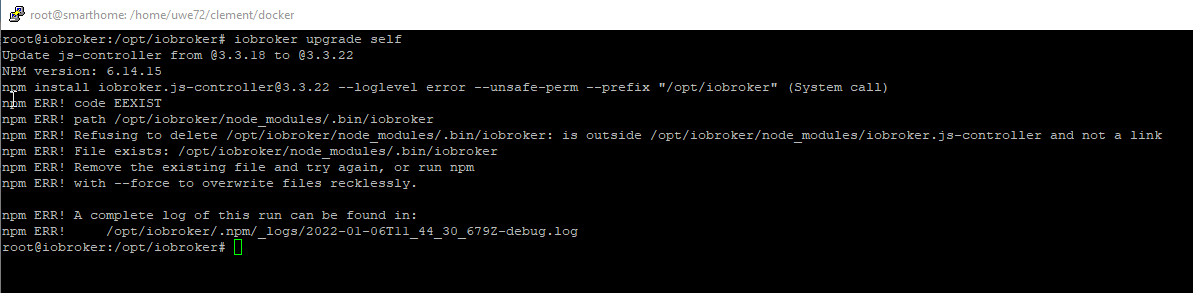
-
npm und nodejs sind nun auf die stable versionen downgegraded worden
Nun wollte ich die Adapter updaten und das geht leider nicht. Als ersten sollte der "admin" adapter auf 5.2.3 upgedated werden, aber das funktioniert nicht in der Weboberfläche noch in der Konsole
pi@All-In-One_RasPi:/opt/iobroker $ sudo iobroker stop
pi@All-In-One_RasPi:/opt/iobroker $ sudo iobroker update
Used repository: Stable (default)
hash unchanged, use cached sources
update done
Adapter    "admin"         : 5.2.3    , installed 4.2.2 [Updateable]
Adapter    "backitup"      : 2.2.2    , installed 2.1.15 [Updateable]
Adapter    "cloud"         : 4.1.0    , installed 4.1.0
Adapter    "discovery"     : 2.7.3    , installed 2.7.0 [Updateable]
Adapter    "flot"          : 1.10.7   , installed 1.10.6 [Updateable]
Adapter    "history"       : 1.9.14   , installed 1.9.13 [Updateable]
Adapter    "hm-rega"       : 3.0.33   , installed 3.0.30 [Updateable]
Adapter    "hm-rpc"        : 1.14.50  , installed 1.14.43 [Updateable]
Adapter    "info"          : 1.9.8    , installed 1.9.8
Adapter    "iogo"          : 0.7.0    , installed 0.7.0
Adapter    "javascript"    : 5.2.13   , installed 4.11.0 [Updateable]
Controller "js-controller" : 3.3.22   , installed 3.3.15 [Updateable]
Adapter    "knx"           : 2.0.5    , installed 1.0.45 [Updateable]
Adapter    "mobile"        : 1.0.1    , installed 1.0.1
Adapter    "mqtt-client"   : 1.4.0    , installed 1.4.0
Adapter    "nina"          : 0.0.25   , installed 0.0.25
Adapter    "node-red"      : 2.4.1    , installed 2.4.0 [Updateable]
Adapter    "nuki-extended" : 2.3.1    , installed 2.3.1
Adapter    "ping"          : 1.5.0    , installed 1.5.0
Adapter    "pushover"      : 2.0.5    , installed 2.0.5
Adapter    "roomba"        : 1.1.4    , installed 1.1.4
Adapter    "rpi2"          : 1.3.1    , installed 1.3.1
Adapter    "scenes"        : 2.3.8    , installed 2.3.6 [Updateable]
Adapter    "shelly"        : 4.0.7    , installed 4.0.8
Adapter    "simple-api"    : 2.6.1    , installed 2.6.1
Adapter    "socketio"      : 3.1.4    , installed 3.1.4
Adapter    "sonos"         : 2.1.1    , installed 2.1.1
Adapter    "vis"           : 1.4.5    , installed 1.4.3 [Updateable]
Adapter    "vis-hqwidgets" : 1.1.7    , installed 1.1.7
Adapter    "web"           : 3.4.9    , installed 3.4.8 [Updateable]
..und hier macht er einfach nicht mehr weiter

...und nach etlichen Minuten nun das
pi@All-In-One_RasPi:/opt/iobroker $ sudo iobroker upgrade self Update js-controller from @3.3.15 to @3.3.22 NPM version: 6.14.15 npm install iobroker.js-controller@3.3.22 --loglevel error --unsafe-perm --prefix "/opt/iobroker" (System call) npm ERR! code EEXIST npm ERR! path /opt/iobroker/node_modules/.bin/uuid npm ERR! Refusing to delete /opt/iobroker/node_modules/.bin/uuid: ../uuid/bin/uuid symlink target is not controlled by npm /opt/iobroker/node_modules/uuid npm ERR! File exists: /opt/iobroker/node_modules/.bin/uuid npm ERR! Remove the existing file and try again, or run npm npm ERR! with --force to overwrite files recklessly. npm ERR! A complete log of this run can be found in: npm ERR! /home/iobroker/.npm/_logs/2022-01-07T14_03_34_230Z-debug.log@speedyblade sagte in Problem bei Update js-controller from @3.3.18 to @3.3.22:
/opt/iobroker/node_modules/.bin/uuid
Bitte mal schauen was das für eine Datei ist:
ls -la /opt/iobroker/node_modules/.bin/uuid -
@speedyblade sagte in Problem bei Update js-controller from @3.3.18 to @3.3.22:
/opt/iobroker/node_modules/.bin/uuid
Bitte mal schauen was das für eine Datei ist:
ls -la /opt/iobroker/node_modules/.bin/uuidwenn ich das richtig sehe, ist der pfad falsch
lt. der vorhin angegebenen anleitung sollte da nichts unter local seinpi@All-In-One_RasPi:/opt/iobroker $ which nodejs node npm && nodejs -v && node -v && npm -v && whoami && sudo apt update &> /dev/null && sudo apt update && apt policy nodejs /usr/bin/nodejs /usr/local/bin/node /usr/local/bin/npm v14.18.2 v14.18.2 6.14.15 -
wenn ich das richtig sehe, ist der pfad falsch
lt. der vorhin angegebenen anleitung sollte da nichts unter local seinpi@All-In-One_RasPi:/opt/iobroker $ which nodejs node npm && nodejs -v && node -v && npm -v && whoami && sudo apt update &> /dev/null && sudo apt update && apt policy nodejs /usr/bin/nodejs /usr/local/bin/node /usr/local/bin/npm v14.18.2 v14.18.2 6.14.15@speedyblade sagte in Problem bei Update js-controller from @3.3.18 to @3.3.22:
lt. der vorhin angegebenen anleitung sollte da nichts unter local sein
Exakt. Und in der verlinkten Anleitung steht auch drin wie man das korrigiert.
-
wenn ich das richtig sehe, ist der pfad falsch
lt. der vorhin angegebenen anleitung sollte da nichts unter local seinpi@All-In-One_RasPi:/opt/iobroker $ which nodejs node npm && nodejs -v && node -v && npm -v && whoami && sudo apt update &> /dev/null && sudo apt update && apt policy nodejs /usr/bin/nodejs /usr/local/bin/node /usr/local/bin/npm v14.18.2 v14.18.2 6.14.15Aber kannst du mir mal sagen, wie man von v14.17.4 auf v14.18.2 in /usr/local/bin kommt? Ist ernst gemeint die Frage, ich versteh einfach nicht wo das immer herkommt.
Ich würds aber gerne mal verstehen... HILFE! -
Aber kannst du mir mal sagen, wie man von v14.17.4 auf v14.18.2 in /usr/local/bin kommt? Ist ernst gemeint die Frage, ich versteh einfach nicht wo das immer herkommt.
Ich würds aber gerne mal verstehen... HILFE!das kommt davon, dass Leute wie ich nicht viel Ahnung von Linux haben und einfach nur wollen, dass das System läuft ;)
-
das kommt davon, dass Leute wie ich nicht viel Ahnung von Linux haben und einfach nur wollen, dass das System läuft ;)
@speedyblade
Aber bitte mal konkret: Wie bist du die Installation von nodejs angegangen? Nach welcher Anleitung? Du hast dir ja nicht irgendwas ausgedacht und dann war es schwuppdiwupp in /usr/local/bin. -
@speedyblade
Aber bitte mal konkret: Wie bist du die Installation von nodejs angegangen? Nach welcher Anleitung? Du hast dir ja nicht irgendwas ausgedacht und dann war es schwuppdiwupp in /usr/local/bin.pi@All-In-One_RasPi:/opt/iobroker $ which nodejs node npm && nodejs -v && node -v && npm -v && apt policy nodejs /usr/bin/nodejs /usr/bin/node /usr/bin/npm v14.18.2 -bash: /usr/local/bin/node: Datei oder Verzeichnis nicht gefundenso...ich glaub das sieht nun ganz gut aus.
Muss nun npm noch installiert werden und wenn ja wie, denn dies habe ich nicht in der Anleitung gelesen -
pi@All-In-One_RasPi:/opt/iobroker $ which nodejs node npm && nodejs -v && node -v && npm -v && apt policy nodejs
/usr/bin/nodejs
/usr/bin/node
/usr/bin/npm
v14.18.2
-bash: /usr/local/bin/node: Datei oder Verzeichnis nicht gefunden
so...ich glaub das sieht nun ganz gut aus.
Muss nun npm noch installiert werden und wenn ja wie, denn dies habe ich nicht in der Anleitung gelesen@speedyblade sagte in Problem bei Update js-controller from @3.3.18 to @3.3.22:
so...ich glaub das sieht nun ganz gut aus.
Nein, jetzt fehlt nodeJS ganz.
Einmal ausloggen, besser neustarten und dann 'von Grund auf' nodejs 14 installieren. -
@speedyblade sagte in Problem bei Update js-controller from @3.3.18 to @3.3.22:
so...ich glaub das sieht nun ganz gut aus.
Nein, jetzt fehlt nodeJS ganz.
Einmal ausloggen, besser neustarten und dann 'von Grund auf' nodejs 14 installieren.so meinst du?
curl -sL https://deb.nodesource.com/setup_VV.x | sudo -E bash sudo apt install nodejs sudo ln -s /usr/bin/node /usr/bin/nodejs -
so meinst du?
curl -sL https://deb.nodesource.com/setup_VV.x | sudo -E bash sudo apt install nodejs sudo ln -s /usr/bin/node /usr/bin/nodejs@speedyblade du must die Anleitung vollständig lesen:
Die gewünschte Version anpassen, also in

setup_VV.x

entsprechend VV durch den gewünschten Versionszweig (z.B. 14) ersetzen.
Wobei das bei einem komplett frischen Debian nicht mal erforderlich ist, der iobroker-Installer installiert ohnehin eine Version von nodejs, wenn noch nicht vorhanden.
Version angeben da iobroker ja schon vorhanden ist oder fängst du komplett bei "0" an ?
-
das kommt davon, dass Leute wie ich nicht viel Ahnung von Linux haben und einfach nur wollen, dass das System läuft ;)
@speedyblade sagte in Problem bei Update js-controller from @3.3.18 to @3.3.22:
das kommt davon, dass Leute wie ich nicht viel Ahnung von Linux haben und einfach nur wollen, dass das System läuft ;)
und wie hast du dann deine node-Installation(en) gemacht?
alleine durch wollen wird es ja wohl nicht gegangen sein. -
@speedyblade sagte in Problem bei Update js-controller from @3.3.18 to @3.3.22:
das kommt davon, dass Leute wie ich nicht viel Ahnung von Linux haben und einfach nur wollen, dass das System läuft ;)
und wie hast du dann deine node-Installation(en) gemacht?
alleine durch wollen wird es ja wohl nicht gegangen sein.-bash: /usr/local/bin/node: Datei oder Verzeichnis nicht gefunden...
ist nun doch strikt nach Anleitung gemacht worden...verstehe die Welt nicht mehrpi@All-In-One_RasPi:/opt/iobroker $ curl -sL https://deb.nodesource.com/setup_14.x | sudo -E bash ## Installing the NodeSource Node.js 14.x repo... ## Populating apt-get cache... + apt-get update OK:1 http://archive.raspberrypi.org/debian stretch InRelease OK:2 http://raspbian.raspberrypi.org/raspbian stretch InRelease OK:3 https://deb.nodesource.com/node_14.x stretch InRelease Ign:4 https://www.pivccu.de/piVCCU stable InRelease Fehl:5 https://www.pivccu.de/piVCCU stable Release server certificate verification failed. CAfile: /etc/ssl/certs/ca-certificates.crt CRLfile: none Paketlisten werden gelesen... Fertig E: The repository 'https://www.pivccu.de/piVCCU stable Release' does no longer have a Release file. N: Updating from such a repository can't be done securely, and is therefore disabled by default. N: See apt-secure(8) manpage for repository creation and user configuration details. Error executing command, exiting pi@All-In-One_RasPi:/opt/iobroker $ sudo apt install nodejs Paketlisten werden gelesen... Fertig Abhängigkeitsbaum wird aufgebaut. Statusinformationen werden eingelesen.... Fertig nodejs ist schon die neueste Version (14.18.2-1nodesource1). 0 aktualisiert, 0 neu installiert, 0 zu entfernen und 45 nicht aktualisiert. pi@All-In-One_RasPi:/opt/iobroker $ sudo ln -s /usr/bin/node /usr/bin/nodejs ln: die symbolische Verknüpfung '/usr/bin/nodejs' konnte nicht angelegt werden: Die Datei existiert bereits pi@All-In-One_RasPi:/opt/iobroker $ which nodejs node npm && nodejs -v && node -v && npm -v && whoami && sudo apt update &> /dev/null && sudo apt update && apt policy nodejs /usr/bin/nodejs /usr/bin/node /usr/bin/npm v14.18.2 -bash: /usr/local/bin/node: Datei oder Verzeichnis nicht gefunden pi@All-In-One_RasPi:/opt/iobroker $ -
-bash: /usr/local/bin/node: Datei oder Verzeichnis nicht gefunden...
ist nun doch strikt nach Anleitung gemacht worden...verstehe die Welt nicht mehrpi@All-In-One_RasPi:/opt/iobroker $ curl -sL https://deb.nodesource.com/setup_14.x | sudo -E bash ## Installing the NodeSource Node.js 14.x repo... ## Populating apt-get cache... + apt-get update OK:1 http://archive.raspberrypi.org/debian stretch InRelease OK:2 http://raspbian.raspberrypi.org/raspbian stretch InRelease OK:3 https://deb.nodesource.com/node_14.x stretch InRelease Ign:4 https://www.pivccu.de/piVCCU stable InRelease Fehl:5 https://www.pivccu.de/piVCCU stable Release server certificate verification failed. CAfile: /etc/ssl/certs/ca-certificates.crt CRLfile: none Paketlisten werden gelesen... Fertig E: The repository 'https://www.pivccu.de/piVCCU stable Release' does no longer have a Release file. N: Updating from such a repository can't be done securely, and is therefore disabled by default. N: See apt-secure(8) manpage for repository creation and user configuration details. Error executing command, exiting pi@All-In-One_RasPi:/opt/iobroker $ sudo apt install nodejs Paketlisten werden gelesen... Fertig Abhängigkeitsbaum wird aufgebaut. Statusinformationen werden eingelesen.... Fertig nodejs ist schon die neueste Version (14.18.2-1nodesource1). 0 aktualisiert, 0 neu installiert, 0 zu entfernen und 45 nicht aktualisiert. pi@All-In-One_RasPi:/opt/iobroker $ sudo ln -s /usr/bin/node /usr/bin/nodejs ln: die symbolische Verknüpfung '/usr/bin/nodejs' konnte nicht angelegt werden: Die Datei existiert bereits pi@All-In-One_RasPi:/opt/iobroker $ which nodejs node npm && nodejs -v && node -v && npm -v && whoami && sudo apt update &> /dev/null && sudo apt update && apt policy nodejs /usr/bin/nodejs /usr/bin/node /usr/bin/npm v14.18.2 -bash: /usr/local/bin/node: Datei oder Verzeichnis nicht gefunden pi@All-In-One_RasPi:/opt/iobroker $@speedyblade sagte in Problem bei Update js-controller from @3.3.18 to @3.3.22:
/usr/local/bin/node: Datei oder Verzeichnis nicht gefunden...
uname -a
iobroker stop
sudo reboot
Das 'stretch'-Release ist auch tot. Hat sein EOL / End of Life letztes Jahr erreicht. Bitte dringendst durch was lebendiges ersetzen.
-
@speedyblade sagte in Problem bei Update js-controller from @3.3.18 to @3.3.22:
/usr/local/bin/node: Datei oder Verzeichnis nicht gefunden...
uname -a
iobroker stop
sudo reboot
Das 'stretch'-Release ist auch tot. Hat sein EOL / End of Life letztes Jahr erreicht. Bitte dringendst durch was lebendiges ersetzen.
@thomas-braun sagte in Problem bei Update js-controller from @3.3.18 to @3.3.22:
Das 'stretch'-Release ist auch tot. Hat sein EOL / End of Life letztes Jahr erreicht. Bitte dringendst durch was lebendiges ersetzen.
@SpeedyBlade
und deswegen mag das alte piVCCU auch nicht mehrkein Support per PN! - Fragen im Forum stellen - Benutzt das Voting rechts unten im Beitrag wenn er euch geholfen hat.
Das Forum freut sich über eine Spende. Benutzt dazu den Spendenbutton oben rechts. Danke!
der Installationsfixer: curl -fsL https://iobroker.net/fix.sh | bash - -
@thomas-braun sagte in Problem bei Update js-controller from @3.3.18 to @3.3.22:
Das 'stretch'-Release ist auch tot. Hat sein EOL / End of Life letztes Jahr erreicht. Bitte dringendst durch was lebendiges ersetzen.
@SpeedyBlade
und deswegen mag das alte piVCCU auch nicht mehr@homoran sagte in Problem bei Update js-controller from @3.3.18 to @3.3.22:
und deswegen mag das alte piVCCU auch nicht mehr
Tot ist tot. Friede seiner Asche.
-
@speedyblade sagte in Problem bei Update js-controller from @3.3.18 to @3.3.22:
/usr/local/bin/node: Datei oder Verzeichnis nicht gefunden...
uname -a
iobroker stop
sudo reboot
Das 'stretch'-Release ist auch tot. Hat sein EOL / End of Life letztes Jahr erreicht. Bitte dringendst durch was lebendiges ersetzen.
pi@All-In-One_RasPi:~ $ uname -a
Linux All-In-One_RasPi 4.19.66-v7+ #1253 SMP Thu Aug 15 11:49:46 BST 2019 armv7l GNU/Linux
pi@All-In-One_RasPi:~ $ iobroker stop
pi@All-In-One_RasPi:~ $ sudo reboot
wie meinst du durch was lebendiges ersetzen?
muss hier was speziellen installiert werden? -
@homoran sagte in Problem bei Update js-controller from @3.3.18 to @3.3.22:
und deswegen mag das alte piVCCU auch nicht mehr
Tot ist tot. Friede seiner Asche.
d.h. nun was genau?
mit den Aussagen kann ich nichts anfangen und viele Neulinge oder Unwissende auch nicht -
d.h. nun was genau?
mit den Aussagen kann ich nichts anfangen und viele Neulinge oder Unwissende auch nicht@speedyblade sagte in Problem bei Update js-controller from @3.3.18 to @3.3.22:
mit den Aussagen kann ich nichts anfangen und viele Neulinge oder Unwissende auch nicht
Du hast zu lange mit Updates des Systems gewartet
Inzwischen gibt es schon die alten Repositories teilweise nicht mehr, so das ein Upgrade mit irgendwelcehn Tricks wahrscheinlich komplett scheitern wird.Da hilft nur noch ein komplett neuer Aufbau um ein sauberes System zu erhalten.
Tot ist eben tot - Reanimation geht hier nicht mehr
-
d.h. nun was genau?
mit den Aussagen kann ich nichts anfangen und viele Neulinge oder Unwissende auch nicht -
pi@All-In-One_RasPi:~ $ apt update
Paketlisten werden gelesen... Fertig
W: chmod 0700 of directory /var/lib/apt/lists/partial failed - SetupAPTPartialDi                                                                                                                                                             rectory (1: Die Operation ist nicht erlaubt)
E: Sperrdatei /var/lib/apt/lists/lock konnte nicht geöffnet werden. - open (13:                                                                                                                                                              Keine Berechtigung)
E: Das Verzeichnis /var/lib/apt/lists/ kann nicht gesperrt werden.
W: Problem beim Entfernen (unlink) der Datei /var/cache/apt/pkgcache.bin - Remov                                                                                                                                                             eCaches (13: Keine Berechtigung)
W: Problem beim Entfernen (unlink) der Datei /var/cache/apt/srcpkgcache.bin - Re                                                                                                                                                             moveCaches (13: Keine Berechtigung)
pi@All-In-One_RasPi:~ $ apt policy nodejs
nodejs:
  Installiert:           14.18.2-1nodesource1
  Installationskandidat: 14.18.2-1nodesource1
  Versionstabelle:
 *** 14.18.2-1nodesource1 500
        500 https://deb.nodesource.com/node_14.x stretch/main armhf Packages
        100 /var/lib/dpkg/status
     8.11.1~dfsg-2~bpo9+1 500
        500 http://archive.raspberrypi.org/debian stretch/main armhf Packages
     4.8.2~dfsg-1 500
        500 http://raspbian.raspberrypi.org/raspbian stretch/main armhf Packages
pi@All-In-One_RasPi:~ $


Hey! Du scheinst an dieser Unterhaltung interessiert zu sein, hast aber noch kein Konto.
Hast du es satt, bei jedem Besuch durch die gleichen Beiträge zu scrollen? Wenn du dich für ein Konto anmeldest, kommst du immer genau dorthin zurück, wo du zuvor warst, und kannst dich über neue Antworten benachrichtigen lassen (entweder per E-Mail oder Push-Benachrichtigung). Du kannst auch Lesezeichen speichern und Beiträge positiv bewerten, um anderen Community-Mitgliedern deine Wertschätzung zu zeigen.
Mit deinem Input könnte dieser Beitrag noch besser werden 💗
Registrieren Anmelden428
Online33.0k
Benutzer83.5k
Themen1.3m
Beiträge