Skip to content
  • Home
  • Aktuell
  • Tags
  • 0 Ungelesen 0
  • Kategorien
  • Unreplied
  • Beliebt
  • GitHub
  • Docu
  • Hilfe
Skins
  • Light
  • Brite
  • Cerulean
  • Cosmo
  • Flatly
  • Journal
  • Litera
  • Lumen
  • Lux
  • Materia
  • Minty
  • Morph
  • Pulse
  • Sandstone
  • Simplex
  • Sketchy
  • Spacelab
  • United
  • Yeti
  • Zephyr
  • Dark
  • Cyborg
  • Darkly
  • Quartz
  • Slate
  • Solar
  • Superhero
  • Vapor

  • Standard: (Kein Skin)
  • Kein Skin
Einklappen
ioBroker Logo

Community Forum

donate donate
  1. ioBroker Community Home
  2. Deutsch
  3. ioBroker Allgemein
  4. Anfänger sucht Hilfe bei Install. proxmox auf INTELNUC8i3BEK
NEWS

  • UPDATE 31.10.: Amazon Alexa - ioBroker Skill läuft aus ?
    apollon77A
    apollon77
    48
    3
    8.9k

  • Monatsrückblick – September 2025
    BluefoxB
    Bluefox
    13
    1
    2.3k

  • Neues Video "KI im Smart Home" - ioBroker plus n8n
    BluefoxB
    Bluefox
    16
    1
    3.4k

Anfänger sucht Hilfe bei Install. proxmox auf INTELNUC8i3BEK

Geplant Angeheftet Gesperrt Verschoben ioBroker Allgemein
1.0k Beiträge 16 Kommentatoren 244.6k Aufrufe 15 Watching
  • Älteste zuerst
  • Neuste zuerst
  • Meiste Stimmen
Antworten
  • In einem neuen Thema antworten
Anmelden zum Antworten
Dieses Thema wurde gelöscht. Nur Nutzer mit entsprechenden Rechten können es sehen.
  • G GOETSCHHOFER

    @crunchip

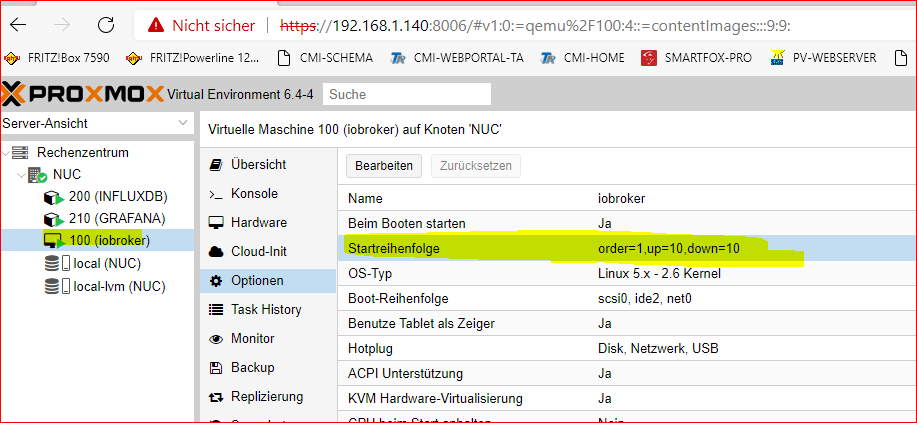
    Ich habe dies jetzt so bei der VM100-iobroker eingegeben.

    Aber hast du nicht vorhin gemeint, die Influxdb sollte als erstes starten ? Oder gilt diese Regel nur wenn die InfluxDB auch als VM läuft. Ich habe ja nur eine VM und 2 LXC.
    440e5982-95bb-4c71-8e0a-c1945fb819a3-image.png

    crunchipC Abwesend
    crunchipC Abwesend
    crunchip
    Forum Testing Most Active
    schrieb am zuletzt editiert von
    #224

    @goetschhofer nein, die Startreihenfolge gilt bei allen Maschinen, egal ob VM oder LXC
    Beispiel
    du startest deinen rechner, iobroker läuft als erstes los, möchte etwas in die InfluDB senden, kann aber nicht, weil diese noch gar nicht läuft.
    oder umgekehrt, deine Influx wird als erstes beendet, wenn du z.b deinen Rechner rebootest, iobroker möchte jedoch noch die restlichen Daten an influx senden, geht aber nicht, da die InfluxDB schon weg ist.
    also bekommt in deinem Fall, die InfluxDB die Nummer 1

    umgestiegen von Proxmox auf Unraid

    1 Antwort Letzte Antwort
    1
    • G GOETSCHHOFER

      @crunchip

      Bin ich hier richtig für die Installation der InfluxDB ?

      Eingabe unter Konsole ?

      db9eedf4-76a0-46f4-9122-7c200de16d0c-image.png

      crunchipC Abwesend
      crunchipC Abwesend
      crunchip
      Forum Testing Most Active
      schrieb am zuletzt editiert von crunchip
      #225

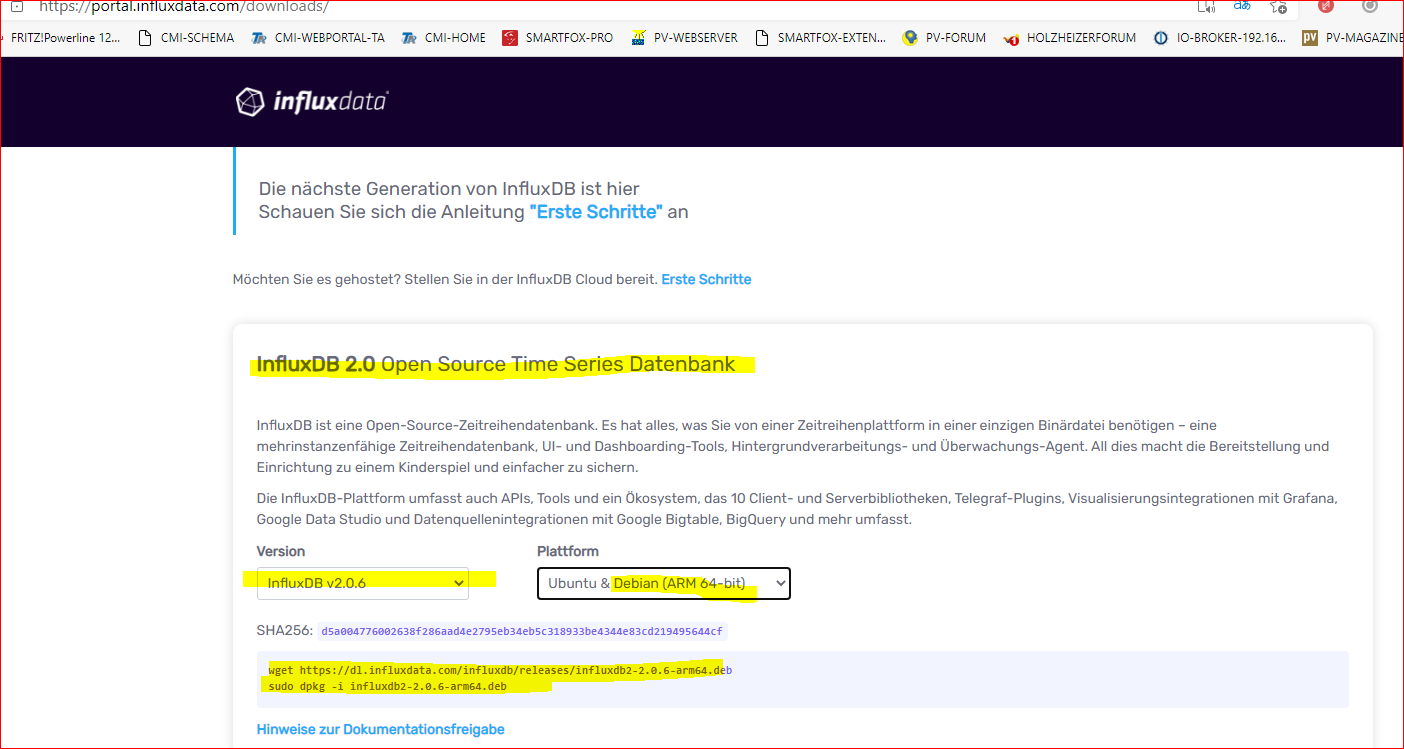
      @goetschhofer ja, aber nicht die v2.x, die läuft noch nicht mit der Influx Instanz
      https://docs.influxdata.com/influxdb/v1.8/introduction/install/

      umgestiegen von Proxmox auf Unraid

      G 1 Antwort Letzte Antwort
      1
      • G GOETSCHHOFER

        @crunchip

        Bin ich hier richtig für die Installation der InfluxDB ?

        Eingabe unter Konsole ?

        db9eedf4-76a0-46f4-9122-7c200de16d0c-image.png

        crunchipC Abwesend
        crunchipC Abwesend
        crunchip
        Forum Testing Most Active
        schrieb am zuletzt editiert von
        #226

        @goetschhofer weiss nicht ob es irgendwann schon mal erwähnt wurde, aber HIER findest du einiges an gut gebräuchlichen Videos

        umgestiegen von Proxmox auf Unraid

        G 1 Antwort Letzte Antwort
        1
        • da_WoodyD da_Woody

          @goetschhofer was hast du jetzt vor? ich dachte, du hast schon den container. willst du jetzt eine VM einrichten?

          G Offline
          G Offline
          GOETSCHHOFER
          schrieb am zuletzt editiert von
          #227

          @da_woody

          Ich möchte im Container Influxb installieren und anschließend Grafana.

          1 Antwort Letzte Antwort
          0
          • crunchipC crunchip

            @goetschhofer weiss nicht ob es irgendwann schon mal erwähnt wurde, aber HIER findest du einiges an gut gebräuchlichen Videos

            G Offline
            G Offline
            GOETSCHHOFER
            schrieb am zuletzt editiert von
            #228

            @crunchip

            Danke für den Hinweis.

            1 Antwort Letzte Antwort
            0
            • crunchipC crunchip

              @goetschhofer ja, aber nicht die v2.x, die läuft noch nicht mit der Influx Instanz
              https://docs.influxdata.com/influxdb/v1.8/introduction/install/

              G Offline
              G Offline
              GOETSCHHOFER
              schrieb am zuletzt editiert von
              #229

              @crunchip

              Muss ich hier für die Installation der Influxdb-Vers.1.8. beim Punkt 1 mit apt-get starten oder kann ich gleich mit ...starten ?

              wget -qO- https://repos.influxdata.com/influxdb.key | gpg --dearmor > /etc/apt/trusted.gpg.d/influxdb.gpg
              export DISTRIB_ID=$(lsb_release -si); export DISTRIB_CODENAME=$(lsb_release -sc)
              echo "deb [signed-by=/etc/apt/trusted.gpg.d/influxdb.gpg] https://repos.influxdata.com/${DISTRIB_ID,,} ${DISTRIB_CODENAME} stable" > /etc/apt/sources.list.d/influxdb.list
              
              crunchipC 1 Antwort Letzte Antwort
              0
              • G GOETSCHHOFER

                @crunchip

                Muss ich hier für die Installation der Influxdb-Vers.1.8. beim Punkt 1 mit apt-get starten oder kann ich gleich mit ...starten ?

                wget -qO- https://repos.influxdata.com/influxdb.key | gpg --dearmor > /etc/apt/trusted.gpg.d/influxdb.gpg
                export DISTRIB_ID=$(lsb_release -si); export DISTRIB_CODENAME=$(lsb_release -sc)
                echo "deb [signed-by=/etc/apt/trusted.gpg.d/influxdb.gpg] https://repos.influxdata.com/${DISTRIB_ID,,} ${DISTRIB_CODENAME} stable" > /etc/apt/sources.list.d/influxdb.list
                
                crunchipC Abwesend
                crunchipC Abwesend
                crunchip
                Forum Testing Most Active
                schrieb am zuletzt editiert von
                #230

                @goetschhofer du führst das aus und danach

                sudo apt-get update && sudo apt-get install influxdb
                sudo service influxdb start


                danach noch die "/etc/influxdb/influxdb.conf" anpassen

                umgestiegen von Proxmox auf Unraid

                G 1 Antwort Letzte Antwort
                1
                • crunchipC crunchip

                  @goetschhofer du führst das aus und danach

                  sudo apt-get update && sudo apt-get install influxdb
                  sudo service influxdb start


                  danach noch die "/etc/influxdb/influxdb.conf" anpassen

                  G Offline
                  G Offline
                  GOETSCHHOFER
                  schrieb am zuletzt editiert von
                  #231

                  @crunchip said in Anfänger sucht Hilfe bei Install. proxmox auf INTELNUC8i3BEK:

                  sudo apt-get update && sudo apt-get install influxdb

                  Da bekomme ich folgende Fehlermeldung ?

                  root@INFLUXDB:~# sudo apt-get update && sudo apt-get install influxdb
                  -bash: sudo: command not found
                  root@INFLUXDB:~# 
                  
                  crunchipC 1 Antwort Letzte Antwort
                  0
                  • G GOETSCHHOFER

                    @crunchip said in Anfänger sucht Hilfe bei Install. proxmox auf INTELNUC8i3BEK:

                    sudo apt-get update && sudo apt-get install influxdb

                    Da bekomme ich folgende Fehlermeldung ?

                    root@INFLUXDB:~# sudo apt-get update && sudo apt-get install influxdb
                    -bash: sudo: command not found
                    root@INFLUXDB:~# 
                    
                    crunchipC Abwesend
                    crunchipC Abwesend
                    crunchip
                    Forum Testing Most Active
                    schrieb am zuletzt editiert von crunchip
                    #232

                    @goetschhofer wenn man einen Container installiert, ist nicht wie bei einer VM gleich alles mit rein gepackt,
                    Befehle wie sudo oder curl müssen nachinstalliert werden, bevor man diese ausführen kann.
                    Des weiteren hast du auch noch keinen Benutzer angelegt und bist noch mit root auf deinem System

                    apt install sudo
                    

                    umgestiegen von Proxmox auf Unraid

                    G 1 Antwort Letzte Antwort
                    1
                    • crunchipC crunchip

                      @goetschhofer wenn man einen Container installiert, ist nicht wie bei einer VM gleich alles mit rein gepackt,
                      Befehle wie sudo oder curl müssen nachinstalliert werden, bevor man diese ausführen kann.
                      Des weiteren hast du auch noch keinen Benutzer angelegt und bist noch mit root auf deinem System

                      apt install sudo
                      
                      G Offline
                      G Offline
                      GOETSCHHOFER
                      schrieb am zuletzt editiert von
                      #233

                      @crunchip

                      Hat die Fehlermeldung am Ende etwas zu bedeuten ?

                      root@INFLUXDB:~# sudo apt-get update && sudo apt-get install influxdb
                      -bash: sudo: command not found
                      root@INFLUXDB:~# apt install sudo
                      Reading package lists... Done
                      Building dependency tree... Done
                      The following NEW packages will be installed:
                        sudo
                      0 upgraded, 1 newly installed, 0 to remove and 0 not upgraded.
                      Need to get 1245 kB of archives.
                      After this operation, 3878 kB of additional disk space will be used.
                      Err:1 http://ftp.debian.org/debian buster/main amd64 sudo amd64 1.8.27-1+deb10u2
                        404  Not Found [IP: 199.232.18.132 80]
                      E: Failed to fetch http://ftp.debian.org/debian/pool/main/s/sudo/sudo_1.8.27-1+deb10u2_amd64.deb  404  Not Found [IP: 199.232.18.132 80]
                      E: Unable to fetch some archives, maybe run apt-get update or try with --fix-missing?
                      root@INFLUXDB:~# 
                      
                      crunchipC 1 Antwort Letzte Antwort
                      0
                      • G GOETSCHHOFER

                        @crunchip

                        Hat die Fehlermeldung am Ende etwas zu bedeuten ?

                        root@INFLUXDB:~# sudo apt-get update && sudo apt-get install influxdb
                        -bash: sudo: command not found
                        root@INFLUXDB:~# apt install sudo
                        Reading package lists... Done
                        Building dependency tree... Done
                        The following NEW packages will be installed:
                          sudo
                        0 upgraded, 1 newly installed, 0 to remove and 0 not upgraded.
                        Need to get 1245 kB of archives.
                        After this operation, 3878 kB of additional disk space will be used.
                        Err:1 http://ftp.debian.org/debian buster/main amd64 sudo amd64 1.8.27-1+deb10u2
                          404  Not Found [IP: 199.232.18.132 80]
                        E: Failed to fetch http://ftp.debian.org/debian/pool/main/s/sudo/sudo_1.8.27-1+deb10u2_amd64.deb  404  Not Found [IP: 199.232.18.132 80]
                        E: Unable to fetch some archives, maybe run apt-get update or try with --fix-missing?
                        root@INFLUXDB:~# 
                        
                        crunchipC Abwesend
                        crunchipC Abwesend
                        crunchip
                        Forum Testing Most Active
                        schrieb am zuletzt editiert von
                        #234

                        @goetschhofer zeig mal die Ausgabe von

                        cat /etc/apt/sources.list
                        

                        umgestiegen von Proxmox auf Unraid

                        G 1 Antwort Letzte Antwort
                        1
                        • crunchipC crunchip

                          @goetschhofer zeig mal die Ausgabe von

                          cat /etc/apt/sources.list
                          
                          G Offline
                          G Offline
                          GOETSCHHOFER
                          schrieb am zuletzt editiert von
                          #235

                          @crunchip said in Anfänger sucht Hilfe bei Install. proxmox auf INTELNUC8i3BEK:

                          cat /etc/apt/sources.list

                          root@INFLUXDB:~# cat /etc/apt/sources.list
                          deb http://ftp.debian.org/debian buster main contrib
                          
                          deb http://ftp.debian.org/debian buster-updates main contrib
                          
                          deb http://security.debian.org buster/updates main contrib
                          
                          root@INFLUXDB:~# 
                          
                          crunchipC 1 Antwort Letzte Antwort
                          0
                          • G GOETSCHHOFER

                            @crunchip said in Anfänger sucht Hilfe bei Install. proxmox auf INTELNUC8i3BEK:

                            cat /etc/apt/sources.list

                            root@INFLUXDB:~# cat /etc/apt/sources.list
                            deb http://ftp.debian.org/debian buster main contrib
                            
                            deb http://ftp.debian.org/debian buster-updates main contrib
                            
                            deb http://security.debian.org buster/updates main contrib
                            
                            root@INFLUXDB:~# 
                            
                            crunchipC Abwesend
                            crunchipC Abwesend
                            crunchip
                            Forum Testing Most Active
                            schrieb am zuletzt editiert von
                            #236

                            @goetschhofer passt
                            hast du überhaupt schon ein upgrade deines LXC gemacht?

                            apt update && apt upgrade
                            

                            umgestiegen von Proxmox auf Unraid

                            G 1 Antwort Letzte Antwort
                            1
                            • crunchipC crunchip

                              @goetschhofer passt
                              hast du überhaupt schon ein upgrade deines LXC gemacht?

                              apt update && apt upgrade
                              
                              G Offline
                              G Offline
                              GOETSCHHOFER
                              schrieb am zuletzt editiert von GOETSCHHOFER
                              #237

                              @crunchip said in Anfänger sucht Hilfe bei Install. proxmox auf INTELNUC8i3BEK:

                              apt update && apt upgrade

                              Ich war der Meinung, dass man dies erst nach der Installation der InfluxDB macht.

                              Wo setzte ich jetzt fort ?

                              Setting up libapt-inst2.0:amd64 (1.8.2.3) ...
                              Setting up libldap-common (2.4.47+dfsg-3+deb10u6) ...
                              Setting up libpython3.7-minimal:amd64 (3.7.3-2+deb10u3) ...
                              Setting up tzdata (2021a-0+deb10u1) ...
                              
                              Current default time zone: 'Etc/UTC'
                              Local time is now:      Fri May  7 19:41:49 UTC 2021.
                              Universal Time is now:  Fri May  7 19:41:49 UTC 2021.
                              Run 'dpkg-reconfigure tzdata' if you wish to change it.
                              
                              Setting up liblwres161:amd64 (1:9.11.5.P4+dfsg-5.1+deb10u5) ...
                              Setting up udev (241-7~deb10u7) ...
                              Setting up python3.7-minimal (3.7.3-2+deb10u3) ...
                              Setting up libisc-export1100:amd64 (1:9.11.5.P4+dfsg-5.1+deb10u5) ...
                              Setting up python-apt-common (1.8.4.3) ...
                              Setting up groff-base (1.22.4-3+deb10u1) ...
                              Setting up libpam-systemd:amd64 (241-7~deb10u7) ...
                              Setting up libisccc161:amd64 (1:9.11.5.P4+dfsg-5.1+deb10u5) ...
                              Setting up openssl (1.1.1d-0+deb10u6) ...
                              Setting up libbsd0:amd64 (0.9.1-2+deb10u1) ...
                              Setting up libdns-export1104 (1:9.11.5.P4+dfsg-5.1+deb10u5) ...
                              Setting up iputils-ping (3:20180629-2+deb10u2) ...
                              Setting up libdns1104:amd64 (1:9.11.5.P4+dfsg-5.1+deb10u5) ...
                              Setting up libpython3.7-stdlib:amd64 (3.7.3-2+deb10u3) ...
                              Setting up apt-utils (1.8.2.3) ...
                              Setting up python3-apt (1.8.4.3) ...
                              Setting up libldap-2.4-2:amd64 (2.4.47+dfsg-3+deb10u6) ...
                              Setting up libcurl3-gnutls:amd64 (7.64.0-4+deb10u2) ...
                              Setting up ca-certificates (20200601~deb10u2) ...
                              Updating certificates in /etc/ssl/certs...
                              11 added, 0 removed; done.
                              Setting up libisccfg163:amd64 (1:9.11.5.P4+dfsg-5.1+deb10u5) ...
                              Setting up python3.7 (3.7.3-2+deb10u3) ...
                              Setting up libbind9-161:amd64 (1:9.11.5.P4+dfsg-5.1+deb10u5) ...
                              Setting up bind9-host (1:9.11.5.P4+dfsg-5.1+deb10u5) ...
                              Processing triggers for libc-bin (2.28-10) ...
                              Processing triggers for man-db (2.8.5-2) ...
                              Processing triggers for dbus (1.12.20-0+deb10u1) ...
                              Processing triggers for mime-support (3.62) ...
                              Processing triggers for ca-certificates (20200601~deb10u2) ...
                              Updating certificates in /etc/ssl/certs...
                              0 added, 0 removed; done.
                              Running hooks in /etc/ca-certificates/update.d...
                              done.
                              root@INFLUXDB:~# 
                              
                              Thomas BraunT crunchipC 2 Antworten Letzte Antwort
                              0
                              • G GOETSCHHOFER

                                @crunchip said in Anfänger sucht Hilfe bei Install. proxmox auf INTELNUC8i3BEK:

                                apt update && apt upgrade

                                Ich war der Meinung, dass man dies erst nach der Installation der InfluxDB macht.

                                Wo setzte ich jetzt fort ?

                                Setting up libapt-inst2.0:amd64 (1.8.2.3) ...
                                Setting up libldap-common (2.4.47+dfsg-3+deb10u6) ...
                                Setting up libpython3.7-minimal:amd64 (3.7.3-2+deb10u3) ...
                                Setting up tzdata (2021a-0+deb10u1) ...
                                
                                Current default time zone: 'Etc/UTC'
                                Local time is now:      Fri May  7 19:41:49 UTC 2021.
                                Universal Time is now:  Fri May  7 19:41:49 UTC 2021.
                                Run 'dpkg-reconfigure tzdata' if you wish to change it.
                                
                                Setting up liblwres161:amd64 (1:9.11.5.P4+dfsg-5.1+deb10u5) ...
                                Setting up udev (241-7~deb10u7) ...
                                Setting up python3.7-minimal (3.7.3-2+deb10u3) ...
                                Setting up libisc-export1100:amd64 (1:9.11.5.P4+dfsg-5.1+deb10u5) ...
                                Setting up python-apt-common (1.8.4.3) ...
                                Setting up groff-base (1.22.4-3+deb10u1) ...
                                Setting up libpam-systemd:amd64 (241-7~deb10u7) ...
                                Setting up libisccc161:amd64 (1:9.11.5.P4+dfsg-5.1+deb10u5) ...
                                Setting up openssl (1.1.1d-0+deb10u6) ...
                                Setting up libbsd0:amd64 (0.9.1-2+deb10u1) ...
                                Setting up libdns-export1104 (1:9.11.5.P4+dfsg-5.1+deb10u5) ...
                                Setting up iputils-ping (3:20180629-2+deb10u2) ...
                                Setting up libdns1104:amd64 (1:9.11.5.P4+dfsg-5.1+deb10u5) ...
                                Setting up libpython3.7-stdlib:amd64 (3.7.3-2+deb10u3) ...
                                Setting up apt-utils (1.8.2.3) ...
                                Setting up python3-apt (1.8.4.3) ...
                                Setting up libldap-2.4-2:amd64 (2.4.47+dfsg-3+deb10u6) ...
                                Setting up libcurl3-gnutls:amd64 (7.64.0-4+deb10u2) ...
                                Setting up ca-certificates (20200601~deb10u2) ...
                                Updating certificates in /etc/ssl/certs...
                                11 added, 0 removed; done.
                                Setting up libisccfg163:amd64 (1:9.11.5.P4+dfsg-5.1+deb10u5) ...
                                Setting up python3.7 (3.7.3-2+deb10u3) ...
                                Setting up libbind9-161:amd64 (1:9.11.5.P4+dfsg-5.1+deb10u5) ...
                                Setting up bind9-host (1:9.11.5.P4+dfsg-5.1+deb10u5) ...
                                Processing triggers for libc-bin (2.28-10) ...
                                Processing triggers for man-db (2.8.5-2) ...
                                Processing triggers for dbus (1.12.20-0+deb10u1) ...
                                Processing triggers for mime-support (3.62) ...
                                Processing triggers for ca-certificates (20200601~deb10u2) ...
                                Updating certificates in /etc/ssl/certs...
                                0 added, 0 removed; done.
                                Running hooks in /etc/ca-certificates/update.d...
                                done.
                                root@INFLUXDB:~# 
                                
                                Thomas BraunT Online
                                Thomas BraunT Online
                                Thomas Braun
                                Most Active
                                schrieb am zuletzt editiert von
                                #238

                                @goetschhofer sagte in Anfänger sucht Hilfe bei Install. proxmox auf INTELNUC8i3BEK:

                                dpkg-reconfigure tzdata
                                

                                Die Zeit musst du setzen. Sonst passt da einiges nachher nicht zueinander auf den diversen Maschinen.

                                Linux-Werkzeugkasten:
                                https://forum.iobroker.net/topic/42952/der-kleine-iobroker-linux-werkzeugkasten
                                NodeJS Fixer Skript:
                                https://forum.iobroker.net/topic/68035/iob-node-fix-skript
                                iob_diag: curl -sLf -o diag.sh https://iobroker.net/diag.sh && bash diag.sh

                                G 1 Antwort Letzte Antwort
                                1
                                • Thomas BraunT Thomas Braun

                                  @goetschhofer sagte in Anfänger sucht Hilfe bei Install. proxmox auf INTELNUC8i3BEK:

                                  dpkg-reconfigure tzdata
                                  

                                  Die Zeit musst du setzen. Sonst passt da einiges nachher nicht zueinander auf den diversen Maschinen.

                                  G Offline
                                  G Offline
                                  GOETSCHHOFER
                                  schrieb am zuletzt editiert von
                                  #239

                                  @thomas-braun said in Anfänger sucht Hilfe bei Install. proxmox auf INTELNUC8i3BEK:

                                  dpkg-reconfigure tzdata

                                  Danke

                                  Current default time zone: 'Europe/Vienna'
                                  Local time is now:      Fri May  7 21:46:28 CEST 2021.
                                  Universal Time is now:  Fri May  7 19:46:28 UTC 2021.
                                  
                                  1 Antwort Letzte Antwort
                                  0
                                  • G GOETSCHHOFER

                                    @crunchip said in Anfänger sucht Hilfe bei Install. proxmox auf INTELNUC8i3BEK:

                                    apt update && apt upgrade

                                    Ich war der Meinung, dass man dies erst nach der Installation der InfluxDB macht.

                                    Wo setzte ich jetzt fort ?

                                    Setting up libapt-inst2.0:amd64 (1.8.2.3) ...
                                    Setting up libldap-common (2.4.47+dfsg-3+deb10u6) ...
                                    Setting up libpython3.7-minimal:amd64 (3.7.3-2+deb10u3) ...
                                    Setting up tzdata (2021a-0+deb10u1) ...
                                    
                                    Current default time zone: 'Etc/UTC'
                                    Local time is now:      Fri May  7 19:41:49 UTC 2021.
                                    Universal Time is now:  Fri May  7 19:41:49 UTC 2021.
                                    Run 'dpkg-reconfigure tzdata' if you wish to change it.
                                    
                                    Setting up liblwres161:amd64 (1:9.11.5.P4+dfsg-5.1+deb10u5) ...
                                    Setting up udev (241-7~deb10u7) ...
                                    Setting up python3.7-minimal (3.7.3-2+deb10u3) ...
                                    Setting up libisc-export1100:amd64 (1:9.11.5.P4+dfsg-5.1+deb10u5) ...
                                    Setting up python-apt-common (1.8.4.3) ...
                                    Setting up groff-base (1.22.4-3+deb10u1) ...
                                    Setting up libpam-systemd:amd64 (241-7~deb10u7) ...
                                    Setting up libisccc161:amd64 (1:9.11.5.P4+dfsg-5.1+deb10u5) ...
                                    Setting up openssl (1.1.1d-0+deb10u6) ...
                                    Setting up libbsd0:amd64 (0.9.1-2+deb10u1) ...
                                    Setting up libdns-export1104 (1:9.11.5.P4+dfsg-5.1+deb10u5) ...
                                    Setting up iputils-ping (3:20180629-2+deb10u2) ...
                                    Setting up libdns1104:amd64 (1:9.11.5.P4+dfsg-5.1+deb10u5) ...
                                    Setting up libpython3.7-stdlib:amd64 (3.7.3-2+deb10u3) ...
                                    Setting up apt-utils (1.8.2.3) ...
                                    Setting up python3-apt (1.8.4.3) ...
                                    Setting up libldap-2.4-2:amd64 (2.4.47+dfsg-3+deb10u6) ...
                                    Setting up libcurl3-gnutls:amd64 (7.64.0-4+deb10u2) ...
                                    Setting up ca-certificates (20200601~deb10u2) ...
                                    Updating certificates in /etc/ssl/certs...
                                    11 added, 0 removed; done.
                                    Setting up libisccfg163:amd64 (1:9.11.5.P4+dfsg-5.1+deb10u5) ...
                                    Setting up python3.7 (3.7.3-2+deb10u3) ...
                                    Setting up libbind9-161:amd64 (1:9.11.5.P4+dfsg-5.1+deb10u5) ...
                                    Setting up bind9-host (1:9.11.5.P4+dfsg-5.1+deb10u5) ...
                                    Processing triggers for libc-bin (2.28-10) ...
                                    Processing triggers for man-db (2.8.5-2) ...
                                    Processing triggers for dbus (1.12.20-0+deb10u1) ...
                                    Processing triggers for mime-support (3.62) ...
                                    Processing triggers for ca-certificates (20200601~deb10u2) ...
                                    Updating certificates in /etc/ssl/certs...
                                    0 added, 0 removed; done.
                                    Running hooks in /etc/ca-certificates/update.d...
                                    done.
                                    root@INFLUXDB:~# 
                                    
                                    crunchipC Abwesend
                                    crunchipC Abwesend
                                    crunchip
                                    Forum Testing Most Active
                                    schrieb am zuletzt editiert von
                                    #240

                                    @goetschhofer sagte in Anfänger sucht Hilfe bei Install. proxmox auf INTELNUC8i3BEK:

                                    Ich war der Meinung, dass man dies erst nach der Installation der InfluxDB macht.

                                    nein das ist das erste was man macht, das Grundsystem erst mal auf aktuellen stand bringen

                                    Zeitzone hast du auch noch nicht angepasst

                                    dpkg-reconfigure tzdata
                                    

                                    danach installierst du dein Influx, vorher aber noch deinen User anlegen, ausloggen und mit deinem user anmelden

                                    umgestiegen von Proxmox auf Unraid

                                    G 1 Antwort Letzte Antwort
                                    1
                                    • crunchipC crunchip

                                      @goetschhofer sagte in Anfänger sucht Hilfe bei Install. proxmox auf INTELNUC8i3BEK:

                                      Ich war der Meinung, dass man dies erst nach der Installation der InfluxDB macht.

                                      nein das ist das erste was man macht, das Grundsystem erst mal auf aktuellen stand bringen

                                      Zeitzone hast du auch noch nicht angepasst

                                      dpkg-reconfigure tzdata
                                      

                                      danach installierst du dein Influx, vorher aber noch deinen User anlegen, ausloggen und mit deinem user anmelden

                                      G Offline
                                      G Offline
                                      GOETSCHHOFER
                                      schrieb am zuletzt editiert von
                                      #241

                                      @crunchip

                                      Ich weiß nicht mehr, wie ich vor ca. 4 Monaten auf meinem RSP Pi3+ einen user für die Influxdb angelegt habe.

                                      Dies habe ich dazu gefunden:

                                      Nun in der Datenbank selbst die Benutzer sowie die Datenbank anlegen. Zuletzt geben wir noch dem “user” das Recht auf die Datenbank zuzugreifen. Wichtig – adminpassword und userpassword entsprechend tauschen:
                                      
                                      CREATE USER "admin" WITH PASSWORD '<adminpassword>' WITH ALL PRIVILEGES
                                      CREATE USER "user" WITH PASSWORD '<userpassword>'
                                      CREATE DATABASE "iobroker"
                                      GRANT ALL ON "iobroker" TO "user"
                                      
                                      crunchipC 1 Antwort Letzte Antwort
                                      0
                                      • G GOETSCHHOFER

                                        @crunchip

                                        Ich weiß nicht mehr, wie ich vor ca. 4 Monaten auf meinem RSP Pi3+ einen user für die Influxdb angelegt habe.

                                        Dies habe ich dazu gefunden:

                                        Nun in der Datenbank selbst die Benutzer sowie die Datenbank anlegen. Zuletzt geben wir noch dem “user” das Recht auf die Datenbank zuzugreifen. Wichtig – adminpassword und userpassword entsprechend tauschen:
                                        
                                        CREATE USER "admin" WITH PASSWORD '<adminpassword>' WITH ALL PRIVILEGES
                                        CREATE USER "user" WITH PASSWORD '<userpassword>'
                                        CREATE DATABASE "iobroker"
                                        GRANT ALL ON "iobroker" TO "user"
                                        
                                        crunchipC Abwesend
                                        crunchipC Abwesend
                                        crunchip
                                        Forum Testing Most Active
                                        schrieb am zuletzt editiert von
                                        #242

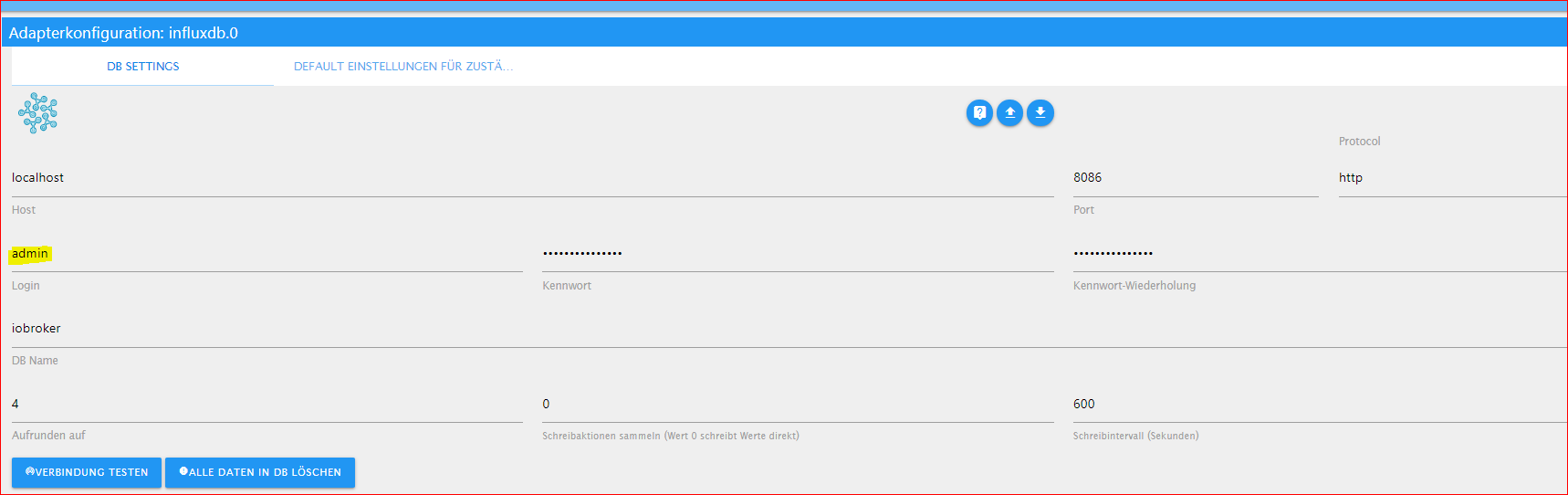
                                        @goetschhofer dein user steht in deiner Influx Instanz.
                                        create database hättest gar nicht machen müssen, zum einen erstellt die influx instanz diese automatisch und zum anderen möchtest du doch dein backup deiner influx zurückspielen.

                                        umgestiegen von Proxmox auf Unraid

                                        G 1 Antwort Letzte Antwort
                                        1
                                        • crunchipC crunchip

                                          @goetschhofer dein user steht in deiner Influx Instanz.
                                          create database hättest gar nicht machen müssen, zum einen erstellt die influx instanz diese automatisch und zum anderen möchtest du doch dein backup deiner influx zurückspielen.

                                          G Offline
                                          G Offline
                                          GOETSCHHOFER
                                          schrieb am zuletzt editiert von GOETSCHHOFER
                                          #243

                                          @crunchip

                                          Habe ich eh nicht gemacht, war nur eine Frage.

                                          Du meinst in der bestehenden InfluxDB vom RSP Pi3.

                                          b9d2b8e7-fdb5-4395-a624-412f1ec20271-image.png

                                          crunchipC 1 Antwort Letzte Antwort
                                          0
                                          Antworten
                                          • In einem neuen Thema antworten
                                          Anmelden zum Antworten
                                          • Älteste zuerst
                                          • Neuste zuerst
                                          • Meiste Stimmen


                                          Support us

                                          ioBroker
                                          Community Adapters
                                          Donate
                                          FAQ Cloud / IOT
                                          HowTo: Node.js-Update
                                          HowTo: Backup/Restore
                                          Downloads
                                          BLOG

                                          615

                                          Online

                                          32.4k

                                          Benutzer

                                          81.6k

                                          Themen

                                          1.3m

                                          Beiträge
                                          Community
                                          Impressum | Datenschutz-Bestimmungen | Nutzungsbedingungen | Einwilligungseinstellungen
                                          ioBroker Community 2014-2025
                                          logo
                                          • Anmelden

                                          • Du hast noch kein Konto? Registrieren

                                          • Anmelden oder registrieren, um zu suchen
                                          • Erster Beitrag
                                            Letzter Beitrag
                                          0
                                          • Home
                                          • Aktuell
                                          • Tags
                                          • Ungelesen 0
                                          • Kategorien
                                          • Unreplied
                                          • Beliebt
                                          • GitHub
                                          • Docu
                                          • Hilfe