
NEWS




Test Adapter e3oncan - Viessmann E3 Serie einbinden
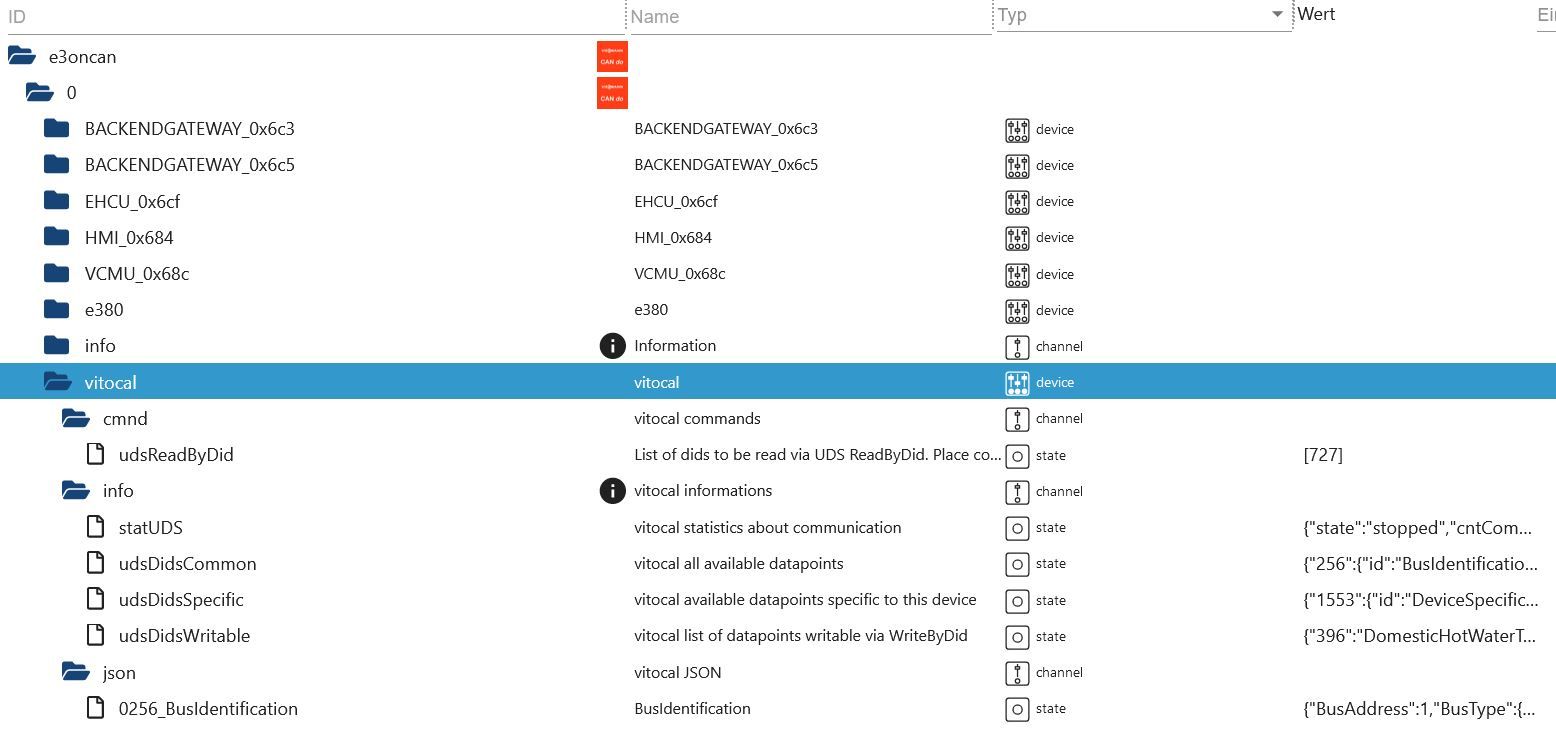
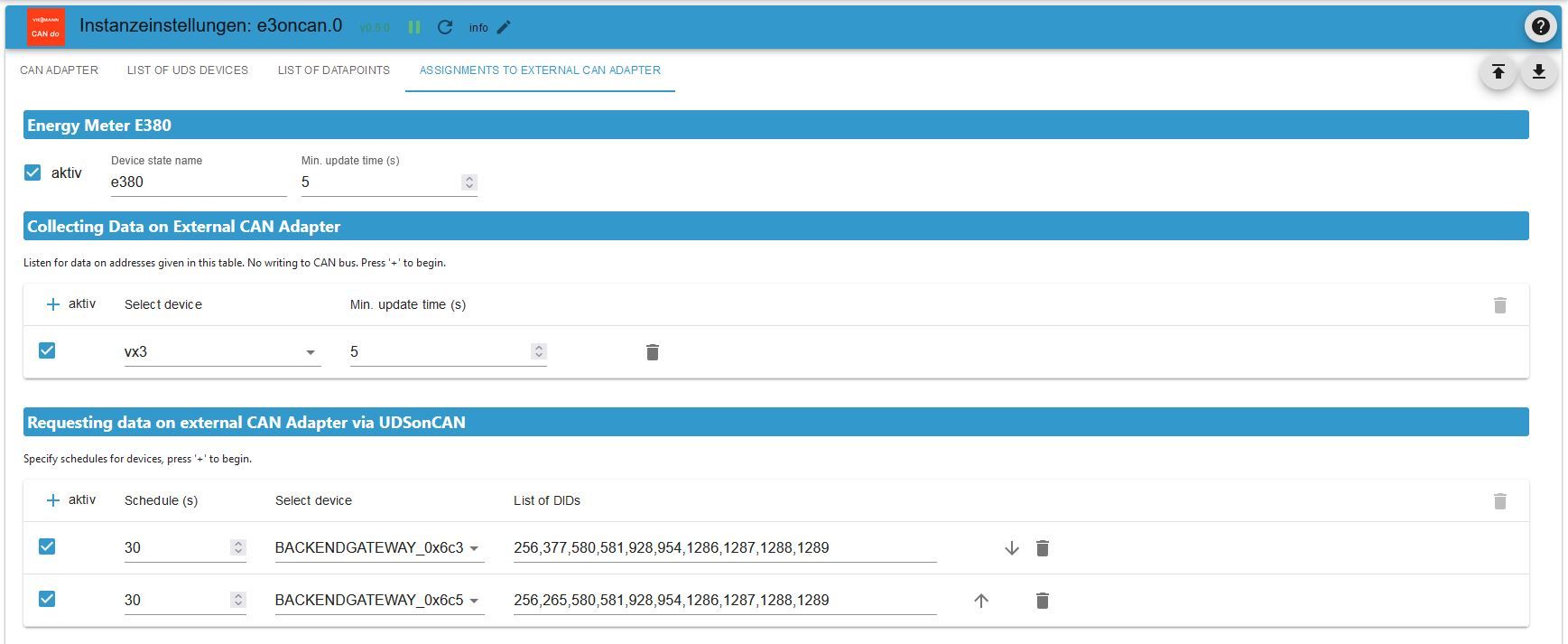
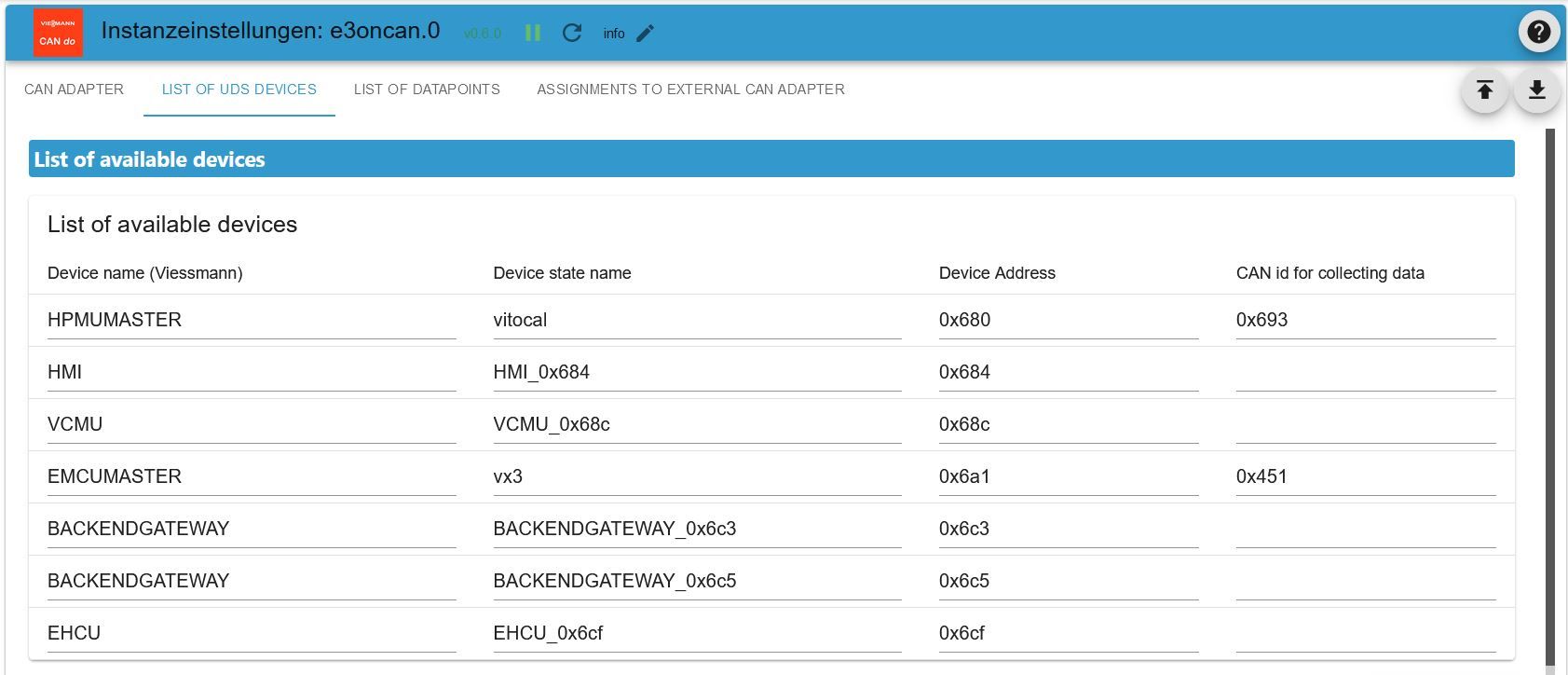
-
OK, danke! Das gibts bei mir nicht.
Auch nicht, wenn ich eine neue Instanz erstelle.
Allerdings zeigt es, wenn ich die Instanz-Zeile nach unten aufklappe an, dass die Instanz mit Version 0.10.14 läuft: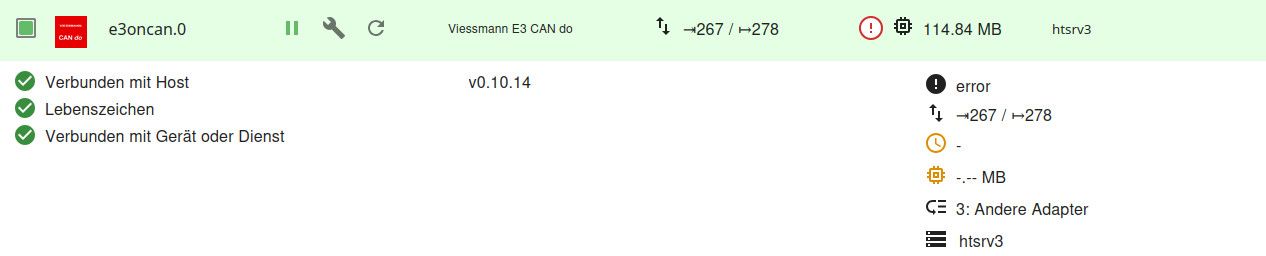
Bei "Adapter" steht aber die aktuelle Beta
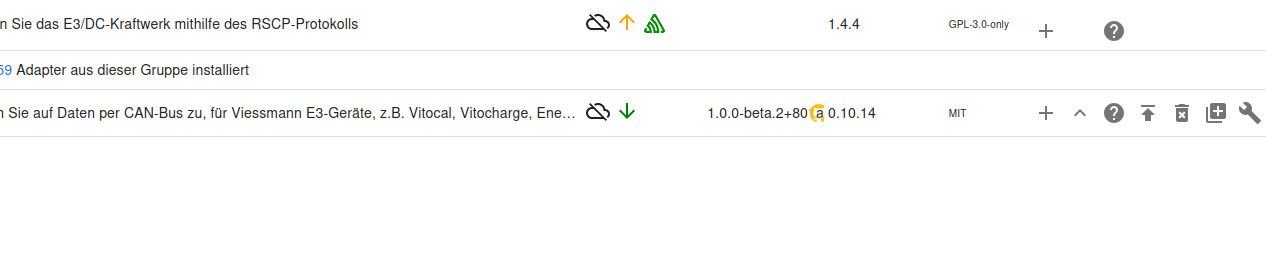
Komisch, oder?
Nachtrag:
Wenn ich eine neue Instanz erstelle, dann passt die Version. Sobald ich aber die Sicherung meiner Konfiguration einlese, kommt in der Instanzzeile wieder die alte Version.@damichi85 Das Einlesen der alten Konfiguration ist keine gute Idee, denn beim ersten Start der neuen Version wird die Konfiguration auf den neuen Stand migriert. Warum sich beim Einlesen die Version ändert ist mir allerdings unklar.
Wie sieht es aus, wenn Du das Upgrade wie beschrieben durchführst und kein Einlesen der Konfig machst?
-
@damichi85 Das Einlesen der alten Konfiguration ist keine gute Idee, denn beim ersten Start der neuen Version wird die Konfiguration auf den neuen Stand migriert. Warum sich beim Einlesen die Version ändert ist mir allerdings unklar.
Wie sieht es aus, wenn Du das Upgrade wie beschrieben durchführst und kein Einlesen der Konfig machst?
@jrbwh
So, alle Probleme sind jetzt gelöst! Vielen Dank!iob fixausgeführt - und schon bleibt die neue Beta-Version aktiv. Keine Ahnung, was da faul war.
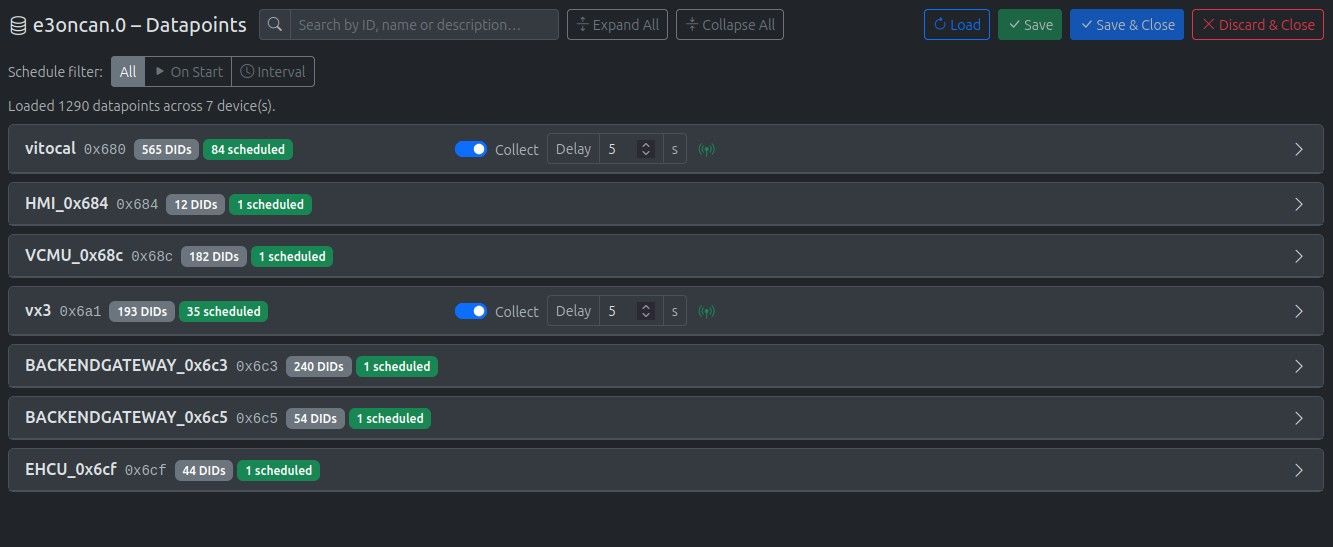
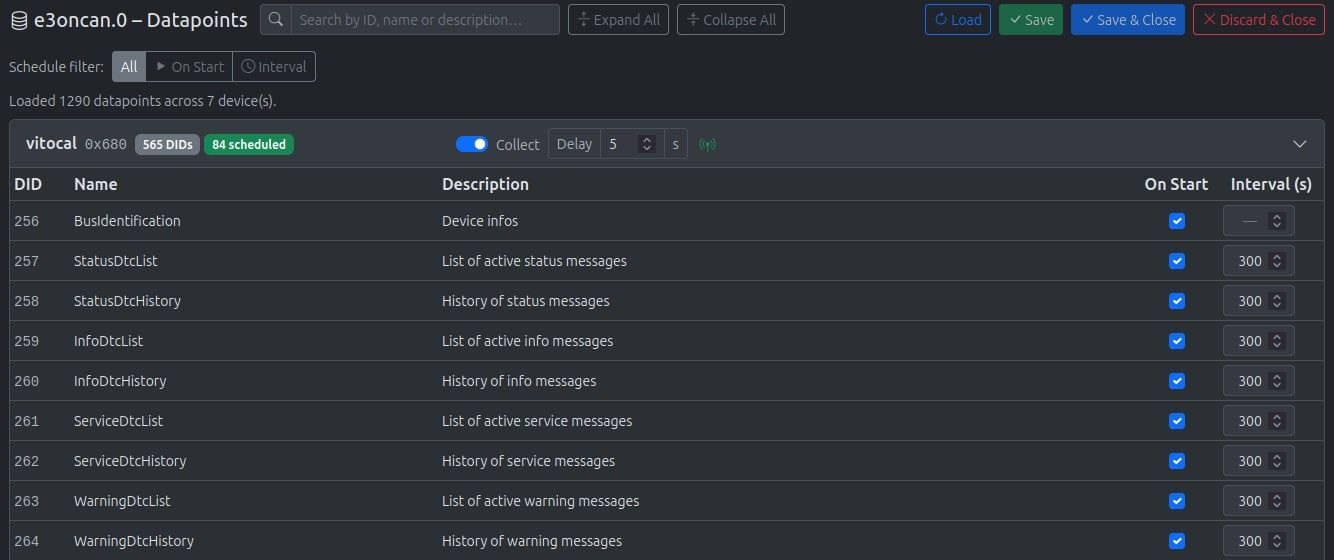
Der neue Datenpunkt-Manager ist ja der Hammer
 :-) Schaut super aus und lässt sich sehr gut bedienen.
Ich teste und melde mich wieder....
@thomas-braun
Thomas, an dich auch ein Dankeschön für deinen Tipp! -
@jrbwh
So, alle Probleme sind jetzt gelöst! Vielen Dank!iob fixausgeführt - und schon bleibt die neue Beta-Version aktiv. Keine Ahnung, was da faul war.
Der neue Datenpunkt-Manager ist ja der Hammer
:-) Schaut super aus und lässt sich sehr gut bedienen.Ich teste und melde mich wieder....
@thomas-braun
Thomas, an dich auch ein Dankeschön für deinen Tipp!@damichi85 Freut mich, dass es nun funktioniert und dass Dir die neue Konfig-Oberfläche gefällt. Hast Du schon die verschiedenen Filter ausprobiert? Die wirken über die Geräte hinweg und das praktisch verzögerungsfrei.
Und wenn Du die Scans gemacht hast, klick mal auf den Button "Topology". Mich interessiert, ob die Ergebnisse stimmig und plausibel für Deine Anlage sind.
-
@damichi85 Freut mich, dass es nun funktioniert und dass Dir die neue Konfig-Oberfläche gefällt. Hast Du schon die verschiedenen Filter ausprobiert? Die wirken über die Geräte hinweg und das praktisch verzögerungsfrei.
Und wenn Du die Scans gemacht hast, klick mal auf den Button "Topology". Mich interessiert, ob die Ergebnisse stimmig und plausibel für Deine Anlage sind.
@jrbwh
Das mit den Filtern hab ich gestern intuitiv gleich ausprobiert
Mir hat das sehr geholfen, ich musste ja, da ich das Backup nicht einspielen durfte die zu synchronisierenden Datenpunkte erneut definieren.Wenn man vergisst, das Polling-Intervall zu definieren, und wie ich gestern z. B. nur den Haken für "on Start" setzt, kommt man mit den Filtern schnell drauf, welche Datenpunkte anders bzw. falsch konfiguriert sind. Perfekt - gefällt mir richtig gut.


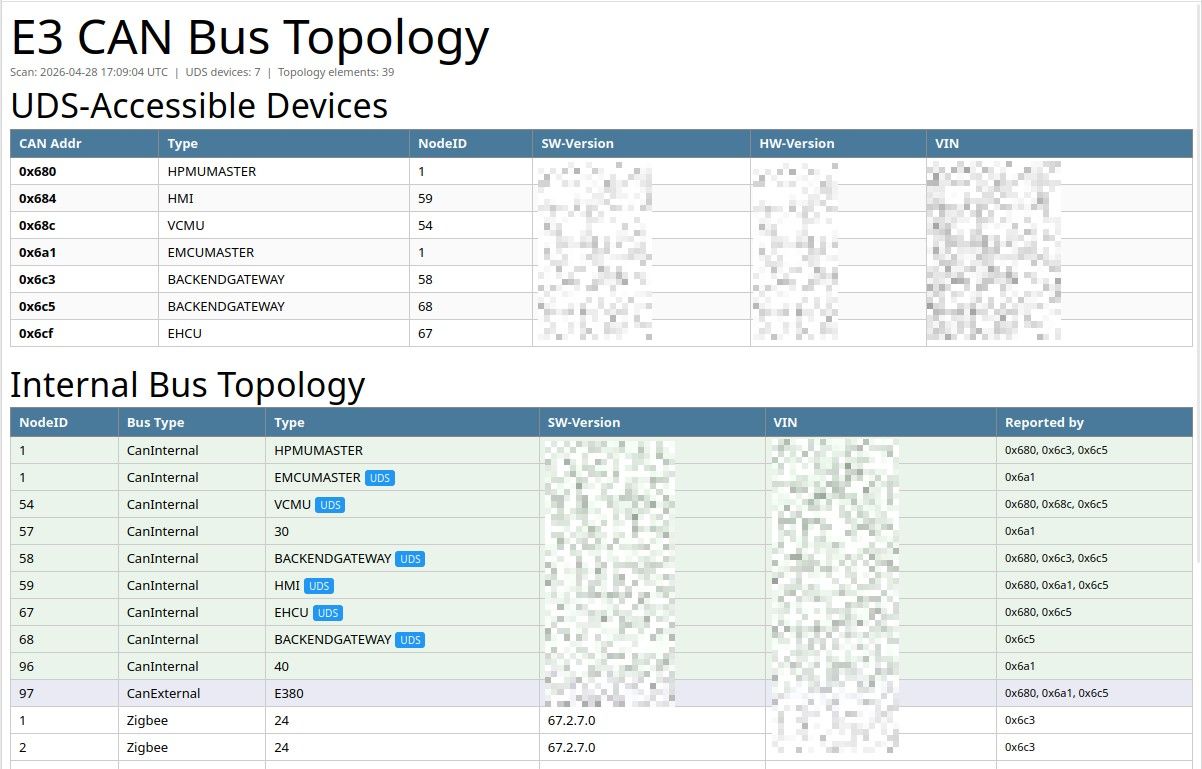
Ich hatte in wenigen Minuten alle benötigten Datenpunkte ausgewählt.Hier noch ein Screenshot von der Topologie.
Da kenn ich mich aber nicht besonders gut aus.
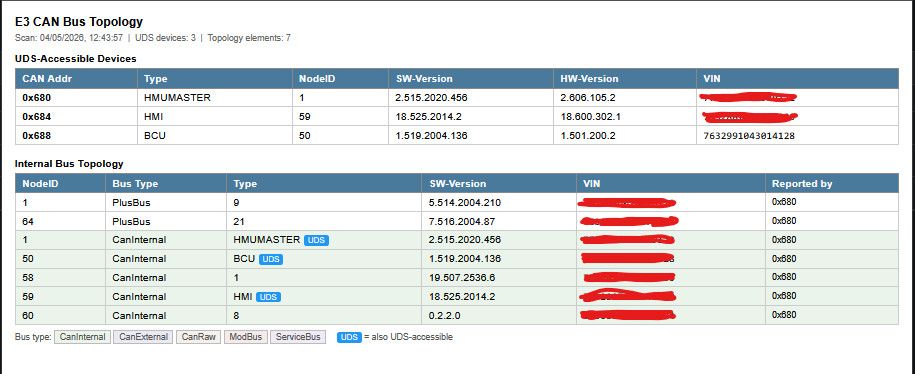
Die Anlage besteht aus:
- dem Gaskessel (Vitodens 200W) mit Display (das sind wahrscheinlich die drei UDS-Devices, oder)
- der Plusbus Node 64 (könnte evtl. der Solar-Divicon sein, das ist ein Plusbus-Teilnehmer)
- einer EA-Erweiterung, da bin ich mir aber nicht sicher, wo die dran hängt, am CAN jedenfalls nicht
Auch diese Topologie-Übersicht ist der Hammer - gefällt mir richtig gut!
-
@jrbwh
Das mit den Filtern hab ich gestern intuitiv gleich ausprobiert
Mir hat das sehr geholfen, ich musste ja, da ich das Backup nicht einspielen durfte die zu synchronisierenden Datenpunkte erneut definieren.Wenn man vergisst, das Polling-Intervall zu definieren, und wie ich gestern z. B. nur den Haken für "on Start" setzt, kommt man mit den Filtern schnell drauf, welche Datenpunkte anders bzw. falsch konfiguriert sind. Perfekt - gefällt mir richtig gut.
Ich hatte in wenigen Minuten alle benötigten Datenpunkte ausgewählt.Hier noch ein Screenshot von der Topologie.
Da kenn ich mich aber nicht besonders gut aus.
Die Anlage besteht aus:
- dem Gaskessel (Vitodens 200W) mit Display (das sind wahrscheinlich die drei UDS-Devices, oder)
- der Plusbus Node 64 (könnte evtl. der Solar-Divicon sein, das ist ein Plusbus-Teilnehmer)
- einer EA-Erweiterung, da bin ich mir aber nicht sicher, wo die dran hängt, am CAN jedenfalls nicht
Auch diese Topologie-Übersicht ist der Hammer - gefällt mir richtig gut!
@damichi85 Das ist natürlich ein bisschen blöd gelaufen, dass Du den Adapter komplett neu installieren musstest. Sonst wäre die Konfig einfach übernommen worden. Auch wenn es jetzt zu spät ist, vielleicht hilft später mal:
Die ganzen Infos, wann was abgefragt wird, sind in "tableUdsSchedules" gespeichert. Du kannst also die neue Konfig exportieren, den Abschnitt aus der alten nehmen und damit den Abschnitt in der neuen Konfig ersetzen und dann diese wieder importieren. Dann ist alles direkt wieder da.
Wird noch nichts abgefragt sieht der Abschnitt so aus:
  "tableUdsSchedules": [
  ],
Und hier ein Beispiel mit 2 Geräten:
  "tableUdsSchedules": [
    {
      "udsScheduleActive": true,
      "udsSchedule": 15,
      "udsSelectDevAddr": "0x680",
      "udsScheduleDids": "1190,2346,2735",
      "udsScheduleUserComment": ""
    },
    {
      "udsScheduleActive": true,
      "udsSchedule": 0,
      "udsSelectDevAddr": "0x684",
      "udsScheduleDids": "256,580",
      "udsScheduleUserComment": "on start"
    }
  ],
Die Topologie sieht für mich plausibel aus.
Denke, ich kann demnächst ein richtiges Release ins Beta-Repo machen.
Danke & Gruß, Jürgen
-
@damichi85 Das ist natürlich ein bisschen blöd gelaufen, dass Du den Adapter komplett neu installieren musstest. Sonst wäre die Konfig einfach übernommen worden. Auch wenn es jetzt zu spät ist, vielleicht hilft später mal:
Die ganzen Infos, wann was abgefragt wird, sind in "tableUdsSchedules" gespeichert. Du kannst also die neue Konfig exportieren, den Abschnitt aus der alten nehmen und damit den Abschnitt in der neuen Konfig ersetzen und dann diese wieder importieren. Dann ist alles direkt wieder da.
Wird noch nichts abgefragt sieht der Abschnitt so aus:
  "tableUdsSchedules": [
  ],
Und hier ein Beispiel mit 2 Geräten:
  "tableUdsSchedules": [
    {
      "udsScheduleActive": true,
      "udsSchedule": 15,
      "udsSelectDevAddr": "0x680",
      "udsScheduleDids": "1190,2346,2735",
      "udsScheduleUserComment": ""
    },
    {
      "udsScheduleActive": true,
      "udsSchedule": 0,
      "udsSelectDevAddr": "0x684",
      "udsScheduleDids": "256,580",
      "udsScheduleUserComment": "on start"
    }
  ],
Die Topologie sieht für mich plausibel aus.
Denke, ich kann demnächst ein richtiges Release ins Beta-Repo machen.
Danke & Gruß, Jürgen
@jrbwh
Danke, das ist sehr interessant! Ich werd das beim nächsten Mal ausprobieren!Denke, ich kann demnächst ein richtiges Release ins Beta-Repo machen.
Ja, du schaut gut aus bis jetzt. Schreiben funktioniert nach wie vor auch noch einwandfrei.
Dir noch einen schönen Abend!
Michael -
@damichi85 Im Beta-Repo ist jetzt die Version 1.0.1 verfügbar. Kleiner Bugfix. Und mit Klick auf das Badge "xxx scheduled" kann man nun nach genau diesen DIDs filtern.
-
@damichi85 Im Beta-Repo ist jetzt die Version 1.0.1 verfügbar. Kleiner Bugfix. Und mit Klick auf das Badge "xxx scheduled" kann man nun nach genau diesen DIDs filtern.
-
Hab da mal ne Frage. Muß der CAN-Bus Adapter am PI stecken auf dem ioBroker installiert ist?
-
Hab da mal ne Frage. Muß der CAN-Bus Adapter am PI stecken auf dem ioBroker installiert ist?
@Beowolf Ja, das ist die Standard-Konfiguration. Falls der ioBroker-Raspi zu weit weg ist, gibt es weitere Möglichkeiten
- Einen älteren zusätzlichen Raspi beim CAN-Bus installieren und ioBroker als Master-Slave aufsetzen
- Cannelloni verwenden und die CAN-Bus Daten über TCP/IP tunneln. Dazu reicht ein Raspi-Zero am CAN-Bus. Das wird auf beiden Rechner installiert, auf dem ioBroker-Raspi sind die Daten dann auf einem virtuellen CAN-Bus (vcan0) verfügbar. Den trägt man im e3oncan-Adapter ein.
-
Bekomme seit seit Mitte Mai UDS timeout auf allen Datenpunkten die ich abfrage. Geändert hatte ich nichts, keine Updates oder ähnliches.
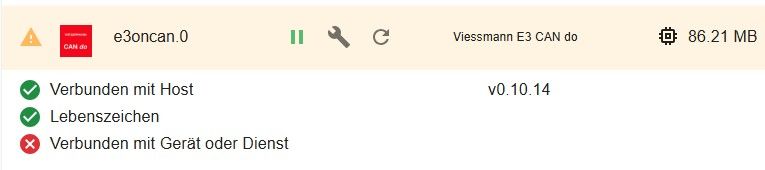
Es wird angezeigt, dass der Dienst oder Gerät nicht verbunden ist. Habe alles kontrolliert, konnte keinen Fehler feststellen.
Komisch ist allerdings, dass es keinen Error über can0 gibt.
Wie kann ich e3oncan wieder zum Leben erwecken, ohne timeout error?
Was könnte das Problem sein?
-
Bekomme seit seit Mitte Mai UDS timeout auf allen Datenpunkten die ich abfrage. Geändert hatte ich nichts, keine Updates oder ähnliches.
Es wird angezeigt, dass der Dienst oder Gerät nicht verbunden ist. Habe alles kontrolliert, konnte keinen Fehler feststellen.
Komisch ist allerdings, dass es keinen Error über can0 gibt.
Wie kann ich e3oncan wieder zum Leben erwecken, ohne timeout error?
Was könnte das Problem sein?
@RaspiCan
Was steht denn zu einem Kaltstart der Instanz im Log?iob logs --watchanschauen. Oder gleich das 'große Ganze' per
iob diag -
Bekomme seit seit Mitte Mai UDS timeout auf allen Datenpunkten die ich abfrage. Geändert hatte ich nichts, keine Updates oder ähnliches.
Es wird angezeigt, dass der Dienst oder Gerät nicht verbunden ist. Habe alles kontrolliert, konnte keinen Fehler feststellen.
Komisch ist allerdings, dass es keinen Error über can0 gibt.
Wie kann ich e3oncan wieder zum Leben erwecken, ohne timeout error?
Was könnte das Problem sein?
@RaspiCan Hast Du in node.js-Upgrade gemacht? Dann gibt es zwei Möglichkeiten:
- das native Modul socketcan neu compilieren mit
iob stop e3oncan && iob rebuild && iob start e3oncan- siehe auch im Readme - Upgrade auf e3oncan v1.0.3 - da ist dieses Problem komplett behoben, da der Entwickler von socketcan sein Modul auf non-native umgestellt hat. Allerdings bringt 1.0.3 viele Updates von Datenpunkten, da ist ziemlich sicher Nacharbeit notwendig. Auch hier gilt: Siehe Readme.
Falls Du kein node.js-Upgrade gemacht hast: Poste die Log.Einträge beim Start des Adapters.
- das native Modul socketcan neu compilieren mit
-
2026-06-05 14:08:23.658 - error: e3oncan.0 (27942) UDS timeout on 0x68c.2852
habe kein Update gemacht
-
========== Start marking the full check here ===========

Script v.2026-06-01

*** BASE SYSTEM ***
Operating System: Debian GNU/Linux 12 (bookworm)
 Static hostname: raspberrypi
       Icon name: computer
          Kernel: Linux 6.12.62+rpt-rpi-v8
    Architecture: arm64
OS is similar to:

Model           : Raspberry Pi 4 Model B Rev 1.5
Docker          : false
Virtualization  : none
Kernel          : aarch64
Userland        : 64bit

System was installed 451 days ago (on 2025-03-10).

Systemuptime and Load:
 14:15:45 up  2:28,  7 users,  load average: 0.13, 0.05, 0.01
CPU threads     : 4

*** LIFE CYCLE STATUS ***
Debian 'bookworm' is the current oldstable version. Please upgrade to the latest stable release 'trixie' in due time!

*** RASPBERRY THROTTLING ***
Current issues:
No throttling issues detected.

Previously detected issues:
No throttling issues detected.

*** TIME AND TIMEZONES ***
               Local time: Fri 2026-06-05 14:15:45 CEST
           Universal time: Fri 2026-06-05 12:15:45 UTC
                 RTC time: n/a
                Time zone: Europe/Berlin (CEST, +0200)
System clock synchronized: no
              NTP service: active
          RTC in local TZ: no

*** Users and Groups ***
User that called 'iob diag':
raspi
HOME=/home/raspi
GROUPS=raspi adm dialout cdrom sudo audio video plugdev games users input render netdev lpadmin gpio i2c spi iobroker

User that is running 'js-controller':
iobroker
HOME=/home/iobroker
GROUPS=iobroker tty dialout audio video plugdev bluetooth gpio i2c

*** DISPLAY-SERVER SETUP ***
Display-Server:         Unknown
Display-Manager:        * lightdm.service - Light Display Manager
Desktop:
Session:                tty
Boot Target:            graphical.target

System is booting into 'graphical.target'. Usually a server is running in 'multi-user.target'.
Please set BootTarget to 'multi-user.target' or run 'iobroker fix'

*** MEMORY ***
               total        used        free      shared  buff/cache   available
Mem:            4.0G        1.2G        874M         23M        2.0G        2.8G
Swap:             0B          0B          0B
Total:          4.0G        1.2G        874M

Active iob-Instances:   8

         3795 M total memory
         1153 M used memory
         1604 M active memory
         1043 M inactive memory
          834 M free memory
          106 M buffer memory
         1791 M swap cache
            0 M total swap
            0 M used swap
            0 M free swap

*** top - Table Of Processes  ***
top - 14:15:46 up  2:28,  7 users,  load average: 0.13, 0.05, 0.01
Tasks: 243 total,   1 running, 242 sleeping,   0 stopped,   0 zombie
%Cpu(s): 14.3 us, 14.3 sy,  0.0 ni, 71.4 id,  0.0 wa,  0.0 hi,  0.0 si,  0.0 st
MiB Mem :   3795.8 total,    834.2 free,   1153.5 used,   1898.5 buff/cache
MiB Swap:      0.0 total,      0.0 free,      0.0 used.   2642.3 avail Mem

*** FAILED SERVICES ***
  UNIT                                 LOAD   ACTIVE SUB    DESCRIPTION
* systemd-networkd-wait-online.service loaded failed failed Wait for Network to be Configured

LOAD   = Reflects whether the unit definition was properly loaded.
ACTIVE = The high-level unit activation state, i.e. generalization of SUB.
SUB    = The low-level unit activation state, values depend on unit type.
1 loaded units listed.

*** DMESG CRITICAL ERRORS ***
No critical errors detected

*** FILESYSTEM ***
Filesystem     Type      Size  Used Avail Use% Mounted on
udev           devtmpfs  1.6G     0  1.6G   0% /dev
tmpfs          tmpfs     380M  1.4M  379M   1% /run
/dev/sda2      ext4      916G   19G  851G   3% /
tmpfs          tmpfs     1.9G  224K  1.9G   1% /dev/shm
tmpfs          tmpfs     5.0M   16K  5.0M   1% /run/lock
/dev/sda1      vfat      511M   70M  442M  14% /boot/firmware
tmpfs          tmpfs     380M   48K  380M   1% /run/user/1000
/dev/mmcblk0p2 ext4       58G  8.0G   48G  15% /media/raspi/rootfs
/dev/mmcblk0p1 vfat      510M   68M  443M  14% /media/raspi/bootfs

Messages concerning filesystems in dmesg:
[Fri Jun  5 11:47:43 2026] EXT4-fs (sda2): mounted filesystem a36be96c-66be-4487-a7a6-0481bca99d89 ro with ordered data mode. Quota mode: none.
[Fri Jun  5 11:47:44 2026] EXT4-fs (sda2): re-mounted a36be96c-66be-4487-a7a6-0481bca99d89 r/w.
[Fri Jun  5 11:47:52 2026] EXT4-fs (mmcblk0p2): recovery complete
[Fri Jun  5 11:47:52 2026] EXT4-fs (mmcblk0p2): mounted filesystem a36be96c-66be-4487-a7a6-0481bca99d89 r/w with ordered data mode. Quota mode: none.

Show mounted filesystems:
TARGET                        SOURCE         FSTYPE      OPTIONS
/                             /dev/sda2      ext4        rw,noatime
|-/run/user/1000/doc          portal         fuse.portal rw,nosuid,nodev,relatime,user_id=1000,group_id=1000
|-/boot/firmware              /dev/sda1      vfat        rw,relatime,fmask=0022,dmask=0022,codepage=437,iocharset=ascii,shortname=mixed,errors=remount-ro
|-/media/raspi/rootfs /dev/mmcblk0p2 ext4        rw,nosuid,nodev,relatime,errors=remount-ro
`-/media/raspi/bootfs /dev/mmcblk0p1 vfat        rw,nosuid,nodev,relatime,uid=1000,gid=1000,fmask=0022,dmask=0022,codepage=437,iocharset=ascii,shortname=mixed,showexec,utf8,flush,errors=remount-ro

Files in neuralgic directories:
/var:
2.5G    /var/
1.1G    /var/cache/apt
1.1G    /var/cache
962M    /var/cache/apt/archives
666M    /var/log
Archived and active journals take up 664.5M in the file system.

/opt/iobroker/backups:
3.2G    /opt/iobroker/backups/

/opt/iobroker/iobroker-data:
5.6G    /opt/iobroker/iobroker-data/
5.4G    /opt/iobroker/iobroker-data/history
87M     /opt/iobroker/iobroker-data/files
55M     /opt/iobroker/iobroker-data/backup-objects
47M     /opt/iobroker/iobroker-data/files/admin.admin

The five largest files in iobroker-data are:
19M     /opt/iobroker/iobroker-data/objects.jsonl
8.2M    /opt/iobroker/iobroker-data/files/backitup.admin/assets/index-BDfRPp5J.js
4.3M    /opt/iobroker/iobroker-data/history/20260221/history.Drehzahl Verdichter Wärmepumpe.json
4.2M    /opt/iobroker/iobroker-data/history/20260318/history.Drehzahl Verdichter Wärmepumpe.json
4.2M    /opt/iobroker/iobroker-data/history/20260315/history.Drehzahl Verdichter Wärmepumpe.json

USB-Devices by-id:
USB-Sticks - Avoid direct links to /dev/tty* in your adapter setups,
please always prefer the links 'by-id':

No Devices found 'by-id'
No nvbackup.json found.

*** NodeJS-Installation ***

/usr/bin/nodejs         v20.20.2
/usr/bin/node           v20.20.2
/usr/bin/npm            10.8.2
/usr/bin/npx            10.8.2

✓ Node.js installation is correct

nodejs:
  Installed: 20.20.2-1nodesource1
  Candidate: 20.20.2-1nodesource1
  Version table:
 *** 20.20.2-1nodesource1 1001
        500 https://deb.nodesource.com/node_20.x nodistro/main arm64 Packages
        100 /var/lib/dpkg/status
     20.20.1-1nodesource1 1001
        500 https://deb.nodesource.com/node_20.x nodistro/main arm64 Packages
     20.20.0-1nodesource1 1001
        500 https://deb.nodesource.com/node_20.x nodistro/main arm64 Packages
     20.19.6-1nodesource1 1001
        500 https://deb.nodesource.com/node_20.x nodistro/main arm64 Packages
     20.19.5-1nodesource1 1001
        500 https://deb.nodesource.com/node_20.x nodistro/main arm64 Packages
     20.19.4-1nodesource1 1001
        500 https://deb.nodesource.com/node_20.x nodistro/main arm64 Packages
     20.19.3-1nodesource1 1001
        500 https://deb.nodesource.com/node_20.x nodistro/main arm64 Packages
     20.19.2-1nodesource1 1001
        500 https://deb.nodesource.com/node_20.x nodistro/main arm64 Packages
     20.19.1-1nodesource1 1001
        500 https://deb.nodesource.com/node_20.x nodistro/main arm64 Packages
     20.19.0-1nodesource1 1001
        500 https://deb.nodesource.com/node_20.x nodistro/main arm64 Packages
     20.18.3-1nodesource1 1001
        500 https://deb.nodesource.com/node_20.x nodistro/main arm64 Packages
     20.18.2-1nodesource1 1001
        500 https://deb.nodesource.com/node_20.x nodistro/main arm64 Packages
     20.18.1-1nodesource1 1001
        500 https://deb.nodesource.com/node_20.x nodistro/main arm64 Packages
     20.18.0-1nodesource1 1001
        500 https://deb.nodesource.com/node_20.x nodistro/main arm64 Packages
     20.17.0-1nodesource1 1001
        500 https://deb.nodesource.com/node_20.x nodistro/main arm64 Packages
     20.16.0-1nodesource1 1001
        500 https://deb.nodesource.com/node_20.x nodistro/main arm64 Packages
     20.15.1-1nodesource1 1001
        500 https://deb.nodesource.com/node_20.x nodistro/main arm64 Packages
     20.15.0-1nodesource1 1001
        500 https://deb.nodesource.com/node_20.x nodistro/main arm64 Packages
     20.14.0-1nodesource1 1001
        500 https://deb.nodesource.com/node_20.x nodistro/main arm64 Packages
     20.13.1-1nodesource1 1001
        500 https://deb.nodesource.com/node_20.x nodistro/main arm64 Packages
     20.13.0-1nodesource1 1001
        500 https://deb.nodesource.com/node_20.x nodistro/main arm64 Packages
     20.12.2-1nodesource1 1001
        500 https://deb.nodesource.com/node_20.x nodistro/main arm64 Packages
     20.12.1-1nodesource1 1001
        500 https://deb.nodesource.com/node_20.x nodistro/main arm64 Packages
     20.12.0-1nodesource1 1001
        500 https://deb.nodesource.com/node_20.x nodistro/main arm64 Packages
     20.11.1-1nodesource1 1001
        500 https://deb.nodesource.com/node_20.x nodistro/main arm64 Packages
     20.11.0-1nodesource1 1001
        500 https://deb.nodesource.com/node_20.x nodistro/main arm64 Packages
     20.10.0-1nodesource1 1001
        500 https://deb.nodesource.com/node_20.x nodistro/main arm64 Packages
     20.9.0-1nodesource1 1001
        500 https://deb.nodesource.com/node_20.x nodistro/main arm64 Packages
     20.8.1-1nodesource1 1001
        500 https://deb.nodesource.com/node_20.x nodistro/main arm64 Packages
     20.8.0-1nodesource1 1001
        500 https://deb.nodesource.com/node_20.x nodistro/main arm64 Packages
     20.7.0-1nodesource1 1001
        500 https://deb.nodesource.com/node_20.x nodistro/main arm64 Packages
     20.6.1-1nodesource1 1001
        500 https://deb.nodesource.com/node_20.x nodistro/main arm64 Packages
     20.6.0-1nodesource1 1001
        500 https://deb.nodesource.com/node_20.x nodistro/main arm64 Packages
     20.5.1-1nodesource1 1001
        500 https://deb.nodesource.com/node_20.x nodistro/main arm64 Packages
     20.5.0-1nodesource1 1001
        500 https://deb.nodesource.com/node_20.x nodistro/main arm64 Packages
     20.4.0-1nodesource1 1001
        500 https://deb.nodesource.com/node_20.x nodistro/main arm64 Packages
     20.3.1-1nodesource1 1001
        500 https://deb.nodesource.com/node_20.x nodistro/main arm64 Packages
     20.3.0-1nodesource1 1001
        500 https://deb.nodesource.com/node_20.x nodistro/main arm64 Packages
     20.2.0-1nodesource1 1001
        500 https://deb.nodesource.com/node_20.x nodistro/main arm64 Packages
     20.1.0-1nodesource1 1001
        500 https://deb.nodesource.com/node_20.x nodistro/main arm64 Packages
     20.0.0-1nodesource1 1001
        500 https://deb.nodesource.com/node_20.x nodistro/main arm64 Packages
     18.20.4+dfsg-1~deb12u2 500
        500 http://deb.debian.org/debian-security bookworm-security/main arm64 Packages
     18.20.4+dfsg-1~deb12u1 500
        500 http://deb.debian.org/debian bookworm/main arm64 Packages

Temp directories causing deletion problem: 0
No problems detected

Errors in npm tree: 0
No problems detected

Checking for nodejs vulnerability:
Vulnerabilities detected in the Node.js version!
node:fs:2380
    return binding.writeFileUtf8(
                   ^

Error: EACCES: permission denied, open '/home/iobroker/node_modules/is-my-node-vulnerable/schedule.etag'
    at Object.writeFileSync (node:fs:2380:20)
    at ClientRequest.<anonymous> (/home/iobroker/node_modules/is-my-node-vulnerable/is-vulnerable.js:82:12)
    at Object.onceWrapper (node:events:639:26)
    at ClientRequest.emit (node:events:524:28)
    at HTTPParser.parserOnIncomingClient [as onIncoming] (node:_http_client:702:27)
    at HTTPParser.parserOnHeadersComplete (node:_http_common:118:17)
    at TLSSocket.socketOnData (node:_http_client:544:22)
    at TLSSocket.emit (node:events:524:28)
    at addChunk (node:internal/streams/readable:561:12)
    at readableAddChunkPushByteMode (node:internal/streams/readable:512:3) {
  errno: -13,
  code: 'EACCES',
  syscall: 'open',
  path: '/home/iobroker/node_modules/is-my-node-vulnerable/schedule.etag'
}

Node.js v20.20.2
npm notice
npm notice New major version of npm available! 10.8.2 -> 11.16.0
npm notice Changelog: https://github.com/npm/cli/releases/tag/v11.16.0
npm notice To update run: npm install -g npm@11.16.0
npm notice


*** ioBroker-Installation ***
ioBroker Status
iobroker is running on this host.


Objects type: jsonl
States  type: jsonl

Hosts:
raspberrypi         raspberrypi (version: 7.0.7, hostname: raspberrypi   , alive, uptime: 7713)

Core adapters versions
js-controller:  7.0.7
admin:          7.7.22
javascript:     "javascript" not found

nodejs modules from github:     0


Adapter State
+ system.adapter.admin.0                  : admin                 : raspberrypi                              -  enabled, port: 8081, bind: 0.0.0.0, run as: admin
+ system.adapter.backitup.0               : backitup              : raspberrypi                              -  enabled
+ system.adapter.discovery.0              : discovery             : raspberrypi                              -  enabled
+ system.adapter.e3oncan.0                : e3oncan               : raspberrypi                              -  enabled
  system.adapter.e3oncan.1                : e3oncan               : raspberrypi                              - disabled
+ system.adapter.echarts.0                : echarts               : raspberrypi                              -  enabled
+ system.adapter.history.0                : history               : raspberrypi                              -  enabled
+ system.adapter.web.0                    : web                   : raspberrypi                              -  enabled, port: 8082, bind: 0.0.0.0, run as: admin

+ instance is alive

Enabled adapters with bindings
+ system.adapter.admin.0                  : admin                 : raspberrypi                              -  enabled, port: 8081, bind: 0.0.0.0, run as: admin
+ system.adapter.web.0                    : web                   : raspberrypi                              -  enabled, port: 8082, bind: 0.0.0.0, run as: admin


ioBroker-Repositories
┌─────────┬──────────┬─────────────────────────────────────────────────────────┬──────────────┐
│ (index) │ name     │ url                                                     │ auto upgrade │
├─────────┼──────────┼─────────────────────────────────────────────────────────┼──────────────┤
│ 0       │ 'stable' │ 'http://download.iobroker.net/sources-dist.json'        │ false        │
│ 1       │ 'beta'   │ 'http://download.iobroker.net/sources-dist-latest.json' │ false        │
└─────────┴──────────┴─────────────────────────────────────────────────────────┴──────────────┘

Active repo(s): stable
Upgrade policy: none


Installed ioBroker-Adapters
┌─────────┬────────────────────────────┬─────────────┬───────────┬────────────────┐
│ (index) │ id                         │ name        │ version   │ upgrade policy │
├─────────┼────────────────────────────┼─────────────┼───────────┼────────────────┤
│ 0       │ 'system.adapter.admin'     │ 'admin'     │ '7.7.22'  │ 'none'         │
│ 1       │ 'system.adapter.backitup'  │ 'backitup'  │ '3.3.14'  │ 'none'         │
│ 2       │ 'system.adapter.discovery' │ 'discovery' │ '5.0.0'   │ 'none'         │
│ 3       │ 'system.adapter.e3oncan'   │ 'e3oncan'   │ '0.10.14' │ 'none'         │
│ 4       │ 'system.adapter.echarts'   │ 'echarts'   │ '3.1.0'   │ 'none'         │
│ 5       │ 'system.adapter.history'   │ 'history'   │ '3.0.1'   │ 'none'         │
│ 6       │ 'system.adapter.socketio'  │ 'socketio'  │ '6.7.1'   │ 'none'         │
│ 7       │ 'system.adapter.web'       │ 'web'       │ '7.0.8'   │ 'none'         │
│ 8       │ 'system.adapter.ws'        │ 'ws'        │ '2.6.2'   │ 'none'         │
└─────────┴────────────────────────────┴─────────────┴───────────┴────────────────┘


ioBroker-Adapter Versions and update status
Used repository: stable
Adapter    "admin"        : 7.8.23   , installed 7.7.22 [Updatable]
Adapter    "backitup"     : 3.3.14   , installed 3.3.14
Adapter    "discovery"    : 5.0.0    , installed 5.0.0
Adapter    "e3oncan"      : 0.11.3   , installed 0.10.14 [Updatable]
Adapter    "echarts"      : 3.1.0    , installed 3.1.0
Adapter    "history"      : 4.0.0    , installed 3.0.1  [Updatable]
Controller "js-controller": 7.0.7    , installed 7.0.7
Adapter    "socketio"     : 7.1.3    , installed 7.1.3
Adapter    "web"          : 8.0.0    , installed 7.0.8  [Updatable]
Adapter    "ws"           : 4.0.0    , installed 3.0.19 [Updatable]


Objects and States
Please stand by - This may take a while

Objects:        5587
States:         5466

*** OS-Repositories and Updates ***

Hit:1 http://deb.debian.org/debian bookworm InRelease
Hit:2 http://deb.debian.org/debian-security bookworm-security InRelease
Hit:3 http://deb.debian.org/debian bookworm-updates InRelease
Hit:4 http://archive.raspberrypi.com/debian bookworm InRelease
Hit:5 https://mschneider82.github.io/vieventlog stable InRelease
Hit:6 https://deb.nodesource.com/node_20.x nodistro InRelease
Reading package lists...

Pending systemupdates: 0

*** Listening Ports ***
Netid State  Recv-Q Send-Q Local Address:Port   Peer Address:PortProcess
udp   UNCONN 0      0            0.0.0.0:mdns        0.0.0.0:*    users:(("avahi-daemon",pid=495,fd=12))
udp   UNCONN 0      0            0.0.0.0:54621       0.0.0.0:*    users:(("avahi-daemon",pid=495,fd=14))
udp   UNCONN 0      0                  *:37406             *:*    users:(("avahi-daemon",pid=495,fd=15))
udp   UNCONN 0      0                  *:mdns              *:*    users:(("avahi-daemon",pid=495,fd=13))
tcp   LISTEN 0      128          0.0.0.0:ssh         0.0.0.0:*    users:(("sshd",pid=14888,fd=3))
tcp   LISTEN 0      128        127.0.0.1:ipp         0.0.0.0:*    users:(("cupsd",pid=629,fd=7))
tcp   LISTEN 0      511        127.0.0.1:9000        0.0.0.0:*    users:(("iobroker.js-con",pid=24529,fd=25))
tcp   LISTEN 0      511        127.0.0.1:9001        0.0.0.0:*    users:(("iobroker.js-con",pid=24529,fd=19))
tcp   LISTEN 0      4096               *:5000              *:*    users:(("vieventlog",pid=25918,fd=5))
tcp   LISTEN 0      128             [::]:ssh            [::]:*    users:(("sshd",pid=14888,fd=4))
tcp   LISTEN 0      511                *:tproxy            *:*    users:(("io.admin.0",pid=24561,fd=32))
tcp   LISTEN 0      511                *:8082              *:*    users:(("io.web.0",pid=25014,fd=27))
tcp   LISTEN 0      16                 *:5900              *:*    users:(("wayvnc",pid=680,fd=9))
tcp   LISTEN 0      128            [::1]:ipp            [::]:*    users:(("cupsd",pid=629,fd=6))


*** Log File - Last 25 Lines ***
2026-06-05 14:15:39.649  - error: e3oncan.0 (27942) UDS timeout on 0x68c.388
2026-06-05 14:15:40.255  - error: e3oncan.0 (27942) UDS timeout on 0x680.1393
2026-06-05 14:15:43.778  - error: e3oncan.0 (27942) UDS timeout on 0x6cf.2442
2026-06-05 14:15:47.152  - error: e3oncan.0 (27942) UDS timeout on 0x68c.390
2026-06-05 14:15:47.757  - error: e3oncan.0 (27942) UDS timeout on 0x680.1769
2026-06-05 14:15:53.765  - error: e3oncan.0 (27942) UDS timeout on 0x6cf.2442
2026-06-05 14:15:54.691  - error: e3oncan.0 (27942) UDS timeout on 0x68c.2852
2026-06-05 14:15:55.262  - error: e3oncan.0 (27942) UDS timeout on 0x680.1770
2026-06-05 14:16:02.212  - error: e3oncan.0 (27942) UDS timeout on 0x68c.388
2026-06-05 14:16:02.773  - error: e3oncan.0 (27942) UDS timeout on 0x680.1771
2026-06-05 14:16:03.772  - error: e3oncan.0 (27942) UDS timeout on 0x6cf.2442
2026-06-05 14:16:09.724  - error: e3oncan.0 (27942) UDS timeout on 0x68c.390
2026-06-05 14:16:10.287  - error: e3oncan.0 (27942) UDS timeout on 0x680.1772
2026-06-05 14:16:13.791  - error: e3oncan.0 (27942) UDS timeout on 0x6cf.2442
2026-06-05 14:16:17.238  - error: e3oncan.0 (27942) UDS timeout on 0x68c.2852
2026-06-05 14:16:17.800  - error: e3oncan.0 (27942) UDS timeout on 0x680.1773
2026-06-05 14:16:23.784  - error: e3oncan.0 (27942) UDS timeout on 0x6cf.2442
2026-06-05 14:16:24.750  - error: e3oncan.0 (27942) UDS timeout on 0x68c.388
2026-06-05 14:16:25.316  - error: e3oncan.0 (27942) UDS timeout on 0x680.1774
2026-06-05 14:16:32.273  - error: e3oncan.0 (27942) UDS timeout on 0x68c.390
2026-06-05 14:16:32.832  - error: e3oncan.0 (27942) UDS timeout on 0x680.1775
2026-06-05 14:16:33.794  - error: e3oncan.0 (27942) UDS timeout on 0x6cf.2442
2026-06-05 14:16:39.804  - error: e3oncan.0 (27942) UDS timeout on 0x68c.2852
2026-06-05 14:16:40.371  - error: e3oncan.0 (27942) UDS timeout on 0x680.1776
2026-06-05 14:16:43.784  - error: e3oncan.0 (27942) UDS timeout on 0x6cf.2442
============= Mark until here for C&P =============
iob diag has finished.
-
========== Start marking the full check here ===========

Script v.2026-06-01

*** BASE SYSTEM ***
Operating System: Debian GNU/Linux 12 (bookworm)
 Static hostname: raspberrypi
       Icon name: computer
          Kernel: Linux 6.12.62+rpt-rpi-v8
    Architecture: arm64
OS is similar to:

Model           : Raspberry Pi 4 Model B Rev 1.5
Docker          : false
Virtualization  : none
Kernel          : aarch64
Userland        : 64bit

System was installed 451 days ago (on 2025-03-10).

Systemuptime and Load:
 14:15:45 up  2:28,  7 users,  load average: 0.13, 0.05, 0.01
CPU threads     : 4

*** LIFE CYCLE STATUS ***
Debian 'bookworm' is the current oldstable version. Please upgrade to the latest stable release 'trixie' in due time!

*** RASPBERRY THROTTLING ***
Current issues:
No throttling issues detected.

Previously detected issues:
No throttling issues detected.

*** TIME AND TIMEZONES ***
               Local time: Fri 2026-06-05 14:15:45 CEST
           Universal time: Fri 2026-06-05 12:15:45 UTC
                 RTC time: n/a
                Time zone: Europe/Berlin (CEST, +0200)
System clock synchronized: no
              NTP service: active
          RTC in local TZ: no

*** Users and Groups ***
User that called 'iob diag':
raspi
HOME=/home/raspi
GROUPS=raspi adm dialout cdrom sudo audio video plugdev games users input render netdev lpadmin gpio i2c spi iobroker

User that is running 'js-controller':
iobroker
HOME=/home/iobroker
GROUPS=iobroker tty dialout audio video plugdev bluetooth gpio i2c

*** DISPLAY-SERVER SETUP ***
Display-Server:         Unknown
Display-Manager:        * lightdm.service - Light Display Manager
Desktop:
Session:                tty
Boot Target:            graphical.target

System is booting into 'graphical.target'. Usually a server is running in 'multi-user.target'.
Please set BootTarget to 'multi-user.target' or run 'iobroker fix'

*** MEMORY ***
               total        used        free      shared  buff/cache   available
Mem:            4.0G        1.2G        874M         23M        2.0G        2.8G
Swap:             0B          0B          0B
Total:          4.0G        1.2G        874M

Active iob-Instances:   8

         3795 M total memory
         1153 M used memory
         1604 M active memory
         1043 M inactive memory
          834 M free memory
          106 M buffer memory
         1791 M swap cache
            0 M total swap
            0 M used swap
            0 M free swap

*** top - Table Of Processes  ***
top - 14:15:46 up  2:28,  7 users,  load average: 0.13, 0.05, 0.01
Tasks: 243 total,   1 running, 242 sleeping,   0 stopped,   0 zombie
%Cpu(s): 14.3 us, 14.3 sy,  0.0 ni, 71.4 id,  0.0 wa,  0.0 hi,  0.0 si,  0.0 st
MiB Mem :   3795.8 total,    834.2 free,   1153.5 used,   1898.5 buff/cache
MiB Swap:      0.0 total,      0.0 free,      0.0 used.   2642.3 avail Mem

*** FAILED SERVICES ***
  UNIT                                 LOAD   ACTIVE SUB    DESCRIPTION
* systemd-networkd-wait-online.service loaded failed failed Wait for Network to be Configured

LOAD   = Reflects whether the unit definition was properly loaded.
ACTIVE = The high-level unit activation state, i.e. generalization of SUB.
SUB    = The low-level unit activation state, values depend on unit type.
1 loaded units listed.

*** DMESG CRITICAL ERRORS ***
No critical errors detected

*** FILESYSTEM ***
Filesystem     Type      Size  Used Avail Use% Mounted on
udev           devtmpfs  1.6G     0  1.6G   0% /dev
tmpfs          tmpfs     380M  1.4M  379M   1% /run
/dev/sda2      ext4      916G   19G  851G   3% /
tmpfs          tmpfs     1.9G  224K  1.9G   1% /dev/shm
tmpfs          tmpfs     5.0M   16K  5.0M   1% /run/lock
/dev/sda1      vfat      511M   70M  442M  14% /boot/firmware
tmpfs          tmpfs     380M   48K  380M   1% /run/user/1000
/dev/mmcblk0p2 ext4       58G  8.0G   48G  15% /media/raspi/rootfs
/dev/mmcblk0p1 vfat      510M   68M  443M  14% /media/raspi/bootfs

Messages concerning filesystems in dmesg:
[Fri Jun  5 11:47:43 2026] EXT4-fs (sda2): mounted filesystem a36be96c-66be-4487-a7a6-0481bca99d89 ro with ordered data mode. Quota mode: none.
[Fri Jun  5 11:47:44 2026] EXT4-fs (sda2): re-mounted a36be96c-66be-4487-a7a6-0481bca99d89 r/w.
[Fri Jun  5 11:47:52 2026] EXT4-fs (mmcblk0p2): recovery complete
[Fri Jun  5 11:47:52 2026] EXT4-fs (mmcblk0p2): mounted filesystem a36be96c-66be-4487-a7a6-0481bca99d89 r/w with ordered data mode. Quota mode: none.

Show mounted filesystems:
TARGET                        SOURCE         FSTYPE      OPTIONS
/                             /dev/sda2      ext4        rw,noatime
|-/run/user/1000/doc          portal         fuse.portal rw,nosuid,nodev,relatime,user_id=1000,group_id=1000
|-/boot/firmware              /dev/sda1      vfat        rw,relatime,fmask=0022,dmask=0022,codepage=437,iocharset=ascii,shortname=mixed,errors=remount-ro
|-/media/raspi/rootfs /dev/mmcblk0p2 ext4        rw,nosuid,nodev,relatime,errors=remount-ro
`-/media/raspi/bootfs /dev/mmcblk0p1 vfat        rw,nosuid,nodev,relatime,uid=1000,gid=1000,fmask=0022,dmask=0022,codepage=437,iocharset=ascii,shortname=mixed,showexec,utf8,flush,errors=remount-ro

Files in neuralgic directories:
/var:
2.5G    /var/
1.1G    /var/cache/apt
1.1G    /var/cache
962M    /var/cache/apt/archives
666M    /var/log
Archived and active journals take up 664.5M in the file system.

/opt/iobroker/backups:
3.2G    /opt/iobroker/backups/

/opt/iobroker/iobroker-data:
5.6G    /opt/iobroker/iobroker-data/
5.4G    /opt/iobroker/iobroker-data/history
87M     /opt/iobroker/iobroker-data/files
55M     /opt/iobroker/iobroker-data/backup-objects
47M     /opt/iobroker/iobroker-data/files/admin.admin

The five largest files in iobroker-data are:
19M     /opt/iobroker/iobroker-data/objects.jsonl
8.2M    /opt/iobroker/iobroker-data/files/backitup.admin/assets/index-BDfRPp5J.js
4.3M    /opt/iobroker/iobroker-data/history/20260221/history.Drehzahl Verdichter Wärmepumpe.json
4.2M    /opt/iobroker/iobroker-data/history/20260318/history.Drehzahl Verdichter Wärmepumpe.json
4.2M    /opt/iobroker/iobroker-data/history/20260315/history.Drehzahl Verdichter Wärmepumpe.json

USB-Devices by-id:
USB-Sticks - Avoid direct links to /dev/tty* in your adapter setups,
please always prefer the links 'by-id':

No Devices found 'by-id'
No nvbackup.json found.

*** NodeJS-Installation ***

/usr/bin/nodejs         v20.20.2
/usr/bin/node           v20.20.2
/usr/bin/npm            10.8.2
/usr/bin/npx            10.8.2

✓ Node.js installation is correct

nodejs:
  Installed: 20.20.2-1nodesource1
  Candidate: 20.20.2-1nodesource1
  Version table:
 *** 20.20.2-1nodesource1 1001
        500 https://deb.nodesource.com/node_20.x nodistro/main arm64 Packages
        100 /var/lib/dpkg/status
     20.20.1-1nodesource1 1001
        500 https://deb.nodesource.com/node_20.x nodistro/main arm64 Packages
     20.20.0-1nodesource1 1001
        500 https://deb.nodesource.com/node_20.x nodistro/main arm64 Packages
     20.19.6-1nodesource1 1001
        500 https://deb.nodesource.com/node_20.x nodistro/main arm64 Packages
     20.19.5-1nodesource1 1001
        500 https://deb.nodesource.com/node_20.x nodistro/main arm64 Packages
     20.19.4-1nodesource1 1001
        500 https://deb.nodesource.com/node_20.x nodistro/main arm64 Packages
     20.19.3-1nodesource1 1001
        500 https://deb.nodesource.com/node_20.x nodistro/main arm64 Packages
     20.19.2-1nodesource1 1001
        500 https://deb.nodesource.com/node_20.x nodistro/main arm64 Packages
     20.19.1-1nodesource1 1001
        500 https://deb.nodesource.com/node_20.x nodistro/main arm64 Packages
     20.19.0-1nodesource1 1001
        500 https://deb.nodesource.com/node_20.x nodistro/main arm64 Packages
     20.18.3-1nodesource1 1001
        500 https://deb.nodesource.com/node_20.x nodistro/main arm64 Packages
     20.18.2-1nodesource1 1001
        500 https://deb.nodesource.com/node_20.x nodistro/main arm64 Packages
     20.18.1-1nodesource1 1001
        500 https://deb.nodesource.com/node_20.x nodistro/main arm64 Packages
     20.18.0-1nodesource1 1001
        500 https://deb.nodesource.com/node_20.x nodistro/main arm64 Packages
     20.17.0-1nodesource1 1001
        500 https://deb.nodesource.com/node_20.x nodistro/main arm64 Packages
     20.16.0-1nodesource1 1001
        500 https://deb.nodesource.com/node_20.x nodistro/main arm64 Packages
     20.15.1-1nodesource1 1001
        500 https://deb.nodesource.com/node_20.x nodistro/main arm64 Packages
     20.15.0-1nodesource1 1001
        500 https://deb.nodesource.com/node_20.x nodistro/main arm64 Packages
     20.14.0-1nodesource1 1001
        500 https://deb.nodesource.com/node_20.x nodistro/main arm64 Packages
     20.13.1-1nodesource1 1001
        500 https://deb.nodesource.com/node_20.x nodistro/main arm64 Packages
     20.13.0-1nodesource1 1001
        500 https://deb.nodesource.com/node_20.x nodistro/main arm64 Packages
     20.12.2-1nodesource1 1001
        500 https://deb.nodesource.com/node_20.x nodistro/main arm64 Packages
     20.12.1-1nodesource1 1001
        500 https://deb.nodesource.com/node_20.x nodistro/main arm64 Packages
     20.12.0-1nodesource1 1001
        500 https://deb.nodesource.com/node_20.x nodistro/main arm64 Packages
     20.11.1-1nodesource1 1001
        500 https://deb.nodesource.com/node_20.x nodistro/main arm64 Packages
     20.11.0-1nodesource1 1001
        500 https://deb.nodesource.com/node_20.x nodistro/main arm64 Packages
     20.10.0-1nodesource1 1001
        500 https://deb.nodesource.com/node_20.x nodistro/main arm64 Packages
     20.9.0-1nodesource1 1001
        500 https://deb.nodesource.com/node_20.x nodistro/main arm64 Packages
     20.8.1-1nodesource1 1001
        500 https://deb.nodesource.com/node_20.x nodistro/main arm64 Packages
     20.8.0-1nodesource1 1001
        500 https://deb.nodesource.com/node_20.x nodistro/main arm64 Packages
     20.7.0-1nodesource1 1001
        500 https://deb.nodesource.com/node_20.x nodistro/main arm64 Packages
     20.6.1-1nodesource1 1001
        500 https://deb.nodesource.com/node_20.x nodistro/main arm64 Packages
     20.6.0-1nodesource1 1001
        500 https://deb.nodesource.com/node_20.x nodistro/main arm64 Packages
     20.5.1-1nodesource1 1001
        500 https://deb.nodesource.com/node_20.x nodistro/main arm64 Packages
     20.5.0-1nodesource1 1001
        500 https://deb.nodesource.com/node_20.x nodistro/main arm64 Packages
     20.4.0-1nodesource1 1001
        500 https://deb.nodesource.com/node_20.x nodistro/main arm64 Packages
     20.3.1-1nodesource1 1001
        500 https://deb.nodesource.com/node_20.x nodistro/main arm64 Packages
     20.3.0-1nodesource1 1001
        500 https://deb.nodesource.com/node_20.x nodistro/main arm64 Packages
     20.2.0-1nodesource1 1001
        500 https://deb.nodesource.com/node_20.x nodistro/main arm64 Packages
     20.1.0-1nodesource1 1001
        500 https://deb.nodesource.com/node_20.x nodistro/main arm64 Packages
     20.0.0-1nodesource1 1001
        500 https://deb.nodesource.com/node_20.x nodistro/main arm64 Packages
     18.20.4+dfsg-1~deb12u2 500
        500 http://deb.debian.org/debian-security bookworm-security/main arm64 Packages
     18.20.4+dfsg-1~deb12u1 500
        500 http://deb.debian.org/debian bookworm/main arm64 Packages

Temp directories causing deletion problem: 0
No problems detected

Errors in npm tree: 0
No problems detected

Checking for nodejs vulnerability:
Vulnerabilities detected in the Node.js version!
node:fs:2380
    return binding.writeFileUtf8(
                   ^

Error: EACCES: permission denied, open '/home/iobroker/node_modules/is-my-node-vulnerable/schedule.etag'
    at Object.writeFileSync (node:fs:2380:20)
    at ClientRequest.<anonymous> (/home/iobroker/node_modules/is-my-node-vulnerable/is-vulnerable.js:82:12)
    at Object.onceWrapper (node:events:639:26)
    at ClientRequest.emit (node:events:524:28)
    at HTTPParser.parserOnIncomingClient [as onIncoming] (node:_http_client:702:27)
    at HTTPParser.parserOnHeadersComplete (node:_http_common:118:17)
    at TLSSocket.socketOnData (node:_http_client:544:22)
    at TLSSocket.emit (node:events:524:28)
    at addChunk (node:internal/streams/readable:561:12)
    at readableAddChunkPushByteMode (node:internal/streams/readable:512:3) {
  errno: -13,
  code: 'EACCES',
  syscall: 'open',
  path: '/home/iobroker/node_modules/is-my-node-vulnerable/schedule.etag'
}

Node.js v20.20.2
npm notice
npm notice New major version of npm available! 10.8.2 -> 11.16.0
npm notice Changelog: https://github.com/npm/cli/releases/tag/v11.16.0
npm notice To update run: npm install -g npm@11.16.0
npm notice


*** ioBroker-Installation ***
ioBroker Status
iobroker is running on this host.


Objects type: jsonl
States  type: jsonl

Hosts:
raspberrypi         raspberrypi (version: 7.0.7, hostname: raspberrypi   , alive, uptime: 7713)

Core adapters versions
js-controller:  7.0.7
admin:          7.7.22
javascript:     "javascript" not found

nodejs modules from github:     0


Adapter State
+ system.adapter.admin.0                  : admin                 : raspberrypi                              -  enabled, port: 8081, bind: 0.0.0.0, run as: admin
+ system.adapter.backitup.0               : backitup              : raspberrypi                              -  enabled
+ system.adapter.discovery.0              : discovery             : raspberrypi                              -  enabled
+ system.adapter.e3oncan.0                : e3oncan               : raspberrypi                              -  enabled
  system.adapter.e3oncan.1                : e3oncan               : raspberrypi                              - disabled
+ system.adapter.echarts.0                : echarts               : raspberrypi                              -  enabled
+ system.adapter.history.0                : history               : raspberrypi                              -  enabled
+ system.adapter.web.0                    : web                   : raspberrypi                              -  enabled, port: 8082, bind: 0.0.0.0, run as: admin

+ instance is alive

Enabled adapters with bindings
+ system.adapter.admin.0                  : admin                 : raspberrypi                              -  enabled, port: 8081, bind: 0.0.0.0, run as: admin
+ system.adapter.web.0                    : web                   : raspberrypi                              -  enabled, port: 8082, bind: 0.0.0.0, run as: admin


ioBroker-Repositories
┌─────────┬──────────┬─────────────────────────────────────────────────────────┬──────────────┐
│ (index) │ name     │ url                                                     │ auto upgrade │
├─────────┼──────────┼─────────────────────────────────────────────────────────┼──────────────┤
│ 0       │ 'stable' │ 'http://download.iobroker.net/sources-dist.json'        │ false        │
│ 1       │ 'beta'   │ 'http://download.iobroker.net/sources-dist-latest.json' │ false        │
└─────────┴──────────┴─────────────────────────────────────────────────────────┴──────────────┘

Active repo(s): stable
Upgrade policy: none


Installed ioBroker-Adapters
┌─────────┬────────────────────────────┬─────────────┬───────────┬────────────────┐
│ (index) │ id                         │ name        │ version   │ upgrade policy │
├─────────┼────────────────────────────┼─────────────┼───────────┼────────────────┤
│ 0       │ 'system.adapter.admin'     │ 'admin'     │ '7.7.22'  │ 'none'         │
│ 1       │ 'system.adapter.backitup'  │ 'backitup'  │ '3.3.14'  │ 'none'         │
│ 2       │ 'system.adapter.discovery' │ 'discovery' │ '5.0.0'   │ 'none'         │
│ 3       │ 'system.adapter.e3oncan'   │ 'e3oncan'   │ '0.10.14' │ 'none'         │
│ 4       │ 'system.adapter.echarts'   │ 'echarts'   │ '3.1.0'   │ 'none'         │
│ 5       │ 'system.adapter.history'   │ 'history'   │ '3.0.1'   │ 'none'         │
│ 6       │ 'system.adapter.socketio'  │ 'socketio'  │ '6.7.1'   │ 'none'         │
│ 7       │ 'system.adapter.web'       │ 'web'       │ '7.0.8'   │ 'none'         │
│ 8       │ 'system.adapter.ws'        │ 'ws'        │ '2.6.2'   │ 'none'         │
└─────────┴────────────────────────────┴─────────────┴───────────┴────────────────┘


ioBroker-Adapter Versions and update status
Used repository: stable
Adapter    "admin"        : 7.8.23   , installed 7.7.22 [Updatable]
Adapter    "backitup"     : 3.3.14   , installed 3.3.14
Adapter    "discovery"    : 5.0.0    , installed 5.0.0
Adapter    "e3oncan"      : 0.11.3   , installed 0.10.14 [Updatable]
Adapter    "echarts"      : 3.1.0    , installed 3.1.0
Adapter    "history"      : 4.0.0    , installed 3.0.1  [Updatable]
Controller "js-controller": 7.0.7    , installed 7.0.7
Adapter    "socketio"     : 7.1.3    , installed 7.1.3
Adapter    "web"          : 8.0.0    , installed 7.0.8  [Updatable]
Adapter    "ws"           : 4.0.0    , installed 3.0.19 [Updatable]


Objects and States
Please stand by - This may take a while

Objects:        5587
States:         5466

*** OS-Repositories and Updates ***

Hit:1 http://deb.debian.org/debian bookworm InRelease
Hit:2 http://deb.debian.org/debian-security bookworm-security InRelease
Hit:3 http://deb.debian.org/debian bookworm-updates InRelease
Hit:4 http://archive.raspberrypi.com/debian bookworm InRelease
Hit:5 https://mschneider82.github.io/vieventlog stable InRelease
Hit:6 https://deb.nodesource.com/node_20.x nodistro InRelease
Reading package lists...

Pending systemupdates: 0

*** Listening Ports ***
Netid State  Recv-Q Send-Q Local Address:Port   Peer Address:PortProcess
udp   UNCONN 0      0            0.0.0.0:mdns        0.0.0.0:*    users:(("avahi-daemon",pid=495,fd=12))
udp   UNCONN 0      0            0.0.0.0:54621       0.0.0.0:*    users:(("avahi-daemon",pid=495,fd=14))
udp   UNCONN 0      0                  *:37406             *:*    users:(("avahi-daemon",pid=495,fd=15))
udp   UNCONN 0      0                  *:mdns              *:*    users:(("avahi-daemon",pid=495,fd=13))
tcp   LISTEN 0      128          0.0.0.0:ssh         0.0.0.0:*    users:(("sshd",pid=14888,fd=3))
tcp   LISTEN 0      128        127.0.0.1:ipp         0.0.0.0:*    users:(("cupsd",pid=629,fd=7))
tcp   LISTEN 0      511        127.0.0.1:9000        0.0.0.0:*    users:(("iobroker.js-con",pid=24529,fd=25))
tcp   LISTEN 0      511        127.0.0.1:9001        0.0.0.0:*    users:(("iobroker.js-con",pid=24529,fd=19))
tcp   LISTEN 0      4096               *:5000              *:*    users:(("vieventlog",pid=25918,fd=5))
tcp   LISTEN 0      128             [::]:ssh            [::]:*    users:(("sshd",pid=14888,fd=4))
tcp   LISTEN 0      511                *:tproxy            *:*    users:(("io.admin.0",pid=24561,fd=32))
tcp   LISTEN 0      511                *:8082              *:*    users:(("io.web.0",pid=25014,fd=27))
tcp   LISTEN 0      16                 *:5900              *:*    users:(("wayvnc",pid=680,fd=9))
tcp   LISTEN 0      128            [::1]:ipp            [::]:*    users:(("cupsd",pid=629,fd=6))


*** Log File - Last 25 Lines ***
2026-06-05 14:15:39.649  - error: e3oncan.0 (27942) UDS timeout on 0x68c.388
2026-06-05 14:15:40.255  - error: e3oncan.0 (27942) UDS timeout on 0x680.1393
2026-06-05 14:15:43.778  - error: e3oncan.0 (27942) UDS timeout on 0x6cf.2442
2026-06-05 14:15:47.152  - error: e3oncan.0 (27942) UDS timeout on 0x68c.390
2026-06-05 14:15:47.757  - error: e3oncan.0 (27942) UDS timeout on 0x680.1769
2026-06-05 14:15:53.765  - error: e3oncan.0 (27942) UDS timeout on 0x6cf.2442
2026-06-05 14:15:54.691  - error: e3oncan.0 (27942) UDS timeout on 0x68c.2852
2026-06-05 14:15:55.262  - error: e3oncan.0 (27942) UDS timeout on 0x680.1770
2026-06-05 14:16:02.212  - error: e3oncan.0 (27942) UDS timeout on 0x68c.388
2026-06-05 14:16:02.773  - error: e3oncan.0 (27942) UDS timeout on 0x680.1771
2026-06-05 14:16:03.772  - error: e3oncan.0 (27942) UDS timeout on 0x6cf.2442
2026-06-05 14:16:09.724  - error: e3oncan.0 (27942) UDS timeout on 0x68c.390
2026-06-05 14:16:10.287  - error: e3oncan.0 (27942) UDS timeout on 0x680.1772
2026-06-05 14:16:13.791  - error: e3oncan.0 (27942) UDS timeout on 0x6cf.2442
2026-06-05 14:16:17.238  - error: e3oncan.0 (27942) UDS timeout on 0x68c.2852
2026-06-05 14:16:17.800  - error: e3oncan.0 (27942) UDS timeout on 0x680.1773
2026-06-05 14:16:23.784  - error: e3oncan.0 (27942) UDS timeout on 0x6cf.2442
2026-06-05 14:16:24.750  - error: e3oncan.0 (27942) UDS timeout on 0x68c.388
2026-06-05 14:16:25.316  - error: e3oncan.0 (27942) UDS timeout on 0x680.1774
2026-06-05 14:16:32.273  - error: e3oncan.0 (27942) UDS timeout on 0x68c.390
2026-06-05 14:16:32.832  - error: e3oncan.0 (27942) UDS timeout on 0x680.1775
2026-06-05 14:16:33.794  - error: e3oncan.0 (27942) UDS timeout on 0x6cf.2442
2026-06-05 14:16:39.804  - error: e3oncan.0 (27942) UDS timeout on 0x68c.2852
2026-06-05 14:16:40.371  - error: e3oncan.0 (27942) UDS timeout on 0x680.1776
2026-06-05 14:16:43.784  - error: e3oncan.0 (27942) UDS timeout on 0x6cf.2442
============= Mark until here for C&P =============
iob diag has finished.
Setz das in CodeTags.
Oder kopier das komplett, inkl. der dafür vorgesehenen Kopiermarken.



Hey! Du scheinst an dieser Unterhaltung interessiert zu sein, hast aber noch kein Konto.
Hast du es satt, bei jedem Besuch durch die gleichen Beiträge zu scrollen? Wenn du dich für ein Konto anmeldest, kommst du immer genau dorthin zurück, wo du zuvor warst, und kannst dich über neue Antworten benachrichtigen lassen (entweder per E-Mail oder Push-Benachrichtigung). Du kannst auch Lesezeichen speichern und Beiträge positiv bewerten, um anderen Community-Mitgliedern deine Wertschätzung zu zeigen.
Mit deinem Input könnte dieser Beitrag noch besser werden 💗
Registrieren AnmeldenSupport us
231
Online33.1k
Benutzende83.7k
Themen1.3m
Beiträge