



Skip to content
  • Home
  • Aktuell
  • Tags
  • 0 Ungelesen 0
  • Kategorien
  • Unreplied
  • Beliebt
  • GitHub
  • Docu
  • Hilfe
Skins
  • Light
  • Brite
  • Cerulean
  • Cosmo
  • Flatly
  • Journal
  • Litera
  • Lumen
  • Lux
  • Materia
  • Minty
  • Morph
  • Pulse
  • Sandstone
  • Simplex
  • Sketchy
  • Spacelab
  • United
  • Yeti
  • Zephyr
  • Dark
  • Cyborg
  • Darkly
  • Quartz
  • Slate
  • Solar
  • Superhero
  • Vapor

  • Standard: (Kein Skin)
  • Kein Skin
Einklappen
ioBroker Logo

Community Forum

donate donate
  1. ioBroker Community Home
  2. Deutsch
  3. ioBroker Allgemein
  4. Update js-Controller 3.x auf 5.x funktioniert nicht
NEWS

  • Jahresrückblick 2025 – unser neuer Blogbeitrag ist online! ✨
    BluefoxB
    Bluefox
    14
    1
    432

  • Neuer Blogbeitrag: Monatsrückblick - Dezember 2025 🎄
    BluefoxB
    Bluefox
    13
    1
    613

  • Weihnachtsangebot 2025! 🎄
    BluefoxB
    Bluefox
    25
    1
    1.8k

Update js-Controller 3.x auf 5.x funktioniert nicht

Geplant Angeheftet Gesperrt Verschoben ioBroker Allgemein
67 Beiträge 7 Kommentatoren 7.7k Aufrufe 5 Watching
  • Älteste zuerst
  • Neuste zuerst
  • Meiste Stimmen
Antworten
  • In einem neuen Thema antworten
Anmelden zum Antworten
Dieses Thema wurde gelöscht. Nur Nutzer mit entsprechenden Rechten können es sehen.
  • F Frank-KNX

    Hallo,

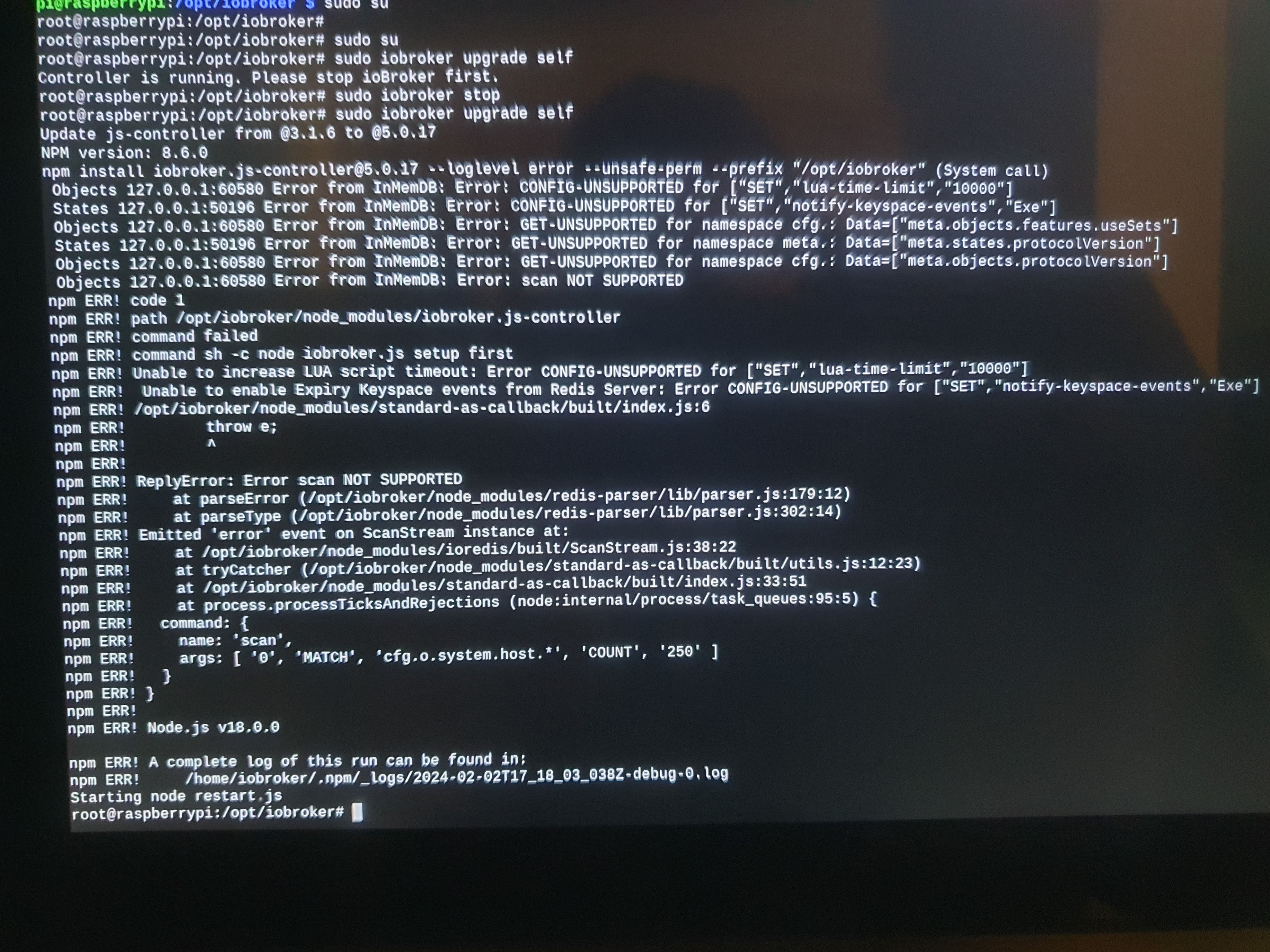
    leider habe ich es noch nicht geschafft, den Text zu kopieren, denn ich Arbeite am Touchscreen und schreibe euch von einem anderen Laptop.

    Danke für die ersten Hinweise.

    Verstehe ich das nun richtig.
    Weil das Update der Daten also schon auf den PI geladen wurde und das upgrade wegen meiner Fehleingaben oder falschem root in die Hosen gegangen ist, soll ich nun
    mit einem Befehl "iobroker fix" nach dem Stop des iobrokers versuchen ?

    Ich bin leider kein Linux-Fachmann und habe offenbar die falsche Eingabeempfehlung verwendet.

    Damit ich meinen Fehler wieder korrigieren kann, welche Comandos soll ich eingeben (damit ich nicht erneut Unfug mache.. will ja etwas dazu lernen..)

    HomoranH Nicht stören
    HomoranH Nicht stören
    Homoran
    Global Moderator Administrators
    schrieb am zuletzt editiert von
    #9

    @frank-knx sagte in Update js-Controller 3.x auf 5.x funktioniert nicht:

    welche Comandos soll ich eingeben

    @thomas-braun sagte in Update js-Controller 3.x auf 5.x funktioniert nicht:

    @frank-knx sagte in Update js-Controller 3.x auf 5.x funktioniert nicht:

    Wenn man die Updates so selten macht, stellt man sich vielleicht auch etwas unbeholfen an

    Joh. Vor allen Dingen wird iobroker nie nicht per sudo angepackt...

    iob stop
    iob fix
    iob start
    iob diag
    

    ausführen.
    Und man hampelt auch nicht als root über die Kiste.

    kein Support per PN! - Fragen im Forum stellen - es gibt fast nichts, was nicht auch für andere interessant ist.

    Benutzt das Voting rechts unten im Beitrag wenn er euch geholfen hat.

    der Installationsfixer: curl -fsL https://iobroker.net/fix.sh | bash -

    HomoranH 1 Antwort Letzte Antwort
    0
    • F Frank-KNX

      Hallo,

      leider habe ich es noch nicht geschafft, den Text zu kopieren, denn ich Arbeite am Touchscreen und schreibe euch von einem anderen Laptop.

      Danke für die ersten Hinweise.

      Verstehe ich das nun richtig.
      Weil das Update der Daten also schon auf den PI geladen wurde und das upgrade wegen meiner Fehleingaben oder falschem root in die Hosen gegangen ist, soll ich nun
      mit einem Befehl "iobroker fix" nach dem Stop des iobrokers versuchen ?

      Ich bin leider kein Linux-Fachmann und habe offenbar die falsche Eingabeempfehlung verwendet.

      Damit ich meinen Fehler wieder korrigieren kann, welche Comandos soll ich eingeben (damit ich nicht erneut Unfug mache.. will ja etwas dazu lernen..)

      Thomas BraunT Online
      Thomas BraunT Online
      Thomas Braun
      Most Active
      schrieb am zuletzt editiert von
      #10

      @frank-knx sagte in Update js-Controller 3.x auf 5.x funktioniert nicht:

      denn ich Arbeite am Touchscreen und schreibe euch von einem anderen Laptop.

      Sowas ist doch eine perfekte Anwendung für SSH.

      Linux-Werkzeugkasten:
      https://forum.iobroker.net/topic/42952/der-kleine-iobroker-linux-werkzeugkasten
      NodeJS Fixer Skript:
      https://forum.iobroker.net/topic/68035/iob-node-fix-skript
      iob_diag: curl -sLf -o diag.sh https://iobroker.net/diag.sh && bash diag.sh

      1 Antwort Letzte Antwort
      0
      • HomoranH Homoran

        @frank-knx sagte in Update js-Controller 3.x auf 5.x funktioniert nicht:

        welche Comandos soll ich eingeben

        @thomas-braun sagte in Update js-Controller 3.x auf 5.x funktioniert nicht:

        @frank-knx sagte in Update js-Controller 3.x auf 5.x funktioniert nicht:

        Wenn man die Updates so selten macht, stellt man sich vielleicht auch etwas unbeholfen an

        Joh. Vor allen Dingen wird iobroker nie nicht per sudo angepackt...

        iob stop
        iob fix
        iob start
        iob diag
        

        ausführen.
        Und man hampelt auch nicht als root über die Kiste.

        HomoranH Nicht stören
        HomoranH Nicht stören
        Homoran
        Global Moderator Administrators
        schrieb am zuletzt editiert von
        #11

        @homoran ich suche gerade hier
        https://forum.iobroker.net/post/1043425
        ob es irgendwelche Limitierungen für v3 -> v5 gibt.
        kann aber nichts auf die Schnelle finden

        kein Support per PN! - Fragen im Forum stellen - es gibt fast nichts, was nicht auch für andere interessant ist.

        Benutzt das Voting rechts unten im Beitrag wenn er euch geholfen hat.

        der Installationsfixer: curl -fsL https://iobroker.net/fix.sh | bash -

        F 1 Antwort Letzte Antwort
        0
        • HomoranH Homoran

          @homoran ich suche gerade hier
          https://forum.iobroker.net/post/1043425
          ob es irgendwelche Limitierungen für v3 -> v5 gibt.
          kann aber nichts auf die Schnelle finden

          F Offline
          F Offline
          Frank-KNX
          schrieb am zuletzt editiert von
          #12

          So, ich habe die 4 zeilen von Homoran eingegeben.

          Ich erhalte die grüne Meldung "your installation was fixed successfully".
          nach der Eingabe " iob diag" erhalte ich nun eine mehrseitige Darstellung (die ich derzeit ohne SSH nicht abfotografieren will...

          Daher die Frage, welche Information ist wichtig für euch, um eine Fernanalyse machen zu können.

          Es ist unverändert das "alte" System 3.x aktiv.

          HomoranH 2 Antworten Letzte Antwort
          0
          • F Frank-KNX

            So, ich habe die 4 zeilen von Homoran eingegeben.

            Ich erhalte die grüne Meldung "your installation was fixed successfully".
            nach der Eingabe " iob diag" erhalte ich nun eine mehrseitige Darstellung (die ich derzeit ohne SSH nicht abfotografieren will...

            Daher die Frage, welche Information ist wichtig für euch, um eine Fernanalyse machen zu können.

            Es ist unverändert das "alte" System 3.x aktiv.

            HomoranH Nicht stören
            HomoranH Nicht stören
            Homoran
            Global Moderator Administrators
            schrieb am zuletzt editiert von
            #13

            @frank-knx sagte in Update js-Controller 3.x auf 5.x funktioniert nicht:

            Daher die Frage, welche Information ist wichtig für euch, um eine Fernanalyse machen zu können.

            ALLES!

            wenn diese Ausgabe

            @frank-knx sagte in Update js-Controller 3.x auf 5.x funktioniert nicht:

            eine mehrseitige Darstellung (

            enthält, ist wohl sehr viel krumm

            Dann mach erst dein SSH flott

            kein Support per PN! - Fragen im Forum stellen - es gibt fast nichts, was nicht auch für andere interessant ist.

            Benutzt das Voting rechts unten im Beitrag wenn er euch geholfen hat.

            der Installationsfixer: curl -fsL https://iobroker.net/fix.sh | bash -

            F 1 Antwort Letzte Antwort
            0
            • F Frank-KNX

              So, ich habe die 4 zeilen von Homoran eingegeben.

              Ich erhalte die grüne Meldung "your installation was fixed successfully".
              nach der Eingabe " iob diag" erhalte ich nun eine mehrseitige Darstellung (die ich derzeit ohne SSH nicht abfotografieren will...

              Daher die Frage, welche Information ist wichtig für euch, um eine Fernanalyse machen zu können.

              Es ist unverändert das "alte" System 3.x aktiv.

              HomoranH Nicht stören
              HomoranH Nicht stören
              Homoran
              Global Moderator Administrators
              schrieb am zuletzt editiert von
              #14

              @frank-knx sagte in Update js-Controller 3.x auf 5.x funktioniert nicht:

              Es ist unverändert das "alte" System 3.x aktiv.

              Natürlich!
              der fixer fixt in erster Linie nur verbogene Rechte so gut er kann

              kein Support per PN! - Fragen im Forum stellen - es gibt fast nichts, was nicht auch für andere interessant ist.

              Benutzt das Voting rechts unten im Beitrag wenn er euch geholfen hat.

              der Installationsfixer: curl -fsL https://iobroker.net/fix.sh | bash -

              1 Antwort Letzte Antwort
              0
              • HomoranH Homoran

                @frank-knx sagte in Update js-Controller 3.x auf 5.x funktioniert nicht:

                Daher die Frage, welche Information ist wichtig für euch, um eine Fernanalyse machen zu können.

                ALLES!

                wenn diese Ausgabe

                @frank-knx sagte in Update js-Controller 3.x auf 5.x funktioniert nicht:

                eine mehrseitige Darstellung (

                enthält, ist wohl sehr viel krumm

                Dann mach erst dein SSH flott

                F Offline
                F Offline
                Frank-KNX
                schrieb am zuletzt editiert von
                #15

                @homoran

                Es werden aber nicht wirklich Fehler sondern alle Adapter und Versionsnummern angezeigt und das die "alte" Version fehlerfrei läuft.

                "SSH" ist für einen Anfänger wie mich vermutlich eine noch größere Hürde, oder lässt sich das mit Anleitung einfach herstellen ?

                Ich vermute, dass ich nun mit eurer Hilfe zumindest die alte Version "gefixt" habe und vielleicht sollte ich mit den richtigen befehlen von Euch erneut den gesamten Updatevorgang erneut starten...

                HomoranH Thomas BraunT 2 Antworten Letzte Antwort
                0
                • F Frank-KNX

                  @homoran

                  Es werden aber nicht wirklich Fehler sondern alle Adapter und Versionsnummern angezeigt und das die "alte" Version fehlerfrei läuft.

                  "SSH" ist für einen Anfänger wie mich vermutlich eine noch größere Hürde, oder lässt sich das mit Anleitung einfach herstellen ?

                  Ich vermute, dass ich nun mit eurer Hilfe zumindest die alte Version "gefixt" habe und vielleicht sollte ich mit den richtigen befehlen von Euch erneut den gesamten Updatevorgang erneut starten...

                  HomoranH Nicht stören
                  HomoranH Nicht stören
                  Homoran
                  Global Moderator Administrators
                  schrieb am zuletzt editiert von
                  #16

                  @frank-knx sagte in Update js-Controller 3.x auf 5.x funktioniert nicht:

                  lässt sich das mit Anleitung einfach herstellen ?

                  ähm, ja!

                  windows?
                  powershell öffnen
                  ssh user@IP eingeben
                  fertig

                  user und ip natürlich entsprechend deiner Installation

                  kein Support per PN! - Fragen im Forum stellen - es gibt fast nichts, was nicht auch für andere interessant ist.

                  Benutzt das Voting rechts unten im Beitrag wenn er euch geholfen hat.

                  der Installationsfixer: curl -fsL https://iobroker.net/fix.sh | bash -

                  F mcm1957M 2 Antworten Letzte Antwort
                  0
                  • F Frank-KNX

                    @homoran

                    Es werden aber nicht wirklich Fehler sondern alle Adapter und Versionsnummern angezeigt und das die "alte" Version fehlerfrei läuft.

                    "SSH" ist für einen Anfänger wie mich vermutlich eine noch größere Hürde, oder lässt sich das mit Anleitung einfach herstellen ?

                    Ich vermute, dass ich nun mit eurer Hilfe zumindest die alte Version "gefixt" habe und vielleicht sollte ich mit den richtigen befehlen von Euch erneut den gesamten Updatevorgang erneut starten...

                    Thomas BraunT Online
                    Thomas BraunT Online
                    Thomas Braun
                    Most Active
                    schrieb am zuletzt editiert von
                    #17

                    @frank-knx sagte in Update js-Controller 3.x auf 5.x funktioniert nicht:

                    "SSH" ist für einen Anfänger wie mich vermutlich eine noch größere Hürde, oder lässt sich das mit Anleitung einfach herstellen ?

                    https://www.heise.de/tipps-tricks/Raspberry-Pi-SSH-einrichten-so-geht-s-4190645.html

                    Linux-Werkzeugkasten:
                    https://forum.iobroker.net/topic/42952/der-kleine-iobroker-linux-werkzeugkasten
                    NodeJS Fixer Skript:
                    https://forum.iobroker.net/topic/68035/iob-node-fix-skript
                    iob_diag: curl -sLf -o diag.sh https://iobroker.net/diag.sh && bash diag.sh

                    1 Antwort Letzte Antwort
                    0
                    • HomoranH Homoran

                      @frank-knx sagte in Update js-Controller 3.x auf 5.x funktioniert nicht:

                      lässt sich das mit Anleitung einfach herstellen ?

                      ähm, ja!

                      windows?
                      powershell öffnen
                      ssh user@IP eingeben
                      fertig

                      user und ip natürlich entsprechend deiner Installation

                      F Offline
                      F Offline
                      Frank-KNX
                      schrieb am zuletzt editiert von
                      #18

                      @homoran
                      Aber meines Wissens, muss ich doch im PI auch SSH freigeben, oder ?
                      Ich habe unter Einstellungen im PI mal dazu etwas gefunden.. aber SSH ist nicht aktiv.

                      HomoranH 1 Antwort Letzte Antwort
                      0
                      • HomoranH Homoran

                        @frank-knx sagte in Update js-Controller 3.x auf 5.x funktioniert nicht:

                        lässt sich das mit Anleitung einfach herstellen ?

                        ähm, ja!

                        windows?
                        powershell öffnen
                        ssh user@IP eingeben
                        fertig

                        user und ip natürlich entsprechend deiner Installation

                        mcm1957M Online
                        mcm1957M Online
                        mcm1957
                        schrieb am zuletzt editiert von
                        #19

                        @homoran said in Update js-Controller 3.x auf 5.x funktioniert nicht:

                        @frank-knx sagte in Update js-Controller 3.x auf 5.x funktioniert nicht:

                        lässt sich das mit Anleitung einfach herstellen ?

                        ähm, ja!

                        windows?
                        powershell öffnen
                        ssh user@IP eingeben
                        fertig

                        user und ip natürlich entsprechend deiner Installation

                        geht auch in der Eingabeaufforderung ("cmd"), muss nicht powershell sein.

                        Entwicklung u Betreuung: envertech-pv, hoymiles-ms, ns-client, pid, snmp Adapter;
                        Support Repositoryverwaltung.

                        Wer Danke sagen will, kann nen Kaffee spendieren: https://paypal.me/mcm1957atiobroker

                        LESEN - gute Forenbeitrage

                        1 Antwort Letzte Antwort
                        0
                        • F Frank-KNX

                          @homoran
                          Aber meines Wissens, muss ich doch im PI auch SSH freigeben, oder ?
                          Ich habe unter Einstellungen im PI mal dazu etwas gefunden.. aber SSH ist nicht aktiv.

                          HomoranH Nicht stören
                          HomoranH Nicht stören
                          Homoran
                          Global Moderator Administrators
                          schrieb am zuletzt editiert von
                          #20

                          @frank-knx sagte in Update js-Controller 3.x auf 5.x funktioniert nicht:

                          muss ich doch im PI auch SSH freigeben, oder ?

                          ja!
                          wenn das noch nicht ist, am tatsch screen sudo raspi-config aufrufen und einstellen.

                          Natürlich als user pi

                          kein Support per PN! - Fragen im Forum stellen - es gibt fast nichts, was nicht auch für andere interessant ist.

                          Benutzt das Voting rechts unten im Beitrag wenn er euch geholfen hat.

                          der Installationsfixer: curl -fsL https://iobroker.net/fix.sh | bash -

                          F 1 Antwort Letzte Antwort
                          0
                          • HomoranH Homoran

                            @frank-knx sagte in Update js-Controller 3.x auf 5.x funktioniert nicht:

                            muss ich doch im PI auch SSH freigeben, oder ?

                            ja!
                            wenn das noch nicht ist, am tatsch screen sudo raspi-config aufrufen und einstellen.

                            Natürlich als user pi

                            F Offline
                            F Offline
                            Frank-KNX
                            schrieb am zuletzt editiert von
                            #21

                            @homoran
                            So, SSH funktioniert.

                            Vielen Dank..
                            Nun wieder zum Update, damit ich wieder auf dem aktuellen Stand bin.

                            Was soll ich nun eingeben ?

                            Thomas BraunT 1 Antwort Letzte Antwort
                            0
                            • F Frank-KNX

                              @homoran
                              So, SSH funktioniert.

                              Vielen Dank..
                              Nun wieder zum Update, damit ich wieder auf dem aktuellen Stand bin.

                              Was soll ich nun eingeben ?

                              Thomas BraunT Online
                              Thomas BraunT Online
                              Thomas Braun
                              Most Active
                              schrieb am zuletzt editiert von
                              #22

                              @frank-knx sagte in Update js-Controller 3.x auf 5.x funktioniert nicht:

                              Was soll ich nun eingeben ?

                              iob diag
                              

                              Damit man mal sieht wie du da genau unterwegs bist.

                              Linux-Werkzeugkasten:
                              https://forum.iobroker.net/topic/42952/der-kleine-iobroker-linux-werkzeugkasten
                              NodeJS Fixer Skript:
                              https://forum.iobroker.net/topic/68035/iob-node-fix-skript
                              iob_diag: curl -sLf -o diag.sh https://iobroker.net/diag.sh && bash diag.sh

                              F 1 Antwort Letzte Antwort
                              0
                              • Thomas BraunT Thomas Braun

                                @frank-knx sagte in Update js-Controller 3.x auf 5.x funktioniert nicht:

                                Was soll ich nun eingeben ?

                                iob diag
                                

                                Damit man mal sieht wie du da genau unterwegs bist.

                                F Offline
                                F Offline
                                Frank-KNX
                                schrieb am zuletzt editiert von
                                #23

                                @thomas-braun
                                ======== Start marking the full check here =========

                                Skript v.2023-10-10
                                
                                *** BASE SYSTEM ***
                                   Static hostname: raspberrypi
                                         Icon name: computer
                                  Operating System: Raspbian GNU/Linux 10 (buster)
                                            Kernel: Linux 5.10.63-v7l+
                                      Architecture: arm
                                
                                Model           : Raspberry Pi 4 Model B Rev 1.4
                                Docker          : false
                                Virtualization  : none
                                Kernel          : armv7l
                                Userland        : armhf
                                
                                Systemuptime and Load:
                                 22:44:41 up  4:00,  3 users,  load average: 0.34, 0.22, 0.27
                                CPU threads: 4
                                
                                
                                *** RASPBERRY THROTTLING ***
                                Current issues:
                                No throttling issues detected.
                                
                                Previously detected issues:
                                No throttling issues detected.
                                
                                *** Time and Time Zones ***
                                               Local time: Fri 2024-02-02 22:44:41 CET
                                           Universal time: Fri 2024-02-02 21:44:41 UTC
                                                 RTC time: n/a
                                                Time zone: Europe/Berlin (CET, +0100)
                                System clock synchronized: yes
                                              NTP service: active
                                          RTC in local TZ: no
                                
                                *** User and Groups ***
                                pi
                                /home/pi
                                pi adm dialout cdrom sudo audio video plugdev games users input netdev lpadmin gpio i2c spi iobroker
                                
                                *** X-Server-Setup ***
                                X-Server:       true
                                Desktop:
                                Terminal:       tty
                                Boot Target:    graphical.target
                                
                                *** MEMORY ***
                                              total        used        free      shared  buff/cache   available
                                Mem:           7.9G        975M        5.9G         50M        1.1G        6.7G
                                Swap:           99M          0B         99M
                                Total:         8.0G        975M        6.0G
                                
                                         7898 M total memory
                                          975 M used memory
                                          534 M active memory
                                         1296 M inactive memory
                                         5866 M free memory
                                          134 M buffer memory
                                          922 M swap cache
                                           99 M total swap
                                            0 M used swap
                                           99 M free swap
                                
                                Raspberry only:
                                oom events: 0
                                lifetime oom required: 0 Mbytes
                                total time in oom handler: 0 ms
                                max time spent in oom handler: 0 ms
                                
                                *** FAILED SERVICES ***
                                
                                  UNIT                  LOAD   ACTIVE SUB    DESCRIPTION
                                * bthelper@hci0.service loaded failed failed Raspberry Pi bluetooth helper
                                
                                LOAD   = Reflects whether the unit definition was properly loaded.
                                ACTIVE = The high-level unit activation state, i.e. generalization of SUB.
                                SUB    = The low-level unit activation state, values depend on unit type.
                                
                                1 loaded units listed. Pass --all to see loaded but inactive units, too.
                                To show all installed unit files use 'systemctl list-unit-files'.
                                
                                *** FILESYSTEM ***
                                Filesystem     Type      Size  Used Avail Use% Mounted on
                                /dev/root      ext4      117G  9.5G  103G   9% /
                                devtmpfs       devtmpfs  3.7G     0  3.7G   0% /dev
                                tmpfs          tmpfs     3.9G     0  3.9G   0% /dev/shm
                                tmpfs          tmpfs     3.9G  8.7M  3.9G   1% /run
                                tmpfs          tmpfs     5.0M  4.0K  5.0M   1% /run/lock
                                tmpfs          tmpfs     3.9G     0  3.9G   0% /sys/fs/cgroup
                                /dev/mmcblk0p1 vfat      253M   49M  204M  20% /boot
                                tmpfs          tmpfs     790M  4.0K  790M   1% /run/user/1000
                                
                                Messages concerning ext4 filesystem in dmesg:
                                [Fri Feb  2 18:43:58 2024] Kernel command line: coherent_pool=1M 8250.nr_uarts=0 snd_bcm2835.enable_compat_alsa=0 snd_bcm2835.enable_hdmi=1 video=HDMI-A-1:1920x1080M@60 smsc95xx.macaddr=DC:A6:32:D3:7A:A7 vc_mem.mem_base=0x3ec00000 vc_mem.mem_size=0x40000000  console=ttyS0,115200 console=tty1 root=PARTUUID=def5eda3-02 rootfstype=ext4 elevator=deadline fsck.repair=yes rootwait quiet splash plymouth.ignore-serial-consoles
                                [Fri Feb  2 18:43:59 2024] EXT4-fs (mmcblk0p2): mounted filesystem with ordered data mode. Opts: (null)
                                [Fri Feb  2 18:43:59 2024] VFS: Mounted root (ext4 filesystem) readonly on device 179:2.
                                [Fri Feb  2 18:44:01 2024] EXT4-fs (mmcblk0p2): re-mounted. Opts: (null)
                                
                                Show mounted filesystems \(real ones only\):
                                TARGET                SOURCE         FSTYPE          OPTIONS
                                /                     /dev/mmcblk0p2 ext4            rw,noatime
                                |-/sys/fs/bpf         none           bpf             rw,nosuid,nodev,noexec,relatime,mode=700
                                |-/run/user/1000/gvfs gvfsd-fuse     fuse.gvfsd-fuse rw,nosuid,nodev,relatime,user_id=1000,group_id=1000
                                `-/boot               /dev/mmcblk0p1 vfat            rw,relatime,fmask=0022,dmask=0022,codepage=437,iocharset=ascii,shortname=mixed,errors=remount-ro
                                
                                Files in neuralgic directories:
                                
                                /var:
                                914M    /var/
                                552M    /var/cache
                                539M    /var/cache/apt
                                480M    /var/cache/apt/archives
                                248M    /var/lib
                                
                                Archived and active journals take up 8.0M in the file system.
                                
                                /opt/iobroker/backups:
                                101M    /opt/iobroker/backups/
                                
                                /opt/iobroker/iobroker-data:
                                148M    /opt/iobroker/iobroker-data/
                                69M     /opt/iobroker/iobroker-data/files
                                59M     /opt/iobroker/iobroker-data/backup-objects
                                16M     /opt/iobroker/iobroker-data/files/javascript.admin
                                13M     /opt/iobroker/iobroker-data/files/vis.0
                                
                                The five largest files in iobroker-data are:
                                6.3M    /opt/iobroker/iobroker-data/objects.json.bak
                                6.3M    /opt/iobroker/iobroker-data/objects.json
                                4.7M    /opt/iobroker/iobroker-data/files/javascript.admin/static/js/2.7e0b7583.chunk.js.map
                                3.5M    /opt/iobroker/iobroker-data/files/vis.0/Grundriss_final.png
                                3.4M    /opt/iobroker/iobroker-data/files/vis.0/Parkplatz.jpg
                                
                                USB-Devices by-id:
                                USB-Sticks -  Avoid direct links to /dev/* in your adapter setups, please always prefer the links 'by-id':
                                
                                find: '/dev/serial/by-id/': No such file or directory
                                
                                *** NodeJS-Installation ***
                                
                                /usr/bin/nodejs         v18.0.0
                                /usr/bin/node           v18.0.0
                                /usr/bin/npm            8.6.0
                                /usr/bin/npx            8.6.0
                                /usr/bin/corepack       0.10.0
                                
                                
                                nodejs:
                                  Installed: 18.0.0-1nodesource1
                                  Candidate: 18.19.0-1nodesource1
                                  Version table:
                                     18.19.0-1nodesource1 1001
                                        500 https://deb.nodesource.com/node_18.x nodistro/main armhf Packages
                                     18.18.2-1nodesource1 1001
                                        500 https://deb.nodesource.com/node_18.x nodistro/main armhf Packages
                                     18.18.1-1nodesource1 1001
                                        500 https://deb.nodesource.com/node_18.x nodistro/main armhf Packages
                                     18.18.0-1nodesource1 1001
                                        500 https://deb.nodesource.com/node_18.x nodistro/main armhf Packages
                                     18.17.1-1nodesource1 1001
                                        500 https://deb.nodesource.com/node_18.x nodistro/main armhf Packages
                                     18.17.0-1nodesource1 1001
                                        500 https://deb.nodesource.com/node_18.x nodistro/main armhf Packages
                                     18.16.1-1nodesource1 1001
                                        500 https://deb.nodesource.com/node_18.x nodistro/main armhf Packages
                                     18.16.0-1nodesource1 1001
                                        500 https://deb.nodesource.com/node_18.x nodistro/main armhf Packages
                                     18.15.0-1nodesource1 1001
                                        500 https://deb.nodesource.com/node_18.x nodistro/main armhf Packages
                                     18.14.2-1nodesource1 1001
                                        500 https://deb.nodesource.com/node_18.x nodistro/main armhf Packages
                                     18.14.1-1nodesource1 1001
                                        500 https://deb.nodesource.com/node_18.x nodistro/main armhf Packages
                                     18.14.0-1nodesource1 1001
                                        500 https://deb.nodesource.com/node_18.x nodistro/main armhf Packages
                                     18.13.0-1nodesource1 1001
                                        500 https://deb.nodesource.com/node_18.x nodistro/main armhf Packages
                                     18.12.0-1nodesource1 1001
                                        500 https://deb.nodesource.com/node_18.x nodistro/main armhf Packages
                                     18.11.0-1nodesource1 1001
                                        500 https://deb.nodesource.com/node_18.x nodistro/main armhf Packages
                                     18.10.0-1nodesource1 1001
                                        500 https://deb.nodesource.com/node_18.x nodistro/main armhf Packages
                                     18.9.1-1nodesource1 1001
                                        500 https://deb.nodesource.com/node_18.x nodistro/main armhf Packages
                                     18.9.0-1nodesource1 1001
                                        500 https://deb.nodesource.com/node_18.x nodistro/main armhf Packages
                                     18.8.0-1nodesource1 1001
                                        500 https://deb.nodesource.com/node_18.x nodistro/main armhf Packages
                                     18.7.0-1nodesource1 1001
                                        500 https://deb.nodesource.com/node_18.x nodistro/main armhf Packages
                                     18.6.0-1nodesource1 1001
                                        500 https://deb.nodesource.com/node_18.x nodistro/main armhf Packages
                                     18.5.0-1nodesource1 1001
                                        500 https://deb.nodesource.com/node_18.x nodistro/main armhf Packages
                                     18.4.0-1nodesource1 1001
                                        500 https://deb.nodesource.com/node_18.x nodistro/main armhf Packages
                                     18.3.0-1nodesource1 1001
                                        500 https://deb.nodesource.com/node_18.x nodistro/main armhf Packages
                                     18.2.0-1nodesource1 1001
                                        500 https://deb.nodesource.com/node_18.x nodistro/main armhf Packages
                                     18.1.0-1nodesource1 1001
                                        500 https://deb.nodesource.com/node_18.x nodistro/main armhf Packages
                                 *** 18.0.0-1nodesource1 1001
                                        500 https://deb.nodesource.com/node_18.x nodistro/main armhf Packages
                                        100 /var/lib/dpkg/status
                                     10.24.0~dfsg-1~deb10u3 500
                                        500 http://raspbian.raspberrypi.org/raspbian buster/main armhf Packages
                                
                                Temp directories causing npm8 problem: 0
                                No problems detected
                                
                                Errors in npm tree:
                                
                                *** ioBroker-Installation ***
                                
                                ioBroker Status
                                iobroker is running on this host.
                                
                                At least one iobroker host is running.
                                
                                Objects type: file
                                States  type: file
                                
                                Core adapters versions
                                js-controller:  3.1.6
                                admin:          4.1.11
                                javascript:     4.8.4
                                
                                Adapters from github:   0
                                
                                Adapter State
                                + system.adapter.admin.0                 : admin                 -  enabled, port: 8081, bind: 0.0.0.0, run as: admin
                                + system.adapter.discovery.0             : discovery             -  enabled
                                  system.adapter.ical.0                  : ical                  -  enabled
                                  system.adapter.icons-mfd-png.0         : icons-mfd-png         -  enabled
                                + system.adapter.influxdb.0              : influxdb              -  enabled, port: 8086
                                + system.adapter.info.0                  : info                  -  enabled
                                + system.adapter.javascript.0            : javascript            -  enabled
                                + system.adapter.knx.0                   : knx                   -  enabled, bind: 192.168.2.98
                                + system.adapter.linux-control.0         : linux-control         -  enabled
                                + system.adapter.meldungsliste.0         : meldungsliste         -  enabled
                                + system.adapter.meldungsliste.1         : meldungsliste         -  enabled
                                + system.adapter.meldungsliste.10        : meldungsliste         -  enabled
                                + system.adapter.meldungsliste.11        : meldungsliste         -  enabled
                                + system.adapter.meldungsliste.12        : meldungsliste         -  enabled
                                + system.adapter.meldungsliste.13        : meldungsliste         -  enabled
                                + system.adapter.meldungsliste.2         : meldungsliste         -  enabled
                                + system.adapter.meldungsliste.3         : meldungsliste         -  enabled
                                + system.adapter.meldungsliste.4         : meldungsliste         -  enabled
                                + system.adapter.meldungsliste.5         : meldungsliste         -  enabled
                                + system.adapter.meldungsliste.6         : meldungsliste         -  enabled
                                + system.adapter.meldungsliste.7         : meldungsliste         -  enabled
                                + system.adapter.meldungsliste.8         : meldungsliste         -  enabled
                                + system.adapter.meldungsliste.9         : meldungsliste         -  enabled
                                + system.adapter.node-red.0              : node-red              -  enabled, port: 1880, bind: 192.168.2.98
                                + system.adapter.statistics.0            : statistics            -  enabled
                                  system.adapter.tr-064.0                : tr-064                - disabled
                                + system.adapter.trashschedule.0         : trashschedule         -  enabled
                                  system.adapter.upnp.0                  : upnp                  - disabled
                                  system.adapter.vis-bars.0              : vis-bars              -  enabled
                                  system.adapter.vis-colorpicker.0       : vis-colorpicker       -  enabled
                                  system.adapter.vis-fancyswitch.0       : vis-fancyswitch       -  enabled
                                  system.adapter.vis-hqwidgets.0         : vis-hqwidgets         -  enabled
                                  system.adapter.vis-jqui-mfd.0          : vis-jqui-mfd          -  enabled
                                  system.adapter.vis-timeandweather.0    : vis-timeandweather    -  enabled
                                  system.adapter.vis.0                   : vis                   -  enabled
                                + system.adapter.web.0                   : web                   -  enabled, port: 8082, bind: 0.0.0.0, run as: admin
                                
                                + instance is alive
                                
                                Enabled adapters with bindings
                                + system.adapter.admin.0                 : admin                 -  enabled, port: 8081, bind: 0.0.0.0, run as: admin
                                + system.adapter.influxdb.0              : influxdb              -  enabled, port: 8086
                                + system.adapter.node-red.0              : node-red              -  enabled, port: 1880, bind: 192.168.2.98
                                + system.adapter.web.0                   : web                   -  enabled, port: 8082, bind: 0.0.0.0, run as: admin
                                
                                ioBroker-Repositories
                                Stable (default): http://download.iobroker.net/sources-dist.json
                                Beta (latest): http://download.iobroker.net/sources-dist-latest.json
                                
                                Active repo: Stable (default)
                                
                                Installed ioBroker-Instances
                                Used repository: Stable (default)
                                hash changed or no sources cached => force download of new sources
                                Cannot get any information of "_repoInfo". Ignored.
                                update done
                                Adapter    "admin"         : 6.13.15  , installed 4.1.11 [Updateable]
                                Adapter    "backitup"      : 2.9.8    , installed 2.9.8
                                Adapter    "discovery"     : 4.2.0    , installed 4.2.0
                                Adapter    "ical"          : 1.13.3   , installed 1.7.4 [Updateable]
                                Adapter    "icons-mfd-png" : 1.2.1    , installed 1.2.1
                                Adapter    "influxdb"      : 3.2.0    , installed 1.9.4 [Updateable]
                                Adapter    "info"          : 2.0.0    , installed 1.7.10 [Updateable]
                                Adapter    "javascript"    : 7.1.6    , installed 4.8.4 [Updateable]
                                Controller "js-controller" : 5.0.17   , installed 3.1.6 [Updateable]
                                Adapter    "knx"           : 2.0.24   , installed 1.0.39 [Updateable]
                                Adapter    "linux-control" : 1.1.5    , installed 1.1.2 [Updateable]
                                Adapter    "node-red"      : 5.1.0    , installed 2.0.1 [Updateable]
                                Adapter    "simple-api"    : 2.7.2    , installed 2.7.2
                                Adapter    "socketio"      : 6.6.0    , installed 6.6.0
                                Adapter    "statistics"    : 2.4.0    , installed 1.0.2 [Updateable]
                                Adapter    "tr-064"        : 4.2.18   , installed 4.2.18
                                Adapter    "trashschedule" : 2.3.0    , installed 1.0.3 [Updateable]
                                Adapter    "upnp"          : 1.0.21   , installed 1.0.17 [Updateable]
                                Adapter    "vis"           : 1.5.4    , installed 1.3.4 [Updateable]
                                Adapter    "vis-bars"      : 0.1.4    , installed 0.1.4
                                Adapter    "vis-colorpicker": 2.0.3   , installed 2.0.3
                                Adapter    "vis-fancyswitch": 1.1.0   , installed 1.1.0
                                Adapter    "vis-hqwidgets" : 1.4.0    , installed 1.4.0
                                Adapter    "vis-jqui-mfd"  : 1.0.12   , installed 1.0.12
                                Adapter    "vis-timeandweather": 1.2.2   , installed 1.2.2
                                Adapter    "web"           : 6.2.3    , installed 3.1.0 [Updateable]
                                
                                Objects and States
                                Please stand by - This may take a while
                                Objects:        3504
                                States:         2428
                                
                                *** OS-Repositories and Updates ***
                                W: An error occurred during the signature verification. The repository is not updated and the previous index files will be used. GPG error: https://repos.influxdata.com/debian buster InRelease: The following signatures couldn't be verified because the public key is not available: NO_PUBKEY D8FF8E1F7DF8B07E
                                W: Failed to fetch https://repos.influxdata.com/debian/dists/buster/InRelease  The following signatures couldn't be verified because the public key is not available: NO_PUBKEY D8FF8E1F7DF8B07E
                                W: Some index files failed to download. They have been ignored, or old ones used instead.
                                Hit:1 http://raspbian.raspberrypi.org/raspbian buster InRelease
                                Hit:2 http://archive.raspberrypi.org/debian buster InRelease
                                Get:3 https://repos.influxdata.com/debian buster InRelease [7047 B]
                                Hit:4 https://deb.nodesource.com/node_18.x nodistro InRelease
                                Err:3 https://repos.influxdata.com/debian buster InRelease
                                  The following signatures couldn't be verified because the public key is not available: NO_PUBKEY D8FF8E1F7DF8B07E
                                F Thomas BraunT 2 Antworten Letzte Antwort
                                0
                                • F Frank-KNX

                                  @thomas-braun
                                  ======== Start marking the full check here =========

                                  Skript v.2023-10-10
                                  
                                  *** BASE SYSTEM ***
                                     Static hostname: raspberrypi
                                           Icon name: computer
                                    Operating System: Raspbian GNU/Linux 10 (buster)
                                              Kernel: Linux 5.10.63-v7l+
                                        Architecture: arm
                                  
                                  Model           : Raspberry Pi 4 Model B Rev 1.4
                                  Docker          : false
                                  Virtualization  : none
                                  Kernel          : armv7l
                                  Userland        : armhf
                                  
                                  Systemuptime and Load:
                                   22:44:41 up  4:00,  3 users,  load average: 0.34, 0.22, 0.27
                                  CPU threads: 4
                                  
                                  
                                  *** RASPBERRY THROTTLING ***
                                  Current issues:
                                  No throttling issues detected.
                                  
                                  Previously detected issues:
                                  No throttling issues detected.
                                  
                                  *** Time and Time Zones ***
                                                 Local time: Fri 2024-02-02 22:44:41 CET
                                             Universal time: Fri 2024-02-02 21:44:41 UTC
                                                   RTC time: n/a
                                                  Time zone: Europe/Berlin (CET, +0100)
                                  System clock synchronized: yes
                                                NTP service: active
                                            RTC in local TZ: no
                                  
                                  *** User and Groups ***
                                  pi
                                  /home/pi
                                  pi adm dialout cdrom sudo audio video plugdev games users input netdev lpadmin gpio i2c spi iobroker
                                  
                                  *** X-Server-Setup ***
                                  X-Server:       true
                                  Desktop:
                                  Terminal:       tty
                                  Boot Target:    graphical.target
                                  
                                  *** MEMORY ***
                                                total        used        free      shared  buff/cache   available
                                  Mem:           7.9G        975M        5.9G         50M        1.1G        6.7G
                                  Swap:           99M          0B         99M
                                  Total:         8.0G        975M        6.0G
                                  
                                           7898 M total memory
                                            975 M used memory
                                            534 M active memory
                                           1296 M inactive memory
                                           5866 M free memory
                                            134 M buffer memory
                                            922 M swap cache
                                             99 M total swap
                                              0 M used swap
                                             99 M free swap
                                  
                                  Raspberry only:
                                  oom events: 0
                                  lifetime oom required: 0 Mbytes
                                  total time in oom handler: 0 ms
                                  max time spent in oom handler: 0 ms
                                  
                                  *** FAILED SERVICES ***
                                  
                                    UNIT                  LOAD   ACTIVE SUB    DESCRIPTION
                                  * bthelper@hci0.service loaded failed failed Raspberry Pi bluetooth helper
                                  
                                  LOAD   = Reflects whether the unit definition was properly loaded.
                                  ACTIVE = The high-level unit activation state, i.e. generalization of SUB.
                                  SUB    = The low-level unit activation state, values depend on unit type.
                                  
                                  1 loaded units listed. Pass --all to see loaded but inactive units, too.
                                  To show all installed unit files use 'systemctl list-unit-files'.
                                  
                                  *** FILESYSTEM ***
                                  Filesystem     Type      Size  Used Avail Use% Mounted on
                                  /dev/root      ext4      117G  9.5G  103G   9% /
                                  devtmpfs       devtmpfs  3.7G     0  3.7G   0% /dev
                                  tmpfs          tmpfs     3.9G     0  3.9G   0% /dev/shm
                                  tmpfs          tmpfs     3.9G  8.7M  3.9G   1% /run
                                  tmpfs          tmpfs     5.0M  4.0K  5.0M   1% /run/lock
                                  tmpfs          tmpfs     3.9G     0  3.9G   0% /sys/fs/cgroup
                                  /dev/mmcblk0p1 vfat      253M   49M  204M  20% /boot
                                  tmpfs          tmpfs     790M  4.0K  790M   1% /run/user/1000
                                  
                                  Messages concerning ext4 filesystem in dmesg:
                                  [Fri Feb  2 18:43:58 2024] Kernel command line: coherent_pool=1M 8250.nr_uarts=0 snd_bcm2835.enable_compat_alsa=0 snd_bcm2835.enable_hdmi=1 video=HDMI-A-1:1920x1080M@60 smsc95xx.macaddr=DC:A6:32:D3:7A:A7 vc_mem.mem_base=0x3ec00000 vc_mem.mem_size=0x40000000  console=ttyS0,115200 console=tty1 root=PARTUUID=def5eda3-02 rootfstype=ext4 elevator=deadline fsck.repair=yes rootwait quiet splash plymouth.ignore-serial-consoles
                                  [Fri Feb  2 18:43:59 2024] EXT4-fs (mmcblk0p2): mounted filesystem with ordered data mode. Opts: (null)
                                  [Fri Feb  2 18:43:59 2024] VFS: Mounted root (ext4 filesystem) readonly on device 179:2.
                                  [Fri Feb  2 18:44:01 2024] EXT4-fs (mmcblk0p2): re-mounted. Opts: (null)
                                  
                                  Show mounted filesystems \(real ones only\):
                                  TARGET                SOURCE         FSTYPE          OPTIONS
                                  /                     /dev/mmcblk0p2 ext4            rw,noatime
                                  |-/sys/fs/bpf         none           bpf             rw,nosuid,nodev,noexec,relatime,mode=700
                                  |-/run/user/1000/gvfs gvfsd-fuse     fuse.gvfsd-fuse rw,nosuid,nodev,relatime,user_id=1000,group_id=1000
                                  `-/boot               /dev/mmcblk0p1 vfat            rw,relatime,fmask=0022,dmask=0022,codepage=437,iocharset=ascii,shortname=mixed,errors=remount-ro
                                  
                                  Files in neuralgic directories:
                                  
                                  /var:
                                  914M    /var/
                                  552M    /var/cache
                                  539M    /var/cache/apt
                                  480M    /var/cache/apt/archives
                                  248M    /var/lib
                                  
                                  Archived and active journals take up 8.0M in the file system.
                                  
                                  /opt/iobroker/backups:
                                  101M    /opt/iobroker/backups/
                                  
                                  /opt/iobroker/iobroker-data:
                                  148M    /opt/iobroker/iobroker-data/
                                  69M     /opt/iobroker/iobroker-data/files
                                  59M     /opt/iobroker/iobroker-data/backup-objects
                                  16M     /opt/iobroker/iobroker-data/files/javascript.admin
                                  13M     /opt/iobroker/iobroker-data/files/vis.0
                                  
                                  The five largest files in iobroker-data are:
                                  6.3M    /opt/iobroker/iobroker-data/objects.json.bak
                                  6.3M    /opt/iobroker/iobroker-data/objects.json
                                  4.7M    /opt/iobroker/iobroker-data/files/javascript.admin/static/js/2.7e0b7583.chunk.js.map
                                  3.5M    /opt/iobroker/iobroker-data/files/vis.0/Grundriss_final.png
                                  3.4M    /opt/iobroker/iobroker-data/files/vis.0/Parkplatz.jpg
                                  
                                  USB-Devices by-id:
                                  USB-Sticks -  Avoid direct links to /dev/* in your adapter setups, please always prefer the links 'by-id':
                                  
                                  find: '/dev/serial/by-id/': No such file or directory
                                  
                                  *** NodeJS-Installation ***
                                  
                                  /usr/bin/nodejs         v18.0.0
                                  /usr/bin/node           v18.0.0
                                  /usr/bin/npm            8.6.0
                                  /usr/bin/npx            8.6.0
                                  /usr/bin/corepack       0.10.0
                                  
                                  
                                  nodejs:
                                    Installed: 18.0.0-1nodesource1
                                    Candidate: 18.19.0-1nodesource1
                                    Version table:
                                       18.19.0-1nodesource1 1001
                                          500 https://deb.nodesource.com/node_18.x nodistro/main armhf Packages
                                       18.18.2-1nodesource1 1001
                                          500 https://deb.nodesource.com/node_18.x nodistro/main armhf Packages
                                       18.18.1-1nodesource1 1001
                                          500 https://deb.nodesource.com/node_18.x nodistro/main armhf Packages
                                       18.18.0-1nodesource1 1001
                                          500 https://deb.nodesource.com/node_18.x nodistro/main armhf Packages
                                       18.17.1-1nodesource1 1001
                                          500 https://deb.nodesource.com/node_18.x nodistro/main armhf Packages
                                       18.17.0-1nodesource1 1001
                                          500 https://deb.nodesource.com/node_18.x nodistro/main armhf Packages
                                       18.16.1-1nodesource1 1001
                                          500 https://deb.nodesource.com/node_18.x nodistro/main armhf Packages
                                       18.16.0-1nodesource1 1001
                                          500 https://deb.nodesource.com/node_18.x nodistro/main armhf Packages
                                       18.15.0-1nodesource1 1001
                                          500 https://deb.nodesource.com/node_18.x nodistro/main armhf Packages
                                       18.14.2-1nodesource1 1001
                                          500 https://deb.nodesource.com/node_18.x nodistro/main armhf Packages
                                       18.14.1-1nodesource1 1001
                                          500 https://deb.nodesource.com/node_18.x nodistro/main armhf Packages
                                       18.14.0-1nodesource1 1001
                                          500 https://deb.nodesource.com/node_18.x nodistro/main armhf Packages
                                       18.13.0-1nodesource1 1001
                                          500 https://deb.nodesource.com/node_18.x nodistro/main armhf Packages
                                       18.12.0-1nodesource1 1001
                                          500 https://deb.nodesource.com/node_18.x nodistro/main armhf Packages
                                       18.11.0-1nodesource1 1001
                                          500 https://deb.nodesource.com/node_18.x nodistro/main armhf Packages
                                       18.10.0-1nodesource1 1001
                                          500 https://deb.nodesource.com/node_18.x nodistro/main armhf Packages
                                       18.9.1-1nodesource1 1001
                                          500 https://deb.nodesource.com/node_18.x nodistro/main armhf Packages
                                       18.9.0-1nodesource1 1001
                                          500 https://deb.nodesource.com/node_18.x nodistro/main armhf Packages
                                       18.8.0-1nodesource1 1001
                                          500 https://deb.nodesource.com/node_18.x nodistro/main armhf Packages
                                       18.7.0-1nodesource1 1001
                                          500 https://deb.nodesource.com/node_18.x nodistro/main armhf Packages
                                       18.6.0-1nodesource1 1001
                                          500 https://deb.nodesource.com/node_18.x nodistro/main armhf Packages
                                       18.5.0-1nodesource1 1001
                                          500 https://deb.nodesource.com/node_18.x nodistro/main armhf Packages
                                       18.4.0-1nodesource1 1001
                                          500 https://deb.nodesource.com/node_18.x nodistro/main armhf Packages
                                       18.3.0-1nodesource1 1001
                                          500 https://deb.nodesource.com/node_18.x nodistro/main armhf Packages
                                       18.2.0-1nodesource1 1001
                                          500 https://deb.nodesource.com/node_18.x nodistro/main armhf Packages
                                       18.1.0-1nodesource1 1001
                                          500 https://deb.nodesource.com/node_18.x nodistro/main armhf Packages
                                   *** 18.0.0-1nodesource1 1001
                                          500 https://deb.nodesource.com/node_18.x nodistro/main armhf Packages
                                          100 /var/lib/dpkg/status
                                       10.24.0~dfsg-1~deb10u3 500
                                          500 http://raspbian.raspberrypi.org/raspbian buster/main armhf Packages
                                  
                                  Temp directories causing npm8 problem: 0
                                  No problems detected
                                  
                                  Errors in npm tree:
                                  
                                  *** ioBroker-Installation ***
                                  
                                  ioBroker Status
                                  iobroker is running on this host.
                                  
                                  At least one iobroker host is running.
                                  
                                  Objects type: file
                                  States  type: file
                                  
                                  Core adapters versions
                                  js-controller:  3.1.6
                                  admin:          4.1.11
                                  javascript:     4.8.4
                                  
                                  Adapters from github:   0
                                  
                                  Adapter State
                                  + system.adapter.admin.0                 : admin                 -  enabled, port: 8081, bind: 0.0.0.0, run as: admin
                                  + system.adapter.discovery.0             : discovery             -  enabled
                                    system.adapter.ical.0                  : ical                  -  enabled
                                    system.adapter.icons-mfd-png.0         : icons-mfd-png         -  enabled
                                  + system.adapter.influxdb.0              : influxdb              -  enabled, port: 8086
                                  + system.adapter.info.0                  : info                  -  enabled
                                  + system.adapter.javascript.0            : javascript            -  enabled
                                  + system.adapter.knx.0                   : knx                   -  enabled, bind: 192.168.2.98
                                  + system.adapter.linux-control.0         : linux-control         -  enabled
                                  + system.adapter.meldungsliste.0         : meldungsliste         -  enabled
                                  + system.adapter.meldungsliste.1         : meldungsliste         -  enabled
                                  + system.adapter.meldungsliste.10        : meldungsliste         -  enabled
                                  + system.adapter.meldungsliste.11        : meldungsliste         -  enabled
                                  + system.adapter.meldungsliste.12        : meldungsliste         -  enabled
                                  + system.adapter.meldungsliste.13        : meldungsliste         -  enabled
                                  + system.adapter.meldungsliste.2         : meldungsliste         -  enabled
                                  + system.adapter.meldungsliste.3         : meldungsliste         -  enabled
                                  + system.adapter.meldungsliste.4         : meldungsliste         -  enabled
                                  + system.adapter.meldungsliste.5         : meldungsliste         -  enabled
                                  + system.adapter.meldungsliste.6         : meldungsliste         -  enabled
                                  + system.adapter.meldungsliste.7         : meldungsliste         -  enabled
                                  + system.adapter.meldungsliste.8         : meldungsliste         -  enabled
                                  + system.adapter.meldungsliste.9         : meldungsliste         -  enabled
                                  + system.adapter.node-red.0              : node-red              -  enabled, port: 1880, bind: 192.168.2.98
                                  + system.adapter.statistics.0            : statistics            -  enabled
                                    system.adapter.tr-064.0                : tr-064                - disabled
                                  + system.adapter.trashschedule.0         : trashschedule         -  enabled
                                    system.adapter.upnp.0                  : upnp                  - disabled
                                    system.adapter.vis-bars.0              : vis-bars              -  enabled
                                    system.adapter.vis-colorpicker.0       : vis-colorpicker       -  enabled
                                    system.adapter.vis-fancyswitch.0       : vis-fancyswitch       -  enabled
                                    system.adapter.vis-hqwidgets.0         : vis-hqwidgets         -  enabled
                                    system.adapter.vis-jqui-mfd.0          : vis-jqui-mfd          -  enabled
                                    system.adapter.vis-timeandweather.0    : vis-timeandweather    -  enabled
                                    system.adapter.vis.0                   : vis                   -  enabled
                                  + system.adapter.web.0                   : web                   -  enabled, port: 8082, bind: 0.0.0.0, run as: admin
                                  
                                  + instance is alive
                                  
                                  Enabled adapters with bindings
                                  + system.adapter.admin.0                 : admin                 -  enabled, port: 8081, bind: 0.0.0.0, run as: admin
                                  + system.adapter.influxdb.0              : influxdb              -  enabled, port: 8086
                                  + system.adapter.node-red.0              : node-red              -  enabled, port: 1880, bind: 192.168.2.98
                                  + system.adapter.web.0                   : web                   -  enabled, port: 8082, bind: 0.0.0.0, run as: admin
                                  
                                  ioBroker-Repositories
                                  Stable (default): http://download.iobroker.net/sources-dist.json
                                  Beta (latest): http://download.iobroker.net/sources-dist-latest.json
                                  
                                  Active repo: Stable (default)
                                  
                                  Installed ioBroker-Instances
                                  Used repository: Stable (default)
                                  hash changed or no sources cached => force download of new sources
                                  Cannot get any information of "_repoInfo". Ignored.
                                  update done
                                  Adapter    "admin"         : 6.13.15  , installed 4.1.11 [Updateable]
                                  Adapter    "backitup"      : 2.9.8    , installed 2.9.8
                                  Adapter    "discovery"     : 4.2.0    , installed 4.2.0
                                  Adapter    "ical"          : 1.13.3   , installed 1.7.4 [Updateable]
                                  Adapter    "icons-mfd-png" : 1.2.1    , installed 1.2.1
                                  Adapter    "influxdb"      : 3.2.0    , installed 1.9.4 [Updateable]
                                  Adapter    "info"          : 2.0.0    , installed 1.7.10 [Updateable]
                                  Adapter    "javascript"    : 7.1.6    , installed 4.8.4 [Updateable]
                                  Controller "js-controller" : 5.0.17   , installed 3.1.6 [Updateable]
                                  Adapter    "knx"           : 2.0.24   , installed 1.0.39 [Updateable]
                                  Adapter    "linux-control" : 1.1.5    , installed 1.1.2 [Updateable]
                                  Adapter    "node-red"      : 5.1.0    , installed 2.0.1 [Updateable]
                                  Adapter    "simple-api"    : 2.7.2    , installed 2.7.2
                                  Adapter    "socketio"      : 6.6.0    , installed 6.6.0
                                  Adapter    "statistics"    : 2.4.0    , installed 1.0.2 [Updateable]
                                  Adapter    "tr-064"        : 4.2.18   , installed 4.2.18
                                  Adapter    "trashschedule" : 2.3.0    , installed 1.0.3 [Updateable]
                                  Adapter    "upnp"          : 1.0.21   , installed 1.0.17 [Updateable]
                                  Adapter    "vis"           : 1.5.4    , installed 1.3.4 [Updateable]
                                  Adapter    "vis-bars"      : 0.1.4    , installed 0.1.4
                                  Adapter    "vis-colorpicker": 2.0.3   , installed 2.0.3
                                  Adapter    "vis-fancyswitch": 1.1.0   , installed 1.1.0
                                  Adapter    "vis-hqwidgets" : 1.4.0    , installed 1.4.0
                                  Adapter    "vis-jqui-mfd"  : 1.0.12   , installed 1.0.12
                                  Adapter    "vis-timeandweather": 1.2.2   , installed 1.2.2
                                  Adapter    "web"           : 6.2.3    , installed 3.1.0 [Updateable]
                                  
                                  Objects and States
                                  Please stand by - This may take a while
                                  Objects:        3504
                                  States:         2428
                                  
                                  *** OS-Repositories and Updates ***
                                  W: An error occurred during the signature verification. The repository is not updated and the previous index files will be used. GPG error: https://repos.influxdata.com/debian buster InRelease: The following signatures couldn't be verified because the public key is not available: NO_PUBKEY D8FF8E1F7DF8B07E
                                  W: Failed to fetch https://repos.influxdata.com/debian/dists/buster/InRelease  The following signatures couldn't be verified because the public key is not available: NO_PUBKEY D8FF8E1F7DF8B07E
                                  W: Some index files failed to download. They have been ignored, or old ones used instead.
                                  Hit:1 http://raspbian.raspberrypi.org/raspbian buster InRelease
                                  Hit:2 http://archive.raspberrypi.org/debian buster InRelease
                                  Get:3 https://repos.influxdata.com/debian buster InRelease [7047 B]
                                  Hit:4 https://deb.nodesource.com/node_18.x nodistro InRelease
                                  Err:3 https://repos.influxdata.com/debian buster InRelease
                                    The following signatures couldn't be verified because the public key is not available: NO_PUBKEY D8FF8E1F7DF8B07E
                                  F Offline
                                  F Offline
                                  Frank-KNX
                                  schrieb am zuletzt editiert von
                                  #24

                                  Hier der Auszug aus dem "iob diag".
                                  ich hoffe, dass ich mit Copy und paste alles korekt gemacht habe..
                                  Hoffe, dass hilft für Diagnose.

                                  F 1 Antwort Letzte Antwort
                                  0
                                  • F Frank-KNX

                                    @thomas-braun
                                    ======== Start marking the full check here =========

                                    Skript v.2023-10-10
                                    
                                    *** BASE SYSTEM ***
                                       Static hostname: raspberrypi
                                             Icon name: computer
                                      Operating System: Raspbian GNU/Linux 10 (buster)
                                                Kernel: Linux 5.10.63-v7l+
                                          Architecture: arm
                                    
                                    Model           : Raspberry Pi 4 Model B Rev 1.4
                                    Docker          : false
                                    Virtualization  : none
                                    Kernel          : armv7l
                                    Userland        : armhf
                                    
                                    Systemuptime and Load:
                                     22:44:41 up  4:00,  3 users,  load average: 0.34, 0.22, 0.27
                                    CPU threads: 4
                                    
                                    
                                    *** RASPBERRY THROTTLING ***
                                    Current issues:
                                    No throttling issues detected.
                                    
                                    Previously detected issues:
                                    No throttling issues detected.
                                    
                                    *** Time and Time Zones ***
                                                   Local time: Fri 2024-02-02 22:44:41 CET
                                               Universal time: Fri 2024-02-02 21:44:41 UTC
                                                     RTC time: n/a
                                                    Time zone: Europe/Berlin (CET, +0100)
                                    System clock synchronized: yes
                                                  NTP service: active
                                              RTC in local TZ: no
                                    
                                    *** User and Groups ***
                                    pi
                                    /home/pi
                                    pi adm dialout cdrom sudo audio video plugdev games users input netdev lpadmin gpio i2c spi iobroker
                                    
                                    *** X-Server-Setup ***
                                    X-Server:       true
                                    Desktop:
                                    Terminal:       tty
                                    Boot Target:    graphical.target
                                    
                                    *** MEMORY ***
                                                  total        used        free      shared  buff/cache   available
                                    Mem:           7.9G        975M        5.9G         50M        1.1G        6.7G
                                    Swap:           99M          0B         99M
                                    Total:         8.0G        975M        6.0G
                                    
                                             7898 M total memory
                                              975 M used memory
                                              534 M active memory
                                             1296 M inactive memory
                                             5866 M free memory
                                              134 M buffer memory
                                              922 M swap cache
                                               99 M total swap
                                                0 M used swap
                                               99 M free swap
                                    
                                    Raspberry only:
                                    oom events: 0
                                    lifetime oom required: 0 Mbytes
                                    total time in oom handler: 0 ms
                                    max time spent in oom handler: 0 ms
                                    
                                    *** FAILED SERVICES ***
                                    
                                      UNIT                  LOAD   ACTIVE SUB    DESCRIPTION
                                    * bthelper@hci0.service loaded failed failed Raspberry Pi bluetooth helper
                                    
                                    LOAD   = Reflects whether the unit definition was properly loaded.
                                    ACTIVE = The high-level unit activation state, i.e. generalization of SUB.
                                    SUB    = The low-level unit activation state, values depend on unit type.
                                    
                                    1 loaded units listed. Pass --all to see loaded but inactive units, too.
                                    To show all installed unit files use 'systemctl list-unit-files'.
                                    
                                    *** FILESYSTEM ***
                                    Filesystem     Type      Size  Used Avail Use% Mounted on
                                    /dev/root      ext4      117G  9.5G  103G   9% /
                                    devtmpfs       devtmpfs  3.7G     0  3.7G   0% /dev
                                    tmpfs          tmpfs     3.9G     0  3.9G   0% /dev/shm
                                    tmpfs          tmpfs     3.9G  8.7M  3.9G   1% /run
                                    tmpfs          tmpfs     5.0M  4.0K  5.0M   1% /run/lock
                                    tmpfs          tmpfs     3.9G     0  3.9G   0% /sys/fs/cgroup
                                    /dev/mmcblk0p1 vfat      253M   49M  204M  20% /boot
                                    tmpfs          tmpfs     790M  4.0K  790M   1% /run/user/1000
                                    
                                    Messages concerning ext4 filesystem in dmesg:
                                    [Fri Feb  2 18:43:58 2024] Kernel command line: coherent_pool=1M 8250.nr_uarts=0 snd_bcm2835.enable_compat_alsa=0 snd_bcm2835.enable_hdmi=1 video=HDMI-A-1:1920x1080M@60 smsc95xx.macaddr=DC:A6:32:D3:7A:A7 vc_mem.mem_base=0x3ec00000 vc_mem.mem_size=0x40000000  console=ttyS0,115200 console=tty1 root=PARTUUID=def5eda3-02 rootfstype=ext4 elevator=deadline fsck.repair=yes rootwait quiet splash plymouth.ignore-serial-consoles
                                    [Fri Feb  2 18:43:59 2024] EXT4-fs (mmcblk0p2): mounted filesystem with ordered data mode. Opts: (null)
                                    [Fri Feb  2 18:43:59 2024] VFS: Mounted root (ext4 filesystem) readonly on device 179:2.
                                    [Fri Feb  2 18:44:01 2024] EXT4-fs (mmcblk0p2): re-mounted. Opts: (null)
                                    
                                    Show mounted filesystems \(real ones only\):
                                    TARGET                SOURCE         FSTYPE          OPTIONS
                                    /                     /dev/mmcblk0p2 ext4            rw,noatime
                                    |-/sys/fs/bpf         none           bpf             rw,nosuid,nodev,noexec,relatime,mode=700
                                    |-/run/user/1000/gvfs gvfsd-fuse     fuse.gvfsd-fuse rw,nosuid,nodev,relatime,user_id=1000,group_id=1000
                                    `-/boot               /dev/mmcblk0p1 vfat            rw,relatime,fmask=0022,dmask=0022,codepage=437,iocharset=ascii,shortname=mixed,errors=remount-ro
                                    
                                    Files in neuralgic directories:
                                    
                                    /var:
                                    914M    /var/
                                    552M    /var/cache
                                    539M    /var/cache/apt
                                    480M    /var/cache/apt/archives
                                    248M    /var/lib
                                    
                                    Archived and active journals take up 8.0M in the file system.
                                    
                                    /opt/iobroker/backups:
                                    101M    /opt/iobroker/backups/
                                    
                                    /opt/iobroker/iobroker-data:
                                    148M    /opt/iobroker/iobroker-data/
                                    69M     /opt/iobroker/iobroker-data/files
                                    59M     /opt/iobroker/iobroker-data/backup-objects
                                    16M     /opt/iobroker/iobroker-data/files/javascript.admin
                                    13M     /opt/iobroker/iobroker-data/files/vis.0
                                    
                                    The five largest files in iobroker-data are:
                                    6.3M    /opt/iobroker/iobroker-data/objects.json.bak
                                    6.3M    /opt/iobroker/iobroker-data/objects.json
                                    4.7M    /opt/iobroker/iobroker-data/files/javascript.admin/static/js/2.7e0b7583.chunk.js.map
                                    3.5M    /opt/iobroker/iobroker-data/files/vis.0/Grundriss_final.png
                                    3.4M    /opt/iobroker/iobroker-data/files/vis.0/Parkplatz.jpg
                                    
                                    USB-Devices by-id:
                                    USB-Sticks -  Avoid direct links to /dev/* in your adapter setups, please always prefer the links 'by-id':
                                    
                                    find: '/dev/serial/by-id/': No such file or directory
                                    
                                    *** NodeJS-Installation ***
                                    
                                    /usr/bin/nodejs         v18.0.0
                                    /usr/bin/node           v18.0.0
                                    /usr/bin/npm            8.6.0
                                    /usr/bin/npx            8.6.0
                                    /usr/bin/corepack       0.10.0
                                    
                                    
                                    nodejs:
                                      Installed: 18.0.0-1nodesource1
                                      Candidate: 18.19.0-1nodesource1
                                      Version table:
                                         18.19.0-1nodesource1 1001
                                            500 https://deb.nodesource.com/node_18.x nodistro/main armhf Packages
                                         18.18.2-1nodesource1 1001
                                            500 https://deb.nodesource.com/node_18.x nodistro/main armhf Packages
                                         18.18.1-1nodesource1 1001
                                            500 https://deb.nodesource.com/node_18.x nodistro/main armhf Packages
                                         18.18.0-1nodesource1 1001
                                            500 https://deb.nodesource.com/node_18.x nodistro/main armhf Packages
                                         18.17.1-1nodesource1 1001
                                            500 https://deb.nodesource.com/node_18.x nodistro/main armhf Packages
                                         18.17.0-1nodesource1 1001
                                            500 https://deb.nodesource.com/node_18.x nodistro/main armhf Packages
                                         18.16.1-1nodesource1 1001
                                            500 https://deb.nodesource.com/node_18.x nodistro/main armhf Packages
                                         18.16.0-1nodesource1 1001
                                            500 https://deb.nodesource.com/node_18.x nodistro/main armhf Packages
                                         18.15.0-1nodesource1 1001
                                            500 https://deb.nodesource.com/node_18.x nodistro/main armhf Packages
                                         18.14.2-1nodesource1 1001
                                            500 https://deb.nodesource.com/node_18.x nodistro/main armhf Packages
                                         18.14.1-1nodesource1 1001
                                            500 https://deb.nodesource.com/node_18.x nodistro/main armhf Packages
                                         18.14.0-1nodesource1 1001
                                            500 https://deb.nodesource.com/node_18.x nodistro/main armhf Packages
                                         18.13.0-1nodesource1 1001
                                            500 https://deb.nodesource.com/node_18.x nodistro/main armhf Packages
                                         18.12.0-1nodesource1 1001
                                            500 https://deb.nodesource.com/node_18.x nodistro/main armhf Packages
                                         18.11.0-1nodesource1 1001
                                            500 https://deb.nodesource.com/node_18.x nodistro/main armhf Packages
                                         18.10.0-1nodesource1 1001
                                            500 https://deb.nodesource.com/node_18.x nodistro/main armhf Packages
                                         18.9.1-1nodesource1 1001
                                            500 https://deb.nodesource.com/node_18.x nodistro/main armhf Packages
                                         18.9.0-1nodesource1 1001
                                            500 https://deb.nodesource.com/node_18.x nodistro/main armhf Packages
                                         18.8.0-1nodesource1 1001
                                            500 https://deb.nodesource.com/node_18.x nodistro/main armhf Packages
                                         18.7.0-1nodesource1 1001
                                            500 https://deb.nodesource.com/node_18.x nodistro/main armhf Packages
                                         18.6.0-1nodesource1 1001
                                            500 https://deb.nodesource.com/node_18.x nodistro/main armhf Packages
                                         18.5.0-1nodesource1 1001
                                            500 https://deb.nodesource.com/node_18.x nodistro/main armhf Packages
                                         18.4.0-1nodesource1 1001
                                            500 https://deb.nodesource.com/node_18.x nodistro/main armhf Packages
                                         18.3.0-1nodesource1 1001
                                            500 https://deb.nodesource.com/node_18.x nodistro/main armhf Packages
                                         18.2.0-1nodesource1 1001
                                            500 https://deb.nodesource.com/node_18.x nodistro/main armhf Packages
                                         18.1.0-1nodesource1 1001
                                            500 https://deb.nodesource.com/node_18.x nodistro/main armhf Packages
                                     *** 18.0.0-1nodesource1 1001
                                            500 https://deb.nodesource.com/node_18.x nodistro/main armhf Packages
                                            100 /var/lib/dpkg/status
                                         10.24.0~dfsg-1~deb10u3 500
                                            500 http://raspbian.raspberrypi.org/raspbian buster/main armhf Packages
                                    
                                    Temp directories causing npm8 problem: 0
                                    No problems detected
                                    
                                    Errors in npm tree:
                                    
                                    *** ioBroker-Installation ***
                                    
                                    ioBroker Status
                                    iobroker is running on this host.
                                    
                                    At least one iobroker host is running.
                                    
                                    Objects type: file
                                    States  type: file
                                    
                                    Core adapters versions
                                    js-controller:  3.1.6
                                    admin:          4.1.11
                                    javascript:     4.8.4
                                    
                                    Adapters from github:   0
                                    
                                    Adapter State
                                    + system.adapter.admin.0                 : admin                 -  enabled, port: 8081, bind: 0.0.0.0, run as: admin
                                    + system.adapter.discovery.0             : discovery             -  enabled
                                      system.adapter.ical.0                  : ical                  -  enabled
                                      system.adapter.icons-mfd-png.0         : icons-mfd-png         -  enabled
                                    + system.adapter.influxdb.0              : influxdb              -  enabled, port: 8086
                                    + system.adapter.info.0                  : info                  -  enabled
                                    + system.adapter.javascript.0            : javascript            -  enabled
                                    + system.adapter.knx.0                   : knx                   -  enabled, bind: 192.168.2.98
                                    + system.adapter.linux-control.0         : linux-control         -  enabled
                                    + system.adapter.meldungsliste.0         : meldungsliste         -  enabled
                                    + system.adapter.meldungsliste.1         : meldungsliste         -  enabled
                                    + system.adapter.meldungsliste.10        : meldungsliste         -  enabled
                                    + system.adapter.meldungsliste.11        : meldungsliste         -  enabled
                                    + system.adapter.meldungsliste.12        : meldungsliste         -  enabled
                                    + system.adapter.meldungsliste.13        : meldungsliste         -  enabled
                                    + system.adapter.meldungsliste.2         : meldungsliste         -  enabled
                                    + system.adapter.meldungsliste.3         : meldungsliste         -  enabled
                                    + system.adapter.meldungsliste.4         : meldungsliste         -  enabled
                                    + system.adapter.meldungsliste.5         : meldungsliste         -  enabled
                                    + system.adapter.meldungsliste.6         : meldungsliste         -  enabled
                                    + system.adapter.meldungsliste.7         : meldungsliste         -  enabled
                                    + system.adapter.meldungsliste.8         : meldungsliste         -  enabled
                                    + system.adapter.meldungsliste.9         : meldungsliste         -  enabled
                                    + system.adapter.node-red.0              : node-red              -  enabled, port: 1880, bind: 192.168.2.98
                                    + system.adapter.statistics.0            : statistics            -  enabled
                                      system.adapter.tr-064.0                : tr-064                - disabled
                                    + system.adapter.trashschedule.0         : trashschedule         -  enabled
                                      system.adapter.upnp.0                  : upnp                  - disabled
                                      system.adapter.vis-bars.0              : vis-bars              -  enabled
                                      system.adapter.vis-colorpicker.0       : vis-colorpicker       -  enabled
                                      system.adapter.vis-fancyswitch.0       : vis-fancyswitch       -  enabled
                                      system.adapter.vis-hqwidgets.0         : vis-hqwidgets         -  enabled
                                      system.adapter.vis-jqui-mfd.0          : vis-jqui-mfd          -  enabled
                                      system.adapter.vis-timeandweather.0    : vis-timeandweather    -  enabled
                                      system.adapter.vis.0                   : vis                   -  enabled
                                    + system.adapter.web.0                   : web                   -  enabled, port: 8082, bind: 0.0.0.0, run as: admin
                                    
                                    + instance is alive
                                    
                                    Enabled adapters with bindings
                                    + system.adapter.admin.0                 : admin                 -  enabled, port: 8081, bind: 0.0.0.0, run as: admin
                                    + system.adapter.influxdb.0              : influxdb              -  enabled, port: 8086
                                    + system.adapter.node-red.0              : node-red              -  enabled, port: 1880, bind: 192.168.2.98
                                    + system.adapter.web.0                   : web                   -  enabled, port: 8082, bind: 0.0.0.0, run as: admin
                                    
                                    ioBroker-Repositories
                                    Stable (default): http://download.iobroker.net/sources-dist.json
                                    Beta (latest): http://download.iobroker.net/sources-dist-latest.json
                                    
                                    Active repo: Stable (default)
                                    
                                    Installed ioBroker-Instances
                                    Used repository: Stable (default)
                                    hash changed or no sources cached => force download of new sources
                                    Cannot get any information of "_repoInfo". Ignored.
                                    update done
                                    Adapter    "admin"         : 6.13.15  , installed 4.1.11 [Updateable]
                                    Adapter    "backitup"      : 2.9.8    , installed 2.9.8
                                    Adapter    "discovery"     : 4.2.0    , installed 4.2.0
                                    Adapter    "ical"          : 1.13.3   , installed 1.7.4 [Updateable]
                                    Adapter    "icons-mfd-png" : 1.2.1    , installed 1.2.1
                                    Adapter    "influxdb"      : 3.2.0    , installed 1.9.4 [Updateable]
                                    Adapter    "info"          : 2.0.0    , installed 1.7.10 [Updateable]
                                    Adapter    "javascript"    : 7.1.6    , installed 4.8.4 [Updateable]
                                    Controller "js-controller" : 5.0.17   , installed 3.1.6 [Updateable]
                                    Adapter    "knx"           : 2.0.24   , installed 1.0.39 [Updateable]
                                    Adapter    "linux-control" : 1.1.5    , installed 1.1.2 [Updateable]
                                    Adapter    "node-red"      : 5.1.0    , installed 2.0.1 [Updateable]
                                    Adapter    "simple-api"    : 2.7.2    , installed 2.7.2
                                    Adapter    "socketio"      : 6.6.0    , installed 6.6.0
                                    Adapter    "statistics"    : 2.4.0    , installed 1.0.2 [Updateable]
                                    Adapter    "tr-064"        : 4.2.18   , installed 4.2.18
                                    Adapter    "trashschedule" : 2.3.0    , installed 1.0.3 [Updateable]
                                    Adapter    "upnp"          : 1.0.21   , installed 1.0.17 [Updateable]
                                    Adapter    "vis"           : 1.5.4    , installed 1.3.4 [Updateable]
                                    Adapter    "vis-bars"      : 0.1.4    , installed 0.1.4
                                    Adapter    "vis-colorpicker": 2.0.3   , installed 2.0.3
                                    Adapter    "vis-fancyswitch": 1.1.0   , installed 1.1.0
                                    Adapter    "vis-hqwidgets" : 1.4.0    , installed 1.4.0
                                    Adapter    "vis-jqui-mfd"  : 1.0.12   , installed 1.0.12
                                    Adapter    "vis-timeandweather": 1.2.2   , installed 1.2.2
                                    Adapter    "web"           : 6.2.3    , installed 3.1.0 [Updateable]
                                    
                                    Objects and States
                                    Please stand by - This may take a while
                                    Objects:        3504
                                    States:         2428
                                    
                                    *** OS-Repositories and Updates ***
                                    W: An error occurred during the signature verification. The repository is not updated and the previous index files will be used. GPG error: https://repos.influxdata.com/debian buster InRelease: The following signatures couldn't be verified because the public key is not available: NO_PUBKEY D8FF8E1F7DF8B07E
                                    W: Failed to fetch https://repos.influxdata.com/debian/dists/buster/InRelease  The following signatures couldn't be verified because the public key is not available: NO_PUBKEY D8FF8E1F7DF8B07E
                                    W: Some index files failed to download. They have been ignored, or old ones used instead.
                                    Hit:1 http://raspbian.raspberrypi.org/raspbian buster InRelease
                                    Hit:2 http://archive.raspberrypi.org/debian buster InRelease
                                    Get:3 https://repos.influxdata.com/debian buster InRelease [7047 B]
                                    Hit:4 https://deb.nodesource.com/node_18.x nodistro InRelease
                                    Err:3 https://repos.influxdata.com/debian buster InRelease
                                      The following signatures couldn't be verified because the public key is not available: NO_PUBKEY D8FF8E1F7DF8B07E
                                    Thomas BraunT Online
                                    Thomas BraunT Online
                                    Thomas Braun
                                    Most Active
                                    schrieb am zuletzt editiert von Thomas Braun
                                    #25

                                    @frank-knx

                                    Raspbian GNU/Linux 10 (buster)

                                    Ist tot, muss durch Version 12 'Bookworm' erstetzt werden. Neuinstallation als 64Bit-Version, wenn der ioBroker später up-to-date ist und du ein Backup davon gezogen hast.

                                    sudo rm /etc/apt/sources.list.d/infl*
                                    wget -q https://repos.influxdata.com/influxdata-archive_compat.key
                                    echo '393e8779c89ac8d958f81f942f9ad7fb82a25e133faddaf92e15b16e6ac9ce4c influxdata-archive_compat.key' | sha256sum -c && cat influxdata-archive_compat.key | gpg --dearmor | sudo tee /usr/share/keyrings/influxdata-archive_compat.gpg > /dev/null
                                    echo 'deb [signed-by=/usr/share/keyrings/influxdata-archive_compat.gpg] https://repos.influxdata.com/debian stable main' | sudo tee /etc/apt/sources.list.d/influxdata.list
                                    rm influxdata-archive_compat.key
                                    iob stop
                                    sudo apt update
                                    sudo apt full-upgrade
                                    sudo reboot
                                    

                                    Wenn die Kiste wieder erreichbar ist nochmal ein

                                    iob diag
                                    

                                    Diesmal aber bitte vollständig. Bis zur zweiten Kopiermarke.

                                    Linux-Werkzeugkasten:
                                    https://forum.iobroker.net/topic/42952/der-kleine-iobroker-linux-werkzeugkasten
                                    NodeJS Fixer Skript:
                                    https://forum.iobroker.net/topic/68035/iob-node-fix-skript
                                    iob_diag: curl -sLf -o diag.sh https://iobroker.net/diag.sh && bash diag.sh

                                    F 1 Antwort Letzte Antwort
                                    0
                                    • F Frank-KNX

                                      Hier der Auszug aus dem "iob diag".
                                      ich hoffe, dass ich mit Copy und paste alles korekt gemacht habe..
                                      Hoffe, dass hilft für Diagnose.

                                      F Offline
                                      F Offline
                                      Frank-KNX
                                      schrieb am zuletzt editiert von
                                      #26

                                      Hier gehts weiter mit Teil, der später ergänzt wurde:

                                      W: Some index files failed to download. They have been ignored, or old ones used instead.
                                      E: Broken packages
                                      Pending Updates:

                                      *** Listening Ports ***
                                      Active Internet connections (only servers)

                                      Proto Recv-Q Send-Q Local Address           Foreign Address         State       User       Inode      PID/Program name
                                      tcp        0      0 127.0.0.1:9000          0.0.0.0:*               LISTEN      1001       56298      4883/iobroker.js-co
                                      tcp        0      0 127.0.0.1:9001          0.0.0.0:*               LISTEN      1001       56297      4883/iobroker.js-co
                                      tcp        0      0 0.0.0.0:22              0.0.0.0:*               LISTEN      0          19548      545/sshd
                                      tcp        0      0 127.0.0.1:631           0.0.0.0:*               LISTEN      0          16869      429/cupsd
                                      tcp        0      0 192.168.2.98:1880       0.0.0.0:*               LISTEN      1001       59193      5432/node-red
                                      tcp        0      0 127.0.0.1:8088          0.0.0.0:*               LISTEN      999        16895      437/influxd
                                      tcp6       0      0 :::8081                 :::*                    LISTEN      1001       58127      4901/io.admin.0
                                      tcp6       0      0 :::8082                 :::*                    LISTEN      1001       61575      5493/io.web.0
                                      tcp6       0      0 :::8086                 :::*                    LISTEN      999        19360      437/influxd
                                      tcp6       0      0 :::22                   :::*                    LISTEN      0          19558      545/sshd
                                      tcp6       0      0 ::1:631                 :::*                    LISTEN      0          16868      429/cupsd
                                      udp        0      0 192.168.2.98:54637      0.0.0.0:*                           1001       59054      4954/io.knx.0
                                      udp        0      0 0.0.0.0:68              0.0.0.0:*                           0          16932      468/dhcpcd
                                      udp        0      0 0.0.0.0:631             0.0.0.0:*                           0          17768      509/cups-browsed
                                      udp        0      0 0.0.0.0:36572           0.0.0.0:*                           108        16048      411/avahi-daemon: r
                                      udp        0      0 0.0.0.0:5353            0.0.0.0:*                           108        16046      411/avahi-daemon: r
                                      udp6       0      0 :::33610                :::*                                108        16049      411/avahi-daemon: r
                                      udp6       0      0 :::546                  :::*                                0          17164      468/dhcpcd
                                      udp6       0      0 :::5353                 :::*                                108        16047      411/avahi-daemon: r
                                      
                                      *** Log File - Last 25 Lines ***
                                      
                                      F 1 Antwort Letzte Antwort
                                      0
                                      • F Frank-KNX

                                        Hier gehts weiter mit Teil, der später ergänzt wurde:

                                        W: Some index files failed to download. They have been ignored, or old ones used instead.
                                        E: Broken packages
                                        Pending Updates:

                                        *** Listening Ports ***
                                        Active Internet connections (only servers)

                                        Proto Recv-Q Send-Q Local Address           Foreign Address         State       User       Inode      PID/Program name
                                        tcp        0      0 127.0.0.1:9000          0.0.0.0:*               LISTEN      1001       56298      4883/iobroker.js-co
                                        tcp        0      0 127.0.0.1:9001          0.0.0.0:*               LISTEN      1001       56297      4883/iobroker.js-co
                                        tcp        0      0 0.0.0.0:22              0.0.0.0:*               LISTEN      0          19548      545/sshd
                                        tcp        0      0 127.0.0.1:631           0.0.0.0:*               LISTEN      0          16869      429/cupsd
                                        tcp        0      0 192.168.2.98:1880       0.0.0.0:*               LISTEN      1001       59193      5432/node-red
                                        tcp        0      0 127.0.0.1:8088          0.0.0.0:*               LISTEN      999        16895      437/influxd
                                        tcp6       0      0 :::8081                 :::*                    LISTEN      1001       58127      4901/io.admin.0
                                        tcp6       0      0 :::8082                 :::*                    LISTEN      1001       61575      5493/io.web.0
                                        tcp6       0      0 :::8086                 :::*                    LISTEN      999        19360      437/influxd
                                        tcp6       0      0 :::22                   :::*                    LISTEN      0          19558      545/sshd
                                        tcp6       0      0 ::1:631                 :::*                    LISTEN      0          16868      429/cupsd
                                        udp        0      0 192.168.2.98:54637      0.0.0.0:*                           1001       59054      4954/io.knx.0
                                        udp        0      0 0.0.0.0:68              0.0.0.0:*                           0          16932      468/dhcpcd
                                        udp        0      0 0.0.0.0:631             0.0.0.0:*                           0          17768      509/cups-browsed
                                        udp        0      0 0.0.0.0:36572           0.0.0.0:*                           108        16048      411/avahi-daemon: r
                                        udp        0      0 0.0.0.0:5353            0.0.0.0:*                           108        16046      411/avahi-daemon: r
                                        udp6       0      0 :::33610                :::*                                108        16049      411/avahi-daemon: r
                                        udp6       0      0 :::546                  :::*                                0          17164      468/dhcpcd
                                        udp6       0      0 :::5353                 :::*                                108        16047      411/avahi-daemon: r
                                        
                                        *** Log File - Last 25 Lines ***
                                        
                                        F Offline
                                        F Offline
                                        Frank-KNX
                                        schrieb am zuletzt editiert von
                                        #27

                                        So, hier nun nochmal alles von den beiden Marken:

                                        ======== Start marking the full check here =========

                                        Skript v.2023-10-10
                                        
                                        *** BASE SYSTEM ***
                                           Static hostname: raspberrypi
                                                 Icon name: computer
                                          Operating System: Raspbian GNU/Linux 10 (buster)
                                                    Kernel: Linux 5.10.63-v7l+
                                              Architecture: arm
                                        
                                        Model           : Raspberry Pi 4 Model B Rev 1.4
                                        Docker          : false
                                        Virtualization  : none
                                        Kernel          : armv7l
                                        Userland        : armhf
                                        
                                        Systemuptime and Load:
                                         22:44:41 up  4:00,  3 users,  load average: 0.34, 0.22, 0.27
                                        CPU threads: 4
                                        
                                        
                                        *** RASPBERRY THROTTLING ***
                                        Current issues:
                                        No throttling issues detected.
                                        
                                        Previously detected issues:
                                        No throttling issues detected.
                                        
                                        *** Time and Time Zones ***
                                                       Local time: Fri 2024-02-02 22:44:41 CET
                                                   Universal time: Fri 2024-02-02 21:44:41 UTC
                                                         RTC time: n/a
                                                        Time zone: Europe/Berlin (CET, +0100)
                                        System clock synchronized: yes
                                                      NTP service: active
                                                  RTC in local TZ: no
                                        
                                        *** User and Groups ***
                                        pi
                                        /home/pi
                                        pi adm dialout cdrom sudo audio video plugdev games users input netdev lpadmin gpio i2c spi iobroker
                                        
                                        *** X-Server-Setup ***
                                        X-Server:       true
                                        Desktop:
                                        Terminal:       tty
                                        Boot Target:    graphical.target
                                        
                                        *** MEMORY ***
                                                      total        used        free      shared  buff/cache   available
                                        Mem:           7.9G        975M        5.9G         50M        1.1G        6.7G
                                        Swap:           99M          0B         99M
                                        Total:         8.0G        975M        6.0G
                                        
                                                 7898 M total memory
                                                  975 M used memory
                                                  534 M active memory
                                                 1296 M inactive memory
                                                 5866 M free memory
                                                  134 M buffer memory
                                                  922 M swap cache
                                                   99 M total swap
                                                    0 M used swap
                                                   99 M free swap
                                        
                                        Raspberry only:
                                        oom events: 0
                                        lifetime oom required: 0 Mbytes
                                        total time in oom handler: 0 ms
                                        max time spent in oom handler: 0 ms
                                        
                                        *** FAILED SERVICES ***
                                        
                                          UNIT                  LOAD   ACTIVE SUB    DESCRIPTION
                                        * bthelper@hci0.service loaded failed failed Raspberry Pi bluetooth helper
                                        
                                        LOAD   = Reflects whether the unit definition was properly loaded.
                                        ACTIVE = The high-level unit activation state, i.e. generalization of SUB.
                                        SUB    = The low-level unit activation state, values depend on unit type.
                                        
                                        1 loaded units listed. Pass --all to see loaded but inactive units, too.
                                        To show all installed unit files use 'systemctl list-unit-files'.
                                        
                                        *** FILESYSTEM ***
                                        Filesystem     Type      Size  Used Avail Use% Mounted on
                                        /dev/root      ext4      117G  9.5G  103G   9% /
                                        devtmpfs       devtmpfs  3.7G     0  3.7G   0% /dev
                                        tmpfs          tmpfs     3.9G     0  3.9G   0% /dev/shm
                                        tmpfs          tmpfs     3.9G  8.7M  3.9G   1% /run
                                        tmpfs          tmpfs     5.0M  4.0K  5.0M   1% /run/lock
                                        tmpfs          tmpfs     3.9G     0  3.9G   0% /sys/fs/cgroup
                                        /dev/mmcblk0p1 vfat      253M   49M  204M  20% /boot
                                        tmpfs          tmpfs     790M  4.0K  790M   1% /run/user/1000
                                        
                                        Messages concerning ext4 filesystem in dmesg:
                                        [Fri Feb  2 18:43:58 2024] Kernel command line: coherent_pool=1M 8250.nr_uarts=0 snd_bcm2835.enable_compat_alsa=0 snd_bcm2835.enable_hdmi=1 video=HDMI-A-1:1920x1080M@60 smsc95xx.macaddr=DC:A6:32:D3:7A:A7 vc_mem.mem_base=0x3ec00000 vc_mem.mem_size=0x40000000  console=ttyS0,115200 console=tty1 root=PARTUUID=def5eda3-02 rootfstype=ext4 elevator=deadline fsck.repair=yes rootwait quiet splash plymouth.ignore-serial-consoles
                                        [Fri Feb  2 18:43:59 2024] EXT4-fs (mmcblk0p2): mounted filesystem with ordered data mode. Opts: (null)
                                        [Fri Feb  2 18:43:59 2024] VFS: Mounted root (ext4 filesystem) readonly on device 179:2.
                                        [Fri Feb  2 18:44:01 2024] EXT4-fs (mmcblk0p2): re-mounted. Opts: (null)
                                        
                                        Show mounted filesystems \(real ones only\):
                                        TARGET                SOURCE         FSTYPE          OPTIONS
                                        /                     /dev/mmcblk0p2 ext4            rw,noatime
                                        |-/sys/fs/bpf         none           bpf             rw,nosuid,nodev,noexec,relatime,mode=700
                                        |-/run/user/1000/gvfs gvfsd-fuse     fuse.gvfsd-fuse rw,nosuid,nodev,relatime,user_id=1000,group_id=1000
                                        `-/boot               /dev/mmcblk0p1 vfat            rw,relatime,fmask=0022,dmask=0022,codepage=437,iocharset=ascii,shortname=mixed,errors=remount-ro
                                        
                                        Files in neuralgic directories:
                                        
                                        /var:
                                        914M    /var/
                                        552M    /var/cache
                                        539M    /var/cache/apt
                                        480M    /var/cache/apt/archives
                                        248M    /var/lib
                                        
                                        Archived and active journals take up 8.0M in the file system.
                                        
                                        /opt/iobroker/backups:
                                        101M    /opt/iobroker/backups/
                                        
                                        /opt/iobroker/iobroker-data:
                                        148M    /opt/iobroker/iobroker-data/
                                        69M     /opt/iobroker/iobroker-data/files
                                        59M     /opt/iobroker/iobroker-data/backup-objects
                                        16M     /opt/iobroker/iobroker-data/files/javascript.admin
                                        13M     /opt/iobroker/iobroker-data/files/vis.0
                                        
                                        The five largest files in iobroker-data are:
                                        6.3M    /opt/iobroker/iobroker-data/objects.json.bak
                                        6.3M    /opt/iobroker/iobroker-data/objects.json
                                        4.7M    /opt/iobroker/iobroker-data/files/javascript.admin/static/js/2.7e0b7583.chunk.js.map
                                        3.5M    /opt/iobroker/iobroker-data/files/vis.0/Grundriss_final.png
                                        3.4M    /opt/iobroker/iobroker-data/files/vis.0/Parkplatz.jpg
                                        
                                        USB-Devices by-id:
                                        USB-Sticks -  Avoid direct links to /dev/* in your adapter setups, please always prefer the links 'by-id':
                                        
                                        find: '/dev/serial/by-id/': No such file or directory
                                        
                                        *** NodeJS-Installation ***
                                        
                                        /usr/bin/nodejs         v18.0.0
                                        /usr/bin/node           v18.0.0
                                        /usr/bin/npm            8.6.0
                                        /usr/bin/npx            8.6.0
                                        /usr/bin/corepack       0.10.0
                                        
                                        
                                        nodejs:
                                          Installed: 18.0.0-1nodesource1
                                          Candidate: 18.19.0-1nodesource1
                                          Version table:
                                             18.19.0-1nodesource1 1001
                                                500 https://deb.nodesource.com/node_18.x nodistro/main armhf Packages
                                             18.18.2-1nodesource1 1001
                                                500 https://deb.nodesource.com/node_18.x nodistro/main armhf Packages
                                             18.18.1-1nodesource1 1001
                                                500 https://deb.nodesource.com/node_18.x nodistro/main armhf Packages
                                             18.18.0-1nodesource1 1001
                                                500 https://deb.nodesource.com/node_18.x nodistro/main armhf Packages
                                             18.17.1-1nodesource1 1001
                                                500 https://deb.nodesource.com/node_18.x nodistro/main armhf Packages
                                             18.17.0-1nodesource1 1001
                                                500 https://deb.nodesource.com/node_18.x nodistro/main armhf Packages
                                             18.16.1-1nodesource1 1001
                                                500 https://deb.nodesource.com/node_18.x nodistro/main armhf Packages
                                             18.16.0-1nodesource1 1001
                                                500 https://deb.nodesource.com/node_18.x nodistro/main armhf Packages
                                             18.15.0-1nodesource1 1001
                                                500 https://deb.nodesource.com/node_18.x nodistro/main armhf Packages
                                             18.14.2-1nodesource1 1001
                                                500 https://deb.nodesource.com/node_18.x nodistro/main armhf Packages
                                             18.14.1-1nodesource1 1001
                                                500 https://deb.nodesource.com/node_18.x nodistro/main armhf Packages
                                             18.14.0-1nodesource1 1001
                                                500 https://deb.nodesource.com/node_18.x nodistro/main armhf Packages
                                             18.13.0-1nodesource1 1001
                                                500 https://deb.nodesource.com/node_18.x nodistro/main armhf Packages
                                             18.12.0-1nodesource1 1001
                                                500 https://deb.nodesource.com/node_18.x nodistro/main armhf Packages
                                             18.11.0-1nodesource1 1001
                                                500 https://deb.nodesource.com/node_18.x nodistro/main armhf Packages
                                             18.10.0-1nodesource1 1001
                                                500 https://deb.nodesource.com/node_18.x nodistro/main armhf Packages
                                             18.9.1-1nodesource1 1001
                                                500 https://deb.nodesource.com/node_18.x nodistro/main armhf Packages
                                             18.9.0-1nodesource1 1001
                                                500 https://deb.nodesource.com/node_18.x nodistro/main armhf Packages
                                             18.8.0-1nodesource1 1001
                                                500 https://deb.nodesource.com/node_18.x nodistro/main armhf Packages
                                             18.7.0-1nodesource1 1001
                                                500 https://deb.nodesource.com/node_18.x nodistro/main armhf Packages
                                             18.6.0-1nodesource1 1001
                                                500 https://deb.nodesource.com/node_18.x nodistro/main armhf Packages
                                             18.5.0-1nodesource1 1001
                                                500 https://deb.nodesource.com/node_18.x nodistro/main armhf Packages
                                             18.4.0-1nodesource1 1001
                                                500 https://deb.nodesource.com/node_18.x nodistro/main armhf Packages
                                             18.3.0-1nodesource1 1001
                                                500 https://deb.nodesource.com/node_18.x nodistro/main armhf Packages
                                             18.2.0-1nodesource1 1001
                                                500 https://deb.nodesource.com/node_18.x nodistro/main armhf Packages
                                             18.1.0-1nodesource1 1001
                                                500 https://deb.nodesource.com/node_18.x nodistro/main armhf Packages
                                         *** 18.0.0-1nodesource1 1001
                                                500 https://deb.nodesource.com/node_18.x nodistro/main armhf Packages
                                                100 /var/lib/dpkg/status
                                             10.24.0~dfsg-1~deb10u3 500
                                                500 http://raspbian.raspberrypi.org/raspbian buster/main armhf Packages
                                        
                                        Temp directories causing npm8 problem: 0
                                        No problems detected
                                        
                                        Errors in npm tree:
                                        
                                        *** ioBroker-Installation ***
                                        
                                        ioBroker Status
                                        iobroker is running on this host.
                                        
                                        At least one iobroker host is running.
                                        
                                        Objects type: file
                                        States  type: file
                                        
                                        Core adapters versions
                                        js-controller:  3.1.6
                                        admin:          4.1.11
                                        javascript:     4.8.4
                                        
                                        Adapters from github:   0
                                        
                                        Adapter State
                                        + system.adapter.admin.0                 : admin                 -  enabled, port: 8081, bind: 0.0.0.0, run as: admin
                                        + system.adapter.discovery.0             : discovery             -  enabled
                                          system.adapter.ical.0                  : ical                  -  enabled
                                          system.adapter.icons-mfd-png.0         : icons-mfd-png         -  enabled
                                        + system.adapter.influxdb.0              : influxdb              -  enabled, port: 8086
                                        + system.adapter.info.0                  : info                  -  enabled
                                        + system.adapter.javascript.0            : javascript            -  enabled
                                        + system.adapter.knx.0                   : knx                   -  enabled, bind: 192.168.2.98
                                        + system.adapter.linux-control.0         : linux-control         -  enabled
                                        + system.adapter.meldungsliste.0         : meldungsliste         -  enabled
                                        + system.adapter.meldungsliste.1         : meldungsliste         -  enabled
                                        + system.adapter.meldungsliste.10        : meldungsliste         -  enabled
                                        + system.adapter.meldungsliste.11        : meldungsliste         -  enabled
                                        + system.adapter.meldungsliste.12        : meldungsliste         -  enabled
                                        + system.adapter.meldungsliste.13        : meldungsliste         -  enabled
                                        + system.adapter.meldungsliste.2         : meldungsliste         -  enabled
                                        + system.adapter.meldungsliste.3         : meldungsliste         -  enabled
                                        + system.adapter.meldungsliste.4         : meldungsliste         -  enabled
                                        + system.adapter.meldungsliste.5         : meldungsliste         -  enabled
                                        + system.adapter.meldungsliste.6         : meldungsliste         -  enabled
                                        + system.adapter.meldungsliste.7         : meldungsliste         -  enabled
                                        + system.adapter.meldungsliste.8         : meldungsliste         -  enabled
                                        + system.adapter.meldungsliste.9         : meldungsliste         -  enabled
                                        + system.adapter.node-red.0              : node-red              -  enabled, port: 1880, bind: 192.168.2.98
                                        + system.adapter.statistics.0            : statistics            -  enabled
                                          system.adapter.tr-064.0                : tr-064                - disabled
                                        + system.adapter.trashschedule.0         : trashschedule         -  enabled
                                          system.adapter.upnp.0                  : upnp                  - disabled
                                          system.adapter.vis-bars.0              : vis-bars              -  enabled
                                          system.adapter.vis-colorpicker.0       : vis-colorpicker       -  enabled
                                          system.adapter.vis-fancyswitch.0       : vis-fancyswitch       -  enabled
                                          system.adapter.vis-hqwidgets.0         : vis-hqwidgets         -  enabled
                                          system.adapter.vis-jqui-mfd.0          : vis-jqui-mfd          -  enabled
                                          system.adapter.vis-timeandweather.0    : vis-timeandweather    -  enabled
                                          system.adapter.vis.0                   : vis                   -  enabled
                                        + system.adapter.web.0                   : web                   -  enabled, port: 8082, bind: 0.0.0.0, run as: admin
                                        
                                        + instance is alive
                                        
                                        Enabled adapters with bindings
                                        + system.adapter.admin.0                 : admin                 -  enabled, port: 8081, bind: 0.0.0.0, run as: admin
                                        + system.adapter.influxdb.0              : influxdb              -  enabled, port: 8086
                                        + system.adapter.node-red.0              : node-red              -  enabled, port: 1880, bind: 192.168.2.98
                                        + system.adapter.web.0                   : web                   -  enabled, port: 8082, bind: 0.0.0.0, run as: admin
                                        
                                        ioBroker-Repositories
                                        Stable (default): http://download.iobroker.net/sources-dist.json
                                        Beta (latest): http://download.iobroker.net/sources-dist-latest.json
                                        
                                        Active repo: Stable (default)
                                        
                                        Installed ioBroker-Instances
                                        Used repository: Stable (default)
                                        hash changed or no sources cached => force download of new sources
                                        Cannot get any information of "_repoInfo". Ignored.
                                        update done
                                        Adapter    "admin"         : 6.13.15  , installed 4.1.11 [Updateable]
                                        Adapter    "backitup"      : 2.9.8    , installed 2.9.8
                                        Adapter    "discovery"     : 4.2.0    , installed 4.2.0
                                        Adapter    "ical"          : 1.13.3   , installed 1.7.4 [Updateable]
                                        Adapter    "icons-mfd-png" : 1.2.1    , installed 1.2.1
                                        Adapter    "influxdb"      : 3.2.0    , installed 1.9.4 [Updateable]
                                        Adapter    "info"          : 2.0.0    , installed 1.7.10 [Updateable]
                                        Adapter    "javascript"    : 7.1.6    , installed 4.8.4 [Updateable]
                                        Controller "js-controller" : 5.0.17   , installed 3.1.6 [Updateable]
                                        Adapter    "knx"           : 2.0.24   , installed 1.0.39 [Updateable]
                                        Adapter    "linux-control" : 1.1.5    , installed 1.1.2 [Updateable]
                                        Adapter    "node-red"      : 5.1.0    , installed 2.0.1 [Updateable]
                                        Adapter    "simple-api"    : 2.7.2    , installed 2.7.2
                                        Adapter    "socketio"      : 6.6.0    , installed 6.6.0
                                        Adapter    "statistics"    : 2.4.0    , installed 1.0.2 [Updateable]
                                        Adapter    "tr-064"        : 4.2.18   , installed 4.2.18
                                        Adapter    "trashschedule" : 2.3.0    , installed 1.0.3 [Updateable]
                                        Adapter    "upnp"          : 1.0.21   , installed 1.0.17 [Updateable]
                                        Adapter    "vis"           : 1.5.4    , installed 1.3.4 [Updateable]
                                        Adapter    "vis-bars"      : 0.1.4    , installed 0.1.4
                                        Adapter    "vis-colorpicker": 2.0.3   , installed 2.0.3
                                        Adapter    "vis-fancyswitch": 1.1.0   , installed 1.1.0
                                        Adapter    "vis-hqwidgets" : 1.4.0    , installed 1.4.0
                                        Adapter    "vis-jqui-mfd"  : 1.0.12   , installed 1.0.12
                                        Adapter    "vis-timeandweather": 1.2.2   , installed 1.2.2
                                        Adapter    "web"           : 6.2.3    , installed 3.1.0 [Updateable]
                                        
                                        Objects and States
                                        Please stand by - This may take a while
                                        Objects:        3504
                                        States:         2428
                                        
                                        *** OS-Repositories and Updates ***
                                        W: An error occurred during the signature verification. The repository is not updated and the previous index files will be used. GPG error: https://repos.influxdata.com/debian buster InRelease: The following signatures couldn't be verified because the public key is not available: NO_PUBKEY D8FF8E1F7DF8B07E
                                        W: Failed to fetch https://repos.influxdata.com/debian/dists/buster/InRelease  The following signatures couldn't be verified because the public key is not available: NO_PUBKEY D8FF8E1F7DF8B07E
                                        W: Some index files failed to download. They have been ignored, or old ones used instead.
                                        Hit:1 http://raspbian.raspberrypi.org/raspbian buster InRelease
                                        Hit:2 http://archive.raspberrypi.org/debian buster InRelease
                                        Get:3 https://repos.influxdata.com/debian buster InRelease [7047 B]
                                        Hit:4 https://deb.nodesource.com/node_18.x nodistro InRelease
                                        Err:3 https://repos.influxdata.com/debian buster InRelease
                                          The following signatures couldn't be verified because the public key is not available: NO_PUBKEY D8FF8E1F7DF8B07E
                                        Fetched 7047 B in 9s (744 B/s)
                                        Reading package lists...
                                        W: An error occurred during the signature verification. The repository is not updated and the previous index files will be used. GPG error: https://repos.influxdata.com/debian buster InRelease: The following signatures couldn't be verified because the public key is not available: NO_PUBKEY D8FF8E1F7DF8B07E
                                        W: Failed to fetch https://repos.influxdata.com/debian/dists/buster/InRelease  The following signatures couldn't be verified because the public key is not available: NO_PUBKEY D8FF8E1F7DF8B07E
                                        W: Some index files failed to download. They have been ignored, or old ones used instead.
                                        E: Broken packages
                                        Pending Updates:
                                        
                                        *** Listening Ports ***
                                        Active Internet connections (only servers)
                                        Proto Recv-Q Send-Q Local Address           Foreign Address         State       User       Inode      PID/Program name
                                        tcp        0      0 127.0.0.1:9000          0.0.0.0:*               LISTEN      1001       56298      4883/iobroker.js-co
                                        tcp        0      0 127.0.0.1:9001          0.0.0.0:*               LISTEN      1001       56297      4883/iobroker.js-co
                                        tcp        0      0 0.0.0.0:22              0.0.0.0:*               LISTEN      0          19548      545/sshd
                                        tcp        0      0 127.0.0.1:631           0.0.0.0:*               LISTEN      0          16869      429/cupsd
                                        tcp        0      0 192.168.2.98:1880       0.0.0.0:*               LISTEN      1001       59193      5432/node-red
                                        tcp        0      0 127.0.0.1:8088          0.0.0.0:*               LISTEN      999        16895      437/influxd
                                        tcp6       0      0 :::8081                 :::*                    LISTEN      1001       58127      4901/io.admin.0
                                        tcp6       0      0 :::8082                 :::*                    LISTEN      1001       61575      5493/io.web.0
                                        tcp6       0      0 :::8086                 :::*                    LISTEN      999        19360      437/influxd
                                        tcp6       0      0 :::22                   :::*                    LISTEN      0          19558      545/sshd
                                        tcp6       0      0 ::1:631                 :::*                    LISTEN      0          16868      429/cupsd
                                        udp        0      0 192.168.2.98:54637      0.0.0.0:*                           1001       59054      4954/io.knx.0
                                        udp        0      0 0.0.0.0:68              0.0.0.0:*                           0          16932      468/dhcpcd
                                        udp        0      0 0.0.0.0:631             0.0.0.0:*                           0          17768      509/cups-browsed
                                        udp        0      0 0.0.0.0:36572           0.0.0.0:*                           108        16048      411/avahi-daemon: r
                                        udp        0      0 0.0.0.0:5353            0.0.0.0:*                           108        16046      411/avahi-daemon: r
                                        udp6       0      0 :::33610                :::*                                108        16049      411/avahi-daemon: r
                                        udp6       0      0 :::546                  :::*                                0          17164      468/dhcpcd
                                        udp6       0      0 :::5353                 :::*                                108        16047      411/avahi-daemon: r
                                        
                                        *** Log File - Last 25 Lines ***
                                        
                                        2024-02-02 22:46:00.781  - info: knx.0 (4954) Change state from STATE_READY(7) to STATE_TUNNELLING_REQUEST(13)
                                        2024-02-02 22:46:00.781  - info: knx.0 (4954) Change state from STATE_TUNNELLING_REQUEST(13) to STATE_TUNNELLING_ACK(14)
                                        2024-02-02 22:46:00.781  - info: knx.0 (4954) =====> STATE_TUNNELING_ACK
                                        2024-02-02 22:46:00.783  - info: knx.0 (4954) ( 4 ) Sending Tunnel_Request ACK  : 06 10 04 21 00 0a 04 4e e5 00   ChID : 78 SeqCntIN : 229 SeqCntOUT : 25 queue length : 0
                                        2024-02-02 22:46:00.783  - info: knx.0 (4954) ( 4.b ) return to STATE_READY, processing : false
                                        2024-02-02 22:46:00.784  - info: knx.0 (4954) Change state from STATE_TUNNELLING_ACK(14) to STATE_READY(7)
                                        2024-02-02 22:46:04.851  - info: knx.0 (4954) ( 3.2 ) Received TUNNEL_REQUEST (WRITE - send ACK )         :    06 10 04 20 00 17 04 4e e6 00 29 00 bc c0 12 49 23 03 03 00 80 02 26   ChID: 78
                                        2024-02-02 22:46:04.852  - info: knx.0 (4954) WRITE : mappedName : Temperatur Wasser Teich    dest : 4/3/3  val: 5.5   (DPT9.001) Temperatur_Wasser_Teich
                                        2024-02-02 22:46:04.852  - info: knx.0 (4954) Change state from STATE_READY(7) to STATE_TUNNELLING_REQUEST(13)
                                        2024-02-02 22:46:04.853  - info: knx.0 (4954) Change state from STATE_TUNNELLING_REQUEST(13) to STATE_TUNNELLING_ACK(14)
                                        2024-02-02 22:46:04.853  - info: knx.0 (4954) =====> STATE_TUNNELING_ACK
                                        2024-02-02 22:46:04.854  - info: knx.0 (4954) ( 4 ) Sending Tunnel_Request ACK  : 06 10 04 21 00 0a 04 4e e6 00   ChID : 78 SeqCntIN : 230 SeqCntOUT : 25 queue length : 0
                                        2024-02-02 22:46:04.854  - info: knx.0 (4954) ( 4.b ) return to STATE_READY, processing : false
                                        2024-02-02 22:46:04.854  - info: knx.0 (4954) Change state from STATE_TUNNELLING_ACK(14) to STATE_READY(7)
                                        2024-02-02 22:46:06.513  - info: meldungsliste.8 (5708) state 0_userdata.0.DSL_Status_Fritzbox updated: true (ack = false)
                                        2024-02-02 22:46:06.514  - info: meldungsliste.8 (5708) trigger:false
                                        2024-02-02 22:46:06.514  - info: meldungsliste.8 (5708) value:true
                                        2024-02-02 22:46:06.554  - info: knx.0 (4954) ( 3.2 ) Received TUNNEL_REQUEST (WRITE - send ACK )         :    06 10 04 20 00 19 04 4e e7 00 29 00 bc c0 12 3c 28 04 05 00 80 42 fa 00 00   ChID: 78
                                        2024-02-02 22:46:06.555  - info: knx.0 (4954) WRITE : mappedName : Leistung    dest : 5/0/4  val: 125   (DPT14.056) Leistung
                                        2024-02-02 22:46:06.555  - info: knx.0 (4954) Change state from STATE_READY(7) to STATE_TUNNELLING_REQUEST(13)
                                        2024-02-02 22:46:06.555  - info: knx.0 (4954) Change state from STATE_TUNNELLING_REQUEST(13) to STATE_TUNNELLING_ACK(14)
                                        2024-02-02 22:46:06.556  - info: knx.0 (4954) =====> STATE_TUNNELING_ACK
                                        2024-02-02 22:46:06.557  - info: knx.0 (4954) ( 4 ) Sending Tunnel_Request ACK  : 06 10 04 21 00 0a 04 4e e7 00   ChID : 78 SeqCntIN : 231 SeqCntOUT : 25 queue length : 0
                                        2024-02-02 22:46:06.557  - info: knx.0 (4954) ( 4.b ) return to STATE_READY, processing : false
                                        2024-02-02 22:46:06.557  - info: knx.0 (4954) Change state from STATE_TUNNELLING_ACK(14) to STATE_READY(7)


                                        ============ Mark until here for C&P =============

                                        F 1 Antwort Letzte Antwort
                                        0
                                        • F Frank-KNX

                                          So, hier nun nochmal alles von den beiden Marken:

                                          ======== Start marking the full check here =========

                                          Skript v.2023-10-10
                                          
                                          *** BASE SYSTEM ***
                                             Static hostname: raspberrypi
                                                   Icon name: computer
                                            Operating System: Raspbian GNU/Linux 10 (buster)
                                                      Kernel: Linux 5.10.63-v7l+
                                                Architecture: arm
                                          
                                          Model           : Raspberry Pi 4 Model B Rev 1.4
                                          Docker          : false
                                          Virtualization  : none
                                          Kernel          : armv7l
                                          Userland        : armhf
                                          
                                          Systemuptime and Load:
                                           22:44:41 up  4:00,  3 users,  load average: 0.34, 0.22, 0.27
                                          CPU threads: 4
                                          
                                          
                                          *** RASPBERRY THROTTLING ***
                                          Current issues:
                                          No throttling issues detected.
                                          
                                          Previously detected issues:
                                          No throttling issues detected.
                                          
                                          *** Time and Time Zones ***
                                                         Local time: Fri 2024-02-02 22:44:41 CET
                                                     Universal time: Fri 2024-02-02 21:44:41 UTC
                                                           RTC time: n/a
                                                          Time zone: Europe/Berlin (CET, +0100)
                                          System clock synchronized: yes
                                                        NTP service: active
                                                    RTC in local TZ: no
                                          
                                          *** User and Groups ***
                                          pi
                                          /home/pi
                                          pi adm dialout cdrom sudo audio video plugdev games users input netdev lpadmin gpio i2c spi iobroker
                                          
                                          *** X-Server-Setup ***
                                          X-Server:       true
                                          Desktop:
                                          Terminal:       tty
                                          Boot Target:    graphical.target
                                          
                                          *** MEMORY ***
                                                        total        used        free      shared  buff/cache   available
                                          Mem:           7.9G        975M        5.9G         50M        1.1G        6.7G
                                          Swap:           99M          0B         99M
                                          Total:         8.0G        975M        6.0G
                                          
                                                   7898 M total memory
                                                    975 M used memory
                                                    534 M active memory
                                                   1296 M inactive memory
                                                   5866 M free memory
                                                    134 M buffer memory
                                                    922 M swap cache
                                                     99 M total swap
                                                      0 M used swap
                                                     99 M free swap
                                          
                                          Raspberry only:
                                          oom events: 0
                                          lifetime oom required: 0 Mbytes
                                          total time in oom handler: 0 ms
                                          max time spent in oom handler: 0 ms
                                          
                                          *** FAILED SERVICES ***
                                          
                                            UNIT                  LOAD   ACTIVE SUB    DESCRIPTION
                                          * bthelper@hci0.service loaded failed failed Raspberry Pi bluetooth helper
                                          
                                          LOAD   = Reflects whether the unit definition was properly loaded.
                                          ACTIVE = The high-level unit activation state, i.e. generalization of SUB.
                                          SUB    = The low-level unit activation state, values depend on unit type.
                                          
                                          1 loaded units listed. Pass --all to see loaded but inactive units, too.
                                          To show all installed unit files use 'systemctl list-unit-files'.
                                          
                                          *** FILESYSTEM ***
                                          Filesystem     Type      Size  Used Avail Use% Mounted on
                                          /dev/root      ext4      117G  9.5G  103G   9% /
                                          devtmpfs       devtmpfs  3.7G     0  3.7G   0% /dev
                                          tmpfs          tmpfs     3.9G     0  3.9G   0% /dev/shm
                                          tmpfs          tmpfs     3.9G  8.7M  3.9G   1% /run
                                          tmpfs          tmpfs     5.0M  4.0K  5.0M   1% /run/lock
                                          tmpfs          tmpfs     3.9G     0  3.9G   0% /sys/fs/cgroup
                                          /dev/mmcblk0p1 vfat      253M   49M  204M  20% /boot
                                          tmpfs          tmpfs     790M  4.0K  790M   1% /run/user/1000
                                          
                                          Messages concerning ext4 filesystem in dmesg:
                                          [Fri Feb  2 18:43:58 2024] Kernel command line: coherent_pool=1M 8250.nr_uarts=0 snd_bcm2835.enable_compat_alsa=0 snd_bcm2835.enable_hdmi=1 video=HDMI-A-1:1920x1080M@60 smsc95xx.macaddr=DC:A6:32:D3:7A:A7 vc_mem.mem_base=0x3ec00000 vc_mem.mem_size=0x40000000  console=ttyS0,115200 console=tty1 root=PARTUUID=def5eda3-02 rootfstype=ext4 elevator=deadline fsck.repair=yes rootwait quiet splash plymouth.ignore-serial-consoles
                                          [Fri Feb  2 18:43:59 2024] EXT4-fs (mmcblk0p2): mounted filesystem with ordered data mode. Opts: (null)
                                          [Fri Feb  2 18:43:59 2024] VFS: Mounted root (ext4 filesystem) readonly on device 179:2.
                                          [Fri Feb  2 18:44:01 2024] EXT4-fs (mmcblk0p2): re-mounted. Opts: (null)
                                          
                                          Show mounted filesystems \(real ones only\):
                                          TARGET                SOURCE         FSTYPE          OPTIONS
                                          /                     /dev/mmcblk0p2 ext4            rw,noatime
                                          |-/sys/fs/bpf         none           bpf             rw,nosuid,nodev,noexec,relatime,mode=700
                                          |-/run/user/1000/gvfs gvfsd-fuse     fuse.gvfsd-fuse rw,nosuid,nodev,relatime,user_id=1000,group_id=1000
                                          `-/boot               /dev/mmcblk0p1 vfat            rw,relatime,fmask=0022,dmask=0022,codepage=437,iocharset=ascii,shortname=mixed,errors=remount-ro
                                          
                                          Files in neuralgic directories:
                                          
                                          /var:
                                          914M    /var/
                                          552M    /var/cache
                                          539M    /var/cache/apt
                                          480M    /var/cache/apt/archives
                                          248M    /var/lib
                                          
                                          Archived and active journals take up 8.0M in the file system.
                                          
                                          /opt/iobroker/backups:
                                          101M    /opt/iobroker/backups/
                                          
                                          /opt/iobroker/iobroker-data:
                                          148M    /opt/iobroker/iobroker-data/
                                          69M     /opt/iobroker/iobroker-data/files
                                          59M     /opt/iobroker/iobroker-data/backup-objects
                                          16M     /opt/iobroker/iobroker-data/files/javascript.admin
                                          13M     /opt/iobroker/iobroker-data/files/vis.0
                                          
                                          The five largest files in iobroker-data are:
                                          6.3M    /opt/iobroker/iobroker-data/objects.json.bak
                                          6.3M    /opt/iobroker/iobroker-data/objects.json
                                          4.7M    /opt/iobroker/iobroker-data/files/javascript.admin/static/js/2.7e0b7583.chunk.js.map
                                          3.5M    /opt/iobroker/iobroker-data/files/vis.0/Grundriss_final.png
                                          3.4M    /opt/iobroker/iobroker-data/files/vis.0/Parkplatz.jpg
                                          
                                          USB-Devices by-id:
                                          USB-Sticks -  Avoid direct links to /dev/* in your adapter setups, please always prefer the links 'by-id':
                                          
                                          find: '/dev/serial/by-id/': No such file or directory
                                          
                                          *** NodeJS-Installation ***
                                          
                                          /usr/bin/nodejs         v18.0.0
                                          /usr/bin/node           v18.0.0
                                          /usr/bin/npm            8.6.0
                                          /usr/bin/npx            8.6.0
                                          /usr/bin/corepack       0.10.0
                                          
                                          
                                          nodejs:
                                            Installed: 18.0.0-1nodesource1
                                            Candidate: 18.19.0-1nodesource1
                                            Version table:
                                               18.19.0-1nodesource1 1001
                                                  500 https://deb.nodesource.com/node_18.x nodistro/main armhf Packages
                                               18.18.2-1nodesource1 1001
                                                  500 https://deb.nodesource.com/node_18.x nodistro/main armhf Packages
                                               18.18.1-1nodesource1 1001
                                                  500 https://deb.nodesource.com/node_18.x nodistro/main armhf Packages
                                               18.18.0-1nodesource1 1001
                                                  500 https://deb.nodesource.com/node_18.x nodistro/main armhf Packages
                                               18.17.1-1nodesource1 1001
                                                  500 https://deb.nodesource.com/node_18.x nodistro/main armhf Packages
                                               18.17.0-1nodesource1 1001
                                                  500 https://deb.nodesource.com/node_18.x nodistro/main armhf Packages
                                               18.16.1-1nodesource1 1001
                                                  500 https://deb.nodesource.com/node_18.x nodistro/main armhf Packages
                                               18.16.0-1nodesource1 1001
                                                  500 https://deb.nodesource.com/node_18.x nodistro/main armhf Packages
                                               18.15.0-1nodesource1 1001
                                                  500 https://deb.nodesource.com/node_18.x nodistro/main armhf Packages
                                               18.14.2-1nodesource1 1001
                                                  500 https://deb.nodesource.com/node_18.x nodistro/main armhf Packages
                                               18.14.1-1nodesource1 1001
                                                  500 https://deb.nodesource.com/node_18.x nodistro/main armhf Packages
                                               18.14.0-1nodesource1 1001
                                                  500 https://deb.nodesource.com/node_18.x nodistro/main armhf Packages
                                               18.13.0-1nodesource1 1001
                                                  500 https://deb.nodesource.com/node_18.x nodistro/main armhf Packages
                                               18.12.0-1nodesource1 1001
                                                  500 https://deb.nodesource.com/node_18.x nodistro/main armhf Packages
                                               18.11.0-1nodesource1 1001
                                                  500 https://deb.nodesource.com/node_18.x nodistro/main armhf Packages
                                               18.10.0-1nodesource1 1001
                                                  500 https://deb.nodesource.com/node_18.x nodistro/main armhf Packages
                                               18.9.1-1nodesource1 1001
                                                  500 https://deb.nodesource.com/node_18.x nodistro/main armhf Packages
                                               18.9.0-1nodesource1 1001
                                                  500 https://deb.nodesource.com/node_18.x nodistro/main armhf Packages
                                               18.8.0-1nodesource1 1001
                                                  500 https://deb.nodesource.com/node_18.x nodistro/main armhf Packages
                                               18.7.0-1nodesource1 1001
                                                  500 https://deb.nodesource.com/node_18.x nodistro/main armhf Packages
                                               18.6.0-1nodesource1 1001
                                                  500 https://deb.nodesource.com/node_18.x nodistro/main armhf Packages
                                               18.5.0-1nodesource1 1001
                                                  500 https://deb.nodesource.com/node_18.x nodistro/main armhf Packages
                                               18.4.0-1nodesource1 1001
                                                  500 https://deb.nodesource.com/node_18.x nodistro/main armhf Packages
                                               18.3.0-1nodesource1 1001
                                                  500 https://deb.nodesource.com/node_18.x nodistro/main armhf Packages
                                               18.2.0-1nodesource1 1001
                                                  500 https://deb.nodesource.com/node_18.x nodistro/main armhf Packages
                                               18.1.0-1nodesource1 1001
                                                  500 https://deb.nodesource.com/node_18.x nodistro/main armhf Packages
                                           *** 18.0.0-1nodesource1 1001
                                                  500 https://deb.nodesource.com/node_18.x nodistro/main armhf Packages
                                                  100 /var/lib/dpkg/status
                                               10.24.0~dfsg-1~deb10u3 500
                                                  500 http://raspbian.raspberrypi.org/raspbian buster/main armhf Packages
                                          
                                          Temp directories causing npm8 problem: 0
                                          No problems detected
                                          
                                          Errors in npm tree:
                                          
                                          *** ioBroker-Installation ***
                                          
                                          ioBroker Status
                                          iobroker is running on this host.
                                          
                                          At least one iobroker host is running.
                                          
                                          Objects type: file
                                          States  type: file
                                          
                                          Core adapters versions
                                          js-controller:  3.1.6
                                          admin:          4.1.11
                                          javascript:     4.8.4
                                          
                                          Adapters from github:   0
                                          
                                          Adapter State
                                          + system.adapter.admin.0                 : admin                 -  enabled, port: 8081, bind: 0.0.0.0, run as: admin
                                          + system.adapter.discovery.0             : discovery             -  enabled
                                            system.adapter.ical.0                  : ical                  -  enabled
                                            system.adapter.icons-mfd-png.0         : icons-mfd-png         -  enabled
                                          + system.adapter.influxdb.0              : influxdb              -  enabled, port: 8086
                                          + system.adapter.info.0                  : info                  -  enabled
                                          + system.adapter.javascript.0            : javascript            -  enabled
                                          + system.adapter.knx.0                   : knx                   -  enabled, bind: 192.168.2.98
                                          + system.adapter.linux-control.0         : linux-control         -  enabled
                                          + system.adapter.meldungsliste.0         : meldungsliste         -  enabled
                                          + system.adapter.meldungsliste.1         : meldungsliste         -  enabled
                                          + system.adapter.meldungsliste.10        : meldungsliste         -  enabled
                                          + system.adapter.meldungsliste.11        : meldungsliste         -  enabled
                                          + system.adapter.meldungsliste.12        : meldungsliste         -  enabled
                                          + system.adapter.meldungsliste.13        : meldungsliste         -  enabled
                                          + system.adapter.meldungsliste.2         : meldungsliste         -  enabled
                                          + system.adapter.meldungsliste.3         : meldungsliste         -  enabled
                                          + system.adapter.meldungsliste.4         : meldungsliste         -  enabled
                                          + system.adapter.meldungsliste.5         : meldungsliste         -  enabled
                                          + system.adapter.meldungsliste.6         : meldungsliste         -  enabled
                                          + system.adapter.meldungsliste.7         : meldungsliste         -  enabled
                                          + system.adapter.meldungsliste.8         : meldungsliste         -  enabled
                                          + system.adapter.meldungsliste.9         : meldungsliste         -  enabled
                                          + system.adapter.node-red.0              : node-red              -  enabled, port: 1880, bind: 192.168.2.98
                                          + system.adapter.statistics.0            : statistics            -  enabled
                                            system.adapter.tr-064.0                : tr-064                - disabled
                                          + system.adapter.trashschedule.0         : trashschedule         -  enabled
                                            system.adapter.upnp.0                  : upnp                  - disabled
                                            system.adapter.vis-bars.0              : vis-bars              -  enabled
                                            system.adapter.vis-colorpicker.0       : vis-colorpicker       -  enabled
                                            system.adapter.vis-fancyswitch.0       : vis-fancyswitch       -  enabled
                                            system.adapter.vis-hqwidgets.0         : vis-hqwidgets         -  enabled
                                            system.adapter.vis-jqui-mfd.0          : vis-jqui-mfd          -  enabled
                                            system.adapter.vis-timeandweather.0    : vis-timeandweather    -  enabled
                                            system.adapter.vis.0                   : vis                   -  enabled
                                          + system.adapter.web.0                   : web                   -  enabled, port: 8082, bind: 0.0.0.0, run as: admin
                                          
                                          + instance is alive
                                          
                                          Enabled adapters with bindings
                                          + system.adapter.admin.0                 : admin                 -  enabled, port: 8081, bind: 0.0.0.0, run as: admin
                                          + system.adapter.influxdb.0              : influxdb              -  enabled, port: 8086
                                          + system.adapter.node-red.0              : node-red              -  enabled, port: 1880, bind: 192.168.2.98
                                          + system.adapter.web.0                   : web                   -  enabled, port: 8082, bind: 0.0.0.0, run as: admin
                                          
                                          ioBroker-Repositories
                                          Stable (default): http://download.iobroker.net/sources-dist.json
                                          Beta (latest): http://download.iobroker.net/sources-dist-latest.json
                                          
                                          Active repo: Stable (default)
                                          
                                          Installed ioBroker-Instances
                                          Used repository: Stable (default)
                                          hash changed or no sources cached => force download of new sources
                                          Cannot get any information of "_repoInfo". Ignored.
                                          update done
                                          Adapter    "admin"         : 6.13.15  , installed 4.1.11 [Updateable]
                                          Adapter    "backitup"      : 2.9.8    , installed 2.9.8
                                          Adapter    "discovery"     : 4.2.0    , installed 4.2.0
                                          Adapter    "ical"          : 1.13.3   , installed 1.7.4 [Updateable]
                                          Adapter    "icons-mfd-png" : 1.2.1    , installed 1.2.1
                                          Adapter    "influxdb"      : 3.2.0    , installed 1.9.4 [Updateable]
                                          Adapter    "info"          : 2.0.0    , installed 1.7.10 [Updateable]
                                          Adapter    "javascript"    : 7.1.6    , installed 4.8.4 [Updateable]
                                          Controller "js-controller" : 5.0.17   , installed 3.1.6 [Updateable]
                                          Adapter    "knx"           : 2.0.24   , installed 1.0.39 [Updateable]
                                          Adapter    "linux-control" : 1.1.5    , installed 1.1.2 [Updateable]
                                          Adapter    "node-red"      : 5.1.0    , installed 2.0.1 [Updateable]
                                          Adapter    "simple-api"    : 2.7.2    , installed 2.7.2
                                          Adapter    "socketio"      : 6.6.0    , installed 6.6.0
                                          Adapter    "statistics"    : 2.4.0    , installed 1.0.2 [Updateable]
                                          Adapter    "tr-064"        : 4.2.18   , installed 4.2.18
                                          Adapter    "trashschedule" : 2.3.0    , installed 1.0.3 [Updateable]
                                          Adapter    "upnp"          : 1.0.21   , installed 1.0.17 [Updateable]
                                          Adapter    "vis"           : 1.5.4    , installed 1.3.4 [Updateable]
                                          Adapter    "vis-bars"      : 0.1.4    , installed 0.1.4
                                          Adapter    "vis-colorpicker": 2.0.3   , installed 2.0.3
                                          Adapter    "vis-fancyswitch": 1.1.0   , installed 1.1.0
                                          Adapter    "vis-hqwidgets" : 1.4.0    , installed 1.4.0
                                          Adapter    "vis-jqui-mfd"  : 1.0.12   , installed 1.0.12
                                          Adapter    "vis-timeandweather": 1.2.2   , installed 1.2.2
                                          Adapter    "web"           : 6.2.3    , installed 3.1.0 [Updateable]
                                          
                                          Objects and States
                                          Please stand by - This may take a while
                                          Objects:        3504
                                          States:         2428
                                          
                                          *** OS-Repositories and Updates ***
                                          W: An error occurred during the signature verification. The repository is not updated and the previous index files will be used. GPG error: https://repos.influxdata.com/debian buster InRelease: The following signatures couldn't be verified because the public key is not available: NO_PUBKEY D8FF8E1F7DF8B07E
                                          W: Failed to fetch https://repos.influxdata.com/debian/dists/buster/InRelease  The following signatures couldn't be verified because the public key is not available: NO_PUBKEY D8FF8E1F7DF8B07E
                                          W: Some index files failed to download. They have been ignored, or old ones used instead.
                                          Hit:1 http://raspbian.raspberrypi.org/raspbian buster InRelease
                                          Hit:2 http://archive.raspberrypi.org/debian buster InRelease
                                          Get:3 https://repos.influxdata.com/debian buster InRelease [7047 B]
                                          Hit:4 https://deb.nodesource.com/node_18.x nodistro InRelease
                                          Err:3 https://repos.influxdata.com/debian buster InRelease
                                            The following signatures couldn't be verified because the public key is not available: NO_PUBKEY D8FF8E1F7DF8B07E
                                          Fetched 7047 B in 9s (744 B/s)
                                          Reading package lists...
                                          W: An error occurred during the signature verification. The repository is not updated and the previous index files will be used. GPG error: https://repos.influxdata.com/debian buster InRelease: The following signatures couldn't be verified because the public key is not available: NO_PUBKEY D8FF8E1F7DF8B07E
                                          W: Failed to fetch https://repos.influxdata.com/debian/dists/buster/InRelease  The following signatures couldn't be verified because the public key is not available: NO_PUBKEY D8FF8E1F7DF8B07E
                                          W: Some index files failed to download. They have been ignored, or old ones used instead.
                                          E: Broken packages
                                          Pending Updates:
                                          
                                          *** Listening Ports ***
                                          Active Internet connections (only servers)
                                          Proto Recv-Q Send-Q Local Address           Foreign Address         State       User       Inode      PID/Program name
                                          tcp        0      0 127.0.0.1:9000          0.0.0.0:*               LISTEN      1001       56298      4883/iobroker.js-co
                                          tcp        0      0 127.0.0.1:9001          0.0.0.0:*               LISTEN      1001       56297      4883/iobroker.js-co
                                          tcp        0      0 0.0.0.0:22              0.0.0.0:*               LISTEN      0          19548      545/sshd
                                          tcp        0      0 127.0.0.1:631           0.0.0.0:*               LISTEN      0          16869      429/cupsd
                                          tcp        0      0 192.168.2.98:1880       0.0.0.0:*               LISTEN      1001       59193      5432/node-red
                                          tcp        0      0 127.0.0.1:8088          0.0.0.0:*               LISTEN      999        16895      437/influxd
                                          tcp6       0      0 :::8081                 :::*                    LISTEN      1001       58127      4901/io.admin.0
                                          tcp6       0      0 :::8082                 :::*                    LISTEN      1001       61575      5493/io.web.0
                                          tcp6       0      0 :::8086                 :::*                    LISTEN      999        19360      437/influxd
                                          tcp6       0      0 :::22                   :::*                    LISTEN      0          19558      545/sshd
                                          tcp6       0      0 ::1:631                 :::*                    LISTEN      0          16868      429/cupsd
                                          udp        0      0 192.168.2.98:54637      0.0.0.0:*                           1001       59054      4954/io.knx.0
                                          udp        0      0 0.0.0.0:68              0.0.0.0:*                           0          16932      468/dhcpcd
                                          udp        0      0 0.0.0.0:631             0.0.0.0:*                           0          17768      509/cups-browsed
                                          udp        0      0 0.0.0.0:36572           0.0.0.0:*                           108        16048      411/avahi-daemon: r
                                          udp        0      0 0.0.0.0:5353            0.0.0.0:*                           108        16046      411/avahi-daemon: r
                                          udp6       0      0 :::33610                :::*                                108        16049      411/avahi-daemon: r
                                          udp6       0      0 :::546                  :::*                                0          17164      468/dhcpcd
                                          udp6       0      0 :::5353                 :::*                                108        16047      411/avahi-daemon: r
                                          
                                          *** Log File - Last 25 Lines ***
                                          
                                          2024-02-02 22:46:00.781  - info: knx.0 (4954) Change state from STATE_READY(7) to STATE_TUNNELLING_REQUEST(13)
                                          2024-02-02 22:46:00.781  - info: knx.0 (4954) Change state from STATE_TUNNELLING_REQUEST(13) to STATE_TUNNELLING_ACK(14)
                                          2024-02-02 22:46:00.781  - info: knx.0 (4954) =====> STATE_TUNNELING_ACK
                                          2024-02-02 22:46:00.783  - info: knx.0 (4954) ( 4 ) Sending Tunnel_Request ACK  : 06 10 04 21 00 0a 04 4e e5 00   ChID : 78 SeqCntIN : 229 SeqCntOUT : 25 queue length : 0
                                          2024-02-02 22:46:00.783  - info: knx.0 (4954) ( 4.b ) return to STATE_READY, processing : false
                                          2024-02-02 22:46:00.784  - info: knx.0 (4954) Change state from STATE_TUNNELLING_ACK(14) to STATE_READY(7)
                                          2024-02-02 22:46:04.851  - info: knx.0 (4954) ( 3.2 ) Received TUNNEL_REQUEST (WRITE - send ACK )         :    06 10 04 20 00 17 04 4e e6 00 29 00 bc c0 12 49 23 03 03 00 80 02 26   ChID: 78
                                          2024-02-02 22:46:04.852  - info: knx.0 (4954) WRITE : mappedName : Temperatur Wasser Teich    dest : 4/3/3  val: 5.5   (DPT9.001) Temperatur_Wasser_Teich
                                          2024-02-02 22:46:04.852  - info: knx.0 (4954) Change state from STATE_READY(7) to STATE_TUNNELLING_REQUEST(13)
                                          2024-02-02 22:46:04.853  - info: knx.0 (4954) Change state from STATE_TUNNELLING_REQUEST(13) to STATE_TUNNELLING_ACK(14)
                                          2024-02-02 22:46:04.853  - info: knx.0 (4954) =====> STATE_TUNNELING_ACK
                                          2024-02-02 22:46:04.854  - info: knx.0 (4954) ( 4 ) Sending Tunnel_Request ACK  : 06 10 04 21 00 0a 04 4e e6 00   ChID : 78 SeqCntIN : 230 SeqCntOUT : 25 queue length : 0
                                          2024-02-02 22:46:04.854  - info: knx.0 (4954) ( 4.b ) return to STATE_READY, processing : false
                                          2024-02-02 22:46:04.854  - info: knx.0 (4954) Change state from STATE_TUNNELLING_ACK(14) to STATE_READY(7)
                                          2024-02-02 22:46:06.513  - info: meldungsliste.8 (5708) state 0_userdata.0.DSL_Status_Fritzbox updated: true (ack = false)
                                          2024-02-02 22:46:06.514  - info: meldungsliste.8 (5708) trigger:false
                                          2024-02-02 22:46:06.514  - info: meldungsliste.8 (5708) value:true
                                          2024-02-02 22:46:06.554  - info: knx.0 (4954) ( 3.2 ) Received TUNNEL_REQUEST (WRITE - send ACK )         :    06 10 04 20 00 19 04 4e e7 00 29 00 bc c0 12 3c 28 04 05 00 80 42 fa 00 00   ChID: 78
                                          2024-02-02 22:46:06.555  - info: knx.0 (4954) WRITE : mappedName : Leistung    dest : 5/0/4  val: 125   (DPT14.056) Leistung
                                          2024-02-02 22:46:06.555  - info: knx.0 (4954) Change state from STATE_READY(7) to STATE_TUNNELLING_REQUEST(13)
                                          2024-02-02 22:46:06.555  - info: knx.0 (4954) Change state from STATE_TUNNELLING_REQUEST(13) to STATE_TUNNELLING_ACK(14)
                                          2024-02-02 22:46:06.556  - info: knx.0 (4954) =====> STATE_TUNNELING_ACK
                                          2024-02-02 22:46:06.557  - info: knx.0 (4954) ( 4 ) Sending Tunnel_Request ACK  : 06 10 04 21 00 0a 04 4e e7 00   ChID : 78 SeqCntIN : 231 SeqCntOUT : 25 queue length : 0
                                          2024-02-02 22:46:06.557  - info: knx.0 (4954) ( 4.b ) return to STATE_READY, processing : false
                                          2024-02-02 22:46:06.557  - info: knx.0 (4954) Change state from STATE_TUNNELLING_ACK(14) to STATE_READY(7)


                                          ============ Mark until here for C&P =============

                                          F Offline
                                          F Offline
                                          Frank-KNX
                                          schrieb am zuletzt editiert von
                                          #28

                                          Und hier noch das nachfolgende Summary:

                                          ======================= SUMMARY =======================
                                                                  v.2023-10-10
                                          
                                          
                                             Static hostname: raspberrypi
                                                   Icon name: computer
                                            Operating System: Raspbian GNU/Linux 10 (buster)
                                                      Kernel: Linux 5.10.63-v7l+
                                                Architecture: arm
                                          
                                          Installation:           native
                                          Kernel:                 armv7l
                                          Userland:               armhf
                                          Timezone:               Europe/Berlin (CET, +0100)
                                          User-ID:                1000
                                          X-Server:               true
                                          Boot Target:            graphical.target
                                          
                                          Pending OS-Updates:
                                          Pending iob updates:    14
                                          
                                          Nodejs-Installation:    /usr/bin/nodejs         v18.0.0
                                                                  /usr/bin/node           v18.0.0
                                                                  /usr/bin/npm            8.6.0
                                                                  /usr/bin/npx            8.6.0
                                                                  /usr/bin/corepack       0.10.0
                                          
                                          Recommended versions are nodejs  and npm
                                          Your nodejs installation is correct
                                          
                                          MEMORY:
                                                        total        used        free      shared  buff/cache   available
                                          Mem:           7.9G        1.2G        5.6G         50M        1.1G        6.5G
                                          Swap:           99M          0B         99M
                                          Total:         8.0G        1.2G        5.7G
                                          
                                          Active iob-Instances:   26
                                          Active repo: Stable (default)
                                          
                                          ioBroker Core:          js-controller           3.1.6
                                                                  admin                   4.1.11
                                          
                                          ioBroker Status:        iobroker is running on this host.
                                          
                                          At least one iobroker host is running.
                                          
                                          Objects type: file
                                          States  type: file
                                          
                                          Status admin and web instance:
                                          + system.adapter.admin.0                 : admin                 -  enabled, port: 8081, bind: 0.0.0.0, run as: admin
                                          + system.adapter.web.0                   : web                   -  enabled, port: 8082, bind: 0.0.0.0, run as: admin
                                          
                                          Objects:                3504
                                          States:                 2428
                                          
                                          Size of iob-Database:
                                          
                                          6.3M    /opt/iobroker/iobroker-data/objects.json.bak
                                          6.3M    /opt/iobroker/iobroker-data/objects.json
                                          652K    /opt/iobroker/iobroker-data/states.json.bak
                                          652K    /opt/iobroker/iobroker-data/states.json


                                          =================== END OF SUMMARY ====================
                                          
                                          1 Antwort Letzte Antwort
                                          0
                                          Antworten
                                          • In einem neuen Thema antworten
                                          Anmelden zum Antworten
                                          • Älteste zuerst
                                          • Neuste zuerst
                                          • Meiste Stimmen


                                          Support us

                                          ioBroker
                                          Community Adapters
                                          Donate
                                          FAQ Cloud / IOT
                                          HowTo: Node.js-Update
                                          HowTo: Backup/Restore
                                          Downloads
                                          BLOG

                                          386

                                          Online

                                          32.6k

                                          Benutzer

                                          81.9k

                                          Themen

                                          1.3m

                                          Beiträge
                                          Community
                                          Impressum | Datenschutz-Bestimmungen | Nutzungsbedingungen | Einwilligungseinstellungen
                                          ioBroker Community 2014-2025
                                          logo
                                          • Anmelden

                                          • Du hast noch kein Konto? Registrieren

                                          • Anmelden oder registrieren, um zu suchen
                                          • Erster Beitrag
                                            Letzter Beitrag
                                          0
                                          • Home
                                          • Aktuell
                                          • Tags
                                          • Ungelesen 0
                                          • Kategorien
                                          • Unreplied
                                          • Beliebt
                                          • GitHub
                                          • Docu
                                          • Hilfe