




IObroker startet jeden Abend neu!
-
Bevor weiter rumprobiert wird, es ist derArbeitsspeicher. Der reicht nicht mehr. Mein System lief vorher auch Jahre, aber seit dem letztem Admin Update stürzte der immer wieder ab, auch wenn andere sagen das kann damit nichts zu tun haben.
Neue Kiste mit mehr Arbeitsspeicher und läuft jetzt wieder seit 50 Tagen ohne Ausfälle.Kannst dir meinen Thread dazu anschauen, hat die gleichen Werte ausgeworfen
https://forum.iobroker.net/topic/68713/gelöst-admin-adapter-restart-loop/3
@johnnybahama das hat @Homoran schon im dritten Post geschrieben
https://forum.iobroker.net/topic/72131/iobroker-startet-jeden-abend-neu/3#
-
@norman sagte in IObroker startet jeden Abend neu!:
Blickt da einer genau durch??
Nein. Aber du hast auch irgendwas wirres in die Konsole geklatscht und das führt dann zu dem chaotischen Output.
Also nochmal sauber die Ausgabe voniob diagbitte.======== Start marking the full check here ========= Skript v.2023-10-10 *** BASE SYSTEM *** Static hostname: raspi Icon name: computer Operating System: Debian GNU/Linux 12 (bookworm) Kernel: Linux 6.1.0-rpi7-rpi-v8 Architecture: arm64 Model : Raspberry Pi 4 Model B Rev 1.1 Docker : false Virtualization : none Kernel : aarch64 Userland : arm64 Systemuptime and Load: 09:29:50 up 14:23, 2 users, load average: 0.13, 0.10, 0.09 CPU threads: 4 *** RASPBERRY THROTTLING *** Current issues: No throttling issues detected. Previously detected issues: No throttling issues detected. *** Time and Time Zones *** Local time: Thu 2024-01-25 09:29:50 CET Universal time: Thu 2024-01-25 08:29:50 UTC RTC time: n/a Time zone: Europe/Berlin (CET, +0100) System clock synchronized: yes NTP service: active RTC in local TZ: no *** User and Groups *** pi /home/pi pi adm dialout cdrom sudo audio video plugdev games users input render netdev gpio i2c spi iobroker *** X-Server-Setup *** X-Server: false Desktop: Terminal: tty Boot Target: multi-user.target *** MEMORY *** total used free shared buff/cache available Mem: 1.9G 1.7G 108M 229K 225M 262M Swap: 104M 7.6M 97M Total: 2.0G 1.7G 205M 1848 M total memory 1597 M used memory 976 M active memory 624 M inactive memory 103 M free memory 1 M buffer memory 213 M swap cache 99 M total swap 7 M used swap 92 M free swap Raspberry only: oom events: 0 lifetime oom required: 0 Mbytes total time in oom handler: 0 ms max time spent in oom handler: 0 ms *** FAILED SERVICES *** UNIT LOAD ACTIVE SUB DESCRIPTION 0 loaded units listed. *** FILESYSTEM *** Filesystem Type Size Used Avail Use% Mounted on udev devtmpfs 661M 0 661M 0% /dev tmpfs tmpfs 185M 1.2M 184M 1% /run /dev/mmcblk0p2 ext4 59G 4.8G 51G 9% / tmpfs tmpfs 925M 0 925M 0% /dev/shm tmpfs tmpfs 5.0M 16K 5.0M 1% /run/lock /dev/mmcblk0p1 vfat 510M 61M 450M 12% /boot/firmware tmpfs tmpfs 185M 0 185M 0% /run/user/1000 Messages concerning ext4 filesystem in dmesg: [Wed Jan 24 19:06:02 2024] Kernel command line: coherent_pool=1M 8250.nr_uarts=0 snd_bcm2835.enable_headphones=0 snd_bcm2835.enable_headphones=1 snd_bcm2835.enable_hdmi=1 snd_bcm2835.enable_hdmi=0 smsc95xx.macaddr=DC:A6:32:2A:EE:F4 vc_mem.mem_base=0x3ec00000 vc_mem.mem_size=0x40000000 console=ttyS0,115200 console=tty1 root=PARTUUID=c7af47fd-02 rootfstype=ext4 fsck.repair=yes rootwait [Wed Jan 24 19:06:05 2024] EXT4-fs (mmcblk0p2): mounted filesystem with ordered data mode. Quota mode: none. [Wed Jan 24 19:06:07 2024] EXT4-fs (mmcblk0p2): re-mounted. Quota mode: none. Show mounted filesystems \(real ones only\): TARGET SOURCE FSTYPE OPTIONS / /dev/mmcblk0p2 ext4 rw,noatime,commit=600 `-/boot/firmware /dev/mmcblk0p1 vfat rw,relatime,fmask=0022,dmask=0022,codepage=437,iocharset=ascii,shortname=mixed,errors=remount-ro Files in neuralgic directories: /var: 1.1G /var/ 627M /var/log 625M /var/log/journal/646f283dbad041b98afadc09481d9d55 625M /var/log/journal 203M /var/cache Archived and active journals take up 624.8M in the file system. /opt/iobroker/backups: 28M /opt/iobroker/backups/ /opt/iobroker/iobroker-data: 345M /opt/iobroker/iobroker-data/ 224M /opt/iobroker/iobroker-data/files 76M /opt/iobroker/iobroker-data/backup-objects 67M /opt/iobroker/iobroker-data/files/javascript.admin 48M /opt/iobroker/iobroker-data/files/javascript.admin/static The five largest files in iobroker-data are: 43M /opt/iobroker/iobroker-data/objects.jsonl 33M /opt/iobroker/iobroker-data/files/iot.admin/static/js/main.1797d034.js.map 21M /opt/iobroker/iobroker-data/files/web.admin/static/js/main.aaea95f8.js.map 8.5M /opt/iobroker/iobroker-data/files/iot.admin/static/js/main.1797d034.js 8.3M /opt/iobroker/iobroker-data/files/web.admin/static/js/main.aaea95f8.js USB-Devices by-id: USB-Sticks - Avoid direct links to /dev/* in your adapter setups, please always prefer the links 'by-id': /dev/serial/by-id/usb-Texas_Instruments_TI_CC2531_USB_CDC___0X00124B00193675CD-if00 *** NodeJS-Installation *** /usr/bin/nodejs v18.19.0 /usr/bin/node v18.19.0 /usr/bin/npm 10.2.3 /usr/bin/npx 10.2.3 /usr/bin/corepack 0.22.0 nodejs: Installed: 18.19.0-1nodesource1 Candidate: 18.19.0-1nodesource1 Version table: 18.19.0+dfsg-6~deb12u1 500 500 http://deb.debian.org/debian-security bookworm-security/main arm64 Packages *** 18.19.0-1nodesource1 1001 500 https://deb.nodesource.com/node_18.x nodistro/main arm64 Packages 100 /var/lib/dpkg/status 18.18.2-1nodesource1 1001 500 https://deb.nodesource.com/node_18.x nodistro/main arm64 Packages 18.18.1-1nodesource1 1001 500 https://deb.nodesource.com/node_18.x nodistro/main arm64 Packages 18.18.0-1nodesource1 1001 500 https://deb.nodesource.com/node_18.x nodistro/main arm64 Packages 18.17.1-1nodesource1 1001 500 https://deb.nodesource.com/node_18.x nodistro/main arm64 Packages 18.17.0-1nodesource1 1001 500 https://deb.nodesource.com/node_18.x nodistro/main arm64 Packages 18.16.1-1nodesource1 1001 500 https://deb.nodesource.com/node_18.x nodistro/main arm64 Packages 18.16.0-1nodesource1 1001 500 https://deb.nodesource.com/node_18.x nodistro/main arm64 Packages 18.15.0-1nodesource1 1001 500 https://deb.nodesource.com/node_18.x nodistro/main arm64 Packages 18.14.2-1nodesource1 1001 500 https://deb.nodesource.com/node_18.x nodistro/main arm64 Packages 18.14.1-1nodesource1 1001 500 https://deb.nodesource.com/node_18.x nodistro/main arm64 Packages 18.14.0-1nodesource1 1001 500 https://deb.nodesource.com/node_18.x nodistro/main arm64 Packages 18.13.0+dfsg1-1 500 500 http://deb.debian.org/debian bookworm/main arm64 Packages 18.13.0-1nodesource1 1001 500 https://deb.nodesource.com/node_18.x nodistro/main arm64 Packages 18.12.0-1nodesource1 1001 500 https://deb.nodesource.com/node_18.x nodistro/main arm64 Packages 18.11.0-1nodesource1 1001 500 https://deb.nodesource.com/node_18.x nodistro/main arm64 Packages 18.10.0-1nodesource1 1001 500 https://deb.nodesource.com/node_18.x nodistro/main arm64 Packages 18.9.1-1nodesource1 1001 500 https://deb.nodesource.com/node_18.x nodistro/main arm64 Packages 18.9.0-1nodesource1 1001 500 https://deb.nodesource.com/node_18.x nodistro/main arm64 Packages 18.8.0-1nodesource1 1001 500 https://deb.nodesource.com/node_18.x nodistro/main arm64 Packages 18.7.0-1nodesource1 1001 500 https://deb.nodesource.com/node_18.x nodistro/main arm64 Packages 18.6.0-1nodesource1 1001 500 https://deb.nodesource.com/node_18.x nodistro/main arm64 Packages 18.5.0-1nodesource1 1001 500 https://deb.nodesource.com/node_18.x nodistro/main arm64 Packages 18.4.0-1nodesource1 1001 500 https://deb.nodesource.com/node_18.x nodistro/main arm64 Packages 18.3.0-1nodesource1 1001 500 https://deb.nodesource.com/node_18.x nodistro/main arm64 Packages 18.2.0-1nodesource1 1001 500 https://deb.nodesource.com/node_18.x nodistro/main arm64 Packages 18.1.0-1nodesource1 1001 500 https://deb.nodesource.com/node_18.x nodistro/main arm64 Packages 18.0.0-1nodesource1 1001 500 https://deb.nodesource.com/node_18.x nodistro/main arm64 Packages Temp directories causing npm8 problem: 0 No problems detected Errors in npm tree: *** ioBroker-Installation *** ioBroker Status iobroker is running on this host. Objects type: jsonl States type: redis Core adapters versions js-controller: 5.0.17 admin: 6.12.0 javascript: 7.1.6 Adapters from github: 2 Adapter State + system.adapter.admin.0 : admin : raspi - enabled, port: 8081, bind: 0.0.0.0, run as: admin + system.adapter.alexa2.0 : alexa2 : raspi - enabled system.adapter.backitup.0 : backitup : raspi - disabled + system.adapter.evohome.0 : evohome : raspi - enabled system.adapter.flot.0 : flot : raspi - disabled + system.adapter.growatt.0 : growatt : raspi - enabled + system.adapter.history.0 : history : raspi - enabled + system.adapter.hs100.0 : hs100 : raspi - enabled system.adapter.ical.0 : ical : raspi - enabled system.adapter.ical.1 : ical : raspi - enabled system.adapter.icons-mfd-png.0 : icons-mfd-png : raspi - disabled + system.adapter.info.0 : info : raspi - enabled + system.adapter.iot.0 : iot : raspi - enabled + system.adapter.javascript.0 : javascript : raspi - enabled + system.adapter.lgtv.0 : lgtv : raspi - enabled system.adapter.mobile.0 : mobile : raspi - disabled + system.adapter.mqtt.0 : mqtt : raspi - enabled, port: 1884, bind: 192.168.178.60 system.adapter.openweathermap.0 : openweathermap : raspi - enabled + system.adapter.ring.0 : ring : raspi - enabled + system.adapter.rpi2.0 : rpi2 : raspi - enabled system.adapter.socketio.0 : socketio : raspi - disabled, port: 8084, bind: 0.0.0.0, run as: admin + system.adapter.sonoff.0 : sonoff : raspi - enabled, port: 1883, bind: 0.0.0.0 + system.adapter.tr-064.1 : tr-064 : raspi - enabled system.adapter.vis-fancyswitch.0 : vis-fancyswitch : raspi - disabled system.adapter.vis-hqwidgets.0 : vis-hqwidgets : raspi - disabled system.adapter.vis-icontwo.0 : vis-icontwo : raspi - disabled system.adapter.vis-inventwo.0 : vis-inventwo : raspi - disabled system.adapter.vis-justgage.0 : vis-justgage : raspi - disabled system.adapter.vis-timeandweather.0 : vis-timeandweather : raspi - disabled system.adapter.vis.0 : vis : raspi - enabled system.adapter.wallpanel.0 : wallpanel : raspi - disabled + system.adapter.web.0 : web : raspi - enabled, port: 8082, bind: 0.0.0.0, run as: admin system.adapter.web.1 : web : raspi - disabled, port: 20002, bind: 0.0.0.0, run as: admin + system.adapter.whatsapp-cmb.0 : whatsapp-cmb : raspi - enabled system.adapter.ws.0 : ws : raspi - disabled, port: 8084, bind: 0.0.0.0, run as: admin + system.adapter.zigbee.0 : zigbee : raspi - enabled, port: /dev/serial/by-id/usb-Texas_Instruments_TI_CC2531_USB_CDC___0X00124B00193675CD-if00 + instance is alive Enabled adapters with bindings + system.adapter.admin.0 : admin : raspi - enabled, port: 8081, bind: 0.0.0.0, run as: admin + system.adapter.mqtt.0 : mqtt : raspi - enabled, port: 1884, bind: 192.168.178.60 + system.adapter.sonoff.0 : sonoff : raspi - enabled, port: 1883, bind: 0.0.0.0 + system.adapter.web.0 : web : raspi - enabled, port: 8082, bind: 0.0.0.0, run as: admin + system.adapter.zigbee.0 : zigbee : raspi - enabled, port: /dev/serial/by-id/usb-Texas_Instruments_TI_CC2531_USB_CDC___0X00124B00193675CD-if00 ioBroker-Repositories beta : http://download.iobroker.net/sources-dist-latest.json stabil : http://download.iobroker.net/sources-dist.json Active repo(s): stabil Installed ioBroker-Instances Used repository: stabil Objects database error: read ECONNRESET Objects database error: connect ECONNREFUSED 127.0.0.1:9001 Objects database error: connect ECONNREFUSED 127.0.0.1:9001 Objects database error: connect ECONNREFUSED 127.0.0.1:9001 Adapter "admin" : 6.12.0 , installed 6.12.0 Adapter "alexa2" : 3.26.3 , installed 3.26.3 Adapter "backitup" : 2.9.8 , installed 2.9.8 Adapter "flot" : 1.12.0 , installed 1.12.0 Adapter "growatt" : 3.2.1 , installed 3.2.1 Adapter "history" : 3.0.1 , installed 3.0.1 Adapter "hs100" : 2.2.0 , installed 2.2.0 Adapter "ical" : 1.13.3 , installed 1.13.3 Adapter "icons-mfd-png": 1.2.1 , installed 1.2.1 Adapter "info" : 2.0.0 , installed 2.0.0 Adapter "iot" : 2.0.11 , installed 2.0.11 Adapter "javascript" : 7.1.6 , installed 7.1.6 Controller "js-controller": 5.0.17 , installed 5.0.17 Adapter "lgtv" : 2.1.2 , installed 2.1.2 Adapter "mobile" : 1.0.1 , installed 1.0.1 Adapter "mqtt" : 5.1.0 , installed 5.1.0 Adapter "openweathermap": 1.0.4 , installed 1.0.4 Adapter "ring" : 5.0.10 , installed 5.0.10 Adapter "rpi2" : 1.3.2 , installed 1.3.2 Adapter "simple-api" : 2.7.2 , installed 2.7.2 Adapter "socketio" : 6.6.0 , installed 6.6.0 Adapter "sonoff" : 3.0.3 , installed 3.0.3 Adapter "tr-064" : 4.2.18 , installed 4.2.18 Adapter "vis" : 1.5.4 , installed 1.5.4 Adapter "vis-fancyswitch": 1.1.0 , installed 1.1.0 Adapter "vis-hqwidgets": 1.4.0 , installed 1.4.0 Adapter "vis-icontwo" : 1.3.0 , installed 1.3.0 Adapter "vis-inventwo" : 3.3.3 , installed 3.3.3 Adapter "vis-justgage" : 2.1.0 , installed 2.1.0 Adapter "vis-timeandweather": 1.2.2, installed 1.2.2 Adapter "wallpanel" : 0.3.11 , installed 0.3.11 Adapter "web" : 6.1.10 , installed 6.1.10 Adapter "whatsapp-cmb" : 0.2.3 , installed 0.2.3 Adapter "ws" : 2.5.8 , installed 2.5.8 Adapter "zigbee" : 1.10.1 , installed 1.10.1 Objects and States Please stand by - This may take a while Objects: 6085 States: 16776 *** OS-Repositories and Updates *** Hit:1 http://deb.debian.org/debian bookworm InRelease Hit:2 http://deb.debian.org/debian-security bookworm-security InRelease Hit:3 http://deb.debian.org/debian bookworm-updates InRelease Hit:4 http://archive.raspberrypi.com/debian bookworm InRelease Hit:5 https://deb.nodesource.com/node_18.x nodistro InRelease Reading package lists... Pending Updates: 7 *** Listening Ports *** Active Internet connections (only servers) Proto Recv-Q Send-Q Local Address Foreign Address State User Inode PID/Program name tcp 0 0 192.168.178.60:1884 0.0.0.0:* LISTEN 1001 542361 26603/io.mqtt.0 tcp 0 0 192.168.178.60:1885 0.0.0.0:* LISTEN 1001 542362 26603/io.mqtt.0 tcp 0 0 127.0.0.1:9001 0.0.0.0:* LISTEN 1001 539776 26064/iobroker.js-c tcp 0 0 127.0.0.1:6379 0.0.0.0:* LISTEN 106 13880 613/redis-server 12 tcp 0 0 0.0.0.0:22 0.0.0.0:* LISTEN 0 13837 652/sshd: /usr/sbin tcp6 0 0 :::8081 :::* LISTEN 1001 539836 26082/io.admin.0 tcp6 0 0 :::22 :::* LISTEN 0 13839 652/sshd: /usr/sbin tcp6 0 0 ::1:6379 :::* LISTEN 106 13881 613/redis-server 12 udp 0 0 0.0.0.0:5353 0.0.0.0:* 104 13770 453/avahi-daemon: r udp 0 0 0.0.0.0:36397 0.0.0.0:* 104 13772 453/avahi-daemon: r udp6 0 0 :::60534 :::* 104 13773 453/avahi-daemon: r udp6 0 0 :::5353 :::* 104 13771 453/avahi-daemon: r udp6 0 0 fe80::c189:98ca:96e:546 :::* 0 13959 539/NetworkManager *** Log File - Last 25 Lines *** 2024-01-25 09:33:05.695 - info: javascript.0 (26128) Start javascript script.js.common.Waschmaschine_fertig_Ansage 2024-01-25 09:33:05.703 - info: javascript.0 (26128) script.js.common.Waschmaschine_fertig_Ansage: registered 1 subscription, 0 schedules, 0 messages, 0 logs and 0 file subscriptions 2024-01-25 09:33:05.778 - info: whatsapp-cmb.0 (26147) starting. Version 0.2.3 in /opt/iobroker/node_modules/iobroker.whatsapp-cmb, node: v18.19.0, js-controller: 5.0.17 2024-01-25 09:33:06.702 - info: host.raspi instance scheduled system.adapter.ical.1 0 3 * * * 2024-01-25 09:33:06.718 - info: host.raspi instance system.adapter.ical.1 started with pid 26215 2024-01-25 09:33:08.050 - info: ical.0 (26185) starting. Version 1.13.3 in /opt/iobroker/node_modules/iobroker.ical, node: v18.19.0, js-controller: 5.0.17 2024-01-25 09:33:08.502 - info: ical.0 (26185) processing URL: Abfall /opt/iobroker/Abfall2024.ics 2024-01-25 09:33:10.149 - info: ical.1 (26215) starting. Version 1.13.3 in /opt/iobroker/node_modules/iobroker.ical, node: v18.19.0, js-controller: 5.0.17 2024-01-25 09:33:10.250 - info: alexa2.0 (26157) Initialize all Device states ... 2024-01-25 09:33:10.688 - info: host.raspi instance system.adapter.mqtt.0 started with pid 26603 2024-01-25 09:33:10.898 - info: ical.1 (26215) processing URL: Frei https://calendar.google.com/calendar/ical/l8asmcgpumc56d3n6opmji52to%40group.calendar.google.com/public/basic.ics 2024-01-25 09:33:12.112 - warn: ical.0 (26185) Error reading from URL "http://www.eventfabrik24.de/Abfall2023.ics": 404 2024-01-25 09:33:12.119 - warn: ical.0 (26185) Error reading "http://www.eventfabrik24.de/Abfall2023.ics": Cannot read URL: "http://www.eventfabrik24.de/Abfall2023.ics" 2024-01-25 09:33:14.677 - info: host.raspi instance scheduled system.adapter.openweathermap.0 0 23 * * * 2024-01-25 09:33:14.692 - info: host.raspi instance system.adapter.openweathermap.0 started with pid 26625 2024-01-25 09:33:16.006 - info: ical.1 (26215) Terminated (NO_ERROR): Without reason 2024-01-25 09:33:16.687 - info: host.raspi instance system.adapter.ical.1 terminated with code 0 (NO_ERROR) 2024-01-25 09:33:17.233 - info: ical.0 (26185) Terminated (NO_ERROR): Without reason 2024-01-25 09:33:18.010 - info: host.raspi instance system.adapter.ical.0 terminated with code 0 (NO_ERROR) 2024-01-25 09:33:18.790 - info: host.raspi instance system.adapter.rpi2.0 started with pid 27004 2024-01-25 09:33:20.344 - info: openweathermap.0 (26625) starting. Version 1.0.4 in /opt/iobroker/node_modules/iobroker.openweathermap, node: v18.19.0, js-controller: 5.0.17 2024-01-25 09:33:22.289 - info: rpi2.0 (27004) starting. Version 1.3.2 in /opt/iobroker/node_modules/iobroker.rpi2, node: v18.19.0, js-controller: 5.0.17 2024-01-25 09:33:22.678 - error: rpi2.0 (27004) No Value found for cpu_frequency 2024-01-25 09:33:22.690 - info: host.raspi instance system.adapter.sonoff.0 started with pid 27052 2024-01-25 09:33:26.745 - info: host.raspi instance system.adapter.tr-064.1 started with pid 27060 ============ Mark until here for C&P ============= iob diag has finished. Press any key for a summary -
======== Start marking the full check here ========= Skript v.2023-10-10 *** BASE SYSTEM *** Static hostname: raspi Icon name: computer Operating System: Debian GNU/Linux 12 (bookworm) Kernel: Linux 6.1.0-rpi7-rpi-v8 Architecture: arm64 Model : Raspberry Pi 4 Model B Rev 1.1 Docker : false Virtualization : none Kernel : aarch64 Userland : arm64 Systemuptime and Load: 09:29:50 up 14:23, 2 users, load average: 0.13, 0.10, 0.09 CPU threads: 4 *** RASPBERRY THROTTLING *** Current issues: No throttling issues detected. Previously detected issues: No throttling issues detected. *** Time and Time Zones *** Local time: Thu 2024-01-25 09:29:50 CET Universal time: Thu 2024-01-25 08:29:50 UTC RTC time: n/a Time zone: Europe/Berlin (CET, +0100) System clock synchronized: yes NTP service: active RTC in local TZ: no *** User and Groups *** pi /home/pi pi adm dialout cdrom sudo audio video plugdev games users input render netdev gpio i2c spi iobroker *** X-Server-Setup *** X-Server: false Desktop: Terminal: tty Boot Target: multi-user.target *** MEMORY *** total used free shared buff/cache available Mem: 1.9G 1.7G 108M 229K 225M 262M Swap: 104M 7.6M 97M Total: 2.0G 1.7G 205M 1848 M total memory 1597 M used memory 976 M active memory 624 M inactive memory 103 M free memory 1 M buffer memory 213 M swap cache 99 M total swap 7 M used swap 92 M free swap Raspberry only: oom events: 0 lifetime oom required: 0 Mbytes total time in oom handler: 0 ms max time spent in oom handler: 0 ms *** FAILED SERVICES *** UNIT LOAD ACTIVE SUB DESCRIPTION 0 loaded units listed. *** FILESYSTEM *** Filesystem Type Size Used Avail Use% Mounted on udev devtmpfs 661M 0 661M 0% /dev tmpfs tmpfs 185M 1.2M 184M 1% /run /dev/mmcblk0p2 ext4 59G 4.8G 51G 9% / tmpfs tmpfs 925M 0 925M 0% /dev/shm tmpfs tmpfs 5.0M 16K 5.0M 1% /run/lock /dev/mmcblk0p1 vfat 510M 61M 450M 12% /boot/firmware tmpfs tmpfs 185M 0 185M 0% /run/user/1000 Messages concerning ext4 filesystem in dmesg: [Wed Jan 24 19:06:02 2024] Kernel command line: coherent_pool=1M 8250.nr_uarts=0 snd_bcm2835.enable_headphones=0 snd_bcm2835.enable_headphones=1 snd_bcm2835.enable_hdmi=1 snd_bcm2835.enable_hdmi=0 smsc95xx.macaddr=DC:A6:32:2A:EE:F4 vc_mem.mem_base=0x3ec00000 vc_mem.mem_size=0x40000000 console=ttyS0,115200 console=tty1 root=PARTUUID=c7af47fd-02 rootfstype=ext4 fsck.repair=yes rootwait [Wed Jan 24 19:06:05 2024] EXT4-fs (mmcblk0p2): mounted filesystem with ordered data mode. Quota mode: none. [Wed Jan 24 19:06:07 2024] EXT4-fs (mmcblk0p2): re-mounted. Quota mode: none. Show mounted filesystems \(real ones only\): TARGET SOURCE FSTYPE OPTIONS / /dev/mmcblk0p2 ext4 rw,noatime,commit=600 `-/boot/firmware /dev/mmcblk0p1 vfat rw,relatime,fmask=0022,dmask=0022,codepage=437,iocharset=ascii,shortname=mixed,errors=remount-ro Files in neuralgic directories: /var: 1.1G /var/ 627M /var/log 625M /var/log/journal/646f283dbad041b98afadc09481d9d55 625M /var/log/journal 203M /var/cache Archived and active journals take up 624.8M in the file system. /opt/iobroker/backups: 28M /opt/iobroker/backups/ /opt/iobroker/iobroker-data: 345M /opt/iobroker/iobroker-data/ 224M /opt/iobroker/iobroker-data/files 76M /opt/iobroker/iobroker-data/backup-objects 67M /opt/iobroker/iobroker-data/files/javascript.admin 48M /opt/iobroker/iobroker-data/files/javascript.admin/static The five largest files in iobroker-data are: 43M /opt/iobroker/iobroker-data/objects.jsonl 33M /opt/iobroker/iobroker-data/files/iot.admin/static/js/main.1797d034.js.map 21M /opt/iobroker/iobroker-data/files/web.admin/static/js/main.aaea95f8.js.map 8.5M /opt/iobroker/iobroker-data/files/iot.admin/static/js/main.1797d034.js 8.3M /opt/iobroker/iobroker-data/files/web.admin/static/js/main.aaea95f8.js USB-Devices by-id: USB-Sticks - Avoid direct links to /dev/* in your adapter setups, please always prefer the links 'by-id': /dev/serial/by-id/usb-Texas_Instruments_TI_CC2531_USB_CDC___0X00124B00193675CD-if00 *** NodeJS-Installation *** /usr/bin/nodejs v18.19.0 /usr/bin/node v18.19.0 /usr/bin/npm 10.2.3 /usr/bin/npx 10.2.3 /usr/bin/corepack 0.22.0 nodejs: Installed: 18.19.0-1nodesource1 Candidate: 18.19.0-1nodesource1 Version table: 18.19.0+dfsg-6~deb12u1 500 500 http://deb.debian.org/debian-security bookworm-security/main arm64 Packages *** 18.19.0-1nodesource1 1001 500 https://deb.nodesource.com/node_18.x nodistro/main arm64 Packages 100 /var/lib/dpkg/status 18.18.2-1nodesource1 1001 500 https://deb.nodesource.com/node_18.x nodistro/main arm64 Packages 18.18.1-1nodesource1 1001 500 https://deb.nodesource.com/node_18.x nodistro/main arm64 Packages 18.18.0-1nodesource1 1001 500 https://deb.nodesource.com/node_18.x nodistro/main arm64 Packages 18.17.1-1nodesource1 1001 500 https://deb.nodesource.com/node_18.x nodistro/main arm64 Packages 18.17.0-1nodesource1 1001 500 https://deb.nodesource.com/node_18.x nodistro/main arm64 Packages 18.16.1-1nodesource1 1001 500 https://deb.nodesource.com/node_18.x nodistro/main arm64 Packages 18.16.0-1nodesource1 1001 500 https://deb.nodesource.com/node_18.x nodistro/main arm64 Packages 18.15.0-1nodesource1 1001 500 https://deb.nodesource.com/node_18.x nodistro/main arm64 Packages 18.14.2-1nodesource1 1001 500 https://deb.nodesource.com/node_18.x nodistro/main arm64 Packages 18.14.1-1nodesource1 1001 500 https://deb.nodesource.com/node_18.x nodistro/main arm64 Packages 18.14.0-1nodesource1 1001 500 https://deb.nodesource.com/node_18.x nodistro/main arm64 Packages 18.13.0+dfsg1-1 500 500 http://deb.debian.org/debian bookworm/main arm64 Packages 18.13.0-1nodesource1 1001 500 https://deb.nodesource.com/node_18.x nodistro/main arm64 Packages 18.12.0-1nodesource1 1001 500 https://deb.nodesource.com/node_18.x nodistro/main arm64 Packages 18.11.0-1nodesource1 1001 500 https://deb.nodesource.com/node_18.x nodistro/main arm64 Packages 18.10.0-1nodesource1 1001 500 https://deb.nodesource.com/node_18.x nodistro/main arm64 Packages 18.9.1-1nodesource1 1001 500 https://deb.nodesource.com/node_18.x nodistro/main arm64 Packages 18.9.0-1nodesource1 1001 500 https://deb.nodesource.com/node_18.x nodistro/main arm64 Packages 18.8.0-1nodesource1 1001 500 https://deb.nodesource.com/node_18.x nodistro/main arm64 Packages 18.7.0-1nodesource1 1001 500 https://deb.nodesource.com/node_18.x nodistro/main arm64 Packages 18.6.0-1nodesource1 1001 500 https://deb.nodesource.com/node_18.x nodistro/main arm64 Packages 18.5.0-1nodesource1 1001 500 https://deb.nodesource.com/node_18.x nodistro/main arm64 Packages 18.4.0-1nodesource1 1001 500 https://deb.nodesource.com/node_18.x nodistro/main arm64 Packages 18.3.0-1nodesource1 1001 500 https://deb.nodesource.com/node_18.x nodistro/main arm64 Packages 18.2.0-1nodesource1 1001 500 https://deb.nodesource.com/node_18.x nodistro/main arm64 Packages 18.1.0-1nodesource1 1001 500 https://deb.nodesource.com/node_18.x nodistro/main arm64 Packages 18.0.0-1nodesource1 1001 500 https://deb.nodesource.com/node_18.x nodistro/main arm64 Packages Temp directories causing npm8 problem: 0 No problems detected Errors in npm tree: *** ioBroker-Installation *** ioBroker Status iobroker is running on this host. Objects type: jsonl States type: redis Core adapters versions js-controller: 5.0.17 admin: 6.12.0 javascript: 7.1.6 Adapters from github: 2 Adapter State + system.adapter.admin.0 : admin : raspi - enabled, port: 8081, bind: 0.0.0.0, run as: admin + system.adapter.alexa2.0 : alexa2 : raspi - enabled system.adapter.backitup.0 : backitup : raspi - disabled + system.adapter.evohome.0 : evohome : raspi - enabled system.adapter.flot.0 : flot : raspi - disabled + system.adapter.growatt.0 : growatt : raspi - enabled + system.adapter.history.0 : history : raspi - enabled + system.adapter.hs100.0 : hs100 : raspi - enabled system.adapter.ical.0 : ical : raspi - enabled system.adapter.ical.1 : ical : raspi - enabled system.adapter.icons-mfd-png.0 : icons-mfd-png : raspi - disabled + system.adapter.info.0 : info : raspi - enabled + system.adapter.iot.0 : iot : raspi - enabled + system.adapter.javascript.0 : javascript : raspi - enabled + system.adapter.lgtv.0 : lgtv : raspi - enabled system.adapter.mobile.0 : mobile : raspi - disabled + system.adapter.mqtt.0 : mqtt : raspi - enabled, port: 1884, bind: 192.168.178.60 system.adapter.openweathermap.0 : openweathermap : raspi - enabled + system.adapter.ring.0 : ring : raspi - enabled + system.adapter.rpi2.0 : rpi2 : raspi - enabled system.adapter.socketio.0 : socketio : raspi - disabled, port: 8084, bind: 0.0.0.0, run as: admin + system.adapter.sonoff.0 : sonoff : raspi - enabled, port: 1883, bind: 0.0.0.0 + system.adapter.tr-064.1 : tr-064 : raspi - enabled system.adapter.vis-fancyswitch.0 : vis-fancyswitch : raspi - disabled system.adapter.vis-hqwidgets.0 : vis-hqwidgets : raspi - disabled system.adapter.vis-icontwo.0 : vis-icontwo : raspi - disabled system.adapter.vis-inventwo.0 : vis-inventwo : raspi - disabled system.adapter.vis-justgage.0 : vis-justgage : raspi - disabled system.adapter.vis-timeandweather.0 : vis-timeandweather : raspi - disabled system.adapter.vis.0 : vis : raspi - enabled system.adapter.wallpanel.0 : wallpanel : raspi - disabled + system.adapter.web.0 : web : raspi - enabled, port: 8082, bind: 0.0.0.0, run as: admin system.adapter.web.1 : web : raspi - disabled, port: 20002, bind: 0.0.0.0, run as: admin + system.adapter.whatsapp-cmb.0 : whatsapp-cmb : raspi - enabled system.adapter.ws.0 : ws : raspi - disabled, port: 8084, bind: 0.0.0.0, run as: admin + system.adapter.zigbee.0 : zigbee : raspi - enabled, port: /dev/serial/by-id/usb-Texas_Instruments_TI_CC2531_USB_CDC___0X00124B00193675CD-if00 + instance is alive Enabled adapters with bindings + system.adapter.admin.0 : admin : raspi - enabled, port: 8081, bind: 0.0.0.0, run as: admin + system.adapter.mqtt.0 : mqtt : raspi - enabled, port: 1884, bind: 192.168.178.60 + system.adapter.sonoff.0 : sonoff : raspi - enabled, port: 1883, bind: 0.0.0.0 + system.adapter.web.0 : web : raspi - enabled, port: 8082, bind: 0.0.0.0, run as: admin + system.adapter.zigbee.0 : zigbee : raspi - enabled, port: /dev/serial/by-id/usb-Texas_Instruments_TI_CC2531_USB_CDC___0X00124B00193675CD-if00 ioBroker-Repositories beta : http://download.iobroker.net/sources-dist-latest.json stabil : http://download.iobroker.net/sources-dist.json Active repo(s): stabil Installed ioBroker-Instances Used repository: stabil Objects database error: read ECONNRESET Objects database error: connect ECONNREFUSED 127.0.0.1:9001 Objects database error: connect ECONNREFUSED 127.0.0.1:9001 Objects database error: connect ECONNREFUSED 127.0.0.1:9001 Adapter "admin" : 6.12.0 , installed 6.12.0 Adapter "alexa2" : 3.26.3 , installed 3.26.3 Adapter "backitup" : 2.9.8 , installed 2.9.8 Adapter "flot" : 1.12.0 , installed 1.12.0 Adapter "growatt" : 3.2.1 , installed 3.2.1 Adapter "history" : 3.0.1 , installed 3.0.1 Adapter "hs100" : 2.2.0 , installed 2.2.0 Adapter "ical" : 1.13.3 , installed 1.13.3 Adapter "icons-mfd-png": 1.2.1 , installed 1.2.1 Adapter "info" : 2.0.0 , installed 2.0.0 Adapter "iot" : 2.0.11 , installed 2.0.11 Adapter "javascript" : 7.1.6 , installed 7.1.6 Controller "js-controller": 5.0.17 , installed 5.0.17 Adapter "lgtv" : 2.1.2 , installed 2.1.2 Adapter "mobile" : 1.0.1 , installed 1.0.1 Adapter "mqtt" : 5.1.0 , installed 5.1.0 Adapter "openweathermap": 1.0.4 , installed 1.0.4 Adapter "ring" : 5.0.10 , installed 5.0.10 Adapter "rpi2" : 1.3.2 , installed 1.3.2 Adapter "simple-api" : 2.7.2 , installed 2.7.2 Adapter "socketio" : 6.6.0 , installed 6.6.0 Adapter "sonoff" : 3.0.3 , installed 3.0.3 Adapter "tr-064" : 4.2.18 , installed 4.2.18 Adapter "vis" : 1.5.4 , installed 1.5.4 Adapter "vis-fancyswitch": 1.1.0 , installed 1.1.0 Adapter "vis-hqwidgets": 1.4.0 , installed 1.4.0 Adapter "vis-icontwo" : 1.3.0 , installed 1.3.0 Adapter "vis-inventwo" : 3.3.3 , installed 3.3.3 Adapter "vis-justgage" : 2.1.0 , installed 2.1.0 Adapter "vis-timeandweather": 1.2.2, installed 1.2.2 Adapter "wallpanel" : 0.3.11 , installed 0.3.11 Adapter "web" : 6.1.10 , installed 6.1.10 Adapter "whatsapp-cmb" : 0.2.3 , installed 0.2.3 Adapter "ws" : 2.5.8 , installed 2.5.8 Adapter "zigbee" : 1.10.1 , installed 1.10.1 Objects and States Please stand by - This may take a while Objects: 6085 States: 16776 *** OS-Repositories and Updates *** Hit:1 http://deb.debian.org/debian bookworm InRelease Hit:2 http://deb.debian.org/debian-security bookworm-security InRelease Hit:3 http://deb.debian.org/debian bookworm-updates InRelease Hit:4 http://archive.raspberrypi.com/debian bookworm InRelease Hit:5 https://deb.nodesource.com/node_18.x nodistro InRelease Reading package lists... Pending Updates: 7 *** Listening Ports *** Active Internet connections (only servers) Proto Recv-Q Send-Q Local Address Foreign Address State User Inode PID/Program name tcp 0 0 192.168.178.60:1884 0.0.0.0:* LISTEN 1001 542361 26603/io.mqtt.0 tcp 0 0 192.168.178.60:1885 0.0.0.0:* LISTEN 1001 542362 26603/io.mqtt.0 tcp 0 0 127.0.0.1:9001 0.0.0.0:* LISTEN 1001 539776 26064/iobroker.js-c tcp 0 0 127.0.0.1:6379 0.0.0.0:* LISTEN 106 13880 613/redis-server 12 tcp 0 0 0.0.0.0:22 0.0.0.0:* LISTEN 0 13837 652/sshd: /usr/sbin tcp6 0 0 :::8081 :::* LISTEN 1001 539836 26082/io.admin.0 tcp6 0 0 :::22 :::* LISTEN 0 13839 652/sshd: /usr/sbin tcp6 0 0 ::1:6379 :::* LISTEN 106 13881 613/redis-server 12 udp 0 0 0.0.0.0:5353 0.0.0.0:* 104 13770 453/avahi-daemon: r udp 0 0 0.0.0.0:36397 0.0.0.0:* 104 13772 453/avahi-daemon: r udp6 0 0 :::60534 :::* 104 13773 453/avahi-daemon: r udp6 0 0 :::5353 :::* 104 13771 453/avahi-daemon: r udp6 0 0 fe80::c189:98ca:96e:546 :::* 0 13959 539/NetworkManager *** Log File - Last 25 Lines *** 2024-01-25 09:33:05.695 - info: javascript.0 (26128) Start javascript script.js.common.Waschmaschine_fertig_Ansage 2024-01-25 09:33:05.703 - info: javascript.0 (26128) script.js.common.Waschmaschine_fertig_Ansage: registered 1 subscription, 0 schedules, 0 messages, 0 logs and 0 file subscriptions 2024-01-25 09:33:05.778 - info: whatsapp-cmb.0 (26147) starting. Version 0.2.3 in /opt/iobroker/node_modules/iobroker.whatsapp-cmb, node: v18.19.0, js-controller: 5.0.17 2024-01-25 09:33:06.702 - info: host.raspi instance scheduled system.adapter.ical.1 0 3 * * * 2024-01-25 09:33:06.718 - info: host.raspi instance system.adapter.ical.1 started with pid 26215 2024-01-25 09:33:08.050 - info: ical.0 (26185) starting. Version 1.13.3 in /opt/iobroker/node_modules/iobroker.ical, node: v18.19.0, js-controller: 5.0.17 2024-01-25 09:33:08.502 - info: ical.0 (26185) processing URL: Abfall /opt/iobroker/Abfall2024.ics 2024-01-25 09:33:10.149 - info: ical.1 (26215) starting. Version 1.13.3 in /opt/iobroker/node_modules/iobroker.ical, node: v18.19.0, js-controller: 5.0.17 2024-01-25 09:33:10.250 - info: alexa2.0 (26157) Initialize all Device states ... 2024-01-25 09:33:10.688 - info: host.raspi instance system.adapter.mqtt.0 started with pid 26603 2024-01-25 09:33:10.898 - info: ical.1 (26215) processing URL: Frei https://calendar.google.com/calendar/ical/l8asmcgpumc56d3n6opmji52to%40group.calendar.google.com/public/basic.ics 2024-01-25 09:33:12.112 - warn: ical.0 (26185) Error reading from URL "http://www.eventfabrik24.de/Abfall2023.ics": 404 2024-01-25 09:33:12.119 - warn: ical.0 (26185) Error reading "http://www.eventfabrik24.de/Abfall2023.ics": Cannot read URL: "http://www.eventfabrik24.de/Abfall2023.ics" 2024-01-25 09:33:14.677 - info: host.raspi instance scheduled system.adapter.openweathermap.0 0 23 * * * 2024-01-25 09:33:14.692 - info: host.raspi instance system.adapter.openweathermap.0 started with pid 26625 2024-01-25 09:33:16.006 - info: ical.1 (26215) Terminated (NO_ERROR): Without reason 2024-01-25 09:33:16.687 - info: host.raspi instance system.adapter.ical.1 terminated with code 0 (NO_ERROR) 2024-01-25 09:33:17.233 - info: ical.0 (26185) Terminated (NO_ERROR): Without reason 2024-01-25 09:33:18.010 - info: host.raspi instance system.adapter.ical.0 terminated with code 0 (NO_ERROR) 2024-01-25 09:33:18.790 - info: host.raspi instance system.adapter.rpi2.0 started with pid 27004 2024-01-25 09:33:20.344 - info: openweathermap.0 (26625) starting. Version 1.0.4 in /opt/iobroker/node_modules/iobroker.openweathermap, node: v18.19.0, js-controller: 5.0.17 2024-01-25 09:33:22.289 - info: rpi2.0 (27004) starting. Version 1.3.2 in /opt/iobroker/node_modules/iobroker.rpi2, node: v18.19.0, js-controller: 5.0.17 2024-01-25 09:33:22.678 - error: rpi2.0 (27004) No Value found for cpu_frequency 2024-01-25 09:33:22.690 - info: host.raspi instance system.adapter.sonoff.0 started with pid 27052 2024-01-25 09:33:26.745 - info: host.raspi instance system.adapter.tr-064.1 started with pid 27060 ============ Mark until here for C&P ============= iob diag has finished. Press any key for a summary@norman sagte in IObroker startet jeden Abend neu!:
*** MEMORY ***
               total        used        free      shared  buff/cache   available
Mem:            1.9G        1.7G        108M        229K        225M        262M
Das wird zu wenig sein. Bei Lastspitzen knickt dir das weg.
-
Bevor weiter rumprobiert wird, es ist derArbeitsspeicher. Der reicht nicht mehr. Mein System lief vorher auch Jahre, aber seit dem letztem Admin Update stürzte der immer wieder ab, auch wenn andere sagen das kann damit nichts zu tun haben.
Neue Kiste mit mehr Arbeitsspeicher und läuft jetzt wieder seit 50 Tagen ohne Ausfälle.Kannst dir meinen Thread dazu anschauen, hat die gleichen Werte ausgeworfen
https://forum.iobroker.net/topic/68713/gelöst-admin-adapter-restart-loop/3
nicht, dass ich dir nicht glauben will, will das nur etwas genauer verstehen. er kommt bei mir ja gar nicht über die 1500MB Speicherbedarf drüber bevor er abschmiert, da is ja eigentlich noch etwas Luft.....
-
nicht, dass ich dir nicht glauben will, will das nur etwas genauer verstehen. er kommt bei mir ja gar nicht über die 1500MB Speicherbedarf drüber bevor er abschmiert, da is ja eigentlich noch etwas Luft.....
Da sind noch 262MB verfügbar. So viel Luft ist da also nicht mehr.
Wenn jetzt ein Adapter sich mehr genehmigen muss (z. B. weil ein Backup läuft) hast du ein Problem. -
Da sind noch 262MB verfügbar. So viel Luft ist da also nicht mehr.
Wenn jetzt ein Adapter sich mehr genehmigen muss (z. B. weil ein Backup läuft) hast du ein Problem.@thomas-braun said in IObroker startet jeden Abend neu!:
Da sind noch 262MB verfügbar. So viel Luft ist da also nicht mehr.
Wenn jetzt ein Adapter sich mehr genehmigen muss (z. B. weil ein Backup läuft) hast du ein Problem.ja, knapp is es schon....aber es gibt doch noch mehr Leute hier, die IOb auf nem 2GBPi4 rennen haben.....
Oder ich hab zuviel Instanzen am laufen :-(Also auf n Pi5 gehen??
-
@thomas-braun said in IObroker startet jeden Abend neu!:
Da sind noch 262MB verfügbar. So viel Luft ist da also nicht mehr.
Wenn jetzt ein Adapter sich mehr genehmigen muss (z. B. weil ein Backup läuft) hast du ein Problem.ja, knapp is es schon....aber es gibt doch noch mehr Leute hier, die IOb auf nem 2GBPi4 rennen haben.....
Oder ich hab zuviel Instanzen am laufen :-(Also auf n Pi5 gehen??
@norman sagte in IObroker startet jeden Abend neu!:
die IOb auf nem 2GBPi4 rennen haben.....
Oder ich hab zuviel Instanzen am laufenDie haben dann aber nicht wie du da 18 Instanzen laufen.
Man kann mit einem durchschnittlichen Bedarf von 80-100MB pro Instanz rechnen. Da bist du also alleine mit dem iobroker schon fast dicht. Und das Betriebssystem braucht ja auch noch was Luft zum atmen. -
@thomas-braun said in IObroker startet jeden Abend neu!:
Da sind noch 262MB verfügbar. So viel Luft ist da also nicht mehr.
Wenn jetzt ein Adapter sich mehr genehmigen muss (z. B. weil ein Backup läuft) hast du ein Problem.ja, knapp is es schon....aber es gibt doch noch mehr Leute hier, die IOb auf nem 2GBPi4 rennen haben.....
Oder ich hab zuviel Instanzen am laufen :-(Also auf n Pi5 gehen??
@norman sagte in IObroker startet jeden Abend neu!:
Also auf n Pi5 gehen??
muss kein pi5 sein, gibt auch pi4 mit 4 und 8 GB.
@norman sagte in IObroker startet jeden Abend neu!:
er kommt bei mir ja gar nicht über die 1500MB Speicherbedarf drüber bevor er abschmiert
woher weisst du das?
Da wird wahrscheinlich intern schon Speicher freigeräumt indem Prozesse gestoppt werden.
...bis dann lebenswichtige Prozesse dran glauben müssen. -
@thomas-braun said in IObroker startet jeden Abend neu!:
Da sind noch 262MB verfügbar. So viel Luft ist da also nicht mehr.
Wenn jetzt ein Adapter sich mehr genehmigen muss (z. B. weil ein Backup läuft) hast du ein Problem.ja, knapp is es schon....aber es gibt doch noch mehr Leute hier, die IOb auf nem 2GBPi4 rennen haben.....
Oder ich hab zuviel Instanzen am laufen :-(Also auf n Pi5 gehen??
@norman said in IObroker startet jeden Abend neu!:
@thomas-braun said in IObroker startet jeden Abend neu!:
Da sind noch 262MB verfügbar. So viel Luft ist da also nicht mehr.
Wenn jetzt ein Adapter sich mehr genehmigen muss (z. B. weil ein Backup läuft) hast du ein Problem.ja, knapp is es schon....aber es gibt doch noch mehr Leute hier, die IOb auf nem 2GBPi4 rennen haben.....
Oder ich hab zuviel Instanzen am laufen :-(Also auf n Pi5 gehen??
Ein Pi4 mit mehr Arbeitsspeicher, oder ein Mini-PC (NUC o.Ä.) wäre auch eine Option, wenn die IO-Pins des Pi nicht gebraucht werden....
Eine weitere Option wäre, ggfs die ioBroker Installation zu verschlanken. Adapter, die man probeweise installiert hat anhalten oder deinstallieren, Aufgaben an Slave-ioBroker auslagern usw... In aller Regel ist das aber keine Lösung, die dauerhaft funktioniert ...
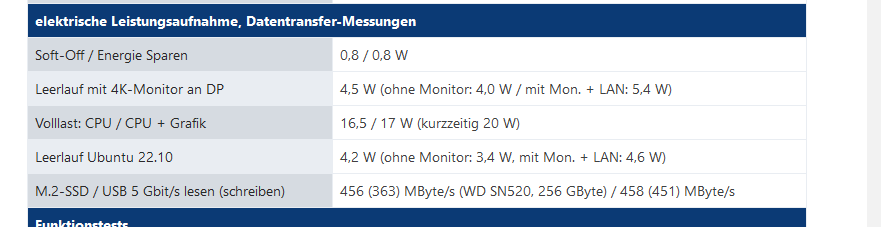
Mein in der Signatur genanntes System kommt mit unter 10 Watt aus ... Tagesverbrauch ca 0,2 kWh ...
Mein Celeron 3000 ist aber ziemlich lahm (irgendwo zwischen Pi3 und Pi4), das System hat aber auch ohne RAM und SSD nur 69€ incl Gehäuse und Netzteil als "Refurbished" gekostet...
-
@thomas-braun said in IObroker startet jeden Abend neu!:
Da sind noch 262MB verfügbar. So viel Luft ist da also nicht mehr.
Wenn jetzt ein Adapter sich mehr genehmigen muss (z. B. weil ein Backup läuft) hast du ein Problem.ja, knapp is es schon....aber es gibt doch noch mehr Leute hier, die IOb auf nem 2GBPi4 rennen haben.....
Oder ich hab zuviel Instanzen am laufen :-(Also auf n Pi5 gehen??
@norman sagte in IObroker startet jeden Abend neu!:
ja, knapp is es schon....aber es gibt doch noch mehr Leute hier, die IOb auf nem 2GBPi4 rennen haben.....
Oder ich hab zuviel Instanzen am laufenIch finde, du hättest schon noch ein wenig Optimierungspotential, um die Zeit bis zur neuen Hardware zu überbrücken. Den Info-Adapter würde ich wegwerfen und ob man bei DER Anzahl von States eine redis-DB betreiben muss? Ich weiß nicht ...
Also auf n Pi5 gehen??
Wenn das Geld ein Thema ist und du mit der CPU Leistung zufrieden bist, warum nicht einen gebrauchten Pi4 mit 4 oder 8 GB RAM?
-
@norman sagte in IObroker startet jeden Abend neu!:
Also auf n Pi5 gehen??
muss kein pi5 sein, gibt auch pi4 mit 4 und 8 GB.
@norman sagte in IObroker startet jeden Abend neu!:
er kommt bei mir ja gar nicht über die 1500MB Speicherbedarf drüber bevor er abschmiert
woher weisst du das?
Da wird wahrscheinlich intern schon Speicher freigeräumt indem Prozesse gestoppt werden.
...bis dann lebenswichtige Prozesse dran glauben müssen.@homoran said in IObroker startet jeden Abend neu!:
@norman sagte in IObroker startet jeden Abend neu!:
Also auf n Pi5 gehen??
muss kein pi5 sein, gibt auch pi4 mit 4 und 8 GB.
Joa, stimmt schon, macht aber preislich ja schon kaum noch einen Unterschied, da kann man das gleich auf den 5er gehen.
Oder hat der HW-technisch irgendwelche Nachteile beim IOB-Betrieb? -
@homoran said in IObroker startet jeden Abend neu!:
@norman sagte in IObroker startet jeden Abend neu!:
Also auf n Pi5 gehen??
muss kein pi5 sein, gibt auch pi4 mit 4 und 8 GB.
Joa, stimmt schon, macht aber preislich ja schon kaum noch einen Unterschied, da kann man das gleich auf den 5er gehen.
Oder hat der HW-technisch irgendwelche Nachteile beim IOB-Betrieb?@norman sagte in IObroker startet jeden Abend neu!:
macht aber preislich ja schon kaum noch einen Unterschied
mal schnell bei einem Händler verglichen: bei 8GB 95 vs 79 Euro (Ohne Gewähr auf Vollständigkeit)
@norman sagte in IObroker startet jeden Abend neu!:
Oder hat der HW-technisch irgendwelche Nachteile beim IOB-Betrieb?
außer dem höheren Stromverbrauch eher nicht.
-
@homoran said in IObroker startet jeden Abend neu!:
@norman sagte in IObroker startet jeden Abend neu!:
Also auf n Pi5 gehen??
muss kein pi5 sein, gibt auch pi4 mit 4 und 8 GB.
Joa, stimmt schon, macht aber preislich ja schon kaum noch einen Unterschied, da kann man das gleich auf den 5er gehen.
Oder hat der HW-technisch irgendwelche Nachteile beim IOB-Betrieb? -
@norman sagte in IObroker startet jeden Abend neu!:
macht aber preislich ja schon kaum noch einen Unterschied
mal schnell bei einem Händler verglichen: bei 8GB 95 vs 79 Euro (Ohne Gewähr auf Vollständigkeit)
@norman sagte in IObroker startet jeden Abend neu!:
Oder hat der HW-technisch irgendwelche Nachteile beim IOB-Betrieb?
außer dem höheren Stromverbrauch eher nicht.
@homoran said in IObroker startet jeden Abend neu!:
@norman sagte in IObroker startet jeden Abend neu!:
macht aber preislich ja schon kaum noch einen Unterschied
mal schnell bei einem Händler verglichen: bei 8GB 95 vs 79 Euro (Ohne Gewähr auf Vollständigkeit)
ja, bei Berrybase 93,90€ zu 79,90, bei 4GB Ram sind sogar knapp unter 10€ Preisunterschied
-
@norman Es wurde ja vorgeschlagen einen gebrauchten Pi4 zu versuchen, aber da habe ich schon gewisse Vorbehalte. Ein geschrotteter IO-Pin ist nicht schnell erkennbar, und ansonsten könnte der Pi dann bei ersten Tests unauffällig sein ....
@martinp said in IObroker startet jeden Abend neu!:
@norman Es wurde ja vorgeschlagen einen gebrauchten Pi4 zu versuchen, aber da habe ich schon gewisse Vorbehalte. Ein geschrotteter IO-Pin ist nicht schnell erkennbar, und ansonsten könnte der Pi dann bei ersten Tests unauffällig sein ....
Joa, hab eben auch mal kurz auf Kleinanzeigen geschaut, die sind ja z.T. teuerer als neue im Netz, die haben zum Teil echt seltsame Preisvorstellungen.
okay, DANKE nochmals @all !
Ich habe jetzt mal ein paar nicht so wichtige Instanzen bzw. Spielerein deaktiviert und schaue mal, ob er jetzt so stabiler läuft.
Wenns so klappt, stell ich um ;-)Ich geb auf jeden Fall Rückmeldung!
-
@homoran said in IObroker startet jeden Abend neu!:
@norman sagte in IObroker startet jeden Abend neu!:
macht aber preislich ja schon kaum noch einen Unterschied
mal schnell bei einem Händler verglichen: bei 8GB 95 vs 79 Euro (Ohne Gewähr auf Vollständigkeit)
ja, bei Berrybase 93,90€ zu 79,90, bei 4GB Ram sind sogar knapp unter 10€ Preisunterschied
Oder ein Futro S740 ...
https://www.heise.de/select/ct/2023/6/2301013201757655367
https://browser.geekbench.com/v5/cpu/20833684
Geekbench 5.5.1 Multi Core 1449
Pi5 1608
Pi4 789
Mein Celeron3000 426 ;-(
https://browser.geekbench.com/v5/cpu/19722005Bei den Futros muss man aber aufpassen, die S720 und S920 werden DEUTLICH günstiger angeboten, sind aber mit alten AMD G-Prozessoren ausgestattet, sind auch eher bei 300 .. 500 im Geekbench... Stromverbrauch liegt auch bei um die 10 Watt
-
nicht, dass ich dir nicht glauben will, will das nur etwas genauer verstehen. er kommt bei mir ja gar nicht über die 1500MB Speicherbedarf drüber bevor er abschmiert, da is ja eigentlich noch etwas Luft.....
@norman Das wird sich auch nicht ändern. Nachdem du umgezogen bist, siehst du das du über die 2GB kommst. Fakt ist, du kannst dich jetzt weiter ärgern das er absgürzt oder Adapter deinstallieren damit es wieder geht oder ne größere Kiste besorgen und sorgenfrei sein.
Nimm am besten nen Futro und nicht nen Pi. Die sind etwas grßer ja, aber da kannste die Ramriegel wenigstens tauschen. Zudem sind die günstiger. -
@norman Das wird sich auch nicht ändern. Nachdem du umgezogen bist, siehst du das du über die 2GB kommst. Fakt ist, du kannst dich jetzt weiter ärgern das er absgürzt oder Adapter deinstallieren damit es wieder geht oder ne größere Kiste besorgen und sorgenfrei sein.
Nimm am besten nen Futro und nicht nen Pi. Die sind etwas grßer ja, aber da kannste die Ramriegel wenigstens tauschen. Zudem sind die günstiger.@johnnybahama said in IObroker startet jeden Abend neu!:
@norman Das wird sich auch nicht ändern. Nachdem du umgezogen bist, siehst du das du über die 2GB kommst. Fakt ist, du kannst dich jetzt weiter ärgern das er absgürzt oder Adapter deinstallieren damit es wieder geht oder ne größere Kiste besorgen und sorgenfrei sein.
Nimm am besten nen Futro und nicht nen Pi. Die sind etwas grßer ja, aber da kannste die Ramriegel wenigstens tauschen. Zudem sind die günstiger.Ja, wie gesagt, die Adapter deinstallieren war je jetzt nur mal zur Fehlersuche, soll natürlich nicht für immer so bleiben.
Wollte ja nur sichergehen, dass der RAM die einzige ursache ist.@all, es scheint aber tatsächlich zu funktionieren, seitdem ich ein paar Adapter deaktiviert habe läufts nun schon über 2 Tage durch, scheint wirklich wohl nur am RAM zu liegen, danke für die Hilfe.
Eine Frage hätte ich aber noch, mir ist aufgefallen dass jeden morgen die RAM-Auslastung ein klein wenig einknickt, genau zu der Zeit, und das täglich, hab ich das hier im LOG stehen, weiß jemand, was es damit auf sich hat? Oder ist das normal:
pi@raspi:~ $ iob logs admin 2024-01-27 09:32:56.739 - info: admin.0 (26082) Adapter rating updated 2024-01-27 09:33:11.746 - info: admin.0 (26082) Request actual repository... 2024-01-27 09:33:18.404 - info: admin.0 (26082) Repository received successfull y. 2024-01-27 11:20:05.313 - info: admin.0 (26082) ==> Connected system.user.admin from ::ffff:192.168.178.94 pi@raspi:~ $ -
@johnnybahama said in IObroker startet jeden Abend neu!:
@norman Das wird sich auch nicht ändern. Nachdem du umgezogen bist, siehst du das du über die 2GB kommst. Fakt ist, du kannst dich jetzt weiter ärgern das er absgürzt oder Adapter deinstallieren damit es wieder geht oder ne größere Kiste besorgen und sorgenfrei sein.
Nimm am besten nen Futro und nicht nen Pi. Die sind etwas grßer ja, aber da kannste die Ramriegel wenigstens tauschen. Zudem sind die günstiger.Ja, wie gesagt, die Adapter deinstallieren war je jetzt nur mal zur Fehlersuche, soll natürlich nicht für immer so bleiben.
Wollte ja nur sichergehen, dass der RAM die einzige ursache ist.@all, es scheint aber tatsächlich zu funktionieren, seitdem ich ein paar Adapter deaktiviert habe läufts nun schon über 2 Tage durch, scheint wirklich wohl nur am RAM zu liegen, danke für die Hilfe.
Eine Frage hätte ich aber noch, mir ist aufgefallen dass jeden morgen die RAM-Auslastung ein klein wenig einknickt, genau zu der Zeit, und das täglich, hab ich das hier im LOG stehen, weiß jemand, was es damit auf sich hat? Oder ist das normal:
pi@raspi:~ $ iob logs admin 2024-01-27 09:32:56.739 - info: admin.0 (26082) Adapter rating updated 2024-01-27 09:33:11.746 - info: admin.0 (26082) Request actual repository... 2024-01-27 09:33:18.404 - info: admin.0 (26082) Repository received successfull y. 2024-01-27 11:20:05.313 - info: admin.0 (26082) ==> Connected system.user.admin from ::ffff:192.168.178.94 pi@raspi:~ $Normal.
Da schaut der ioBroker ob es Updates gibt und schickt statische Daten.




Hey! Du scheinst an dieser Unterhaltung interessiert zu sein, hast aber noch kein Konto.
Hast du es satt, bei jedem Besuch durch die gleichen Beiträge zu scrollen? Wenn du dich für ein Konto anmeldest, kommst du immer genau dorthin zurück, wo du zuvor warst, und kannst dich über neue Antworten benachrichtigen lassen (entweder per E-Mail oder Push-Benachrichtigung). Du kannst auch Lesezeichen speichern und Beiträge positiv bewerten, um anderen Community-Mitgliedern deine Wertschätzung zu zeigen.
Mit deinem Input könnte dieser Beitrag noch besser werden 💗
Registrieren Anmelden438
Online33.0k
Benutzende83.7k
Themen1.3m
Beiträge