




Vis-2(.0) - Neuer Adapter als Beta

-
Schon da:
Adapter "vis-2" : 2.2.5 , installed 2.2.5This upgrade of "vis-2" will introduce the following changes: ======================================================================= -> 2.2.5: Implemented horizontal navigation =======================================================================Wunderbar !!!!!!!!!!

Mein Projekt von V2.1.2 funktioniert nun auch auf V2.2.5
D A N K EEEEEEEEEEEEEEEEEEEEEEEEEEEEEEEEEE !!!!!!!!!!!!!!!!!!!!!!!!!!!!!!!!!
mfg
Digi-Bit
-
@Thomas-Braun
Super jetzt gehts auch ohne das die fenster offen sind ;) DAANNNNKKKKKEEEEEE ;)mfg Smilie108
-
Hallo zusammen,
ich habe vor ein paar Wochen Vis 2 Beta installiert und mal 1-2 Sachen dort probiert und auch mal nen VIS 1 Projekt geladen und seitdem nichts wieder damit gemacht.
Heute wollte ich mich mal wieder dransetzen und meine alte VIS bearbeiten oder vielleicht auch komplett neu gestalten.
Allerdings habe ich das Problem dass weder Widgets noch Seiten vom Projekt geladen werden. Stattdessen läuft nur der Blaue Ladebalken bei beiden Fenstern, mehr tut sich hier nicht.Auch das erstellen eines neues Projekts ändert daran nichts.
Habe auch mal den VIS 2 Adapter gelöscht und neu installiert (v.2.2.5), auch hier bleibt das gleiche Verhalten.Einstellungen Web Adapter:
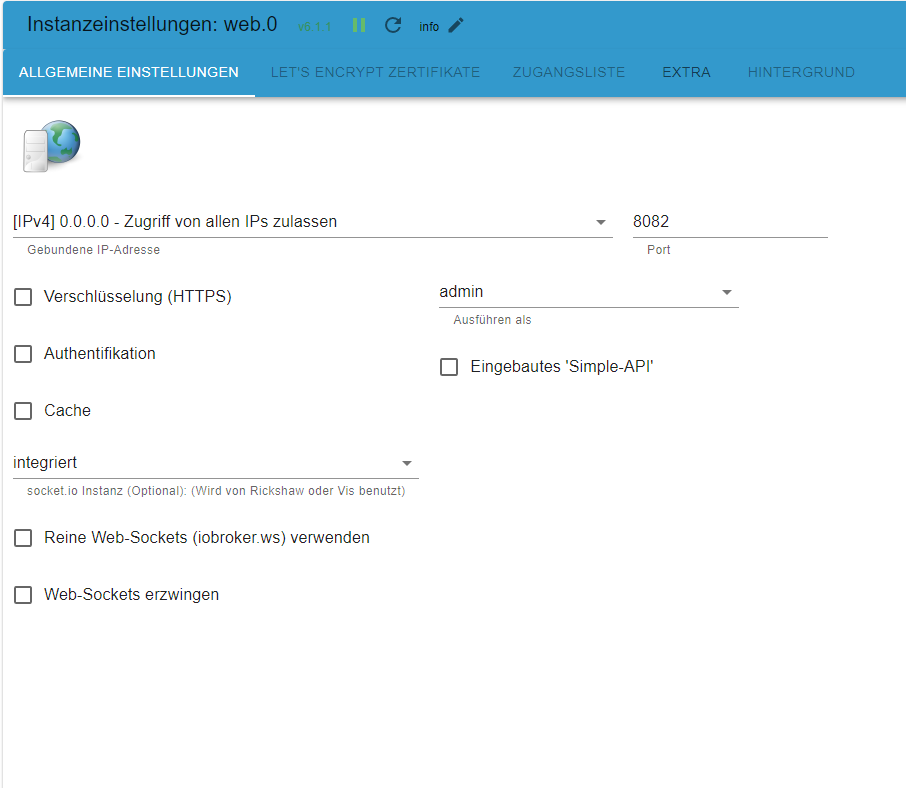
Vielen Dank.
-
Moin,
mein Hintergrund wird nur im Querformat angezeigt und im unteren "weißen" Bereich kann ich nicht im Editor arbeiten.
Dies ist ein VIS 1 Projekt, muss ich noch etwas in den Einstellungen ändern?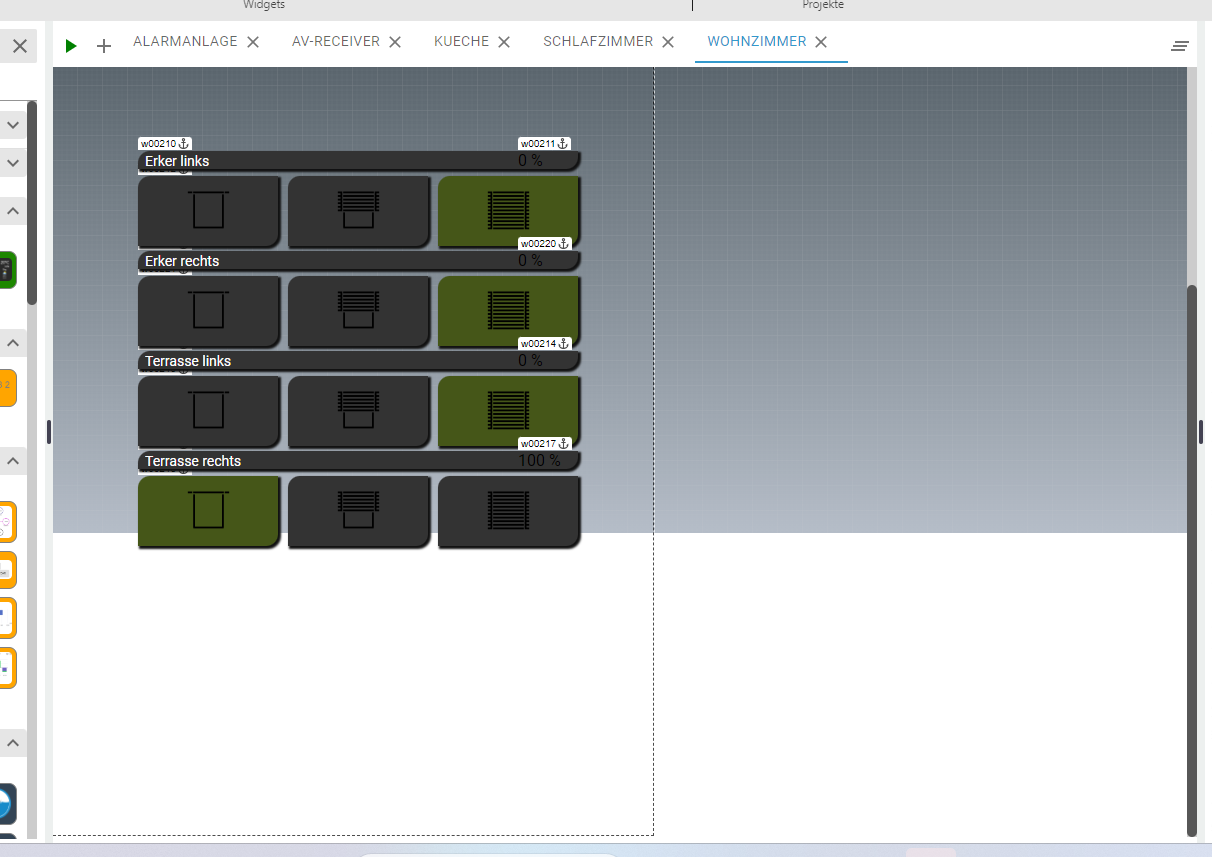
Moin
ich versuche gerade Vis-2 von 2.2.2 auf 2.2.5 upzudaten.
Mit V2.2.2 funktioniert es soweit, die VIS öffnet sich normal und alle Widgets (Basic, etc ) sind vorhanden.
Nach dem Update auf 2.2.5 bricht der Editor ab.Was könnte hier schief gelaufen sein?
Ich hatte vis und vis-2 vorher komplett entfernt und neu aufgesetzt.
Installation erfolgte per Repo aus Iobroker-Adapter.Iob ist auf einem RapsberryPi 4 Bullseye installiert
iobroker.vis-2@2.2.5 using theme "colored"
Prompt.js:14
██╗ ██████╗ ██████╗ ██████╗  ██████╗ ██╗  ██╗███████╗██████╗
██║██╔═══██╗██╔══██╗██╔══██╗██╔═══██╗██║ ██╔╝██╔════╝██╔══██╗
██║██║   ██║██████╔╝██████╔╝██║   ██║█████╔╝ █████╗  ██████╔╝
██║██║   ██║██╔══██╗██╔══██╗██║   ██║██╔═██╗ ██╔══╝  ██╔══██╗
██║╚██████╔╝██████╔╝██║  ██║╚██████╔╝██║  ██╗███████╗██║  ██║
╚═╝ ╚═════╝ ╚═════╝ ╚═╝  ╚═╝ ╚═════╝ ╚═╝  ╚═╝╚══════╝╚═╝  ╚═╝

Prompt.js:15 Nice to see you here! :) Join our dev community here https://github.com/ioBroker/ioBroker or here https://github.com/iobroker-community-adapters
Prompt.js:16 Help us to create open source project with reactJS!
Prompt.js:17 See you :)
socket.io.js:66 [2023-09-14T09:14:32.449Z] Try to connect
widgets.html:1     Failed to load resource: the server responded with a status of 404 (Not Found)
instrument.ts:144 Translate: jqui_html_dialog
instrument.ts:144 Translate: jqui_icon_dialog
instrument.ts:144 Translate: jqui_container_dialog
instrument.ts:144 Translate: tabs
instrument.ts:144 Common user CSS not found: Not exists
(anonym) @ instrument.ts:144
iob diag:
======== Start marking the full check here ========= Skript v.2023-04-16 *** BASE SYSTEM *** Model : Raspberry Pi 4 Model B Rev 1.5 Architecture : aarch64 Docker : false Virtualization : none Distributor ID: Debian Description: Debian GNU/Linux 11 (bullseye) Release: 11 Codename: bullseye PRETTY_NAME="Debian GNU/Linux 11 (bullseye)" NAME="Debian GNU/Linux" VERSION_ID="11" VERSION="11 (bullseye)" VERSION_CODENAME=bullseye ID=debian HOME_URL="https://www.debian.org/" SUPPORT_URL="https://www.debian.org/support" BUG_REPORT_URL="https://bugs.debian.org/" Systemuptime and Load: 11:23:41 up 8 days, 22:48, 1 user, load average: 0.12, 0.40, 0.57 CPU threads: 4 Raspberry only: throttled=0x0 Other values than 0x0 hint to temperature/voltage problems temp=43.3'C volt=0.9260V *** Time and Time Zones *** Local time: Thu 2023-09-14 11:23:41 CEST Universal time: Thu 2023-09-14 09:23:41 UTC RTC time: n/a Time zone: Europe/Berlin (CEST, +0200) System clock synchronized: yes NTP service: active RTC in local TZ: no *** User and Groups *** rapsytrelo /home/rapsytrelo rapsytrelo adm dialout cdrom sudo audio video plugdev games users input render netdev gpio i2c spi iobroker *** X-Server-Setup *** X-Server: false Desktop: Terminal: tty Boot Target: multi-user.target *** MEMORY *** total used free shared buff/cache available Mem: 7.8G 2.2G 2.3G 1.0M 3.4G 5.5G Swap: 99M 0B 99M Total: 7.9G 2.2G 2.4G 7811 M total memory 2195 M used memory 2290 M active memory 2944 M inactive memory 2254 M free memory 177 M buffer memory 3183 M swap cache 99 M total swap 0 M used swap 99 M free swap Raspberry only: oom events: 0 lifetime oom required: 0 Mbytes total time in oom handler: 0 ms max time spent in oom handler: 0 ms *** FILESYSTEM *** Filesystem Type Size Used Avail Use% Mounted on /dev/root ext4 29G 5.6G 22G 21% / devtmpfs devtmpfs 3.6G 0 3.6G 0% /dev tmpfs tmpfs 3.9G 0 3.9G 0% /dev/shm tmpfs tmpfs 1.6G 1.1M 1.6G 1% /run tmpfs tmpfs 5.0M 4.0K 5.0M 1% /run/lock /dev/sda1 vfat 255M 31M 225M 13% /boot tmpfs tmpfs 782M 0 782M 0% /run/user/1000 Messages concerning ext4 filesystem in dmesg: [Tue Sep 5 12:34:57 2023] Kernel command line: coherent_pool=1M 8250.nr_uarts=0 snd_bcm2835.enable_headphones=0 snd_bcm2835.enable_headphones=1 snd_bcm2835.enable_hdmi=1 snd_bcm2835.enable_hdmi=0 smsc95xx.macaddr=D8:3A:DD:34:5B:DE vc_mem.mem_base=0x3eb00000 vc_mem.mem_size=0x3ff00000 console=ttyS0,115200 console=tty1 root=PARTUUID=071417eb-02 rootfstype=ext4 fsck.repair=yes rootwait [Tue Sep 5 12:35:00 2023] EXT4-fs (sda2): mounted filesystem with ordered data mode. Quota mode: none. [Tue Sep 5 12:35:00 2023] VFS: Mounted root (ext4 filesystem) readonly on device 8:2. [Tue Sep 5 12:35:02 2023] EXT4-fs (sda2): re-mounted. Quota mode: none. Show mounted filesystems (real ones only): TARGET SOURCE FSTYPE OPTIONS / /dev/sda2 ext4 rw,noatime `-/boot /dev/sda1 vfat rw,relatime,fmask=0022,dmask=0022,codepage=437,iocharset=ascii,shortname=mixed,errors=remount-ro Files in neuralgic directories: /var: 651M /var/ 224M /var/log 217M /var/log/journal/f6d599b849934723a09caeabf10c3363 217M /var/log/journal 180M /var/cache Archived and active journals take up 216.0M in the file system. /opt/iobroker/backups: 536M /opt/iobroker/backups/ /opt/iobroker/iobroker-data: 780M /opt/iobroker/iobroker-data/ 501M /opt/iobroker/iobroker-data/files 120M /opt/iobroker/iobroker-data/files/vis-2 96M /opt/iobroker/iobroker-data/backup-objects 88M /opt/iobroker/iobroker-data/files/echarts.admin The five largest files in iobroker-data are: 35M /opt/iobroker/iobroker-data/files/devices.admin/static/js/main.24f2bb56.js.map 34M /opt/iobroker/iobroker-data/objects.jsonl 28M /opt/iobroker/iobroker-data/states.jsonl 23M /opt/iobroker/iobroker-data/files/echarts/static/js/main.eb0afecd.js.map 23M /opt/iobroker/iobroker-data/files/echarts.admin/static/js/main.7952f0f7.js.map *** NodeJS-Installation *** /usr/bin/nodejs v18.17.0 /usr/bin/node v18.17.0 /usr/bin/npm 9.6.7 /usr/bin/npx 9.6.7 nodejs: Installed: 18.17.0-deb-1nodesource1 Candidate: 18.17.1-deb-1nodesource1 Version table: 18.17.1-deb-1nodesource1 500 500 https://deb.nodesource.com/node_18.x bullseye/main arm64 Packages *** 18.17.0-deb-1nodesource1 100 100 /var/lib/dpkg/status 12.22.12~dfsg-1~deb11u4 500 500 http://security.debian.org/debian-security bullseye-security/main arm64 Packages 12.22.12~dfsg-1~deb11u3 500 500 http://deb.debian.org/debian bullseye/main arm64 Packages Temp directories causing npm8 problem: 0 No problems detected *** ioBroker-Installation *** ioBroker Status iobroker is running on this host. Objects type: jsonl States type: jsonl MULTIHOSTSERVICE/enabled: false Core adapters versions js-controller: 4.0.24 admin: 6.8.0 javascript: 7.0.3 Adapters from github: 1 Adapter State + system.adapter.admin.0 : admin : rasptrelo - enabled, port: 8081, bind: 0.0.0.0 (SSL), run as: admin system.adapter.alias-manager.0 : alias-manager : rasptrelo - disabled + system.adapter.backitup.0 : backitup : rasptrelo - enabled system.adapter.daswetter.0 : daswetter : rasptrelo - enabled system.adapter.devices.0 : devices : rasptrelo - disabled system.adapter.discovery.0 : discovery : rasptrelo - disabled system.adapter.dwd.0 : dwd : rasptrelo - enabled + system.adapter.echarts.0 : echarts : rasptrelo - enabled system.adapter.ecovacs-deebot.0 : ecovacs-deebot : rasptrelo - disabled + system.adapter.fb-checkpresence.0 : fb-checkpresence : rasptrelo - enabled system.adapter.feiertage.0 : feiertage : rasptrelo - enabled + system.adapter.followthesun.0 : followthesun : rasptrelo - enabled system.adapter.heatingcontrol.0 : heatingcontrol : rasptrelo - disabled + system.adapter.history.0 : history : rasptrelo - enabled + system.adapter.hm-rega.0 : hm-rega : rasptrelo - enabled + system.adapter.hm-rpc.0 : hm-rpc : rasptrelo - enabled, port: 0 + system.adapter.hm-rpc.1 : hm-rpc : rasptrelo - enabled, port: 0 + system.adapter.hm-rpc.3 : hm-rpc : rasptrelo - enabled, port: 0 + system.adapter.hue.0 : hue : rasptrelo - enabled, port: 443 system.adapter.ical.0 : ical : rasptrelo - enabled system.adapter.icons-mfd-png.0 : icons-mfd-png : rasptrelo - disabled system.adapter.icons-mfd-svg.0 : icons-mfd-svg : rasptrelo - disabled + system.adapter.info.0 : info : rasptrelo - enabled + system.adapter.javascript.0 : javascript : rasptrelo - enabled + system.adapter.node-red.0 : node-red : rasptrelo - enabled, port: 1880, bind: 0.0.0.0 + system.adapter.ping.0 : ping : rasptrelo - enabled system.adapter.rpi2.0 : rpi2 : rasptrelo - disabled + system.adapter.scenes.0 : scenes : rasptrelo - enabled system.adapter.schoolfree.0 : schoolfree : rasptrelo - enabled + system.adapter.shelly.0 : shelly : rasptrelo - enabled, port: 1882, bind: 0.0.0.0 + system.adapter.shelly.1 : shelly : rasptrelo - enabled, port: 1882, bind: 0.0.0.0 system.adapter.smartcontrol.0 : smartcontrol : rasptrelo - disabled system.adapter.sprinklecontrol.0 : sprinklecontrol : rasptrelo - disabled + system.adapter.tankerkoenig.0 : tankerkoenig : rasptrelo - enabled system.adapter.tr-064.0 : tr-064 : rasptrelo - disabled + system.adapter.trashschedule.0 : trashschedule : rasptrelo - enabled system.adapter.vis-2.0 : vis-2 : rasptrelo - enabled system.adapter.vis-colorpicker.0 : vis-colorpicker : rasptrelo - enabled system.adapter.vis-metro.0 : vis-metro : rasptrelo - enabled system.adapter.vis.0 : vis : rasptrelo - disabled system.adapter.weatherunderground.0 : weatherunderground : rasptrelo - enabled + system.adapter.web.0 : web : rasptrelo - enabled, port: 8082, bind: 0.0.0.0, run as: admin + system.adapter.whatsapp-cmb.0 : whatsapp-cmb : rasptrelo - enabled + instance is alive Enabled adapters with bindings + system.adapter.admin.0 : admin : rasptrelo - enabled, port: 8081, bind: 0.0.0.0 (SSL), run as: admin + system.adapter.hm-rpc.0 : hm-rpc : rasptrelo - enabled, port: 0 + system.adapter.hm-rpc.1 : hm-rpc : rasptrelo - enabled, port: 0 + system.adapter.hm-rpc.3 : hm-rpc : rasptrelo - enabled, port: 0 + system.adapter.hue.0 : hue : rasptrelo - enabled, port: 443 + system.adapter.node-red.0 : node-red : rasptrelo - enabled, port: 1880, bind: 0.0.0.0 + system.adapter.shelly.0 : shelly : rasptrelo - enabled, port: 1882, bind: 0.0.0.0 + system.adapter.shelly.1 : shelly : rasptrelo - enabled, port: 1882, bind: 0.0.0.0 + system.adapter.web.0 : web : rasptrelo - enabled, port: 8082, bind: 0.0.0.0, run as: admin ioBroker-Repositories stable : http://download.iobroker.net/sources-dist.json beta : http://download.iobroker.net/sources-dist-latest.json Active repo(s): beta Installed ioBroker-Instances Used repository: beta Adapter "admin" : 6.10.1 , installed 6.8.0 [Updatable] Adapter "alias-manager": 1.2.6 , installed 1.2.4 [Updatable] Adapter "backitup" : 2.8.1 , installed 2.6.23 [Updatable] Adapter "daswetter" : 3.1.10 , installed 3.1.10 Adapter "devices" : 1.1.5 , installed 1.1.5 Adapter "discovery" : 4.0.0 , installed 3.1.0 [Updatable] Adapter "dwd" : 2.8.5 , installed 2.8.5 Adapter "echarts" : 1.5.4 , installed 1.5.1 [Updatable] Adapter "ecovacs-deebot": 1.4.13 , installed 1.4.13 Adapter "fb-checkpresence": 1.2.2 , installed 1.2.2 Adapter "feiertage" : 1.1.4 , installed 1.1.0 [Updatable] Adapter "followthesun" : 0.4.2 , installed 0.4.2 Adapter "heatingcontrol": 2.11.1 , installed 2.11.1 Adapter "history" : 2.2.6 , installed 2.2.6 Adapter "hm-rega" : 4.0.0 , installed 3.0.47 [Updatable] Adapter "hm-rpc" : 1.15.19 , installed 1.15.19 Adapter "hue" : 3.10.0 , installed 3.9.5 [Updatable] Adapter "ical" : 1.13.3 , installed 1.13.3 Adapter "icons-mfd-png": 1.1.0 , installed 1.1.0 Adapter "icons-mfd-svg": 1.1.0 , installed 1.1.0 Adapter "info" : 2.0.0 , installed 1.9.26 [Updatable] Adapter "javascript" : 7.1.4 , installed 7.0.3 [Updatable] Controller "js-controller": 5.0.12 , installed 4.0.24 [Updatable] Adapter "node-red" : 4.0.3 , installed 4.0.3 Adapter "openweathermap": 0.4.3 , installed 0.3.9 [Updatable] Adapter "ping" : 1.6.2 , installed 1.6.2 Adapter "rpi2" : 1.3.2 , installed 1.3.2 Adapter "scenes" : 2.3.9 , installed 2.3.9 Adapter "schoolfree" : 1.1.2 , installed 1.1.1 [Updatable] Adapter "shelly" : 6.4.1 , installed 6.4.1 Adapter "simple-api" : 2.7.2 , installed 2.7.2 Adapter "smartcontrol" : 2.0.1 , installed 2.0.1 Adapter "socketio" : 6.5.3 , installed 6.5.3 Adapter "sprinklecontrol": 0.2.13 , installed 0.2.13 Adapter "tankerkoenig" : 3.3.7 , installed 3.3.7 Adapter "tr-064" : 4.2.18 , installed 4.2.18 Adapter "trashschedule": 2.2.0 , installed 2.2.0 Adapter "vis" : 1.4.16 , installed 1.4.16 Adapter "vis-2" : 2.2.5 , installed 2.2.5 Adapter "vis-2-widgets-gauges": 0.2.0, installed 0.2.0 Adapter "vis-2-widgets-jaeger-design": 1.0.0, installed 1.0.0 Adapter "vis-2-widgets-material": 1.1.3, installed 1.0.0 [Updatable] Adapter "vis-colorpicker": 2.0.3 , installed 2.0.3 Adapter "vis-material-advanced": 1.7.4, installed 1.7.2 [Updatable] Adapter "vis-metro" : 1.2.0 , installed 1.2.0 Adapter "weatherunderground": 3.6.0, installed 3.4.2 [Updatable] Adapter "web" : 6.1.1 , installed 6.1.1 Adapter "whatsapp-cmb" : 0.2.3 , installed 0.2.3 Adapter "ws" : 2.5.4 , installed 2.5.4 Objects and States Please stand by - This may take a while Objects: 19869 States: 13299 *** OS-Repositories and Updates *** Hit:1 http://deb.debian.org/debian bullseye InRelease Hit:2 http://security.debian.org/debian-security bullseye-security InRelease Hit:3 http://deb.debian.org/debian bullseye-updates InRelease Hit:4 http://archive.raspberrypi.org/debian bullseye InRelease Get:5 https://deb.nodesource.com/node_18.x bullseye InRelease [4586 B] Fetched 4586 B in 1s (3145 B/s) Reading package lists... Pending Updates: 23 *** Listening Ports *** Active Internet connections (only servers) Proto Recv-Q Send-Q Local Address Foreign Address State User Inode PID/Program name tcp 0 0 0.0.0.0:22 0.0.0.0:* LISTEN 0 13413 540/sshd: /usr/sbin tcp 0 0 127.0.0.1:9001 0.0.0.0:* LISTEN 1001 4070048 256825/iobroker.js- tcp 0 0 127.0.0.1:9000 0.0.0.0:* LISTEN 1001 4070617 256825/iobroker.js- tcp 0 0 0.0.0.0:1880 0.0.0.0:* LISTEN 1001 4070718 256933/node-red tcp 0 0 0.0.0.0:1882 0.0.0.0:* LISTEN 1001 4069276 257071/io.shelly.0 tcp 0 0 192.168.178.57:2001 0.0.0.0:* LISTEN 1001 4070245 256978/io.hm-rpc.0 tcp 0 0 192.168.178.57:2010 0.0.0.0:* LISTEN 1001 4070740 256993/io.hm-rpc.1 tcp 0 0 192.168.178.57:9292 0.0.0.0:* LISTEN 1001 4070759 257007/io.hm-rpc.3 tcp6 0 0 :::8081 :::* LISTEN 1001 4068974 256843/io.admin.0 tcp6 0 0 :::8082 :::* LISTEN 1001 4073876 257367/io.web.0 tcp6 0 0 :::22 :::* LISTEN 0 13415 540/sshd: /usr/sbin udp 0 0 0.0.0.0:68 0.0.0.0:* 0 15436 661/dhcpcd udp 0 0 0.0.0.0:54290 0.0.0.0:* 108 13377 394/avahi-daemon: r udp 0 0 0.0.0.0:5353 0.0.0.0:* 108 13375 394/avahi-daemon: r udp 0 0 0.0.0.0:5683 0.0.0.0:* 1001 4069309 257082/io.shelly.1 udp6 0 0 :::53110 :::* 108 13378 394/avahi-daemon: r udp6 0 0 :::5353 :::* 108 13376 394/avahi-daemon: r *** Log File - Last 25 Lines *** 2023-09-14 11:17:44.522 - warn: node-red.0 (256896) 14 Sep 11:17:44 - [warn] [function:Richtig lueften Auswertung] RichtigLueftenAuswertung: Error: Luftfeuchtigkeit_aussen: keine korrekten Werte 2023-09-14 11:17:55.530 - warn: node-red.0 (256896) 14 Sep 11:17:55 - [warn] [function:Richtig lueften Auswertung] RichtigLueftenAuswertung: Error: Luftfeuchtigkeit_aussen: keine korrekten Werte 2023-09-14 11:17:55.569 - warn: node-red.0 (256896) 14 Sep 11:17:55 - [warn] [function:Richtig lueften Auswertung] RichtigLueftenAuswertung: Error: Luftfeuchtigkeit_aussen: keine korrekten Werte 2023-09-14 11:18:00.647 - info: hm-rega.0 (256959) pollingTrigger 2023-09-14 11:18:45.639 - info: hm-rega.0 (256959) pollingTrigger 2023-09-14 11:19:30.641 - info: hm-rega.0 (256959) pollingTrigger 2023-09-14 11:20:00.089 - info: host.rasptrelo instance system.adapter.dwd.0 started with pid 260926 2023-09-14 11:20:02.952 - info: dwd.0 (260926) starting. Version 2.8.5 in /opt/iobroker/node_modules/iobroker.dwd, node: v18.17.0, js-controller: 4.0.24 2023-09-14 11:20:04.630 - info: dwd.0 (260926) Terminated (ADAPTER_REQUESTED_TERMINATION): Without reason 2023-09-14 11:20:05.165 - info: host.rasptrelo instance system.adapter.dwd.0 terminated with code 11 (ADAPTER_REQUESTED_TERMINATION) 2023-09-14 11:20:15.642 - info: hm-rega.0 (256959) pollingTrigger 2023-09-14 11:21:00.693 - info: hm-rega.0 (256959) pollingTrigger 2023-09-14 11:21:45.648 - info: hm-rega.0 (256959) pollingTrigger 2023-09-14 11:22:30.650 - info: hm-rega.0 (256959) pollingTrigger 2023-09-14 11:22:55.529 - warn: node-red.0 (256896) 14 Sep 11:22:55 - [warn] [function:Richtig lueften Auswertung] RichtigLueftenAuswertung: Error: Luftfeuchtigkeit_aussen: keine korrekten Werte 2023-09-14 11:22:55.569 - warn: node-red.0 (256896) 14 Sep 11:22:55 - [warn] [function:Richtig lueften Auswertung] RichtigLueftenAuswertung: Error: Luftfeuchtigkeit_aussen: keine korrekten Werte 2023-09-14 11:23:15.652 - info: hm-rega.0 (256959) pollingTrigger 2023-09-14 11:24:00.657 - info: hm-rega.0 (256959) pollingTrigger 2023-09-14 11:24:45.660 - info: hm-rega.0 (256959) pollingTriggersoweit ich das im Protokoll gesehen habe:
023-09-14 11:10:31.487 - debug: Delete file vis-2/widgets/trashschedule/css/style.css
2023-09-14 11:10:31.491 - debug: Delete file vis-2/widgets/trashschedule/js/trashschedule.js
2023-09-14 11:10:31.496 - debug: Delete file vis-2/widgets/trashschedule.html
2023-09-14 11:10:31.500 - debug: Delete file vis-2/widgets.htmlwird beim Update die widgets.html gelöscht
-
Moin
ich versuche gerade Vis-2 von 2.2.2 auf 2.2.5 upzudaten.
Mit V2.2.2 funktioniert es soweit, die VIS öffnet sich normal und alle Widgets (Basic, etc ) sind vorhanden.
Nach dem Update auf 2.2.5 bricht der Editor ab.Was könnte hier schief gelaufen sein?
Ich hatte vis und vis-2 vorher komplett entfernt und neu aufgesetzt.
Installation erfolgte per Repo aus Iobroker-Adapter.Iob ist auf einem RapsberryPi 4 Bullseye installiert
iobroker.vis-2@2.2.5 using theme "colored"
Prompt.js:14
██╗ ██████╗ ██████╗ ██████╗  ██████╗ ██╗  ██╗███████╗██████╗
██║██╔═══██╗██╔══██╗██╔══██╗██╔═══██╗██║ ██╔╝██╔════╝██╔══██╗
██║██║   ██║██████╔╝██████╔╝██║   ██║█████╔╝ █████╗  ██████╔╝
██║██║   ██║██╔══██╗██╔══██╗██║   ██║██╔═██╗ ██╔══╝  ██╔══██╗
██║╚██████╔╝██████╔╝██║  ██║╚██████╔╝██║  ██╗███████╗██║  ██║
╚═╝ ╚═════╝ ╚═════╝ ╚═╝  ╚═╝ ╚═════╝ ╚═╝  ╚═╝╚══════╝╚═╝  ╚═╝

Prompt.js:15 Nice to see you here! :) Join our dev community here https://github.com/ioBroker/ioBroker or here https://github.com/iobroker-community-adapters
Prompt.js:16 Help us to create open source project with reactJS!
Prompt.js:17 See you :)
socket.io.js:66 [2023-09-14T09:14:32.449Z] Try to connect
widgets.html:1     Failed to load resource: the server responded with a status of 404 (Not Found)
instrument.ts:144 Translate: jqui_html_dialog
instrument.ts:144 Translate: jqui_icon_dialog
instrument.ts:144 Translate: jqui_container_dialog
instrument.ts:144 Translate: tabs
instrument.ts:144 Common user CSS not found: Not exists
(anonym) @ instrument.ts:144
iob diag:
======== Start marking the full check here ========= Skript v.2023-04-16 *** BASE SYSTEM *** Model : Raspberry Pi 4 Model B Rev 1.5 Architecture : aarch64 Docker : false Virtualization : none Distributor ID: Debian Description: Debian GNU/Linux 11 (bullseye) Release: 11 Codename: bullseye PRETTY_NAME="Debian GNU/Linux 11 (bullseye)" NAME="Debian GNU/Linux" VERSION_ID="11" VERSION="11 (bullseye)" VERSION_CODENAME=bullseye ID=debian HOME_URL="https://www.debian.org/" SUPPORT_URL="https://www.debian.org/support" BUG_REPORT_URL="https://bugs.debian.org/" Systemuptime and Load: 11:23:41 up 8 days, 22:48, 1 user, load average: 0.12, 0.40, 0.57 CPU threads: 4 Raspberry only: throttled=0x0 Other values than 0x0 hint to temperature/voltage problems temp=43.3'C volt=0.9260V *** Time and Time Zones *** Local time: Thu 2023-09-14 11:23:41 CEST Universal time: Thu 2023-09-14 09:23:41 UTC RTC time: n/a Time zone: Europe/Berlin (CEST, +0200) System clock synchronized: yes NTP service: active RTC in local TZ: no *** User and Groups *** rapsytrelo /home/rapsytrelo rapsytrelo adm dialout cdrom sudo audio video plugdev games users input render netdev gpio i2c spi iobroker *** X-Server-Setup *** X-Server: false Desktop: Terminal: tty Boot Target: multi-user.target *** MEMORY *** total used free shared buff/cache available Mem: 7.8G 2.2G 2.3G 1.0M 3.4G 5.5G Swap: 99M 0B 99M Total: 7.9G 2.2G 2.4G 7811 M total memory 2195 M used memory 2290 M active memory 2944 M inactive memory 2254 M free memory 177 M buffer memory 3183 M swap cache 99 M total swap 0 M used swap 99 M free swap Raspberry only: oom events: 0 lifetime oom required: 0 Mbytes total time in oom handler: 0 ms max time spent in oom handler: 0 ms *** FILESYSTEM *** Filesystem Type Size Used Avail Use% Mounted on /dev/root ext4 29G 5.6G 22G 21% / devtmpfs devtmpfs 3.6G 0 3.6G 0% /dev tmpfs tmpfs 3.9G 0 3.9G 0% /dev/shm tmpfs tmpfs 1.6G 1.1M 1.6G 1% /run tmpfs tmpfs 5.0M 4.0K 5.0M 1% /run/lock /dev/sda1 vfat 255M 31M 225M 13% /boot tmpfs tmpfs 782M 0 782M 0% /run/user/1000 Messages concerning ext4 filesystem in dmesg: [Tue Sep 5 12:34:57 2023] Kernel command line: coherent_pool=1M 8250.nr_uarts=0 snd_bcm2835.enable_headphones=0 snd_bcm2835.enable_headphones=1 snd_bcm2835.enable_hdmi=1 snd_bcm2835.enable_hdmi=0 smsc95xx.macaddr=D8:3A:DD:34:5B:DE vc_mem.mem_base=0x3eb00000 vc_mem.mem_size=0x3ff00000 console=ttyS0,115200 console=tty1 root=PARTUUID=071417eb-02 rootfstype=ext4 fsck.repair=yes rootwait [Tue Sep 5 12:35:00 2023] EXT4-fs (sda2): mounted filesystem with ordered data mode. Quota mode: none. [Tue Sep 5 12:35:00 2023] VFS: Mounted root (ext4 filesystem) readonly on device 8:2. [Tue Sep 5 12:35:02 2023] EXT4-fs (sda2): re-mounted. Quota mode: none. Show mounted filesystems (real ones only): TARGET SOURCE FSTYPE OPTIONS / /dev/sda2 ext4 rw,noatime `-/boot /dev/sda1 vfat rw,relatime,fmask=0022,dmask=0022,codepage=437,iocharset=ascii,shortname=mixed,errors=remount-ro Files in neuralgic directories: /var: 651M /var/ 224M /var/log 217M /var/log/journal/f6d599b849934723a09caeabf10c3363 217M /var/log/journal 180M /var/cache Archived and active journals take up 216.0M in the file system. /opt/iobroker/backups: 536M /opt/iobroker/backups/ /opt/iobroker/iobroker-data: 780M /opt/iobroker/iobroker-data/ 501M /opt/iobroker/iobroker-data/files 120M /opt/iobroker/iobroker-data/files/vis-2 96M /opt/iobroker/iobroker-data/backup-objects 88M /opt/iobroker/iobroker-data/files/echarts.admin The five largest files in iobroker-data are: 35M /opt/iobroker/iobroker-data/files/devices.admin/static/js/main.24f2bb56.js.map 34M /opt/iobroker/iobroker-data/objects.jsonl 28M /opt/iobroker/iobroker-data/states.jsonl 23M /opt/iobroker/iobroker-data/files/echarts/static/js/main.eb0afecd.js.map 23M /opt/iobroker/iobroker-data/files/echarts.admin/static/js/main.7952f0f7.js.map *** NodeJS-Installation *** /usr/bin/nodejs v18.17.0 /usr/bin/node v18.17.0 /usr/bin/npm 9.6.7 /usr/bin/npx 9.6.7 nodejs: Installed: 18.17.0-deb-1nodesource1 Candidate: 18.17.1-deb-1nodesource1 Version table: 18.17.1-deb-1nodesource1 500 500 https://deb.nodesource.com/node_18.x bullseye/main arm64 Packages *** 18.17.0-deb-1nodesource1 100 100 /var/lib/dpkg/status 12.22.12~dfsg-1~deb11u4 500 500 http://security.debian.org/debian-security bullseye-security/main arm64 Packages 12.22.12~dfsg-1~deb11u3 500 500 http://deb.debian.org/debian bullseye/main arm64 Packages Temp directories causing npm8 problem: 0 No problems detected *** ioBroker-Installation *** ioBroker Status iobroker is running on this host. Objects type: jsonl States type: jsonl MULTIHOSTSERVICE/enabled: false Core adapters versions js-controller: 4.0.24 admin: 6.8.0 javascript: 7.0.3 Adapters from github: 1 Adapter State + system.adapter.admin.0 : admin : rasptrelo - enabled, port: 8081, bind: 0.0.0.0 (SSL), run as: admin system.adapter.alias-manager.0 : alias-manager : rasptrelo - disabled + system.adapter.backitup.0 : backitup : rasptrelo - enabled system.adapter.daswetter.0 : daswetter : rasptrelo - enabled system.adapter.devices.0 : devices : rasptrelo - disabled system.adapter.discovery.0 : discovery : rasptrelo - disabled system.adapter.dwd.0 : dwd : rasptrelo - enabled + system.adapter.echarts.0 : echarts : rasptrelo - enabled system.adapter.ecovacs-deebot.0 : ecovacs-deebot : rasptrelo - disabled + system.adapter.fb-checkpresence.0 : fb-checkpresence : rasptrelo - enabled system.adapter.feiertage.0 : feiertage : rasptrelo - enabled + system.adapter.followthesun.0 : followthesun : rasptrelo - enabled system.adapter.heatingcontrol.0 : heatingcontrol : rasptrelo - disabled + system.adapter.history.0 : history : rasptrelo - enabled + system.adapter.hm-rega.0 : hm-rega : rasptrelo - enabled + system.adapter.hm-rpc.0 : hm-rpc : rasptrelo - enabled, port: 0 + system.adapter.hm-rpc.1 : hm-rpc : rasptrelo - enabled, port: 0 + system.adapter.hm-rpc.3 : hm-rpc : rasptrelo - enabled, port: 0 + system.adapter.hue.0 : hue : rasptrelo - enabled, port: 443 system.adapter.ical.0 : ical : rasptrelo - enabled system.adapter.icons-mfd-png.0 : icons-mfd-png : rasptrelo - disabled system.adapter.icons-mfd-svg.0 : icons-mfd-svg : rasptrelo - disabled + system.adapter.info.0 : info : rasptrelo - enabled + system.adapter.javascript.0 : javascript : rasptrelo - enabled + system.adapter.node-red.0 : node-red : rasptrelo - enabled, port: 1880, bind: 0.0.0.0 + system.adapter.ping.0 : ping : rasptrelo - enabled system.adapter.rpi2.0 : rpi2 : rasptrelo - disabled + system.adapter.scenes.0 : scenes : rasptrelo - enabled system.adapter.schoolfree.0 : schoolfree : rasptrelo - enabled + system.adapter.shelly.0 : shelly : rasptrelo - enabled, port: 1882, bind: 0.0.0.0 + system.adapter.shelly.1 : shelly : rasptrelo - enabled, port: 1882, bind: 0.0.0.0 system.adapter.smartcontrol.0 : smartcontrol : rasptrelo - disabled system.adapter.sprinklecontrol.0 : sprinklecontrol : rasptrelo - disabled + system.adapter.tankerkoenig.0 : tankerkoenig : rasptrelo - enabled system.adapter.tr-064.0 : tr-064 : rasptrelo - disabled + system.adapter.trashschedule.0 : trashschedule : rasptrelo - enabled system.adapter.vis-2.0 : vis-2 : rasptrelo - enabled system.adapter.vis-colorpicker.0 : vis-colorpicker : rasptrelo - enabled system.adapter.vis-metro.0 : vis-metro : rasptrelo - enabled system.adapter.vis.0 : vis : rasptrelo - disabled system.adapter.weatherunderground.0 : weatherunderground : rasptrelo - enabled + system.adapter.web.0 : web : rasptrelo - enabled, port: 8082, bind: 0.0.0.0, run as: admin + system.adapter.whatsapp-cmb.0 : whatsapp-cmb : rasptrelo - enabled + instance is alive Enabled adapters with bindings + system.adapter.admin.0 : admin : rasptrelo - enabled, port: 8081, bind: 0.0.0.0 (SSL), run as: admin + system.adapter.hm-rpc.0 : hm-rpc : rasptrelo - enabled, port: 0 + system.adapter.hm-rpc.1 : hm-rpc : rasptrelo - enabled, port: 0 + system.adapter.hm-rpc.3 : hm-rpc : rasptrelo - enabled, port: 0 + system.adapter.hue.0 : hue : rasptrelo - enabled, port: 443 + system.adapter.node-red.0 : node-red : rasptrelo - enabled, port: 1880, bind: 0.0.0.0 + system.adapter.shelly.0 : shelly : rasptrelo - enabled, port: 1882, bind: 0.0.0.0 + system.adapter.shelly.1 : shelly : rasptrelo - enabled, port: 1882, bind: 0.0.0.0 + system.adapter.web.0 : web : rasptrelo - enabled, port: 8082, bind: 0.0.0.0, run as: admin ioBroker-Repositories stable : http://download.iobroker.net/sources-dist.json beta : http://download.iobroker.net/sources-dist-latest.json Active repo(s): beta Installed ioBroker-Instances Used repository: beta Adapter "admin" : 6.10.1 , installed 6.8.0 [Updatable] Adapter "alias-manager": 1.2.6 , installed 1.2.4 [Updatable] Adapter "backitup" : 2.8.1 , installed 2.6.23 [Updatable] Adapter "daswetter" : 3.1.10 , installed 3.1.10 Adapter "devices" : 1.1.5 , installed 1.1.5 Adapter "discovery" : 4.0.0 , installed 3.1.0 [Updatable] Adapter "dwd" : 2.8.5 , installed 2.8.5 Adapter "echarts" : 1.5.4 , installed 1.5.1 [Updatable] Adapter "ecovacs-deebot": 1.4.13 , installed 1.4.13 Adapter "fb-checkpresence": 1.2.2 , installed 1.2.2 Adapter "feiertage" : 1.1.4 , installed 1.1.0 [Updatable] Adapter "followthesun" : 0.4.2 , installed 0.4.2 Adapter "heatingcontrol": 2.11.1 , installed 2.11.1 Adapter "history" : 2.2.6 , installed 2.2.6 Adapter "hm-rega" : 4.0.0 , installed 3.0.47 [Updatable] Adapter "hm-rpc" : 1.15.19 , installed 1.15.19 Adapter "hue" : 3.10.0 , installed 3.9.5 [Updatable] Adapter "ical" : 1.13.3 , installed 1.13.3 Adapter "icons-mfd-png": 1.1.0 , installed 1.1.0 Adapter "icons-mfd-svg": 1.1.0 , installed 1.1.0 Adapter "info" : 2.0.0 , installed 1.9.26 [Updatable] Adapter "javascript" : 7.1.4 , installed 7.0.3 [Updatable] Controller "js-controller": 5.0.12 , installed 4.0.24 [Updatable] Adapter "node-red" : 4.0.3 , installed 4.0.3 Adapter "openweathermap": 0.4.3 , installed 0.3.9 [Updatable] Adapter "ping" : 1.6.2 , installed 1.6.2 Adapter "rpi2" : 1.3.2 , installed 1.3.2 Adapter "scenes" : 2.3.9 , installed 2.3.9 Adapter "schoolfree" : 1.1.2 , installed 1.1.1 [Updatable] Adapter "shelly" : 6.4.1 , installed 6.4.1 Adapter "simple-api" : 2.7.2 , installed 2.7.2 Adapter "smartcontrol" : 2.0.1 , installed 2.0.1 Adapter "socketio" : 6.5.3 , installed 6.5.3 Adapter "sprinklecontrol": 0.2.13 , installed 0.2.13 Adapter "tankerkoenig" : 3.3.7 , installed 3.3.7 Adapter "tr-064" : 4.2.18 , installed 4.2.18 Adapter "trashschedule": 2.2.0 , installed 2.2.0 Adapter "vis" : 1.4.16 , installed 1.4.16 Adapter "vis-2" : 2.2.5 , installed 2.2.5 Adapter "vis-2-widgets-gauges": 0.2.0, installed 0.2.0 Adapter "vis-2-widgets-jaeger-design": 1.0.0, installed 1.0.0 Adapter "vis-2-widgets-material": 1.1.3, installed 1.0.0 [Updatable] Adapter "vis-colorpicker": 2.0.3 , installed 2.0.3 Adapter "vis-material-advanced": 1.7.4, installed 1.7.2 [Updatable] Adapter "vis-metro" : 1.2.0 , installed 1.2.0 Adapter "weatherunderground": 3.6.0, installed 3.4.2 [Updatable] Adapter "web" : 6.1.1 , installed 6.1.1 Adapter "whatsapp-cmb" : 0.2.3 , installed 0.2.3 Adapter "ws" : 2.5.4 , installed 2.5.4 Objects and States Please stand by - This may take a while Objects: 19869 States: 13299 *** OS-Repositories and Updates *** Hit:1 http://deb.debian.org/debian bullseye InRelease Hit:2 http://security.debian.org/debian-security bullseye-security InRelease Hit:3 http://deb.debian.org/debian bullseye-updates InRelease Hit:4 http://archive.raspberrypi.org/debian bullseye InRelease Get:5 https://deb.nodesource.com/node_18.x bullseye InRelease [4586 B] Fetched 4586 B in 1s (3145 B/s) Reading package lists... Pending Updates: 23 *** Listening Ports *** Active Internet connections (only servers) Proto Recv-Q Send-Q Local Address Foreign Address State User Inode PID/Program name tcp 0 0 0.0.0.0:22 0.0.0.0:* LISTEN 0 13413 540/sshd: /usr/sbin tcp 0 0 127.0.0.1:9001 0.0.0.0:* LISTEN 1001 4070048 256825/iobroker.js- tcp 0 0 127.0.0.1:9000 0.0.0.0:* LISTEN 1001 4070617 256825/iobroker.js- tcp 0 0 0.0.0.0:1880 0.0.0.0:* LISTEN 1001 4070718 256933/node-red tcp 0 0 0.0.0.0:1882 0.0.0.0:* LISTEN 1001 4069276 257071/io.shelly.0 tcp 0 0 192.168.178.57:2001 0.0.0.0:* LISTEN 1001 4070245 256978/io.hm-rpc.0 tcp 0 0 192.168.178.57:2010 0.0.0.0:* LISTEN 1001 4070740 256993/io.hm-rpc.1 tcp 0 0 192.168.178.57:9292 0.0.0.0:* LISTEN 1001 4070759 257007/io.hm-rpc.3 tcp6 0 0 :::8081 :::* LISTEN 1001 4068974 256843/io.admin.0 tcp6 0 0 :::8082 :::* LISTEN 1001 4073876 257367/io.web.0 tcp6 0 0 :::22 :::* LISTEN 0 13415 540/sshd: /usr/sbin udp 0 0 0.0.0.0:68 0.0.0.0:* 0 15436 661/dhcpcd udp 0 0 0.0.0.0:54290 0.0.0.0:* 108 13377 394/avahi-daemon: r udp 0 0 0.0.0.0:5353 0.0.0.0:* 108 13375 394/avahi-daemon: r udp 0 0 0.0.0.0:5683 0.0.0.0:* 1001 4069309 257082/io.shelly.1 udp6 0 0 :::53110 :::* 108 13378 394/avahi-daemon: r udp6 0 0 :::5353 :::* 108 13376 394/avahi-daemon: r *** Log File - Last 25 Lines *** 2023-09-14 11:17:44.522 - warn: node-red.0 (256896) 14 Sep 11:17:44 - [warn] [function:Richtig lueften Auswertung] RichtigLueftenAuswertung: Error: Luftfeuchtigkeit_aussen: keine korrekten Werte 2023-09-14 11:17:55.530 - warn: node-red.0 (256896) 14 Sep 11:17:55 - [warn] [function:Richtig lueften Auswertung] RichtigLueftenAuswertung: Error: Luftfeuchtigkeit_aussen: keine korrekten Werte 2023-09-14 11:17:55.569 - warn: node-red.0 (256896) 14 Sep 11:17:55 - [warn] [function:Richtig lueften Auswertung] RichtigLueftenAuswertung: Error: Luftfeuchtigkeit_aussen: keine korrekten Werte 2023-09-14 11:18:00.647 - info: hm-rega.0 (256959) pollingTrigger 2023-09-14 11:18:45.639 - info: hm-rega.0 (256959) pollingTrigger 2023-09-14 11:19:30.641 - info: hm-rega.0 (256959) pollingTrigger 2023-09-14 11:20:00.089 - info: host.rasptrelo instance system.adapter.dwd.0 started with pid 260926 2023-09-14 11:20:02.952 - info: dwd.0 (260926) starting. Version 2.8.5 in /opt/iobroker/node_modules/iobroker.dwd, node: v18.17.0, js-controller: 4.0.24 2023-09-14 11:20:04.630 - info: dwd.0 (260926) Terminated (ADAPTER_REQUESTED_TERMINATION): Without reason 2023-09-14 11:20:05.165 - info: host.rasptrelo instance system.adapter.dwd.0 terminated with code 11 (ADAPTER_REQUESTED_TERMINATION) 2023-09-14 11:20:15.642 - info: hm-rega.0 (256959) pollingTrigger 2023-09-14 11:21:00.693 - info: hm-rega.0 (256959) pollingTrigger 2023-09-14 11:21:45.648 - info: hm-rega.0 (256959) pollingTrigger 2023-09-14 11:22:30.650 - info: hm-rega.0 (256959) pollingTrigger 2023-09-14 11:22:55.529 - warn: node-red.0 (256896) 14 Sep 11:22:55 - [warn] [function:Richtig lueften Auswertung] RichtigLueftenAuswertung: Error: Luftfeuchtigkeit_aussen: keine korrekten Werte 2023-09-14 11:22:55.569 - warn: node-red.0 (256896) 14 Sep 11:22:55 - [warn] [function:Richtig lueften Auswertung] RichtigLueftenAuswertung: Error: Luftfeuchtigkeit_aussen: keine korrekten Werte 2023-09-14 11:23:15.652 - info: hm-rega.0 (256959) pollingTrigger 2023-09-14 11:24:00.657 - info: hm-rega.0 (256959) pollingTrigger 2023-09-14 11:24:45.660 - info: hm-rega.0 (256959) pollingTriggersoweit ich das im Protokoll gesehen habe:
023-09-14 11:10:31.487 - debug: Delete file vis-2/widgets/trashschedule/css/style.css
2023-09-14 11:10:31.491 - debug: Delete file vis-2/widgets/trashschedule/js/trashschedule.js
2023-09-14 11:10:31.496 - debug: Delete file vis-2/widgets/trashschedule.html
2023-09-14 11:10:31.500 - debug: Delete file vis-2/widgets.htmlwird beim Update die widgets.html gelöscht
Hey
Ich habe mal ne Frage wieso werden mir nicht alle Projekte aus Vis1 nicht anzeigt und wieso kann ich das Fehlende Objekt nicht importieren... Bzw. Taucht in der Liste auf aber lässt sich nicht öffnen... Ebenso kann ich einzelne View nicht importieren kann?
Hat einer einen Tipp stelle gerne Informationen zur Verfügung die noch benötigt werden..
Danke und Grüße aus Kreischa
-
Moin
ich versuche gerade Vis-2 von 2.2.2 auf 2.2.5 upzudaten.
Mit V2.2.2 funktioniert es soweit, die VIS öffnet sich normal und alle Widgets (Basic, etc ) sind vorhanden.
Nach dem Update auf 2.2.5 bricht der Editor ab.Was könnte hier schief gelaufen sein?
Ich hatte vis und vis-2 vorher komplett entfernt und neu aufgesetzt.
Installation erfolgte per Repo aus Iobroker-Adapter.Iob ist auf einem RapsberryPi 4 Bullseye installiert
iobroker.vis-2@2.2.5 using theme "colored"
Prompt.js:14
██╗ ██████╗ ██████╗ ██████╗  ██████╗ ██╗  ██╗███████╗██████╗
██║██╔═══██╗██╔══██╗██╔══██╗██╔═══██╗██║ ██╔╝██╔════╝██╔══██╗
██║██║   ██║██████╔╝██████╔╝██║   ██║█████╔╝ █████╗  ██████╔╝
██║██║   ██║██╔══██╗██╔══██╗██║   ██║██╔═██╗ ██╔══╝  ██╔══██╗
██║╚██████╔╝██████╔╝██║  ██║╚██████╔╝██║  ██╗███████╗██║  ██║
╚═╝ ╚═════╝ ╚═════╝ ╚═╝  ╚═╝ ╚═════╝ ╚═╝  ╚═╝╚══════╝╚═╝  ╚═╝

Prompt.js:15 Nice to see you here! :) Join our dev community here https://github.com/ioBroker/ioBroker or here https://github.com/iobroker-community-adapters
Prompt.js:16 Help us to create open source project with reactJS!
Prompt.js:17 See you :)
socket.io.js:66 [2023-09-14T09:14:32.449Z] Try to connect
widgets.html:1     Failed to load resource: the server responded with a status of 404 (Not Found)
instrument.ts:144 Translate: jqui_html_dialog
instrument.ts:144 Translate: jqui_icon_dialog
instrument.ts:144 Translate: jqui_container_dialog
instrument.ts:144 Translate: tabs
instrument.ts:144 Common user CSS not found: Not exists
(anonym) @ instrument.ts:144
iob diag:
======== Start marking the full check here ========= Skript v.2023-04-16 *** BASE SYSTEM *** Model : Raspberry Pi 4 Model B Rev 1.5 Architecture : aarch64 Docker : false Virtualization : none Distributor ID: Debian Description: Debian GNU/Linux 11 (bullseye) Release: 11 Codename: bullseye PRETTY_NAME="Debian GNU/Linux 11 (bullseye)" NAME="Debian GNU/Linux" VERSION_ID="11" VERSION="11 (bullseye)" VERSION_CODENAME=bullseye ID=debian HOME_URL="https://www.debian.org/" SUPPORT_URL="https://www.debian.org/support" BUG_REPORT_URL="https://bugs.debian.org/" Systemuptime and Load: 11:23:41 up 8 days, 22:48, 1 user, load average: 0.12, 0.40, 0.57 CPU threads: 4 Raspberry only: throttled=0x0 Other values than 0x0 hint to temperature/voltage problems temp=43.3'C volt=0.9260V *** Time and Time Zones *** Local time: Thu 2023-09-14 11:23:41 CEST Universal time: Thu 2023-09-14 09:23:41 UTC RTC time: n/a Time zone: Europe/Berlin (CEST, +0200) System clock synchronized: yes NTP service: active RTC in local TZ: no *** User and Groups *** rapsytrelo /home/rapsytrelo rapsytrelo adm dialout cdrom sudo audio video plugdev games users input render netdev gpio i2c spi iobroker *** X-Server-Setup *** X-Server: false Desktop: Terminal: tty Boot Target: multi-user.target *** MEMORY *** total used free shared buff/cache available Mem: 7.8G 2.2G 2.3G 1.0M 3.4G 5.5G Swap: 99M 0B 99M Total: 7.9G 2.2G 2.4G 7811 M total memory 2195 M used memory 2290 M active memory 2944 M inactive memory 2254 M free memory 177 M buffer memory 3183 M swap cache 99 M total swap 0 M used swap 99 M free swap Raspberry only: oom events: 0 lifetime oom required: 0 Mbytes total time in oom handler: 0 ms max time spent in oom handler: 0 ms *** FILESYSTEM *** Filesystem Type Size Used Avail Use% Mounted on /dev/root ext4 29G 5.6G 22G 21% / devtmpfs devtmpfs 3.6G 0 3.6G 0% /dev tmpfs tmpfs 3.9G 0 3.9G 0% /dev/shm tmpfs tmpfs 1.6G 1.1M 1.6G 1% /run tmpfs tmpfs 5.0M 4.0K 5.0M 1% /run/lock /dev/sda1 vfat 255M 31M 225M 13% /boot tmpfs tmpfs 782M 0 782M 0% /run/user/1000 Messages concerning ext4 filesystem in dmesg: [Tue Sep 5 12:34:57 2023] Kernel command line: coherent_pool=1M 8250.nr_uarts=0 snd_bcm2835.enable_headphones=0 snd_bcm2835.enable_headphones=1 snd_bcm2835.enable_hdmi=1 snd_bcm2835.enable_hdmi=0 smsc95xx.macaddr=D8:3A:DD:34:5B:DE vc_mem.mem_base=0x3eb00000 vc_mem.mem_size=0x3ff00000 console=ttyS0,115200 console=tty1 root=PARTUUID=071417eb-02 rootfstype=ext4 fsck.repair=yes rootwait [Tue Sep 5 12:35:00 2023] EXT4-fs (sda2): mounted filesystem with ordered data mode. Quota mode: none. [Tue Sep 5 12:35:00 2023] VFS: Mounted root (ext4 filesystem) readonly on device 8:2. [Tue Sep 5 12:35:02 2023] EXT4-fs (sda2): re-mounted. Quota mode: none. Show mounted filesystems (real ones only): TARGET SOURCE FSTYPE OPTIONS / /dev/sda2 ext4 rw,noatime `-/boot /dev/sda1 vfat rw,relatime,fmask=0022,dmask=0022,codepage=437,iocharset=ascii,shortname=mixed,errors=remount-ro Files in neuralgic directories: /var: 651M /var/ 224M /var/log 217M /var/log/journal/f6d599b849934723a09caeabf10c3363 217M /var/log/journal 180M /var/cache Archived and active journals take up 216.0M in the file system. /opt/iobroker/backups: 536M /opt/iobroker/backups/ /opt/iobroker/iobroker-data: 780M /opt/iobroker/iobroker-data/ 501M /opt/iobroker/iobroker-data/files 120M /opt/iobroker/iobroker-data/files/vis-2 96M /opt/iobroker/iobroker-data/backup-objects 88M /opt/iobroker/iobroker-data/files/echarts.admin The five largest files in iobroker-data are: 35M /opt/iobroker/iobroker-data/files/devices.admin/static/js/main.24f2bb56.js.map 34M /opt/iobroker/iobroker-data/objects.jsonl 28M /opt/iobroker/iobroker-data/states.jsonl 23M /opt/iobroker/iobroker-data/files/echarts/static/js/main.eb0afecd.js.map 23M /opt/iobroker/iobroker-data/files/echarts.admin/static/js/main.7952f0f7.js.map *** NodeJS-Installation *** /usr/bin/nodejs v18.17.0 /usr/bin/node v18.17.0 /usr/bin/npm 9.6.7 /usr/bin/npx 9.6.7 nodejs: Installed: 18.17.0-deb-1nodesource1 Candidate: 18.17.1-deb-1nodesource1 Version table: 18.17.1-deb-1nodesource1 500 500 https://deb.nodesource.com/node_18.x bullseye/main arm64 Packages *** 18.17.0-deb-1nodesource1 100 100 /var/lib/dpkg/status 12.22.12~dfsg-1~deb11u4 500 500 http://security.debian.org/debian-security bullseye-security/main arm64 Packages 12.22.12~dfsg-1~deb11u3 500 500 http://deb.debian.org/debian bullseye/main arm64 Packages Temp directories causing npm8 problem: 0 No problems detected *** ioBroker-Installation *** ioBroker Status iobroker is running on this host. Objects type: jsonl States type: jsonl MULTIHOSTSERVICE/enabled: false Core adapters versions js-controller: 4.0.24 admin: 6.8.0 javascript: 7.0.3 Adapters from github: 1 Adapter State + system.adapter.admin.0 : admin : rasptrelo - enabled, port: 8081, bind: 0.0.0.0 (SSL), run as: admin system.adapter.alias-manager.0 : alias-manager : rasptrelo - disabled + system.adapter.backitup.0 : backitup : rasptrelo - enabled system.adapter.daswetter.0 : daswetter : rasptrelo - enabled system.adapter.devices.0 : devices : rasptrelo - disabled system.adapter.discovery.0 : discovery : rasptrelo - disabled system.adapter.dwd.0 : dwd : rasptrelo - enabled + system.adapter.echarts.0 : echarts : rasptrelo - enabled system.adapter.ecovacs-deebot.0 : ecovacs-deebot : rasptrelo - disabled + system.adapter.fb-checkpresence.0 : fb-checkpresence : rasptrelo - enabled system.adapter.feiertage.0 : feiertage : rasptrelo - enabled + system.adapter.followthesun.0 : followthesun : rasptrelo - enabled system.adapter.heatingcontrol.0 : heatingcontrol : rasptrelo - disabled + system.adapter.history.0 : history : rasptrelo - enabled + system.adapter.hm-rega.0 : hm-rega : rasptrelo - enabled + system.adapter.hm-rpc.0 : hm-rpc : rasptrelo - enabled, port: 0 + system.adapter.hm-rpc.1 : hm-rpc : rasptrelo - enabled, port: 0 + system.adapter.hm-rpc.3 : hm-rpc : rasptrelo - enabled, port: 0 + system.adapter.hue.0 : hue : rasptrelo - enabled, port: 443 system.adapter.ical.0 : ical : rasptrelo - enabled system.adapter.icons-mfd-png.0 : icons-mfd-png : rasptrelo - disabled system.adapter.icons-mfd-svg.0 : icons-mfd-svg : rasptrelo - disabled + system.adapter.info.0 : info : rasptrelo - enabled + system.adapter.javascript.0 : javascript : rasptrelo - enabled + system.adapter.node-red.0 : node-red : rasptrelo - enabled, port: 1880, bind: 0.0.0.0 + system.adapter.ping.0 : ping : rasptrelo - enabled system.adapter.rpi2.0 : rpi2 : rasptrelo - disabled + system.adapter.scenes.0 : scenes : rasptrelo - enabled system.adapter.schoolfree.0 : schoolfree : rasptrelo - enabled + system.adapter.shelly.0 : shelly : rasptrelo - enabled, port: 1882, bind: 0.0.0.0 + system.adapter.shelly.1 : shelly : rasptrelo - enabled, port: 1882, bind: 0.0.0.0 system.adapter.smartcontrol.0 : smartcontrol : rasptrelo - disabled system.adapter.sprinklecontrol.0 : sprinklecontrol : rasptrelo - disabled + system.adapter.tankerkoenig.0 : tankerkoenig : rasptrelo - enabled system.adapter.tr-064.0 : tr-064 : rasptrelo - disabled + system.adapter.trashschedule.0 : trashschedule : rasptrelo - enabled system.adapter.vis-2.0 : vis-2 : rasptrelo - enabled system.adapter.vis-colorpicker.0 : vis-colorpicker : rasptrelo - enabled system.adapter.vis-metro.0 : vis-metro : rasptrelo - enabled system.adapter.vis.0 : vis : rasptrelo - disabled system.adapter.weatherunderground.0 : weatherunderground : rasptrelo - enabled + system.adapter.web.0 : web : rasptrelo - enabled, port: 8082, bind: 0.0.0.0, run as: admin + system.adapter.whatsapp-cmb.0 : whatsapp-cmb : rasptrelo - enabled + instance is alive Enabled adapters with bindings + system.adapter.admin.0 : admin : rasptrelo - enabled, port: 8081, bind: 0.0.0.0 (SSL), run as: admin + system.adapter.hm-rpc.0 : hm-rpc : rasptrelo - enabled, port: 0 + system.adapter.hm-rpc.1 : hm-rpc : rasptrelo - enabled, port: 0 + system.adapter.hm-rpc.3 : hm-rpc : rasptrelo - enabled, port: 0 + system.adapter.hue.0 : hue : rasptrelo - enabled, port: 443 + system.adapter.node-red.0 : node-red : rasptrelo - enabled, port: 1880, bind: 0.0.0.0 + system.adapter.shelly.0 : shelly : rasptrelo - enabled, port: 1882, bind: 0.0.0.0 + system.adapter.shelly.1 : shelly : rasptrelo - enabled, port: 1882, bind: 0.0.0.0 + system.adapter.web.0 : web : rasptrelo - enabled, port: 8082, bind: 0.0.0.0, run as: admin ioBroker-Repositories stable : http://download.iobroker.net/sources-dist.json beta : http://download.iobroker.net/sources-dist-latest.json Active repo(s): beta Installed ioBroker-Instances Used repository: beta Adapter "admin" : 6.10.1 , installed 6.8.0 [Updatable] Adapter "alias-manager": 1.2.6 , installed 1.2.4 [Updatable] Adapter "backitup" : 2.8.1 , installed 2.6.23 [Updatable] Adapter "daswetter" : 3.1.10 , installed 3.1.10 Adapter "devices" : 1.1.5 , installed 1.1.5 Adapter "discovery" : 4.0.0 , installed 3.1.0 [Updatable] Adapter "dwd" : 2.8.5 , installed 2.8.5 Adapter "echarts" : 1.5.4 , installed 1.5.1 [Updatable] Adapter "ecovacs-deebot": 1.4.13 , installed 1.4.13 Adapter "fb-checkpresence": 1.2.2 , installed 1.2.2 Adapter "feiertage" : 1.1.4 , installed 1.1.0 [Updatable] Adapter "followthesun" : 0.4.2 , installed 0.4.2 Adapter "heatingcontrol": 2.11.1 , installed 2.11.1 Adapter "history" : 2.2.6 , installed 2.2.6 Adapter "hm-rega" : 4.0.0 , installed 3.0.47 [Updatable] Adapter "hm-rpc" : 1.15.19 , installed 1.15.19 Adapter "hue" : 3.10.0 , installed 3.9.5 [Updatable] Adapter "ical" : 1.13.3 , installed 1.13.3 Adapter "icons-mfd-png": 1.1.0 , installed 1.1.0 Adapter "icons-mfd-svg": 1.1.0 , installed 1.1.0 Adapter "info" : 2.0.0 , installed 1.9.26 [Updatable] Adapter "javascript" : 7.1.4 , installed 7.0.3 [Updatable] Controller "js-controller": 5.0.12 , installed 4.0.24 [Updatable] Adapter "node-red" : 4.0.3 , installed 4.0.3 Adapter "openweathermap": 0.4.3 , installed 0.3.9 [Updatable] Adapter "ping" : 1.6.2 , installed 1.6.2 Adapter "rpi2" : 1.3.2 , installed 1.3.2 Adapter "scenes" : 2.3.9 , installed 2.3.9 Adapter "schoolfree" : 1.1.2 , installed 1.1.1 [Updatable] Adapter "shelly" : 6.4.1 , installed 6.4.1 Adapter "simple-api" : 2.7.2 , installed 2.7.2 Adapter "smartcontrol" : 2.0.1 , installed 2.0.1 Adapter "socketio" : 6.5.3 , installed 6.5.3 Adapter "sprinklecontrol": 0.2.13 , installed 0.2.13 Adapter "tankerkoenig" : 3.3.7 , installed 3.3.7 Adapter "tr-064" : 4.2.18 , installed 4.2.18 Adapter "trashschedule": 2.2.0 , installed 2.2.0 Adapter "vis" : 1.4.16 , installed 1.4.16 Adapter "vis-2" : 2.2.5 , installed 2.2.5 Adapter "vis-2-widgets-gauges": 0.2.0, installed 0.2.0 Adapter "vis-2-widgets-jaeger-design": 1.0.0, installed 1.0.0 Adapter "vis-2-widgets-material": 1.1.3, installed 1.0.0 [Updatable] Adapter "vis-colorpicker": 2.0.3 , installed 2.0.3 Adapter "vis-material-advanced": 1.7.4, installed 1.7.2 [Updatable] Adapter "vis-metro" : 1.2.0 , installed 1.2.0 Adapter "weatherunderground": 3.6.0, installed 3.4.2 [Updatable] Adapter "web" : 6.1.1 , installed 6.1.1 Adapter "whatsapp-cmb" : 0.2.3 , installed 0.2.3 Adapter "ws" : 2.5.4 , installed 2.5.4 Objects and States Please stand by - This may take a while Objects: 19869 States: 13299 *** OS-Repositories and Updates *** Hit:1 http://deb.debian.org/debian bullseye InRelease Hit:2 http://security.debian.org/debian-security bullseye-security InRelease Hit:3 http://deb.debian.org/debian bullseye-updates InRelease Hit:4 http://archive.raspberrypi.org/debian bullseye InRelease Get:5 https://deb.nodesource.com/node_18.x bullseye InRelease [4586 B] Fetched 4586 B in 1s (3145 B/s) Reading package lists... Pending Updates: 23 *** Listening Ports *** Active Internet connections (only servers) Proto Recv-Q Send-Q Local Address Foreign Address State User Inode PID/Program name tcp 0 0 0.0.0.0:22 0.0.0.0:* LISTEN 0 13413 540/sshd: /usr/sbin tcp 0 0 127.0.0.1:9001 0.0.0.0:* LISTEN 1001 4070048 256825/iobroker.js- tcp 0 0 127.0.0.1:9000 0.0.0.0:* LISTEN 1001 4070617 256825/iobroker.js- tcp 0 0 0.0.0.0:1880 0.0.0.0:* LISTEN 1001 4070718 256933/node-red tcp 0 0 0.0.0.0:1882 0.0.0.0:* LISTEN 1001 4069276 257071/io.shelly.0 tcp 0 0 192.168.178.57:2001 0.0.0.0:* LISTEN 1001 4070245 256978/io.hm-rpc.0 tcp 0 0 192.168.178.57:2010 0.0.0.0:* LISTEN 1001 4070740 256993/io.hm-rpc.1 tcp 0 0 192.168.178.57:9292 0.0.0.0:* LISTEN 1001 4070759 257007/io.hm-rpc.3 tcp6 0 0 :::8081 :::* LISTEN 1001 4068974 256843/io.admin.0 tcp6 0 0 :::8082 :::* LISTEN 1001 4073876 257367/io.web.0 tcp6 0 0 :::22 :::* LISTEN 0 13415 540/sshd: /usr/sbin udp 0 0 0.0.0.0:68 0.0.0.0:* 0 15436 661/dhcpcd udp 0 0 0.0.0.0:54290 0.0.0.0:* 108 13377 394/avahi-daemon: r udp 0 0 0.0.0.0:5353 0.0.0.0:* 108 13375 394/avahi-daemon: r udp 0 0 0.0.0.0:5683 0.0.0.0:* 1001 4069309 257082/io.shelly.1 udp6 0 0 :::53110 :::* 108 13378 394/avahi-daemon: r udp6 0 0 :::5353 :::* 108 13376 394/avahi-daemon: r *** Log File - Last 25 Lines *** 2023-09-14 11:17:44.522 - warn: node-red.0 (256896) 14 Sep 11:17:44 - [warn] [function:Richtig lueften Auswertung] RichtigLueftenAuswertung: Error: Luftfeuchtigkeit_aussen: keine korrekten Werte 2023-09-14 11:17:55.530 - warn: node-red.0 (256896) 14 Sep 11:17:55 - [warn] [function:Richtig lueften Auswertung] RichtigLueftenAuswertung: Error: Luftfeuchtigkeit_aussen: keine korrekten Werte 2023-09-14 11:17:55.569 - warn: node-red.0 (256896) 14 Sep 11:17:55 - [warn] [function:Richtig lueften Auswertung] RichtigLueftenAuswertung: Error: Luftfeuchtigkeit_aussen: keine korrekten Werte 2023-09-14 11:18:00.647 - info: hm-rega.0 (256959) pollingTrigger 2023-09-14 11:18:45.639 - info: hm-rega.0 (256959) pollingTrigger 2023-09-14 11:19:30.641 - info: hm-rega.0 (256959) pollingTrigger 2023-09-14 11:20:00.089 - info: host.rasptrelo instance system.adapter.dwd.0 started with pid 260926 2023-09-14 11:20:02.952 - info: dwd.0 (260926) starting. Version 2.8.5 in /opt/iobroker/node_modules/iobroker.dwd, node: v18.17.0, js-controller: 4.0.24 2023-09-14 11:20:04.630 - info: dwd.0 (260926) Terminated (ADAPTER_REQUESTED_TERMINATION): Without reason 2023-09-14 11:20:05.165 - info: host.rasptrelo instance system.adapter.dwd.0 terminated with code 11 (ADAPTER_REQUESTED_TERMINATION) 2023-09-14 11:20:15.642 - info: hm-rega.0 (256959) pollingTrigger 2023-09-14 11:21:00.693 - info: hm-rega.0 (256959) pollingTrigger 2023-09-14 11:21:45.648 - info: hm-rega.0 (256959) pollingTrigger 2023-09-14 11:22:30.650 - info: hm-rega.0 (256959) pollingTrigger 2023-09-14 11:22:55.529 - warn: node-red.0 (256896) 14 Sep 11:22:55 - [warn] [function:Richtig lueften Auswertung] RichtigLueftenAuswertung: Error: Luftfeuchtigkeit_aussen: keine korrekten Werte 2023-09-14 11:22:55.569 - warn: node-red.0 (256896) 14 Sep 11:22:55 - [warn] [function:Richtig lueften Auswertung] RichtigLueftenAuswertung: Error: Luftfeuchtigkeit_aussen: keine korrekten Werte 2023-09-14 11:23:15.652 - info: hm-rega.0 (256959) pollingTrigger 2023-09-14 11:24:00.657 - info: hm-rega.0 (256959) pollingTrigger 2023-09-14 11:24:45.660 - info: hm-rega.0 (256959) pollingTriggersoweit ich das im Protokoll gesehen habe:
023-09-14 11:10:31.487 - debug: Delete file vis-2/widgets/trashschedule/css/style.css
2023-09-14 11:10:31.491 - debug: Delete file vis-2/widgets/trashschedule/js/trashschedule.js
2023-09-14 11:10:31.496 - debug: Delete file vis-2/widgets/trashschedule.html
2023-09-14 11:10:31.500 - debug: Delete file vis-2/widgets.htmlwird beim Update die widgets.html gelöscht
-
Ich hab nun js-controler auf 5.0.12 installiert und Vis-2 erfolgreich auf v2.2.6 installiert.
Widgets werden nun angezeigt.Jetzt kann ich loslegen :-)
@piemur sagte in Vis-2(.0) - Neuer Adapter als Beta:
Ich hab nun js-controler auf 5.0.12 installiert und Vis-2 erfolgreich auf v2.2.6 installiert.
Wo gibt es den die V2.2.6 schon ?
mir wird nur die 2.2.5 angezeigt ;(
mfg
Digi-Bit
Router: Ubiquiti UniFi Dream Machine Pro|Iobroker I.NUCi5/Debian, 6 x Switche, 3 x APs, 3 x Cam, 2 x Nas(Qnap 4 & 8 Bay's)
7 x Echos, 76 x Tasmota, 58 x ZigBee, Homatic Ip, 2 x USV -
@piemur sagte in Vis-2(.0) - Neuer Adapter als Beta:
Ich hab nun js-controler auf 5.0.12 installiert und Vis-2 erfolgreich auf v2.2.6 installiert.
Wo gibt es den die V2.2.6 schon ?
mir wird nur die 2.2.5 angezeigt ;(
mfg
Digi-Bit
Linux-Werkzeugkasten:
https://forum.iobroker.net/topic/42952/der-kleine-iobroker-linux-werkzeugkasten
NodeJS Fixer Skript:
https://forum.iobroker.net/topic/68035/iob-node-fix-skript
iob_diag: curl -sLf -o diag.sh https://iobroker.net/diag.sh && bash diag.sh -
Hallo zusammen, ich musste bei mir am Wochenende alles mit BackitUp wiederherstellen. Hat auch soweit gut funktioniert bis auf den VIS-2-Adapter. Den musste ich natürlich neu installieren und jetzt bekomme ich ihn auch wieder grün angezeigt (V 2.1.5). Allerdings kann ich VIS2 nicht starten bzw. öffnen. Auch in die Einstellungen der Instanz komme ich nicht rein. Hat jemand schon mal hierzu Erfahrungen gesammelt oder Tipps wie ich VIS2 wieder zum laufen bekomme?
Nachtrag: Habe gerade noch festgestellt, dass auch VIS1 nicht gestartet werden kann. Im Protokoll sehe ich aber eigentlich keine Fehler, aber seltsame Infos. Die Seite wird einfach nicht mehr aufgebaut.
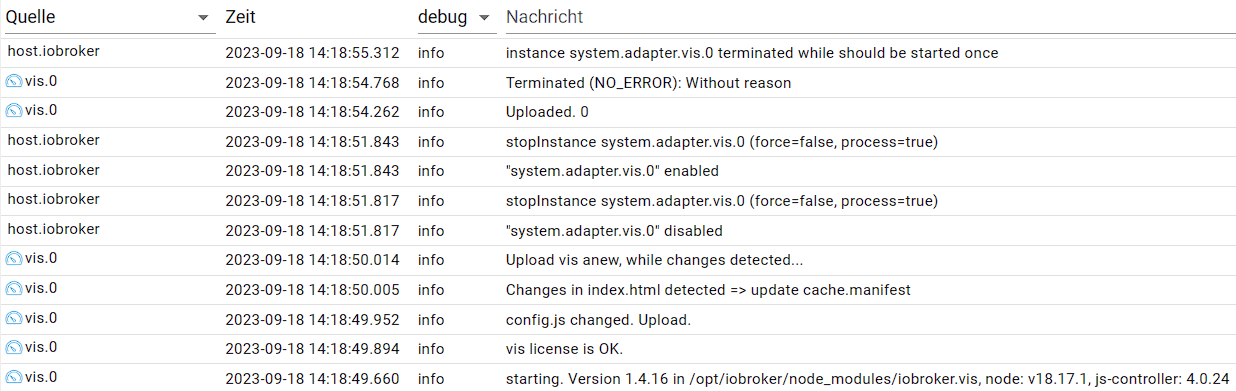
Kann mir hier jemand Hinweise geben was ich noch testen sollte?
-
@thomas-braun sagte in Vis-2(.0) - Neuer Adapter als Beta:
Zufällig gerade geupdated:
Hallo, via Konsole oder per Admin?
Bitte benutzt das Voting rechts unten im Beitrag wenn er euch geholfen hat.
Immer Daten sichern! -
Hallo,
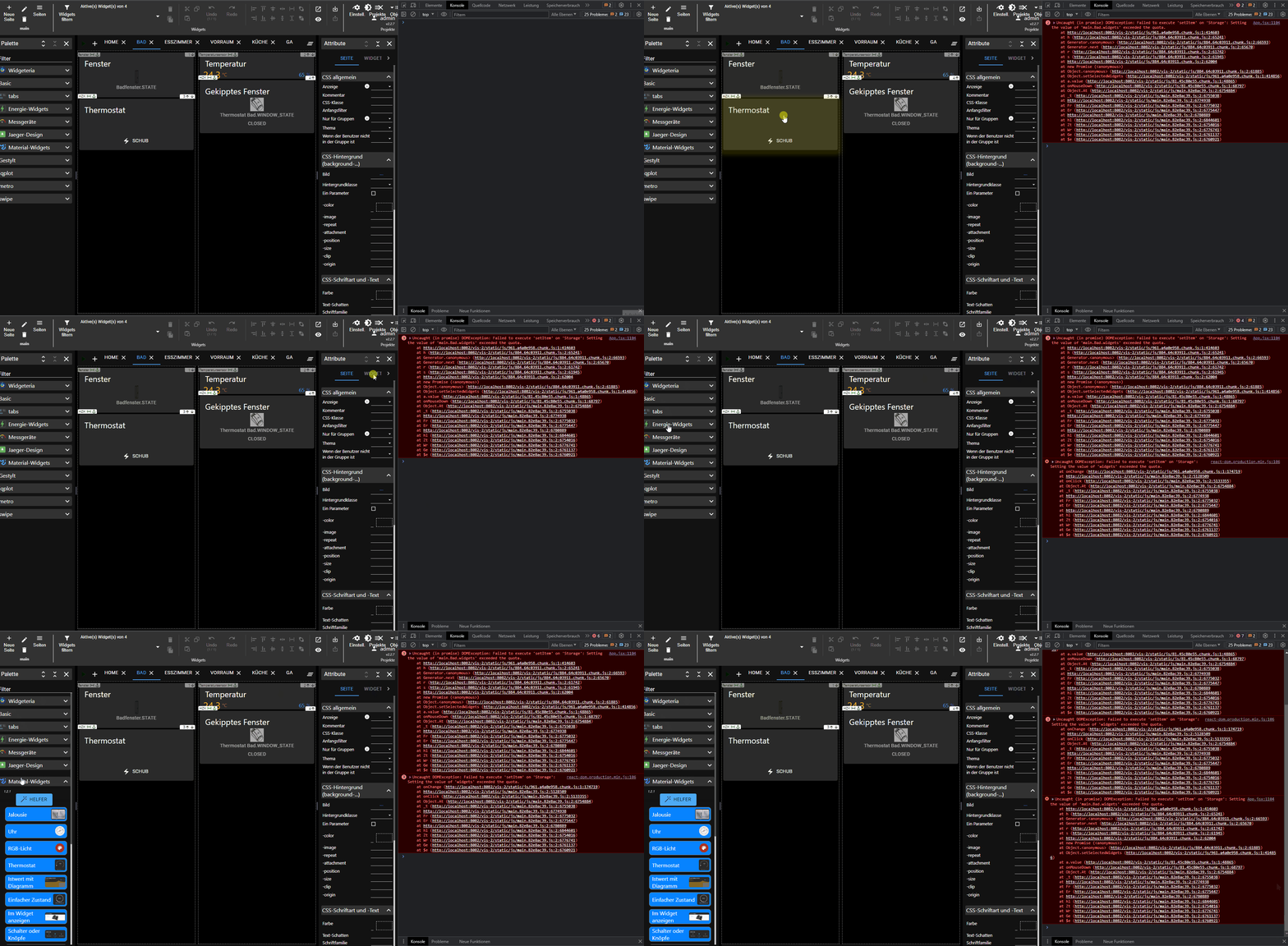
kann keine Widgets auswählen, kommt ein Fehler:
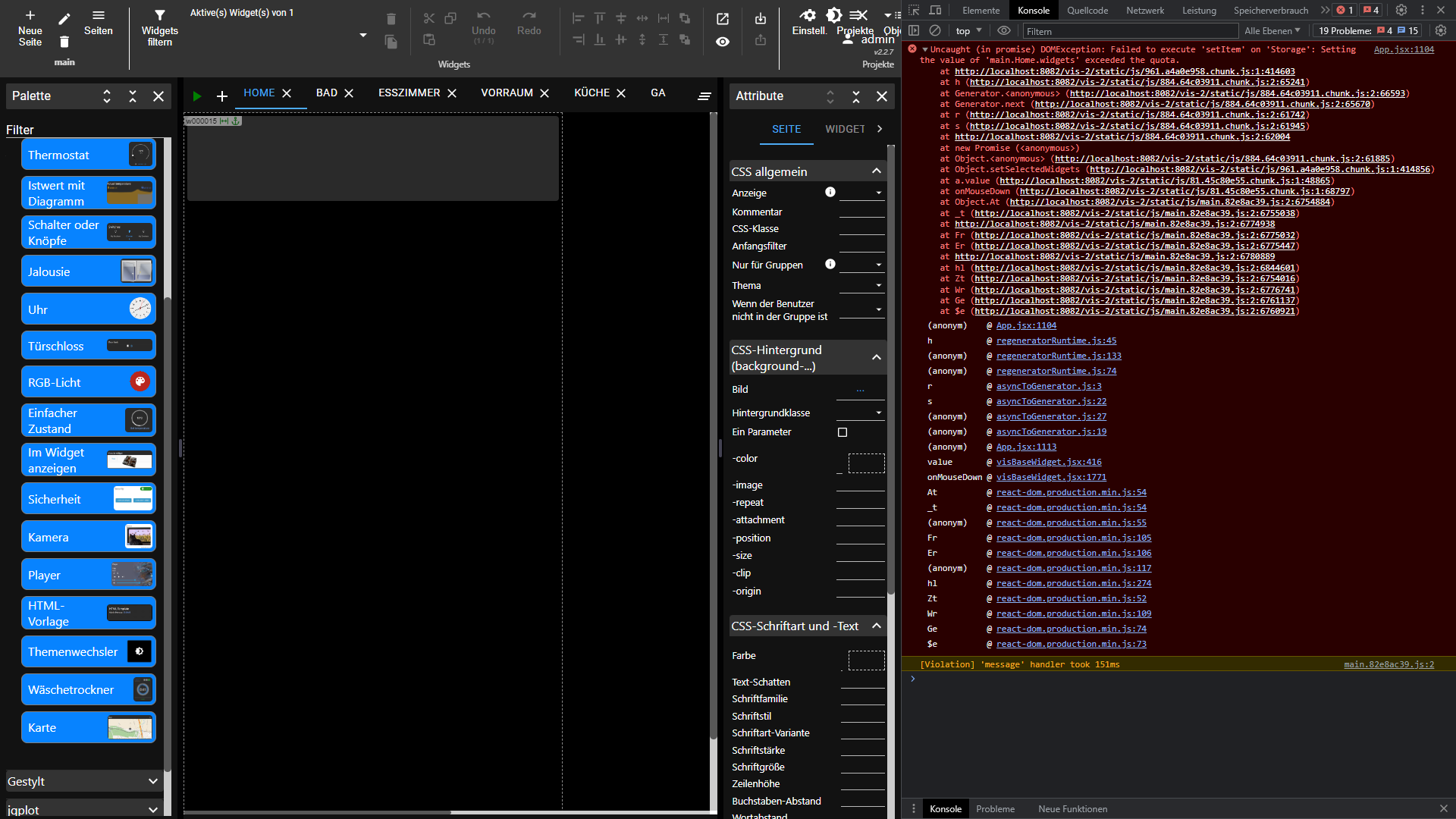
Edit2
-
@thomas-braun sagte in Vis-2(.0) - Neuer Adapter als Beta:
Zufällig gerade geupdated:
Hallo, via Konsole oder per Admin?
@sigi234 sagte in Vis-2(.0) - Neuer Adapter als Beta:
via Konsole
Konsole, natürlich. Wie geht das im Admin? ;-)
Linux-Werkzeugkasten:
https://forum.iobroker.net/topic/42952/der-kleine-iobroker-linux-werkzeugkasten
NodeJS Fixer Skript:
https://forum.iobroker.net/topic/68035/iob-node-fix-skript
iob_diag: curl -sLf -o diag.sh https://iobroker.net/diag.sh && bash diag.sh -
@sigi234 sagte in Vis-2(.0) - Neuer Adapter als Beta:
via Konsole
Konsole, natürlich. Wie geht das im Admin? ;-)
@thomas-braun sagte in Vis-2(.0) - Neuer Adapter als Beta:
@sigi234 sagte in Vis-2(.0) - Neuer Adapter als Beta:
via Konsole
Konsole, natürlich. Wie geht das im Admin? ;-)
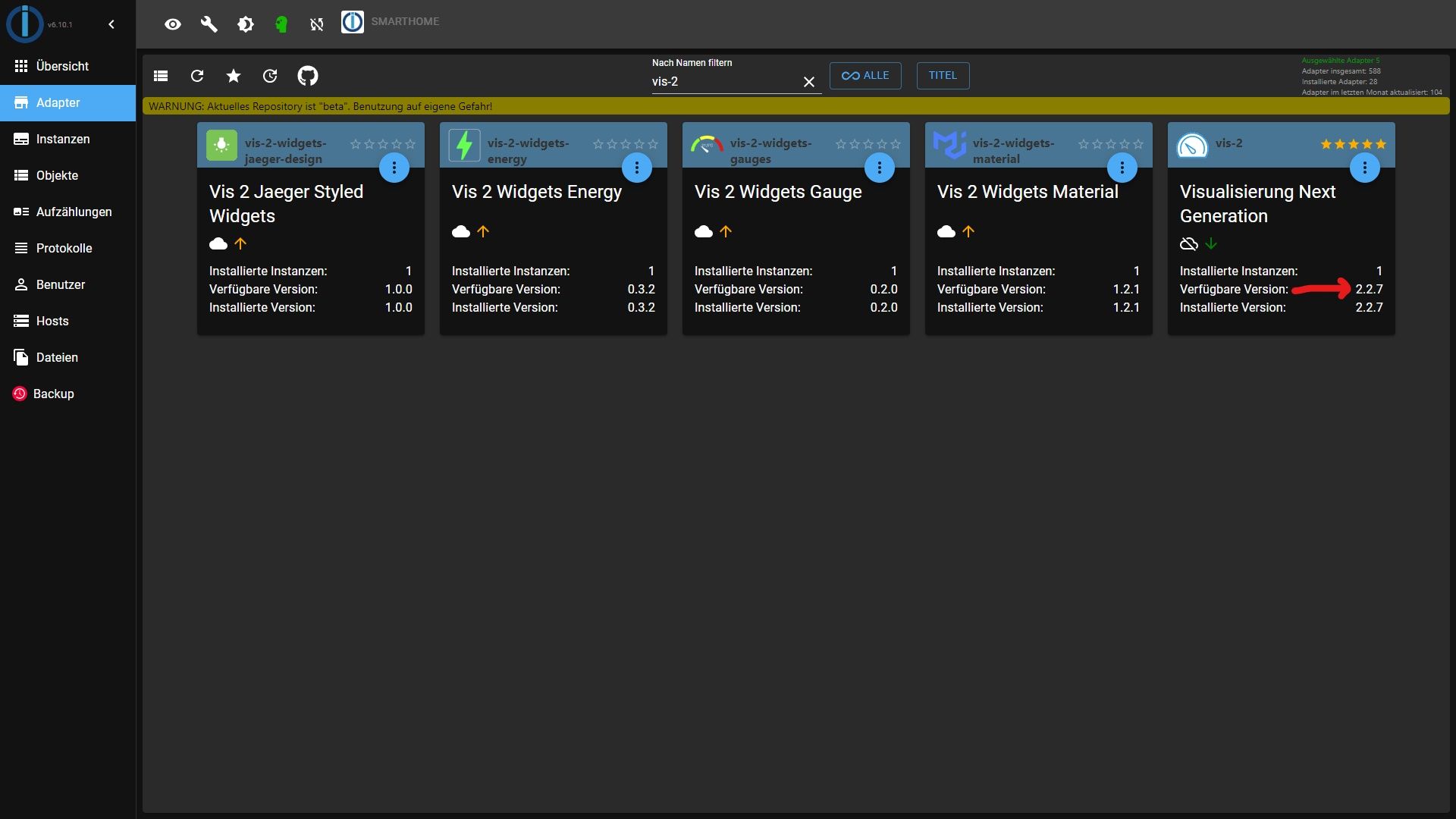
Bitte benutzt das Voting rechts unten im Beitrag wenn er euch geholfen hat.
Immer Daten sichern! -
@thomas-braun sagte in Vis-2(.0) - Neuer Adapter als Beta:
@sigi234 sagte in Vis-2(.0) - Neuer Adapter als Beta:
via Konsole
Konsole, natürlich. Wie geht das im Admin? ;-)
Ah, danke. Ist mir aber zu unübersichtlich. ;-)
-
Hallo liebe Visualisierungsfreunde,
einige von euch haben sich schon einige Zeit mit der Alpha Version von Vis 2.0 beschäftigt, was in den letzten Monaten unter https://forum.iobroker.net/topic/60398/test-adapter-vis-2-0-alpha bereits sehr ausführlich getestet wurde. Vielen Dank, vor allem auch im Namen von Denis, an alle die hier tatkräftig unterstützt haben!
Die Software ist inzwischen aus dem Alpha-Status herausgewachsen weil schon sehr viel geht. Da vis 2.0 allerdings eine komplette Neuentwicklung auf aktuellen Technologien ist, hat sich die Rückwärtskompatibilität also doch nicht so einfach zu lösen herausgestellt. Denis hat einigen Aufwand investiert schon viele der alten Widgets anzupassen. Das wird aber nicht bei allen gehen.
Aus diesem, und auch anderen Gründen, und um die weitere Arbeit nicht weiter aufzuhalten mit Rückwärtskompatibilitäts-Themen, hat Denis die Entscheidung getroffen das vis 2.0 ein NEUER Adapter sein wird namens vis-2. Dies bedeutet das es kein automatisches Update von "vis" zu "vis-2" gibt und so jeder User selbst entscheiden kann was er nutzt. Damit einher geht allerdings auch das vis2 die Visualisierungprojekte von vis importieren kann und auch viel gehen wird, allerdings einige Widgets nicht gehen werden. Hier müsstet Ihr dann Eure Visus umbauen.
Wir denken das es so für alle Beteiligten am Transparentesten und klarsten ist. Auch von der Erwartungshaltung her!In dem Zuge gibt es aber eine Thematik wo Ihr aktiv werden müsst: Stichwort Lizenzen:
Aktuell kann man EINE freie vis-Lizenz haben in einem Account und ggf gekaufte Lizenzen. Dazu können die aktuellen vis(1.0) Lizenzen in vis-2 Lizenzen umgewandelt werden unter https://iobroker.net . Wichtig ist hierbei das dies NICHT wieder zurück zu wandeln geht! Also bitte wandelt um wenn Ihr dann wirklich Eure Vis auf Basis von vis2 "Inbetriebnehmt"! Die "alte" vis (1.0) kann nach einer Umwandlung bis auf weiteres noch für die bestehende vis1.0 Instanz genutzt werden und ist weiterhin gültig.Damit gesagt ist vis-2 als neuer Adapter seit ein paar Tagen im beta Repository und vis2-beta ist nicht mehr verfügbar und bekommt auch keine Updates mehr. Für alle vis2-beta Nutzer werden die vis2beta Projekte in vis-2 beim ersten Start übernommen. Sonst die von vis1.
Dann hier noch ein paar Informationen zu vis-2:
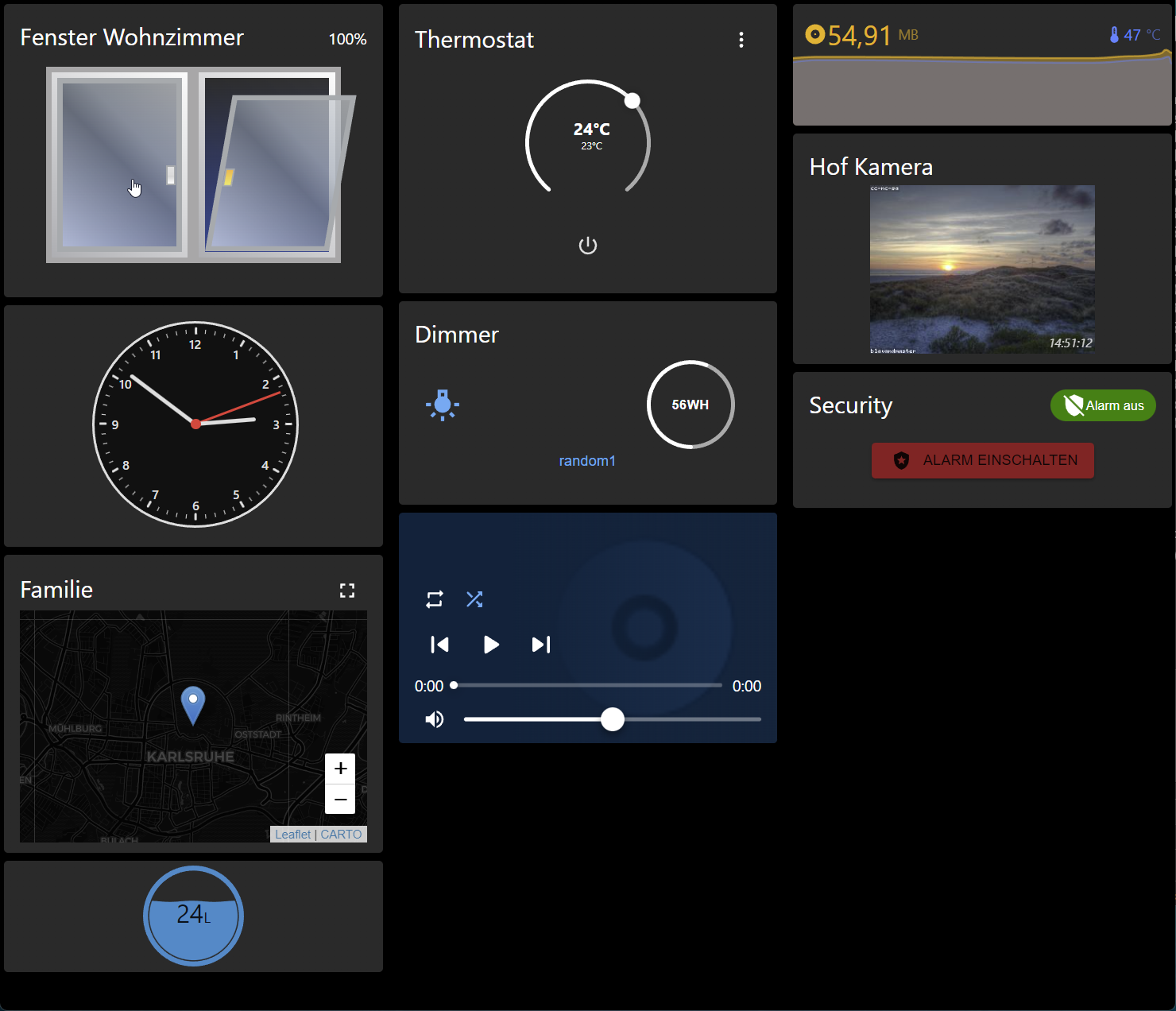
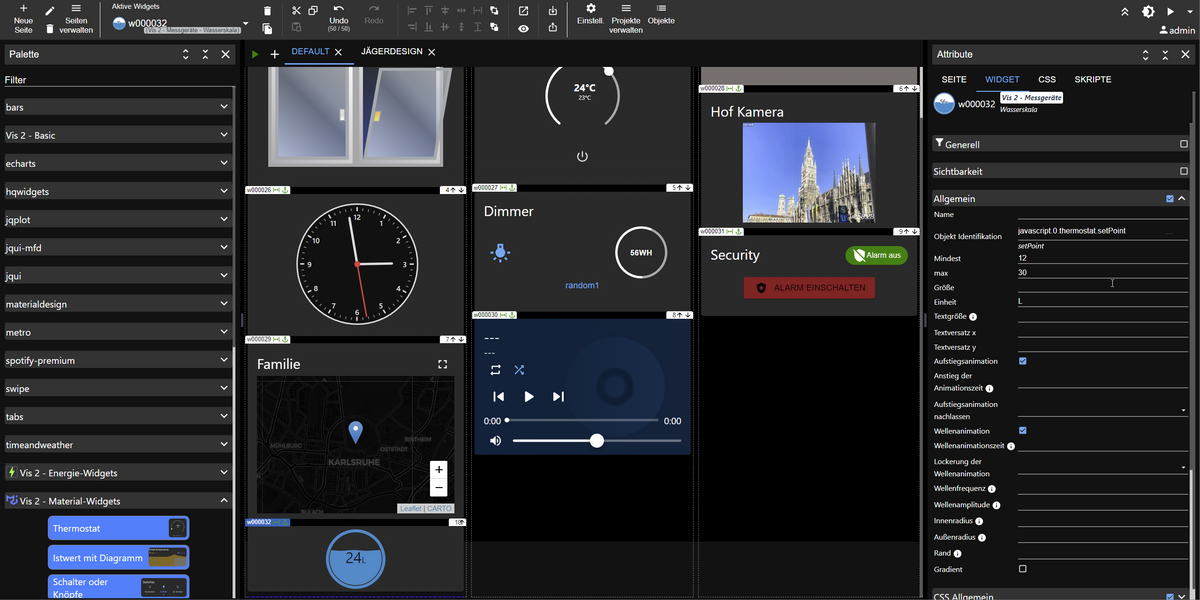
Bilder sagen mehr als 1000 Worte ...
Visu
Editor
Ein Video mit super Bildern, und mehr als 1000 Worten, sagt noch mehr ;-)
@haus-automatisierung hat mal wieder ein Super Video zu Vis2 gemacht, wo man nochmal sehr genau alles vorher sieht und auch einige der Features und Änderungen vorstellt. Vielen Dank dafür!
--> https://m.youtube.com/watch?v=zBFCmcCidhA
Was ist neu?
Um Bluefox zu zitieren: "Es ist einfacher zu sagen was nicht neu ist!" :-)
Vis 2.0 ist zu großen Teilen - vor allem im Editor, aber auch in der sog. "Runtime" (also der Teil der eine Visualisierung dann anzeigt) - neu geschrieben worden. Dabei wurde versucht auch alte Widgets zu unterstützen, es kann aber sehr gut sein das bei diesen Anpassungen nötig sind! Es gibt auch einige neue Widgets, die technisch auch eine ganz andere Basis haben.
Bisher war vis vor allem gut darin auf festen Displaygrößen manuell zusammengestellte Oberflächen mit fest positionierten Elementen zu gestalten. Wer also eine Tablet und eine Mobile Ansicht braucht musste alles doppelt machen.
Mit den neuen Material-basierten Widgets und den neuen Features von Vis ist es ebenso möglich Oberflächen zu erstellen, die sich responsive mit anpassen, wenn die Screengröße geändert wird. Man kann - sofern es Sinn ergibt - immer noch einzelne Elemente Fest positionieren.Denis und Ingo
Hallo, ist diese Anleitung noch relevant für VIS-2 ?
WIE WIRD ES INSTALLIERT?
Für den Alpha Test erfolgt die Installation manuell über die Kommandozeile durch das Installieren von npm Paketen.

Zuerst braucht ihr die aktuellste Beta/Latest Version vom web Adapter!
Darüber hinaus muss aktuell der Adapetr vis-metro installiert sein!

Danach wird vis-2-beta initial über folgende Befehle installiert:

cd /opt/iobroker
npm i iobroker.vis-2-beta
iob add vis-2-beta
Danach taucht vis2 als Neuer Adapter mit einer Instanz in der ioBroker Installation auf.

Die neuen Widget-Pakete bzw. aktualisierte Widgets für Wetter installiert man bei Bedarf über:

cd /opt/iobroker
npm i iobroker.vis-2-widgets-material
iob add vis-2-widgets-material
npm i iobroker.vis-2-widgets-energy
iob add vis-2-widgets-energy
npm i iobroker.vis-2-widgets-gauges
iob add vis-2-widgets-gauges
Bitte benutzt das Voting rechts unten im Beitrag wenn er euch geholfen hat.
Immer Daten sichern! -
Hallo, ist diese Anleitung noch relevant für VIS-2 ?
WIE WIRD ES INSTALLIERT? Für den Alpha Test erfolgt die Installation manuell über die Kommandozeile durch das Installieren von npm Paketen. Zuerst braucht ihr die aktuellste Beta/Latest Version vom web Adapter! Darüber hinaus muss aktuell der Adapetr vis-metro installiert sein! Danach wird vis-2-beta initial über folgende Befehle installiert: cd /opt/iobroker npm i iobroker.vis-2-beta iob add vis-2-beta Danach taucht vis2 als Neuer Adapter mit einer Instanz in der ioBroker Installation auf. Die neuen Widget-Pakete bzw. aktualisierte Widgets für Wetter installiert man bei Bedarf über: cd /opt/iobroker npm i iobroker.vis-2-widgets-material iob add vis-2-widgets-material npm i iobroker.vis-2-widgets-energy iob add vis-2-widgets-energy npm i iobroker.vis-2-widgets-gauges iob add vis-2-widgets-gaugesNein. vis2 wird ganz normal über das Beta-Repo reingezogen.
-
Wenn ich mit "Gruppe bearbeiten" eine Gruppe öffne und dort versuche ein Widget zu löschen fliege ich raus (weißer Bildschirm). Das Problem tritt auch in einem zuvor neu erzeugten Projekt mit 2 Widgets auf. Kennt das Verhalten jemand?
TypeError: n is undefined
    value visView.jsx:1371
    value visView.jsx:1363
    React 14
    t App.jsx:1104
    Babel 7
    setSelectedWidgets App.jsx:1111
    t App.jsx:519
    Babel 7
    onClose App.jsx:1751
    value Confirm.js:78
    onClick Confirm.js:120
    React 11
    sentryWrapped helpers.ts:87
instrument.ts:144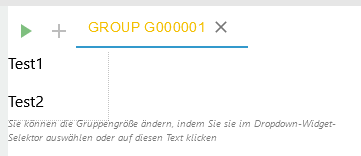






Hey! Du scheinst an dieser Unterhaltung interessiert zu sein, hast aber noch kein Konto.
Hast du es satt, bei jedem Besuch durch die gleichen Beiträge zu scrollen? Wenn du dich für ein Konto anmeldest, kommst du immer genau dorthin zurück, wo du zuvor warst, und kannst dich über neue Antworten benachrichtigen lassen (entweder per E-Mail oder Push-Benachrichtigung). Du kannst auch Lesezeichen speichern und Beiträge positiv bewerten, um anderen Community-Mitgliedern deine Wertschätzung zu zeigen.
Mit deinem Input könnte dieser Beitrag noch besser werden 💗
Registrieren Anmelden240
Online33.0k
Benutzende83.7k
Themen1.3m
Beiträge