
NEWS




Adapter: ebus

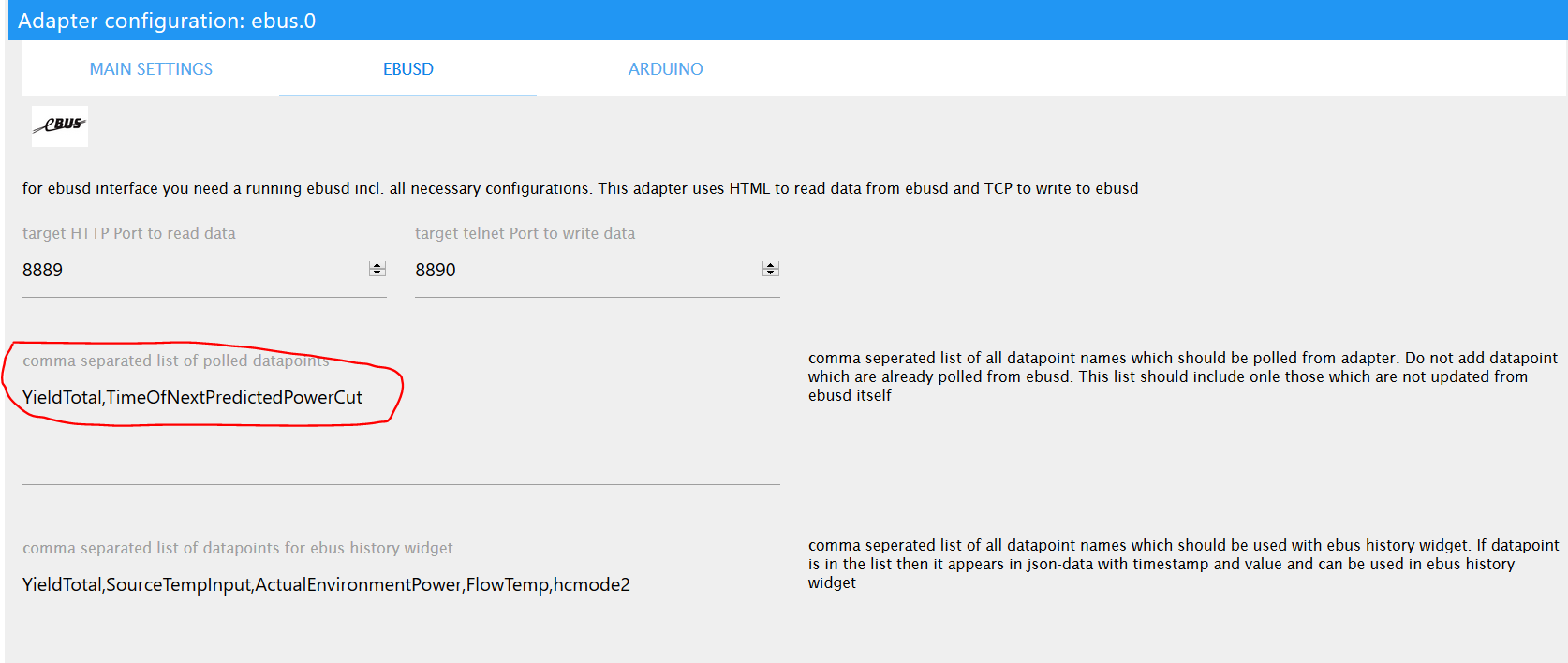
-
iobroker url https://github.com/rg-engineering/ioBroker.ebus -
@thomas-braun
Danke dir aber so komme ich auch nur auf den Master 2.2.3
Rene hat mir aber irgendwo eine 2.2.4 eingestellt und die kann ich leider nicht finden. -
@hasont Im master-branch liegt aber 2.2.4, sieht man auch in der readme. Den tag V2.2.4 habe ich noch nicht gesetzt, die URL von @Thomas-Braun von oben ist also richtig.
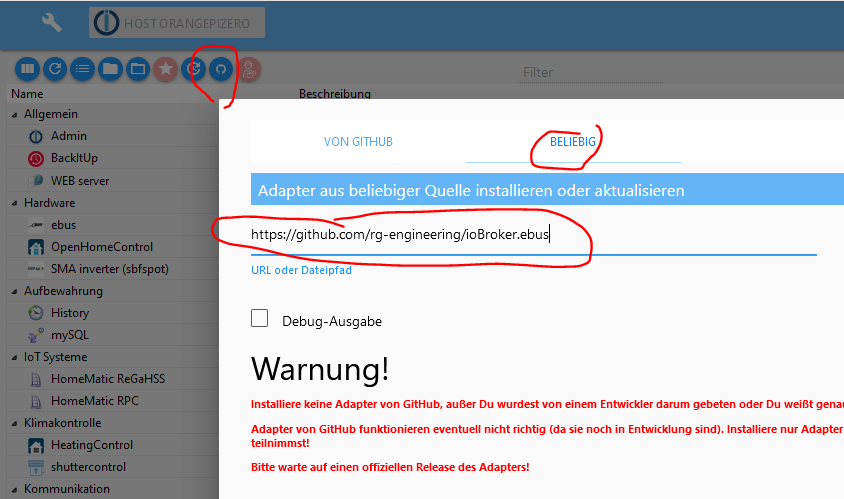
und ja, die Installation überschreibt die 2.2.3
@rene_hm
Hallo Rene,
das hatte ich so schon probiert.
Hab jetzt Raspie reboot gemacht und nach dem das auch nicht geholfen hat habe ich die Histoty aus den Daten gelöscht.
Und siehe da nach der Neuanlage passt es jetzt.
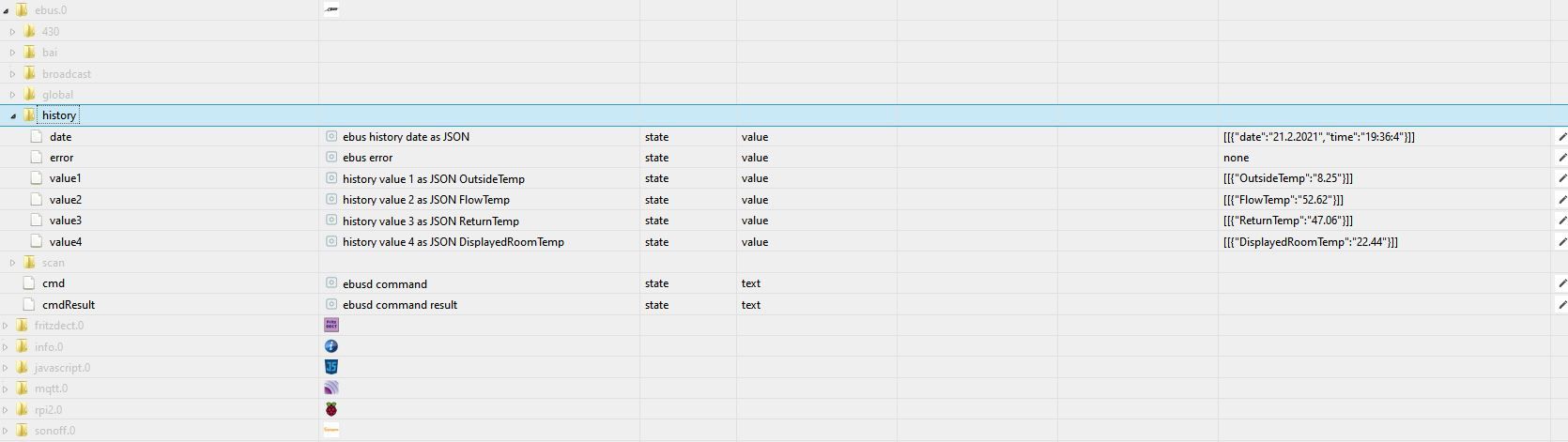
Vielen Dank du bist ein Schatz!!!Nachtrag 22.02:
Hast du ev. noch einen Tip warum er nur ab und zu mal die X-Achse anzeigt.
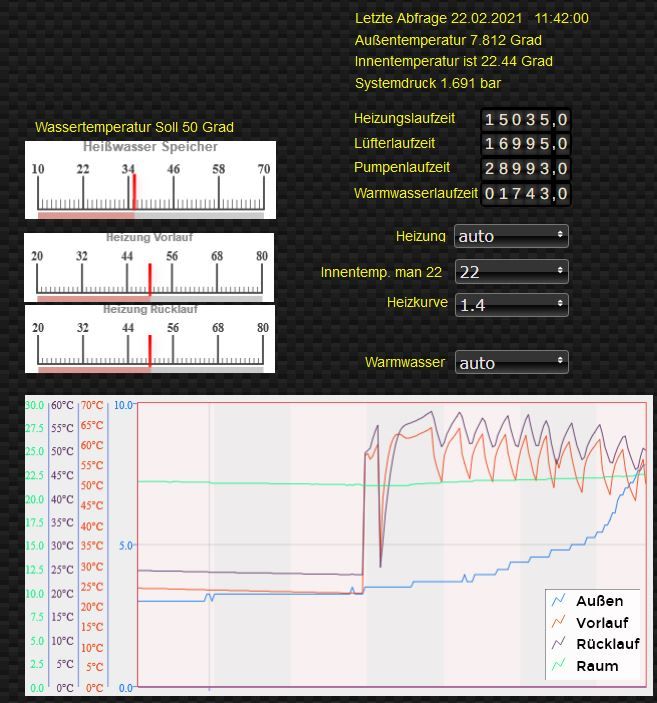
Selten kommt hier mal eine Uhrzeit meist aber gar nichts. Zoomen bringt auch nix.
Ist aber nicht weiter dramatisch.LG
Horst -
@rene_hm
Hallo Rene,
das hatte ich so schon probiert.
Hab jetzt Raspie reboot gemacht und nach dem das auch nicht geholfen hat habe ich die Histoty aus den Daten gelöscht.
Und siehe da nach der Neuanlage passt es jetzt.
Vielen Dank du bist ein Schatz!!!Nachtrag 22.02:
Hast du ev. noch einen Tip warum er nur ab und zu mal die X-Achse anzeigt.
Selten kommt hier mal eine Uhrzeit meist aber gar nichts. Zoomen bringt auch nix.
Ist aber nicht weiter dramatisch.LG
Horst@hasont sagte in Adapter: ebus:
Hast du ev. noch einen Tip warum er nur ab und zu mal die X-Achse anzeigt.
Bisher gab es nur hin und wieder mal eine Meldung, dass die X-Achse gar nicht angezeigt wird. Aber sporadisch anzeigen und dann wieder nicht kenne ich noch nicht...
Schau dir mal das log in der Konsole des browsers an, evtl. siehst du da etwas, oder poste das log als Text hier... -
Hallo!
Habe den ebusd bei mir auch installiert, komme aber absolut nicht mehr weiter.Es ist egal ob die config lokal oder im internet liegt - ich bekomme keine Daten ausgelesen. Ich nutze einen Raspi 3 inkl. dem esera USB Adapter. Dieser wird auch gefunden auf /dev/ttyUSB0
Wenn ich nun mir die Konfig aufrufe, dann wird keine Heizung (habe eine Vaillant geoTherm) gefunden. Das Ding ist - es hat schon funktioniert :(
root@raspberrypi:/# ebusctl info
version: ebusd 21.2.v21.2
signal: acquired
symbol rate: 73
max symbol rate: 120
reconnects: 0
masters: 3
messages: 16
conditional: 0
poll: 0
update: 4
address 03: master #11
address 08: slave #11
address 10: master #2
address 23: slave
address 25: slave
address 31: master #8, ebusd
address 36: slave #8, ebusd
address 50: slave
Ich finde den Fehler nicht und weiss gerade echt nicht weiter.
Meine Konfig aktuell:
EBUSD_OPTS="-d /dev/ttyUSB0 -p 8888 -l /var/log/ebusd.log --httpport=8889 --accesslevel=* --scanconfig=full --configpath=/home/pi/ebusd-configuration/ebusd-2.1.x/de"
-
Hallo!
Habe den ebusd bei mir auch installiert, komme aber absolut nicht mehr weiter.Es ist egal ob die config lokal oder im internet liegt - ich bekomme keine Daten ausgelesen. Ich nutze einen Raspi 3 inkl. dem esera USB Adapter. Dieser wird auch gefunden auf /dev/ttyUSB0
Wenn ich nun mir die Konfig aufrufe, dann wird keine Heizung (habe eine Vaillant geoTherm) gefunden. Das Ding ist - es hat schon funktioniert :(
root@raspberrypi:/# ebusctl info
version: ebusd 21.2.v21.2
signal: acquired
symbol rate: 73
max symbol rate: 120
reconnects: 0
masters: 3
messages: 16
conditional: 0
poll: 0
update: 4
address 03: master #11
address 08: slave #11
address 10: master #2
address 23: slave
address 25: slave
address 31: master #8, ebusd
address 36: slave #8, ebusd
address 50: slave
Ich finde den Fehler nicht und weiss gerade echt nicht weiter.
Meine Konfig aktuell:
EBUSD_OPTS="-d /dev/ttyUSB0 -p 8888 -l /var/log/ebusd.log --httpport=8889 --accesslevel=* --scanconfig=full --configpath=/home/pi/ebusd-configuration/ebusd-2.1.x/de"
@maxpower-0 sagte in Adapter: ebus:
Ich finde den Fehler nicht
Hier der erste Fehler:
root@raspberrypi -
Danke für die schnelle Antwort. Ändert nur leider nichts.
pi@raspberrypi:~ $ ebusctl info
version: ebusd 21.2.v21.2
access: *
signal: acquired
symbol rate: 85
max symbol rate: 115
reconnects: 0
masters: 3
messages: 16
conditional: 0
poll: 0
update: 4
address 03: master #11
address 08: slave #11
address 10: master #2
address 23: slave
address 25: slave
address 31: master #8, ebusd
address 36: slave #8, ebusd
address 50: slave
Und hier das log:
2021-05-04 10:46:31.139 [main notice] ebusd 21.2.v21.2 started with full scan on device /dev/ttyUSB0 2021-05-04 10:46:31.268 [bus notice] bus started with own address 31/36 2021-05-04 10:46:31.269 [bus notice] signal acquired 2021-05-04 10:46:32.125 [bus notice] new master 10, master count 2 2021-05-04 10:46:32.142 [update notice] received unknown MS cmd: 1050b505042d000000 / 00 2021-05-04 10:46:34.813 [update notice] received unknown BC cmd: 10feb5050427002c00 2021-05-04 10:46:35.000 [update notice] received unknown MS cmd: 1050b5040100 / 0a03494611040502214009 2021-05-04 10:46:36.183 [update notice] received unknown MS cmd: 1050b505072b000100000000 / 00 2021-05-04 10:46:36.461 [bus notice] new master 03, master count 3 2021-05-04 10:46:36.461 [update notice] received unknown MS cmd: 1008b5110103 / 0ac4028609b40503080000 2021-05-04 10:46:36.628 [update notice] received unknown MS cmd: 1008b5110102 / 050000c800c8 2021-05-04 10:46:39.572 [update notice] received unknown MS cmd: 1008b509040ed10001 / 00 2021-05-04 10:46:40.163 [update notice] received unknown MS cmd: 1025b5040101 / 092d0300000003000100 2021-05-04 10:46:40.329 [update notice] received unknown MS cmd: 1025b504010d / 050000c4022d 2021-05-04 10:46:41.269 [main notice] starting initial full scan 2021-05-04 10:46:44.150 [update notice] received unknown BC cmd: 10feb5050427002c00 2021-05-04 10:46:46.164 [update notice] received unknown MS cmd: 1025b505072b000100000000 / 00 2021-05-04 10:46:46.535 [update notice] received unknown MS cmd: 1008b5110103 / 0ac6028609b40503080000 2021-05-04 10:46:46.700 [update notice] received unknown MS cmd: 1008b5110102 / 050000c800c8 2021-05-04 10:46:48.255 [update notice] received unknown MS cmd: 1008b5090329d300 / 05d300636363 2021-05-04 10:46:48.714 [update notice] received unknown MS cmd: 1008b509040ed10001 / 00 2021-05-04 10:46:50.156 [update notice] received unknown MS cmd: 1025b509040ef40000 / 00 2021-05-04 10:46:50.566 [update notice] received unknown MS cmd: 1023b5040101 / 091e0300000006000000 2021-05-04 10:46:50.731 [update notice] received unknown MS cmd: 1023b504010d / 050000008000 2021-05-04 10:46:50.905 [update notice] received unknown MS cmd: 1008b50903290f00 / 050f00a20100 2021-05-04 10:46:51.071 [update notice] received unknown MS cmd: 1008b5090329bb00 / 03bb0000 2021-05-04 10:46:51.239 [update notice] received unknown MS cmd: 1008b5090329ba00 / 03ba0000 2021-05-04 10:47:06.252 [update notice] received unknown MS cmd: 1008b50903290300 / 050300af0200 2021-05-04 10:47:07.632 [update notice] received unknown BC cmd: 10feb5050427002c00 2021-05-04 10:47:08.113 [update notice] received unknown BC cmd: 10feb516080001471104050221 2021-05-04 10:47:08.570 [update notice] received unknown BC cmd: 10feb51603014009 2021-05-04 10:47:09.101 [update notice] received update-read broadcast datetime QQ=10: 9.250;11:47:01;04.05.2021 2021-05-04 10:47:10.100 [update notice] received unknown MS cmd: 1023b505072b000100000000 / 00 2021-05-04 10:47:10.748 [update notice] received unknown MS cmd: 1008b5110103 / 0ac9028609b40503080000 2021-05-04 10:47:10.847 [main error] scan config 08: ERR: arbitration lost 2021-05-04 10:47:10.912 [update notice] received unknown MS cmd: 1008b5110102 / 050000c800c8 -
Danke für die schnelle Antwort. Ändert nur leider nichts.
pi@raspberrypi:~ $ ebusctl info
version: ebusd 21.2.v21.2
access: *
signal: acquired
symbol rate: 85
max symbol rate: 115
reconnects: 0
masters: 3
messages: 16
conditional: 0
poll: 0
update: 4
address 03: master #11
address 08: slave #11
address 10: master #2
address 23: slave
address 25: slave
address 31: master #8, ebusd
address 36: slave #8, ebusd
address 50: slave
Und hier das log:
2021-05-04 10:46:31.139 [main notice] ebusd 21.2.v21.2 started with full scan on device /dev/ttyUSB0 2021-05-04 10:46:31.268 [bus notice] bus started with own address 31/36 2021-05-04 10:46:31.269 [bus notice] signal acquired 2021-05-04 10:46:32.125 [bus notice] new master 10, master count 2 2021-05-04 10:46:32.142 [update notice] received unknown MS cmd: 1050b505042d000000 / 00 2021-05-04 10:46:34.813 [update notice] received unknown BC cmd: 10feb5050427002c00 2021-05-04 10:46:35.000 [update notice] received unknown MS cmd: 1050b5040100 / 0a03494611040502214009 2021-05-04 10:46:36.183 [update notice] received unknown MS cmd: 1050b505072b000100000000 / 00 2021-05-04 10:46:36.461 [bus notice] new master 03, master count 3 2021-05-04 10:46:36.461 [update notice] received unknown MS cmd: 1008b5110103 / 0ac4028609b40503080000 2021-05-04 10:46:36.628 [update notice] received unknown MS cmd: 1008b5110102 / 050000c800c8 2021-05-04 10:46:39.572 [update notice] received unknown MS cmd: 1008b509040ed10001 / 00 2021-05-04 10:46:40.163 [update notice] received unknown MS cmd: 1025b5040101 / 092d0300000003000100 2021-05-04 10:46:40.329 [update notice] received unknown MS cmd: 1025b504010d / 050000c4022d 2021-05-04 10:46:41.269 [main notice] starting initial full scan 2021-05-04 10:46:44.150 [update notice] received unknown BC cmd: 10feb5050427002c00 2021-05-04 10:46:46.164 [update notice] received unknown MS cmd: 1025b505072b000100000000 / 00 2021-05-04 10:46:46.535 [update notice] received unknown MS cmd: 1008b5110103 / 0ac6028609b40503080000 2021-05-04 10:46:46.700 [update notice] received unknown MS cmd: 1008b5110102 / 050000c800c8 2021-05-04 10:46:48.255 [update notice] received unknown MS cmd: 1008b5090329d300 / 05d300636363 2021-05-04 10:46:48.714 [update notice] received unknown MS cmd: 1008b509040ed10001 / 00 2021-05-04 10:46:50.156 [update notice] received unknown MS cmd: 1025b509040ef40000 / 00 2021-05-04 10:46:50.566 [update notice] received unknown MS cmd: 1023b5040101 / 091e0300000006000000 2021-05-04 10:46:50.731 [update notice] received unknown MS cmd: 1023b504010d / 050000008000 2021-05-04 10:46:50.905 [update notice] received unknown MS cmd: 1008b50903290f00 / 050f00a20100 2021-05-04 10:46:51.071 [update notice] received unknown MS cmd: 1008b5090329bb00 / 03bb0000 2021-05-04 10:46:51.239 [update notice] received unknown MS cmd: 1008b5090329ba00 / 03ba0000 2021-05-04 10:47:06.252 [update notice] received unknown MS cmd: 1008b50903290300 / 050300af0200 2021-05-04 10:47:07.632 [update notice] received unknown BC cmd: 10feb5050427002c00 2021-05-04 10:47:08.113 [update notice] received unknown BC cmd: 10feb516080001471104050221 2021-05-04 10:47:08.570 [update notice] received unknown BC cmd: 10feb51603014009 2021-05-04 10:47:09.101 [update notice] received update-read broadcast datetime QQ=10: 9.250;11:47:01;04.05.2021 2021-05-04 10:47:10.100 [update notice] received unknown MS cmd: 1023b505072b000100000000 / 00 2021-05-04 10:47:10.748 [update notice] received unknown MS cmd: 1008b5110103 / 0ac9028609b40503080000 2021-05-04 10:47:10.847 [main error] scan config 08: ERR: arbitration lost 2021-05-04 10:47:10.912 [update notice] received unknown MS cmd: 1008b5110102 / 050000c800c8Versuchs mal mit --latency=30000 --receivetimeout=80000 und lass den configpath weg
Den Esera USB Adapter hatte ich auch, funktionierte nur mit latency bei mir.
-
Danke für Deine Antwort - das hat leider am Ergebnis nichts verändert
-
Danke für Deine Antwort - das hat leider am Ergebnis nichts verändert
@maxpower-0
"arbitration lost" ist ein Timing Problem, also du solltest ggf. die latency erhöhen. Musst dich halt ein bisschen spielen damit...Ich hatte ein ähnliches Problem, musste ein paar Mal die Heizung bzw. den Adapter vom Strom nehmen, bis eine Config geladen wurde.
Hab mir dann aber einen anderen Adapter gekauft, der funktioniert um Vieles besser.
https://forum.fhem.de/index.php/topic,114988.0.html?PHPSESSID=tk16kvmfhcgekkmv07htjmduuu -
@maxpower-0
"arbitration lost" ist ein Timing Problem, also du solltest ggf. die latency erhöhen. Musst dich halt ein bisschen spielen damit...Ich hatte ein ähnliches Problem, musste ein paar Mal die Heizung bzw. den Adapter vom Strom nehmen, bis eine Config geladen wurde.
Hab mir dann aber einen anderen Adapter gekauft, der funktioniert um Vieles besser.
https://forum.fhem.de/index.php/topic,114988.0.html?PHPSESSID=tk16kvmfhcgekkmv07htjmduuu@massiveattack said in Adapter: ebus:
@maxpower-0
"musste ein paar Mal die Heizung bzw. den Adapter vom Strom nehmen, bis eine Config geladen wurde."DANKE
Das war es - hab heute morgen die Heizung neu gestartet und schon klappte alles. Darauf hätte ich auch früher kommen können. DANKE!
-
Hallo zusammen,
ich bin neu in diesem Thema und dies ist auch mein erster Post, bisher konnte ich alles lösen dank diesem Forum allerdings komme ich jetzt nicht weiter. Versuche seit 1,5Wochen den Ebus Adapter von Esera ans laufen zu bekommen.
Meine Anlage:
Therme - VC266/5-5
VMS 8 - Solarstation
VRC 700/6 Multimaticmeine aktuelle config:
EBUSD_OPTS="-d /dev/ttyUSB0 -p 8888 --latency=10000 --receivetimeout=100000 -l /var/log/ebusd.log --configpath=/etc/ebusd --scanconfig=full --httpport=8889 --htmlpath=/var/ebusd/html"Ausgabe status:
root@raspberrypi:/home/pi# service ebusd status
● ebusd.service - LSB: controls ebusd, the daemon for communication with eBUS heating systems.
   Loaded: loaded (/etc/init.d/ebusd; generated)
   Active: active (running) since Fri 2021-07-02 15:09:31 CEST; 23min ago
     Docs: man:systemd-sysv-generator(8)
  Process: 4395 ExecStart=/etc/init.d/ebusd start (code=exited, status=0/SUCCESS)
    Tasks: 4 (limit: 4915)
   CGroup: /system.slice/ebusd.service
           └─4402 /usr/bin/ebusd --pidfile /var/run/ebusd.pid -d /dev/ttyUSB0 -p 8888 --latency=10000 --receivetimeout=100000 -l /var/log/ebusd.log --configpath=/etc/ebusd --scanconfig=ful

Jul 02 15:09:31 raspberrypi systemd[1]: Starting LSB: controls ebusd, the daemon for communication with eBUS heating systems....
Jul 02 15:09:31 raspberrypi ebusd[4395]: Starting ebusd: ebusd.
Jul 02 15:09:31 raspberrypi systemd[1]: Started LSB: controls ebusd, the daemon for communication with eBUS heating systems..
Ausgabe info:
root@raspberrypi:/home/pi# ebusctl i
version: ebusd 21.2.v21.2
signal: acquired
symbol rate: 38
max symbol rate: 150
min arbitration micros: 622
max arbitration micros: 3982
min symbol latency: 2
max symbol latency: 11
reconnects: 0
masters: 3
messages: 214
conditional: 3
poll: 0
update: 10
address 03: master #11
address 08: slave #11, scanned "MF=Vaillant;ID=BAI00;SW=0104;HW=7803", loaded "vaillant/bai.308523.inc", "vaillant/08.bai.csv"
address 10: master #2
address 15: slave #2, scanned "MF=Vaillant;ID=70000;SW=0613;HW=6903"
address 31: master #8, ebusd
address 36: slave #8, ebusd
address ed: slave, scanned "MF=Vaillant;ID=VMS02;SW=0108;HW=1703"
ich weis nicht wieso er die csv für die Geräte "ID=7000" und "ID=VMS02" nicht lädt. Hoffe es kann mir jemand helfen, habe das forum gefühlt 100 mal durchgelesen.
-
Hallo zusammen,
ich bin neu in diesem Thema und dies ist auch mein erster Post, bisher konnte ich alles lösen dank diesem Forum allerdings komme ich jetzt nicht weiter. Versuche seit 1,5Wochen den Ebus Adapter von Esera ans laufen zu bekommen.
Meine Anlage:
Therme - VC266/5-5
VMS 8 - Solarstation
VRC 700/6 Multimaticmeine aktuelle config:
EBUSD_OPTS="-d /dev/ttyUSB0 -p 8888 --latency=10000 --receivetimeout=100000 -l /var/log/ebusd.log --configpath=/etc/ebusd --scanconfig=full --httpport=8889 --htmlpath=/var/ebusd/html"Ausgabe status:
root@raspberrypi:/home/pi# service ebusd status
● ebusd.service - LSB: controls ebusd, the daemon for communication with eBUS heating systems.
   Loaded: loaded (/etc/init.d/ebusd; generated)
   Active: active (running) since Fri 2021-07-02 15:09:31 CEST; 23min ago
     Docs: man:systemd-sysv-generator(8)
  Process: 4395 ExecStart=/etc/init.d/ebusd start (code=exited, status=0/SUCCESS)
    Tasks: 4 (limit: 4915)
   CGroup: /system.slice/ebusd.service
           └─4402 /usr/bin/ebusd --pidfile /var/run/ebusd.pid -d /dev/ttyUSB0 -p 8888 --latency=10000 --receivetimeout=100000 -l /var/log/ebusd.log --configpath=/etc/ebusd --scanconfig=ful

Jul 02 15:09:31 raspberrypi systemd[1]: Starting LSB: controls ebusd, the daemon for communication with eBUS heating systems....
Jul 02 15:09:31 raspberrypi ebusd[4395]: Starting ebusd: ebusd.
Jul 02 15:09:31 raspberrypi systemd[1]: Started LSB: controls ebusd, the daemon for communication with eBUS heating systems..
Ausgabe info:
root@raspberrypi:/home/pi# ebusctl i
version: ebusd 21.2.v21.2
signal: acquired
symbol rate: 38
max symbol rate: 150
min arbitration micros: 622
max arbitration micros: 3982
min symbol latency: 2
max symbol latency: 11
reconnects: 0
masters: 3
messages: 214
conditional: 3
poll: 0
update: 10
address 03: master #11
address 08: slave #11, scanned "MF=Vaillant;ID=BAI00;SW=0104;HW=7803", loaded "vaillant/bai.308523.inc", "vaillant/08.bai.csv"
address 10: master #2
address 15: slave #2, scanned "MF=Vaillant;ID=70000;SW=0613;HW=6903"
address 31: master #8, ebusd
address 36: slave #8, ebusd
address ed: slave, scanned "MF=Vaillant;ID=VMS02;SW=0108;HW=1703"
ich weis nicht wieso er die csv für die Geräte "ID=7000" und "ID=VMS02" nicht lädt. Hoffe es kann mir jemand helfen, habe das forum gefühlt 100 mal durchgelesen.
@pairo sagte in Adapter: ebus:
ich weis nicht wieso er die csv für die Geräte "ID=7000" und "ID=VMS02" nicht lädt.
Weiß ich auch nicht. Aber ich weiß dass man sich nicht als root anmeldet.
-
Grundsätzlich meldet man sich nicht als root an.
-
Grundsätzlich meldet man sich nicht als root an.
-
Hallo zusammen,
ich bin neu in diesem Thema und dies ist auch mein erster Post, bisher konnte ich alles lösen dank diesem Forum allerdings komme ich jetzt nicht weiter. Versuche seit 1,5Wochen den Ebus Adapter von Esera ans laufen zu bekommen.
Meine Anlage:
Therme - VC266/5-5
VMS 8 - Solarstation
VRC 700/6 Multimaticmeine aktuelle config:
EBUSD_OPTS="-d /dev/ttyUSB0 -p 8888 --latency=10000 --receivetimeout=100000 -l /var/log/ebusd.log --configpath=/etc/ebusd --scanconfig=full --httpport=8889 --htmlpath=/var/ebusd/html"Ausgabe status:
root@raspberrypi:/home/pi# service ebusd status
● ebusd.service - LSB: controls ebusd, the daemon for communication with eBUS heating systems.
   Loaded: loaded (/etc/init.d/ebusd; generated)
   Active: active (running) since Fri 2021-07-02 15:09:31 CEST; 23min ago
     Docs: man:systemd-sysv-generator(8)
  Process: 4395 ExecStart=/etc/init.d/ebusd start (code=exited, status=0/SUCCESS)
    Tasks: 4 (limit: 4915)
   CGroup: /system.slice/ebusd.service
           └─4402 /usr/bin/ebusd --pidfile /var/run/ebusd.pid -d /dev/ttyUSB0 -p 8888 --latency=10000 --receivetimeout=100000 -l /var/log/ebusd.log --configpath=/etc/ebusd --scanconfig=ful

Jul 02 15:09:31 raspberrypi systemd[1]: Starting LSB: controls ebusd, the daemon for communication with eBUS heating systems....
Jul 02 15:09:31 raspberrypi ebusd[4395]: Starting ebusd: ebusd.
Jul 02 15:09:31 raspberrypi systemd[1]: Started LSB: controls ebusd, the daemon for communication with eBUS heating systems..
Ausgabe info:
root@raspberrypi:/home/pi# ebusctl i
version: ebusd 21.2.v21.2
signal: acquired
symbol rate: 38
max symbol rate: 150
min arbitration micros: 622
max arbitration micros: 3982
min symbol latency: 2
max symbol latency: 11
reconnects: 0
masters: 3
messages: 214
conditional: 3
poll: 0
update: 10
address 03: master #11
address 08: slave #11, scanned "MF=Vaillant;ID=BAI00;SW=0104;HW=7803", loaded "vaillant/bai.308523.inc", "vaillant/08.bai.csv"
address 10: master #2
address 15: slave #2, scanned "MF=Vaillant;ID=70000;SW=0613;HW=6903"
address 31: master #8, ebusd
address 36: slave #8, ebusd
address ed: slave, scanned "MF=Vaillant;ID=VMS02;SW=0108;HW=1703"
ich weis nicht wieso er die csv für die Geräte "ID=7000" und "ID=VMS02" nicht lädt. Hoffe es kann mir jemand helfen, habe das forum gefühlt 100 mal durchgelesen.
@pairo sagte in Adapter: ebus:
--configpath=/etc/ebusd
Versuche mal Online die Daten zu holen .
EBUSD_OPTS="-d /dev/ttyUSB0 -p 8888 --latency=10000 --receivetimeout=100000 -l /var/log/ebusd.log --configpath=http://ebusd.eu/config/ --scanconfig=full --httpport=8889 --htmlpath=/var/ebusd/html" -
@pairo sagte in Adapter: ebus:
--configpath=/etc/ebusd
Versuche mal Online die Daten zu holen .
EBUSD_OPTS="-d /dev/ttyUSB0 -p 8888 --latency=10000 --receivetimeout=100000 -l /var/log/ebusd.log --configpath=http://ebusd.eu/config/ --scanconfig=full --httpport=8889 --htmlpath=/var/ebusd/html"habe es geändert, leider ist es nicht besser geworden:
pi@raspberrypi:~ $ service ebusd status
● ebusd.service - LSB: controls ebusd, the daemon for communication with eBUS heating systems.
   Loaded: loaded (/etc/init.d/ebusd; generated)
   Active: active (running) since Fri 2021-07-02 18:01:03 CEST; 11min ago
     Docs: man:systemd-sysv-generator(8)
  Process: 7643 ExecStart=/etc/init.d/ebusd start (code=exited, status=0/SUCCESS)
    Tasks: 4 (limit: 4915)
   CGroup: /system.slice/ebusd.service
           └─7650 /usr/bin/ebusd --pidfile /var/run/ebusd.pid -d /dev/ttyUSB0 -p 8888 --latency=10000 --receivetimeout=100000 -l /var/log/ebusd.log --configpath=http://ebusd.eu/config/ --s

Jul 02 18:01:03 raspberrypi systemd[1]: Starting LSB: controls ebusd, the daemon for communication with eBUS heating systems....
Jul 02 18:01:03 raspberrypi ebusd[7643]: Starting ebusd: ebusd.
Jul 02 18:01:03 raspberrypi systemd[1]: Started LSB: controls ebusd, the daemon for communication with eBUS heating systems..
eher schlechter:
pi@raspberrypi:~ $ ebusctl i
version: ebusd 21.2.v21.2
signal: acquired
symbol rate: 23
max symbol rate: 130
min arbitration micros: 629
max arbitration micros: 3956
min symbol latency: 4
max symbol latency: 8
reconnects: 0
masters: 3
messages: 214
conditional: 3
poll: 0
update: 10
address 03: master #11
address 08: slave #11, scanned "MF=Vaillant;ID=BAI00;SW=0104;HW=7803", loaded "vaillant/bai.308523.inc", "vaillant/08.bai.csv"
address 10: master #2
address 15: slave #2
address 31: master #8, ebusd
address 36: slave #8, ebusd
address ed: slave, scanned "MF=Vaillant;ID=VMS02;SW=0108;HW=1703"
ist es normal, dass ich nach einer config Änderung die Heizung aus und wieder einschalten muss?
Ich mache immer:
service ebusd stop
nano /etc/default/ebusd - anpassen
service ebbst startDanach findet er garnichts mehr. Schalte ich die Heizungsanlage aus und danach wieder ein findet er was - siehe oben ebusctl i
Was mir noch aufgefallen ist, bei mir steht bei der Abfrage service ebusd status in Zeile 9 --pidfile /var/run/ebusd.pid```
CGroup: /system.slice/ebusd.service
└─7650 /usr/bin/ebusd --pidfile /var/run/ebusd.pid -d /dev/ttyUSB0 -p 8888 --latency=10000 --receivetimeout=100000 -l /var/log/ebusd.log --configpath=http://ebusd.eu/config/ --sdas habe ich so noch nirgends gesehen, liegt es evtl. daran? -
habe es geändert, leider ist es nicht besser geworden:
pi@raspberrypi:~ $ service ebusd status
● ebusd.service - LSB: controls ebusd, the daemon for communication with eBUS heating systems.
   Loaded: loaded (/etc/init.d/ebusd; generated)
   Active: active (running) since Fri 2021-07-02 18:01:03 CEST; 11min ago
     Docs: man:systemd-sysv-generator(8)
  Process: 7643 ExecStart=/etc/init.d/ebusd start (code=exited, status=0/SUCCESS)
    Tasks: 4 (limit: 4915)
   CGroup: /system.slice/ebusd.service
           └─7650 /usr/bin/ebusd --pidfile /var/run/ebusd.pid -d /dev/ttyUSB0 -p 8888 --latency=10000 --receivetimeout=100000 -l /var/log/ebusd.log --configpath=http://ebusd.eu/config/ --s

Jul 02 18:01:03 raspberrypi systemd[1]: Starting LSB: controls ebusd, the daemon for communication with eBUS heating systems....
Jul 02 18:01:03 raspberrypi ebusd[7643]: Starting ebusd: ebusd.
Jul 02 18:01:03 raspberrypi systemd[1]: Started LSB: controls ebusd, the daemon for communication with eBUS heating systems..
eher schlechter:
pi@raspberrypi:~ $ ebusctl i
version: ebusd 21.2.v21.2
signal: acquired
symbol rate: 23
max symbol rate: 130
min arbitration micros: 629
max arbitration micros: 3956
min symbol latency: 4
max symbol latency: 8
reconnects: 0
masters: 3
messages: 214
conditional: 3
poll: 0
update: 10
address 03: master #11
address 08: slave #11, scanned "MF=Vaillant;ID=BAI00;SW=0104;HW=7803", loaded "vaillant/bai.308523.inc", "vaillant/08.bai.csv"
address 10: master #2
address 15: slave #2
address 31: master #8, ebusd
address 36: slave #8, ebusd
address ed: slave, scanned "MF=Vaillant;ID=VMS02;SW=0108;HW=1703"
ist es normal, dass ich nach einer config Änderung die Heizung aus und wieder einschalten muss?
Ich mache immer:
service ebusd stop
nano /etc/default/ebusd - anpassen
service ebbst startDanach findet er garnichts mehr. Schalte ich die Heizungsanlage aus und danach wieder ein findet er was - siehe oben ebusctl i
Was mir noch aufgefallen ist, bei mir steht bei der Abfrage service ebusd status in Zeile 9 --pidfile /var/run/ebusd.pid```
CGroup: /system.slice/ebusd.service
└─7650 /usr/bin/ebusd --pidfile /var/run/ebusd.pid -d /dev/ttyUSB0 -p 8888 --latency=10000 --receivetimeout=100000 -l /var/log/ebusd.log --configpath=http://ebusd.eu/config/ --sdas habe ich so noch nirgends gesehen, liegt es evtl. daran?@pairo
Versuche mal damit ,hier war das gleiche :https://forum.iobroker.net/topic/29359/ebus-adapter-vaillant/119
und einmal hier :
https://forum.iobroker.net/topic/29359/ebus-adapter-vaillant/135
-
@pairo
Versuche mal damit ,hier war das gleiche :https://forum.iobroker.net/topic/29359/ebus-adapter-vaillant/119
und einmal hier :
https://forum.iobroker.net/topic/29359/ebus-adapter-vaillant/135
@glasfaser ok schaue ich mir an.




433
Online32.7k
Users82.3k
Topics1.3m
Posts