




-
@scrounger Ist das auch wichtig, weil "Please report this to the developer "?
-
-
@Scrounger noch habe ich den Adapter nicht am Laufen. Bisher hatte ich den Unifi-Adapter am Laufen.
Ich habe einen "Cloud Gateway Ultra". Ich bin davon ausgegangen, dass dies ein Unifi OS ist. Es läuft Version Network 9.4.19, UniFi OS 4.3.9. Einloggen kann ich mich über 192.168.1.1. Ich gebe da keinen Port zusätzlich an. Der andere Adapter hingegen läuft auf port 8443. Muss ich den hier auch einstellen? Das geht ja nur ohne "ist Unifi OS". Und habe ich "default" controller site? Wie finde ich es heraus?Edit: nee, der andere Adapter hat auch keinen Port vorgewählt... es erscheint geschwächt 8443 (hatte ich früher mal als container laufen)
Edit2: ist wohl default:
unifi-network.0 2025-10-05 21:11:15.517 info [onReady]: WebSocket listener to realtime API successfully started unifi-network.0 2025-10-05 21:11:15.503 error [login]: Login to the Unifi-Network controller API failed! (host: 192.168.1.1, site: default) unifi-network.0 2025-10-05 21:11:15.502 error [NetworkApi._retrieve] Unable to connect to the Network controller. This is temporary and may occur during device reboots. unifi-network.0 2025-10-05 21:11:12.184 info starting. Version 1.1.3 (non-npm: Scrounger/ioBroker.unifi-network#fab63502974c2b23b621ebc96844f9d5bc0c61ef) in /opt/iobroker/node_modules/iobroker.unifi-network, node: v22.20.0, js-controller: 7.0.7 -
@scrounger sagte in Test Adapter Unifi Network:
teste mal die v1.1.3
Die gute Nachricht: Die Instanz wird grün.
Die schlechte: Ich erhalte keine Daten :-(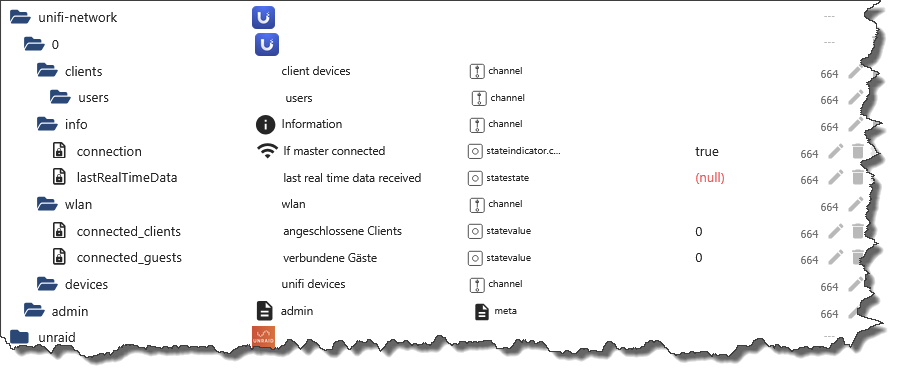
FYI: Es läuft hier nur ein Unifi-AP-Pro. Also ausschließlich WLAN-Clients und kein Unifi-OS.
unifi-network.0
	2025-10-05 17:55:09.066	info	[onReady]: WebSocket listener to realtime API successfully started
unifi-network.0
	2025-10-05 17:55:09.058	debug	Search can't be optimized because wildcard not at the end, fallback to keys!: function(doc) { if (doc.type === 'state') emit(doc._id, doc) }
unifi-network.0
	2025-10-05 17:55:09.047	debug	Search can't be optimized because wildcard not at the end, fallback to keys!: function(doc) { if (doc.type === 'state') emit(doc._id, doc) }
unifi-network.0
	2025-10-05 17:55:09.020	debug	Search can't be optimized because wildcard not at the end, fallback to keys!: function(doc) { if (doc.type === 'state') emit(doc._id, doc) }
unifi-network.0
	2025-10-05 17:55:08.920	error	[NetworkApi._retrieve] Unable to connect to the Network controller. This is temporary and may occur during device reboots.
unifi-network.0
	2025-10-05 17:55:05.886	error	[NetworkApi._retrieve] Unable to connect to the Network controller. This is temporary and may occur during device reboots.
unifi-network.0
	2025-10-05 17:55:02.841	error	[NetworkApi._retrieve] Unable to connect to the Network controller. This is temporary and may occur during device reboots.
unifi-network.0
	2025-10-05 17:54:59.806	error	[NetworkApi._retrieve] Unable to connect to the Network controller. This is temporary and may occur during device reboots.
unifi-network.0
	2025-10-05 17:54:56.772	error	[NetworkApi._retrieve] Unable to connect to the Network controller. This is temporary and may occur during device reboots.
unifi-network.0
	2025-10-05 17:54:53.740	error	[NetworkApi._retrieve] Unable to connect to the Network controller. This is temporary and may occur during device reboots.
unifi-network.0
	2025-10-05 17:54:50.688	error	[NetworkApi._retrieve] Unable to connect to the Network controller. This is temporary and may occur during device reboots.
unifi-network.0
	2025-10-05 17:54:47.654	error	[NetworkApi._retrieve] Unable to connect to the Network controller. This is temporary and may occur during device reboots.
unifi-network.0
	2025-10-05 17:54:44.610	info	[login]: WebSocket connection to realtime API successfully established
unifi-network.0
	2025-10-05 17:54:44.587	debug	[NetworkApi.loginController] login to self hosted UniFi controller successful.
unifi-network.0
	2025-10-05 17:54:44.263	info	[login]: Logged in successfully to the Unifi-Network controller (host: 192.168.179.13:8443, site: D*****V, isUnifiOs: false)
unifi-network.0
	2025-10-05 17:54:44.262	debug	[NetworkApi.loginController] login to self hosted UniFi controller successful.
unifi-network.0
	2025-10-05 17:54:43.974	debug	[NetworkApi.logout] Logging out and clearing credentials.
unifi-network.0
	2025-10-05 17:54:43.957	info	starting. Version 1.1.3 (non-npm: Scrounger/ioBroker.unifi-network#fab63502974c2b23b621ebc96844f9d5bc0c61ef) in /opt/iobroker/node_modules/iobroker.unifi-network, node: v22.20.0, js-controller: 7.0.7
unifi-network.0
	2025-10-05 17:54:43.896	debug	States connected to redis: 0.0.0.0:9010
unifi-network.0
	2025-10-05 17:54:43.846	debug	States create User PubSub Client
unifi-network.0
	2025-10-05 17:54:43.846	debug	States create System PubSub Client
unifi-network.0
	2025-10-05 17:54:43.841	debug	Redis States: Use Redis connection: 0.0.0.0:9010
unifi-network.0
	2025-10-05 17:54:43.829	debug	Objects connected to redis: 0.0.0.0:9011
unifi-network.0
	2025-10-05 17:54:43.827	debug	Objects client initialize lua scripts
unifi-network.0
	2025-10-05 17:54:43.812	debug	Objects create User PubSub Client
unifi-network.0
	2025-10-05 17:54:43.812	debug	Objects create System PubSub Client
unifi-network.0
	2025-10-05 17:54:43.811	debug	Objects client ready ... initialize now
unifi-network.0
	2025-10-05 17:54:43.798	debug	Redis Objects: Use Redis connection: 0.0.0.0:9011
host.iobroker
	2025-10-05 17:54:43.193	info	instance system.adapter.unifi-network.0 in version "1.1.3" (non-npm: Scrounger/ioBroker.unifi-network#fab63502974c2b23b621ebc96844f9d5bc0c61ef) started with pid 3818642
host.iobroker
	2025-10-05 17:54:42.900	info	"system.adapter.unifi-network.0" enabled
Meine Einstellungen:
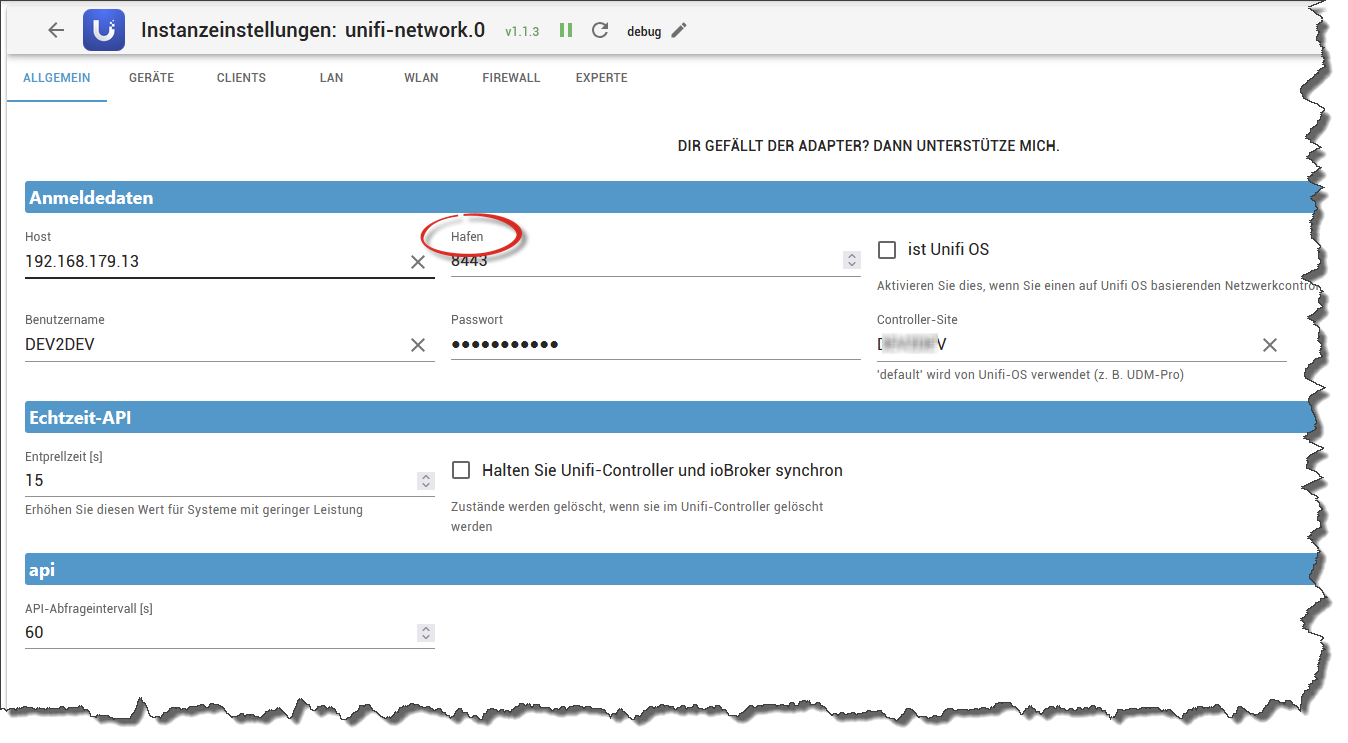
Vielleicht korrigierts Du bei Gelegenheit auch den Fauxpas der automatischen Übersetzung
@codierknecht
also ich hab jetzt extra mal einen self hosted controller in einem proxmox lxc aufgesetzt und auch ne AP dran gehängt.
Läuft bei mir ohne probleme. Evtl. wird da irgendwas geblockt?
Test mal die v1.1.4, hab ein paar debug info mit eingebaut, damit man sieht was er da genau macht. Am besten den Adapter davor komplett mal löschen.
Und bitte info's nach dem test im issue auf github posten!@lobomau
Test mal die v1.1.4, UniFi OS oder self hosted wird jetzt automatusch erkannt. Am besten den Adapter davor komplett mal löschen.
Wenn noch immer Probleme bestehen, bitte issue auf github erstellen -
@codierknecht
also ich hab jetzt extra mal einen self hosted controller in einem proxmox lxc aufgesetzt und auch ne AP dran gehängt.
Läuft bei mir ohne probleme. Evtl. wird da irgendwas geblockt?
Test mal die v1.1.4, hab ein paar debug info mit eingebaut, damit man sieht was er da genau macht. Am besten den Adapter davor komplett mal löschen.
Und bitte info's nach dem test im issue auf github posten!@lobomau
Test mal die v1.1.4, UniFi OS oder self hosted wird jetzt automatusch erkannt. Am besten den Adapter davor komplett mal löschen.
Wenn noch immer Probleme bestehen, bitte issue auf github erstellenEdit. ok... zuerst code eintragen und hinterher den Codeknopf drüber. Hab ich sonst andersrum gemacht...
@scrounger haben die bei Github etwas geändert? Sieht in der Preview nicht nach Code aus: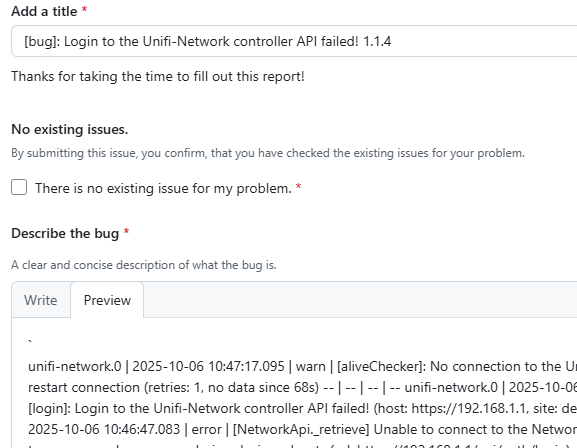
Host: NUC8i3 mit Proxmox:
- ioBroker CT Debian 13, npm 10.9.4, nodejs 22.21.0
- Slave: Pi4
-
Edit. ok... zuerst code eintragen und hinterher den Codeknopf drüber. Hab ich sonst andersrum gemacht...
@scrounger haben die bei Github etwas geändert? Sieht in der Preview nicht nach Code aus: -
@codierknecht
also ich hab jetzt extra mal einen self hosted controller in einem proxmox lxc aufgesetzt und auch ne AP dran gehängt.
Läuft bei mir ohne probleme. Evtl. wird da irgendwas geblockt?
Test mal die v1.1.4, hab ein paar debug info mit eingebaut, damit man sieht was er da genau macht. Am besten den Adapter davor komplett mal löschen.
Und bitte info's nach dem test im issue auf github posten!@lobomau
Test mal die v1.1.4, UniFi OS oder self hosted wird jetzt automatusch erkannt. Am besten den Adapter davor komplett mal löschen.
Wenn noch immer Probleme bestehen, bitte issue auf github erstellen@scrounger sagte in Test Adapter Unifi Network:
Test mal die v1.1.4, hab ein paar debug info mit eingebaut, damit man sieht was er da genau macht
unifi-network.0
2025-10-06 11:25:53.661	error	[NetworkApi._retrieve] Unable to connect to the Network controller. This is temporary and may occur during device reboots (url: https://192.168.179.13:8443/v2/api/site/D*****V/device?separateUnmanaged=false&includeTrafficUsage=false)
unifi-network.0
2025-10-06 11:25:50.633	info	[login]: WebSocket connection to realtime API successfully established
unifi-network.0
2025-10-06 11:25:50.630	info	[login]: Logged in successfully to the Unifi-Network controller (host: 192.168.179.13:8443, site: D*****V, isUnifiOs: false)
unifi-network.0
2025-10-06 11:25:50.629	debug	[NetworkApi.loginController] login to self hosted UniFi controller successful.
unifi-network.0
2025-10-06 11:25:50.302	debug	[NetworkApi.logout] Logging out and clearing credentials.
unifi-network.0
2025-10-06 11:25:50.292	debug	[NetworkApi.logout] Logging out and clearing credentials.
unifi-network.0
2025-10-06 11:25:50.292	warn	[aliveChecker]: No connection to the Unifi-Network controller -> restart connection (retries: 0, no data since 55s)
unifi-network.0
2025-10-06 11:25:20.281	debug	Search can't be optimized because wildcard not at the end, fallback to keys!: function(doc) { if (doc.type === 'state') emit(doc._id, doc) }
unifi-network.0
2025-10-06 11:25:20.261	debug	Search can't be optimized because wildcard not at the end, fallback to keys!: function(doc) { if (doc.type === 'state') emit(doc._id, doc) }
unifi-network.0
2025-10-06 11:25:20.231	debug	Search can't be optimized because wildcard not at the end, fallback to keys!: function(doc) { if (doc.type === 'state') emit(doc._id, doc) }
unifi-network.0
2025-10-06 11:25:20.120	error	[NetworkApi._retrieve] Unable to connect to the Network controller. This is temporary and may occur during device reboots (url: https://192.168.179.13:8443/v2/api/site/D*****V/wlan/enriched-configuration)
unifi-network.0
2025-10-06 11:25:17.100	error	[NetworkApi._retrieve] Unable to connect to the Network controller. This is temporary and may occur during device reboots (url: https://192.168.179.13:8443/v2/api/site/D*****V/wlan/enriched-configuration)
unifi-network.0
2025-10-06 11:25:14.060	debug	[createOrUpdateChannel]: creating channel 'wlan'
unifi-network.0
2025-10-06 11:25:14.053	error	[NetworkApi._retrieve] Unable to connect to the Network controller. This is temporary and may occur during device reboots (url: https://192.168.179.13:8443/v2/api/site/D*****V/clients/history?includeUnifiDevices=true&withinHours=0)
unifi-network.0
2025-10-06 11:25:11.024	error	[NetworkApi._retrieve] Unable to connect to the Network controller. This is temporary and may occur during device reboots (url: https://192.168.179.13:8443/v2/api/site/D*****V/clients/history?includeUnifiDevices=true&withinHours=0)
unifi-network.0
2025-10-06 11:25:07.992	error	[NetworkApi._retrieve] Unable to connect to the Network controller. This is temporary and may occur during device reboots (url: https://192.168.179.13:8443/v2/api/site/D*****V/clients/active?includeTrafficUsage=false&includeUnifiDevices=true)
unifi-network.0
2025-10-06 11:25:04.964	error	[NetworkApi._retrieve] Unable to connect to the Network controller. This is temporary and may occur during device reboots (url: https://192.168.179.13:8443/v2/api/site/D*****V/clients/active?includeTrafficUsage=false&includeUnifiDevices=true)
unifi-network.0
2025-10-06 11:25:01.941	debug	[createOrUpdateChannel]: creating channel 'clients'
unifi-network.0
2025-10-06 11:25:01.939	debug	[createOrUpdateChannel]: creating channel 'clients.vpn'
unifi-network.0
2025-10-06 11:25:01.937	debug	[createOrUpdateChannel]: creating channel 'clients.guests'
unifi-network.0
2025-10-06 11:25:01.934	debug	[createOrUpdateChannel]: creating channel 'clients.users'
unifi-network.0
2025-10-06 11:25:01.929	debug	[createOrUpdateChannel]: creating channel 'devices'
unifi-network.0
2025-10-06 11:25:01.927	error	[NetworkApi._retrieve] Unable to connect to the Network controller. This is temporary and may occur during device reboots (url: https://192.168.179.13:8443/v2/api/site/D*****V/device?separateUnmanaged=false&includeTrafficUsage=false)
unifi-network.0
2025-10-06 11:24:58.905	error	[NetworkApi._retrieve] Unable to connect to the Network controller. This is temporary and may occur during device reboots (url: https://192.168.179.13:8443/v2/api/site/D*****V/device?separateUnmanaged=false&includeTrafficUsage=false)
unifi-network.0
2025-10-06 11:24:55.850	info	[login]: WebSocket connection to realtime API successfully established
unifi-network.0
2025-10-06 11:24:55.836	debug	[NetworkApi.loginController] login to self hosted UniFi controller successful.
unifi-network.0
2025-10-06 11:24:55.565	info	[login]: Logged in successfully to the Unifi-Network controller (host: 192.168.179.13:8443, site: D*****V, isUnifiOs: false)
unifi-network.0
2025-10-06 11:24:55.564	debug	[NetworkApi.loginController] login to self hosted UniFi controller successful.
unifi-network.0
2025-10-06 11:24:55.325	debug	[NetworkApi.logout] Logging out and clearing credentials.
unifi-network.0
2025-10-06 11:24:55.325	debug	[NetworkApi.detectUnifiOs] self hosted controller detected
unifi-network.0
2025-10-06 11:24:55.325	debug	[NetworkApi.detectUnifiOs] detect self hosted controller repsonse: {"statusCode":302,"headers":{"location":"/manage","content-length":"0","date":"Mon, 06 Oct 2025 09:24:55 GMT","keep-alive":"timeout=30","connection":"keep-alive"},"trailers":{},"opaque":null,"body":{"_events":{},"_readableState":{"highWaterMark":65536,"buffer":[],"bufferIndex":0,"length":0,"pipes":[],"awaitDrainWriters":null}}}
unifi-network.0
2025-10-06 11:24:55.282	info	starting. Version 1.1.4 (non-npm: Scrounger/ioBroker.unifi-network) in /opt/iobroker/node_modules/iobroker.unifi-network, node: v22.20.0, js-controller: 7.0.7
unifi-network.0
2025-10-06 11:24:55.193	debug	States connected to redis: 0.0.0.0:9010
unifi-network.0
2025-10-06 11:24:55.137	debug	States create User PubSub Client
unifi-network.0
2025-10-06 11:24:55.136	debug	States create System PubSub Client
unifi-network.0
2025-10-06 11:24:55.131	debug	Redis States: Use Redis connection: 0.0.0.0:9010
unifi-network.0
2025-10-06 11:24:55.118	debug	Objects connected to redis: 0.0.0.0:9011
unifi-network.0
2025-10-06 11:24:55.116	debug	Objects client initialize lua scripts
unifi-network.0
2025-10-06 11:24:55.097	debug	Objects create User PubSub Client
unifi-network.0
2025-10-06 11:24:55.096	debug	Objects create System PubSub Client
unifi-network.0
2025-10-06 11:24:55.095	debug	Objects client ready ... initialize now
unifi-network.0
2025-10-06 11:24:55.082	debug	Redis Objects: Use Redis connection: 0.0.0.0:9011
Geht gleich auch noch an GH
"Any fool can write code that a computer can understand. Good programmers write code that humans can understand." (Martin Fowler, "Refactoring")
Proxmox 9.1.1 LXC|8 GB|Core i7-6700
HmIP|ZigBee|Tasmota|Unifi
Zabbix Certified Specialist
Konnte ich Dir helfen? Dann benutze bitte das Voting unten rechts im Beitrag -
@scrounger sagte in Test Adapter Unifi Network:
Test mal die v1.1.4, hab ein paar debug info mit eingebaut, damit man sieht was er da genau macht
unifi-network.0
2025-10-06 11:25:53.661	error	[NetworkApi._retrieve] Unable to connect to the Network controller. This is temporary and may occur during device reboots (url: https://192.168.179.13:8443/v2/api/site/D*****V/device?separateUnmanaged=false&includeTrafficUsage=false)
unifi-network.0
2025-10-06 11:25:50.633	info	[login]: WebSocket connection to realtime API successfully established
unifi-network.0
2025-10-06 11:25:50.630	info	[login]: Logged in successfully to the Unifi-Network controller (host: 192.168.179.13:8443, site: D*****V, isUnifiOs: false)
unifi-network.0
2025-10-06 11:25:50.629	debug	[NetworkApi.loginController] login to self hosted UniFi controller successful.
unifi-network.0
2025-10-06 11:25:50.302	debug	[NetworkApi.logout] Logging out and clearing credentials.
unifi-network.0
2025-10-06 11:25:50.292	debug	[NetworkApi.logout] Logging out and clearing credentials.
unifi-network.0
2025-10-06 11:25:50.292	warn	[aliveChecker]: No connection to the Unifi-Network controller -> restart connection (retries: 0, no data since 55s)
unifi-network.0
2025-10-06 11:25:20.281	debug	Search can't be optimized because wildcard not at the end, fallback to keys!: function(doc) { if (doc.type === 'state') emit(doc._id, doc) }
unifi-network.0
2025-10-06 11:25:20.261	debug	Search can't be optimized because wildcard not at the end, fallback to keys!: function(doc) { if (doc.type === 'state') emit(doc._id, doc) }
unifi-network.0
2025-10-06 11:25:20.231	debug	Search can't be optimized because wildcard not at the end, fallback to keys!: function(doc) { if (doc.type === 'state') emit(doc._id, doc) }
unifi-network.0
2025-10-06 11:25:20.120	error	[NetworkApi._retrieve] Unable to connect to the Network controller. This is temporary and may occur during device reboots (url: https://192.168.179.13:8443/v2/api/site/D*****V/wlan/enriched-configuration)
unifi-network.0
2025-10-06 11:25:17.100	error	[NetworkApi._retrieve] Unable to connect to the Network controller. This is temporary and may occur during device reboots (url: https://192.168.179.13:8443/v2/api/site/D*****V/wlan/enriched-configuration)
unifi-network.0
2025-10-06 11:25:14.060	debug	[createOrUpdateChannel]: creating channel 'wlan'
unifi-network.0
2025-10-06 11:25:14.053	error	[NetworkApi._retrieve] Unable to connect to the Network controller. This is temporary and may occur during device reboots (url: https://192.168.179.13:8443/v2/api/site/D*****V/clients/history?includeUnifiDevices=true&withinHours=0)
unifi-network.0
2025-10-06 11:25:11.024	error	[NetworkApi._retrieve] Unable to connect to the Network controller. This is temporary and may occur during device reboots (url: https://192.168.179.13:8443/v2/api/site/D*****V/clients/history?includeUnifiDevices=true&withinHours=0)
unifi-network.0
2025-10-06 11:25:07.992	error	[NetworkApi._retrieve] Unable to connect to the Network controller. This is temporary and may occur during device reboots (url: https://192.168.179.13:8443/v2/api/site/D*****V/clients/active?includeTrafficUsage=false&includeUnifiDevices=true)
unifi-network.0
2025-10-06 11:25:04.964	error	[NetworkApi._retrieve] Unable to connect to the Network controller. This is temporary and may occur during device reboots (url: https://192.168.179.13:8443/v2/api/site/D*****V/clients/active?includeTrafficUsage=false&includeUnifiDevices=true)
unifi-network.0
2025-10-06 11:25:01.941	debug	[createOrUpdateChannel]: creating channel 'clients'
unifi-network.0
2025-10-06 11:25:01.939	debug	[createOrUpdateChannel]: creating channel 'clients.vpn'
unifi-network.0
2025-10-06 11:25:01.937	debug	[createOrUpdateChannel]: creating channel 'clients.guests'
unifi-network.0
2025-10-06 11:25:01.934	debug	[createOrUpdateChannel]: creating channel 'clients.users'
unifi-network.0
2025-10-06 11:25:01.929	debug	[createOrUpdateChannel]: creating channel 'devices'
unifi-network.0
2025-10-06 11:25:01.927	error	[NetworkApi._retrieve] Unable to connect to the Network controller. This is temporary and may occur during device reboots (url: https://192.168.179.13:8443/v2/api/site/D*****V/device?separateUnmanaged=false&includeTrafficUsage=false)
unifi-network.0
2025-10-06 11:24:58.905	error	[NetworkApi._retrieve] Unable to connect to the Network controller. This is temporary and may occur during device reboots (url: https://192.168.179.13:8443/v2/api/site/D*****V/device?separateUnmanaged=false&includeTrafficUsage=false)
unifi-network.0
2025-10-06 11:24:55.850	info	[login]: WebSocket connection to realtime API successfully established
unifi-network.0
2025-10-06 11:24:55.836	debug	[NetworkApi.loginController] login to self hosted UniFi controller successful.
unifi-network.0
2025-10-06 11:24:55.565	info	[login]: Logged in successfully to the Unifi-Network controller (host: 192.168.179.13:8443, site: D*****V, isUnifiOs: false)
unifi-network.0
2025-10-06 11:24:55.564	debug	[NetworkApi.loginController] login to self hosted UniFi controller successful.
unifi-network.0
2025-10-06 11:24:55.325	debug	[NetworkApi.logout] Logging out and clearing credentials.
unifi-network.0
2025-10-06 11:24:55.325	debug	[NetworkApi.detectUnifiOs] self hosted controller detected
unifi-network.0
2025-10-06 11:24:55.325	debug	[NetworkApi.detectUnifiOs] detect self hosted controller repsonse: {"statusCode":302,"headers":{"location":"/manage","content-length":"0","date":"Mon, 06 Oct 2025 09:24:55 GMT","keep-alive":"timeout=30","connection":"keep-alive"},"trailers":{},"opaque":null,"body":{"_events":{},"_readableState":{"highWaterMark":65536,"buffer":[],"bufferIndex":0,"length":0,"pipes":[],"awaitDrainWriters":null}}}
unifi-network.0
2025-10-06 11:24:55.282	info	starting. Version 1.1.4 (non-npm: Scrounger/ioBroker.unifi-network) in /opt/iobroker/node_modules/iobroker.unifi-network, node: v22.20.0, js-controller: 7.0.7
unifi-network.0
2025-10-06 11:24:55.193	debug	States connected to redis: 0.0.0.0:9010
unifi-network.0
2025-10-06 11:24:55.137	debug	States create User PubSub Client
unifi-network.0
2025-10-06 11:24:55.136	debug	States create System PubSub Client
unifi-network.0
2025-10-06 11:24:55.131	debug	Redis States: Use Redis connection: 0.0.0.0:9010
unifi-network.0
2025-10-06 11:24:55.118	debug	Objects connected to redis: 0.0.0.0:9011
unifi-network.0
2025-10-06 11:24:55.116	debug	Objects client initialize lua scripts
unifi-network.0
2025-10-06 11:24:55.097	debug	Objects create User PubSub Client
unifi-network.0
2025-10-06 11:24:55.096	debug	Objects create System PubSub Client
unifi-network.0
2025-10-06 11:24:55.095	debug	Objects client ready ... initialize now
unifi-network.0
2025-10-06 11:24:55.082	debug	Redis Objects: Use Redis connection: 0.0.0.0:9011
Geht gleich auch noch an GH
Mit einer Site "default" klappt's dann auch. Issue habe ich geschlossen.
"Any fool can write code that a computer can understand. Good programmers write code that humans can understand." (Martin Fowler, "Refactoring")
Proxmox 9.1.1 LXC|8 GB|Core i7-6700
HmIP|ZigBee|Tasmota|Unifi
Zabbix Certified Specialist
Konnte ich Dir helfen? Dann benutze bitte das Voting unten rechts im Beitrag -
Mit einer Site "default" klappt's dann auch. Issue habe ich geschlossen.
-
@codierknecht
Hab jetzt noch ne Prüfung eingebaut, die anzeigt welche Sites überhaupt verfügbar sind und bei falscher Eingabe ne Error Meldung wirft"Any fool can write code that a computer can understand. Good programmers write code that humans can understand." (Martin Fowler, "Refactoring")
Proxmox 9.1.1 LXC|8 GB|Core i7-6700
HmIP|ZigBee|Tasmota|Unifi
Zabbix Certified Specialist
Konnte ich Dir helfen? Dann benutze bitte das Voting unten rechts im Beitrag -
@codierknecht sagte in Test Adapter Unifi Network:
Die automatische Übersetzung hat wieder zugeschlagen
Tja da gibt's noch nen paar andere so klöpse drin
Wenn ihr mithelfen wollt dann erstellt nen PR mit korrigierten Übersetzungen. -
Tolle Idee mit dem Adapter ... und danke, dass Du das öffentlich verfügbar machst.
Leider ist bei mir wohl ein Rebuild bei der Installation nötig ... und der schlägt mit NodeJS 22.20.0 fehl da das Modul "TokenRefresher" nicht gefunden werden kann. Habe ein Issue unter https://github.com/Scrounger/ioBroker.unifi-network/issues/33 aufgemacht.
-
Kann die Zugangsdaten nicht speichern. Er gibt jedes mal einen Json error und die Daten sind wieder leer.
-
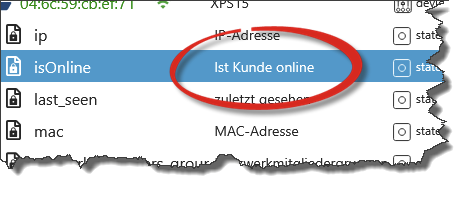
wäre es möglich das der adapter den db last_seen bei den clients gleich von einem unix zeitstempel in ein "lesbares" datum/uhrzeit format umwandelt,oder ist es doch besser das über einen alias zu konvertieren?
Carpe diem
-
wäre es möglich das der adapter den db last_seen bei den clients gleich von einem unix zeitstempel in ein "lesbares" datum/uhrzeit format umwandelt,oder ist es doch besser das über einen alias zu konvertieren?
wäre es möglich das der adapter den db last_seen bei den clients gleich von einem unix zeitstempel in ein "lesbares" datum/uhrzeit format umwandelt,oder ist es doch besser das über einen alias zu konvertieren?
@scrounger sagte in Test Adapter Unifi Network:
Nee des ist bewusst so weil ich immer mit timestamps arbeitet. Wenn man mit der Maus drüber fährt zeigt es ja das Datum und Zeit an.
Alternativ kannst du ja nen alias erstellen -
@dragon said in Test Adapter Unifi Network:
Kann die Zugangsdaten nicht speichern. Er gibt jedes mal einen Json error und die Daten sind wieder leer.
@Scrounger
Hab heute dieses Issue mitbekommen:
https://github.com/ioBroker/ioBroker.admin/issues/3257Nur als Info falls da was in Admin faul ist das sich nur bei gewissen Konstellationen auswirkt. Issue bei unifi-network hab ich nicht gefunden um das dort ggF zu verlinken
-
@scrounger Log kann ich heut Abend oder morgen vormittag anhängen. Habe den Adapter über die Katze installiert und nach dem Anlegen der Instanz fragt er nach IP und Zugangsdaten. Die kann ich eintippen und dann klicke ich auf speichern. Dann zeigt er den weiter unten noch einmal erwähnten json Fehler an und wenn ich dann noch einmal die Konfiguration aufmache ist sie leer. Das passiert jedes mal beim Druck auf speichern
-
@scrounger Log kann ich heut Abend oder morgen vormittag anhängen. Habe den Adapter über die Katze installiert und nach dem Anlegen der Instanz fragt er nach IP und Zugangsdaten. Die kann ich eintippen und dann klicke ich auf speichern. Dann zeigt er den weiter unten noch einmal erwähnten json Fehler an und wenn ich dann noch einmal die Konfiguration aufmache ist sie leer. Das passiert jedes mal beim Druck auf speichern








Hello! It looks like you're interested in this conversation, but you don't have an account yet.
Getting fed up of having to scroll through the same posts each visit? When you register for an account, you'll always come back to exactly where you were before, and choose to be notified of new replies (either via email, or push notification). You'll also be able to save bookmarks and upvote posts to show your appreciation to other community members.
With your input, this post could be even better 💗
Register LoginSupport us
551
Online32.9k
Users83.0k
Topics1.3m
Posts