Skip to content
  • Home
  • Recent
  • Tags
  • 0 Unread 0
  • Categories
  • Unreplied
  • Popular
  • GitHub
  • Docu
  • Hilfe
Skins
  • Light
  • Brite
  • Cerulean
  • Cosmo
  • Flatly
  • Journal
  • Litera
  • Lumen
  • Lux
  • Materia
  • Minty
  • Morph
  • Pulse
  • Sandstone
  • Simplex
  • Sketchy
  • Spacelab
  • United
  • Yeti
  • Zephyr
  • Dark
  • Cyborg
  • Darkly
  • Quartz
  • Slate
  • Solar
  • Superhero
  • Vapor

  • Default (No Skin)
  • No Skin
Collapse
ioBroker Logo

Community Forum

donate donate
  1. ioBroker Community Home
  2. Deutsch
  3. Skripten / Logik
  4. Blockly
  5. [ gelöst ] JSON aufteilen in DP

NEWS

  • Jahresrückblick 2025 – unser neuer Blogbeitrag ist online! ✨
    BluefoxB
    Bluefox
    17
    1
    2.6k

  • Neuer Blogbeitrag: Monatsrückblick - Dezember 2025 🎄
    BluefoxB
    Bluefox
    13
    1
    996

  • Weihnachtsangebot 2025! 🎄
    BluefoxB
    Bluefox
    25
    1
    2.3k

[ gelöst ] JSON aufteilen in DP

Scheduled Pinned Locked Moved Blockly
48 Posts 5 Posters 4.2k Views 2 Watching
  • Oldest to Newest
  • Newest to Oldest
  • Most Votes
Reply
  • Reply as topic
Log in to reply
This topic has been deleted. Only users with topic management privileges can see it.
  • HomoranH Homoran

    @iobrokermike ich seh nichts von Javascript!
    läuft das Skript?
    und die Instanz?

    I Online
    I Online
    ioBrokerMike
    wrote on last edited by
    #24

    @homoran
    Blockly 5.png

    @mickym
    Das habe ich im Hinterkopf.
    Danke für den Hinweis

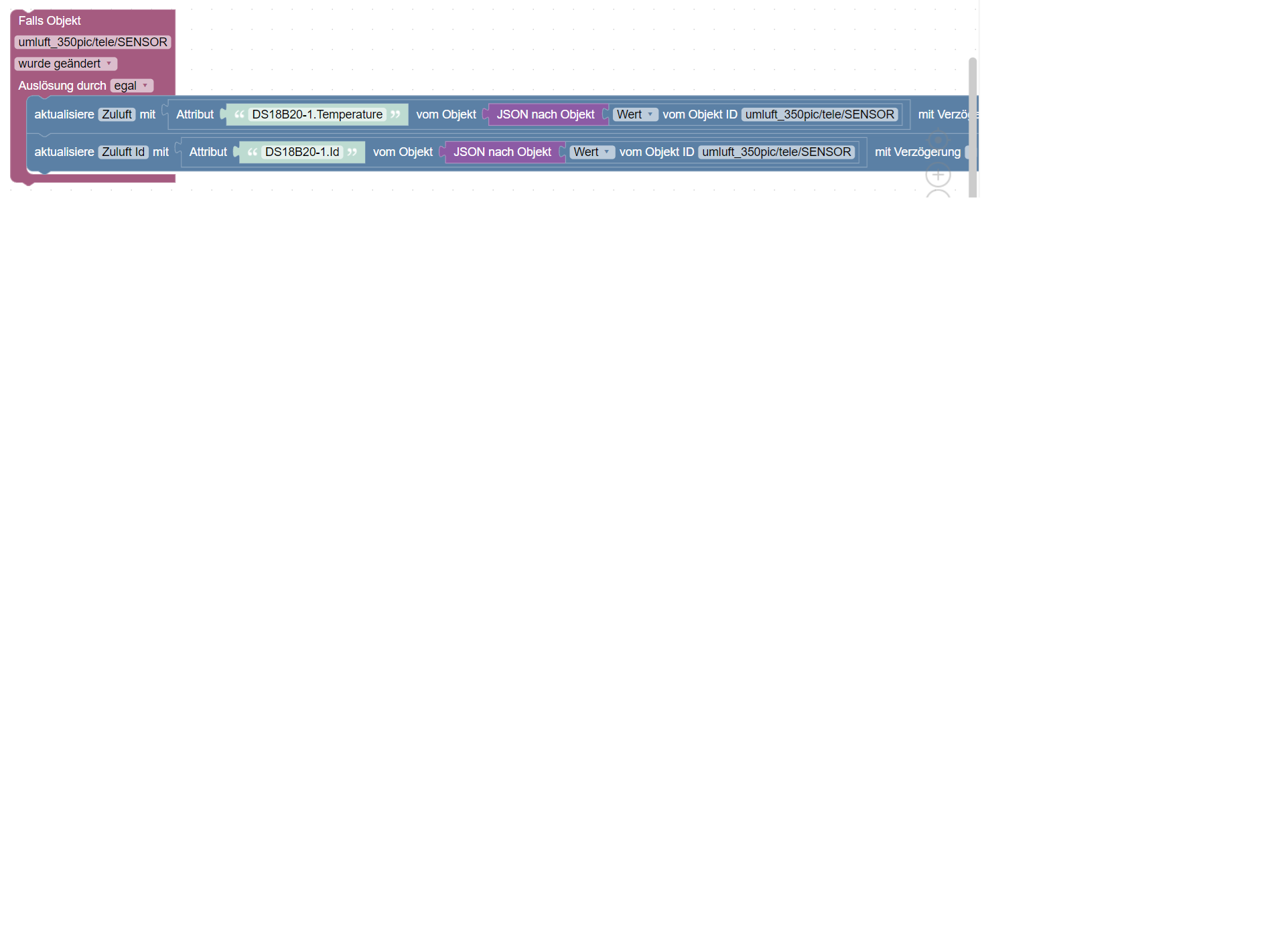
    Wenn ich das erstmal von @Homoran zum laufen bekomme werde ich mich mit den Rest (Eigentlichen) beschäftigen.

    Mfg
    IOBrokerMike

    Achtung ! Sehkraft 25% | 60% , kein scherz
    Systeme : GEEKOM MiniAir 11 | Linux : Trixie 13.2 | HMIP | OpenCCU / RasPi3 | SMA PV Anlage | Robonect Hx | Hydrawise | RTL_433

    mickymM HomoranH 2 Replies Last reply
    0
    • I ioBrokerMike

      @homoran
      Blockly 5.png

      @mickym
      Das habe ich im Hinterkopf.
      Danke für den Hinweis

      Wenn ich das erstmal von @Homoran zum laufen bekomme werde ich mich mit den Rest (Eigentlichen) beschäftigen.

      mickymM Online
      mickymM Online
      mickym
      Most Active
      wrote on last edited by
      #25

      @iobrokermike
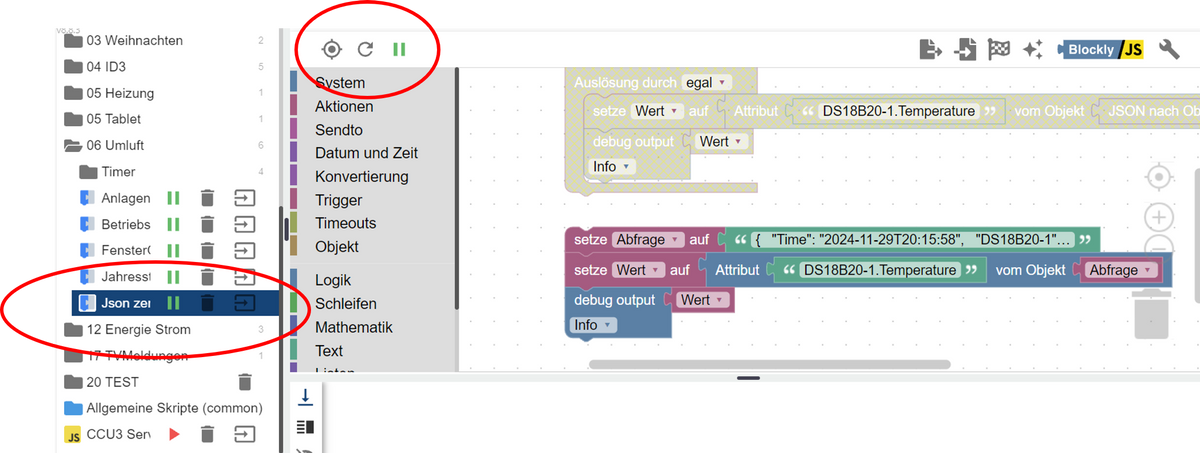
      @Homoran hat ja Recht, dass in Deinem Debug Fenster ja gar nichts steht. Hast Du noch irgendwas anderes nicht deaktiviertes im Skript.
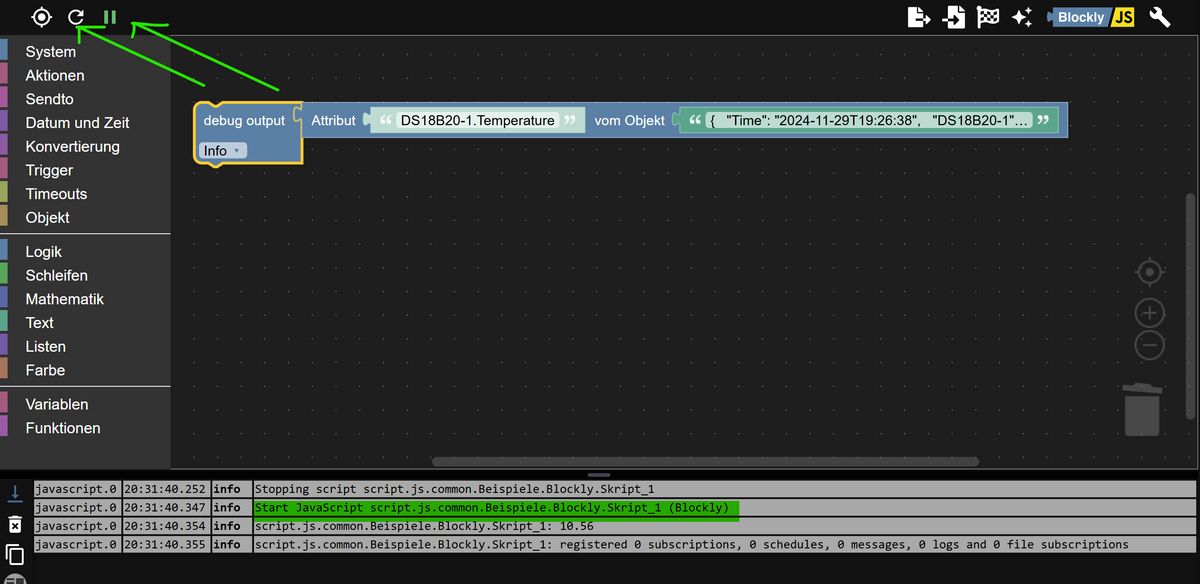
      894decef-f8de-4df6-9eeb-30f9b816a757-image.png

      Hast Du mal Dein gestartetes Skript mit dem Wiederholungssymbol neu gestartet? - Das muss im Debugfenster zu sehen sein.

      Jeder Flow bzw. jedes Script, das ich hier poste implementiert jeder auf eigene Gefahr. Flows und Scripts können Fehler aufweisen und weder der Seitenbetreiber noch ich persönlich können hierfür haftbar gemacht werden. Das gleiche gilt für Empfehlungen aller Art.

      I 1 Reply Last reply
      0
      • mickymM mickym

        @homoran Ja Du hast Recht - ist für mich auch neu - früher ging das glaub nicht. Aber jetzt geht das anscheinend.
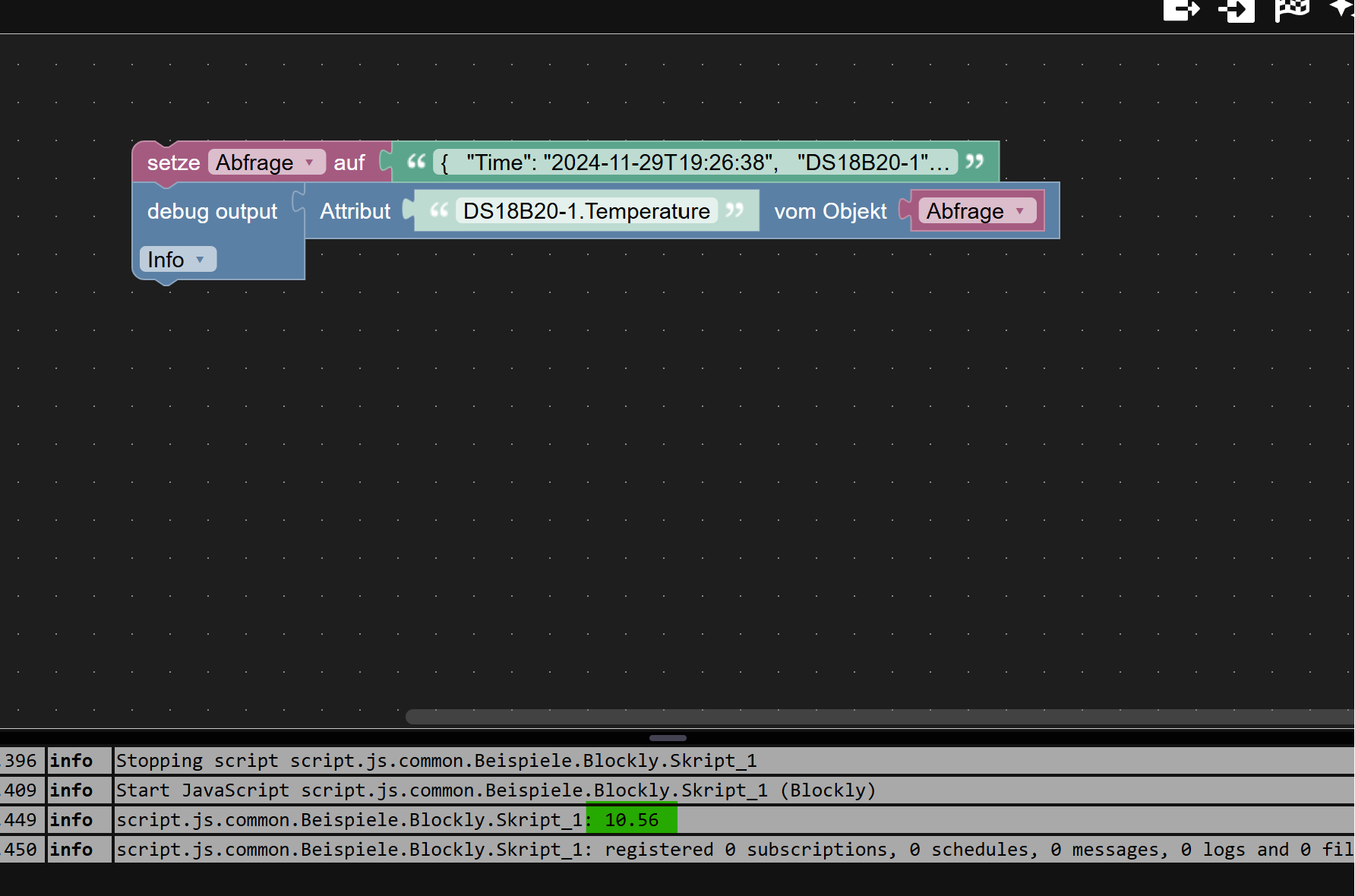
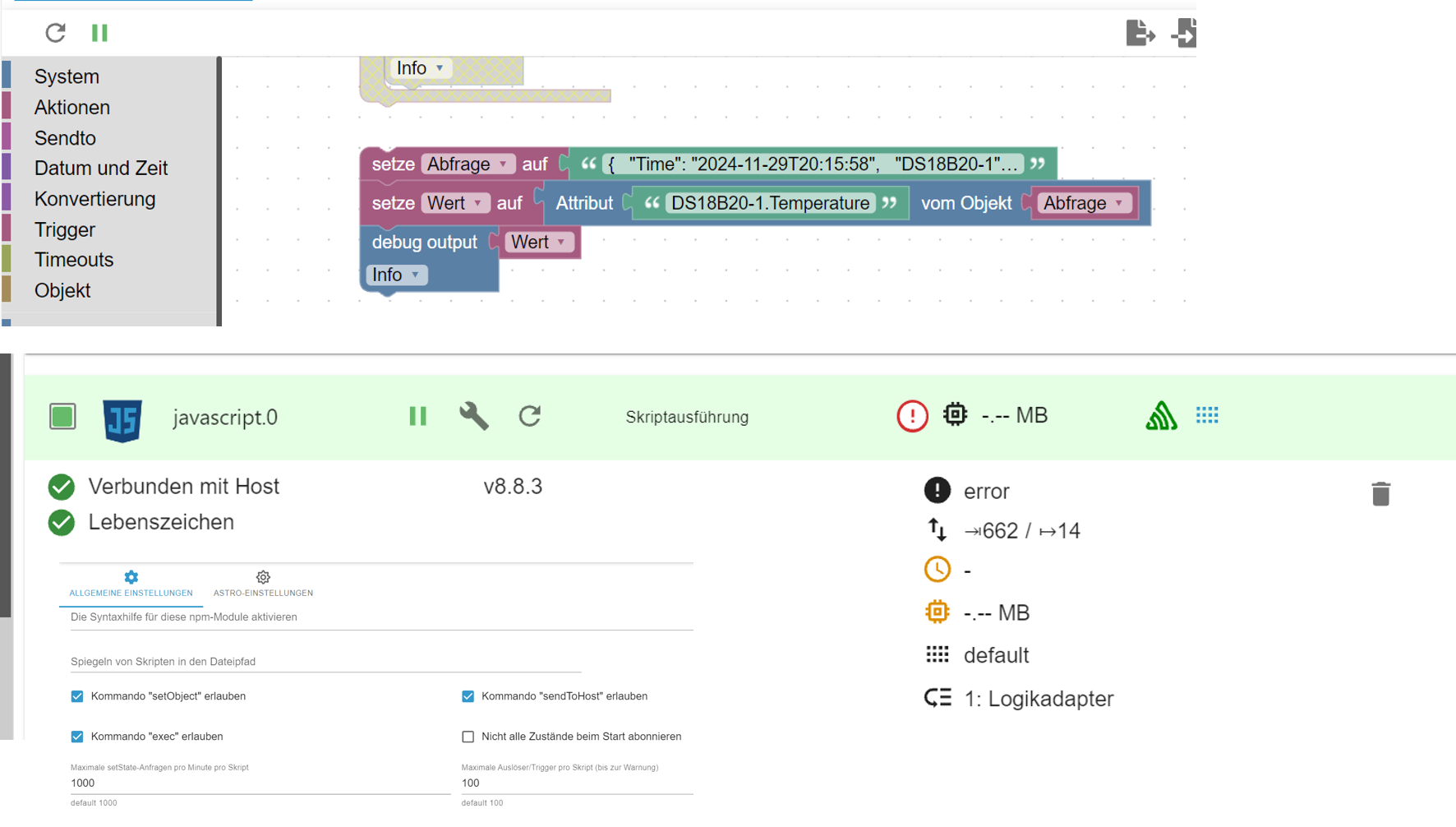
        b5b2b58c-3418-4036-9d05-6c2bd502ac0e-image.png

        geht sogar direkt aus dem Text

        c66cb765-351c-452d-9b58-138812069f7b-image.png

        Aber irgendwie habe ich es in Erinnerung, dass das früher nicht ging.

        paul53P Offline
        paul53P Offline
        paul53
        wrote on last edited by
        #26

        @mickym sagte: früher ging das glaub nicht.

        Das ging mit getAttr() schon immer. Siehe Doku. Die Funktion wurde speziell für Blockly geschaffen.

        Bitte verzichtet auf Chat-Nachrichten, denn die Handhabung ist grauenhaft !
        Produktiv: RPi 2 mit S.USV, HM-MOD-RPI und SLC-USB-Stick mit root fs

        mickymM 2 Replies Last reply
        0
        • paul53P paul53

          @mickym sagte: früher ging das glaub nicht.

          Das ging mit getAttr() schon immer. Siehe Doku. Die Funktion wurde speziell für Blockly geschaffen.

          mickymM Online
          mickymM Online
          mickym
          Most Active
          wrote on last edited by
          #27

          @paul53 OK

          321482ec-b7b2-411d-afc4-c70d744dd006-image.png

          Ich weiß dann nur nicht, ob es dann daran lag, dass es ein verschachteltes Array war - aber es gab Fälle da ging es nicht. Ich schau mal, ob ich was finde.

          Jeder Flow bzw. jedes Script, das ich hier poste implementiert jeder auf eigene Gefahr. Flows und Scripts können Fehler aufweisen und weder der Seitenbetreiber noch ich persönlich können hierfür haftbar gemacht werden. Das gleiche gilt für Empfehlungen aller Art.

          1 Reply Last reply
          0
          • I ioBrokerMike

            @homoran
            Blockly 5.png

            @mickym
            Das habe ich im Hinterkopf.
            Danke für den Hinweis

            Wenn ich das erstmal von @Homoran zum laufen bekomme werde ich mich mit den Rest (Eigentlichen) beschäftigen.

            HomoranH Do not disturb
            HomoranH Do not disturb
            Homoran
            Global Moderator Administrators
            wrote on last edited by Homoran
            #28

            @iobrokermike läuft das Skript selber?
            war das große log nach mqtt gefiltert?

            kein Support per PN! - Fragen im Forum stellen - es gibt fast nichts, was nicht auch für andere interessant ist.

            Benutzt das Voting rechts unten im Beitrag wenn er euch geholfen hat.

            der Installationsfixer: curl -fsL https://iobroker.net/fix.sh | bash -

            I 1 Reply Last reply
            0
            • mickymM mickym

              @iobrokermike
              @Homoran hat ja Recht, dass in Deinem Debug Fenster ja gar nichts steht. Hast Du noch irgendwas anderes nicht deaktiviertes im Skript.

              894decef-f8de-4df6-9eeb-30f9b816a757-image.png

              Hast Du mal Dein gestartetes Skript mit dem Wiederholungssymbol neu gestartet? - Das muss im Debugfenster zu sehen sein.
              I Online
              I Online
              ioBrokerMike
              wrote on last edited by
              #29

              @mickym

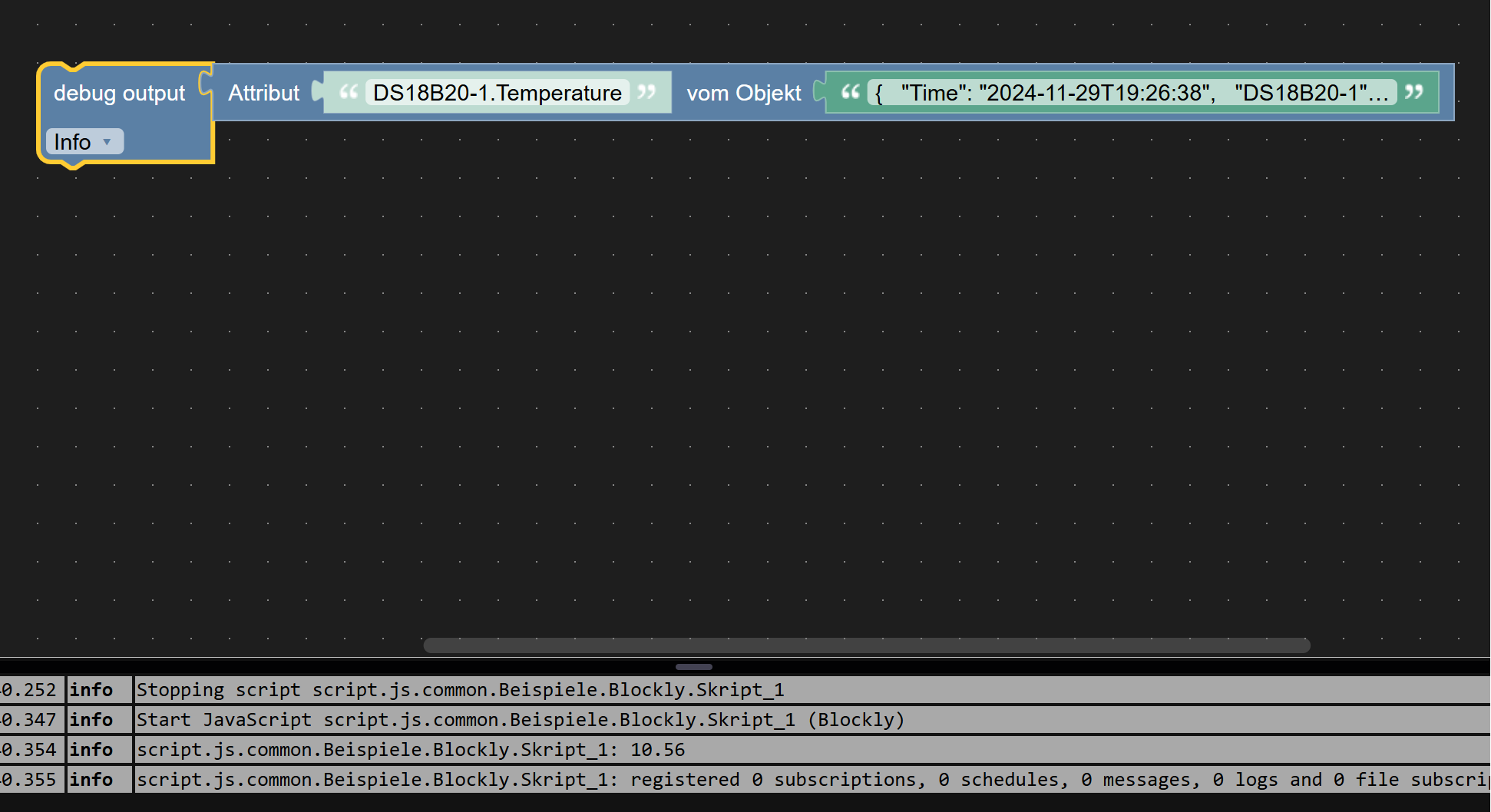
              Blockly 6.png

              Hast Du mal Dein gestartetes Skript mit dem Wiederholungssymbol neu gestartet? ...
              Ja das habe ich gemacht.

              Mfg
              IOBrokerMike

              Achtung ! Sehkraft 25% | 60% , kein scherz
              Systeme : GEEKOM MiniAir 11 | Linux : Trixie 13.2 | HMIP | OpenCCU / RasPi3 | SMA PV Anlage | Robonect Hx | Hydrawise | RTL_433

              HomoranH 1 Reply Last reply
              0
              • I ioBrokerMike

                @mickym

                Blockly 6.png

                Hast Du mal Dein gestartetes Skript mit dem Wiederholungssymbol neu gestartet? ...
                Ja das habe ich gemacht.

                HomoranH Do not disturb
                HomoranH Do not disturb
                Homoran
                Global Moderator Administrators
                wrote on last edited by
                #30

                @iobrokermike starte mal die Instsnz neu und mach rinen Browserrefresh (Strg-f5)

                kein Support per PN! - Fragen im Forum stellen - es gibt fast nichts, was nicht auch für andere interessant ist.

                Benutzt das Voting rechts unten im Beitrag wenn er euch geholfen hat.

                der Installationsfixer: curl -fsL https://iobroker.net/fix.sh | bash -

                1 Reply Last reply
                0
                • HomoranH Homoran

                  @iobrokermike läuft das Skript selber?
                  war das große log nach mqtt gefiltert?

                  I Online
                  I Online
                  ioBrokerMike
                  wrote on last edited by ioBrokerMike
                  #31

                  @homoran sagte in JSON aufteilen in DP:

                  war das große log nach mqtt gefiltert?

                  Ja, das war nach mqtt gefiltert

                  Mfg
                  IOBrokerMike

                  Achtung ! Sehkraft 25% | 60% , kein scherz
                  Systeme : GEEKOM MiniAir 11 | Linux : Trixie 13.2 | HMIP | OpenCCU / RasPi3 | SMA PV Anlage | Robonect Hx | Hydrawise | RTL_433

                  HomoranH 1 Reply Last reply
                  0
                  • I ioBrokerMike

                    @homoran sagte in JSON aufteilen in DP:

                    war das große log nach mqtt gefiltert?

                    Ja, das war nach mqtt gefiltert

                    HomoranH Do not disturb
                    HomoranH Do not disturb
                    Homoran
                    Global Moderator Administrators
                    wrote on last edited by Homoran
                    #32

                    @iobrokermike sagte in JSON aufteilen in DP:

                    @homoran sagte in JSON aufteilen in DP:

                    war das große log nach mqtt gefiltert?

                    Ja, das war nach matt gefiltert

                    dann kann man da natürlich auch keine Meldungen von javascript sehen!

                    kein Support per PN! - Fragen im Forum stellen - es gibt fast nichts, was nicht auch für andere interessant ist.

                    Benutzt das Voting rechts unten im Beitrag wenn er euch geholfen hat.

                    der Installationsfixer: curl -fsL https://iobroker.net/fix.sh | bash -

                    I 1 Reply Last reply
                    0
                    • paul53P paul53

                      @mickym sagte: früher ging das glaub nicht.

                      Das ging mit getAttr() schon immer. Siehe Doku. Die Funktion wurde speziell für Blockly geschaffen.

                      mickymM Online
                      mickymM Online
                      mickym
                      Most Active
                      wrote on last edited by mickym
                      #33

                      @paul53 sagte in JSON aufteilen in DP:

                      @mickym sagte: früher ging das glaub nicht.

                      Das ging mit getAttr() schon immer. Siehe Doku. Die Funktion wurde speziell für Blockly geschaffen.

                      Irgendwie ist das aber anscheinend doch kein Objekt - zumindest, wenn ich es in JSONATA weiter verwenden will. Gibt es da eine Erklärung?
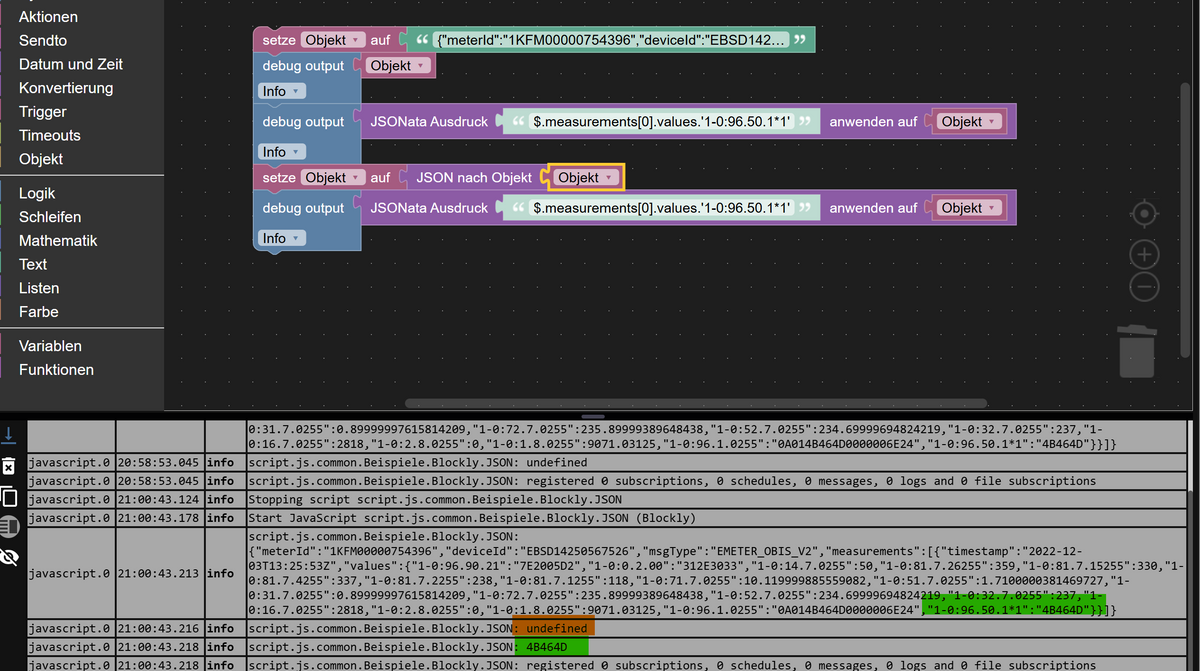
                      51cae8de-09dd-4ffa-9335-2766aa379d39-image.png

                      Im 1. Fall ohne Konvertierung - kann ich über JSONATA nicht auf die Objekteigenschaft zugreifen. Im 2. Fall gehts.

                      <xml xmlns="https://developers.google.com/blockly/xml">
                       <variables>
                         <variable id="NWR;`_N@3a:sTiBKQkne">Objekt</variable>
                       </variables>
                       <block type="variables_set" id="M@F*zUMa;{#yJo2.2goG" x="-1137" y="-337">
                         <field name="VAR" id="NWR;`_N@3a:sTiBKQkne">Objekt</field>
                         <value name="VALUE">
                           <block type="text" id="fWZa-MC8^[YM-V-;#R}:">
                             <field name="TEXT">{"meterId":"1KFM00000754396","deviceId":"EBSD14250567526","msgType":"EMETER_OBIS_V2","measurements":[{"timestamp":"2022-12-03T13:25:53Z","values":{"1-0:96.90.21":"7E2005D2","1-0:0.2.00":"312E3033","1-0:14.7.0255":50,"1-0:81.7.26255":359,"1-0:81.7.15255":330,"1-0:81.7.4255":337,"1-0:81.7.2255":238,"1-0:81.7.1255":118,"1-0:71.7.0255":10.119999885559082,"1-0:51.7.0255":1.7100000381469727,"1-0:31.7.0255":0.89999997615814209,"1-0:72.7.0255":235.89999389648438,"1-0:52.7.0255":234.69999694824219,"1-0:32.7.0255":237,"1-0:16.7.0255":2818,"1-0:2.8.0255":0,"1-0:1.8.0255":9071.03125,"1-0:96.1.0255":"0A014B464D0000006E24","1-0:96.50.1*1":"4B464D"}}]}</field>
                           </block>
                         </value>
                         <next>
                           <block type="debug" id="^5#in-UU}%!K~KPOKHz_">
                             <field name="Severity">info</field>
                             <value name="TEXT">
                               <shadow type="text" id="-,TGC$b5|aHgxT-/9J]`">
                                 <field name="TEXT">test</field>
                               </shadow>
                               <block type="variables_get" id="nRXii?=4yGGy,y7%2jY(">
                                 <field name="VAR" id="NWR;`_N@3a:sTiBKQkne">Objekt</field>
                               </block>
                             </value>
                             <next>
                               <block type="debug" id="C*BY:f~|[e)Xvn8W1*s{">
                                 <field name="Severity">info</field>
                                 <value name="TEXT">
                                   <shadow type="text" id="michMudNxqrBOIIp?ntJ">
                                     <field name="TEXT">test</field>
                                   </shadow>
                                   <block type="convert_jsonata" id="AS%.5T)U4NQRb~6pE|^y">
                                     <value name="EXPRESSION">
                                       <shadow type="text" id="]-J?Hivq,p/e0?KwDjKv">
                                         <field name="TEXT">$.measurements[0].values.'1-0:96.50.1*1'</field>
                                       </shadow>
                                     </value>
                                     <value name="TARGET">
                                       <block type="variables_get" id="$:M+P`jmlylnj6q[{yF,">
                                         <field name="VAR" id="NWR;`_N@3a:sTiBKQkne">Objekt</field>
                                       </block>
                                     </value>
                                   </block>
                                 </value>
                                 <next>
                                   <block type="variables_set" id="QRu@$s3*df8mR7r@=iO#">
                                     <field name="VAR" id="NWR;`_N@3a:sTiBKQkne">Objekt</field>
                                     <value name="VALUE">
                                       <block type="convert_json2object" id="R.c9ffe%vYu70tFC4Wg0">
                                         <value name="VALUE">
                                           <block type="variables_get" id="Z^;~j8`)]MoA[fRfSluS">
                                             <field name="VAR" id="NWR;`_N@3a:sTiBKQkne">Objekt</field>
                                           </block>
                                         </value>
                                       </block>
                                     </value>
                                     <next>
                                       <block type="debug" id="yQlY]j3k2iPYr$s%:Z=c">
                                         <field name="Severity">info</field>
                                         <value name="TEXT">
                                           <shadow type="text" id="michMudNxqrBOIIp?ntJ">
                                             <field name="TEXT">test</field>
                                           </shadow>
                                           <block type="convert_jsonata" id="*P_(9@j7YL};L(Uz5~ZN">
                                             <value name="EXPRESSION">
                                               <shadow type="text" id="7abV56Ncd4Eb9CA7Gy|N">
                                                 <field name="TEXT">$.measurements[0].values.'1-0:96.50.1*1'</field>
                                               </shadow>
                                             </value>
                                             <value name="TARGET">
                                               <block type="variables_get" id="^3+giB~)?btQR6/;R1~a">
                                                 <field name="VAR" id="NWR;`_N@3a:sTiBKQkne">Objekt</field>
                                               </block>
                                             </value>
                                           </block>
                                         </value>
                                       </block>
                                     </next>
                                   </block>
                                 </next>
                               </block>
                             </next>
                           </block>
                         </next>
                       </block>
                      </xml>
                      

                      Oder heißt das, dass zum Extrahieren wird es temporär in ein Objekt gewandelt, wenn ich es aber weiterverwenden will, dann muss ich es konveritieren.

                      Ja ich hab es mir selbst beantwortet. Vergiss diesen Post.

                      Jeder Flow bzw. jedes Script, das ich hier poste implementiert jeder auf eigene Gefahr. Flows und Scripts können Fehler aufweisen und weder der Seitenbetreiber noch ich persönlich können hierfür haftbar gemacht werden. Das gleiche gilt für Empfehlungen aller Art.

                      HomoranH 1 Reply Last reply
                      0
                      • HomoranH Homoran

                        @iobrokermike sagte in JSON aufteilen in DP:

                        @homoran sagte in JSON aufteilen in DP:

                        war das große log nach mqtt gefiltert?

                        Ja, das war nach matt gefiltert

                        dann kann man da natürlich auch keine Meldungen von javascript sehen!

                        I Online
                        I Online
                        ioBrokerMike
                        wrote on last edited by
                        #34

                        @homoran

                        So jetzt die Filterung von Javascript:

                           2024-11-29 20:59:14.006	warn	(COMPACT) at Job.job (/opt/iobroker/node_modules/iobroker.javascript/lib/sandbox.js:1876:34)
                        
                        javascript.0
                        2024-11-29 20:59:14.006	warn	(COMPACT) at Object.<anonymous> (script.js.00_Anwesend.AnzahlAnwesend:17:3)
                        
                        javascript.0
                        2024-11-29 20:59:14.005	warn	(COMPACT) at setState (/opt/iobroker/node_modules/iobroker.javascript/lib/sandbox.js:2090:20)
                        
                        javascript.0
                        2024-11-29 20:59:14.003	warn	(COMPACT) You are assigning a number to the state "0_userdata.0.Anwesend.Anzahl" which expects a string. Please fix your code to use a string or change the state type to number. This warning might become an error in future versions.
                        
                        javascript.0
                        2024-11-29 20:59:12.010	info	(COMPACT) State value to set for "0_userdata.0.Anwesend.Anzahl" has to be type "string" but received type "number"
                        
                        javascript.0
                        2024-11-29 20:59:12.005	warn	(COMPACT) at processTimers (node:internal/timers:519:7)
                        
                        javascript.0
                        2024-11-29 20:59:12.005	warn	(COMPACT) at listOnTimeout (node:internal/timers:581:17)
                        
                        javascript.0
                        2024-11-29 20:59:12.004	warn	(COMPACT) at Timeout._onTimeout (/opt/iobroker/node_modules/node-schedule/lib/Invocation.js:228:7)
                        
                        javascript.0
                        2024-11-29 20:59:12.004	warn	(COMPACT) at /opt/iobroker/node_modules/node-schedule/lib/Invocation.js:268:28
                        
                        javascript.0
                        2024-11-29 20:59:12.004	warn	(COMPACT) at Job.invoke (/opt/iobroker/node_modules/node-schedule/lib/Job.js:171:15)
                        
                        javascript.0
                        2024-11-29 20:59:12.004	warn	(COMPACT) at Job.job (/opt/iobroker/node_modules/iobroker.javascript/lib/sandbox.js:1876:34)
                        
                        javascript.0
                        2024-11-29 20:59:12.003	warn	(COMPACT) at Object.<anonymous> (script.js.00_Anwesend.AnzahlAnwesend:17:3)
                        
                        javascript.0
                        2024-11-29 20:59:12.003	warn	(COMPACT) at setState (/opt/iobroker/node_modules/iobroker.javascript/lib/sandbox.js:2090:20)
                        
                        javascript.0
                        2024-11-29 20:59:12.002	warn	(COMPACT) You are assigning a number to the state "0_userdata.0.Anwesend.Anzahl" which expects a string. Please fix your code to use a string or change the state type to number. This warning might become an error in future versions.
                        
                        javascript.0
                        2024-11-29 20:59:10.011	info	(COMPACT) State value to set for "0_userdata.0.Anwesend.Anzahl" has to be type "string" but received type "number"
                        
                        javascript.0
                        2024-11-29 20:59:10.005	warn	(COMPACT) at processTimers (node:internal/timers:519:7)


                        starte mal die Instsnz neu und mach rinen Browserrefresh (Strg-f5)

                        Javascript und mqtt neugestartet sowie F5

                        Mfg
                        IOBrokerMike

                        Achtung ! Sehkraft 25% | 60% , kein scherz
                        Systeme : GEEKOM MiniAir 11 | Linux : Trixie 13.2 | HMIP | OpenCCU / RasPi3 | SMA PV Anlage | Robonect Hx | Hydrawise | RTL_433

                        mickymM HomoranH 2 Replies Last reply
                        0
                        • mickymM mickym

                          @paul53 sagte in JSON aufteilen in DP:

                          @mickym sagte: früher ging das glaub nicht.

                          Das ging mit getAttr() schon immer. Siehe Doku. Die Funktion wurde speziell für Blockly geschaffen.

                          Irgendwie ist das aber anscheinend doch kein Objekt - zumindest, wenn ich es in JSONATA weiter verwenden will. Gibt es da eine Erklärung?

                          51cae8de-09dd-4ffa-9335-2766aa379d39-image.png

                          Im 1. Fall ohne Konvertierung - kann ich über JSONATA nicht auf die Objekteigenschaft zugreifen. Im 2. Fall gehts.

                          <xml xmlns="https://developers.google.com/blockly/xml">
                           <variables>
                             <variable id="NWR;`_N@3a:sTiBKQkne">Objekt</variable>
                           </variables>
                           <block type="variables_set" id="M@F*zUMa;{#yJo2.2goG" x="-1137" y="-337">
                             <field name="VAR" id="NWR;`_N@3a:sTiBKQkne">Objekt</field>
                             <value name="VALUE">
                               <block type="text" id="fWZa-MC8^[YM-V-;#R}:">
                                 <field name="TEXT">{"meterId":"1KFM00000754396","deviceId":"EBSD14250567526","msgType":"EMETER_OBIS_V2","measurements":[{"timestamp":"2022-12-03T13:25:53Z","values":{"1-0:96.90.21":"7E2005D2","1-0:0.2.00":"312E3033","1-0:14.7.0255":50,"1-0:81.7.26255":359,"1-0:81.7.15255":330,"1-0:81.7.4255":337,"1-0:81.7.2255":238,"1-0:81.7.1255":118,"1-0:71.7.0255":10.119999885559082,"1-0:51.7.0255":1.7100000381469727,"1-0:31.7.0255":0.89999997615814209,"1-0:72.7.0255":235.89999389648438,"1-0:52.7.0255":234.69999694824219,"1-0:32.7.0255":237,"1-0:16.7.0255":2818,"1-0:2.8.0255":0,"1-0:1.8.0255":9071.03125,"1-0:96.1.0255":"0A014B464D0000006E24","1-0:96.50.1*1":"4B464D"}}]}</field>
                               </block>
                             </value>
                             <next>
                               <block type="debug" id="^5#in-UU}%!K~KPOKHz_">
                                 <field name="Severity">info</field>
                                 <value name="TEXT">
                                   <shadow type="text" id="-,TGC$b5|aHgxT-/9J]`">
                                     <field name="TEXT">test</field>
                                   </shadow>
                                   <block type="variables_get" id="nRXii?=4yGGy,y7%2jY(">
                                     <field name="VAR" id="NWR;`_N@3a:sTiBKQkne">Objekt</field>
                                   </block>
                                 </value>
                                 <next>
                                   <block type="debug" id="C*BY:f~|[e)Xvn8W1*s{">
                                     <field name="Severity">info</field>
                                     <value name="TEXT">
                                       <shadow type="text" id="michMudNxqrBOIIp?ntJ">
                                         <field name="TEXT">test</field>
                                       </shadow>
                                       <block type="convert_jsonata" id="AS%.5T)U4NQRb~6pE|^y">
                                         <value name="EXPRESSION">
                                           <shadow type="text" id="]-J?Hivq,p/e0?KwDjKv">
                                             <field name="TEXT">$.measurements[0].values.'1-0:96.50.1*1'</field>
                                           </shadow>
                                         </value>
                                         <value name="TARGET">
                                           <block type="variables_get" id="$:M+P`jmlylnj6q[{yF,">
                                             <field name="VAR" id="NWR;`_N@3a:sTiBKQkne">Objekt</field>
                                           </block>
                                         </value>
                                       </block>
                                     </value>
                                     <next>
                                       <block type="variables_set" id="QRu@$s3*df8mR7r@=iO#">
                                         <field name="VAR" id="NWR;`_N@3a:sTiBKQkne">Objekt</field>
                                         <value name="VALUE">
                                           <block type="convert_json2object" id="R.c9ffe%vYu70tFC4Wg0">
                                             <value name="VALUE">
                                               <block type="variables_get" id="Z^;~j8`)]MoA[fRfSluS">
                                                 <field name="VAR" id="NWR;`_N@3a:sTiBKQkne">Objekt</field>
                                               </block>
                                             </value>
                                           </block>
                                         </value>
                                         <next>
                                           <block type="debug" id="yQlY]j3k2iPYr$s%:Z=c">
                                             <field name="Severity">info</field>
                                             <value name="TEXT">
                                               <shadow type="text" id="michMudNxqrBOIIp?ntJ">
                                                 <field name="TEXT">test</field>
                                               </shadow>
                                               <block type="convert_jsonata" id="*P_(9@j7YL};L(Uz5~ZN">
                                                 <value name="EXPRESSION">
                                                   <shadow type="text" id="7abV56Ncd4Eb9CA7Gy|N">
                                                     <field name="TEXT">$.measurements[0].values.'1-0:96.50.1*1'</field>
                                                   </shadow>
                                                 </value>
                                                 <value name="TARGET">
                                                   <block type="variables_get" id="^3+giB~)?btQR6/;R1~a">
                                                     <field name="VAR" id="NWR;`_N@3a:sTiBKQkne">Objekt</field>
                                                   </block>
                                                 </value>
                                               </block>
                                             </value>
                                           </block>
                                         </next>
                                       </block>
                                     </next>
                                   </block>
                                 </next>
                               </block>
                             </next>
                           </block>
                          </xml>
                          

                          Oder heißt das, dass zum Extrahieren wird es temporär in ein Objekt gewandelt, wenn ich es aber weiterverwenden will, dann muss ich es konveritieren.

                          Ja ich hab es mir selbst beantwortet. Vergiss diesen Post.

                          HomoranH Do not disturb
                          HomoranH Do not disturb
                          Homoran
                          Global Moderator Administrators
                          wrote on last edited by
                          #35

                          @mickym Ist sehr interessant (vielleicht werd ich deswegen mit jsonata nicht warm), aber könnten wir das bitte aus diesem Thread erst mal herauslassen.

                          ich fürchte wir verlieren @ioBrokerMike sonst.

                          kein Support per PN! - Fragen im Forum stellen - es gibt fast nichts, was nicht auch für andere interessant ist.

                          Benutzt das Voting rechts unten im Beitrag wenn er euch geholfen hat.

                          der Installationsfixer: curl -fsL https://iobroker.net/fix.sh | bash -

                          mickymM 1 Reply Last reply
                          0
                          • I ioBrokerMike

                            @homoran

                            So jetzt die Filterung von Javascript:

                               2024-11-29 20:59:14.006	warn	(COMPACT) at Job.job (/opt/iobroker/node_modules/iobroker.javascript/lib/sandbox.js:1876:34)
                            
                            javascript.0
                            2024-11-29 20:59:14.006	warn	(COMPACT) at Object.<anonymous> (script.js.00_Anwesend.AnzahlAnwesend:17:3)
                            
                            javascript.0
                            2024-11-29 20:59:14.005	warn	(COMPACT) at setState (/opt/iobroker/node_modules/iobroker.javascript/lib/sandbox.js:2090:20)
                            
                            javascript.0
                            2024-11-29 20:59:14.003	warn	(COMPACT) You are assigning a number to the state "0_userdata.0.Anwesend.Anzahl" which expects a string. Please fix your code to use a string or change the state type to number. This warning might become an error in future versions.
                            
                            javascript.0
                            2024-11-29 20:59:12.010	info	(COMPACT) State value to set for "0_userdata.0.Anwesend.Anzahl" has to be type "string" but received type "number"
                            
                            javascript.0
                            2024-11-29 20:59:12.005	warn	(COMPACT) at processTimers (node:internal/timers:519:7)
                            
                            javascript.0
                            2024-11-29 20:59:12.005	warn	(COMPACT) at listOnTimeout (node:internal/timers:581:17)
                            
                            javascript.0
                            2024-11-29 20:59:12.004	warn	(COMPACT) at Timeout._onTimeout (/opt/iobroker/node_modules/node-schedule/lib/Invocation.js:228:7)
                            
                            javascript.0
                            2024-11-29 20:59:12.004	warn	(COMPACT) at /opt/iobroker/node_modules/node-schedule/lib/Invocation.js:268:28
                            
                            javascript.0
                            2024-11-29 20:59:12.004	warn	(COMPACT) at Job.invoke (/opt/iobroker/node_modules/node-schedule/lib/Job.js:171:15)
                            
                            javascript.0
                            2024-11-29 20:59:12.004	warn	(COMPACT) at Job.job (/opt/iobroker/node_modules/iobroker.javascript/lib/sandbox.js:1876:34)
                            
                            javascript.0
                            2024-11-29 20:59:12.003	warn	(COMPACT) at Object.<anonymous> (script.js.00_Anwesend.AnzahlAnwesend:17:3)
                            
                            javascript.0
                            2024-11-29 20:59:12.003	warn	(COMPACT) at setState (/opt/iobroker/node_modules/iobroker.javascript/lib/sandbox.js:2090:20)
                            
                            javascript.0
                            2024-11-29 20:59:12.002	warn	(COMPACT) You are assigning a number to the state "0_userdata.0.Anwesend.Anzahl" which expects a string. Please fix your code to use a string or change the state type to number. This warning might become an error in future versions.
                            
                            javascript.0
                            2024-11-29 20:59:10.011	info	(COMPACT) State value to set for "0_userdata.0.Anwesend.Anzahl" has to be type "string" but received type "number"
                            
                            javascript.0
                            2024-11-29 20:59:10.005	warn	(COMPACT) at processTimers (node:internal/timers:519:7)


                            starte mal die Instsnz neu und mach rinen Browserrefresh (Strg-f5)

                            Javascript und mqtt neugestartet sowie F5

                            mickymM Online
                            mickymM Online
                            mickym
                            Most Active
                            wrote on last edited by
                            #36

                            @iobrokermike Ja entweder konvertierst Du die Anzahl in eine Zahl oder den Datenpunkt in String/Zeichenkette.

                            Jeder Flow bzw. jedes Script, das ich hier poste implementiert jeder auf eigene Gefahr. Flows und Scripts können Fehler aufweisen und weder der Seitenbetreiber noch ich persönlich können hierfür haftbar gemacht werden. Das gleiche gilt für Empfehlungen aller Art.

                            I 1 Reply Last reply
                            0
                            • HomoranH Homoran

                              @mickym Ist sehr interessant (vielleicht werd ich deswegen mit jsonata nicht warm), aber könnten wir das bitte aus diesem Thread erst mal herauslassen.

                              ich fürchte wir verlieren @ioBrokerMike sonst.

                              mickymM Online
                              mickymM Online
                              mickym
                              Most Active
                              wrote on last edited by
                              #37

                              @homoran Ja ist OK - ich habs selbst gecheckt - Du kannst den Post auch löschen.

                              Jeder Flow bzw. jedes Script, das ich hier poste implementiert jeder auf eigene Gefahr. Flows und Scripts können Fehler aufweisen und weder der Seitenbetreiber noch ich persönlich können hierfür haftbar gemacht werden. Das gleiche gilt für Empfehlungen aller Art.

                              1 Reply Last reply
                              1
                              • mickymM mickym

                                @iobrokermike Ja entweder konvertierst Du die Anzahl in eine Zahl oder den Datenpunkt in String/Zeichenkette.

                                I Online
                                I Online
                                ioBrokerMike
                                wrote on last edited by
                                #38

                                @mickym sagte in JSON aufteilen in DP:

                                die Anzahl in eine Zahl oder den Datenpunkt in String/Zeichenkette.

                                Schon gemacht

                                Mfg
                                IOBrokerMike

                                Achtung ! Sehkraft 25% | 60% , kein scherz
                                Systeme : GEEKOM MiniAir 11 | Linux : Trixie 13.2 | HMIP | OpenCCU / RasPi3 | SMA PV Anlage | Robonect Hx | Hydrawise | RTL_433

                                1 Reply Last reply
                                0
                                • I ioBrokerMike

                                  @homoran

                                  So jetzt die Filterung von Javascript:

                                     2024-11-29 20:59:14.006	warn	(COMPACT) at Job.job (/opt/iobroker/node_modules/iobroker.javascript/lib/sandbox.js:1876:34)
                                  
                                  javascript.0
                                  2024-11-29 20:59:14.006	warn	(COMPACT) at Object.<anonymous> (script.js.00_Anwesend.AnzahlAnwesend:17:3)
                                  
                                  javascript.0
                                  2024-11-29 20:59:14.005	warn	(COMPACT) at setState (/opt/iobroker/node_modules/iobroker.javascript/lib/sandbox.js:2090:20)
                                  
                                  javascript.0
                                  2024-11-29 20:59:14.003	warn	(COMPACT) You are assigning a number to the state "0_userdata.0.Anwesend.Anzahl" which expects a string. Please fix your code to use a string or change the state type to number. This warning might become an error in future versions.
                                  
                                  javascript.0
                                  2024-11-29 20:59:12.010	info	(COMPACT) State value to set for "0_userdata.0.Anwesend.Anzahl" has to be type "string" but received type "number"
                                  
                                  javascript.0
                                  2024-11-29 20:59:12.005	warn	(COMPACT) at processTimers (node:internal/timers:519:7)
                                  
                                  javascript.0
                                  2024-11-29 20:59:12.005	warn	(COMPACT) at listOnTimeout (node:internal/timers:581:17)
                                  
                                  javascript.0
                                  2024-11-29 20:59:12.004	warn	(COMPACT) at Timeout._onTimeout (/opt/iobroker/node_modules/node-schedule/lib/Invocation.js:228:7)
                                  
                                  javascript.0
                                  2024-11-29 20:59:12.004	warn	(COMPACT) at /opt/iobroker/node_modules/node-schedule/lib/Invocation.js:268:28
                                  
                                  javascript.0
                                  2024-11-29 20:59:12.004	warn	(COMPACT) at Job.invoke (/opt/iobroker/node_modules/node-schedule/lib/Job.js:171:15)
                                  
                                  javascript.0
                                  2024-11-29 20:59:12.004	warn	(COMPACT) at Job.job (/opt/iobroker/node_modules/iobroker.javascript/lib/sandbox.js:1876:34)
                                  
                                  javascript.0
                                  2024-11-29 20:59:12.003	warn	(COMPACT) at Object.<anonymous> (script.js.00_Anwesend.AnzahlAnwesend:17:3)
                                  
                                  javascript.0
                                  2024-11-29 20:59:12.003	warn	(COMPACT) at setState (/opt/iobroker/node_modules/iobroker.javascript/lib/sandbox.js:2090:20)
                                  
                                  javascript.0
                                  2024-11-29 20:59:12.002	warn	(COMPACT) You are assigning a number to the state "0_userdata.0.Anwesend.Anzahl" which expects a string. Please fix your code to use a string or change the state type to number. This warning might become an error in future versions.
                                  
                                  javascript.0
                                  2024-11-29 20:59:10.011	info	(COMPACT) State value to set for "0_userdata.0.Anwesend.Anzahl" has to be type "string" but received type "number"
                                  
                                  javascript.0
                                  2024-11-29 20:59:10.005	warn	(COMPACT) at processTimers (node:internal/timers:519:7)


                                  starte mal die Instsnz neu und mach rinen Browserrefresh (Strg-f5)

                                  Javascript und mqtt neugestartet sowie F5

                                  HomoranH Do not disturb
                                  HomoranH Do not disturb
                                  Homoran
                                  Global Moderator Administrators
                                  wrote on last edited by Homoran
                                  #39

                                  @iobrokermike sagte in JSON aufteilen in DP:

                                  So jetzt die Filterung von Javascript:

                                  und in dem Zeitbereich (4 Sekunden!) hast du das Testskript refreshed?

                                  @iobrokermike sagte in JSON aufteilen in DP:

                                                          2024-11-29 20:59:12.004	warn	(COMPACT)
                                  

                                  läuft der Adapter bei dir im compact mode?
                                  warum?

                                  kein Support per PN! - Fragen im Forum stellen - es gibt fast nichts, was nicht auch für andere interessant ist.

                                  Benutzt das Voting rechts unten im Beitrag wenn er euch geholfen hat.

                                  der Installationsfixer: curl -fsL https://iobroker.net/fix.sh | bash -

                                  I 1 Reply Last reply
                                  0
                                  • HomoranH Homoran

                                    @iobrokermike sagte in JSON aufteilen in DP:

                                    So jetzt die Filterung von Javascript:

                                    und in dem Zeitbereich (4 Sekunden!) hast du das Testskript refreshed?

                                    @iobrokermike sagte in JSON aufteilen in DP:

                                                            2024-11-29 20:59:12.004	warn	(COMPACT)
                                    

                                    läuft der Adapter bei dir im compact mode?
                                    warum?

                                    I Online
                                    I Online
                                    ioBrokerMike
                                    wrote on last edited by ioBrokerMike
                                    #40

                                    @homoran sagte in JSON aufteilen in DP:

                                    nd in dem Zeitbereich (4 Sekunden!) hast du das Testskript refres

                                    Nein das hatte ich nicht getan.

                                    läuft der Adapter bei dir im compact mode?
                                    warum?

                                    Das kann ich nicht sagen.
                                    Habe den harken im Host raus gemacht.

                                    Was mir eben auffiel ist :
                                    Wenn ich den Javascript Adapter auf debug stelle läuft das Testscript warum auch immer.
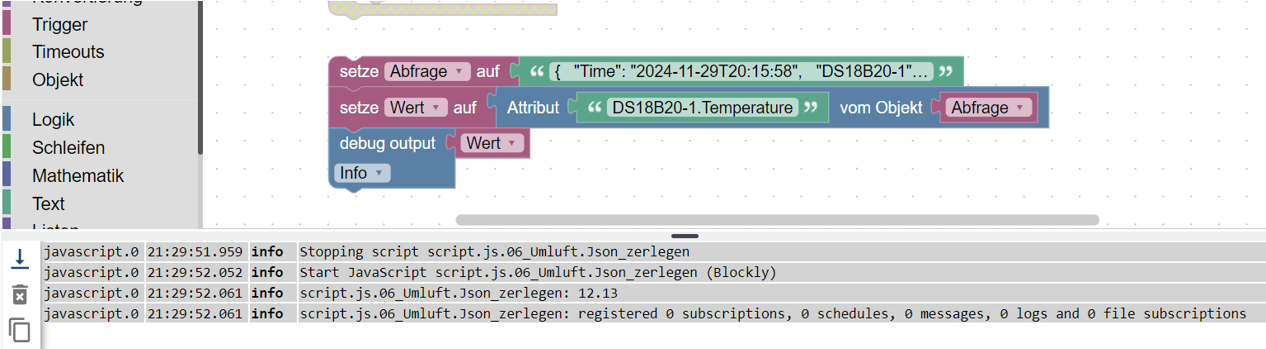
                                    Blockly 7.png

                                    Mfg
                                    IOBrokerMike

                                    Achtung ! Sehkraft 25% | 60% , kein scherz
                                    Systeme : GEEKOM MiniAir 11 | Linux : Trixie 13.2 | HMIP | OpenCCU / RasPi3 | SMA PV Anlage | Robonect Hx | Hydrawise | RTL_433

                                    HomoranH 1 Reply Last reply
                                    0
                                    • I ioBrokerMike

                                      @homoran sagte in JSON aufteilen in DP:

                                      nd in dem Zeitbereich (4 Sekunden!) hast du das Testskript refres

                                      Nein das hatte ich nicht getan.

                                      läuft der Adapter bei dir im compact mode?
                                      warum?

                                      Das kann ich nicht sagen.
                                      Habe den harken im Host raus gemacht.

                                      Was mir eben auffiel ist :
                                      Wenn ich den Javascript Adapter auf debug stelle läuft das Testscript warum auch immer.
                                      Blockly 7.png

                                      HomoranH Do not disturb
                                      HomoranH Do not disturb
                                      Homoran
                                      Global Moderator Administrators
                                      wrote on last edited by
                                      #41

                                      @iobrokermike sagte in JSON aufteilen in DP:

                                      läuft das Testscript warum auch immer.

                                      dann jetzt zum echten Skript!

                                      kein Support per PN! - Fragen im Forum stellen - es gibt fast nichts, was nicht auch für andere interessant ist.

                                      Benutzt das Voting rechts unten im Beitrag wenn er euch geholfen hat.

                                      der Installationsfixer: curl -fsL https://iobroker.net/fix.sh | bash -

                                      I 1 Reply Last reply
                                      0
                                      • HomoranH Homoran

                                        @iobrokermike sagte in JSON aufteilen in DP:

                                        läuft das Testscript warum auch immer.

                                        dann jetzt zum echten Skript!

                                        I Online
                                        I Online
                                        ioBrokerMike
                                        wrote on last edited by
                                        #42

                                        @homoran sagte in JSON aufteilen in DP:

                                        t zum echten Skript!
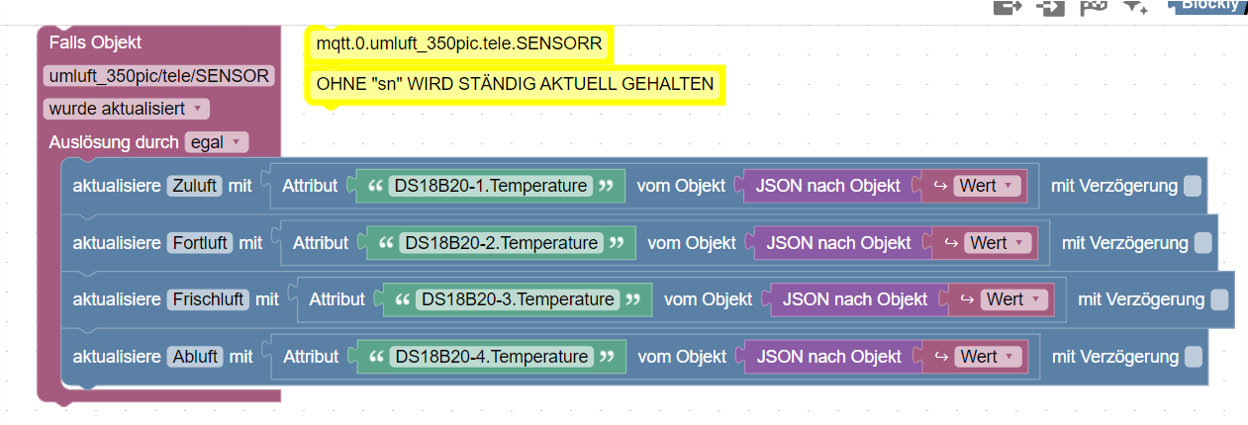
                                        Blockly 8.png

                                        Vielen Dank an euch und eure Geduld . :+1:

                                        Mfg
                                        IOBrokerMike

                                        Achtung ! Sehkraft 25% | 60% , kein scherz
                                        Systeme : GEEKOM MiniAir 11 | Linux : Trixie 13.2 | HMIP | OpenCCU / RasPi3 | SMA PV Anlage | Robonect Hx | Hydrawise | RTL_433

                                        HomoranH 1 Reply Last reply
                                        0
                                        • I ioBrokerMike

                                          @homoran sagte in JSON aufteilen in DP:

                                          t zum echten Skript!

                                          Blockly 8.png

                                          Vielen Dank an euch und eure Geduld . :+1:

                                          HomoranH Do not disturb
                                          HomoranH Do not disturb
                                          Homoran
                                          Global Moderator Administrators
                                          wrote on last edited by
                                          #43

                                          @iobrokermike sagte in [ gelöst ] JSON aufteilen in DP:

                                          Vielen Dank an euch und eure Geduld .

                                          heisst das, dass es jetzt läuft?

                                          kein Support per PN! - Fragen im Forum stellen - es gibt fast nichts, was nicht auch für andere interessant ist.

                                          Benutzt das Voting rechts unten im Beitrag wenn er euch geholfen hat.

                                          der Installationsfixer: curl -fsL https://iobroker.net/fix.sh | bash -

                                          I 1 Reply Last reply
                                          0
                                          Reply
                                          • Reply as topic
                                          Log in to reply
                                          • Oldest to Newest
                                          • Newest to Oldest
                                          • Most Votes


                                          Support us

                                          ioBroker
                                          Community Adapters
                                          Donate

                                          674

                                          Online

                                          32.6k

                                          Users

                                          82.3k

                                          Topics

                                          1.3m

                                          Posts
                                          Community
                                          Impressum | Datenschutz-Bestimmungen | Nutzungsbedingungen | Einwilligungseinstellungen
                                          ioBroker Community 2014-2025
                                          logo
                                          • Login

                                          • Don't have an account? Register

                                          • Login or register to search.
                                          • First post
                                            Last post
                                          0
                                          • Home
                                          • Recent
                                          • Tags
                                          • Unread 0
                                          • Categories
                                          • Unreplied
                                          • Popular
                                          • GitHub
                                          • Docu
                                          • Hilfe