Weiter zum Inhalt
  • Home
  • Aktuell
  • Tags
  • 0 Ungelesen 0
  • Kategorien
  • Unreplied
  • Beliebt
  • GitHub
  • Docu
  • Hilfe
Skins
  • Hell
  • Brite
  • Cerulean
  • Cosmo
  • Flatly
  • Journal
  • Litera
  • Lumen
  • Lux
  • Materia
  • Minty
  • Morph
  • Pulse
  • Sandstone
  • Simplex
  • Sketchy
  • Spacelab
  • United
  • Yeti
  • Zephyr
  • Dunkel
  • Cyborg
  • Darkly
  • Quartz
  • Slate
  • Solar
  • Superhero
  • Vapor

  • Standard: (Kein Skin)
  • Kein Skin
Einklappen
ioBroker Logo

Community Forum

donate donate
  1. ioBroker Community Home
  2. Deutsch
  3. ioBroker Allgemein
  4. Anfrage zu solax Adapter für Solax X1 Mini 1.5 G4

NEWS

  • Neuer ioBroker-Blog online: Monatsrückblick März/April 2026
    BluefoxB
    Bluefox
    8
    1
    310

  • Verwendung von KI bitte immer deutlich kennzeichnen
    HomoranH
    Homoran
    9
    1
    285

  • Monatsrückblick Januar/Februar 2026 ist online!
    BluefoxB
    Bluefox
    18
    1
    920

Anfrage zu solax Adapter für Solax X1 Mini 1.5 G4

Geplant Angeheftet Gesperrt Verschoben ioBroker Allgemein
71 Beiträge 4 Kommentatoren 2.0k Aufrufe 4 Beobachtet
  • Älteste zuerst
  • Neuste zuerst
  • Meiste Stimmen
Antworten
  • In einem neuen Thema antworten
Anmelden zum Antworten
Dieses Thema wurde gelöscht. Nur Nutzer mit entsprechenden Rechten können es sehen.
  • I icke2002

    @simatec

    d2728774-8e52-4ecf-9c6b-191aa33314a3-grafik.png

    simatecS Offline
    simatecS Offline
    simatec
    Developer Most Active
    schrieb am zuletzt editiert von
    #40

    @icke2002 Da muss irgendwas schief gelaufen sein bei dir... Du kannst kein Update über Github gemacht haben. Den Inverter Typ X3-FTH habe ich gelöscht und kann mit der Github Version nicht mehr angezeigt werden.

    Du hast sicher über die Katze das npm Paket installiert.

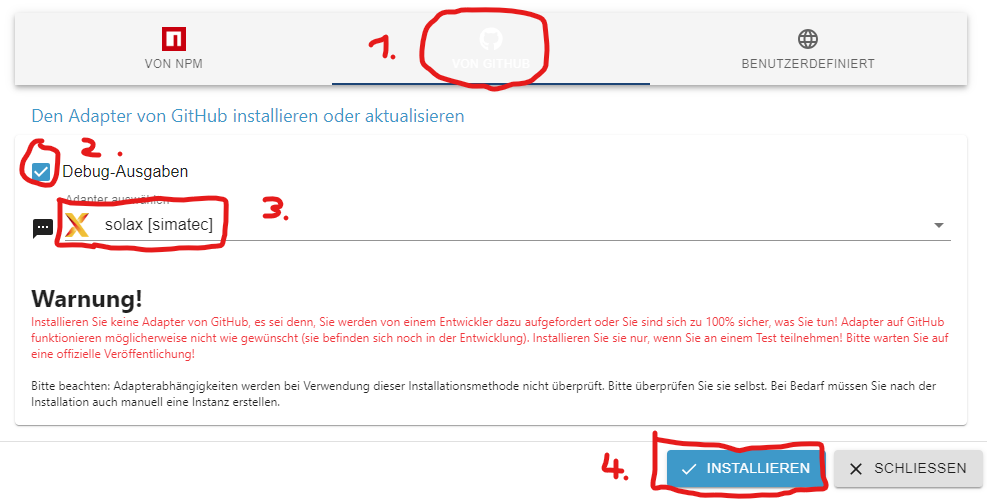
    Gehe wie folgt vor
    Im Tab Adapter auf die Katze gehen
    68a222f9-15cd-4748-8b3b-12db05dd61cd-image.png

    • Besuche meine Github Seite
    • Beitrag hat geholfen oder willst du mich unterstützen
    • HowTo Restore ioBroker
    1 Antwort Letzte Antwort
    0
    • I Offline
      I Offline
      icke2002
      schrieb am zuletzt editiert von
      #41

      @simatec Stimmt github wahrscheinlich nicht nochmal .angeklickt.
      Leider bricht die Installation mit Fehler ab:

      $ iobroker url simatec/ioBroker.solax --host PC-Wolfgang --debug

      install simatec/ioBroker.solax

      Installing simatec/ioBroker.solax... (System call)

      npm error A complete log of this run can be found in: C:\WINDOWS\system32\config\systemprofile\AppData\Local\npm-cache_logs\2024-06-27T14_25_10_988Z-debug-0.log

      host.PC-Wolfgang Cannot install simatec/ioBroker.solax: 4294963238

      ERROR: Process exited with code 25

      I 1 Antwort Letzte Antwort
      0
      • I icke2002

        @simatec Stimmt github wahrscheinlich nicht nochmal .angeklickt.
        Leider bricht die Installation mit Fehler ab:

        $ iobroker url simatec/ioBroker.solax --host PC-Wolfgang --debug

        install simatec/ioBroker.solax

        Installing simatec/ioBroker.solax... (System call)

        npm error A complete log of this run can be found in: C:\WINDOWS\system32\config\systemprofile\AppData\Local\npm-cache_logs\2024-06-27T14_25_10_988Z-debug-0.log

        host.PC-Wolfgang Cannot install simatec/ioBroker.solax: 4294963238

        ERROR: Process exited with code 25

        I Offline
        I Offline
        icke2002
        schrieb am zuletzt editiert von Homoran
        #42

        @icke2002

        0 verbose cli C:\Program Files\nodejs\node.exe C:\Program Files\nodejs\node_modules\npm\bin\npm-cli.js
        1 info using npm@10.7.0
        2 info using node@v20.15.0
        3 silly config:load:file:C:\Program Files\nodejs\node_modules\npm\npmrc
        4 silly config:load:file:C:\ioBroker\.npmrc
        5 silly config:load:file:C:\WINDOWS\system32\config\systemprofile\.npmrc
        6 silly config:load:file:C:\WINDOWS\system32\config\systemprofile\AppData\Roaming\npm\etc\npmrc
        7 verbose title npm install simatec/ioBroker.solax
        8 verbose argv "install" "simatec/ioBroker.solax"
        9 verbose logfile logs-max:10 dir:C:\WINDOWS\system32\config\systemprofile\AppData\Local\npm-cache\_logs\2024-06-27T14_25_10_988Z-
        10 verbose logfile C:\WINDOWS\system32\config\systemprofile\AppData\Local\npm-cache\_logs\2024-06-27T14_25_10_988Z-debug-0.log
        11 silly logfile done cleaning log files
        12 verbose shrinkwrap failed to load node_modules/.package-lock.json out of date, updated: node_modules/iobroker.solax
        13 verbose stack Error: An unknown git error occurred
        13 verbose stack     at makeError (C:\Program Files\nodejs\node_modules\npm\node_modules\@npmcli\git\lib\make-error.js:28:13)
        13 verbose stack     at C:\Program Files\nodejs\node_modules\npm\node_modules\@npmcli\git\lib\spawn.js:37:26
        13 verbose stack     at process.processTicksAndRejections (node:internal/process/task_queues:95:5)
        14 verbose cwd C:\ioBroker
        15 verbose Windows_NT 10.0.19045
        16 verbose node v20.15.0
        17 verbose npm  v10.7.0
        18 error code ENOENT
        19 error syscall spawn git
        20 error path git
        21 error errno -4058
        22 error enoent An unknown git error occurred
        23 error enoent This is related to npm not being able to find a file.
        23 error enoent
        24 verbose exit -4058
        25 verbose code -4058
        26 silly unfinished npm timer reify 1719498311579
        27 silly unfinished npm timer reify:loadTrees 1719498311583
        28 silly unfinished npm timer idealTree:userRequests 1719498311824
        29 error A complete log of this run can be found in: C:\WINDOWS\system32\config\systemprofile\AppData\Local\npm-cache\_logs\2024-06-27T14_25_10_988Z-debug-0.log


        MOD-EDIT: Code in code-tags gesetzt!

        simatecS 1 Antwort Letzte Antwort
        0
        • I icke2002

          @simatec

          d2728774-8e52-4ecf-9c6b-191aa33314a3-grafik.png

          HomoranH Nicht stören
          HomoranH Nicht stören
          Homoran
          Global Moderator Administrators
          schrieb am zuletzt editiert von
          #43

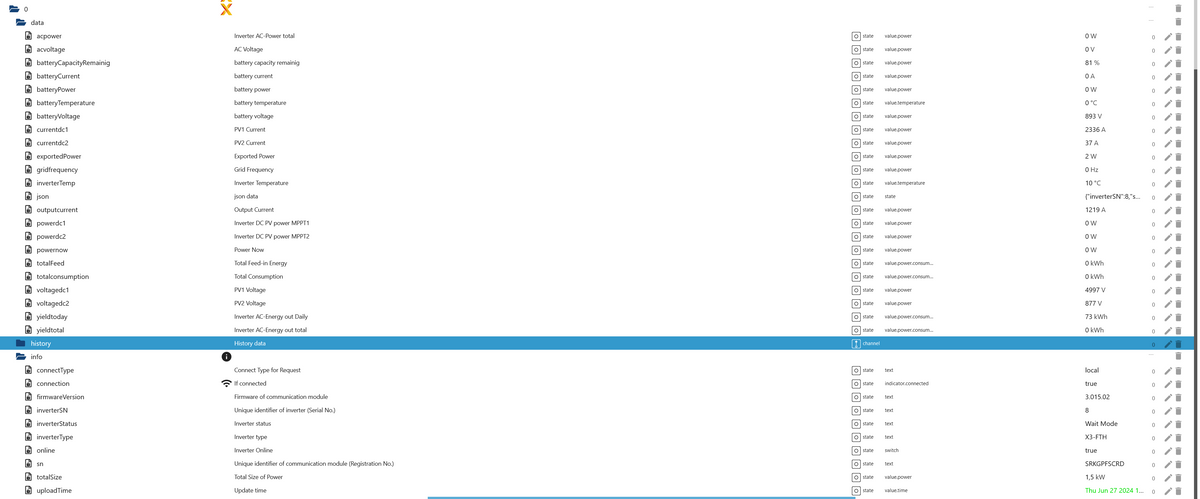
          @icke2002 Bitte keine 4K Briefmarken posten!

          Screenshot_20240627-163353_Firefox.jpg

          24% davon sind zu wenig zum erkennen.

          kein Support per PN! - Fragen im Forum stellen -
          Benutzt das Voting rechts unten im Beitrag wenn er euch geholfen hat.
          Das Forum freut sich über eine Spende. Benutzt dazu den Spendenbutton oben rechts. Danke!
          der Installationsfixer: curl -fsL https://iobroker.net/fix.sh | bash -

          I 1 Antwort Letzte Antwort
          0
          • HomoranH Homoran

            @icke2002 Bitte keine 4K Briefmarken posten!

            Screenshot_20240627-163353_Firefox.jpg

            24% davon sind zu wenig zum erkennen.

            I Offline
            I Offline
            icke2002
            schrieb am zuletzt editiert von
            #44

            @homoran verstehe ich nicht - bei mir ist alles zu erkennen???

            simatecS HomoranH 2 Antworten Letzte Antwort
            0
            • I icke2002

              @homoran verstehe ich nicht - bei mir ist alles zu erkennen???

              simatecS Offline
              simatecS Offline
              simatec
              Developer Most Active
              schrieb am zuletzt editiert von
              #45

              @icke2002 Also bei mir läuft es sauber durch ...

              $ iobroker url simatec/ioBroker.solax --host iobroker-dev --debug
              
              install simatec/ioBroker.solax
              
              NPM version: 10.7.0
              
              Installing simatec/ioBroker.solax... (System call)
              
              removed 362 packages, and changed 1 package in 4s157 packages are looking for funding run `npm fund` for details
              
              upload [16] solax.admin /opt/iobroker/node_modules/iobroker.solax/admin/admin.d.ts admin.d.ts video/mp2t
              
              upload [14] solax.admin /opt/iobroker/node_modules/iobroker.solax/admin/i18n/en/translations.json i18n/en/translations.json application/json
              
              upload [12] solax.admin /opt/iobroker/node_modules/iobroker.solax/admin/i18n/fr/translations.json i18n/fr/translations.json application/json
              
              upload [11] solax.admin /opt/iobroker/node_modules/iobroker.solax/admin/i18n/it/translations.json i18n/it/translations.json application/json
              
              upload [9] solax.admin /opt/iobroker/node_modules/iobroker.solax/admin/i18n/pl/translations.json i18n/pl/translations.json application/json
              
              upload [6] solax.admin /opt/iobroker/node_modules/iobroker.solax/admin/i18n/uk/translations.json i18n/uk/translations.json application/json
              
              upload [5] solax.admin /opt/iobroker/node_modules/iobroker.solax/admin/i18n/zh-cn/translations.json i18n/zh-cn/translations.json application/json
              
              upload [3] solax.admin /opt/iobroker/node_modules/iobroker.solax/admin/jsonConfig.json jsonConfig.json application/json
              
              upload [2] solax.admin /opt/iobroker/node_modules/iobroker.solax/admin/solax.png solax.png image/png
              
              upload [0] solax.admin /opt/iobroker/node_modules/iobroker.solax/admin/words.js words.js application/javascript
              
              Update "system.adapter.solax.0"
              
              Process exited with code 0
              
              • Besuche meine Github Seite
              • Beitrag hat geholfen oder willst du mich unterstützen
              • HowTo Restore ioBroker
              simatecS 1 Antwort Letzte Antwort
              0
              • simatecS simatec

                @icke2002 Also bei mir läuft es sauber durch ...

                $ iobroker url simatec/ioBroker.solax --host iobroker-dev --debug
                
                install simatec/ioBroker.solax
                
                NPM version: 10.7.0
                
                Installing simatec/ioBroker.solax... (System call)
                
                removed 362 packages, and changed 1 package in 4s157 packages are looking for funding run `npm fund` for details
                
                upload [16] solax.admin /opt/iobroker/node_modules/iobroker.solax/admin/admin.d.ts admin.d.ts video/mp2t
                
                upload [14] solax.admin /opt/iobroker/node_modules/iobroker.solax/admin/i18n/en/translations.json i18n/en/translations.json application/json
                
                upload [12] solax.admin /opt/iobroker/node_modules/iobroker.solax/admin/i18n/fr/translations.json i18n/fr/translations.json application/json
                
                upload [11] solax.admin /opt/iobroker/node_modules/iobroker.solax/admin/i18n/it/translations.json i18n/it/translations.json application/json
                
                upload [9] solax.admin /opt/iobroker/node_modules/iobroker.solax/admin/i18n/pl/translations.json i18n/pl/translations.json application/json
                
                upload [6] solax.admin /opt/iobroker/node_modules/iobroker.solax/admin/i18n/uk/translations.json i18n/uk/translations.json application/json
                
                upload [5] solax.admin /opt/iobroker/node_modules/iobroker.solax/admin/i18n/zh-cn/translations.json i18n/zh-cn/translations.json application/json
                
                upload [3] solax.admin /opt/iobroker/node_modules/iobroker.solax/admin/jsonConfig.json jsonConfig.json application/json
                
                upload [2] solax.admin /opt/iobroker/node_modules/iobroker.solax/admin/solax.png solax.png image/png
                
                upload [0] solax.admin /opt/iobroker/node_modules/iobroker.solax/admin/words.js words.js application/javascript
                
                Update "system.adapter.solax.0"
                
                Process exited with code 0
                
                simatecS Offline
                simatecS Offline
                simatec
                Developer Most Active
                schrieb am zuletzt editiert von
                #46

                @simatec Starte mal dein System komplett neu und versuche es erneut

                • Besuche meine Github Seite
                • Beitrag hat geholfen oder willst du mich unterstützen
                • HowTo Restore ioBroker
                I 2 Antworten Letzte Antwort
                0
                • simatecS simatec

                  @simatec Starte mal dein System komplett neu und versuche es erneut

                  I Offline
                  I Offline
                  icke2002
                  schrieb am zuletzt editiert von
                  #47

                  @simatec ok mach ich!

                  1 Antwort Letzte Antwort
                  0
                  • I icke2002

                    @homoran verstehe ich nicht - bei mir ist alles zu erkennen???

                    HomoranH Nicht stören
                    HomoranH Nicht stören
                    Homoran
                    Global Moderator Administrators
                    schrieb am zuletzt editiert von
                    #48

                    @icke2002 sagte in Anfrage zu solax Adapter für Solax X1 Mini 1.5 G4:

                    verstehe ich nicht - bei mir ist alles zu erkennen???

                    ich denke mal dein Bildschirm ist breiter als 7cm.

                    kein Support per PN! - Fragen im Forum stellen -
                    Benutzt das Voting rechts unten im Beitrag wenn er euch geholfen hat.
                    Das Forum freut sich über eine Spende. Benutzt dazu den Spendenbutton oben rechts. Danke!
                    der Installationsfixer: curl -fsL https://iobroker.net/fix.sh | bash -

                    I 1 Antwort Letzte Antwort
                    0
                    • HomoranH Homoran

                      @icke2002 sagte in Anfrage zu solax Adapter für Solax X1 Mini 1.5 G4:

                      verstehe ich nicht - bei mir ist alles zu erkennen???

                      ich denke mal dein Bildschirm ist breiter als 7cm.

                      I Offline
                      I Offline
                      icke2002
                      schrieb am zuletzt editiert von
                      #49

                      @homoran richtig?

                      1 Antwort Letzte Antwort
                      0
                      • simatecS simatec

                        @simatec Starte mal dein System komplett neu und versuche es erneut

                        I Offline
                        I Offline
                        icke2002
                        schrieb am zuletzt editiert von Homoran
                        #50

                        @simatec hat nichts genützt - bricht mit Fehler ab!?

                        0 verbose cli C:\Program Files\nodejs\node.exe C:\Program Files\nodejs\node_modules\npm\bin\npm-cli.js
                        1 info using npm@10.7.0
                        2 info using node@v20.15.0
                        3 silly config:load:file:C:\Program Files\nodejs\node_modules\npm\npmrc
                        4 silly config:load:file:C:\ioBroker\.npmrc
                        5 silly config:load:file:C:\WINDOWS\system32\config\systemprofile\.npmrc
                        6 silly config:load:file:C:\WINDOWS\system32\config\systemprofile\AppData\Roaming\npm\etc\npmrc
                        7 verbose title npm install simatec/ioBroker.solax
                        8 verbose argv "install" "simatec/ioBroker.solax"
                        9 verbose logfile logs-max:10 dir:C:\WINDOWS\system32\config\systemprofile\AppData\Local\npm-cache\_logs\2024-06-23T17_34_25_905Z-
                        10 verbose logfile C:\WINDOWS\system32\config\systemprofile\AppData\Local\npm-cache\_logs\2024-06-23T17_34_25_905Z-debug-0.log
                        11 silly logfile done cleaning log files
                        12 verbose shrinkwrap failed to load node_modules/.package-lock.json out of date, updated: node_modules/iobroker.solax
                        13 verbose stack Error: An unknown git error occurred
                        13 verbose stack     at makeError (C:\Program Files\nodejs\node_modules\npm\node_modules\@npmcli\git\lib\make-error.js:28:13)
                        13 verbose stack     at C:\Program Files\nodejs\node_modules\npm\node_modules\@npmcli\git\lib\spawn.js:37:26
                        13 verbose stack     at process.processTicksAndRejections (node:internal/process/task_queues:95:5)
                        14 verbose cwd C:\ioBroker
                        15 verbose Windows_NT 10.0.19045
                        16 verbose node v20.15.0
                        17 verbose npm  v10.7.0
                        18 error code ENOENT
                        19 error syscall spawn git
                        20 error path git
                        21 error errno -4058
                        22 error enoent An unknown git error occurred
                        23 error enoent This is related to npm not being able to find a file.
                        23 error enoent
                        24 verbose exit -4058
                        25 verbose code -4058
                        26 silly unfinished npm timer reify 1719164066510
                        27 silly unfinished npm timer reify:loadTrees 1719164066570
                        28 silly unfinished npm timer idealTree:userRequests 1719164066788
                        29 error A complete log of this run can be found in: C:\WINDOWS\system32\config\systemprofile\AppData\Local\npm-cache\_logs\2024-06-23T17_34_25_905Z-debug-0.log


                        MOD-EDIT: Code in code-tags gesetzt!

                        1 Antwort Letzte Antwort
                        0
                        • I icke2002

                          @icke2002

                          0 verbose cli C:\Program Files\nodejs\node.exe C:\Program Files\nodejs\node_modules\npm\bin\npm-cli.js
                          1 info using npm@10.7.0
                          2 info using node@v20.15.0
                          3 silly config:load:file:C:\Program Files\nodejs\node_modules\npm\npmrc
                          4 silly config:load:file:C:\ioBroker\.npmrc
                          5 silly config:load:file:C:\WINDOWS\system32\config\systemprofile\.npmrc
                          6 silly config:load:file:C:\WINDOWS\system32\config\systemprofile\AppData\Roaming\npm\etc\npmrc
                          7 verbose title npm install simatec/ioBroker.solax
                          8 verbose argv "install" "simatec/ioBroker.solax"
                          9 verbose logfile logs-max:10 dir:C:\WINDOWS\system32\config\systemprofile\AppData\Local\npm-cache\_logs\2024-06-27T14_25_10_988Z-
                          10 verbose logfile C:\WINDOWS\system32\config\systemprofile\AppData\Local\npm-cache\_logs\2024-06-27T14_25_10_988Z-debug-0.log
                          11 silly logfile done cleaning log files
                          12 verbose shrinkwrap failed to load node_modules/.package-lock.json out of date, updated: node_modules/iobroker.solax
                          13 verbose stack Error: An unknown git error occurred
                          13 verbose stack     at makeError (C:\Program Files\nodejs\node_modules\npm\node_modules\@npmcli\git\lib\make-error.js:28:13)
                          13 verbose stack     at C:\Program Files\nodejs\node_modules\npm\node_modules\@npmcli\git\lib\spawn.js:37:26
                          13 verbose stack     at process.processTicksAndRejections (node:internal/process/task_queues:95:5)
                          14 verbose cwd C:\ioBroker
                          15 verbose Windows_NT 10.0.19045
                          16 verbose node v20.15.0
                          17 verbose npm  v10.7.0
                          18 error code ENOENT
                          19 error syscall spawn git
                          20 error path git
                          21 error errno -4058
                          22 error enoent An unknown git error occurred
                          23 error enoent This is related to npm not being able to find a file.
                          23 error enoent
                          24 verbose exit -4058
                          25 verbose code -4058
                          26 silly unfinished npm timer reify 1719498311579
                          27 silly unfinished npm timer reify:loadTrees 1719498311583
                          28 silly unfinished npm timer idealTree:userRequests 1719498311824
                          29 error A complete log of this run can be found in: C:\WINDOWS\system32\config\systemprofile\AppData\Local\npm-cache\_logs\2024-06-27T14_25_10_988Z-debug-0.log


                          MOD-EDIT: Code in code-tags gesetzt!

                          simatecS Offline
                          simatecS Offline
                          simatec
                          Developer Most Active
                          schrieb am zuletzt editiert von
                          #51

                          @icke2002 Dann lösche den Adapter vorher komplett. Also auch im Tab Adapter. Sprich Instanzen und Adapter löschen.
                          Im Anschluss dann nochmals die Installation via Github siehe Screenshot

                          • Besuche meine Github Seite
                          • Beitrag hat geholfen oder willst du mich unterstützen
                          • HowTo Restore ioBroker
                          I 1 Antwort Letzte Antwort
                          0
                          • simatecS simatec

                            @icke2002 Dann lösche den Adapter vorher komplett. Also auch im Tab Adapter. Sprich Instanzen und Adapter löschen.
                            Im Anschluss dann nochmals die Installation via Github siehe Screenshot

                            I Offline
                            I Offline
                            icke2002
                            schrieb am zuletzt editiert von Homoran
                            #52

                            @simatec Wird leider immer schlimmer!?
                            Die Version 0.9.7 von npm lässt sich installieren - fehlt bei mir irgendetwas?

                            Punkt 13 und 18 - 23 - ich verstehe es nicht!

                            0 verbose cli C:\Program Files\nodejs\node.exe C:\Program Files\nodejs\node_modules\npm\bin\npm-cli.js
                            1 info using npm@10.7.0
                            2 info using node@v20.15.0
                            3 silly config:load:file:C:\Program Files\nodejs\node_modules\npm\npmrc
                            4 silly config:load:file:C:\ioBroker\.npmrc
                            5 silly config:load:file:C:\WINDOWS\system32\config\systemprofile\.npmrc
                            6 silly config:load:file:C:\WINDOWS\system32\config\systemprofile\AppData\Roaming\npm\etc\npmrc
                            7 verbose title npm install simatec/ioBroker.solax
                            8 verbose argv "install" "simatec/ioBroker.solax"
                            9 verbose logfile logs-max:10 dir:C:\WINDOWS\system32\config\systemprofile\AppData\Local\npm-cache\_logs\2024-06-27T16_53_21_153Z-
                            10 verbose logfile C:\WINDOWS\system32\config\systemprofile\AppData\Local\npm-cache\_logs\2024-06-27T16_53_21_153Z-debug-0.log
                            11 silly logfile start cleaning logs, removing 1 files
                            12 silly logfile done cleaning log files
                            13 verbose stack Error: An unknown git error occurred
                            13 verbose stack     at makeError (C:\Program Files\nodejs\node_modules\npm\node_modules\@npmcli\git\lib\make-error.js:28:13)
                            13 verbose stack     at C:\Program Files\nodejs\node_modules\npm\node_modules\@npmcli\git\lib\spawn.js:37:26
                            13 verbose stack     at process.processTicksAndRejections (node:internal/process/task_queues:95:5)
                            14 verbose cwd C:\ioBroker
                            15 verbose Windows_NT 10.0.19045
                            16 verbose node v20.15.0
                            17 verbose npm  v10.7.0
                            18 error code ENOENT
                            19 error syscall spawn git
                            20 error path git
                            21 error errno -4058
                            22 error enoent An unknown git error occurred
                            23 error enoent This is related to npm not being able to find a file.
                            23 error enoent
                            24 verbose exit -4058
                            25 verbose code -4058
                            26 silly unfinished npm timer reify 1719507201733
                            27 silly unfinished npm timer reify:loadTrees 1719507201739
                            28 silly unfinished npm timer idealTree:userRequests 1719507201999
                            29 error A complete log of this run can be found in: C:\WINDOWS\system32\config\systemprofile\AppData\Local\npm-cache\_logs\2024-06-27T16_53_21_153Z-debug-0.log


                            MOD-EDIT: Code in code-tags gesetzt!

                            HomoranH 1 Antwort Letzte Antwort
                            0
                            • I icke2002

                              @simatec Wird leider immer schlimmer!?
                              Die Version 0.9.7 von npm lässt sich installieren - fehlt bei mir irgendetwas?

                              Punkt 13 und 18 - 23 - ich verstehe es nicht!

                              0 verbose cli C:\Program Files\nodejs\node.exe C:\Program Files\nodejs\node_modules\npm\bin\npm-cli.js
                              1 info using npm@10.7.0
                              2 info using node@v20.15.0
                              3 silly config:load:file:C:\Program Files\nodejs\node_modules\npm\npmrc
                              4 silly config:load:file:C:\ioBroker\.npmrc
                              5 silly config:load:file:C:\WINDOWS\system32\config\systemprofile\.npmrc
                              6 silly config:load:file:C:\WINDOWS\system32\config\systemprofile\AppData\Roaming\npm\etc\npmrc
                              7 verbose title npm install simatec/ioBroker.solax
                              8 verbose argv "install" "simatec/ioBroker.solax"
                              9 verbose logfile logs-max:10 dir:C:\WINDOWS\system32\config\systemprofile\AppData\Local\npm-cache\_logs\2024-06-27T16_53_21_153Z-
                              10 verbose logfile C:\WINDOWS\system32\config\systemprofile\AppData\Local\npm-cache\_logs\2024-06-27T16_53_21_153Z-debug-0.log
                              11 silly logfile start cleaning logs, removing 1 files
                              12 silly logfile done cleaning log files
                              13 verbose stack Error: An unknown git error occurred
                              13 verbose stack     at makeError (C:\Program Files\nodejs\node_modules\npm\node_modules\@npmcli\git\lib\make-error.js:28:13)
                              13 verbose stack     at C:\Program Files\nodejs\node_modules\npm\node_modules\@npmcli\git\lib\spawn.js:37:26
                              13 verbose stack     at process.processTicksAndRejections (node:internal/process/task_queues:95:5)
                              14 verbose cwd C:\ioBroker
                              15 verbose Windows_NT 10.0.19045
                              16 verbose node v20.15.0
                              17 verbose npm  v10.7.0
                              18 error code ENOENT
                              19 error syscall spawn git
                              20 error path git
                              21 error errno -4058
                              22 error enoent An unknown git error occurred
                              23 error enoent This is related to npm not being able to find a file.
                              23 error enoent
                              24 verbose exit -4058
                              25 verbose code -4058
                              26 silly unfinished npm timer reify 1719507201733
                              27 silly unfinished npm timer reify:loadTrees 1719507201739
                              28 silly unfinished npm timer idealTree:userRequests 1719507201999
                              29 error A complete log of this run can be found in: C:\WINDOWS\system32\config\systemprofile\AppData\Local\npm-cache\_logs\2024-06-27T16_53_21_153Z-debug-0.log


                              MOD-EDIT: Code in code-tags gesetzt!

                              HomoranH Nicht stören
                              HomoranH Nicht stören
                              Homoran
                              Global Moderator Administrators
                              schrieb am zuletzt editiert von
                              #53

                              @icke2002 sagte in Anfrage zu solax Adapter für Solax X1 Mini 1.5 G4:

                              fehlt bei mir irgendetwas?

                              @icke2002 sagte in Anfrage zu solax Adapter für Solax X1 Mini 1.5 G4:

                              Punkt 13 und 18 - 23 - ich verstehe es nicht!

                              @icke2002 sagte in Anfrage zu solax Adapter für Solax X1 Mini 1.5 G4:

                              19 error syscall spawn git
                              20 error path git
                              21 error errno -4058
                              22 error enoent An unknown git error occurred
                              23 error enoent This is related to npm not being able to find a file.
                              23 error enoent

                              da war doch was mit dem installer für Win.
                              Ich glaube der installiert das Paket git nicht standardmäßig

                              kein Support per PN! - Fragen im Forum stellen -
                              Benutzt das Voting rechts unten im Beitrag wenn er euch geholfen hat.
                              Das Forum freut sich über eine Spende. Benutzt dazu den Spendenbutton oben rechts. Danke!
                              der Installationsfixer: curl -fsL https://iobroker.net/fix.sh | bash -

                              I 1 Antwort Letzte Antwort
                              0
                              • HomoranH Homoran

                                @icke2002 sagte in Anfrage zu solax Adapter für Solax X1 Mini 1.5 G4:

                                fehlt bei mir irgendetwas?

                                @icke2002 sagte in Anfrage zu solax Adapter für Solax X1 Mini 1.5 G4:

                                Punkt 13 und 18 - 23 - ich verstehe es nicht!

                                @icke2002 sagte in Anfrage zu solax Adapter für Solax X1 Mini 1.5 G4:

                                19 error syscall spawn git
                                20 error path git
                                21 error errno -4058
                                22 error enoent An unknown git error occurred
                                23 error enoent This is related to npm not being able to find a file.
                                23 error enoent

                                da war doch was mit dem installer für Win.
                                Ich glaube der installiert das Paket git nicht standardmäßig

                                I Offline
                                I Offline
                                icke2002
                                schrieb am zuletzt editiert von
                                #54

                                @homoran ok - danke - wie kann ich das Problem als newbee lösen?

                                HomoranH simatecS 2 Antworten Letzte Antwort
                                0
                                • I icke2002

                                  @homoran ok - danke - wie kann ich das Problem als newbee lösen?

                                  HomoranH Nicht stören
                                  HomoranH Nicht stören
                                  Homoran
                                  Global Moderator Administrators
                                  schrieb am zuletzt editiert von
                                  #55

                                  @icke2002 sagte in Anfrage zu solax Adapter für Solax X1 Mini 1.5 G4:

                                  @homoran ok - danke - wie kann ich das Problem als newbee lösen?

                                  Suche benutzen und u.a. dieses finden:
                                  https://forum.iobroker.net/post/1166454

                                  kein Support per PN! - Fragen im Forum stellen -
                                  Benutzt das Voting rechts unten im Beitrag wenn er euch geholfen hat.
                                  Das Forum freut sich über eine Spende. Benutzt dazu den Spendenbutton oben rechts. Danke!
                                  der Installationsfixer: curl -fsL https://iobroker.net/fix.sh | bash -

                                  I 1 Antwort Letzte Antwort
                                  0
                                  • I icke2002

                                    @homoran ok - danke - wie kann ich das Problem als newbee lösen?

                                    simatecS Offline
                                    simatecS Offline
                                    simatec
                                    Developer Most Active
                                    schrieb am zuletzt editiert von
                                    #56

                                    @icke2002 oder du wartest, bis ich die Version auf npm habe und installierst von npm über die Katze

                                    • Besuche meine Github Seite
                                    • Beitrag hat geholfen oder willst du mich unterstützen
                                    • HowTo Restore ioBroker
                                    I 2 Antworten Letzte Antwort
                                    1
                                    • HomoranH Homoran

                                      @icke2002 sagte in Anfrage zu solax Adapter für Solax X1 Mini 1.5 G4:

                                      @homoran ok - danke - wie kann ich das Problem als newbee lösen?

                                      Suche benutzen und u.a. dieses finden:
                                      https://forum.iobroker.net/post/1166454

                                      I Offline
                                      I Offline
                                      icke2002
                                      schrieb am zuletzt editiert von
                                      #57

                                      @homoran Ich hatte gesucht - aber nicht gefunden - Danke für den Tip. Nach Neustart lief die Installation!👍 😳

                                      1 Antwort Letzte Antwort
                                      0
                                      • simatecS simatec

                                        @icke2002 oder du wartest, bis ich die Version auf npm habe und installierst von npm über die Katze

                                        I Offline
                                        I Offline
                                        icke2002
                                        schrieb am zuletzt editiert von
                                        #58

                                        @simatec nach der git -Installation konnte ich den Adapter installieren und jetzt läuft es!
                                        Super - Danke!👍 👍 👍

                                        simatecS 1 Antwort Letzte Antwort
                                        0
                                        • I icke2002

                                          @simatec nach der git -Installation konnte ich den Adapter installieren und jetzt läuft es!
                                          Super - Danke!👍 👍 👍

                                          simatecS Offline
                                          simatecS Offline
                                          simatec
                                          Developer Most Active
                                          schrieb am zuletzt editiert von simatec
                                          #59

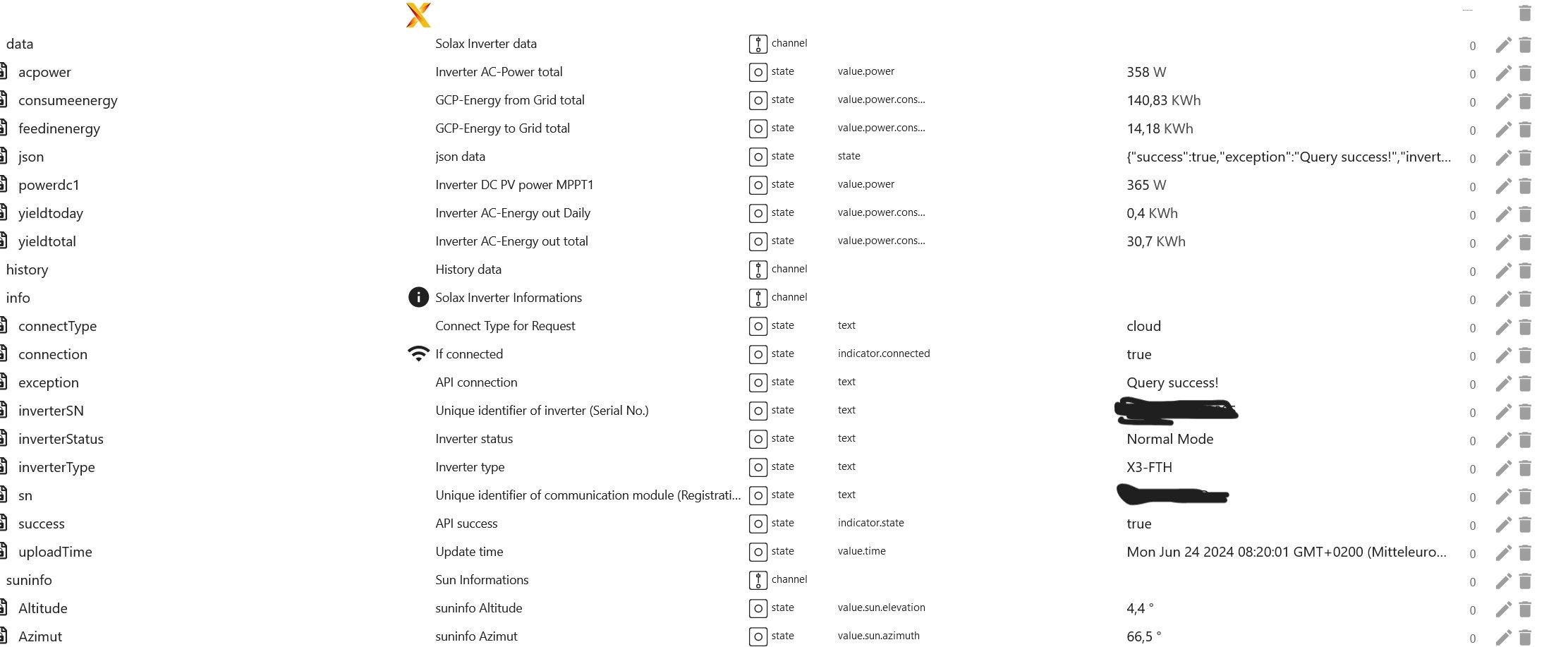
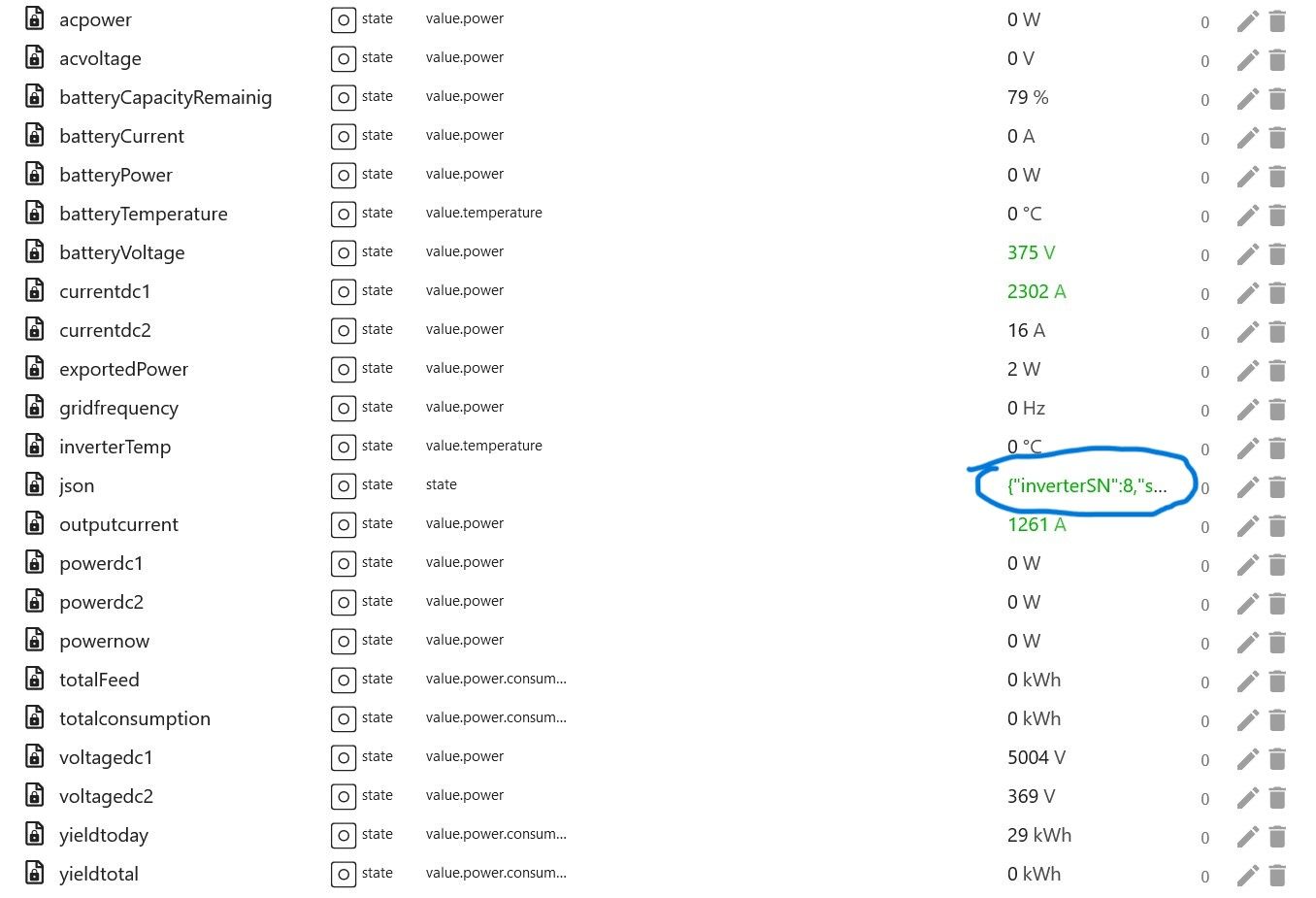
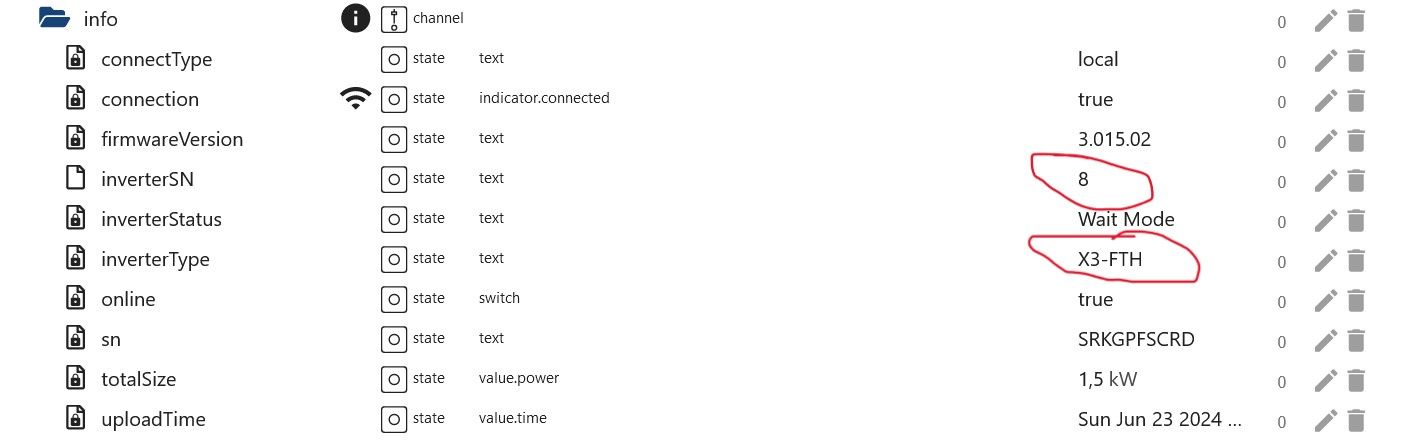
                                          @icke2002 Poste mal bitte die Objekte, die nun alle erzeugt wurden. Sind die Daten alle korrekt und plausibel?

                                          • Besuche meine Github Seite
                                          • Beitrag hat geholfen oder willst du mich unterstützen
                                          • HowTo Restore ioBroker
                                          I 1 Antwort Letzte Antwort
                                          0

                                          Hey! Du scheinst an dieser Unterhaltung interessiert zu sein, hast aber noch kein Konto.

                                          Hast du es satt, bei jedem Besuch durch die gleichen Beiträge zu scrollen? Wenn du dich für ein Konto anmeldest, kommst du immer genau dorthin zurück, wo du zuvor warst, und kannst dich über neue Antworten benachrichtigen lassen (entweder per E-Mail oder Push-Benachrichtigung). Du kannst auch Lesezeichen speichern und Beiträge positiv bewerten, um anderen Community-Mitgliedern deine Wertschätzung zu zeigen.

                                          Mit deinem Input könnte dieser Beitrag noch besser werden 💗

                                          Registrieren Anmelden
                                          Antworten
                                          • In einem neuen Thema antworten
                                          Anmelden zum Antworten
                                          • Älteste zuerst
                                          • Neuste zuerst
                                          • Meiste Stimmen


                                          Support us

                                          ioBroker
                                          Community Adapters
                                          Donate
                                          FAQ Cloud / IOT
                                          HowTo: Node.js-Update
                                          HowTo: Backup/Restore
                                          Downloads
                                          BLOG

                                          562

                                          Online

                                          32.8k

                                          Benutzer

                                          82.8k

                                          Themen

                                          1.3m

                                          Beiträge
                                          Community
                                          Impressum | Datenschutz-Bestimmungen | Nutzungsbedingungen | Einwilligungseinstellungen
                                          ioBroker Community 2014-2025
                                          logo
                                          • Anmelden

                                          • Du hast noch kein Konto? Registrieren

                                          • Anmelden oder registrieren, um zu suchen
                                          • Erster Beitrag
                                            Letzter Beitrag
                                          0
                                          • Home
                                          • Aktuell
                                          • Tags
                                          • Ungelesen 0
                                          • Kategorien
                                          • Unreplied
                                          • Beliebt
                                          • GitHub
                                          • Docu
                                          • Hilfe