




Backup wiederherstellen
-
@christoph-g Vielleicht kann dir der Backup/Restore Guru @simatec weiterhelfen?
-
@dr-bakterius
Gibt es irgendwo eine Übersicht welcher admin bzw backitup adapter mit welcher js controller version funktioniert?
@christoph-g Also die benötigte backitup-Adapter Version kennst du jetzt. Beim admin-Adapter kann dir sicher @foxriver76 weiter helfen...
-
@christoph-g Also die benötigte backitup-Adapter Version kennst du jetzt. Beim admin-Adapter kann dir sicher @foxriver76 weiter helfen...
Moin,
ich habe beim node.js update mein system zerschossen. Hab von node 16 auf 18 geupdated.
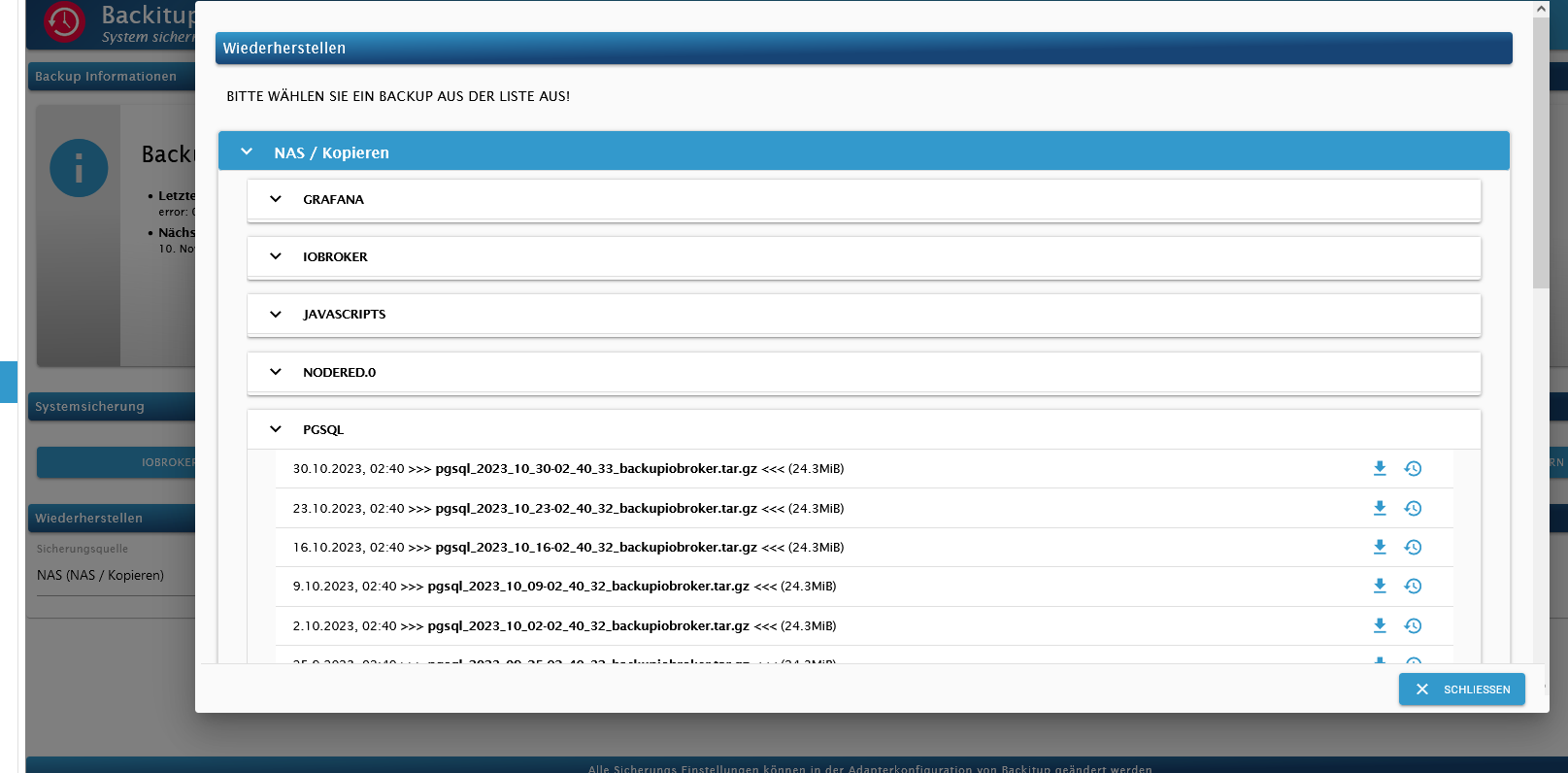
Habe dann mein system neu aufgesetzt und die backups vom dem gleichnamigen adapter wieder eingespielt. hat alles funktioniert bis auf beim postgres db.
Hab naturlich die aktulle version installiert --> bin jetzt wieder auf der vorherrigen version zurückgegangen und bekomme folgenden fehler:Started restore ... [DEBUG] [pgsql] - Start postgresql Restore ... [ERROR] [pgsql] - Error: EPERM: operation not permitted, utime '/opt/iobroker/backups/pgsql_restore_backupiobroker.sql' [ERROR] [pgsql] - postgresql Restore not completed [EXIT]mit psql geht auch nicht
sudo psql -U postgres anko_iobroker_v1 < pgsql_2023_10_30-02_40_33_backupiobroker.sql
psql: error: connection to server on socket "/var/run/postgresql/.s.PGSQL.5432" failed: FATAL:  Peer authentication failed for user "postgres"
verbindung ist aber offen
sudo psql --host=localhost --port=5432 --username=iobroker --password --dbname=anko_iobroker_v1
Password:
psql (13.12 (Debian 13.12-1.pgdg120+1))
SSL connection (protocol: TLSv1.3, cipher: TLS_AES_256_GCM_SHA384, bits: 256, compression: off)
Type "help" for help.

anko_iobroker_v1=# \q
pg_restore bring auch nen fehler.
hat eine/r ne idee.
gibts noch eine möglichkeit? -
Moin,
ich habe beim node.js update mein system zerschossen. Hab von node 16 auf 18 geupdated.
Habe dann mein system neu aufgesetzt und die backups vom dem gleichnamigen adapter wieder eingespielt. hat alles funktioniert bis auf beim postgres db.
Hab naturlich die aktulle version installiert --> bin jetzt wieder auf der vorherrigen version zurückgegangen und bekomme folgenden fehler:Started restore ... [DEBUG] [pgsql] - Start postgresql Restore ... [ERROR] [pgsql] - Error: EPERM: operation not permitted, utime '/opt/iobroker/backups/pgsql_restore_backupiobroker.sql' [ERROR] [pgsql] - postgresql Restore not completed [EXIT]mit psql geht auch nicht
sudo psql -U postgres anko_iobroker_v1 < pgsql_2023_10_30-02_40_33_backupiobroker.sql
psql: error: connection to server on socket "/var/run/postgresql/.s.PGSQL.5432" failed: FATAL:  Peer authentication failed for user "postgres"
verbindung ist aber offen
sudo psql --host=localhost --port=5432 --username=iobroker --password --dbname=anko_iobroker_v1
Password:
psql (13.12 (Debian 13.12-1.pgdg120+1))
SSL connection (protocol: TLSv1.3, cipher: TLS_AES_256_GCM_SHA384, bits: 256, compression: off)
Type "help" for help.

anko_iobroker_v1=# \q
pg_restore bring auch nen fehler.
hat eine/r ne idee.
gibts noch eine möglichkeit?@andré-koschnik sagte in Backup wiederherstellen:
ch habe beim node.js update mein system zerschossen. Hab von node 16 auf 18 geupdated.
Wie schafft man das?
Wie bist du denn da nun unterwegs?iob diaganschauen.
Linux-Werkzeugkasten:
https://forum.iobroker.net/topic/42952/der-kleine-iobroker-linux-werkzeugkasten
NodeJS Fixer Skript:
https://forum.iobroker.net/topic/68035/iob-node-fix-skript
iob_diag: curl -sLf -o diag.sh https://iobroker.net/diag.sh && bash diag.sh -
@andré-koschnik sagte in Backup wiederherstellen:
ch habe beim node.js update mein system zerschossen. Hab von node 16 auf 18 geupdated.
Wie schafft man das?
Wie bist du denn da nun unterwegs?iob diaganschauen.
bin leider nicht so fit unter debin bin her ein mausschubser.
der iobroker hat eine neue node.js version empfohlen. apt update | apt upgrate hat aber nix geupated und dann hat google nicht immer gute tips gegeben.
Egal lauft ja alles wieder bis auf die daten in der db.bin peer ssh auf dem bulleyes oder im webinterface des iob
-
bin leider nicht so fit unter debin bin her ein mausschubser.
der iobroker hat eine neue node.js version empfohlen. apt update | apt upgrate hat aber nix geupated und dann hat google nicht immer gute tips gegeben.
Egal lauft ja alles wieder bis auf die daten in der db.bin peer ssh auf dem bulleyes oder im webinterface des iob
Linux-Werkzeugkasten:
https://forum.iobroker.net/topic/42952/der-kleine-iobroker-linux-werkzeugkasten
NodeJS Fixer Skript:
https://forum.iobroker.net/topic/68035/iob-node-fix-skript
iob_diag: curl -sLf -o diag.sh https://iobroker.net/diag.sh && bash diag.sh -
bin leider nicht so fit unter debin bin her ein mausschubser.
der iobroker hat eine neue node.js version empfohlen. apt update | apt upgrate hat aber nix geupated und dann hat google nicht immer gute tips gegeben.
Egal lauft ja alles wieder bis auf die daten in der db.bin peer ssh auf dem bulleyes oder im webinterface des iob
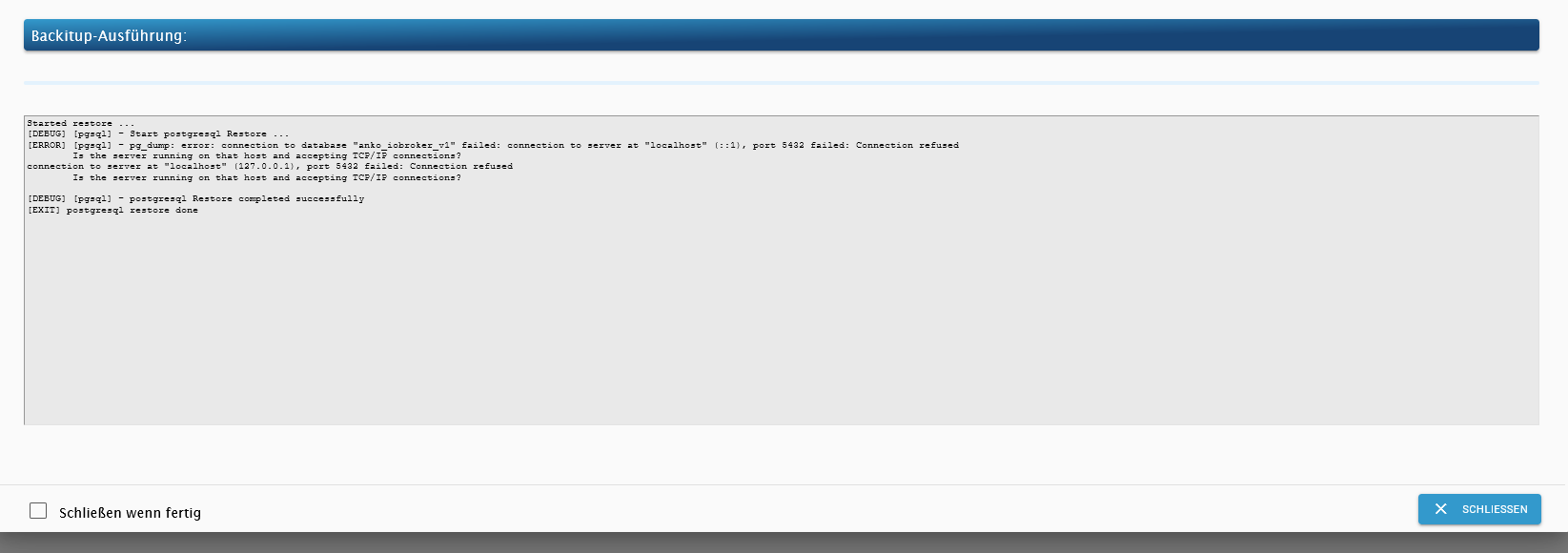
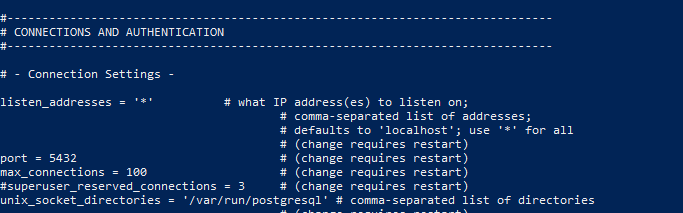
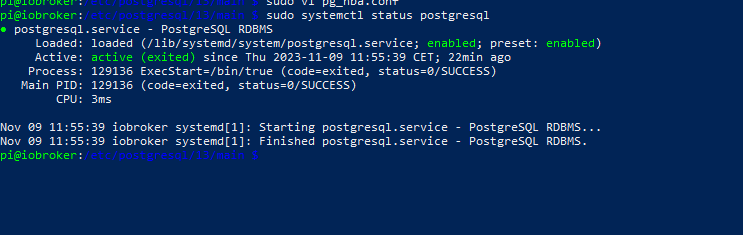
postgresql.conf
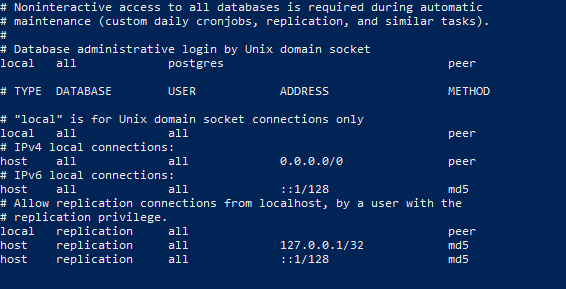
pg_hba.conf
status postgres
-
@thomas-braun said in Backup wiederherstellen:
iob diag
======== Start marking the full check here ========= Skript v.2023-10-10 *** BASE SYSTEM *** Static hostname: iobroker Icon name: computer Operating System: Debian GNU/Linux 12 (bookworm) Kernel: Linux 6.1.0-rpi6-rpi-v8 Architecture: arm64 Model : Raspberry Pi 4 Model B Rev 1.4 Docker : false Virtualization : none Kernel : aarch64 Userland : arm64 Systemuptime and Load: 12:30:07 up 22:12, 5 users, load average: 0.90, 0.89, 0.75 CPU threads: 4 *** RASPBERRY THROTTLING *** Current issues: No throttling issues detected. Previously detected issues: No throttling issues detected. *** Time and Time Zones *** Local time: Thu 2023-11-09 12:30:07 CET Universal time: Thu 2023-11-09 11:30:07 UTC RTC time: n/a Time zone: Europe/Berlin (CET, +0100) System clock synchronized: yes NTP service: active RTC in local TZ: no *** User and Groups *** pi /home/pi pi adm dialout cdrom sudo audio video plugdev games users input render netdev lpadmin gpio i2c spi iobroker *** X-Server-Setup *** X-Server: false Desktop: Terminal: tty Boot Target: graphical.target *** MEMORY *** total used free shared buff/cache available Mem: 4.0G 2.3G 507M 23M 1.3G 1.7G Swap: 104M 5.5M 99M Total: 4.1G 2.3G 606M 3792 M total memory 2192 M used memory 2221 M active memory 829 M inactive memory 483 M free memory 26 M buffer memory 1187 M swap cache 99 M total swap 5 M used swap 94 M free swap Raspberry only: oom events: 0 lifetime oom required: 0 Mbytes total time in oom handler: 0 ms max time spent in oom handler: 0 ms *** FAILED SERVICES *** UNIT LOAD ACTIVE SUB DESCRIPTION * postgresql@13-main.service loaded failed failed PostgreSQL Cluster 13-main LOAD = Reflects whether the unit definition was properly loaded. ACTIVE = The high-level unit activation state, i.e. generalization of SUB. SUB = The low-level unit activation state, values depend on unit type. 1 loaded units listed. *** FILESYSTEM *** Filesystem Type Size Used Avail Use% Mounted on udev devtmpfs 1.6G 0 1.6G 0% /dev tmpfs tmpfs 380M 1.4M 378M 1% /run /dev/sda2 ext4 235G 7.7G 215G 4% / tmpfs tmpfs 1.9G 4.3M 1.9G 1% /dev/shm tmpfs tmpfs 5.0M 16K 5.0M 1% /run/lock /dev/sda1 vfat 510M 73M 438M 15% /boot/firmware tmpfs tmpfs 380M 36K 380M 1% /run/user/1000 //192.168.100.2/share/ioBrokerbackupDir cifs 5.4T 2.3T 3.2T 42% /opt/iobroker/backups Messages concerning ext4 filesystem in dmesg: [Wed Nov 8 14:17:42 2023] Kernel command line: coherent_pool=1M 8250.nr_uarts=0 snd_bcm2835.enable_headphones=0 snd_bcm2835.enable_headphones=1 snd_bcm2835.enable_hdmi=1 snd_bcm2835.enable_hdmi=0 smsc95xx.macaddr=E4:5F:01:54:39:F9 vc_mem.mem_base=0x3eb00000 vc_mem.mem_size=0x3ff00000 console=ttyS0,115200 console=tty1 root=PARTUUID=20713d2e-02 rootfstype=ext4 fsck.repair=yes rootwait quiet splash plymouth.ignore-serial-consoles [Wed Nov 8 14:17:46 2023] EXT4-fs (sda2): mounted filesystem with ordered data mode. Quota mode: none. [Wed Nov 8 14:17:48 2023] EXT4-fs (sda2): re-mounted. Quota mode: none. Show mounted filesystems \(real ones only\): TARGET SOURCE FSTYPE OPTIONS / /dev/sda2 ext4 rw,noatime |-/run/user/1000/doc portal fuse.portal rw,nosuid,nodev,relatime,user_id=1000,group_id=1000 |-/boot/firmware /dev/sda1 vfat rw,relatime,fmask=0022,dmask=0022,codepage=437,iocharset=ascii,shortname=mixed,errors=remount-ro `-/opt/iobroker/backups //192.168.100.2/share/ioBrokerbackupDir cifs rw,relatime,vers=3.1.1,cache=strict,username=iobroker,domain=leevan.de,uid=1001,noforceuid,gid=1001,noforcegid,addr=192.168.100.2,file_mode=0777,dir_mode=0777,soft,nounix,serverino,mapposix,rsize=4194304,wsize=4194304,bsize=1048576,echo_interval=60,actimeo=1,closetimeo=1 `-/opt/iobroker/backups //192.168.100.2/share/ioBrokerbackupDir cifs rw,relatime,vers=1.0,cache=strict,username=iobroker,domain=leevan.de,uid=1001,noforceuid,gid=1001,noforcegid,addr=192.168.100.2,soft,unix,posixpaths,serverino,mapposix,acl,rsize=1048576,wsize=1048576,bsize=1048576,echo_interval=60,actimeo=1,closetimeo=1 `-/opt/iobroker/backups //192.168.100.2/share/ioBrokerbackupDir cifs rw,relatime,vers=3.1.1,cache=strict,username=iobroker,domain=leevan.de,uid=1001,noforceuid,gid=1001,noforcegid,addr=192.168.100.2,file_mode=0777,dir_mode=0777,soft,nounix,serverino,mapposix,rsize=4194304,wsize=4194304,bsize=1048576,echo_interval=60,actimeo=1,closetimeo=1 `-/opt/iobroker/backups //192.168.100.2/share/ioBrokerbackupDir cifs rw,relatime,vers=1.0,cache=strict,username=iobroker,domain=leevan.de,uid=1001,noforceuid,gid=1001,noforcegid,addr=192.168.100.2,soft,unix,posixpaths,serverino,mapposix,acl,rsize=1048576,wsize=1048576,bsize=1048576,echo_interval=60,actimeo=1,closetimeo=1 `-/opt/iobroker/backups //192.168.100.2/share/ioBrokerbackupDir cifs rw,relatime,vers=3.1.1,cache=strict,username=iobroker,domain=leevan.de,uid=1001,noforceuid,gid=1001,noforcegid,addr=192.168.100.2,file_mode=0777,dir_mode=0777,soft,nounix,serverino,mapposix,rsize=4194304,wsize=4194304,bsize=1048576,echo_interval=60,actimeo=1,closetimeo=1 `-/opt/iobroker/backups //192.168.100.2/share/ioBrokerbackupDir cifs rw,relatime,vers=1.0,cache=strict,username=iobroker,domain=leevan.de,uid=1001,noforceuid,gid=1001,noforcegid,addr=192.168.100.2,soft,unix,posixpaths,serverino,mapposix,acl,rsize=1048576,wsize=1048576,bsize=1048576,echo_interval=60,actimeo=1,closetimeo=1 `-/opt/iobroker/backups //192.168.100.2/share/ioBrokerbackupDir cifs rw,relatime,vers=3.1.1,cache=strict,username=iobroker,domain=leevan.de,uid=1001,noforceuid,gid=1001,noforcegid,addr=192.168.100.2,file_mode=0777,dir_mode=0777,soft,nounix,serverino,mapposix,rsize=4194304,wsize=4194304,bsize=1048576,echo_interval=60,actimeo=1,closetimeo=1 Files in neuralgic directories: /var: 890M /var/ 463M /var/cache 454M /var/cache/apt 340M /var/cache/apt/archives 248M /var/lib Archived and active journals take up 48.0M in the file system. /opt/iobroker/backups: 11G /opt/iobroker/backups/ 9.2G /opt/iobroker/backups/1/iobroker/iobroker-tar-backup-20230129-122153 9.2G /opt/iobroker/backups/1/iobroker 9.2G /opt/iobroker/backups/1 84M /opt/iobroker/backups/iobroker_2023_03_06-02_40_21_backupiobroker.tar /opt/iobroker/iobroker-data: 255M /opt/iobroker/iobroker-data/ 171M /opt/iobroker/iobroker-data/files 52M /opt/iobroker/iobroker-data/files/javascript.admin 45M /opt/iobroker/iobroker-data/files/devices.admin/static 45M /opt/iobroker/iobroker-data/files/devices.admin The five largest files in iobroker-data are: 35M /opt/iobroker/iobroker-data/files/devices.admin/static/js/main.24f2bb56.js.map 27M /opt/iobroker/iobroker-data/objects.jsonl 21M /opt/iobroker/iobroker-data/files/web.admin/static/js/main.eafddf6f.js.map 8.6M /opt/iobroker/iobroker-data/files/devices.admin/static/js/main.24f2bb56.js 8.3M /opt/iobroker/iobroker-data/files/web.admin/static/js/main.eafddf6f.js USB-Devices by-id: USB-Sticks - Avoid direct links to /dev/* in your adapter setups, please always prefer the links 'by-id': /dev/serial/by-id/usb-ITead_Sonoff_Zigbee_3.0_USB_Dongle_Plus_36651404c719ec11b22276e5f01c6278-if00-port0 /dev/serial/by-id/usb-Silicon_Labs_CP2102_USB_to_UART_Bridge_Controller_0037-if00-port0 *** NodeJS-Installation *** /usr/bin/nodejs v20.5.1 /usr/bin/node v20.5.1 /usr/bin/npm 9.8.0 /usr/bin/npx 9.8.0 /usr/bin/corepack 0.19.0 nodejs: Installed: 20.5.1-deb-1nodesource1 Candidate: 20.5.1-deb-1nodesource1 Version table: *** 20.5.1-deb-1nodesource1 500 500 https://deb.nodesource.com/node_20.x bookworm/main arm64 Packages 100 /var/lib/dpkg/status 18.13.0+dfsg1-1 500 500 http://deb.debian.org/debian bookworm/main arm64 Packages Temp directories causing npm8 problem: 0 No problems detected Errors in npm tree: npm ERR! code ELSPROBLEMS npm ERR! missing: moment-parseformat@^4.0.0, required by iobroker.javascript@7.1.4 npm ERR! A complete log of this run can be found in: /home/pi/.npm/_logs/2023-11-09T11_30_15_066Z-debug-0.log *** ioBroker-Installation *** ioBroker Status iobroker is running on this host. Objects type: jsonl States type: jsonl Core adapters versions js-controller: 5.0.12 admin: 6.12.0 javascript: 7.1.4 Adapters from github: 1 Adapter State + system.adapter.accuweather.0 : accuweather : iobroker - enabled + system.adapter.admin.0 : admin : iobroker - enabled, port: 8081, bind: 0.0.0.0, run as: admin + system.adapter.alexa2.0 : alexa2 : iobroker - enabled + system.adapter.alexa2.1 : alexa2 : iobroker - enabled + system.adapter.backitup.0 : backitup : iobroker - enabled system.adapter.devices.0 : devices : iobroker - disabled system.adapter.discovery.0 : discovery : iobroker - disabled system.adapter.fb-checkpresence.0 : fb-checkpresence : iobroker - disabled + system.adapter.go-e.0 : go-e : iobroker - enabled + system.adapter.hue-extended.0 : hue-extended : iobroker - enabled system.adapter.ical.1 : ical : iobroker - enabled + system.adapter.info.0 : info : iobroker - enabled system.adapter.javascript.0 : javascript : iobroker - disabled + system.adapter.lovelace.0 : lovelace : iobroker - enabled, port: 8091, bind: 0.0.0.0, run as: admin + system.adapter.meater.0 : meater : iobroker - enabled + system.adapter.mqtt.0 : mqtt : iobroker - enabled, port: 1883, bind: 0.0.0.0 + system.adapter.node-red.0 : node-red : iobroker - enabled, port: 1880, bind: 0.0.0.0 + system.adapter.parser.0 : parser : iobroker - enabled + system.adapter.pi-hole.0 : pi-hole : iobroker - enabled + system.adapter.rpi2.0 : rpi2 : iobroker - enabled + system.adapter.samsung.0 : samsung : iobroker - enabled + system.adapter.smartmeter.0 : smartmeter : iobroker - enabled system.adapter.sql.0 : sql : iobroker - disabled, port: 5432 + system.adapter.terminal.0 : terminal : iobroker - enabled, port: 8088, bind: 0.0.0.0, run as: admin + system.adapter.trashschedule.1 : trashschedule : iobroker - enabled system.adapter.vis.0 : vis : iobroker - enabled system.adapter.web.0 : web : iobroker - disabled, port: 8082, bind: 0.0.0.0, run as: admin + system.adapter.whatsapp-cmb.0 : whatsapp-cmb : iobroker - enabled + system.adapter.worx.0 : worx : iobroker - enabled + system.adapter.zigbee.0 : zigbee : iobroker - enabled, port: /dev/ttyUSB0 + instance is alive Enabled adapters with bindings + system.adapter.admin.0 : admin : iobroker - enabled, port: 8081, bind: 0.0.0.0, run as: admin + system.adapter.lovelace.0 : lovelace : iobroker - enabled, port: 8091, bind: 0.0.0.0, run as: admin + system.adapter.mqtt.0 : mqtt : iobroker - enabled, port: 1883, bind: 0.0.0.0 + system.adapter.node-red.0 : node-red : iobroker - enabled, port: 1880, bind: 0.0.0.0 + system.adapter.terminal.0 : terminal : iobroker - enabled, port: 8088, bind: 0.0.0.0, run as: admin + system.adapter.zigbee.0 : zigbee : iobroker - enabled, port: /dev/ttyUSB0 ioBroker-Repositories stable : http://download.iobroker.net/sources-dist.json beta : http://download.iobroker.net/sources-dist-latest.json Active repo(s): stable Installed ioBroker-Instances Used repository: stable Adapter "accuweather" : 1.3.1 , installed 1.3.1 Adapter "admin" : 6.12.0 , installed 6.12.0 Adapter "alexa2" : 3.25.2 , installed 3.25.2 Adapter "backitup" : 2.8.7 , installed 2.8.7 Adapter "devices" : 1.1.5 , installed 1.1.5 Adapter "discovery" : 3.1.0 , installed 3.1.0 Adapter "fb-checkpresence": 1.2.2 , installed 1.2.2 Adapter "go-e" : 1.0.27 , installed 1.0.28 Adapter "hue-extended" : 2.0.0 , installed 2.0.0 Adapter "ical" : 1.13.3 , installed 1.13.3 Adapter "info" : 2.0.0 , installed 2.0.0 Adapter "javascript" : 7.1.4 , installed 7.1.4 Controller "js-controller": 5.0.12 , installed 5.0.12 Adapter "lovelace" : 3.0.1 , installed 3.0.1 Adapter "meater" : 1.0.2 , installed 1.0.2 Adapter "mqtt" : 4.1.1 , installed 4.1.1 Adapter "node-red" : 4.0.3 , installed 4.0.3 Adapter "parser" : 1.3.2 , installed 1.3.2 Adapter "pi-hole" : 1.3.6 , installed 1.3.6 Adapter "rpi2" : 1.3.2 , installed 1.3.2 Adapter "samsung" : 0.5.11 , installed 0.5.11 Adapter "simple-api" : 2.7.2 , installed 2.7.2 Adapter "smartmeter" : 3.3.4 , installed 3.3.4 Adapter "socketio" : 6.5.5 , installed 6.5.7 Adapter "sql" : 2.2.0 , installed 2.2.0 Adapter "terminal" : 1.0.0 , installed 1.0.0 Adapter "trashschedule": 2.3.0 , installed 2.3.0 Adapter "vis" : 1.4.16 , installed 1.4.16 Adapter "web" : 6.1.4 , installed 6.1.4 Adapter "whatsapp-cmb" : 0.2.3 , installed 0.2.3 Adapter "worx" : 2.3.4 , installed 2.3.4 Adapter "ws" : 2.5.5 , installed 2.5.7 Adapter "zigbee" : 1.8.23 , installed 1.8.23 Objects and States Please stand by - This may take a while Objects: 12144 States: 9183 *** OS-Repositories and Updates *** W: https://packages.grafana.com/oss/deb/dists/stable/InRelease: Key is stored in legacy trusted.gpg keyring (/etc/apt/trusted.gpg), see the DEPRECATION section in apt-key(8) for details. W: Target Packages (main/binary-arm64/Packages) is configured multiple times in /etc/apt/sources.list.d/grafana.list:1 and /etc/apt/sources.list.d/grafana.list:2 W: Target Packages (main/binary-armhf/Packages) is configured multiple times in /etc/apt/sources.list.d/grafana.list:1 and /etc/apt/sources.list.d/grafana.list:2 W: Target Packages (main/binary-all/Packages) is configured multiple times in /etc/apt/sources.list.d/grafana.list:1 and /etc/apt/sources.list.d/grafana.list:2 W: Target Translations (main/i18n/Translation-en) is configured multiple times in /etc/apt/sources.list.d/grafana.list:1 and /etc/apt/sources.list.d/grafana.list:2 W: Target Packages (main/binary-arm64/Packages) is configured multiple times in /etc/apt/sources.list.d/grafana.list:1 and /etc/apt/sources.list.d/grafana.list:3 W: Target Packages (main/binary-armhf/Packages) is configured multiple times in /etc/apt/sources.list.d/grafana.list:1 and /etc/apt/sources.list.d/grafana.list:3 W: Target Packages (main/binary-all/Packages) is configured multiple times in /etc/apt/sources.list.d/grafana.list:1 and /etc/apt/sources.list.d/grafana.list:3 W: Target Translations (main/i18n/Translation-en) is configured multiple times in /etc/apt/sources.list.d/grafana.list:1 and /etc/apt/sources.list.d/grafana.list:3 W: Target Packages (main/binary-arm64/Packages) is configured multiple times in /etc/apt/sources.list.d/grafana.list:1 and /etc/apt/sources.list.d/grafana.list:2 W: Target Packages (main/binary-armhf/Packages) is configured multiple times in /etc/apt/sources.list.d/grafana.list:1 and /etc/apt/sources.list.d/grafana.list:2 W: Target Packages (main/binary-all/Packages) is configured multiple times in /etc/apt/sources.list.d/grafana.list:1 and /etc/apt/sources.list.d/grafana.list:2 W: Target Translations (main/i18n/Translation-en) is configured multiple times in /etc/apt/sources.list.d/grafana.list:1 and /etc/apt/sources.list.d/grafana.list:2 W: Target Packages (main/binary-arm64/Packages) is configured multiple times in /etc/apt/sources.list.d/grafana.list:1 and /etc/apt/sources.list.d/grafana.list:3 W: Target Packages (main/binary-armhf/Packages) is configured multiple times in /etc/apt/sources.list.d/grafana.list:1 and /etc/apt/sources.list.d/grafana.list:3 W: Target Packages (main/binary-all/Packages) is configured multiple times in /etc/apt/sources.list.d/grafana.list:1 and /etc/apt/sources.list.d/grafana.list:3 W: Target Translations (main/i18n/Translation-en) is configured multiple times in /etc/apt/sources.list.d/grafana.list:1 and /etc/apt/sources.list.d/grafana.list:3 Hit:1 http://deb.debian.org/debian bookworm InRelease Hit:2 http://deb.debian.org/debian-security bookworm-security InRelease Hit:3 http://archive.raspberrypi.com/debian bookworm InRelease Hit:4 http://deb.debian.org/debian bookworm-updates InRelease Hit:5 https://packages.grafana.com/oss/deb stable InRelease Hit:6 https://deb.nodesource.com/node_20.x bookworm InRelease Hit:7 https://apt.postgresql.org/pub/repos/apt bookworm-pgdg InRelease Reading package lists... W: https://packages.grafana.com/oss/deb/dists/stable/InRelease: Key is stored in legacy trusted.gpg keyring (/etc/apt/trusted.gpg), see the DEPRECATION section in apt-key(8) for details. W: Target Packages (main/binary-arm64/Packages) is configured multiple times in /etc/apt/sources.list.d/grafana.list:1 and /etc/apt/sources.list.d/grafana.list:2 W: Target Packages (main/binary-armhf/Packages) is configured multiple times in /etc/apt/sources.list.d/grafana.list:1 and /etc/apt/sources.list.d/grafana.list:2 W: Target Packages (main/binary-all/Packages) is configured multiple times in /etc/apt/sources.list.d/grafana.list:1 and /etc/apt/sources.list.d/grafana.list:2 W: Target Translations (main/i18n/Translation-en) is configured multiple times in /etc/apt/sources.list.d/grafana.list:1 and /etc/apt/sources.list.d/grafana.list:2 W: Target Packages (main/binary-arm64/Packages) is configured multiple times in /etc/apt/sources.list.d/grafana.list:1 and /etc/apt/sources.list.d/grafana.list:3 W: Target Packages (main/binary-armhf/Packages) is configured multiple times in /etc/apt/sources.list.d/grafana.list:1 and /etc/apt/sources.list.d/grafana.list:3 W: Target Packages (main/binary-all/Packages) is configured multiple times in /etc/apt/sources.list.d/grafana.list:1 and /etc/apt/sources.list.d/grafana.list:3 W: Target Translations (main/i18n/Translation-en) is configured multiple times in /etc/apt/sources.list.d/grafana.list:1 and /etc/apt/sources.list.d/grafana.list:3 W: Target Packages (main/binary-arm64/Packages) is configured multiple times in /etc/apt/sources.list.d/grafana.list:1 and /etc/apt/sources.list.d/grafana.list:2 W: Target Packages (main/binary-armhf/Packages) is configured multiple times in /etc/apt/sources.list.d/grafana.list:1 and /etc/apt/sources.list.d/grafana.list:2 W: Target Packages (main/binary-all/Packages) is configured multiple times in /etc/apt/sources.list.d/grafana.list:1 and /etc/apt/sources.list.d/grafana.list:2 W: Target Translations (main/i18n/Translation-en) is configured multiple times in /etc/apt/sources.list.d/grafana.list:1 and /etc/apt/sources.list.d/grafana.list:2 W: Target Packages (main/binary-arm64/Packages) is configured multiple times in /etc/apt/sources.list.d/grafana.list:1 and /etc/apt/sources.list.d/grafana.list:3 W: Target Packages (main/binary-armhf/Packages) is configured multiple times in /etc/apt/sources.list.d/grafana.list:1 and /etc/apt/sources.list.d/grafana.list:3 W: Target Packages (main/binary-all/Packages) is configured multiple times in /etc/apt/sources.list.d/grafana.list:1 and /etc/apt/sources.list.d/grafana.list:3 W: Target Translations (main/i18n/Translation-en) is configured multiple times in /etc/apt/sources.list.d/grafana.list:1 and /etc/apt/sources.list.d/grafana.list:3 Pending Updates: 0 *** Listening Ports *** Active Internet connections (only servers) Proto Recv-Q Send-Q Local Address Foreign Address State User Inode PID/Program name tcp 0 0 0.0.0.0:22 0.0.0.0:* LISTEN 0 1938 819/sshd: /usr/sbin tcp 0 0 0.0.0.0:53 0.0.0.0:* LISTEN 999 19800 1452/pihole-FTL tcp 0 0 0.0.0.0:80 0.0.0.0:* LISTEN 0 19860 1470/lighttpd tcp 0 0 127.0.0.1:9000 0.0.0.0:* LISTEN 1001 19044 789/iobroker.js-con tcp 0 0 127.0.0.1:9001 0.0.0.0:* LISTEN 1001 14231 789/iobroker.js-con tcp 0 0 127.0.0.1:631 0.0.0.0:* LISTEN 0 356850 63306/cupsd tcp 0 0 127.0.0.1:4711 0.0.0.0:* LISTEN 999 19806 1452/pihole-FTL tcp 0 0 0.0.0.0:1883 0.0.0.0:* LISTEN 1001 21150 2537/io.mqtt.0 tcp 0 0 0.0.0.0:1880 0.0.0.0:* LISTEN 1001 609835 106360/node-red tcp6 0 0 :::22 :::* LISTEN 0 1940 819/sshd: /usr/sbin tcp6 0 0 :::53 :::* LISTEN 999 19802 1452/pihole-FTL tcp6 0 0 :::80 :::* LISTEN 0 19859 1470/lighttpd tcp6 0 0 ::1:4711 :::* LISTEN 999 19807 1452/pihole-FTL tcp6 0 0 ::1:631 :::* LISTEN 0 356849 63306/cupsd tcp6 0 0 :::3000 :::* LISTEN 112 133357 24886/grafana tcp6 0 0 :::8091 :::* LISTEN 1001 25648 2944/io.lovelace.0 tcp6 0 0 :::8090 :::* LISTEN 1001 631380 106360/node-red tcp6 0 0 :::8088 :::* LISTEN 1001 25985 3106/io.terminal.0 tcp6 0 0 :::8081 :::* LISTEN 1001 215821 39107/io.admin.0 tcp6 0 0 :::2011 :::* LISTEN 1001 629991 106360/node-red tcp6 0 0 :::2010 :::* LISTEN 1001 629973 106360/node-red tcp6 0 0 :::2009 :::* LISTEN 1001 629975 106360/node-red tcp6 0 0 :::2008 :::* LISTEN 1001 629977 106360/node-red tcp6 0 0 :::2007 :::* LISTEN 1001 629989 106360/node-red tcp6 0 0 :::2006 :::* LISTEN 1001 629987 106360/node-red tcp6 0 0 :::2005 :::* LISTEN 1001 629985 106360/node-red tcp6 0 0 :::2004 :::* LISTEN 1001 629983 106360/node-red tcp6 0 0 :::2003 :::* LISTEN 1001 629979 106360/node-red tcp6 0 0 :::2002 :::* LISTEN 1001 631382 106360/node-red tcp6 0 0 :::2001 :::* LISTEN 1001 631384 106360/node-red tcp6 0 0 :::2000 :::* LISTEN 1001 629981 106360/node-red udp 0 0 0.0.0.0:631 0.0.0.0:* 0 356185 63324/cups-browsed udp 0 0 0.0.0.0:5353 0.0.0.0:* 104 13697 603/avahi-daemon: r udp 0 0 0.0.0.0:1900 0.0.0.0:* 1001 629993 106360/node-red udp 0 0 0.0.0.0:1900 0.0.0.0:* 1001 629992 106360/node-red udp 0 0 0.0.0.0:53 0.0.0.0:* 999 19799 1452/pihole-FTL udp 0 0 0.0.0.0:55396 0.0.0.0:* 104 13699 603/avahi-daemon: r udp6 0 0 fe80::f4dc:1a48:40a:546 :::* 0 17893 756/NetworkManager udp6 0 0 :::47665 :::* 104 13700 603/avahi-daemon: r udp6 0 0 :::5353 :::* 104 13698 603/avahi-daemon: r udp6 0 0 :::53 :::* 999 19801 1452/pihole-FTL *** Log File - Last 25 Lines *** 2023-11-09 12:12:45.260 - info: smartmeter.0 (2697) Received 351 values, 2 updated 2023-11-09 12:14:02.441 - info: smartmeter.0 (2697) Received 351 values, 1 updated 2023-11-09 12:15:19.701 - info: smartmeter.0 (2697) Received 351 values, 2 updated 2023-11-09 12:16:37.058 - info: smartmeter.0 (2697) Received 351 values, 2 updated 2023-11-09 12:17:54.089 - info: smartmeter.0 (2697) Received 351 values, 4 updated 2023-11-09 12:19:11.274 - info: smartmeter.0 (2697) Received 351 values, 2 updated 2023-11-09 12:20:28.407 - info: smartmeter.0 (2697) Received 351 values, 2 updated 2023-11-09 12:21:45.645 - info: smartmeter.0 (2697) Received 351 values, 2 updated 2023-11-09 12:22:03.305 - info: admin.0 (39107) ==> Connected system.user.admin from ::ffff:192.168.100.241 2023-11-09 12:22:26.668 - info: admin.0 (39107) ==> Connected system.user.admin from ::ffff:192.168.100.241 2023-11-09 12:22:28.653 - info: admin.0 (39107) ==> Connected system.user.admin from ::ffff:192.168.100.241 2023-11-09 12:22:28.994 - info: zigbee.0 (2757) List of port: [{"path":"/dev/ttyUSB0","manufacturer":"ITead","serialNumber":"36651404c719ec11b22276e5f01c6278","pnpId":"usb-ITead_Sonoff_Zigbee_3.0_USB_Dongle_Plus_36651404c719ec11b22276e5f01c6278-if00-port0","vendorId":"10c4","productId":"ea60"},{"path":"/dev/ttyUSB1","manufacturer":"Silicon Labs","serialNumber":"0037","pnpId":"usb-Silicon_Labs_CP2102_USB_to_UART_Bridge_Controller_0037-if00-port0","vendorId":"10c4","productId":"ea60"}] 2023-11-09 12:23:02.860 - info: smartmeter.0 (2697) Received 351 values, 2 updated 2023-11-09 12:23:28.510 - error: zigbee.0 (2757) Send command to 0xa4c138ab4e1a5a57 failed with no error code (undefined) 2023-11-09 12:23:49.390 - error: zigbee.0 (2757) Send command to 0xa4c138aadf131aa8 failed with no error code (undefined) 2023-11-09 12:23:52.068 - error: zigbee.0 (2757) Send command to 0xa4c138aadf131aa8 failed with no error code (undefined) 2023-11-09 12:23:55.604 - error: zigbee.0 (2757) Send command to 0xa4c138ab4e1a5a57 failed with no error code (undefined) 2023-11-09 12:24:20.139 - info: smartmeter.0 (2697) Received 351 values, 2 updated 2023-11-09 12:24:59.312 - info: admin.0 (39107) <== Disconnect system.user.admin from ::ffff:192.168.100.241 2023-11-09 12:25:00.815 - info: admin.0 (39107) ==> Connected system.user.admin from ::ffff:192.168.100.241 2023-11-09 12:25:37.319 - info: smartmeter.0 (2697) Received 351 values, 2 updated 2023-11-09 12:26:54.526 - info: smartmeter.0 (2697) Received 351 values, 2 updated 2023-11-09 12:28:11.561 - info: smartmeter.0 (2697) Received 351 values, 2 updated 2023-11-09 12:29:28.694 - info: smartmeter.0 (2697) Received 351 values, 2 updated 2023-11-09 12:30:45.784 - info: smartmeter.0 (2697) Received 351 values, 2 updated============ Mark until here for C&P =============
iob diag has finished.
-
@thomas-braun said in Backup wiederherstellen:
iob diag
======== Start marking the full check here ========= Skript v.2023-10-10 *** BASE SYSTEM *** Static hostname: iobroker Icon name: computer Operating System: Debian GNU/Linux 12 (bookworm) Kernel: Linux 6.1.0-rpi6-rpi-v8 Architecture: arm64 Model : Raspberry Pi 4 Model B Rev 1.4 Docker : false Virtualization : none Kernel : aarch64 Userland : arm64 Systemuptime and Load: 12:30:07 up 22:12, 5 users, load average: 0.90, 0.89, 0.75 CPU threads: 4 *** RASPBERRY THROTTLING *** Current issues: No throttling issues detected. Previously detected issues: No throttling issues detected. *** Time and Time Zones *** Local time: Thu 2023-11-09 12:30:07 CET Universal time: Thu 2023-11-09 11:30:07 UTC RTC time: n/a Time zone: Europe/Berlin (CET, +0100) System clock synchronized: yes NTP service: active RTC in local TZ: no *** User and Groups *** pi /home/pi pi adm dialout cdrom sudo audio video plugdev games users input render netdev lpadmin gpio i2c spi iobroker *** X-Server-Setup *** X-Server: false Desktop: Terminal: tty Boot Target: graphical.target *** MEMORY *** total used free shared buff/cache available Mem: 4.0G 2.3G 507M 23M 1.3G 1.7G Swap: 104M 5.5M 99M Total: 4.1G 2.3G 606M 3792 M total memory 2192 M used memory 2221 M active memory 829 M inactive memory 483 M free memory 26 M buffer memory 1187 M swap cache 99 M total swap 5 M used swap 94 M free swap Raspberry only: oom events: 0 lifetime oom required: 0 Mbytes total time in oom handler: 0 ms max time spent in oom handler: 0 ms *** FAILED SERVICES *** UNIT LOAD ACTIVE SUB DESCRIPTION * postgresql@13-main.service loaded failed failed PostgreSQL Cluster 13-main LOAD = Reflects whether the unit definition was properly loaded. ACTIVE = The high-level unit activation state, i.e. generalization of SUB. SUB = The low-level unit activation state, values depend on unit type. 1 loaded units listed. *** FILESYSTEM *** Filesystem Type Size Used Avail Use% Mounted on udev devtmpfs 1.6G 0 1.6G 0% /dev tmpfs tmpfs 380M 1.4M 378M 1% /run /dev/sda2 ext4 235G 7.7G 215G 4% / tmpfs tmpfs 1.9G 4.3M 1.9G 1% /dev/shm tmpfs tmpfs 5.0M 16K 5.0M 1% /run/lock /dev/sda1 vfat 510M 73M 438M 15% /boot/firmware tmpfs tmpfs 380M 36K 380M 1% /run/user/1000 //192.168.100.2/share/ioBrokerbackupDir cifs 5.4T 2.3T 3.2T 42% /opt/iobroker/backups Messages concerning ext4 filesystem in dmesg: [Wed Nov 8 14:17:42 2023] Kernel command line: coherent_pool=1M 8250.nr_uarts=0 snd_bcm2835.enable_headphones=0 snd_bcm2835.enable_headphones=1 snd_bcm2835.enable_hdmi=1 snd_bcm2835.enable_hdmi=0 smsc95xx.macaddr=E4:5F:01:54:39:F9 vc_mem.mem_base=0x3eb00000 vc_mem.mem_size=0x3ff00000 console=ttyS0,115200 console=tty1 root=PARTUUID=20713d2e-02 rootfstype=ext4 fsck.repair=yes rootwait quiet splash plymouth.ignore-serial-consoles [Wed Nov 8 14:17:46 2023] EXT4-fs (sda2): mounted filesystem with ordered data mode. Quota mode: none. [Wed Nov 8 14:17:48 2023] EXT4-fs (sda2): re-mounted. Quota mode: none. Show mounted filesystems \(real ones only\): TARGET SOURCE FSTYPE OPTIONS / /dev/sda2 ext4 rw,noatime |-/run/user/1000/doc portal fuse.portal rw,nosuid,nodev,relatime,user_id=1000,group_id=1000 |-/boot/firmware /dev/sda1 vfat rw,relatime,fmask=0022,dmask=0022,codepage=437,iocharset=ascii,shortname=mixed,errors=remount-ro `-/opt/iobroker/backups //192.168.100.2/share/ioBrokerbackupDir cifs rw,relatime,vers=3.1.1,cache=strict,username=iobroker,domain=leevan.de,uid=1001,noforceuid,gid=1001,noforcegid,addr=192.168.100.2,file_mode=0777,dir_mode=0777,soft,nounix,serverino,mapposix,rsize=4194304,wsize=4194304,bsize=1048576,echo_interval=60,actimeo=1,closetimeo=1 `-/opt/iobroker/backups //192.168.100.2/share/ioBrokerbackupDir cifs rw,relatime,vers=1.0,cache=strict,username=iobroker,domain=leevan.de,uid=1001,noforceuid,gid=1001,noforcegid,addr=192.168.100.2,soft,unix,posixpaths,serverino,mapposix,acl,rsize=1048576,wsize=1048576,bsize=1048576,echo_interval=60,actimeo=1,closetimeo=1 `-/opt/iobroker/backups //192.168.100.2/share/ioBrokerbackupDir cifs rw,relatime,vers=3.1.1,cache=strict,username=iobroker,domain=leevan.de,uid=1001,noforceuid,gid=1001,noforcegid,addr=192.168.100.2,file_mode=0777,dir_mode=0777,soft,nounix,serverino,mapposix,rsize=4194304,wsize=4194304,bsize=1048576,echo_interval=60,actimeo=1,closetimeo=1 `-/opt/iobroker/backups //192.168.100.2/share/ioBrokerbackupDir cifs rw,relatime,vers=1.0,cache=strict,username=iobroker,domain=leevan.de,uid=1001,noforceuid,gid=1001,noforcegid,addr=192.168.100.2,soft,unix,posixpaths,serverino,mapposix,acl,rsize=1048576,wsize=1048576,bsize=1048576,echo_interval=60,actimeo=1,closetimeo=1 `-/opt/iobroker/backups //192.168.100.2/share/ioBrokerbackupDir cifs rw,relatime,vers=3.1.1,cache=strict,username=iobroker,domain=leevan.de,uid=1001,noforceuid,gid=1001,noforcegid,addr=192.168.100.2,file_mode=0777,dir_mode=0777,soft,nounix,serverino,mapposix,rsize=4194304,wsize=4194304,bsize=1048576,echo_interval=60,actimeo=1,closetimeo=1 `-/opt/iobroker/backups //192.168.100.2/share/ioBrokerbackupDir cifs rw,relatime,vers=1.0,cache=strict,username=iobroker,domain=leevan.de,uid=1001,noforceuid,gid=1001,noforcegid,addr=192.168.100.2,soft,unix,posixpaths,serverino,mapposix,acl,rsize=1048576,wsize=1048576,bsize=1048576,echo_interval=60,actimeo=1,closetimeo=1 `-/opt/iobroker/backups //192.168.100.2/share/ioBrokerbackupDir cifs rw,relatime,vers=3.1.1,cache=strict,username=iobroker,domain=leevan.de,uid=1001,noforceuid,gid=1001,noforcegid,addr=192.168.100.2,file_mode=0777,dir_mode=0777,soft,nounix,serverino,mapposix,rsize=4194304,wsize=4194304,bsize=1048576,echo_interval=60,actimeo=1,closetimeo=1 Files in neuralgic directories: /var: 890M /var/ 463M /var/cache 454M /var/cache/apt 340M /var/cache/apt/archives 248M /var/lib Archived and active journals take up 48.0M in the file system. /opt/iobroker/backups: 11G /opt/iobroker/backups/ 9.2G /opt/iobroker/backups/1/iobroker/iobroker-tar-backup-20230129-122153 9.2G /opt/iobroker/backups/1/iobroker 9.2G /opt/iobroker/backups/1 84M /opt/iobroker/backups/iobroker_2023_03_06-02_40_21_backupiobroker.tar /opt/iobroker/iobroker-data: 255M /opt/iobroker/iobroker-data/ 171M /opt/iobroker/iobroker-data/files 52M /opt/iobroker/iobroker-data/files/javascript.admin 45M /opt/iobroker/iobroker-data/files/devices.admin/static 45M /opt/iobroker/iobroker-data/files/devices.admin The five largest files in iobroker-data are: 35M /opt/iobroker/iobroker-data/files/devices.admin/static/js/main.24f2bb56.js.map 27M /opt/iobroker/iobroker-data/objects.jsonl 21M /opt/iobroker/iobroker-data/files/web.admin/static/js/main.eafddf6f.js.map 8.6M /opt/iobroker/iobroker-data/files/devices.admin/static/js/main.24f2bb56.js 8.3M /opt/iobroker/iobroker-data/files/web.admin/static/js/main.eafddf6f.js USB-Devices by-id: USB-Sticks - Avoid direct links to /dev/* in your adapter setups, please always prefer the links 'by-id': /dev/serial/by-id/usb-ITead_Sonoff_Zigbee_3.0_USB_Dongle_Plus_36651404c719ec11b22276e5f01c6278-if00-port0 /dev/serial/by-id/usb-Silicon_Labs_CP2102_USB_to_UART_Bridge_Controller_0037-if00-port0 *** NodeJS-Installation *** /usr/bin/nodejs v20.5.1 /usr/bin/node v20.5.1 /usr/bin/npm 9.8.0 /usr/bin/npx 9.8.0 /usr/bin/corepack 0.19.0 nodejs: Installed: 20.5.1-deb-1nodesource1 Candidate: 20.5.1-deb-1nodesource1 Version table: *** 20.5.1-deb-1nodesource1 500 500 https://deb.nodesource.com/node_20.x bookworm/main arm64 Packages 100 /var/lib/dpkg/status 18.13.0+dfsg1-1 500 500 http://deb.debian.org/debian bookworm/main arm64 Packages Temp directories causing npm8 problem: 0 No problems detected Errors in npm tree: npm ERR! code ELSPROBLEMS npm ERR! missing: moment-parseformat@^4.0.0, required by iobroker.javascript@7.1.4 npm ERR! A complete log of this run can be found in: /home/pi/.npm/_logs/2023-11-09T11_30_15_066Z-debug-0.log *** ioBroker-Installation *** ioBroker Status iobroker is running on this host. Objects type: jsonl States type: jsonl Core adapters versions js-controller: 5.0.12 admin: 6.12.0 javascript: 7.1.4 Adapters from github: 1 Adapter State + system.adapter.accuweather.0 : accuweather : iobroker - enabled + system.adapter.admin.0 : admin : iobroker - enabled, port: 8081, bind: 0.0.0.0, run as: admin + system.adapter.alexa2.0 : alexa2 : iobroker - enabled + system.adapter.alexa2.1 : alexa2 : iobroker - enabled + system.adapter.backitup.0 : backitup : iobroker - enabled system.adapter.devices.0 : devices : iobroker - disabled system.adapter.discovery.0 : discovery : iobroker - disabled system.adapter.fb-checkpresence.0 : fb-checkpresence : iobroker - disabled + system.adapter.go-e.0 : go-e : iobroker - enabled + system.adapter.hue-extended.0 : hue-extended : iobroker - enabled system.adapter.ical.1 : ical : iobroker - enabled + system.adapter.info.0 : info : iobroker - enabled system.adapter.javascript.0 : javascript : iobroker - disabled + system.adapter.lovelace.0 : lovelace : iobroker - enabled, port: 8091, bind: 0.0.0.0, run as: admin + system.adapter.meater.0 : meater : iobroker - enabled + system.adapter.mqtt.0 : mqtt : iobroker - enabled, port: 1883, bind: 0.0.0.0 + system.adapter.node-red.0 : node-red : iobroker - enabled, port: 1880, bind: 0.0.0.0 + system.adapter.parser.0 : parser : iobroker - enabled + system.adapter.pi-hole.0 : pi-hole : iobroker - enabled + system.adapter.rpi2.0 : rpi2 : iobroker - enabled + system.adapter.samsung.0 : samsung : iobroker - enabled + system.adapter.smartmeter.0 : smartmeter : iobroker - enabled system.adapter.sql.0 : sql : iobroker - disabled, port: 5432 + system.adapter.terminal.0 : terminal : iobroker - enabled, port: 8088, bind: 0.0.0.0, run as: admin + system.adapter.trashschedule.1 : trashschedule : iobroker - enabled system.adapter.vis.0 : vis : iobroker - enabled system.adapter.web.0 : web : iobroker - disabled, port: 8082, bind: 0.0.0.0, run as: admin + system.adapter.whatsapp-cmb.0 : whatsapp-cmb : iobroker - enabled + system.adapter.worx.0 : worx : iobroker - enabled + system.adapter.zigbee.0 : zigbee : iobroker - enabled, port: /dev/ttyUSB0 + instance is alive Enabled adapters with bindings + system.adapter.admin.0 : admin : iobroker - enabled, port: 8081, bind: 0.0.0.0, run as: admin + system.adapter.lovelace.0 : lovelace : iobroker - enabled, port: 8091, bind: 0.0.0.0, run as: admin + system.adapter.mqtt.0 : mqtt : iobroker - enabled, port: 1883, bind: 0.0.0.0 + system.adapter.node-red.0 : node-red : iobroker - enabled, port: 1880, bind: 0.0.0.0 + system.adapter.terminal.0 : terminal : iobroker - enabled, port: 8088, bind: 0.0.0.0, run as: admin + system.adapter.zigbee.0 : zigbee : iobroker - enabled, port: /dev/ttyUSB0 ioBroker-Repositories stable : http://download.iobroker.net/sources-dist.json beta : http://download.iobroker.net/sources-dist-latest.json Active repo(s): stable Installed ioBroker-Instances Used repository: stable Adapter "accuweather" : 1.3.1 , installed 1.3.1 Adapter "admin" : 6.12.0 , installed 6.12.0 Adapter "alexa2" : 3.25.2 , installed 3.25.2 Adapter "backitup" : 2.8.7 , installed 2.8.7 Adapter "devices" : 1.1.5 , installed 1.1.5 Adapter "discovery" : 3.1.0 , installed 3.1.0 Adapter "fb-checkpresence": 1.2.2 , installed 1.2.2 Adapter "go-e" : 1.0.27 , installed 1.0.28 Adapter "hue-extended" : 2.0.0 , installed 2.0.0 Adapter "ical" : 1.13.3 , installed 1.13.3 Adapter "info" : 2.0.0 , installed 2.0.0 Adapter "javascript" : 7.1.4 , installed 7.1.4 Controller "js-controller": 5.0.12 , installed 5.0.12 Adapter "lovelace" : 3.0.1 , installed 3.0.1 Adapter "meater" : 1.0.2 , installed 1.0.2 Adapter "mqtt" : 4.1.1 , installed 4.1.1 Adapter "node-red" : 4.0.3 , installed 4.0.3 Adapter "parser" : 1.3.2 , installed 1.3.2 Adapter "pi-hole" : 1.3.6 , installed 1.3.6 Adapter "rpi2" : 1.3.2 , installed 1.3.2 Adapter "samsung" : 0.5.11 , installed 0.5.11 Adapter "simple-api" : 2.7.2 , installed 2.7.2 Adapter "smartmeter" : 3.3.4 , installed 3.3.4 Adapter "socketio" : 6.5.5 , installed 6.5.7 Adapter "sql" : 2.2.0 , installed 2.2.0 Adapter "terminal" : 1.0.0 , installed 1.0.0 Adapter "trashschedule": 2.3.0 , installed 2.3.0 Adapter "vis" : 1.4.16 , installed 1.4.16 Adapter "web" : 6.1.4 , installed 6.1.4 Adapter "whatsapp-cmb" : 0.2.3 , installed 0.2.3 Adapter "worx" : 2.3.4 , installed 2.3.4 Adapter "ws" : 2.5.5 , installed 2.5.7 Adapter "zigbee" : 1.8.23 , installed 1.8.23 Objects and States Please stand by - This may take a while Objects: 12144 States: 9183 *** OS-Repositories and Updates *** W: https://packages.grafana.com/oss/deb/dists/stable/InRelease: Key is stored in legacy trusted.gpg keyring (/etc/apt/trusted.gpg), see the DEPRECATION section in apt-key(8) for details. W: Target Packages (main/binary-arm64/Packages) is configured multiple times in /etc/apt/sources.list.d/grafana.list:1 and /etc/apt/sources.list.d/grafana.list:2 W: Target Packages (main/binary-armhf/Packages) is configured multiple times in /etc/apt/sources.list.d/grafana.list:1 and /etc/apt/sources.list.d/grafana.list:2 W: Target Packages (main/binary-all/Packages) is configured multiple times in /etc/apt/sources.list.d/grafana.list:1 and /etc/apt/sources.list.d/grafana.list:2 W: Target Translations (main/i18n/Translation-en) is configured multiple times in /etc/apt/sources.list.d/grafana.list:1 and /etc/apt/sources.list.d/grafana.list:2 W: Target Packages (main/binary-arm64/Packages) is configured multiple times in /etc/apt/sources.list.d/grafana.list:1 and /etc/apt/sources.list.d/grafana.list:3 W: Target Packages (main/binary-armhf/Packages) is configured multiple times in /etc/apt/sources.list.d/grafana.list:1 and /etc/apt/sources.list.d/grafana.list:3 W: Target Packages (main/binary-all/Packages) is configured multiple times in /etc/apt/sources.list.d/grafana.list:1 and /etc/apt/sources.list.d/grafana.list:3 W: Target Translations (main/i18n/Translation-en) is configured multiple times in /etc/apt/sources.list.d/grafana.list:1 and /etc/apt/sources.list.d/grafana.list:3 W: Target Packages (main/binary-arm64/Packages) is configured multiple times in /etc/apt/sources.list.d/grafana.list:1 and /etc/apt/sources.list.d/grafana.list:2 W: Target Packages (main/binary-armhf/Packages) is configured multiple times in /etc/apt/sources.list.d/grafana.list:1 and /etc/apt/sources.list.d/grafana.list:2 W: Target Packages (main/binary-all/Packages) is configured multiple times in /etc/apt/sources.list.d/grafana.list:1 and /etc/apt/sources.list.d/grafana.list:2 W: Target Translations (main/i18n/Translation-en) is configured multiple times in /etc/apt/sources.list.d/grafana.list:1 and /etc/apt/sources.list.d/grafana.list:2 W: Target Packages (main/binary-arm64/Packages) is configured multiple times in /etc/apt/sources.list.d/grafana.list:1 and /etc/apt/sources.list.d/grafana.list:3 W: Target Packages (main/binary-armhf/Packages) is configured multiple times in /etc/apt/sources.list.d/grafana.list:1 and /etc/apt/sources.list.d/grafana.list:3 W: Target Packages (main/binary-all/Packages) is configured multiple times in /etc/apt/sources.list.d/grafana.list:1 and /etc/apt/sources.list.d/grafana.list:3 W: Target Translations (main/i18n/Translation-en) is configured multiple times in /etc/apt/sources.list.d/grafana.list:1 and /etc/apt/sources.list.d/grafana.list:3 Hit:1 http://deb.debian.org/debian bookworm InRelease Hit:2 http://deb.debian.org/debian-security bookworm-security InRelease Hit:3 http://archive.raspberrypi.com/debian bookworm InRelease Hit:4 http://deb.debian.org/debian bookworm-updates InRelease Hit:5 https://packages.grafana.com/oss/deb stable InRelease Hit:6 https://deb.nodesource.com/node_20.x bookworm InRelease Hit:7 https://apt.postgresql.org/pub/repos/apt bookworm-pgdg InRelease Reading package lists... W: https://packages.grafana.com/oss/deb/dists/stable/InRelease: Key is stored in legacy trusted.gpg keyring (/etc/apt/trusted.gpg), see the DEPRECATION section in apt-key(8) for details. W: Target Packages (main/binary-arm64/Packages) is configured multiple times in /etc/apt/sources.list.d/grafana.list:1 and /etc/apt/sources.list.d/grafana.list:2 W: Target Packages (main/binary-armhf/Packages) is configured multiple times in /etc/apt/sources.list.d/grafana.list:1 and /etc/apt/sources.list.d/grafana.list:2 W: Target Packages (main/binary-all/Packages) is configured multiple times in /etc/apt/sources.list.d/grafana.list:1 and /etc/apt/sources.list.d/grafana.list:2 W: Target Translations (main/i18n/Translation-en) is configured multiple times in /etc/apt/sources.list.d/grafana.list:1 and /etc/apt/sources.list.d/grafana.list:2 W: Target Packages (main/binary-arm64/Packages) is configured multiple times in /etc/apt/sources.list.d/grafana.list:1 and /etc/apt/sources.list.d/grafana.list:3 W: Target Packages (main/binary-armhf/Packages) is configured multiple times in /etc/apt/sources.list.d/grafana.list:1 and /etc/apt/sources.list.d/grafana.list:3 W: Target Packages (main/binary-all/Packages) is configured multiple times in /etc/apt/sources.list.d/grafana.list:1 and /etc/apt/sources.list.d/grafana.list:3 W: Target Translations (main/i18n/Translation-en) is configured multiple times in /etc/apt/sources.list.d/grafana.list:1 and /etc/apt/sources.list.d/grafana.list:3 W: Target Packages (main/binary-arm64/Packages) is configured multiple times in /etc/apt/sources.list.d/grafana.list:1 and /etc/apt/sources.list.d/grafana.list:2 W: Target Packages (main/binary-armhf/Packages) is configured multiple times in /etc/apt/sources.list.d/grafana.list:1 and /etc/apt/sources.list.d/grafana.list:2 W: Target Packages (main/binary-all/Packages) is configured multiple times in /etc/apt/sources.list.d/grafana.list:1 and /etc/apt/sources.list.d/grafana.list:2 W: Target Translations (main/i18n/Translation-en) is configured multiple times in /etc/apt/sources.list.d/grafana.list:1 and /etc/apt/sources.list.d/grafana.list:2 W: Target Packages (main/binary-arm64/Packages) is configured multiple times in /etc/apt/sources.list.d/grafana.list:1 and /etc/apt/sources.list.d/grafana.list:3 W: Target Packages (main/binary-armhf/Packages) is configured multiple times in /etc/apt/sources.list.d/grafana.list:1 and /etc/apt/sources.list.d/grafana.list:3 W: Target Packages (main/binary-all/Packages) is configured multiple times in /etc/apt/sources.list.d/grafana.list:1 and /etc/apt/sources.list.d/grafana.list:3 W: Target Translations (main/i18n/Translation-en) is configured multiple times in /etc/apt/sources.list.d/grafana.list:1 and /etc/apt/sources.list.d/grafana.list:3 Pending Updates: 0 *** Listening Ports *** Active Internet connections (only servers) Proto Recv-Q Send-Q Local Address Foreign Address State User Inode PID/Program name tcp 0 0 0.0.0.0:22 0.0.0.0:* LISTEN 0 1938 819/sshd: /usr/sbin tcp 0 0 0.0.0.0:53 0.0.0.0:* LISTEN 999 19800 1452/pihole-FTL tcp 0 0 0.0.0.0:80 0.0.0.0:* LISTEN 0 19860 1470/lighttpd tcp 0 0 127.0.0.1:9000 0.0.0.0:* LISTEN 1001 19044 789/iobroker.js-con tcp 0 0 127.0.0.1:9001 0.0.0.0:* LISTEN 1001 14231 789/iobroker.js-con tcp 0 0 127.0.0.1:631 0.0.0.0:* LISTEN 0 356850 63306/cupsd tcp 0 0 127.0.0.1:4711 0.0.0.0:* LISTEN 999 19806 1452/pihole-FTL tcp 0 0 0.0.0.0:1883 0.0.0.0:* LISTEN 1001 21150 2537/io.mqtt.0 tcp 0 0 0.0.0.0:1880 0.0.0.0:* LISTEN 1001 609835 106360/node-red tcp6 0 0 :::22 :::* LISTEN 0 1940 819/sshd: /usr/sbin tcp6 0 0 :::53 :::* LISTEN 999 19802 1452/pihole-FTL tcp6 0 0 :::80 :::* LISTEN 0 19859 1470/lighttpd tcp6 0 0 ::1:4711 :::* LISTEN 999 19807 1452/pihole-FTL tcp6 0 0 ::1:631 :::* LISTEN 0 356849 63306/cupsd tcp6 0 0 :::3000 :::* LISTEN 112 133357 24886/grafana tcp6 0 0 :::8091 :::* LISTEN 1001 25648 2944/io.lovelace.0 tcp6 0 0 :::8090 :::* LISTEN 1001 631380 106360/node-red tcp6 0 0 :::8088 :::* LISTEN 1001 25985 3106/io.terminal.0 tcp6 0 0 :::8081 :::* LISTEN 1001 215821 39107/io.admin.0 tcp6 0 0 :::2011 :::* LISTEN 1001 629991 106360/node-red tcp6 0 0 :::2010 :::* LISTEN 1001 629973 106360/node-red tcp6 0 0 :::2009 :::* LISTEN 1001 629975 106360/node-red tcp6 0 0 :::2008 :::* LISTEN 1001 629977 106360/node-red tcp6 0 0 :::2007 :::* LISTEN 1001 629989 106360/node-red tcp6 0 0 :::2006 :::* LISTEN 1001 629987 106360/node-red tcp6 0 0 :::2005 :::* LISTEN 1001 629985 106360/node-red tcp6 0 0 :::2004 :::* LISTEN 1001 629983 106360/node-red tcp6 0 0 :::2003 :::* LISTEN 1001 629979 106360/node-red tcp6 0 0 :::2002 :::* LISTEN 1001 631382 106360/node-red tcp6 0 0 :::2001 :::* LISTEN 1001 631384 106360/node-red tcp6 0 0 :::2000 :::* LISTEN 1001 629981 106360/node-red udp 0 0 0.0.0.0:631 0.0.0.0:* 0 356185 63324/cups-browsed udp 0 0 0.0.0.0:5353 0.0.0.0:* 104 13697 603/avahi-daemon: r udp 0 0 0.0.0.0:1900 0.0.0.0:* 1001 629993 106360/node-red udp 0 0 0.0.0.0:1900 0.0.0.0:* 1001 629992 106360/node-red udp 0 0 0.0.0.0:53 0.0.0.0:* 999 19799 1452/pihole-FTL udp 0 0 0.0.0.0:55396 0.0.0.0:* 104 13699 603/avahi-daemon: r udp6 0 0 fe80::f4dc:1a48:40a:546 :::* 0 17893 756/NetworkManager udp6 0 0 :::47665 :::* 104 13700 603/avahi-daemon: r udp6 0 0 :::5353 :::* 104 13698 603/avahi-daemon: r udp6 0 0 :::53 :::* 999 19801 1452/pihole-FTL *** Log File - Last 25 Lines *** 2023-11-09 12:12:45.260 - info: smartmeter.0 (2697) Received 351 values, 2 updated 2023-11-09 12:14:02.441 - info: smartmeter.0 (2697) Received 351 values, 1 updated 2023-11-09 12:15:19.701 - info: smartmeter.0 (2697) Received 351 values, 2 updated 2023-11-09 12:16:37.058 - info: smartmeter.0 (2697) Received 351 values, 2 updated 2023-11-09 12:17:54.089 - info: smartmeter.0 (2697) Received 351 values, 4 updated 2023-11-09 12:19:11.274 - info: smartmeter.0 (2697) Received 351 values, 2 updated 2023-11-09 12:20:28.407 - info: smartmeter.0 (2697) Received 351 values, 2 updated 2023-11-09 12:21:45.645 - info: smartmeter.0 (2697) Received 351 values, 2 updated 2023-11-09 12:22:03.305 - info: admin.0 (39107) ==> Connected system.user.admin from ::ffff:192.168.100.241 2023-11-09 12:22:26.668 - info: admin.0 (39107) ==> Connected system.user.admin from ::ffff:192.168.100.241 2023-11-09 12:22:28.653 - info: admin.0 (39107) ==> Connected system.user.admin from ::ffff:192.168.100.241 2023-11-09 12:22:28.994 - info: zigbee.0 (2757) List of port: [{"path":"/dev/ttyUSB0","manufacturer":"ITead","serialNumber":"36651404c719ec11b22276e5f01c6278","pnpId":"usb-ITead_Sonoff_Zigbee_3.0_USB_Dongle_Plus_36651404c719ec11b22276e5f01c6278-if00-port0","vendorId":"10c4","productId":"ea60"},{"path":"/dev/ttyUSB1","manufacturer":"Silicon Labs","serialNumber":"0037","pnpId":"usb-Silicon_Labs_CP2102_USB_to_UART_Bridge_Controller_0037-if00-port0","vendorId":"10c4","productId":"ea60"}] 2023-11-09 12:23:02.860 - info: smartmeter.0 (2697) Received 351 values, 2 updated 2023-11-09 12:23:28.510 - error: zigbee.0 (2757) Send command to 0xa4c138ab4e1a5a57 failed with no error code (undefined) 2023-11-09 12:23:49.390 - error: zigbee.0 (2757) Send command to 0xa4c138aadf131aa8 failed with no error code (undefined) 2023-11-09 12:23:52.068 - error: zigbee.0 (2757) Send command to 0xa4c138aadf131aa8 failed with no error code (undefined) 2023-11-09 12:23:55.604 - error: zigbee.0 (2757) Send command to 0xa4c138ab4e1a5a57 failed with no error code (undefined) 2023-11-09 12:24:20.139 - info: smartmeter.0 (2697) Received 351 values, 2 updated 2023-11-09 12:24:59.312 - info: admin.0 (39107) <== Disconnect system.user.admin from ::ffff:192.168.100.241 2023-11-09 12:25:00.815 - info: admin.0 (39107) ==> Connected system.user.admin from ::ffff:192.168.100.241 2023-11-09 12:25:37.319 - info: smartmeter.0 (2697) Received 351 values, 2 updated 2023-11-09 12:26:54.526 - info: smartmeter.0 (2697) Received 351 values, 2 updated 2023-11-09 12:28:11.561 - info: smartmeter.0 (2697) Received 351 values, 2 updated 2023-11-09 12:29:28.694 - info: smartmeter.0 (2697) Received 351 values, 2 updated 2023-11-09 12:30:45.784 - info: smartmeter.0 (2697) Received 351 values, 2 updated============ Mark until here for C&P =============
iob diag has finished.
- Deine Versionen von Node und NPM passen nicht zusammen
- Node 20 ist nicht die empfohlene Version
- 4 GB RAM sind reichlich knapp
Das Backup braucht jede Menge RAM - Kleinigkeit:
graphical.target.... Reste eines Desktop?
Das solltemulti-user.targetsein
"Any fool can write code that a computer can understand. Good programmers write code that humans can understand." (Martin Fowler, "Refactoring")
Proxmox 9.1.1 LXC|8 GB|Core i7-6700
HmIP|ZigBee|Tasmota|Unifi
Zabbix Certified Specialist
Konnte ich Dir helfen? Dann benutze bitte das Voting unten rechts im Beitrag -
- Deine Versionen von Node und NPM passen nicht zusammen
- Node 20 ist nicht die empfohlene Version
- 4 GB RAM sind reichlich knapp
Das Backup braucht jede Menge RAM - Kleinigkeit:
graphical.target.... Reste eines Desktop?
Das solltemulti-user.targetsein
@codierknecht said in Backup wiederherstellen:
Node 20 ist nicht die empfohlene Version
gibt es eine einfache möglichkeit auf die empfolen version zu gehen ohne das ich mir bei der hilfe von googel wieder alles zerschieße?
@codierknecht said in Backup wiederherstellen:
Kleinigkeit: graphical.target .... Reste eines Desktop?
Das sollte multi-user.target seinsorry was meinst du? ist das das falsche OS für den iob auf dem rasbi.
-
@thomas-braun said in Backup wiederherstellen:
iob diag
======== Start marking the full check here ========= Skript v.2023-10-10 *** BASE SYSTEM *** Static hostname: iobroker Icon name: computer Operating System: Debian GNU/Linux 12 (bookworm) Kernel: Linux 6.1.0-rpi6-rpi-v8 Architecture: arm64 Model : Raspberry Pi 4 Model B Rev 1.4 Docker : false Virtualization : none Kernel : aarch64 Userland : arm64 Systemuptime and Load: 12:30:07 up 22:12, 5 users, load average: 0.90, 0.89, 0.75 CPU threads: 4 *** RASPBERRY THROTTLING *** Current issues: No throttling issues detected. Previously detected issues: No throttling issues detected. *** Time and Time Zones *** Local time: Thu 2023-11-09 12:30:07 CET Universal time: Thu 2023-11-09 11:30:07 UTC RTC time: n/a Time zone: Europe/Berlin (CET, +0100) System clock synchronized: yes NTP service: active RTC in local TZ: no *** User and Groups *** pi /home/pi pi adm dialout cdrom sudo audio video plugdev games users input render netdev lpadmin gpio i2c spi iobroker *** X-Server-Setup *** X-Server: false Desktop: Terminal: tty Boot Target: graphical.target *** MEMORY *** total used free shared buff/cache available Mem: 4.0G 2.3G 507M 23M 1.3G 1.7G Swap: 104M 5.5M 99M Total: 4.1G 2.3G 606M 3792 M total memory 2192 M used memory 2221 M active memory 829 M inactive memory 483 M free memory 26 M buffer memory 1187 M swap cache 99 M total swap 5 M used swap 94 M free swap Raspberry only: oom events: 0 lifetime oom required: 0 Mbytes total time in oom handler: 0 ms max time spent in oom handler: 0 ms *** FAILED SERVICES *** UNIT LOAD ACTIVE SUB DESCRIPTION * postgresql@13-main.service loaded failed failed PostgreSQL Cluster 13-main LOAD = Reflects whether the unit definition was properly loaded. ACTIVE = The high-level unit activation state, i.e. generalization of SUB. SUB = The low-level unit activation state, values depend on unit type. 1 loaded units listed. *** FILESYSTEM *** Filesystem Type Size Used Avail Use% Mounted on udev devtmpfs 1.6G 0 1.6G 0% /dev tmpfs tmpfs 380M 1.4M 378M 1% /run /dev/sda2 ext4 235G 7.7G 215G 4% / tmpfs tmpfs 1.9G 4.3M 1.9G 1% /dev/shm tmpfs tmpfs 5.0M 16K 5.0M 1% /run/lock /dev/sda1 vfat 510M 73M 438M 15% /boot/firmware tmpfs tmpfs 380M 36K 380M 1% /run/user/1000 //192.168.100.2/share/ioBrokerbackupDir cifs 5.4T 2.3T 3.2T 42% /opt/iobroker/backups Messages concerning ext4 filesystem in dmesg: [Wed Nov 8 14:17:42 2023] Kernel command line: coherent_pool=1M 8250.nr_uarts=0 snd_bcm2835.enable_headphones=0 snd_bcm2835.enable_headphones=1 snd_bcm2835.enable_hdmi=1 snd_bcm2835.enable_hdmi=0 smsc95xx.macaddr=E4:5F:01:54:39:F9 vc_mem.mem_base=0x3eb00000 vc_mem.mem_size=0x3ff00000 console=ttyS0,115200 console=tty1 root=PARTUUID=20713d2e-02 rootfstype=ext4 fsck.repair=yes rootwait quiet splash plymouth.ignore-serial-consoles [Wed Nov 8 14:17:46 2023] EXT4-fs (sda2): mounted filesystem with ordered data mode. Quota mode: none. [Wed Nov 8 14:17:48 2023] EXT4-fs (sda2): re-mounted. Quota mode: none. Show mounted filesystems \(real ones only\): TARGET SOURCE FSTYPE OPTIONS / /dev/sda2 ext4 rw,noatime |-/run/user/1000/doc portal fuse.portal rw,nosuid,nodev,relatime,user_id=1000,group_id=1000 |-/boot/firmware /dev/sda1 vfat rw,relatime,fmask=0022,dmask=0022,codepage=437,iocharset=ascii,shortname=mixed,errors=remount-ro `-/opt/iobroker/backups //192.168.100.2/share/ioBrokerbackupDir cifs rw,relatime,vers=3.1.1,cache=strict,username=iobroker,domain=leevan.de,uid=1001,noforceuid,gid=1001,noforcegid,addr=192.168.100.2,file_mode=0777,dir_mode=0777,soft,nounix,serverino,mapposix,rsize=4194304,wsize=4194304,bsize=1048576,echo_interval=60,actimeo=1,closetimeo=1 `-/opt/iobroker/backups //192.168.100.2/share/ioBrokerbackupDir cifs rw,relatime,vers=1.0,cache=strict,username=iobroker,domain=leevan.de,uid=1001,noforceuid,gid=1001,noforcegid,addr=192.168.100.2,soft,unix,posixpaths,serverino,mapposix,acl,rsize=1048576,wsize=1048576,bsize=1048576,echo_interval=60,actimeo=1,closetimeo=1 `-/opt/iobroker/backups //192.168.100.2/share/ioBrokerbackupDir cifs rw,relatime,vers=3.1.1,cache=strict,username=iobroker,domain=leevan.de,uid=1001,noforceuid,gid=1001,noforcegid,addr=192.168.100.2,file_mode=0777,dir_mode=0777,soft,nounix,serverino,mapposix,rsize=4194304,wsize=4194304,bsize=1048576,echo_interval=60,actimeo=1,closetimeo=1 `-/opt/iobroker/backups //192.168.100.2/share/ioBrokerbackupDir cifs rw,relatime,vers=1.0,cache=strict,username=iobroker,domain=leevan.de,uid=1001,noforceuid,gid=1001,noforcegid,addr=192.168.100.2,soft,unix,posixpaths,serverino,mapposix,acl,rsize=1048576,wsize=1048576,bsize=1048576,echo_interval=60,actimeo=1,closetimeo=1 `-/opt/iobroker/backups //192.168.100.2/share/ioBrokerbackupDir cifs rw,relatime,vers=3.1.1,cache=strict,username=iobroker,domain=leevan.de,uid=1001,noforceuid,gid=1001,noforcegid,addr=192.168.100.2,file_mode=0777,dir_mode=0777,soft,nounix,serverino,mapposix,rsize=4194304,wsize=4194304,bsize=1048576,echo_interval=60,actimeo=1,closetimeo=1 `-/opt/iobroker/backups //192.168.100.2/share/ioBrokerbackupDir cifs rw,relatime,vers=1.0,cache=strict,username=iobroker,domain=leevan.de,uid=1001,noforceuid,gid=1001,noforcegid,addr=192.168.100.2,soft,unix,posixpaths,serverino,mapposix,acl,rsize=1048576,wsize=1048576,bsize=1048576,echo_interval=60,actimeo=1,closetimeo=1 `-/opt/iobroker/backups //192.168.100.2/share/ioBrokerbackupDir cifs rw,relatime,vers=3.1.1,cache=strict,username=iobroker,domain=leevan.de,uid=1001,noforceuid,gid=1001,noforcegid,addr=192.168.100.2,file_mode=0777,dir_mode=0777,soft,nounix,serverino,mapposix,rsize=4194304,wsize=4194304,bsize=1048576,echo_interval=60,actimeo=1,closetimeo=1 Files in neuralgic directories: /var: 890M /var/ 463M /var/cache 454M /var/cache/apt 340M /var/cache/apt/archives 248M /var/lib Archived and active journals take up 48.0M in the file system. /opt/iobroker/backups: 11G /opt/iobroker/backups/ 9.2G /opt/iobroker/backups/1/iobroker/iobroker-tar-backup-20230129-122153 9.2G /opt/iobroker/backups/1/iobroker 9.2G /opt/iobroker/backups/1 84M /opt/iobroker/backups/iobroker_2023_03_06-02_40_21_backupiobroker.tar /opt/iobroker/iobroker-data: 255M /opt/iobroker/iobroker-data/ 171M /opt/iobroker/iobroker-data/files 52M /opt/iobroker/iobroker-data/files/javascript.admin 45M /opt/iobroker/iobroker-data/files/devices.admin/static 45M /opt/iobroker/iobroker-data/files/devices.admin The five largest files in iobroker-data are: 35M /opt/iobroker/iobroker-data/files/devices.admin/static/js/main.24f2bb56.js.map 27M /opt/iobroker/iobroker-data/objects.jsonl 21M /opt/iobroker/iobroker-data/files/web.admin/static/js/main.eafddf6f.js.map 8.6M /opt/iobroker/iobroker-data/files/devices.admin/static/js/main.24f2bb56.js 8.3M /opt/iobroker/iobroker-data/files/web.admin/static/js/main.eafddf6f.js USB-Devices by-id: USB-Sticks - Avoid direct links to /dev/* in your adapter setups, please always prefer the links 'by-id': /dev/serial/by-id/usb-ITead_Sonoff_Zigbee_3.0_USB_Dongle_Plus_36651404c719ec11b22276e5f01c6278-if00-port0 /dev/serial/by-id/usb-Silicon_Labs_CP2102_USB_to_UART_Bridge_Controller_0037-if00-port0 *** NodeJS-Installation *** /usr/bin/nodejs v20.5.1 /usr/bin/node v20.5.1 /usr/bin/npm 9.8.0 /usr/bin/npx 9.8.0 /usr/bin/corepack 0.19.0 nodejs: Installed: 20.5.1-deb-1nodesource1 Candidate: 20.5.1-deb-1nodesource1 Version table: *** 20.5.1-deb-1nodesource1 500 500 https://deb.nodesource.com/node_20.x bookworm/main arm64 Packages 100 /var/lib/dpkg/status 18.13.0+dfsg1-1 500 500 http://deb.debian.org/debian bookworm/main arm64 Packages Temp directories causing npm8 problem: 0 No problems detected Errors in npm tree: npm ERR! code ELSPROBLEMS npm ERR! missing: moment-parseformat@^4.0.0, required by iobroker.javascript@7.1.4 npm ERR! A complete log of this run can be found in: /home/pi/.npm/_logs/2023-11-09T11_30_15_066Z-debug-0.log *** ioBroker-Installation *** ioBroker Status iobroker is running on this host. Objects type: jsonl States type: jsonl Core adapters versions js-controller: 5.0.12 admin: 6.12.0 javascript: 7.1.4 Adapters from github: 1 Adapter State + system.adapter.accuweather.0 : accuweather : iobroker - enabled + system.adapter.admin.0 : admin : iobroker - enabled, port: 8081, bind: 0.0.0.0, run as: admin + system.adapter.alexa2.0 : alexa2 : iobroker - enabled + system.adapter.alexa2.1 : alexa2 : iobroker - enabled + system.adapter.backitup.0 : backitup : iobroker - enabled system.adapter.devices.0 : devices : iobroker - disabled system.adapter.discovery.0 : discovery : iobroker - disabled system.adapter.fb-checkpresence.0 : fb-checkpresence : iobroker - disabled + system.adapter.go-e.0 : go-e : iobroker - enabled + system.adapter.hue-extended.0 : hue-extended : iobroker - enabled system.adapter.ical.1 : ical : iobroker - enabled + system.adapter.info.0 : info : iobroker - enabled system.adapter.javascript.0 : javascript : iobroker - disabled + system.adapter.lovelace.0 : lovelace : iobroker - enabled, port: 8091, bind: 0.0.0.0, run as: admin + system.adapter.meater.0 : meater : iobroker - enabled + system.adapter.mqtt.0 : mqtt : iobroker - enabled, port: 1883, bind: 0.0.0.0 + system.adapter.node-red.0 : node-red : iobroker - enabled, port: 1880, bind: 0.0.0.0 + system.adapter.parser.0 : parser : iobroker - enabled + system.adapter.pi-hole.0 : pi-hole : iobroker - enabled + system.adapter.rpi2.0 : rpi2 : iobroker - enabled + system.adapter.samsung.0 : samsung : iobroker - enabled + system.adapter.smartmeter.0 : smartmeter : iobroker - enabled system.adapter.sql.0 : sql : iobroker - disabled, port: 5432 + system.adapter.terminal.0 : terminal : iobroker - enabled, port: 8088, bind: 0.0.0.0, run as: admin + system.adapter.trashschedule.1 : trashschedule : iobroker - enabled system.adapter.vis.0 : vis : iobroker - enabled system.adapter.web.0 : web : iobroker - disabled, port: 8082, bind: 0.0.0.0, run as: admin + system.adapter.whatsapp-cmb.0 : whatsapp-cmb : iobroker - enabled + system.adapter.worx.0 : worx : iobroker - enabled + system.adapter.zigbee.0 : zigbee : iobroker - enabled, port: /dev/ttyUSB0 + instance is alive Enabled adapters with bindings + system.adapter.admin.0 : admin : iobroker - enabled, port: 8081, bind: 0.0.0.0, run as: admin + system.adapter.lovelace.0 : lovelace : iobroker - enabled, port: 8091, bind: 0.0.0.0, run as: admin + system.adapter.mqtt.0 : mqtt : iobroker - enabled, port: 1883, bind: 0.0.0.0 + system.adapter.node-red.0 : node-red : iobroker - enabled, port: 1880, bind: 0.0.0.0 + system.adapter.terminal.0 : terminal : iobroker - enabled, port: 8088, bind: 0.0.0.0, run as: admin + system.adapter.zigbee.0 : zigbee : iobroker - enabled, port: /dev/ttyUSB0 ioBroker-Repositories stable : http://download.iobroker.net/sources-dist.json beta : http://download.iobroker.net/sources-dist-latest.json Active repo(s): stable Installed ioBroker-Instances Used repository: stable Adapter "accuweather" : 1.3.1 , installed 1.3.1 Adapter "admin" : 6.12.0 , installed 6.12.0 Adapter "alexa2" : 3.25.2 , installed 3.25.2 Adapter "backitup" : 2.8.7 , installed 2.8.7 Adapter "devices" : 1.1.5 , installed 1.1.5 Adapter "discovery" : 3.1.0 , installed 3.1.0 Adapter "fb-checkpresence": 1.2.2 , installed 1.2.2 Adapter "go-e" : 1.0.27 , installed 1.0.28 Adapter "hue-extended" : 2.0.0 , installed 2.0.0 Adapter "ical" : 1.13.3 , installed 1.13.3 Adapter "info" : 2.0.0 , installed 2.0.0 Adapter "javascript" : 7.1.4 , installed 7.1.4 Controller "js-controller": 5.0.12 , installed 5.0.12 Adapter "lovelace" : 3.0.1 , installed 3.0.1 Adapter "meater" : 1.0.2 , installed 1.0.2 Adapter "mqtt" : 4.1.1 , installed 4.1.1 Adapter "node-red" : 4.0.3 , installed 4.0.3 Adapter "parser" : 1.3.2 , installed 1.3.2 Adapter "pi-hole" : 1.3.6 , installed 1.3.6 Adapter "rpi2" : 1.3.2 , installed 1.3.2 Adapter "samsung" : 0.5.11 , installed 0.5.11 Adapter "simple-api" : 2.7.2 , installed 2.7.2 Adapter "smartmeter" : 3.3.4 , installed 3.3.4 Adapter "socketio" : 6.5.5 , installed 6.5.7 Adapter "sql" : 2.2.0 , installed 2.2.0 Adapter "terminal" : 1.0.0 , installed 1.0.0 Adapter "trashschedule": 2.3.0 , installed 2.3.0 Adapter "vis" : 1.4.16 , installed 1.4.16 Adapter "web" : 6.1.4 , installed 6.1.4 Adapter "whatsapp-cmb" : 0.2.3 , installed 0.2.3 Adapter "worx" : 2.3.4 , installed 2.3.4 Adapter "ws" : 2.5.5 , installed 2.5.7 Adapter "zigbee" : 1.8.23 , installed 1.8.23 Objects and States Please stand by - This may take a while Objects: 12144 States: 9183 *** OS-Repositories and Updates *** W: https://packages.grafana.com/oss/deb/dists/stable/InRelease: Key is stored in legacy trusted.gpg keyring (/etc/apt/trusted.gpg), see the DEPRECATION section in apt-key(8) for details. W: Target Packages (main/binary-arm64/Packages) is configured multiple times in /etc/apt/sources.list.d/grafana.list:1 and /etc/apt/sources.list.d/grafana.list:2 W: Target Packages (main/binary-armhf/Packages) is configured multiple times in /etc/apt/sources.list.d/grafana.list:1 and /etc/apt/sources.list.d/grafana.list:2 W: Target Packages (main/binary-all/Packages) is configured multiple times in /etc/apt/sources.list.d/grafana.list:1 and /etc/apt/sources.list.d/grafana.list:2 W: Target Translations (main/i18n/Translation-en) is configured multiple times in /etc/apt/sources.list.d/grafana.list:1 and /etc/apt/sources.list.d/grafana.list:2 W: Target Packages (main/binary-arm64/Packages) is configured multiple times in /etc/apt/sources.list.d/grafana.list:1 and /etc/apt/sources.list.d/grafana.list:3 W: Target Packages (main/binary-armhf/Packages) is configured multiple times in /etc/apt/sources.list.d/grafana.list:1 and /etc/apt/sources.list.d/grafana.list:3 W: Target Packages (main/binary-all/Packages) is configured multiple times in /etc/apt/sources.list.d/grafana.list:1 and /etc/apt/sources.list.d/grafana.list:3 W: Target Translations (main/i18n/Translation-en) is configured multiple times in /etc/apt/sources.list.d/grafana.list:1 and /etc/apt/sources.list.d/grafana.list:3 W: Target Packages (main/binary-arm64/Packages) is configured multiple times in /etc/apt/sources.list.d/grafana.list:1 and /etc/apt/sources.list.d/grafana.list:2 W: Target Packages (main/binary-armhf/Packages) is configured multiple times in /etc/apt/sources.list.d/grafana.list:1 and /etc/apt/sources.list.d/grafana.list:2 W: Target Packages (main/binary-all/Packages) is configured multiple times in /etc/apt/sources.list.d/grafana.list:1 and /etc/apt/sources.list.d/grafana.list:2 W: Target Translations (main/i18n/Translation-en) is configured multiple times in /etc/apt/sources.list.d/grafana.list:1 and /etc/apt/sources.list.d/grafana.list:2 W: Target Packages (main/binary-arm64/Packages) is configured multiple times in /etc/apt/sources.list.d/grafana.list:1 and /etc/apt/sources.list.d/grafana.list:3 W: Target Packages (main/binary-armhf/Packages) is configured multiple times in /etc/apt/sources.list.d/grafana.list:1 and /etc/apt/sources.list.d/grafana.list:3 W: Target Packages (main/binary-all/Packages) is configured multiple times in /etc/apt/sources.list.d/grafana.list:1 and /etc/apt/sources.list.d/grafana.list:3 W: Target Translations (main/i18n/Translation-en) is configured multiple times in /etc/apt/sources.list.d/grafana.list:1 and /etc/apt/sources.list.d/grafana.list:3 Hit:1 http://deb.debian.org/debian bookworm InRelease Hit:2 http://deb.debian.org/debian-security bookworm-security InRelease Hit:3 http://archive.raspberrypi.com/debian bookworm InRelease Hit:4 http://deb.debian.org/debian bookworm-updates InRelease Hit:5 https://packages.grafana.com/oss/deb stable InRelease Hit:6 https://deb.nodesource.com/node_20.x bookworm InRelease Hit:7 https://apt.postgresql.org/pub/repos/apt bookworm-pgdg InRelease Reading package lists... W: https://packages.grafana.com/oss/deb/dists/stable/InRelease: Key is stored in legacy trusted.gpg keyring (/etc/apt/trusted.gpg), see the DEPRECATION section in apt-key(8) for details. W: Target Packages (main/binary-arm64/Packages) is configured multiple times in /etc/apt/sources.list.d/grafana.list:1 and /etc/apt/sources.list.d/grafana.list:2 W: Target Packages (main/binary-armhf/Packages) is configured multiple times in /etc/apt/sources.list.d/grafana.list:1 and /etc/apt/sources.list.d/grafana.list:2 W: Target Packages (main/binary-all/Packages) is configured multiple times in /etc/apt/sources.list.d/grafana.list:1 and /etc/apt/sources.list.d/grafana.list:2 W: Target Translations (main/i18n/Translation-en) is configured multiple times in /etc/apt/sources.list.d/grafana.list:1 and /etc/apt/sources.list.d/grafana.list:2 W: Target Packages (main/binary-arm64/Packages) is configured multiple times in /etc/apt/sources.list.d/grafana.list:1 and /etc/apt/sources.list.d/grafana.list:3 W: Target Packages (main/binary-armhf/Packages) is configured multiple times in /etc/apt/sources.list.d/grafana.list:1 and /etc/apt/sources.list.d/grafana.list:3 W: Target Packages (main/binary-all/Packages) is configured multiple times in /etc/apt/sources.list.d/grafana.list:1 and /etc/apt/sources.list.d/grafana.list:3 W: Target Translations (main/i18n/Translation-en) is configured multiple times in /etc/apt/sources.list.d/grafana.list:1 and /etc/apt/sources.list.d/grafana.list:3 W: Target Packages (main/binary-arm64/Packages) is configured multiple times in /etc/apt/sources.list.d/grafana.list:1 and /etc/apt/sources.list.d/grafana.list:2 W: Target Packages (main/binary-armhf/Packages) is configured multiple times in /etc/apt/sources.list.d/grafana.list:1 and /etc/apt/sources.list.d/grafana.list:2 W: Target Packages (main/binary-all/Packages) is configured multiple times in /etc/apt/sources.list.d/grafana.list:1 and /etc/apt/sources.list.d/grafana.list:2 W: Target Translations (main/i18n/Translation-en) is configured multiple times in /etc/apt/sources.list.d/grafana.list:1 and /etc/apt/sources.list.d/grafana.list:2 W: Target Packages (main/binary-arm64/Packages) is configured multiple times in /etc/apt/sources.list.d/grafana.list:1 and /etc/apt/sources.list.d/grafana.list:3 W: Target Packages (main/binary-armhf/Packages) is configured multiple times in /etc/apt/sources.list.d/grafana.list:1 and /etc/apt/sources.list.d/grafana.list:3 W: Target Packages (main/binary-all/Packages) is configured multiple times in /etc/apt/sources.list.d/grafana.list:1 and /etc/apt/sources.list.d/grafana.list:3 W: Target Translations (main/i18n/Translation-en) is configured multiple times in /etc/apt/sources.list.d/grafana.list:1 and /etc/apt/sources.list.d/grafana.list:3 Pending Updates: 0 *** Listening Ports *** Active Internet connections (only servers) Proto Recv-Q Send-Q Local Address Foreign Address State User Inode PID/Program name tcp 0 0 0.0.0.0:22 0.0.0.0:* LISTEN 0 1938 819/sshd: /usr/sbin tcp 0 0 0.0.0.0:53 0.0.0.0:* LISTEN 999 19800 1452/pihole-FTL tcp 0 0 0.0.0.0:80 0.0.0.0:* LISTEN 0 19860 1470/lighttpd tcp 0 0 127.0.0.1:9000 0.0.0.0:* LISTEN 1001 19044 789/iobroker.js-con tcp 0 0 127.0.0.1:9001 0.0.0.0:* LISTEN 1001 14231 789/iobroker.js-con tcp 0 0 127.0.0.1:631 0.0.0.0:* LISTEN 0 356850 63306/cupsd tcp 0 0 127.0.0.1:4711 0.0.0.0:* LISTEN 999 19806 1452/pihole-FTL tcp 0 0 0.0.0.0:1883 0.0.0.0:* LISTEN 1001 21150 2537/io.mqtt.0 tcp 0 0 0.0.0.0:1880 0.0.0.0:* LISTEN 1001 609835 106360/node-red tcp6 0 0 :::22 :::* LISTEN 0 1940 819/sshd: /usr/sbin tcp6 0 0 :::53 :::* LISTEN 999 19802 1452/pihole-FTL tcp6 0 0 :::80 :::* LISTEN 0 19859 1470/lighttpd tcp6 0 0 ::1:4711 :::* LISTEN 999 19807 1452/pihole-FTL tcp6 0 0 ::1:631 :::* LISTEN 0 356849 63306/cupsd tcp6 0 0 :::3000 :::* LISTEN 112 133357 24886/grafana tcp6 0 0 :::8091 :::* LISTEN 1001 25648 2944/io.lovelace.0 tcp6 0 0 :::8090 :::* LISTEN 1001 631380 106360/node-red tcp6 0 0 :::8088 :::* LISTEN 1001 25985 3106/io.terminal.0 tcp6 0 0 :::8081 :::* LISTEN 1001 215821 39107/io.admin.0 tcp6 0 0 :::2011 :::* LISTEN 1001 629991 106360/node-red tcp6 0 0 :::2010 :::* LISTEN 1001 629973 106360/node-red tcp6 0 0 :::2009 :::* LISTEN 1001 629975 106360/node-red tcp6 0 0 :::2008 :::* LISTEN 1001 629977 106360/node-red tcp6 0 0 :::2007 :::* LISTEN 1001 629989 106360/node-red tcp6 0 0 :::2006 :::* LISTEN 1001 629987 106360/node-red tcp6 0 0 :::2005 :::* LISTEN 1001 629985 106360/node-red tcp6 0 0 :::2004 :::* LISTEN 1001 629983 106360/node-red tcp6 0 0 :::2003 :::* LISTEN 1001 629979 106360/node-red tcp6 0 0 :::2002 :::* LISTEN 1001 631382 106360/node-red tcp6 0 0 :::2001 :::* LISTEN 1001 631384 106360/node-red tcp6 0 0 :::2000 :::* LISTEN 1001 629981 106360/node-red udp 0 0 0.0.0.0:631 0.0.0.0:* 0 356185 63324/cups-browsed udp 0 0 0.0.0.0:5353 0.0.0.0:* 104 13697 603/avahi-daemon: r udp 0 0 0.0.0.0:1900 0.0.0.0:* 1001 629993 106360/node-red udp 0 0 0.0.0.0:1900 0.0.0.0:* 1001 629992 106360/node-red udp 0 0 0.0.0.0:53 0.0.0.0:* 999 19799 1452/pihole-FTL udp 0 0 0.0.0.0:55396 0.0.0.0:* 104 13699 603/avahi-daemon: r udp6 0 0 fe80::f4dc:1a48:40a:546 :::* 0 17893 756/NetworkManager udp6 0 0 :::47665 :::* 104 13700 603/avahi-daemon: r udp6 0 0 :::5353 :::* 104 13698 603/avahi-daemon: r udp6 0 0 :::53 :::* 999 19801 1452/pihole-FTL *** Log File - Last 25 Lines *** 2023-11-09 12:12:45.260 - info: smartmeter.0 (2697) Received 351 values, 2 updated 2023-11-09 12:14:02.441 - info: smartmeter.0 (2697) Received 351 values, 1 updated 2023-11-09 12:15:19.701 - info: smartmeter.0 (2697) Received 351 values, 2 updated 2023-11-09 12:16:37.058 - info: smartmeter.0 (2697) Received 351 values, 2 updated 2023-11-09 12:17:54.089 - info: smartmeter.0 (2697) Received 351 values, 4 updated 2023-11-09 12:19:11.274 - info: smartmeter.0 (2697) Received 351 values, 2 updated 2023-11-09 12:20:28.407 - info: smartmeter.0 (2697) Received 351 values, 2 updated 2023-11-09 12:21:45.645 - info: smartmeter.0 (2697) Received 351 values, 2 updated 2023-11-09 12:22:03.305 - info: admin.0 (39107) ==> Connected system.user.admin from ::ffff:192.168.100.241 2023-11-09 12:22:26.668 - info: admin.0 (39107) ==> Connected system.user.admin from ::ffff:192.168.100.241 2023-11-09 12:22:28.653 - info: admin.0 (39107) ==> Connected system.user.admin from ::ffff:192.168.100.241 2023-11-09 12:22:28.994 - info: zigbee.0 (2757) List of port: [{"path":"/dev/ttyUSB0","manufacturer":"ITead","serialNumber":"36651404c719ec11b22276e5f01c6278","pnpId":"usb-ITead_Sonoff_Zigbee_3.0_USB_Dongle_Plus_36651404c719ec11b22276e5f01c6278-if00-port0","vendorId":"10c4","productId":"ea60"},{"path":"/dev/ttyUSB1","manufacturer":"Silicon Labs","serialNumber":"0037","pnpId":"usb-Silicon_Labs_CP2102_USB_to_UART_Bridge_Controller_0037-if00-port0","vendorId":"10c4","productId":"ea60"}] 2023-11-09 12:23:02.860 - info: smartmeter.0 (2697) Received 351 values, 2 updated 2023-11-09 12:23:28.510 - error: zigbee.0 (2757) Send command to 0xa4c138ab4e1a5a57 failed with no error code (undefined) 2023-11-09 12:23:49.390 - error: zigbee.0 (2757) Send command to 0xa4c138aadf131aa8 failed with no error code (undefined) 2023-11-09 12:23:52.068 - error: zigbee.0 (2757) Send command to 0xa4c138aadf131aa8 failed with no error code (undefined) 2023-11-09 12:23:55.604 - error: zigbee.0 (2757) Send command to 0xa4c138ab4e1a5a57 failed with no error code (undefined) 2023-11-09 12:24:20.139 - info: smartmeter.0 (2697) Received 351 values, 2 updated 2023-11-09 12:24:59.312 - info: admin.0 (39107) <== Disconnect system.user.admin from ::ffff:192.168.100.241 2023-11-09 12:25:00.815 - info: admin.0 (39107) ==> Connected system.user.admin from ::ffff:192.168.100.241 2023-11-09 12:25:37.319 - info: smartmeter.0 (2697) Received 351 values, 2 updated 2023-11-09 12:26:54.526 - info: smartmeter.0 (2697) Received 351 values, 2 updated 2023-11-09 12:28:11.561 - info: smartmeter.0 (2697) Received 351 values, 2 updated 2023-11-09 12:29:28.694 - info: smartmeter.0 (2697) Received 351 values, 2 updated 2023-11-09 12:30:45.784 - info: smartmeter.0 (2697) Received 351 values, 2 updated============ Mark until here for C&P =============
iob diag has finished.
@andré-koschnik sagte in Backup wiederherstellen:
Installier nodejs@18
iob stop
iob fix
iob nodejs-update
Und was veranstaltest du mit der Freigabe bitte?
`-/opt/iobroker/backups             //192.168.100.2/share/ioBrokerbackupDir cifs        rw,relatime,vers=3.1.1,cache=strict,username=iobroker,domain=leevan.de,uid=1001,noforceuid,gid=1001,noforcegid,addr=192.168.100.2,file_mode=0777,dir_mode=0777,soft,nounix,serverino,mapposix,rsize=4194304,wsize=4194304,bsize=1048576,echo_interval=60,actimeo=1,closetimeo=1

  `-/opt/iobroker/backups           //192.168.100.2/share/ioBrokerbackupDir cifs        rw,relatime,vers=1.0,cache=strict,username=iobroker,domain=leevan.de,uid=1001,noforceuid,gid=1001,noforcegid,addr=192.168.100.2,soft,unix,posixpaths,serverino,mapposix,acl,rsize=1048576,wsize=1048576,bsize=1048576,echo_interval=60,actimeo=1,closetimeo=1

    `-/opt/iobroker/backups         //192.168.100.2/share/ioBrokerbackupDir cifs        rw,relatime,vers=3.1.1,cache=strict,username=iobroker,domain=leevan.de,uid=1001,noforceuid,gid=1001,noforcegid,addr=192.168.100.2,file_mode=0777,dir_mode=0777,soft,nounix,serverino,mapposix,rsize=4194304,wsize=4194304,bsize=1048576,echo_interval=60,actimeo=1,closetimeo=1

      `-/opt/iobroker/backups       //192.168.100.2/share/ioBrokerbackupDir cifs        rw,relatime,vers=1.0,cache=strict,username=iobroker,domain=leevan.de,uid=1001,noforceuid,gid=1001,noforcegid,addr=192.168.100.2,soft,unix,posixpaths,serverino,mapposix,acl,rsize=1048576,wsize=1048576,bsize=1048576,echo_interval=60,actimeo=1,closetimeo=1

        `-/opt/iobroker/backups     //192.168.100.2/share/ioBrokerbackupDir cifs        rw,relatime,vers=3.1.1,cache=strict,username=iobroker,domain=leevan.de,uid=1001,noforceuid,gid=1001,noforcegid,addr=192.168.100.2,file_mode=0777,dir_mode=0777,soft,nounix,serverino,mapposix,rsize=4194304,wsize=4194304,bsize=1048576,echo_interval=60,actimeo=1,closetimeo=1

          `-/opt/iobroker/backups   //192.168.100.2/share/ioBrokerbackupDir cifs        rw,relatime,vers=1.0,cache=strict,username=iobroker,domain=leevan.de,uid=1001,noforceuid,gid=1001,noforcegid,addr=192.168.100.2,soft,unix,posixpaths,serverino,mapposix,acl,rsize=1048576,wsize=1048576,bsize=1048576,echo_interval=60,actimeo=1,closetimeo=1

            `-/opt/iobroker/backups //192.168.100.2/share/ioBrokerbackupDir cifs        rw,relatime,vers=3.1.1,cache=strict,username=iobroker,domain=leevan.de,uid=1001,noforceuid,gid=1001,noforcegid,addr=192.168.100.2,file_mode=0777,dir_mode=0777,soft,nounix,serverino,mapposix,rsize=4194304,wsize=4194304,bsize=1048576,echo_interval=60,actimeo=1,closetimeo=1
Siebenmal übereinander gestapelt? Macht gar keinen Sinn, bzw. ist falsch.
Linux-Werkzeugkasten:
https://forum.iobroker.net/topic/42952/der-kleine-iobroker-linux-werkzeugkasten
NodeJS Fixer Skript:
https://forum.iobroker.net/topic/68035/iob-node-fix-skript
iob_diag: curl -sLf -o diag.sh https://iobroker.net/diag.sh && bash diag.sh -
@andré-koschnik sagte in Backup wiederherstellen:
Installier nodejs@18
iob stop
iob fix
iob nodejs-update
Und was veranstaltest du mit der Freigabe bitte?
`-/opt/iobroker/backups             //192.168.100.2/share/ioBrokerbackupDir cifs        rw,relatime,vers=3.1.1,cache=strict,username=iobroker,domain=leevan.de,uid=1001,noforceuid,gid=1001,noforcegid,addr=192.168.100.2,file_mode=0777,dir_mode=0777,soft,nounix,serverino,mapposix,rsize=4194304,wsize=4194304,bsize=1048576,echo_interval=60,actimeo=1,closetimeo=1

  `-/opt/iobroker/backups           //192.168.100.2/share/ioBrokerbackupDir cifs        rw,relatime,vers=1.0,cache=strict,username=iobroker,domain=leevan.de,uid=1001,noforceuid,gid=1001,noforcegid,addr=192.168.100.2,soft,unix,posixpaths,serverino,mapposix,acl,rsize=1048576,wsize=1048576,bsize=1048576,echo_interval=60,actimeo=1,closetimeo=1

    `-/opt/iobroker/backups         //192.168.100.2/share/ioBrokerbackupDir cifs        rw,relatime,vers=3.1.1,cache=strict,username=iobroker,domain=leevan.de,uid=1001,noforceuid,gid=1001,noforcegid,addr=192.168.100.2,file_mode=0777,dir_mode=0777,soft,nounix,serverino,mapposix,rsize=4194304,wsize=4194304,bsize=1048576,echo_interval=60,actimeo=1,closetimeo=1

      `-/opt/iobroker/backups       //192.168.100.2/share/ioBrokerbackupDir cifs        rw,relatime,vers=1.0,cache=strict,username=iobroker,domain=leevan.de,uid=1001,noforceuid,gid=1001,noforcegid,addr=192.168.100.2,soft,unix,posixpaths,serverino,mapposix,acl,rsize=1048576,wsize=1048576,bsize=1048576,echo_interval=60,actimeo=1,closetimeo=1

        `-/opt/iobroker/backups     //192.168.100.2/share/ioBrokerbackupDir cifs        rw,relatime,vers=3.1.1,cache=strict,username=iobroker,domain=leevan.de,uid=1001,noforceuid,gid=1001,noforcegid,addr=192.168.100.2,file_mode=0777,dir_mode=0777,soft,nounix,serverino,mapposix,rsize=4194304,wsize=4194304,bsize=1048576,echo_interval=60,actimeo=1,closetimeo=1

          `-/opt/iobroker/backups   //192.168.100.2/share/ioBrokerbackupDir cifs        rw,relatime,vers=1.0,cache=strict,username=iobroker,domain=leevan.de,uid=1001,noforceuid,gid=1001,noforcegid,addr=192.168.100.2,soft,unix,posixpaths,serverino,mapposix,acl,rsize=1048576,wsize=1048576,bsize=1048576,echo_interval=60,actimeo=1,closetimeo=1

            `-/opt/iobroker/backups //192.168.100.2/share/ioBrokerbackupDir cifs        rw,relatime,vers=3.1.1,cache=strict,username=iobroker,domain=leevan.de,uid=1001,noforceuid,gid=1001,noforcegid,addr=192.168.100.2,file_mode=0777,dir_mode=0777,soft,nounix,serverino,mapposix,rsize=4194304,wsize=4194304,bsize=1048576,echo_interval=60,actimeo=1,closetimeo=1
Siebenmal übereinander gestapelt? Macht gar keinen Sinn, bzw. ist falsch.
das ist mein share zu meinem NAS für das iobroker backup
-
@codierknecht said in Backup wiederherstellen:
Node 20 ist nicht die empfohlene Version
gibt es eine einfache möglichkeit auf die empfolen version zu gehen ohne das ich mir bei der hilfe von googel wieder alles zerschieße?
@codierknecht said in Backup wiederherstellen:
Kleinigkeit: graphical.target .... Reste eines Desktop?
Das sollte multi-user.target seinsorry was meinst du? ist das das falsche OS für den iob auf dem rasbi.
@andré-koschnik sagte in Backup wiederherstellen:
ohne das ich mir bei der hilfe von googel wieder alles zerschieße?
Was Du bei Tante Gurgel so alles findest, ist meisten veraltet und/oder falsch.
Schau in die Signatur von @Thomas-Braunsorry was meinst du? ist das das falsche OS für den iob auf dem rasbi.
Nein. Musst Du nur umstellen.
sudo systemctl set-default multi-user.target -
das ist mein share zu meinem NAS für das iobroker backup
@andré-koschnik sagte in Backup wiederherstellen:
das ist mein share zu meinem NAS für das iobroker backup
Aber das hängt man nicht 7x übereinander.
Linux-Werkzeugkasten:
https://forum.iobroker.net/topic/42952/der-kleine-iobroker-linux-werkzeugkasten
NodeJS Fixer Skript:
https://forum.iobroker.net/topic/68035/iob-node-fix-skript
iob_diag: curl -sLf -o diag.sh https://iobroker.net/diag.sh && bash diag.sh -
@andré-koschnik sagte in Backup wiederherstellen:
das ist mein share zu meinem NAS für das iobroker backup
Aber das hängt man nicht 7x übereinander.
keine ahnung wo das 7 mal herkommt
-
keine ahnung wo das 7 mal herkommt
@andré-koschnik sagte in Backup wiederherstellen:
keine ahnung wo das 7 mal herkommt
Ich auch nicht.
Vor allen dingen mit unterschiedlichen mount-Optionen. Hast du das in der fstab eingetragen?cat /etc/fstabLinux-Werkzeugkasten:
https://forum.iobroker.net/topic/42952/der-kleine-iobroker-linux-werkzeugkasten
NodeJS Fixer Skript:
https://forum.iobroker.net/topic/68035/iob-node-fix-skript
iob_diag: curl -sLf -o diag.sh https://iobroker.net/diag.sh && bash diag.sh -
@andré-koschnik sagte in Backup wiederherstellen:
keine ahnung wo das 7 mal herkommt
Ich auch nicht.
Vor allen dingen mit unterschiedlichen mount-Optionen. Hast du das in der fstab eingetragen?cat /etc/fstab -
@andré-koschnik keinen abgeschnittenen Screenshot, sondern Text in code-tags!
@andré-koschnik sagte in Backup wiederherstellen:
den befehl kenne ich nicht
klappt aber
-
@andré-koschnik sagte in Backup wiederherstellen:
Installier nodejs@18
iob stop
iob fix
iob nodejs-update
Und was veranstaltest du mit der Freigabe bitte?
`-/opt/iobroker/backups             //192.168.100.2/share/ioBrokerbackupDir cifs        rw,relatime,vers=3.1.1,cache=strict,username=iobroker,domain=leevan.de,uid=1001,noforceuid,gid=1001,noforcegid,addr=192.168.100.2,file_mode=0777,dir_mode=0777,soft,nounix,serverino,mapposix,rsize=4194304,wsize=4194304,bsize=1048576,echo_interval=60,actimeo=1,closetimeo=1

  `-/opt/iobroker/backups           //192.168.100.2/share/ioBrokerbackupDir cifs        rw,relatime,vers=1.0,cache=strict,username=iobroker,domain=leevan.de,uid=1001,noforceuid,gid=1001,noforcegid,addr=192.168.100.2,soft,unix,posixpaths,serverino,mapposix,acl,rsize=1048576,wsize=1048576,bsize=1048576,echo_interval=60,actimeo=1,closetimeo=1

    `-/opt/iobroker/backups         //192.168.100.2/share/ioBrokerbackupDir cifs        rw,relatime,vers=3.1.1,cache=strict,username=iobroker,domain=leevan.de,uid=1001,noforceuid,gid=1001,noforcegid,addr=192.168.100.2,file_mode=0777,dir_mode=0777,soft,nounix,serverino,mapposix,rsize=4194304,wsize=4194304,bsize=1048576,echo_interval=60,actimeo=1,closetimeo=1

      `-/opt/iobroker/backups       //192.168.100.2/share/ioBrokerbackupDir cifs        rw,relatime,vers=1.0,cache=strict,username=iobroker,domain=leevan.de,uid=1001,noforceuid,gid=1001,noforcegid,addr=192.168.100.2,soft,unix,posixpaths,serverino,mapposix,acl,rsize=1048576,wsize=1048576,bsize=1048576,echo_interval=60,actimeo=1,closetimeo=1

        `-/opt/iobroker/backups     //192.168.100.2/share/ioBrokerbackupDir cifs        rw,relatime,vers=3.1.1,cache=strict,username=iobroker,domain=leevan.de,uid=1001,noforceuid,gid=1001,noforcegid,addr=192.168.100.2,file_mode=0777,dir_mode=0777,soft,nounix,serverino,mapposix,rsize=4194304,wsize=4194304,bsize=1048576,echo_interval=60,actimeo=1,closetimeo=1

          `-/opt/iobroker/backups   //192.168.100.2/share/ioBrokerbackupDir cifs        rw,relatime,vers=1.0,cache=strict,username=iobroker,domain=leevan.de,uid=1001,noforceuid,gid=1001,noforcegid,addr=192.168.100.2,soft,unix,posixpaths,serverino,mapposix,acl,rsize=1048576,wsize=1048576,bsize=1048576,echo_interval=60,actimeo=1,closetimeo=1

            `-/opt/iobroker/backups //192.168.100.2/share/ioBrokerbackupDir cifs        rw,relatime,vers=3.1.1,cache=strict,username=iobroker,domain=leevan.de,uid=1001,noforceuid,gid=1001,noforcegid,addr=192.168.100.2,file_mode=0777,dir_mode=0777,soft,nounix,serverino,mapposix,rsize=4194304,wsize=4194304,bsize=1048576,echo_interval=60,actimeo=1,closetimeo=1
Siebenmal übereinander gestapelt? Macht gar keinen Sinn, bzw. ist falsch.
@thomas-braun
node.js ist gefixed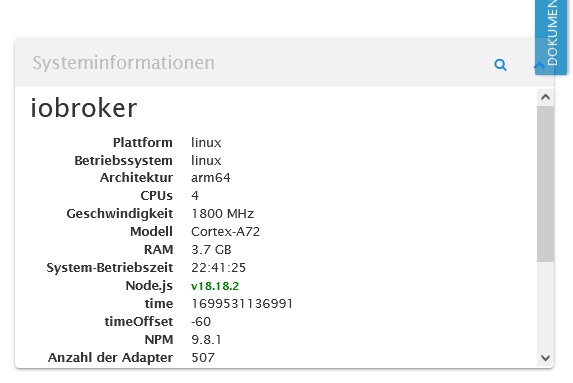
-
Dann mountest du das von Hand?
Und/oder mit dem Backitup-Adapter? Wobei ich das von dem noch nie gesehen habe, der mountet und umountet nämlich vorher und nachher.Linux-Werkzeugkasten:
https://forum.iobroker.net/topic/42952/der-kleine-iobroker-linux-werkzeugkasten
NodeJS Fixer Skript:
https://forum.iobroker.net/topic/68035/iob-node-fix-skript
iob_diag: curl -sLf -o diag.sh https://iobroker.net/diag.sh && bash diag.sh





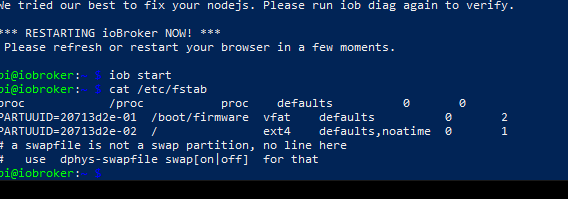
Hey! Du scheinst an dieser Unterhaltung interessiert zu sein, hast aber noch kein Konto.
Hast du es satt, bei jedem Besuch durch die gleichen Beiträge zu scrollen? Wenn du dich für ein Konto anmeldest, kommst du immer genau dorthin zurück, wo du zuvor warst, und kannst dich über neue Antworten benachrichtigen lassen (entweder per E-Mail oder Push-Benachrichtigung). Du kannst auch Lesezeichen speichern und Beiträge positiv bewerten, um anderen Community-Mitgliedern deine Wertschätzung zu zeigen.
Mit deinem Input könnte dieser Beitrag noch besser werden 💗
Registrieren Anmelden229
Online33.0k
Benutzende83.7k
Themen1.3m
Beiträge