Skip to content
  • Home
  • Recent
  • Tags
  • 0 Unread 0
  • Categories
  • Unreplied
  • Popular
  • GitHub
  • Docu
  • Hilfe
Skins
  • Light
  • Brite
  • Cerulean
  • Cosmo
  • Flatly
  • Journal
  • Litera
  • Lumen
  • Lux
  • Materia
  • Minty
  • Morph
  • Pulse
  • Sandstone
  • Simplex
  • Sketchy
  • Spacelab
  • United
  • Yeti
  • Zephyr
  • Dark
  • Cyborg
  • Darkly
  • Quartz
  • Slate
  • Solar
  • Superhero
  • Vapor

  • Default (No Skin)
  • No Skin
Collapse
ioBroker Logo

Community Forum

donate donate
  1. ioBroker Community Home
  2. Deutsch
  3. Praktische Anwendungen (Showcase)
  4. E-INK Display OpenEPaperLink - Displayanzeige mit Batterie
NEWS

  • Jahresrückblick 2025 – unser neuer Blogbeitrag ist online! ✨
    BluefoxB
    Bluefox
    17
    1
    2.9k

  • Neuer Blogbeitrag: Monatsrückblick - Dezember 2025 🎄
    BluefoxB
    Bluefox
    13
    1
    1.1k

  • Weihnachtsangebot 2025! 🎄
    BluefoxB
    Bluefox
    25
    1
    2.4k

E-INK Display OpenEPaperLink - Displayanzeige mit Batterie
Scheduled Pinned Locked Moved Praktische Anwendungen (Showcase)
1.0k Posts 49 Posters 366.2k Views 52 Watching
  • Oldest to Newest
  • Newest to Oldest
  • Most Votes
Reply
  • Reply as topic
Log in to reply
This topic has been deleted. Only users with topic management privileges can see it.
  • B Offline
    B Offline
    Beowolf
    wrote on last edited by
    #830

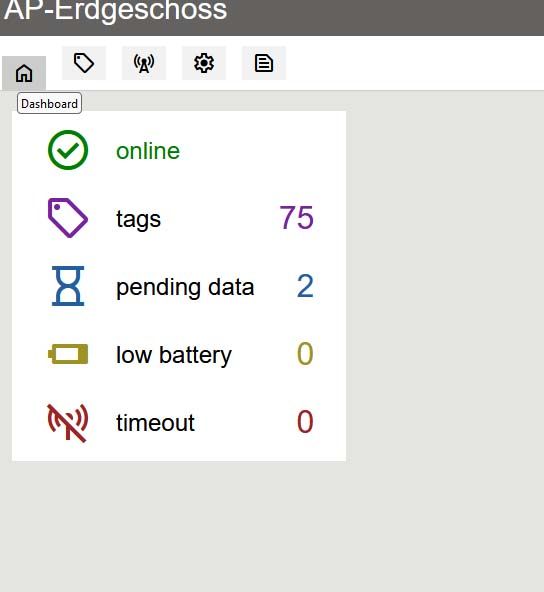
    Ich habe drei von den yellow APs hier laufen. Damit habe ich keine Probleme.

    Ich hatte allerdings erst auf "Update latest Version" geklickt und musste danach noch einmal bei "Environment" den "ESP32_S3_16_8_YELLOW_AP" auswählen.
    Dann habe ich bei ESP32 und Filesystem das Update noch mal manuell angestossen.

    Habe 75 TAGs am laufen.

    72.jpg

    Die Natur braucht nicht unseren Schutz, sie braucht unsere Abwesenheit.

    O BananaJoeB 3 Replies Last reply
    1
    • B Beowolf

      Ich habe drei von den yellow APs hier laufen. Damit habe ich keine Probleme.

      Ich hatte allerdings erst auf "Update latest Version" geklickt und musste danach noch einmal bei "Environment" den "ESP32_S3_16_8_YELLOW_AP" auswählen.
      Dann habe ich bei ESP32 und Filesystem das Update noch mal manuell angestossen.

      Habe 75 TAGs am laufen.

      72.jpg

      O Offline
      O Offline
      oxident
      wrote on last edited by
      #831

      @beowolf 75 Tags? Hast Du damit tapeziert??

      B 1 Reply Last reply
      0
      • B Beowolf

        Ich habe drei von den yellow APs hier laufen. Damit habe ich keine Probleme.

        Ich hatte allerdings erst auf "Update latest Version" geklickt und musste danach noch einmal bei "Environment" den "ESP32_S3_16_8_YELLOW_AP" auswählen.
        Dann habe ich bei ESP32 und Filesystem das Update noch mal manuell angestossen.

        Habe 75 TAGs am laufen.

        72.jpg

        BananaJoeB Online
        BananaJoeB Online
        BananaJoe
        Most Active
        wrote on last edited by
        #832

        @beowolf Ich hatte erst danach geschnallt das es schlich verstellt war, gibt ja auch schon ein Issue dazu auf Github:
        https://github.com/OpenEPaperLink/OpenEPaperLink/issues/409
        Und dann unten den ESP geupdated, das war wohl mein Problem

        ioBroker@Ubuntu 24.04 LTS (VMware) für: >260 Geräte, 5 Switche, 7 AP, 9 IP-Cam, 1 NAS 42TB, 1 ESXi 15TB, 4 Proxmox 1TB, 1 Hyper-V 48TB, 14 x Echo, 5x FireTV, 5 x Tablett/Handy VIS || >=160 Tasmota/Shelly || >=95 ZigBee || PV 8.1kW / Akku 14kWh || 2x USV 750W kaskadiert || Creality CR-10 SE 3D-Drucker

        1 Reply Last reply
        0
        • B Beowolf

          Ich habe drei von den yellow APs hier laufen. Damit habe ich keine Probleme.

          Ich hatte allerdings erst auf "Update latest Version" geklickt und musste danach noch einmal bei "Environment" den "ESP32_S3_16_8_YELLOW_AP" auswählen.
          Dann habe ich bei ESP32 und Filesystem das Update noch mal manuell angestossen.

          Habe 75 TAGs am laufen.

          72.jpg

          BananaJoeB Online
          BananaJoeB Online
          BananaJoe
          Most Active
          wrote on last edited by BananaJoe
          #833

          @beowolf sagte in E-INK Display OpenEPaperLink - Displayanzeige mit Batterie:

          Habe 75 TAGs am laufen.

          Ist man da nicht recht viel mit Batteriewechseln beschäftigt? Wie behältst du da den Überblick wo ein Wechsel Notwendig ist? So etwas wie den Device-Watcher gibt es hier ja nicht.

          ioBroker@Ubuntu 24.04 LTS (VMware) für: >260 Geräte, 5 Switche, 7 AP, 9 IP-Cam, 1 NAS 42TB, 1 ESXi 15TB, 4 Proxmox 1TB, 1 Hyper-V 48TB, 14 x Echo, 5x FireTV, 5 x Tablett/Handy VIS || >=160 Tasmota/Shelly || >=95 ZigBee || PV 8.1kW / Akku 14kWh || 2x USV 750W kaskadiert || Creality CR-10 SE 3D-Drucker

          1 Reply Last reply
          0
          • B Offline
            B Offline
            Beowolf
            wrote on last edited by
            #834

            Die Batteriespannung kann ich mir aber holen.
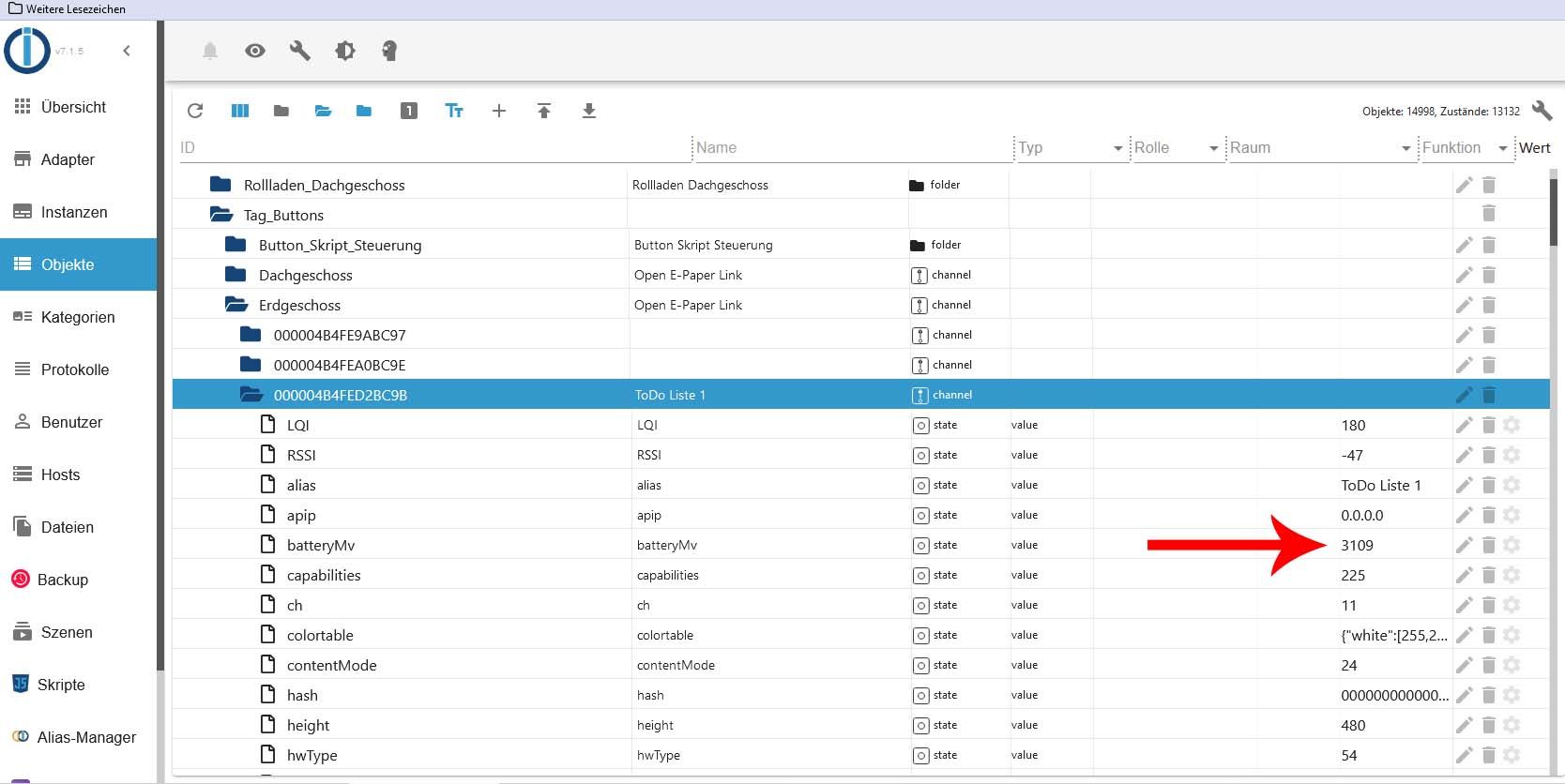
            batterie.jpg

            Ich habe dieses Skript ja am laufen.

            // HIER DIE IP ADRESSE VOM OEPL ACCESS POINT EINTRAGEN
            const serverIP = 'xxx.xxx.xxx.xxx';  // z.B. 192.168.1.71
            
            // AB HIER NICHTS MEHR ÄNDERN!
            const WebSocket = require('ws');
            const http = require('http');
            const wsUrl = `ws://${serverIP}/ws`;  // WebSocket-URL
            
            let ws;
            let pingInterval;
            let scriptStopping = false;  // Flag, um zu prüfen, ob das Skript gestoppt wird
            
            const controlState = '0_userdata.0.Tag_Buttons.Button_Skript_Steuerung.Button_Tags_Dachgeschoss';  // Datenpunkt zur Steuerung des Skripts
            
            function ensureOpenEPaperLinkFolderExists(callback) {
                const OpenEPaperLinkFolderPath = '0_userdata.0.Tag_Buttons.Dachgeschoss';
                getObject(OpenEPaperLinkFolderPath, (err, obj) => {
                    if (err || !obj) {
                        setObject(OpenEPaperLinkFolderPath, {
                            type: 'channel',
                            common: { name: 'Open E-Paper Link' },
                            native: {}
                        }, callback);
                    } else {
                        callback();
                    }
                });
            }
            
            function ensureChannelExists(path, alias, callback) {
                getObject(path, (err, obj) => {
                    if (err || !obj) {
                        setObject(path, {
                            type: 'channel',
                            common: { name: alias || 'Unbekanntes Gerät' },
                            native: {}
                        }, callback);
                    } else if (obj.common.name !== alias) {
                        extendObject(path, { common: { name: alias } }, callback);
                    } else {
                        callback();
                    }
                });
            }
            
            function createStateAndSet(statePath, value) {
                setObject(statePath, {
                    type: 'state',
                    common: {
                        name: statePath.split('.').pop(),
                        type: 'string',
                        role: 'value',
                        read: true,
                        write: true
                    },
                    native: {}
                }, (err) => {
                    if (!err) {
                        setState(statePath, String(value), true);
                    }
                });
            }
            
            function updateStateIfChanged(statePath, value) {
                getState(statePath, (err, state) => {
                    if (err || !state) {
                        createStateAndSet(statePath, String(value));
                    } else if (state.val !== String(value)) {
                        setState(statePath, String(value), true);
                    }
                });
            }
            
            function fetchDimensions(hwType, callback) {
                const hwTypeHex = hwType.toString(16).padStart(2, '0').toUpperCase();  // Convert hwType to two-digit uppercase hexadecimal
                const url = `http://${serverIP}/tagtypes/${hwTypeHex}.json`;
                http.get(url, (res) => {
                    let data = '';
                    res.on('data', (chunk) => data += chunk);
                    res.on('end', () => {
                        if (res.statusCode === 200) {
                            try {
                                const dimensions = JSON.parse(data);
                                callback(null, dimensions);
                            } catch (e) {
                                callback(`Error parsing JSON from ${url}: ${e}`);
                            }
                        } else {
                            callback(`HTTP Error ${res.statusCode} from ${url}`);
                        }
                    });
                }).on('error', (err) => {
                    callback(`Error fetching ${url}: ${err.message}`);
                });
            }
            
            function handleHWType(basePath, hwType) {
                createStateAndSet(`${basePath}.hwType`, String(hwType));  // Save hwType as a state
                fetchDimensions(hwType, (err, dimensions) => {
                    if (!err && dimensions) {
                        createStateAndSet(`${basePath}.height`, String(dimensions.height));
                        createStateAndSet(`${basePath}.width`, String(dimensions.width));
                        createStateAndSet(`${basePath}.name`, String(dimensions.name));
                        if (dimensions.colors) {
                            createStateAndSet(`${basePath}.colors`, String(dimensions.colors));
                        }
                        if (dimensions.colortable) {
                            createStateAndSet(`${basePath}.colortable`, JSON.stringify(dimensions.colortable));
                        }
                    } else {
                        // console.error(`Failed to fetch or set dimensions for hwType ${hwType}: ${err}`);
                    }
                });
            }
            
            function connectWebSocket() {
                if (scriptStopping) {
                    return;  // Wenn das Skript gestoppt wird, keine Verbindung mehr herstellen
                }
            
                ws = new WebSocket(wsUrl);
                ws.on('open', function open() {
                    // console.log('Verbunden mit WebSocket');
                    startHeartbeat();
                });
            
                ws.on('message', function incoming(data) {
                    // console.log('Daten empfangen:', data);
                    if (data) {
                        try {
                            let parsedData = JSON.parse(data);
                            // console.log('Verarbeitete Daten:', JSON.stringify(parsedData, null, 2));
                            handleData(parsedData);
                        } catch (err) {
                            // console.error('Fehler bei der Verarbeitung der Daten:', err);
                        }
                    } else {
                        // console.log('Keine Daten oder leere Nachricht empfangen');
                    }
                });
            
                ws.on('close', function close() {
                    if (!scriptStopping) {
                        // console.log('WebSocket-Verbindung geschlossen, versuche neu zu verbinden...');
                        clearInterval(pingInterval);
                        setTimeout(connectWebSocket, 5000);
                    }
                });
            
                ws.on('error', function error(err) {
                    // console.error('WebSocket-Fehler:', err);
                });
            }
            
            function startHeartbeat() {
                pingInterval = setInterval(() => {
                    if (ws.readyState === WebSocket.OPEN) {
                        ws.ping(() => {
                            // console.log('Ping sent');
                        });
                    }
                }, 10000); // Send ping every 10 seconds
            
                ws.on('pong', () => {
                    // console.log('Pong received');
                });
            }
            
            function handleData(parsedData) {
                if (parsedData.tags && Array.isArray(parsedData.tags)) {
                    parsedData.tags.forEach(tag => {
                        let basePath = `0_userdata.0.Tag_Buttons.Dachgeschoss.${tag.mac.replace(/:/g, '')}`;
                        ensureChannelExists(basePath, tag.alias, () => {
                            Object.keys(tag).forEach(key => {
                                let statePath = `${basePath}.${key}`;
                                let value = tag[key];
                                updateStateIfChanged(statePath, value);
                                if (key === 'hwType') {
                                    handleHWType(basePath, tag.hwType);
                                }
                            });
                        });
                    });
                }
            }
            
            function disconnectWebSocket() {
                if (ws) {
                    ws.close();
                    ws = null;
                }
                clearInterval(pingInterval);
            }
            
            // Skript-Start und -Stopp basierend auf einem Datenpunkt steuern
            function setupScriptControl() {
                setObject(controlState, {
                    type: 'state',
                    common: {
                        name: 'EPaper Script Control',
                        type: 'boolean',
                        role: 'switch',
                        read: true,
                        write: true,
                        def: false
                    },
                    native: {}
                });
            
                on({id: controlState, change: 'ne'}, (obj) => {
                    const state = obj.state.val;
                    if (state) {
                        // Skript starten
                        scriptStopping = false;
                        ensureOpenEPaperLinkFolderExists(connectWebSocket);
                    } else {
                        // Skript stoppen
                        scriptStopping = true;
                        disconnectWebSocket();
                        // console.log('Skript beendet durch Steuer-Datenpunkt');
                    }
                });
            }
            
            // Initiale Einrichtung
            setupScriptControl();
            

            Die Natur braucht nicht unseren Schutz, sie braucht unsere Abwesenheit.

            BananaJoeB 1 Reply Last reply
            1
            • O oxident

              @beowolf 75 Tags? Hast Du damit tapeziert??

              B Offline
              B Offline
              Beowolf
              wrote on last edited by
              #835

              @oxident sagte in E-INK Display OpenEPaperLink - Displayanzeige mit Batterie:

              @beowolf 75 Tags? Hast Du damit tapeziert??

              Die sind nur alle am AP angemeldet. Nur zum Testen.

              Die Natur braucht nicht unseren Schutz, sie braucht unsere Abwesenheit.

              1 Reply Last reply
              1
              • haselchenH haselchen

                @bimmi

                Und schon ist das Projekt gestorben :disappointed_relieved:

                S Offline
                S Offline
                Stefan341
                wrote on last edited by
                #836

                @haselchen
                Ich löte das gerne für dich :)

                haselchenH 1 Reply Last reply
                0
                • S Stefan341

                  @haselchen
                  Ich löte das gerne für dich :)

                  haselchenH Offline
                  haselchenH Offline
                  haselchen
                  Most Active
                  wrote on last edited by
                  #837

                  @stefan341

                  Was genau? 🤔

                  Synology DS218+ & 2 x Fujitsu Esprimo (VM/Container) + FritzBox7590 + 2 AVM 3000 Repeater & Homematic & HUE & Osram & Xiaomi, NPM 10.9.4, Nodejs 22.21.0 ,JS Controller 7.0.7 ,Admin 7.7.19

                  1 Reply Last reply
                  0
                  • haselchenH haselchen

                    @bimmi

                    Und schon ist das Projekt gestorben :disappointed_relieved:

                    HomoranH Do not disturb
                    HomoranH Do not disturb
                    Homoran
                    Global Moderator Administrators
                    wrote on last edited by
                    #838

                    @haselchen sagte in E-INK Display OpenEPaperLink - Displayanzeige mit Batterie:

                    @bimmi

                    Und schon ist das Projekt gestorben :disappointed_relieved:

                    das

                    kein Support per PN! - Fragen im Forum stellen - es gibt fast nichts, was nicht auch für andere interessant ist.

                    Benutzt das Voting rechts unten im Beitrag wenn er euch geholfen hat.

                    der Installationsfixer: curl -fsL https://iobroker.net/fix.sh | bash -

                    haselchenH 1 Reply Last reply
                    0
                    • HomoranH Homoran

                      @haselchen sagte in E-INK Display OpenEPaperLink - Displayanzeige mit Batterie:

                      @bimmi

                      Und schon ist das Projekt gestorben :disappointed_relieved:

                      das

                      haselchenH Offline
                      haselchenH Offline
                      haselchen
                      Most Active
                      wrote on last edited by haselchen
                      #839

                      @homoran
                      @stefan341

                      Da muss ich mich natürlich entschuldigen, dass ich einen 1,5 Jahre alten Post nicht mehr weiß 😂

                      Edit: Dank eines Forumsmitgliedes ist der Lötkolben nichts Fremdes mehr ☺️

                      Synology DS218+ & 2 x Fujitsu Esprimo (VM/Container) + FritzBox7590 + 2 AVM 3000 Repeater & Homematic & HUE & Osram & Xiaomi, NPM 10.9.4, Nodejs 22.21.0 ,JS Controller 7.0.7 ,Admin 7.7.19

                      1 Reply Last reply
                      2
                      • B Beowolf

                        Die Batteriespannung kann ich mir aber holen.

                        batterie.jpg

                        Ich habe dieses Skript ja am laufen.

                        // HIER DIE IP ADRESSE VOM OEPL ACCESS POINT EINTRAGEN
                        const serverIP = 'xxx.xxx.xxx.xxx';  // z.B. 192.168.1.71
                        
                        // AB HIER NICHTS MEHR ÄNDERN!
                        const WebSocket = require('ws');
                        const http = require('http');
                        const wsUrl = `ws://${serverIP}/ws`;  // WebSocket-URL
                        
                        let ws;
                        let pingInterval;
                        let scriptStopping = false;  // Flag, um zu prüfen, ob das Skript gestoppt wird
                        
                        const controlState = '0_userdata.0.Tag_Buttons.Button_Skript_Steuerung.Button_Tags_Dachgeschoss';  // Datenpunkt zur Steuerung des Skripts
                        
                        function ensureOpenEPaperLinkFolderExists(callback) {
                            const OpenEPaperLinkFolderPath = '0_userdata.0.Tag_Buttons.Dachgeschoss';
                            getObject(OpenEPaperLinkFolderPath, (err, obj) => {
                                if (err || !obj) {
                                    setObject(OpenEPaperLinkFolderPath, {
                                        type: 'channel',
                                        common: { name: 'Open E-Paper Link' },
                                        native: {}
                                    }, callback);
                                } else {
                                    callback();
                                }
                            });
                        }
                        
                        function ensureChannelExists(path, alias, callback) {
                            getObject(path, (err, obj) => {
                                if (err || !obj) {
                                    setObject(path, {
                                        type: 'channel',
                                        common: { name: alias || 'Unbekanntes Gerät' },
                                        native: {}
                                    }, callback);
                                } else if (obj.common.name !== alias) {
                                    extendObject(path, { common: { name: alias } }, callback);
                                } else {
                                    callback();
                                }
                            });
                        }
                        
                        function createStateAndSet(statePath, value) {
                            setObject(statePath, {
                                type: 'state',
                                common: {
                                    name: statePath.split('.').pop(),
                                    type: 'string',
                                    role: 'value',
                                    read: true,
                                    write: true
                                },
                                native: {}
                            }, (err) => {
                                if (!err) {
                                    setState(statePath, String(value), true);
                                }
                            });
                        }
                        
                        function updateStateIfChanged(statePath, value) {
                            getState(statePath, (err, state) => {
                                if (err || !state) {
                                    createStateAndSet(statePath, String(value));
                                } else if (state.val !== String(value)) {
                                    setState(statePath, String(value), true);
                                }
                            });
                        }
                        
                        function fetchDimensions(hwType, callback) {
                            const hwTypeHex = hwType.toString(16).padStart(2, '0').toUpperCase();  // Convert hwType to two-digit uppercase hexadecimal
                            const url = `http://${serverIP}/tagtypes/${hwTypeHex}.json`;
                            http.get(url, (res) => {
                                let data = '';
                                res.on('data', (chunk) => data += chunk);
                                res.on('end', () => {
                                    if (res.statusCode === 200) {
                                        try {
                                            const dimensions = JSON.parse(data);
                                            callback(null, dimensions);
                                        } catch (e) {
                                            callback(`Error parsing JSON from ${url}: ${e}`);
                                        }
                                    } else {
                                        callback(`HTTP Error ${res.statusCode} from ${url}`);
                                    }
                                });
                            }).on('error', (err) => {
                                callback(`Error fetching ${url}: ${err.message}`);
                            });
                        }
                        
                        function handleHWType(basePath, hwType) {
                            createStateAndSet(`${basePath}.hwType`, String(hwType));  // Save hwType as a state
                            fetchDimensions(hwType, (err, dimensions) => {
                                if (!err && dimensions) {
                                    createStateAndSet(`${basePath}.height`, String(dimensions.height));
                                    createStateAndSet(`${basePath}.width`, String(dimensions.width));
                                    createStateAndSet(`${basePath}.name`, String(dimensions.name));
                                    if (dimensions.colors) {
                                        createStateAndSet(`${basePath}.colors`, String(dimensions.colors));
                                    }
                                    if (dimensions.colortable) {
                                        createStateAndSet(`${basePath}.colortable`, JSON.stringify(dimensions.colortable));
                                    }
                                } else {
                                    // console.error(`Failed to fetch or set dimensions for hwType ${hwType}: ${err}`);
                                }
                            });
                        }
                        
                        function connectWebSocket() {
                            if (scriptStopping) {
                                return;  // Wenn das Skript gestoppt wird, keine Verbindung mehr herstellen
                            }
                        
                            ws = new WebSocket(wsUrl);
                            ws.on('open', function open() {
                                // console.log('Verbunden mit WebSocket');
                                startHeartbeat();
                            });
                        
                            ws.on('message', function incoming(data) {
                                // console.log('Daten empfangen:', data);
                                if (data) {
                                    try {
                                        let parsedData = JSON.parse(data);
                                        // console.log('Verarbeitete Daten:', JSON.stringify(parsedData, null, 2));
                                        handleData(parsedData);
                                    } catch (err) {
                                        // console.error('Fehler bei der Verarbeitung der Daten:', err);
                                    }
                                } else {
                                    // console.log('Keine Daten oder leere Nachricht empfangen');
                                }
                            });
                        
                            ws.on('close', function close() {
                                if (!scriptStopping) {
                                    // console.log('WebSocket-Verbindung geschlossen, versuche neu zu verbinden...');
                                    clearInterval(pingInterval);
                                    setTimeout(connectWebSocket, 5000);
                                }
                            });
                        
                            ws.on('error', function error(err) {
                                // console.error('WebSocket-Fehler:', err);
                            });
                        }
                        
                        function startHeartbeat() {
                            pingInterval = setInterval(() => {
                                if (ws.readyState === WebSocket.OPEN) {
                                    ws.ping(() => {
                                        // console.log('Ping sent');
                                    });
                                }
                            }, 10000); // Send ping every 10 seconds
                        
                            ws.on('pong', () => {
                                // console.log('Pong received');
                            });
                        }
                        
                        function handleData(parsedData) {
                            if (parsedData.tags && Array.isArray(parsedData.tags)) {
                                parsedData.tags.forEach(tag => {
                                    let basePath = `0_userdata.0.Tag_Buttons.Dachgeschoss.${tag.mac.replace(/:/g, '')}`;
                                    ensureChannelExists(basePath, tag.alias, () => {
                                        Object.keys(tag).forEach(key => {
                                            let statePath = `${basePath}.${key}`;
                                            let value = tag[key];
                                            updateStateIfChanged(statePath, value);
                                            if (key === 'hwType') {
                                                handleHWType(basePath, tag.hwType);
                                            }
                                        });
                                    });
                                });
                            }
                        }
                        
                        function disconnectWebSocket() {
                            if (ws) {
                                ws.close();
                                ws = null;
                            }
                            clearInterval(pingInterval);
                        }
                        
                        // Skript-Start und -Stopp basierend auf einem Datenpunkt steuern
                        function setupScriptControl() {
                            setObject(controlState, {
                                type: 'state',
                                common: {
                                    name: 'EPaper Script Control',
                                    type: 'boolean',
                                    role: 'switch',
                                    read: true,
                                    write: true,
                                    def: false
                                },
                                native: {}
                            });
                        
                            on({id: controlState, change: 'ne'}, (obj) => {
                                const state = obj.state.val;
                                if (state) {
                                    // Skript starten
                                    scriptStopping = false;
                                    ensureOpenEPaperLinkFolderExists(connectWebSocket);
                                } else {
                                    // Skript stoppen
                                    scriptStopping = true;
                                    disconnectWebSocket();
                                    // console.log('Skript beendet durch Steuer-Datenpunkt');
                                }
                            });
                        }
                        
                        // Initiale Einrichtung
                        setupScriptControl();
                        
                        BananaJoeB Online
                        BananaJoeB Online
                        BananaJoe
                        Most Active
                        wrote on last edited by
                        #840

                        @beowolf tja, da gewinne ich wohl keinen Blumentopf mit:
                        7e631b71-5c68-4da9-9966-3756fe0e8416-image.png
                        Da steht immer 2600
                        wobei einen habe ich gefunden wo der wert niedriger ist, dann zeigt der Datenpunkt etwas an wenn der Wert unter dem Schwellwert liegt?

                        ioBroker@Ubuntu 24.04 LTS (VMware) für: >260 Geräte, 5 Switche, 7 AP, 9 IP-Cam, 1 NAS 42TB, 1 ESXi 15TB, 4 Proxmox 1TB, 1 Hyper-V 48TB, 14 x Echo, 5x FireTV, 5 x Tablett/Handy VIS || >=160 Tasmota/Shelly || >=95 ZigBee || PV 8.1kW / Akku 14kWh || 2x USV 750W kaskadiert || Creality CR-10 SE 3D-Drucker

                        S B 2 Replies Last reply
                        0
                        • BananaJoeB BananaJoe

                          @beowolf tja, da gewinne ich wohl keinen Blumentopf mit:
                          7e631b71-5c68-4da9-9966-3756fe0e8416-image.png
                          Da steht immer 2600
                          wobei einen habe ich gefunden wo der wert niedriger ist, dann zeigt der Datenpunkt etwas an wenn der Wert unter dem Schwellwert liegt?

                          S Offline
                          S Offline
                          sameOne
                          wrote on last edited by sameOne
                          #841

                          @bananajoe Der Mikrocontroller in den M2 Displays hat keinen ADC, deswegen wird als Hack das E-Paper Display genutzt um die aktuelle Spannung zu erfahren, dieses hat aber nur eine Range von 2.1-2.6 V also ist jede Batterie über 2.6V nicht detektierbar und wird als 2.6V angezeigt

                          1 Reply Last reply
                          1
                          • BananaJoeB BananaJoe

                            @beowolf tja, da gewinne ich wohl keinen Blumentopf mit:
                            7e631b71-5c68-4da9-9966-3756fe0e8416-image.png
                            Da steht immer 2600
                            wobei einen habe ich gefunden wo der wert niedriger ist, dann zeigt der Datenpunkt etwas an wenn der Wert unter dem Schwellwert liegt?

                            B Offline
                            B Offline
                            Beowolf
                            wrote on last edited by
                            #842

                            @bananajoe

                            Ich habe diese hier

                            https://github.com/OpenEPaperLink/OpenEPaperLink/wiki/2.9″-EL029H3WRA

                            Dort funktioniert es.

                            Die Natur braucht nicht unseren Schutz, sie braucht unsere Abwesenheit.

                            S B 2 Replies Last reply
                            0
                            • B Beowolf

                              @bananajoe

                              Ich habe diese hier

                              https://github.com/OpenEPaperLink/OpenEPaperLink/wiki/2.9″-EL029H3WRA

                              Dort funktioniert es.

                              S Offline
                              S Offline
                              sameOne
                              wrote on last edited by
                              #843

                              @beowolf Das nutzt einen anderen Mikrocontroller, nRF52811/ARM und ist ein M3, die M2 nutzen den ZBS243/8051 der keinen ADC hat

                              1 Reply Last reply
                              1
                              • B Offline
                                B Offline
                                bimmi
                                wrote on last edited by
                                #844

                                @atc ah hi Aaron! Jetzt seh ich es erst an deinem Nic! Schön das du auch hier bist!

                                Gruß Bimmi

                                iobroker in einer Proxmox Umgebung auf einem ausrangierten DELL OptiPlex 3080 24GB i5 in der VM auf SSD. Nutze den slaeh zigbee Router mit Tür- und Temperatursensoren von Aqara, viele Tasmota Devices, Unifi AP, Sprinklecontrol, günstige E-INK Displays, Adguard und noch vieles mehr 😬

                                1 Reply Last reply
                                1
                                • B Beowolf

                                  @bananajoe

                                  Ich habe diese hier

                                  https://github.com/OpenEPaperLink/OpenEPaperLink/wiki/2.9″-EL029H3WRA

                                  Dort funktioniert es.

                                  B Offline
                                  B Offline
                                  bimmi
                                  wrote on last edited by
                                  #845

                                  @beowolf das mit dem rescale hat sich denke ich erledigt. Lag wohl am ersten update vom tag. Die neuesten gehen wieder einwandfrei!

                                  Gruß Bimmi

                                  iobroker in einer Proxmox Umgebung auf einem ausrangierten DELL OptiPlex 3080 24GB i5 in der VM auf SSD. Nutze den slaeh zigbee Router mit Tür- und Temperatursensoren von Aqara, viele Tasmota Devices, Unifi AP, Sprinklecontrol, günstige E-INK Displays, Adguard und noch vieles mehr 😬

                                  1 Reply Last reply
                                  1
                                  • B Offline
                                    B Offline
                                    Beowolf
                                    wrote on last edited by Beowolf
                                    #846

                                    Ich habe plötzlich diese Meldungen:

                                    puppeteer.0
                                    	2025-01-06 23:42:16.640	error	Could not take screenshot of "http://192.168.49.38:8082/vis/index.html?E-Paper-Obergeschoss#EPaper-Schlafzimmer-Manfred": Page.captureScreenshot timed out. Increase the 'protocolTimeout' setting in launch/connect calls for a higher timeout if needed.
                                    javascript.0
                                    	2025-01-06 23:40:49.337	warn	script.js.common.EPaper-Displays.Obergeschoss.Schlafzimmer_Manfred: Fehler beim Aufruf der View: http://192.168.49.38:8082/vis/index.html?E-Paper-Obergeschoss#EPaper-Schlafzimmer-Manfred => undefined
                                    javascript.0
                                    	2025-01-06 23:40:20.117	warn	script.js.common.EPaper-Displays.Allgemein.Kellerlüfter_1: Fehler beim Aufruf der View: http://192.168.49.38:8082/vis/index.html?E-Paper-Allgemein#Kellerl%C3%BCftung => undefined
                                    javascript.0
                                    	2025-01-06 23:40:01.357	warn	script.js.common.EPaper-Displays.Erdgeschoss.Büro_Manfred: Fehler beim Aufruf der View: http://192.168.49.38:8082/vis/index.html?E-Paper-Erdgeschoss#B%C3%BCro_Manfred => undefined
                                    javascript.0
                                    	2025-01-06 23:39:58.468	warn	script.js.common.EPaper-Displays.Obergeschoss.Wohnzimmer: Fehler beim Aufruf der View: http://192.168.49.38:8082/vis/index.html?E-Paper-Obergeschoss#EPaper-Wohnzimmer => undefined
                                    javascript.0
                                    	2025-01-06 23:39:44.153	warn	script.js.common.EPaper-Displays.Obergeschoss.Küche: Fehler beim Aufruf der View: http://192.168.49.38:8082/vis/index.html?E-Paper-Obergeschoss#EPaper-K%C3%BCche => undefined
                                    puppeteer.0
                                    	2025-01-06 23:39:16.372	error	Could not take screenshot of "http://192.168.49.38:8082/vis/index.html?E-Paper-Erdgeschoss#CopyShop": Page.captureScreenshot timed out. Increase the 'protocolTimeout' setting in launch/connect calls for a higher timeout if needed.
                                    javascript.0
                                    	2025-01-06 23:39:05.643	warn	script.js.common.EPaper-Displays.Obergeschoss.Hauswirtschaftsraum: Fehler beim Aufruf der View: http://192.168.49.38:8082/vis/index.html?E-Paper-Obergeschoss#EPaper-HWR => undefined
                                    javascript.0
                                    	2025-01-06 23:37:42.794	warn	script.js.common.EPaper-Displays.Erdgeschoss.Papierraum: Fehler beim Aufruf der View: http://192.168.49.38:8082/vis/index.html?E-Paper-Erdgeschoss#Papierraum => undefined
                                    javascript.0
                                    	2025-01-06 23:36:57.889	warn	script.js.common.EPaper-Displays.Obergeschoss.Hauswirtschaftsraum: Fehler beim Aufruf der View: http://192.168.49.38:8082/vis/index.html?E-Paper-Obergeschoss#EPaper-HWR => undefined
                                    puppeteer.0
                                    	2025-01-06 23:36:15.488	error	Could not take screenshot of "http://192.168.49.38:8082/vis/index.html?E-Paper-Erdgeschoss#B%C3%BCro_Manfred": Page.captureScreenshot timed out. Increase the 'protocolTimeout' setting in launch/connect calls for a higher timeout if needed.
                                    

                                    Hatte mal alles wieder upgedatet.
                                    Jetzt bin ich mir nicht sicher wo das Problem liegt.

                                    Die "VIS-Ansichten" sind alle da.

                                    Die Natur braucht nicht unseren Schutz, sie braucht unsere Abwesenheit.

                                    1 Reply Last reply
                                    0
                                    • B Offline
                                      B Offline
                                      Beowolf
                                      wrote on last edited by Beowolf
                                      #847

                                      Muß hier noch etwas rein?

                                      pupp.jpg

                                      Ich verstehe das nicht.

                                      Mit diesem Skript

                                      sendTo('puppeteer.0', 'screenshot', { 
                                          url: urlOfVISView,                     
                                          path: imageSaveToFilenameWithPath,     
                                          width: viewWidth,                      
                                          height: viewHeight,                    
                                          quality: jpgQuality,                   
                                      
                                          waitOption: {
                                              waitForSelector: waitForSelector,  
                                              waitForTimeout: 25000              
                                          },
                                      
                                          fullPage: false,                       
                                      
                                          clip: {         
                                              x: cutoutX,                        
                                              y: cutoutY,                        
                                              width: cutoutWidth,                
                                              height: cutoutHeight               
                                          }
                                      }, obj => {
                                          if (obj.error) {
                                              console.warn("Fehler beim Aufruf der View: " + urlOfVISView + " => " + obj.error.message);
                                          } else {
                                              const http = require('http'); 
                                              const https = require('https');
                                              const { URL } = require('url');
                                      
                                              const boundary = '--------------------------' + Date.now().toString(16);
                                              const CRLF = '\r\n';
                                      
                                              // Payload-Erstellung
                                              const payload = Buffer.concat([
                                                  Buffer.from(`--${boundary}${CRLF}Content-Disposition: form-data; name="dither"${CRLF}${CRLF}0${CRLF}`),
                                                  Buffer.from(`--${boundary}${CRLF}Content-Disposition: form-data; name="mac"${CRLF}${CRLF}${ePaperMAC}${CRLF}`),
                                                  Buffer.from(`--${boundary}${CRLF}Content-Disposition: form-data; name="image"; filename="screenshot.jpg"${CRLF}Content-Type: image/jpeg${CRLF}${CRLF}`),
                                                  Buffer.from(Object.values(obj.result), 'binary'),
                                                  Buffer.from(`${CRLF}--${boundary}--${CRLF}`)
                                              ]);
                                      
                                              // URL Parsing
                                              const url = new URL(imageUploadURL);
                                              const options = {
                                                  hostname: url.hostname,
                                                  port: url.port || (url.protocol === 'https:' ? 443 : 80),
                                                  path: url.pathname + (url.search || ''),
                                                  method: 'POST',
                                                  headers: {
                                                      'Content-Type': 'multipart/form-data; boundary=' + boundary,
                                                      'Content-Length': payload.length
                                                  }
                                              };
                                      
                                              // Protokollwahl
                                              const protocol = url.protocol === 'https:' ? https : http;
                                      
                                              // HTTP Request
                                              const req = protocol.request(options, function(res) {
                                                  console.log('ImageUploadStatusCode:', res.statusCode);
                                                  res.on('data', function(chunk) {
                                                      console.log('Response:', chunk.toString());
                                                  });
                                              });
                                      
                                              req.on('error', function(e) {
                                                  console.error('Fehler beim Hochladen:', e.message);
                                              });
                                      
                                              req.write(payload);
                                              req.end();
                                          }
                                      });
                                      

                                      hat es bis jetzt funktioniert.

                                      Jetzt kommt immer das.

                                      puppeteer.0
                                      	2025-01-07 10:33:06.343	error	Could not take screenshot of "http://192.168.49.38:8082/vis/index.html?E-Paper-Allgemein#Kellerlüftung": Page.captureScreenshot timed out. Increase the 'protocolTimeout' setting in launch/connect calls for a higher timeout if needed.
                                      mqtt.0
                                      	2025-01-07 10:32:45.479	warn	script.js.common.EPaper-Displays.Allgemein.Kellerlüfter_1: Fehler beim Aufruf der View: http://192.168.49.38:8082/vis/index.html?E-Paper-Allgemein#Kellerlüftung => undefined
                                      

                                      Der "VIS-Link" funktioniert. Dort wird auch sofort die Änderung sichtbar.

                                      Was kann ich noch testen?

                                      Die Natur braucht nicht unseren Schutz, sie braucht unsere Abwesenheit.

                                      ? D 2 Replies Last reply
                                      0
                                      • B Beowolf

                                        Muß hier noch etwas rein?

                                        pupp.jpg

                                        Ich verstehe das nicht.

                                        Mit diesem Skript

                                        sendTo('puppeteer.0', 'screenshot', { 
                                            url: urlOfVISView,                     
                                            path: imageSaveToFilenameWithPath,     
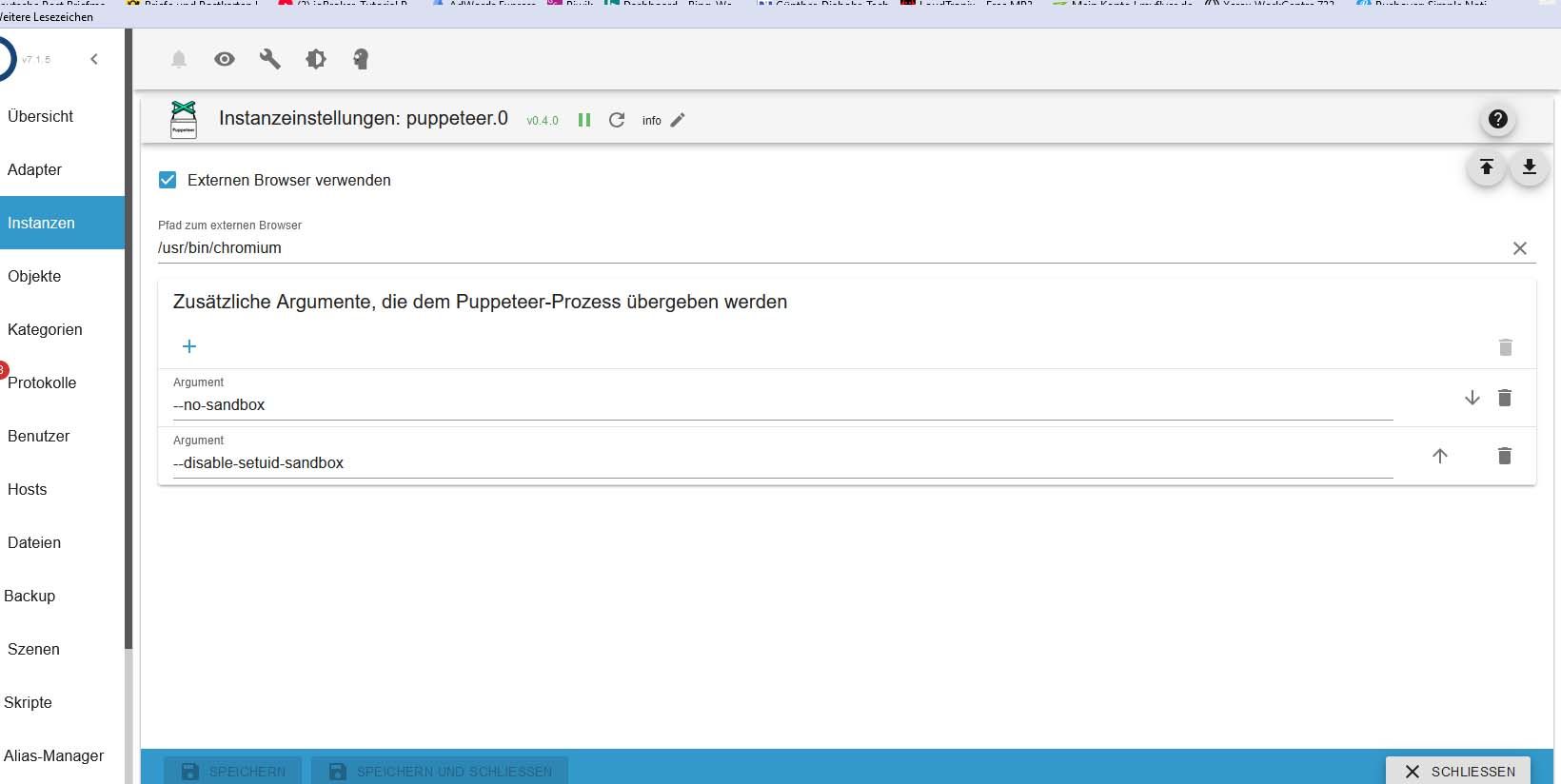
                                            width: viewWidth,                      
                                            height: viewHeight,                    
                                            quality: jpgQuality,                   
                                        
                                            waitOption: {
                                                waitForSelector: waitForSelector,  
                                                waitForTimeout: 25000              
                                            },
                                        
                                            fullPage: false,                       
                                        
                                            clip: {         
                                                x: cutoutX,                        
                                                y: cutoutY,                        
                                                width: cutoutWidth,                
                                                height: cutoutHeight               
                                            }
                                        }, obj => {
                                            if (obj.error) {
                                                console.warn("Fehler beim Aufruf der View: " + urlOfVISView + " => " + obj.error.message);
                                            } else {
                                                const http = require('http'); 
                                                const https = require('https');
                                                const { URL } = require('url');
                                        
                                                const boundary = '--------------------------' + Date.now().toString(16);
                                                const CRLF = '\r\n';
                                        
                                                // Payload-Erstellung
                                                const payload = Buffer.concat([
                                                    Buffer.from(`--${boundary}${CRLF}Content-Disposition: form-data; name="dither"${CRLF}${CRLF}0${CRLF}`),
                                                    Buffer.from(`--${boundary}${CRLF}Content-Disposition: form-data; name="mac"${CRLF}${CRLF}${ePaperMAC}${CRLF}`),
                                                    Buffer.from(`--${boundary}${CRLF}Content-Disposition: form-data; name="image"; filename="screenshot.jpg"${CRLF}Content-Type: image/jpeg${CRLF}${CRLF}`),
                                                    Buffer.from(Object.values(obj.result), 'binary'),
                                                    Buffer.from(`${CRLF}--${boundary}--${CRLF}`)
                                                ]);
                                        
                                                // URL Parsing
                                                const url = new URL(imageUploadURL);
                                                const options = {
                                                    hostname: url.hostname,
                                                    port: url.port || (url.protocol === 'https:' ? 443 : 80),
                                                    path: url.pathname + (url.search || ''),
                                                    method: 'POST',
                                                    headers: {
                                                        'Content-Type': 'multipart/form-data; boundary=' + boundary,
                                                        'Content-Length': payload.length
                                                    }
                                                };
                                        
                                                // Protokollwahl
                                                const protocol = url.protocol === 'https:' ? https : http;
                                        
                                                // HTTP Request
                                                const req = protocol.request(options, function(res) {
                                                    console.log('ImageUploadStatusCode:', res.statusCode);
                                                    res.on('data', function(chunk) {
                                                        console.log('Response:', chunk.toString());
                                                    });
                                                });
                                        
                                                req.on('error', function(e) {
                                                    console.error('Fehler beim Hochladen:', e.message);
                                                });
                                        
                                                req.write(payload);
                                                req.end();
                                            }
                                        });
                                        

                                        hat es bis jetzt funktioniert.

                                        Jetzt kommt immer das.

                                        puppeteer.0
                                        	2025-01-07 10:33:06.343	error	Could not take screenshot of "http://192.168.49.38:8082/vis/index.html?E-Paper-Allgemein#Kellerlüftung": Page.captureScreenshot timed out. Increase the 'protocolTimeout' setting in launch/connect calls for a higher timeout if needed.
                                        mqtt.0
                                        	2025-01-07 10:32:45.479	warn	script.js.common.EPaper-Displays.Allgemein.Kellerlüfter_1: Fehler beim Aufruf der View: http://192.168.49.38:8082/vis/index.html?E-Paper-Allgemein#Kellerlüftung => undefined
                                        

                                        Der "VIS-Link" funktioniert. Dort wird auch sofort die Änderung sichtbar.

                                        Was kann ich noch testen?

                                        ? Offline
                                        ? Offline
                                        A Former User
                                        wrote on last edited by
                                        #848

                                        @beowolf

                                        Hello,
                                        die Fehlermeldung sagt, dass deine 25000ms timeout im Script nicht ausreichen, also den mal hoeher stellen.

                                        Wird denn der Screenshot richtig erstellt?
                                        oder kommt da schon nix?

                                        Ansonsten das Script mal auf debug stellen und laufen lassen.

                                        B 1 Reply Last reply
                                        0
                                        • ? A Former User

                                          @beowolf

                                          Hello,
                                          die Fehlermeldung sagt, dass deine 25000ms timeout im Script nicht ausreichen, also den mal hoeher stellen.

                                          Wird denn der Screenshot richtig erstellt?
                                          oder kommt da schon nix?

                                          Ansonsten das Script mal auf debug stellen und laufen lassen.

                                          B Offline
                                          B Offline
                                          Beowolf
                                          wrote on last edited by Beowolf
                                          #849

                                          @ilovegym

                                          Es kommt nur diese Nachricht.

                                          javascript.0
                                          	2025-01-08 10:50:48.385	warn	script.js.common.EPaper-Displays.Allgemein.Kellerlüfter_1: Fehler beim Aufruf der View: http://192.168.49.38:8082/vis/index.html?E-Paper-Allgemein#Kellerlüftung => undefined
                                          javascript.0
                                          	2025-01-08 10:50:28.385	info	script.js.common.EPaper-Displays.Allgemein.Kellerlüfter_1: TAG-Lüftung1 wurde aktualisiert
                                          

                                          Das "ü" in Kellerlüftung ist egal. Es kommt solche eine Meldung auch bei anderen TAGs. Diesen kann ich aber einfacher schalten.

                                          Egal welche Zeit ich bei

                                          waitForTimeout: 25000 
                                          

                                          eingebe.

                                          Die Meldung erscheint immer nach genau 20 Sekunden.

                                          Zu Deiner Frage:

                                          Wird denn der Screenshot richtig erstellt?
                                          

                                          Nein, er erscheint auch nicht im /tmp Ordner.
                                          Rufe ich den Link manuell auf, erscheint der TAG-Inhalt so wie es sein soll.

                                          Wenn ich Puppeteer neu starte, funktioniert es ein paar mal.

                                          Wenn es dann funktioniert, erscheint die neue Bilddatei sofort im /tmp Ordner.

                                          Wenn ich bei

                                          waitForTimeout: 25000 
                                          

                                          das einstelle, sollte die neue Datei doch eigentlich erst nach 25 Sekunden erscheinen, oder?

                                          Die Natur braucht nicht unseren Schutz, sie braucht unsere Abwesenheit.

                                          ? 1 Reply Last reply
                                          0
                                          Reply
                                          • Reply as topic
                                          Log in to reply
                                          • Oldest to Newest
                                          • Newest to Oldest
                                          • Most Votes


                                          Support us

                                          ioBroker
                                          Community Adapters
                                          Donate

                                          614

                                          Online

                                          32.6k

                                          Users

                                          82.3k

                                          Topics

                                          1.3m

                                          Posts
                                          Community
                                          Impressum | Datenschutz-Bestimmungen | Nutzungsbedingungen | Einwilligungseinstellungen
                                          ioBroker Community 2014-2025
                                          logo
                                          • Login

                                          • Don't have an account? Register

                                          • Login or register to search.
                                          • First post
                                            Last post
                                          0
                                          • Home
                                          • Recent
                                          • Tags
                                          • Unread 0
                                          • Categories
                                          • Unreplied
                                          • Popular
                                          • GitHub
                                          • Docu
                                          • Hilfe