



Weiter zum Inhalt
  • Home
  • Aktuell
  • Tags
  • 0 Ungelesen 0
  • Kategorien
  • Unreplied
  • Beliebt
  • GitHub
  • Docu
  • Hilfe
Skins
  • Hell
  • Brite
  • Cerulean
  • Cosmo
  • Flatly
  • Journal
  • Litera
  • Lumen
  • Lux
  • Materia
  • Minty
  • Morph
  • Pulse
  • Sandstone
  • Simplex
  • Sketchy
  • Spacelab
  • United
  • Yeti
  • Zephyr
  • Dunkel
  • Cyborg
  • Darkly
  • Quartz
  • Slate
  • Solar
  • Superhero
  • Vapor

  • Standard: (Kein Skin)
  • Kein Skin
Einklappen
ioBroker Logo

Community Forum

donate donate
  1. ioBroker Community Home
  2. Deutsch
  3. Skripten / Logik
  4. Blockly
  5. [ Gelöst ] Kamerabild aufnehmen (speichern)

NEWS

  • Monatsrückblick Januar/Februar 2026 ist online!
    BluefoxB
    Bluefox
    18
    1
    786

  • Jahresrückblick 2025 – unser neuer Blogbeitrag ist online! ✨
    BluefoxB
    Bluefox
    18
    1
    6.2k

  • Neuer Blogbeitrag: Monatsrückblick - Dezember 2025 🎄
    BluefoxB
    Bluefox
    13
    1
    1.5k

[ Gelöst ] Kamerabild aufnehmen (speichern)

Geplant Angeheftet Gesperrt Verschoben Blockly
19 Beiträge 5 Kommentatoren 1.5k Aufrufe 4 Beobachtet
  • Älteste zuerst
  • Neuste zuerst
  • Meiste Stimmen
Antworten
  • In einem neuen Thema antworten
Anmelden zum Antworten
Dieses Thema wurde gelöscht. Nur Nutzer mit entsprechenden Rechten können es sehen.
  • I Online
    I Online
    ioBrokerMike
    schrieb am zuletzt editiert von ioBrokerMike
    #1

    Moin

    Brauche Hilfe von Experten.

    Ich möchte, wenn es Klingelt ein Bild meiner IP Kamera speichern.

    Was ich habe ist folgendes :
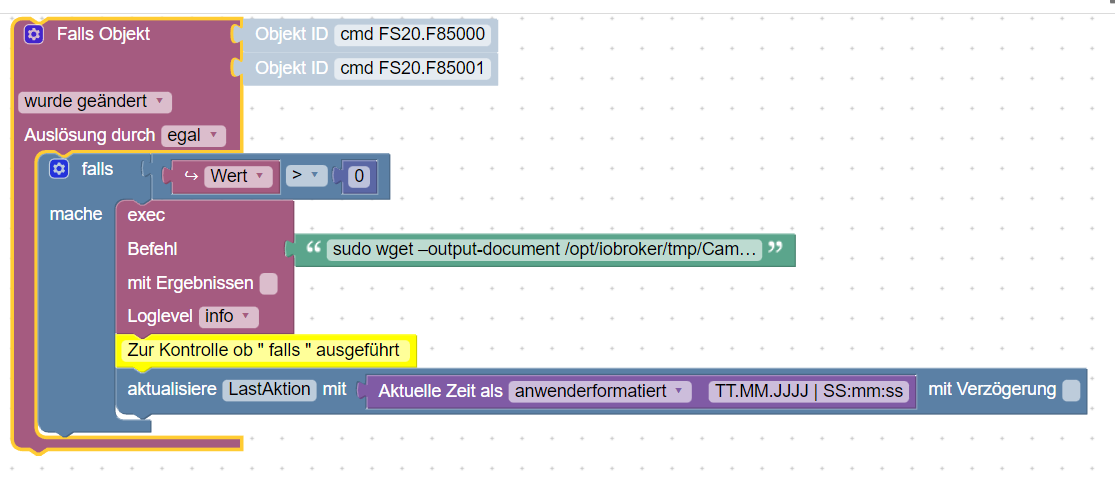
    CamBild.png

    • Das Blockly Script
    <block xmlns="https://developers.google.com/blockly/xml" type="on_ext" id="*Wd9o_3QBbmu7n(.|H9M" x="37.666656494140625" y="-112.33335876464844">
     <mutation xmlns="http://www.w3.org/1999/xhtml" items="2"></mutation>
     <field name="CONDITION">ne</field>
     <field name="ACK_CONDITION"></field>
     <value name="OID0">
       <shadow type="field_oid" id="x;IGNi$;5Kn:kB`tq1{$">
         <field name="oid">cul.0.FS20.F85000.cmd</field>
       </shadow>
     </value>
     <value name="OID1">
       <shadow type="field_oid" id="@nInN9t]rzjFfqw{DoLD">
         <field name="oid">cul.0.FS20.F85001.cmd</field>
       </shadow>
     </value>
     <statement name="STATEMENT">
       <block type="controls_if" id=",E+)WRA_=k%0lckb]:h[">
         <value name="IF0">
           <block type="logic_compare" id="mc*;#$q(in/W,^NYSm0.">
             <field name="OP">GT</field>
             <value name="A">
               <block type="on_source" id=")!]cHIs5IHqe:aSL?i;W">
                 <field name="ATTR">state.val</field>
               </block>
             </value>
             <value name="B">
               <block type="math_number" id=";~!@F3p$erxkoh%mO_Kq">
                 <field name="NUM">0</field>
               </block>
             </value>
           </block>
         </value>
         <statement name="DO0">
           <block type="exec" id="|dc(Wlzqg,`[3J#AwM-E">
             <mutation xmlns="http://www.w3.org/1999/xhtml" with_statement="false"></mutation>
             <field name="WITH_STATEMENT">FALSE</field>
             <field name="LOG">log</field>
             <value name="COMMAND">
               <shadow type="text" id="D-t0!nfSJz;wNEZt3zIo">
                 <field name="TEXT">sudo wget –output-document /opt/iobroker/tmp/CamBild.jpg 'http://xxx.xxx.xxx.xx:80/snapshot.cgi?user=abc&amp;pwd"'</field>
               </shadow>
               <block type="text" id="*wuA:AUw8Pje6_^m*FSt">
                 <field name="TEXT">sudo wget –output-document /opt/iobroker/tmp/CamBild.jpg 'http://xxx.xxx.xxx.xx:80/snapshot.cgi?user=abc&amp;pwd='</field>
               </block>
             </value>
             <next>
               <block type="comment" id="=K3U4+r?LSApEOLoXn)m">
                 <field name="COMMENT">Zur Kontrolle ob " falls " ausgeführt </field>
                 <next>
                   <block type="update" id="Cik=io5YoK.Ny/-vV}jL">
                     <mutation xmlns="http://www.w3.org/1999/xhtml" delay_input="false"></mutation>
                     <field name="OID">0_userdata.0.HaustürKamera.LastAktion</field>
                     <field name="WITH_DELAY">FALSE</field>
                     <value name="VALUE">
                       <block type="time_get" id="5a{-58b8y%qD*-RU5%UN">
                         <mutation xmlns="http://www.w3.org/1999/xhtml" format="true" language="false"></mutation>
                         <field name="OPTION">custom</field>
                         <field name="FORMAT">TT.MM.JJJJ | SS:mm:ss</field>
                       </block>
                     </value>
                   </block>
                 </next>
               </block>
             </next>
           </block>
         </statement>
       </block>
     </statement>
    </block>
    

    • Den Link der Kamera
      http://xxx.xxx.xxx.xx:80/snapshot.cgi?user=abc&amp;pwd=
      Der mir das Bild im Browser anzeigt.

    • Das Verzeichnis
      /opt/iobroker/tmp/ mit Schreibrechte

    Nur leider tut sich da nichts.
    Bin auf eure Hilfe angewiesen. 😞

    Mfg
    IOBrokerMike

    Achtung ! Sehkraft 25% | 60% , kein scherz
    Systeme : GEEKOM MiniAir 11 | Linux : Trixie 13.4 | HMIP | OpenCCU / RasPi3 | SMA PV Anlage | Robonect Hx | Hydrawise | RTL_433

    E CodierknechtC GlasfaserG 3 Antworten Letzte Antwort
    0
    • I ioBrokerMike

      Moin

      Brauche Hilfe von Experten.

      Ich möchte, wenn es Klingelt ein Bild meiner IP Kamera speichern.

      Was ich habe ist folgendes :

      CamBild.png

      • Das Blockly Script
      <block xmlns="https://developers.google.com/blockly/xml" type="on_ext" id="*Wd9o_3QBbmu7n(.|H9M" x="37.666656494140625" y="-112.33335876464844">
       <mutation xmlns="http://www.w3.org/1999/xhtml" items="2"></mutation>
       <field name="CONDITION">ne</field>
       <field name="ACK_CONDITION"></field>
       <value name="OID0">
         <shadow type="field_oid" id="x;IGNi$;5Kn:kB`tq1{$">
           <field name="oid">cul.0.FS20.F85000.cmd</field>
         </shadow>
       </value>
       <value name="OID1">
         <shadow type="field_oid" id="@nInN9t]rzjFfqw{DoLD">
           <field name="oid">cul.0.FS20.F85001.cmd</field>
         </shadow>
       </value>
       <statement name="STATEMENT">
         <block type="controls_if" id=",E+)WRA_=k%0lckb]:h[">
           <value name="IF0">
             <block type="logic_compare" id="mc*;#$q(in/W,^NYSm0.">
               <field name="OP">GT</field>
               <value name="A">
                 <block type="on_source" id=")!]cHIs5IHqe:aSL?i;W">
                   <field name="ATTR">state.val</field>
                 </block>
               </value>
               <value name="B">
                 <block type="math_number" id=";~!@F3p$erxkoh%mO_Kq">
                   <field name="NUM">0</field>
                 </block>
               </value>
             </block>
           </value>
           <statement name="DO0">
             <block type="exec" id="|dc(Wlzqg,`[3J#AwM-E">
               <mutation xmlns="http://www.w3.org/1999/xhtml" with_statement="false"></mutation>
               <field name="WITH_STATEMENT">FALSE</field>
               <field name="LOG">log</field>
               <value name="COMMAND">
                 <shadow type="text" id="D-t0!nfSJz;wNEZt3zIo">
                   <field name="TEXT">sudo wget –output-document /opt/iobroker/tmp/CamBild.jpg 'http://xxx.xxx.xxx.xx:80/snapshot.cgi?user=abc&amp;pwd"'</field>
                 </shadow>
                 <block type="text" id="*wuA:AUw8Pje6_^m*FSt">
                   <field name="TEXT">sudo wget –output-document /opt/iobroker/tmp/CamBild.jpg 'http://xxx.xxx.xxx.xx:80/snapshot.cgi?user=abc&amp;pwd='</field>
                 </block>
               </value>
               <next>
                 <block type="comment" id="=K3U4+r?LSApEOLoXn)m">
                   <field name="COMMENT">Zur Kontrolle ob " falls " ausgeführt </field>
                   <next>
                     <block type="update" id="Cik=io5YoK.Ny/-vV}jL">
                       <mutation xmlns="http://www.w3.org/1999/xhtml" delay_input="false"></mutation>
                       <field name="OID">0_userdata.0.HaustürKamera.LastAktion</field>
                       <field name="WITH_DELAY">FALSE</field>
                       <value name="VALUE">
                         <block type="time_get" id="5a{-58b8y%qD*-RU5%UN">
                           <mutation xmlns="http://www.w3.org/1999/xhtml" format="true" language="false"></mutation>
                           <field name="OPTION">custom</field>
                           <field name="FORMAT">TT.MM.JJJJ | SS:mm:ss</field>
                         </block>
                       </value>
                     </block>
                   </next>
                 </block>
               </next>
             </block>
           </statement>
         </block>
       </statement>
      </block>
      

      • Den Link der Kamera
        http://xxx.xxx.xxx.xx:80/snapshot.cgi?user=abc&amp;pwd=
        Der mir das Bild im Browser anzeigt.

      • Das Verzeichnis
        /opt/iobroker/tmp/ mit Schreibrechte

      Nur leider tut sich da nichts.
      Bin auf eure Hilfe angewiesen. 😞

      E Online
      E Online
      emil70
      schrieb am zuletzt editiert von
      #2

      @iobrokermike sagte in Kamerabild aufnehmen (speichern):

      Was passiert den, wenn du den wget Befehl über Konsole(Putty) ausführst?

      Mein Befehl sieht so aus

      wget --output-document /opt/iobroker/Kamerabilder/Eingang1.jpg "http://xxx.xxx.xxx.xxx/snap.jpeg"
      

      gruss emil70

      iobroker,pihole,homematic,motioneys,solaranlage laufen auf Proxmox (16 x AMD Ryzen 7 6800H with Radeon Graphics )

      1 Antwort Letzte Antwort
      0
      • I ioBrokerMike

        Moin

        Brauche Hilfe von Experten.

        Ich möchte, wenn es Klingelt ein Bild meiner IP Kamera speichern.

        Was ich habe ist folgendes :

        CamBild.png

        • Das Blockly Script
        <block xmlns="https://developers.google.com/blockly/xml" type="on_ext" id="*Wd9o_3QBbmu7n(.|H9M" x="37.666656494140625" y="-112.33335876464844">
         <mutation xmlns="http://www.w3.org/1999/xhtml" items="2"></mutation>
         <field name="CONDITION">ne</field>
         <field name="ACK_CONDITION"></field>
         <value name="OID0">
           <shadow type="field_oid" id="x;IGNi$;5Kn:kB`tq1{$">
             <field name="oid">cul.0.FS20.F85000.cmd</field>
           </shadow>
         </value>
         <value name="OID1">
           <shadow type="field_oid" id="@nInN9t]rzjFfqw{DoLD">
             <field name="oid">cul.0.FS20.F85001.cmd</field>
           </shadow>
         </value>
         <statement name="STATEMENT">
           <block type="controls_if" id=",E+)WRA_=k%0lckb]:h[">
             <value name="IF0">
               <block type="logic_compare" id="mc*;#$q(in/W,^NYSm0.">
                 <field name="OP">GT</field>
                 <value name="A">
                   <block type="on_source" id=")!]cHIs5IHqe:aSL?i;W">
                     <field name="ATTR">state.val</field>
                   </block>
                 </value>
                 <value name="B">
                   <block type="math_number" id=";~!@F3p$erxkoh%mO_Kq">
                     <field name="NUM">0</field>
                   </block>
                 </value>
               </block>
             </value>
             <statement name="DO0">
               <block type="exec" id="|dc(Wlzqg,`[3J#AwM-E">
                 <mutation xmlns="http://www.w3.org/1999/xhtml" with_statement="false"></mutation>
                 <field name="WITH_STATEMENT">FALSE</field>
                 <field name="LOG">log</field>
                 <value name="COMMAND">
                   <shadow type="text" id="D-t0!nfSJz;wNEZt3zIo">
                     <field name="TEXT">sudo wget –output-document /opt/iobroker/tmp/CamBild.jpg 'http://xxx.xxx.xxx.xx:80/snapshot.cgi?user=abc&amp;pwd"'</field>
                   </shadow>
                   <block type="text" id="*wuA:AUw8Pje6_^m*FSt">
                     <field name="TEXT">sudo wget –output-document /opt/iobroker/tmp/CamBild.jpg 'http://xxx.xxx.xxx.xx:80/snapshot.cgi?user=abc&amp;pwd='</field>
                   </block>
                 </value>
                 <next>
                   <block type="comment" id="=K3U4+r?LSApEOLoXn)m">
                     <field name="COMMENT">Zur Kontrolle ob " falls " ausgeführt </field>
                     <next>
                       <block type="update" id="Cik=io5YoK.Ny/-vV}jL">
                         <mutation xmlns="http://www.w3.org/1999/xhtml" delay_input="false"></mutation>
                         <field name="OID">0_userdata.0.HaustürKamera.LastAktion</field>
                         <field name="WITH_DELAY">FALSE</field>
                         <value name="VALUE">
                           <block type="time_get" id="5a{-58b8y%qD*-RU5%UN">
                             <mutation xmlns="http://www.w3.org/1999/xhtml" format="true" language="false"></mutation>
                             <field name="OPTION">custom</field>
                             <field name="FORMAT">TT.MM.JJJJ | SS:mm:ss</field>
                           </block>
                         </value>
                       </block>
                     </next>
                   </block>
                 </next>
               </block>
             </statement>
           </block>
         </statement>
        </block>
        

        • Den Link der Kamera
          http://xxx.xxx.xxx.xx:80/snapshot.cgi?user=abc&amp;pwd=
          Der mir das Bild im Browser anzeigt.

        • Das Verzeichnis
          /opt/iobroker/tmp/ mit Schreibrechte

        Nur leider tut sich da nichts.
        Bin auf eure Hilfe angewiesen. 😞

        CodierknechtC Offline
        CodierknechtC Offline
        Codierknecht
        Developer Most Active
        schrieb am zuletzt editiert von
        #3

        @iobrokermike @emil70
        Nur zur Info: Ihr braucht die IP-Adressen eures Heimnetzes hier nicht zu verschleiern.
        Das ist euer Netz - da kommt keiner ran - zumindest nicht ohne euer Zutun.
        Mal ganz davon abgesehen, sehen die Adressen bei fast jedem hier gleich oder zumindest sehr ähnlich aus.
        192.168.178.1 ist in der Regel der Router (FritzBox).

        "Any fool can write code that a computer can understand. Good programmers write code that humans can understand." (Martin Fowler, "Refactoring")

        Proxmox 9.1.1 LXC|8 GB|Core i7-6700
        HmIP|ZigBee|Tasmota|Unifi
        Zabbix Certified Specialist
        Konnte ich Dir helfen? Dann benutze bitte das Voting unten rechts im Beitrag

        1 Antwort Letzte Antwort
        1
        • I ioBrokerMike

          Moin

          Brauche Hilfe von Experten.

          Ich möchte, wenn es Klingelt ein Bild meiner IP Kamera speichern.

          Was ich habe ist folgendes :

          CamBild.png

          • Das Blockly Script
          <block xmlns="https://developers.google.com/blockly/xml" type="on_ext" id="*Wd9o_3QBbmu7n(.|H9M" x="37.666656494140625" y="-112.33335876464844">
           <mutation xmlns="http://www.w3.org/1999/xhtml" items="2"></mutation>
           <field name="CONDITION">ne</field>
           <field name="ACK_CONDITION"></field>
           <value name="OID0">
             <shadow type="field_oid" id="x;IGNi$;5Kn:kB`tq1{$">
               <field name="oid">cul.0.FS20.F85000.cmd</field>
             </shadow>
           </value>
           <value name="OID1">
             <shadow type="field_oid" id="@nInN9t]rzjFfqw{DoLD">
               <field name="oid">cul.0.FS20.F85001.cmd</field>
             </shadow>
           </value>
           <statement name="STATEMENT">
             <block type="controls_if" id=",E+)WRA_=k%0lckb]:h[">
               <value name="IF0">
                 <block type="logic_compare" id="mc*;#$q(in/W,^NYSm0.">
                   <field name="OP">GT</field>
                   <value name="A">
                     <block type="on_source" id=")!]cHIs5IHqe:aSL?i;W">
                       <field name="ATTR">state.val</field>
                     </block>
                   </value>
                   <value name="B">
                     <block type="math_number" id=";~!@F3p$erxkoh%mO_Kq">
                       <field name="NUM">0</field>
                     </block>
                   </value>
                 </block>
               </value>
               <statement name="DO0">
                 <block type="exec" id="|dc(Wlzqg,`[3J#AwM-E">
                   <mutation xmlns="http://www.w3.org/1999/xhtml" with_statement="false"></mutation>
                   <field name="WITH_STATEMENT">FALSE</field>
                   <field name="LOG">log</field>
                   <value name="COMMAND">
                     <shadow type="text" id="D-t0!nfSJz;wNEZt3zIo">
                       <field name="TEXT">sudo wget –output-document /opt/iobroker/tmp/CamBild.jpg 'http://xxx.xxx.xxx.xx:80/snapshot.cgi?user=abc&amp;pwd"'</field>
                     </shadow>
                     <block type="text" id="*wuA:AUw8Pje6_^m*FSt">
                       <field name="TEXT">sudo wget –output-document /opt/iobroker/tmp/CamBild.jpg 'http://xxx.xxx.xxx.xx:80/snapshot.cgi?user=abc&amp;pwd='</field>
                     </block>
                   </value>
                   <next>
                     <block type="comment" id="=K3U4+r?LSApEOLoXn)m">
                       <field name="COMMENT">Zur Kontrolle ob " falls " ausgeführt </field>
                       <next>
                         <block type="update" id="Cik=io5YoK.Ny/-vV}jL">
                           <mutation xmlns="http://www.w3.org/1999/xhtml" delay_input="false"></mutation>
                           <field name="OID">0_userdata.0.HaustürKamera.LastAktion</field>
                           <field name="WITH_DELAY">FALSE</field>
                           <value name="VALUE">
                             <block type="time_get" id="5a{-58b8y%qD*-RU5%UN">
                               <mutation xmlns="http://www.w3.org/1999/xhtml" format="true" language="false"></mutation>
                               <field name="OPTION">custom</field>
                               <field name="FORMAT">TT.MM.JJJJ | SS:mm:ss</field>
                             </block>
                           </value>
                         </block>
                       </next>
                     </block>
                   </next>
                 </block>
               </statement>
             </block>
           </statement>
          </block>
          

          • Den Link der Kamera
            http://xxx.xxx.xxx.xx:80/snapshot.cgi?user=abc&amp;pwd=
            Der mir das Bild im Browser anzeigt.

          • Das Verzeichnis
            /opt/iobroker/tmp/ mit Schreibrechte

          Nur leider tut sich da nichts.
          Bin auf eure Hilfe angewiesen. 😞

          GlasfaserG Online
          GlasfaserG Online
          Glasfaser
          schrieb am zuletzt editiert von
          #4

          @iobrokermike sagte in Kamerabild aufnehmen (speichern):

          Nur leider tut sich da nichts.

          WAS tut nichts !?

          • Es wird nicht getriggert ,
            es wird kein Bild geholt ,
            es wird kein Bild gespeichert .
            es kommt eine Fehlermeldung

          Synology 918+ 16GB - ioBroker in Docker v9 , VISO auf Trekstor Primebook C13 13,3" , Hikvision Domkameras mit Surveillance Station .. CCU RaspberryMatic in Synology VM .. Zigbee CC2538+CC2592 .. Sonoff .. KNX .. Modbus ..

          I 1 Antwort Letzte Antwort
          1
          • GlasfaserG Glasfaser

            @iobrokermike sagte in Kamerabild aufnehmen (speichern):

            Nur leider tut sich da nichts.

            WAS tut nichts !?

            • Es wird nicht getriggert ,
              es wird kein Bild geholt ,
              es wird kein Bild gespeichert .
              es kommt eine Fehlermeldung
            I Online
            I Online
            ioBrokerMike
            schrieb am zuletzt editiert von
            #5

            @emil70

            mit sudo

            
            pi@iobroker-pi:~ $ sudo wget –output-document /opt/iobroker/tmp/CamBild.jpeg 'http://192.168.178.200:80/snapshot.cgi?user=abc&pwd='
            --2023-01-04 11:27:33--  http://xn--output-document-du9h/
            Resolving xn--output-document-du9h (xn--output-document-du9h)... failed: Name or service not known.
            wget: unable to resolve host address ‘xn--output-document-du9h’
            /opt/iobroker/tmp/CamBild.jpeg: Scheme missing.
            --2023-01-04 11:27:34--  http://192.168.178.200/snapshot.cgi?user=abc&pwd=
            Connecting to 192.168.178.200:80... connected.
            HTTP request sent, awaiting response... 200 OK
            Length: 28860 (28K) [image/jpeg]
            Saving to: ‘snapshot.cgi?user=admin&pwd=.4’
            
            snapshot.cgi?user=admin&pwd=.4      100%[==================================================================>]  28.18K  --.-KB/s    in 0.01s
            
            2023-01-04 11:27:34 (1.91 MB/s) - ‘snapshot.cgi?user=admin&pwd=.4’ saved [28860/28860]
            
            FINISHED --2023-01-04 11:27:34--
            Total wall clock time: 0.4s
            Downloaded: 1 files, 28K in 0.01s (1.91 MB/s)


            ohne sudo

            pi@iobroker-pi:~ $  wget –output-document /opt/iobroker/tmp/CamBild.jpeg 'http://192.168.178.200:80/snapshot.cgi?user=admin&pwd='
            --2023-01-04 11:41:03--  http://xn--output-document-du9h/
            Resolving xn--output-document-du9h (xn--output-document-du9h)... failed: Name or service not known.
            wget: unable to resolve host address ‘xn--output-document-du9h’
            /opt/iobroker/tmp/CamBild.jpeg: Scheme missing.
            --2023-01-04 11:41:03--  http://192.168.178.200/snapshot.cgi?user=admin&pwd=
            Connecting to 192.168.178.200:80... connected.
            HTTP request sent, awaiting response... 200 OK
            Length: 29192 (29K) [image/jpeg]
            Saving to: ‘snapshot.cgi?user=abc&pwd=.6’
            
            snapshot.cgi?user=admin&pwd=.6      100%[==================================================================>]  28.51K  --.-KB/s    in 0.01s
            
            2023-01-04 11:41:03 (2.00 MB/s) - ‘snapshot.cgi?user=abc&pwd=.6’ saved [29192/29192]
            
            FINISHED --2023-01-04 11:41:03--
            Total wall clock time: 0.1s
            Downloaded: 1 files, 29K in 0.01s (2.00 MB/s)


            @glasfaser
            Es wird kein Bild gespeichert.
            Ob es geholt wird weiß ich nicht?

            @Codierknecht
            OK, hast recht werde sie stehen lassen.
            System ist von außen ja nicht Zugänglich.

            Mfg
            IOBrokerMike

            Achtung ! Sehkraft 25% | 60% , kein scherz
            Systeme : GEEKOM MiniAir 11 | Linux : Trixie 13.4 | HMIP | OpenCCU / RasPi3 | SMA PV Anlage | Robonect Hx | Hydrawise | RTL_433

            GlasfaserG 2 Antworten Letzte Antwort
            0
            • I ioBrokerMike

              @emil70

              mit sudo

              
              pi@iobroker-pi:~ $ sudo wget –output-document /opt/iobroker/tmp/CamBild.jpeg 'http://192.168.178.200:80/snapshot.cgi?user=abc&pwd='
              --2023-01-04 11:27:33--  http://xn--output-document-du9h/
              Resolving xn--output-document-du9h (xn--output-document-du9h)... failed: Name or service not known.
              wget: unable to resolve host address ‘xn--output-document-du9h’
              /opt/iobroker/tmp/CamBild.jpeg: Scheme missing.
              --2023-01-04 11:27:34--  http://192.168.178.200/snapshot.cgi?user=abc&pwd=
              Connecting to 192.168.178.200:80... connected.
              HTTP request sent, awaiting response... 200 OK
              Length: 28860 (28K) [image/jpeg]
              Saving to: ‘snapshot.cgi?user=admin&pwd=.4’
              
              snapshot.cgi?user=admin&pwd=.4      100%[==================================================================>]  28.18K  --.-KB/s    in 0.01s
              
              2023-01-04 11:27:34 (1.91 MB/s) - ‘snapshot.cgi?user=admin&pwd=.4’ saved [28860/28860]
              
              FINISHED --2023-01-04 11:27:34--
              Total wall clock time: 0.4s
              Downloaded: 1 files, 28K in 0.01s (1.91 MB/s)


              ohne sudo

              pi@iobroker-pi:~ $  wget –output-document /opt/iobroker/tmp/CamBild.jpeg 'http://192.168.178.200:80/snapshot.cgi?user=admin&pwd='
              --2023-01-04 11:41:03--  http://xn--output-document-du9h/
              Resolving xn--output-document-du9h (xn--output-document-du9h)... failed: Name or service not known.
              wget: unable to resolve host address ‘xn--output-document-du9h’
              /opt/iobroker/tmp/CamBild.jpeg: Scheme missing.
              --2023-01-04 11:41:03--  http://192.168.178.200/snapshot.cgi?user=admin&pwd=
              Connecting to 192.168.178.200:80... connected.
              HTTP request sent, awaiting response... 200 OK
              Length: 29192 (29K) [image/jpeg]
              Saving to: ‘snapshot.cgi?user=abc&pwd=.6’
              
              snapshot.cgi?user=admin&pwd=.6      100%[==================================================================>]  28.51K  --.-KB/s    in 0.01s
              
              2023-01-04 11:41:03 (2.00 MB/s) - ‘snapshot.cgi?user=abc&pwd=.6’ saved [29192/29192]
              
              FINISHED --2023-01-04 11:41:03--
              Total wall clock time: 0.1s
              Downloaded: 1 files, 29K in 0.01s (2.00 MB/s)


              @glasfaser
              Es wird kein Bild gespeichert.
              Ob es geholt wird weiß ich nicht?

              @Codierknecht
              OK, hast recht werde sie stehen lassen.
              System ist von außen ja nicht Zugänglich.

              GlasfaserG Online
              GlasfaserG Online
              Glasfaser
              schrieb am zuletzt editiert von
              #6

              @iobrokermike sagte in Kamerabild aufnehmen (speichern):

              /opt/iobroker/tmp/CamBild.jpeg: Scheme missing.

              ist
              jpg

              Synology 918+ 16GB - ioBroker in Docker v9 , VISO auf Trekstor Primebook C13 13,3" , Hikvision Domkameras mit Surveillance Station .. CCU RaspberryMatic in Synology VM .. Zigbee CC2538+CC2592 .. Sonoff .. KNX .. Modbus ..

              1 Antwort Letzte Antwort
              0
              • I ioBrokerMike

                @emil70

                mit sudo

                
                pi@iobroker-pi:~ $ sudo wget –output-document /opt/iobroker/tmp/CamBild.jpeg 'http://192.168.178.200:80/snapshot.cgi?user=abc&pwd='
                --2023-01-04 11:27:33--  http://xn--output-document-du9h/
                Resolving xn--output-document-du9h (xn--output-document-du9h)... failed: Name or service not known.
                wget: unable to resolve host address ‘xn--output-document-du9h’
                /opt/iobroker/tmp/CamBild.jpeg: Scheme missing.
                --2023-01-04 11:27:34--  http://192.168.178.200/snapshot.cgi?user=abc&pwd=
                Connecting to 192.168.178.200:80... connected.
                HTTP request sent, awaiting response... 200 OK
                Length: 28860 (28K) [image/jpeg]
                Saving to: ‘snapshot.cgi?user=admin&pwd=.4’
                
                snapshot.cgi?user=admin&pwd=.4      100%[==================================================================>]  28.18K  --.-KB/s    in 0.01s
                
                2023-01-04 11:27:34 (1.91 MB/s) - ‘snapshot.cgi?user=admin&pwd=.4’ saved [28860/28860]
                
                FINISHED --2023-01-04 11:27:34--
                Total wall clock time: 0.4s
                Downloaded: 1 files, 28K in 0.01s (1.91 MB/s)


                ohne sudo

                pi@iobroker-pi:~ $  wget –output-document /opt/iobroker/tmp/CamBild.jpeg 'http://192.168.178.200:80/snapshot.cgi?user=admin&pwd='
                --2023-01-04 11:41:03--  http://xn--output-document-du9h/
                Resolving xn--output-document-du9h (xn--output-document-du9h)... failed: Name or service not known.
                wget: unable to resolve host address ‘xn--output-document-du9h’
                /opt/iobroker/tmp/CamBild.jpeg: Scheme missing.
                --2023-01-04 11:41:03--  http://192.168.178.200/snapshot.cgi?user=admin&pwd=
                Connecting to 192.168.178.200:80... connected.
                HTTP request sent, awaiting response... 200 OK
                Length: 29192 (29K) [image/jpeg]
                Saving to: ‘snapshot.cgi?user=abc&pwd=.6’
                
                snapshot.cgi?user=admin&pwd=.6      100%[==================================================================>]  28.51K  --.-KB/s    in 0.01s
                
                2023-01-04 11:41:03 (2.00 MB/s) - ‘snapshot.cgi?user=abc&pwd=.6’ saved [29192/29192]
                
                FINISHED --2023-01-04 11:41:03--
                Total wall clock time: 0.1s
                Downloaded: 1 files, 29K in 0.01s (2.00 MB/s)


                @glasfaser
                Es wird kein Bild gespeichert.
                Ob es geholt wird weiß ich nicht?

                @Codierknecht
                OK, hast recht werde sie stehen lassen.
                System ist von außen ja nicht Zugänglich.

                GlasfaserG Online
                GlasfaserG Online
                Glasfaser
                schrieb am zuletzt editiert von
                #7

                @iobrokermike sagte in Kamerabild aufnehmen (speichern):

                esolving xn--output-document-du9h (xn--output-document-du9h)... failed: Name or service not known.

                Das ist auch merkwürdig ..

                geht ein :

                ping google.com
                

                Synology 918+ 16GB - ioBroker in Docker v9 , VISO auf Trekstor Primebook C13 13,3" , Hikvision Domkameras mit Surveillance Station .. CCU RaspberryMatic in Synology VM .. Zigbee CC2538+CC2592 .. Sonoff .. KNX .. Modbus ..

                I 1 Antwort Letzte Antwort
                0
                • GlasfaserG Glasfaser

                  @iobrokermike sagte in Kamerabild aufnehmen (speichern):

                  esolving xn--output-document-du9h (xn--output-document-du9h)... failed: Name or service not known.

                  Das ist auch merkwürdig ..

                  geht ein :

                  ping google.com
                  
                  I Online
                  I Online
                  ioBrokerMike
                  schrieb am zuletzt editiert von
                  #8

                  @glasfaser sagte in Kamerabild aufnehmen (speichern):

                  t auch merkwürdig

                  
                  pi@iobroker-pi:~ $ ping google.com
                  PING google.com(fra24s12-in-x0e.1e100.net (2a00:1450:4001:831::200e)) 56 data bytes
                  64 bytes from fra24s12-in-x0e.1e100.net (2a00:1450:4001:831::200e): icmp_seq=1 ttl=119 time=20.7 ms
                  64 bytes from fra24s12-in-x0e.1e100.net (2a00:1450:4001:831::200e): icmp_seq=2 ttl=119 time=9.99 ms
                  64 bytes from fra24s12-in-x0e.1e100.net (2a00:1450:4001:831::200e): icmp_seq=3 ttl=119 time=10.0 ms
                  64 bytes from fra24s12-in-x0e.1e100.net (2a00:1450:4001:831::200e): icmp_seq=4 ttl=119 time=9.55 ms
                  64 bytes from fra24s12-in-x0e.1e100.net (2a00:1450:4001:831::200e): icmp_seq=5 ttl=119 time=9.66 ms
                  64 bytes from fra24s12-in-x0e.1e100.net (2a00:1450:4001:831::200e): icmp_seq=6 ttl=119 time=9.63 ms
                  64 bytes from fra24s12-in-x0e.1e100.net (2a00:1450:4001:831::200e): icmp_seq=7 ttl=119 time=9.98 ms
                  64 bytes from fra24s12-in-x0e.1e100.net (2a00:1450:4001:831::200e): icmp_seq=8 ttl=119 time=9.82 ms


                  Mfg
                  IOBrokerMike

                  Achtung ! Sehkraft 25% | 60% , kein scherz
                  Systeme : GEEKOM MiniAir 11 | Linux : Trixie 13.4 | HMIP | OpenCCU / RasPi3 | SMA PV Anlage | Robonect Hx | Hydrawise | RTL_433

                  1 Antwort Letzte Antwort
                  0
                  • GlasfaserG Online
                    GlasfaserG Online
                    Glasfaser
                    schrieb am zuletzt editiert von
                    #9

                    @iobrokermike sagte in Kamerabild aufnehmen (speichern):

                    wget –output-document

                    das ist falsch , der Bindestrich vor output !!!!

                    deshalb die Meldung

                    so :

                    wget --output-document
                    

                    Synology 918+ 16GB - ioBroker in Docker v9 , VISO auf Trekstor Primebook C13 13,3" , Hikvision Domkameras mit Surveillance Station .. CCU RaspberryMatic in Synology VM .. Zigbee CC2538+CC2592 .. Sonoff .. KNX .. Modbus ..

                    1 Antwort Letzte Antwort
                    0
                    • I Online
                      I Online
                      ioBrokerMike
                      schrieb am zuletzt editiert von
                      #10

                      @glasfaser
                      @glasfaser sagte in Kamerabild aufnehmen (speichern):

                      trich vor output !!!!
                      deshalb die Meldung

                      Leider ohne Erfolg.

                      pi@iobroker-pi:~ $ sudo wget -–output-document /opt/iobroker/tmp/CamBild.jpg 'http://192.168.178.200:80/snapshot.cgi?user=abc&pwd='
                      wget: invalid option -- '▒'
                      wget: invalid option -- '▒'
                      wget: invalid option -- '▒'
                      Usage: wget [OPTION]... [URL]...
                      
                      Try `wget --help' for more options.
                      pi@iobroker-pi:~ $ wget -–output-document /opt/iobroker/tmp/CamBild.jpg 'http://192.168.178.200:80/snapshot.cgi?user=abc&pwd='
                      wget: invalid option -- '▒'
                      wget: invalid option -- '▒'
                      wget: invalid option -- '▒'
                      Usage: wget [OPTION]... [URL]...
                      
                      Try `wget --help' for more options.


                      Bin schon ein schwerer Fall 😊

                      Mfg
                      IOBrokerMike

                      Achtung ! Sehkraft 25% | 60% , kein scherz
                      Systeme : GEEKOM MiniAir 11 | Linux : Trixie 13.4 | HMIP | OpenCCU / RasPi3 | SMA PV Anlage | Robonect Hx | Hydrawise | RTL_433

                      E GlasfaserG 2 Antworten Letzte Antwort
                      0
                      • I ioBrokerMike

                        @glasfaser
                        @glasfaser sagte in Kamerabild aufnehmen (speichern):

                        trich vor output !!!!
                        deshalb die Meldung

                        Leider ohne Erfolg.

                        pi@iobroker-pi:~ $ sudo wget -–output-document /opt/iobroker/tmp/CamBild.jpg 'http://192.168.178.200:80/snapshot.cgi?user=abc&pwd='
                        wget: invalid option -- '▒'
                        wget: invalid option -- '▒'
                        wget: invalid option -- '▒'
                        Usage: wget [OPTION]... [URL]...
                        
                        Try `wget --help' for more options.
                        pi@iobroker-pi:~ $ wget -–output-document /opt/iobroker/tmp/CamBild.jpg 'http://192.168.178.200:80/snapshot.cgi?user=abc&pwd='
                        wget: invalid option -- '▒'
                        wget: invalid option -- '▒'
                        wget: invalid option -- '▒'
                        Usage: wget [OPTION]... [URL]...
                        
                        Try `wget --help' for more options.


                        Bin schon ein schwerer Fall 😊

                        E Online
                        E Online
                        emil70
                        schrieb am zuletzt editiert von
                        #11

                        @iobrokermike setzt mal den http teil in

                        "       "
                        

                        gruss emil70

                        iobroker,pihole,homematic,motioneys,solaranlage laufen auf Proxmox (16 x AMD Ryzen 7 6800H with Radeon Graphics )

                        I 1 Antwort Letzte Antwort
                        0
                        • E emil70

                          @iobrokermike setzt mal den http teil in

                          "       "
                          
                          I Online
                          I Online
                          ioBrokerMike
                          schrieb am zuletzt editiert von
                          #12

                          @emil70

                          Leider nichts geändert.

                          pi@iobroker-pi:~ $  wget -–output-document /opt/iobroker/tmp/CamBild.jpg "http://192.168.178.200:80/snapshot.cgi?user=abc&pwd="
                          wget: invalid option -- '▒'
                          wget: invalid option -- '▒'
                          wget: invalid option -- '▒'
                          Usage: wget [OPTION]... [URL]...
                          
                          Try `wget --help' for more options.
                          

                          Mfg
                          IOBrokerMike

                          Achtung ! Sehkraft 25% | 60% , kein scherz
                          Systeme : GEEKOM MiniAir 11 | Linux : Trixie 13.4 | HMIP | OpenCCU / RasPi3 | SMA PV Anlage | Robonect Hx | Hydrawise | RTL_433

                          CodierknechtC OliverIOO 2 Antworten Letzte Antwort
                          0
                          • I ioBrokerMike

                            @emil70

                            Leider nichts geändert.

                            pi@iobroker-pi:~ $  wget -–output-document /opt/iobroker/tmp/CamBild.jpg "http://192.168.178.200:80/snapshot.cgi?user=abc&pwd="
                            wget: invalid option -- '▒'
                            wget: invalid option -- '▒'
                            wget: invalid option -- '▒'
                            Usage: wget [OPTION]... [URL]...
                            
                            Try `wget --help' for more options.
                            
                            CodierknechtC Offline
                            CodierknechtC Offline
                            Codierknecht
                            Developer Most Active
                            schrieb am zuletzt editiert von
                            #13

                            @iobrokermike
                            Hast Du im Passwort evtl. Sonderzeichen? Könnte ein mögliches Problem sein.

                            "Any fool can write code that a computer can understand. Good programmers write code that humans can understand." (Martin Fowler, "Refactoring")

                            Proxmox 9.1.1 LXC|8 GB|Core i7-6700
                            HmIP|ZigBee|Tasmota|Unifi
                            Zabbix Certified Specialist
                            Konnte ich Dir helfen? Dann benutze bitte das Voting unten rechts im Beitrag

                            1 Antwort Letzte Antwort
                            0
                            • I ioBrokerMike

                              @emil70

                              Leider nichts geändert.

                              pi@iobroker-pi:~ $  wget -–output-document /opt/iobroker/tmp/CamBild.jpg "http://192.168.178.200:80/snapshot.cgi?user=abc&pwd="
                              wget: invalid option -- '▒'
                              wget: invalid option -- '▒'
                              wget: invalid option -- '▒'
                              Usage: wget [OPTION]... [URL]...
                              
                              Try `wget --help' for more options.
                              
                              OliverIOO Offline
                              OliverIOO Offline
                              OliverIO
                              schrieb am zuletzt editiert von OliverIO
                              #14

                              @iobrokermike sagte in Kamerabild aufnehmen (speichern):

                              wget -–output-document /opt/iobroker/tmp/CamBild.jpg "http://192.168.178.200:80/snapshot.cgi?user=abc&pwd="

                              ein Blick in die Doku von wget hätte hier schnell weitergeholfen.
                              die kann man in linux einfach mit
                              man wget
                              aufrufen. das in google eintippen hilft genauso weiter
                              https://linux.die.net/man/1/wget

                              unter dem Parameter -–output-document ist ersichtlich, das die Definitiopn der Datei mit einem Gleichheitszeichen angegeben wird.
                              In Linux wird jeder seperate Parameter immer mit einem Leerzeichen getrennt.
                              Wenn zu einem Parameter ein Wert gehört, dann wird meist dieser mit = zugewiesen, allerdings habe ich auch schon gesehen, das direkt ohne Leerzeichen dahinter weitergeschrieben wird.

                              wget -–output-document=/opt/iobroker/tmp/CamBild.jpg "http://192.168.178.200:80/snapshot.cgi?user=abc&pwd="
                              

                              mit man <befehl> kann man sich eigentlich zu jedem shell kommando die hilfe aufrufen.

                              Meine Adapter und Widgets
                              TVProgram, SqueezeboxRPC, OpenLiga, RSSFeed, MyTime,, pi-hole2, vis-json-template, skiinfo, vis-mapwidgets, vis-2-widgets-rssfeed
                              Links im Profil

                              I 1 Antwort Letzte Antwort
                              0
                              • OliverIOO OliverIO

                                @iobrokermike sagte in Kamerabild aufnehmen (speichern):

                                wget -–output-document /opt/iobroker/tmp/CamBild.jpg "http://192.168.178.200:80/snapshot.cgi?user=abc&pwd="

                                ein Blick in die Doku von wget hätte hier schnell weitergeholfen.
                                die kann man in linux einfach mit
                                man wget
                                aufrufen. das in google eintippen hilft genauso weiter
                                https://linux.die.net/man/1/wget

                                unter dem Parameter -–output-document ist ersichtlich, das die Definitiopn der Datei mit einem Gleichheitszeichen angegeben wird.
                                In Linux wird jeder seperate Parameter immer mit einem Leerzeichen getrennt.
                                Wenn zu einem Parameter ein Wert gehört, dann wird meist dieser mit = zugewiesen, allerdings habe ich auch schon gesehen, das direkt ohne Leerzeichen dahinter weitergeschrieben wird.

                                wget -–output-document=/opt/iobroker/tmp/CamBild.jpg "http://192.168.178.200:80/snapshot.cgi?user=abc&pwd="
                                

                                mit man <befehl> kann man sich eigentlich zu jedem shell kommando die hilfe aufrufen.

                                I Online
                                I Online
                                ioBrokerMike
                                schrieb am zuletzt editiert von
                                #15

                                @oliverio sagte in Kamerabild aufnehmen (speichern):

                                wget -–output-document=/opt/iobroker/tmp/CamBild.jpg "http://192.168.178.200:80/snapshot.cgi?user=abc&pwd="

                                Auch mit dem = bekomme ich kein Bild.

                                pi@iobroker-pi:~ $ wget -–output-document=/opt/iobroker/tmp/CamBild.jpg "http://192.168.178.200:80/snapshot.cgi?user=abc&pwd="
                                wget: invalid option -- '▒'
                                wget: invalid option -- '▒'
                                wget: invalid option -- '▒'
                                Usage: wget [OPTION]... [URL]...
                                
                                Try `wget --help' for more options.


                                Mfg
                                IOBrokerMike

                                Achtung ! Sehkraft 25% | 60% , kein scherz
                                Systeme : GEEKOM MiniAir 11 | Linux : Trixie 13.4 | HMIP | OpenCCU / RasPi3 | SMA PV Anlage | Robonect Hx | Hydrawise | RTL_433

                                GlasfaserG 1 Antwort Letzte Antwort
                                0
                                • I ioBrokerMike

                                  @glasfaser
                                  @glasfaser sagte in Kamerabild aufnehmen (speichern):

                                  trich vor output !!!!
                                  deshalb die Meldung

                                  Leider ohne Erfolg.

                                  pi@iobroker-pi:~ $ sudo wget -–output-document /opt/iobroker/tmp/CamBild.jpg 'http://192.168.178.200:80/snapshot.cgi?user=abc&pwd='
                                  wget: invalid option -- '▒'
                                  wget: invalid option -- '▒'
                                  wget: invalid option -- '▒'
                                  Usage: wget [OPTION]... [URL]...
                                  
                                  Try `wget --help' for more options.
                                  pi@iobroker-pi:~ $ wget -–output-document /opt/iobroker/tmp/CamBild.jpg 'http://192.168.178.200:80/snapshot.cgi?user=abc&pwd='
                                  wget: invalid option -- '▒'
                                  wget: invalid option -- '▒'
                                  wget: invalid option -- '▒'
                                  Usage: wget [OPTION]... [URL]...
                                  
                                  Try `wget --help' for more options.


                                  Bin schon ein schwerer Fall 😊

                                  GlasfaserG Online
                                  GlasfaserG Online
                                  Glasfaser
                                  schrieb am zuletzt editiert von Glasfaser
                                  #16

                                  @iobrokermike sagte in Kamerabild aufnehmen (speichern):

                                  wget -–output-document

                                  da stimmt immer noch der -- !!!

                                  der ist bei dir kurz und lang !!!!

                                  siehe hier bei der Meldung die Bindestriche

                                  Try `wget --help' for more options.

                                  edit :

                                  so sieht der bei dir aus
                                  c9f70221-a449-41df-a709-2dc01051d5ea-grafik.png

                                  Synology 918+ 16GB - ioBroker in Docker v9 , VISO auf Trekstor Primebook C13 13,3" , Hikvision Domkameras mit Surveillance Station .. CCU RaspberryMatic in Synology VM .. Zigbee CC2538+CC2592 .. Sonoff .. KNX .. Modbus ..

                                  1 Antwort Letzte Antwort
                                  0
                                  • I ioBrokerMike

                                    @oliverio sagte in Kamerabild aufnehmen (speichern):

                                    wget -–output-document=/opt/iobroker/tmp/CamBild.jpg "http://192.168.178.200:80/snapshot.cgi?user=abc&pwd="

                                    Auch mit dem = bekomme ich kein Bild.

                                    pi@iobroker-pi:~ $ wget -–output-document=/opt/iobroker/tmp/CamBild.jpg "http://192.168.178.200:80/snapshot.cgi?user=abc&pwd="
                                    wget: invalid option -- '▒'
                                    wget: invalid option -- '▒'
                                    wget: invalid option -- '▒'
                                    Usage: wget [OPTION]... [URL]...
                                    
                                    Try `wget --help' for more options.
                                    
                                    
                                    GlasfaserG Online
                                    GlasfaserG Online
                                    Glasfaser
                                    schrieb am zuletzt editiert von
                                    #17

                                    @iobrokermike

                                    ??? was ist denn jetzt [gelöst]
                                    ..

                                    77e9ebe9-e2d7-42b0-b88c-06df567f630e-grafik.png

                                    Synology 918+ 16GB - ioBroker in Docker v9 , VISO auf Trekstor Primebook C13 13,3" , Hikvision Domkameras mit Surveillance Station .. CCU RaspberryMatic in Synology VM .. Zigbee CC2538+CC2592 .. Sonoff .. KNX .. Modbus ..

                                    1 Antwort Letzte Antwort
                                    0
                                    • I Online
                                      I Online
                                      ioBrokerMike
                                      schrieb am zuletzt editiert von ioBrokerMike
                                      #18

                                      Vielen Dank an euch!

                                      Ihr hatte es nicht einfach mit mir.

                                      Hier die Lösung : wget --output-document /opt/iobroker/tmp/CamBild.jpg "http://192.168.178.200:80/snapshot.cgi?user=abc&pwd="
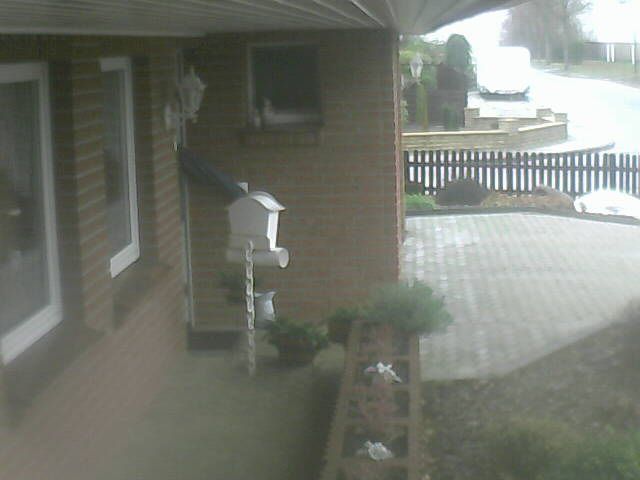
                                      CamBild.jpg

                                      Mfg
                                      IOBrokerMike

                                      Achtung ! Sehkraft 25% | 60% , kein scherz
                                      Systeme : GEEKOM MiniAir 11 | Linux : Trixie 13.4 | HMIP | OpenCCU / RasPi3 | SMA PV Anlage | Robonect Hx | Hydrawise | RTL_433

                                      GlasfaserG 1 Antwort Letzte Antwort
                                      0
                                      • I ioBrokerMike

                                        Vielen Dank an euch!

                                        Ihr hatte es nicht einfach mit mir.

                                        Hier die Lösung : wget --output-document /opt/iobroker/tmp/CamBild.jpg "http://192.168.178.200:80/snapshot.cgi?user=abc&pwd="

                                        CamBild.jpg

                                        GlasfaserG Online
                                        GlasfaserG Online
                                        Glasfaser
                                        schrieb am zuletzt editiert von
                                        #19

                                        @iobrokermike sagte in [ Gelöst ] Kamerabild aufnehmen (speichern):

                                        Hier die Lösung

                                        Der Postbote hat geklingelt ...

                                        Synology 918+ 16GB - ioBroker in Docker v9 , VISO auf Trekstor Primebook C13 13,3" , Hikvision Domkameras mit Surveillance Station .. CCU RaspberryMatic in Synology VM .. Zigbee CC2538+CC2592 .. Sonoff .. KNX .. Modbus ..

                                        1 Antwort Letzte Antwort
                                        0

                                        Hey! Du scheinst an dieser Unterhaltung interessiert zu sein, hast aber noch kein Konto.

                                        Hast du es satt, bei jedem Besuch durch die gleichen Beiträge zu scrollen? Wenn du dich für ein Konto anmeldest, kommst du immer genau dorthin zurück, wo du zuvor warst, und kannst dich über neue Antworten benachrichtigen lassen (entweder per E-Mail oder Push-Benachrichtigung). Du kannst auch Lesezeichen speichern und Beiträge positiv bewerten, um anderen Community-Mitgliedern deine Wertschätzung zu zeigen.

                                        Mit deinem Input könnte dieser Beitrag noch besser werden 💗

                                        Registrieren Anmelden
                                        Antworten
                                        • In einem neuen Thema antworten
                                        Anmelden zum Antworten
                                        • Älteste zuerst
                                        • Neuste zuerst
                                        • Meiste Stimmen


                                        Support us

                                        ioBroker
                                        Community Adapters
                                        Donate

                                        583

                                        Online

                                        32.8k

                                        Benutzer

                                        82.7k

                                        Themen

                                        1.3m

                                        Beiträge
                                        Community
                                        Impressum | Datenschutz-Bestimmungen | Nutzungsbedingungen | Einwilligungseinstellungen
                                        ioBroker Community 2014-2025
                                        logo
                                        • Anmelden

                                        • Du hast noch kein Konto? Registrieren

                                        • Anmelden oder registrieren, um zu suchen
                                        • Erster Beitrag
                                          Letzter Beitrag
                                        0
                                        • Home
                                        • Aktuell
                                        • Tags
                                        • Ungelesen 0
                                        • Kategorien
                                        • Unreplied
                                        • Beliebt
                                        • GitHub
                                        • Docu
                                        • Hilfe

