Skip to content
  • Home
  • Recent
  • Tags
  • 0 Unread 0
  • Categories
  • Unreplied
  • Popular
  • GitHub
  • Docu
  • Hilfe
Skins
  • Light
  • Brite
  • Cerulean
  • Cosmo
  • Flatly
  • Journal
  • Litera
  • Lumen
  • Lux
  • Materia
  • Minty
  • Morph
  • Pulse
  • Sandstone
  • Simplex
  • Sketchy
  • Spacelab
  • United
  • Yeti
  • Zephyr
  • Dark
  • Cyborg
  • Darkly
  • Quartz
  • Slate
  • Solar
  • Superhero
  • Vapor

  • Default (No Skin)
  • No Skin
Collapse
ioBroker Logo

Community Forum

donate donate
  1. ioBroker Community Home
  2. Deutsch
  3. ioBroker Allgemein
  4. iob diag - Skript

NEWS

  • UPDATE 31.10.: Amazon Alexa - ioBroker Skill läuft aus ?
    apollon77A
    apollon77
    48
    3
    8.9k

  • Monatsrückblick – September 2025
    BluefoxB
    Bluefox
    13
    1
    2.2k

  • Neues Video "KI im Smart Home" - ioBroker plus n8n
    BluefoxB
    Bluefox
    16
    1
    3.4k

iob diag - Skript

Scheduled Pinned Locked Moved ioBroker Allgemein
738 Posts 49 Posters 208.3k Views 38 Watching
  • Oldest to Newest
  • Newest to Oldest
  • Most Votes
Reply
  • Reply as topic
Log in to reply
This topic has been deleted. Only users with topic management privileges can see it.
  • GlasfaserG Glasfaser

    @thomas-braun sagte in iob diag - Skript:

    Keine Ahnung warum in deinem System die Services nicht laufen.

    Laut INet ein Bug in Ubuntu ...

    Kann aber nicht erkenne was genau @Nashra hat !

    EDIT :

    Sollte man lieber in einem seperaten Thread klären !!

    Thomas BraunT Online
    Thomas BraunT Online
    Thomas Braun
    Most Active
    wrote on last edited by
    #450

    @glasfaser sagte in iob diag - Skript:

    Sollte man lieber in einem seperaten Thread klären !!

    Richtig, hat mit dem Skript nix zu tun, das funktioniert wie vorgesehen.

    Linux-Werkzeugkasten:
    https://forum.iobroker.net/topic/42952/der-kleine-iobroker-linux-werkzeugkasten
    NodeJS Fixer Skript:
    https://forum.iobroker.net/topic/68035/iob-node-fix-skript
    iob_diag: curl -sLf -o diag.sh https://iobroker.net/diag.sh && bash diag.sh

    1 Reply Last reply
    1
    • GlasfaserG Glasfaser

      @thomas-braun sagte in iob diag - Skript:

      Keine Ahnung warum in deinem System die Services nicht laufen.

      Laut INet ein Bug in Ubuntu ...

      Kann aber nicht erkenne was genau @Nashra hat !

      EDIT :

      Sollte man lieber in einem seperaten Thread klären !!

      NashraN Offline
      NashraN Offline
      Nashra
      Most Active Forum Testing
      wrote on last edited by
      #451

      @glasfaser sagte in iob diag - Skript:

      @thomas-braun sagte in iob diag - Skript:

      Keine Ahnung warum in deinem System die Services nicht laufen.

      Laut INet ein Bug in Ubuntu ...

      Kann aber nicht erkenne was genau @Nashra hat !

      EDIT :

      Sollte man lieber in einem seperaten Thread klären !!

      Debian 11

      Habe gerade mal die anderen Container getestet, da funktionieren die Befehle.
      Ergo, der ioB Container hat ne Macke, hat also nichts mit dem Skript zu tun.
      Werde das die Tage mal alles neu aufsetzen, Backups sind ja genug da.

      Gruß Ralf
      Mir egal, wer Dein Vater ist! Wenn ich hier angel, wird nicht übers Wasser gelaufen!!

      Benutzt das Voting rechts unten im Beitrag wenn er euch geholfen hat.

      Thomas BraunT 1 Reply Last reply
      0
      • NashraN Nashra

        @glasfaser sagte in iob diag - Skript:

        @thomas-braun sagte in iob diag - Skript:

        Keine Ahnung warum in deinem System die Services nicht laufen.

        Laut INet ein Bug in Ubuntu ...

        Kann aber nicht erkenne was genau @Nashra hat !

        EDIT :

        Sollte man lieber in einem seperaten Thread klären !!

        Debian 11

        Habe gerade mal die anderen Container getestet, da funktionieren die Befehle.
        Ergo, der ioB Container hat ne Macke, hat also nichts mit dem Skript zu tun.
        Werde das die Tage mal alles neu aufsetzen, Backups sind ja genug da.

        Thomas BraunT Online
        Thomas BraunT Online
        Thomas Braun
        Most Active
        wrote on last edited by
        #452

        @nashra sagte in iob diag - Skript:

        Ergo, der ioB Container hat ne Macke

        :-D Und ich sitz hier laut alle Virtualisierungen verfluchend über meinem Spaghetti-Code und such einen Workaround...

        Linux-Werkzeugkasten:
        https://forum.iobroker.net/topic/42952/der-kleine-iobroker-linux-werkzeugkasten
        NodeJS Fixer Skript:
        https://forum.iobroker.net/topic/68035/iob-node-fix-skript
        iob_diag: curl -sLf -o diag.sh https://iobroker.net/diag.sh && bash diag.sh

        NashraN 1 Reply Last reply
        2
        • Thomas BraunT Thomas Braun

          @nashra sagte in iob diag - Skript:

          Ergo, der ioB Container hat ne Macke

          :-D Und ich sitz hier laut alle Virtualisierungen verfluchend über meinem Spaghetti-Code und such einen Workaround...

          NashraN Offline
          NashraN Offline
          Nashra
          Most Active Forum Testing
          wrote on last edited by
          #453

          @thomas-braun sagte in iob diag - Skript:

          @nashra sagte in iob diag - Skript:

          Ergo, der ioB Container hat ne Macke

          :-D Und ich sitz hier laut alle Virtualisierungen verfluchend über meinem Spaghetti-Code und such einen Workaround...

          Sorry Thomas :man-bowing:

          Gruß Ralf
          Mir egal, wer Dein Vater ist! Wenn ich hier angel, wird nicht übers Wasser gelaufen!!

          Benutzt das Voting rechts unten im Beitrag wenn er euch geholfen hat.

          1 Reply Last reply
          0
          • GlasfaserG Offline
            GlasfaserG Offline
            Glasfaser
            wrote on last edited by Glasfaser
            #454

            @thomas-braun

            Vorschlag :

            da dein

            iob diag
            

            schon zu einem Schweizer Taschenmesser geworden ist , könnte im Skript das

            Mit Ausgabe in eine Logdatei namens iob_diag.log sähe der Aufruf so aus:
            ./iob_diag | tee iob_diag.log

            mit einbauen , auf Basis von :

            iob diag  | tee log/iob_diag.log
            

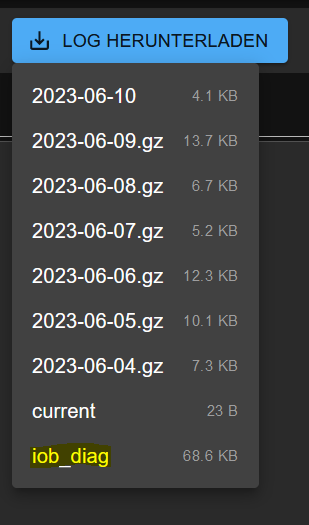
            Wäre dann über die Admin Oberfläche :

            e329e7a8-dbe1-48e5-a8d3-c4b29e5224d3-grafik.png

            per Download bzw. besser markierbar ... ( da haben so einige Probleme damit )

            Man könnte noch weiter denken es im Admin als Abfrage dazu mit einem Button mit einzubauen , " wenn benötigt " :)

            Synology 918+ 16GB - ioBroker in Docker v9 , VISO auf Trekstor Primebook C13 13,3" , Hikvision Domkameras mit Surveillance Station .. CCU RaspberryMatic in Synology VM .. Zigbee CC2538+CC2592 .. Sonoff .. KNX .. Modbus ..

            Thomas BraunT 2 Replies Last reply
            0
            • GlasfaserG Glasfaser

              @thomas-braun

              Vorschlag :

              da dein

              iob diag
              

              schon zu einem Schweizer Taschenmesser geworden ist , könnte im Skript das

              Mit Ausgabe in eine Logdatei namens iob_diag.log sähe der Aufruf so aus:
              ./iob_diag | tee iob_diag.log

              mit einbauen , auf Basis von :

              iob diag  | tee log/iob_diag.log
              

              Wäre dann über die Admin Oberfläche :

              e329e7a8-dbe1-48e5-a8d3-c4b29e5224d3-grafik.png

              per Download bzw. besser markierbar ... ( da haben so einige Probleme damit )

              Man könnte noch weiter denken es im Admin als Abfrage dazu mit einem Button mit einzubauen , " wenn benötigt " :)

              Thomas BraunT Online
              Thomas BraunT Online
              Thomas Braun
              Most Active
              wrote on last edited by Thomas Braun
              #455

              @glasfaser

              Ich hab nur keine Ahnung von Admin
              Das Skript wird aber bereits heute in /home/iobroker/iob_diag.log abgelegt. Müsste vermutlich da nur abgeholt werden.

              Das müsste dann im iob-Installer bzw. in iob fix angepasst werden. Magst du ein Issue aufmachen?

              Linux-Werkzeugkasten:
              https://forum.iobroker.net/topic/42952/der-kleine-iobroker-linux-werkzeugkasten
              NodeJS Fixer Skript:
              https://forum.iobroker.net/topic/68035/iob-node-fix-skript
              iob_diag: curl -sLf -o diag.sh https://iobroker.net/diag.sh && bash diag.sh

              GlasfaserG 1 Reply Last reply
              0
              • GlasfaserG Glasfaser

                @thomas-braun

                Vorschlag :

                da dein

                iob diag
                

                schon zu einem Schweizer Taschenmesser geworden ist , könnte im Skript das

                Mit Ausgabe in eine Logdatei namens iob_diag.log sähe der Aufruf so aus:
                ./iob_diag | tee iob_diag.log

                mit einbauen , auf Basis von :

                iob diag  | tee log/iob_diag.log
                

                Wäre dann über die Admin Oberfläche :

                e329e7a8-dbe1-48e5-a8d3-c4b29e5224d3-grafik.png

                per Download bzw. besser markierbar ... ( da haben so einige Probleme damit )

                Man könnte noch weiter denken es im Admin als Abfrage dazu mit einem Button mit einzubauen , " wenn benötigt " :)

                Thomas BraunT Online
                Thomas BraunT Online
                Thomas Braun
                Most Active
                wrote on last edited by
                #456

                @glasfaser

                Hab jetzt nochmal damit herumgespielt.
                Kann man natürlich auch direkt in /opt/iobroker/log rein werfen.
                Ist nur unschön, dass die ganze Formatierung (Leerzeilen, TabStops, Farben usw. dann weg fällt

                Linux-Werkzeugkasten:
                https://forum.iobroker.net/topic/42952/der-kleine-iobroker-linux-werkzeugkasten
                NodeJS Fixer Skript:
                https://forum.iobroker.net/topic/68035/iob-node-fix-skript
                iob_diag: curl -sLf -o diag.sh https://iobroker.net/diag.sh && bash diag.sh

                HomoranH 1 Reply Last reply
                0
                • Thomas BraunT Thomas Braun

                  @glasfaser

                  Hab jetzt nochmal damit herumgespielt.
                  Kann man natürlich auch direkt in /opt/iobroker/log rein werfen.
                  Ist nur unschön, dass die ganze Formatierung (Leerzeilen, TabStops, Farben usw. dann weg fällt

                  HomoranH Do not disturb
                  HomoranH Do not disturb
                  Homoran
                  Global Moderator Administrators
                  wrote on last edited by
                  #457

                  @thomas-braun sagte in iob diag - Skript:

                  Ist nur unschön, dass die ganze Formatierung (Leerzeilen, TabStops, Farben usw. dann weg fällt

                  dann lass es! :grin:

                  kein Support per PN! - Fragen im Forum stellen - es gibt fast nichts, was nicht auch für andere interessant ist.

                  Benutzt das Voting rechts unten im Beitrag wenn er euch geholfen hat.

                  der Installationsfixer: curl -fsL https://iobroker.net/fix.sh | bash -

                  Thomas BraunT 1 Reply Last reply
                  0
                  • HomoranH Homoran

                    @thomas-braun sagte in iob diag - Skript:

                    Ist nur unschön, dass die ganze Formatierung (Leerzeilen, TabStops, Farben usw. dann weg fällt

                    dann lass es! :grin:

                    Thomas BraunT Online
                    Thomas BraunT Online
                    Thomas Braun
                    Most Active
                    wrote on last edited by
                    #458

                    @homoran

                    Ja, da hab ich mir sooooolche Mühe mit gegeben... :-D

                    Linux-Werkzeugkasten:
                    https://forum.iobroker.net/topic/42952/der-kleine-iobroker-linux-werkzeugkasten
                    NodeJS Fixer Skript:
                    https://forum.iobroker.net/topic/68035/iob-node-fix-skript
                    iob_diag: curl -sLf -o diag.sh https://iobroker.net/diag.sh && bash diag.sh

                    1 Reply Last reply
                    3
                    • GlasfaserG Offline
                      GlasfaserG Offline
                      Glasfaser
                      wrote on last edited by
                      #459

                      @thomas-braun sagte in iob diag - Skript:

                      Ist nur unschön, dass die ganze Formatierung (Leerzeilen, TabStops, Farben usw. dann weg fällt

                      .... das alles war ja nur ein Vorschlag !

                      Synology 918+ 16GB - ioBroker in Docker v9 , VISO auf Trekstor Primebook C13 13,3" , Hikvision Domkameras mit Surveillance Station .. CCU RaspberryMatic in Synology VM .. Zigbee CC2538+CC2592 .. Sonoff .. KNX .. Modbus ..

                      Thomas BraunT 1 Reply Last reply
                      0
                      • GlasfaserG Glasfaser

                        @thomas-braun sagte in iob diag - Skript:

                        Ist nur unschön, dass die ganze Formatierung (Leerzeilen, TabStops, Farben usw. dann weg fällt

                        .... das alles war ja nur ein Vorschlag !

                        Thomas BraunT Online
                        Thomas BraunT Online
                        Thomas Braun
                        Most Active
                        wrote on last edited by
                        #460

                        @glasfaser

                        Müsste eh im Installer geändert werden. Im Moment ist da ~/iobroker als Ausgabe-Pfad drin. Müsste jemand, der an den Code dran kommt nur auf /opt/iobroker/log umbauen.

                        Linux-Werkzeugkasten:
                        https://forum.iobroker.net/topic/42952/der-kleine-iobroker-linux-werkzeugkasten
                        NodeJS Fixer Skript:
                        https://forum.iobroker.net/topic/68035/iob-node-fix-skript
                        iob_diag: curl -sLf -o diag.sh https://iobroker.net/diag.sh && bash diag.sh

                        1 Reply Last reply
                        0
                        • Thomas BraunT Thomas Braun

                          @glasfaser

                          Ich hab nur keine Ahnung von Admin
                          Das Skript wird aber bereits heute in /home/iobroker/iob_diag.log abgelegt. Müsste vermutlich da nur abgeholt werden.

                          Das müsste dann im iob-Installer bzw. in iob fix angepasst werden. Magst du ein Issue aufmachen?

                          GlasfaserG Offline
                          GlasfaserG Offline
                          Glasfaser
                          wrote on last edited by Glasfaser
                          #461

                          @thomas-braun sagte in iob diag - Skript:

                          Das Skript wird aber bereits heute in /home/iobroker/iob_diag.log abgelegt.

                          Sorry finde ich nicht in deinem Skript , wird mir auch aktuell da nicht hin gelegt !?

                          Synology 918+ 16GB - ioBroker in Docker v9 , VISO auf Trekstor Primebook C13 13,3" , Hikvision Domkameras mit Surveillance Station .. CCU RaspberryMatic in Synology VM .. Zigbee CC2538+CC2592 .. Sonoff .. KNX .. Modbus ..

                          Thomas BraunT 1 Reply Last reply
                          0
                          • GlasfaserG Glasfaser

                            @thomas-braun sagte in iob diag - Skript:

                            Das Skript wird aber bereits heute in /home/iobroker/iob_diag.log abgelegt.

                            Sorry finde ich nicht in deinem Skript , wird mir auch aktuell da nicht hin gelegt !?

                            Thomas BraunT Online
                            Thomas BraunT Online
                            Thomas Braun
                            Most Active
                            wrote on last edited by
                            #462

                            @glasfaser sagte in iob diag - Skript:

                            Sorry finde ich nicht in deinem Skript , wird mir auch aktuell da nicht hin gelegt !?

                            Musste eigentlich im Aufruf von iob diag hinterlegt worden sein.
                            Bei mir wird das da auch automatisch abgeworfen:

                            echad@chet:~ $ ls -l /home/iobroker/
                            total 32
                            -rw-r--r-- 1 iobroker iobroker 24604 Jun 10 16:23 iob_diag.log
                            drwxr-xr-x 3 iobroker iobroker  4096 Mar 12 15:59 skripte
                            

                            Linux-Werkzeugkasten:
                            https://forum.iobroker.net/topic/42952/der-kleine-iobroker-linux-werkzeugkasten
                            NodeJS Fixer Skript:
                            https://forum.iobroker.net/topic/68035/iob-node-fix-skript
                            iob_diag: curl -sLf -o diag.sh https://iobroker.net/diag.sh && bash diag.sh

                            GlasfaserG 1 Reply Last reply
                            0
                            • Thomas BraunT Thomas Braun

                              @glasfaser sagte in iob diag - Skript:

                              Sorry finde ich nicht in deinem Skript , wird mir auch aktuell da nicht hin gelegt !?

                              Musste eigentlich im Aufruf von iob diag hinterlegt worden sein.
                              Bei mir wird das da auch automatisch abgeworfen:

                              echad@chet:~ $ ls -l /home/iobroker/
                              total 32
                              -rw-r--r-- 1 iobroker iobroker 24604 Jun 10 16:23 iob_diag.log
                              drwxr-xr-x 3 iobroker iobroker  4096 Mar 12 15:59 skripte
                              
                              GlasfaserG Offline
                              GlasfaserG Offline
                              Glasfaser
                              wrote on last edited by
                              #463

                              @thomas-braun sagte in iob diag - Skript:

                              ls -l /home/iobroker/

                              Jipp ...ist da :face_with_rolling_eyes:

                              root@iobroker:/opt/iobroker# ls -l /home/iobroker/
                              total 72
                              -rw-r--r-- 1 iobroker iobroker 72556 Jun 10 16:28 iob_diag.log
                              root@iobroker:/opt/iobroker#
                              

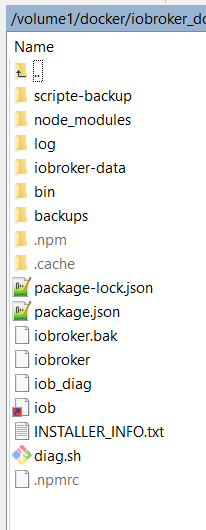
                              bin selten bei Docker unterhalb von

                              /opt/iobroker
                              

                              automatisch angemeldet bzw. ist eine Etage tiefe im " Mount Ordner " nicht sichbar .

                              .
                              a1e5c82c-d977-4f6c-9cb2-c1adce76dffc-grafik.png

                              root@iobroker:/opt/iobroker# ls
                              backups  INSTALLER_INFO.txt  iobroker       log           package-lock.json
                              bin      iob                 iobroker.bak   node_modules  scripte-backup
                              diag.sh  iob_diag            iobroker-data  package.json
                              root@iobroker:/opt/iobroker#
                              

                              Synology 918+ 16GB - ioBroker in Docker v9 , VISO auf Trekstor Primebook C13 13,3" , Hikvision Domkameras mit Surveillance Station .. CCU RaspberryMatic in Synology VM .. Zigbee CC2538+CC2592 .. Sonoff .. KNX .. Modbus ..

                              Thomas BraunT 1 Reply Last reply
                              0
                              • GlasfaserG Glasfaser

                                @thomas-braun sagte in iob diag - Skript:

                                ls -l /home/iobroker/

                                Jipp ...ist da :face_with_rolling_eyes:

                                root@iobroker:/opt/iobroker# ls -l /home/iobroker/
                                total 72
                                -rw-r--r-- 1 iobroker iobroker 72556 Jun 10 16:28 iob_diag.log
                                root@iobroker:/opt/iobroker#
                                

                                bin selten bei Docker unterhalb von

                                /opt/iobroker
                                

                                automatisch angemeldet bzw. ist eine Etage tiefe im " Mount Ordner " nicht sichbar .

                                .
                                a1e5c82c-d977-4f6c-9cb2-c1adce76dffc-grafik.png

                                root@iobroker:/opt/iobroker# ls
                                backups  INSTALLER_INFO.txt  iobroker       log           package-lock.json
                                bin      iob                 iobroker.bak   node_modules  scripte-backup
                                diag.sh  iob_diag            iobroker-data  package.json
                                root@iobroker:/opt/iobroker#
                                
                                Thomas BraunT Online
                                Thomas BraunT Online
                                Thomas Braun
                                Most Active
                                wrote on last edited by
                                #464

                                @glasfaser

                                Man könnte natürlich den Pfad auf /opt/iobroker/log ändern, dann erscheint es im DropDown der logs und kann dann da angeklickt werden.

                                Linux-Werkzeugkasten:
                                https://forum.iobroker.net/topic/42952/der-kleine-iobroker-linux-werkzeugkasten
                                NodeJS Fixer Skript:
                                https://forum.iobroker.net/topic/68035/iob-node-fix-skript
                                iob_diag: curl -sLf -o diag.sh https://iobroker.net/diag.sh && bash diag.sh

                                GlasfaserG 2 Replies Last reply
                                1
                                • Thomas BraunT Thomas Braun

                                  @glasfaser

                                  Man könnte natürlich den Pfad auf /opt/iobroker/log ändern, dann erscheint es im DropDown der logs und kann dann da angeklickt werden.

                                  GlasfaserG Offline
                                  GlasfaserG Offline
                                  Glasfaser
                                  wrote on last edited by
                                  #465

                                  @thomas-braun

                                  Habe es gefunden

                                  	elif [ "\$1" = "diag" ]; then
                                  		  sudo -u $IOB_USER curl -sLf $DIAG_URL --output /home/$IOB_USER/.diag.sh && bash /home/$IOB_USER/.diag.sh | sudo -u $IOB_USER tee /home/$IOB_USER/iob_diag.log
                                  

                                  https://github.com/ioBroker/ioBroker/blob/master/fix_installation.sh

                                  Synology 918+ 16GB - ioBroker in Docker v9 , VISO auf Trekstor Primebook C13 13,3" , Hikvision Domkameras mit Surveillance Station .. CCU RaspberryMatic in Synology VM .. Zigbee CC2538+CC2592 .. Sonoff .. KNX .. Modbus ..

                                  Thomas BraunT 1 Reply Last reply
                                  0
                                  • GlasfaserG Glasfaser

                                    @thomas-braun

                                    Habe es gefunden

                                    	elif [ "\$1" = "diag" ]; then
                                    		  sudo -u $IOB_USER curl -sLf $DIAG_URL --output /home/$IOB_USER/.diag.sh && bash /home/$IOB_USER/.diag.sh | sudo -u $IOB_USER tee /home/$IOB_USER/iob_diag.log
                                    

                                    https://github.com/ioBroker/ioBroker/blob/master/fix_installation.sh

                                    Thomas BraunT Online
                                    Thomas BraunT Online
                                    Thomas Braun
                                    Most Active
                                    wrote on last edited by
                                    #466

                                    @glasfaser

                                    Dann kannste ja einen PR gegen den Installer setzen.

                                    Linux-Werkzeugkasten:
                                    https://forum.iobroker.net/topic/42952/der-kleine-iobroker-linux-werkzeugkasten
                                    NodeJS Fixer Skript:
                                    https://forum.iobroker.net/topic/68035/iob-node-fix-skript
                                    iob_diag: curl -sLf -o diag.sh https://iobroker.net/diag.sh && bash diag.sh

                                    1 Reply Last reply
                                    0
                                    • Thomas BraunT Thomas Braun

                                      @glasfaser

                                      Man könnte natürlich den Pfad auf /opt/iobroker/log ändern, dann erscheint es im DropDown der logs und kann dann da angeklickt werden.

                                      GlasfaserG Offline
                                      GlasfaserG Offline
                                      Glasfaser
                                      wrote on last edited by
                                      #467

                                      @thomas-braun sagte in iob diag - Skript:

                                      Man könnte natürlich den Pfad auf /opt/iobroker/log ändern, dann erscheint es im DropDown der logs und kann dann da angeklickt werden.

                                      Das war ja mein Vorschlag oben ...

                                      @glasfaser sagte in iob diag - Skript:
                                      Wäre dann über die Admin Oberfläche :

                                      e329e7a8-dbe1-48e5-a8d3-c4b29e5224d3-grafik.png

                                      per Download bzw. besser markierbar ... ( da haben so einige Probleme damit )

                                      Synology 918+ 16GB - ioBroker in Docker v9 , VISO auf Trekstor Primebook C13 13,3" , Hikvision Domkameras mit Surveillance Station .. CCU RaspberryMatic in Synology VM .. Zigbee CC2538+CC2592 .. Sonoff .. KNX .. Modbus ..

                                      Thomas BraunT 1 Reply Last reply
                                      0
                                      • GlasfaserG Glasfaser

                                        @thomas-braun sagte in iob diag - Skript:

                                        Man könnte natürlich den Pfad auf /opt/iobroker/log ändern, dann erscheint es im DropDown der logs und kann dann da angeklickt werden.

                                        Das war ja mein Vorschlag oben ...

                                        @glasfaser sagte in iob diag - Skript:
                                        Wäre dann über die Admin Oberfläche :

                                        e329e7a8-dbe1-48e5-a8d3-c4b29e5224d3-grafik.png

                                        per Download bzw. besser markierbar ... ( da haben so einige Probleme damit )

                                        Thomas BraunT Online
                                        Thomas BraunT Online
                                        Thomas Braun
                                        Most Active
                                        wrote on last edited by
                                        #468

                                        @glasfaser sagte in iob diag - Skript:

                                        per Download bzw. besser markierbar ... ( da haben so einige Probleme damit )

                                        Downside ist: Es ist nach dem posten im Forum für Helfer schlechter lesbar.

                                        Linux-Werkzeugkasten:
                                        https://forum.iobroker.net/topic/42952/der-kleine-iobroker-linux-werkzeugkasten
                                        NodeJS Fixer Skript:
                                        https://forum.iobroker.net/topic/68035/iob-node-fix-skript
                                        iob_diag: curl -sLf -o diag.sh https://iobroker.net/diag.sh && bash diag.sh

                                        GlasfaserG 1 Reply Last reply
                                        0
                                        • Thomas BraunT Thomas Braun

                                          @glasfaser sagte in iob diag - Skript:

                                          per Download bzw. besser markierbar ... ( da haben so einige Probleme damit )

                                          Downside ist: Es ist nach dem posten im Forum für Helfer schlechter lesbar.

                                          GlasfaserG Offline
                                          GlasfaserG Offline
                                          Glasfaser
                                          wrote on last edited by
                                          #469

                                          @thomas-braun

                                          Ja .. du hast Recht , wenn man alles so kopiert / einfügt .
                                          Natürlich sollte es so bleiben , wie du es auch im Script angegeben hast :

                                          ======== Start marking the full check here =========

                                          Skript v.2023-04-16
                                          
                                          
                                          blaba 
                                          
                                          hier Ende 
                                          

                                          Synology 918+ 16GB - ioBroker in Docker v9 , VISO auf Trekstor Primebook C13 13,3" , Hikvision Domkameras mit Surveillance Station .. CCU RaspberryMatic in Synology VM .. Zigbee CC2538+CC2592 .. Sonoff .. KNX .. Modbus ..

                                          Thomas BraunT 1 Reply Last reply
                                          0
                                          Reply
                                          • Reply as topic
                                          Log in to reply
                                          • Oldest to Newest
                                          • Newest to Oldest
                                          • Most Votes


                                          Support us

                                          ioBroker
                                          Community Adapters
                                          Donate
                                          FAQ Cloud / IOT
                                          HowTo: Node.js-Update
                                          HowTo: Backup/Restore
                                          Downloads
                                          BLOG

                                          764

                                          Online

                                          32.4k

                                          Users

                                          81.5k

                                          Topics

                                          1.3m

                                          Posts
                                          Community
                                          Impressum | Datenschutz-Bestimmungen | Nutzungsbedingungen | Einwilligungseinstellungen
                                          ioBroker Community 2014-2025
                                          logo
                                          • Login

                                          • Don't have an account? Register

                                          • Login or register to search.
                                          • First post
                                            Last post
                                          0
                                          • Home
                                          • Recent
                                          • Tags
                                          • Unread 0
                                          • Categories
                                          • Unreplied
                                          • Popular
                                          • GitHub
                                          • Docu
                                          • Hilfe