




iob diag - Skript
-
@thomas-braun sagte in iob diag - Skript:
Da war die Abfrage auch anders aufgebaut.
Am Rande: Spring da nicht als root herum. Auch in LXCs verwendet man natürlich Standard-User.
Bin als User dort unterwegs, root packe ich nicht an
Linux-Werkzeugkasten:
https://forum.iobroker.net/topic/42952/der-kleine-iobroker-linux-werkzeugkasten
NodeJS Fixer Skript:
https://forum.iobroker.net/topic/68035/iob-node-fix-skript
iob_diag: curl -sLf -o diag.sh https://iobroker.net/diag.sh && bash diag.sh -
@thomas-braun Hab das skript auch mal im lxc container getestet.
Skript v.2023-05-28-4 *** BASE SYSTEM *** Static hostname: iob-test Icon name: computer-container Chassis: container Machine ID: d8caa5b3244e49f2ac681e0f79a122d3 Boot ID: d94366b77fd34be8be8ae7312c47af6a Virtualization: lxc Operating System: Debian GNU/Linux 11 (bullseye) Kernel: Linux 6.0.19-edge Architecture: x86-64 model name : Intel(R) Celeron(R) J4105 CPU @ 1.50GHz Virtualization : lxc Kernel : x86_64 Userland : amd64 Systemuptime and Load: 12:44:23 up 0 min, 2 users, load average: 1.58, 0.91, 0.65 CPU threads: 2 *** Time and Time Zones *** Local time: Mon 2023-05-29 12:44:23 CEST Universal time: Mon 2023-05-29 10:44:23 UTC RTC time: n/a Time zone: Europe/Berlin (CEST, +0200) System clock synchronized: yes NTP service: inactive RTC in local TZ: no *** User and Groups *** rog /home/rog rog adm sudo redis iobroker *** X-Server-Setup *** X-Server: false Desktop: Terminal: tty Boot Target: multi-user.target *** MEMORY *** total used free shared buff/cache available Mem: 8.2G 1.6G 6.3G 2.0M 293M 6.6G Swap: 2.0G 0B 2.0G Total: 10G 1.6G 8.3G 8192 M total memory 1598 M used memory 66 M active memory 1764 M inactive memory 6299 M free memory 0 M buffer memory 293 M swap cache 2048 M total swap 0 M used swap 2048 M free swap *** FILESYSTEM *** Filesystem Type Size Used Avail Use% Mounted on /dev/mapper/pve-vm--200--disk--0 ext4 16G 3.9G 11G 27% / none tmpfs 492K 4.0K 488K 1% /dev /dev/mapper/pve-root ext4 66G 12G 51G 18% /dev/ttyACM0 tmpfs tmpfs 7.8G 0 7.8G 0% /dev/shm tmpfs tmpfs 3.1G 160K 3.1G 1% /run tmpfs tmpfs 5.0M 0 5.0M 0% /run/lock //10.10.10.10/Public/backup/iobroker cifs 2.7T 2.1T 627G 78% /media/iobroker tmpfs tmpfs 1.6G 0 1.6G 0% /run/user/1000 Messages concerning ext4 filesystem in dmesg: [Sat May 27 18:18:31 2023] EXT4-fs (dm-1): mounted filesystem with ordered data mode. Quota mode: none. [Sat May 27 18:18:32 2023] EXT4-fs (dm-1): re-mounted. Quota mode: none. [Sat May 27 18:18:51 2023] EXT4-fs (dm-11): mounted filesystem with ordered data mode. Quota mode: none. [Sat May 27 18:19:10 2023] EXT4-fs (dm-8): mounted filesystem with ordered data mode. Quota mode: none. [Sat May 27 18:19:29 2023] EXT4-fs (dm-6): mounted filesystem with ordered data mode. Quota mode: none. [Sat May 27 18:19:48 2023] EXT4-fs (dm-10): mounted filesystem with ordered data mode. Quota mode: none. [Sat May 27 18:19:52 2023] EXT4-fs (dm-7): mounted filesystem with ordered data mode. Quota mode: none. [Sat May 27 19:01:21 2023] EXT4-fs (dm-9): mounted filesystem with ordered data mode. Quota mode: none. [Sat May 27 19:01:47 2023] EXT4-fs (dm-9): unmounting filesystem. [Sat May 27 19:01:51 2023] EXT4-fs (dm-12): mounted filesystem with ordered data mode. Quota mode: none. [Sat May 27 19:02:53 2023] EXT4-fs (dm-12): unmounting filesystem. [Sun May 28 07:01:21 2023] EXT4-fs (dm-9): mounted filesystem with ordered data mode. Quota mode: none. [Sun May 28 07:02:15 2023] EXT4-fs (dm-9): unmounting filesystem. [Sun May 28 07:02:20 2023] EXT4-fs (dm-12): mounted filesystem with ordered data mode. Quota mode: none. [Sun May 28 07:03:23 2023] EXT4-fs (dm-12): unmounting filesystem. [Sun May 28 19:01:23 2023] EXT4-fs (dm-9): mounted filesystem with ordered data mode. Quota mode: none. [Sun May 28 19:01:48 2023] EXT4-fs (dm-9): unmounting filesystem. [Sun May 28 19:01:53 2023] EXT4-fs (dm-12): mounted filesystem with ordered data mode. Quota mode: none. [Sun May 28 19:02:57 2023] EXT4-fs (dm-12): unmounting filesystem. [Mon May 29 07:01:21 2023] EXT4-fs (dm-9): mounted filesystem with ordered data mode. Quota mode: none. [Mon May 29 07:01:46 2023] EXT4-fs (dm-9): unmounting filesystem. [Mon May 29 07:01:50 2023] EXT4-fs (dm-12): mounted filesystem with ordered data mode. Quota mode: none. [Mon May 29 07:02:53 2023] EXT4-fs (dm-12): unmounting filesystem. [Mon May 29 12:38:02 2023] EXT4-fs (dm-12): mounted filesystem with ordered data mode. Quota mode: none. [Mon May 29 12:43:43 2023] EXT4-fs (dm-12): unmounting filesystem. [Mon May 29 12:43:44 2023] EXT4-fs (dm-12): mounted filesystem with ordered data mode. Quota mode: none. Show mounted filesystems (real ones only): TARGET SOURCE FSTYPE OPTIONS / /dev/mapper/pve-vm--200--disk--0 ext4 rw,relatime,stripe=16 |-/dev/ttyACM0 /dev/mapper/pve-root[/var/lib/lxc/100/devices/ttyACM0] ext4 rw,relatime,errors=remount-ro `-/media/iobroker //10.10.10.10/Public/backup/iobroker cifs rw,relatime,vers=3.1.1,cache=strict,username=XXX,uid=1001,noforceuid,gid=1001,noforc Files in neuralgic directories: /var: 458M /var/ 226M /var/cache 221M /var/cache/apt 161M /var/lib 152M /var/cache/apt/archives Archived and active journals take up 24.0M in the file system. /opt/iobroker/backups: 142M /opt/iobroker/backups/ /opt/iobroker/iobroker-data: 392M /opt/iobroker/iobroker-data/ 305M /opt/iobroker/iobroker-data/files 66M /opt/iobroker/iobroker-data/backup-objects 51M /opt/iobroker/iobroker-data/files/javascript.admin 48M /opt/iobroker/iobroker-data/files/telegram.admin The five largest files in iobroker-data are: 33M /opt/iobroker/iobroker-data/files/devices.admin/static/js/main.10538062.js.map 17M /opt/iobroker/iobroker-data/objects.jsonl 15M /opt/iobroker/iobroker-data/files/telegram.admin/rules/static/js/vendors-node_modules_iobroker_adapter-react-v5_assets_devices_parseNames_d_ts-node_modules_io-1d9f06.44fe4a3f.chunk.js.map 9.1M /opt/iobroker/iobroker-data/files/echarts.admin/static/js/2.bbf74d5f.chunk.js.map 8.9M /opt/iobroker/iobroker-data/files/echarts/static/js/2.3d2d025f.chunk.js.map *** NodeJS-Installation *** /usr/bin/nodejs v18.16.0 /usr/bin/node v18.16.0 /usr/bin/npm 9.5.1 /usr/bin/npx 9.5.1 nodejs: Installed: 18.16.0-deb-1nodesource1 Candidate: 18.16.0-deb-1nodesource1 Version table: *** 18.16.0-deb-1nodesource1 500 500 https://deb.nodesource.com/node_18.x bullseye/main amd64 Packages 100 /var/lib/dpkg/status 12.22.12~dfsg-1~deb11u4 500 500 http://security.debian.org bullseye-security/main amd64 Packages 12.22.12~dfsg-1~deb11u3 500 500 http://deb.debian.org/debian bullseye/main amd64 Packages Temp directories causing npm8 problem: 0 No problems detected *** ioBroker-Installation *** ioBroker Status iobroker is running on this host. Objects type: jsonl States type: redis No configuration change needed. Multihost discovery server: disabled Discovery authentication: enabled Persistent activation: disabled Objects: jsonl on 127.0.0.1 States: redis on 127.0.0.1 Core adapters versions js-controller: 4.0.24 admin: 6.3.5 javascript: 6.1.4 Adapters from github: 2 Adapter State + system.adapter.admin.0 : admin : iob-test - enabled, port: 8081, bind: 0.0.0.0, run as: admin system.adapter.alexa2.0 : alexa2 : iob-test - disabled system.adapter.alias-manager.0 : alias-manager : iob-test - disabled system.adapter.apple-find-me.0 : apple-find-me : iob-test - disabled system.adapter.apple-find-me.1 : apple-find-me : iob-test - disabled system.adapter.apple-find-me.2 : apple-find-me : iob-test - disabled system.adapter.apple-find-me.3 : apple-find-me : iob-test - disabled system.adapter.apple-find-me.4 : apple-find-me : iob-test - disabled + system.adapter.backitup.0 : backitup : iob-test - enabled + system.adapter.device-watcher.0 : device-watcher : iob-test - enabled system.adapter.devices.0 : devices : iob-test - disabled + system.adapter.discovery.0 : discovery : iob-test - enabled + system.adapter.echarts.0 : echarts : iob-test - enabled system.adapter.flot.0 : flot : iob-test - disabled system.adapter.history.0 : history : iob-test - disabled system.adapter.icons-fatcow-hosting.0 : icons-fatcow-hosting : iob-test - disabled system.adapter.icons-material-svg.0 : icons-material-svg : iob-test - disabled + system.adapter.info.0 : info : iob-test - enabled system.adapter.jarvis.0 : jarvis : iob-test - disabled + system.adapter.javascript.0 : javascript : iob-test - enabled system.adapter.nina.0 : nina : iob-test - disabled system.adapter.plex.0 : plex : iob-test - disabled + system.adapter.simple-api.0 : simple-api : iob-test - enabled, port: 8087, bind: 0.0.0.0, run as: admin + system.adapter.socketio.0 : socketio : iob-test - enabled, port: 8084, bind: 0.0.0.0, run as: admin system.adapter.switchbot-hub.0 : switchbot-hub : iob-test - disabled system.adapter.telegram.0 : telegram : iob-test - disabled, port: 8443, bind: 0.0.0.0 system.adapter.tr-064.0 : tr-064 : iob-test - disabled system.adapter.vis-icontwo.0 : vis-icontwo : iob-test - disabled + system.adapter.vis-inventwo.0 : vis-inventwo : iob-test - enabled system.adapter.vis-map.0 : vis-map : iob-test - disabled system.adapter.vis-materialdesign.0 : vis-materialdesign : iob-test - disabled system.adapter.vis-owl.0 : vis-owl : iob-test - disabled system.adapter.vis-timeandweather.0 : vis-timeandweather : iob-test - disabled system.adapter.vis.0 : vis : iob-test - enabled + system.adapter.web.0 : web : iob-test - enabled, port: 8082, bind: 0.0.0.0, run as: admin + system.adapter.web.1 : web : iob-test - enabled, port: 8083, bind: 0.0.0.0, run as: admin + system.adapter.ws.0 : ws : iob-test - enabled, port: 8085, bind: 0.0.0.0, run as: admin system.adapter.zigbee.0 : zigbee : iob-test - disabled, port: /dev/ttyACM0 + instance is alive Enabled adapters with bindings + system.adapter.admin.0 : admin : iob-test - enabled, port: 8081, bind: 0.0.0.0, run as: admin + system.adapter.simple-api.0 : simple-api : iob-test - enabled, port: 8087, bind: 0.0.0.0, run as: admin + system.adapter.socketio.0 : socketio : iob-test - enabled, port: 8084, bind: 0.0.0.0, run as: admin + system.adapter.web.0 : web : iob-test - enabled, port: 8082, bind: 0.0.0.0, run as: admin + system.adapter.web.1 : web : iob-test - enabled, port: 8083, bind: 0.0.0.0, run as: admin + system.adapter.ws.0 : ws : iob-test - enabled, port: 8085, bind: 0.0.0.0, run as: admin ioBroker-Repositories Stable (default): http://download.iobroker.net/sources-dist.json Beta (latest) : http://download.iobroker.net/sources-dist-latest.json live-beta : http://iobroker.live/repo/sources-dist-latest.json live-stable : http://iobroker.live/repo/sources-dist.json Active repo(s): Stable (default) Installed ioBroker-Instances Used repository: Stable (default) Adapter "admin" : 6.3.5 , installed 6.3.5 Adapter "alexa2" : 3.23.2 , installed 3.23.2 Adapter "alias-manager": 1.2.4 , installed 1.2.4 Adapter "apple-find-me": 0.0.14 , installed 0.0.15 Adapter "backitup" : 2.6.19 , installed 2.6.19 Adapter "device-watcher": 2.9.1 , installed 2.9.1 Adapter "devices" : 1.1.2 , installed 1.1.2 Adapter "discovery" : 3.1.0 , installed 3.1.0 Adapter "echarts" : 1.0.12 , installed 1.0.12 Adapter "flot" : 1.11.0 , installed 1.11.0 Adapter "history" : 2.2.4 , installed 2.2.4 Adapter "icons-fatcow-hosting": 0.1.0, installed 0.1.0 Adapter "icons-material-svg": 0.1.0, installed 0.1.0 Adapter "info" : 1.9.26 , installed 1.9.26 Adapter "jarvis" : 3.1.2 , installed 3.1.2 Adapter "javascript" : 6.1.4 , installed 6.1.4 Controller "js-controller": 4.0.24 , installed 4.0.24 Adapter "nina" : 0.0.25 , installed 0.0.25 Adapter "plex" : 0.9.1 , installed 0.9.1 Adapter "simple-api" : 2.7.2 , installed 2.7.2 Adapter "socketio" : 4.2.0 , installed 4.2.0 Adapter "telegram" : 1.15.2 , installed 1.15.2 Adapter "tr-064" : 4.2.18 , installed 4.2.18 Adapter "vis" : 1.4.16 , installed 1.4.16 Adapter "vis-icontwo" : 0.93.0 , installed 0.93.0 Adapter "vis-inventwo" : 3.3.1 , installed 3.3.1 Adapter "vis-map" : 1.0.4 , installed 1.0.4 Adapter "vis-timeandweather": 1.2.2, installed 1.2.2 Adapter "web" : 4.3.0 , installed 4.3.0 Adapter "ws" : 1.3.0 , installed 1.3.0 Adapter "zigbee" : 1.8.10 , installed 1.8.10 Objects and States Please stand by - This may take a while Objects: 5543 States: 4580 *** OS-Repositories and Updates *** Hit:1 http://deb.debian.org/debian bullseye InRelease Hit:2 http://deb.debian.org/debian bullseye-updates InRelease Hit:3 http://security.debian.org bullseye-security InRelease Hit:4 https://deb.nodesource.com/node_18.x bullseye InRelease Hit:5 https://packages.sury.org/php bullseye InRelease Hit:6 https://packagecloud.io/ookla/speedtest-cli/debian bullseye InRelease Reading package lists... Done Pending Updates: 0 *** Listening Ports *** Active Internet connections (only servers) Proto Recv-Q Send-Q Local Address Foreign Address State User Inode PID/Program name tcp 0 0 0.0.0.0:1883 0.0.0.0:* LISTEN 110 10096841 124/mosquitto tcp 0 0 127.0.0.1:25 0.0.0.0:* LISTEN 0 10097023 318/master tcp 0 0 0.0.0.0:111 0.0.0.0:* LISTEN 0 10094414 1/init tcp 0 0 0.0.0.0:80 0.0.0.0:* LISTEN 0 10096944 213/lighttpd tcp 0 0 127.0.0.1:9001 0.0.0.0:* LISTEN 1001 10097182 129/iobroker.js-con tcp 0 0 127.0.0.53:53 0.0.0.0:* LISTEN 104 10096812 108/systemd-resolve tcp 0 0 127.0.0.1:6379 0.0.0.0:* LISTEN 109 10097759 119/redis-server 12 tcp 0 0 0.0.0.0:5355 0.0.0.0:* LISTEN 104 10096806 108/systemd-resolve tcp6 0 0 ::1:25 :::* LISTEN 0 10097024 318/master tcp6 0 0 :::1883 :::* LISTEN 110 10096842 124/mosquitto tcp6 0 0 :::22 :::* LISTEN 0 10094545 1/init tcp6 0 0 :::111 :::* LISTEN 0 10094418 1/init tcp6 0 0 :::80 :::* LISTEN 0 10096945 213/lighttpd tcp6 0 0 ::1:6379 :::* LISTEN 109 10097760 119/redis-server 12 tcp6 0 0 :::8085 :::* LISTEN 1001 10098846 457/io.ws.0 tcp6 0 0 :::8084 :::* LISTEN 1001 10103907 944/io.socketio.0 tcp6 0 0 :::8087 :::* LISTEN 1001 10100707 758/io.simple-api.0 tcp6 0 0 :::8081 :::* LISTEN 1001 10098182 333/io.admin.0 tcp6 0 0 :::8083 :::* LISTEN 1001 10104026 987/io.web.1 tcp6 0 0 :::8082 :::* LISTEN 1001 10098618 417/io.web.0 tcp6 0 0 :::5355 :::* LISTEN 104 10096809 108/systemd-resolve udp 0 0 0.0.0.0:5355 0.0.0.0:* 104 10096805 108/systemd-resolve udp 0 0 127.0.0.53:53 0.0.0.0:* 104 10096811 108/systemd-resolve udp 0 0 0.0.0.0:111 0.0.0.0:* 0 10094415 1/init udp6 0 0 :::5355 :::* 104 10096808 108/systemd-resolve udp6 0 0 :::111 :::* 0 10094421 1/init *** Log File - Last 25 Lines *** 2023-05-29 12:44:23.992 - info: host.iob-test instance system.adapter.echarts.0 started with pid 534 2023-05-29 12:44:24.222 - info: vis.0 (474) Uploaded. 0 2023-05-29 12:44:24.727 - info: vis.0 (474) Terminated (NO_ERROR): Without reason 2023-05-29 12:44:25.038 - info: echarts.0 (534) starting. Version 1.0.12 in /opt/iobroker/node_modules/iobroker.echarts, node: v18.16.0, js-controller: 4.0.24 2023-05-29 12:44:25.305 - info: host.iob-test instance system.adapter.vis.0 terminated while should be started once 2023-05-29 12:44:28.032 - info: host.iob-test instance system.adapter.info.0 started with pid 562 2023-05-29 12:44:30.330 - info: info.0 (562) starting. Version 1.9.26 in /opt/iobroker/node_modules/iobroker.info, node: v18.16.0, js-controller: 4.0.24 2023-05-29 12:44:30.462 - info: info.0 (562) Reading/updating systemdata. 2023-05-29 12:44:30.975 - info: info.0 (562) State value to set for "info.0.sysinfo.cpu.info.speed" has to be type "string" but received type "number" 2023-05-29 12:44:31.018 - info: info.0 (562) State value to set for "info.0.sysinfo.cpu.info.cache-l3" has to be type "number" but received type "string" 2023-05-29 12:44:31.112 - info: info.0 (562) cpu Temp res = {"main":46,"cores":[46,46,46,45],"max":46,"socket":[45],"chipset":null} 2023-05-29 12:44:32.051 - info: host.iob-test instance system.adapter.simple-api.0 started with pid 758 2023-05-29 12:44:33.467 - info: simple-api.0 (758) starting. Version 2.7.2 in /opt/iobroker/node_modules/iobroker.simple-api, node: v18.16.0, js-controller: 4.0.24 2023-05-29 12:44:33.495 - info: simple-api.0 (758) simpleAPI server listening on port 8087 2023-05-29 12:44:33.496 - info: simple-api.0 (758) Allow states only when user is owner: false 2023-05-29 12:44:33.505 - info: simple-api.0 (758) http server listening on port 8087 2023-05-29 12:44:36.036 - info: host.iob-test instance system.adapter.socketio.0 started with pid 944 2023-05-29 12:44:37.130 - info: socketio.0 (944) starting. Version 4.2.0 in /opt/iobroker/node_modules/iobroker.socketio, node: v18.16.0, js-controller: 4.0.24 2023-05-29 12:44:37.268 - info: socketio.0 (944) socket.io server listening on port 8084 2023-05-29 12:44:40.035 - info: host.iob-test instance system.adapter.vis-inventwo.0 started with pid 959 2023-05-29 12:44:41.086 - info: vis-inventwo.0 (959) starting. Version 3.3.1 in /opt/iobroker/node_modules/iobroker.vis-inventwo, node: v18.16.0, js-controller: 4.0.24 2023-05-29 12:44:44.044 - info: host.iob-test instance system.adapter.web.1 started with pid 987 2023-05-29 12:44:45.611 - info: web.1 (987) starting. Version 4.3.0 in /opt/iobroker/node_modules/iobroker.web, node: v18.16.0, js-controller: 4.0.24 2023-05-29 12:44:45.770 - info: web.1 (987) socket.io server listening on port 8083 2023-05-29 12:44:45.774 - info: web.1 (987) http server listening on port 8083======================= SUMMARY ======================= v.2023-05-28-4 Static hostname: iob-test Icon name: computer-container Chassis: container Machine ID: d8caa5b3244e49f2ac681e0f79a122d3 Boot ID: d94366b77fd34be8be8ae7312c47af6a Virtualization: lxc Operating System: Debian GNU/Linux 11 (bullseye) Kernel: Linux 6.0.19-edge Architecture: x86-64 Installation: lxc Kernel: x86_64 Userland: amd64 Timezone: Europe/Berlin (CEST, +0200) User-ID: 1000 X-Server: false Boot Target: multi-user.target Pending OS-Updates: 0 Pending iob updates: 0 Nodejs-Installation: /usr/bin/nodejs v18.16.0 /usr/bin/node v18.16.0 /usr/bin/npm 9.5.1 /usr/bin/npx 9.5.1 Recommended versions are nodejs 18.x.y and npm 9.x.y Your nodejs installation is correct MEMORY: total used free shared buff/cache available Mem: 8.2G 1.5G 6.2G 2.0M 530M 6.7G Swap: 2.0G 0B 2.0G Total: 10G 1.5G 8.2G Active iob-Instances: 14 Active repo(s): Stable (default) ioBroker Core: js-controller 4.0.24 admin 6.3.5 ioBroker Status: iobroker is running on this host. Objects type: jsonl States type: redis Status admin and web instance: + system.adapter.admin.0 : admin : iob-test - enabled, port: 8081, bind: 0.0.0.0, run as: admin + system.adapter.web.0 : web : iob-test - enabled, port: 8082, bind: 0.0.0.0, run as: admin + system.adapter.web.1 : web : iob-test - enabled, port: 8083, bind: 0.0.0.0, run as: admin Objects: 5543 States: 4580 Size of iob-Database: 27M /opt/iobroker/iobroker-data/objects.jsonl 3.8M /opt/iobroker/iobroker-data/states.jsonl =================== END OF SUMMARY ====================rog@iob-test:~$ systemd-detect-virt lxc -
@thomas-braun Hab das skript auch mal im lxc container getestet.
Skript v.2023-05-28-4 *** BASE SYSTEM *** Static hostname: iob-test Icon name: computer-container Chassis: container Machine ID: d8caa5b3244e49f2ac681e0f79a122d3 Boot ID: d94366b77fd34be8be8ae7312c47af6a Virtualization: lxc Operating System: Debian GNU/Linux 11 (bullseye) Kernel: Linux 6.0.19-edge Architecture: x86-64 model name : Intel(R) Celeron(R) J4105 CPU @ 1.50GHz Virtualization : lxc Kernel : x86_64 Userland : amd64 Systemuptime and Load: 12:44:23 up 0 min, 2 users, load average: 1.58, 0.91, 0.65 CPU threads: 2 *** Time and Time Zones *** Local time: Mon 2023-05-29 12:44:23 CEST Universal time: Mon 2023-05-29 10:44:23 UTC RTC time: n/a Time zone: Europe/Berlin (CEST, +0200) System clock synchronized: yes NTP service: inactive RTC in local TZ: no *** User and Groups *** rog /home/rog rog adm sudo redis iobroker *** X-Server-Setup *** X-Server: false Desktop: Terminal: tty Boot Target: multi-user.target *** MEMORY *** total used free shared buff/cache available Mem: 8.2G 1.6G 6.3G 2.0M 293M 6.6G Swap: 2.0G 0B 2.0G Total: 10G 1.6G 8.3G 8192 M total memory 1598 M used memory 66 M active memory 1764 M inactive memory 6299 M free memory 0 M buffer memory 293 M swap cache 2048 M total swap 0 M used swap 2048 M free swap *** FILESYSTEM *** Filesystem Type Size Used Avail Use% Mounted on /dev/mapper/pve-vm--200--disk--0 ext4 16G 3.9G 11G 27% / none tmpfs 492K 4.0K 488K 1% /dev /dev/mapper/pve-root ext4 66G 12G 51G 18% /dev/ttyACM0 tmpfs tmpfs 7.8G 0 7.8G 0% /dev/shm tmpfs tmpfs 3.1G 160K 3.1G 1% /run tmpfs tmpfs 5.0M 0 5.0M 0% /run/lock //10.10.10.10/Public/backup/iobroker cifs 2.7T 2.1T 627G 78% /media/iobroker tmpfs tmpfs 1.6G 0 1.6G 0% /run/user/1000 Messages concerning ext4 filesystem in dmesg: [Sat May 27 18:18:31 2023] EXT4-fs (dm-1): mounted filesystem with ordered data mode. Quota mode: none. [Sat May 27 18:18:32 2023] EXT4-fs (dm-1): re-mounted. Quota mode: none. [Sat May 27 18:18:51 2023] EXT4-fs (dm-11): mounted filesystem with ordered data mode. Quota mode: none. [Sat May 27 18:19:10 2023] EXT4-fs (dm-8): mounted filesystem with ordered data mode. Quota mode: none. [Sat May 27 18:19:29 2023] EXT4-fs (dm-6): mounted filesystem with ordered data mode. Quota mode: none. [Sat May 27 18:19:48 2023] EXT4-fs (dm-10): mounted filesystem with ordered data mode. Quota mode: none. [Sat May 27 18:19:52 2023] EXT4-fs (dm-7): mounted filesystem with ordered data mode. Quota mode: none. [Sat May 27 19:01:21 2023] EXT4-fs (dm-9): mounted filesystem with ordered data mode. Quota mode: none. [Sat May 27 19:01:47 2023] EXT4-fs (dm-9): unmounting filesystem. [Sat May 27 19:01:51 2023] EXT4-fs (dm-12): mounted filesystem with ordered data mode. Quota mode: none. [Sat May 27 19:02:53 2023] EXT4-fs (dm-12): unmounting filesystem. [Sun May 28 07:01:21 2023] EXT4-fs (dm-9): mounted filesystem with ordered data mode. Quota mode: none. [Sun May 28 07:02:15 2023] EXT4-fs (dm-9): unmounting filesystem. [Sun May 28 07:02:20 2023] EXT4-fs (dm-12): mounted filesystem with ordered data mode. Quota mode: none. [Sun May 28 07:03:23 2023] EXT4-fs (dm-12): unmounting filesystem. [Sun May 28 19:01:23 2023] EXT4-fs (dm-9): mounted filesystem with ordered data mode. Quota mode: none. [Sun May 28 19:01:48 2023] EXT4-fs (dm-9): unmounting filesystem. [Sun May 28 19:01:53 2023] EXT4-fs (dm-12): mounted filesystem with ordered data mode. Quota mode: none. [Sun May 28 19:02:57 2023] EXT4-fs (dm-12): unmounting filesystem. [Mon May 29 07:01:21 2023] EXT4-fs (dm-9): mounted filesystem with ordered data mode. Quota mode: none. [Mon May 29 07:01:46 2023] EXT4-fs (dm-9): unmounting filesystem. [Mon May 29 07:01:50 2023] EXT4-fs (dm-12): mounted filesystem with ordered data mode. Quota mode: none. [Mon May 29 07:02:53 2023] EXT4-fs (dm-12): unmounting filesystem. [Mon May 29 12:38:02 2023] EXT4-fs (dm-12): mounted filesystem with ordered data mode. Quota mode: none. [Mon May 29 12:43:43 2023] EXT4-fs (dm-12): unmounting filesystem. [Mon May 29 12:43:44 2023] EXT4-fs (dm-12): mounted filesystem with ordered data mode. Quota mode: none. Show mounted filesystems (real ones only): TARGET SOURCE FSTYPE OPTIONS / /dev/mapper/pve-vm--200--disk--0 ext4 rw,relatime,stripe=16 |-/dev/ttyACM0 /dev/mapper/pve-root[/var/lib/lxc/100/devices/ttyACM0] ext4 rw,relatime,errors=remount-ro `-/media/iobroker //10.10.10.10/Public/backup/iobroker cifs rw,relatime,vers=3.1.1,cache=strict,username=XXX,uid=1001,noforceuid,gid=1001,noforc Files in neuralgic directories: /var: 458M /var/ 226M /var/cache 221M /var/cache/apt 161M /var/lib 152M /var/cache/apt/archives Archived and active journals take up 24.0M in the file system. /opt/iobroker/backups: 142M /opt/iobroker/backups/ /opt/iobroker/iobroker-data: 392M /opt/iobroker/iobroker-data/ 305M /opt/iobroker/iobroker-data/files 66M /opt/iobroker/iobroker-data/backup-objects 51M /opt/iobroker/iobroker-data/files/javascript.admin 48M /opt/iobroker/iobroker-data/files/telegram.admin The five largest files in iobroker-data are: 33M /opt/iobroker/iobroker-data/files/devices.admin/static/js/main.10538062.js.map 17M /opt/iobroker/iobroker-data/objects.jsonl 15M /opt/iobroker/iobroker-data/files/telegram.admin/rules/static/js/vendors-node_modules_iobroker_adapter-react-v5_assets_devices_parseNames_d_ts-node_modules_io-1d9f06.44fe4a3f.chunk.js.map 9.1M /opt/iobroker/iobroker-data/files/echarts.admin/static/js/2.bbf74d5f.chunk.js.map 8.9M /opt/iobroker/iobroker-data/files/echarts/static/js/2.3d2d025f.chunk.js.map *** NodeJS-Installation *** /usr/bin/nodejs v18.16.0 /usr/bin/node v18.16.0 /usr/bin/npm 9.5.1 /usr/bin/npx 9.5.1 nodejs: Installed: 18.16.0-deb-1nodesource1 Candidate: 18.16.0-deb-1nodesource1 Version table: *** 18.16.0-deb-1nodesource1 500 500 https://deb.nodesource.com/node_18.x bullseye/main amd64 Packages 100 /var/lib/dpkg/status 12.22.12~dfsg-1~deb11u4 500 500 http://security.debian.org bullseye-security/main amd64 Packages 12.22.12~dfsg-1~deb11u3 500 500 http://deb.debian.org/debian bullseye/main amd64 Packages Temp directories causing npm8 problem: 0 No problems detected *** ioBroker-Installation *** ioBroker Status iobroker is running on this host. Objects type: jsonl States type: redis No configuration change needed. Multihost discovery server: disabled Discovery authentication: enabled Persistent activation: disabled Objects: jsonl on 127.0.0.1 States: redis on 127.0.0.1 Core adapters versions js-controller: 4.0.24 admin: 6.3.5 javascript: 6.1.4 Adapters from github: 2 Adapter State + system.adapter.admin.0 : admin : iob-test - enabled, port: 8081, bind: 0.0.0.0, run as: admin system.adapter.alexa2.0 : alexa2 : iob-test - disabled system.adapter.alias-manager.0 : alias-manager : iob-test - disabled system.adapter.apple-find-me.0 : apple-find-me : iob-test - disabled system.adapter.apple-find-me.1 : apple-find-me : iob-test - disabled system.adapter.apple-find-me.2 : apple-find-me : iob-test - disabled system.adapter.apple-find-me.3 : apple-find-me : iob-test - disabled system.adapter.apple-find-me.4 : apple-find-me : iob-test - disabled + system.adapter.backitup.0 : backitup : iob-test - enabled + system.adapter.device-watcher.0 : device-watcher : iob-test - enabled system.adapter.devices.0 : devices : iob-test - disabled + system.adapter.discovery.0 : discovery : iob-test - enabled + system.adapter.echarts.0 : echarts : iob-test - enabled system.adapter.flot.0 : flot : iob-test - disabled system.adapter.history.0 : history : iob-test - disabled system.adapter.icons-fatcow-hosting.0 : icons-fatcow-hosting : iob-test - disabled system.adapter.icons-material-svg.0 : icons-material-svg : iob-test - disabled + system.adapter.info.0 : info : iob-test - enabled system.adapter.jarvis.0 : jarvis : iob-test - disabled + system.adapter.javascript.0 : javascript : iob-test - enabled system.adapter.nina.0 : nina : iob-test - disabled system.adapter.plex.0 : plex : iob-test - disabled + system.adapter.simple-api.0 : simple-api : iob-test - enabled, port: 8087, bind: 0.0.0.0, run as: admin + system.adapter.socketio.0 : socketio : iob-test - enabled, port: 8084, bind: 0.0.0.0, run as: admin system.adapter.switchbot-hub.0 : switchbot-hub : iob-test - disabled system.adapter.telegram.0 : telegram : iob-test - disabled, port: 8443, bind: 0.0.0.0 system.adapter.tr-064.0 : tr-064 : iob-test - disabled system.adapter.vis-icontwo.0 : vis-icontwo : iob-test - disabled + system.adapter.vis-inventwo.0 : vis-inventwo : iob-test - enabled system.adapter.vis-map.0 : vis-map : iob-test - disabled system.adapter.vis-materialdesign.0 : vis-materialdesign : iob-test - disabled system.adapter.vis-owl.0 : vis-owl : iob-test - disabled system.adapter.vis-timeandweather.0 : vis-timeandweather : iob-test - disabled system.adapter.vis.0 : vis : iob-test - enabled + system.adapter.web.0 : web : iob-test - enabled, port: 8082, bind: 0.0.0.0, run as: admin + system.adapter.web.1 : web : iob-test - enabled, port: 8083, bind: 0.0.0.0, run as: admin + system.adapter.ws.0 : ws : iob-test - enabled, port: 8085, bind: 0.0.0.0, run as: admin system.adapter.zigbee.0 : zigbee : iob-test - disabled, port: /dev/ttyACM0 + instance is alive Enabled adapters with bindings + system.adapter.admin.0 : admin : iob-test - enabled, port: 8081, bind: 0.0.0.0, run as: admin + system.adapter.simple-api.0 : simple-api : iob-test - enabled, port: 8087, bind: 0.0.0.0, run as: admin + system.adapter.socketio.0 : socketio : iob-test - enabled, port: 8084, bind: 0.0.0.0, run as: admin + system.adapter.web.0 : web : iob-test - enabled, port: 8082, bind: 0.0.0.0, run as: admin + system.adapter.web.1 : web : iob-test - enabled, port: 8083, bind: 0.0.0.0, run as: admin + system.adapter.ws.0 : ws : iob-test - enabled, port: 8085, bind: 0.0.0.0, run as: admin ioBroker-Repositories Stable (default): http://download.iobroker.net/sources-dist.json Beta (latest) : http://download.iobroker.net/sources-dist-latest.json live-beta : http://iobroker.live/repo/sources-dist-latest.json live-stable : http://iobroker.live/repo/sources-dist.json Active repo(s): Stable (default) Installed ioBroker-Instances Used repository: Stable (default) Adapter "admin" : 6.3.5 , installed 6.3.5 Adapter "alexa2" : 3.23.2 , installed 3.23.2 Adapter "alias-manager": 1.2.4 , installed 1.2.4 Adapter "apple-find-me": 0.0.14 , installed 0.0.15 Adapter "backitup" : 2.6.19 , installed 2.6.19 Adapter "device-watcher": 2.9.1 , installed 2.9.1 Adapter "devices" : 1.1.2 , installed 1.1.2 Adapter "discovery" : 3.1.0 , installed 3.1.0 Adapter "echarts" : 1.0.12 , installed 1.0.12 Adapter "flot" : 1.11.0 , installed 1.11.0 Adapter "history" : 2.2.4 , installed 2.2.4 Adapter "icons-fatcow-hosting": 0.1.0, installed 0.1.0 Adapter "icons-material-svg": 0.1.0, installed 0.1.0 Adapter "info" : 1.9.26 , installed 1.9.26 Adapter "jarvis" : 3.1.2 , installed 3.1.2 Adapter "javascript" : 6.1.4 , installed 6.1.4 Controller "js-controller": 4.0.24 , installed 4.0.24 Adapter "nina" : 0.0.25 , installed 0.0.25 Adapter "plex" : 0.9.1 , installed 0.9.1 Adapter "simple-api" : 2.7.2 , installed 2.7.2 Adapter "socketio" : 4.2.0 , installed 4.2.0 Adapter "telegram" : 1.15.2 , installed 1.15.2 Adapter "tr-064" : 4.2.18 , installed 4.2.18 Adapter "vis" : 1.4.16 , installed 1.4.16 Adapter "vis-icontwo" : 0.93.0 , installed 0.93.0 Adapter "vis-inventwo" : 3.3.1 , installed 3.3.1 Adapter "vis-map" : 1.0.4 , installed 1.0.4 Adapter "vis-timeandweather": 1.2.2, installed 1.2.2 Adapter "web" : 4.3.0 , installed 4.3.0 Adapter "ws" : 1.3.0 , installed 1.3.0 Adapter "zigbee" : 1.8.10 , installed 1.8.10 Objects and States Please stand by - This may take a while Objects: 5543 States: 4580 *** OS-Repositories and Updates *** Hit:1 http://deb.debian.org/debian bullseye InRelease Hit:2 http://deb.debian.org/debian bullseye-updates InRelease Hit:3 http://security.debian.org bullseye-security InRelease Hit:4 https://deb.nodesource.com/node_18.x bullseye InRelease Hit:5 https://packages.sury.org/php bullseye InRelease Hit:6 https://packagecloud.io/ookla/speedtest-cli/debian bullseye InRelease Reading package lists... Done Pending Updates: 0 *** Listening Ports *** Active Internet connections (only servers) Proto Recv-Q Send-Q Local Address Foreign Address State User Inode PID/Program name tcp 0 0 0.0.0.0:1883 0.0.0.0:* LISTEN 110 10096841 124/mosquitto tcp 0 0 127.0.0.1:25 0.0.0.0:* LISTEN 0 10097023 318/master tcp 0 0 0.0.0.0:111 0.0.0.0:* LISTEN 0 10094414 1/init tcp 0 0 0.0.0.0:80 0.0.0.0:* LISTEN 0 10096944 213/lighttpd tcp 0 0 127.0.0.1:9001 0.0.0.0:* LISTEN 1001 10097182 129/iobroker.js-con tcp 0 0 127.0.0.53:53 0.0.0.0:* LISTEN 104 10096812 108/systemd-resolve tcp 0 0 127.0.0.1:6379 0.0.0.0:* LISTEN 109 10097759 119/redis-server 12 tcp 0 0 0.0.0.0:5355 0.0.0.0:* LISTEN 104 10096806 108/systemd-resolve tcp6 0 0 ::1:25 :::* LISTEN 0 10097024 318/master tcp6 0 0 :::1883 :::* LISTEN 110 10096842 124/mosquitto tcp6 0 0 :::22 :::* LISTEN 0 10094545 1/init tcp6 0 0 :::111 :::* LISTEN 0 10094418 1/init tcp6 0 0 :::80 :::* LISTEN 0 10096945 213/lighttpd tcp6 0 0 ::1:6379 :::* LISTEN 109 10097760 119/redis-server 12 tcp6 0 0 :::8085 :::* LISTEN 1001 10098846 457/io.ws.0 tcp6 0 0 :::8084 :::* LISTEN 1001 10103907 944/io.socketio.0 tcp6 0 0 :::8087 :::* LISTEN 1001 10100707 758/io.simple-api.0 tcp6 0 0 :::8081 :::* LISTEN 1001 10098182 333/io.admin.0 tcp6 0 0 :::8083 :::* LISTEN 1001 10104026 987/io.web.1 tcp6 0 0 :::8082 :::* LISTEN 1001 10098618 417/io.web.0 tcp6 0 0 :::5355 :::* LISTEN 104 10096809 108/systemd-resolve udp 0 0 0.0.0.0:5355 0.0.0.0:* 104 10096805 108/systemd-resolve udp 0 0 127.0.0.53:53 0.0.0.0:* 104 10096811 108/systemd-resolve udp 0 0 0.0.0.0:111 0.0.0.0:* 0 10094415 1/init udp6 0 0 :::5355 :::* 104 10096808 108/systemd-resolve udp6 0 0 :::111 :::* 0 10094421 1/init *** Log File - Last 25 Lines *** 2023-05-29 12:44:23.992 - info: host.iob-test instance system.adapter.echarts.0 started with pid 534 2023-05-29 12:44:24.222 - info: vis.0 (474) Uploaded. 0 2023-05-29 12:44:24.727 - info: vis.0 (474) Terminated (NO_ERROR): Without reason 2023-05-29 12:44:25.038 - info: echarts.0 (534) starting. Version 1.0.12 in /opt/iobroker/node_modules/iobroker.echarts, node: v18.16.0, js-controller: 4.0.24 2023-05-29 12:44:25.305 - info: host.iob-test instance system.adapter.vis.0 terminated while should be started once 2023-05-29 12:44:28.032 - info: host.iob-test instance system.adapter.info.0 started with pid 562 2023-05-29 12:44:30.330 - info: info.0 (562) starting. Version 1.9.26 in /opt/iobroker/node_modules/iobroker.info, node: v18.16.0, js-controller: 4.0.24 2023-05-29 12:44:30.462 - info: info.0 (562) Reading/updating systemdata. 2023-05-29 12:44:30.975 - info: info.0 (562) State value to set for "info.0.sysinfo.cpu.info.speed" has to be type "string" but received type "number" 2023-05-29 12:44:31.018 - info: info.0 (562) State value to set for "info.0.sysinfo.cpu.info.cache-l3" has to be type "number" but received type "string" 2023-05-29 12:44:31.112 - info: info.0 (562) cpu Temp res = {"main":46,"cores":[46,46,46,45],"max":46,"socket":[45],"chipset":null} 2023-05-29 12:44:32.051 - info: host.iob-test instance system.adapter.simple-api.0 started with pid 758 2023-05-29 12:44:33.467 - info: simple-api.0 (758) starting. Version 2.7.2 in /opt/iobroker/node_modules/iobroker.simple-api, node: v18.16.0, js-controller: 4.0.24 2023-05-29 12:44:33.495 - info: simple-api.0 (758) simpleAPI server listening on port 8087 2023-05-29 12:44:33.496 - info: simple-api.0 (758) Allow states only when user is owner: false 2023-05-29 12:44:33.505 - info: simple-api.0 (758) http server listening on port 8087 2023-05-29 12:44:36.036 - info: host.iob-test instance system.adapter.socketio.0 started with pid 944 2023-05-29 12:44:37.130 - info: socketio.0 (944) starting. Version 4.2.0 in /opt/iobroker/node_modules/iobroker.socketio, node: v18.16.0, js-controller: 4.0.24 2023-05-29 12:44:37.268 - info: socketio.0 (944) socket.io server listening on port 8084 2023-05-29 12:44:40.035 - info: host.iob-test instance system.adapter.vis-inventwo.0 started with pid 959 2023-05-29 12:44:41.086 - info: vis-inventwo.0 (959) starting. Version 3.3.1 in /opt/iobroker/node_modules/iobroker.vis-inventwo, node: v18.16.0, js-controller: 4.0.24 2023-05-29 12:44:44.044 - info: host.iob-test instance system.adapter.web.1 started with pid 987 2023-05-29 12:44:45.611 - info: web.1 (987) starting. Version 4.3.0 in /opt/iobroker/node_modules/iobroker.web, node: v18.16.0, js-controller: 4.0.24 2023-05-29 12:44:45.770 - info: web.1 (987) socket.io server listening on port 8083 2023-05-29 12:44:45.774 - info: web.1 (987) http server listening on port 8083======================= SUMMARY ======================= v.2023-05-28-4 Static hostname: iob-test Icon name: computer-container Chassis: container Machine ID: d8caa5b3244e49f2ac681e0f79a122d3 Boot ID: d94366b77fd34be8be8ae7312c47af6a Virtualization: lxc Operating System: Debian GNU/Linux 11 (bullseye) Kernel: Linux 6.0.19-edge Architecture: x86-64 Installation: lxc Kernel: x86_64 Userland: amd64 Timezone: Europe/Berlin (CEST, +0200) User-ID: 1000 X-Server: false Boot Target: multi-user.target Pending OS-Updates: 0 Pending iob updates: 0 Nodejs-Installation: /usr/bin/nodejs v18.16.0 /usr/bin/node v18.16.0 /usr/bin/npm 9.5.1 /usr/bin/npx 9.5.1 Recommended versions are nodejs 18.x.y and npm 9.x.y Your nodejs installation is correct MEMORY: total used free shared buff/cache available Mem: 8.2G 1.5G 6.2G 2.0M 530M 6.7G Swap: 2.0G 0B 2.0G Total: 10G 1.5G 8.2G Active iob-Instances: 14 Active repo(s): Stable (default) ioBroker Core: js-controller 4.0.24 admin 6.3.5 ioBroker Status: iobroker is running on this host. Objects type: jsonl States type: redis Status admin and web instance: + system.adapter.admin.0 : admin : iob-test - enabled, port: 8081, bind: 0.0.0.0, run as: admin + system.adapter.web.0 : web : iob-test - enabled, port: 8082, bind: 0.0.0.0, run as: admin + system.adapter.web.1 : web : iob-test - enabled, port: 8083, bind: 0.0.0.0, run as: admin Objects: 5543 States: 4580 Size of iob-Database: 27M /opt/iobroker/iobroker-data/objects.jsonl 3.8M /opt/iobroker/iobroker-data/states.jsonl =================== END OF SUMMARY ====================rog@iob-test:~$ systemd-detect-virt lxcJa, so sollte es in einem LXC aussehen. Warum das bei @Nashra nicht funktioniert kann ich mir gerade nicht erklären. Ist aber offenbar ein individuelles phänomen in seiner Installation.
Linux-Werkzeugkasten:
https://forum.iobroker.net/topic/42952/der-kleine-iobroker-linux-werkzeugkasten
NodeJS Fixer Skript:
https://forum.iobroker.net/topic/68035/iob-node-fix-skript
iob_diag: curl -sLf -o diag.sh https://iobroker.net/diag.sh && bash diag.sh -
@thomas-braun sagte in iob diag - Skript:
Warum das bei @Nashra nicht funktioniert kann ich mir gerade nicht erklären.
Da sind noch mehr ... bei Ihm :
*** Time and Time Zones ***
Failed to query server: Connection timed out
Synology 918+ 16GB - ioBroker in Docker v9 , VISO auf Trekstor Primebook C13 13,3" , Hikvision Domkameras mit Surveillance Station .. CCU RaspberryMatic in Synology VM .. Zigbee CC2538+CC2592 .. Sonoff .. KNX .. Modbus ..
-
-
@thomas-braun sagte in iob diag - Skript:
Warum das bei @Nashra nicht funktioniert kann ich mir gerade nicht erklären.
Da sind noch mehr ... bei Ihm :
*** Time and Time Zones *** Failed to query server: Connection timed outJa, hab ich gesehen. Sind die Stellen, die ich für non-Docker auf systemd-Kommandos umgestellt habe. Bei @tobrog funktioniert es ja auch wie vorgesehen und erwartet.
Vielleicht eine steinalte Basis? Keine Ahnung seit wann Proxmox-LXC auf systemd laufen.
-
@thomas-braun sagte in iob diag - Skript:
systemd-detect-virt
jack@ioBroker:~$ systemd-detect-virt
lxc
jack@ioBroker:~$
Starte die Kiste mal neu, ist aktuellste Version drauf
Gruß Ralf
Mir egal, wer Dein Vater ist! Wenn ich hier angel, wird nicht übers Wasser gelaufen!!Benutzt das Voting rechts unten im Beitrag wenn er euch geholfen hat.
-
@thomas-braun sagte in iob diag - Skript:
systemd-detect-virt
jack@ioBroker:~$ systemd-detect-virt
lxc
jack@ioBroker:~$
Starte die Kiste mal neu, ist aktuellste Version drauf
Linux-Werkzeugkasten:
https://forum.iobroker.net/topic/42952/der-kleine-iobroker-linux-werkzeugkasten
NodeJS Fixer Skript:
https://forum.iobroker.net/topic/68035/iob-node-fix-skript
iob_diag: curl -sLf -o diag.sh https://iobroker.net/diag.sh && bash diag.sh -
@thomas-braun sagte in iob diag - Skript:
timedatectl
Funktionieren beide nicht, Fehlermeldung
und das kommt jetzt nach einem kompletten Neustart
Skript v.2023-05-28-4

*** BASE SYSTEM ***
Failed to query system properties: Failed to activate service 'org.freedesktop.hostname1': timed out (service_start_timeout=25000ms)

model name      : Intel(R) Core(TM) i3-8100 CPU @ 3.60GHz
Virtualization  : lxc
Kernel          : x86_64
Userland        : amd64

Systemuptime and Load:
 13:30:51 up 5 min,  1 user,  load average: 1.34, 1.23, 0.64
CPU threads: 4


*** Time and Time Zones ***
Failed to query server: Failed to activate service 'org.freedesktop.timedate1': timed out (service_start_timeout=25000ms)

*** User and Groups ***
jack
/home/jack
jack sudo iobroker
Gruß Ralf
Mir egal, wer Dein Vater ist! Wenn ich hier angel, wird nicht übers Wasser gelaufen!!Benutzt das Voting rechts unten im Beitrag wenn er euch geholfen hat.
-
@thomas-braun sagte in iob diag - Skript:
timedatectl
Funktionieren beide nicht, Fehlermeldung
und das kommt jetzt nach einem kompletten Neustart
Skript v.2023-05-28-4 *** BASE SYSTEM *** Failed to query system properties: Failed to activate service 'org.freedesktop.hostname1': timed out (service_start_timeout=25000ms) model name : Intel(R) Core(TM) i3-8100 CPU @ 3.60GHz Virtualization : lxc Kernel : x86_64 Userland : amd64 Systemuptime and Load: 13:30:51 up 5 min, 1 user, load average: 1.34, 1.23, 0.64 CPU threads: 4 *** Time and Time Zones *** Failed to query server: Failed to activate service 'org.freedesktop.timedate1': timed out (service_start_timeout=25000ms) *** User and Groups *** jack /home/jack jack sudo iobroker@nashra sagte in iob diag - Skript:
Failed to activate service
Keine Ahnung warum in deinem System die Services nicht laufen. Sollten sie imho eigentlich.
Linux-Werkzeugkasten:
https://forum.iobroker.net/topic/42952/der-kleine-iobroker-linux-werkzeugkasten
NodeJS Fixer Skript:
https://forum.iobroker.net/topic/68035/iob-node-fix-skript
iob_diag: curl -sLf -o diag.sh https://iobroker.net/diag.sh && bash diag.sh -
@nashra sagte in iob diag - Skript:
Failed to activate service
Keine Ahnung warum in deinem System die Services nicht laufen. Sollten sie imho eigentlich.
@thomas-braun sagte in iob diag - Skript:
Keine Ahnung warum in deinem System die Services nicht laufen.
Laut INet ein Bug in Ubuntu ...
Kann aber nicht erkenne was genau @Nashra hat !
EDIT :
Sollte man lieber in einem seperaten Thread klären !!
Synology 918+ 16GB - ioBroker in Docker v9 , VISO auf Trekstor Primebook C13 13,3" , Hikvision Domkameras mit Surveillance Station .. CCU RaspberryMatic in Synology VM .. Zigbee CC2538+CC2592 .. Sonoff .. KNX .. Modbus ..
-
@thomas-braun sagte in iob diag - Skript:
Keine Ahnung warum in deinem System die Services nicht laufen.
Laut INet ein Bug in Ubuntu ...
Kann aber nicht erkenne was genau @Nashra hat !
EDIT :
Sollte man lieber in einem seperaten Thread klären !!
@glasfaser sagte in iob diag - Skript:
Sollte man lieber in einem seperaten Thread klären !!
Richtig, hat mit dem Skript nix zu tun, das funktioniert wie vorgesehen.
-
@thomas-braun sagte in iob diag - Skript:
Keine Ahnung warum in deinem System die Services nicht laufen.
Laut INet ein Bug in Ubuntu ...
Kann aber nicht erkenne was genau @Nashra hat !
EDIT :
Sollte man lieber in einem seperaten Thread klären !!
@glasfaser sagte in iob diag - Skript:
@thomas-braun sagte in iob diag - Skript:
Keine Ahnung warum in deinem System die Services nicht laufen.
Laut INet ein Bug in Ubuntu ...
Kann aber nicht erkenne was genau @Nashra hat !
EDIT :
Sollte man lieber in einem seperaten Thread klären !!
Debian 11
Habe gerade mal die anderen Container getestet, da funktionieren die Befehle.
Ergo, der ioB Container hat ne Macke, hat also nichts mit dem Skript zu tun.
Werde das die Tage mal alles neu aufsetzen, Backups sind ja genug da.Gruß Ralf
Mir egal, wer Dein Vater ist! Wenn ich hier angel, wird nicht übers Wasser gelaufen!!Benutzt das Voting rechts unten im Beitrag wenn er euch geholfen hat.
-
@glasfaser sagte in iob diag - Skript:
@thomas-braun sagte in iob diag - Skript:
Keine Ahnung warum in deinem System die Services nicht laufen.
Laut INet ein Bug in Ubuntu ...
Kann aber nicht erkenne was genau @Nashra hat !
EDIT :
Sollte man lieber in einem seperaten Thread klären !!
Debian 11
Habe gerade mal die anderen Container getestet, da funktionieren die Befehle.
Ergo, der ioB Container hat ne Macke, hat also nichts mit dem Skript zu tun.
Werde das die Tage mal alles neu aufsetzen, Backups sind ja genug da.@nashra sagte in iob diag - Skript:
Ergo, der ioB Container hat ne Macke
:-D Und ich sitz hier laut alle Virtualisierungen verfluchend über meinem Spaghetti-Code und such einen Workaround...
Linux-Werkzeugkasten:
https://forum.iobroker.net/topic/42952/der-kleine-iobroker-linux-werkzeugkasten
NodeJS Fixer Skript:
https://forum.iobroker.net/topic/68035/iob-node-fix-skript
iob_diag: curl -sLf -o diag.sh https://iobroker.net/diag.sh && bash diag.sh -
@nashra sagte in iob diag - Skript:
Ergo, der ioB Container hat ne Macke
:-D Und ich sitz hier laut alle Virtualisierungen verfluchend über meinem Spaghetti-Code und such einen Workaround...
@thomas-braun sagte in iob diag - Skript:
@nashra sagte in iob diag - Skript:
Ergo, der ioB Container hat ne Macke
:-D Und ich sitz hier laut alle Virtualisierungen verfluchend über meinem Spaghetti-Code und such einen Workaround...
Sorry Thomas :man-bowing:
-
Vorschlag :
da dein
iob diagschon zu einem Schweizer Taschenmesser geworden ist , könnte im Skript das
Mit Ausgabe in eine Logdatei namens iob_diag.log sähe der Aufruf so aus:
./iob_diag | tee iob_diag.logmit einbauen , auf Basis von :
iob diag | tee log/iob_diag.logWäre dann über die Admin Oberfläche :
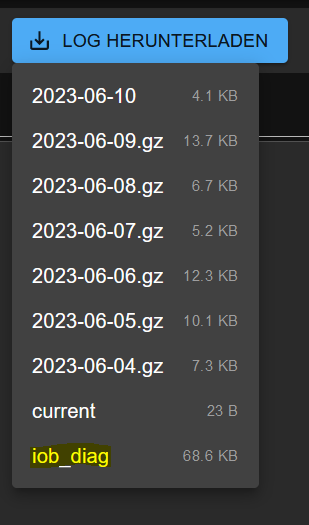
per Download bzw. besser markierbar ... ( da haben so einige Probleme damit )
Man könnte noch weiter denken es im Admin als Abfrage dazu mit einem Button mit einzubauen , " wenn benötigt " :)
Synology 918+ 16GB - ioBroker in Docker v9 , VISO auf Trekstor Primebook C13 13,3" , Hikvision Domkameras mit Surveillance Station .. CCU RaspberryMatic in Synology VM .. Zigbee CC2538+CC2592 .. Sonoff .. KNX .. Modbus ..
-
Vorschlag :
da dein
iob diagschon zu einem Schweizer Taschenmesser geworden ist , könnte im Skript das
Mit Ausgabe in eine Logdatei namens iob_diag.log sähe der Aufruf so aus:
./iob_diag | tee iob_diag.logmit einbauen , auf Basis von :
iob diag | tee log/iob_diag.logWäre dann über die Admin Oberfläche :
per Download bzw. besser markierbar ... ( da haben so einige Probleme damit )
Man könnte noch weiter denken es im Admin als Abfrage dazu mit einem Button mit einzubauen , " wenn benötigt " :)
Ich hab nur keine Ahnung von Admin
Das Skript wird aber bereits heute in /home/iobroker/iob_diag.log abgelegt. Müsste vermutlich da nur abgeholt werden.Das müsste dann im iob-Installer bzw. in
iob fixangepasst werden. Magst du ein Issue aufmachen?Linux-Werkzeugkasten:
https://forum.iobroker.net/topic/42952/der-kleine-iobroker-linux-werkzeugkasten
NodeJS Fixer Skript:
https://forum.iobroker.net/topic/68035/iob-node-fix-skript
iob_diag: curl -sLf -o diag.sh https://iobroker.net/diag.sh && bash diag.sh -
Vorschlag :
da dein
iob diagschon zu einem Schweizer Taschenmesser geworden ist , könnte im Skript das
Mit Ausgabe in eine Logdatei namens iob_diag.log sähe der Aufruf so aus:
./iob_diag | tee iob_diag.logmit einbauen , auf Basis von :
iob diag | tee log/iob_diag.logWäre dann über die Admin Oberfläche :
per Download bzw. besser markierbar ... ( da haben so einige Probleme damit )
Man könnte noch weiter denken es im Admin als Abfrage dazu mit einem Button mit einzubauen , " wenn benötigt " :)
Hab jetzt nochmal damit herumgespielt.
Kann man natürlich auch direkt in /opt/iobroker/log rein werfen.
Ist nur unschön, dass die ganze Formatierung (Leerzeilen, TabStops, Farben usw. dann weg fälltLinux-Werkzeugkasten:
https://forum.iobroker.net/topic/42952/der-kleine-iobroker-linux-werkzeugkasten
NodeJS Fixer Skript:
https://forum.iobroker.net/topic/68035/iob-node-fix-skript
iob_diag: curl -sLf -o diag.sh https://iobroker.net/diag.sh && bash diag.sh -
Hab jetzt nochmal damit herumgespielt.
Kann man natürlich auch direkt in /opt/iobroker/log rein werfen.
Ist nur unschön, dass die ganze Formatierung (Leerzeilen, TabStops, Farben usw. dann weg fällt@thomas-braun sagte in iob diag - Skript:
Ist nur unschön, dass die ganze Formatierung (Leerzeilen, TabStops, Farben usw. dann weg fällt
dann lass es!

kein Support per PN! - Fragen im Forum stellen - Benutzt das Voting rechts unten im Beitrag wenn er euch geholfen hat.
Das Forum freut sich über eine Spende. Benutzt dazu den Spendenbutton oben rechts. Danke!
der Installationsfixer: curl -fsL https://iobroker.net/fix.sh | bash - -
@thomas-braun sagte in iob diag - Skript:
Ist nur unschön, dass die ganze Formatierung (Leerzeilen, TabStops, Farben usw. dann weg fällt
dann lass es!
Ja, da hab ich mir sooooolche Mühe mit gegeben... :-D



Hey! Du scheinst an dieser Unterhaltung interessiert zu sein, hast aber noch kein Konto.
Hast du es satt, bei jedem Besuch durch die gleichen Beiträge zu scrollen? Wenn du dich für ein Konto anmeldest, kommst du immer genau dorthin zurück, wo du zuvor warst, und kannst dich über neue Antworten benachrichtigen lassen (entweder per E-Mail oder Push-Benachrichtigung). Du kannst auch Lesezeichen speichern und Beiträge positiv bewerten, um anderen Community-Mitgliedern deine Wertschätzung zu zeigen.
Mit deinem Input könnte dieser Beitrag noch besser werden 💗
Registrieren Anmelden453
Online33.1k
Benutzende83.7k
Themen1.3m
Beiträge