Skip to content
  • Home
  • Recent
  • Tags
  • 0 Unread 0
  • Categories
  • Unreplied
  • Popular
  • GitHub
  • Docu
  • Hilfe
Skins
  • Light
  • Brite
  • Cerulean
  • Cosmo
  • Flatly
  • Journal
  • Litera
  • Lumen
  • Lux
  • Materia
  • Minty
  • Morph
  • Pulse
  • Sandstone
  • Simplex
  • Sketchy
  • Spacelab
  • United
  • Yeti
  • Zephyr
  • Dark
  • Cyborg
  • Darkly
  • Quartz
  • Slate
  • Solar
  • Superhero
  • Vapor

  • Default (No Skin)
  • No Skin
Collapse
ioBroker Logo

Community Forum

donate donate
  1. ioBroker Community Home
  2. Deutsch
  3. Tester
  4. Test Adapter zigbee2mqtt

NEWS

  • Jahresrückblick 2025 – unser neuer Blogbeitrag ist online! ✨
    BluefoxB
    Bluefox
    17
    1
    3.4k

  • Neuer Blogbeitrag: Monatsrückblick - Dezember 2025 🎄
    BluefoxB
    Bluefox
    13
    1
    1.1k

  • Weihnachtsangebot 2025! 🎄
    BluefoxB
    Bluefox
    25
    1
    2.5k

Test Adapter zigbee2mqtt

Scheduled Pinned Locked Moved Tester
zigbeezigbee 3.0zigbee2mqtt
526 Posts 52 Posters 167.5k Views 45 Watching
  • Oldest to Newest
  • Newest to Oldest
  • Most Votes
Reply
  • Reply as topic
Log in to reply
This topic has been deleted. Only users with topic management privileges can see it.
  • arteckA arteck

    @biker1602 hast du mal mit Batterie Tausch versucht ?

    B Offline
    B Offline
    biker1602
    wrote on last edited by biker1602
    #211

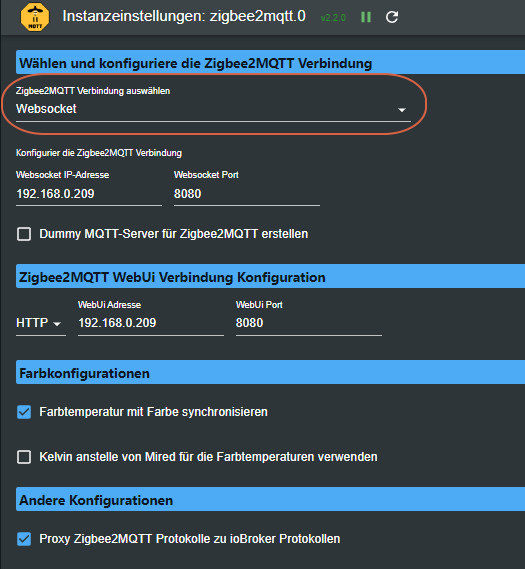
    @arteck ja habe ganz neue Batterie reingemacht. Aber ich habe festgestellt das noch etwas anderem im Argen ist. Ich starte ja auf der Konsole mit Start und dann ist im iobroker der Adapter grün. Sobald ich aber die Konsole schließe, ist der Adapter mit gelben Ausrufezeichen versehen. Ich muss das nochmal Schritt für Schritt durchzugehen. Ich schicke nachher nochmal ein Foto wie es auf der Konsole aussieht. Unter Protokolle steht dann sofort Websocket Disconnected

    AsgothianA 2 Replies Last reply
    0
    • B biker1602

      @arteck ja habe ganz neue Batterie reingemacht. Aber ich habe festgestellt das noch etwas anderem im Argen ist. Ich starte ja auf der Konsole mit Start und dann ist im iobroker der Adapter grün. Sobald ich aber die Konsole schließe, ist der Adapter mit gelben Ausrufezeichen versehen. Ich muss das nochmal Schritt für Schritt durchzugehen. Ich schicke nachher nochmal ein Foto wie es auf der Konsole aussieht. Unter Protokolle steht dann sofort Websocket Disconnected

      AsgothianA Offline
      AsgothianA Offline
      Asgothian
      Developer
      wrote on last edited by
      #212

      @biker1602 sagte in Test Adapter zigbee2mqtt:

      @arteck ja habe ganz neue Batterie reingemacht. Aber ich habe festgestellt das noch etwas anderem im Argen ist. Ich starte ja auf der Konsole mit Start und dann ist im iobroker der Adapter grün. Sobald ich aber die Konsole schließe, ist der Adapter mit gelben Ausrufezeichen versehen. Ich muss das nochmal Schritt für Schritt durchzugehen. Ich schicke nachher nochmal ein Foto wie es auf der Konsole aussieht.

      Beschreib mal wie genau du den zigbee2mqtt.io startest. Wenn ich "auf der Konsole mit Start" starten, und sobald die Konsole weg ist läuft der Adapter nicht mehr höre deutet das für mich das Du das Programm im Kontext der Konsole startest - dann wird es bei beenden der Konsole mit beendet.

      A.

      ioBroker auf RPi4 - Hardware soweit wie möglich via Zigbee.
      "Shit don't work" ist keine Fehlermeldung, sondern ein Fluch.

      1 Reply Last reply
      0
      • B biker1602

        @arteck ja habe ganz neue Batterie reingemacht. Aber ich habe festgestellt das noch etwas anderem im Argen ist. Ich starte ja auf der Konsole mit Start und dann ist im iobroker der Adapter grün. Sobald ich aber die Konsole schließe, ist der Adapter mit gelben Ausrufezeichen versehen. Ich muss das nochmal Schritt für Schritt durchzugehen. Ich schicke nachher nochmal ein Foto wie es auf der Konsole aussieht. Unter Protokolle steht dann sofort Websocket Disconnected

        AsgothianA Offline
        AsgothianA Offline
        Asgothian
        Developer
        wrote on last edited by
        #213

        @biker1602 sagte in Test Adapter zigbee2mqtt:

        Ich schicke nachher nochmal ein Foto wie es auf der Konsole aussieht. Unter Protokolle steht dann sofort Websocket Disconnected

        Kein Foto.

        Text aus der Konsole kopieren

        als Code hier posten, dann ist das sogar lesbar. (dafür gibts im Editor im Forum extra den button </>)

        A.

        ioBroker auf RPi4 - Hardware soweit wie möglich via Zigbee.
        "Shit don't work" ist keine Fehlermeldung, sondern ein Fluch.

        B 1 Reply Last reply
        0
        • AsgothianA Asgothian

          @biker1602 sagte in Test Adapter zigbee2mqtt:

          Ich schicke nachher nochmal ein Foto wie es auf der Konsole aussieht. Unter Protokolle steht dann sofort Websocket Disconnected

          Kein Foto.

          Text aus der Konsole kopieren

          als Code hier posten, dann ist das sogar lesbar. (dafür gibts im Editor im Forum extra den button </>)

          A.

          B Offline
          B Offline
          biker1602
          wrote on last edited by biker1602
          #214

          @asgothian

          Zigbee2MQTT:info  2022-12-20 07:42:58: Logging to console and directory: '/opt/zigbee2mqtt/data/log/2022-12-20.07-42-57' filename: log.txt
          Zigbee2MQTT:info  2022-12-20 07:42:58: Starting Zigbee2MQTT version 1.28.0 (commit #03ba647)
          Zigbee2MQTT:info  2022-12-20 07:42:58: Starting zigbee-herdsman (0.14.62)
          Zigbee2MQTT:info  2022-12-20 07:42:59: zigbee-herdsman started (resumed)
          Zigbee2MQTT:info  2022-12-20 07:42:59: Coordinator firmware version: '{"meta":{"maintrel":3,"majorrel":2,"minorrel":6,"product":0,"revision":20190608,"transportrev":2},"type":"zStack12"}'
          Zigbee2MQTT:info  2022-12-20 07:42:59: Currently 1 devices are joined:
          Zigbee2MQTT:info  2022-12-20 07:42:59: IKEA Smart Home Button (0x84fd27fffe1f7496): E1524/E1810 - IKEA TRADFRI remote control (EndDevice)
          Zigbee2MQTT:info  2022-12-20 07:42:59: Zigbee: disabling joining new devices.
          Zigbee2MQTT:info  2022-12-20 07:42:59: Connecting to MQTT server at mqtt://localhost
          Zigbee2MQTT:info  2022-12-20 07:42:59: Connected to MQTT server
          Zigbee2MQTT:info  2022-12-20 07:42:59: MQTT publish: topic 'zigbee2mqtt/bridge/state', payload '{"state":"online"}'
          Zigbee2MQTT:info  2022-12-20 07:42:59: MQTT publish: topic 'zigbee2mqtt/IKEA Smart Home Button/availability', payload '{"state":"online"}'
          Zigbee2MQTT:info  2022-12-20 07:42:59: Started frontend on port 0.0.0.0:8080


          Es sieht aber gar nicht so aus, als ob er richtig durchläuft, denn der Cursor bleibt links stehen.
          Mich macht Zeile 13 stutzig

          ? 1 Reply Last reply
          0
          • B biker1602

            @asgothian

            Zigbee2MQTT:info  2022-12-20 07:42:58: Logging to console and directory: '/opt/zigbee2mqtt/data/log/2022-12-20.07-42-57' filename: log.txt
            Zigbee2MQTT:info  2022-12-20 07:42:58: Starting Zigbee2MQTT version 1.28.0 (commit #03ba647)
            Zigbee2MQTT:info  2022-12-20 07:42:58: Starting zigbee-herdsman (0.14.62)
            Zigbee2MQTT:info  2022-12-20 07:42:59: zigbee-herdsman started (resumed)
            Zigbee2MQTT:info  2022-12-20 07:42:59: Coordinator firmware version: '{"meta":{"maintrel":3,"majorrel":2,"minorrel":6,"product":0,"revision":20190608,"transportrev":2},"type":"zStack12"}'
            Zigbee2MQTT:info  2022-12-20 07:42:59: Currently 1 devices are joined:
            Zigbee2MQTT:info  2022-12-20 07:42:59: IKEA Smart Home Button (0x84fd27fffe1f7496): E1524/E1810 - IKEA TRADFRI remote control (EndDevice)
            Zigbee2MQTT:info  2022-12-20 07:42:59: Zigbee: disabling joining new devices.
            Zigbee2MQTT:info  2022-12-20 07:42:59: Connecting to MQTT server at mqtt://localhost
            Zigbee2MQTT:info  2022-12-20 07:42:59: Connected to MQTT server
            Zigbee2MQTT:info  2022-12-20 07:42:59: MQTT publish: topic 'zigbee2mqtt/bridge/state', payload '{"state":"online"}'
            Zigbee2MQTT:info  2022-12-20 07:42:59: MQTT publish: topic 'zigbee2mqtt/IKEA Smart Home Button/availability', payload '{"state":"online"}'
            Zigbee2MQTT:info  2022-12-20 07:42:59: Started frontend on port 0.0.0.0:8080


            Es sieht aber gar nicht so aus, als ob er richtig durchläuft, denn der Cursor bleibt links stehen.
            Mich macht Zeile 13 stutzig

            ? Offline
            ? Offline
            A Former User
            wrote on last edited by
            #215

            @biker1602 das ist normal du musst noch ein deamon erstellen der die beim Start automatisch zigbee2mqtt startet. Siehe in der Doku: (Optional) Running as a daemon with systemctl

            https://www.zigbee2mqtt.io/guide/installation/01_linux.html#optional-running-as-a-daemon-with-systemctl

            B 1 Reply Last reply
            0
            • ? A Former User

              @biker1602 das ist normal du musst noch ein deamon erstellen der die beim Start automatisch zigbee2mqtt startet. Siehe in der Doku: (Optional) Running as a daemon with systemctl

              https://www.zigbee2mqtt.io/guide/installation/01_linux.html#optional-running-as-a-daemon-with-systemctl

              B Offline
              B Offline
              biker1602
              wrote on last edited by
              #216

              @ciddi89
              Habe ich gemacht

              pi@raspberrypi:~ $ sudo nano /etc/systemd/system/zigbee2mqtt.service
              pi@raspberrypi:~ $ sudo systemctl start zigbee2mqtt
              pi@raspberrypi:~ $ systemctl status zigbee2mqtt.service
              ● zigbee2mqtt.service - zigbee2mqtt
                 Loaded: loaded (/etc/systemd/system/zigbee2mqtt.service; disabled; vendor pre
                 Active: activating (auto-restart) (Result: exit-code) since Tue 2022-12-20 08
                Process: 2304 ExecStart=/usr/local/bin/npm start (code=exited, status=203/EXEC
               Main PID: 2304 (code=exited, status=203/EXEC)
              lines 1-5/5 (END)
              ● zigbee2mqtt.service - zigbee2mqtt
                 Loaded: loaded (/etc/systemd/system/zigbee2mqtt.service; disabled; vendor preset: enabled)
                 Active: activating (auto-restart) (Result: exit-code) since Tue 2022-12-20 08:10:35 CET; 622ms ago
                Process: 2304 ExecStart=/usr/local/bin/npm start (code=exited, status=203/EXEC)
               Main PID: 2304 (code=exited, status=203/EXEC)


              Aber wenn ich die Konsole schließe ist genau das gleiche Adapter mit gelbem Ausrufezeichen

              15be7903-3fad-4aeb-a6b8-3c45efb19eba-grafik.png

              ? 1 Reply Last reply
              0
              • B biker1602

                @ciddi89
                Habe ich gemacht

                pi@raspberrypi:~ $ sudo nano /etc/systemd/system/zigbee2mqtt.service
                pi@raspberrypi:~ $ sudo systemctl start zigbee2mqtt
                pi@raspberrypi:~ $ systemctl status zigbee2mqtt.service
                ● zigbee2mqtt.service - zigbee2mqtt
                   Loaded: loaded (/etc/systemd/system/zigbee2mqtt.service; disabled; vendor pre
                   Active: activating (auto-restart) (Result: exit-code) since Tue 2022-12-20 08
                  Process: 2304 ExecStart=/usr/local/bin/npm start (code=exited, status=203/EXEC
                 Main PID: 2304 (code=exited, status=203/EXEC)
                lines 1-5/5 (END)
                ● zigbee2mqtt.service - zigbee2mqtt
                   Loaded: loaded (/etc/systemd/system/zigbee2mqtt.service; disabled; vendor preset: enabled)
                   Active: activating (auto-restart) (Result: exit-code) since Tue 2022-12-20 08:10:35 CET; 622ms ago
                  Process: 2304 ExecStart=/usr/local/bin/npm start (code=exited, status=203/EXEC)
                 Main PID: 2304 (code=exited, status=203/EXEC)


                Aber wenn ich die Konsole schließe ist genau das gleiche Adapter mit gelbem Ausrufezeichen
                15be7903-3fad-4aeb-a6b8-3c45efb19eba-grafik.png

                ? Offline
                ? Offline
                A Former User
                wrote on last edited by
                #217

                @biker1602 es fehlt noch

                sudo systemctl enable zigbee2mqtt.service
                

                Und danach ein Neustart

                B 1 Reply Last reply
                0
                • ? A Former User

                  @biker1602 es fehlt noch

                  sudo systemctl enable zigbee2mqtt.service
                  

                  Und danach ein Neustart

                  B Offline
                  B Offline
                  biker1602
                  wrote on last edited by
                  #218

                  @ciddi89 said in Test Adapter zigbee2mqtt:

                  @biker1602 es fehlt noch

                  sudo systemctl enable zigbee2mqtt.service
                  

                  Und danach ein Neustart

                  Muss ich den Raspi komplett neu starten?

                  ? 1 Reply Last reply
                  0
                  • B biker1602

                    @ciddi89 said in Test Adapter zigbee2mqtt:

                    @biker1602 es fehlt noch

                    sudo systemctl enable zigbee2mqtt.service
                    

                    Und danach ein Neustart

                    Muss ich den Raspi komplett neu starten?

                    ? Offline
                    ? Offline
                    A Former User
                    wrote on last edited by
                    #219

                    @biker1602 wenn zigbee2mqtt nicht in einem Container läuft dann ja

                    1 Reply Last reply
                    0
                    • B Offline
                      B Offline
                      biker1602
                      wrote on last edited by biker1602
                      #220

                      @ciddi89
                      Habe den Raspi neu gestartet aber kein Erfolg der Adapter bleibt gelb

                      Konsole gestartet
                      cd /opt/zigbee2mqtt
                      npm start

                      Adapter sofort grün

                      ? 1 Reply Last reply
                      0
                      • B biker1602

                        @ciddi89
                        Habe den Raspi neu gestartet aber kein Erfolg der Adapter bleibt gelb

                        Konsole gestartet
                        cd /opt/zigbee2mqtt
                        npm start

                        Adapter sofort grün

                        ? Offline
                        ? Offline
                        A Former User
                        wrote on last edited by
                        #221

                        @biker1602 was fürn raspberry ist das? 0, 1 oder höher?

                        B 1 Reply Last reply
                        0
                        • ? A Former User

                          @biker1602 was fürn raspberry ist das? 0, 1 oder höher?

                          B Offline
                          B Offline
                          biker1602
                          wrote on last edited by biker1602
                          #222

                          @ciddi89 said in Test Adapter zigbee2mqtt:

                          @biker1602 was fürn raspberry ist das? 0, 1 oder höher?

                          Raspi 4 ohne SD-Karte, sondern mit SSD Festplatte.

                          ? 1 Reply Last reply
                          0
                          • B biker1602

                            @ciddi89 said in Test Adapter zigbee2mqtt:

                            @biker1602 was fürn raspberry ist das? 0, 1 oder höher?

                            Raspi 4 ohne SD-Karte, sondern mit SSD Festplatte.

                            ? Offline
                            ? Offline
                            A Former User
                            wrote on last edited by
                            #223

                            @biker1602 wie sieht die config aus?

                            sudo nano /etc/systemd/system/zigbee2mqtt.service
                            
                            B 1 Reply Last reply
                            0
                            • ? A Former User

                              @biker1602 wie sieht die config aus?

                              sudo nano /etc/systemd/system/zigbee2mqtt.service
                              
                              B Offline
                              B Offline
                              biker1602
                              wrote on last edited by
                              #224

                              @ciddi89

                              [Unit]
                              Description=zigbee2mqtt
                              After=network.target
                              
                              [Service]
                              ExecStart=/usr/local/bin/npm start
                              WorkingDirectory=/opt/zigbee2mqtt
                              StandardOutput=inherit
                              # Or use StandardOutput=null if you don't want Zigbee2MQTT messages filling syslog, for more options see systemd.exec(5)
                              StandardError=inherit
                              Restart=always
                              RestartSec=10s
                              User=pi
                              
                              [Install]
                              WantedBy=multi-user.target
                              
                              
                              ? 1 Reply Last reply
                              0
                              • B biker1602

                                @ciddi89

                                [Unit]
                                Description=zigbee2mqtt
                                After=network.target
                                
                                [Service]
                                ExecStart=/usr/local/bin/npm start
                                WorkingDirectory=/opt/zigbee2mqtt
                                StandardOutput=inherit
                                # Or use StandardOutput=null if you don't want Zigbee2MQTT messages filling syslog, for more options see systemd.exec(5)
                                StandardError=inherit
                                Restart=always
                                RestartSec=10s
                                User=pi
                                
                                [Install]
                                WantedBy=multi-user.target
                                
                                
                                ? Offline
                                ? Offline
                                A Former User
                                wrote on last edited by
                                #225

                                @biker1602 da fehlt eine Zeile.

                                [Unit]
                                Description=zigbee2mqtt
                                After=network.target
                                
                                [Service]
                                Environment=NODE_ENV=production
                                ExecStart=/usr/bin/npm start
                                WorkingDirectory=/opt/zigbee2mqtt
                                StandardOutput=inherit
                                # Or use StandardOutput=null if you don't want Zigbee2MQTT messages filling syslog, for more options see systemd.exec(5)
                                StandardError=inherit
                                Restart=always
                                RestartSec=10s
                                User=pi
                                
                                [Install]
                                WantedBy=multi-user.target
                                

                                Danach

                                sudo systemctl start zigbee2mqtt
                                

                                Und Ergebnis von

                                systemctl status zigbee2mqtt.service
                                
                                B 1 Reply Last reply
                                0
                                • ? A Former User

                                  @biker1602 da fehlt eine Zeile.

                                  [Unit]
                                  Description=zigbee2mqtt
                                  After=network.target
                                  
                                  [Service]
                                  Environment=NODE_ENV=production
                                  ExecStart=/usr/bin/npm start
                                  WorkingDirectory=/opt/zigbee2mqtt
                                  StandardOutput=inherit
                                  # Or use StandardOutput=null if you don't want Zigbee2MQTT messages filling syslog, for more options see systemd.exec(5)
                                  StandardError=inherit
                                  Restart=always
                                  RestartSec=10s
                                  User=pi
                                  
                                  [Install]
                                  WantedBy=multi-user.target
                                  

                                  Danach

                                  sudo systemctl start zigbee2mqtt
                                  

                                  Und Ergebnis von

                                  systemctl status zigbee2mqtt.service
                                  
                                  B Offline
                                  B Offline
                                  biker1602
                                  wrote on last edited by
                                  #226

                                  @ciddi89

                                  Debian GNU/Linux comes with ABSOLUTELY NO WARRANTY, to the extent
                                  permitted by applicable law.
                                  Last login: Tue Dec 20 08:45:59 2022 from 192.168.57.120
                                  #pi@raspberrypi:~ $ sudo systemctl enable zigbee2mqtt.service
                                  pi@raspberrypi:~ $ sudo nano /etc/systemd/system/zigbee2mqtt.service
                                  pi@raspberrypi:~ $ sudo systemctl start zigbee2mqtt
                                  Warning: The unit file, source configuration file or drop-ins of zigbee2mqtt.service changed on disk. Run 'systemctl daemon-reload' to reload units.
                                  pi@raspberrypi:~ $ systemctl status zigbee2mqtt.service
                                  Warning: The unit file, source configuration file or drop-ins of zigbee2mqtt.service changed on disk. Run 'systemctl daemon-reload' to reload units.
                                  ● zigbee2mqtt.service - zigbee2mqtt
                                     Loaded: loaded (/etc/systemd/system/zigbee2mqtt.service; enabled; vendor preset: enabled)
                                     Active: activating (auto-restart) (Result: exit-code) since Tue 2022-12-20 09:07:18 CET; 10s ago
                                    Process: 5532 ExecStart=/usr/local/bin/npm start (code=exited, status=203/EXEC)
                                   Main PID: 5532 (code=exited, status=203/EXEC)
                                  pi@raspberrypi:~ $


                                  ? 1 Reply Last reply
                                  0
                                  • B biker1602

                                    @ciddi89

                                    Debian GNU/Linux comes with ABSOLUTELY NO WARRANTY, to the extent
                                    permitted by applicable law.
                                    Last login: Tue Dec 20 08:45:59 2022 from 192.168.57.120
                                    #pi@raspberrypi:~ $ sudo systemctl enable zigbee2mqtt.service
                                    pi@raspberrypi:~ $ sudo nano /etc/systemd/system/zigbee2mqtt.service
                                    pi@raspberrypi:~ $ sudo systemctl start zigbee2mqtt
                                    Warning: The unit file, source configuration file or drop-ins of zigbee2mqtt.service changed on disk. Run 'systemctl daemon-reload' to reload units.
                                    pi@raspberrypi:~ $ systemctl status zigbee2mqtt.service
                                    Warning: The unit file, source configuration file or drop-ins of zigbee2mqtt.service changed on disk. Run 'systemctl daemon-reload' to reload units.
                                    ● zigbee2mqtt.service - zigbee2mqtt
                                       Loaded: loaded (/etc/systemd/system/zigbee2mqtt.service; enabled; vendor preset: enabled)
                                       Active: activating (auto-restart) (Result: exit-code) since Tue 2022-12-20 09:07:18 CET; 10s ago
                                      Process: 5532 ExecStart=/usr/local/bin/npm start (code=exited, status=203/EXEC)
                                     Main PID: 5532 (code=exited, status=203/EXEC)
                                    pi@raspberrypi:~ $


                                    ? Offline
                                    ? Offline
                                    A Former User
                                    wrote on last edited by
                                    #227

                                    @biker1602
                                    Mach mal

                                    systemctl daemon-reload
                                    

                                    Und dann noch mal

                                    sudo systemctl start zigbee2mqtt
                                    

                                    Und Ergebnis von

                                    systemctl status zigbee2mqtt.service
                                    
                                    B 1 Reply Last reply
                                    0
                                    • ? A Former User

                                      @biker1602
                                      Mach mal

                                      systemctl daemon-reload
                                      

                                      Und dann noch mal

                                      sudo systemctl start zigbee2mqtt
                                      

                                      Und Ergebnis von

                                      systemctl status zigbee2mqtt.service
                                      
                                      B Offline
                                      B Offline
                                      biker1602
                                      wrote on last edited by
                                      #228

                                      @ciddi89 said in Test Adapter zigbee2mqtt:

                                      systemctl daemon-reload

                                      Authentication is required to reload the systemd state.
                                      Multiple identities can be used for authentication:
                                       1.  ,,, (pi)
                                       2.  root
                                      Choose identity to authenticate as (1-2): Failed to reload daemon: Method call timed out


                                      Was soll ich da nehmen 1 oder 2?

                                      ? 1 Reply Last reply
                                      0
                                      • B biker1602

                                        @ciddi89 said in Test Adapter zigbee2mqtt:

                                        systemctl daemon-reload

                                        Authentication is required to reload the systemd state.
                                        Multiple identities can be used for authentication:
                                         1.  ,,, (pi)
                                         2.  root
                                        Choose identity to authenticate as (1-2): Failed to reload daemon: Method call timed out


                                        Was soll ich da nehmen 1 oder 2?

                                        ? Offline
                                        ? Offline
                                        A Former User
                                        wrote on last edited by
                                        #229

                                        @biker1602 pi

                                        ? 1 Reply Last reply
                                        0
                                        • ? A Former User

                                          @biker1602 pi

                                          ? Offline
                                          ? Offline
                                          A Former User
                                          wrote on last edited by
                                          #230

                                          @ciddi89 wenn das nicht geht dann mit sudo. Hatte ich vergessen.

                                          sudo systemctl daemon-reload

                                          
                                          B 1 Reply Last reply
                                          0
                                          Reply
                                          • Reply as topic
                                          Log in to reply
                                          • Oldest to Newest
                                          • Newest to Oldest
                                          • Most Votes


                                          Support us

                                          ioBroker
                                          Community Adapters
                                          Donate

                                          499

                                          Online

                                          32.7k

                                          Users

                                          82.4k

                                          Topics

                                          1.3m

                                          Posts
                                          Community
                                          Impressum | Datenschutz-Bestimmungen | Nutzungsbedingungen | Einwilligungseinstellungen
                                          ioBroker Community 2014-2025
                                          logo
                                          • Login

                                          • Don't have an account? Register

                                          • Login or register to search.
                                          • First post
                                            Last post
                                          0
                                          • Home
                                          • Recent
                                          • Tags
                                          • Unread 0
                                          • Categories
                                          • Unreplied
                                          • Popular
                                          • GitHub
                                          • Docu
                                          • Hilfe