



Skip to content
  • Home
  • Recent
  • Tags
  • 0 Unread 0
  • Categories
  • Unreplied
  • Popular
  • GitHub
  • Docu
  • Hilfe
Skins
  • Light
  • Brite
  • Cerulean
  • Cosmo
  • Flatly
  • Journal
  • Litera
  • Lumen
  • Lux
  • Materia
  • Minty
  • Morph
  • Pulse
  • Sandstone
  • Simplex
  • Sketchy
  • Spacelab
  • United
  • Yeti
  • Zephyr
  • Dark
  • Cyborg
  • Darkly
  • Quartz
  • Slate
  • Solar
  • Superhero
  • Vapor

  • Default (No Skin)
  • No Skin
Collapse
ioBroker Logo

Community Forum

donate donate
  1. ioBroker Community Home
  2. Deutsch
  3. Off Topic
  4. mount.nfs: Operation not permitted
NEWS

  • Jahresrückblick 2025 – unser neuer Blogbeitrag ist online! ✨
    BluefoxB
    Bluefox
    16
    1
    1.9k

  • Neuer Blogbeitrag: Monatsrückblick - Dezember 2025 🎄
    BluefoxB
    Bluefox
    13
    1
    900

  • Weihnachtsangebot 2025! 🎄
    BluefoxB
    Bluefox
    25
    1
    2.2k

mount.nfs: Operation not permitted

Scheduled Pinned Locked Moved Off Topic
64 Posts 9 Posters 9.8k Views 7 Watching
  • Oldest to Newest
  • Newest to Oldest
  • Most Votes
Reply
  • Reply as topic
Log in to reply
This topic has been deleted. Only users with topic management privileges can see it.
  • NegaleinN Negalein

    @JLeg @liv-in-sky

    ich bräuchte nochmal eure Hilfe.

    Ich hatte Proxmox und NAS neu starten müssen.

    Dann konnte ich den ioB-LXC nicht mehr starten.
    Erst als ich den Mountpoint wieder entfernt habe startete der LXC wieder.

    Wenn ich nun wieder den Mountpoint wie hier im Thread beschrieben einhänge, startet der LXC nicht mehr.
    Mountpoint wieder weg und er startet wieder.

    Was hab ich da wieder angestellt?

    liv-in-skyL Offline
    liv-in-skyL Offline
    liv-in-sky
    wrote on last edited by
    #31

    @negalein ichweiß nicht, ob ich da eine große hilfe sein kann - habe das eingerichtet und läuft bei mir - gibt es keine fehlermeldung in proxmox - evtl auch mal auf dem proxmox in der konsole folgendes aufrufen, und beobachten, während du mit mountpoint startest

    tail -f /var/log/syslog
    

    evtl kann @crunchip noch helfen - der macht doch auch viel mit proxmox

    nach einem gelösten Thread wäre es sinnvoll dies in der Überschrift des ersten Posts einzutragen [gelöst]-... Bitte benutzt das Voting rechts unten im Beitrag wenn er euch geholfen hat. Forum-Tools: PicPick https://picpick.app/en/download/ und ScreenToGif https://www.screentogif.com/downloads.html

    NegaleinN crunchipC 2 Replies Last reply
    0
    • liv-in-skyL liv-in-sky

      @negalein ichweiß nicht, ob ich da eine große hilfe sein kann - habe das eingerichtet und läuft bei mir - gibt es keine fehlermeldung in proxmox - evtl auch mal auf dem proxmox in der konsole folgendes aufrufen, und beobachten, während du mit mountpoint startest

      tail -f /var/log/syslog
      

      evtl kann @crunchip noch helfen - der macht doch auch viel mit proxmox

      NegaleinN Offline
      NegaleinN Offline
      Negalein
      Global Moderator
      wrote on last edited by
      #32

      @liv-in-sky sagte in mount.nfs: Operation not permitted:

      gibt es keine fehlermeldung in proxmox

      das steht in der Tasks-Liste

      run_buffer: 321 Script exited with status 2
      lxc_init: 846 Failed to run lxc.hook.pre-start for container "100"
      __lxc_start: 2002 Failed to initialize container "100"
      TASK ERROR: startup for container '100' failed
      

      ° Node.js & System Update ---> sudo apt update, iob stop, sudo apt full-upgrade
      ° Node.js Fixer ---> iob nodejs-update
      ° Fixer ---> iob fix

      liv-in-skyL 1 Reply Last reply
      0
      • NegaleinN Negalein

        @liv-in-sky sagte in mount.nfs: Operation not permitted:

        gibt es keine fehlermeldung in proxmox

        das steht in der Tasks-Liste

        run_buffer: 321 Script exited with status 2
        lxc_init: 846 Failed to run lxc.hook.pre-start for container "100"
        __lxc_start: 2002 Failed to initialize container "100"
        TASK ERROR: startup for container '100' failed
        
        liv-in-skyL Offline
        liv-in-skyL Offline
        liv-in-sky
        wrote on last edited by
        #33

        @negalein ich vermute mal, das script ist die conf datei, die aufgerufen wird - evtl trägst du da was falsches ein

        was steht in der /etc/pve/lxc/xxx.conf - xxx ist die lxc nummer

        nach einem gelösten Thread wäre es sinnvoll dies in der Überschrift des ersten Posts einzutragen [gelöst]-... Bitte benutzt das Voting rechts unten im Beitrag wenn er euch geholfen hat. Forum-Tools: PicPick https://picpick.app/en/download/ und ScreenToGif https://www.screentogif.com/downloads.html

        NegaleinN 1 Reply Last reply
        0
        • liv-in-skyL liv-in-sky

          @negalein ichweiß nicht, ob ich da eine große hilfe sein kann - habe das eingerichtet und läuft bei mir - gibt es keine fehlermeldung in proxmox - evtl auch mal auf dem proxmox in der konsole folgendes aufrufen, und beobachten, während du mit mountpoint startest

          tail -f /var/log/syslog
          

          evtl kann @crunchip noch helfen - der macht doch auch viel mit proxmox

          crunchipC Away
          crunchipC Away
          crunchip
          Forum Testing Most Active
          wrote on last edited by
          #34

          @liv-in-sky das Thema war ja im anderen Thread, hab ihn an diesen hier "erinnert"
          Ich habe kein NAS und mit dem durchreichen in einem nicht privilegiertem LXC bin ich auch nicht fit.

          @Negalein alle Info's dazu findest du unter https://pve.proxmox.com/wiki/Linux_Container

          umgestiegen von Proxmox auf Unraid

          1 Reply Last reply
          1
          • liv-in-skyL liv-in-sky

            @negalein ich vermute mal, das script ist die conf datei, die aufgerufen wird - evtl trägst du da was falsches ein

            was steht in der /etc/pve/lxc/xxx.conf - xxx ist die lxc nummer

            NegaleinN Offline
            NegaleinN Offline
            Negalein
            Global Moderator
            wrote on last edited by Negalein
            #35

            @liv-in-sky sagte in mount.nfs: Operation not permitted:

            ich vermute mal, das script ist die conf datei, die aufgerufen wird - evtl trägst du da was falsches ein
            was steht in der /etc/pve/lxc/xxx.conf - xxx ist die lxc nummer

            Sorry für die späte Antwort. War paar Tage unterwegs.

            Wenn in /etc/pve/lxc/100.conf nur das steht, also ohne Mountpoint mp0: /mnt/NAS/Backups/ioBroker,mp=/opt/iobroker/backups dann startet der LXC.

            arch: amd64
            cores: 4
            hostname: ioBroker
            memory: 6144
            net0: name=eth0,bridge=vmbr0,firewall=1,hwaddr=F2:89:94:C1:D3:8C,ip=dhcp,type=veth
            onboot: 1
            ostype: ubuntu
            parent: Update_JSC_18_11_2021
            rootfs: local-lvm:vm-100-disk-0,size=20G
            swap: 2048
            unprivileged: 1
            

            Schaut /etc/pve/lxc/100.conf so aus, unter Ressourcen scheint der Mountpoint auf, aber dann kommt obige Fehlermeldung und der LXC startet nicht.

            arch: amd64
            cores: 4
            hostname: ioBroker
            memory: 6144
            net0: name=eth0,bridge=vmbr0,firewall=1,hwaddr=F2:89:94:C1:D3:8C,ip=dhcp,type=veth
            onboot: 1
            ostype: ubuntu
            parent: Update_JSC_18_11_2021
            rootfs: local-lvm:vm-100-disk-0,size=20G
            swap: 2048
            unprivileged: 1
            mp0: /mnt/NAS/Backups/ioBroker,mp=/opt/iobroker/backups
            

            ° Node.js & System Update ---> sudo apt update, iob stop, sudo apt full-upgrade
            ° Node.js Fixer ---> iob nodejs-update
            ° Fixer ---> iob fix

            crunchipC 1 Reply Last reply
            0
            • NegaleinN Negalein

              @liv-in-sky sagte in mount.nfs: Operation not permitted:

              ich vermute mal, das script ist die conf datei, die aufgerufen wird - evtl trägst du da was falsches ein
              was steht in der /etc/pve/lxc/xxx.conf - xxx ist die lxc nummer

              Sorry für die späte Antwort. War paar Tage unterwegs.

              Wenn in /etc/pve/lxc/100.conf nur das steht, also ohne Mountpoint mp0: /mnt/NAS/Backups/ioBroker,mp=/opt/iobroker/backups dann startet der LXC.

              arch: amd64
              cores: 4
              hostname: ioBroker
              memory: 6144
              net0: name=eth0,bridge=vmbr0,firewall=1,hwaddr=F2:89:94:C1:D3:8C,ip=dhcp,type=veth
              onboot: 1
              ostype: ubuntu
              parent: Update_JSC_18_11_2021
              rootfs: local-lvm:vm-100-disk-0,size=20G
              swap: 2048
              unprivileged: 1
              

              Schaut /etc/pve/lxc/100.conf so aus, unter Ressourcen scheint der Mountpoint auf, aber dann kommt obige Fehlermeldung und der LXC startet nicht.

              arch: amd64
              cores: 4
              hostname: ioBroker
              memory: 6144
              net0: name=eth0,bridge=vmbr0,firewall=1,hwaddr=F2:89:94:C1:D3:8C,ip=dhcp,type=veth
              onboot: 1
              ostype: ubuntu
              parent: Update_JSC_18_11_2021
              rootfs: local-lvm:vm-100-disk-0,size=20G
              swap: 2048
              unprivileged: 1
              mp0: /mnt/NAS/Backups/ioBroker,mp=/opt/iobroker/backups
              
              crunchipC Away
              crunchipC Away
              crunchip
              Forum Testing Most Active
              wrote on last edited by
              #36

              @negalein sagte in mount.nfs: Operation not permitted:

              unprivileged: 1

              https://forum.iobroker.net/post/785194

              umgestiegen von Proxmox auf Unraid

              NegaleinN 1 Reply Last reply
              0
              • crunchipC crunchip

                @negalein sagte in mount.nfs: Operation not permitted:

                unprivileged: 1

                https://forum.iobroker.net/post/785194

                NegaleinN Offline
                NegaleinN Offline
                Negalein
                Global Moderator
                wrote on last edited by
                #37

                @crunchip sagte in mount.nfs: Operation not permitted:

                https://forum.iobroker.net/post/785194

                hat aber immer so funktioniert.
                Und in anderen LXCs funktioniert ein Mount mit unprivileged: 1 auf NFS auch.

                ° Node.js & System Update ---> sudo apt update, iob stop, sudo apt full-upgrade
                ° Node.js Fixer ---> iob nodejs-update
                ° Fixer ---> iob fix

                crunchipC 1 Reply Last reply
                0
                • NegaleinN Negalein

                  @crunchip sagte in mount.nfs: Operation not permitted:

                  https://forum.iobroker.net/post/785194

                  hat aber immer so funktioniert.
                  Und in anderen LXCs funktioniert ein Mount mit unprivileged: 1 auf NFS auch.

                  crunchipC Away
                  crunchipC Away
                  crunchip
                  Forum Testing Most Active
                  wrote on last edited by crunchip
                  #38

                  @negalein sagte in mount.nfs: Operation not permitted:

                  Und in anderen LXCs funktioniert ein Mount mit unprivileged: 1 auf NFS auch.

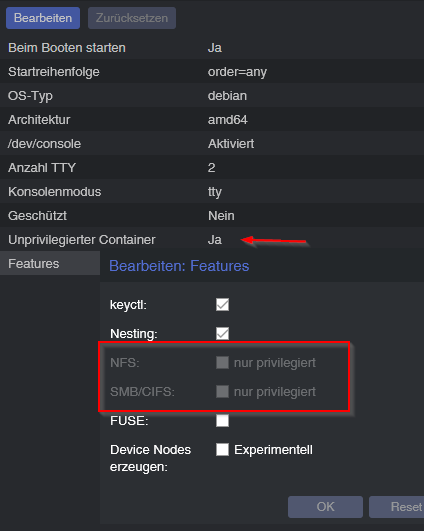
                  aber mit Sicherheit nicht auf offiziellem Wege
                  65616bc1-b513-4e83-8cc2-83c0383adf62-image.png

                  dann müsstest du mindestens apparmor deaktivieren und eventuell noch ein paar Einstellungen treffen

                  AppArmor
                  AppArmor profiles are used to restrict access to possibly dangerous actions. Some system calls, i.e. mount, are prohibited from execution.
                  
                  To trace AppArmor activity, use:
                  
                  # dmesg | grep apparmor
                  Although it is not recommended, AppArmor can be disabled for a container. This brings security risks with it. Some syscalls can lead to privilege escalation when executed within a container if the system is misconfigured or if a LXC or Linux Kernel vulnerability exists.
                  
                  To disable AppArmor for a container, add the following line to the container configuration file located at /etc/pve/lxc/CTID.conf:
                  
                  lxc.apparmor.profile = unconfined
                  

                  umgestiegen von Proxmox auf Unraid

                  NegaleinN DutchmanD 2 Replies Last reply
                  0
                  • crunchipC crunchip

                    @negalein sagte in mount.nfs: Operation not permitted:

                    Und in anderen LXCs funktioniert ein Mount mit unprivileged: 1 auf NFS auch.

                    aber mit Sicherheit nicht auf offiziellem Wege
                    65616bc1-b513-4e83-8cc2-83c0383adf62-image.png

                    dann müsstest du mindestens apparmor deaktivieren und eventuell noch ein paar Einstellungen treffen

                    AppArmor
                    AppArmor profiles are used to restrict access to possibly dangerous actions. Some system calls, i.e. mount, are prohibited from execution.
                    
                    To trace AppArmor activity, use:
                    
                    # dmesg | grep apparmor
                    Although it is not recommended, AppArmor can be disabled for a container. This brings security risks with it. Some syscalls can lead to privilege escalation when executed within a container if the system is misconfigured or if a LXC or Linux Kernel vulnerability exists.
                    
                    To disable AppArmor for a container, add the following line to the container configuration file located at /etc/pve/lxc/CTID.conf:
                    
                    lxc.apparmor.profile = unconfined
                    
                    NegaleinN Offline
                    NegaleinN Offline
                    Negalein
                    Global Moderator
                    wrote on last edited by
                    #39

                    @crunchip sagte in mount.nfs: Operation not permitted:

                    aber mit Sicherheit nicht auf offiziellem Wege

                    das müsste dann @Dutchman gemacht haben, kann mir das aber nicht vorstellen.

                    ° Node.js & System Update ---> sudo apt update, iob stop, sudo apt full-upgrade
                    ° Node.js Fixer ---> iob nodejs-update
                    ° Fixer ---> iob fix

                    crunchipC 1 Reply Last reply
                    0
                    • NegaleinN Negalein

                      @crunchip sagte in mount.nfs: Operation not permitted:

                      aber mit Sicherheit nicht auf offiziellem Wege

                      das müsste dann @Dutchman gemacht haben, kann mir das aber nicht vorstellen.

                      crunchipC Away
                      crunchipC Away
                      crunchip
                      Forum Testing Most Active
                      wrote on last edited by
                      #40

                      @negalein sind denn deine Laufwerke wieder mit proxmox verbunden?(Nas)

                      wenn ja, alternativ wie weiter oben schon geschrieben wurde, könntest du den LXC auf privilegiert stellen, dann müsste auch der mount funktionieren.

                      umstellen kannst du, indem du ein backup des LXC machst, anschliessend den LXC löscht und dann mittels backup wieder anlegst, dabei kommt dann das Fenster um diese Einstellung zu ändern.

                      umgestiegen von Proxmox auf Unraid

                      NegaleinN 1 Reply Last reply
                      0
                      • crunchipC crunchip

                        @negalein sind denn deine Laufwerke wieder mit proxmox verbunden?(Nas)

                        wenn ja, alternativ wie weiter oben schon geschrieben wurde, könntest du den LXC auf privilegiert stellen, dann müsste auch der mount funktionieren.

                        umstellen kannst du, indem du ein backup des LXC machst, anschliessend den LXC löscht und dann mittels backup wieder anlegst, dabei kommt dann das Fenster um diese Einstellung zu ändern.

                        NegaleinN Offline
                        NegaleinN Offline
                        Negalein
                        Global Moderator
                        wrote on last edited by
                        #41

                        @crunchip sagte in mount.nfs: Operation not permitted:

                        sind denn deine Laufwerke wieder mit proxmox verbunden?(Nas)

                        Ja, sind sie.

                        Ich hab nun nochmals alles Schritt für Schritt kontrolliert.
                        Passt alles.
                        Hab dann nochmals mit mount -t nfs 10.0.1.21:/volume1/Backups /mnt/Backups/ die Verbindung neu angelegt, obwohl schon vorhanden.
                        Jetzt funktioniert es wieder. :)

                        ° Node.js & System Update ---> sudo apt update, iob stop, sudo apt full-upgrade
                        ° Node.js Fixer ---> iob nodejs-update
                        ° Fixer ---> iob fix

                        1 Reply Last reply
                        0
                        • crunchipC crunchip

                          @negalein sagte in mount.nfs: Operation not permitted:

                          Und in anderen LXCs funktioniert ein Mount mit unprivileged: 1 auf NFS auch.

                          aber mit Sicherheit nicht auf offiziellem Wege
                          65616bc1-b513-4e83-8cc2-83c0383adf62-image.png

                          dann müsstest du mindestens apparmor deaktivieren und eventuell noch ein paar Einstellungen treffen

                          AppArmor
                          AppArmor profiles are used to restrict access to possibly dangerous actions. Some system calls, i.e. mount, are prohibited from execution.
                          
                          To trace AppArmor activity, use:
                          
                          # dmesg | grep apparmor
                          Although it is not recommended, AppArmor can be disabled for a container. This brings security risks with it. Some syscalls can lead to privilege escalation when executed within a container if the system is misconfigured or if a LXC or Linux Kernel vulnerability exists.
                          
                          To disable AppArmor for a container, add the following line to the container configuration file located at /etc/pve/lxc/CTID.conf:
                          
                          lxc.apparmor.profile = unconfined
                          
                          DutchmanD Offline
                          DutchmanD Offline
                          Dutchman
                          Developer Most Active Administrators
                          wrote on last edited by
                          #42

                          @crunchip sagte in mount.nfs: Operation not permitted:

                          @negalein sagte in mount.nfs: Operation not permitted:

                          Und in anderen LXCs funktioniert ein Mount mit unprivileged: 1 auf NFS auch.

                          aber mit Sicherheit nicht auf offiziellem Wege
                          65616bc1-b513-4e83-8cc2-83c0383adf62-image.png

                          dann müsstest du mindestens apparmor deaktivieren und eventuell noch ein paar Einstellungen treffen

                          AppArmor
                          AppArmor profiles are used to restrict access to possibly dangerous actions. Some system calls, i.e. mount, are prohibited from execution.
                          
                          To trace AppArmor activity, use:
                          
                          # dmesg | grep apparmor
                          Although it is not recommended, AppArmor can be disabled for a container. This brings security risks with it. Some syscalls can lead to privilege escalation when executed within a container if the system is misconfigured or if a LXC or Linux Kernel vulnerability exists.
                          
                          To disable AppArmor for a container, add the following line to the container configuration file located at /etc/pve/lxc/CTID.conf:
                          
                          lxc.apparmor.profile = unconfined
                          

                          Huh, Quatsch…

                          https://drozmotix.github.io/languages/en/BasicSetup/03.ProxmoxLXC.html#_4-mount-device-into-lxc

                          crunchipC 1 Reply Last reply
                          1
                          • DutchmanD Dutchman

                            @crunchip sagte in mount.nfs: Operation not permitted:

                            @negalein sagte in mount.nfs: Operation not permitted:

                            Und in anderen LXCs funktioniert ein Mount mit unprivileged: 1 auf NFS auch.

                            aber mit Sicherheit nicht auf offiziellem Wege
                            65616bc1-b513-4e83-8cc2-83c0383adf62-image.png

                            dann müsstest du mindestens apparmor deaktivieren und eventuell noch ein paar Einstellungen treffen

                            AppArmor
                            AppArmor profiles are used to restrict access to possibly dangerous actions. Some system calls, i.e. mount, are prohibited from execution.
                            
                            To trace AppArmor activity, use:
                            
                            # dmesg | grep apparmor
                            Although it is not recommended, AppArmor can be disabled for a container. This brings security risks with it. Some syscalls can lead to privilege escalation when executed within a container if the system is misconfigured or if a LXC or Linux Kernel vulnerability exists.
                            
                            To disable AppArmor for a container, add the following line to the container configuration file located at /etc/pve/lxc/CTID.conf:
                            
                            lxc.apparmor.profile = unconfined
                            

                            Huh, Quatsch…

                            https://drozmotix.github.io/languages/en/BasicSetup/03.ProxmoxLXC.html#_4-mount-device-into-lxc

                            crunchipC Away
                            crunchipC Away
                            crunchip
                            Forum Testing Most Active
                            wrote on last edited by
                            #43

                            @dutchman ok, war wohl ein kleiner Denkfehler meinerseits, das direkte durchreichen funktioniert nicht so einfach im unprivilegiertem LXC

                            umgestiegen von Proxmox auf Unraid

                            DutchmanD 1 Reply Last reply
                            2
                            • crunchipC crunchip

                              @dutchman ok, war wohl ein kleiner Denkfehler meinerseits, das direkte durchreichen funktioniert nicht so einfach im unprivilegiertem LXC

                              DutchmanD Offline
                              DutchmanD Offline
                              Dutchman
                              Developer Most Active Administrators
                              wrote on last edited by
                              #44

                              @crunchip sagte in mount.nfs: Operation not permitted:

                              @dutchman ok, war wohl ein kleiner Denkfehler meinerseits, das direkte durchreichen funktioniert nicht so einfach im unprivilegiertem LXC

                              korrekt, meist sind aber die NFS permissions der source das problem. Da man im LXC die guid nicht sauber Mappen kann muss ma NFS ohne permission verwenden und per IP die freigaben authentifizieren.

                              (daher die Anleitung auf meiner Seite :))

                              1 Reply Last reply
                              2
                              • NegaleinN Offline
                                NegaleinN Offline
                                Negalein
                                Global Moderator
                                wrote on last edited by
                                #45

                                @crunchip @Dutchman @liv-in-sky

                                Ich verfluche das Teil. :imp:
                                Bräuchte wiedermal eure Hilfe.

                                Möchte mit sudo mount -t nfs 10.0.1.21:/volume1/Backups/Plex /mnt/Backups/ die Nas für die Plex-Backups einbinden.

                                Leider kommt dann

                                nega@Plex:/mnt/Backups$ sudo mount -t nfs 10.0.1.21:/volume1/Backups/Plex /mnt/Backups/
                                mount.nfs: Operation not permitted
                                

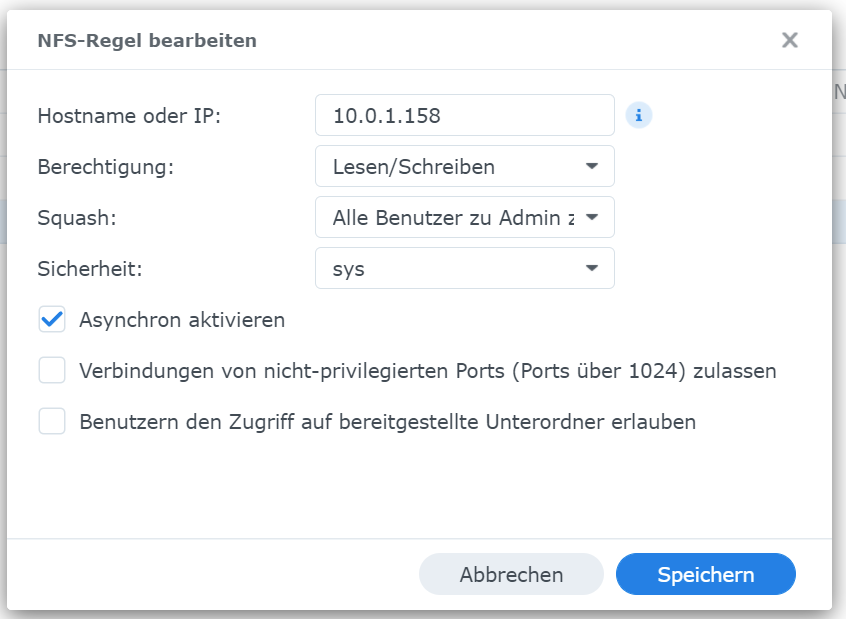
                                Auf der Synology müsste es passen, da die ioBroker-Backups (10.0.1.201) brav rübergeschoben werden.
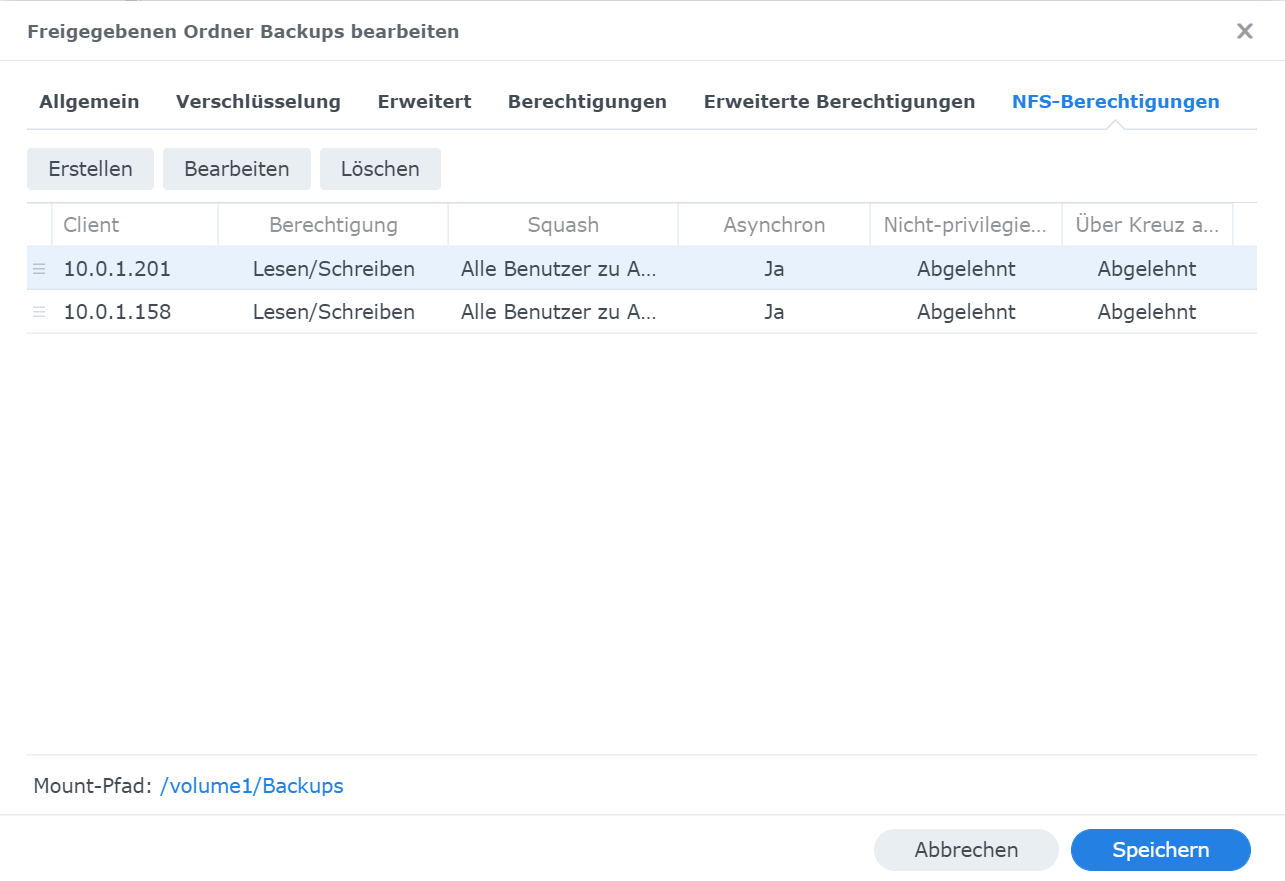
                                c4984997-ae61-4aae-9d4a-d4a87b0d3951-image.png
                                1cf528f3-379b-42fc-95ac-255fae8cefeb-image.png

                                ° Node.js & System Update ---> sudo apt update, iob stop, sudo apt full-upgrade
                                ° Node.js Fixer ---> iob nodejs-update
                                ° Fixer ---> iob fix

                                crunchipC GlasfaserG 2 Replies Last reply
                                0
                                • NegaleinN Negalein

                                  @crunchip @Dutchman @liv-in-sky

                                  Ich verfluche das Teil. :imp:
                                  Bräuchte wiedermal eure Hilfe.

                                  Möchte mit sudo mount -t nfs 10.0.1.21:/volume1/Backups/Plex /mnt/Backups/ die Nas für die Plex-Backups einbinden.

                                  Leider kommt dann

                                  nega@Plex:/mnt/Backups$ sudo mount -t nfs 10.0.1.21:/volume1/Backups/Plex /mnt/Backups/
                                  mount.nfs: Operation not permitted
                                  

                                  Auf der Synology müsste es passen, da die ioBroker-Backups (10.0.1.201) brav rübergeschoben werden.
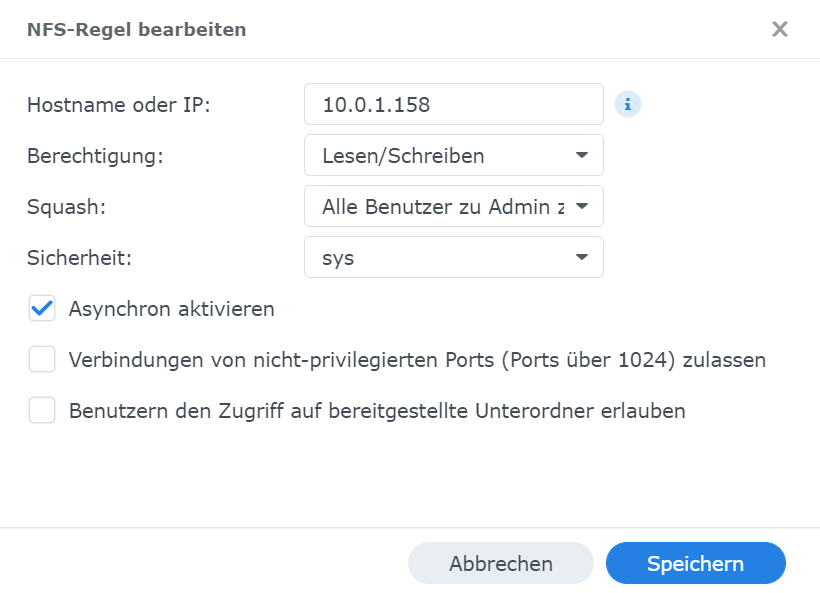
                                  c4984997-ae61-4aae-9d4a-d4a87b0d3951-image.png
                                  1cf528f3-379b-42fc-95ac-255fae8cefeb-image.png

                                  crunchipC Away
                                  crunchipC Away
                                  crunchip
                                  Forum Testing Most Active
                                  wrote on last edited by
                                  #46

                                  @negalein fann vergleiche doch nochmal alles, mit ioBroker-Backups
                                  Oder guck mal mit

                                  ls -al /mnt
                                  

                                  umgestiegen von Proxmox auf Unraid

                                  NegaleinN 1 Reply Last reply
                                  0
                                  • crunchipC crunchip

                                    @negalein fann vergleiche doch nochmal alles, mit ioBroker-Backups
                                    Oder guck mal mit

                                    ls -al /mnt
                                    
                                    NegaleinN Offline
                                    NegaleinN Offline
                                    Negalein
                                    Global Moderator
                                    wrote on last edited by
                                    #47

                                    @crunchip sagte in mount.nfs: Operation not permitted:

                                    Oder guck mal mit

                                    nega@Plex:~$ ls -al /mnt
                                    total 52
                                    drwxr-xr-x 15 root   root    4096 Jul  5 08:00 .
                                    drwxr-xr-x 24 root   root    4096 Jun  9 15:32 ..
                                    drwxr-xr-x  2 root   root    4096 Mar 30 20:35 Backup
                                    drwxr-xr-x  2 root   root    4096 Aug 20  2021 Backups
                                    drwxrwxrwx  1 nobody nogroup   62 Jul  3 21:14 Film
                                    drwxrwxrwx  1 nobody nogroup  114 Jul  3 21:14 Kind
                                    drwxr-xr-x  2 root   root    4096 Mar 30 21:30 Kinder
                                    drwxr-xr-x  2 root   root    4096 Sep 18  2021 MP3
                                    drwxr-xr-x  2 root   root    4096 Aug 20  2021 MediaNAS
                                    drwxr-xr-x  2 root   root    4096 Aug 20  2021 MediaNAs
                                    drwxr-xr-x  2 root   root    4096 Sep 18  2021 Musik
                                    drwxr-xr-x  2 root   root    4096 Aug 20  2021 Photo
                                    drwxr-xr-x  2 root   root    4096 Aug 20  2021 PhotoNAS
                                    drwxr-xr-x  2 root   root    4096 Jul  5 08:00 Plex
                                    drwxr-xr-x  2 root   root    4096 Aug 20  2021 Video
                                    nega@Plex:~$ sudo mount -t nfs 10.0.1.21:/volume1/Backups/ /mnt/Plex/
                                    mount.nfs: Operation not permitted
                                    nega@Plex:~$ sudo mount -t nfs 10.0.1.21:/volume2/Plexbackup /mnt/Plex/
                                    mount.nfs: Operation not permitted
                                    

                                    Hab mal komplett von vorne angefangen (sudo mount -t nfs 10.0.1.21:/volume2/Plexbackup /mnt/Plex/).
                                    Wieder selbes Ergebnis! :(

                                    ° Node.js & System Update ---> sudo apt update, iob stop, sudo apt full-upgrade
                                    ° Node.js Fixer ---> iob nodejs-update
                                    ° Fixer ---> iob fix

                                    crunchipC GlasfaserG 2 Replies Last reply
                                    0
                                    • NegaleinN Negalein

                                      @crunchip sagte in mount.nfs: Operation not permitted:

                                      Oder guck mal mit

                                      nega@Plex:~$ ls -al /mnt
                                      total 52
                                      drwxr-xr-x 15 root   root    4096 Jul  5 08:00 .
                                      drwxr-xr-x 24 root   root    4096 Jun  9 15:32 ..
                                      drwxr-xr-x  2 root   root    4096 Mar 30 20:35 Backup
                                      drwxr-xr-x  2 root   root    4096 Aug 20  2021 Backups
                                      drwxrwxrwx  1 nobody nogroup   62 Jul  3 21:14 Film
                                      drwxrwxrwx  1 nobody nogroup  114 Jul  3 21:14 Kind
                                      drwxr-xr-x  2 root   root    4096 Mar 30 21:30 Kinder
                                      drwxr-xr-x  2 root   root    4096 Sep 18  2021 MP3
                                      drwxr-xr-x  2 root   root    4096 Aug 20  2021 MediaNAS
                                      drwxr-xr-x  2 root   root    4096 Aug 20  2021 MediaNAs
                                      drwxr-xr-x  2 root   root    4096 Sep 18  2021 Musik
                                      drwxr-xr-x  2 root   root    4096 Aug 20  2021 Photo
                                      drwxr-xr-x  2 root   root    4096 Aug 20  2021 PhotoNAS
                                      drwxr-xr-x  2 root   root    4096 Jul  5 08:00 Plex
                                      drwxr-xr-x  2 root   root    4096 Aug 20  2021 Video
                                      nega@Plex:~$ sudo mount -t nfs 10.0.1.21:/volume1/Backups/ /mnt/Plex/
                                      mount.nfs: Operation not permitted
                                      nega@Plex:~$ sudo mount -t nfs 10.0.1.21:/volume2/Plexbackup /mnt/Plex/
                                      mount.nfs: Operation not permitted
                                      

                                      Hab mal komplett von vorne angefangen (sudo mount -t nfs 10.0.1.21:/volume2/Plexbackup /mnt/Plex/).
                                      Wieder selbes Ergebnis! :(

                                      crunchipC Away
                                      crunchipC Away
                                      crunchip
                                      Forum Testing Most Active
                                      wrote on last edited by
                                      #48

                                      @negalein fällt mir auf die schnelle jetzt auch nix ein

                                      umgestiegen von Proxmox auf Unraid

                                      NegaleinN 1 Reply Last reply
                                      0
                                      • crunchipC crunchip

                                        @negalein fällt mir auf die schnelle jetzt auch nix ein

                                        NegaleinN Offline
                                        NegaleinN Offline
                                        Negalein
                                        Global Moderator
                                        wrote on last edited by
                                        #49

                                        @crunchip sagte in mount.nfs: Operation not permitted:

                                        fällt mir auf die schnelle jetzt auch nix ein

                                        vielleicht kann @Dutchman mir weiterhelfen?

                                        ° Node.js & System Update ---> sudo apt update, iob stop, sudo apt full-upgrade
                                        ° Node.js Fixer ---> iob nodejs-update
                                        ° Fixer ---> iob fix

                                        1 Reply Last reply
                                        0
                                        • NegaleinN Negalein

                                          @crunchip sagte in mount.nfs: Operation not permitted:

                                          Oder guck mal mit

                                          nega@Plex:~$ ls -al /mnt
                                          total 52
                                          drwxr-xr-x 15 root   root    4096 Jul  5 08:00 .
                                          drwxr-xr-x 24 root   root    4096 Jun  9 15:32 ..
                                          drwxr-xr-x  2 root   root    4096 Mar 30 20:35 Backup
                                          drwxr-xr-x  2 root   root    4096 Aug 20  2021 Backups
                                          drwxrwxrwx  1 nobody nogroup   62 Jul  3 21:14 Film
                                          drwxrwxrwx  1 nobody nogroup  114 Jul  3 21:14 Kind
                                          drwxr-xr-x  2 root   root    4096 Mar 30 21:30 Kinder
                                          drwxr-xr-x  2 root   root    4096 Sep 18  2021 MP3
                                          drwxr-xr-x  2 root   root    4096 Aug 20  2021 MediaNAS
                                          drwxr-xr-x  2 root   root    4096 Aug 20  2021 MediaNAs
                                          drwxr-xr-x  2 root   root    4096 Sep 18  2021 Musik
                                          drwxr-xr-x  2 root   root    4096 Aug 20  2021 Photo
                                          drwxr-xr-x  2 root   root    4096 Aug 20  2021 PhotoNAS
                                          drwxr-xr-x  2 root   root    4096 Jul  5 08:00 Plex
                                          drwxr-xr-x  2 root   root    4096 Aug 20  2021 Video
                                          nega@Plex:~$ sudo mount -t nfs 10.0.1.21:/volume1/Backups/ /mnt/Plex/
                                          mount.nfs: Operation not permitted
                                          nega@Plex:~$ sudo mount -t nfs 10.0.1.21:/volume2/Plexbackup /mnt/Plex/
                                          mount.nfs: Operation not permitted
                                          

                                          Hab mal komplett von vorne angefangen (sudo mount -t nfs 10.0.1.21:/volume2/Plexbackup /mnt/Plex/).
                                          Wieder selbes Ergebnis! :(

                                          GlasfaserG Offline
                                          GlasfaserG Offline
                                          Glasfaser
                                          wrote on last edited by
                                          #50

                                          @negalein sagte in mount.nfs: Operation not permitted:
                                          nega@Plex:~$ sudo mount -t nfs 10.0.1.21:/volume1/Backups/ /mnt/Plex/

                                          Habe nicht alles verfolgt , habe kein proxmox aber 10.0.1.21 ist deine Synology !?

                                          showmount -e 10.0.1.21
                                          

                                          Synology 918+ 16GB - ioBroker in Docker v9 , VISO auf Trekstor Primebook C13 13,3" , Hikvision Domkameras mit Surveillance Station .. CCU RaspberryMatic in Synology VM .. Zigbee CC2538+CC2592 .. Sonoff .. KNX .. Modbus ..


                                          NegaleinN 1 Reply Last reply
                                          0
                                          Reply
                                          • Reply as topic
                                          Log in to reply
                                          • Oldest to Newest
                                          • Newest to Oldest
                                          • Most Votes


                                          Support us

                                          ioBroker
                                          Community Adapters
                                          Donate

                                          641

                                          Online

                                          32.6k

                                          Users

                                          82.2k

                                          Topics

                                          1.3m

                                          Posts
                                          Community
                                          Impressum | Datenschutz-Bestimmungen | Nutzungsbedingungen | Einwilligungseinstellungen
                                          ioBroker Community 2014-2025
                                          logo
                                          • Login

                                          • Don't have an account? Register

                                          • Login or register to search.
                                          • First post
                                            Last post
                                          0
                                          • Home
                                          • Recent
                                          • Tags
                                          • Unread 0
                                          • Categories
                                          • Unreplied
                                          • Popular
                                          • GitHub
                                          • Docu
                                          • Hilfe


