
NEWS




[HowTo] InfluxDB 2.1 auf Debian 11 (proxmox CT) installieren
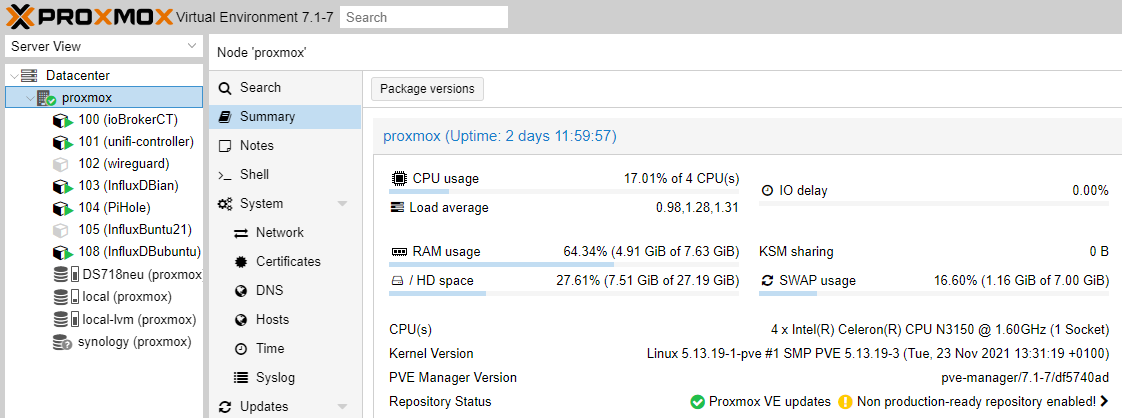
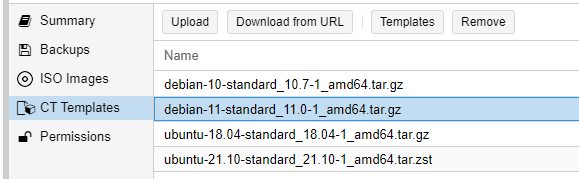
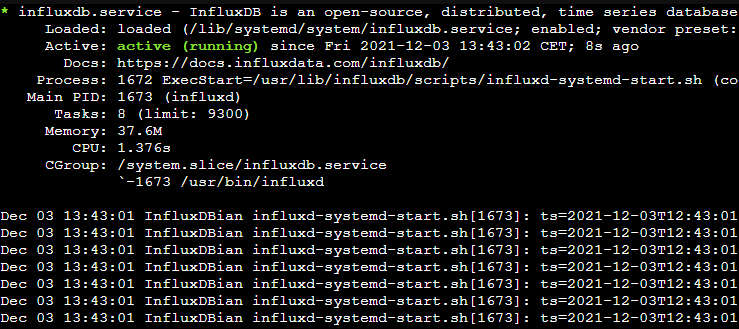
-
@ftd ja, stimmt. hab ich von gehört. Das wäre tatsächlich auch noch eine Möglichkeit. Teste ich mal zwischendurch.
@lobomau hab's jetzt die no-subscription license nicht gefunden, oder braucht es die bei Proxmox v7 nicht mehr?
kein Support per PN! - Fragen im Forum stellen - es gibt fast nichts, was nicht auch für andere interessant ist.
Benutzt das Voting rechts unten im Beitrag wenn er euch geholfen hat.
der Installationsfixer: curl -fsL https://iobroker.net/fix.sh | bash -
-
@lobomau hab's jetzt die no-subscription license nicht gefunden, oder braucht es die bei Proxmox v7 nicht mehr?
@homoran also... direkt "apt install influxdb" ging auch. Dann ist erstmal nur 1.6.7. installiert. 1.8.10 ist aber die aktuellste 1.8.
InfluxDBian login: root
Password:
Linux InfluxDBian 5.13.19-1-pve #1 SMP PVE 5.13.19-3 (Tue, 23 Nov 2021 13:31:19 +0100) x86_64

The programs included with the Debian GNU/Linux system are free software;
the exact distribution terms for each program are described in the
individual files in /usr/share/doc/*/copyright.

Debian GNU/Linux comes with ABSOLUTELY NO WARRANTY, to the extent
permitted by applicable law.
Last login: Fri Dec  3 10:39:39 CET 2021 on tty1
root@InfluxDBian:~# apt install influxdb
Reading package lists... Done
Building dependency tree... Done
Reading state information... Done
The following NEW packages will be installed:
  influxdb
0 upgraded, 1 newly installed, 0 to remove and 0 not upgraded.
Need to get 5010 kB of archives.
After this operation, 19.0 MB of additional disk space will be used.
Get:1 http://ftp.debian.org/debian bullseye/main amd64 influxdb amd64 1.6.7~rc0-1+b5 [5010 kB]
Fetched 5010 kB in 0s (10.2 MB/s)
Selecting previously unselected package influxdb.
(Reading database ... 20396 files and directories currently installed.)
Preparing to unpack .../influxdb_1.6.7~rc0-1+b5_amd64.deb ...
Unpacking influxdb (1.6.7~rc0-1+b5) ...
Setting up influxdb (1.6.7~rc0-1+b5) ...
Adding system user `influxdb' (UID 107) ...
Adding new user `influxdb' (UID 107) with group `nogroup' ...
Not creating home directory `/var/lib/influxdb'.
Adding group `influxdb' (GID 115) ...
Done.
Adding user `influxdb' to group `influxdb' ...
Adding user influxdb to group influxdb
Done.
Created symlink /etc/systemd/system/influxd.service -> /lib/systemd/system/influxdb.service.
Created symlink /etc/systemd/system/multi-user.target.wants/influxdb.service -> /lib/systemd/system/influxdb.service.
Processing triggers for man-db (2.9.4-2) ...
root@InfluxDBian:~# influx
-bash: influx: command not found
root@InfluxDBian:~# influxd

 8888888           .d888 888                   8888888b.  888888b.
   888            d88P"  888                   888  "Y88b 888  "88b
   888            888    888                   888    888 888  .88P
   888   88888b.  888888 888 888  888 888  888 888    888 8888888K.
   888   888 "88b 888    888 888  888  Y8bd8P' 888    888 888  "Y88b
   888   888  888 888    888 888  888   X88K   888    888 888    888
   888   888  888 888    888 Y88b 888 .d8""8b. 888  .d88P 888   d88P
 8888888 888  888 888    888  "Y88888 888  888 8888888P"  8888888P"

2021-12-03T10:28:29.761197Z     info    InfluxDB starting       {"log_id": "0YByFwlG000", "version": "1.6.7~rc0", "branch": "unknown", "commit": "unknown"}
2021-12-03T10:28:29.761262Z     info    Go runtime      {"log_id": "0YByFwlG000", "version": "go1.15.9", "maxprocs": 2}
run: open server: listen: listen tcp 127.0.0.1:8088: bind: address already in use
root@InfluxDBian:~#
Host: NUC8i3 mit Proxmox:
- ioBroker CT Debian 13, npm 10.9.4, nodejs 22.21.0
- Slave: Pi4
-
@homoran also... direkt "apt install influxdb" ging auch. Dann ist erstmal nur 1.6.7. installiert. 1.8.10 ist aber die aktuellste 1.8.
InfluxDBian login: root Password: Linux InfluxDBian 5.13.19-1-pve #1 SMP PVE 5.13.19-3 (Tue, 23 Nov 2021 13:31:19 +0100) x86_64 The programs included with the Debian GNU/Linux system are free software; the exact distribution terms for each program are described in the individual files in /usr/share/doc/*/copyright. Debian GNU/Linux comes with ABSOLUTELY NO WARRANTY, to the extent permitted by applicable law. Last login: Fri Dec 3 10:39:39 CET 2021 on tty1 root@InfluxDBian:~# apt install influxdb Reading package lists... Done Building dependency tree... Done Reading state information... Done The following NEW packages will be installed: influxdb 0 upgraded, 1 newly installed, 0 to remove and 0 not upgraded. Need to get 5010 kB of archives. After this operation, 19.0 MB of additional disk space will be used. Get:1 http://ftp.debian.org/debian bullseye/main amd64 influxdb amd64 1.6.7~rc0-1+b5 [5010 kB] Fetched 5010 kB in 0s (10.2 MB/s) Selecting previously unselected package influxdb. (Reading database ... 20396 files and directories currently installed.) Preparing to unpack .../influxdb_1.6.7~rc0-1+b5_amd64.deb ... Unpacking influxdb (1.6.7~rc0-1+b5) ... Setting up influxdb (1.6.7~rc0-1+b5) ... Adding system user `influxdb' (UID 107) ... Adding new user `influxdb' (UID 107) with group `nogroup' ... Not creating home directory `/var/lib/influxdb'. Adding group `influxdb' (GID 115) ... Done. Adding user `influxdb' to group `influxdb' ... Adding user influxdb to group influxdb Done. Created symlink /etc/systemd/system/influxd.service -> /lib/systemd/system/influxdb.service. Created symlink /etc/systemd/system/multi-user.target.wants/influxdb.service -> /lib/systemd/system/influxdb.service. Processing triggers for man-db (2.9.4-2) ... root@InfluxDBian:~# influx -bash: influx: command not found root@InfluxDBian:~# influxd 8888888 .d888 888 8888888b. 888888b. 888 d88P" 888 888 "Y88b 888 "88b 888 888 888 888 888 888 .88P 888 88888b. 888888 888 888 888 888 888 888 888 8888888K. 888 888 "88b 888 888 888 888 Y8bd8P' 888 888 888 "Y88b 888 888 888 888 888 888 888 X88K 888 888 888 888 888 888 888 888 888 Y88b 888 .d8""8b. 888 .d88P 888 d88P 8888888 888 888 888 888 "Y88888 888 888 8888888P" 8888888P" 2021-12-03T10:28:29.761197Z info InfluxDB starting {"log_id": "0YByFwlG000", "version": "1.6.7~rc0", "branch": "unknown", "commit": "unknown"} 2021-12-03T10:28:29.761262Z info Go runtime {"log_id": "0YByFwlG000", "version": "go1.15.9", "maxprocs": 2} run: open server: listen: listen tcp 127.0.0.1:8088: bind: address already in use root@InfluxDBian:~# -
@homoran also... direkt "apt install influxdb" ging auch. Dann ist erstmal nur 1.6.7. installiert. 1.8.10 ist aber die aktuellste 1.8.
InfluxDBian login: root Password: Linux InfluxDBian 5.13.19-1-pve #1 SMP PVE 5.13.19-3 (Tue, 23 Nov 2021 13:31:19 +0100) x86_64 The programs included with the Debian GNU/Linux system are free software; the exact distribution terms for each program are described in the individual files in /usr/share/doc/*/copyright. Debian GNU/Linux comes with ABSOLUTELY NO WARRANTY, to the extent permitted by applicable law. Last login: Fri Dec 3 10:39:39 CET 2021 on tty1 root@InfluxDBian:~# apt install influxdb Reading package lists... Done Building dependency tree... Done Reading state information... Done The following NEW packages will be installed: influxdb 0 upgraded, 1 newly installed, 0 to remove and 0 not upgraded. Need to get 5010 kB of archives. After this operation, 19.0 MB of additional disk space will be used. Get:1 http://ftp.debian.org/debian bullseye/main amd64 influxdb amd64 1.6.7~rc0-1+b5 [5010 kB] Fetched 5010 kB in 0s (10.2 MB/s) Selecting previously unselected package influxdb. (Reading database ... 20396 files and directories currently installed.) Preparing to unpack .../influxdb_1.6.7~rc0-1+b5_amd64.deb ... Unpacking influxdb (1.6.7~rc0-1+b5) ... Setting up influxdb (1.6.7~rc0-1+b5) ... Adding system user `influxdb' (UID 107) ... Adding new user `influxdb' (UID 107) with group `nogroup' ... Not creating home directory `/var/lib/influxdb'. Adding group `influxdb' (GID 115) ... Done. Adding user `influxdb' to group `influxdb' ... Adding user influxdb to group influxdb Done. Created symlink /etc/systemd/system/influxd.service -> /lib/systemd/system/influxdb.service. Created symlink /etc/systemd/system/multi-user.target.wants/influxdb.service -> /lib/systemd/system/influxdb.service. Processing triggers for man-db (2.9.4-2) ... root@InfluxDBian:~# influx -bash: influx: command not found root@InfluxDBian:~# influxd 8888888 .d888 888 8888888b. 888888b. 888 d88P" 888 888 "Y88b 888 "88b 888 888 888 888 888 888 .88P 888 88888b. 888888 888 888 888 888 888 888 888 8888888K. 888 888 "88b 888 888 888 888 Y8bd8P' 888 888 888 "Y88b 888 888 888 888 888 888 888 X88K 888 888 888 888 888 888 888 888 888 Y88b 888 .d8""8b. 888 .d88P 888 d88P 8888888 888 888 888 888 "Y88888 888 888 8888888P" 8888888P" 2021-12-03T10:28:29.761197Z info InfluxDB starting {"log_id": "0YByFwlG000", "version": "1.6.7~rc0", "branch": "unknown", "commit": "unknown"} 2021-12-03T10:28:29.761262Z info Go runtime {"log_id": "0YByFwlG000", "version": "go1.15.9", "maxprocs": 2} run: open server: listen: listen tcp 127.0.0.1:8088: bind: address already in use root@InfluxDBian:~#@lobomau sagte in [HowTo?] InfluxDB 1.8.x auf Debian 11 (proxmox) installieren:
@homoran also... direkt "apt install influxdb" ging auch
es ging nicht um Influx - es geht um Proxmox Grundinstallation
kein Support per PN! - Fragen im Forum stellen - es gibt fast nichts, was nicht auch für andere interessant ist.
Benutzt das Voting rechts unten im Beitrag wenn er euch geholfen hat.
der Installationsfixer: curl -fsL https://iobroker.net/fix.sh | bash -
-
@lobomau sagte in [HowTo?] InfluxDB 1.8.x auf Debian 11 (proxmox) installieren:
@homoran also... direkt "apt install influxdb" ging auch
es ging nicht um Influx - es geht um Proxmox Grundinstallation
@homoran sagte in [HowTo?] InfluxDB 1.8.x auf Debian 11 (proxmox) installieren:
@lobomau sagte in [HowTo?] InfluxDB 1.8.x auf Debian 11 (proxmox) installieren:
@homoran also... direkt "apt install influxdb" ging auch
es ging nicht um Influx - es geht um Proxmox Grundinstallation
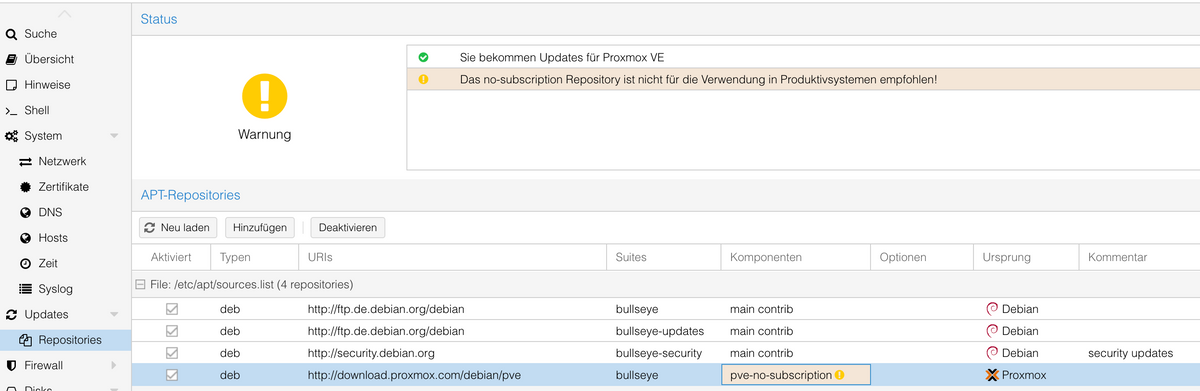
Ich habe es damit gemacht.
https://pve.proxmox.com/wiki/Package_Repositories
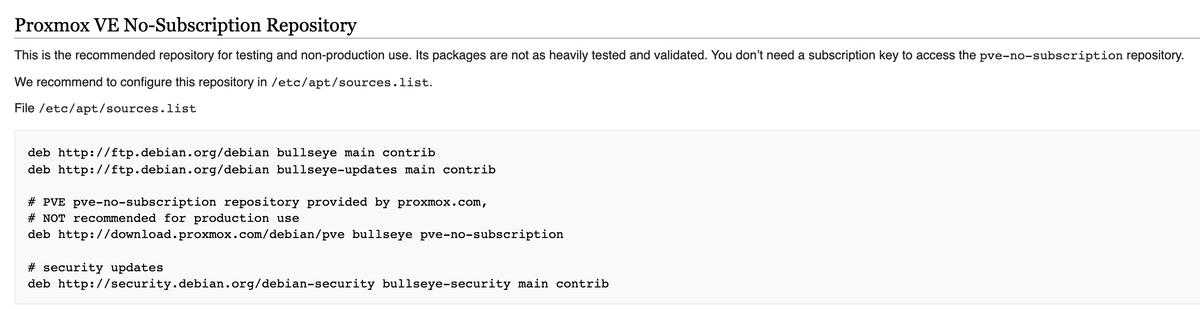
und das sieht dann so aus
-
@homoran sagte in [HowTo?] InfluxDB 1.8.x auf Debian 11 (proxmox) installieren:
@lobomau sagte in [HowTo?] InfluxDB 1.8.x auf Debian 11 (proxmox) installieren:
@homoran also... direkt "apt install influxdb" ging auch
es ging nicht um Influx - es geht um Proxmox Grundinstallation
Ich habe es damit gemacht.
https://pve.proxmox.com/wiki/Package_Repositories
und das sieht dann so aus
@dslraser ja, das könnte es sein. Korrigiere ich mal und teste nochmal...
Edit.: hab ich doch, oder?
/etc/apt/sources.list:
#deb http://ftp.de.debian.org/debian bullseye main contrib
deb http://ftp.debian.org/debian bullseye main contrib
deb http://ftp.debian.org/debian bullseye-updates main contrib
#deb http://ftp.de.debian.org/debian bullseye-updates main contrib
deb http://download.proxmox.com/debian/pve bullseye pve-no-subscription
# security updates
#deb http://security.debian.org bullseye-security main contrib
deb http://security.debian.org/debian-security bullseye-security main contrib
#deb http://deb.debian.org/debian-security bullseye-security main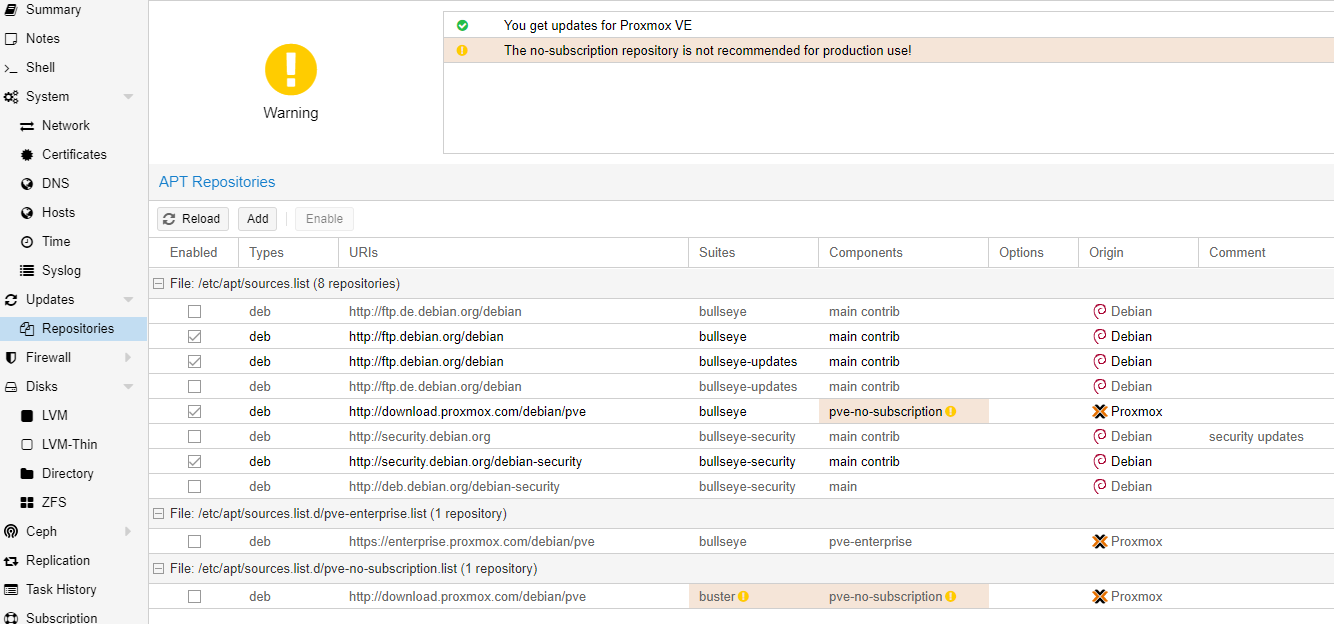
Host: NUC8i3 mit Proxmox:
- ioBroker CT Debian 13, npm 10.9.4, nodejs 22.21.0
- Slave: Pi4
-
@dslraser ja, das könnte es sein. Korrigiere ich mal und teste nochmal...
Edit.: hab ich doch, oder?
/etc/apt/sources.list:
#deb http://ftp.de.debian.org/debian bullseye main contrib deb http://ftp.debian.org/debian bullseye main contrib deb http://ftp.debian.org/debian bullseye-updates main contrib #deb http://ftp.de.debian.org/debian bullseye-updates main contrib deb http://download.proxmox.com/debian/pve bullseye pve-no-subscription # security updates #deb http://security.debian.org bullseye-security main contrib deb http://security.debian.org/debian-security bullseye-security main contrib #deb http://deb.debian.org/debian-security bullseye-security mainEdit.: ich habe die Installation für InfluxDB 1.8 verworfen und gleich 2.1. versucht. Ging dann auch ohne Schwierigkeiten. HowTo habe ich darauf hin angepasst.
Bei Punkt 11 hänge ich nun :-(Debian GNU/Linux comes with ABSOLUTELY NO WARRANTY, to the extent permitted by applicable law. Last login: Fri Dec 3 11:58:39 CET 2021 on tty1 root@InfluxDBian:~# systemctl status influxdb.service * influxdb.service - InfluxDB is an open-source, distributed, time series database Loaded: loaded (/lib/systemd/system/influxdb.service; enabled; vendor preset: e> Active: activating (start) since Fri 2021-12-03 12:08:57 CET; 1min 16s ago Docs: https://docs.influxdata.com/influxdb/ Cntrl PID: 2406 (influxd-systemd) Tasks: 2 (limit: 9300) Memory: 1000.0K CPU: 2.178s CGroup: /system.slice/influxdb.service |-2406 /bin/bash -e /usr/lib/influxdb/scripts/influxd-systemd-start.sh `-2685 sleep 1 Dec 03 12:10:04 InfluxDBian influxd-systemd-start.sh[2406]: InfluxDB API unavailable> Dec 03 12:10:05 InfluxDBian influxd-systemd-start.sh[2406]: InfluxDB API unavailable> Dec 03 12:10:06 InfluxDBian influxd-systemd-start.sh[2406]: InfluxDB API unavailable> Dec 03 12:10:07 InfluxDBian influxd-systemd-start.sh[2406]: InfluxDB API unavailable> Dec 03 12:10:08 InfluxDBian influxd-systemd-start.sh[2406]: InfluxDB API unavailable> Dec 03 12:10:09 InfluxDBian influxd-systemd-start.sh[2406]: InfluxDB API unavailable> Dec 03 12:10:10 InfluxDBian influxd-systemd-start.sh[2406]: InfluxDB API unavailable> Dec 03 12:10:11 InfluxDBian influxd-systemd-start.sh[2406]: InfluxDB API unavailable> Dec 03 12:10:12 InfluxDBian influxd-systemd-start.sh[2406]: InfluxDB API unavailable> Dec 03 12:10:13 InfluxDBian influxd-systemd-start.sh[2406]: InfluxDB API unavailable> lines 1-22/22 (END)...skipping... * influxdb.service - InfluxDB is an open-source, distributed, time series database Loaded: loaded (/lib/systemd/system/influxdb.service; enabled; vendor preset: e> Active: activating (start) since Fri 2021-12-03 12:08:57 CET; 1min 16s ago Docs: https://docs.influxdata.com/influxdb/ Cntrl PID: 2406 (influxd-systemd) Tasks: 2 (limit: 9300) Memory: 1000.0K CPU: 2.178s CGroup: /system.slice/influxdb.service |-2406 /bin/bash -e /usr/lib/influxdb/scripts/influxd-systemd-start.sh `-2685 sleep 1 Dec 03 12:10:04 InfluxDBian influxd-systemd-start.sh[2406]: InfluxDB API unavailable> Dec 03 12:10:05 InfluxDBian influxd-systemd-start.sh[2406]: InfluxDB API unavailable> Dec 03 12:10:06 InfluxDBian influxd-systemd-start.sh[2406]: InfluxDB API unavailable> Dec 03 12:10:07 InfluxDBian influxd-systemd-start.sh[2406]: InfluxDB API unavailable> Dec 03 12:10:08 InfluxDBian influxd-systemd-start.sh[2406]: InfluxDB API unavailable> Dec 03 12:10:09 InfluxDBian influxd-systemd-start.sh[2406]: InfluxDB API unavailable> Dec 03 12:10:10 InfluxDBian influxd-systemd-start.sh[2406]: InfluxDB API unavailable> Dec 03 12:10:11 InfluxDBian influxd-systemd-start.sh[2406]: InfluxDB API unavailable> Dec 03 12:10:12 InfluxDBian influxd-systemd-start.sh[2406]: InfluxDB API unavailable> Dec 03 12:10:13 InfluxDBian influxd-systemd-start.sh[2406]: InfluxDB API unavailable> ~ -
@lobomau zu 4) 2.1.1 ist aktuell .... https://portal.influxdata.com/downloads/
@ftd so, habe das einfach mal nach deinem link gemacht. Ist dann nicht so schwierig. Ich werde sehen wie ich meine alte Datenbank aus 1.8 in 2.1 bekomme.
Anleitung sollte so klappen. habe extra nochmal Backup eingespielt und meine Befehle oben genau so eingegeben.
Installiert ist es schon mal. Fehlt noch die korrekte konfiguration. Im Augenblick ist der port :8086 anderweitig in Gebrauch weshalb es (noch) einen Fehler gibt.Edit: Ziel/Motivation bei mir ist, alles auf Debian 11 bullseye umzustellen. Bisher ist das nur beim Proxmox und bei einem Pi3-Slave der Fall.
Die anderen Container sind Debian 10 und InfluxDB läuft auf Ubuntu 20: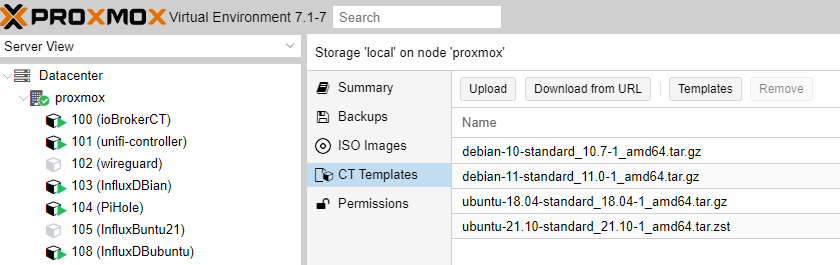
-
@dslraser ja, das könnte es sein. Korrigiere ich mal und teste nochmal...
Edit.: hab ich doch, oder?
/etc/apt/sources.list:
#deb http://ftp.de.debian.org/debian bullseye main contrib deb http://ftp.debian.org/debian bullseye main contrib deb http://ftp.debian.org/debian bullseye-updates main contrib #deb http://ftp.de.debian.org/debian bullseye-updates main contrib deb http://download.proxmox.com/debian/pve bullseye pve-no-subscription # security updates #deb http://security.debian.org bullseye-security main contrib deb http://security.debian.org/debian-security bullseye-security main contrib #deb http://deb.debian.org/debian-security bullseye-security main@lobomau sagte in [HowTo] InfluxDB 2.1 auf Debian 11 (proxmox CT) installieren:
Edit.: hab ich doch, oder?
Ich hatte @Homoran geantwortet, das war nur die Antwort auf seine Frage.
-
@homoran da hat sich nichts geändert, ausser das du in v7 das Repo nun direkt in der proxmox Gui bearbeiten kannst
-
@ftd so, habe das einfach mal nach deinem link gemacht. Ist dann nicht so schwierig. Ich werde sehen wie ich meine alte Datenbank aus 1.8 in 2.1 bekomme.
Anleitung sollte so klappen. habe extra nochmal Backup eingespielt und meine Befehle oben genau so eingegeben.
Installiert ist es schon mal. Fehlt noch die korrekte konfiguration. Im Augenblick ist der port :8086 anderweitig in Gebrauch weshalb es (noch) einen Fehler gibt.Edit: Ziel/Motivation bei mir ist, alles auf Debian 11 bullseye umzustellen. Bisher ist das nur beim Proxmox und bei einem Pi3-Slave der Fall.
Die anderen Container sind Debian 10 und InfluxDB läuft auf Ubuntu 20:@lobomau Ich hatte die 1.8 seit einem Jahr erfolgreich im einem Proxmox CT am laufen. Nach Update des Influx-Adapters von 1.9.5 auf 2.2.0 kam keine Verbindung zu InfluxDB zu stande (1.x war in den Adaptereinstellungen eingestellt). Nach einem Downgrade lief wieder alles.
Ich habe mich gestern mit deiner Anleitung an das Installieren einer InfluxDB 2.1 CT gemacht. Es hat alles soweit geklappt.
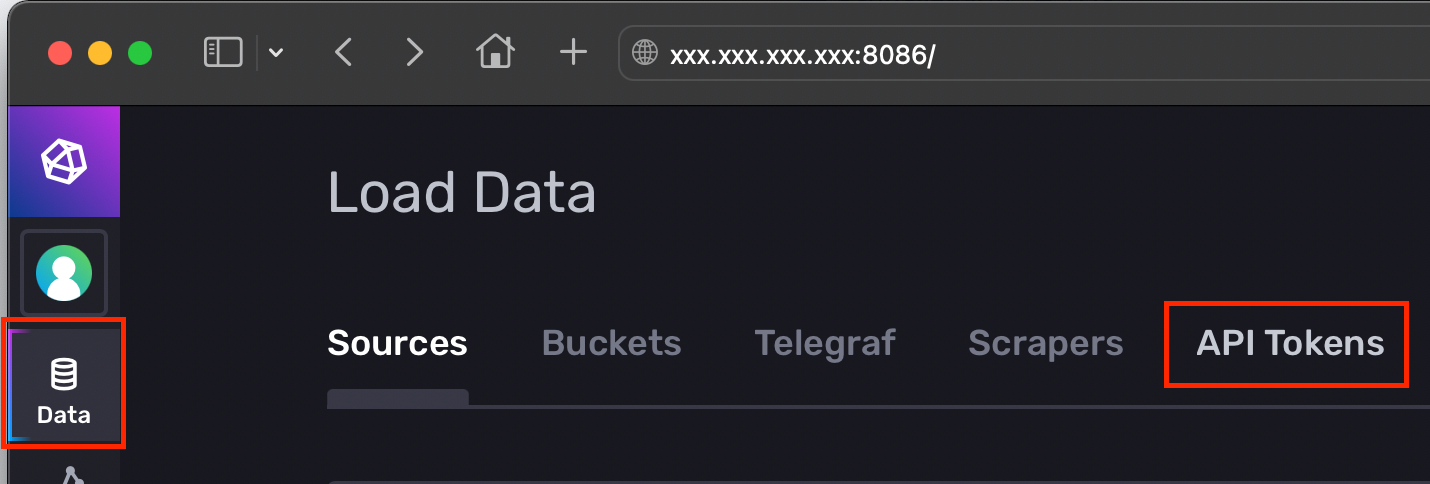
Nach dem Updaten des Adapters wollte ich meine Daten eintragen. Wo in aller Welt bekomme ich den Token her? Habe die ganze Nacht "gegoogelt", bin aber leider zu keinem Ergebnis gekommen.
Kannst du mir auf die Sprünge helfen? -
-
@lobomau Ich hatte die 1.8 seit einem Jahr erfolgreich im einem Proxmox CT am laufen. Nach Update des Influx-Adapters von 1.9.5 auf 2.2.0 kam keine Verbindung zu InfluxDB zu stande (1.x war in den Adaptereinstellungen eingestellt). Nach einem Downgrade lief wieder alles.
Ich habe mich gestern mit deiner Anleitung an das Installieren einer InfluxDB 2.1 CT gemacht. Es hat alles soweit geklappt.
Nach dem Updaten des Adapters wollte ich meine Daten eintragen. Wo in aller Welt bekomme ich den Token her? Habe die ganze Nacht "gegoogelt", bin aber leider zu keinem Ergebnis gekommen.
Kannst du mir auf die Sprünge helfen? -
Hallo,
tolle Anleitung. Wie sieht es denn bei einem Upgrade von V1 auf V2 von influxdb aus, gibt es da einen Weg unter Mitnahme aller bereits vorhandenen Datenbanken? Ich würde gerne wechseln, würde aber ungern meine Daten verlieren, die ich nun schon seit über 1 Jahr aufzeichne.
-
Hallo,
tolle Anleitung. Wie sieht es denn bei einem Upgrade von V1 auf V2 von influxdb aus, gibt es da einen Weg unter Mitnahme aller bereits vorhandenen Datenbanken? Ich würde gerne wechseln, würde aber ungern meine Daten verlieren, die ich nun schon seit über 1 Jahr aufzeichne.
-
@ftd @crunchip Über die GUI hat es geklappt. Habe ich heute nacht schon probiert (aber versehentlich die falsche IP erwischt und bin nicht drauf gekommen).
Grafana habe ich seinerzeit auf dem gleichen Container wie InfluxDB gehabt. Mal sehen ob ich es auch auf dem neuen Container wieder hinbekomme.
Wäre es nicht möglich InfluxDB auf dem alten Container zu löschen und diesen nur noch für Grafana zu nutzen?
Wie geht denn der uninstall? Bin unter Linux leider eine richtige Pfeife..... -
@ftd @crunchip Über die GUI hat es geklappt. Habe ich heute nacht schon probiert (aber versehentlich die falsche IP erwischt und bin nicht drauf gekommen).
Grafana habe ich seinerzeit auf dem gleichen Container wie InfluxDB gehabt. Mal sehen ob ich es auch auf dem neuen Container wieder hinbekomme.
Wäre es nicht möglich InfluxDB auf dem alten Container zu löschen und diesen nur noch für Grafana zu nutzen?
Wie geht denn der uninstall? Bin unter Linux leider eine richtige Pfeife..... -
sudo apt purge influxdbggf. noch Verzeichnisse löschen
/var/lib/influxdb/data
/var/lib/influxdb/wal
/var/lib/influxdb/meta@ftd Ich gebe es für heute auf...
Mit dem eigentlichen Thema hat mein Problem auch nichts mehr zu tun (InfluxDB ist installiert und wird im Moment auch schn vom Adapter mit Daten gefüttert).
Ich habe jetzt doch Grafana in den Container installiert. Das läuft auch....Nur bekomme ich die Datenbank nicht damit verknüpft.
Vielleicht finde ich noch eine Anleitung für "Dummies" -
sudo apt purge influxdbggf. noch Verzeichnisse löschen
/var/lib/influxdb/data
/var/lib/influxdb/wal
/var/lib/influxdb/metasudo apt-get autoremove --purge influxdbsollte eigendlich Influx, alle Abhängigkeiten und Verzeichnisse löschen
@docgame sagte in [HowTo] InfluxDB 2.1 auf Debian 11 (proxmox CT) installieren:
Ich gebe es für heute auf...
wo ist jetzt das Problem, du hast jetzt 2 Container laufen?
-
@ftd Ich gebe es für heute auf...
Mit dem eigentlichen Thema hat mein Problem auch nichts mehr zu tun (InfluxDB ist installiert und wird im Moment auch schn vom Adapter mit Daten gefüttert).
Ich habe jetzt doch Grafana in den Container installiert. Das läuft auch....Nur bekomme ich die Datenbank nicht damit verknüpft.
Vielleicht finde ich noch eine Anleitung für "Dummies"@docgame Wir driften jetzt allerdings zu Grafana ab...
Für Influx mit Flux:
URL => localhost:8086, wenn Influx auf dem gleichen System läuft... wenn nicht, dann die IP-Adresse
Auth => alles ausschalten
Custom HTTP Headers
Header: Authorization
Value: Token DerTokenausderInfluxGUIDa muss das Wort Token stehen, danach ein Leerzeichen und dann der Token selbst... da kommen Sternchen... man sieht nicht, was man schreibt.
InfluxDB Details
Organsisation und Bucket und der Token (hier nur der Token, ohne dem Wort Token und ohne Leerzeichen)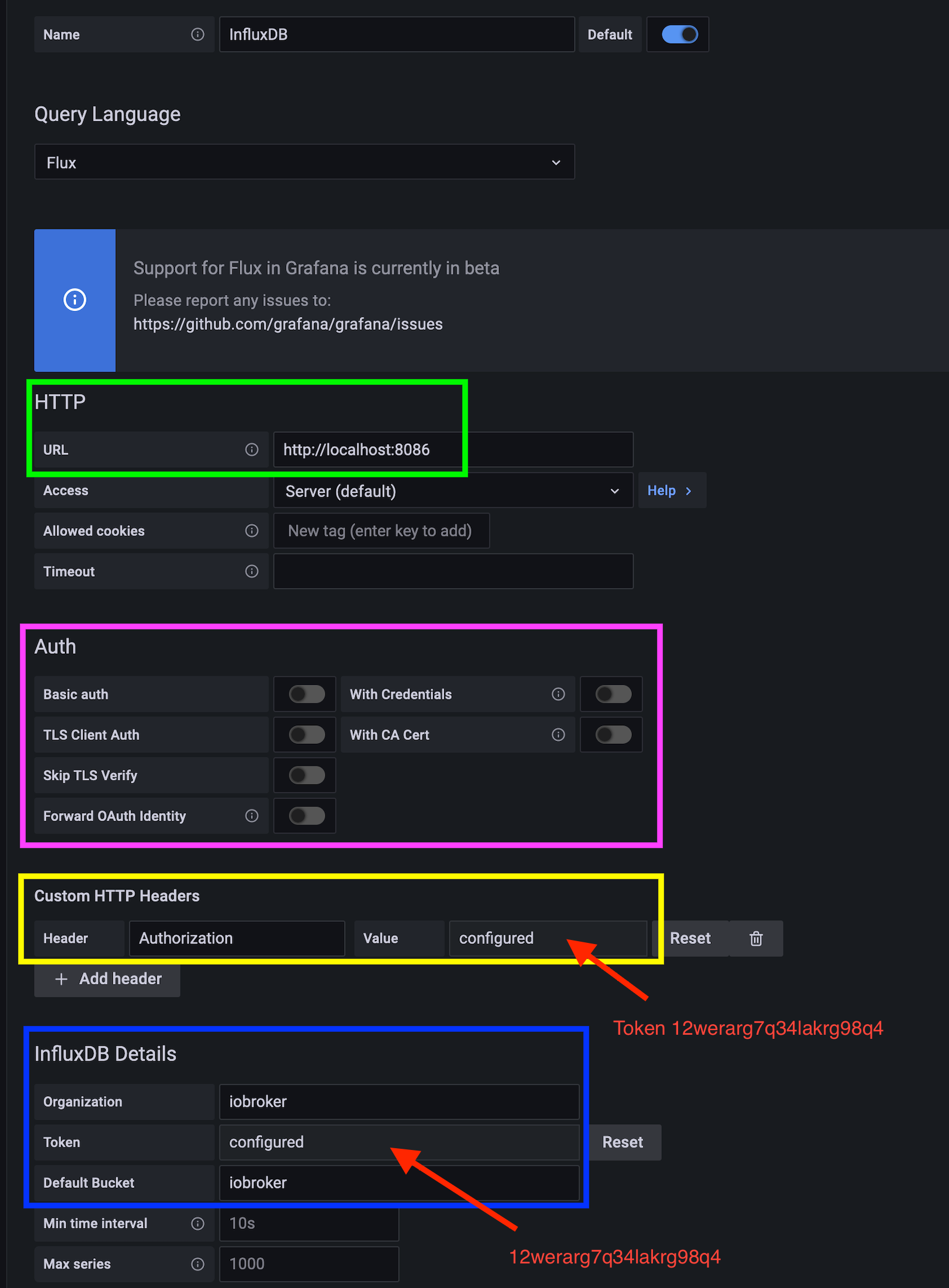






Support us
730
Online32.6k
Users82.3k
Topics1.3m
Posts