Skip to content
  • Home
  • Aktuell
  • Tags
  • 0 Ungelesen 0
  • Kategorien
  • Unreplied
  • Beliebt
  • GitHub
  • Docu
  • Hilfe
Skins
  • Light
  • Brite
  • Cerulean
  • Cosmo
  • Flatly
  • Journal
  • Litera
  • Lumen
  • Lux
  • Materia
  • Minty
  • Morph
  • Pulse
  • Sandstone
  • Simplex
  • Sketchy
  • Spacelab
  • United
  • Yeti
  • Zephyr
  • Dark
  • Cyborg
  • Darkly
  • Quartz
  • Slate
  • Solar
  • Superhero
  • Vapor

  • Standard: (Kein Skin)
  • Kein Skin
Einklappen
ioBroker Logo

Community Forum

donate donate
  1. ioBroker Community Home
  2. Deutsch
  3. Tester
  4. Test Widget json template

NEWS

  • UPDATE 31.10.: Amazon Alexa - ioBroker Skill läuft aus ?
    apollon77A
    apollon77
    48
    3
    8.9k

  • Monatsrückblick – September 2025
    BluefoxB
    Bluefox
    13
    1
    2.3k

  • Neues Video "KI im Smart Home" - ioBroker plus n8n
    BluefoxB
    Bluefox
    16
    1
    3.5k

Test Widget json template

Geplant Angeheftet Gesperrt Verschoben Tester
adapterjson widgetrssfeedviswidget
36 Beiträge 4 Kommentatoren 4.9k Aufrufe 10 Watching
  • Älteste zuerst
  • Neuste zuerst
  • Meiste Stimmen
Antworten
  • In einem neuen Thema antworten
Anmelden zum Antworten
Dieses Thema wurde gelöscht. Nur Nutzer mit entsprechenden Rechten können es sehen.
  • T trojanhector

    @oliverio Passt wieder alles. Alle meine bisherigen Widgets zeigen wieder alles an, wie es sein soll.
    Auch die generelle Verwendung mit html, script und css ist gut. Entwickle gerade eine Card für die Heizung damit.
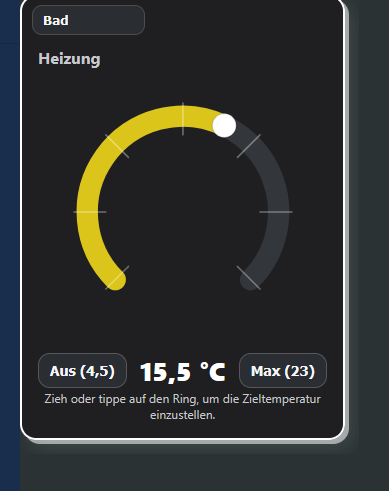
    2025-09-14 14_03_09-ioBroker.vis – Mozilla Firefox.png
    Danke fürs Update.

    OliverIOO Offline
    OliverIOO Offline
    OliverIO
    schrieb am zuletzt editiert von OliverIO
    #23

    @trojanhector

    Sehr gut, genau dafür ist es gedacht. Damit kann jeder seine eigenen Widgets entwickeln,
    ohne gleich einen Adapter umsetzen zu müssen.

    Was mich noch interessieren würde, was hast du gemacht, dass das Widget Set dann doch geladen hat? Das hatten wir jetzt zweimal bei dir, in beiden fällen ging es magisch dann irgendwie

    Meine Adapter und Widgets
    TVProgram, SqueezeboxRPC, OpenLiga, RSSFeed, MyTime,, pi-hole2, vis-json-template, skiinfo, vis-mapwidgets, vis-2-widgets-rssfeed
    Links im Profil

    T 1 Antwort Letzte Antwort
    0
    • OliverIOO OliverIO

      @trojanhector

      Sehr gut, genau dafür ist es gedacht. Damit kann jeder seine eigenen Widgets entwickeln,
      ohne gleich einen Adapter umsetzen zu müssen.

      Was mich noch interessieren würde, was hast du gemacht, dass das Widget Set dann doch geladen hat? Das hatten wir jetzt zweimal bei dir, in beiden fällen ging es magisch dann irgendwie

      T Offline
      T Offline
      trojanhector
      schrieb am zuletzt editiert von
      #24

      @oliverio Zuerst alle offenen Browser geschlossen.
      Ich habe CCleaner. Damit habe ich allen Browser Cache radikal gelöscht.
      Auf raspberry dann
      Iob upload all
      und sicherheitshalber
      iob stop
      iob start
      und dann erst wieder den Browser gestartet.

      OliverIOO 1 Antwort Letzte Antwort
      0
      • T trojanhector

        @oliverio Zuerst alle offenen Browser geschlossen.
        Ich habe CCleaner. Damit habe ich allen Browser Cache radikal gelöscht.
        Auf raspberry dann
        Iob upload all
        und sicherheitshalber
        iob stop
        iob start
        und dann erst wieder den Browser gestartet.

        OliverIOO Offline
        OliverIOO Offline
        OliverIO
        schrieb am zuletzt editiert von
        #25

        @trojanhector

        ok danke. gelegentlich haben andere auch das problem, aber dann ist nix neues dabei ausser was ich schon geschrieben habe.

        von ccleaner halte ich persönlich nix, kann man alles auch mit eigenen funktionen machen. aber wahrscheinlich ist es für manche einfacher und gibt ein besseres gefühl.

        Meine Adapter und Widgets
        TVProgram, SqueezeboxRPC, OpenLiga, RSSFeed, MyTime,, pi-hole2, vis-json-template, skiinfo, vis-mapwidgets, vis-2-widgets-rssfeed
        Links im Profil

        T 1 Antwort Letzte Antwort
        0
        • OliverIOO OliverIO

          @trojanhector

          ok danke. gelegentlich haben andere auch das problem, aber dann ist nix neues dabei ausser was ich schon geschrieben habe.

          von ccleaner halte ich persönlich nix, kann man alles auch mit eigenen funktionen machen. aber wahrscheinlich ist es für manche einfacher und gibt ein besseres gefühl.

          T Offline
          T Offline
          trojanhector
          schrieb am zuletzt editiert von
          #26

          @oliverio Vielleicht könntest Du mir auf die schnelle ein andere Frage beantworten. Von dem Widget will ich gem. Vorschlag von chatgpt den Skriptteil in ein Extra File speichern und diese dann einbinden. Mein Hauptspeicherpfad ist dieser:
          /iobroker/iobroker-data/files/0_userdata.0/heater/hc-thermo.js
          Allerdings erhalte ich beim Direktaufruf ein 404 - not found. Die Berechigungen und Gruppe/owner sind gesetzt, und die WEB-Instance wurde durchgestartet. Hast Du eine Idee? Geht das überhaupt. Ich kann leider keine Doku finden.

          OliverIOO 1 Antwort Letzte Antwort
          0
          • T trojanhector

            @oliverio Vielleicht könntest Du mir auf die schnelle ein andere Frage beantworten. Von dem Widget will ich gem. Vorschlag von chatgpt den Skriptteil in ein Extra File speichern und diese dann einbinden. Mein Hauptspeicherpfad ist dieser:
            /iobroker/iobroker-data/files/0_userdata.0/heater/hc-thermo.js
            Allerdings erhalte ich beim Direktaufruf ein 404 - not found. Die Berechigungen und Gruppe/owner sind gesetzt, und die WEB-Instance wurde durchgestartet. Hast Du eine Idee? Geht das überhaupt. Ich kann leider keine Doku finden.

            OliverIOO Offline
            OliverIOO Offline
            OliverIO
            schrieb am zuletzt editiert von
            #27

            @trojanhector
            das problem ist, das die dateien im web-adapter registriert sein muss, das der web adapter die kennt.

            am besten du lädst die datei über den upload dialog im admin oder in vis hoch (der tab links in der admin sicht, muss ggfs eingeblendet werden)

            alternative über shell mit iob file write:

            root@iobroker_test:/opt/iobroker# iob file --help
            iobroker file
            
            File management
            
            Commands:
              iobroker file read <iobroker-path-to-read> [<filesystem-path-to-write>]  Read file from iobroker path and optionally write to destination
              iobroker file write <filesystem-path-to-read> <iobroker-path-to-write>   Read file from path and write it to iobroker path
              iobroker file rm <iobroker-path-to-delete>                               Remove file
              iobroker file sync                                                       Sync files
            
            Options:
              --help  Show help  [boolean]
            

            oder über javascript adapter mit
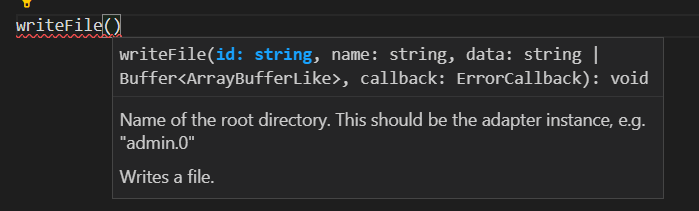
            42d816d0-368c-4f93-98b5-0254f50ff4a2-image.png

            Meine Adapter und Widgets
            TVProgram, SqueezeboxRPC, OpenLiga, RSSFeed, MyTime,, pi-hole2, vis-json-template, skiinfo, vis-mapwidgets, vis-2-widgets-rssfeed
            Links im Profil

            T 1 Antwort Letzte Antwort
            0
            • OliverIOO OliverIO

              @trojanhector
              das problem ist, das die dateien im web-adapter registriert sein muss, das der web adapter die kennt.

              am besten du lädst die datei über den upload dialog im admin oder in vis hoch (der tab links in der admin sicht, muss ggfs eingeblendet werden)

              alternative über shell mit iob file write:

              root@iobroker_test:/opt/iobroker# iob file --help
              iobroker file
              
              File management
              
              Commands:
                iobroker file read <iobroker-path-to-read> [<filesystem-path-to-write>]  Read file from iobroker path and optionally write to destination
                iobroker file write <filesystem-path-to-read> <iobroker-path-to-write>   Read file from path and write it to iobroker path
                iobroker file rm <iobroker-path-to-delete>                               Remove file
                iobroker file sync                                                       Sync files
              
              Options:
                --help  Show help  [boolean]
              

              oder über javascript adapter mit
              42d816d0-368c-4f93-98b5-0254f50ff4a2-image.png

              T Offline
              T Offline
              trojanhector
              schrieb am zuletzt editiert von
              #28

              @oliverio Danke für die Hilfe. Der Hinweis mit dem registrieren der Datein war ein Teil des Problems. Ein anderer war, das chatgpt mir immer einen falschen Pfad angegeben hat.
              Falsch: https://192.168.178.62:8084/files/vis-2.0/wola_home/heatercontrol/hc-thermo.js
              Richtig: https://192.168.178.62:8084/vis-2.0/wola_home/heatercontrol/hc-thermo.js

              Das hat chatgpt dann durch genaues Fehlerfeedback doch noch hinbekommen.
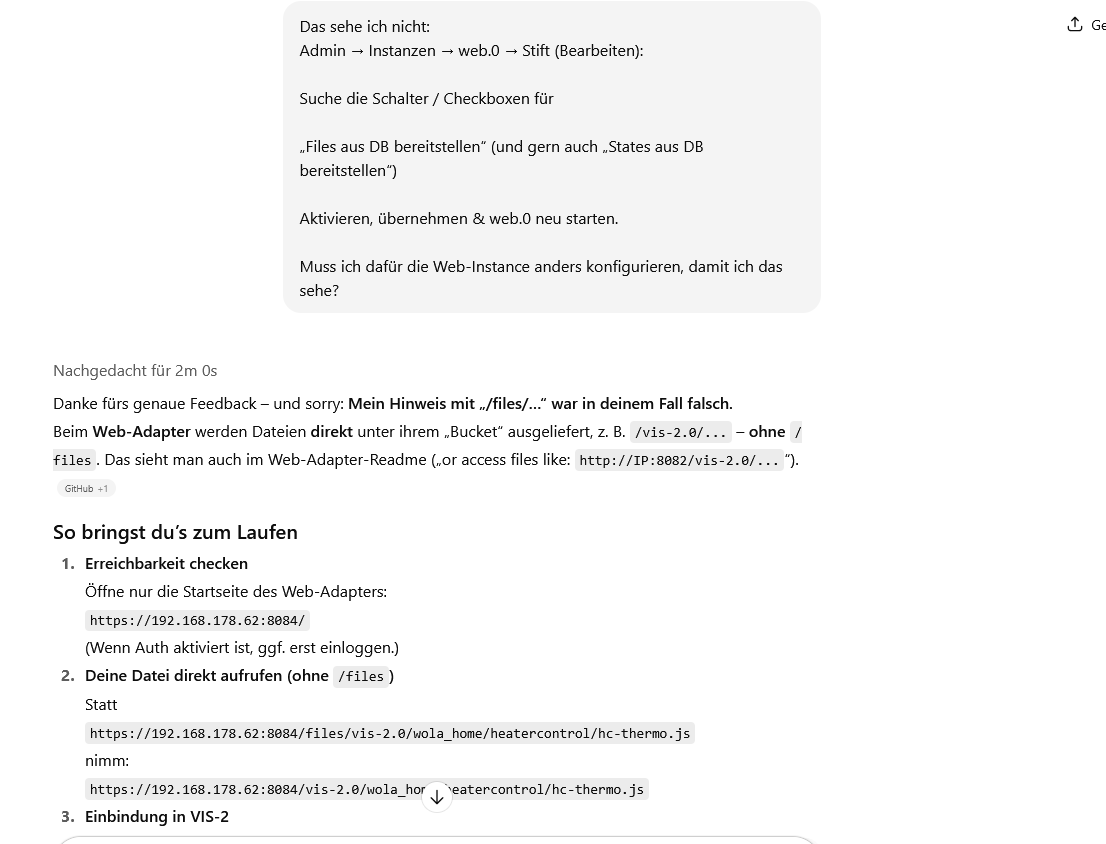
              2025-09-15 12_48_10-JS-Datei einbinden VIS-2 – Mozilla Firefox.png

              OliverIOO 1 Antwort Letzte Antwort
              0
              • T trojanhector

                @oliverio Danke für die Hilfe. Der Hinweis mit dem registrieren der Datein war ein Teil des Problems. Ein anderer war, das chatgpt mir immer einen falschen Pfad angegeben hat.
                Falsch: https://192.168.178.62:8084/files/vis-2.0/wola_home/heatercontrol/hc-thermo.js
                Richtig: https://192.168.178.62:8084/vis-2.0/wola_home/heatercontrol/hc-thermo.js

                Das hat chatgpt dann durch genaues Fehlerfeedback doch noch hinbekommen.
                2025-09-15 12_48_10-JS-Datei einbinden VIS-2 – Mozilla Firefox.png

                OliverIOO Offline
                OliverIOO Offline
                OliverIO
                schrieb am zuletzt editiert von OliverIO
                #29

                @trojanhector

                ja da muss man aufpassen. Fehler auch immer erst bei chatgpt suchen und nochmal durch echte Dokumentation verifizieren.
                Ganz unrecht hat chatgpt nicht, kann aber für den Anwender verwirrend sein.

                Der physische Pfad
                /opt/iobroker/iobroker-data/files/vis.0/main/
                /opt/iobroker/iobroker-data/files/vis-2.0/main/

                wird im Browser als
                /vis.0/main/
                /vis-2.0/main/

                ausgeliefert.

                Achtung, das gilt nur für den Fall das man jsonl als Datenbankformat verwendet. Wenn man redis verwendet, werden die Dateien direkt in redis gespeichert. Daher darf man nur die iobroker tools zum speichern von dateien verwenden.

                Meine Adapter und Widgets
                TVProgram, SqueezeboxRPC, OpenLiga, RSSFeed, MyTime,, pi-hole2, vis-json-template, skiinfo, vis-mapwidgets, vis-2-widgets-rssfeed
                Links im Profil

                1 Antwort Letzte Antwort
                0
                • OliverIOO Offline
                  OliverIOO Offline
                  OliverIO
                  schrieb am zuletzt editiert von OliverIO
                  #30

                  Neue Version 1.0.1 vis-2-widgets-ovarious

                  Nachdem der neue Adapter vis-jsontemplate eingeführt wurde und vis1 und vis2 widgets parallel enthält, habe ich in der Version1.0.1 das widget auf deprecated gesetzt, so das dann demnächst der komplette Adapter abgemanaged werden kann.
                  Bitte zeitnah den adapter iobroker.vis-jsontemplate installieren.
                  An diesem Adapter wird es keine Weiterentwicklung mehr geben.

                  Leider bin ich aktuell nicht in der Lage hier ein neues Build zu erstellen.
                  Trotz identischer Konfiguration wird mir aufgrund eines Problems, was aber in den build Tools der react widgets (für eine ältere Version) liegt. Wird das build nicht erstellt.

                  Da ich den Adapter aber deswegen nicht auf die neuere build Kette umstellen will, erkläre ich hiermit den Adapter und die darin enthaltenen Widgets als deprecated.

                  Meine Adapter und Widgets
                  TVProgram, SqueezeboxRPC, OpenLiga, RSSFeed, MyTime,, pi-hole2, vis-json-template, skiinfo, vis-mapwidgets, vis-2-widgets-rssfeed
                  Links im Profil

                  1 Antwort Letzte Antwort
                  0
                  • OliverIOO OliverIO

                    @trojanhector

                    hm, ja das ist ein Ding.
                    Irgendwie hab ich den release Befehl hier nicht ausgelöst.
                    Also lag an mir.

                    Daher kommt nun Version 4.1.2
                    Sorry


                    Version ist da
                    Wer es noch schneller haben will,
                    kann über den Expertenmodus/Octocat-Knopf/NPM
                    direkt von npm installieren

                    OliverIOO Offline
                    OliverIOO Offline
                    OliverIO
                    schrieb am zuletzt editiert von
                    #31

                    Mit dieser Version befindet sich der Adapter nun im stable.

                    @oliverio sagte in Test Widget json template:

                    @trojanhector

                    hm, ja das ist ein Ding.
                    Irgendwie hab ich den release Befehl hier nicht ausgelöst.
                    Also lag an mir.

                    Daher kommt nun Version 4.1.2
                    Sorry


                    Version ist da
                    Wer es noch schneller haben will,
                    kann über den Expertenmodus/Octocat-Knopf/NPM
                    direkt von npm installieren

                    Meine Adapter und Widgets
                    TVProgram, SqueezeboxRPC, OpenLiga, RSSFeed, MyTime,, pi-hole2, vis-json-template, skiinfo, vis-mapwidgets, vis-2-widgets-rssfeed
                    Links im Profil

                    1 Antwort Letzte Antwort
                    1
                    • OliverIOO Offline
                      OliverIOO Offline
                      OliverIO
                      schrieb am zuletzt editiert von OliverIO
                      #32

                      Neue Version 4.1.3

                      • Eine Race-Condition wurde behoben, die sich bei der gleichzeitigen Verwendung des selben Datenpunktes in 2 jsontemplate widgets ergeibt.

                      https://forum.iobroker.net/topic/81472/neuer-adapter-pi-hole2-für-pihole-v6/35?_=1762181697804

                      Meine Adapter und Widgets
                      TVProgram, SqueezeboxRPC, OpenLiga, RSSFeed, MyTime,, pi-hole2, vis-json-template, skiinfo, vis-mapwidgets, vis-2-widgets-rssfeed
                      Links im Profil

                      1 Antwort Letzte Antwort
                      0
                      • OliverIOO Offline
                        OliverIOO Offline
                        OliverIO
                        schrieb am zuletzt editiert von OliverIO
                        #33

                        Ich habe mal das Battery-skript für jsontemplate umgesetzt, so das man ohne zusätzlichen Datenpunkt das Ergebnis direkt im Browser einbinden kann

                        Das Template hier im widget einfach einfügen.
                        Der Datenpunkt aus dem der Wert kommt ist als
                        datapoint[1] einzutragen
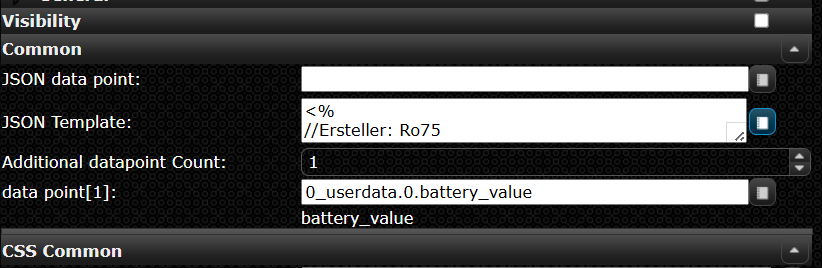
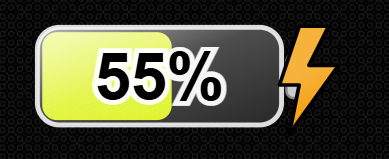
                        4398c0af-52fb-4920-a92f-6628eea0b476-image.png

                        5ce0641d-f613-41a8-abb1-c8e30d0dd23f-image.png

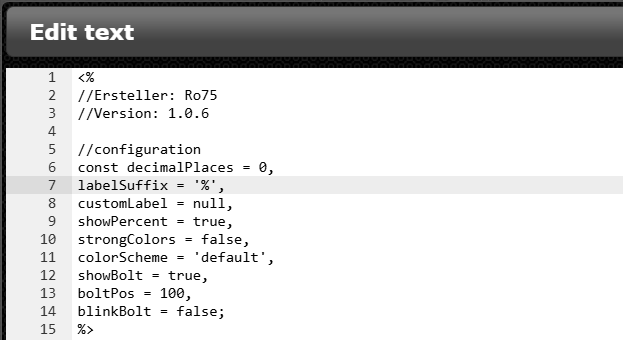
                        Die im folgenden thread beschriebenen Konfigurationsmöglichkeiten sind direkt zum Beginn des Template verfügbar:

                        3276d915-f870-4974-b656-a2aa36f1abca-image.png
                        https://forum.iobroker.net/topic/82868/skript-zur-dynamischen-generierung-batterie-akku-symbol?page=1

                        <%
                        //Ersteller: Ro75
                        //Version: 1.0.6
                        
                        //configuration
                        const decimalPlaces = 0,
                        labelSuffix = '%',
                        customLabel = null,
                        showPercent = true,
                        strongColors = false,
                        colorScheme = 'default',
                        showBolt = true,
                        boltPos = 100,
                        blinkBolt = false;
                        %>
                        
                        <%
                        const percent = dp[Object.keys(dp)[0]];
                        
                        // -------------------------------------------------------
                        // Hilfsfunktionen
                        // -------------------------------------------------------
                        function clamp(v, a, b) {
                           return Math.max(a, Math.min(b, v));
                        }
                        function uid(prefix = 'id') {
                           return prefix + "-" + Math.random().toString(36).slice(2, 9);
                        }
                        function hslToRgb(h, s, l) {
                           s /= 100;
                           l /= 100;
                           const k = n => (n + h / 30) % 12;
                           const a = s * Math.min(l, 1 - l);
                           const f = n => l - a * Math.max(-1, Math.min(k(n) - 3, Math.min(9 - k(n), 1)));
                           return [Math.round(255 * f(0)), Math.round(255 * f(8)), Math.round(255 * f(4))];
                        }
                        
                        function luminance(r, g, b) {
                           const srgb = [r, g, b].map(c => {
                               c /= 255;
                               return (c <= 0.04045) ? c / 12.92 : Math.pow((c + 0.055) / 1.055, 2.4);
                           });
                           return 0.2126 * srgb[0] + 0.7152 * srgb[1] + 0.0722 * srgb[2];
                        }
                        const SAMPLE_POINTS = [{
                               p: 0,
                               w: 2
                           }, {
                               p: 5,
                               w: 10
                           }, {
                               p: 10,
                               w: 19
                           }, {
                               p: 15,
                               w: 29
                           }, {
                               p: 20,
                               w: 38
                           }, {
                               p: 25,
                               w: 48
                           }, {
                               p: 30,
                               w: 58
                           }, {
                               p: 35,
                               w: 67
                           }, {
                               p: 40,
                               w: 77
                           }, {
                               p: 45,
                               w: 86
                           }, {
                               p: 50,
                               w: 96
                           }, {
                               p: 55,
                               w: 106
                           }, {
                               p: 60,
                               w: 115
                           }, {
                               p: 65,
                               w: 125
                           }, {
                               p: 70,
                               w: 134
                           }, {
                               p: 75,
                               w: 144
                           }, {
                               p: 80,
                               w: 154
                           }, {
                               p: 85,
                               w: 163
                           }, {
                               p: 90,
                               w: 173
                           }, {
                               p: 95,
                               w: 182
                           }, {
                               p: 100,
                               w: 192
                           }
                        ];
                        
                        function interpolatedWidth(percent) {
                           const p = clamp(percent, 0, 100);
                           for (const s of SAMPLE_POINTS)
                               if (s.p === p)
                                   return s.w;
                           let lower = SAMPLE_POINTS[0],
                           upper = SAMPLE_POINTS[SAMPLE_POINTS.length - 1];
                           for (let i = 0; i < SAMPLE_POINTS.length - 1; i++) {
                               const a = SAMPLE_POINTS[i],
                               b = SAMPLE_POINTS[i + 1];
                               if (p > a.p && p < b.p) {
                                   lower = a;
                                   upper = b;
                                   break;
                               }
                               if (p === b.p)
                                   return b.w;
                           }
                           const t = (p - lower.p) / (upper.p - lower.p);
                           return Math.round(lower.w + t * (upper.w - lower.w));
                        }
                        
                        // -------------------------------------------------------
                        // Farb-Schemata mit strongColors-Effekt
                        // -------------------------------------------------------
                        function getFillColor(p, strongColors, colorScheme) {
                           let hue;
                           let saturation;
                           let lightness;
                        
                           switch ((colorScheme || 'default').toLowerCase()) {
                           case 'green':
                               hue = 120;
                               saturation = strongColors ? 100 : 80;
                               lightness = strongColors ? 25 + (p / 100) * 25 : 35 + (p / 100) * 30;
                               break;
                           case 'yellow':
                               hue = 50;
                               saturation = strongColors ? 100 : 85;
                               lightness = strongColors ? 25 + (p / 100) * 30 : 35 + (p / 100) * 30;
                               break;
                           case 'blue':
                               hue = 210;
                               saturation = strongColors ? 100 : 75;
                               lightness = strongColors ? 20 + (p / 100) * 25 : 35 + (p / 100) * 30;
                               break;
                           case 'red':
                               hue = 0;
                               saturation = strongColors ? 100 : 75;
                               lightness = strongColors ? 20 + (p / 100) * 25 : 35 + (p / 100) * 30;
                               break;
                           case 'orange':
                               hue = 30;
                               saturation = strongColors ? 100 : 80;
                               lightness = strongColors ? 20 + (p / 100) * 25 : 35 + (p / 100) * 30;
                               break;
                           case 'brown':
                               hue = 25;
                               saturation = strongColors ? 85 : 65;
                               lightness = strongColors ? 20 + (p / 100) * 20 : 25 + (p / 100) * 25;
                               break;
                           case 'grey':
                               hue = 0;
                               saturation = strongColors ? 15 : 0;
                               lightness = strongColors ? 20 + (p / 100) * 40 : 25 + (p / 100) * 40;
                               break;
                           case 'purple':
                               hue = 275;
                               saturation = strongColors ? 95 : 75;
                               lightness = strongColors ? 25 + (p / 100) * 25 : 35 + (p / 100) * 30;
                               break;
                           case 'black':
                               hue = 0;
                               saturation = strongColors ? 10 : 0;
                               lightness = strongColors ? 1 + (p / 100) * 27 : 3 + (p / 100) * 20;
                               break;
                           default: // Standard: grün → rot Verlauf
                               hue = Math.round((p / 100) * 120);
                               saturation = strongColors ? 100 : 90;
                               lightness = strongColors ? 35 : 50;
                               break;
                           }
                        
                           return "hsl(" + hue + "," + saturation + "%," + lightness + "%)";
                        }
                        
                        // -------------------------------------------------------
                        // Hauptfunktion:
                        // -------------------------------------------------------
                        const raw = Number(percent);
                        const p = clamp(Number.isFinite(raw) ? raw : 0, 0, 100);
                        
                        const viewBoxW = 264, viewBoxH = 129;
                        const outer = {
                           x: 20,
                           y: 24,
                           w: 200,
                           h: 80,
                           rx: 18
                        };
                        const inner = {
                           x: 24,
                           y: 28,
                           h: 72,
                           rx: 12
                        };
                        const maxInnerWidth = 192;
                        
                        const fillW = interpolatedWidth(p);
                        const fillColor = getFillColor(p, strongColors, colorScheme);
                        const nums = (fillColor.match(/-?\d+(\.\d+)?/g) || []).map(Number);
                        const [hVal = 0, sVal = 0, lVal = 50] = nums;
                        const [r, g, b] = hslToRgb(hVal, sVal, lVal);
                        const lum = luminance(r, g, b);
                        const textFill = lum > 0.55 ? '#000' : '#fff';
                        const outlineColor = (textFill === '#fff') ? 'rgba(0,0,0,0.85)' : 'rgba(255,255,255,0.95)';
                        
                        const formattedValue = Number(p).toFixed(decimalPlaces);
                        
                        const formattedTrimmed = (decimalPlaces === 0) ? String(Math.round(Number(formattedValue))) : formattedValue;
                        
                        const displayText = customLabel ?? formattedTrimmed + labelSuffix;
                        
                        const fontSize = Math.max(12, Math.round(inner.h * 0.33 * 2.25));
                        const textCenterX = inner.x + maxInnerWidth / 2;
                        const textCenterY = inner.y + inner.h / 2;
                        const TEXT_DY_EM = 0.35;
                        
                        const contact = {
                           x: 224,
                           y: 46,
                           w: 20,
                           h: 36
                        };
                        const contactCenterX = contact.x + contact.w / 2;
                        const contactCenterY = contact.y + contact.h / 2;
                        
                        const boltViewBox = {
                           w: 102.7,
                           h: 186.8
                        };
                        const boltTargetH = outer.h * 1.7;
                        const boltScale = boltTargetH / boltViewBox.h;
                        const boltOffsetY = contactCenterY + 26;
                        
                        const clampedBoltPos = clamp(boltPos, 0, 100);
                        const leftEdge = 0;
                        const rightEdge = contactCenterX - 50;
                        const baseX = leftEdge + ((rightEdge - leftEdge) * (clampedBoltPos / 100));
                        let extraOffset = -30;
                        if (clampedBoltPos === 0)
                           extraOffset = -15;
                        else if (clampedBoltPos === 100)
                           extraOffset = 0;
                        const boltX = baseX + extraOffset;
                        const id = uid('b');
                        %>
                        <svg xmlns="http://www.w3.org/2000/svg" viewBox="0 0 <%= viewBoxW %> <%= viewBoxH %>" width="100%" height="100%" preserveAspectRatio="xMidYMid meet">
                        <% if (blinkBolt) { %>
                           <style>
                             @keyframes blinkBolt-<%= id %> {
                               0%, 100% { 
                                 opacity: 1;
                               }
                               50% { 
                                 opacity: 0.6; 
                               }
                             }
                             .blinking-bolt-<%= id %> {
                               animation: blinkBolt-<%= id %> 1.8s ease-in-out infinite;
                             }
                           </style>
                        <% } %>
                           <defs>
                           	<linearGradient id="glass-<%= id %>" x1="0" y1="0" x2="0" y2="1">
                           		<stop offset="0%" stop-color="#ffffff" stop-opacity="0.80"/>
                           		<stop offset="100%" stop-color="#ffffff" stop-opacity="0.10"/>
                           	</linearGradient>
                           	<linearGradient id="diagGlass-<%= id %>" x1="0" y1="0" x2="1" y2="1">
                           		<stop offset="0%" stop-color="#ffffff" stop-opacity="0.75"/>
                           		<stop offset="45%" stop-color="#ffffff" stop-opacity="0.22"/>
                           		<stop offset="100%" stop-color="#ffffff" stop-opacity="0.03"/>
                           	</linearGradient>
                           	<pattern id="stripes-<%= id %>" width="8" height="8" patternUnits="userSpaceOnUse">
                           		<rect width="8" height="8" fill="transparent"/>
                           		<path d="M-1,6 l8,-6 M-1,10 l8,-6" stroke="#fff" stroke-opacity="0.08" stroke-width="1"/>
                           	</pattern>
                           	<clipPath id="clip-fill-<%= id %>">
                           		<rect x="<%= inner.x %>" y="<%= inner.y %>" width="<%= fillW %>" height="<%= inner.h %>" rx="<%= inner.rx %>" ry="<%= inner.rx %>"/>
                           	</clipPath>
                           	<linearGradient id="boltGradient-<%= id %>" x1="8.7" x2="80.9" y1="17.1" y2="142.1" gradientUnits="userSpaceOnUse">
                           		<stop offset="0" stop-color="#f7b23b"/>
                           		<stop offset=".5" stop-color="#f7b23b"/>
                           		<stop offset="1" stop-color="#f59e0b"/>
                           	</linearGradient>
                           	<symbol id="boltSymbol-<%= id %>" viewBox="0 0 102.7 186.8">
                           		<path fill="url(#boltGradient-<%= id %>)" stroke="#000" stroke-width="6" stroke-linejoin="round" d="m34.8 2-32 96h32l-16 80 80-112h-48l32-64h-48z"/>
                           	</symbol>
                           </defs>
                           <rect x="<%= outer.x %>" y="<%= outer.y %>" width="<%= outer.w %>" height="<%= outer.h %>" rx="<%= outer.rx %>" fill="#222" stroke="#ddd" stroke-width="4"/>
                           <rect x="<%= inner.x %>" y="<%= inner.y %>" width="<%= fillW %>" height="<%= inner.h %>" rx="<%= inner.rx %>" ry="<%= inner.rx %>" fill="<%= fillColor %>"/>
                           <g clip-path="url(#clip-fill-<%= id %>)">
                           	<rect x="<%= inner.x %>" y="<%= inner.y %>" width="<%= fillW %>" height="<%= inner.h %>" rx="<%= inner.rx %>" fill="url(#stripes-<%= id %>)" opacity="0.95"/>
                           	<rect x="<%= inner.x %>" y="<%= inner.y %>" width="<%= fillW %>" height="<%= inner.h %>" rx="<%= inner.rx %>" fill="url(#glass-<%= id %>)" opacity="0.25"/>
                           </g>
                           <rect x="<%= outer.x %>" y="<%= outer.y %>" width="<%= outer.w %>" height="<%= outer.h %>" rx="<%= outer.rx %>" fill="url(#diagGlass-<%= id %>)" opacity="0.9"/>
                           <rect x="224" y="46" width="20" height="36" rx="6" fill="#ccc" stroke="#888" stroke-width="2"/>
                           <% if (showBolt) { %>
                           <use xlink:href="#boltSymbol-<%= id %>" class="blinking-bolt-<%= id %>" transform="translate(184, 90) scale(0.728051391862955) translate(-51.35, -93.4)"/>
                           <% } %>
                           <g transform="translate(<%= textCenterX %>, <%= textCenterY %>)">
                           	<text text-anchor="middle" font-family="Arial, Helvetica, sans-serif" font-size="<%= fontSize %>" font-weight="700" fill="<%= textFill %>" stroke="<%= outlineColor %>" stroke-width="<%= Math.max(2, Math.round(fontSize * 0.15)) %>" paint-order="stroke" dy="<%= TEXT_DY_EM %>em">
                                 <%= displayText %>
                           	</text>
                           </g>
                        </svg>
                        

                        Die Objektnotationen aus dem Skript mussten umformatiert werden, da diese durch vis ansonsten als bindings erkannt werden.

                        Meine Adapter und Widgets
                        TVProgram, SqueezeboxRPC, OpenLiga, RSSFeed, MyTime,, pi-hole2, vis-json-template, skiinfo, vis-mapwidgets, vis-2-widgets-rssfeed
                        Links im Profil

                        Ro75R 1 Antwort Letzte Antwort
                        0
                        • OliverIOO OliverIO

                          Ich habe mal das Battery-skript für jsontemplate umgesetzt, so das man ohne zusätzlichen Datenpunkt das Ergebnis direkt im Browser einbinden kann

                          Das Template hier im widget einfach einfügen.
                          Der Datenpunkt aus dem der Wert kommt ist als
                          datapoint[1] einzutragen

                          4398c0af-52fb-4920-a92f-6628eea0b476-image.png

                          5ce0641d-f613-41a8-abb1-c8e30d0dd23f-image.png

                          Die im folgenden thread beschriebenen Konfigurationsmöglichkeiten sind direkt zum Beginn des Template verfügbar:

                          3276d915-f870-4974-b656-a2aa36f1abca-image.png
                          https://forum.iobroker.net/topic/82868/skript-zur-dynamischen-generierung-batterie-akku-symbol?page=1

                          <%
                          //Ersteller: Ro75
                          //Version: 1.0.6
                          
                          //configuration
                          const decimalPlaces = 0,
                          labelSuffix = '%',
                          customLabel = null,
                          showPercent = true,
                          strongColors = false,
                          colorScheme = 'default',
                          showBolt = true,
                          boltPos = 100,
                          blinkBolt = false;
                          %>
                          
                          <%
                          const percent = dp[Object.keys(dp)[0]];
                          
                          // -------------------------------------------------------
                          // Hilfsfunktionen
                          // -------------------------------------------------------
                          function clamp(v, a, b) {
                             return Math.max(a, Math.min(b, v));
                          }
                          function uid(prefix = 'id') {
                             return prefix + "-" + Math.random().toString(36).slice(2, 9);
                          }
                          function hslToRgb(h, s, l) {
                             s /= 100;
                             l /= 100;
                             const k = n => (n + h / 30) % 12;
                             const a = s * Math.min(l, 1 - l);
                             const f = n => l - a * Math.max(-1, Math.min(k(n) - 3, Math.min(9 - k(n), 1)));
                             return [Math.round(255 * f(0)), Math.round(255 * f(8)), Math.round(255 * f(4))];
                          }
                          
                          function luminance(r, g, b) {
                             const srgb = [r, g, b].map(c => {
                                 c /= 255;
                                 return (c <= 0.04045) ? c / 12.92 : Math.pow((c + 0.055) / 1.055, 2.4);
                             });
                             return 0.2126 * srgb[0] + 0.7152 * srgb[1] + 0.0722 * srgb[2];
                          }
                          const SAMPLE_POINTS = [{
                                 p: 0,
                                 w: 2
                             }, {
                                 p: 5,
                                 w: 10
                             }, {
                                 p: 10,
                                 w: 19
                             }, {
                                 p: 15,
                                 w: 29
                             }, {
                                 p: 20,
                                 w: 38
                             }, {
                                 p: 25,
                                 w: 48
                             }, {
                                 p: 30,
                                 w: 58
                             }, {
                                 p: 35,
                                 w: 67
                             }, {
                                 p: 40,
                                 w: 77
                             }, {
                                 p: 45,
                                 w: 86
                             }, {
                                 p: 50,
                                 w: 96
                             }, {
                                 p: 55,
                                 w: 106
                             }, {
                                 p: 60,
                                 w: 115
                             }, {
                                 p: 65,
                                 w: 125
                             }, {
                                 p: 70,
                                 w: 134
                             }, {
                                 p: 75,
                                 w: 144
                             }, {
                                 p: 80,
                                 w: 154
                             }, {
                                 p: 85,
                                 w: 163
                             }, {
                                 p: 90,
                                 w: 173
                             }, {
                                 p: 95,
                                 w: 182
                             }, {
                                 p: 100,
                                 w: 192
                             }
                          ];
                          
                          function interpolatedWidth(percent) {
                             const p = clamp(percent, 0, 100);
                             for (const s of SAMPLE_POINTS)
                                 if (s.p === p)
                                     return s.w;
                             let lower = SAMPLE_POINTS[0],
                             upper = SAMPLE_POINTS[SAMPLE_POINTS.length - 1];
                             for (let i = 0; i < SAMPLE_POINTS.length - 1; i++) {
                                 const a = SAMPLE_POINTS[i],
                                 b = SAMPLE_POINTS[i + 1];
                                 if (p > a.p && p < b.p) {
                                     lower = a;
                                     upper = b;
                                     break;
                                 }
                                 if (p === b.p)
                                     return b.w;
                             }
                             const t = (p - lower.p) / (upper.p - lower.p);
                             return Math.round(lower.w + t * (upper.w - lower.w));
                          }
                          
                          // -------------------------------------------------------
                          // Farb-Schemata mit strongColors-Effekt
                          // -------------------------------------------------------
                          function getFillColor(p, strongColors, colorScheme) {
                             let hue;
                             let saturation;
                             let lightness;
                          
                             switch ((colorScheme || 'default').toLowerCase()) {
                             case 'green':
                                 hue = 120;
                                 saturation = strongColors ? 100 : 80;
                                 lightness = strongColors ? 25 + (p / 100) * 25 : 35 + (p / 100) * 30;
                                 break;
                             case 'yellow':
                                 hue = 50;
                                 saturation = strongColors ? 100 : 85;
                                 lightness = strongColors ? 25 + (p / 100) * 30 : 35 + (p / 100) * 30;
                                 break;
                             case 'blue':
                                 hue = 210;
                                 saturation = strongColors ? 100 : 75;
                                 lightness = strongColors ? 20 + (p / 100) * 25 : 35 + (p / 100) * 30;
                                 break;
                             case 'red':
                                 hue = 0;
                                 saturation = strongColors ? 100 : 75;
                                 lightness = strongColors ? 20 + (p / 100) * 25 : 35 + (p / 100) * 30;
                                 break;
                             case 'orange':
                                 hue = 30;
                                 saturation = strongColors ? 100 : 80;
                                 lightness = strongColors ? 20 + (p / 100) * 25 : 35 + (p / 100) * 30;
                                 break;
                             case 'brown':
                                 hue = 25;
                                 saturation = strongColors ? 85 : 65;
                                 lightness = strongColors ? 20 + (p / 100) * 20 : 25 + (p / 100) * 25;
                                 break;
                             case 'grey':
                                 hue = 0;
                                 saturation = strongColors ? 15 : 0;
                                 lightness = strongColors ? 20 + (p / 100) * 40 : 25 + (p / 100) * 40;
                                 break;
                             case 'purple':
                                 hue = 275;
                                 saturation = strongColors ? 95 : 75;
                                 lightness = strongColors ? 25 + (p / 100) * 25 : 35 + (p / 100) * 30;
                                 break;
                             case 'black':
                                 hue = 0;
                                 saturation = strongColors ? 10 : 0;
                                 lightness = strongColors ? 1 + (p / 100) * 27 : 3 + (p / 100) * 20;
                                 break;
                             default: // Standard: grün → rot Verlauf
                                 hue = Math.round((p / 100) * 120);
                                 saturation = strongColors ? 100 : 90;
                                 lightness = strongColors ? 35 : 50;
                                 break;
                             }
                          
                             return "hsl(" + hue + "," + saturation + "%," + lightness + "%)";
                          }
                          
                          // -------------------------------------------------------
                          // Hauptfunktion:
                          // -------------------------------------------------------
                          const raw = Number(percent);
                          const p = clamp(Number.isFinite(raw) ? raw : 0, 0, 100);
                          
                          const viewBoxW = 264, viewBoxH = 129;
                          const outer = {
                             x: 20,
                             y: 24,
                             w: 200,
                             h: 80,
                             rx: 18
                          };
                          const inner = {
                             x: 24,
                             y: 28,
                             h: 72,
                             rx: 12
                          };
                          const maxInnerWidth = 192;
                          
                          const fillW = interpolatedWidth(p);
                          const fillColor = getFillColor(p, strongColors, colorScheme);
                          const nums = (fillColor.match(/-?\d+(\.\d+)?/g) || []).map(Number);
                          const [hVal = 0, sVal = 0, lVal = 50] = nums;
                          const [r, g, b] = hslToRgb(hVal, sVal, lVal);
                          const lum = luminance(r, g, b);
                          const textFill = lum > 0.55 ? '#000' : '#fff';
                          const outlineColor = (textFill === '#fff') ? 'rgba(0,0,0,0.85)' : 'rgba(255,255,255,0.95)';
                          
                          const formattedValue = Number(p).toFixed(decimalPlaces);
                          
                          const formattedTrimmed = (decimalPlaces === 0) ? String(Math.round(Number(formattedValue))) : formattedValue;
                          
                          const displayText = customLabel ?? formattedTrimmed + labelSuffix;
                          
                          const fontSize = Math.max(12, Math.round(inner.h * 0.33 * 2.25));
                          const textCenterX = inner.x + maxInnerWidth / 2;
                          const textCenterY = inner.y + inner.h / 2;
                          const TEXT_DY_EM = 0.35;
                          
                          const contact = {
                             x: 224,
                             y: 46,
                             w: 20,
                             h: 36
                          };
                          const contactCenterX = contact.x + contact.w / 2;
                          const contactCenterY = contact.y + contact.h / 2;
                          
                          const boltViewBox = {
                             w: 102.7,
                             h: 186.8
                          };
                          const boltTargetH = outer.h * 1.7;
                          const boltScale = boltTargetH / boltViewBox.h;
                          const boltOffsetY = contactCenterY + 26;
                          
                          const clampedBoltPos = clamp(boltPos, 0, 100);
                          const leftEdge = 0;
                          const rightEdge = contactCenterX - 50;
                          const baseX = leftEdge + ((rightEdge - leftEdge) * (clampedBoltPos / 100));
                          let extraOffset = -30;
                          if (clampedBoltPos === 0)
                             extraOffset = -15;
                          else if (clampedBoltPos === 100)
                             extraOffset = 0;
                          const boltX = baseX + extraOffset;
                          const id = uid('b');
                          %>
                          <svg xmlns="http://www.w3.org/2000/svg" viewBox="0 0 <%= viewBoxW %> <%= viewBoxH %>" width="100%" height="100%" preserveAspectRatio="xMidYMid meet">
                          <% if (blinkBolt) { %>
                             <style>
                               @keyframes blinkBolt-<%= id %> {
                                 0%, 100% { 
                                   opacity: 1;
                                 }
                                 50% { 
                                   opacity: 0.6; 
                                 }
                               }
                               .blinking-bolt-<%= id %> {
                                 animation: blinkBolt-<%= id %> 1.8s ease-in-out infinite;
                               }
                             </style>
                          <% } %>
                             <defs>
                             	<linearGradient id="glass-<%= id %>" x1="0" y1="0" x2="0" y2="1">
                             		<stop offset="0%" stop-color="#ffffff" stop-opacity="0.80"/>
                             		<stop offset="100%" stop-color="#ffffff" stop-opacity="0.10"/>
                             	</linearGradient>
                             	<linearGradient id="diagGlass-<%= id %>" x1="0" y1="0" x2="1" y2="1">
                             		<stop offset="0%" stop-color="#ffffff" stop-opacity="0.75"/>
                             		<stop offset="45%" stop-color="#ffffff" stop-opacity="0.22"/>
                             		<stop offset="100%" stop-color="#ffffff" stop-opacity="0.03"/>
                             	</linearGradient>
                             	<pattern id="stripes-<%= id %>" width="8" height="8" patternUnits="userSpaceOnUse">
                             		<rect width="8" height="8" fill="transparent"/>
                             		<path d="M-1,6 l8,-6 M-1,10 l8,-6" stroke="#fff" stroke-opacity="0.08" stroke-width="1"/>
                             	</pattern>
                             	<clipPath id="clip-fill-<%= id %>">
                             		<rect x="<%= inner.x %>" y="<%= inner.y %>" width="<%= fillW %>" height="<%= inner.h %>" rx="<%= inner.rx %>" ry="<%= inner.rx %>"/>
                             	</clipPath>
                             	<linearGradient id="boltGradient-<%= id %>" x1="8.7" x2="80.9" y1="17.1" y2="142.1" gradientUnits="userSpaceOnUse">
                             		<stop offset="0" stop-color="#f7b23b"/>
                             		<stop offset=".5" stop-color="#f7b23b"/>
                             		<stop offset="1" stop-color="#f59e0b"/>
                             	</linearGradient>
                             	<symbol id="boltSymbol-<%= id %>" viewBox="0 0 102.7 186.8">
                             		<path fill="url(#boltGradient-<%= id %>)" stroke="#000" stroke-width="6" stroke-linejoin="round" d="m34.8 2-32 96h32l-16 80 80-112h-48l32-64h-48z"/>
                             	</symbol>
                             </defs>
                             <rect x="<%= outer.x %>" y="<%= outer.y %>" width="<%= outer.w %>" height="<%= outer.h %>" rx="<%= outer.rx %>" fill="#222" stroke="#ddd" stroke-width="4"/>
                             <rect x="<%= inner.x %>" y="<%= inner.y %>" width="<%= fillW %>" height="<%= inner.h %>" rx="<%= inner.rx %>" ry="<%= inner.rx %>" fill="<%= fillColor %>"/>
                             <g clip-path="url(#clip-fill-<%= id %>)">
                             	<rect x="<%= inner.x %>" y="<%= inner.y %>" width="<%= fillW %>" height="<%= inner.h %>" rx="<%= inner.rx %>" fill="url(#stripes-<%= id %>)" opacity="0.95"/>
                             	<rect x="<%= inner.x %>" y="<%= inner.y %>" width="<%= fillW %>" height="<%= inner.h %>" rx="<%= inner.rx %>" fill="url(#glass-<%= id %>)" opacity="0.25"/>
                             </g>
                             <rect x="<%= outer.x %>" y="<%= outer.y %>" width="<%= outer.w %>" height="<%= outer.h %>" rx="<%= outer.rx %>" fill="url(#diagGlass-<%= id %>)" opacity="0.9"/>
                             <rect x="224" y="46" width="20" height="36" rx="6" fill="#ccc" stroke="#888" stroke-width="2"/>
                             <% if (showBolt) { %>
                             <use xlink:href="#boltSymbol-<%= id %>" class="blinking-bolt-<%= id %>" transform="translate(184, 90) scale(0.728051391862955) translate(-51.35, -93.4)"/>
                             <% } %>
                             <g transform="translate(<%= textCenterX %>, <%= textCenterY %>)">
                             	<text text-anchor="middle" font-family="Arial, Helvetica, sans-serif" font-size="<%= fontSize %>" font-weight="700" fill="<%= textFill %>" stroke="<%= outlineColor %>" stroke-width="<%= Math.max(2, Math.round(fontSize * 0.15)) %>" paint-order="stroke" dy="<%= TEXT_DY_EM %>em">
                                   <%= displayText %>
                             	</text>
                             </g>
                          </svg>
                          

                          Die Objektnotationen aus dem Skript mussten umformatiert werden, da diese durch vis ansonsten als bindings erkannt werden.

                          Ro75R Offline
                          Ro75R Offline
                          Ro75
                          schrieb am zuletzt editiert von
                          #34

                          @oliverio super. Frage. Kann auch individuell das Ladesymbol zugeschalten werden, wenn Ladevorgang erkannt wird?

                          Ro75.

                          SERVER = Beelink U59 16GB DDR4 RAM 512GB SSD, FB 7490, FritzDect 200+301+440, ConBee II, Zigbee Aqara Sensoren + NOUS A1Z, NOUS A1T, Philips Hue ** ioBroker, REDIS, influxdb2, Grafana, PiHole, Plex-Mediaserver, paperless-ngx (Docker), MariaDB + phpmyadmin *** VIS-Runtime = Intel NUC 8GB RAM 128GB SSD + 24" Touchscreen

                          OliverIOO 1 Antwort Letzte Antwort
                          0
                          • Ro75R Ro75

                            @oliverio super. Frage. Kann auch individuell das Ladesymbol zugeschalten werden, wenn Ladevorgang erkannt wird?

                            Ro75.

                            OliverIOO Offline
                            OliverIOO Offline
                            OliverIO
                            schrieb am zuletzt editiert von OliverIO
                            #35

                            @ro75

                            Ja man kann beliebig viele datenpunkte eintragen und die dann wie bei percent in eine variable übernehmen.
                            Wenn man da dann True/false drin steht oder man das mit JavaScript Logic auswertet ist egal.

                            Das holt den Wert des ersten datenpunktes

                            const percent = dp[Object.keys(dp)[0]];
                            

                            Meine Adapter und Widgets
                            TVProgram, SqueezeboxRPC, OpenLiga, RSSFeed, MyTime,, pi-hole2, vis-json-template, skiinfo, vis-mapwidgets, vis-2-widgets-rssfeed
                            Links im Profil

                            1 Antwort Letzte Antwort
                            1
                            • OliverIOO Offline
                              OliverIOO Offline
                              OliverIO
                              schrieb am zuletzt editiert von
                              #36

                              Neue Version 4.2.0

                              • Einige Übersetzungen korrigieren
                              • vis2-Attributnamen an vis1 anpassen (Achtung ggfs sind templates anzupassen)
                              • Widget-Daten zu den verfügbaren Vorlagenobjekten in vis2 hinzugefügt
                              • style- und Widget-Objekte zu den verfügbaren Vorlagenobjekten in vis1 hinzugefügt
                              • Dokumentation verbessert

                              Meine Adapter und Widgets
                              TVProgram, SqueezeboxRPC, OpenLiga, RSSFeed, MyTime,, pi-hole2, vis-json-template, skiinfo, vis-mapwidgets, vis-2-widgets-rssfeed
                              Links im Profil

                              1 Antwort Letzte Antwort
                              0
                              Antworten
                              • In einem neuen Thema antworten
                              Anmelden zum Antworten
                              • Älteste zuerst
                              • Neuste zuerst
                              • Meiste Stimmen


                              Support us

                              ioBroker
                              Community Adapters
                              Donate

                              790

                              Online

                              32.5k

                              Benutzer

                              81.6k

                              Themen

                              1.3m

                              Beiträge
                              Community
                              Impressum | Datenschutz-Bestimmungen | Nutzungsbedingungen | Einwilligungseinstellungen
                              ioBroker Community 2014-2025
                              logo
                              • Anmelden

                              • Du hast noch kein Konto? Registrieren

                              • Anmelden oder registrieren, um zu suchen
                              • Erster Beitrag
                                Letzter Beitrag
                              0
                              • Home
                              • Aktuell
                              • Tags
                              • Ungelesen 0
                              • Kategorien
                              • Unreplied
                              • Beliebt
                              • GitHub
                              • Docu
                              • Hilfe