Skip to content
  • Home
  • Recent
  • Tags
  • 0 Unread 0
  • Categories
  • Unreplied
  • Popular
  • GitHub
  • Docu
  • Hilfe
Skins
  • Light
  • Brite
  • Cerulean
  • Cosmo
  • Flatly
  • Journal
  • Litera
  • Lumen
  • Lux
  • Materia
  • Minty
  • Morph
  • Pulse
  • Sandstone
  • Simplex
  • Sketchy
  • Spacelab
  • United
  • Yeti
  • Zephyr
  • Dark
  • Cyborg
  • Darkly
  • Quartz
  • Slate
  • Solar
  • Superhero
  • Vapor

  • Default (No Skin)
  • No Skin
Collapse
ioBroker Logo

Community Forum

donate donate
  1. ioBroker Community Home
  2. Deutsch
  3. ioBroker Allgemein
  4. Adapter: iobroker.backitup (stable Release)

NEWS

  • UPDATE 31.10.: Amazon Alexa - ioBroker Skill läuft aus ?
    apollon77A
    apollon77
    48
    3
    8.8k

  • Monatsrückblick – September 2025
    BluefoxB
    Bluefox
    13
    1
    2.2k

  • Neues Video "KI im Smart Home" - ioBroker plus n8n
    BluefoxB
    Bluefox
    16
    1
    3.2k

Adapter: iobroker.backitup (stable Release)

Scheduled Pinned Locked Moved ioBroker Allgemein
adapterbackitupiobroker backupbackupiobroker.backitup
2.3k Posts 185 Posters 1.2m Views 50 Watching
  • Oldest to Newest
  • Newest to Oldest
  • Most Votes
Reply
  • Reply as topic
Log in to reply
This topic has been deleted. Only users with topic management privileges can see it.
  • sissiwupS Offline
    sissiwupS Offline
    sissiwup
    wrote on last edited by
    #1211

    @simatec:

    Ab sofort ist die Version 0.4.1 im github und ab heute Nacht im latest verfügbar.

    0.4.1 (07.12.2018)

    __(simatec) Added boolean for backup Success

    (simatec) Added Selection menu SMB type (CIFS)

    (simatec) Added Checkbox for mount as root (sudo)__

    In der Version wurden einige User Wünsche erfüllt.

    Pro Backup gibt es in der Objekten einen neuen Datenpunkt, der das erfolgreiche erstellen als true ausgibt.

    Des Weiteren hat man nun im CIFS die Möglichkeit die SMB Version zu wählen und im NFS und CIFS kann man die Option "sudo" aktivieren.

    Der sudo mount ist für alle User interessant, die iob nicht als root laufen haben. `

    0.4.1 startet bei mir immer neu.

    ERR_INVALID_CALLBACK

    MfG

    Sissi

    –-----------------------------------------

    1 CCU3 1 CCU2-Gateway 1 LanGateway 1 Pi-Gateway 1 I7 für ioBroker/MySQL


    1 Reply Last reply
    0
    • simatecS Online
      simatecS Online
      simatec
      Developer Most Active
      wrote on last edited by
      #1212

      @Griesemer:

      @simatec:

      @Griesemer:

      Das ist nicht korrekt. backitup legt die Verzeichnisse, die in den Dropbox Einstellungen festgelegt werden, eigenständig im App-Folder der Dropbox an. Genauso wie das Verzeichnis "HA-Backup" wenn "Extrapfade für alle Backuptypen" nicht angeklickt ist. Ich habe das jetzt mehrfach reproduziert und dabei auch die Dropbox App neu angelegt und mit Extrapfaden und auch ohne Extrapfade versucht. Das Standardbackup und die CCU Sicherung werden gemacht. Die Vollsicherung nicht. Hat mich jetzt mehrere Stunden gekostet und ich will jetzt auch nicht weiter rumnerven. Trotzdem vielen Dank! `

      Muss ich mir mal anschauen … vielleicht ist da ein Bug im Code.

      Kannst du jetzt mit manuellen Anlegen des Ordners denn das total auf der dropbox ablegen?

      Gesendet von iPhone mit Tapatalk Nein. leider nicht. Das total hat bei mir noch nie funktioniert.

      Wenn der Pfad stimmt und die Ordner in der dropbox auch zu 100% existieren, dann würde ich dir raten backitup noch einmal komplett neu zu installieren.

      Eventuell ist etwas beschädigt.

      Das total geht definitiv auf der dropbox.

      Wird es denn im backupdir local überhaupt erstellt?

      Denn da müsste es ja definitiv vorhanden sein.

      Gesendet von iPhone mit Tapatalk

      • Besuche meine Github Seite
      • Beitrag hat geholfen oder willst du mich unterstützen
      • HowTo Restore ioBroker
      1 Reply Last reply
      0
      • simatecS Online
        simatecS Online
        simatec
        Developer Most Active
        wrote on last edited by
        #1213

        @sissiwup:

        @simatec:

        Ab sofort ist die Version 0.4.1 im github und ab heute Nacht im latest verfügbar.

        0.4.1 (07.12.2018)

        __(simatec) Added boolean for backup Success

        (simatec) Added Selection menu SMB type (CIFS)

        (simatec) Added Checkbox for mount as root (sudo)__

        In der Version wurden einige User Wünsche erfüllt.

        Pro Backup gibt es in der Objekten einen neuen Datenpunkt, der das erfolgreiche erstellen als true ausgibt.

        Des Weiteren hat man nun im CIFS die Möglichkeit die SMB Version zu wählen und im NFS und CIFS kann man die Option "sudo" aktivieren.

        Der sudo mount ist für alle User interessant, die iob nicht als root laufen haben. `

        0.4.1 startet bei mir immer neu.

        ERR_INVALID_CALLBACK `

        Wird gefixt. Lösche mal bis dahin die Datei .mount im Ordner iobroker.backitup.

        Danach sollte es laufen.

        Gesendet von iPhone mit Tapatalk

        • Besuche meine Github Seite
        • Beitrag hat geholfen oder willst du mich unterstützen
        • HowTo Restore ioBroker
        1 Reply Last reply
        0
        • nieIPN Offline
          nieIPN Offline
          nieIP
          wrote on last edited by
          #1214

          Hallo

          ich lese hier von npm version 6.x

          Auf meinem Raspi (Jessi) läuft nmp 3.10

          Ist das aktuell? Mit npm update wird keine neuere Version installiert.

          1 Reply Last reply
          0
          • HomoranH Do not disturb
            HomoranH Do not disturb
            Homoran
            Global Moderator Administrators
            wrote on last edited by
            #1215

            npm v6 ist m8mentan aktuell, kommt z.b. mit nodejs v8

            Da stellt sich mir die Frage, welche nodejs Version du hast.

            ~~@[url=http://www.iobroker.net/docu/?page_id=8323⟨=de#Installation_Nodejs:~~

            ~~Doku"]~~Als letzte Überprüfung bitte noch die Version von npm mittels npm -v überprüfen.

            Ergibt dies eine Version < 6, bitte noch mit sudo npm install -g npm@6 ein npm-Update durchführen `

            Gruß

            Rainer

            kein Support per PN! - Fragen im Forum stellen - es gibt fast nichts, was nicht auch für andere interessant ist.

            Benutzt das Voting rechts unten im Beitrag wenn er euch geholfen hat.

            der Installationsfixer: curl -fsL https://iobroker.net/fix.sh | bash -

            1 Reply Last reply
            0
            • nieIPN Offline
              nieIPN Offline
              nieIP
              wrote on last edited by
              #1216

              nodejs v 6.15.1

              Installation von npm 6.4.1 hat funktioniert.

              Danke

              1 Reply Last reply
              0
              • sigi234S Online
                sigi234S Online
                sigi234
                Forum Testing Most Active
                wrote on last edited by
                #1217

                Hallo,

                OT: wie mache ich ein update unter Windows?

                Node.js v8.11.3 (Es gibt eine neuere Version: v8.14.0)

                Bitte benutzt das Voting rechts unten im Beitrag wenn er euch geholfen hat.
                Immer Daten sichern!

                1 Reply Last reply
                0
                • sissiwupS Offline
                  sissiwupS Offline
                  sissiwup
                  wrote on last edited by
                  #1218

                  @simatec:

                  @sissiwup:

                  @simatec:

                  Ab sofort ist die Version 0.4.1 im github und ab heute Nacht im latest verfügbar.

                  0.4.1 (07.12.2018)

                  __(simatec) Added boolean for backup Success

                  (simatec) Added Selection menu SMB type (CIFS)

                  (simatec) Added Checkbox for mount as root (sudo)__

                  In der Version wurden einige User Wünsche erfüllt.

                  Pro Backup gibt es in der Objekten einen neuen Datenpunkt, der das erfolgreiche erstellen als true ausgibt.

                  Des Weiteren hat man nun im CIFS die Möglichkeit die SMB Version zu wählen und im NFS und CIFS kann man die Option "sudo" aktivieren.

                  Der sudo mount ist für alle User interessant, die iob nicht als root laufen haben. `

                  0.4.1 startet bei mir immer neu.

                  ERR_INVALID_CALLBACK `

                  Wird gefixt. Lösche mal bis dahin die Datei .mount im Ordner iobroker.backitup.

                  Danach sollte es laufen.

                  Gesendet von iPhone mit Tapatalk `

                  Die Datei habe ich nicht.

                  MfG

                  Sissi

                  –-----------------------------------------

                  1 CCU3 1 CCU2-Gateway 1 LanGateway 1 Pi-Gateway 1 I7 für ioBroker/MySQL


                  1 Reply Last reply
                  0
                  • simatecS Online
                    simatecS Online
                    simatec
                    Developer Most Active
                    wrote on last edited by
                    #1219

                    @sissiwup

                    Ich fixe es … morgen sollte ich dazu kommen.

                    Gesendet von iPhone mit Tapatalk

                    • Besuche meine Github Seite
                    • Beitrag hat geholfen oder willst du mich unterstützen
                    • HowTo Restore ioBroker
                    1 Reply Last reply
                    0
                    • simatecS Online
                      simatecS Online
                      simatec
                      Developer Most Active
                      wrote on last edited by
                      #1220

                      Die Version 0.4.2 ist ab sofort im Github und ab heute Nacht im latest.

                      0.4.2 (10.12.2018)

                      __(simatec) Fix mount / umount

                      (simatec) Fix Readme__

                      • Besuche meine Github Seite
                      • Beitrag hat geholfen oder willst du mich unterstützen
                      • HowTo Restore ioBroker
                      1 Reply Last reply
                      0
                      • simatecS Online
                        simatecS Online
                        simatec
                        Developer Most Active
                        wrote on last edited by
                        #1221

                        @Einstein67:

                        ` > Dann schalte bitte den sudo mount aus.

                        Der ist nur für User, die ohne sudo nicht mounten können. `

                        Ohne "sudo mount" kommt folgender Fehler:

                        mount: only root can use "--options" option
                        

                        Und zur Info. Bei mir läuft das Dropbox-Backup mit minimal und total problemlos! `

                        Dr. Google hat einiges ausgeworfen …

                        Das liegt daran, dass dein sudo beim ersten Aufruf ein PW will.

                        Schau mal hier und befolge der Anleitung ...

                        http://germanylandofinnovation.com/ques ... ben-fehler

                        • Besuche meine Github Seite
                        • Beitrag hat geholfen oder willst du mich unterstützen
                        • HowTo Restore ioBroker
                        1 Reply Last reply
                        0
                        • sissiwupS Offline
                          sissiwupS Offline
                          sissiwup
                          wrote on last edited by
                          #1222

                          @simatec:

                          Die Version 0.4.2 ist ab sofort im Github und ab heute Nacht im latest.

                          0.4.2 (10.12.2018)

                          __(simatec) Fix mount / umount

                          (simatec) Fix Readme__ `

                          Läuft. Danke.

                          MfG

                          Sissi

                          –-----------------------------------------

                          1 CCU3 1 CCU2-Gateway 1 LanGateway 1 Pi-Gateway 1 I7 für ioBroker/MySQL


                          1 Reply Last reply
                          0
                          • L Offline
                            L Offline
                            ltsalvatore
                            wrote on last edited by
                            #1223

                            ich habe auch die neuste version inst.

                            testweise habe ich ein fullbackup erstellt.

                            gibt es einen unterschied zwischen scheduled und manuell angestoßenen fullbackups?

                            mir ist nämlich aufgefallen, dass das von mir heute manuell angestoßene backup ca. 20MB größer ist, als die beiden automatisch erstellten von vor ein paar tagen.

                            und gravierende änderungen habe ich in den letzten tagen nicht wirklich vorgenommen.

                            vor allem nicht in der größenordnung

                            6497_screenshot_2018.12.11_12_30_54_001.jpg

                            1 Reply Last reply
                            0
                            • nieIPN Offline
                              nieIPN Offline
                              nieIP
                              wrote on last edited by
                              #1224

                              Hallo

                              ich habe heute den aktuellen Adapter installiert und auch manuell ein komplett Backup gestartet. Meines ist nur von 192 auf 195MB hoch. Im Verlauf der Wochen wurden es immer mal einige MB mehr, aber es werden ja auch regelmäßig Adapter aktualisiert, die einen größeren Funktionsumfang haben.

                              Also bei meiner Installation würde ich das für normal halten.

                              1 Reply Last reply
                              0
                              • simatecS Online
                                simatecS Online
                                simatec
                                Developer Most Active
                                wrote on last edited by
                                #1225

                                Bei einem Total Backup wird immer der komplette iob Ordner in ein Archiv gepackt.

                                Gesendet von iPhone mit Tapatalk

                                • Besuche meine Github Seite
                                • Beitrag hat geholfen oder willst du mich unterstützen
                                • HowTo Restore ioBroker
                                1 Reply Last reply
                                0
                                • fu_zhouF Offline
                                  fu_zhouF Offline
                                  fu_zhou
                                  wrote on last edited by
                                  #1226

                                  @simatec:

                                  Wieviele Backups liegen aktuell Lokal bei dir ab und was hast du in der Config eingestellt, wieviele erhalten bleiben sollen?

                                  Gesendet von iPhone mit Tapatalk `

                                  So, der Vollständigkeit halber: Backitup läuft (jetzt) so wie erwartet! Vielen Dank für den Adapter und die Unterstützung!

                                  Synology DS920+ VM, S7-315 PN mit ET200S

                                  1 Reply Last reply
                                  0
                                  • haselchenH Offline
                                    haselchenH Offline
                                    haselchen
                                    Most Active
                                    wrote on last edited by
                                    #1227

                                    Wie verhält sich das Backup , wenn nun das IOBroker System sich ändert?

                                    IOT, Pro, Free Cloud….kann man in 6 Monaten noch ein altes Backup einspielen , das dann noch funktioniert?

                                    Synology DS218+ & 2 x Fujitsu Esprimo (VM/Container) + FritzBox7590 + 2 AVM 3000 Repeater & Homematic & HUE & Osram & Xiaomi, NPM 10.9.4, Nodejs 22.21.0 ,JS Controller 7.0.7 ,Admin 7.7.19

                                    1 Reply Last reply
                                    0
                                    • simatecS Online
                                      simatecS Online
                                      simatec
                                      Developer Most Active
                                      wrote on last edited by
                                      #1228

                                      Klar geht das.

                                      Die Frage ist, ob das Sinn macht.

                                      Ich selber ändere Woche für Woche neue Dinge und ein halbes Jahr altes backup wäre für mich der horror [emoji51]

                                      Gesendet von iPhone mit Tapatalk

                                      • Besuche meine Github Seite
                                      • Beitrag hat geholfen oder willst du mich unterstützen
                                      • HowTo Restore ioBroker
                                      1 Reply Last reply
                                      0
                                      • haselchenH Offline
                                        haselchenH Offline
                                        haselchen
                                        Most Active
                                        wrote on last edited by
                                        #1229

                                        Die Frage zielte vornehmlich auf die neuen Änderungen, die gerade eingeführt werden.

                                        Hat das Auswirkungen auf den Adapter?

                                        Auf die Backups, die ich z.B. Heute mache ohne die neuen Skills IOT, Pro etc. und dann zurückspielen möchte, es dann aber die Freecloud und andere Einstellungen nicht mehr gibt.

                                        Synology DS218+ & 2 x Fujitsu Esprimo (VM/Container) + FritzBox7590 + 2 AVM 3000 Repeater & Homematic & HUE & Osram & Xiaomi, NPM 10.9.4, Nodejs 22.21.0 ,JS Controller 7.0.7 ,Admin 7.7.19

                                        1 Reply Last reply
                                        0
                                        • H Offline
                                          H Offline
                                          Hightower1976
                                          wrote on last edited by
                                          #1230

                                          Hallo Zusammen,

                                          habe den Adapter mal installiert aber leider funktioniert er nicht und finde keine Lösung. Es wird zwar auf dem PRI ein Backup erzeugt, aber dies wird nicht auf die NAS per CIFS oder FTP oder sonst wie kopiert.

                                          Gestartet...
                                          [DEBUG] [mount] start with {"mountType":"CIFS","type":"storage","source":"Local","mount":"192.168.7.200","fileDir":"/opt/iobroker/node_modules/iobroker.backitup","smb":"vers=2.0","sudo":false,"deleteOldBackup":true,"ownDir":false,"bkpType":"Minimal","dir":"TMBackup/IOB","dirMinimal":"sharename/backupDir","dirTotal":"sharename/backupDir","user":"hm-iob","pass":"****"}
                                          [ERROR] [mount] - [undefined /bin/sh: 1: ***Password***,rw,file_mode=0777,dir_mode=0777: not found
                                          
                                          Usage:
                                           mount [-lhV]
                                           mount -a [options]
                                           mount [options] [--source] <source> | [--target] <directory>
                                           mount [options] <source> <directory>
                                           mount <operation> <mountpoint> [<target>]
                                          
                                          Mount a filesystem.
                                          
                                          Options:
                                           -a, --all               mount all filesystems mentioned in fstab
                                           -c, --no-canonicalize   don't canonicalize paths
                                           -f, --fake              dry run; skip the mount(2) syscall
                                           -F, --fork              fork off for each device (use with -a)
                                           -T, --fstab <path>      alternative file to /etc/fstab
                                           -i, --internal-only     don't call the mount. <type>helpers
                                           -l, --show-labels       show also filesystem labels
                                           -n, --no-mtab           don't write to /etc/mtab
                                           -o, --options     comma-separated list of mount options
                                           -O, --test-opts   limit the set of filesystems (use with -a)
                                           -r, --read-only         mount the filesystem read-only (same as -o ro)
                                           -t, --types       limit the set of filesystem types
                                               --source <src>      explicitly specifies source (path, label, uuid)
                                               --target <target>   explicitly specifies mountpoint
                                           -v, --verbose           say what is being done
                                           -w, --rw, --read-write  mount the filesystem read-write (default)
                                          
                                           -h, --help     display this help and exit
                                           -V, --version  output version information and exit
                                          
                                          Source:
                                           -L, --label <label>     synonym for LABEL= <label>-U, --uuid <uuid>       synonym for UUID= <uuid>LABEL= <label>specifies device by filesystem label
                                           UUID= <uuid>specifies device by filesystem UUID
                                           PARTLABEL= <label>specifies device by partition label
                                           PARTUUID= <uuid>specifies device by partition UUID
                                           <device>                specifies device by path
                                           <directory>             mountpoint for bind mounts (see --bind/rbind)
                                           <file>                  regular file for loopdev setup
                                          
                                          Operations:
                                           -B, --bind              mount a subtree somewhere else (same as -o bind)
                                           -M, --move              move a subtree to some other place
                                           -R, --rbind             mount a subtree and all submounts somewhere else
                                           --make-shared           mark a subtree as shared
                                           --make-slave            mark a subtree as slave
                                           --make-private          mark a subtree as private
                                           --make-unbindable       mark a subtree as unbindable
                                           --make-rshared          recursively mark a whole subtree as shared
                                           --make-rslave           recursively mark a whole subtree as slave
                                           --make-rprivate         recursively mark a whole subtree as private
                                           --make-runbindable      recursively mark a whole subtree as unbindable
                                          
                                          For more details see mount(8).
                                          
                                          [ERROR] [mount] - [IGNORED] Error: Command failed: mount -t cifs -o user=hm-iob,password=****password****,rw,file_mode=0777,dir_mode=0777 //192.168.7.200/TMBackup/IOB /opt/iobroker/backups
                                          /bin/sh: 1: ****password***,rw,file_mode=0777,dir_mode=0777: not found
                                          
                                          Usage:
                                           mount [-lhV]
                                           mount -a [options]
                                           mount [options] [--source] <source> | [--target] <directory>
                                           mount [options] <source> <directory>
                                           mount <operation> <mountpoint> [<target>]
                                          
                                          Mount a filesystem.
                                          
                                          Options:
                                           -a, --all               mount all filesystems mentioned in fstab
                                           -c, --no-canonicalize   don't canonicalize paths
                                           -f, --fake              dry run; skip the mount(2) syscall
                                           -F, --fork              fork off for each device (use with -a)
                                           -T, --fstab <path>      alternative file to /etc/fstab
                                           -i, --internal-only     don't call the mount. <type>helpers
                                           -l, --show-labels       show also filesystem labels
                                           -n, --no-mtab           don't write to /etc/mtab
                                           -o, --options     comma-separated list of mount options
                                           -O, --test-opts   limit the set of filesystems (use with -a)
                                           -r, --read-only         mount the filesystem read-only (same as -o ro)
                                           -t, --types       limit the set of filesystem types
                                               --source <src>      explicitly specifies source (path, label, uuid)
                                               --target <target>   explicitly specifies mountpoint
                                           -v, --verbose           say what is being done
                                           -w, --rw, --read-write  mount the filesystem read-write (default)
                                          
                                           -h, --help     display this help and exit
                                           -V, --version  output version information and exit
                                          
                                          Source:
                                           -L, --label <label>     synonym for LABEL= <label>-U, --uuid <uuid>       synonym for UUID= <uuid>LABEL= <label>specifies device by filesystem label
                                           UUID= <uuid>specifies device by filesystem UUID
                                           PARTLABEL= <label>specifies device by partition label
                                           PARTUUID= <uuid>specifies device by partition UUID
                                           <device>                specifies device by path
                                           <directory>             mountpoint for bind mounts (see --bind/rbind)
                                           <file>                  regular file for loopdev setup
                                          
                                          Operations:
                                           -B, --bind              mount a subtree somewhere else (same as -o bind)
                                           -M, --move              move a subtree to some other place
                                           -R, --rbind             mount a subtree and all submounts somewhere else
                                           --make-shared           mark a subtree as shared
                                           --make-slave            mark a subtree as slave
                                           --make-private          mark a subtree as private
                                           --make-unbindable       mark a subtree as unbindable
                                           --make-rshared          recursively mark a whole subtree as shared
                                           --make-rslave           recursively mark a whole subtree as slave
                                           --make-rprivate         recursively mark a whole subtree as private
                                           --make-runbindable      recursively mark a whole subtree as unbindable
                                          
                                          For more details see mount(8).
                                          
                                          [DEBUG] [minimal] start with {"type":"creator","time":"02:00","debugging":false,"everyXDays":"1","deleteBackupAfter":0,"mysqlEnabled":false,"redisEnabled":false,"cifs":{"enabled":true,"mountType":"CIFS","type":"storage","source":"Local","mount":"//192.168.7.200","fileDir":"/opt/iobroker/node_modules/iobroker.backitup","smb":"vers=2.0","sudo":false,"deleteOldBackup":true,"ownDir":false,"bkpType":"Minimal","dir":"/TMBackup/IOB","dirMinimal":"sharename/backupDir","dirTotal":"sharename/backupDir","user":"hm-iob","pass":"****","context":{"fileNames":[],"errors":{},"done":[],"types":[]},"adapter":null},"dir":"/opt/iobroker","redis":{"enabled":false,"type":"creator","ftp":{"enabled":false,"type":"storage","source":"Local","host":"","deleteOldBackup":false,"ownDir":false,"bkpType":"Minimal","dir":"/backupDir","dirMinimal":"/backupDir/minimal","dirTotal":"/backupDir/total","user":"","pass":"","port":"21"},"cifs":{"enabled":true,"mountType":"CIFS","type":"storage","source":"Local","mount":"192.168.7.200","fileDir":"/opt/iobroker/node_modules/iobroker.backitup","smb":"vers=2.0","sudo":false,"deleteOldBackup":true,"ownDir":false,"bkpType":"Minimal","dir":"TMBackup/IOB","dirMinimal":"sharename/backupDir","dirTotal":"sharename/backupDir","user":"hm-iob","pass":"***Passwort***"},"dropbox":{"enabled":false,"type":"storage","source":"Local","deleteOldBackup":false,"accessToken":"","ownDir":false,"bkpType":"Minimal","dir":"/backupDir","dirMinimal":"/backupDir/minimal","dirTotal":"/backupDir/total"},"path":"/var/lib/redis"},"history":{"enabled":true,"type":"message","entriesNumber":"25","systemLang":"de"},"email":{"enabled":false,"notificationsType":"Telegram","type":"message","instance":"","NoticeType":"longEmailNotice","emailReceiver":"xxx@xxx.com","emailSender":"xxx@xxx.com","systemLang":"de"},"pushover":{"enabled":false,"notificationsType":"Telegram","type":"message","instance":"","SilentNotice":false,"NoticeType":"longPushoverNotice","systemLang":"de"},"backupDir":"/opt/iobroker/backups"}
                                          [DEBUG] [minimal] - Backup created: /opt/iobroker/backups/minimal_2018_12_11-21_28_51_backupiobroker.tar.gz
                                          
                                          [DEBUG] [minimal] - done
                                          [DEBUG] [cifs] start with {"mountType":"CIFS","type":"storage","source":"Local","mount":"//192.168.7.200","fileDir":"/opt/iobroker/node_modules/iobroker.backitup","smb":"vers=2.0","sudo":false,"deleteOldBackup":true,"ownDir":false,"bkpType":"Minimal","dir":"/TMBackup/IOB","dirMinimal":"sharename/backupDir","dirTotal":"sharename/backupDir","user":"hm-iob","pass":"****","backupDir":"/opt/iobroker/backups","deleteBackupAfter":0}
                                          [DEBUG] [cifs] - done
                                          [DEBUG] [clean] start with {"deleteBackupAfter":0}
                                          [DEBUG] [clean] - done
                                          [DEBUG] [history] start with {"type":"creator","time":"02:00","debugging":false,"everyXDays":"1","deleteBackupAfter":0,"mysqlEnabled":false,"redisEnabled":false,"cifs":{"enabled":true,"mountType":"CIFS","type":"storage","source":"Local","mount":"//192.168.7.200","fileDir":"/opt/iobroker/node_modules/iobroker.backitup","smb":"vers=2.0","sudo":false,"deleteOldBackup":true,"ownDir":false,"bkpType":"Minimal","dir":"/TMBackup/IOB","dirMinimal":"sharename/backupDir","dirTotal":"sharename/backupDir","user":"hm-iob","pass":"****","context":{"fileNames":["/opt/iobroker/backups/minimal_2018_12_11-21_28_51_backupiobroker.tar.gz"],"errors":{},"done":["minimal"],"types":["minimal"]},"adapter":null},"dir":"/opt/iobroker","redis":{"enabled":false,"type":"creator","ftp":{"enabled":false,"type":"storage","source":"Local","host":"","deleteOldBackup":false,"ownDir":false,"bkpType":"Minimal","dir":"/backupDir","dirMinimal":"/backupDir/minimal","dirTotal":"/backupDir/total","user":"","pass":"","port":"21"},"cifs":{"enabled":true,"mountType":"CIFS","type":"storage","source":"Local","mount":"192.168.7.200","fileDir":"/opt/iobroker/node_modules/iobroker.backitup","smb":"vers=2.0","sudo":false,"deleteOldBackup":true,"ownDir":false,"bkpType":"Minimal","dir":"TMBackup/IOB","dirMinimal":"sharename/backupDir","dirTotal":"sharename/backupDir","user":"hm-iob","pass":"***Passwort***"},"dropbox":{"enabled":false,"type":"storage","source":"Local","deleteOldBackup":false,"accessToken":"","ownDir":false,"bkpType":"Minimal","dir":"/backupDir","dirMinimal":"/backupDir/minimal","dirTotal":"/backupDir/total"},"path":"/var/lib/redis"},"history":{"enabled":true,"type":"message","entriesNumber":"25","systemLang":"de","time":"11\. Dezember 2018 um 21:28 Uhr"},"email":{"enabled":false,"notificationsType":"Telegram","type":"message","instance":"","NoticeType":"longEmailNotice","emailReceiver":"xxx@xxx.com","emailSender":"xxx@xxx.com","systemLang":"de"},"pushover":{"enabled":false,"notificationsType":"Telegram","type":"message","instance":"","SilentNotice":false,"NoticeType":"longPushoverNotice","systemLang":"de"},"backupDir":"/opt/iobroker/backups"}
                                          [DEBUG] [history] - done
                                          [DEBUG] [umount] start with {"mountType":"CIFS","type":"storage","source":"Local","mount":"//192.168.7.200","fileDir":"/opt/iobroker/node_modules/iobroker.backitup","smb":"vers=2.0","sudo":false,"deleteOldBackup":true,"ownDir":false,"bkpType":"Minimal","dir":"/TMBackup/IOB","dirMinimal":"sharename/backupDir","dirTotal":"sharename/backupDir","user":"hm-iob","pass":"****","backupDir":"/opt/iobroker/backups"}</file></directory></device></uuid></label></uuid></label></uuid></uuid></label></label></target></src></type></path></target></mountpoint></operation></directory></directory></file></directory></device></uuid></label></uuid></label></uuid></uuid></label></label></target></src></type></path></target></mountpoint></operation></directory></directory>
                                          

                                          Ich habe den Hostnamen versucht. Die IP und auch beim Pfad habe ich alles Groß, alles klein und so wie es ist versucht. Ich habe vom Mac aus mit Forklifter und dem Finder den Pfad per smb überprüft. auf dem Mac geht der Pfad. Nur halt vom RPI aus nicht.

                                          Wer hat eine Idee was ich noch machen kann?

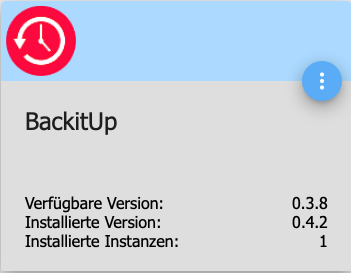
                                          nebenbei….. angeboten wird Version 0.3.8 und installiert wird 0.4.2 ;-)

                                          Danke

                                          Gruß

                                          Rainer
                                          13307_version.png

                                          1 Reply Last reply
                                          0
                                          Reply
                                          • Reply as topic
                                          Log in to reply
                                          • Oldest to Newest
                                          • Newest to Oldest
                                          • Most Votes


                                          Support us

                                          ioBroker
                                          Community Adapters
                                          Donate
                                          FAQ Cloud / IOT
                                          HowTo: Node.js-Update
                                          HowTo: Backup/Restore
                                          Downloads
                                          BLOG

                                          578

                                          Online

                                          32.4k

                                          Users

                                          81.5k

                                          Topics

                                          1.3m

                                          Posts
                                          Community
                                          Impressum | Datenschutz-Bestimmungen | Nutzungsbedingungen | Einwilligungseinstellungen
                                          ioBroker Community 2014-2025
                                          logo
                                          • Login

                                          • Don't have an account? Register

                                          • Login or register to search.
                                          • First post
                                            Last post
                                          0
                                          • Home
                                          • Recent
                                          • Tags
                                          • Unread 0
                                          • Categories
                                          • Unreplied
                                          • Popular
                                          • GitHub
                                          • Docu
                                          • Hilfe