Skip to content
  • Home
  • Recent
  • Tags
  • 0 Unread 0
  • Categories
  • Unreplied
  • Popular
  • GitHub
  • Docu
  • Hilfe
Skins
  • Light
  • Brite
  • Cerulean
  • Cosmo
  • Flatly
  • Journal
  • Litera
  • Lumen
  • Lux
  • Materia
  • Minty
  • Morph
  • Pulse
  • Sandstone
  • Simplex
  • Sketchy
  • Spacelab
  • United
  • Yeti
  • Zephyr
  • Dark
  • Cyborg
  • Darkly
  • Quartz
  • Slate
  • Solar
  • Superhero
  • Vapor

  • Default (No Skin)
  • No Skin
Collapse
ioBroker Logo

Community Forum

donate donate
  1. ioBroker Community Home
  2. Deutsch
  3. ioBroker Allgemein
  4. Installation auf NUC mit Proxmox

NEWS

  • Jahresrückblick 2025 – unser neuer Blogbeitrag ist online! ✨
    BluefoxB
    Bluefox
    17
    1
    2.0k

  • Neuer Blogbeitrag: Monatsrückblick - Dezember 2025 🎄
    BluefoxB
    Bluefox
    13
    1
    925

  • Weihnachtsangebot 2025! 🎄
    BluefoxB
    Bluefox
    25
    1
    2.2k

Installation auf NUC mit Proxmox

Scheduled Pinned Locked Moved ioBroker Allgemein
128 Posts 29 Posters 27.2k Views 9 Watching
  • Oldest to Newest
  • Newest to Oldest
  • Most Votes
Reply
  • Reply as topic
Log in to reply
This topic has been deleted. Only users with topic management privileges can see it.
  • VumerV Offline
    VumerV Offline
    Vumer
    wrote on last edited by
    #70

    das ist einfacher als ich dachte :lol:

    Host -> Netzwerk -> Erstellen -> Linux Bridge -> Erstellen ( Nur Name, mehr nichts. Name wird automatisch erstellt. Bei mir vmbr1 )

    VM -> VM Herunterfahren -> Hardware -> Hinzufügen -> Netzwerkarte -> Bridge: neu erstellte, bei mir vmbr1; Model: VirtIO -> Hinzufügen

    VM Start -> Konsole -> ip a -> dem Name von die neue VirtNIC rausfinden, bei mir ens19.

    mit nano /etc/network/interfaces die ens19 konfigurieren

    Ich hoffe das so alles richtig ist, auf jeden Fall funktioniert der ping

    1 Reply Last reply
    0
    • M Offline
      M Offline
      mafe68
      wrote on last edited by
      #71

      Vielleicht kann mir wer einen Tipp geben. Mein Proxmox ist auf einmal nicht mehr über die WebUi zu erreichen. Per SSH geht es ohne Probleme. Hier mal die Ausgabe von "pveversion -v"

      proxmox-ve: 5.2-2 (running kernel: 4.15.18-2-pve)
      pve-manager: 5.2-7 (running version: 5.2-7/8d88e66a)
      pve-kernel-4.15: 5.2-5
      pve-kernel-4.15.18-2-pve: 4.15.18-20
      corosync: 2.4.2-pve5
      criu: 2.11.1-1~bpo90
      glusterfs-client: 3.8.8-1
      ksm-control-daemon: not correctly installed
      libjs-extjs: 6.0.1-2
      libpve-access-control: 5.0-8
      libpve-apiclient-perl: 2.0-5
      libpve-common-perl: 5.0-38
      libpve-guest-common-perl: 2.0-17
      libpve-http-server-perl: 2.0-10
      libpve-storage-perl: 5.0-24
      libqb0: 1.0.1-1
      lvm2: 2.02.168-pve6
      lxc-pve: 3.0.2+pve1-1
      lxcfs: 3.0.0-1
      novnc-pve: 1.0.0-2
      proxmox-widget-toolkit: 1.0-19
      pve-cluster: 5.0-29
      pve-container: 2.0-25
      pve-docs: 5.2-8
      pve-firewall: 3.0-13
      pve-firmware: 2.0-5
      pve-ha-manager: 2.0-5
      pve-i18n: 1.0-6
      pve-libspice-server1: 0.12.8-3
      pve-qemu-kvm: 2.11.2-1
      pve-xtermjs: 1.0-5
      qemu-server: 5.0-32
      smartmontools: 6.5+svn4324-1
      spiceterm: 3.0-5
      vncterm: 1.5-3
      root@proxmox:~# 


      LG. Mario

      ioBroker LXC Container Proxmox

      ioBroker BananaPi M1

      1 Reply Last reply
      0
      • DutchmanD Offline
        DutchmanD Offline
        Dutchman
        Developer Most Active Administrators
        wrote on last edited by
        #72

        Rebooten….

        Ich kenne dieses Problem nur bei volgelaufenem Disk Space.

        Bei mir ist das Mal passiert weil ich mehr snapshots hatte als verfügbarer Speicher und dann ging der Webinterface nicht mehr.

        Da SSH noch geht soft Reboot per console ausführen

        Sent from my iPhone using Tapatalk

        1 Reply Last reply
        0
        • M Offline
          M Offline
          mafe68
          wrote on last edited by
          #73

          Habe auch schon einen reboot des System gemacht und auch die service einen restart

          service pveproxy restart
          service pvedaemon restart


          alles ohne Erfolg

          LG. Mario

          ioBroker LXC Container Proxmox

          ioBroker BananaPi M1

          1 Reply Last reply
          0
          • DutchmanD Offline
            DutchmanD Offline
            Dutchman
            Developer Most Active Administrators
            wrote on last edited by
            #74

            Hast du Mal überprüft wieviel Festplattenspeicher nog frei ist?

            Sent from my iPhone using Tapatalk

            1 Reply Last reply
            0
            • M Offline
              M Offline
              mafe68
              wrote on last edited by
              #75

              Nein habe ich noch nicht, nur kann sie nicht voll sein da nur eine LXC Container drauf ist bei einer 2TB Platte

              Hier habe ich auch mal den Log

              root@proxmox:~# tail -f /var/log/daemon.log
              Sep 11 00:20:02 proxmox systemd[1]: pvesr.service: Failed with result 'exit-code'.
              Sep 11 00:21:00 proxmox systemd[1]: Starting Proxmox VE replication runner...
              Sep 11 00:21:02 proxmox pvesr[2897]: ipcc_send_rec[1] failed: Connection refused
              Sep 11 00:21:02 proxmox pvesr[2897]: ipcc_send_rec[2] failed: Connection refused
              Sep 11 00:21:02 proxmox pvesr[2897]: ipcc_send_rec[3] failed: Connection refused
              Sep 11 00:21:02 proxmox pvesr[2897]: Unable to load access control list: Connection refused
              Sep 11 00:21:02 proxmox systemd[1]: pvesr.service: Main process exited, code=exited, status=111/n/a
              Sep 11 00:21:02 proxmox systemd[1]: Failed to start Proxmox VE replication runner.
              Sep 11 00:21:02 proxmox systemd[1]: pvesr.service: Unit entered failed state.
              Sep 11 00:21:02 proxmox systemd[1]: pvesr.service: Failed with result 'exit-code'.
              Sep 11 00:22:00 proxmox systemd[1]: Starting Proxmox VE replication runner...
              Sep 11 00:22:02 proxmox pvesr[2911]: ipcc_send_rec[1] failed: Connection refused
              Sep 11 00:22:02 proxmox pvesr[2911]: ipcc_send_rec[2] failed: Connection refused
              Sep 11 00:22:02 proxmox pvesr[2911]: ipcc_send_rec[3] failed: Connection refused
              Sep 11 00:22:02 proxmox pvesr[2911]: Unable to load access control list: Connection refused
              Sep 11 00:22:02 proxmox systemd[1]: pvesr.service: Main process exited, code=exited, status=111/n/a
              Sep 11 00:22:02 proxmox systemd[1]: Failed to start Proxmox VE replication runner.
              Sep 11 00:22:02 proxmox systemd[1]: pvesr.service: Unit entered failed state.
              Sep 11 00:22:02 proxmox systemd[1]: pvesr.service: Failed with result 'exit-code'.


              LG. Mario

              ioBroker LXC Container Proxmox

              ioBroker BananaPi M1

              1 Reply Last reply
              0
              • M Offline
                M Offline
                mafe68
                wrote on last edited by
                #76

                Hier die Auslastung der HDD`s

                root@proxmox:~# df -h
                Filesystem      Size  Used Avail Use% Mounted on
                udev            7.6G     0  7.6G   0% /dev
                tmpfs           1.6G  8.9M  1.6G   1% /run
                /dev/sda1        15G  2.0G   12G  15% /
                tmpfs           7.6G     0  7.6G   0% /dev/shm
                tmpfs           5.0M     0  5.0M   0% /run/lock
                tmpfs           7.6G     0  7.6G   0% /sys/fs/cgroup
                /dev/sda6        28G   45M   27G   1% /home
                /dev/sdb1       1.8T  5.0G  1.7T   1% /datastore
                tmpfs           1.6G     0  1.6G   0% /run/user/0


                LG. Mario

                ioBroker LXC Container Proxmox

                ioBroker BananaPi M1

                1 Reply Last reply
                0
                • U Offline
                  U Offline
                  UncleB
                  wrote on last edited by
                  #77

                  Sorry das ich so reingrätsche, aber wieso bügelt man Linux nicht direkt auf die ssd, sondern lässt das ganze unter Proxmox laufen?

                  Gesendet von meinem SM-G950F mit Tapatalk

                  1 Reply Last reply
                  0
                  • M Offline
                    M Offline
                    mafe68
                    wrote on last edited by
                    #78

                    Proxmox ist ein Linux System nur halt für Virtualisierung. Ich könnte ioBroker direkt in deinem Debian oder Ubuntu laufen lassen ,nur habe ich hier mehrere Anwendungen laufen die ich getrennt haben möchte und für jede Anwendung ein eigenes System laufen lassen ist Unsinn. Darum hier alles auf einer Hardware unter Proxmox als LXC Container.

                    LG. Mario

                    ioBroker LXC Container Proxmox

                    ioBroker BananaPi M1

                    1 Reply Last reply
                    0
                    • DutchmanD Offline
                      DutchmanD Offline
                      Dutchman
                      Developer Most Active Administrators
                      wrote on last edited by
                      #79

                      @UncleB:

                      Sorry das ich so reingrätsche, aber wieso bügelt man Linux nicht direkt auf die ssd, sondern lässt das ganze unter Proxmox laufen?

                      Gesendet von meinem SM-G950F mit Tapatalk `

                      Weil der Gebrauch von einen NUC mit seinen Ressourcen nur die eine Installation reine Ressourcen Verschwendung ist und Virtualisierung vierte Vorteile bringt.

                      (Verschieden Systeme auf einen Host, snapshots usw)

                      Sent from my iPhone using Tapatalk

                      1 Reply Last reply
                      0
                      • chucky666C Online
                        chucky666C Online
                        chucky666
                        wrote on last edited by
                        #80

                        Ich habe mehrere Vm am laufen ,

                        Eine für Iobroker, Test Iobroker, Pi Hole , Windows

                        Kann ich jedem nur empfehlen, wenn was schief geht . Super schnell ein Snapshot zurück spielen

                        Gesendet von iPhone mit Tapatalk Pro

                        1 Reply Last reply
                        0
                        • P Offline
                          P Offline
                          piet
                          wrote on last edited by
                          #81

                          Hallo an die Spezialisten,

                          ich habe jetzt auch Proxmox auf einem Nuc installiert.

                          Proxmox läuft , VM Debian mit Iobroker läuft auch.

                          Autostart der VM funktioniert auch.

                          Der Autostart von Iobroker selber klappt nicht.

                          Ich habe es schon mit dem Vorschlag von Holger probiert.

                          chmod +x /etc/init.d/iobroker.sh

                          update-rc.d iobroker.sh defaults

                          reboot

                          Bei mir ist aber keine Datei iobroker.sh vorhanden.

                          Node.js: v8.12.0

                          NPM: 6.4.1

                          JS Controller 1.4.2

                          Hat jemand einen Tipp für mich?

                          Gruß

                          Klaus

                          Aktiv: Pi 3
                          Test: NUC mit Proxmox LXC und VM, Iobroker auf Debian.

                          1 Reply Last reply
                          0
                          • VumerV Offline
                            VumerV Offline
                            Vumer
                            wrote on last edited by
                            #82

                            nach dieser http://www.iobroker.net/docu/?page_id=5106&lang=de sollte alles funktionieren

                            1 Reply Last reply
                            0
                            • P Offline
                              P Offline
                              piet
                              wrote on last edited by
                              #83

                              Hallo Vumer,

                              vielen Dank

                              aber ich hatte nach der Anleitung installiert.

                              Gruß

                              Klaus

                              Aktiv: Pi 3
                              Test: NUC mit Proxmox LXC und VM, Iobroker auf Debian.

                              1 Reply Last reply
                              0
                              • VumerV Offline
                                VumerV Offline
                                Vumer
                                wrote on last edited by
                                #84

                                aber da steht
                                ` > das mitglieferte npm 5.6.0 npm unbedingt downgraden mit sudo npm install -g npm@4

                                <size size="85">npm 5.x enthält noch einen Bug, der bei ioBroker zu massiven Problemen führt</size>. `
                                und der Bug hat mit dem Autustart zutun

                                1 Reply Last reply
                                0
                                • P Offline
                                  P Offline
                                  piet
                                  wrote on last edited by
                                  #85

                                  ist das auch gültig für

                                  6.4.1 ?

                                  Aktiv: Pi 3
                                  Test: NUC mit Proxmox LXC und VM, Iobroker auf Debian.

                                  1 Reply Last reply
                                  0
                                  • VumerV Offline
                                    VumerV Offline
                                    Vumer
                                    wrote on last edited by
                                    #86

                                    denke schon

                                    mach doch eine neue VM und installier streng nach der Anleitung

                                    1 Reply Last reply
                                    0
                                    • P Offline
                                      P Offline
                                      piet
                                      wrote on last edited by
                                      #87

                                      so jetzt habe ich iobroker komplett neu installiert nach dieser Anleitung:

                                      http://www.iobroker.net/docu/?page_id=5106&lang=de

                                      Wenn ich die VM starte wird Iobroker nicht automatisch gestartet.

                                      Node = 6.14.4

                                      Nodejs = 6.14.4

                                      npm = 4.6.1

                                      js-controller = 1.4.2

                                      Vielleicht hat ja noch jemand einen Tipp.

                                      Gruß

                                      Klaus

                                      Aktiv: Pi 3
                                      Test: NUC mit Proxmox LXC und VM, Iobroker auf Debian.

                                      1 Reply Last reply
                                      0
                                      • P Offline
                                        P Offline
                                        piet
                                        wrote on last edited by
                                        #88

                                        habe das Problem gelöst.

                                        Es musste noch Sudo installiert werden.

                                        Aktiv: Pi 3
                                        Test: NUC mit Proxmox LXC und VM, Iobroker auf Debian.

                                        1 Reply Last reply
                                        0
                                        • X Offline
                                          X Offline
                                          Xanon
                                          wrote on last edited by
                                          #89

                                          Hallo,

                                          ich habe mich nun auch mit meinem NUC an die Proxmox installation gewagt um dort iobroker und später noch weitere Sachen drauf laufen zu lassen.

                                          Ich habe zuvor viel gelesen und der Umzug hat gut funktioniert.

                                          Neustart funktioniert und auch die externe Speicherung auf meinem NAS scheint zu funktionieren.

                                          Allerdings…

                                          ... ich verstehe noch nicht ganz, auf was ich bei einer Datensicherung/Einstellung (Backup, Snapshot) achten soll.
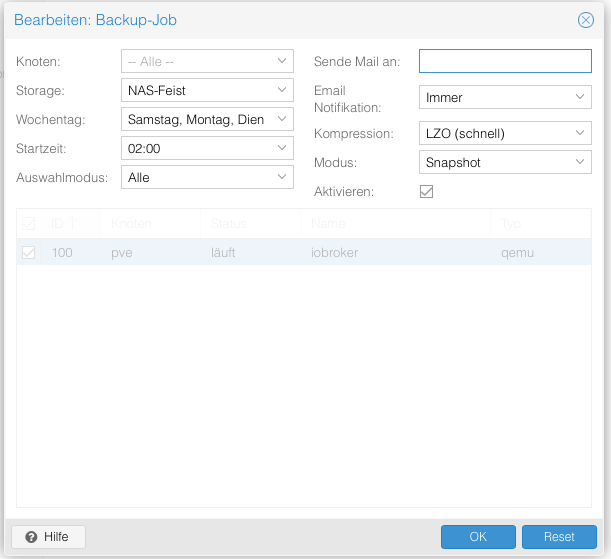
                                          1895_bildschirmfoto_2018-10-05_um_17.15.05.png
                                          Ich habe das Backup so eingerichtet, dass täglich um 02:00 Uhr ein Backup auf meinem NAS erstellt wird.

                                          Welche Einstellungen benutzt Ihr?

                                          Modus: Snapshot, Suspend, Stopp?

                                          Auswahlmodus: Alle ?

                                          Kompression: LZO , GZIP?

                                          Auch habe ich noch nicht verstanden, wie dass mit dem Backup funktioniert.

                                          Also ich habe ein Backup erstellt , welches den Dateinamen "vzdump-qemu-100-2018_10_05-14_17_54.vma.lzo" trägt und 1,76GB groß ist

                                          Was mache ich in einem Ernstfall mit dieser Datei?

                                          Wohin muss das backup kopieren?

                                          Ist in der Datei alles enthalten?

                                          Debian, iobroker-komplett, VIS, …

                                          Sorry, für die ganzen fragen aber ich blicke da noch nicht ganz durch.

                                          Gruß

                                          Marcus

                                          1 Reply Last reply
                                          0
                                          Reply
                                          • Reply as topic
                                          Log in to reply
                                          • Oldest to Newest
                                          • Newest to Oldest
                                          • Most Votes


                                          Support us

                                          ioBroker
                                          Community Adapters
                                          Donate
                                          FAQ Cloud / IOT
                                          HowTo: Node.js-Update
                                          HowTo: Backup/Restore
                                          Downloads
                                          BLOG

                                          362

                                          Online

                                          32.6k

                                          Users

                                          82.2k

                                          Topics

                                          1.3m

                                          Posts
                                          Community
                                          Impressum | Datenschutz-Bestimmungen | Nutzungsbedingungen | Einwilligungseinstellungen
                                          ioBroker Community 2014-2025
                                          logo
                                          • Login

                                          • Don't have an account? Register

                                          • Login or register to search.
                                          • First post
                                            Last post
                                          0
                                          • Home
                                          • Recent
                                          • Tags
                                          • Unread 0
                                          • Categories
                                          • Unreplied
                                          • Popular
                                          • GitHub
                                          • Docu
                                          • Hilfe