




IOBroker backup auf neue Rasperry übertragen
-
@crunchip hallo denke da musst du umstellen auf file/file. Wie kann ich das umstellen. Ist das auf der alten oder neuen Maschine
@metzid auf deiner neuen Installation
iobroker stop
iobroker setup custom
Aber ist aus meiner Sicht nur eine Vermutung das es daran liegt.
-
@metzid sagte in IOBroker backup auf neue Rasperry übertragen:
liege ich da falsch
ja!
nodejs ist die Laufzeitumgebung auf die ioBroker aufgesetzt ist.
-
@metzid auf deiner neuen Installation
iobroker stop
iobroker setup custom
Aber ist aus meiner Sicht nur eine Vermutung das es daran liegt.
@crunchip pi@piiobroker:/opt/iobroker $ sudo iobroker setup custom
Current configuration:- Objects database:
- Type: jsonl
- Host/Unix Socket: 127.0.0.1
- Port: 9001
- States database:
- Type: jsonl
- Host/Unix Socket: 127.0.0.1
- Port: 9000
- Data Directory: ../../iobroker-data/
Type of objects DB [(j)sonl, (f)ile, (r)edis, ...], default [jsonl]: f
Host / Unix Socket of objects DB(file), default[127.0.0.1]: f
Port of objects DB(file), default[9001]: f
Input another, please.
Port of objects DB(file), default[9001]:Das schreibt er gerade was soll ich da einstellen was ist imput another please
- Objects database:
-
@crunchip pi@piiobroker:/opt/iobroker $ sudo iobroker setup custom
Current configuration:- Objects database:
- Type: jsonl
- Host/Unix Socket: 127.0.0.1
- Port: 9001
- States database:
- Type: jsonl
- Host/Unix Socket: 127.0.0.1
- Port: 9000
- Data Directory: ../../iobroker-data/
Type of objects DB [(j)sonl, (f)ile, (r)edis, ...], default [jsonl]: f
Host / Unix Socket of objects DB(file), default[127.0.0.1]: f
Port of objects DB(file), default[9001]: f
Input another, please.
Port of objects DB(file), default[9001]:Das schreibt er gerade was soll ich da einstellen was ist imput another please
@metzid sagte in IOBroker backup auf neue Rasperry übertragen:
sudo iobroker
iobroker NIE in Verbindung mit sudo verwenden.
Fixen:
iob stop iob fix iob start - Objects database:
-
@crunchip pi@piiobroker:/opt/iobroker $ sudo iobroker setup custom
Current configuration:- Objects database:
- Type: jsonl
- Host/Unix Socket: 127.0.0.1
- Port: 9001
- States database:
- Type: jsonl
- Host/Unix Socket: 127.0.0.1
- Port: 9000
- Data Directory: ../../iobroker-data/
Type of objects DB [(j)sonl, (f)ile, (r)edis, ...], default [jsonl]: f
Host / Unix Socket of objects DB(file), default[127.0.0.1]: f
Port of objects DB(file), default[9001]: f
Input another, please.
Port of objects DB(file), default[9001]:Das schreibt er gerade was soll ich da einstellen was ist imput another please
@metzid pi@piiobroker:/opt/iobroker $ sudo iobroker setup custom
Current configuration:- Objects database:
- Type: jsonl
- Host/Unix Socket: 127.0.0.1
- Port: 9001
- States database:
- Type: jsonl
- Host/Unix Socket: 127.0.0.1
- Port: 9000
- Data Directory: ../../iobroker-data/
Type of objects DB [(j)sonl, (f)ile, (r)edis, ...], default [jsonl]: f
Host / Unix Socket of objects DB(file), default[127.0.0.1]: f
Port of objects DB(file), default[9001]: f
Input another, please.
Port of objects DB(file), default[9001]: 9001
Type of states DB [(j)sonl, (f)file, (r)edis, ...], default [file]: f
Host / Unix Socket of states DB (file), default[f]: f
Port of states DB (file), default[9000]: 9000
Host name of this machine [piiobroker]: piiobroker
Please choose if this is a Master/single host (enter "m") or a Slave host (enter "S") you are about to edit. For Slave hosts the data migration will be skipped. [S/m]: mDo you want to migrate objects and states from "jsonl/jsonl" to "file/file" [y/N]: y
Migrating the objects database will overwrite all objects! Are you sure that this is not a slave host and you want to migrate the data? [y/N]: y
Connecting to previous DB "jsonl"...
Creating backup ...
This can take some time ... please be patient!
host.piiobroker 1626 states saved
host.piiobroker 2188 objects saved
Backup created: /opt/iobroker/backups/2023_04_26-22_20_28_backupiobroker-migration.tar.gz
updating conf/iobroker.jsonConnecting to new DB "file" (can take up to 20s) ...
Server Cannot load /opt/iobroker/iobroker-data/objects.json: Database file /opt/iobroker/iobroker-data/objects.json does not exists.. We try last Backup!
Server Cannot load /opt/iobroker/iobroker-data/states.json: Database file /opt/iobroker/iobroker-data/states.json does not exists.. We try last Backup!
Server Cannot load /opt/iobroker/iobroker-data/objects.json.bak: Database file /opt/iobroker/iobroker-data/objects.json.bak does not exists.. Continue with empty dataset!
Server If this is no Migration or initial start please restore the last backup from /opt/iobroker/iobroker-data/backup-objects
Server Cannot load /opt/iobroker/iobroker-data/states.json.bak: Database file /opt/iobroker/iobroker-data/states.json.bak does not exists.. Continue with empty dataset!
Server If this is no Migration or initial start please restore the last backup from /opt/iobroker/iobroker-data/backup-objects
No connection to databases possible ...New Database could not be connected. Please check your settings. No settings have been changed.
restoring conf/iobroker.json
pi@piiobroker:/opt/iobroker $ - Objects database:
-
@metzid pi@piiobroker:/opt/iobroker $ sudo iobroker setup custom
Current configuration:- Objects database:
- Type: jsonl
- Host/Unix Socket: 127.0.0.1
- Port: 9001
- States database:
- Type: jsonl
- Host/Unix Socket: 127.0.0.1
- Port: 9000
- Data Directory: ../../iobroker-data/
Type of objects DB [(j)sonl, (f)ile, (r)edis, ...], default [jsonl]: f
Host / Unix Socket of objects DB(file), default[127.0.0.1]: f
Port of objects DB(file), default[9001]: f
Input another, please.
Port of objects DB(file), default[9001]: 9001
Type of states DB [(j)sonl, (f)file, (r)edis, ...], default [file]: f
Host / Unix Socket of states DB (file), default[f]: f
Port of states DB (file), default[9000]: 9000
Host name of this machine [piiobroker]: piiobroker
Please choose if this is a Master/single host (enter "m") or a Slave host (enter "S") you are about to edit. For Slave hosts the data migration will be skipped. [S/m]: mDo you want to migrate objects and states from "jsonl/jsonl" to "file/file" [y/N]: y
Migrating the objects database will overwrite all objects! Are you sure that this is not a slave host and you want to migrate the data? [y/N]: y
Connecting to previous DB "jsonl"...
Creating backup ...
This can take some time ... please be patient!
host.piiobroker 1626 states saved
host.piiobroker 2188 objects saved
Backup created: /opt/iobroker/backups/2023_04_26-22_20_28_backupiobroker-migration.tar.gz
updating conf/iobroker.jsonConnecting to new DB "file" (can take up to 20s) ...
Server Cannot load /opt/iobroker/iobroker-data/objects.json: Database file /opt/iobroker/iobroker-data/objects.json does not exists.. We try last Backup!
Server Cannot load /opt/iobroker/iobroker-data/states.json: Database file /opt/iobroker/iobroker-data/states.json does not exists.. We try last Backup!
Server Cannot load /opt/iobroker/iobroker-data/objects.json.bak: Database file /opt/iobroker/iobroker-data/objects.json.bak does not exists.. Continue with empty dataset!
Server If this is no Migration or initial start please restore the last backup from /opt/iobroker/iobroker-data/backup-objects
Server Cannot load /opt/iobroker/iobroker-data/states.json.bak: Database file /opt/iobroker/iobroker-data/states.json.bak does not exists.. Continue with empty dataset!
Server If this is no Migration or initial start please restore the last backup from /opt/iobroker/iobroker-data/backup-objects
No connection to databases possible ...New Database could not be connected. Please check your settings. No settings have been changed.
restoring conf/iobroker.json
pi@piiobroker:/opt/iobroker $ - Objects database:
-
pi@piiobroker:/opt/iobroker $ iob fix
library: loaded
Library version=2022-12-09

==========================================================================

    Welcome to the ioBroker installation fixer!
    Script version: 2023-04-02

    You might need to enter your password a couple of times.

==========================================================================


==========================================================================
    Installing prerequisites (1/5)
==========================================================================

Hit:1 http://security.debian.org/debian-security bullseye-security InRelease
Hit:2 http://deb.debian.org/debian bullseye InRelease
Get:3 http://deb.debian.org/debian bullseye-updates InRelease [44.1 kB]
Hit:4 http://archive.raspberrypi.org/debian bullseye InRelease
Hit:5 https://deb.nodesource.com/node_18.x bullseye InRelease
Reading package lists... Done
Installed gcc-c++

==========================================================================
    Checking ioBroker user and directory permissions (2/5)
==========================================================================

Created /etc/sudoers.d/iobroker
Fixing directory permissions...

==========================================================================
    Check and cleanup npm temporary directories (3/5)
==========================================================================

Done.

==========================================================================
    Database maintenance (4/5)
==========================================================================

Checking for uncompressed JSONL databases... This might take a while!

Compressing /opt/iobroker/iobroker-data/states.jsonl
Compressing /opt/iobroker/iobroker-data/objects.jsonl
Compressed 2 JSONL files. Done

==========================================================================
    Checking autostart (5/5)
==========================================================================

Enabling autostart...
Autostart enabled!

==========================================================================

    Your installation was fixed successfully
    Run iobroker start to start ioBroker again!

==========================================================================

pi@piiobroker:/opt/iobroker $ iob start
MOD-EDIT: Code in code-tags gesetzt!
leider über browser nicht erreichbar
-
@thomas-braun aber Fehler hat er beim fix nicht gebracht
-
@crunchip pi@piiobroker:/opt/iobroker $ sudo iobroker setup custom
Current configuration:- Objects database:
- Type: jsonl
- Host/Unix Socket: 127.0.0.1
- Port: 9001
- States database:
- Type: jsonl
- Host/Unix Socket: 127.0.0.1
- Port: 9000
- Data Directory: ../../iobroker-data/
Type of objects DB [(j)sonl, (f)ile, (r)edis, ...], default [jsonl]: f
Host / Unix Socket of objects DB(file), default[127.0.0.1]: f
Port of objects DB(file), default[9001]: f
Input another, please.
Port of objects DB(file), default[9001]:Das schreibt er gerade was soll ich da einstellen was ist imput another please
@metzid wie schon geschrieben, ohne sudo
Du hast da ein f zu viel gedrückt, bei port einfach enter drücken, damit default übernommen wird - Objects database:
-
pi@piiobroker:/opt/iobroker $ iob fix
library: loaded
Library version=2022-12-09

==========================================================================

    Welcome to the ioBroker installation fixer!
    Script version: 2023-04-02

    You might need to enter your password a couple of times.

==========================================================================


==========================================================================
    Installing prerequisites (1/5)
==========================================================================

Hit:1 http://security.debian.org/debian-security bullseye-security InRelease
Hit:2 http://deb.debian.org/debian bullseye InRelease
Get:3 http://deb.debian.org/debian bullseye-updates InRelease [44.1 kB]
Hit:4 http://archive.raspberrypi.org/debian bullseye InRelease
Hit:5 https://deb.nodesource.com/node_18.x bullseye InRelease
Reading package lists... Done
Installed gcc-c++

==========================================================================
    Checking ioBroker user and directory permissions (2/5)
==========================================================================

Created /etc/sudoers.d/iobroker
Fixing directory permissions...

==========================================================================
    Check and cleanup npm temporary directories (3/5)
==========================================================================

Done.

==========================================================================
    Database maintenance (4/5)
==========================================================================

Checking for uncompressed JSONL databases... This might take a while!

Compressing /opt/iobroker/iobroker-data/states.jsonl
Compressing /opt/iobroker/iobroker-data/objects.jsonl
Compressed 2 JSONL files. Done

==========================================================================
    Checking autostart (5/5)
==========================================================================

Enabling autostart...
Autostart enabled!

==========================================================================

    Your installation was fixed successfully
    Run iobroker start to start ioBroker again!

==========================================================================

pi@piiobroker:/opt/iobroker $ iob start
MOD-EDIT: Code in code-tags gesetzt!
leider über browser nicht erreichbar
@metzid sagte in IOBroker backup auf neue Rasperry übertragen:
leider über browser nicht erreichbar
iob list instances -
@thomas-braun aber Fehler hat er beim fix nicht gebracht
@metzid sagte in IOBroker backup auf neue Rasperry übertragen:
aber Fehler hat er beim fix nicht gebracht
Der Fixer gibt auch keine Fehlerdiagnose aus, der fixt es einfach.
-
@metzid sagte in IOBroker backup auf neue Rasperry übertragen:
leider über browser nicht erreichbar
iob list instancespi@piiobroker:/opt/iobroker $ iobroker setup custom Current configuration: - Objects database: - Type: jsonl - Host/Unix Socket: 127.0.0.1 - Port: 9001 - States database: - Type: jsonl - Host/Unix Socket: 127.0.0.1 - Port: 9000 - Data Directory: ../../iobroker-data/ Type of objects DB [(j)sonl, (f)ile, (r)edis, ...], default [jsonl]: f Host / Unix Socket of objects DB(file), default[127.0.0.1]: f Port of objects DB(file), default[9001]: Type of states DB [(j)sonl, (f)file, (r)edis, ...], default [file]: f Host / Unix Socket of states DB (file), default[f]: f Port of states DB (file), default[9000]: Host name of this machine [piiobroker]: piiobroker Please choose if this is a Master/single host (enter "m") or a Slave host (enter "S") you are about to edit. For Slave hosts the data migration will be skipped. [S/m]: m Do you want to migrate objects and states from "jsonl/jsonl" to "file/file" [y/N]: y Migrating the objects database will overwrite all objects! Are you sure that this is not a slave host and you want to migrate the data? [y/N]: y Connecting to previous DB "jsonl"... Creating backup ... This can take some time ... please be patient! host.piiobroker 1626 states saved host.piiobroker 2188 objects saved Backup created: /opt/iobroker/backups/2023_04_26-22_38_38_backupiobroker-migration.tar.gz updating conf/iobroker.json Connecting to new DB "file" (can take up to 20s) ... Server Cannot load /opt/iobroker/iobroker-data/objects.json: Database file /opt/iobroker/iobroker-data/objects.json does not exists.. We try last Backup! Server Cannot load /opt/iobroker/iobroker-data/objects.json.bak: Database file /opt/iobroker/iobroker-data/objects.json.bak does not exists.. Continue with empty dataset! Server If this is no Migration or initial start please restore the last backup from /opt/iobroker/iobroker-data/backup-objects No connection to databases possible ... New Database could not be connected. Please check your settings. No settings have been changed. restoring conf/iobroker.json pi@piiobroker:/opt/iobroker $ iob startMOD-EDIT: Code in code-tags gesetzt!
-
@metzid sagte in IOBroker backup auf neue Rasperry übertragen:
leider über browser nicht erreichbar
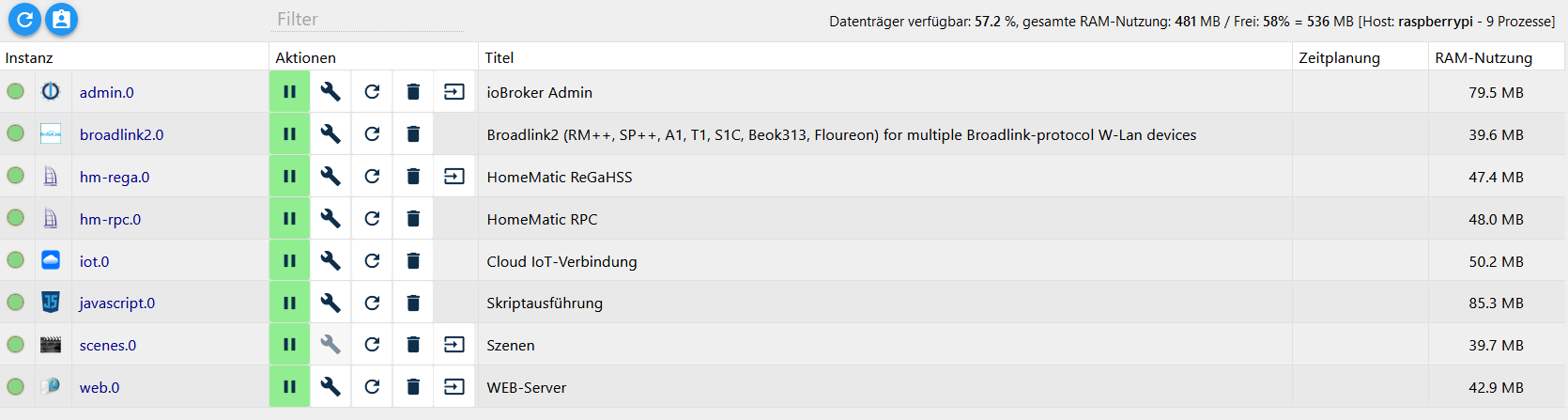
iob list instancespi@piiobroker:/opt/iobroker $ iob list instances system.adapter.admin.0 : admin : piiobroker - enabled, port: 8081, bind: 0.0.0.0, run as: admin system.adapter.broadlink2.0 : broadlink2 : piiobroker - disabled system.adapter.hm-rega.0 : hm-rega : piiobroker - disabled system.adapter.hm-rpc.0 : hm-rpc : piiobroker - disabled, port: 0 system.adapter.iot.0 : iot : piiobroker - disabled system.adapter.javascript.0 : javascript : piiobroker - disabled system.adapter.scenes.0 : scenes : piiobroker - disabled system.adapter.web.0 : web : piiobroker - disabled, port: 8082, bind: 0.0.0.0, run as: admin + instance is alive pi@piiobroker:/opt/iobroker $MOD-EDIT: Code in code-tags gesetzt!
-
pi@piiobroker:/opt/iobroker $ iobroker setup custom
Current configuration:
- Objects database:
  - Type: jsonl
  - Host/Unix Socket: 127.0.0.1
  - Port: 9001
- States database:
  - Type: jsonl
  - Host/Unix Socket: 127.0.0.1
  - Port: 9000
- Data Directory: ../../iobroker-data/

Type of objects DB [(j)sonl, (f)ile, (r)edis, ...], default [jsonl]: f
Host / Unix Socket of objects DB(file), default[127.0.0.1]: f
Port of objects DB(file), default[9001]:
Type of states DB [(j)sonl, (f)file, (r)edis, ...], default [file]: f
Host / Unix Socket of states DB (file), default[f]: f
Port of states DB (file), default[9000]:
Host name of this machine [piiobroker]: piiobroker
Please choose if this is a Master/single host (enter "m") or a Slave host (enter "S") you are about to edit. For Slave hosts the data migration will be skipped. [S/m]: m

Do you want to migrate objects and states from "jsonl/jsonl" to "file/file" [y/N]: y

Migrating the objects database will overwrite all objects! Are you sure that this is not a slave host and you want to migrate the data? [y/N]: y

Connecting to previous DB "jsonl"...
Creating backup ...
This can take some time ... please be patient!
host.piiobroker 1626 states saved
host.piiobroker 2188 objects saved
Backup created: /opt/iobroker/backups/2023_04_26-22_38_38_backupiobroker-migration.tar.gz
updating conf/iobroker.json

Connecting to new DB "file" (can take up to 20s) ...
Server Cannot load /opt/iobroker/iobroker-data/objects.json: Database file /opt/iobroker/iobroker-data/objects.json does not exists.. We try last Backup!
Server Cannot load /opt/iobroker/iobroker-data/objects.json.bak: Database file /opt/iobroker/iobroker-data/objects.json.bak does not exists.. Continue with empty dataset!
Server If this is no Migration or initial start please restore the last backup from /opt/iobroker/iobroker-data/backup-objects
No connection to databases possible ...

New Database could not be connected. Please check your settings. No settings have been changed.
restoring conf/iobroker.json
pi@piiobroker:/opt/iobroker $ iob start
MOD-EDIT: Code in code-tags gesetzt!
@metzid sagte in IOBroker backup auf neue Rasperry übertragen:
Connecting to previous DB "jsonl"...
Creating backup ...
This can take some time ... please be patient!
host.piiobroker 1626 states saved
host.piiobroker 2188 objects saved
Backup created: /opt/iobroker/backups/2023_04_26-22_38_38_backupiobroker-migration.tar.gz
updating conf/iobroker.jsonAlso müsste ja eigentlich eine jeweilige jsonl vorhanden sein, aber wohl nur als backup
-
pi@piiobroker:/opt/iobroker $ iob list instances
  system.adapter.admin.0                  : admin                 : piiobroker                               -  enabled, port: 8081, bind: 0.0.0.0, run as: admin
  system.adapter.broadlink2.0             : broadlink2            : piiobroker                               - disabled
  system.adapter.hm-rega.0                : hm-rega               : piiobroker                               - disabled
  system.adapter.hm-rpc.0                 : hm-rpc                : piiobroker                               - disabled, port: 0
  system.adapter.iot.0                    : iot                   : piiobroker                               - disabled
  system.adapter.javascript.0             : javascript            : piiobroker                               - disabled
  system.adapter.scenes.0                 : scenes                : piiobroker                               - disabled
  system.adapter.web.0                    : web                   : piiobroker                               - disabled, port: 8082, bind: 0.0.0.0, run as: admin

+ instance is alive
pi@piiobroker:/opt/iobroker $
MOD-EDIT: Code in code-tags gesetzt!
@metzid da läuft kein admin, soweit man hier sehen kann
-
@metzid
iob start admin -
pi@piiobroker:/opt/iobroker $ iob start admin
pi@piiobroker:/opt/iobroker $ iob list instances
  system.adapter.admin.0                  : admin                 : piiobroker                               -  enabled, port: 8081, bind: 0.0.0.0, run as: admin
  system.adapter.broadlink2.0             : broadlink2            : piiobroker                               - disabled
  system.adapter.hm-rega.0                : hm-rega               : piiobroker                               - disabled
  system.adapter.hm-rpc.0                 : hm-rpc                : piiobroker                               - disabled, port: 0
  system.adapter.iot.0                    : iot                   : piiobroker                               - disabled
  system.adapter.javascript.0             : javascript            : piiobroker                               - disabled
  system.adapter.scenes.0                 : scenes                : piiobroker                               - disabled
  system.adapter.web.0                    : web                   : piiobroker                               - disabled, port: 8082, bind: 0.0.0.0, run as: admin

+ instance is alive
pi@piiobroker:/opt/iobroker $
MOD-EDIT: Code in code-tags gesetzt!
Leider über Browser nicht erreichbar
-
@crunchip Hallo guten Morgen. Ich habe mir heute Nacht nochmals überlegt ob es Sinn macht das Image des neuen Raspberry mit neiem OS und iobroker nochmals einzuspielen dann die datenbank auf file/file umzustellen und dann ein restore des iobrokers zu fahren. Dann dürfte doch zumindest die datenbbank auf dem Level des restores dein. Oder mache ich da einen Denkfehler.
Noch eine kurze Frage wenn so ein Restore gefahren wird werden dann die ganzen Module /Datenbanken auf dem raspberry auf die Versionsnummer des Altgerätes zurückgestellt. Oder gibt es eine versionsabhängigkeit wo dann nur der Inhalt der verschiedenen Datenbank und Module zurückgespielt wird so dass keine Instalation auf die alten Level erfolgt also rein Daten eingespielt werden. Sollte man da schon die ganzen Adapter die auch im alten Backup hinterlegt sind schon in der neuen Version installieren so dass das System nur noch Daten zurück spielt und keine Adapter auf alte Versionen zurücksetzt. Oder gibt es da eine versionsabhängigkeit ab wann das iobroker Backup nur Daten oder auch Versionen zurückspielt.
-
@metzid sagte in IOBroker backup auf neue Rasperry übertragen:
Sollte man da schon die ganzen Adapter die auch im alten Backup hinterlegt sind schon in der neuen Version installieren so dass das System nur noch Daten zurück spielt und keine Adapter auf alte Versionen zurücksetzt. Oder gibt es da eine versionsabhängigkeit ab wann das iobroker Backup nur Daten oder auch Versionen zurückspielt.
nein, um ein backup zurückzuspielen, müssen keine Adapter im Vorfeld installiert werden, das beinhaltet alles das backup. Einzige Ausnahme aufgrund eines bugs, muss vis (falls genutzt wird) vor dem backup installiert werden.
@metzid sagte in IOBroker backup auf neue Rasperry übertragen:
Hallo guten Morgen. Ich habe mir heute Nacht nochmals überlegt ob es Sinn macht das Image des neuen Raspberry mit neiem OS und iobroker nochmals einzuspielen dann die datenbank auf file/file umzustellen und dann ein restore des iobrokers zu fahren
kannst du versuchen


Hey! Du scheinst an dieser Unterhaltung interessiert zu sein, hast aber noch kein Konto.
Hast du es satt, bei jedem Besuch durch die gleichen Beiträge zu scrollen? Wenn du dich für ein Konto anmeldest, kommst du immer genau dorthin zurück, wo du zuvor warst, und kannst dich über neue Antworten benachrichtigen lassen (entweder per E-Mail oder Push-Benachrichtigung). Du kannst auch Lesezeichen speichern und Beiträge positiv bewerten, um anderen Community-Mitgliedern deine Wertschätzung zu zeigen.
Mit deinem Input könnte dieser Beitrag noch besser werden 💗
Registrieren AnmeldenSupport us
337
Online33.0k
Benutzer83.6k
Themen1.3m
Beiträge