



cloud.0 Adapter Fehlermeldung Admin instance not defined
-
Noch eine kleine Zusatzinfo an die Experten..
Ich habe jetzt die ganze Zeit online an Scripten gearbeitet, und ab und zu auf die Protokolle geklickt.
Dabei ist mir aufgefallen, dass der scheinbar erst wieder anfängt, die Fehlermeldungen (3 pro Sek. !) auszugeben, sobald ich auf Protokolle klicke.
Dazwischen sind immer zeitliche Lücken - eben die Lücken, in denen ich an den Scripten gearbeitet habe, und nicht in den Protokollen war.
So, jetzt gebe ich Ruhe bis ich gleich die logs habe.
Danke nochmal für die rege Beteiligung so far.2022-09-29 14:08:11.164 - info: cloud.0 (1065) User accessed from cloud: pzvhrnGtaDl-q1oTAUzi 2022-09-29 14:10:10.608 - info: cloud.0 (1065) User disconnected from cloud: pzvhrnGtaDl-q1oTAUzi 2022-09-29 14:11:09.521 - info: cloud.0 (1065) User accessed from cloud: 571FCjNg4FmuW7hqAU0- 2022-09-29 14:12:59.232 - warn: cloud.0 (1065) User disconnected from cloud: 0 571FCjNg4FmuW7hqAU0- 2022-09-29 14:12:59.235 - info: cloud.0 (1065) User disconnected from cloud: 2022-09-29 14:13:32.389 - error: cloud.0 (1065) Admin instance not defined. Please specify the lovelace instance in settings 2022-09-29 14:13:32.390 - error: cloud.0 (1065) Admin instance not defined. Please specify the lovelace instance in settings 2022-09-29 14:13:32.404 - error: cloud.0 (1065) Admin instance not defined. Please specify the lovelace instance in settings 2022-09-29 14:13:32.420 - error: cloud.0 (1065) Admin instance not defined. Please specify the lovelace instance in settings 2022-09-29 14:13:32.692 - error: cloud.0 (1065) Admin instance not defined. Please specify the lovelace instance in settings 2022-09-29 14:13:33.002 - error: cloud.0 (1065) Admin instance not defined. Please specify the lovelace instance in settings 2022-09-29 14:13:33.310 - error: cloud.0 (1065) Admin instance not defined. Please specify the lovelace instance in settings 2022-09-29 14:13:33.604 - error: cloud.0 (1065) Admin instance not defined. Please specify the lovelace instance in settings 2022-09-29 14:13:33.914 - error: cloud.0 (1065) Admin instance not defined. Please specify the lovelace instance in settings 2022-09-29 14:13:34.215 - error: cloud.0 (1065) Admin instance not defined. Please specify the lovelace instance in settings 2022-09-29 14:13:34.517 - error: cloud.0 (1065) Admin instance not defined. Please specify the lovelace instance in settings 2022-09-29 14:13:34.816 - error: cloud.0 (1065) Admin instance not defined. Please specify the lovelace instance in settings 2022-09-29 14:13:35.142 - error: cloud.0 (1065) Admin instance not defined. Please specify the lovelace instance in settings 2022-09-29 14:13:35.447 - error: cloud.0 (1065) Admin instance not defined. Please specify the lovelace instance in settings 2022-09-29 14:13:35.759 - error: cloud.0 (1065) Admin instance not defined. Please specify the lovelace instance in settings 2022-09-29 14:13:36.054 - error: cloud.0 (1065) Admin instance not defined. Please specify the lovelace instance in settings 2022-09-29 14:13:36.351 - error: cloud.0 (1065) Admin instance not defined. Please specify the lovelace instance in settings 2022-09-29 14:13:36.652 - error: cloud.0 (1065) Admin instance not defined. Please specify the lovelace instance in settings 2022-09-29 14:13:36.952 - error: cloud.0 (1065) Admin instance not defined. Please specify the lovelace instance in settings 2022-09-29 14:13:37.258 - error: cloud.0 (1065) Admin instance not defined. Please specify the lovelace instance in settings 2022-09-29 14:13:37.737 - info: cloud.0 (1065) User accessed from cloud: F45_2QblRpJ4TEvUAU2Q 2022-09-29 14:13:42.286 - info: cloud.0 (1065) User accessed from cloud: CzgPPNB_Jt3lVwr_AU2W 2022-09-29 14:13:42.322 - error: cloud.0 (1065) Received unknown command 1: name 2022-09-29 14:13:45.330 - error: cloud.0 (1065) Cannot request web pages: File i-vis-switch-1.ejs not found: {} 2022-09-29 14:13:45.405 - error: cloud.0 (1065) Cannot request web pages: File i-vis-button.ejs not found: {} 2022-09-29 14:13:47.567 - error: cloud.0 (1065) Cannot request web pages: File i-vis-switch-1.ejs not found: {} 2022-09-29 14:13:47.640 - error: cloud.0 (1065) Cannot request web pages: File i-vis-button.ejs not found: {} 2022-09-29 14:13:51.685 - info: cloud.0 (1065) User disconnected from cloud: CzgPPNB_Jt3lVwr_AU2W 2022-09-29 14:15:22.728 - info: cloud.0 (1065) User disconnected from cloud: F45_2QblRpJ4TEvUAU2Q 2022-09-29 14:15:59.078 - info: cloud.0 (1065) User accessed from cloud: LDN6Rndl4-3sQe76AU3g 2022-09-29 14:16:17.217 - info: cloud.0 (1065) received all objects 2022-09-29 14:17:46.194 - info: cloud.0 (1065) User disconnected from cloud: LDN6Rndl4-3sQe76AU3g 2022-09-29 14:17:46.452 - error: cloud.0 (1065) Admin instance not defined. Please specify the lovelace instance in settings 2022-09-29 14:17:46.492 - error: cloud.0 (1065) Admin instance not defined. Please specify the lovelace instance in settings 2022-09-29 14:18:09.950 - warn: cloud.0 (1065) Used invalid characters: 0_userdata.0.Noch_Verbraucher_eingeschaltet_? changed to 0_userdata.0.Noch_Verbraucher_eingeschaltet__ 2022-09-29 14:18:42.930 - info: cloud.0 (1065) received all objects 2022-09-29 14:19:16.102 - warn: cloud.0 (1065) Used invalid characters: 0_userdata.0.Noch_Verbraucher_eingeschaltet__.Noch_Verbraucher_eingeschaltet_? changed to 0_userdata.0.Noch_Verbraucher_eingeschaltet__.Noch_Verbraucher_eingeschaltet__ 2022-09-29 14:19:23.269 - error: cloud.0 (1065) Admin instance not defined. Please specify the lovelace instance in settings 2022-09-29 14:19:23.271 - error: cloud.0 (1065) Admin instance not defined. Please specify the lovelace instance in settings 2022-09-29 14:19:23.273 - error: cloud.0 (1065) Admin instance not defined. Please specify the lovelace instance in settings 2022-09-29 14:19:23.308 - error: cloud.0 (1065) Admin instance not defined. Please specify the lovelace instance in settings 2022-09-29 14:19:23.567 - error: cloud.0 (1065) Admin instance not defined. Please specify the lovelace instance in settings 2022-09-29 14:19:23.881 - error: cloud.0 (1065) Admin instance not defined. Please specify the lovelace instance in settings 2022-09-29 14:19:24.179 - error: cloud.0 (1065) Admin instance not defined. Please specify the lovelace instance in settings 2022-09-29 14:19:24.467 - error: cloud.0 (1065) Admin instance not defined. Please specify the lovelace instance in settings 2022-09-29 14:19:24.755 - error: cloud.0 (1065) Admin instance not defined. Please specify the lovelace instance in settings 2022-09-29 14:19:25.054 - error: cloud.0 (1065) Admin instance not defined. Please specify the lovelace instance in settings 2022-09-29 14:19:25.342 - error: cloud.0 (1065) Admin instance not defined. Please specify the lovelace instance in settings 2022-09-29 14:19:25.638 - error: cloud.0 (1065) Admin instance not defined. Please specify the lovelace instance in settings 2022-09-29 14:19:25.941 - error: cloud.0 (1065) Admin instance not defined. Please specify the lovelace instance in settings 2022-09-29 14:19:26.230 - error: cloud.0 (1065) Admin instance not defined. Please specify the lovelace instance in settings 2022-09-29 14:19:26.539 - error: cloud.0 (1065) Admin instance not defined. Please specify the lovelace instance in settings 2022-09-29 14:19:26.823 - error: cloud.0 (1065) Admin instance not defined. Please specify the lovelace instance in settings 2022-09-29 14:19:27.121 - error: cloud.0 (1065) Admin instance not defined. Please specify the lovelace instance in settings 2022-09-29 14:19:27.419 - error: cloud.0 (1065) Admin instance not defined. Please specify the lovelace instance in settings 2022-09-29 14:19:27.715 - error: cloud.0 (1065) Admin instance not defined. Please specify the lovelace instance in settings 2022-09-29 14:19:28.003 - error: cloud.0 (1065) Admin instance not defined. Please specify the lovelace instance in settings 2022-09-29 14:19:28.636 - error: cloud.0 (1065) Admin instance not defined. Please specify the lovelace instance in settings 2022-09-29 14:19:28.948 - error: cloud.0 (1065) Admin instance not defined. Please specify the lovelace instance in settings 2022-09-29 14:19:29.239 - error: cloud.0 (1065) Admin instance not defined. Please specify the lovelace instance in settings 2022-09-29 14:19:29.553 - error: cloud.0 (1065) Admin instance not defined. Please specify the lovelace instance in settings 2022-09-29 14:19:29.558 - error: cloud.0 (1065) Admin instance not defined. Please specify the lovelace instance in settings 2022-09-29 14:19:34.622 - info: cloud.0 (1065) received all objects 2022-09-29 14:19:57.312 - info: cloud.0 (1065) User accessed from cloud: 78l_vKjv-nv3okU2AU6K 2022-09-29 14:20:55.188 - info: javascript.0 (813) Stop script script.js.common.Energie.Noch_Verbraucher_eingeschaltet__ 2022-09-29 14:21:01.676 - warn: cloud.0 (1065) User disconnected from cloud: 0 78l_vKjv-nv3okU2AU6K 2022-09-29 14:21:01.680 - info: cloud.0 (1065) User disconnected from cloud: 2022-09-29 14:21:01.688 - info: cloud.0 (1065) User disconnected from cloud: gXr3IVoOZEduz4DjAURB 2022-09-29 14:22:33.850 - info: cloud.0 (1065) User accessed from cloud: PBzg5Cr07YXXvEYYAU7y 2022-09-29 14:22:42.303 - error: cloud.0 (1065) Admin instance not defined. Please specify the lovelace instance in settings 2022-09-29 14:22:42.307 - error: cloud.0 (1065) Admin instance not defined. Please specify the lovelace instance in settings 2022-09-29 14:24:34.087 - error: cloud.0 (1065) Admin instance not defined. Please specify the lovelace instance in settings 2022-09-29 14:24:34.092 - error: cloud.0 (1065) Admin instance not defined. Please specify the lovelace instance in settings 2022-09-29 14:24:34.096 - error: cloud.0 (1065) Admin instance not defined. Please specify the lovelace instance in settings 2022-09-29 14:24:34.129 - error: cloud.0 (1065) Admin instance not defined. Please specify the lovelace instance in settings 2022-09-29 14:24:34.403 - error: cloud.0 (1065) Admin instance not defined. Please specify the lovelace instance in settings 2022-09-29 14:24:34.700 - error: cloud.0 (1065) Admin instance not defined. Please specify the lovelace instance in settings 2022-09-29 14:24:35.020 - error: cloud.0 (1065) Admin instance not defined. Please specify the lovelace instance in settings 2022-09-29 14:24:35.328 - error: cloud.0 (1065) Admin instance not defined. Please specify the lovelace instance in settings 2022-09-29 14:24:35.619 - error: cloud.0 (1065) Admin instance not defined. Please specify the lovelace instance in settings 2022-09-29 14:24:35.921 - error: cloud.0 (1065) Admin instance not defined. Please specify the lovelace instance in settings 2022-09-29 14:24:36.231 - error: cloud.0 (1065) Admin instance not defined. Please specify the lovelace instance in settings 2022-09-29 14:24:36.544 - error: cloud.0 (1065) Admin instance not defined. Please specify the lovelace instance in settings 2022-09-29 14:24:36.836 - error: cloud.0 (1065) Admin instance not defined. Please specify the lovelace instance in settings 2022-09-29 14:24:37.135 - error: cloud.0 (1065) Admin instance not defined. Please specify the lovelace instance in settings 2022-09-29 14:24:37.454 - info: cloud.0 (1065) User accessed from cloud: 6ewN_arEbvPrGCLpAU8t 2022-09-29 14:25:33.791 - warn: cloud.0 (1065) User disconnected from cloud: 0 6ewN_arEbvPrGCLpAU8t 2022-09-29 14:25:33.794 - info: cloud.0 (1065) User disconnected from cloud: 2022-09-29 14:25:34.091 - error: cloud.0 (1065) Admin instance not defined. Please specify the lovelace instance in settings 2022-09-29 14:25:34.290 - error: cloud.0 (1065) Admin instance not defined. Please specify the lovelace instance in settings 2022-09-29 14:26:43.292 - info: cloud.0 (1065) User accessed from cloud: n34UEuZqv2uz35jNAU91 2022-09-29 14:26:54.962 - info: cloud.0 (1065) User disconnected from cloud: n34UEuZqv2uz35jNAU91 2022-09-29 14:26:54.975 - info: cloud.0 (1065) User disconnected from cloud: PBzg5Cr07YXXvEYYAU7y 2022-09-29 14:46:05.757 - info: cloud.0 (1065) Connection changed: disconnect 2022-09-29 14:46:05.758 - info: cloud.0 (1065) Connection lost 2022-09-29 14:46:35.830 - info: cloud.0 (1065) Trying to connect as system.user.admin to cloud 2022-09-29 14:46:55.515 - info: cloud.0 (1065) Connection changed: connect 2022-09-29 15:16:52.456 - info: web.0 (1004) ==> Connected system.user.admin from ::ffff:192.168.123.21 2022-09-29 15:18:21.677 - info: web.0 (1004) <== Disconnect system.user.admin from ::ffff:192.168.123.21 vis.0 2022-09-29 15:26:12.393 - info: admin.0 (581) failed connection to socket.io from ::ffff:192.168.123.196: Passport was not initialized 2022-09-29 15:26:55.411 - info: admin.0 (581) ==> Connected system.user.admin from ::ffff:192.168.123.196 -
2022-09-29 14:08:11.164 - info: cloud.0 (1065) User accessed from cloud: pzvhrnGtaDl-q1oTAUzi 2022-09-29 14:10:10.608 - info: cloud.0 (1065) User disconnected from cloud: pzvhrnGtaDl-q1oTAUzi 2022-09-29 14:11:09.521 - info: cloud.0 (1065) User accessed from cloud: 571FCjNg4FmuW7hqAU0- 2022-09-29 14:12:59.232 - warn: cloud.0 (1065) User disconnected from cloud: 0 571FCjNg4FmuW7hqAU0- 2022-09-29 14:12:59.235 - info: cloud.0 (1065) User disconnected from cloud: 2022-09-29 14:13:32.389 - error: cloud.0 (1065) Admin instance not defined. Please specify the lovelace instance in settings 2022-09-29 14:13:32.390 - error: cloud.0 (1065) Admin instance not defined. Please specify the lovelace instance in settings 2022-09-29 14:13:32.404 - error: cloud.0 (1065) Admin instance not defined. Please specify the lovelace instance in settings 2022-09-29 14:13:32.420 - error: cloud.0 (1065) Admin instance not defined. Please specify the lovelace instance in settings 2022-09-29 14:13:32.692 - error: cloud.0 (1065) Admin instance not defined. Please specify the lovelace instance in settings 2022-09-29 14:13:33.002 - error: cloud.0 (1065) Admin instance not defined. Please specify the lovelace instance in settings 2022-09-29 14:13:33.310 - error: cloud.0 (1065) Admin instance not defined. Please specify the lovelace instance in settings 2022-09-29 14:13:33.604 - error: cloud.0 (1065) Admin instance not defined. Please specify the lovelace instance in settings 2022-09-29 14:13:33.914 - error: cloud.0 (1065) Admin instance not defined. Please specify the lovelace instance in settings 2022-09-29 14:13:34.215 - error: cloud.0 (1065) Admin instance not defined. Please specify the lovelace instance in settings 2022-09-29 14:13:34.517 - error: cloud.0 (1065) Admin instance not defined. Please specify the lovelace instance in settings 2022-09-29 14:13:34.816 - error: cloud.0 (1065) Admin instance not defined. Please specify the lovelace instance in settings 2022-09-29 14:13:35.142 - error: cloud.0 (1065) Admin instance not defined. Please specify the lovelace instance in settings 2022-09-29 14:13:35.447 - error: cloud.0 (1065) Admin instance not defined. Please specify the lovelace instance in settings 2022-09-29 14:13:35.759 - error: cloud.0 (1065) Admin instance not defined. Please specify the lovelace instance in settings 2022-09-29 14:13:36.054 - error: cloud.0 (1065) Admin instance not defined. Please specify the lovelace instance in settings 2022-09-29 14:13:36.351 - error: cloud.0 (1065) Admin instance not defined. Please specify the lovelace instance in settings 2022-09-29 14:13:36.652 - error: cloud.0 (1065) Admin instance not defined. Please specify the lovelace instance in settings 2022-09-29 14:13:36.952 - error: cloud.0 (1065) Admin instance not defined. Please specify the lovelace instance in settings 2022-09-29 14:13:37.258 - error: cloud.0 (1065) Admin instance not defined. Please specify the lovelace instance in settings 2022-09-29 14:13:37.737 - info: cloud.0 (1065) User accessed from cloud: F45_2QblRpJ4TEvUAU2Q 2022-09-29 14:13:42.286 - info: cloud.0 (1065) User accessed from cloud: CzgPPNB_Jt3lVwr_AU2W 2022-09-29 14:13:42.322 - error: cloud.0 (1065) Received unknown command 1: name 2022-09-29 14:13:45.330 - error: cloud.0 (1065) Cannot request web pages: File i-vis-switch-1.ejs not found: {} 2022-09-29 14:13:45.405 - error: cloud.0 (1065) Cannot request web pages: File i-vis-button.ejs not found: {} 2022-09-29 14:13:47.567 - error: cloud.0 (1065) Cannot request web pages: File i-vis-switch-1.ejs not found: {} 2022-09-29 14:13:47.640 - error: cloud.0 (1065) Cannot request web pages: File i-vis-button.ejs not found: {} 2022-09-29 14:13:51.685 - info: cloud.0 (1065) User disconnected from cloud: CzgPPNB_Jt3lVwr_AU2W 2022-09-29 14:15:22.728 - info: cloud.0 (1065) User disconnected from cloud: F45_2QblRpJ4TEvUAU2Q 2022-09-29 14:15:59.078 - info: cloud.0 (1065) User accessed from cloud: LDN6Rndl4-3sQe76AU3g 2022-09-29 14:16:17.217 - info: cloud.0 (1065) received all objects 2022-09-29 14:17:46.194 - info: cloud.0 (1065) User disconnected from cloud: LDN6Rndl4-3sQe76AU3g 2022-09-29 14:17:46.452 - error: cloud.0 (1065) Admin instance not defined. Please specify the lovelace instance in settings 2022-09-29 14:17:46.492 - error: cloud.0 (1065) Admin instance not defined. Please specify the lovelace instance in settings 2022-09-29 14:18:09.950 - warn: cloud.0 (1065) Used invalid characters: 0_userdata.0.Noch_Verbraucher_eingeschaltet_? changed to 0_userdata.0.Noch_Verbraucher_eingeschaltet__ 2022-09-29 14:18:42.930 - info: cloud.0 (1065) received all objects 2022-09-29 14:19:16.102 - warn: cloud.0 (1065) Used invalid characters: 0_userdata.0.Noch_Verbraucher_eingeschaltet__.Noch_Verbraucher_eingeschaltet_? changed to 0_userdata.0.Noch_Verbraucher_eingeschaltet__.Noch_Verbraucher_eingeschaltet__ 2022-09-29 14:19:23.269 - error: cloud.0 (1065) Admin instance not defined. Please specify the lovelace instance in settings 2022-09-29 14:19:23.271 - error: cloud.0 (1065) Admin instance not defined. Please specify the lovelace instance in settings 2022-09-29 14:19:23.273 - error: cloud.0 (1065) Admin instance not defined. Please specify the lovelace instance in settings 2022-09-29 14:19:23.308 - error: cloud.0 (1065) Admin instance not defined. Please specify the lovelace instance in settings 2022-09-29 14:19:23.567 - error: cloud.0 (1065) Admin instance not defined. Please specify the lovelace instance in settings 2022-09-29 14:19:23.881 - error: cloud.0 (1065) Admin instance not defined. Please specify the lovelace instance in settings 2022-09-29 14:19:24.179 - error: cloud.0 (1065) Admin instance not defined. Please specify the lovelace instance in settings 2022-09-29 14:19:24.467 - error: cloud.0 (1065) Admin instance not defined. Please specify the lovelace instance in settings 2022-09-29 14:19:24.755 - error: cloud.0 (1065) Admin instance not defined. Please specify the lovelace instance in settings 2022-09-29 14:19:25.054 - error: cloud.0 (1065) Admin instance not defined. Please specify the lovelace instance in settings 2022-09-29 14:19:25.342 - error: cloud.0 (1065) Admin instance not defined. Please specify the lovelace instance in settings 2022-09-29 14:19:25.638 - error: cloud.0 (1065) Admin instance not defined. Please specify the lovelace instance in settings 2022-09-29 14:19:25.941 - error: cloud.0 (1065) Admin instance not defined. Please specify the lovelace instance in settings 2022-09-29 14:19:26.230 - error: cloud.0 (1065) Admin instance not defined. Please specify the lovelace instance in settings 2022-09-29 14:19:26.539 - error: cloud.0 (1065) Admin instance not defined. Please specify the lovelace instance in settings 2022-09-29 14:19:26.823 - error: cloud.0 (1065) Admin instance not defined. Please specify the lovelace instance in settings 2022-09-29 14:19:27.121 - error: cloud.0 (1065) Admin instance not defined. Please specify the lovelace instance in settings 2022-09-29 14:19:27.419 - error: cloud.0 (1065) Admin instance not defined. Please specify the lovelace instance in settings 2022-09-29 14:19:27.715 - error: cloud.0 (1065) Admin instance not defined. Please specify the lovelace instance in settings 2022-09-29 14:19:28.003 - error: cloud.0 (1065) Admin instance not defined. Please specify the lovelace instance in settings 2022-09-29 14:19:28.636 - error: cloud.0 (1065) Admin instance not defined. Please specify the lovelace instance in settings 2022-09-29 14:19:28.948 - error: cloud.0 (1065) Admin instance not defined. Please specify the lovelace instance in settings 2022-09-29 14:19:29.239 - error: cloud.0 (1065) Admin instance not defined. Please specify the lovelace instance in settings 2022-09-29 14:19:29.553 - error: cloud.0 (1065) Admin instance not defined. Please specify the lovelace instance in settings 2022-09-29 14:19:29.558 - error: cloud.0 (1065) Admin instance not defined. Please specify the lovelace instance in settings 2022-09-29 14:19:34.622 - info: cloud.0 (1065) received all objects 2022-09-29 14:19:57.312 - info: cloud.0 (1065) User accessed from cloud: 78l_vKjv-nv3okU2AU6K 2022-09-29 14:20:55.188 - info: javascript.0 (813) Stop script script.js.common.Energie.Noch_Verbraucher_eingeschaltet__ 2022-09-29 14:21:01.676 - warn: cloud.0 (1065) User disconnected from cloud: 0 78l_vKjv-nv3okU2AU6K 2022-09-29 14:21:01.680 - info: cloud.0 (1065) User disconnected from cloud: 2022-09-29 14:21:01.688 - info: cloud.0 (1065) User disconnected from cloud: gXr3IVoOZEduz4DjAURB 2022-09-29 14:22:33.850 - info: cloud.0 (1065) User accessed from cloud: PBzg5Cr07YXXvEYYAU7y 2022-09-29 14:22:42.303 - error: cloud.0 (1065) Admin instance not defined. Please specify the lovelace instance in settings 2022-09-29 14:22:42.307 - error: cloud.0 (1065) Admin instance not defined. Please specify the lovelace instance in settings 2022-09-29 14:24:34.087 - error: cloud.0 (1065) Admin instance not defined. Please specify the lovelace instance in settings 2022-09-29 14:24:34.092 - error: cloud.0 (1065) Admin instance not defined. Please specify the lovelace instance in settings 2022-09-29 14:24:34.096 - error: cloud.0 (1065) Admin instance not defined. Please specify the lovelace instance in settings 2022-09-29 14:24:34.129 - error: cloud.0 (1065) Admin instance not defined. Please specify the lovelace instance in settings 2022-09-29 14:24:34.403 - error: cloud.0 (1065) Admin instance not defined. Please specify the lovelace instance in settings 2022-09-29 14:24:34.700 - error: cloud.0 (1065) Admin instance not defined. Please specify the lovelace instance in settings 2022-09-29 14:24:35.020 - error: cloud.0 (1065) Admin instance not defined. Please specify the lovelace instance in settings 2022-09-29 14:24:35.328 - error: cloud.0 (1065) Admin instance not defined. Please specify the lovelace instance in settings 2022-09-29 14:24:35.619 - error: cloud.0 (1065) Admin instance not defined. Please specify the lovelace instance in settings 2022-09-29 14:24:35.921 - error: cloud.0 (1065) Admin instance not defined. Please specify the lovelace instance in settings 2022-09-29 14:24:36.231 - error: cloud.0 (1065) Admin instance not defined. Please specify the lovelace instance in settings 2022-09-29 14:24:36.544 - error: cloud.0 (1065) Admin instance not defined. Please specify the lovelace instance in settings 2022-09-29 14:24:36.836 - error: cloud.0 (1065) Admin instance not defined. Please specify the lovelace instance in settings 2022-09-29 14:24:37.135 - error: cloud.0 (1065) Admin instance not defined. Please specify the lovelace instance in settings 2022-09-29 14:24:37.454 - info: cloud.0 (1065) User accessed from cloud: 6ewN_arEbvPrGCLpAU8t 2022-09-29 14:25:33.791 - warn: cloud.0 (1065) User disconnected from cloud: 0 6ewN_arEbvPrGCLpAU8t 2022-09-29 14:25:33.794 - info: cloud.0 (1065) User disconnected from cloud: 2022-09-29 14:25:34.091 - error: cloud.0 (1065) Admin instance not defined. Please specify the lovelace instance in settings 2022-09-29 14:25:34.290 - error: cloud.0 (1065) Admin instance not defined. Please specify the lovelace instance in settings 2022-09-29 14:26:43.292 - info: cloud.0 (1065) User accessed from cloud: n34UEuZqv2uz35jNAU91 2022-09-29 14:26:54.962 - info: cloud.0 (1065) User disconnected from cloud: n34UEuZqv2uz35jNAU91 2022-09-29 14:26:54.975 - info: cloud.0 (1065) User disconnected from cloud: PBzg5Cr07YXXvEYYAU7y 2022-09-29 14:46:05.757 - info: cloud.0 (1065) Connection changed: disconnect 2022-09-29 14:46:05.758 - info: cloud.0 (1065) Connection lost 2022-09-29 14:46:35.830 - info: cloud.0 (1065) Trying to connect as system.user.admin to cloud 2022-09-29 14:46:55.515 - info: cloud.0 (1065) Connection changed: connect 2022-09-29 15:16:52.456 - info: web.0 (1004) ==> Connected system.user.admin from ::ffff:192.168.123.21 2022-09-29 15:18:21.677 - info: web.0 (1004) <== Disconnect system.user.admin from ::ffff:192.168.123.21 vis.0 2022-09-29 15:26:12.393 - info: admin.0 (581) failed connection to socket.io from ::ffff:192.168.123.196: Passport was not initialized 2022-09-29 15:26:55.411 - info: admin.0 (581) ==> Connected system.user.admin from ::ffff:192.168.123.196Und wegen dem URL-Schlüssel für Dienste...
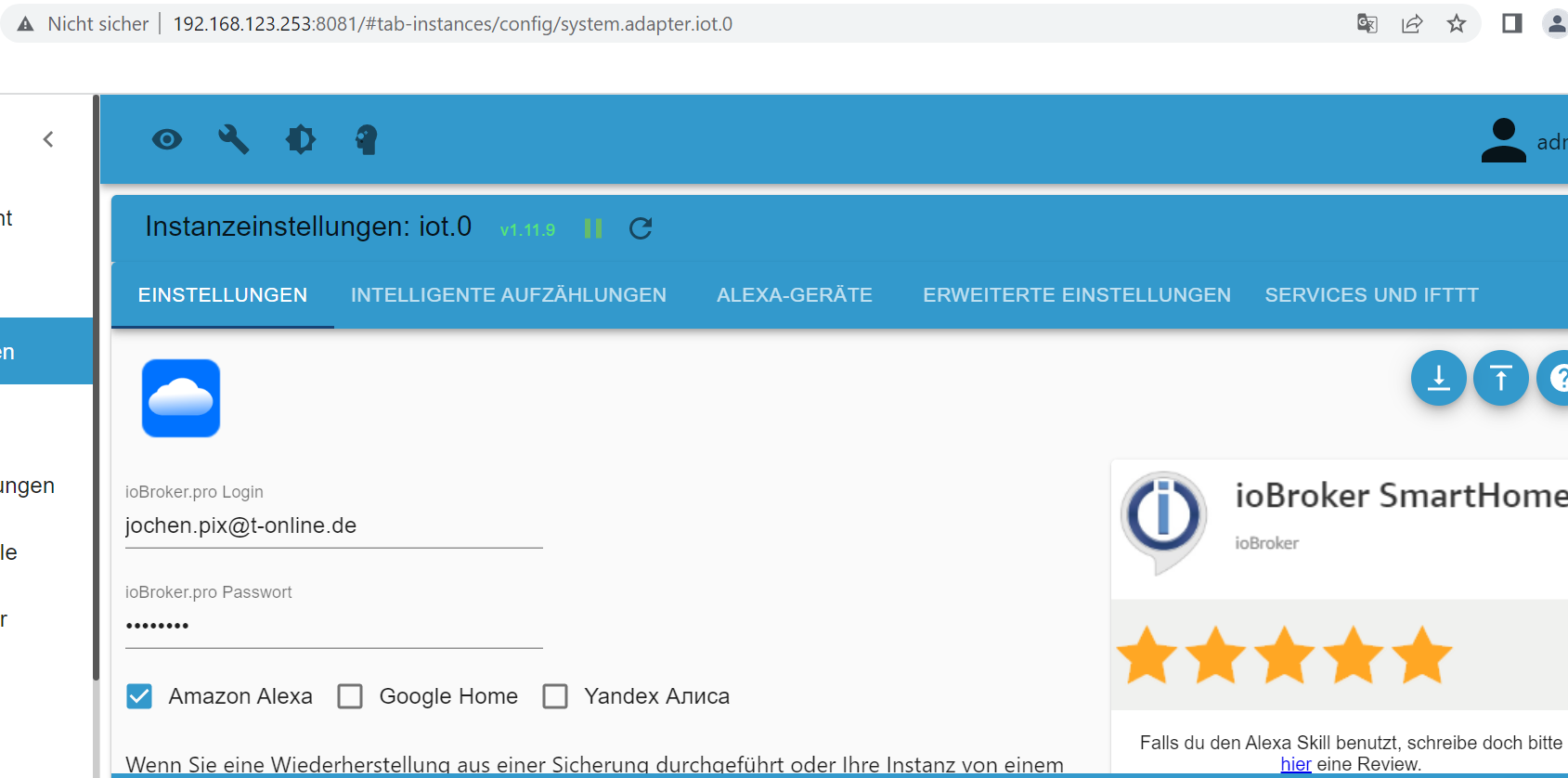
Die Anmeldedaten sind ok. Wenn ich die "ändere" - also mit dem Gleichen überschreibe (was soll ich sonst da rein schreiben, wenn es richtig ist), dann lässt der mich ja noch nicht mal speichern.
Oder ist das hier: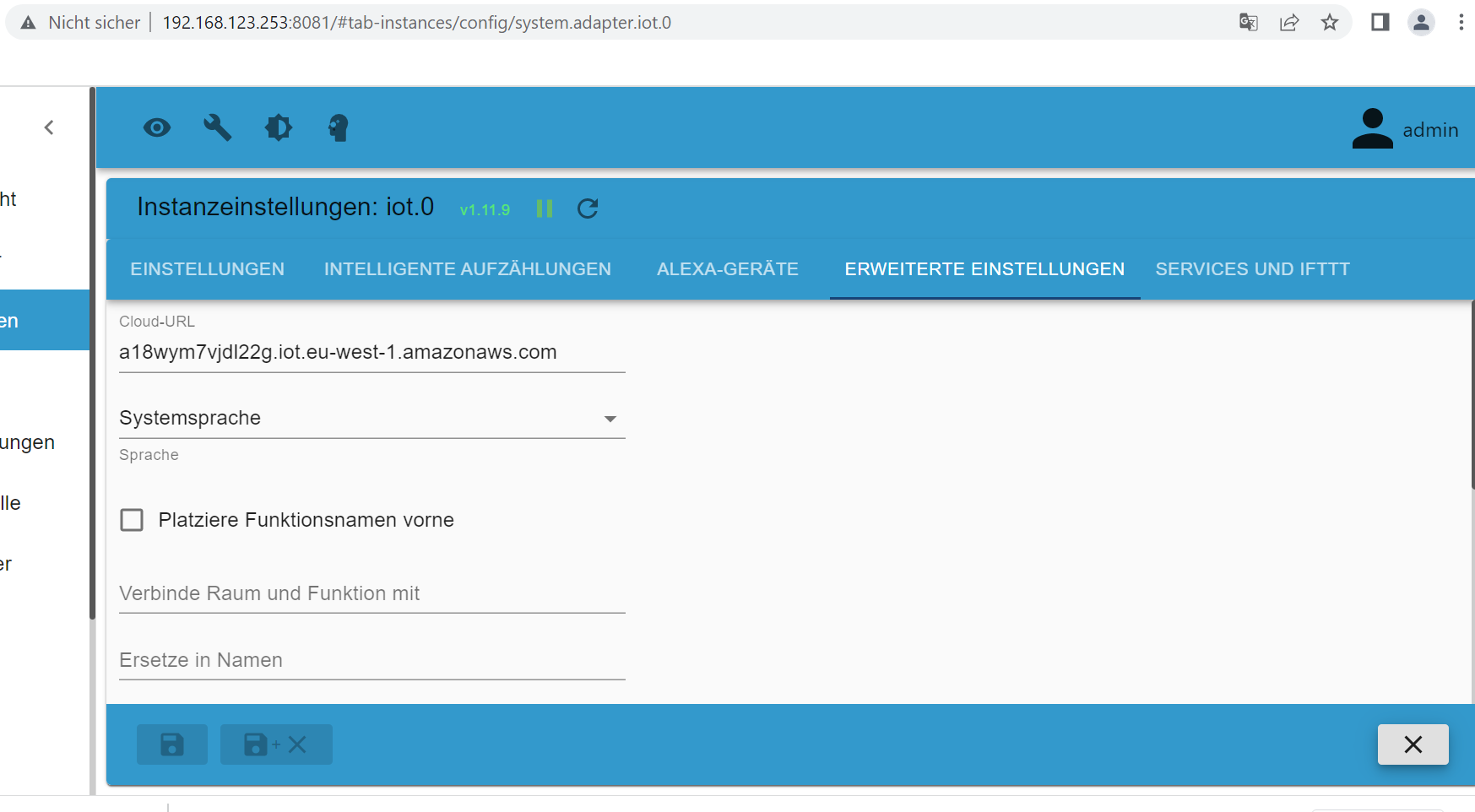
-
Und wegen dem URL-Schlüssel für Dienste...
Die Anmeldedaten sind ok. Wenn ich die "ändere" - also mit dem Gleichen überschreibe (was soll ich sonst da rein schreiben, wenn es richtig ist), dann lässt der mich ja noch nicht mal speichern.
Oder ist das hier:@jochen sagte in cloud.0 Adapter Fehlermeldung Admin instance not defined:
Und wegen dem URL-Schlüssel für Dienste...

Dann muss aber der iot Skill wieder aktiviert werden
-
@jochen sagte in cloud.0 Adapter Fehlermeldung Admin instance not defined:
Und wegen dem URL-Schlüssel für Dienste...
Dann muss aber der iot Skill wieder aktiviert werden
-
@jochen sagte in cloud.0 Adapter Fehlermeldung Admin instance not defined:
Und wegen dem URL-Schlüssel für Dienste...
Dann muss aber der iot Skill wieder aktiviert werden
-
@jochen sagte in cloud.0 Adapter Fehlermeldung Admin instance not defined:
Und wegen dem URL-Schlüssel für Dienste...
Dann muss aber der iot Skill wieder aktiviert werden
@fredf ```
2022-09-29 17:23:10.830 - info: host.raspberrypi stopInstance system.adapter.iot.0 (force=false, process=true)
2022-09-29 17:23:10.837 - info: iot.0 (26671) Got terminate signal TERMINATE_YOURSELF
2022-09-29 17:23:10.842 - info: iot.0 (26671) terminating
2022-09-29 17:23:10.844 - info: iot.0 (26671) Terminated (ADAPTER_REQUESTED_TERMINATION): Without reason
2022-09-29 17:23:10.884 - info: iot.0 (26671) Connection changed: disconnect
2022-09-29 17:23:10.885 - info: iot.0 (26671) Connection lost
2022-09-29 17:23:10.894 - info: host.raspberrypi stopInstance system.adapter.iot.0 send kill signal
2022-09-29 17:23:11.413 - info: host.raspberrypi instance system.adapter.iot.0 terminated with code 11 (ADAPTER_REQUESTED_TERMINATION)
2022-09-29 17:23:14.014 - info: host.raspberrypi instance system.adapter.iot.0 started with pid 29802
2022-09-29 17:23:16.320 - info: iot.0 (29802) starting. Version 1.11.9 in /opt/iobroker/node_modules/iobroker.iot, node: v16.17.0, js-controller: 4.0.23
2022-09-29 17:23:16.398 - info: iot.0 (29802) Connecting with a18wym7vjdl22g.iot.eu-west-1.amazonaws.com
2022-09-29 17:23:21.976 - info: iot.0 (29802) Connection changed: connect
2022-09-29 17:23:51.374 - info: iot.0 (29802) Request devices
2022-09-29 17:24:03.056 - info: admin.0 (581) <== Disconnect system.user.admin from ::ffff:192.168.123.196 iot
2022-09-29 17:27:24.021 - info: admin.0 (581) ==> Connected system.user.admin from ::ffff:192.168.123.196
2022-09-29 17:30:08.057 - info: admin.0 (581) <== Disconnect system.user.admin from ::ffff:192.168.123.196 iot -
@fredf ```
2022-09-29 17:23:10.830 - info: host.raspberrypi stopInstance system.adapter.iot.0 (force=false, process=true)
2022-09-29 17:23:10.837 - info: iot.0 (26671) Got terminate signal TERMINATE_YOURSELF
2022-09-29 17:23:10.842 - info: iot.0 (26671) terminating
2022-09-29 17:23:10.844 - info: iot.0 (26671) Terminated (ADAPTER_REQUESTED_TERMINATION): Without reason
2022-09-29 17:23:10.884 - info: iot.0 (26671) Connection changed: disconnect
2022-09-29 17:23:10.885 - info: iot.0 (26671) Connection lost
2022-09-29 17:23:10.894 - info: host.raspberrypi stopInstance system.adapter.iot.0 send kill signal
2022-09-29 17:23:11.413 - info: host.raspberrypi instance system.adapter.iot.0 terminated with code 11 (ADAPTER_REQUESTED_TERMINATION)
2022-09-29 17:23:14.014 - info: host.raspberrypi instance system.adapter.iot.0 started with pid 29802
2022-09-29 17:23:16.320 - info: iot.0 (29802) starting. Version 1.11.9 in /opt/iobroker/node_modules/iobroker.iot, node: v16.17.0, js-controller: 4.0.23
2022-09-29 17:23:16.398 - info: iot.0 (29802) Connecting with a18wym7vjdl22g.iot.eu-west-1.amazonaws.com
2022-09-29 17:23:21.976 - info: iot.0 (29802) Connection changed: connect
2022-09-29 17:23:51.374 - info: iot.0 (29802) Request devices
2022-09-29 17:24:03.056 - info: admin.0 (581) <== Disconnect system.user.admin from ::ffff:192.168.123.196 iot
2022-09-29 17:27:24.021 - info: admin.0 (581) ==> Connected system.user.admin from ::ffff:192.168.123.196
2022-09-29 17:30:08.057 - info: admin.0 (581) <== Disconnect system.user.admin from ::ffff:192.168.123.196 iot@jochen
Das sind normale Meldungen, die ich vorhin auch hatte.
Somit müsste die rote Meldung über die pro cloud weg sein, oder? -
@jochen
Das sind normale Meldungen, die ich vorhin auch hatte.
Somit müsste die rote Meldung über die pro cloud weg sein, oder? -
@jochen
Das sind normale Meldungen, die ich vorhin auch hatte.
Somit müsste die rote Meldung über die pro cloud weg sein, oder? -
@jochen Bei mir hatte es heute Mittag so funktioniert...
-
@fredf Also mir sind die Ideen ausgegangen.
Beide oben beschriebenen Probleme existieren noch.
Zwischenzeitlich cloud Adapter gelöscht und wieder rein.
iot Adapter gelöscht und wieder rein.
lovelace Adapter rein (wegen der Fehlermeldung), konfiguriert, und dann wieder gelöscht (ich hatte den schonmal drauf, da ich nicht genau wusste, was das ist, und auch nicht, ob ich den brauche), falls die letzte Deinstallation nicht sauber gelaufen ist.
Sicherheitshalber noch Sonoff und Daikin Adapter raus und draußen gelassen (waren eh noch nicht in Benutzung).
web.0 Adapter nicht getraut, da ich schon eine ziemlich gute (für meine Vorstellungen...) Visualisierung aufgebaut habe, und der anzeigt, dass VIS davon abhängig ist.
Neuen App-Key auf iobroker.pro erstellt und eingetragen.
Zwischen jedem Schritt iobroker gestoppt, und den Fixer laufen lassen.Ich habe im Heimnetzwerk keinerlei Probleme. Keine Fehlermeldungen, Nichts.
Nur wenn ich über iobroker.pro rein gehe, kommen die Fehlermeldungen wie oben im log zu sehen.Ich bin mit meinem Latain am Ende.
Wenn noch Jemand Ideen hat, bin ich dankbar.
-
-
Gelöst:
Ich hatte das Häkchen im Admin.0 bei "Authentifizierung" gesetzt.
Ich kann mich nicht erinnern wann und warum...
Das hat das obenstehende Problem ausgelöst.
Nach viel rumprobieren gefunden und jetzt ist Ruhe in den Protokollen.


@jochen Hallo erstmal, bin komplett neu hier und hab seit gestern Cloud Pro installiert mit der gleichen andauernd eintretenden Fehlermeldung "Admin instance not defined. Please specify the lovelace instance in settings
Leider half das Deaktivieren der Authentifizierung bei mir nicht. Hast Du ggf. sonst noch was angepasst?
Vielen Dank im voraus, viele Grüße
Bernhard -
@jochen Hallo erstmal, bin komplett neu hier und hab seit gestern Cloud Pro installiert mit der gleichen andauernd eintretenden Fehlermeldung "Admin instance not defined. Please specify the lovelace instance in settings
Leider half das Deaktivieren der Authentifizierung bei mir nicht. Hast Du ggf. sonst noch was angepasst?
Vielen Dank im voraus, viele Grüße
Bernhard@besc0029 Hmmm. Nicht dass ich wüsste. Zumindest nichts Relevantes. Bin ja selber noch ziemlicher Newbie.. Bist Du im Cloud.0 mit dem App-Key, oder mit login und password drin ? Lovelace Adapter jemals drauf gehabt ? Bei mir ist der wieder runter.
Also ich habe nun im Admin Adapter das Häkchen bei Authentifizierung raus.
Im cloud.0 bin ich mit App-Key angemeldet, und unter "Erweiterte Einstellungen" habe ich links bei "Administratorzugriff" admin.0 eingetragen, und rechts "Zugang zum Lovelace" = kein.
Tritt die Fehlermeldung denn bei Dir auch nur auf, wenn Du über iobroker.pro darauf zugreifst ? So war es bei mir jedenfalls. Siehe oben. -
@jochen Hallo erstmal, bin komplett neu hier und hab seit gestern Cloud Pro installiert mit der gleichen andauernd eintretenden Fehlermeldung "Admin instance not defined. Please specify the lovelace instance in settings
Leider half das Deaktivieren der Authentifizierung bei mir nicht. Hast Du ggf. sonst noch was angepasst?
Vielen Dank im voraus, viele Grüße
Bernhard -
@besc0029 Im cloud.0 unter Einstellungen unter den App-Key natürlich bei webinstanz noch web.0, aber ich glaube ohne kommst Du gar nicht rein..
Habt ihr schon eine Lösung gefunden?
Habe das gleiche Problem mit der "lovelace instance" Meldung, obwohl der Adapter gar nicht installiert ist....Ich habe die Meldung im Log (aber nicht immer) wenn ich mit der iOS App auf den Broker zugreifen möchte.
-
Habt ihr schon eine Lösung gefunden?
Habe das gleiche Problem mit der "lovelace instance" Meldung, obwohl der Adapter gar nicht installiert ist....Ich habe die Meldung im Log (aber nicht immer) wenn ich mit der iOS App auf den Broker zugreifen möchte.
@draexler Sorry, das ich nochmal rausgebe. Aber die Meldung stört mich ein bisschen... Weiter oben wurde ja geschrieben, das es half den Haken bei Authentifizierung rauszunehmen. Aber damit deaktiviere ich ja einen Sicherheitsaspekt. Oder für was steht diese Authentifizierung Möglichkeit?
Sorry, aber hier will ich nicht rumspielen ;-) -
@draexler Sorry, das ich nochmal rausgebe. Aber die Meldung stört mich ein bisschen... Weiter oben wurde ja geschrieben, das es half den Haken bei Authentifizierung rauszunehmen. Aber damit deaktiviere ich ja einen Sicherheitsaspekt. Oder für was steht diese Authentifizierung Möglichkeit?
Sorry, aber hier will ich nicht rumspielen ;-)@draexler
Hallo draexler, ich hatte das selbe Problem, gelöst habe ich es wie folgt...- Adapter cloud.0 geöffnet
-- Erweiterte Einstellungen
--- Administratorzugriff zulassen (hier konnte ich "admin" auswählen) nur auf pro
Adapter neu gestartet und die Fehlermeldung war weg.
- Adapter cloud.0 geöffnet
-
@draexler
Hallo draexler, ich hatte das selbe Problem, gelöst habe ich es wie folgt...- Adapter cloud.0 geöffnet
-- Erweiterte Einstellungen
--- Administratorzugriff zulassen (hier konnte ich "admin" auswählen) nur auf pro
Adapter neu gestartet und die Fehlermeldung war weg.
- Adapter cloud.0 geöffnet
-
@diro Danke, das probiere ich mal aus. Wäre aber super wenn das trotzdem mal irgendwann gefixt wird, denn damit ist ja der Admin Adapter in der Cloud erreichbar.
Jetzt habe ich folgendes im Log...
Klar was es bedeutet ist klar, aber ist das wirklich so??2023-01-05 09:17:50.372 - error: cloud.0 (247547) Cannot activate admin.0 for cloud, because authentication is enabled. Please create extra instance for cloud 2023-01-05 09:18:20.517 - error: cloud.0 (247547) Cannot activate admin.0 for cloud, because authentication is enabled. Please create extra instance for cloud 2023-01-05 10:05:20.522 - error: cloud.0 (247547) Received unknown command 1: name 2023-01-05 10:05:23.188 - error: cloud.0 (247547) Cannot activate admin.0 for cloud, because authentication is enabled. Please create extra instance for cloud



Hey! Du scheinst an dieser Unterhaltung interessiert zu sein, hast aber noch kein Konto.
Hast du es satt, bei jedem Besuch durch die gleichen Beiträge zu scrollen? Wenn du dich für ein Konto anmeldest, kommst du immer genau dorthin zurück, wo du zuvor warst, und kannst dich über neue Antworten benachrichtigen lassen (entweder per E-Mail oder Push-Benachrichtigung). Du kannst auch Lesezeichen speichern und Beiträge positiv bewerten, um anderen Community-Mitgliedern deine Wertschätzung zu zeigen.
Mit deinem Input könnte dieser Beitrag noch besser werden 💗
Registrieren AnmeldenSupport us
547
Online33.1k
Benutzer84.1k
Themen1.4m
Beiträge