Skip to content
  • Home
  • Aktuell
  • Tags
  • 0 Ungelesen 0
  • Kategorien
  • Unreplied
  • Beliebt
  • GitHub
  • Docu
  • Hilfe
Skins
  • Light
  • Brite
  • Cerulean
  • Cosmo
  • Flatly
  • Journal
  • Litera
  • Lumen
  • Lux
  • Materia
  • Minty
  • Morph
  • Pulse
  • Sandstone
  • Simplex
  • Sketchy
  • Spacelab
  • United
  • Yeti
  • Zephyr
  • Dark
  • Cyborg
  • Darkly
  • Quartz
  • Slate
  • Solar
  • Superhero
  • Vapor

  • Standard: (Kein Skin)
  • Kein Skin
Einklappen
ioBroker Logo

Community Forum

donate donate
  1. ioBroker Community Home
  2. Deutsch
  3. ioBroker Allgemein
  4. [gelöst] Jeelink funktioniert nach Update nicht mehr

NEWS

  • Jahresrückblick 2025 – unser neuer Blogbeitrag ist online! ✨
    BluefoxB
    Bluefox
    14
    1
    153

  • Neuer Blogbeitrag: Monatsrückblick - Dezember 2025 🎄
    BluefoxB
    Bluefox
    12
    1
    566

  • Weihnachtsangebot 2025! 🎄
    BluefoxB
    Bluefox
    24
    1
    1.7k

[gelöst] Jeelink funktioniert nach Update nicht mehr

Geplant Angeheftet Gesperrt Verschoben ioBroker Allgemein
jeelink-adapterupdates
78 Beiträge 3 Kommentatoren 6.7k Aufrufe 3 Watching
  • Älteste zuerst
  • Neuste zuerst
  • Meiste Stimmen
Antworten
  • In einem neuen Thema antworten
Anmelden zum Antworten
Dieses Thema wurde gelöscht. Nur Nutzer mit entsprechenden Rechten können es sehen.
  • GlasfaserG Glasfaser

    @gregors

    Du sollst ins Verzeichniss jeelink ...
    mußt du nachschauen ob es so richtig geschrieben wird ...

    cd /opt/iobroker/iobroker-data/files/jeelink
    

    dann darin

    npm install --production
    

    EDIT :

    oder im

    cd /opt/iobroker/node_modules/iobroker.jeelink
    

    dann darin

    npm install --production
    
    GregorSG Offline
    GregorSG Offline
    GregorS
    schrieb am zuletzt editiert von
    #28

    @glasfaser

    Habe ich gemacht, aber jetztr soll ich eine Verzeichnis umbenennen, dass ich nicht finde.

    npm WARN config production Use `--omit=dev` instead.
    npm ERR! code ENOTEMPTY
    npm ERR! syscall rename
    npm ERR! path /opt/iobroker/node_modules/abab
    npm ERR! dest /opt/iobroker/node_modules/.abab-bvmibCm3
    npm ERR! errno -39
    npm ERR! ENOTEMPTY: directory not empty, rename '/opt/iobroker/node_modules/abab' -> '/opt/iobroker/node_modules/.abab-bvmibCm3'
    
    npm ERR! A complete log of this run can be found in:
    npm ERR!     /home/iobroker/.npm/_logs/2022-08-15T17_43_56_474Z-debug-0.log


    Es gibt bereits ein Verzeichnis .abab-bvmibCm3

    INTEL NUC i7, Sonoff, hmIP, AVM, Jeelink, T-Link, Alexa, Saia-Burgess, uvm.

    GlasfaserG 1 Antwort Letzte Antwort
    0
    • GregorSG GregorS

      @glasfaser

      Habe ich gemacht, aber jetztr soll ich eine Verzeichnis umbenennen, dass ich nicht finde.

      npm WARN config production Use `--omit=dev` instead.
      npm ERR! code ENOTEMPTY
      npm ERR! syscall rename
      npm ERR! path /opt/iobroker/node_modules/abab
      npm ERR! dest /opt/iobroker/node_modules/.abab-bvmibCm3
      npm ERR! errno -39
      npm ERR! ENOTEMPTY: directory not empty, rename '/opt/iobroker/node_modules/abab' -> '/opt/iobroker/node_modules/.abab-bvmibCm3'
      
      npm ERR! A complete log of this run can be found in:
      npm ERR!     /home/iobroker/.npm/_logs/2022-08-15T17_43_56_474Z-debug-0.log


      Es gibt bereits ein Verzeichnis .abab-bvmibCm3

      GlasfaserG Offline
      GlasfaserG Offline
      Glasfaser
      schrieb am zuletzt editiert von
      #29

      @gregors sagte in Jeelink funktioniert nach Update nicht mehr:

      rm -r /opt/iobroker/node_modules/.abab-bvmibCm3
      

      Synology 918+ 16GB - ioBroker in Docker v9 , VISO auf Trekstor Primebook C13 13,3" , Hikvision Domkameras mit Surveillance Station .. CCU RaspberryMatic in Synology VM .. Zigbee CC2538+CC2592 .. Sonoff .. KNX .. Modbus ..

      GregorSG 1 Antwort Letzte Antwort
      0
      • GlasfaserG Glasfaser

        @gregors sagte in Jeelink funktioniert nach Update nicht mehr:

        rm -r /opt/iobroker/node_modules/.abab-bvmibCm3
        
        GregorSG Offline
        GregorSG Offline
        GregorS
        schrieb am zuletzt editiert von GregorS
        #30

        @glasfaser

        
        pi@TinkerboardS:/opt/iobroker/iobroker-data/files/jeelink$ npm install --production
        npm WARN config production Use `--omit=dev` instead.
        npm ERR! code ENOTEMPTY
        npm ERR! syscall rename
        npm ERR! path /opt/iobroker/node_modules/abort-controller
        npm ERR! dest /opt/iobroker/node_modules/.abort-controller-x3pdLVqa
        npm ERR! errno -39
        npm ERR! ENOTEMPTY: directory not empty, rename '/opt/iobroker/node_modules/abort-controller' -> '/opt/iobroker/node_modules/.abort-controller-x3pdLVqa'
        
        npm ERR! A complete log of this run can be found in:
        npm ERR!     /home/iobroker/.npm/_logs/2022-08-15T18_46_11_223Z-debug-0.log
        pi@TinkerboardS:/opt/iobroker/iobroker-data/files/jeelink$ .abort-controller-x3pdLVqa


        Das Verzeichnis ist bereits richtig umbenannt

        jeelnink_3.JPG

        INTEL NUC i7, Sonoff, hmIP, AVM, Jeelink, T-Link, Alexa, Saia-Burgess, uvm.

        GlasfaserG 1 Antwort Letzte Antwort
        0
        • GlasfaserG Offline
          GlasfaserG Offline
          Glasfaser
          schrieb am zuletzt editiert von Glasfaser
          #31

          @gregors sagte in Jeelink funktioniert nach Update nicht mehr:

          Das Verzeichnis ist bereits richtig umbenannt

          nicht umbenennen !

          npm ERR! ENOTEMPTY: directory not empty, rename '/opt/iobroker/node_modules/abort-controller' -> '/opt/iobroker/node_modules/.abort-controller-x3pdLVqa'

          Nächste löschen

          rm -r  /opt/iobroker/node_modules/.abort-controller-x3pdLVqa
          

          Synology 918+ 16GB - ioBroker in Docker v9 , VISO auf Trekstor Primebook C13 13,3" , Hikvision Domkameras mit Surveillance Station .. CCU RaspberryMatic in Synology VM .. Zigbee CC2538+CC2592 .. Sonoff .. KNX .. Modbus ..

          GregorSG 1 Antwort Letzte Antwort
          0
          • GlasfaserG Glasfaser

            @gregors sagte in Jeelink funktioniert nach Update nicht mehr:

            Das Verzeichnis ist bereits richtig umbenannt

            nicht umbenennen !

            npm ERR! ENOTEMPTY: directory not empty, rename '/opt/iobroker/node_modules/abort-controller' -> '/opt/iobroker/node_modules/.abort-controller-x3pdLVqa'

            Nächste löschen

            rm -r  /opt/iobroker/node_modules/.abort-controller-x3pdLVqa
            
            GregorSG Offline
            GregorSG Offline
            GregorS
            schrieb am zuletzt editiert von
            #32

            @glasfaser
            War der Meinung rename ...

            pi@TinkerboardS:~$ rm -r  /opt/iobroker/node_modules/.abort-controller-x3pdLVqa
            rm: das Entfernen von '/opt/iobroker/node_modules/.abort-controller-x3pdLVqa' ist nicht möglich: Datei oder Verzeichnis nicht gefunden


            INTEL NUC i7, Sonoff, hmIP, AVM, Jeelink, T-Link, Alexa, Saia-Burgess, uvm.

            1 Antwort Letzte Antwort
            0
            • GregorSG GregorS

              @glasfaser

              
              pi@TinkerboardS:/opt/iobroker/iobroker-data/files/jeelink$ npm install --production
              npm WARN config production Use `--omit=dev` instead.
              npm ERR! code ENOTEMPTY
              npm ERR! syscall rename
              npm ERR! path /opt/iobroker/node_modules/abort-controller
              npm ERR! dest /opt/iobroker/node_modules/.abort-controller-x3pdLVqa
              npm ERR! errno -39
              npm ERR! ENOTEMPTY: directory not empty, rename '/opt/iobroker/node_modules/abort-controller' -> '/opt/iobroker/node_modules/.abort-controller-x3pdLVqa'
              
              npm ERR! A complete log of this run can be found in:
              npm ERR!     /home/iobroker/.npm/_logs/2022-08-15T18_46_11_223Z-debug-0.log
              pi@TinkerboardS:/opt/iobroker/iobroker-data/files/jeelink$ .abort-controller-x3pdLVqa


              Das Verzeichnis ist bereits richtig umbenannt
              jeelnink_3.JPG

              GlasfaserG Offline
              GlasfaserG Offline
              Glasfaser
              schrieb am zuletzt editiert von
              #33

              @gregors sagte in Jeelink funktioniert nach Update nicht mehr:

              /opt/iobroker/node_modules/

              sind dort viele mit einem Punkt vorraus !?

              Synology 918+ 16GB - ioBroker in Docker v9 , VISO auf Trekstor Primebook C13 13,3" , Hikvision Domkameras mit Surveillance Station .. CCU RaspberryMatic in Synology VM .. Zigbee CC2538+CC2592 .. Sonoff .. KNX .. Modbus ..

              1 Antwort Letzte Antwort
              0
              • GregorSG Offline
                GregorSG Offline
                GregorS
                schrieb am zuletzt editiert von
                #34

                @glasfaser

                Ja, 747 Verzeichnisse

                INTEL NUC i7, Sonoff, hmIP, AVM, Jeelink, T-Link, Alexa, Saia-Burgess, uvm.

                GlasfaserG 1 Antwort Letzte Antwort
                0
                • GregorSG GregorS

                  @glasfaser

                  Ja, 747 Verzeichnisse

                  GlasfaserG Offline
                  GlasfaserG Offline
                  Glasfaser
                  schrieb am zuletzt editiert von
                  #35

                  @gregors

                  Dann :

                  cd /opt/iobroker/node_modules
                  
                  for i in $(ls -d .[^.]*-*/); do rm -rf ${i%%/}; done
                  

                  Zitat von Thomas
                  (Bitte Befehl KOPIEREN, nicht eintippen, ein Vertipper kann und wird da 'tödlich' sein).

                  Synology 918+ 16GB - ioBroker in Docker v9 , VISO auf Trekstor Primebook C13 13,3" , Hikvision Domkameras mit Surveillance Station .. CCU RaspberryMatic in Synology VM .. Zigbee CC2538+CC2592 .. Sonoff .. KNX .. Modbus ..

                  GregorSG 1 Antwort Letzte Antwort
                  1
                  • GlasfaserG Glasfaser

                    @gregors

                    Dann :

                    cd /opt/iobroker/node_modules
                    
                    for i in $(ls -d .[^.]*-*/); do rm -rf ${i%%/}; done
                    

                    Zitat von Thomas
                    (Bitte Befehl KOPIEREN, nicht eintippen, ein Vertipper kann und wird da 'tödlich' sein).

                    GregorSG Offline
                    GregorSG Offline
                    GregorS
                    schrieb am zuletzt editiert von
                    #36

                    @glasfaser
                    jetzt gibt es nur noch .bin

                    INTEL NUC i7, Sonoff, hmIP, AVM, Jeelink, T-Link, Alexa, Saia-Burgess, uvm.

                    GlasfaserG 1 Antwort Letzte Antwort
                    0
                    • GregorSG GregorS

                      @glasfaser
                      jetzt gibt es nur noch .bin

                      GlasfaserG Offline
                      GlasfaserG Offline
                      Glasfaser
                      schrieb am zuletzt editiert von
                      #37

                      @gregors

                      Ja ... den lassen !!!!!!

                      Synology 918+ 16GB - ioBroker in Docker v9 , VISO auf Trekstor Primebook C13 13,3" , Hikvision Domkameras mit Surveillance Station .. CCU RaspberryMatic in Synology VM .. Zigbee CC2538+CC2592 .. Sonoff .. KNX .. Modbus ..

                      GregorSG 1 Antwort Letzte Antwort
                      0
                      • GlasfaserG Glasfaser

                        @gregors

                        Ja ... den lassen !!!!!!

                        GregorSG Offline
                        GregorSG Offline
                        GregorS
                        schrieb am zuletzt editiert von
                        #38

                        @glasfaser
                        Jetzt nochmal:
                        Du sollst ins Verzeichniss jeelink ...
                        mußt du nachschauen ob es so richtig geschrieben wird ...

                        cd /opt/iobroker/iobroker-data/files/jeelink

                        dann darin

                        npm install --production

                        EDIT :

                        oder im

                        cd /opt/iobroker/node_modules/iobroker.jeelink

                        dann darin

                        npm install --production

                        INTEL NUC i7, Sonoff, hmIP, AVM, Jeelink, T-Link, Alexa, Saia-Burgess, uvm.

                        GlasfaserG Thomas BraunT 2 Antworten Letzte Antwort
                        0
                        • GregorSG GregorS

                          @glasfaser
                          Jetzt nochmal:
                          Du sollst ins Verzeichniss jeelink ...
                          mußt du nachschauen ob es so richtig geschrieben wird ...

                          cd /opt/iobroker/iobroker-data/files/jeelink

                          dann darin

                          npm install --production

                          EDIT :

                          oder im

                          cd /opt/iobroker/node_modules/iobroker.jeelink

                          dann darin

                          npm install --production

                          GlasfaserG Offline
                          GlasfaserG Offline
                          Glasfaser
                          schrieb am zuletzt editiert von
                          #39

                          @gregors

                          Nimm erstmal den im EDIT

                          Synology 918+ 16GB - ioBroker in Docker v9 , VISO auf Trekstor Primebook C13 13,3" , Hikvision Domkameras mit Surveillance Station .. CCU RaspberryMatic in Synology VM .. Zigbee CC2538+CC2592 .. Sonoff .. KNX .. Modbus ..

                          1 Antwort Letzte Antwort
                          1
                          • GregorSG GregorS

                            @glasfaser
                            Jetzt nochmal:
                            Du sollst ins Verzeichniss jeelink ...
                            mußt du nachschauen ob es so richtig geschrieben wird ...

                            cd /opt/iobroker/iobroker-data/files/jeelink

                            dann darin

                            npm install --production

                            EDIT :

                            oder im

                            cd /opt/iobroker/node_modules/iobroker.jeelink

                            dann darin

                            npm install --production

                            Thomas BraunT Online
                            Thomas BraunT Online
                            Thomas Braun
                            Most Active
                            schrieb am zuletzt editiert von
                            #40

                            @gregors sagte in Jeelink funktioniert nach Update nicht mehr:

                            npm install --production

                            Die neue Syntax seit npm8 ist übrigens

                            npm install --omit=dev
                            

                            Linux-Werkzeugkasten:
                            https://forum.iobroker.net/topic/42952/der-kleine-iobroker-linux-werkzeugkasten
                            NodeJS Fixer Skript:
                            https://forum.iobroker.net/topic/68035/iob-node-fix-skript
                            iob_diag: curl -sLf -o diag.sh https://iobroker.net/diag.sh && bash diag.sh

                            GregorSG 1 Antwort Letzte Antwort
                            1
                            • Thomas BraunT Thomas Braun

                              @gregors sagte in Jeelink funktioniert nach Update nicht mehr:

                              npm install --production

                              Die neue Syntax seit npm8 ist übrigens

                              npm install --omit=dev
                              
                              GregorSG Offline
                              GregorSG Offline
                              GregorS
                              schrieb am zuletzt editiert von
                              #41

                              @thomas-braun
                              @Glasfaser

                              DANKE !!!
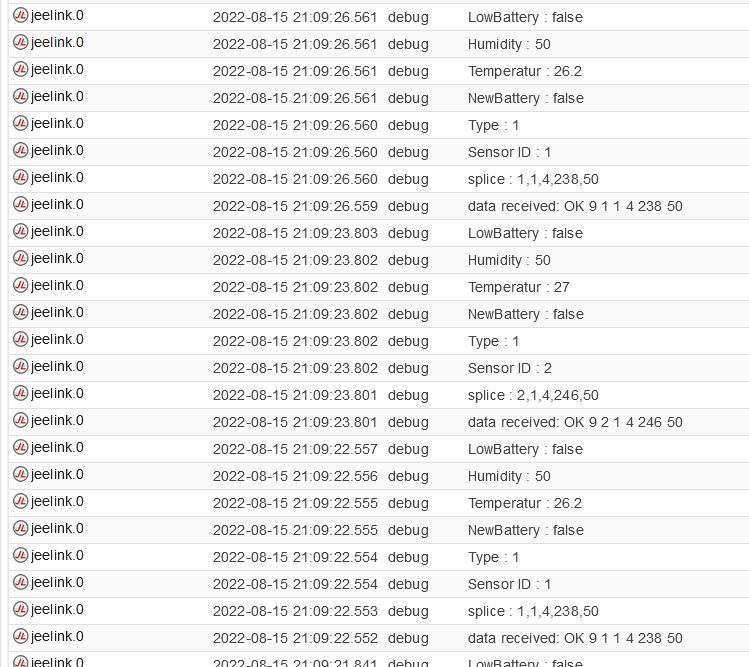
                              Das war´s.

                              pi@TinkerboardS:~$ cd /opt/iobroker/node_modules/iobroker.jeelink
                              pi@TinkerboardS:/opt/iobroker/node_modules/iobroker.jeelink$ npm install --omit=dev
                              [sudo] Passwort für pi:
                              
                              added 46 packages, and audited 61 packages in 34s
                              
                              20 packages are looking for funding
                                run `npm fund` for details
                              
                              found 0 vulnerabilities


                              Jeelink_4.JPG

                              INTEL NUC i7, Sonoff, hmIP, AVM, Jeelink, T-Link, Alexa, Saia-Burgess, uvm.

                              GlasfaserG 1 Antwort Letzte Antwort
                              1
                              • GregorSG GregorS

                                @thomas-braun
                                @Glasfaser

                                DANKE !!!
                                Das war´s.

                                pi@TinkerboardS:~$ cd /opt/iobroker/node_modules/iobroker.jeelink
                                pi@TinkerboardS:/opt/iobroker/node_modules/iobroker.jeelink$ npm install --omit=dev
                                [sudo] Passwort für pi:
                                
                                added 46 packages, and audited 61 packages in 34s
                                
                                20 packages are looking for funding
                                  run `npm fund` for details
                                
                                found 0 vulnerabilities


                                Jeelink_4.JPG

                                GlasfaserG Offline
                                GlasfaserG Offline
                                Glasfaser
                                schrieb am zuletzt editiert von
                                #42

                                @gregors sagte in Jeelink funktioniert nach Update nicht mehr:

                                Das war´s.

                                Puhh ... :)

                                Synology 918+ 16GB - ioBroker in Docker v9 , VISO auf Trekstor Primebook C13 13,3" , Hikvision Domkameras mit Surveillance Station .. CCU RaspberryMatic in Synology VM .. Zigbee CC2538+CC2592 .. Sonoff .. KNX .. Modbus ..

                                GregorSG 1 Antwort Letzte Antwort
                                0
                                • GlasfaserG Glasfaser

                                  @gregors sagte in Jeelink funktioniert nach Update nicht mehr:

                                  Das war´s.

                                  Puhh ... :)

                                  GregorSG Offline
                                  GregorSG Offline
                                  GregorS
                                  schrieb am zuletzt editiert von GregorS
                                  #43

                                  @glasfaser
                                  Habe noch eine Frage wegen den Updates.
                                  Ich habe Probleme mit dem sourceanalytix - Adapter.
                                  Version 0.4.8 ist installiert, aber es gibt die Version 0.4.14.
                                  Es wird mir kein Update angeboten.
                                  Er taucht auch nicht mehr in der Liste der Adapter auf.
                                  Erst wenn ich auf "Beta" umstelle taucht der Adapter auf - und auch zig Andere zum updaten.

                                  Empfiehlt es sich den Adapter aus "Beta" upzudaten?

                                  INTEL NUC i7, Sonoff, hmIP, AVM, Jeelink, T-Link, Alexa, Saia-Burgess, uvm.

                                  Thomas BraunT GlasfaserG 2 Antworten Letzte Antwort
                                  0
                                  • GregorSG GregorS

                                    @glasfaser
                                    Habe noch eine Frage wegen den Updates.
                                    Ich habe Probleme mit dem sourceanalytix - Adapter.
                                    Version 0.4.8 ist installiert, aber es gibt die Version 0.4.14.
                                    Es wird mir kein Update angeboten.
                                    Er taucht auch nicht mehr in der Liste der Adapter auf.
                                    Erst wenn ich auf "Beta" umstelle taucht der Adapter auf - und auch zig Andere zum updaten.

                                    Empfiehlt es sich den Adapter aus "Beta" upzudaten?

                                    Thomas BraunT Online
                                    Thomas BraunT Online
                                    Thomas Braun
                                    Most Active
                                    schrieb am zuletzt editiert von Thomas Braun
                                    #44

                                    @gregors sagte in Jeelink funktioniert nach Update nicht mehr:

                                    Empfiehlt es sich den Adapter aus "Beta" upzudaten?

                                    Welchen Grund siehst du?
                                    Wenn alles läuft: Nein.

                                    Den Adapter gibt es nicht in einer stabilen Version.

                                    Linux-Werkzeugkasten:
                                    https://forum.iobroker.net/topic/42952/der-kleine-iobroker-linux-werkzeugkasten
                                    NodeJS Fixer Skript:
                                    https://forum.iobroker.net/topic/68035/iob-node-fix-skript
                                    iob_diag: curl -sLf -o diag.sh https://iobroker.net/diag.sh && bash diag.sh

                                    GregorSG 1 Antwort Letzte Antwort
                                    0
                                    • Thomas BraunT Thomas Braun

                                      @gregors sagte in Jeelink funktioniert nach Update nicht mehr:

                                      Empfiehlt es sich den Adapter aus "Beta" upzudaten?

                                      Welchen Grund siehst du?
                                      Wenn alles läuft: Nein.

                                      Den Adapter gibt es nicht in einer stabilen Version.

                                      GregorSG Offline
                                      GregorSG Offline
                                      GregorS
                                      schrieb am zuletzt editiert von
                                      #45

                                      @thomas-braun
                                      Es werden keine neuen Zähler mehr hinzugefügt.
                                      Alles richtig eingestellt, aber die Zähler tauchen nicht mehr unter den Objekten auf.
                                      Alte sind drin und bleiben auch dort

                                      INTEL NUC i7, Sonoff, hmIP, AVM, Jeelink, T-Link, Alexa, Saia-Burgess, uvm.

                                      1 Antwort Letzte Antwort
                                      0
                                      • GregorSG GregorS

                                        @glasfaser
                                        Habe noch eine Frage wegen den Updates.
                                        Ich habe Probleme mit dem sourceanalytix - Adapter.
                                        Version 0.4.8 ist installiert, aber es gibt die Version 0.4.14.
                                        Es wird mir kein Update angeboten.
                                        Er taucht auch nicht mehr in der Liste der Adapter auf.
                                        Erst wenn ich auf "Beta" umstelle taucht der Adapter auf - und auch zig Andere zum updaten.

                                        Empfiehlt es sich den Adapter aus "Beta" upzudaten?

                                        GlasfaserG Offline
                                        GlasfaserG Offline
                                        Glasfaser
                                        schrieb am zuletzt editiert von
                                        #46

                                        @gregors sagte in Jeelink funktioniert nach Update nicht mehr:

                                        Ich habe Probleme mit dem sourceanalytix - Adapter.

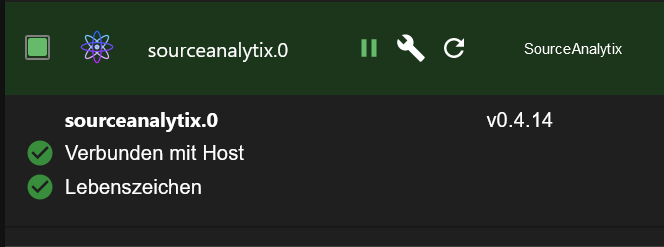
                                        Wie crunchip im Thread sourceanalytix schreibt kannst du Ihn installieren ,
                                        habe Ihn auch
                                        58fe7f58-8299-49cc-a10f-6c1314766e1a-grafik.png

                                        Synology 918+ 16GB - ioBroker in Docker v9 , VISO auf Trekstor Primebook C13 13,3" , Hikvision Domkameras mit Surveillance Station .. CCU RaspberryMatic in Synology VM .. Zigbee CC2538+CC2592 .. Sonoff .. KNX .. Modbus ..

                                        GregorSG 1 Antwort Letzte Antwort
                                        0
                                        • GlasfaserG Glasfaser

                                          @gregors sagte in Jeelink funktioniert nach Update nicht mehr:

                                          Ich habe Probleme mit dem sourceanalytix - Adapter.

                                          Wie crunchip im Thread sourceanalytix schreibt kannst du Ihn installieren ,
                                          habe Ihn auch

                                          58fe7f58-8299-49cc-a10f-6c1314766e1a-grafik.png

                                          GregorSG Offline
                                          GregorSG Offline
                                          GregorS
                                          schrieb am zuletzt editiert von
                                          #47

                                          @glasfaser

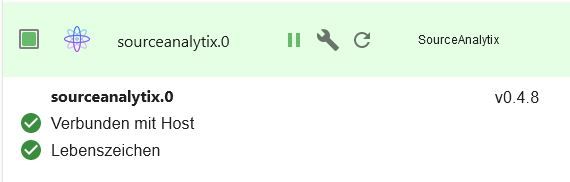
                                          Habe Ihn auch, aber in einer alten Version.
                                          sa.JPG
                                          Sollte ihn drüberinstallieren, aber ich konnte nicht.
                                          Daraufhin habe ich erstmal das System aktualisiert.
                                          Ich sehe die Version 0.4.14 nur im Beta

                                          INTEL NUC i7, Sonoff, hmIP, AVM, Jeelink, T-Link, Alexa, Saia-Burgess, uvm.

                                          GlasfaserG Thomas BraunT 2 Antworten Letzte Antwort
                                          0
                                          Antworten
                                          • In einem neuen Thema antworten
                                          Anmelden zum Antworten
                                          • Älteste zuerst
                                          • Neuste zuerst
                                          • Meiste Stimmen


                                          Support us

                                          ioBroker
                                          Community Adapters
                                          Donate
                                          FAQ Cloud / IOT
                                          HowTo: Node.js-Update
                                          HowTo: Backup/Restore
                                          Downloads
                                          BLOG

                                          404

                                          Online

                                          32.5k

                                          Benutzer

                                          81.8k

                                          Themen

                                          1.3m

                                          Beiträge
                                          Community
                                          Impressum | Datenschutz-Bestimmungen | Nutzungsbedingungen | Einwilligungseinstellungen
                                          ioBroker Community 2014-2025
                                          logo
                                          • Anmelden

                                          • Du hast noch kein Konto? Registrieren

                                          • Anmelden oder registrieren, um zu suchen
                                          • Erster Beitrag
                                            Letzter Beitrag
                                          0
                                          • Home
                                          • Aktuell
                                          • Tags
                                          • Ungelesen 0
                                          • Kategorien
                                          • Unreplied
                                          • Beliebt
                                          • GitHub
                                          • Docu
                                          • Hilfe